1
•
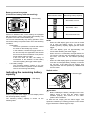
When not operating the tool, always set the
reversing switch lever to the neutral position.
•
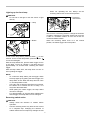
Lighting up the front lamp
CAUTION:
Do not look in the light or see the source of light
directly.
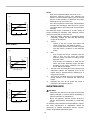
1. Reversing
switch lever
1. Lamp
A
B
1
014641
This tool has a reversing switch to change the direction
of rotation. Depress the reversing switch lever from the
A side for clockwise rotation or from the B side for
counterclockwise rotation.
When the reversing switch lever is in the neutral
position, the switch trigger cannot be pulled.
1
014640
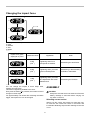
1. Button
1s
S
H
1
014642
To turn on the lamp status, press the button
for one
second. To turn off the lamp status, press the button
for one second again.
With the lamp status ON, pull the switch trigger to turn
on the lamp. To turn off, release it. The lamp goes out
approximately 10 seconds after releasing the switch
trigger.
With the lamp status OFF, the lamp does not turn on
even if pulling the trigger.
NOTE:
•
To confirm the lamp status, pull the trigger. When
the lamp lights up by pulling the switch trigger, the
lamp status is ON. When the lamp does not come
on, the lamp status is OFF.
•
Use a dry cloth to wipe the dirt off the lens of lamp.
Be careful not to scratch the lens of lamp, or it
may lower the illumination.
•
While pulling the switch trigger, the lamp status
cannot be changed.
•
For approximately 10 seconds after releasing the
switch trigger, the lamp status can be changed.
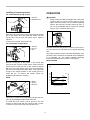
Reversing switch action
•
•
CAUTION:
Always check the direction of rotation before
operation.
Use the reversing switch only after the tool comes
to a complete stop. Changing the direction of
rotation before the tool stops may damage the tool.
7