1
TETTIFIARS
Table of Contents
1
2
3
4
5
6
7
8
9
lntroduction.................
Appllcation........... .. ..
Features .....................
ldentifying parts..........
Measurement procedures
Speclfications
Battery replacement .......
Safety Precaution
End of life
TM-t9l
1 lntroduction
..........
1
.......
1
Safety precautions should be taken
against electric appliances
in places inctudins medicat insritutior;,
districts, where peopte usualy rt"y fo;
patients. babies and senior ciijzen'.
fro.
electromagnetic waves.
An electromagnetic wave simply means
the wave motion of the
electromagnetic fi eld (EMF).
The change in electric fields produces
magnetic fields, and the
ghange in magnetic fietds can atso g"n"r;" ui""tn:JflLil.lrn"
fluctuation of correlation between
eich
other is
"electromagnetic waves",
which i. t"rrn'"i
,"
light and heat thar can be transmitteo
" eitne, """igi
"irnjrlr. ih"
ovialiaj;;;;
air or by an electric conductor.
It is suggested that rearrangements
should be made in families
and work tocations where eLctromag."t"rliol
,i"
the strongest in order to avoid proloriged
electromagnetic fields.
"""""-'rr"
";;;[;;;55ii"*,",
t;;;ti;:j;;;';;"t
"rp"orri";;in;'
..1
..2
.2
.4
.4
.5
k;;;; ;
j;i""i;o
""p"*r"i"
2
Apptication
.
.
Tlis meter is applied to measuring electromagnetic
fields
'"
of extremety tow frequency (ELF);f 30
toaOO]_1..''"
rr ts capable of measuring the electromagnetic
field
radiation intensity that js produced trorn
Ete"iri"
transmission e-quipment, power tine,
oven, air
conditioner, refrigerator, computer monitor,
viOeolauiio
device and so forth.
The magnetic field unit is Tesla (T).
Gauss (G).
mini-Gauss (mG) or micro_Tesla (p T)
rni";;;;;
.
.
.
3
.
.
.
.
.
1T-.10,000c
1lT:10
.
1c:1,000mc
mG
Features
Swilcl between the display of micro_Tesla
and
mrnl-Gauss is available
Data hold (HOLD) . maximum (MAX)
Hotd function.
Rangedisptay(20,200.2000).
Low battery detector -litl,.
Over load display,,OL',.
EN-1
TENIYIARS
TM_t9l
T€Nm,rutS
TM-191
4
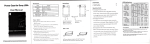
1. Sensor position.
o
2.LCD
3. Power on/off
|
4. maximum hoid button
5. Data hole button
6. mG unit select button
7. pT unit select button
8. Range select button
L Battery cover.
ry* ffi,
5 Measurement Procedures
Press
-O
to power on.
Select q,., for mG unit or
X
.p;
Y
1,,,,
X
X
X
for pT unrt.
Position the front (refer to Figure 1 ) or the upper back
(refer to Figure 2) of the meter to measure the
electromagnetic waves. Try to change the measurement
angle or position for obtaining the highest reading value
(piease refer to Figure 3 to 6).
Read the measured value. The display of "OL" on the left
highest position indicates there is an overload on the
reading. Please press,,,l". to select a higher range for
measurement again.
Due to the environmental magnetic field factors, this
magnetic field meter could display a reading value that is
lower than 0.5mG prior to measuring. This is not a
malfunction of the device.
To permanently loqk and keep the_ reading displayed on
6o$ . or press,, ro$.r again to unlock.
the LCD, presS,
111,,,
(.1 ) Arrow pointing direction indicates
the direction of the electromagnetic
Figure 1 indicate the correcl measurement direction of the
electromagnetic wave.
Figure 2,3, 4, 5 and 6 indicate the incorrect measurement
direction of the electromagnetic wave.
To retain the maximum value, press i.*i I and the
reading value displayed on the LCD wilt keep updating to
the maximum value.
EN-2
EN-3
TElfrlARS
6
.
.
.
.
.
.
.
.
.
.
.
.
.
.
.
7
rM-lel
Specifications
Display:
T€TIIMARS
8
3-'112 digits LCD, maximum
reading 1999.
Range:2O0|2OO0mG,20l20OpT.
Resolution: 0.1/1 mG or 0.01/0.1 pT.
Frequency response: 30Hz to 300H2.
Sensor: Single Axis
Accuracy: t(2.5%+6dgqatSOHzllOHz.
Over load: LCD display,'OL',.
Sample rale: 2.5 times per second.
Battery: 9V NEDA 1604, tEC 6F22 or JtS 006p.
Battery life: Approximate 100 hours.
Operating temperature & humidity: 5.Cto 40.C,below
80% RH.
Storage temperature & humidity: -.10t to 60t , betow
70%.
Weight: About 1209.
Dimensions:130(L).56(W).38(H)mm.
Accessories: User's manual, 9V battery, Carrying case.
.
.
.
9
TM-r9l
Safety Precaution
For cleaning the instrument use a soft dry cloth. Never use
a wet cloth, solvents or water, etc..
Operation Altitude: Up to 2000M.
Operating Environment: lndoors use. This instrument has
been designed for being used in an environment of
pollution degree 2.
End of Iife
X
Caution: this symbol indicates that equipment
and its accessories shall be subject to a
separate coilection and correct disposal
I
Battery replacement
Turn off the instrument.
Remove the battery cover
Replace the battery.
lnstall the battery cover.
EN-4
EN-5