1
T
I
2.Cloud mode (lnternet)
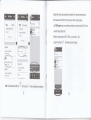
main screen will display "WiFi Setting Success, Camera
I
When Direct Mode connection successfully completed, by setting up an
be Restarted".
I
lnternet connection for cloud mode, you can view remote live video.
il
2.1 Set up an lnternet connection
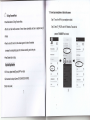
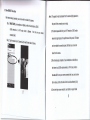
Step 1. Tap the "setting" icon
*
when camera status display ON LINE.
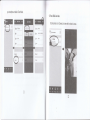
Step 2. Tap the 'Wifi Setting" bar to enter Wifi Sefting screen.
1
I @
I
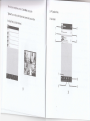
Step 3. Tap the "Wifi Manager" bar. The camera will scan for available
l')
I
i
Wi-Fi networks.
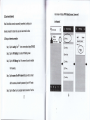
Step 4. Tap the name of the Wi-Fi network that you wish to connect
with the camera, and enter the password of your Wi-Fi router.
aterr sartns
I
-- il
Mat
&t $r $entr
lt*rlxxlxl:xl,*,1|}l1t:
i Q Tiileserry
laaial.ii]liriill,liii$11&llilliilliiallliii*:lrii:,
I
.l1r
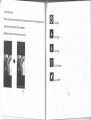
Step 5. Tap the "Done" icon to complete lnternet connection. Then the
13
wind
tttt
.
:-
tr
'
,
'1"
t:i:iiili;:iliilllllliiliiilllrliitilltlllt:iilli;iii::
,,tt:iiiilgli::,i:ilirautiltili::,l|,llillil:
t4
l
will