1
Minimum (MIN) Maximum (MAX) Function
MAX MIN
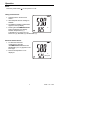
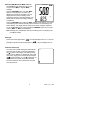
The MIN/MAX mode allows the user to view
only the lowest (MIN) or highest (MAX)
readings.
Press the MAX/MIN button once and “MAX”
appears on the display. The LCD is now
displaying the maximum humidity in the top
display and the maximum reading of the
°C °F
selected parameter in the bottom display. The
display will not change until a higher reading
is registered.
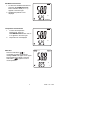
Press the MAX/MIN button again and “MIN” appears on the display. The LCD is
now displaying the minimum humidity and the minimum second reading in the
bottom display. The display will not change until a lower reading is registered.
To exit the MIN/MAX mode, press and hold the MIN/MAX button for 2 seconds
until the “MAX” or “MIN” icon disappears.
Note: Readings are automatically reset when switching from one display to the
next (MAX to MIN).
Backlight
Press and hold the light button (
) until the backlight comes on. To turn the
backlight off press and hold the light button (
Automatic Power OFF
The meter has a default setting that automatically
shuts the meter off after 10 minutes (indicated by
the
symbol on the display. This battery saving
feature can be disabled. To disable the auto power
off function, simply press and hold the hold button
(
) while powering on. The
symbol will not
appear when auto power off has been disabled.
The meter will revert to the default auto-off mode
when powered off.
6
) until to backlight turns off.
MAX MIN
°C °F
RH390 V2.0 03/05