1
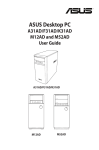
ASUS Desktop PC
M32CD
User Guide
E10433
First Edition
May 2015
Copyright © 2015 ASUSTeK Computer Inc. All Rights Reserved.
No part of this manual, including the products and software described in it, may be reproduced, transmitted,
transcribed, stored in a retrieval system, or translated into any language in any form or by any means, except
documentation kept by the purchaser for backup purposes, without the express written permission of ASUSTeK
Computer Inc. (“ASUS”).
Product warranty or service will not be extended if: (1) the product is repaired, modified or altered, unless such
repair, modification of alteration is authorized in writing by ASUS; or (2) the serial number of the product is
defaced or missing.
ASUS PROVIDES THIS MANUAL “AS IS” WITHOUT WARRANTY OF ANY KIND, EITHER EXPRESS OR IMPLIED,
INCLUDING BUT NOT LIMITED TO THE IMPLIED WARRANTIES OR CONDITIONS OF MERCHANTABILITY OR FITNESS
FOR A PARTICULAR PURPOSE. IN NO EVENT SHALL ASUS, ITS DIRECTORS, OFFICERS, EMPLOYEES OR AGENTS BE
LIABLE FOR ANY INDIRECT, SPECIAL, INCIDENTAL, OR CONSEQUENTIAL DAMAGES (INCLUDING DAMAGES FOR
LOSS OF PROFITS, LOSS OF BUSINESS, LOSS OF USE OR DATA, INTERRUPTION OF BUSINESS AND THE LIKE), EVEN IF
ASUS HAS BEEN ADVISED OF THE POSSIBILITY OF SUCH DAMAGES ARISING FROM ANY DEFECT OR ERROR IN THIS
MANUAL OR PRODUCT.
SPECIFICATIONS AND INFORMATION CONTAINED IN THIS MANUAL ARE FURNISHED FOR INFORMATIONAL USE
ONLY, AND ARE SUBJECT TO CHANGE AT ANY TIME WITHOUT NOTICE, AND SHOULD NOT BE CONSTRUED AS A
COMMITMENT BY ASUS. ASUS ASSUMES NO RESPONSIBILITY OR LIABILITY FOR ANY ERRORS OR INACCURACIES
THAT MAY APPEAR IN THIS MANUAL, INCLUDING THE PRODUCTS AND SOFTWARE DESCRIBED IN IT.
Products and corporate names appearing in this manual may or may not be registered trademarks or copyrights
of their respective companies, and are used only for identification or explanation and to the owners’ benefit,
without intent to infringe.
2
Contents
Notices ................................................................................................................................................. 4
Safety information............................................................................................................................ 7
Conventions used in this guide................................................................................................... 8
Where to find more information.................................................................................................. 8
Package contents.............................................................................................................................. 9
Chapter 1:
Getting started
Welcome!............................................................................................................................................11
Getting to know your computer................................................................................................11
Setting up your computer...........................................................................................................16
Turning your computer ON.........................................................................................................19
Chapter 2:
Connecting devices to your computer
Connecting a USB storage device.............................................................................................21
Removing a USB storage device................................................................................................21
Connecting microphone and speakers...................................................................................22
Connecting multiple external displays...................................................................................25
Connecting an HDTV.....................................................................................................................26
Chapter 3:
Using your computer
Proper posture when using your Desktop PC.......................................................................27
Using the memory card reader..................................................................................................28
Using the optical drive..................................................................................................................29
Chapter 4:
Connecting to the Internet
Wired connection............................................................................................................................31
Wireless connection (on selected models only)..................................................................35
Chapter 5:
Troubleshooting
Troubleshooting..............................................................................................................................37
Appendix
Windows® 10 User Manual
Starting for the first time..............................................................................................................47
Using the Windows® 10 UI............................................................................................................48
Keyboard shortcuts........................................................................................................................52
ASUS contact information
ASUS contact information............................................................................................................54
3
Notices
ASUS Recycling/Takeback Services
ASUS recycling and takeback programs come from our commitment to the highest standards for
protecting our environment. We believe in providing solutions for you to be able to responsibly
recycle our products, batteries, other components, as well as the packaging materials. Please go to
http://csr.asus.com/english/Takeback.htm for the detailed recycling information in different regions.
REACH
Complying with the REACH (Registration, Evaluation, Authorisation, and Restriction of Chemicals)
regulatory framework, we published the chemical substances in our products at ASUS REACH
website at http://csr.asus.com/english/REACH.htm
Federal Communications Commission Statement
This device complies with Part 15 of the FCC Rules. Operation is subject to the following two
conditions:
•
This device may not cause harmful interference; and
•
This device must accept any interference received including interference that may cause
undesired operation.
This equipment has been tested and found to comply with the limits for a Class B digital device,
pursuant to Part 15 of the FCC Rules. These limits are designed to provide reasonable protection
against harmful interference in a residential installation. This equipment generates, uses and can
radiate radio frequency energy and, if not installed and used in accordance with manufacturer’s
instructions, may cause harmful interference to radio communications. However, there is no
guarantee that interference will not occur in a particular installation. If this equipment does cause
harmful interference to radio or television reception, which can be determined by turning the
equipment off and on, the user is encouraged to try to correct the interference by one or more of
the following measures:
•
Reorient or relocate the receiving antenna.
•
Increase the separation between the equipment and receiver.
•
Connect the equipment to an outlet on a circuit different from that to which the receiver is
connected.
•
Consult the dealer or an experienced radio/TV technician for help.
The use of shielded cables for connection of the monitor to the graphics card is required to
assure compliance with FCC regulations. Changes or modifications to this unit not expressly
approved by the party responsible for compliance could void the user’s authority to operate this
equipment.
Lithium Battery Warning
CAUTION: Danger of explosion if battery is incorrectly replaced. Replace only with the same
or equivalent type recommended by the manufacturer. Dispose of used batteries according
to the manufacturer’s instructions.
4
IC: Canadian Compliance Statement
Complies with the Canadian ICES-003 Class B specifications. This device complies with RSS 210
of Industry Canada. This Class B device meets all the requirements of the Canadian interferencecausing equipment regulations.
This device complies with Industry Canada license exempt RSS standard(s). Operation is subject to
the following two conditions: (1) this device may not cause interference, and (2) this device must
accept any interference, including interference that may cause undesired operation of the device.
Cut appareil numérique de la Classe B est conforme à la norme NMB-003 du Canada.
Cet appareil numérique de la Classe B respecte toutes les exigences du Règlement sur le
matériel brouilleur du Canada.
Cet appareil est conforme aux normes CNR exemptes de licence d’Industrie Canada. Le
fonctionnement est soumis aux deux conditions suivantes :
(1) cet appareil ne doit pas provoquer d’interférences et
(2) cet appareil doit accepter toute interférence, y compris celles susceptibles de provoquer
un fonctionnement non souhaité de l’appareil.
Canadian Department of Communications Statement
This digital apparatus does not exceed the Class B limits for radio noise emissions from digital
apparatus set out in the Radio Interference Regulations of the Canadian Department of
Communications.
This class B digital apparatus complies with Canadian ICES-003.
VCCI: Japan Compliance Statement
VCCI Class B Statement
KC: Korea Warning Statement
5
RF Equipment Notices
CE: European Community Compliance Statement
The equipment complies with the RF Exposure Requirement 1999/519/EC, Council
Recommendation of 12 July 1999 on the limitation of exposure of the general public to
electromagnetic fields (0–300 GHz). This wireless device complies with the R&TTE Directive.
Wireless Radio Use
This device is restricted to indoor use when operating in the 5.15 to 5.25 GHz frequency band.
Exposure to Radio Frequency Energy
The radiated output power of the Wi-Fi technology is below the FCC radio frequency exposure
limits. Nevertheless, it is advised to use the wireless equipment in such a manner that the potential
for human contact during normal operation is minimized.
FCC Bluetooth Wireless Compliance
The antenna used with this transmitter must not be colocated or operated in conjunction with any
other antenna or transmitter subject to the conditions of the FCC Grant.
Bluetooth Industry Canada Statement
This Class B device meets all requirements of the Canadian interference-causing equipment
regulations.
Cet appareil numérique de la Class B respecte toutes les exigences du Règlement sur le matériel
brouilleur du Canada.
BSMI: Taiwan Wireless Statement
Japan RF Equipment Statement
KC (RF Equipment)
6
Safety information
Disconnect the AC power and peripherals before cleaning. Wipe the Desktop PC using a clean
cellulose sponge or chamois cloth dampened with solution of nonabrasive detergent and a few
drops of warm water then remove any extra moisture with a dry cloth.
•
DO NOT place on uneven or unstable work surfaces. Seek servicing if the casing has been
damaged.
•
DO NOT expose to dirty or dusty environments. DO NOT operate during a gas leak.
•
DO NOT place or drop objects on top and do not shove any foreign objects into the Desktop
PC.
•
DO NOT expose to strong magnetic or electrical fields.
•
DO NOT expose to or use near liquids, rain, or moisture. DO NOT use the modem during
electrical storms.
•
Battery safety warning: DO NOT throw the battery in fire. DO NOT short circuit the contacts.
DO NOT disassemble the battery.
•
Use this product in environments with ambient temperatures between 0˚C (32̊F) and 35˚C
(95̊F).
•
DO NOT cover the vents on the Desktop PC to prevent the system from getting overheated.
•
DO NOT use damaged power cords, accessories, or other peripherals.
•
To prevent electrical shock hazard, disconnect the power cable from the electrical outlet
before relocating the system.
•
Seek professional assistance before using an adapter or extension cord. These devices could
interrupt the grounding circuit.
•
Ensure that your power supply is set to the correct voltage in your area. If you are not sure
about the voltage of the electrical outlet you are using, contact your local power company.
•
If the power supply is broken, do not try to fix it by yourself. Contact a qualified service
technician or your retailer.
Hazardous moving parts. Desktop should be completely shutdown before servicing product.
Replacing fan components should only be attempted by qualified service personnel.
Hazardous Moving Parts Warning
WARNING: Keep fingers and other body parts away from any moving parts.
7
Conventions used in this guide
To ensure that you perform certain tasks properly, take note of the following symbols used
throughout this guide.
DANGER/WARNING: Information to prevent injury to yourself when trying to
complete a task.
CAUTION: Information to prevent damage to the components when trying to
complete a task.
IMPORTANT: Instructions that you MUST follow to complete a task.
NOTE: Tips and additional information to help you complete a task.
Where to find more information
Refer to the following sources for additional information and for product and software updates.
ASUS websites
The ASUS website provides updated information on ASUS hardware and software products.
Refer to the ASUS website www.asus.com.
ASUS Local Technical Support
Visit ASUS website at http://support.asus.com/contact for the contact information of local
Technical Support Engineer.
The User Guide is located in the following folder in your Desktop PC:
C:\Program Files(X86)\ASUS\eManual
8
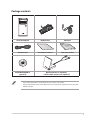
Package contents
ASUS Desktop PC
Keyboard x1
Mouse x1
Installation Guide
Power cord x1
DVD/SDVD/RDVD x1
(optional)
Installation Guide x1
Warranty Card x1
Dipole antenna x1 (optional)
/ Built-in PIFA antenna x 2 (optional)
• If any of the above items is damaged or missing, contact your retailer.
• The illustrated items above are for reference only. Actual product specifications may vary with
different models.
9
10
Chapter 1
Getting started
Welcome!
Thank you for purchasing the ASUS Desktop PC!
The ASUS Desktop PC provides cutting-edge performance, uncompromised reliability, and usercentric utilities. All these values are encapsulated in a stunningly futuristic and stylish system
casing.
Read the ASUS Warranty Card before setting up your ASUS Desktop PC.
Getting to know your computer
Illustrations are for reference only. The ports, their locations and the chassis color vary with
different models.
ASUS M32CD
11
Front panel
ENGLISH
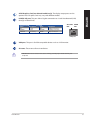
USB 3.0 ports. These Universal Serial Bus 3.0 (USB 3.0) ports connect to USB 3.0 devices
such as a mouse, printer, scanner, camera, PDA, and others.
• DO NOT connect a keyboard / mouse to any USB 3.0 port when installing Windows®
operating system.
• Due to USB 3.0 controller limitation, USB 3.0 devices can only be used under Windows® OS
environment and after the USB 3.0 driver installation.
• USB 3.0 devices can only be used as data storage only.
• We strongly recommend that you connect USB 3.0 devices to USB 3.0 ports for faster and
better performance for your USB 3.0 devices.
Memory Stick™ (MS) / Memory Stick Pro™ (MS Pro) / MultiMediaCard (MMC) /
Secure Digital™ (SD) / High Capacity Secure Digital™(SDHC) / xD-Picture (XD) card
slot. Insert a supported memory card into this slot.
Microphone port. This port connects to a microphone.
Headphone port. This port connects to a headphone or speaker. Supported by ASUS
Audio Wizard.
Power button. Press this button to turn on your computer.
Optical disk drive eject button. Press this button to eject the optical disk drive tray.
Optical disk drive bay. There is an optical disk drive in this bay.
12
Chapter 1: Getting started
ENGLISH
Rear panel
Voltage selector switch. Switch to select the appropriate system input voltage.
This switch may be available in some model types only.
Power connector. Plug the power cord to this connector.
RATING: • 110~120/220~240Vac, 6.0/3.0A, 60/50Hz.
• 220~240Vac, 3.0A, 50Hz.
USB 2.0 ports. These Universal Serial Bus 2.0 (USB 2.0) ports connect to USB 2.0 devices
such as a mouse, printer, scanner, camera, PDA, and others.
HDMI port. This port is for a High-Definition Multimedia Interface (HDMI) connector,
and is HDCP compliant allowing playback of HD DVD, Blu-ray, and other protected
content.
USB 3.1/3.0/2.0 Type A ports. These 9-pin Universal Serial Bus (USB) Type A ports are
for USB 3.1/3.0/2.0 devices.
ASUS M32CD
13
ENGLISH
USB 3.0 ports. These Universal Serial Bus 3.0 (USB 3.0) ports connect to USB 3.0
devices such as a mouse, printer, scanner, camera, PDA, and others.
• DO NOT connect a keyboard / mouse to any USB 3.0 port when installing Windows®
operating system.
• Due to USB 3.0 controller limitation, USB 3.0 devices can only be used under Windows® OS
environment and after the USB 3.0 driver installation.
• USB 3.0 devices can only be used as data storage only.
• We strongly recommend that you connect USB 3.0 devices to USB 3.0 ports for faster and
better performance for your USB 3.0 devices.
Side Speaker Out port (gray). This port connects to the side speakers in an 8-channel
audio configuration.
Rear Speaker Out port (black). This port connects to the rear speakers in a 4, 6, and
8-channel audio configuration.
Center/Subwoofer port (orange). This port connects to the center/subwoofer
speakers.
Microphone port (pink). This port connects to a microphone.
Line Out port (lime). This port connects to a headphone or speaker. In a 4.1, 5.1,
or 7.1-channel configuration, the function of this port becomes Front Speaker Out.
Supported by ASUS Audio Wizard.
Line In port (light blue). This port connects to a tape, CD, DVD player, or other audio
sources.
Refer to the audio configuration table below for the function of the audio ports in a 2.1, 4.1,
5.1, or 7.1-channel configuration.
Audio 2.1, 4.1, 5.1, or 7.1-channel configuration
Headset 2.1-channel
4.1-channel
5.1-channel
7.1-channel
Light Blue (Rear panel)
Port
Line In
Rear Speaker Out
Rear Speaker Out
Rear Speaker Out
Lime (Rear panel)
Line Out
Front Speaker Out
Front Speaker Out
Front Speaker Out
Pink (Rear panel)
Mic In
Mic In
Bass/Center
Bass/Center
Front panel
-
-
-
Side Speaker Out
Expansion slot brackets. Remove the expansion slot bracket when installing an
expansion card.
ASUS WLAN Card (on selected models only). This optional WLAN card allows your
computer to connect to a wireless network.
14
Chapter 1: Getting started
ENGLISH
ASUS Graphics Card (on selected models only). The display output ports on this
optional ASUS Graphics Card may vary with different models.
LAN (RJ-45) port. This port allows Gigabit connection to a Local Area Network (LAN)
through a network hub.
Activity/Link LED
Speed LED
Status
Description
Status
OFF
No link
OFF
ORANGE
Linked
ORANGE
BLINKING
Data activity
GREEN
Description
10Mbps connection
100Mbps connection
1Gbps connection
ACT/LINK SPEED
LED
LED
LAN port
VGA port. This port is for VGA-compatible devices such as a VGA monitor.
Air vents. These vents allow air ventilation.
DO NOT block the air vents on the chassis. Always provide proper ventilation for your
computer.
ASUS M32CD
15
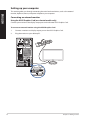
Setting up your computer
ENGLISH
This section guides you through connecting the main hardware devices, such as the external
monitor, keyboard, mouse, and power adapter to your computer.
Connecting an external monitor
Using the ASUS Graphics Card (on selected models only)
Connect your monitor to the display output port on the discrete ASUS Graphics Card.
To connect an external monitor using the ASUS Graphics Card:
16
1.
Connect a monitor to a display output port on the ASUS Graphics Card.
2.
Plug the monitor to your desktop PC.
Chapter 1: Getting started
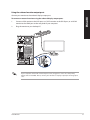
Using the onboard monitor output ports
ENGLISH
Connect your monitor to the onboard display output port.
To connect an external monitor using the onboard display output ports:
1.
Connect a VGA monitor to the VGA port, or a DVI-D monitor to the DVI-D port, or an HDMI
monitor to the HDMI port on the rear panel of your computer.
2.
Plug the monitor to your desktop PC.
If your computer comes with an ASUS Graphics Card, the graphics card is set as the primary
display device in the BIOS. Hence, connect your monitor to a display output port on the graphics
card.
ASUS M32CD
17
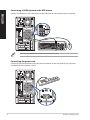
Connecting a USB keyboard and a USB mouse
ENGLISH
Connect a USB keyboard and a USB mouse to the USB ports on the rear panel of your computer.
`
Connect your USB keyboard and USB mouse to the USB 2.0 ports.
Connecting the power cord
Connect one end of the power cord to the power connector on the rear panel of your computer
and the other end to a power source.
18
Chapter 1: Getting started
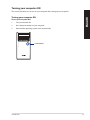
Turning your computer ON
This section describes how to turn on your computer after setting up your computer.
ENGLISH
Turning your computer ON
To turn your computer ON:
1.
Turn your monitor ON.
2.
Press the power button on your computer.
3.
Wait until the operating system loads automatically.
Power button
ASUS M32CD
19
ENGLISH
20
Chapter 1: Getting started
Chapter 2
ENGLISH
Connecting devices to your computer
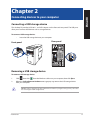
Connecting a USB storage device
This desktop PC provides USB 2.0/1.1 and USB 3.0 ports on the front and rear panels. The USB ports
allow you to connect USB devices such as storage devices.
To connect a USB storage device:
•
Insert the USB storage device to your computer.
Rear panel
Front panel
Removing a USB storage device
To remove a USB storage device:
, then click
from the Windows taskbar on your computer, then click Eject.
1.
Click
2.
When the Safe to Remove Hardware message pops up, remove the USB storage device
from your computer.
DO NOT remove a USB storage device when data transfer is in progress. Doing so may cause data
loss or damage the USB storage device.
ASUS M32CD
21
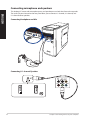
Connecting microphone and speakers
ENGLISH
This desktop PC comes with microphone ports and speaker ports on both the front and rear panels.
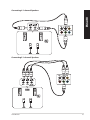
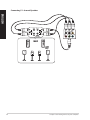
The audio I/O ports located on the rear panel allow you to connect 2.1-channel, 4.1-channel, and
5.1-channel stereo speakers.
Connecting Headphone and Mic
Connecting 2.1-channel Speakers
22
Chapter 2: Connecting devices to your computer
ENGLISH
Connecting 4.1-channel Speakers
Connecting 5.1-channel Speakers
ASUS M32CD
23
Connecting 7.1-channel Speakers
ENGLISH
24
Chapter 2: Connecting devices to your computer
Connecting multiple external displays
ENGLISH
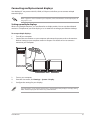
Your desktop PC may come with VGA, HDMI, or DVI ports and allows you to connect multiple
external displays.
When a graphics card is installed in your computer, connect the monitors on the output ports of
the graphics card.
Setting up multiple displays
When using multiple monitors, you are allowed to set display modes. You can use the additional
monitor as a duplicate of your main display, or as an extension to enlarge your Windows desktop.
To set up multiple displays:
1.
Turn off your computer.
2.
Connect the two monitors to your computer and connect the power cords to the monitors.
Refer to Setting up your computer section in Chapter 1 for details on how to connect a
monitor to your computer.
3.
Turn on your computer.
4.
From the Start menu, click Settings > System > Display.
5.
Configure the settings for your displays.
For some graphic cards, only the monitor that is set to be the primary display has display during
POST. The dual display function works only under Windows.
ASUS M32CD
25
Connecting an HDTV
Connect a High Definition TV (HDTV) to the HDMI port of your computer.
ENGLISH
• You need an HDMI cable to connect the HDTV and the computer. The HDMI cable is purchased
separately.
• To get the best display performance, ensure that your HDMI cable is less than 15 meters.
26
Chapter 2: Connecting devices to your computer
Chapter 3
ENGLISH
Using your computer
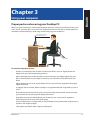
Proper posture when using your Desktop PC
When using your Desktop PC, maintaining the proper posture is necessary to prevent strain to your
wrists, hands, and other joints or muscles. This section provides you with tips on avoiding physical
discomfort and possible injury while using and fully enjoying your Desktop PC.
Eye level to the top of
the monitor screen
Foot rest
90˚ angles
To maintain the proper posture:
•
Position your computer chair to make sure that your elbows are at or slightly above the
keyboard to get a comfortable typing position.
•
Adjust the height of your chair to make sure that your knees are slightly higher than your
hips to relax the backs of your thighs. If necessary, use a footrest to raise the level of your
knees.
•
Adjust the back of your chair so that the base of your spine is firmly supported and angled
slightly backward.
•
Sit upright with your knees, elbows and hips at an approximately 90º angle when you are at
the PC.
•
Place the monitor directly in front of you, and turn the top of the monitor screen even with
your eye level so that your eyes look slightly downward.
•
Keep the mouse close to the keyboard, and if necessary, use a wrist rest for support to reduce the pressure on your wrists while typing.
•
Use your Desktop PC in a comfortably-lit area, and keep it away from sources of glare such as
windows and straight sunlight.
•
Take regular mini-breaks from using your Desktop PC.
ASUS M32CD
27
Using the memory card reader
ENGLISH
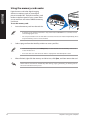
Digital cameras and other digital imaging
devices use memory cards to store digital
picture or media files. The built-in memory card
reader on the front panel of your system allows
you to read from and write to different memory
card drives.
To use the memory card:
1.
Insert the memory card into the card slot.
• A memory card is keyed so that it fits in only one direction. DO NOT force a card into a slot to
avoid damaging the card.
• You can place media in one or more of the card slots and use each media independently. Place
only one memory card in a slot at one time.
2.
Select a program from the AutoPlay window to access your files.
• From the Startup menu, click File Explorer, and then double-click the memory card icon to
access the data on it.
• Each card slot has its own drive icon which is displayed on the File Explorer screen.
3.
When finished, right-click the memory card drive icon, click Eject, and then remove the card.
Never remove cards while or immediately after reading, copying, formatting, or deleting data on
the card or else data loss may occur.
28
Chapter 3: Using your computer
ENGLISH
Using the optical drive
Inserting an optical disc
To insert an optical disc:
1.
While your system is on, press the eject button to open the tray.
2.
Place the disc on the optical drive with the label side outward if the desktop is positioned
vertically and the label side up if the desktop is positioned horizontally.
3.
Push the tray gently to close it.
4.
Select a program from the AutoPlay window to access your files.
If AutoPlay is NOT enabled in your computer, to access the data on an optical disc:
•
From the Start menu, click File Explorer, and then double-click the CD/DVD drive icon.
Removing an optical disc
To remove an optical disc:
1.
2.
While the system is on, do either of the following to eject the tray:
•
Press the eject button below the drive bay cover.
•
From the Start menu, click File Explorer, right-click the CD/DVD drive icon, and click
Eject.
Remove the disc from the disc tray.
ASUS M32CD
29
ENGLISH
30
Chapter 3: Using your computer
Chapter 4
ENGLISH
Connecting to the Internet
Wired connection
Use an RJ-45 cable to connect your computer to a DSL/cable modem or a local area network (LAN).
Connecting via a DSL/cable modem
To connect via a DSL/cable modem:
1.
Set up your DSL/cable modem.
Refer to the documentation that came with your DSL/cable modem.
2.
Connect one end of an RJ-45 cable to the LAN (RJ-45) port on the rear panel of your
computer and the other end to a DSL/cable modem.
Modem
RJ-45 cable
3.
Turn on the DSL/cable modem and your computer.
4.
Configure the necessary Internet connection settings.
• Contact your network administrator for details or assistance in setting up your Internet
connection.
• For more details, refer to the sections Configuring a dynamic IP/PPPoE network connection
or Configuring a static IP network connection.
ASUS M32CD
31
Connecting via a local area network (LAN)
ENGLISH
To connect via a LAN:
1.
Connect one end of an RJ-45 cable to the LAN (RJ-45) port on the rear panel of your
computer and the other end to your LAN.
LAN
RJ-45 cable
2.
Turn on your computer.
3.
Configure the necessary Internet connection settings.
• Contact your network administrator for details or assistance in setting up your Internet
connection.
• For more details, refer to the sections Configuring a dynamic IP/PPPoE network connection
or Configuring a static IP network connection.
32
Chapter 4: Connecting to the Internet
Configuring a dynamic IP/PPPoE network connection
To configure a dynamic IP/PPPoE network connection:
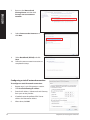
Launch Network and Sharing Center in either of these two ways:
a)
From the taskbar, right-click
ENGLISH
1.
, then click Open Network and Sharing Center.
b)From the Start menu, click Settings > Network & Internet > Ethernet > Network and
Sharing Center.
2.
From the Open Network and Sharing Center screen, click Change Adapter settings.
3.
Right-click on your LAN and select
Properties.
4.
Click Internet Protocol Version 4(TCP/
IPv4) and click Properties.
5.
Click Obtain an IP address automatically
and click OK.
Continue to the next steps if you are using PPPoE connection.
ASUS M32CD
33
Return to the Network and
Sharing Center and then click
Set up a new connection or
network.
8.
Select Connect to the Internet and
click Next.
9.
Select Broadband (PPPoE) and click
Next.
10.
Follow the next onscreen instructions to
complete the setup.
ENGLISH
7.
Configuring a static IP network connection
To configure a static IP network connection:
34
1.
Repeat steps 1 to 4 of the previous section.
2
Click Use the following IP address.
3.
Enter the IP address, Subnet mask and Gateway
from your service provider.
4.
If needed, enter the preferred DNS Server
address and alternative address.
5.
When done, click OK.
Chapter 4: Connecting to the Internet
Wireless connection (on selected models only)
ENGLISH
Connect your computer to the Internet through a wireless connection.
To establish a wireless connection, you need to connect to a wireless access point (AP).
Wireless AP
Modem
• To increase the range and sensitivity of the wireless radio signal, connect the external
antennas to the antenna connectors on the ASUS WLAN Card.
• Place the antennas on the top of your computer for the best wireless performance.
• The external antennas are optional items.
ASUS M32CD
35
ENGLISH
36
Chapter 4: Connecting to the Internet
Chapter 5
ENGLISH
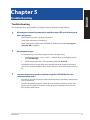
Troubleshooting
Troubleshooting
This chapter presents some problems you might encounter and the possible solutions.
?
?
My computer cannot be powered on and the power LED on the front panel
does not light up.
•
Check if your computer is properly connected.
•
Check if the wall outlet is functioning.
•
Check if the Power Supply Unit is switched on. Refer to the section Turning your
computer ON in Chapter 1.
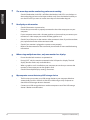
My computer hangs.
•
Do the following to close the programs that are not responding:
1.Simultaneously press <Alt> + <Ctrl> + <Delete> keys on the keyboard, then
click Task Manager.
2.
•
?
Select the program that is not responding, then click End Task.
If the keyboard is not responding, press and hold the Power button on the top of
your chassis until the computer shuts down. Then press the Power button to turn it
on.
I cannot connect to a wireless network using the ASUS WLAN Card (on
selected models only)?
•
Ensure that you enter the correct network security key for the wireless network you
want to connect to.
•
Connect the external antennas (optional) to the antenna connectors on the ASUS
WLAN Card and place the antennas on the top of your computer chassis for the
best wireless performance.
ASUS M32CD
37
?
The arrow keys on the number key pad are not working.
ENGLISH
Check if the Number Lock LED is off. When the Number Lock LED is on, the keys on
the number key pad are used to input numbers only. Press the Number Lock key to
turn the LED off if you want to use the arrow keys on the number key pad.
?
?
?
38
No display on the monitor.
•
Check if the monitor is powered on.
•
Ensure that your monitor is properly connected to the video output port on your
computer.
•
If your computer comes with a discrete graphics card, ensure that you connect your
monitor to a video output port on the discrete graphics card.
•
Check if any of the pins on the monitor video connector is bent. If you discover bent
pins, replace the monitor video connector cable.
•
Check if your monitor is plugged to a power source properly.
•
Refer to the documentation that came with your monitor for more troubleshooting
information.
When using multiple monitors, only one monitor has display.
•
Ensure that the both monitors are powered on.
•
During POST, only the monitor connected to the VGA port has display. The dual
display function works only under Windows.
•
When a graphics card is installed on your computer, ensure that you connect the
monitors to the output port on the graphics card.
•
Check if the multiple displays settings are correct.
My computer cannot detect my USB storage device.
•
The first time you connect your USB storage device to your computer, Windows
automatically installs a driver for it. Wait for a while and go to My Computer to
check if the USB storage device is detected.
•
Connect your USB storage device to another computer to test if the USB storage
device is broken or malfunctions.
Chapter 5: Troubleshooting
?
I want to restore or undo changes to my computer’s system settings
without affecting my personal files or data.
?
The picture on the HDTV is distorted.
•
It is caused by the different resolutions of your monitor and your HDTV. Adjust the
screen resolution to fit your HDTV. To change the screen resolution:
•
?
?
From the Start menu, click Settings > System > Display.
My speakers produce no sound.
•
Ensure that you connect your speakers to the Line out port (lime) on the front panel
or the rear panel.
•
Check if your speak is connected to an electrical source and turned on.
•
Adjust your speakers’ volume.
•
Ensure that your computer’s system sounds are not Muted.
•
If it is muted, the volume icon is displayed as
. To enable the system
sounds, click
from the Windows notification area, then click
.
•
Connect your speakers to another computer to test if the speakers arer working
properly.
•
?
ENGLISH
You can use Windows® 10 Refresh your PC without affecting your files recovery
option to restore or undo changes to your computer’s system settings without
affecting your personal data such as documents or photos. To use this recovery
option, click Settings > Update & recovery > Recovery from the Start menu,
select Refresh your PC without affecting your files, and click Get started.
If it is not muted, click
and drag the slider to adjust the volume.
The DVD drive cannot read a disc.
•
Check if the disc is placed with the label side facing up.
•
Check if the disc is centered in the tray, especially for the discs with
non-standard size or shape.
•
Check if the disc is scratched or damaged.
The DVD drive eject button is not responding.
1.
From the Start menu, click File Explorer.
2.
Right-click
ASUS M32CD
, then click Eject from the menu
39
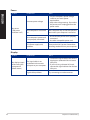
Power
ENGLISH
Problem
No power
(The power
indicator is off)
Possible Cause
Action
Incorrect power voltage
• Set your computer’s power voltage
switch to your area’s power
requirements.
• Adjust the voltage settings. Ensure that
the power cord is unplugged from the
power outlet.
Your computer is not turned
on.
Press the power key on the front panel to
ensure that your computer is turned on.
Your computer’s power cord
is not properly connected.
• Ensure that the power cord is properly
connected.
• Use other compatible power cord.
PSU (Power supply unit)
problems
Contact the ASUS Service Center about
installing another PSU on your computer.
Possible Cause
Action
The signal cable is not
connected to the correct
VGA port on your computer.
• Connect the signal cable to the correct
display port (onboard VGA or discrete
VGA port).
• If you are using a discrete VGA card,
connect the signal cable to the discrete
VGA port.
Signal cable problems
Try connecting to another monitor.
Display
Problem
No display output
after turning the
computer on
(Black screen)
40
Chapter 5: Troubleshooting
Problem
Cannot access the
Internet
Possible Cause
Action
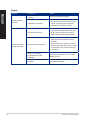
The LAN cable is not
connected.
Connect the LAN cable to your
computer.
LAN cable problems
Ensure the LAN LED is on. If not, try
another LAN cable. If it still does not
work, contact the ASUS service center.
Your computer is not
properly connected to a
router or hub.
Ensure that your computer is properly
connected to a router or hub.
Network settings
Contact your Internet Service Provider
(ISP) for the correct LAN settings.
Problems caused by the antivirus software
Close the anti-virus software.
Driver problems
Reinstall the LAN driver
ENGLISH
LAN
Audio
Problem
No Audio
ASUS M32CD
Possible Cause
Action
Speaker or headphone is
connected to the wrong port.
• Refer to your computer’s User Guide
for the correct port.
• Disconnect and reconnect the speaker
to your computer.
Speaker or headphone does
not work.
Try using another speaker or
headphone.
The front and back audio
ports do not work.
Try both the front and back audio ports.
If one port failed, check if the port is set
to multi-channel.
Driver problems
Reinstall the audio driver
41
System
ENGLISH
Problem
System speed is
too slow
The system often
hangs or freezes.
42
Possible Cause
Action
Too many programs are
running.
Close some of the programs.
Computer virus attack
• Use an anti-virus software to scan for
viruses and repair your computer.
• Reinstall the operating system.
Hard disk drive failure
• Send the damaged hard disk drive to
ASUS Service Center for servicing.
• Replace with a new hard disk drive.
Memory module problems
• Replace with compatible memory
modules.
• Remove the extra memory modules
that you have installed, then try again.
• Contact the ASUS Service Center for
assistance.
There is not enough
air ventilation for your
computer.
Move your computer to an area with
better air flow.
Incompatible softwares are
installed.
Reinstall the OS and reinstall
compatible softwares.
Chapter 5: Troubleshooting
Problem
Too noisy right
after turning on the
computer.
Possible Cause
Action
Your computer is booting up.
It is normal. The fan runs on its full
speed when the computer is powering
on. The fan slows down after entering
the OS.
The BIOS settings have been
changed.
Restore the BIOS to its default settings.
Old BIOS version
Update the BIOS to the latest version.
Visit the ASUS Support site at http://
support.asus.com to download the
latest BIOS versions.
The CPU fan has been
replaced.
Ensure that you are using a compatible
or ASUS-recommended CPU fan.
There is not enough air
ventilation for the computer.
Ensure that your computer is working
in an area with good air flow.
The system temperature is
too high.
• Update the BIOS.
• If you know how to reinstall the
motherboard, try to clean the inner
space of the chassis.
• Contact the ASUS Service Center for
assistance.
Computer is too
noisy when in use.
ENGLISH
CPU
If the problem still persists, refer to your Desktop PC’s warranty card and contact the ASUS Service
Center. Visit the ASUS Support site at http://support.asus.com for the service center information.
ASUS M32CD
43
ENGLISH
44
Chapter 5: Troubleshooting
ASUS Desktop PC
Windows® 10
User Manual
Appendix
Windows® 10 User Manual
E10435
First Edition
May 2015
Copyright © ASUSTeK Computer Inc.
All Rights Reserved
ENGLISH
Starting for the first time
ENGLISH
When you start your computer for the first time, a series of screens appear to guide you in
configuring the basic settings of your Windows® 10 operating system.
To start your Desktop PC for the first time:
When you start your computer for the first time, a series of screens appear to guide you in
configuring the basic settings of your Windows® 10 operating system.
To start your Desktop PC for the first time:
1.
Press the power button on your Desktop PC. Wait for a few minutes until the setup screen
appears.
2.
From the setup screen, pick your region and language that you want to use on your desktop
PC.
3.
Carefully read the License Terms, then tap I Accept.
4.
Follow the onscreen instructions to configure the following basic items:
5.
•
Personalize
•
Get online
•
Settings
•
Your account
Wait until Windows® 10 finishes installing the apps and system settings. After the installation,
the Windows® 10 desktop appears.
ASUS Desktop PC
47
Using the Windows® 10 UI
ENGLISH
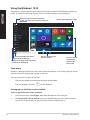
The Windows® 10 User Interface (UI) includes the favorite Start menu and the tiled-formatted Start
screen. It includes the following features you can use while working on your Desktop PC.
Click your account name to change the
picture, sign out of your account, or lock your
Desktop PC
Click to launch the Start menu
Click to expand the Start screen
Pin on or launch an app
from the taskbar
Click to display all the apps
Click to put on sleep mode, shut down,
or restart your desktop PC
Pin on or launch
a tiled-format
app from the
Start screen
Start menu
Windows® 10 brings back the Start menu with some enhancements, such as the space that you can
customize with your favorite apps, people, or websites.
You can launch the Start menu in two ways:
•
Click the Start button from the lower-left corner of the taskbar.
•
Press the Windows® Start key
on your keyboard.
Pinning apps to the Start screen or taskbar
To pin an app to the Start screen or taskbar:
48
1.
From the Start menu, click All apps, then select the app that you want to pin.
2.
Click Pin to Start or Pin to taskbar to pin your selected app to the Start screen or taskbar.
You can also drag then drop an app to the Start Screen or taskbar to pin it.
Windows® 10 User Manual
Start screen
ENGLISH
The Start screen , which appears together with the Start menu, helps organize all the apps you need
in just one place. The apps on the Start screen are displayed on tiled-format for easy access.
Some apps require signing in to your Microsoft account before they are fully launched.
Click to restore the
Start screen
Moving apps on the Start screen
You can move apps from the Start screen simply through dragging and dropping the app to your
preferred location.
Unpinning apps from the Start screen
To unpin an app from the Start screen, right-click on the app to activate its settings bar then click
Unpin from Start.
ASUS Desktop PC
49
Taskbar
ENGLISH
Windows® 10 comes with the standard taskbar, which keeps all your currently running apps or
items in the background.
Unpinning apps from the taskbar
1.
From the Start screen or taskbar, right-click the app you want to unpin.
2.
Click Unpin from Start or Unpin this program from taskbar to remove the app from the
Start screen or taskbar.
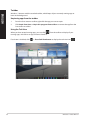
Using the Task View
When you have several running apps, you can click
running apps, and click on an app or item to launch it.
If task view is disabled, click
50
from the taskbar to display all your
> Show Task View button to display the task view icon
.
Windows® 10 User Manual
Snap feature
ENGLISH
The Snap feature displays about four apps or more in one screen, allowing you to work or switch
among apps.
Using Snap
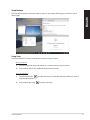
Use your Desktop PC’s mouse or keyboard to activate Snap onscreen.
Using your mouse
a) Launch an app, then drag and release on a screen corner to snap it in place.
b) Snap another app to your preferred location on the screen.
Using your keyboard
a) Launch an app, press
snap the app in place.
b) Snap another app using
ASUS Desktop PC
and the arrow keys to select the direction where you want to
and the arrow keys.
51
Keyboard shortcuts
ENGLISH
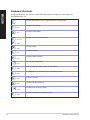
Using your keyboard, you can also use the following shortcuts to help you launch apps and
navigate Windows® 10.
Switches between the Start screen and the last running app
+ <D>
+ <E>
+ <F> or
Launches the desktop
Launches File Explorer
Activates the File search function
+ <W>
+ <H>
+ <I>
+ <K>
+ <L>
+ <M>
+ <P>
+ <Q>
+ <R>
+ <U>
+ <X>
52
Launches Share
Launches Settings
Launches Media Connect
Activates the Lock screen
Hides all currently active screens to the taskbar
Your desktop PC is mirrored to your secondary monitor
Launches Cortana
Launches the Run window
Launches Ease of Access Center
Launches a menu box of Windows tools
Windows® 10 User Manual
Launches the magnifier and zooms in your screen.
+ <+>
+ <Enter>
ENGLISH
Zooms out your screen.
+ <->
Opens the Narrator Settings.
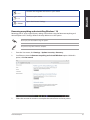
Removing everything and reinstalling Windows® 10
Restoring your PC to its original factory settings can be done using the Remove everything and
reinstall options in PC Settings. Refer to the steps below to use this option.
Back up all your data before using this option.
This process may take a while to complete.
1.
From the Start menu, click Settings > Update & security > Recovery.
2.
Scroll down to view the Remove everything and reinstall Windows option. Under this
option, click Get started.
3.
Follow the onscreen instructions to complete the reinstallation and reset process.
ASUS Desktop PC
53
ASUS contact information
ASUS contact information
ENGLISH
ASUSTeK COMPUTER INC.
Address
Telephone
Fax
E-mail
Web site
15 Li-Te Road, Peitou, Taipei, Taiwan 11259
+886-2-2894-3447
+886-2-2890-7798
[email protected]
www.asus.com.tw
Technical Support
Telephone
Online support
+86-21-38429911
support.asus.com
ASUS COMPUTER INTERNATIONAL (America)
Address
Telephone
Fax
Web site
800 Corporate Way, Fremont, CA 94539, USA
+1-510-739-3777
+1-510-608-4555
usa.asus.com
Technical Support
Telephone
Support fax
Online support
+1-812-282-2787
+1-812-284-0883
support.asus.com
ASUS COMPUTER GmbH (Germany and Austria)
Address
Fax
Web site
Online contact
Harkort Str. 21-23, D-40880 Ratingen, Germany
+49-2102-959931
asus.com/de
eu-rma.asus.com/sales
Technical Support
Telephone (Component)
+49-2102-5789555
Telephone Germany (System/Notebook/Eee/LCD)
+49-2102-5789557
Telephone Austria (System/Notebook/Eee/LCD)
+43-820-240513
Support Fax
+49-2102-959911
Online supportsupport.asus.com
54
Windows® 10 User Manual