1
NVIDIA TEGRA LINUX DRIVER PACKAGE
PG_06076-R19 | July 1, 2014 | R19.3 Release
Developers' Guide
Note: Apparent hyperlinks in this document are a legacy of the HTML
version and may not operate as expected in the PDF version.
NVIDIA Tegra Linux Driver Package
Overview
Welcome to NVIDIA Tegra Linux Driver Package Development Guide. Engineers can
use this document to learn about working with NVIDIA® Tegra® Linux Driver
Package, sometimes referred to as Linux for Tegra (L4T).
Important: This documentation is preliminary and subject to change. Please
see your NVIDIA representative for additional information and to request
documentation updates.
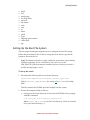
Read the following sections to get started using Tegra Linux Driver Package.
•
•
•
•
•
•
•
•
Package Manifest—describes the top level directories and files installed when
expanding the release TAR file.
Getting Started—provides requirements and set up information to help you
get started using the package.
U-Boot Guide—describes the U-Boot implementation for L4T.
Building Crosstool-ng Toolchain and glibc—provides instructions to build
the cross toolchain suite version 4.5.3 and the glibc suite with an Ubuntu host
machine.
Software Features—describes the software features supported by the release.
Licenses—provides license information for Tegra and 3rd-party software.
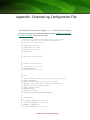
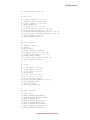
Appendix—provides an example configuration file for the Crosstool-ng
toolchain.
Glossary—provides definitions of key terms.
NVIDIA Tegra Linux Driver Package
Package Manifest
The NVIDIA® Tegra® Linux Driver Package is provided in the following tar file:
Tegra<SOC>_Linux_<release_num>.<version_num>_<release_type>.tb
z2
where
•
•
•
<release_num> is the branch number of the release, such as R19.
<version num> is the version number of the build, such as 3.0 for the third
build.
<release_type> is armel (for softfp ABI) or armhf (for hard-float ABI).
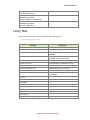
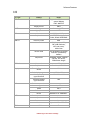
The following table lists the top level directories and files that are created when
you expand the tar file.
Filename
Description
<platform>.conf
Configuration file(s) for flash.sh specific to the
<platform> board
./rootfs
Directory used as a staging directory for the root
filesystem
./rootfs/README.txt
This file explains the need to copy the sample
file system here
./kernel
Directory containing the kernel images and
kernel modules
./kernel/dtb
Directory containing the kernel DTB files for the
particular SoC
./bootloader
Directory containing the boot loader and related
components
./bootloader/<tboard>
Directory containing platform-specific files
./bootloader/<board>/BCT
Directory containing the platform-specific BCT
files
./bootloader/<board>/cfg
Directory containing the appropriate cfg files.
./nv_tegra
Directory containing the NVIDIA drivers and
sample applications.
./nv_tegra/nv_sample_apps
Directory containing the NVIDIA sample
applications.
./source_sync.sh
A script that downloads kernel and uboot source
NVIDIA Tegra Linux Driver Package
Package Manifest
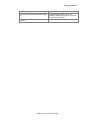
./apply_binaries.sh
A script to apply nv_tegra components.
./flash.sh
A script that flashes the boot loader and kernel
from the package.
./zImage_to_uimg.sh
A script that creates the vmlinux.uimg with
mkimage for use as the kernel image for u-boot
Note: The <platform> variable specifies the development system, such as
jetson-tk1.
Documentation
Tegra Linux Driver Package (L4T) also includes the following documentation:
•
•
Tegra_Linux_Driver_Package_Release_Notes_<ver>.pdf
Tegra_Linux_Driver_Package_Documents_<ver>.tar
Where <ver> is the version of the release, such as R19.3. Both the “armel” and
“armhf” software versions are documented.
Section Overview
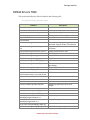
This section provides information about the contents of the L4T tar file.
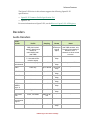
Kernel
This section describes the major components included in the ./kernel
directory.
Filename
Description
./dtb
Directory containing SoC-specific kernel
DTB files.
./dtb/tegra124-ardbeg.dtb
The DTB files specific to various board
types.
./dtc
The device-tree-compiler binary.
./zImage
A kernel binary image.
./LICENSE
A license file for “GNU GENERAL PUBLIC
LICENSE”.
./LICENSE.dtc
A license file for “GNU GENERAL PUBLIC
LICENSE” for the ‘device-tree-compiler’
binary.
./kernel_supplements.tbz2
Loadable kernel modules specific to the
included kernel zImage built with the
defconfig enabled for the device.
./vmlinux.uimg
A u-boot kernel binary image.
NVIDIA Tegra Linux Driver Package
Package Manifest
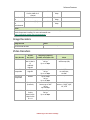
Boot Loader
This section describes the files provided in the ./bootloader directory.
Filename
Description
./mkbootimg
A tool used for img creation.
./nvflash
The NVIDIA flashing tool.
./LICENSE.mkbootimg_and_mkubootscript
A license file for the mkbootimg and
mkbootscript tools.
./LICENSE.mkgpt
A license file for the mkgpt tool.
LICENSE.u-boot_and_mkimage
A license file for u-boot and the mkimage
tool.
./mkgpt
A tool which encodes both primary and
secondary GPT into flashable binary
image files.
./mkimage
A u-boot tool for vmlinux.uimg creation.
./mkubootscript
A tool for flashing u-boot.
./ardbeg
< board> specifies the development
system, ardbeg for Tegra K1 32 Bit
(T12x) devices.
./ardbeg/fastboot.bin
The Fastboot-versioned boot loader
binary file.
./ardbeg/<platform
>_extlinux.conf.emmc
The config file for U-Boot for booting off
the internal EMMC.
./ardbeg/<platform>_extlinux.conf.nfs
The config file for U-Boot for booting off
the nfs root.
./ardbeg/<platform>_extlinux.conf.sdcar
d
The config file for U-Boot for booting off
the SD card.
./ardbeg/<platform>_extlinux.conf.usb
The config file for U-Boot for booting off
USB flash storage device.
./ardbeg/u-boot.bin
The u-boot binary image.
./ardbeg/BCT
Platform-specific BCT directory.
./ardbeg/BCT/PM375_Hynix_2GB_H5TC4G
63AFR_RDA_792MHz.cfg
BCT for Jetson TK1.
./<platform>/BCT/PM375_Hynix_2GB_H5T
C4G63AFR_RDA_924MHz.cfg
BCT for Jetson TK1.
./ardbeg/cfg
Platform-specific CFG directory.
./ardbeg/cfg/gnu_linux_fastboot_emmc_f
ull.cfg
Platform-specific CFG file.
NVIDIA Tegra Linux Driver Package
Package Manifest
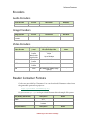
NV Tegra
This section describes the major components included in the ./nv_tegra
directory.
Filename
Description
./config.tbz2
Configuration files specific to the sample
filesystem.
./LICENSE
Tegra software license.
./LICENSE.brcm_patchram_plus
A license file for the brcm_patchram_plus
binary included in nvidia_drivers.tbz2.
./nvidia_drivers.tbz2
NVIDIA driver components
./nv_sample_apps
Directory containing NVIDIA sample
applications.
./nv_sample_apps/LICENSE
Tegra software license for files included in
the nv_sample_apps directory.
./nv_sample_apps/LICENSE.gst-openmax
License file for libgstomx.so and
libgstnvxvimagesink.so included in
nvgstapps.tbz2.
./nv_sample_apps/nvgstapps.tbz2
NVIDIA gstreamer components and
applications.
./nv_sample_apps/nvgstcapture<version>_README.txt
Instructions on how to run the
nvgstcapture application.
./nv_sample_apps/nvgstplayer<version>_README.txt
Instructions on how to run the nvgstplayer
application.
Nvgstapps TBZ2
This section describes the files included in the following file:
./nv_tegra/nv_sample_apps/nvgstapps.tbz2
Filename
Description
./usr
-
./usr/bin
-
./usr/bin/nvgstcapture-<version>
The multimedia capture camera
application
./usr/bin/nvgstplayer-<version>
The multimedia video player application.
./usr/lib
-
./usr/lib/arm-linux-gnueabi[hf]
-
./usr/lib/arm-linuxgnueabi[hf]/gstreamer-<version>
-
./usr/lib/arm-linux-
NVIDIA proprietary gstreamer conversion
NVIDIA Tegra Linux Driver Package
Package Manifest
gnueabi[hf]/gstreamer0.10/libgstnvvidconv.so
plug-in library
./usr/lib/arm-linuxgnueabi[hf]/gstreamer<version>/libgstnvxvimagesink.so
Video sink.
./usr/lib/arm-linuxgnueabi[hf]/gstreamer<version>/libgstomx.so
OpenMax driver.
Config TBZ2
This section describes the files included in the following file:
./nv_tegra/config.tbz2
Filename
Description
./etc
-
./etc/asound.conf.tegrart5639
ALSA library configuration file for RT5639.
./etc/asound.conf.tegramax98090
ALSA library configuration file for
MAX98090.
./etc/enctune.conf
Default multimedia encoding parameters
for NVIDIA reference platforms.
./etc/init
-
./etc/init/nv.conf
An NVIDIA-specific initialization script.
./etc/init/nvfb.conf
NVIDIA specific first-boot script.
./etc/init/nvwifibt.conf
NVIDIA bluetooth/wifi init script.
./etc/init/ttyS0.conf
An initialization script for getty on ttyS0.
./etc/modules
Lists “bluedroid” as a supporting module
for Bluetooth.
./etc/nv
-
./etc/nv/nvfirstboot
Control file used for for first boot.
./etc/udev
-
./etc/udev/rules.d
-
./etc/wpa_supplicant.conf
Sample WPA supplicant.
./etc/X11
-
./etc/X11/xorg.conf.jetson-tk1
The xorg configuration file.
./etc/sysctl.d
-
./etc/sysctl.d/90-tegra-settings.conf
Control file for sysrq.
NVIDIA Tegra Linux Driver Package
Package Manifest
NVIDIA Drivers TBZ2
This section describes the files included in the following file:
./nv_tegra/nvidia_drivers.tbz2
Filename
Description
./etc
-
./etc/ld.so.conf.d
-
./etc/ld.so.conf.d/nvidia-tegra.conf
Ldconf file for tegra directories.
./etc/nv_tegra_release
The tegra driver versioning file.
./lib
-
./lib/firmware
-
./lib/firmware/tegra12x
Directory included only on jetson-tk1
and other Tegra K1 32 bit (T12x) devices.
./lib/firmware/tegra12x/nvhost_msenc03
1.fw
Tegra K1-specific nvhost firwmware file
for msenc.
./lib/firmware/tegra12x/nvhost_tsec.fw
nvhost firmware file for tsec.
./lib/firmware/tegra12x/fecs.bin
GPU FECS firmware.
./lib/firmware/tegra12x/gpccs.bin
GPU GPCCS firmware.
./lib/firmware/tegra12x/gpmu_ucode.bin
GPU PMU ucode firmware
./lib/firmware/tegra12x/NETB_img.bin
GPU device hardware description.
./lib/firmware/tegra12x/vic03_ucode.bin
VIC ucode binary (VIC for pre or post
processing.)
./lib/firmware/tegra_xusb_firmware
Firmware file for XUSB.
./lib/firmware/nvavp_os_*.bin
NVIDIA AVP Kernel firmware.
Restricted codec:
./lib/firmware/nvavp_vid_ucode_alt.bin
NVIDIA video decoders.
./lib/modules
-
./usr
-
./usr/bin
-
./usr/bin/nvidia-bug-report-tegra.sh
NVIDIA bug reporting script (run for
usage)
./usr/lib
-
./usr/lib/arm-linux-gnueabi[hf]
-
./usr/lib/arm-linux-gnueabi[hf]/tegra
-
./usr/lib/arm-linuxgnueabi[hf]/tegra/libcuda.so.1.1
CUDA library
./usr/lib/arm-linuxgnueabi[hf]/tegra/libGL.so.1
GL graphics support library
usr/lib/arm-linux-gnueabi[hf]/tegra-egl
-
usr/lib/arm-linux-gnueabi[hf]/tegra-
Ldconf file for tegra-egl directories.
NVIDIA Tegra Linux Driver Package
Package Manifest
egl/ld.so.conf
./usr/lib/arm-linux-gnueabi[hf]/tegraegl/libEGL.so.1
OpenGL ES driver file.
./usr/lib/arm-linux-gnueabi[hf]/tegraegl/libGLESv1_CM.so.1
OpenGL ES driver file.
./usr/lib/arm-linux-gnueabi[hf]/tegraegl/libGLESv2.so.2
OpenGL ES driver file.
./usr/lib/arm-linuxgnueabi[hf]/tegra/libjpeg.so
Accelerated libjepeg library for Tegra.
./usr/lib/arm-linuxgnueabi[hf]/tegra/libnvapputil.so
Host (x86) shared object for application
utilities.
./usr/lib/arm-linuxgnueabi[hf]/tegra/libnvavp.so
User-space interface to the AVP for
audio/video acceleration via the nvavp
kernel driver.
./usr/lib/arm-linuxgnueabi[hf]/tegra/libnvdc.so
DC driver file.
./usr/lib/arm-linuxgnueabi[hf]/tegra/libnvddk_vic.so
DDK VIC.
./usr/lib/arm-linuxgnueabi[hf]/tegra/libnvfusebypass.so
NVIDIA fuse bypass.
./usr/lib/arm-linuxgnueabi[hf]/tegra/libnvidiaeglcore.so.19.3
EGL core library.
./usr/lib/arm-linuxgnueabi[hf]/tegra/libnvidiaglcore.so.19.3
OpenGL core library. This library is
implicitly used by libGL and by libglx, and
contains the core accelerated 3D
functionality.
./usr/lib/arm-linuxgnueabi[hf]/tegra/libnvidia-glsi.so.19.3
OpenGL System Interaction library.
./usr/lib/arm-linuxgnueabi[hf]/tegra/libnvidia-rmapitegra.so.19.3
A utility library that implements common
code to use the kernel-level graphics
drivers on Tegra.
./usr/lib/arm-linuxgnueabi[hf]/tegra/libnvidia-tls.so.19.3
NVIDIA tls libraries.
./usr/lib/arm-linuxgnueabi[hf]/tegra/libnvmm_camera.so
Multimedia camera driver file.
./usr/lib/arm-linuxgnueabi[hf]/tegra/libnvmm_contentpipe.s
o
Content pipe implementation (file source
abstraction).
./usr/lib/arm-linuxgnueabi[hf]/tegra/libnvmmlite_audio.so
NVIDIA Multimedia audio driver.
./usr/lib/arm-linuxgnueabi[hf]/tegra/libnvmmlite_image.so
NVIDIA Multimedia image driver.
./usr/lib/arm-linuxgnueabi[hf]/tegra/libnvmmlite.so
NVIDIA Multimedia driver.
./usr/lib/arm-linuxgnueabi[hf]/tegra/libnvmmlite_utils.so
NVIDIA Multimedia utilities.
NVIDIA Tegra Linux Driver Package
Package Manifest
./usr/lib/arm-linuxgnueabi[hf]/tegra/libnvmmlite_video.so
NVIDIA Multimedia video driver.
./usr/lib/arm-linuxgnueabi[hf]/tegra/libnvmm_parser.so
Parser.
./usr/lib/arm-linuxgnueabi[hf]/tegra/libnvmm.so
NVIDIA Multimedia Framework.
./usr/lib/arm-linuxgnueabi[hf]/tegra/libnvmm_utils.so
Multimedia Framework utilities.
./usr/lib/arm-linuxgnueabi[hf]/tegra/libnvmm_writer.so
3GP writer block on CPU.
./usr/lib/arm-linuxgnueabi[hf]/tegra/libnvodm_imager.so
Tegra development platform ODM
adaptation for imager.
./usr/lib/arm-linuxgnueabi[hf]/tegra/libnvodm_query.so
ODM Query interface.
./usr/lib/arm-linuxgnueabi[hf]/tegra/libnvomxilclient.so
OpenMAX IL client.
./usr/lib/arm-linuxgnueabi[hf]/tegra/libnvomx.so
OpenMAX IL implementation.
./usr/lib/arm-linuxgnueabi[hf]/tegra/libnvos.so
NVIDIA OS abstraction library.
/usr/lib/arm-linuxgnueabi[hf]/tegra/libnvparser.so
Parser used for NVIDIA NvMMlite.
./usr/lib/arm-linuxgnueabi[hf]/tegra/libnvrm_graphics.so
Resource Manager (NvRM) graphics host,
AVP communication library, and graphics
drivers.
./usr/lib/arm-linuxgnueabi[hf]/tegra/libnvrm.so
Resource Manager kernel interface.
./usr/lib/arm-linuxgnueabi[hf]/tegra/libnvsm.so
NVIDIA shader manager library.
./usr/lib/arm-linuxgnueabi[hf]/tegra/libnvtestio.so
Target (ARM) shared object for test I/O
utilities.
./usr/lib/arm-linuxgnueabi[hf]/tegra/libnvtestresults.so
Test results shared object.
./usr/lib/arm-linuxgnueabi[hf]/tegra/tegra/libnvtnr.so
Temporal Noise Reduction (TNR)
interface.
./usr/lib/arm-linuxgnueabi[hf]/tegra/libnvtvmr.so
Multimedia Tegra video mixer/renderer.
./usr/lib/arm-linuxgnueabi[hf]/tegra/libnvwinsys.so
Winsys library.
./usr/lib/arm-linuxgnueabi[hf]/tegra/libtegrav4l2.so
V4L2 driver for Tegra.
./usr/lib/xorg
-
./usr/lib/xorg/modules
-
./usr/lib/xorg/modules/drivers
-
./usr/lib/xorg/modules/drivers/nvidia_dr
v.so
Tegra X driver.
NVIDIA Tegra Linux Driver Package
Package Manifest
./usr/lib/xorg/modules/extensions
-
./usr/lib/xorg/modules/extensions/libglx
.so
A GLX extension module for X. This
module is used by the X server to provide
server-side GLX support.
./usr/bin
-
NVIDIA Tegra Linux Driver Package
Getting Started
This section contains information to help you get started using this release of
NVIDIA® Tegra® Linux Driver Package.
Requirements
The following lists the requirements to use this Tegra Linux Driver Package
(L4T) release:
•
•
•
•
•
Host PC running Linux. Ubuntu 12.04 is used in examples in this document,
but other distributions should also work.
A kernel image (zImage). L4T does contain a kernel image (zImage), and you
can also download and rebuild from source.
Boot loader. This can be Fastboot or U-Boot. Flashing on a Tegra K1 32 Bit
series (Jetson TK 1) developer board requires a boot loader. This boot loader
can be either the Fastboot utility or U-Boot, both of which are included in this
release.
A rootfs device which can be an SD card, a USB hard disk, or USB stick
formatted to EXT3. It is also possible to use the target device’s internal
memory, or your Linux Host PC hard-drive through NFS.
A USB cable to plug into the recovery port.
Boot Options
It is currently possible to boot L4T on the Tegra K1 32 Bit series Jetson TK 1
developer board with a root file system from:
•
•
•
•
•
USB stick or USB hard disk
SD card
Internal eMMC
SATA (Fastboot only)
Network file system (NFS)
NVIDIA Tegra Linux Driver Package
Getting Started
Setting Up Your Environment
The following subsections contain information to help you get started using this
release of L4T.
Extracting Tegra Linux Driver Package
Note: The procedures in this document assume you extract the release
package in ~/.
To extract Tegra Linux Driver Package
•
Extract the package manually by executing the following command:
$ sudo tar -vxjf
Tegra<SOC>_Linux_<release_num>.<version_num>_<release
type>.tbz2
Where:
•
•
•
<release_num> is the branch number of the release, such as R19.
<version_num> is the revision number of the build such as 1.0 for the
first build.
<release_type> is armel (for softfp ABI) or armhf (for hardfp ABI).
Setting Up Your Board
L4T requires a supported Tegra developer board as well as a host PC running
Linux. Please consult your board documentation for steps on how to setup and
configure your board.
Prerequisites
•
•
You have a device specified above in the “Boot Options” topic (supported
formats: EXT2, EXT3, or EXT4). (The device can also be a memory card with a
USB adapter.)
You have a USB cable to plug into the board’s recovery port.
Setting Up Your File System
This section describes the steps for setting up your file system. You must set up
the root file system and copy the file system to your boot device.
NVIDIA Tegra Linux Driver Package
Getting Started
Sample Root File System
The following are the details regarding the creation of the provided sample root
file system. The steps were performed on a target board.
To create the sample file system
1. Install debootstrap with the following command.
$ sudo apt-get install debootstrap
2. Run the below command as root.
$ debootstrap --verbose --no-check-gpg --arch=armhf -variant=minbase --include=ubuntu-minimal,xserverxorg,xserver-xorg-core,xinit,xterm,alsa-utils,wirelesstools,wpasupplicant,x11-xserver-utils,opensshclient,openssh-server,bzip2,less,iputils-ping,isc-dhcpclient,net-tools,lsb-release,sudo,vim,iw,bluez,gdisk,wget
language-pack-en-base,xfonts-base,ntp -components=main,restricted,universe trusty rfs
http://ports.ubuntu.com/
The hostname used in this procedure is tegra-ubuntu, with the username
ubuntu, and the password ubuntu.
Note: The provided sample target file system does not come with pregenerated SSH host keys. These host keys can be re-generated with the
following command:
$ ssh-keygen -t rsa -f /etc/ssh/ssh_host_rsa_key
View the ssh-keygen man page for other -t options.
If you are using your own Linux distribution, please also view the files included
in ~/Linux_for_Tegra/nv_tegra/config.tbz2 file and make
appropriate adjustments as made in those files for your root file system.
The following packages are installed by default:
•
•
•
•
•
•
•
•
•
•
ubuntu-minimal
xserver-xorg
xserver-xorg-core
x11-xserver-utils
xinit
xterm
alsa-utils
wireless-tools
wpasupplicant
openssh-client
NVIDIA Tegra Linux Driver Package
Getting Started
•
•
•
•
•
•
•
•
•
•
•
•
•
•
•
bzip2
less
iputils-ping
isc-dhcp-client
net-tools
lsb-release
sudo
vim
iw
bluez
gdisk
wget
language-pack-en-base
xfonts-base
ntp
Setting Up the Root File System
The next step in booting the target board is to configure the root file system.
Follow the procedures in this section to set up the rootfs and to copy the file
system to the rootfs device.
Note: The instructions below use the sample file system that is provided by
NVIDIA as the base. If you would like to use your own, set the
LDK_ROOTFS_DIR environment variable to point to where your rootfs is
located and skip Steps 1 and 2.
To set up the rootfs
1. Download the following file to your home directory:
Tegra-Linux-Sample-Root-Filesystem_<release_type>.tbz2
Where <release_type> is armel (for softfp ABI) or armhf (for hardfp
ABI).
This file contains the NVIDIA-provided sample root file system.
2. Extract the compressed file as follows:
•
Navigate to the rootfs directory of the extracted NVIDIA driver package
with this command:
$ cd <your_L4T_root>/Linux_for_Tegra/rootfs
Where <your_L4T_root> is your L4T root directory, which is assumed
to be your home directory (~).
NVIDIA Tegra Linux Driver Package
Getting Started
For more information, see Extracting Tegra Linux Driver Package in this
section.
•
Extract the sample file system to the rootfs directory with this command:
$ sudo tar jxpf ../../Tegra-Linux-Sample-RootFilesystem_<release_type>.tbz2
3. Run the apply_binaries.sh script to copy the NVIDIA user space
libraries into the target file system:
$ cd ..
$ sudo ./apply_binaries.sh
If you are using a different rootfs, or if you already have configured your
rootfs, you can apply the NVIDIA user space libraries by setting the
LDK_ROOTFS_DIR environment variable to point to your rootfs. Then run
the script, as shown above, to copy the binaries into your target file system.
If the apply_binaries.sh script installs the binaries correctly, the last
message output from the script is “Success!”.
4. Optionally load any additional packages as shown in the Installing
Additional Packages topic in this guide.
5. Load the target file system that you have generated onto the first partition of
a device (either a USB stick, an SD card, or a USB hard drive) and attach that
device to the target board. Alternatively, you can use the flash.sh script to
flash the root file system to the internal eMMC. In this case proceed with the
following steps, and then and follow the internal eMMC instructions.
6. Follow the steps in the Flashing the Boot Loader and Kernel section of this
guide.
7. Power on the target board.
8. Optionally, use an RS232 serial cable (not included in the development kit) to
connect the RS232 port on Jetson TK1 to the Linux host PC to access the
debug console. Set up the terminal on the host PC as follows:
•
•
•
•
115200 baud
8-bit
Parity none
1 stop bit
To copy the file system to the external rootfs device
1. Plug your rootfs device into the host PC.
2. If your device is not formatted as Ext3, enter the following command to
format it with an Ext3 file system:
$ sudo mkfs.ext3 /dev/sd<port><device number>
NVIDIA Tegra Linux Driver Package
Getting Started
Where:
•
•
<port> is the port to which your device is mounted.
<device_number> is the device number of the device attached to the
port. You can use the dmesg command to determine the port.
3. If needed, mount your device with the following command:
$ sudo mount /dev/sdX1 <mntpoint>
Where <mntpoint> is your rootfs device’s mount point on the host system.
4. Copy the file system. If LDK_ROOTFS_DIR is set, execute these commands:
$ cd ${LDK_ROOTFS_DIR}
$ sudo cp –a * <mntpoint> && sync
If it is not set, copy the rootfs directory that is included in the release by
executing the following commands:
$ cd <your_L4T_root>/Linux_for_Tegra/rootfs
$ sudo cp –a * <mntpoint> && sync
Once you have copied the content to the external disk or device, you can then
unmount the disk and plug it to the board. For more information about flashing,
see the Flashing the Boot Loader and Kernel topic in this section. For information
about configuring your board setup, see the hardware documentation for your
developer board.
To copy the file system to the external rootfs device
•
For flashing to internal eMMC, see the Flashing the Boot Loader and Kernel
topic in this section.
Updating Drivers on an Existing Target System
These instructions are for the situation where there was a previous release or
driver package loaded onto a target board and that target device is booted.
Prerequisite
You must attach an Ethernet cable to the device through either the Ethernet port
(if available) or through a USB Ethernet adaptor.
To update drivers on an existing target system
1. Log into the target device.
2. From the nvidia.com links with wget, download the NVIDIA Tegra Linux
driver release and the additional support packages:
NVIDIA Tegra Linux Driver Package
Getting Started
wget
http://developer.nvidia.com/sites/default/files/akamai/mobile/
files/L4T/Tegra<SOC>_Linux_<last_rel_num_RNN>_<release_type>.t
bz2
Where:
•
•
•
<SOC> is the number of the Tegra SOC, such as 124 for Jetson TK1.
<last_rel_num_RNN> is the number of the release in this format (RNN),
such as R19.3.
<release_type> is armel (for softfp ABI) or armhf (for hardfp ABI).
Note: The release shown in this example is a previous release and not the
current release.
3. Extract the release. For more information, see Extracting Tegra Linux Driver
Package in this section.
4. Set the LDK_ROOTFS_DIR variable to point to the root '/' directory.
$ export LDK_ROOTFS_DIR=/
$ echo ${LDK_ROOTFS_DIR}
5. Go into the Linux_for_Tegra directory.
$ cd Linux_for_Tegra
6. Run the apply_binaries.sh script to install the NVIDIA drivers onto
your target board. For more information, see Setting Up the Root File System
in this section.
7. (Optional) Change your X driver ABI as a variable passed into
apply_binaries. For more information, see Setting Up the Root File
System in this section.
8. For any additional packages, extract the files, being sure to extract them to
your root '/' directory. For more information, see Installing Additional
Packages in this section.
Determining the Success of a Driver Update
You can determine whether a driver update on a target board went successfully.
To determine the success of a driver update
•
Execute the following command on a booted target device:
$ sha1sum –c /etc/nv_tegra_release
If the driver update is successful, you will see a line similar to:
<file_location>: OK
It will list all files in the release in a format similar to the following:
NVIDIA Tegra Linux Driver Package
Getting Started
/usr/lib/xorg/modules/drivers/nvidia_drv.so: OK
One reason the driver update might be unsuccessful is if the file is missing. The
message in this case is similar to:
sha1sum: /usr/lib/xorg/modules/drivers/ nvidia_drv.so: No such
file or directory
/usr/lib/xorg/modules/drivers/ nvidia_drv.so: FAILED open or
read
Another reason the driver update might be unsuccessful is if the new file is not
the same as the existing file, producing an error similar to:
/usr/lib/xorg/modules/drivers/ nvidia_drv.so: FAILED
Increasing Internal Memory Partition for the Root File
System
The suggested rootfs partition size for the Jetson TK1 platform is 1073741824
bytes and is specified by default in the flash.sh script. This 1 GB reserved in
internal memory for the rootfs partition may be insufficient for installation of
additional packages. Packages such as ubuntu-desktop, gst, and other gnome
plug-ins may require additional space.
The “-S <size-in-bytes>” argument to flash.sh can be used to change
the partition size.
To flash for a larger partition
•
Execute the following command:
$ sudo ./flash.sh <platform> -S <size> <rootdev>
Where:
•
•
•
<platform> is jetson-tk1.
<size> is the desired size for the partition, such as 8589934592 (or 8 GiB)
for 8 GB.
<rootdev> is the rootfs partition’s internal memory, for example
mmcblk0p1.
Installing Additional Packages
This section explains how to install the additional NVIDIA packages, additional
Ubuntu packages, and Google Chrome.
NVIDIA Tegra Linux Driver Package
Getting Started
Installing Additional NVIDIA Packages
Additional NVIDIA packages may be posted alongside the release. To make full
use of the features in the release, these additional packages must be installed.
Directly after the apply_binaries step in Setting Up the Root File System, you
can install the package into the configured rootfs.
To install an NVIDIA package when the rootfs is already installed
1. Mount the target rootfs device to /mnt:
$ sudo mount <device> /mnt
Where <device> is the device such as /dev/sda1.
2. Install the package:
$ tar -C /mnt -xjpf <path-to>/$<package_name>
Where <package_name> is one of the packages.
For example, if you have the restricted_codecs.tbz2 file located in:
$HOME/restricted_codecs.tbz2
then your line will look like:
$ tar -C /mnt -xjpf $HOME/restricted_codecs.tbz2
3. Unmount the device with this command:
$ sudo umount <device>
And then attach the device to the target board.
If the rootfs is installed on the device’s internal eMMC, boot and log in to the
target and use the scp command to copy the restricted_codecs.tbz2
package to the target, and then extract the restricted_codecs.tbz2
package from the root directory.
Installing Additional Ubuntu Packages
This section explains how to install additional packages from Ubuntu by using
the provided sample file-system. For example, you may wish to download the
following packages:
•
•
openssh-server for remotely logging in
ubuntu-desktop for the standard Ubuntu graphical user interface (if not
pre-installed)
You can receive notifications from Update Manager when new Ubuntu packages
are available.
NVIDIA Tegra Linux Driver Package
Getting Started
Note: L4T is tested with base Ubuntu packages only. No updated packages
have been tested.
To receive notifications
1. Locate and edit the following file:
/etc/apt/sources.list
2. Add the following line:
deb http://ports.ubuntu.com/ubuntu-ports <distribution>updates main universe
Where <distribution> is the name of the Ubuntu distribution your rootfs
is based on. For example, for a rootfs based on the Trusty Tahr distribution of
Ubuntu, add the line:
deb http://ports.ubuntu.com/ubuntu-ports trusty-updates main
universe
Prerequisite
You have attached an Ethernet cable to the device through either the Ethernet
port (if available) or through the USB Ethernet adaptor.
To install more packages
1. Boot the target device.
2. Turn on networking by executing:
$ sudo dhclient
Note: You may need to specify eth0/eth1 and other parameters to assign an
IP address to the appropriate interface.
3. Install packages using apt-get. For example, to install wget execute this
command:
$ sudo apt-get install wget
Configuring NFS Root on the Linux Host
To boot the target device from NFS, you must provide an NFS root mount point
on your Linux host machine. The procedure in this section describes the basic
steps to do so.
NVIDIA Tegra Linux Driver Package
Getting Started
Prerequisites
•
•
You must have an Ethernet connection to install packages on the host.
You must have an Ethernet connection on the target.
To configure NFS root on the Linux host
1. Install the nfs components on your host machine:
$ sudo apt-get install nfs-common nfs-kernel-server
2. The NFS server must know which directories you want to 'export' for clients.
This information is specified in the /etc/exports file.
•
Modify /etc/exports to look somewhat like this:
$ /nfsroot
*(rw,nohide,insecure,no_subtree_check,async,no_root_squash)
•
After adding the entry, restart using the following command:
$ sudo /etc/init.d/nfs-kernel-server restart
3. Create an /nfsroot directory on your Linux host machine:
$ sudo mkdir /nfsroot
4. Copy the file system to the nfsroot directory:
$ cd ./rootfs
$ sudo cp –a * /nfsroot
5. Export the root point:
$ sudo exportfs -a
Alternatively, you can export or un-export all directories by using the -a and
-u flags. The following command un-exports all directories:
$ sudo exportfs -au
6. (Optional) If the Ubuntu firewall blocks NFS root access, it must be disabled
depending upon your configuration. You can do so with the following
command:
$ sudo ufw disable
7. If there are issues performing the NFS boot, to separately verify everything
on the ‘host’ machine is configured properly, you can perform the following
step on a booted target board through USB/SD/internal eMMC. It should be
possible to mount the host NFS root point on the target device:
$ mkdir rootfs
$ sudo mount -v -o nfsvers=3 <IP-ADDR>:/nfsroot rootfs
Where <IP-ADDR> is the IP address of the Linux Host machine as taken from
the ifconfig command. This proves that the host configuration is correct.
NVIDIA Tegra Linux Driver Package
Getting Started
Note: Prior to executing the mount command on the target machine, you
must install the nfs-common package using the following command:
$ sudo apt-get install nfs-common
To boot the target with the NFS root point, see the Flashing the Boot Loader and
Kernel topic in this section and be sure to include the -N option for the nfs root
point.
Setting Power Saving Options
This section explains how to enable the hotplug driver and the Tegra CPU
power-gated state (LP2) for power savings on the target board.
Enabling the Auto-Hotplug Driver
The auto-hotplug driver implements the policy for when to bring cores
online/offline. The auto-hotplug driver also implements the policy for when to
switch clusters, i.e. when to switch from companion CPU to main CPU or vice
versa. Cluster switching is transparent to the OS. The switch happens when
software enters a power-gated state on one CPU core and hardware resumes the
execution on a different physical CPU core.
To enable auto-hotplug
•
Enter the following command:
echo 1 >
/sys/devices/system/cpu/cpuquiet/tegra_cpuquiet/enable
echo "balanced" >
/sys/devices/system/cpu/cpuquiet/current_governor
To disable auto-hotplug
•
Enter the following command:
echo 0 >
/sys/devices/system/cpu/cpuquiet/tegra_cpuquiet/enable
Enabling the Tegra CPU Power-Gated State (LP2)
With the LP2 power state, the CPU core is power-gated if supported by the
hardware. If all CPU cores on the VDD_CPU power rail are in LP2, Tegra
hardware signals the PMIC to turn off the regulator.
NVIDIA Tegra Linux Driver Package
Getting Started
To enable the LP2 power state
•
Enter the following command:
$ echo Y > /sys/module/cpuidle/parameters/power_down_in_idle
Controlling Display State
The Linux kernel 3.1 (and later) adds a power saving feature that may blank the
display of an idle system even when applications are running. The feature is
called console blank (screen saver). It is defined as:
consoleblank= [KNL]
Where [KNL] is the console blank (screen saver) timeout in seconds. This
defaults to 10*60 = 10 mins. A value of 0 disables the blank timer.
By passing arguments to the kernel command line, you can:
•
•
Disable this feature, or
Set the timeout to a longer interval.
With the flash.sh script, you can override the kernel command line options
passed from fastboot to the kernel. For more information, see the Flash Script
Usage topic.
To disable the console blank (screen saver) from the kernel command line
1. Add the following line to the kernel parameters in the grub configuration:
consoleblank=0
2. View the current consoleblank value with the following command:
$ cat /sys/module/kernel/parameters/consoleblank
To disable the console blank feature with an escape sequence
•
Enter the following escape sequence:
$ echo -ne "\033[9;0]"
To change the console blank timeout value with an escape sequence
•
Enter the following escape sequence:
$ echo -ne "\033[9;<timeout>]"
where <timeout> is the timeout in seconds.
NVIDIA Tegra Linux Driver Package
Getting Started
For more information on this escape sequence, see the console_codes(4) man
page documents. For information on the input/output controls that provide some
of the same functionality, see the console_ioctl(4) man page.
Flashing the Boot Loader and Kernel
This section describes the steps that must be taken to boot the target board by
flashing the kernel and boot loader (code-name Jetson TK1 platform) and
provides usage information for the flash.sh helper script.
Flash Procedure
The first step is to flash the board with the boot loader and kernel, and,
optionally, flash the rootfs to internal eMMC.
Prerequisites
The following directories must be present:
•
•
•
•
/bootloader—boot loader plus flashing tools (NvFlash, CFG, BCTs, etc.)
/kernel—a kernel zImage /vmlinux.uimg, DTB files, and kernel modules
/rootfs—the root file system that you download (This directory starts empty
and you populate it with the sample file system.)
/nv_tegra—NVIDIA® Tegra® user space binaries and sample applications
You must also have the USB cable connected to the recovery port prior to
running the commands listed in the procedure. For more information, see the
Requirements topic in this section.
To flash the boot loader and kernel
1. Put the target board into reset/recovery mode. Do so by first powering on the
board and then holding the recovery button, and then pressing the reset
button as described in the Quick Start Guide for the board.
2. Run the flash.sh script that is in the top level directory of this release. The
script must be supplied with the target board (jetson-tk1) for the root file
system:
$ sudo ./flash.sh <platform> <rootdev>
•
If the root file system will be on a USB disk, execute the script as follows:
$ sudo ./flash.sh <platform> sda1
Note: If a SATA device is connected, that device enumerates as sda1.
NVIDIA Tegra Linux Driver Package
Getting Started
•
If the root file system will be on an SD card, execute the script as follows:
$ sudo ./flash.sh <platform> mmcblk1p1
•
If the root file system will be on the internal eMMC, execute the script as
follows:
$ sudo ./flash.sh <platform> mmcblk0p1
Where <platform> is jetson-tk1.
The above examples are for fastboot. For U-Boot, add the following
argument:
-L <PATH_TO_U-BOOT_BIN_FILE>
For example:
$ sudo ./flash.sh –L bootloader/<platform>/u-boot.bin
<platform> <rootdev>
The boot loader and kernel will load.
For more information on U-Boot, see the U-Boot Guide chapter of this
document.
Flash Script Usage
You can find the most up-to-date usage information by running flash.sh –h
(using the flash.sh script included in the release). The basic usage information
is as follows.
Usage
sudo ./flash.sh [options] <platform> <rootdev>
Where you specify the required parameters and one or more of the options
shown in the following table.
Parameters
Description
<platform>
Is jetson-tk1.
<rootdev>
Is one of following:
mmcblk0p1
Specifies internal eMMC.
mmcblk1p1
Specifies external SDCARD.
sda1
Specifies external USB device (such as, USB memory
stick or HDD).
eth0
Specifies nfsroot via external USB Ethernet interface.
Options
Description
-h
Specifies to print this usage information.
-b <bctfile>
Specifies the NvFlash Boot Configuration Table (BCT) file.
NVIDIA Tegra Linux Driver Package
Getting Started
-c <cfgfile>
Specifies the NvFlash configuration file.
-d <dtbfile>
Optionally specifies a device tree file to use instead of the default.
-e <emmc_file>
Specifies the eMMC size of the target device.
-f <flashapp>
Specifies the path to flash application: nvflash or tegra-rcm.
-i
Specifies to pass the user kernel command line to the kernel as-is.
-k <partition
id>
Specifies the kernel partition ID to be updated (minimum = 5).
-n <nfs args>
Specifies the static NFS network assignments:
<Client IP>:<Server IP>:<Gateway IP>:<Netmask>
-o <odmdata>
Specifies the ODM data value.
-p
Total eMMC HW boot partition size.
-r
Specifies to skip building and reuse existing system.img.
-s
<ubootscript>
Specifies the boot script file for U-Boot.
-C <cmdline>
Specifies the kernel command line. Warning: Each option in this
kernel command-line gets higher precedence over the same option
from fastboot. In case of NFS booting, this script adds NFS booting
related arguments if the -i option is omitted.
-F <flasher>
Specifies the flash server, such as fastboot.bin.
-I <initrd>
Specifies initrd file. Null initrd is the default.
-K <kernel>
Specifies the kernel image, such as zImage.
-L
<bootloader>
Specifies the full path to the boot loader, such as fastboot.bin or
u-boot.bin.
-P
<end_of_PPT_p
lus_1>
Specifies the sum of the primary GPT start address, the size of PPT,
plus 1.
-R <rootfs dir>
Specifies the sample rootfs directory.
-N <nfsroot>
Specifies the nfsroot, for example:
<my IP addr>:/my/exported/nfs/rootfs
-S <size>
Specifies the rootfs size in bytes. This is valid only for internal
rootdev. KiB, MiB, GiB style shorthand is allowed. For example, 1GiB
signifies 1024 * 1024 * 1024 bytes.
-T <ITS file>
ITS file name. Valid only for u-boot.
Synchronizing the Kernel Sources
You can manually rebuild the kernel used for this package. Internet access is
required to do so.
Prerequisites
•
You have installed Git. Install Git with the following command:
NVIDIA Tegra Linux Driver Package
Getting Started
$ sudo apt-get install git-core
•
Your system has the default Git port 9418 open for outbound connections.
To rebuild the kernel
1. Get the kernel source by running the source_sync.sh script:
$ ./source_sync.sh -k
Which will prompt you to enter a ‘tag’ name, which is provided in the release
notes.
—Or—
You can also manually sync the sources, as follows:
$ cd <myworkspace>
$ git clone git://nv-tegra.nvidia.com/linux-2.6.git
kernel_sources
$ cd kernel_sources
$ git checkout <TAG_NAME>
Where <TAG_NAME> is the ’tag’ name that is available in the release notes.
You can sync to any Linux tag you would like, but the tag provided in the
release notes will sync the sources to the same source point of time the
release binary was built from. To see a list of the available release tags, use:
$ git tag –l tegra-l4t*
Building the NVIDIA Kernel
Follow the steps in this procedure to build the NVIDIA kernel.
Prerequisites
•
You have downloaded the kernel source code.
To build the Tegra Kernel
1. Export the following environment variables:
$ export CROSS_COMPILE=<crossbin>
$ export TEGRA_KERNEL_OUT=<outdir>
$ export ARCH=arm
Where:
•
<crossbin> is the prefix applied to form the path to the tool chain for
cross compilation, e.g., gcc. For a CodeSourcery tool chain, it will look
something like:
NVIDIA Tegra Linux Driver Package
Getting Started
<csinstall>/arm-2009q1-203-arm-none-linux-gnueabi/bin/armnone-linux-gnueabi-
Note: This example requires GCC 4.4 or above.
•
<outdir> is the desired destination for the compiled kernel.
2. Execute the following commands to create the .config:
$ cd <myworkspace>/<kernel_source>
$ mkdir $TEGRA_KERNEL_OUT
Where <kernel_source> directory containing kernel sources.
•
For Tegra K1 32 Bit, Jetson TK 1, use:
$ make O=$TEGRA_KERNEL_OUT tegra12_defconfig
Where <myworkspace> is the parent of the Git root.
3. Execute the following commands to build the kernel:
$ make O=$TEGRA_KERNEL_OUT zImage
4. Execute the following command to create the kernel device tree components:
$ make O=$TEGRA_KERNEL_OUT dtbs
5. Execute the following commands to build the kernel modules (and optionally
install them)
$ make modules DESTDIR=<your_destination>
$ make modules_install INSTALL_MOD_PATH=<your_destination>
6. Copy the kernel zImage over the one present in the ‘kernel’ directory of the
release.
7. Archive the kernel modules created in Step 4 using the tar command and
the filename that is used for the kernel modules TAR file in the same kernel
directory of the release. When both of those TAR files are present, you can
follow the instructions provided in this document to flash and load your
newly built kernel.
OpenGL/EGL Gears Test Application
If you would like to run a sample OpenGL/EGL test application, you can run the
open-source Gears application.
To install and run Gears test application
1. Boot the target system with an Ethernet connection.
NVIDIA Tegra Linux Driver Package
Getting Started
2. Enable package download from the “universe” repository by editing
/etc/apt/sources.list as root:
$ sudo vi /etc/apt/sources.list
3. Uncomment the following line in the file by removing the leading # character:
# deb http://ports.ubuntu.com/ubuntu-ports/ trusty universe
4. Update the repository:
$ sudo apt-get update
5. Install the mesa-utils and mesa-utils-extra packages:
$ sudo apt-get install -y mesa-utils
$ sudo apt-get install –y mesa-utils-extra
6. At this point you should be able to run the application with the following
steps:
$ export DISPLAY=:0
$ X&
$ /usr/bin/es2gears
GStreamer-based Multimedia Playback (NvGstPlayer)
You can use the GStreamer open source multimedia framework and the
NvGstPlayer utility for testing multimedia local playback and HTTP/RTSP
streaming playback use cases. The NvGstPlayer can be used as a reference
implementation.
This section tells you how to install and use this application. This section
includes the following sub-topics.
•
•
Installing GStreamer
Using NvGstPlayer
For more information about the NvGstPlayer application, refer to the readme file
included with the release at .
Installing GStreamer
You install GStreamer from the Internet directly on the target. There is a wrapper
library called gst-openmax that is an interface between GStreamer and
OpenMAX, which enables accelerated NVIDIA plug-ins in the GStreamer
framework
For more information about GStreamer, see the following website:
http://gstreamer.freedesktop.org
NVIDIA Tegra Linux Driver Package
Getting Started
NvGstPlayer is a multimedia player test application.
Complete prerequisite steps in the file nvgstcapture_README.txt before
running the NvGstPlayer and NvGstCapture applications.
Instructions for installing GStreamer are also included in that text file.
Using NvGstPlayer
NvGstPlayer is a command line media file player. It will play audio/video files
encapsulated in MP4, 3GP, AVI, ASF, WMA, MKV, M2TS, WEBM, and MOV.
NvGstPlayer supports local file playback and playback over RSTP, HTTP, and
UDP. For information about NvGstPlayer runtime commands, default settings,
and important notes see the nvgstplayer_README.txt file included in the
release.
Note: To use the NvGstPlayer application, you must install the restricted
codecs available (licensed separately) on the release website. For more
information, see Installing Additional NVIDIA Packages in this guide.
Gstreamer-based Camera Capture (NvGstCapture)
The NvGstCapture application supports GStreamer version 0.10.36 by default.
NvGstCapture can capture audio and video data using microphone and camera
and encapsulate encoded A/V data in the container file.
To use the NvGstCapture application you must install the restricted codecs
package available (licensed separately) on the release website. For more
information, see Installing Additional NVIDIA Packages in this guide.
For NvGstCapture installation and usage information, see the
nvgstcapture_README.txt file included with the release at
<your_L4T_root>/Linux_for_Tegra/nv_tegra/nv_sample_apps.
NVIDIA Bug Reporting Script
Attaching the log file to communication about issues found with the release is
beneficial. Use the nvidia-bug-report-tegra.sh script to generate log files.
To generate a log file for bug reporting
•
Log into the target board and enter the below command:
$ sudo /usr/bin/nvidia-bug-report-tegra.sh
NVIDIA Tegra Linux Driver Package
Getting Started
To generate a log file for bug reporting with extended logging mode
•
Log into the target board and enter the below command:
$ sudo /usr/bin/nvidia-bug-report-tegra.sh –e
By default the logfile generated by both procedures above is located at
$HOME/nvidia-bug-report-tegra.log.
Note: Attach a log file when reporting any bugs to NVIDIA, whether through
email or the forums.
NVIDIA Tegra Linux Driver Package
U-Boot Guide
This document describes the U-Boot implementation for NVIDIA® Tegra® Linux
Driver Package.
Requirements
This topic provides software requirements and prerequisites, including Linux
tools that are required for Tegra Linux Driver Package (L4T).
•
Linux-based Host System.
Functionality of the u-boot build and flashing utilities was validated using an
Ubuntu 12.04 host system; however, later versions or alternative Linux
distributions may work with host-specific modifications.
•
Tegra Linux Driver Package (L4T).
Download the latest L4T package from the Tegra Developer Zone and follow
the installation instructions in the user documentation. You can find L4T on
the Tegra Developer Zone:
http://developer.nvidia.com/linux-tegra
•
Flex and Bison.
The U-Boot makefiles require flex and bison to parse various configuration
files. If flex and bison are not already installed on your host machine, you can
install them on an Ubuntu host machine with the following command:
$ sudo apt-get install flex bison
•
Device Tree Compiler (dtc).
Ensure that the full path to the dtc binary is available to the U-Boot make
system by either passing the path as a variable or by making the dtc directory
available in the local command path of the host machine. Most of the dtc
packages available from standard Linux distribution package management
systems (like apt) are not yet updated with a version of dtc with the features
required by the U-Boot makefile. Therefore, an example of building dtc from
NVIDIA Tegra Linux Driver Package
Getting Started
source is included in this section. For the procedure, see Using Device Tree
Compiler.
A pre-built DTC compiler is also included in the kernel directory of the
release. This DTC compiler is built from the kernel sources in this release.
These sources are located in the scripts/dtc directory and built by
building the kernel dtbs target.
•
U-Boot Kernel Image Tool (mkimage).
The U-Boot image tool is what generates the vmlinux.uimg from the kernel
zImage. The L4T release includes a prebuilt 64-bit mkimage in
<your_L4T_root>/Linux for Tegra/bootloader. If mkimage is not installed, it
can be obtained by building the top-level U-Boot make target on either a 64bit or 32-bit host build system. For more information on building U-Boot, see
Downloading and Building U-Boot . The mkimage tool is in the U-Boot
source directory at:
./tools/mkimage
•
ARM tool chain for cross compilation.
For more information, see the Toolchain section in this guide.
•
U-Boot source.
For more information, see Downloading and Building U-Boot.
•
Kernel source.
For information, see the following sections in the Getting Started chapter:
•
•
•
Setting Up Your Environment
Synchronizing the Kernel Sources
Building the NVIDIA Kernel
Also, see the Adding a Compiled Kernel to the Root File System topic in this
section.
Using Device Tree Compiler
This topic provides an example of building the Device Tree Compiler (dtc) from
source to include the features required by the U-Boot makefile.
NVIDIA Tegra Linux Driver Package
Getting Started
To build dtc from source
1. If you do not want to pass in dtc as a parameter to the U-Boot environment,
ensure a local command path (such as ./usr/local/bin or another
choice) is at the beginning of the shell command path.
$ export PATH=<local_command_path>:${PATH}
Note: If you execute:
$ make install
The dtc makefile installs the binary into the first entry of shell PATH variable,
so it is important that the local command path is at the beginning of the shell
PATH variable.
2. Create a directory to contain the dtc source code and change directories into
it:
$ mkdir -p <dtc_src_dir>
$ cd <dtc_src_dir>
3. Download dtc source code by executing the following git clone
command:
$ git clone http://git.jdl.com/software/dtc.git
4. Build and optionally install dtc by executing:
$ cd <dtc_src_dir>/dtc
$ make
Or, alternatively, if you want it installed on your local host file system
execute:
$ make install
Note: if you specified just make be sure to pass in the following to the U-Boot
make system:
DTC=${PATH_TO_DTC_TOOL_BINARY}
Where PATH_TO_DTC_TOOL_BINARY is the location of the dtc binary,
such as:
<dtc_src_dir>/dtc/dtc
Downloading and Building U-Boot
This topic provides the steps to follow when downloading and building U-Boot
to use as a boot loader for the Tegra device.
Prerequisites
•
Before copying U-Boot, back up the original u-boot.bin file in :
NVIDIA Tegra Linux Driver Package
Getting Started
<your_L4T_root>/Linux_for_Tegra/bootloader/<target_board>/uboot.bin
To download and build U-Boot
1. Download the L4T U-Boot source code by executing the following
commands:
$ mkdir -p <uboot_src_dir>
$ cd <uboot_src_dir>
$ git clone -n git://nv-tegra.nvidia.com/3rdparty/u-boot.git
Alternatively, you can use the source_sync.sh script that is provided in
the L4T release and skip Step 2 below.
When running source_sync.sh -u you are prompted to enter the
<TAG_NAME>, which is provided in the release notes.
$ cd <your_L4T_root>/Linux_for_Tegra
$ ./source_sync.sh –u
This will sync the source to <source_sync.sh_location>/sources/uboot_source. The <uboot_src_dir> directory becomes
<your_L4T_root>/Linux_for_Tegra/sources/u-boot_source. Use
that path below in Step 4.
2. Check out the git tag name:
$ cd u-boot
$ git checkout -b mybranchname <tag_name>
where <tag_name> is provided in the Release Notes.
3. Set the build environment:
$
$
$
$
$
export
export
export
export
export
ARCH=arm
CROSS_COMPILE=<your_toolchain_location>
CONFIG_L4T=1
USE_PRIVATE_LIBGCC=yes
DTC=<dtc_binary_location>
4. Build U-Boot by executing:
$
$
$
$
cd <uboot_src_dir>/u-boot
make distclean
make <target_board>_config
make
Where <target_board> is the device, such as code-name ardbeg for Jetson
TK1.
5. Copy U-Boot for flashing to the device:
$ cp u-boot-dtb-tegra.bin
<your_L4T_root>/Linux_for_Tegra/bootloader/<target_board>/uboot.bin
NVIDIA Tegra Linux Driver Package
Getting Started
Adding a Compiled Kernel to the Root File System
This topic describes the steps to create and install the kernel image required by
U-Boot into the sample file system.
Prerequisites
•
You have compiled the kernel as described in Getting Started in this guide.
To configure a file system for U-Boot
1. Use the apply_binaries script to copy the zImage in the kernel directory into
the rootfs directory in the /boot folder.
2. Install the rootfs directory onto your device.
For U-Boot to function properly, there must be a zImage kernel image in the
/boot directory of the target filesystem.
For information on installing the rootfs directory onto your device, see
Setting Up the Root File System in the Getting Started chapter.
3. If you have already installed your rootfs onto a device, manually copy the
zImage file to the previously installed root file system.
To configure a file system installed in the internal eMMC
1. Optionally, backup the existing release kernel to avoid overwriting it with a
new kernel copy.
2. Copy the compiled zImage kernel over the current L4T release kernel by
executing the following command:
$ cp arch/arm/boot/zImage <L4T_path>/Linux_for_Tegra/kernel
Note: flash.sh automatically copies the zImage to the internal eMMC
rootfs.
Flashing U-Boot
This section presents the theory of usage for flashing U-Boot followed by the
commands used to flash.
NVIDIA Tegra Linux Driver Package
Getting Started
eMMC Partition as Script Partition
With the standard NvFlash Utility and the fastboot.bin flash application, UBoot shares the same internal eMMC partition layout as fastboot. The only
difference is that L4T U-Boot does not use the kernel partition.
Additionally, U-Boot expects the following kernel files
•
•
•
zImage
device_tree_blob.dtb
sysboot_config
These files must be located in the following directory:
<rootfs>/boot
Flash.sh Creation of GPT
The flash.sh script creates the primary and secondary GPT partitions. The
Protective MBR contains device information for traditional boot loaders not to
perform destructive activities. The primary GPT partition contains the GUID
Partition Table and the secondary GPT partition contains the same information
as the primary GPT and is used as the backup. The Protective MBR is located at
LBA 0, the primary GPT is located at LBA 1, and the secondary GPT is located at
the last LBA of the boot device.
Note: The boot device is not necessarily the same as the rootfs device.
The last Logical Block Address (LBA) varies from device to device. Both U-Boot
and the kernel are able to obtain the last LBA.
Example eMMC Layout with Script Partition
This topic provides an example eMMC layout showing the script partition and
configuration (CFG) file contents. For the actual configuration used in the
release, see the gnu_linux_fastboot_emmc_full.cfg file.
U-Boot shares the same layout as fastboot; the layout is described in the
following released configuration file:
gnu_linux_fastboot_emmc_full.cfg
The kernel partition (name=LNX) gets used as the script partition.
Example CFG Contents
[device]
NVIDIA Tegra Linux Driver Package
Getting Started
type=sdmmc
instance=3
[partition]
name=BCT
id=2
type=boot_config_table
allocation_policy=sequential
filesystem_type=basic
size=2097152
#BCTSIZE
file_system_attribute=0
partition_attribute=0
allocation_attribute=8
percent_reserved=0
[partition]
name=PPT
id=3
type=data
allocation_policy=sequential
filesystem_type=basic
size=8388608
#PPTSIZE
file_system_attribute=0
partition_attribute=0
allocation_attribute=8
percent_reserved=0
#filename=ppt.img
[partition]
name=PT
id=4
type=partition_table
allocation_policy=sequential
filesystem_type=basic
size=2097152
file_system_attribute=0
partition_attribute=0
allocation_attribute=8
percent_reserved=0
[partition]
name=EBT
id=5
type=bootloader
allocation_policy=sequential
filesystem_type=basic
size=4194304
file_system_attribute=0
partition_attribute=0
allocation_attribute=8
percent_reserved=0
filename=fastboot.bin
[partition]
name=LNX
id=6
type=data
NVIDIA Tegra Linux Driver Package
Getting Started
allocation_policy=sequential
filesystem_type=basic
size=8388608
file_system_attribute=0
partition_attribute=0
allocation_attribute=8
percent_reserved=0
filename=boot.img
[partition]
name=SOS
id=7
type=data
allocation_policy=sequential
filesystem_type=basic
size=6291456
file_system_attribute=0
partition_attribute=0
allocation_attribute=8
percent_reserved=0
#filename=recovery.img
[partition]
name=GP1
id=8
type=GP1
allocation_policy=sequential
filesystem_type=basic
size=2097152
file_system_attribute=0
partition_attribute=0
allocation_attribute=8
percent_reserved=0
[partition]
name=APP
id=9
type=data
allocation_policy=sequential
filesystem_type=basic
size=1073741824
file_system_attribute=0
partition_attribute=0
allocation_attribute=8
percent_reserved=0
filename=system.img
[partition]
name=DTB
id=10
type=data
allocation_policy=sequential
filesystem_type=basic
size=4194304
file_system_attribute=0
partition_attribute=0
allocation_attribute=8
NVIDIA Tegra Linux Driver Package
Getting Started
percent_reserved=0
#filename=tegra.dtb
[partition]
name=EFI
id=11
type=data
allocation_policy=sequential
filesystem_type=basic
size=67108864
#EFISIZE
file_system_attribute=0
partition_attribute=0
allocation_attribute=8
percent_reserved=0
#filename=efi.img
[partition]
name=USP
id=12
type=data
allocation_policy=sequential
filesystem_type=basic
size=4194304
file_system_attribute=0
partition_attribute=0
allocation_attribute=8
percent_reserved=0
[partition]
name=TP1
id=13
type=data
allocation_policy=sequential
filesystem_type=basic
size=4194304
file_system_attribute=0
partition_attribute=0
allocation_attribute=8
percent_reserved=0
[partition]
name=TP2
id=14
type=data
allocation_policy=sequential
filesystem_type=basic
size=4194304
file_system_attribute=0
partition_attribute=0
allocation_attribute=8
percent_reserved=0
[partition]
name=TP3
id=15
type=data
allocation_policy=sequential
NVIDIA Tegra Linux Driver Package
Getting Started
filesystem_type=basic
size=4194304
file_system_attribute=0
partition_attribute=0
allocation_attribute=8
percent_reserved=0
[partition]
name=UDA
id=16
type=data
allocation_policy=sequential
filesystem_type=basic
size=2097152
file_system_attribute=0
partition_attribute=0
allocation_attribute=0x808
percent_reserved=0
[partition]
name=GPT
id=17
type=GPT
allocation_policy=sequential
filesystem_type=basic
size=0xFFFFFFFFFFFFFFFF
file_system_attribute=0
partition_attribute=0
allocation_attribute=8
percent_reserved=0
#filename=spt.img
Flash Commands
This topic provides the commands to use to flash U-Boot to boot the device from
internal eMMC, from an SD Card, from a USB pen drive, or from an IP network.
To flash U-Boot to boot from internal eMMC
•
Execute the following command:
$ sudo ./flash.sh –L bootloader/<target_board>/u-boot.bin
<target_board> mmcblk0p1
Where <target_board> is the device, such as ardbeg for Jetson TK1.
To flash U-Boot to boot from an SD Card
•
Execute the following command:
$ sudo ./flash.sh –L bootloader/<target_board>/u-boot.bin
<target_board> mmcblk1p1
NVIDIA Tegra Linux Driver Package
Getting Started
Where <target_board> is the device, such as ardbeg for Jetson TK1.
To flash U-Boot to boot from a USB Pen Drive
•
Execute the following command:
$ sudo ./flash.sh –L bootloader/<target_board>/u-boot.bin
<target_board> sda1
Where <target_board> is the device, such as ardbeg for Jetson TK1.
To flash U-Boot to boot from an IP network
•
Execute the following command:
$ sudo ./flash.sh –L bootloader/<target_board>/u-boot.bin –N
<IPA>:/<target_board> [-n <target IPA>:<host IPA>:<gateway
IPA>:<netmask>] <target_board> eth0
Where <target_board> is the device, such as ardbeg for Jetson TK1.
RootFS Tested By Device
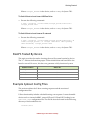
This topic provides the results of testing the root file system location by device.
The “Y” citations indicate that proper U-Boot initialization and hand-off to the
kernel occurred. However, this does not guarantee a fully-functional system.
RootFS Location
Jetson TK1
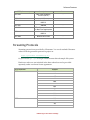
mmcblk0p1
Y
mmcblk1p1
Y
sda1
Y
eth0
Y
Example Sysboot Config Files
This section outlines the U-boot scanning sequence and the associated
configuration files.
U-Boot functionality includes a default booting scan sequence. It scans bootable
devices such as: internal eMMC, external SD card, USB and NFS looking for an
extlinux.conf configuration file. The file file must be located in the following
directory of the bootable device:
<rootfs>/boot
NVIDIA Tegra Linux Driver Package
Getting Started
If U-Boot finds the extlinux.conf file, it:
•
•
•
Uses the sysboot command to read out boot configurations from
extlinux.conf.
Loads kernel zImage file and device tree file.
Boots the kernel.
Since kernel extlinux.conf, zImage, and the device tree files are all in a user
accessible location after booting:
<rootfs>/boot
Users can easily change these files to test their own kernel without flashing.
•
extlinux.conf contains all the information about booting. It is in a
standard and pure text format sysboot configuration file. It tells the U-Boot
kernel the image filename, the device tree blob filename, and the kernel boot
command line. There are four example extlinux.conf files provided in
Tegra Driver for Linux release:
<target_board>_extlinux.conf.emmc
<target_board>_extlinux.conf.sdcard
<target_board>_extlinux.conf.usb
<target_board>_extlinux.conf.nfs
During flashing, flash.sh copies one of them to:
<rootfs>/boot/extlinux.conf
These extlinux.conf files are very similar, except they have different
kernel boot command lines. The extlinux.conf files are at:
bootloader/<target_board>/
Where <target_board> is ardbeg for Jetson TK1.
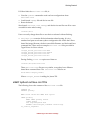
eMMC Sysboot extlinux.conf File
The following shows the contents of the extlinux.conf file.
TIMEOUT 30
DEFAULT primary
MENU TITLE Jetson-TK1 eMMC boot option
LABEL primary
MENU LABEL primary kernel
LINUX zImage
FDT tegra124-pm375.dtb
APPEND console=ttyS0,115200n8 console=tty1
no_console_suspend=1
NVIDIA Tegra Linux Driver Package
Getting Started
lp0_vec=2064@0xf46ff000 video=tegrafb mem=1862M@2048M
memtype=255
ddr_die=2048M@2048M section=256M
pmuboard=0x0177:0x0000:0x02:0x43:0x00
vpr=151M@3945M tsec=32M@3913M
otf_key=c75e5bb91eb3bd947560357b64422f85
usbcore.old_scheme_first=1 core_edp_mv=1150 core_edp_ma=4000
tegraid=40.1.1.0.0 debug_uartport=lsport,3
power_supply=Adapter
audio_codec=rt5640 modem_id=0 android.kerneltype=normal
usb_port_owner_info=0 fbcon=map:1 commchip_id=0
usb_port_owner_info=0
lane_owner_info=6 emc_max_dvfs=0 touch_id=0@0
tegra_fbmem=32899072@0xad012000
board_info=0x0177:0x0000:0x02:0x43:0x00 root=/dev/mmcblk0p1 rw
rootwait tegraboot=sdmmc gpt
Different boot methods have different APPEND strings in the extlinux.conf
file. Check each file for details.
Note: NFS booting also uses eMMC as boot device. <rootfs>/boot is flashed
into to eMMC but kernel mounts NFS device as rootfs.
Debugging U-Boot Environment
This section provides debugging tips for your U-Boot environment. The
examples do not represent a comprehensive listing for U-Boot functionality. For
a full listing of supported commands and their usage by U-Boot, see the U-Boot
documentation and source.
For example, a common problem occurs when you create your own kernel and
U-Boot has trouble finding it. To verify that U-Boot can read the device and sees
the files in the file system, the commands listed in examples in this section may
be beneficial. If a boot device is not found, or the device has trouble booting with
a kernel other than the reference kernel provided in the L4T release, check the
examples in this section for debug assistance.
Interrupting U-Boot
You can interrupt U-Boot during boot.
To interrupt U-Boot
•
Press any key during boot.
NVIDIA Tegra Linux Driver Package
Getting Started
Getting Help
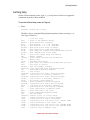
On the U-Boot terminal screen, type help at any time for the list of supported
commands from the U-Boot terminal.
To see the U-Boot Help screen on Tegra 4
•
Enter:
Tegra124 (Jetson TK1) # help
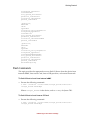
The below shows example Help information printed when executing help
on a Tegra 124 device.
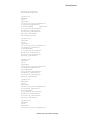
?
base
bdinfo boot
bootd
bootelf bootm
bootp
bootvx bootz
cmp
coninfo cp
crc32
dhcp
echo
editenv enterrcmenv
exit
ext2loadext2ls ext4loadext4ls false
fatinfo fatload fatls
fdt
go
gpio
help
i2c
imxtractitest
load
loadb
loads
loadx
loady
loop
-
alias for 'help'
print or set address offset
print Board Info structure
boot default, i.e., run 'bootcmd'
boot default, i.e., run 'bootcmd'
Boot from an ELF image in memory
boot application image from memory
boot image via network using BOOTP/TFTP protocol
Boot vxWorks from an ELF image
boot Linux zImage image from memory
memory compare
print console devices and information
memory copy
checksum calculation
boot image via network using DHCP/TFTP protocol
echo args to console
edit environment variable
reset Tegra and enter USB Recovery Mode
environment handling commands
exit script
load binary file from a Ext2 filesystem
list files in a directory (default /)
load binary file from a Ext4 filesystem
list files in a directory (default /)
do nothing, unsuccessfully
print information about filesystem
load binary file from a dos filesystem
list files in a directory (default /)
flattened device tree utility commands
start application at address 'addr'
query and control gpio pins
print command description/usage
I2C sub-system
extract a part of a multi-image
return true/false on integer compare
load binary file from a filesystem
load binary file over serial line (kermit mode)
load S-Record file over serial line
load binary file over serial line (xmodem mode)
load binary file over serial line (ymodem mode)
infinite loop on address range
NVIDIA Tegra Linux Driver Package
Getting Started
ls
md
mii
mm
mmc
mmcinfo mw
nm
part
ping
printenvpxe
reset
run
saveenv setenv sf
showvar sleep
source sspi
sysboot test
tftpboottrue
usb
usbboot version -
list files in a directory (default /)
memory display
MII utility commands
memory modify (auto-incrementing address)
MMC sub system
display MMC info
memory write (fill)
memory modify (constant address)
disk partition related commands
send ICMP ECHO_REQUEST to network host
print environment variables
commands to get and boot from pxe files
Perform RESET of the CPU
run commands in an environment variable
save environment variables to persistent storage
set environment variables
SPI flash sub-system
print local hushshell variables
delay execution for some time
run script from memory
SPI utility command
command to get and boot from syslinux files
minimal test like /bin/sh
boot image via network using TFTP protocol
do nothing, successfully
USB sub-system
boot from USB device
print monitor, compiler and linker version
Listing a Directory Structure
You can list the directory structure of a particular device. For example, to list the
directory structure of sda1 in U-Boot by type: mmc 0:1 (for eMMC device 0
partition 1).
To list the directory structure
•
Execute the following command:
Tegra124 (Jetson TK1) # ext2ls mmc 0:1
Note: This works on EXT3/EXT4 file systems, as well.
Example output follows:
<DIR>
<DIR>
<DIR>
<DIR>
<DIR>
<DIR>
<DIR>
<DIR>
<DIR>
4096
4096
4096
4096
4096
4096
4096
4096
4096
.
..
bin
boot
dev
etc
home
lib
lost+found
NVIDIA Tegra Linux Driver Package
Getting Started
<DIR>
<DIR>
<DIR>
<DIR>
<DIR>
<DIR>
<DIR>
<DIR>
<DIR>
<DIR>
<DIR>
<DIR>
4096
4096
4096
4096
4096
4096
4096
4096
4096
4096
4096
4096
media
mnt
opt
proc
root
sbin
selinux
srv
sys
tmp
usr
var
Listing the Contents of a Directory
You can list the contents of any directory.
To list contents of a directory
•
Execute following command:
Tegra124 (Jetson TK1) # ext2ls mmc 0:1 $DIRECTORY
where $DIRECTORY is an expected path on the device.
For example, to list contents of the /boot directory where the zImage file
should be, execute:
Tegra124 (Jetson TK1) # ext2ls mmc 0:1 /boot
<DIR>
1024 .
<DIR>
1024 ..
34642 tegra124-pm375.dtb
908 extlinux.conf
5910248 zImage
Printing the U-Boot Environment
You can print the entire U-Boot environment.
To print the U-Boot environment
•
Execute the following command:
Tegra124 (Jetson TK1) # printenv
Printing/Setting Environment Variables
You can print and set variables in the environment.
NVIDIA Tegra Linux Driver Package
Getting Started
To print a variable in the environment
•
Execute the following command:
Tegra124 (Jetson TK1) # printenv $ENV_VARIABLE
where $ENV_VARIABLE refers to an environment variable in U-Boot.
For example, to print the boot device partition number, execute:
Tegra124 (Jetson TK1) # printenv pn
Output can be as follows:
pn=1
To set a variable in the environment
•
Execute the following command:
Tegra124 (Jetson TK1) # setenv $ENV_VARIABLE $NEW_VALUE
where $ENV_VARIABLE refers to an environment variable in U-Boot and
$NEW_VALUE is the new value for that variable.
For example, to set the partition number variable, enter the following
command:
Tegra124 (Jetson TK1) # setenv pn 1
To save the modified environment
•
Execute the following command:
Tegra124 (Jetson TK1) # saveenv
The saved modified environment is preserved in case of resets and reboots.
NVIDIA Tegra Linux Driver Package
Building Crosstool-ng Toolchain and glibc
This chapter provides instructions to build the Crosstool-ng supplied cross
toolchain suite version 4.5.3 and the glibc suite with an Ubuntu host machine.
The Crosstool-ng toolchain suite is similar to the toolchain used to produce the
L4T release binaries.
Note: For an example Crosstool-ng configuration file, see the Appendix.
Toolchain Information
The toolchain consists of the following elements:
•
•
•
Crosstool-ng reference (http://crosstool-ng.org/)
Cross Toolchain Version : 4.5.3
glibc Version : 2.11
Host Setup
Ubuntu host systems must include the following:
•
•
•
•
Ubuntu 10.04 32-bit distribution (Note: 64-bit distribution is not supported
for building the toolchain)
Fast host CPU like Core 2 Duo (to reduce build time)
1GB Free space on HDD
2GB SDRAM
Dependent Packages
On the Ubuntu distribution host machine, ensure the following packages are
installed:
•
•
•
mercurial
bison
flex
NVIDIA Tegra Linux Driver Package
Getting Started
•
•
•
•
•
gperf
texinfo
m4
libtool
automake
Note: The host system must be connected to the internet before running the
commands below:
You can install the above packages using the following command:
$ sudo apt-get install mercurial bison flex gperf texinfo m4
libtool automake
Building the Toolchain Suite
To build the toolchain suite, perform the following tasks:
•
•
•
•
Set the TOP_DIR Environment Variable and Create Directories
Install autoconf-2.68
Configuring crosstool-ng
Invoke the Build
To set the TOP_DIR environment variable and create directories
1. To set the TOP_DIR variable to ${HOME}/crosstool enter the following
command:
$ export TOP_DIR="${HOME}/crosstool"
2. In the ${TOP_DIR} directory, create subdirectories:
$
$
$
$
$
$
$
$
mkdir depends
mkdir crosstool-ng
cd depends
mkdir src
mkdir install
cd src
mkdir autoconf
mkdir ct-ng
To instal autoconf-2.68
1. Change to the autoconf directory and download autoconf-2.68.tar.bz2 by
executing the following commands:
$ cd ${TOP_DIR}/depends/src/autoconf
$ wget http://ftp.gnu.org/gnu/autoconf/autoconf-2.68.tar.bz2
NVIDIA Tegra Linux Driver Package
Getting Started
2. Extract and configure autoconf-2.68:
$ tar xf autoconf-2.68.tar.bz2
$ cd autoconf-2.68
$ ./configure -prefix=${TOP_DIR}/depends/install/autoconf_install/autoconf2.68-install
3. Make and install autoconf-2.68:
$ make
$ make install
To configure crosstool-ng
1. Change to the ct-ng directory:
$ cd ${TOP_DIR}/depends/src/ct-ng
2. Add the autoconf-2.68-install directory to your path:
$ export
PATH=${TOP_DIR}/depends/install/autoconf_install/autoconf2.68-install/bin:${PATH}
3. Clone the crosstool-ng repository:
$ hg clone http://crosstool-ng.org/hg/crosstool-ng
4. Configure crosstool-ng:
$ cd crosstool-ng
$ ./bootstrap
$ ./configure --prefix=${TOP_DIR}/depends/install/ctng_install/crosstool-ng-hg-install
5. Make and install crosstool-ng:
$ make
$ make install
6. Create the ${TOP_DIR}/crosstool-ng/src directory for locally saving
downloaded packages:
mkdir ${TOP_DIR}/crosstool-ng/src
To invoke the build
1. Change to the /crosstool-ng-hg-install/bin directory:
$ cd ${TOP_DIR}/depends/install/ct-ng_install/crosstool-ng-hginstall/bin
2. Copy the following content of .config from the Sample Crosstool-ng
Configuration File appendix to this guide to a file called .config.
Note: .config is a hidden file. After creating it, confirm it exists in the
correct location by running ls -a in the directory.
NVIDIA Tegra Linux Driver Package
Getting Started
3. Build ct-ng using 8 parallel paths:
$./ct-ng oldconfig
$./ct-ng build.8
This will build the complete suite and install the binary components in
${TOP_DIR}/crosstool-ng/install.
Verifying the Build
After a successful build, the following are the directories and files contained in
the ${TOP_DIR}/crosstool-ng/install directory, as reported by the tree
application (where available).
$ tree -L 2
|-- arm-cortex_a9-linux-gnueabi
|
|-- bin
|
|-- debug-root
|
|-- include
|
|-- lib -> sysroot/lib
|
|-- lib32 -> lib
|
|-- lib64 -> lib
|
`-- sysroot
|-- bin
|
|-- arm-cortex_a9-linux-gnueabi-addr2line
|
|-- arm-cortex_a9-linux-gnueabi-ar
|
|-- arm-cortex_a9-linux-gnueabi-as
|
|-- arm-cortex_a9-linux-gnueabi-c++
|
|-- arm-cortex_a9-linux-gnueabi-cc -> arm-cortex_a9-linuxgnueabi-gcc
|
|-- arm-cortex_a9-linux-gnueabi-c++filt
|
|-- arm-cortex_a9-linux-gnueabi-cpp
|
|-- arm-cortex_a9-linux-gnueabi-ct-ng.config
|
|-- arm-cortex_a9-linux-gnueabi-g++
|
|-- arm-cortex_a9-linux-gnueabi-gcc
|
|-- arm-cortex_a9-linux-gnueabi-gcc-4.5.3
|
|-- arm-cortex_a9-linux-gnueabi-gccbug
|
|-- arm-cortex_a9-linux-gnueabi-gcov
|
|-- arm-cortex_a9-linux-gnueabi-gprof
|
|-- arm-cortex_a9-linux-gnueabi-ld
|
|-- arm-cortex_a9-linux-gnueabi-ldd
|
|-- arm-cortex_a9-linux-gnueabi-nm
|
|-- arm-cortex_a9-linux-gnueabi-objcopy
|
|-- arm-cortex_a9-linux-gnueabi-objdump
|
|-- arm-cortex_a9-linux-gnueabi-populate
|
|-- arm-cortex_a9-linux-gnueabi-ranlib
|
|-- arm-cortex_a9-linux-gnueabi-readelf
|
|-- arm-cortex_a9-linux-gnueabi-size
|
|-- arm-cortex_a9-linux-gnueabi-strings
|
`-- arm-cortex_a9-linux-gnueabi-strip
|-- build.log.bz2
|-- include
NVIDIA Tegra Linux Driver Package
Getting Started
|-|
|
|
|-|
`--
lib
|-- gcc
|-- ldscripts
`-- libiberty.a
libexec
`-- gcc
share
`-- gcc-4.5.3
NVIDIA Tegra Linux Driver Package
Software Features
This section describes the software features expected to be supported with this
release of NVIDIA® Tegra® Linux Driver Package, which provides users with a
complete package to bring up Linux on certain Tegra devices.
This release supports NVIDIA® Tegra® K1 32 Bit series code-name Jetson TK1
device.
Note: Always check the Release Notes for constraints related to these features.
Boot Loaders
Boot Loader
Fastboot
U-Boot
Feature
Notes
Boot Device
eMMC
Root Device
USB, SD, eMMC, SATA
Display device
UART
Boot Device
eMMC
Root Device
USB, SD, eMMC
Display device
UART
Kernel
Feature
Notes
Linux kernel version
3.10
Core support
4+1
SMP
Yes
NVIDIA Tegra Linux Driver Package
Software Features
I/O
I/O Type
Feature
Notes
RTC
PMIC RTC
Support for RTC Alarm and
system Wakeup
PMIC: AMS3722
Display device
UART
Debug
Console (UART4)
High-Speed
UART2
Master
100 Kbps, 400 Kbps
Peripherals
AMS3722, Realtek Audio
Codec, Board ID EEPROMS
Recovery mode
USB1
Host mode
MSD (Pen drives, HDD),
CDC (USB Ethernet),
UVC (web cams),
Audio Class
Device mode
Can be enabled via system
interface. (Disabled by
default)
Peripherals
keyboard, mouse, webcam
(INTEX), Pen drives,
USB-ethenet dongle
Host mode
MSD
Peripherals
Pen drives, USB-HDD
Framebuffer console
device
HDMI
Dual-display support
HDMI + eDP
Primary display
type/resolution
HDMI 1920 x 1080
Secondary display
type/resolution
eDP
Device enumeration
-
Lane configuration
x1 (mPCIe)
Speed
Gen1
Power state
L0
Device
Realtek 8111E 1000BASE-T
Device enumeration
-
Speed
Gen2
Power state
None
Device
Hyinx Half Slim SATA SSD
non-PWM
7
UART
I2C
USB 2.0
USB 3.0
Display
PCIe
SATA
GPIO
NVIDIA Tegra Linux Driver Package
Software Features
PWM
0
Extended GPIO
Y
SPI
SPI Flash ROM tested:
Winbond serial flash
-
SD
HS200 mode
-
eMMC
eMMC 4.5
Device: Hynix
2GB_H5TC4G63AFR
-
JTAG
ARM standard 20-pin
header
-
CUDA
Feature
CUDA
Notes
Version 6.0.23
Power Managment
Feature
Notes
DVFS
-
EMC frequency scaling
Auto
GPU frequency scaling
Auto
Low-power states
Clock-gating, Rail-gating
CPU auto-hotplug
-
CPU clusters
4+1
EDP limiting
-
Thermal management
-
Graphics and Multimedia
Audio
Notes
Multi-instance audio decode
-
Multichannel playback
-
USB audio record
-
Video
Multi-Stream Video Encode
Notes
-
NVIDIA Tegra Linux Driver Package
Software Features
Video-only mode
-
4K playback
-
Media APIs
Notes
Gstreamer-0.10
-
Gstreamer-1.0
-
Displays
Feature
Resolution
Notes
640 X 480
-
HDMI
-
HDMI + eDP
-
Primary display
type/default
resolution
HDMI
Default resolution
1920 x 1080
Secondary display
type/resolution
eDP
-
640 X 480
-
720 X 576
-
1024 X 768
-
1280 X 720
-
1280 X 1024
-
1920 X 1080
-
3840 X 2160
-
4096 X 2160
-
Supported
resolutions
Framebuffer
console device
Dual-display support
Supported
resolutions
EGL and OpenGL ES Support
EGL is an interface between Khronos rendering APIs such as OpenGL ES and the
underlying native platform window system. It handles graphics context
management, surface/buffer binding, and rendering synchronization and enables
high-performance, accelerated, mixed-mode 2D and 3D rendering using other
Khronos APIs.
L4T supports the EGL 1.4 specification, Khronos Native Platform Graphics
Interface (EGL 1.4 Specification).
NVIDIA Tegra Linux Driver Package
Software Features
The OpenGL ES driver in this release supports the following OpenGL ES
specifications:
•
•
OpenGL ES Common Profile Specification 23.0
OpenGL 4.4
For more information on OpenGL ES, see the Khronos OpenGL ES API Registry.
Decoders
Audio Decoders
Audio
Decode
Profile
Sampling
Bitrate
Notes
AAC+
Mono and stereo for
SBR; plus limited
support (described in
Notes) for
multichannel AAC+
(AAC+SBR)
Up to 48 kHz
Up to 128
kilobits per
second
(kbps)
For multi-channel AAC+
(AAC+SBR) streams, only
the AAC multi-channel is
decoded. The 5.1
channels are down-mixed
to stereo.
AAC-LC
Mono and stereo; plus
5.1 channels downmixed to stereo
Up to 48 kHz
Up to 320
Kbps
-
6 channel [5.1]
Up to 48 kHz
Up to 320
Kbps
Output over HDMI
eAAC+
Stero only
Up to 48 kHz
Up to 320
Kbps
-
AMR-NB
1 channel
Up to 8 kHz
Up to 12.2
Kbps
-
AMR-WB
1 channel
Up to 16 kHz
Up to 23.85
Kbps
-
MP3
2 channel
Up to 48 kHz
Up to 320
Kbps
-
MPEG-2
(MPEG-1
Layer 2)
2 channel
Up to 48 kHz
Up to 384
Kbps
-
Vorbis
Ogg Audio
Up to 48 kHz
Up to 256
Kbps
-
16-bit, 2 channels
8kHz to 48
kHz
-
-
Multichannel support
-
-
-
Standard 2-channel
Up to 48 kHz
Up to 384
Kbps
-
AAC-LC
multichannel
WAV linear
PCM
WAV
multichannel
support
WMA-9 *
NVIDIA Tegra Linux Driver Package
Software Features
WMA Lossless
Lossless: Up to N1
Profile; WMA 10: 2
channel
Up to 48 kHz
Up to 384
Kbps
-
WMA Pro LBR
10
M2 Profile; 2 channel
Up to 48 kHz
Up to 384
Kbps
-
WMA Pro LBR
10
multichannel
6 channel [5.1]
Up to 48 kHz
Up to 768
Kbps
-
Notes
* Use of this decoder requires a BSP add-on component available only to customers with Windows
Media Component licensing. For more information see
http://wmlicense.smdisp.net/wmcomponents/.
Image Decoders
Image Decode
Notes
Lib-JPEG HW decoder
-
Video Decoders
Profile
and Level
Sampling Frequency
and Bit rate/Frame rate
MPEG-4
AVC/H.264/V
C1
1080/60i
Highdef
Up to 1080p
60 fps
Up to 10 Mbps
No support for AVH-DC
stereoscope (3D)
DivX 4/5/6
compatible
1080p
Highdef
Up to 1080p
30 fps
Up to 10 Mbps
No QPEL;
No interlace;
No GMC
DivX 4/5/6
compatible
PlusHD
Up to 1080p
30 fps
Up to 20 Mbps
-
Baseline
(Profile 0)
Standard H.263 picture
formats up to 4CIF
30 fps
Up to 8 Mbps
Standard H.263 picture
formats = SQCIF, QCIF,
CIF, 4CIF
Baseline
Profile
Main Profile
High Profile
@ L4.1
Up to 720p
60 fps
Up to 40 Mbps
-
Video Decode
AVCHD
H.263
H.264 AVC
Notes
NVIDIA Tegra Linux Driver Package
Software Features
H.264 AVC
Baseline
Profile
Main Profile
High Profile
@ L4.1
Up to 1080p
60 fps
Up to 62.5 Mbps
-
H.264 AVC
Baseline
Profile
Main Profile
High Profile
@ L4.1
Up to 1080i
60 fps
Up to 40 Mbps
-
YUV 420/
YUV 422
Up to 1080p
30 fps
-
MPEG-2 Video
Main Profile
@ High Level
Up to 1080p 30 fps
/1080i 60 fps
Up to 80 Mbps
-
MPEG-2 Video
Main Profile
@ High Level
Up to 720p
60 fps
Up to 80 Mbps
-
Advanced
Simple
Profile
@ L5
Up to 1080p
30 fps
Up to 10 Mbps
No QPEL;
No interlace;
No GMC
Multiview
High Profile,
Stereo High
Profile
Up to 1080p
24 fps
Up to 32 Mbps
Local playback and
playback over HDMI
VC-1/WMV *
Simple
Profile
Up to 1080p
30 fps
Up to 45 Mbps
-
VC-1/WMV *
Main Profile
Up to 1080p
30 fps
Up to 45 Mbps
-
VC-1/WMV *
Advanced
Profile
Up to 1080p
30 fps
Up to 45 Mbps
-
Xvid
Xvid Highdef
Up to 1080p
30 fps
Up to 10 Mbps
No QPEL;
No interlace;
No GMC
VP8
Version 0
Up to 1080p
60 fps
Up to 40 Mbps
-
MJPEG
MPEG-4
MVC
Notes
* Use of this decoder requires a BSP add-on component available only to customers
with Windows Media Component licensing. For more information see
http://wmlicense.smdisp.net/wmcomponents/.
NVIDIA Tegra Linux Driver Package
Software Features
Encoders
Audio Encoders
Audio Encode
Profile
Resolution
Bit Rates
-
-
Up to 320 Kbps
Profile
Resolution
Bit Rates
-
-
-
Profile and
Level
Sampling Frequency and
Bit rate/Frame rate
Notes
H.264
Baseline
Profile
Main Profile
High Profile
Up to 1080p
30 fps
Up to 50 Mbps
-
H.263
Baseline
Profile
640 X 480
-
Simple
Profile
640 X 480
-
Ver0
HD 1080p30 @ 50Mbps (High
Quality)
-
AAC-LC
Image Encoders
Image Encode
Lib-JPEG HW
encoder
Video Encoders
Video Encode
MPEG-4
VP8
Reader Container Formats
Codecs are provided by GStreamer. You can download GStreamer codecs from
the gstreamer opensource project at:
http://gstreamer.freedesktop.org
Or you can use apt-get in the provided Ubuntu-derived sample file system.
ASF (WMV) (Gstreamer)
Description
Notes
Video
VC-1
-
Audio
WMA 10, WMA Pro, WMA
Lossless
-
Description
Notes
AVI (Gstreamer)
NVIDIA Tegra Linux Driver Package
Software Features
Video
MPEG-4, H.264, DivX/Xvid
-
Audio
AAC, AAC+, eAAC+, MP3,
MPEG-2, AC3
-
Description
Notes
Video
MPEG-4, H.264, H.263
-
Audio
AAC, AAC+, eAAC+, AMRNB, AMR-WB
-
Description
Notes
Video
MPEG-4, DivX/Xvid, H.264
-
Audio
AAC, AAC+, eAAC+, MP3,
AC3
-
Description
Notes
Video
VP8
-
Audio
Vorbis
-
Description
Notes
Vorbis
-
Description
Notes
MP3
-
Description
Notes
Video
H.264, VC-1, MPEG-2
-
Audio
AAC, AAC+, eAAC+
-
MPEG-4
(MP4)/3G2/3GP/MOV
(Gstreamer)
Matroska (MKV)
(Gstreamer)
WebM (Gstreamer)
OGG (Gstreamer)
Audio
MP3 (Gstreamer)
Audio
M2TS/MPEG-TS
(Gstreamer)
Writer Container Formats
The following table presents container information. See container specifications
for audio/video pairing within the container.
MPEG-4 (MP4)/3GP
(Gstreamer)
Description
Notes
Video
MPEG-4, H.264, H.263
-
Audio
Audio: AAC AMR-NB, AMRWB
-
Description
Notes
HTTP1.0
MP3, MP4, 3GP,WMA,
WMV, AVI, ASF
-
HTTP 1.1
MP3, MP4, 3GP,WMA,
WMV, AVI, ASF
-
Streaming (Gstreamer)
NVIDIA Tegra Linux Driver Package
Software Features
RTSP (Gstreamer)
Description
Notes
RFC 2326
Real Time Streaming
Protocol (RTSP)
-
RFC 2429
H.263
-
RFC 3016
AAC-LC, AAC+,eAAC+,
MPEG-4
-
RFC 3267
AMR-NB
-
RFC 3550
RTP: A Transport Protocol
for Real-Time Applications
-
RFC 3640
AAC-LC, AAC+,eAC+,
MPEG-4
-
RFC 3984
MPEG-4 AVC/H.264
-
Streaming Protocols
Streaming protocols are provided by GStreamer. You can download GStreamer
codecs from the gstreamer opensource project at:
http://gstreamer.freedesktop.org
Or you can use apt-get in the provided Ubuntu-derived sample file system.
Hardware codecs are not included in the base release but can be provided
separately under a software license agreement.
HTTP Protocols*
HTTP 1.0
Formats
3GP
AAC
ASF
AVI
MKV
MOV
MP3
MP4
TS
WMA
WMV
HTTP 1.1
3GP
AAC
ASF
AVI
NVIDIA Tegra Linux Driver Package
Software Features
MKV
MOV
MP3
MP4
TS
WMA
WMV
HTTP Chunked Mode Support
Chunked Mode Support
Notes
Chunked Mode Data Transfer
with HTTP 1.1 only
HTTP Streaming
Live Streaming
Notes
RTSP Protocols*
RFC 2326
Notes
Real Time Streaming Protocol (RTSP)
-
RFC 2429
H.263
RFC 3016
AAC-LC, AAC+, eAAC+, MPEG-4
RFC 3267
AMR-NB
RFC 3550
RTP: A Transport Protocol
for Real-Time Applications
RFC 3640
AAC-LC, AAC+, eAAC+, MPEG-4
RFC 3984
MPEG-4 AVC/H.264
Buffer control with
watermarking for RTSP
streaming
SDP Session Set Up
RFC 4566
-
Notes
Session Description Protocol
Additional Notes
* For better user experience, NVIDIA recommends limiting HTTP, RTSP, and RTP
streaming tests to 1080p 30 fps 10 Mbps content over a sustained network with a
bandwidth of greater than 16 Mbps.
NVIDIA Tegra Linux Driver Package
Licenses
This section provides license information for the NVIDIA® Tegra® Linux Driver
Package.
NVIDIA Software
Note: This software license applies to software in the "nv_tegra" directory
(NVIDIA binary drivers and supporting software), the files in the
“nv_tegra/nv_sample_apps” directory: “nvgstcapture”, “nvgstplayer”, and
“libgstnvvidconv.so” (those files included in the nvgstapps.tbz2 file), and the
files “bootloader/mkgpt”, “bootloader/mkbootimg”, and
“bootloader/mkubootscript”.
License For Customer Use of NVIDIA Software
IMPORTANT NOTICE -- READ CAREFULLY: This License For Customer Use of
NVIDIA Software ("LICENSE") is the agreement which governs use of the
software of NVIDIA Corporation and its subsidiaries ("NVIDIA") downloadable,
including computer software and associated printed materials ("SOFTWARE").
By downloading, installing, copying, or otherwise using the SOFTWARE, you
agree to be bound by the terms of this LICENSE. If you do not agree to the terms
of this LICENSE, do not download the SOFTWARE.
RECITALS
Use of NVIDIA's products requires three elements: the SOFTWARE, the
hardware on a graphics controller board, and a personal computer. The
SOFTWARE is protected by copyright laws and international copyright treaties,
as well as other intellectual property laws and treaties. The SOFTWARE is not
sold, and instead is only licensed for use, strictly in accordance with this
document. The hardware is protected by various patents, and is sold, but this
agreement does not cover that sale, since it may not necessarily be sold as a
package with the SOFTWARE. This agreement sets forth the terms and
conditions of the SOFTWARE LICENSE only.
NVIDIA Tegra Linux Driver Package
Licenses
1. DEFINITIONS
1.1 Customer.
Customer means the entity or individual that downloads the SOFTWARE.
2. GRANT OF LICENSE
2.1 Rights and Limitations of Grant.
NVIDIA hereby grants Customer the following non-exclusive, non-transferable
right to use the SOFTWARE, with the following limitations:
2.1.1 Rights.
Customer may install and use one copy of the SOFTWARE on a single computer,
and except for making one back-up copy of the Software, may not otherwise
copy the SOFTWARE. This LICENSE of SOFTWARE may not be shared or used
concurrently on different computers.
2.1.2 Linux/FreeBSD Exception.
Notwithstanding the foregoing terms of Section 2.1.1, SOFTWARE designed
exclusively for use on the Linux or FreeBSD operating systems, or other
operating systems derived from the source code to these operating systems, may
be copied and redistributed, provided that the binary files thereof are not
modified in any way (except for unzipping of compressed files).
2.1.3 Limitations.
No Reverse Engineering. Customer may not reverse engineer, decompile, or
disassemble the SOFTWARE, nor attempt in any other manner to obtain the
source code.
No Separation of Components. The SOFTWARE is licensed as a single product.
Its component parts may not be separated for use on more than one computer,
nor otherwise used separately from the other parts.
No Rental. Customer may not rent or lease the SOFTWARE to someone else.
3. TERMINATION
This LICENSE will automatically terminate if Customer fails to comply with any
of the terms and conditions hereof. In such event, Customer must destroy all
copies of the SOFTWARE and all of its component parts.
NVIDIA Tegra Linux Driver Package
Licenses
Defensive Suspension. If Customer commences or participates in any legal
proceeding against NVIDIA, then NVIDIA may, in its sole discretion, suspend or
terminate all license grants and any other rights provided under this LICENSE
during the pendency of such legal proceedings.
4. COPYRIGHT
All title and copyrights in and to the SOFTWARE (including but not limited to all
images, photographs, animations, video, audio, music, text, and other
information incorporated into the SOFTWARE), the accompanying printed
materials, and any copies of the SOFTWARE, are owned by NVIDIA, or its
suppliers. The SOFTWARE is protected by copyright laws and international
treaty provisions. Accordingly, Customer is required to treat the SOFTWARE
like any other copyrighted material, except as otherwise allowed pursuant to this
LICENSE and that it may make one copy of the SOFTWARE solely for backup or
archive purposes.
5. APPLICABLE LAW
This agreement shall be deemed to have been made in, and shall be construed
pursuant to, the laws of the State of California.
6. DISCLAIMER OF WARRANTIES AND LIMITATION ON LIABILITY
6.1 No Warranties.
TO THE MAXIMUM EXTENT PERMITTED BY APPLICABLE LAW, THE
SOFTWARE IS PROVIDED "AS IS" AND NVIDIA AND ITS SUPPLIERS
DISCLAIM ALL WARRANTIES, EITHER EXPRESS OR IMPLIED, INCLUDING,
BUT NOT LIMITED TO, IMPLIED WARRANTIES OF MERCHANTABILITY
AND FITNESS FOR A PARTICULAR PURPOSE.
6.2 No Liability for Consequential Damages.
TO THE MAXIMUM EXTENT PERMITTED BY APPLICABLE LAW, IN NO
EVENT SHALL NVIDIA OR ITS SUPPLIERS BE LIABLE FOR ANY SPECIAL,
INCIDENTAL, INDIRECT, OR CONSEQUENTIAL DAMAGES WHATSOEVER
(INCLUDING, WITHOUT LIMITATION, DAMAGES FOR LOSS OF BUSINESS
PROFITS, BUSINESS INTERRUPTION, LOSS OF BUSINESS INFORMATION,
OR ANY OTHER PECUNIARY LOSS) ARISING OUT OF THE USE OF OR
INABILITY TO USE THE SOFTWARE, EVEN IF NVIDIA HAS BEEN ADVISED
OF THE POSSIBILITY OF SUCH DAMAGES.
NVIDIA Tegra Linux Driver Package
Licenses
7. MISCELLANEOUS
The United Nations Convention on Contracts for the International Sale of Goods
is specifically disclaimed. If any provision of this LICENSE is inconsistent with,
or cannot be fully enforced under the law, such provision will be construed as
limited to the extent necessary to be consistent with and fully enforceable under
the law. This agreement is the final, complete and exclusive agreement between
the parties relating to the subject matter hereof, and supersedes all prior or
contemporaneous understandings and agreements relating to such subject
matter, whether oral or written. Customer agrees that it will not ship, transfer or
export the SOFTWARE into any country, or use the SOFTWARE in any manner,
prohibited by the United States Bureau of Export Administration or any export
laws, restrictions or regulations. This LICENSE may only be modified in writing
signed by an authorized officer of NVIDIA.
Sample File System
The sample root file system is derived from Ubuntu Linux, version 14.04 for the
hardware floating point (hardfp) release. Information on re-creating the root file
system is provided in the Tegra Linux Driver Package Developers’ Guide. The license
agreement for each software component is located in the software component's
source code, made available from the same location from which this software
was downloaded, or by request to [email protected].
GST OpenMAX
The software listed below is licensed under the terms of the LGPLv2.1 (see
below). To obtain source code, contact [email protected].
gst-openmax (libgstomx.so, libgstegl-1.0.so.0, and libnvgstjpeg.so)
Version 2.1, February 1999
Copyright (C) 1991, 1999 Free Software Foundation, Inc. 51 Franklin Street, Fifth
Floor, Boston, MA 02110-1301 USA Everyone is permitted to copy and
distribute verbatim copies of this license document, but changing it is not
allowed.
[This is the first released version of the Lesser GPL. It also counts as the
successor of the GNU Library Public License, version 2, hence the version
number 2.1.]
NVIDIA Tegra Linux Driver Package
Licenses
Preamble
The licenses for most software are designed to take away your freedom to share
and change it. By contrast, the GNU General Public Licenses are intended to
guarantee your freedom to share and change free software--to make sure the
software is free for all its users.
This license, the Lesser General Public License, applies to some specially
designated software packages--typically libraries--of the Free Software
Foundation and other authors who decide to use it. You can use it too, but we
suggest you first think carefully about whether this license or the ordinary
General Public License is the better strategy to use in any particular case, based
on the explanations below.
When we speak of free software, we are referring to freedom of use, not price.
Our General Public Licenses are designed to make sure that you have the
freedom to distribute copies of free software (and charge for this service if you
wish); that you receive source code or can get it if you want it; that you can
change the software and use pieces of it in new free programs; and that you are
informed that you can do these things.
To protect your rights, we need to make restrictions that forbid distributors to
deny you these rights or to ask you to surrender these rights. These restrictions
translate to certain responsibilities for you if you distribute copies of the library
or if you modify it.
For example, if you distribute copies of the library, whether gratis or for a fee,
you must give the recipients all the rights that we gave you. You must make sure
that they, too, receive or can get the source code. If you link other code with the
library, you must provide complete object files to the recipients, so that they can
relink them with the library after making changes to the library and recompiling
it. And you must show them these terms so they know their rights. We protect
your rights with a two-step method: (1) we copyright the library, and (2) we offer
you this license, which gives you legal permission to copy, distribute and/or
modify the library. To protect each distributor, we want to make it very clear
that there is no warranty for the free library. Also, if the library is modified by
someone else and passed on, the recipients should know that what they have is
not the original version, so that the original author's reputation will not be
affected by problems that might be introduced by others.
Finally, software patents pose a constant threat to the existence of any free
program. We wish to make sure that a company cannot effectively restrict the
users of a free program by obtaining a restrictive license from a patent holder.
NVIDIA Tegra Linux Driver Package
Licenses
Therefore, we insist that any patent license obtained for a version of the library
must be consistent with the full freedom of use specified in this license.
Most GNU software, including some libraries, is covered by the ordinary GNU
General Public License. This license, the GNU Lesser General Public License,
applies to certain designated libraries, and is quite different from the ordinary
General Public License. We use this license for certain libraries in order to permit
linking those libraries into non-free programs.
When a program is linked with a library, whether statically or using a shared
library, the combination of the two is legally speaking a combined work, a
derivative of the original library. The ordinary General Public License therefore
permits such linking only if the entire combination fits its criteria of freedom.
The Lesser General Public License permits more lax criteria for linking other
code with the library.
We call this license the "Lesser" General Public License because it does Less to
protect the user's freedom than the ordinary General Public License. It also
provides other free software developers Less of an advantage over competing
non-free programs. These disadvantages are the reason we use the ordinary
General Public License for many libraries. However, the Lesser license provides
advantages in certain special circumstances.
For example, on rare occasions, there may be a special need to encourage the
widest possible use of a certain library, so that it becomes a de-facto standard.
To achieve this, non-free programs must be allowed to use the library. A more
frequent case is that a free library does the same job as widely used non-free
libraries. In this case, there is little to gain by limiting the free library to free
software only, so we use the Lesser General Public License.
In other cases, permission to use a particular library in non-free programs
enables a greater number of people to use a large body of free software. For
example, permission to use the GNU C Library in non-free programs enables
many more people to use the whole GNU operating system, as well as its
variant, the GNU/Linux operating system.
Although the Lesser General Public License is Less protective of the users'
freedom, it does ensure that the user of a program that is linked with the Library
has the freedom and the wherewithal to run that program using a modified
version of the Library.
The precise terms and conditions for copying, distribution and modification
follow. Pay close attention to the difference between a "work based on the
library" and a "work that uses the library". The former contains code derived
NVIDIA Tegra Linux Driver Package
Licenses
from the library, whereas the latter must be combined with the library in order to
run.
GNU LESSER GENERAL PUBLIC LICENSE
TERMS AND CONDITIONS FOR COPYING, DISTRIBUTION AND
MODIFICATION
0. This License Agreement applies to any software library or other program
which contains a notice placed by the copyright holder or other authorized party
saying it may be distributed under the terms of this Lesser General Public
License (also called "this License"). Each licensee is addressed as "you".
A "library" means a collection of software functions and/or data prepared so as to
be conveniently linked with application programs (which use some of those
functions and data) to form executables.
The "Library", below, refers to any such software library or work which has been
distributed under these terms. A "work based on the Library" means either the
Library or any derivative work under copyright law: that is to say, a work
containing the Library or a portion of it, either verbatim or with modifications
and/or translated straightforwardly into another language. (Hereinafter,
translation is included without limitation in the term "modification".)
"Source code" for a work means the preferred form of the work for making
modifications to it. For a library, complete source code means all the source code
for all modules it contains, plus any associated interface definition files, plus the
scripts used to control compilation and installation of the library.
Activities other than copying, distribution and modification are not covered by
this License; they are outside its scope. The act of running a program using the
Library is not restricted, and output from such a program is covered only if its
contents constitute a work based on the Library (independent of the use of the
Library in a tool for writing it). Whether that is true depends on what the
Library does and what the program that uses the Library does.
1. You may copy and distribute verbatim copies of the Library's complete source
code as you receive it, in any medium, provided that you conspicuously and
appropriately publish on each copy an appropriate copyright notice and
disclaimer of warranty; keep intact all the notices that refer to this License and to
the absence of any warranty; and distribute a copy of this License along with the
Library.
You may charge a fee for the physical act of transferring a copy, and you may at
your option offer warranty protection in exchange for a fee.
NVIDIA Tegra Linux Driver Package
Licenses
2. You may modify your copy or copies of the Library or any portion of it, thus
forming a work based on the Library, and copy and distribute such
modifications or work under the terms of Section 1 above, provided that you also
meet all of these conditions:
a) The modified work must itself be a software library.
b) You must cause the files modified to carry prominent notices stating that
you changed the files and the date of any change.
c) You must cause the whole of the work to be licensed at no charge to all
third parties under the terms of this License.
d) If a facility in the modified Library refers to a function or a table of data to
be supplied by an application program that uses the facility, other than as an
argument passed when the facility is invoked, then you must make a good
faith effort to ensure that, in the event an application does not supply such
function or table, the facility still operates, and performs whatever part of its
purpose remains meaningful.
(For example, a function in a library to compute square roots has a purpose
that is entirely well-defined independent of the application. Therefore,
Subsection 2d requires that any application-supplied function or table used
by this function must be optional: if the application does not supply it, the
square root function must still compute square roots.)
These requirements apply to the modified work as a whole. If identifiable
sections of that work are not derived from the Library, and can be reasonably
considered independent and separate works in themselves, then this License,
and its terms, do not apply to those sections when you distribute them as
separate works. But when you distribute the same sections as part of a whole
which is a work based on the Library, the distribution of the whole must be
on the terms of this License, whose permissions for other licensees extend to
the entire whole, and thus to each and every part regardless of who wrote it.
Thus, it is not the intent of this section to claim rights or contest your rights to
work written entirely by you; rather, the intent is to exercise the right to
control the distribution of derivative or collective works based on the
Library.
In addition, mere aggregation of another work not based on the Library with
the Library (or with a work based on the Library) on a volume of a storage or
distribution medium does not bring the other work under the scope of this
License.
NVIDIA Tegra Linux Driver Package
Licenses
3. You may opt to apply the terms of the ordinary GNU General Public License
instead of this License to a given copy of the Library. To do this, you must alter
all the notices that refer to this License, so that they refer to the ordinary GNU
General Public License, version 2, instead of to this License. (If a newer version
than version 2 of the ordinary GNU General Public License has appeared, then
you can specify that version instead if you wish.) Do not make any other change
in these notices.
Once this change is made in a given copy, it is irreversible for that copy, so the
ordinary GNU General Public License applies to all subsequent copies and
derivative works made from that copy.
This option is useful when you wish to copy part of the code of the Library into a
program that is not a library.
4. You may copy and distribute the Library (or a portion or derivative of it,
under Section 2) in object code or executable form under the terms of Sections 1
and 2 above provided that you accompany it with the complete corresponding
machine-readable source code, which must be distributed under the terms of
Sections 1 and 2 above on a medium customarily used for software interchange.
If distribution of object code is made by offering access to copy from a
designated place, then offering equivalent access to copy the source code from
the same place satisfies the requirement to distribute the source code, even
though third parties are not compelled to copy the source along with the object
code.
5. A program that contains no derivative of any portion of the Library, but is
designed to work with the Library by being compiled or linked with it, is called a
"work that uses the Library". Such a work, in isolation, is not a derivative work
of the Library, and therefore falls outside the scope of this License.
However, linking a "work that uses the Library" with the Library creates an
executable that is a derivative of the Library (because it contains portions of the
Library), rather than a "work that uses the library". The executable is therefore
covered by this License.
Section 6 states terms for distribution of such executables.
When a "work that uses the Library" uses material from a header file that is part
of the Library, the object code for the work may be a derivative work of the
Library even though the source code is not. Whether this is true is especially
significant if the work can be linked without the Library, or if the work is itself a
library. The threshold for this to be true is not precisely defined by law.
NVIDIA Tegra Linux Driver Package
Licenses
If such an object file uses only numerical parameters, data structure layouts and
accessors, and small macros and small inline functions (ten lines or less in
length), then the use of the object file is unrestricted, regardless of whether it is
legally a derivative work. (Executables containing this object code plus portions
of the Library will still fall under Section 6.) Otherwise, if the work is a derivative
of the Library, you may distribute the object code for the work under the terms of
Section 6.
Any executables containing that work also fall under Section 6, whether or not
they are linked directly with the Library itself.
6. As an exception to the Sections above, you may also combine or link a "work
that uses the Library" with the Library to produce a work containing portions of
the Library, and distribute that work under terms of your choice, provided that
the terms permit modification of the work for the customer's own use and
reverse engineering for debugging such modifications. You must give
prominent notice with each copy of the work that the Library is used in it and
that the Library and its use are covered by this License. You must supply a copy
of this License. If the work during execution displays copyright notices, you
must include the copyright notice for the Library among them, as well as a
reference directing the user to the copy of this License. Also, you must do one of
these things:
a) Accompany the work with the complete corresponding machine-readable
source code for the Library including whatever changes were used in the
work (which must be distributed under Sections 1 and 2 above); and, if the
work is an executable linked with the Library, with the complete machinereadable "work that uses the Library", as object code and/or source code, so
that the user can modify the Library and then relink to produce a modified
executable containing the modified Library. (It is understood that the user
who changes the contents of definitions files in the Library will not
necessarily be able to recompile the application to use the modified
definitions.)
b) Use a suitable shared library mechanism for linking with the Library. A
suitable mechanism is one that (1) uses at run time a copy of the library
already present on the user's computer system, rather than copying library
functions into the executable, and (2) will operate properly with a modified
version of the library, if the user installs one, as long as the modified version
is interface-compatible with the version that the work was made with.
c) Accompany the work with a written offer, valid for at least three years, to
give the same user the materials specified in Subsection 6a, above, for a
charge no more than the cost of performing this distribution.
NVIDIA Tegra Linux Driver Package
Licenses
d) If distribution of the work is made by offering access to copy from a
designated place, offer equivalent access to copy the above specified
materials from the same place.
e) Verify that the user has already received a copy of these materials or that
you have already sent this user a copy.
For an executable, the required form of the "work that uses the Library" must
include any data and utility programs needed for reproducing the executable
from it. However, as a special exception, the materials to be distributed need not
include anything that is normally distributed (in either source or binary form)
with the major components (compiler, kernel, and so on) of the operating system
on which the executable runs, unless that component itself accompanies the
executable.
It may happen that this requirement contradicts the license restrictions of other
proprietary libraries that do not normally accompany the operating system.
Such a contradiction means you cannot use both them and the Library together
in an executable that you distribute.
7. You may place library facilities that are a work based on the Library side-byside in a single library together with other library facilities not covered by this
License, and distribute such a combined library, provided that the separate
distribution of the work based on the Library and of the other library facilities is
otherwise permitted, and provided that you do these two things:
a) Accompany the combined library with a copy of the same work based on
the Library, uncombined with any other library facilities. This must be
distributed under the terms of the Sections above.
b) Give prominent notice with the combined library of the fact that part of it
is a work based on the Library, and explaining where to find the
accompanying uncombined form of the same work.
8. You may not copy, modify, sublicense, link with, or distribute the Library
except as expressly provided under this License. Any attempt otherwise to copy,
modify, sublicense, link with, or distribute the Library is void, and will
automatically terminate your rights under this License. However, parties who
have received copies, or rights, from you under this License will not have their
licenses terminated so long as such parties remain in full compliance.
9. You are not required to accept this License, since you have not signed it.
However, nothing else grants you permission to modify or distribute the Library
or its derivative works. These actions are prohibited by law if you do not accept
this License. Therefore, by modifying or distributing the Library (or any work
NVIDIA Tegra Linux Driver Package
Licenses
based on the Library), you indicate your acceptance of this License to do so, and
all its terms and conditions for copying, distributing or modifying the Library or
works based on it.
10. Each time you redistribute the Library (or any work based on the Library),
the recipient automatically receives a license from the original licensor to copy,
distribute, link with or modify the Library subject to these terms and conditions.
You may not impose any further restrictions on the recipients' exercise of the
rights granted herein. You are not responsible for enforcing compliance by third
parties with this License11. If, as a consequence of a court judgment or allegation
of patent infringement or for any other reason (not limited to patent issues),
conditions are imposed on you (whether by court order, agreement or otherwise)
that contradict the conditions of this License, they do not excuse you from the
conditions of this License. If you cannot distribute so as to satisfy
simultaneously your obligations under this License and any other pertinent
obligations, then as a consequence you may not distribute the Library at all. For
example, if a patent license would not permit royalty-free redistribution of the
Library by all those who receive copies directly or indirectly through you, then
the only way you could satisfy both it and this License would be to refrain
entirely from distribution of the Library.
If any portion of this section is held invalid or unenforceable under any
particular circumstance, the balance of the section is intended to apply, and the
section as a whole is intended to apply in other circumstances. It is not the
purpose of this section to induce you to infringe any patents or other property
right claims or to contest validity of any such claims; this section has the sole
purpose of protecting the integrity of the free software distribution system which
is implemented by public license practices. Many people have made generous
contributions to the wide range of software distributed through that system in
reliance on consistent application of that system; it is up to the author/donor to
decide if he or she is willing to distribute software through any other system and
a licensee cannot impose that choice.
This section is intended to make thoroughly clear what is believed to be a
consequence of the rest of this License.
12. If the distribution and/or use of the Library is restricted in certain countries
either by patents or by copyrighted interfaces, the original copyright holder who
places the Library under this License may add an explicit geographical
distribution limitation excluding those countries, so that distribution is permitted
only in or among countries not thus excluded. In such case, this License
incorporates the limitation as if written in the body of this License.
NVIDIA Tegra Linux Driver Package
Licenses
13. The Free Software Foundation may publish revised and/or new versions of
the Lesser General Public License from time to time. Such new versions will be
similar in spirit to the present version, but may differ in detail to address new
problems or concerns. Each version is given a distinguishing version number. If
the Library specifies a version number of this License which applies to it and
"any later version", you have the option of following the terms and conditions
either of that version or of any later version published by the Free Software
Foundation. If the Library does not specify a license version number, you may
choose any version ever published by the Free Software Foundation.
14. If you wish to incorporate parts of the Library into other free programs whose
distribution conditions are incompatible with these, write to the author to ask for
permission. For software which is copyrighted by the Free Software Foundation,
write to the Free Software Foundation; we sometimes make exceptions for this.
Our decision will be guided by the two goals of preserving the free status of all
derivatives of our free software and of promoting the sharing and reuse of
software generally.
NO WARRANTY
15. BECAUSE THE LIBRARY IS LICENSED FREE OF CHARGE, THERE IS NO
WARRANTY FOR THE LIBRARY, TO THE EXTENT PERMITTED BY
APPLICABLE LAW. EXCEPT WHEN OTHERWISE STATED IN WRITING THE
COPYRIGHT HOLDERS AND/OR OTHER PARTIES PROVIDE THE LIBRARY
"AS IS" WITHOUT WARRANTY OF ANY KIND, EITHER EXPRESSED OR
IMPLIED, INCLUDING, BUT NOT LIMITED TO, THE IMPLIED WARRANTIES
OF MERCHANTABILITY AND FITNESS FOR A PARTICULAR PURPOSE.
THE ENTIRE RISK AS TO THE QUALITY AND PERFORMANCE OF THE
LIBRARY IS WITH YOU. SHOULD THE LIBRARY PROVE DEFECTIVE, YOU
ASSUME THE COST OF ALL NECESSARY SERVICING, REPAIR OR
CORRECTION.
16. IN NO EVENT UNLESS REQUIRED BY APPLICABLE LAW OR AGREED
TO IN WRITING WILL ANY COPYRIGHT HOLDER, OR ANY OTHER PARTY
WHO MAY MODIFY AND/OR REDISTRIBUTE THE LIBRARY AS PERMITTED
ABOVE, BE LIABLE TO YOU FOR DAMAGES, INCLUDING ANY GENERAL,
SPECIAL, INCIDENTAL OR CONSEQUENTIAL DAMAGES ARISING OUT OF
THE USE OR INABILITY TO USE THE LIBRARY (INCLUDING BUT NOT
LIMITED TO LOSS OF DATA OR DATA BEING RENDERED INACCURATE
OR LOSSES SUSTAINED BY YOU OR THIRD PARTIES OR A FAILURE OF
THE LIBRARY TO OPERATE WITH ANY OTHER SOFTWARE), EVEN IF
SUCH HOLDER OR OTHER PARTY HAS BEEN ADVISED OF THE
POSSIBILITY OF SUCH DAMAGES.
NVIDIA Tegra Linux Driver Package
Licenses
END OF TERMS AND CONDITIONS
How to Apply These Terms to Your New Libraries
If you develop a new library, and you want it to be of the greatest possible use to
the public, we recommend making it free software that everyone can redistribute
and change. You can do so by permitting redistribution under these terms (or,
alternatively, under the terms of the ordinary General Public License).
To apply these terms, attach the following notices to the library. It is safest to
attach them to the start of each source file to most effectively convey the
exclusion of warranty; and each file should have at least the "copyright" line and
a pointer to where the full notice is found.
<one line to give the library's name and a brief idea of what it does.>
Copyright (C) <year> <name of author>
This library is free software; you can redistribute it and/or modify it under the
terms of the GNU Lesser General Public License as published by the Free
Software Foundation; either version 2.1 of the License, or (at your option) any
later version.
This library is distributed in the hope that it will be useful, but WITHOUT ANY
WARRANTY; without even the implied warranty of MERCHANTABILITY or
FITNESS FOR A PARTICULAR PURPOSE. See the GNU Lesser General Public
License for more details.
You should have received a copy of the GNU Lesser General Public License
along with this library; if not, write to the Free Software Foundation, Inc., 51
Franklin Street, Fifth Floor, Boston, MA 02110-1301 USA
Also add information on how to contact you by electronic and paper mail.
You should also get your employer (if you work as a programmer) or your
school, if any, to sign a "copyright disclaimer" for the library, if necessary. Here
is a sample; alter the names:
Yoyodyne, Inc., hereby disclaims all copyright interest in the library `Frob' (a
library for tweaking knobs) written by James Random Hacker.
<signature of Ty Coon>, 1 April 1990
Ty Coon, President of Vice
That's all there is to it!
NVIDIA Tegra Linux Driver Package
Licenses
GST EGL
GStreamer EGL/GLES Sink
Copyright (C) 2012 Collabora Ltd.
@author: Reynaldo H. Verdejo Pinochet <[email protected]>
@author: Sebastian Dröge <[email protected]>
Copyright (c) 2014, NVIDIA CORPORATION. All rights reserved.
Permission is hereby granted, free of charge, to any person obtaining a copy of this
software and associated documentation files (the "Software"), to deal in the Software
without restriction, including without limitation the rights to use, copy, modify, merge,
publish, distribute, sublicense, and/or sell copies of the Software, and to permit persons
to whom the Software is furnished to do so, subject to the following conditions:
The above copyright notice and this permission notice shall be included in all copies or
substantial portions of the Software.
THE SOFTWARE IS PROVIDED "AS IS", WITHOUT WARRANTY OF ANY KIND,
EXPRESS OR IMPLIED, INCLUDING BUT NOT LIMITED TO THE WARRANTIES OF
MERCHANTABILITY, FITNESS FOR A PARTICULAR PURPOSE AND
NONINFRINGEMENT. IN NO EVENT SHALL THE AUTHORS OR COPYRIGHT
HOLDERS BE LIABLE FOR ANY CLAIM, DAMAGES OR OTHER LIABILITY,
WHETHER IN AN ACTION OF CONTRACT, TORT OR OTHERWISE, ARISING
FROM, OUT OF OR IN CONNECTION WITH THE SOFTWARE OR THE USE OR
OTHER DEALINGS IN THE SOFTWARE.
Linux Kernel
The Linux kernel in this release is licensed under the terms of the GPLv2 (see
below). The revision of Linux kernel source code used to build this binary can be
retrieved by running the 'source_sync.sh' script or by request to [email protected].
The device-tree-compiler (dtc) binary located in the “kernel” directory was built
from the Linux kernel source code provided by this release. It also is licensed
under the terms of the GPLv2 (see below). The revision of the Linux kernel
source code which was used to build this dtc binary can be retrieved by request
to [email protected].
NVIDIA Tegra Linux Driver Package
Licenses
GNU GENERAL PUBLIC LICENSE
Version 2, June 1991
Copyright (C) 1989, 1991 Free Software Foundation, Inc., 51 Franklin Street, Fifth
Floor, Boston, MA 02110-1301 USA Everyone is permitted to copy and distribute
verbatim copies of this license document, but changing it is not allowed.
Preamble
The licenses for most software are designed to take away your freedom to share
and change it. By contrast, the GNU General Public License is intended to
guarantee your freedom to share and change free software--to make sure the
software is free for all its users. This General Public License applies to most of the
Free Software Foundation’s software and to any other program whose authors
commit to using it. (Some other Free Software Foundation software is covered by
the GNU Lesser General Public License instead.) You can apply it to your
programs, too.
When we speak of free software, we are referring to freedom, not price. Our
General Public Licenses are designed to make sure that you have the freedom to
distribute copies of free software (and charge for this service if you wish), that
you receive source code or can get it if you want it, that you can change the
software or use pieces of it in new free programs; and that you know you can do
these things.
To protect your rights, we need to make restrictions that forbid anyone to deny
you these rights or to ask you to surrender the rights. These restrictions translate
to certain responsibilities for you if you distribute copies of the software, or if
you modify it.
For example, if you distribute copies of such a program, whether gratis or for a
fee, you must give the recipients all the rights that you have. You must make
sure that they, too, receive or can get the source code. And you must show them
these terms so they know their rights.
We protect your rights with two steps: (1) copyright the software, and (2) offer
you this license which gives you legal permission to copy, distribute and/or
modify the software.
Also, for each author's protection and ours, we want to make certain that
everyone understands that there is no warranty for this free software. If the
software is modified by someone else and passed on, we want its recipients to
NVIDIA Tegra Linux Driver Package
Licenses
know that what they have is not the original, so that any problems introduced by
others will not reflect on the original authors’ reputations.
Finally, any free program is threatened constantly by software patents. We wish
to avoid the danger that redistributors of a free program will individually obtain
patent licenses, in effect making the program proprietary. To prevent this, we
have made it clear that any patent must be licensed for everyone's free use or not
licensed at all.
The precise terms and conditions for copying, distribution and modification
follow.
GNU GENERAL PUBLIC LICENSE
TERMS AND CONDITIONS FOR COPYING, DISTRIBUTION AND
MODIFICATION
0. This License applies to any program or other work which contains a notice
placed by the copyright holder saying it may be distributed under the terms of
this General Public License. The "Program", below, refers to any such program or
work, and a "work based on the Program” means either the Program or any
derivative work under copyright law: that is to say, a work containing the
Program or a portion of it, either verbatim or with modifications and/or
translated into another language. (Hereinafter, translation is included without
limitation in the term "modification".) Each licensee is addressed as "you".
Activities other than copying, distribution and modification are not covered by
this License; they are outside its scope. The act of running the Program is not
restricted, and the output from the Program is covered only if its contents
constitute a work based on the program (independent of having been made by
running the Program). Whether that is true depends on what the Program does.
1. You may copy and distribute verbatim copies of the Program’s source code as
you receive it, in any medium, provided that you conspicuously and
appropriately publish on each copy an appropriate copyright notice and
disclaimer of warranty; keep intact all the notices that refer to this License and to
the absence of any warranty; and give any other recipients of the Program a copy
of this License along with the Program.
You may charge a fee for the physical act of transferring a copy, and you may at
your option offer warranty protection in exchange for a fee.
2. You may modify your copy or copies of the Program or any portion of it, thus
forming a work based on the Program, and copy and distribute such
NVIDIA Tegra Linux Driver Package
Licenses
modifications or work under the terms of Section 1 above, provided that you also
meet all of these conditions:
a) You must cause the modified files to carry prominent notices stating that
you changed the files and the date of any change.
b) You must cause any work that you distribute or publish, that in whole or
in part contains or is derived from the Program or any part thereof, to be
licensed as a whole at no charge to all third parties under the terms of this
License.
c) If the modified program normally reads commands interactively when
run, you must cause it, when started running for such interactive use in the
most ordinary way, to print or display an announcement including an
appropriate copyright notice and a notice that there is no warranty (or else,
saying that you provide a warranty) and that users may redistribute the
program under these conditions, and telling the user how to view a copy of
this License. (Exception: if the Program itself is interactive but does not
normally print such an announcement, your work based on the Program is
not required to print an announcement.)
These requirements apply to the modified work as a whole. If identifiable
sections of that work are not derived from the Program, and can be reasonably
considered independent and separate works in themselves, then this License,
and its terms, do not apply to those sections when you distribute them as
separate works. But when you distribute the same sections as part of a whole
which is a work based on the Program, the distribution of the whole must be on
the terms of this License, whose permissions for other licensees extend to the
entire whole, and thus to each and every part regardless of who wrote it.
Thus, it is not the intent of this section to claim rights or contest your rights to
work written entirely by you; rather, the intent is to exercise the right to control
the distribution of derivative or collective works based on the Program.
In addition, mere aggregation of another work not based on the Program with
the Program (or with a work based on the Program) on a volume of a storage or
distribution medium does not bring the other work under the scope of this
License.
3. You may copy and distribute the Program (or a work based on it, under
Section 2) in object code or executable form under the terms of Sections 1 and 2
above provided that you also do one of the following:
NVIDIA Tegra Linux Driver Package
Licenses
a) Accompany it with the complete corresponding machine-readable source
code, which must be distributed under the terms of Sections 1 and 2 above on
a medium customarily used for software interchange; or,
b) Accompany it with a written offer, valid for at least three years, to give any
third party, for a charge no more than your cost of physically performing
source distribution, a complete machine-readable copy of the corresponding
source code, to be distributed under the terms of Sections 1 and 2 above on a
medium customarily used for software interchange; or,
c) Accompany it with the information you received as to the offer to
distribute corresponding source code. (This alternative is allowed only for
noncommercial distribution and only if you received the program in object
code or executable form with such an offer, in accord with Subsection b
above.)
The source code for a work means the preferred form of the work for making
modifications to it. For an executable work, complete source code means all the
source code for all modules it contains, plus any associated interface definition
files, plus the scripts used to control compilation and installation of the
executable. However, as a special exception, the source code distributed need not
include anything that is normally distributed (in either source or binary form)
with the major components (compiler, kernel, and so on) of the operating system
on which the executable runs, unless that component itself accompanies the
executable.
If distribution of executable or object code is made by offering access to copy
from a designated place, then offering equivalent access to copy the source code
from the same place counts as distribution of the source code, even though third
parties are not compelled to copy the source along with the object code.
4. You may not copy, modify, sublicense, or distribute the Program except as
expressly provided under this License. Any attempt otherwise to copy, modify,
sublicense or distribute the Program is void, and will automatically terminate
your rights under this License. However, parties who have received copies, or
rights, from you under this License will not have their licenses terminated so
long as such parties remain in full compliance.
5. You are not required to accept this License, since you have not signed it.
However, nothing else grants you permission to modify or distribute the
Program or its derivative works. These actions are prohibited by law if you do
not accept this License. Therefore, by modifying or distributing the Program (or
any work based on the Program), you indicate your acceptance of this License to
NVIDIA Tegra Linux Driver Package
Licenses
do so, and all its terms and conditions for copying, distributing or modifying the
Program or works based on it.
6. Each time you redistribute the Program (or any work based on the Program),
the recipient automatically receives a license from the original licensor to copy,
distribute or modify the Program subject to these terms and conditions. You may
not impose any further restrictions on the recipients' exercise of the rights
granted herein. You are not responsible for enforcing compliance by third parties
to this License.
7. If, as a consequence of a court judgment or allegation of patent infringement or
for any other reason (not limited to patent issues), conditions are imposed on you
(whether by court order, agreement or otherwise) that contradict the conditions
of this License, they do not excuse you from the conditions of this License. If you
cannot distribute so as to satisfy simultaneously your obligations under this
License and any other pertinent obligations, then as a consequence you may not
distribute the Program at all. For example, if a patent license would not permit
royalty-free redistribution of the Program by all those who receive copies
directly or indirectly through you, then the only way you could satisfy both it
and this License would be to refrain entirely from distribution of the Program.
If any portion of this section is held invalid or unenforceable under any
particular circumstance, the balance of the section is intended to apply and the
section as a whole is intended to apply in other circumstances.
It is not the purpose of this section to induce you to infringe any patents or other
property right claims or to contest validity of any such claims; this section has
the sole purpose of protecting the integrity of the free software distribution
system, which is implemented by public license practices. Many people have
made generous contributions to the wide range of software distributed through
that system in reliance on consistent application of that system; it is up to the
author/donor to decide if he or she is willing to distribute software through any
other system and a licensee cannot impose that choice.
This section is intended to make thoroughly clear what is believed to be a
consequence of the rest of this License.
8. If the distribution and/or use of the Program is restricted in certain countries
either by patents or by copyrighted interfaces, the original copyright holder who
places the Program under this License may add an explicit geographical
distribution limitation excluding those countries, so that distribution is permitted
only in or among countries not thus excluded. In such case, this License
incorporates the limitation as if written in the body of this License.
NVIDIA Tegra Linux Driver Package
Licenses
9. The Free Software Foundation may publish revised and/or new versions of the
General Public License from time to time. Such new versions will be similar in
spirit to the present version, but may differ in detail to address new problems or
concerns.
Each version is given a distinguishing version number. If the Program specifies a
version number of this License which applies to it and "any later version", you
have the option of following the terms and conditions either of that version or of
any later version published by the Free software Foundation. If the Program does
not specify a version number of this License, you may choose any version ever
published by the Free Software Foundation.
10. If you wish to incorporate parts of the Program into other free programs
whose distribution conditions are different, write to the author to ask for
permission. For software which is copyrighted by the Free software Foundation,
write to the Free Software Foundation; we sometimes make exceptions for this.
Our decision will be guided by the two goals of preserving the free status of all
derivatives of our free software and of promoting the sharing and reuse of
software generally.
NO WARRANTY
11. BECAUSE THE PROGRAM IS LICENSED FREE OF CHARGE, THERE IS NO
WARRANTY FOR THE PROGRAM, TO THE EXTENT PERMITTED BY
APPLICABLE LAW. EXCEPT WHEN OTHERWISE STATED IN WRITING THE
COPYRIGHT HOLDERS AND/OR OTHER PARTIES PROVIDE THE
PROGRAM "AS IS" WITHOUT WARRANTY OF ANY KIND, EITHER
EXPRESSED OR IMPLIED, INCLUDING, BUT NOT LIMITED TO, THE
IMPLIED WARRANTIES OF MERCHANTABILITY AND FITNESS FOR A
PARTICULAR PURPOSE. THE ENTIRE RISK AS TO THE QUALITY AND
PERFORMANCE OF THE PROGRAM IS WITH YOU. SHOULD THE
PROGRAM PROVE DEFECTIVE, YOU ASSUME THE COST OF ALL
NECESSARY SERVICING, REPAIR OR CORRECTION.
12. IN NO EVENT UNLESS REQUIRED BY APPLICABLE LAW OR AGREED
TO IN WRITING WILL ANY COPYRIGHT HOLDER, OR ANY OTHER PARTY
WHO MAY MODIFY AND/OR REDISTRIBUTE THE PROGRAM AS
PERMITTED ABOVE, BE LIABLE TO YOU FOR DAMAGES, INCLUDING ANY
GENERAL, SPECIAL, INCIDENTAL OR CONSEQUENTIAL DAMAGES
ARISING OUT OF THE USE OR INABILITY TO USE THE PROGRAM
(INCLUDING BUT NOT LIMITED TO LOSS OF DATA OR DATA BEING
RENDERED INACCURATE OR LOSSES SUSTAINED BY YOU OR THIRD
PARTIES OR A FAILURE OF THE PROGRAM TO OPERATE WITH ANY
NVIDIA Tegra Linux Driver Package
Licenses
OTHER PROGRAMS), EVEN IF SUCH HOLDER OR OTHER PARTY HAS
BEEN ADVISED OF THE POSSIBILITY OF SUCH DAMAGES.
END OF TERMS AND CONDITIONS
APPENDIX: How to Apply the Apache License to Your Work
To apply the Apache License to your work, attach the following boilerplate
notice, with the fields enclosed by brackets "[]" replaced with your own
identifying information. (Don't include the brackets!) The text should be enclosed
in the appropriate comment syntax for the file format. We also recommend that a
file or class name and description of purpose be included on the same "printed
page" as the copyright notice for easier identification within third-party archives.
How to Apply These Terms to Your New Programs
If you develop a new program, and you want it to be of the greatest possible use
to the public, the best way to achieve this is to make it free software which
everyone can redistribute and change under these terms.
To do so, attach the following notices to the program. It is safest to attach them to
the start of each source file to most effectively convey the exclusion of warranty;
and each file should have at least the "copyright" line and a pointer to where the
full notice is found.
<one line to give the program's name and a brief idea of what it does.>
Copyright (C) <year> <name of author>
This program is free software; you can redistribute it and/or modify it under
the terms of the GNU General Public License as published by the Free
Software Foundation; either version 2 of the License, or (at your option) any
later version.
This program is distributed in the hope that it will be useful, but WITHOUT
ANY WARRANTY; without even the implied warranty of
MERCHANTABILITY or FITNESS FOR A PARTICULAR PURPOSE. See the
GNU General Public License for more details.
You should have received a copy of the GNU General Public License along
with this program; if not, write to the Free Software Foundation, Inc., 51
Franklin Street, Fifth Floor, Boston, MA 02110-1301 USA.
Also add information on how to contact you by electronic and paper mail.
NVIDIA Tegra Linux Driver Package
Licenses
If the program is interactive, make it output a short notice like this when it starts
in an interactive mode:
Gnomovision version 69, Copyright (C) year name of author
Gnomovision comes with ABSOLUTELY NO WARRANTY; for details type
`show w'. This is free software, and you are welcome to redistribute it under
certain conditions; type `show c' for details.
The hypothetical commands `show w' and `show c' should show the appropriate
parts of the General Public License. Of course, the commands you use may be
called something other than `show w' and `show c'; they could even be mouseclicks or menu items--whatever suits your program.
You should also get your employer (if you work as a programmer) or your
school, if any, to sign a "copyright disclaimer" for the program, if necessary. Here
is a sample; alter the names:
Yoyodyne, Inc., hereby disclaims all copyright interest in the program
`Gnomovision' (which makes passes at compilers) written by James Hacker.
<signature of Ty Coon>, 1 April 1989
Ty Coon, President of Vice
This General Public License does not permit incorporating your program into
proprietary programs. If your program is a subroutine library, you may consider
it more useful to permit linking proprietary applications with the library. If this
is what you want to do, use the GNU Lesser General Public License instead of
this License.
mkbootimg and mkubootscript
mkbootimg and mkubootscript are provided under the following terms:
Copyright 2007, The Android Open Source Project
Apache License
Version 2.0, January 2004
http://www.apache.org/licenses/
TERMS AND CONDITIONS FOR USE, REPRODUCTION, AND
DISTRIBUTION
1. Definitions.
NVIDIA Tegra Linux Driver Package
Licenses
"License" shall mean the terms and conditions for use, reproduction, and
distribution as defined by Sections 1 through 9 of this document.
"Licensor" shall mean the copyright owner or entity authorized by the
copyright owner that is granting the License.
"Legal Entity" shall mean the union of the acting entity and all other entities
that control, are controlled by, or are under common control with that entity.
For the purposes of this definition, "control" means (i) the power, direct or
indirect, to cause the direction or management of such entity, whether by
contract or otherwise, or (ii) ownership of fifty percent (50%) or more of the
outstanding shares, or (iii) beneficial ownership of such entity.
"You" (or "Your") shall mean an individual or Legal Entity exercising
permissions granted by this License.
"Source" form shall mean the preferred form for making modifications,
including but not limited to software source code, documentation source, and
configuration files.
"Object" form shall mean any form resulting from mechanical transformation
or translation of a Source form, including but not limited to compiled object
code, generated documentation, and conversions to other media types.
"Work" shall mean the work of authorship, whether in Source or Object form,
made available under the License, as indicated by a copyright notice that is
included in or attached to the work (an example is provided in the Appendix
below).
"Derivative Works" shall mean any work, whether in Source or Object form,
that is based on (or derived from) the Work and for which the editorial
revisions, annotations, elaborations, or other modifications represent, as a
whole, an original work of authorship. For the purposes of this License,
Derivative Works shall not include works that remain separable from, or
merely link (or bind by name) to the interfaces of, the Work and Derivative
Works thereof.
"Contribution" shall mean any work of authorship, including the original
version of the Work and any modifications or additions to that Work or
Derivative Works thereof, that is intentionally submitted to Licensor for
inclusion in the Work by the copyright owner or by an individual or Legal
Entity authorized to submit on behalf of the copyright owner. For the
purposes of this definition, "submitted" means any form of electronic, verbal,
or written communication sent to the Licensor or its representatives,
including but not limited to communication on electronic mailing lists, source
NVIDIA Tegra Linux Driver Package
Licenses
code control systems, and issue tracking systems that are managed by, or on
behalf of, the Licensor for the purpose of discussing and improving the
Work, but excluding communication that is conspicuously marked or
otherwise designated in writing by the copyright owner as "Not a
Contribution."
"Contributor" shall mean Licensor and any individual or Legal Entity on
behalf of whom a Contribution has been received by Licensor and
subsequently incorporated within the Work.
2. Grant of Copyright License. Subject to the terms and conditions of this License,
each Contributor hereby grants to You a perpetual, worldwide, non-exclusive,
no-charge, royalty-free, irrevocable copyright license to reproduce, prepare
Derivative Works of, publicly display, publicly perform, sublicense, and
distribute the Work and such Derivative Works in Source or Object form.
3. Grant of Patent License. Subject to the terms and conditions of this License,
each Contributor hereby grants to You a perpetual, worldwide, non-exclusive,
no-charge, royalty-free, irrevocable (except as stated in this section) patent
license to make, have made, use, offer to sell, sell, import, and otherwise transfer
the Work, where such license applies only to those patent claims licensable by
such Contributor that are necessarily infringed by their Contribution(s) alone or
by combination of their Contribution(s) with the Work to which such
Contribution(s) was submitted. If You institute patent litigation against any
entity (including a cross-claim or counterclaim in a lawsuit) alleging that the
Work or a Contribution incorporated within the Work constitutes direct or
contributory patent infringement, then any patent licenses granted to You under
this License for that Work shall terminate as of the date such litigation is filed.
4. Redistribution. You may reproduce and distribute copies of the Work or
Derivative Works thereof in any medium, with or without modifications, and in
Source or Object form, provided that You meet the following conditions:
(a) You must give any other recipients of the Work or Derivative Works a
copy of this License; and
(b) You must cause any modified files to carry prominent notices stating that
You changed the files; and
(c) You must retain, in the Source form of any Derivative Works that You
distribute, all copyright, patent, trademark, and attribution notices from the
Source form of the Work, excluding those notices that do not pertain to any
part of the Derivative Works; and
NVIDIA Tegra Linux Driver Package
Licenses
(d) If the Work includes a "NOTICE" text file as part of its distribution, then
any Derivative Works that You distribute must include a readable copy of the
attribution notices contained within such NOTICE file, excluding those
notices that do not pertain to any part of the Derivative Works, in at least one
of the following places: within a NOTICE text file distributed as part of the
Derivative Works; within the Source form or documentation, if provided
along with the Derivative Works; or, within a display generated by the
Derivative Works, if and wherever such third-party notices normally appear.
The contents of the NOTICE file are for informational purposes only and do
not modify the License. You may add Your own attribution notices within
Derivative Works that You distribute, alongside or as an addendum to the
NOTICE text from the Work, provided that such additional attribution
notices cannot be construed as modifying the License.
You may add Your own copyright statement to Your modifications and may
provide additional or different license terms and conditions for use,
reproduction, or distribution of Your modifications, or for any such Derivative
Works as a whole, provided Your use, reproduction, and distribution of the
Work otherwise complies with the conditions stated in this License.
5. Submission of Contributions. Unless You explicitly state otherwise, any
Contribution intentionally submitted for inclusion in the Work by You to the
Licensor shall be under the terms and conditions of this License, without any
additional terms or conditions. Notwithstanding the above, nothing herein shall
supersede or modify the terms of any separate license agreement you may have
executed with Licensor regarding such Contributions.
6. Trademarks. This License does not grant permission to use the trade names,
trademarks, service marks, or product names of the Licensor, except as required
for reasonable and customary use in describing the origin of the Work and
reproducing the content of the NOTICE file.
7. Disclaimer of Warranty. Unless required by applicable law or agreed to in
writing, Licensor provides the Work (and each Contributor provides its
Contributions) on an "AS IS" BASIS, WITHOUT WARRANTIES OR
CONDITIONS OF ANY KIND, either express or implied, including, without
limitation, any warranties or conditions of TITLE, NON-INFRINGEMENT,
MERCHANTABILITY, or FITNESS FOR A PARTICULAR PURPOSE. You are
solely responsible for determining the appropriateness of using or redistributing
the Work and assume any risks associated with Your exercise of permissions
under this License.
8. Limitation of Liability. In no event and under no legal theory, whether in tort
(including negligence), contract, or otherwise, unless required by applicable law
NVIDIA Tegra Linux Driver Package
Licenses
(such as deliberate and grossly negligent acts) or agreed to in writing, shall any
Contributor be liable to You for damages, including any direct, indirect, special,
incidental, or consequential damages of any character arising as a result of this
License or out of the use or inability to use the Work (including but not limited to
damages for loss of goodwill, work stoppage, computer failure or malfunction,
or any and all other commercial damages or losses), even if such Contributor has
been advised of the possibility of such damages.
9. Accepting Warranty or Additional Liability. While redistributing the Work or
Derivative Works thereof, You may choose to offer, and charge a fee for,
acceptance of support, warranty, indemnity, or other liability obligations and/or
rights consistent with this License. However, in accepting such obligations, You
may act only on Your own behalf and on Your sole responsibility, not on behalf
of any other Contributor, and only if You agree to indemnify, defend, and hold
each Contributor harmless for any liability incurred by, or claims asserted
against, such Contributor by reason of your accepting any such warranty or
additional liability.
END OF TERMS AND CONDITIONS
APPENDIX: How to apply the Apache License to your work.
To apply the Apache License to your work, attach the following boilerplate
notice, with the fields enclosed by brackets "[]" replaced with your own
identifying information. (Don't include the brackets!) The text should be
enclosed in the appropriate comment syntax for the file format. We also
recommend that a file or class name and description of purpose be included
on the same "printed page" as the copyright notice for easier identification
within third-party archives.
Copyright [yyyy] [name of copyright owner]
Licensed under the Apache License, Version 2.0 (the "License"); you may not use
this file except in compliance with the License. You may obtain a copy of the
License at
http://www.apache.org/licenses/LICENSE-2.0
Unless required by applicable law or agreed to in writing, software distributed
under the License is distributed on an "AS IS" BASIS, WITHOUT WARRANTIES
OR CONDITIONS OF ANY KIND, either express or implied. See the License for
the specific language governing permissions and limitations under the License.
NVIDIA Tegra Linux Driver Package
Licenses
Copyright (C) 1995, 1996, 1997, and 1998 WIDE Project.
All rights reserved.
Redistribution and use in source and binary forms, with or without modification,
are permitted provided that the following conditions are met:
1. Redistributions of source code must retain the above copyright notice, this list
of conditions and the following disclaimer.
2. Redistributions in binary form must reproduce the above copyright notice, this
list of conditions and the following disclaimer in the documentation and/or other
materials provided with the distribution.
3. Neither the name of the project nor the names of its contributors may be used
to endorse or promote products derived from this software without specific prior
written permission.
THIS SOFTWARE IS PROVIDED BY THE PROJECT AND CONTRIBUTORS
``AS IS'' AND ANY EXPRESS OR IMPLIED WARRANTIES, INCLUDING, BUT
NOT LIMITED TO, THE IMPLIED WARRANTIES OF MERCHANTABILITY
AND FITNESS FOR A PARTICULAR PURPOSE ARE DISCLAIMED. IN NO
EVENT SHALL THE PROJECT OR CONTRIBUTORS BE LIABLE FOR ANY
DIRECT, INDIRECT, INCIDENTAL, SPECIAL, EXEMPLARY, OR
CONSEQUENTIAL DAMAGES (INCLUDING, BUT NOT LIMITED TO,
PROCUREMENT OF SUBSTITUTE GOODS OR SERVICES; LOSS OF USE,
DATA, OR PROFITS; OR BUSINESS INTERRUPTION) HOWEVER CAUSED
AND ON ANY THEORY OF LIABILITY, WHETHER IN CONTRACT, STRICT
LIABILITY, OR TORT (INCLUDING NEGLIGENCE OR OTHERWISE)
ARISING IN ANY WAY OUT OF THE USE OF THIS SOFTWARE, EVEN IF
ADVISED OF THE POSSIBILITY OF SUCH DAMAGE.
FIPS pub 180-1: Secure Hash Algorithm (SHA-1)
based on: http://csrc.nist.gov/fips/fip180-1.txt
implemented by Jun-ichiro itojun Itoh <[email protected]>
GNU GENERAL PUBLIC LICENSE
TERMS AND CONDITIONS FOR COPYING, DISTRIBUTION AND
MODIFICATION
0. This License applies to any program or other work which contains a notice
placed by the copyright holder saying it may be distributed under the terms of
this General Public License. The "Program", below, refers to any such program or
work, and a "work based on the Program” means either the Program or any
derivative work under copyright law: that is to say, a work containing the
NVIDIA Tegra Linux Driver Package
Licenses
Program or a portion of it, either verbatim or with modifications and/or
translated into another language. (Hereinafter, translation is included without
limitation in the term "modification".) Each licensee is addressed as "you".
Activities other than copying, distribution and modification are not covered by
this License; they are outside its scope. The act of running the Program is not
restricted, and the output from the Program is covered only if its contents
constitute a work based on the program (independent of having been made by
running the Program). Whether that is true depends on what the Program does.
1. You may copy and distribute verbatim copies of the Program’s source code as
you receive it, in any medium, provided that you conspicuously and
appropriately publish on each copy an appropriate copyright notice and
disclaimer of warranty; keep intact all the notices that refer to this License and to
the absence of any warranty; and give any other recipients of the Program a copy
of this License along with the Program.
You may charge a fee for the physical act of transferring a copy, and you may at
your option offer warranty protection in exchange for a fee.
2. You may modify your copy or copies of the Program or any portion of it, thus
forming a work based on the Program, and copy and distribute such
modifications or work under the terms of Section 1 above, provided that you also
meet all of these conditions:
a) You must cause the modified files to carry prominent notices stating that
you changed the files and the date of any change.
b) You must cause any work that you distribute or publish, that in whole or
in part contains or is derived from the Program or any part thereof, to be
licensed as a whole at no charge to all third parties under the terms of this
License.
c) If the modified program normally reads commands interactively when
run, you must cause it, when started running for such interactive use in the
most ordinary way, to print or display an announcement including an
appropriate copyright notice and a notice that there is no warranty (or else,
saying that you provide a warranty) and that users may redistribute the
program under these conditions, and telling the user how to view a copy of
this License. (Exception: if the Program itself is interactive but does not
normally print such an announcement, your work based on the Program is
not required to print an announcement.)
These requirements apply to the modified work as a whole. If identifiable
sections of that work are not derived from the Program, and can be reasonably
NVIDIA Tegra Linux Driver Package
Licenses
considered independent and separate works in themselves, then this License,
and its terms, do not apply to those sections when you distribute them as
separate works. But when you distribute the same sections as part of a whole
which is a work based on the Program, the distribution of the whole must be on
the terms of this License, whose permissions for other licensees extend to the
entire whole, and thus to each and every part regardless of who wrote it.
Thus, it is not the intent of this section to claim rights or contest your rights to
work written entirely by you; rather, the intent is to exercise the right to control
the distribution of derivative or collective works based on the Program.
In addition, mere aggregation of another work not based on the Program with
the Program (or with a work based on the Program) on a volume of a storage or
distribution medium does not bring the other work under the scope of this
License.
3. You may copy and distribute the Program (or a work based on it, under
Section 2) in object code or executable form under the terms of Sections 1 and 2
above provided that you also do one of the following:
a) Accompany it with the complete corresponding machine-readable source
code, which must be distributed under the terms of Sections 1 and 2 above on
a medium customarily used for software interchange; or,
b) Accompany it with a written offer, valid for at least three years, to give any
third party, for a charge no more than your cost of physically performing
source distribution, a complete machine-readable copy of the corresponding
source code, to be distributed under the terms of Sections 1 and 2 above on a
medium customarily used for software interchange; or,
c) Accompany it with the information you received as to the offer to
distribute corresponding source code. (This alternative is allowed only for
noncommercial distribution and only if you received the program in object
code or executable form with such an offer, in accord with Subsection b
above.)
The source code for a work means the preferred form of the work for making
modifications to it. For an executable work, complete source code means all the
source code for all modules it contains, plus any associated interface definition
files, plus the scripts used to control compilation and installation of the
executable. However, as a special exception, the source code distributed need not
include anything that is normally distributed (in either source or binary form)
with the major components (compiler, kernel, and so on) of the operating system
on which the executable runs, unless that component itself accompanies the
executable.
NVIDIA Tegra Linux Driver Package
Licenses
If distribution of executable or object code is made by offering access to copy
from a designated place, then offering equivalent access to copy the source code
from the same place counts as distribution of the source code, even though third
parties are not compelled to copy the source along with the object code.
4. You may not copy, modify, sublicense, or distribute the Program except as
expressly provided under this License. Any attempt otherwise to copy, modify,
sublicense or distribute the Program is void, and will automatically terminate
your rights under this License. However, parties who have received copies, or
rights, from you under this License will not have their licenses terminated so
long as such parties remain in full compliance.
5. You are not required to accept this License, since you have not signed it.
However, nothing else grants you permission to modify or distribute the
Program or its derivative works. These actions are prohibited by law if you do
not accept this License. Therefore, by modifying or distributing the Program (or
any work based on the Program), you indicate your acceptance of this License to
do so, and all its terms and conditions for copying, distributing or modifying the
Program or works based on it.
6. Each time you redistribute the Program (or any work based on the Program),
the recipient automatically receives a license from the original licensor to copy,
distribute or modify the Program subject to these terms and conditions. You may
not impose any further restrictions on the recipients' exercise of the rights
granted herein. You are not responsible for enforcing compliance by third parties
to this License.
7. If, as a consequence of a court judgment or allegation of patent infringement or
for any other reason (not limited to patent issues), conditions are imposed on you
(whether by court order, agreement or otherwise) that contradict the conditions
of this License, they do not excuse you from the conditions of this License. If you
cannot distribute so as to satisfy simultaneously your obligations under this
License and any other pertinent obligations, then as a consequence you may not
distribute the Program at all. For example, if a patent license would not permit
royalty-free redistribution of the Program by all those who receive copies
directly or indirectly through you, then the only way you could satisfy both it
and this License would be to refrain entirely from distribution of the Program.
If any portion of this section is held invalid or unenforceable under any
particular circumstance, the balance of the section is intended to apply and the
section as a whole is intended to apply in other circumstances.
It is not the purpose of this section to induce you to infringe any patents or other
property right claims or to contest validity of any such claims; this section has
NVIDIA Tegra Linux Driver Package
Licenses
the sole purpose of protecting the integrity of the free software distribution
system, which is implemented by public license practices. Many people have
made generous contributions to the wide range of software distributed through
that system in reliance on consistent application of that system; it is up to the
author/donor to decide if he or she is willing to distribute software through any
other system and a licensee cannot impose that choice.
This section is intended to make thoroughly clear what is believed to be a
consequence of the rest of this License.
8. If the distribution and/or use of the Program is restricted in certain countries
either by patents or by copyrighted interfaces, the original copyright holder who
places the Program under this License may add an explicit geographical
distribution limitation excluding those countries, so that distribution is permitted
only in or among countries not thus excluded. In such case, this License
incorporates the limitation as if written in the body of this License.
9. The Free Software Foundation may publish revised and/or new versions of the
General Public License from time to time. Such new versions will be similar in
spirit to the present version, but may differ in detail to address new problems or
concerns.
Each version is given a distinguishing version number. If the Program specifies a
version number of this License which applies to it and "any later version", you
have the option of following the terms and conditions either of that version or of
any later version published by the Free software Foundation. If the Program does
not specify a version number of this License, you may choose any version ever
published by the Free Software Foundation.
10. If you wish to incorporate parts of the Program into other free programs
whose distribution conditions are different, write to the author to ask for
permission. For software which is copyrighted by the Free software Foundation,
write to the Free Software Foundation; we sometimes make exceptions for this.
Our decision will be guided by the two goals of preserving the free status of all
derivatives of our free software and of promoting the sharing and reuse of
software generally.
NO WARRANTY
11. BECAUSE THE PROGRAM IS LICENSED FREE OF CHARGE, THERE IS NO
WARRANTY FOR THE PROGRAM, TO THE EXTENT PERMITTED BY
APPLICABLE LAW. EXCEPT WHEN OTHERWISE STATED IN WRITING THE
COPYRIGHT HOLDERS AND/OR OTHER PARTIES PROVIDE THE
PROGRAM "AS IS" WITHOUT WARRANTY OF ANY KIND, EITHER
NVIDIA Tegra Linux Driver Package
Licenses
EXPRESSED OR IMPLIED, INCLUDING, BUT NOT LIMITED TO, THE
IMPLIED WARRANTIES OF MERCHANTABILITY AND FITNESS FOR A
PARTICULAR PURPOSE. THE ENTIRE RISK AS TO THE QUALITY AND
PERFORMANCE OF THE PROGRAM IS WITH YOU. SHOULD THE
PROGRAM PROVE DEFECTIVE, YOU ASSUME THE COST OF ALL
NECESSARY SERVICING, REPAIR OR CORRECTION.
12. IN NO EVENT UNLESS REQUIRED BY APPLICABLE LAW OR AGREED
TO IN WRITING WILL ANY COPYRIGHT HOLDER, OR ANY OTHER PARTY
WHO MAY MODIFY AND/OR REDISTRIBUTE THE PROGRAM AS
PERMITTED ABOVE, BE LIABLE TO YOU FOR DAMAGES, INCLUDING ANY
GENERAL, SPECIAL, INCIDENTAL OR CONSEQUENTIAL DAMAGES
ARISING OUT OF THE USE OR INABILITY TO USE THE PROGRAM
(INCLUDING BUT NOT LIMITED TO LOSS OF DATA OR DATA BEING
RENDERED INACCURATE OR LOSSES SUSTAINED BY YOU OR THIRD
PARTIES OR A FAILURE OF THE PROGRAM TO OPERATE WITH ANY
OTHER PROGRAMS), EVEN IF SUCH HOLDER OR OTHER PARTY HAS
BEEN ADVISED OF THE POSSIBILITY OF SUCH DAMAGES.
END OF TERMS AND CONDITIONS
How to Apply These Terms to Your New Programs
If you develop a new program, and you want it to be of the greatest possible use
to the public, the best way to achieve this is to make it free software which
everyone can redistribute and change under these terms.
To do so, attach the following notices to the program. It is safest to attach them to
the start of each source file to most effectively convey the exclusion of warranty;
and each file should have at least the "copyright" line and a pointer to where the
full notice is found.
<one line to give the program's name and a brief idea of what it does.>
Copyright (C) <year> <name of author>
This program is free software; you can redistribute it and/or modify it under
the terms of the GNU General Public License as published by the Free
Software Foundation; either version 2 of the License, or (at your option) any
later version.
This program is distributed in the hope that it will be useful, but WITHOUT
ANY WARRANTY; without even the implied warranty of
MERCHANTABILITY or FITNESS FOR A PARTICULAR PURPOSE. See the
GNU General Public License for more details.
NVIDIA Tegra Linux Driver Package
Licenses
You should have received a copy of the GNU General Public License along
with this program; if not, write to the Free Software Foundation, Inc.,
51 Franklin Street, Fifth Floor, Boston, MA 02110-1301 USA.
Also add information on how to contact you by electronic and paper mail.
If the program is interactive, make it output a short notice like this when it starts
in an interactive mode:
Gnomovision version 69, Copyright (C) year name of author
Gnomovision comes with ABSOLUTELY NO WARRANTY; for details type
`show w'. This is free software, and you are welcome to redistribute it under
certain conditions; type `show c' for details.
The hypothetical commands `show w' and `show c' should show the appropriate
parts of the General Public License. Of course, the commands you use may be
called something other than `show w' and `show c'; they could even be mouseclicks or menu items--whatever suits your program.
You should also get your employer (if you work as a programmer) or your
school, if any, to sign a "copyright disclaimer" for the program, if necessary. Here
is a sample; alter the names:
Yoyodyne, Inc., hereby disclaims all copyright interest in the program
`Gnomovision' (which makes passes at compilers) written by James Hacker.
<signature of Ty Coon>, 1 April 1989
Ty Coon, President of Vice
This General Public License does not permit incorporating your program into
proprietary programs. If your program is a subroutine library, you may consider
it more useful to permit linking proprietary applications with the library. If this
is what you want to do, use the GNU Lesser General Public License instead of
this License.
Copyright (c) 1992, 1993
The Regents of the University of California. All rights reserved.
Redistribution and use in source and binary forms, with or without modification,
are permitted provided that the following conditions are met:
1. Redistributions of source code must retain the above copyright notice, this list
of conditions and the following disclaimer.
NVIDIA Tegra Linux Driver Package
Licenses
2. Redistributions in binary form must reproduce the above copyright notice, this
list of conditions and the following disclaimer in the documentation and/or other
materials provided with the distribution.
3. Neither the name of the University nor the names of its contributors may be
used to endorse or promote products derived from this software without specific
prior written permission.
THIS SOFTWARE IS PROVIDED BY THE REGENTS AND CONTRIBUTORS
``AS IS'' AND ANY EXPRESS OR IMPLIED WARRANTIES, INCLUDING, BUT
NOT LIMITED TO, THE IMPLIED WARRANTIES OF MERCHANTABILITY
AND FITNESS FOR A PARTICULAR PURPOSE ARE DISCLAIMED. IN NO
EVENT SHALL THE REGENTS OR CONTRIBUTORS BE LIABLE FOR ANY
DIRECT, INDIRECT, INCIDENTAL, SPECIAL, EXEMPLARY, OR
CONSEQUENTIAL DAMAGES (INCLUDING, BUT NOT LIMITED TO,
PROCUREMENT OF SUBSTITUTE GOODS OR SERVICES; LOSS OF USE,
DATA, OR PROFITS; OR BUSINESS INTERRUPTION) HOWEVER CAUSED
AND ON ANY THEORY OF LIABILITY, WHETHER IN CONTRACT, STRICT
LIABILITY, OR TORT (INCLUDING NEGLIGENCE OR OTHERWISE)
ARISING IN ANY WAY OUT OF THE USE OF THIS SOFTWARE, EVEN IF
ADVISED OF THE POSSIBILITY OF SUCH DAMAGE.
Copyright 2007, The Android Open Source Project
Apache License
Version 2.0, January 2004
http://www.apache.org/licenses/
TERMS AND CONDITIONS FOR USE, REPRODUCTION, AND
DISTRIBUTION
1. Definitions.
"License" shall mean the terms and conditions for use, reproduction, and
distribution as defined by Sections 1 through 9 of this document.
"Licensor" shall mean the copyright owner or entity authorized by the copyright
owner that is granting the License.
"Legal Entity" shall mean the union of the acting entity and all other entities that
control, are controlled by, or are under common control with that entity. For the
purposes of this definition, "control" means (i) the power, direct or indirect, to
cause the direction or management of such entity, whether by contract or
otherwise, or (ii) ownership of fifty percent (50%) or more of the outstanding
shares, or (iii) beneficial ownership of such entity.
NVIDIA Tegra Linux Driver Package
Licenses
"You" (or "Your") shall mean an individual or Legal Entity exercising permissions
granted by this License.
"Source" form shall mean the preferred form for making modifications, including
but not limited to software source code, documentation source, and
configuration files.
"Object" form shall mean any form resulting from mechanical transformation or
translation of a Source form, including but not limited to compiled object code,
generated documentation, and conversions to other media types.
"Work" shall mean the work of authorship, whether in Source or Object form,
made available under the License, as indicated by a copyright notice that is
included in or attached to the work (an example is provided in the Appendix
below).
"Derivative Works" shall mean any work, whether in Source or Object form, that
is based on (or derived from) the Work and for which the editorial revisions,
annotations, elaborations, or other modifications represent, as a whole, an
original work of authorship. For the purposes of this License, Derivative Works
shall not include works that remain separable from, or merely link (or bind by
name) to the interfaces of, the Work and Derivative Works thereof.
"Contribution" shall mean any work of authorship, including the original version
of the Work and any modifications or additions to that Work or Derivative
Works thereof, that is intentionally submitted to Licensor for inclusion in the
Work by the copyright owner or by an individual or Legal Entity authorized to
submit on behalf of the copyright owner. For the purposes of this definition,
"submitted" means any form of electronic, verbal, or written communication sent
to the Licensor or its representatives, including but not limited to communication
on electronic mailing lists, source code control systems, and issue tracking
systems that are managed by, or on behalf of, the Licensor for the purpose of
discussing and improving the Work, but excluding communication that is
conspicuously marked or otherwise designated in writing by the copyright
owner as "Not a Contribution."
"Contributor" shall mean Licensor and any individual or Legal Entity on behalf
of whom a Contribution has been received by Licensor and subsequently
incorporated within the Work.
2. Grant of Copyright License. Subject to the terms and conditions of this License,
each Contributor hereby grants to You a perpetual, worldwide, non-exclusive,
no-charge, royalty-free, irrevocable copyright license to reproduce, prepare
Derivative Works of, publicly display, publicly perform, sublicense, and
distribute the Work and such Derivative Works in Source or Object form.
NVIDIA Tegra Linux Driver Package
Licenses
3. Grant of Patent License. Subject to the terms and conditions of this License,
each Contributor hereby grants to You a perpetual, worldwide, non-exclusive,
no-charge, royalty-free, irrevocable (except as stated in this section) patent
license to make, have made, use, offer to sell, sell, import, and otherwise transfer
the Work, where such license applies only to those patent claims licensable by
such Contributor that are necessarily infringed by their Contribution(s) alone or
by combination of their Contribution(s) with the Work to which such
Contribution(s) was submitted. If You institute patent litigation against any
entity (including a cross-claim or counterclaim in a lawsuit) alleging that the
Work or a Contribution incorporated within the Work constitutes direct or
contributory patent infringement, then any patent licenses granted to You under
this License for that Work shall terminate as of the date such litigation is filed.
4. Redistribution. You may reproduce and distribute copies of the Work or
Derivative Works thereof in any medium, with or without modifications, and in
Source or Object form, provided that You meet the following conditions:
(a) You must give any other recipients of the Work or Derivative Works a
copy of this License; and
(b) You must cause any modified files to carry prominent notices stating that
You changed the files; and
(c) You must retain, in the Source form of any Derivative Works that You
distribute, all copyright, patent, trademark, and attribution notices from the
Source form of the Work, excluding those notices that do not pertain to any
part of the Derivative Works; and
(d) If the Work includes a "NOTICE" text file as part of its distribution, then
any Derivative Works that You distribute must include a readable copy of the
attribution notices contained within such NOTICE file, excluding those
notices that do not pertain to any part of the Derivative Works, in at least one
of the following places: within a NOTICE text file distributed as part of the
Derivative Works; within the Source form or documentation, if provided
along with the Derivative Works; or, within a display generated by the
Derivative Works, if and wherever such third-party notices normally appear.
The contents of the NOTICE file are for informational purposes only and do
not modify the License. You may add Your own attribution notices within
Derivative Works that You distribute, alongside or as an addendum to the
NOTICE text from the Work, provided that such additional attribution
notices cannot be construed as modifying the License.
You may add Your own copyright statement to Your modifications and may
provide additional or different license terms and conditions for use,
NVIDIA Tegra Linux Driver Package
Licenses
reproduction, or distribution of Your modifications, or for any such Derivative
Works as a whole, provided Your use, reproduction, and distribution of the
Work otherwise complies with the conditions stated in this License.
5. Submission of Contributions. Unless You explicitly state otherwise, any
Contribution intentionally submitted for inclusion in the Work by You to the
Licensor shall be under the terms and conditions of this License, without any
additional terms or conditions. Notwithstanding the above, nothing herein shall
supersede or modify the terms of any separate license agreement you may have
executed with Licensor regarding such Contributions.
6. Trademarks. This License does not grant permission to use the trade names,
trademarks, service marks, or product names of the Licensor, except as required
for reasonable and customary use in describing the origin of the Work and
reproducing the content of the NOTICE file.
7. Disclaimer of Warranty. Unless required by applicable law or agreed to in
writing, Licensor provides the Work (and each Contributor provides its
Contributions) on an "AS IS" BASIS, WITHOUT WARRANTIES OR
CONDITIONS OF ANY KIND, either express or implied, including, without
limitation, any warranties or conditions of TITLE, NON-INFRINGEMENT,
MERCHANTABILITY, or FITNESS FOR A PARTICULAR PURPOSE. You are
solely responsible for determining the appropriateness of using or redistributing
the Work and assume any risks associated with Your exercise of permissions
under this License.
8. Limitation of Liability. In no event and under no legal theory, whether in tort
(including negligence), contract, or otherwise, unless required by applicable law
(such as deliberate and grossly negligent acts) or agreed to in writing, shall any
Contributor be liable to You for damages, including any direct, indirect, special,
incidental, or consequential damages of any character arising as a result of this
License or out of the use or inability to use the Work (including but not limited to
damages for loss of goodwill, work stoppage, computer failure or malfunction,
or any and all other commercial damages or losses), even if such Contributor has
been advised of the possibility of such damages.
9. Accepting Warranty or Additional Liability. While redistributing the Work or
Derivative Works thereof, You may choose to offer, and charge a fee for,
acceptance of support, warranty, indemnity, or other liability obligations and/or
rights consistent with this License. However, in accepting such obligations, You
may act only on Your own behalf and on Your sole responsibility, not on behalf
of any other Contributor, and only if You agree to indemnify, defend, and hold
each Contributor harmless for any liability incurred by, or claims asserted
NVIDIA Tegra Linux Driver Package
Licenses
against, such Contributor by reason of your accepting any such warranty or
additional liability.
END OF TERMS AND CONDITIONS
APPENDIX: How to apply the Apache License to your work.
To apply the Apache License to your work, attach the following boilerplate
notice, with the fields enclosed by brackets "[]" replaced with your own
identifying information. (Don't include the brackets!) The text should be enclosed
in the appropriate comment syntax for the file format. We also recommend that a
file or class name and description of purpose be included on the same "printed
page" as the copyright notice for easier identification within third-party archives.
Copyright [yyyy] [name of copyright owner]
Licensed under the Apache License, Version 2.0 (the "License"); you may not use
this file except in compliance with the License. You may obtain a copy of the
License at
http://www.apache.org/licenses/LICENSE-2.0
Unless required by applicable law or agreed to in writing, software distributed
under the License is distributed on an "AS IS" BASIS, WITHOUT WARRANTIES
OR CONDITIONS OF ANY KIND, either express or implied. See the License for
the specific language governing permissions and limitations under the License.
U-Boot and mkimage
U-Boot is Free Software. It is copyrighted by Wolfgang Denk and many others
who contributed code (see the actual source code for details). You can
redistribute U-Boot and/or modify it under the terms of version 2 of the GNU
General Public License as published by the Free Software Foundation. Most of it
can also be distributed, at your option, under any later version of the GNU
General Public License -- see individual files for exceptions.
NOTE! This license does *not* cover the so-called "standalone" applications that
use U-Boot services by means of the jump table provided by U-Boot exactly for
this purpose - this is merely considered normal use of U-Boot, and does *not* fall
under the heading of "derived work" -- see file Licenses/Exceptions for details.
Also note that the GPL and the other licenses are copyrighted by the Free
Software Foundation and other organizations, but the instance of code that they
NVIDIA Tegra Linux Driver Package
Licenses
refer to (the U-Boot source code) is copyrighted by me and others who actually
wrote it.
-- Wolfgang Denk
Like many other projects, U-Boot has a tradition of including big blocks of
License headers in all files. This not only blows up the source code with mostly
redundant information, but also makes it very difficult to generate License
Clearing Reports. An additional problem is that even the same licenses are
referred to by a number of slightly varying text blocks (full, abbreviated,
different indentation, line wrapping and/or white space, with obsolete address
information, ...) which makes automatic processing a nightmare.
To make this easier, such license headers in the source files will be replaced with
a single line reference to Unique License Identifiers as defined by the Linux
Foundation's SPDX project [1]. For example, in a source file the full "GPL v2.0 or
later" header text will be replaced by a single line:
SPDX-License-Identifier:
GPL-2.0+
Ideally, the license terms of all files in the source tree should be defined by such
License Identifiers; in no case a file can contain more than one such License
Identifier list.
If a "SPDX-License-Identifier:" line references more than one Unique License
Identifier, then this means that the respective file can be used under the terms of
either of these licenses, i. e. with
SPDX-License-Identifier:
GPL-2.0+
BSD-3-Clause
you can chose between GPL-2.0+ and BSD-3-Clause licensing.
We use the SPDX Unique License Identifiers here; these are available at [2].
[1] http://spdx.org/
[2] http://spdx.org/licenses/
Full Name
SPDX ID
OSI
approv
ed
File Name
NVIDIA Tegra Linux Driver Package
URI
Licenses
GNU General
Public License
v2.0 ovnly
GPL-2.0
Y
gpl-2.0.txt
http://www.gnu.or
g/licenses/gpl2.0.txt
GNU General
Public License
v2.0 or later
GPL-2.0+
Y
gpl-2.0.txt
http://www.gnu.or
g/licenses/gpl2.0.txt
GNU Library
General
Public License
v2 or later
LGPL-2.0+
Y
lgpl-2.0.txt http://www.gnu.or
g/licenses/oldlicenses/lgpl-2.0.txt
GNU Lesser
General
Public License
v2.1 or later
LGPL-2.1+
Y
lgpl-2.1.txt http://www.gnu.or
g/licenses/oldlicenses/lgpl-2.1.txt
eCos license
version 2.0
eCos-2.0
BSD 2-Clause
License
BSD-2-Clause
BSD 3-clause
"New" or
"Revised"
License
BSD-3-Clause
IBM PIBS
(PowerPC
Initialization
and Boot
Software)
license
IBM-pibs
eCos2.0.txt
http://www.gnu.or
g/licenses/ecoslicense.html
Y
bsd-2clause.txt
http://spdx.org/lice
nses/BSD-2-Clause
Y
bsd-3clause.txt
http://spdx.org/lice
nses/BSD-3Clause#licenseText
ibmpibs.txt
NVIDIA Tegra Linux Driver Package
Licenses
=======================================================================
GNU GENERAL PUBLIC LICENSE, Version 2, June 1991
For the complete text of this license, see GNU GENERAL PUBLIC LICENSE in
this section.
NVIDIA Tegra Linux Driver Package
Appendix: Crosstool-ng Configuration File
The following is a listing of an example .config file for the Crosstool-ng
toolchain component. For more information see the Building Crosstool-ng
Toolchain and glibc chapter of this guide.
# Automatically generated make config: don't edit
# crosstool-NG hg+-11c23aa9c9f9 Configuration
# Tue Aug 21 15:05:23 2012
#
CT_CONFIGURE_has_xz=y
CT_CONFIGURE_has_cvs=y
CT_CONFIGURE_has_svn=y
CT_MODULES=y
#
# Paths and misc options
#
#
# crosstool-NG behavior
#
# CT_OBSOLETE is not set
CT_EXPERIMENTAL=y
# CT_DEBUG_CT is not set
#
# Paths
#
CT_LOCAL_TARBALLS_DIR="${TOP_DIR}/crosstool-ng/src"
CT_SAVE_TARBALLS=y
CT_WORK_DIR="${TOP_DIR}/crosstool-ng/work"
CT_PREFIX_DIR="${TOP_DIR}/crosstool-ng/install"
CT_INSTALL_DIR="${CT_PREFIX_DIR}"
CT_RM_RF_PREFIX_DIR=y
CT_REMOVE_DOCS=y
CT_INSTALL_DIR_RO=y
CT_STRIP_ALL_TOOLCHAIN_EXECUTABLES=y
#
# Downloading
#
# CT_FORBID_DOWNLOAD is not set
# CT_FORCE_DOWNLOAD is not set
CT_CONNECT_TIMEOUT=10
# CT_ONLY_DOWNLOAD is not set
NVIDIA Tegra Linux Driver Package
Getting Started
# CT_USE_MIRROR is not set
#
# Extracting
#
# CT_FORCE_EXTRACT is not set
CT_OVERIDE_CONFIG_GUESS_SUB=y
# CT_ONLY_EXTRACT is not set
CT_PATCH_BUNDLED=y
# CT_PATCH_LOCAL is not set
# CT_PATCH_BUNDLED_LOCAL is not set
# CT_PATCH_LOCAL_BUNDLED is not set
# CT_PATCH_BUNDLED_FALLBACK_LOCAL is not set
# CT_PATCH_LOCAL_FALLBACK_BUNDLED is not set
# CT_PATCH_NONE is not set
CT_PATCH_ORDER="bundled"
#
# Build behavior
#
CT_PARALLEL_JOBS=1
CT_LOAD=0
CT_USE_PIPES=y
CT_EXTRA_FLAGS_FOR_HOST=""
# CT_CONFIG_SHELL_SH is not set
# CT_CONFIG_SHELL_ASH is not set
CT_CONFIG_SHELL_BASH=y
# CT_CONFIG_SHELL_CUSTOM is not set
CT_CONFIG_SHELL="${bash}"
#
# Logging
#
# CT_LOG_ERROR is not set
# CT_LOG_WARN is not set
# CT_LOG_INFO is not set
CT_LOG_EXTRA=y
# CT_LOG_ALL is not set
# CT_LOG_DEBUG is not set
CT_LOG_LEVEL_MAX="EXTRA"
# CT_LOG_SEE_TOOLS_WARN is not set
CT_LOG_PROGRESS_BAR=y
CT_LOG_TO_FILE=y
CT_LOG_FILE_COMPRESS=y
#
# Target options
#
CT_ARCH="arm"
CT_ARCH_SUPPORTS_BOTH_MMU=y
CT_ARCH_SUPPORTS_BOTH_ENDIAN=y
CT_ARCH_SUPPORTS_32=y
CT_ARCH_SUPPORTS_WITH_ARCH=y
CT_ARCH_SUPPORTS_WITH_CPU=y
CT_ARCH_SUPPORTS_WITH_TUNE=y
CT_ARCH_SUPPORTS_WITH_FLOAT=y
CT_ARCH_SUPPORTS_WITH_FPU=y
NVIDIA Tegra Linux Driver Package
Getting Started
CT_ARCH_SUPPORTS_SOFTFP=y
CT_ARCH_DEFAULT_HAS_MMU=y
CT_ARCH_DEFAULT_LE=y
CT_ARCH_DEFAULT_32=y
CT_ARCH_ARCH="armv7-a"
CT_ARCH_CPU="cortex-a9"
CT_ARCH_TUNE="cortex-a9"
CT_ARCH_FPU=""
# CT_ARCH_BE is not set
CT_ARCH_LE=y
CT_ARCH_32=y
CT_ARCH_BITNESS=32
CT_ARCH_FLOAT_HW=y
# CT_ARCH_FLOAT_SW is not set
CT_TARGET_CFLAGS=""
CT_TARGET_LDFLAGS=""
# CT_ARCH_alpha is not set
CT_ARCH_arm=y
# CT_ARCH_avr32 is not set
# CT_ARCH_blackfin is not set
# CT_ARCH_m68k is not set
# CT_ARCH_mips is not set
# CT_ARCH_powerpc is not set
# CT_ARCH_s390 is not set
# CT_ARCH_sh is not set
# CT_ARCH_sparc is not set
# CT_ARCH_x86 is not set
CT_ARCH_alpha_AVAILABLE=y
CT_ARCH_arm_AVAILABLE=y
CT_ARCH_avr32_AVAILABLE=y
CT_ARCH_blackfin_AVAILABLE=y
CT_ARCH_m68k_AVAILABLE=y
CT_ARCH_mips_AVAILABLE=y
CT_ARCH_powerpc_AVAILABLE=y
CT_ARCH_s390_AVAILABLE=y
CT_ARCH_sh_AVAILABLE=y
CT_ARCH_sparc_AVAILABLE=y
CT_ARCH_x86_AVAILABLE=y
#
# Generic target options
#
# CT_MULTILIB is not set
CT_ARCH_USE_MMU=y
CT_ARCH_ENDIAN="little"
#
# Target optimisations
#
# CT_ARCH_FLOAT_SOFTFP is not set
CT_ARCH_FLOAT="hard"
#
# arm other options
#
CT_ARCH_ARM_MODE="arm"
CT_ARCH_ARM_MODE_ARM=y
NVIDIA Tegra Linux Driver Package
Getting Started
# CT_ARCH_ARM_MODE_THUMB is not set
# CT_ARCH_ARM_INTERWORKING is not set
CT_ARCH_ARM_EABI=y
#
# Toolchain options
#
#
# General toolchain options
#
CT_FORCE_SYSROOT=y
CT_USE_SYSROOT=y
CT_SYSROOT_NAME="sysroot"
CT_SYSROOT_DIR_PREFIX=""
CT_WANTS_STATIC_LINK=y
CT_STATIC_TOOLCHAIN=y
CT_TOOLCHAIN_PKGVERSION=""
CT_TOOLCHAIN_BUGURL=""
#
# Tuple completion and aliasing
#
CT_TARGET_VENDOR="cortex_a9"
CT_TARGET_ALIAS_SED_EXPR=""
CT_TARGET_ALIAS=""
#
# Toolchain type
#
# CT_NATIVE is not set
CT_CROSS=y
# CT_CROSS_NATIVE is not set
# CT_CANADIAN is not set
CT_TOOLCHAIN_TYPE="cross"
#
# Build system
#
CT_BUILD=""
CT_BUILD_PREFIX=""
CT_BUILD_SUFFIX=""
#
# Misc options
#
# CT_TOOLCHAIN_ENABLE_NLS is not set
#
# Operating System
#
CT_KERNEL_SUPPORTS_SHARED_LIBS=y
CT_KERNEL="linux"
CT_KERNEL_VERSION="2.6.36.4"
# CT_KERNEL_bare_metal is not set
CT_KERNEL_linux=y
CT_KERNEL_bare_metal_AVAILABLE=y
NVIDIA Tegra Linux Driver Package
Getting Started
CT_KERNEL_linux_AVAILABLE=y
# CT_KERNEL_V_3_5 is not set
# CT_KERNEL_V_3_4_7 is not set
# CT_KERNEL_V_3_3_8 is not set
# CT_KERNEL_V_3_2_25 is not set
# CT_KERNEL_V_3_1_10 is not set
# CT_KERNEL_V_3_0_39 is not set
# CT_KERNEL_V_2_6_39_4 is not set
# CT_KERNEL_V_2_6_38_8 is not set
# CT_KERNEL_V_2_6_37_6 is not set
CT_KERNEL_V_2_6_36_4=y
# CT_KERNEL_V_2_6_33_20 is not set
# CT_KERNEL_V_2_6_32_59 is not set
# CT_KERNEL_V_2_6_31_14 is not set
# CT_KERNEL_V_2_6_27_62 is not set
# CT_KERNEL_LINUX_CUSTOM is not set
CT_KERNEL_mingw32_AVAILABLE=y
#
# Common kernel options
#
CT_SHARED_LIBS=y
#
# linux other options
#
CT_KERNEL_LINUX_VERBOSITY_0=y
# CT_KERNEL_LINUX_VERBOSITY_1 is not set
# CT_KERNEL_LINUX_VERBOSITY_2 is not set
CT_KERNEL_LINUX_VERBOSE_LEVEL=0
CT_KERNEL_LINUX_INSTALL_CHECK=y
#
# Binary utilities
#
CT_ARCH_BINFMT_ELF=y
#
# GNU binutils
#
# CT_BINUTILS_V_2_22 is not set
# CT_BINUTILS_V_2_21_53 is not set
# CT_BINUTILS_V_2_21_1a is not set
CT_BINUTILS_V_2_20_1a=y
# CT_BINUTILS_V_2_19_1a is not set
# CT_BINUTILS_V_2_18a is not set
CT_BINUTILS_VERSION="2.20.1a"
CT_BINUTILS_2_20_or_later=y
CT_BINUTILS_2_19_or_later=y
CT_BINUTILS_2_18_or_later=y
CT_BINUTILS_HAS_HASH_STYLE=y
CT_BINUTILS_GOLD_SUPPORTS_ARCH=y
CT_BINUTILS_HAS_PKGVERSION_BUGURL=y
CT_BINUTILS_FORCE_LD_BFD=y
CT_BINUTILS_LINKER_LD=y
CT_BINUTILS_LINKERS_LIST="ld"
CT_BINUTILS_LINKER_DEFAULT="bfd"
NVIDIA Tegra Linux Driver Package
Getting Started
CT_BINUTILS_EXTRA_CONFIG_ARRAY=""
# CT_BINUTILS_FOR_TARGET is not set
#
# C compiler
#
CT_CC="gcc"
CT_CC_VERSION="4.5.3"
CT_CC_gcc=y
# CT_CC_GCC_SHOW_LINARO is not set
# CT_CC_V_4_7_1 is not set
# CT_CC_V_4_7_0 is not set
# CT_CC_V_4_6_3 is not set
# CT_CC_V_4_6_2 is not set
# CT_CC_V_4_6_1 is not set
# CT_CC_V_4_6_0 is not set
CT_CC_V_4_5_3=y
# CT_CC_V_4_5_2 is not set
# CT_CC_V_4_5_1 is not set
# CT_CC_V_4_5_0 is not set
# CT_CC_V_4_4_7 is not set
# CT_CC_V_4_4_6 is not set
# CT_CC_V_4_4_5 is not set
# CT_CC_V_4_4_4 is not set
# CT_CC_V_4_4_3 is not set
# CT_CC_V_4_4_2 is not set
# CT_CC_V_4_4_1 is not set
# CT_CC_V_4_4_0 is not set
# CT_CC_V_4_3_6 is not set
# CT_CC_V_4_3_5 is not set
# CT_CC_V_4_3_4 is not set
# CT_CC_V_4_3_3 is not set
# CT_CC_V_4_3_2 is not set
# CT_CC_V_4_3_1 is not set
# CT_CC_V_4_2_4 is not set
# CT_CC_V_4_2_2 is not set
CT_CC_GCC_4_2_or_later=y
CT_CC_GCC_4_3_or_later=y
CT_CC_GCC_4_4_or_later=y
CT_CC_GCC_4_5=y
CT_CC_GCC_4_5_or_later=y
CT_CC_GCC_HAS_GRAPHITE=y
CT_CC_GCC_HAS_LTO=y
CT_CC_GCC_HAS_PKGVERSION_BUGURL=y
CT_CC_GCC_HAS_BUILD_ID=y
CT_CC_GCC_USE_GMP_MPFR=y
CT_CC_GCC_USE_MPC=y
CT_CC_GCC_USE_LIBELF=y
# CT_CC_LANG_FORTRAN is not set
CT_CC_SUPPORT_CXX=y
CT_CC_SUPPORT_FORTRAN=y
CT_CC_SUPPORT_JAVA=y
CT_CC_SUPPORT_ADA=y
CT_CC_SUPPORT_OBJC=y
CT_CC_SUPPORT_OBJCXX=y
#
NVIDIA Tegra Linux Driver Package
Getting Started
# Additional supported languages:
#
CT_CC_LANG_CXX=y
# CT_CC_LANG_JAVA is not set
# CT_CC_LANG_ADA is not set
# CT_CC_LANG_OBJC is not set
# CT_CC_LANG_OBJCXX is not set
CT_CC_LANG_OTHERS=""
#
# gcc other options
#
CT_CC_ENABLE_CXX_FLAGS=""
CT_CC_CORE_EXTRA_CONFIG_ARRAY="--with-float=hard"
CT_CC_EXTRA_CONFIG_ARRAY="--with-float=hard"
CT_CC_STATIC_LIBSTDCXX=y
# CT_CC_GCC_SYSTEM_ZLIB is not set
#
# Optimisation features
#
# CT_CC_GCC_USE_GRAPHITE is not set
CT_CC_GCC_USE_LTO=y
#
# Settings for libraries running on target
#
CT_CC_GCC_ENABLE_TARGET_OPTSPACE=y
# CT_CC_GCC_LIBMUDFLAP is not set
# CT_CC_GCC_LIBGOMP is not set
# CT_CC_GCC_LIBSSP is not set
#
# Misc. obscure options.
#
CT_CC_CXA_ATEXIT=y
# CT_CC_GCC_DISABLE_PCH is not set
CT_CC_GCC_SJLJ_EXCEPTIONS=m
CT_CC_GCC_LDBL_128=m
# CT_CC_GCC_BUILD_ID is not set
#
# C-library
#
CT_LIBC="glibc"
CT_LIBC_VERSION="2.11"
# CT_LIBC_eglibc is not set
CT_LIBC_glibc=y
# CT_LIBC_uClibc is not set
CT_LIBC_eglibc_AVAILABLE=y
CT_LIBC_glibc_AVAILABLE=y
CT_LIBC_GLIBC_TARBALL=y
# CT_LIBC_GLIBC_V_2_14_1 is not set
# CT_LIBC_GLIBC_V_2_14 is not set
# CT_LIBC_GLIBC_V_2_13 is not set
# CT_LIBC_GLIBC_V_2_12_2 is not set
# CT_LIBC_GLIBC_V_2_12_1 is not set
NVIDIA Tegra Linux Driver Package
Getting Started
# CT_LIBC_GLIBC_V_2_11_1 is not set
CT_LIBC_GLIBC_V_2_11=y
# CT_LIBC_GLIBC_V_2_10_1 is not set
# CT_LIBC_GLIBC_V_2_9 is not set
# CT_LIBC_GLIBC_V_2_8 is not set
CT_LIBC_mingw_AVAILABLE=y
CT_LIBC_newlib_AVAILABLE=y
CT_LIBC_none_AVAILABLE=y
CT_LIBC_uClibc_AVAILABLE=y
CT_LIBC_SUPPORT_THREADS_ANY=y
CT_LIBC_SUPPORT_NPTL=y
CT_THREADS="nptl"
#
# Common C library options
#
CT_THREADS_NPTL=y
CT_LIBC_XLDD=y
CT_LIBC_GLIBC_MAY_FORCE_PORTS=y
CT_LIBC_glibc_familly=y
CT_LIBC_GLIBC_EXTRA_CONFIG_ARRAY=""
CT_LIBC_GLIBC_CONFIGPARMS=""
CT_LIBC_GLIBC_EXTRA_CFLAGS=""
CT_LIBC_EXTRA_CC_ARGS=""
# CT_LIBC_ENABLE_FORTIFIED_BUILD is not set
# CT_LIBC_DISABLE_VERSIONING is not set
CT_LIBC_OLDEST_ABI=""
CT_LIBC_GLIBC_FORCE_UNWIND=y
CT_LIBC_GLIBC_USE_PORTS=y
CT_LIBC_ADDONS_LIST=""
# CT_LIBC_LOCALES is not set
# CT_LIBC_GLIBC_KERNEL_VERSION_NONE is not set
CT_LIBC_GLIBC_KERNEL_VERSION_AS_HEADERS=y
# CT_LIBC_GLIBC_KERNEL_VERSION_CHOSEN is not set
CT_LIBC_GLIBC_MIN_KERNEL="2.6.36.4"
#
# glibc other options
#
#
# WARNING !!!
#
#
#
#
For glibc >= 2.8, it can happen that the tarballs
#
#
#
for the addons are not available for download.
#
#
#
If that happens, bad luck... Try a previous version
#
NVIDIA Tegra Linux Driver Package
Getting Started
#
#
#
#
#
#
#
#
#
#
or try again later... :-(
Debug facilities
CT_DEBUG_dmalloc is not set
CT_DEBUG_duma is not set
CT_DEBUG_gdb is not set
CT_DEBUG_ltrace is not set
CT_DEBUG_strace is not set
#
# Companion libraries
#
CT_COMPLIBS_NEEDED=y
CT_GMP_NEEDED=y
CT_MPFR_NEEDED=y
CT_MPC_NEEDED=y
CT_LIBELF_NEEDED=y
CT_COMPLIBS=y
CT_GMP=y
CT_MPFR=y
CT_MPC=y
CT_LIBELF=y
# CT_GMP_V_5_0_2 is not set
# CT_GMP_V_5_0_1 is not set
CT_GMP_V_4_3_2=y
# CT_GMP_V_4_3_1 is not set
# CT_GMP_V_4_3_0 is not set
CT_GMP_VERSION="4.3.2"
# CT_MPFR_V_3_1_0 is not set
# CT_MPFR_V_3_0_1 is not set
# CT_MPFR_V_3_0_0 is not set
CT_MPFR_V_2_4_2=y
# CT_MPFR_V_2_4_1 is not set
# CT_MPFR_V_2_4_0 is not set
CT_MPFR_VERSION="2.4.2"
# CT_MPC_V_0_9 is not set
# CT_MPC_V_0_8_2 is not set
CT_MPC_V_0_8_1=y
# CT_MPC_V_0_7 is not set
CT_MPC_VERSION="0.8.1"
CT_LIBELF_V_0_8_13=y
# CT_LIBELF_V_0_8_12 is not set
CT_LIBELF_VERSION="0.8.13"
#
# Companion libraries common options
#
# CT_COMPLIBS_CHECK is not set
#
# Companion tools
#
#
NVIDIA Tegra Linux Driver Package
Getting Started
# READ HELP before you say 'Y' below !!!
#
# CT_COMP_TOOLS is not set
#
# Test suite
#
# CT_TEST_SUITE_GCC is not set
NVIDIA Tegra Linux Driver Package
FAQ
This section provides answers to frequently asked questions about your release.
Use it as the first step in troubleshooting problems. You can also try searching
the Index in this document, contacting your support engineer, or filing a bug.
NVIDIA CONFIDENTIAL
Linux FAQs
How do I use a 64-bit Ubuntu host system with NVIDIA® Tegra® Linux-based
product?
If you are running a 64-bit Ubuntu installation on the host PC, this release
requires that you have 32-bit runtime support installed as well. The simple steps
for installing 32-bit support on an Ubuntu host use the apt-get command.
To install 32-bit runtime support
•
Execute the following commands:
$ sudo apt-get update
$ sudo apt-get install ia32-libs
Note: If ia32-libs is not installed, flashing the boot loader with the kernel
(and, possibly, other steps in the process) will fail.
How do I use display mode and resolution configuration with the X RandR
application?
You can use the X Resize, Rotate and Reflect Extension (RandR) extension to
manipulate and configure the attached displays (both the internal panel and any
externally connected HDMI panel). The xrandr(1) utility is the most common
way to do this.
You can find a tutorial on xrandr on the following website:
http://www.thinkwiki.org/wiki/Xorg_RandR_1.2
Are there generated ssh host keys for the sample file system?
There are no keys in the /etc/ssh directory of the provided sample file system.
For information about creating the ssh host keys, see the ssh-keygen man page.
How do I determine the X driver ABI of the X server used in the root file system?
All tegra_drv.abi*.so files are in the driver package. By default the
apply_binaries.sh script creates a sym-link from tegra_drv.so to the X
ABI driver compatible with the provided sample file system.
How do I prevent the system display from blanking out?
Linux kernel 3.1 added a power saving feature that may blank the display of an
idle system even when applications are running. The feature is called console
blank (screen saver). It is defined as:
consoleblank= [KNL]
Where [KNL] is the console blank (screen saver) timeout in seconds. This
defaults to 10*60 = 10 mins. A value of 0 disables the blank timer.
By passing arguments to the kernel command line, you can:
•
•
Disable this feature, or
Set the timeout to a longer interval.
With the flash.sh script, you can override the kernel command line options
passed from fastboot to the kernel.
To disable the console blank (screen saver) from the kernel command line
1. In the grub configuration add the following line to the kernel parameters:
consoleblank=0
2. View the current consoleblank value with the following command:
$ cat /sys/module/kernel/parameters/consoleblank
To disable the console blank feature with an escape sequence
•
Enter the following escape sequence:
$ echo -ne "\033[9;0]"
To change the console blank timeout value with an escape sequence
•
Enter the following escape sequence:
$ echo -ne "\033[9;<timeout>]"
Where <timeout> is the timeout in seconds.
For more information on this escape sequence, see the console_codes(4) man
page documents. For information on the input/output controls that provide some
of the same functionality, see the console_ioctl(4) man page.
What is ‘softfp’ (also known as armel)?
Softfp means software floating point. Softfp systems perform floating point
instructions with software floating point instructions instead of with the full
capabilities of the Floating Point Unit (FPU).
What is ‘hardfp’ (also known as armhf)?
Hardfp means hardware floating point. Hardfp systems execute floating point
instructions with full hardware floating-point support.
Are softfp binaries compatible with a hardfp distro? Are hardfp binaries
compatible with a softfp distro?
No. Softfp binaries can only be used in a full softfp distro, and hardfp binaries
can only be used in a full hardfp distro.
Glossary
[3] [4] [A] [B] [C] [D] [E] [F] [G] [H] [I] [J] [K] [L] [M] [N] [O] [P] [Q] [R]
[S] [T] [U] [V] [W] [X] [Y] [Z]
3
3G
Third generation mobile phone standard/technology, based on standards
defined by the International Telecommunication Union (ITU).
3G2
A standard for 3GP format for CDMA-based phones (3GPP2) and container
format with filename extension (.3gp).
3GP
Simplified version of MPEG-4 Part 14 (.mp4) container format.
3GPP
3rd Generation Partnership Project. A collaboration among
telecommunications associations to define globally applicable third
generation (3G) mobile phone system specifications. For more information,
see http://www.3gpp.org.
3P
Platform Programming Protocol, developed by NVIDIA for client-server
communications between PC and device.
4
4CIF
4 x CIF (704 x 576), Common International Format (CIF) for horizontal and
vertical resolutions of YCbCr.
A
A2DP
Advanced Audio Distribution Profile. For streaming stereo or mono audio
from one device to another over Bluetooth. For more information, see
http://www.atheros.com/.
AAC
Advanced Audio Coding. A lossy compression and encoding standard for
digital audio.
AAC-LC
Advanced Audio Coding-Low Complexity. A standardized, lossy
compression and encoding scheme for digital audio.
AAC+
Advanced Audio Coding Plus, or aacPlus. Same as High Efficiency AAC
(HE-AAC), which extends the Low Complexity AAC (AAC LC) optimized
for low-bit rate applications such as streaming audio.
ABI
Application Binary Interface. A low-level interface between applications and
other applications or the operating system.
ADB
Android Debug Bridge. A client-server tool for managing an emulator
instance or Android-based device. For more information, see
http://developer.android.com/guide/developing/tools/adb.html.
ADMA
Advanced Direct Memory Access.
ADPCM
Adaptive DPCM (differential pulse-code modulation).
AE
Auto exposure.
AES
Advanced Encryption Standard.
AF
Auto focus.
AGC
Automatic gain control.
ALSA
Advanced Linux Sound Architecture.
AMR
Adaptive multi-rate. An audio data compression scheme optimized for
speech coding.
AMR-NB
Adaptive multi-rate (AMR) narrow band.
AMR-WB
Adaptive multi-rate wide band.
ANR
In Android, “Application Not Responding” error.
In camera, advanced noise reduction.
AP
Application Processor. An application processor is a computer that processes
data (as opposed to one that controls data flow, like a database server). The
Tegra® series application processors offer low power, high performance
ARM® processors that handle 2D, 3D, audio, and high-definition (HD) video
data streams. These decoding and encoding functionalities are provided by a
set of interfaces including multiple memory, storage, video, audio, and
peripheral interfaces.
Auto-Hotplug
See CPUQuiet.
AVC
Advanced Video Coding.
AVI
Audio Video Interleave. A multimedia container format, special-case
Resource Interchange File Format (RIFF) file that can contain both audio and
video data; this format enables synchronous audio-with-video playback. For
more information, see http://msdn.microsoft.com/enus/library/ms779631(VS.85).aspx.
AWB
Container format for AMR-WB speech encoding with filename extension
(.awb).
B
BCB
Boot Control Block.
BCT
NVIDIA® Boot Configuration Table.
BIT
Boot Information Table. The status table created by the boot ROM in the
Internal RAM (IRAM) when it executes.
bitblt
A graphics operation that combines several bitmap patterns into one,
typically using a raster operator.
Bpp
Bytes per pixel, used to specify pixel depth (color depth).
bpp
Bits per pixel, used to specify pixel depth (color depth).
Bluetooth
Wireless standard for data exchange over short distances. For more
information, see http://www.bluetooth.com/English/Pages/default.aspx.
BSAC
Bit Sliced Arithmetic Coding. An MPEG-4 standard (ISO/IEC 14496-3 subpart
4) for scalable audio coding.
BusyBox
Utility providing small versions of common UNIX utilities in a single
executable. For more information, see http://www.busybox.net.
C
CABAC
Context-adaptive binary arithmetic coding. A type of entropy coding used in
H.264/MPEG-4 AVC video encoding.
CBR
Constant bit rate.
CDC
USB Communications Device Class.
CDMA
Code division multiple access. Channel access method for radio
communication.
CE
NVIDIA customer engineer.
Cg
C for Graphics. A high-level shading language for programming vertex and
pixel shaders, created by NVIDIA Corporation.
CIF
Common International Format (352 x 288), standardizes horizontal/vertical
resolutions for video.
Cluster Switch
A transition from the companion CPU cluster to the main CPU cluster or the
reverse. Triggered automatically by the Tegra-specific CPUquiet driver or
manually via sysfs.
CMS
NVIDIA Color Management System display technology. Tegra BSP includes
software enabling you to calibrate and tune CMS.
color space
Specifies how color is represented, such as YUV, RGB, or gray scale.
CPUquiet
A framework for dynamically adjusting the number of CPU cores active
within an SMP cluster-based on workload. Comprises the core framework,
pluggable governors, and a Tegra-specific low level driver. Replaces AutoHotplug from earlier releases.
D
D3DM
Microsoft Direct3D Mobile technologies.
DCC
Debug communications channel.
DCT
Discrete cosine transform. A Fourier-related transform similar to the discrete
Fourier transform (DFT), but using only real numbers.
DDI
Device driver interface for Windows CE.
DDK
NVIDIA® Driver Development Kit.
deprecated
This feature is slated to be removed at a later release. Developers should
begin to remove dependencies on this feature in preparation for its eventual
removal.
development system
Board with NVIDIA® Tegra® processor used to do engineering work, which is
typically focused on firmware/software development. Development boards
have a user manual but may or may not include detailed documents, like
schematics.
device tree
A tree-structure data format that represents information about the devices on
a board.
DFS
Dynamic frequency scaling.
DIDIM
Obsolete. See PRISM. Dynamic Image-based Display Intensity Modulation,
which has been renamed pixel rendering intensity and saturation
management (PRISM) since CES 2012.
DivX
Codec by DivX, Inc., that uses lossy MPEG-4 Part 2 compression to compress
lengthy video into small sizes with high visual quality and is often used for
“ripping”. For more information, see http://www.divx.com.
DMO
Microsoft DirectX Media Object. For more information, see
http://msdn2.microsoft.com/en-us/library/ms783356.aspx.
DPB
In H.264, Decode Picture Buffer.
DRC
Dynamic range compression.
DSI
Display Serial Interface a communication protocol specification by the Mobile
Industry Processor Interface (MIPI) Alliance for reducing cost of displays in
mobile devices.
DVB-H
Digital video broadcasting—handheld.
DVB-T
Digital video broadcasting—terrestrial.
DVFS
Dynamic voltage frequency scaling.
DVS
Dynamic voltage scaling.
E
eAAC+
Enhanced AAC+. Combines HE-AAC v1 (or AAC+) coupled with Parametric
Stereo to 3GPP.
ECI
NVIDIA® Embedded Controller Interface. Communication interface between
NVIDIA® Tegra® processor and an embedded controller (EC) for
netbook/smartbook applications.
EDP
Electrical Design Point. The amount of current that a regulator must supply
to handle the current consumed by the worst-case load (e.g. a CPU running a
stress test).
EGL
Embedded-Systems Graphics Library. For OpenGL ES.
eMMC
Embedded MMC. Developed by JEDEC and MMCA for embedded flash
memory applications.
EQ
Equalizer.
Escape code base + value
Microsoft supports definition of additional driver-specific escape codes,
starting at an ESCAPECODEBASE of decimal value 100,000. So an NVIDIAdefined escape code whose value is 7 is actually 100007. (100000 + 7 =
100007)
Exif
Exchangeable image file format. A specification for digital camera image file
formats.
Ext2
Second extended file system for the Linux kernel, designed to replace the
extended file system (ext).
Ext3
Third extended file system. A journaling file system often used by the Linux
kernel, the default file system for some distributions.
Ext4
Fourth extended file system. A journaling file system often used by the Linux
kernel. It is the successor to Ext3.
F
Fastboot boot loader, also called Fastboot
Default boot loader for Tegra BSP devices, except for devices used with
Nvidia Vibrante. This customizable boot loader runs on AVP to initialize the
CPU, after which it runs on CPU and starts the OS. The Fastboot boot loader
supports the Fastboot protocol. In addition to booting the device, this boot
loader can interact with NvFlash to flash binary images on appropriate
storage media.
Fastboot host application
Host software supporting the Fastboot protocol for updating flash file
systems and unsigned partition images for Android-based devices. It is used
for the second stage in two-stage downloads to Tegra devices.
Fastboot protocol
A Google protocol for updating the flash file system in Android devices. The
update is from a host over a USB connection. For more information, see
http://source.android.com/index.html.
FCPU cluster
Applies to: This definition applies to Tegra 4/T11x devices.
Includes one or more of the four CPUs running at a higher operating
frequency and with greater power consumption. For Tegra e devices, see G
cluster.
Flash 11
Adobe multimedia platform enabling animation and interactivity on Web
pages. For more information, see http://get.adobe.com/flashplayer.
FMO
Flexible macroblock ordering. Technique for restructuring the ordering of the
representation of the fundamental regions in pictures, known as
macroblocks. FMO is also referred to as slice groups and arbitrary slice
ordering (ASO).
FOV
In photography, field of view.
G
G cluster
Applies to: This definition applies to Tegra 3 devices.
Includes one or more of the four CPUs running at a higher operating
frequency and with greater power consumption. G reflects the use of G
transistors for a block of high performance hardware logic in Tegra 3 devices.
For Tegra 4/T11x devices, see FCPU cluster.
GLES
See OpenGL ES.
GLSL
OpenGL Shading Language. A high level, C-language shading language.
GPIO
General purpose input/output. This is a generic pin on a chip whose behavior
can be controlled with software.
GPS
Global positioning system.
GPU
Graphics processing unit.
H
H.263
A video codec standard for low-bit rate compressed format
videoconferencing, designed by the ITU-T in a project ending in 1995/1996.
For more information, see http://en.wikipedia.org/wiki/H.263.
H.264
A standard for video compression, also known as MPEG-4 Part 10, or AVC
(for Advanced Video Coding). For more information,
http://en.wikipedia.org/wiki/H.264/MPEG-4_AVC.
HCI
Host Controller Interface. The software connection between a host OS and a
Bluetooth controller.
HD
High-definition.
HDCP
High-bandwidth Digital Content Protection. Digital copy protection
technology developed by Intel Corporation to protect digital audio and video
content as it travels across connections. For more information, see
http://www.digital-cp.com.
HDMI
High-Definition Multimedia Interface. A compact audio/video connector
interface used to connect HDMI-enabled digital audio devices for
transmitting uncompressed digital streams. NVIDIA® Tegra® Board Support
Package (BSP) incorporates support for HDMI® technology.
HID
Human interface device. A computer device that receives human input and
may deliver output.
HSMMC
High-speed MultiMediaCard (MMC).
HTTP
Hypertext transfer protocol. A client-server communications protocol used
for hyperlinked text documents on the Internet.
I
I2C
Inter-Integrated Circuit. A serial computer bus used to attach low-speed
peripherals to an embedded system or cell phone.
I2S
Inter-IC Sound (or Integrated Interchip Sound). A serial bus interface
standard for connecting to digital audio devices.
ID3
Metadata container typically used with MP3 formatted content.
IIR
Infinite impulse response, a property of signal processing systems.
ISDB-T
Terrestrial Integrated Services Digital Broadcasting.
ISP
File extension for NVIDIA® Image Signal Processing pipeline (.isp)
configuration files.
ISV
Independent software vendor.
J
JPEG
Method for compressing photographic images. For more information, see
http://www.jpeg.org.
JTAG
Joint Test Action Group (JTAG). Common term used for the IEEE 1149.1
standard “Standard Test Access Port and Boundary-Scan Architecture” for
testing printed circuit boards. In embedded development, in-circuit
emulators use JTAG as a transport mechanism to provide a way into the
embedded system for debugging.
K
Kconfig
Linux kernel configuration files, which are present in almost each directory.
Kconfig syntax is documented in the Documentation/kbuild/kconfiglanguage.txt file.
L
LBR
Low bit rate.
LCD
Liquid crystal display.
LP
Low power, or low power filter bank.
LMP
Link Management Protocol. Controls the radio link between 2 Bluetooth
devices.
LP cluster
Applies to: This definition applies to Tegra 3 devices.
Includes CPU 0 running at a lower operating frequency and with lower
power consumption. LP reflects the use of LP transistors for a block of low
power hardware logic in Tegra 3 devices. For Tegra 4/T11x devices, see SCPU
cluster.
M
M4A
Multimedia MPEG-4 container format file extension (.m4a), first popularized
by Apple to assure presence of audio/video content as distinguished from
.mp4 files which may or may not have video content.
M4B
Multimedia MPEG-4 container format file extension (.m4b) for audio book
and podcast files. Typically contain metadata for chapters, images, and
hyperlinks.
Meebo
An instant messaging program based on Ajax and libpurple free/open source
library. For more information, see http://www.meebo.com and
http://www.pidgin.im.
MIDI
Musical instrument digital interface. For synchronization of electronic
musical instrument and computer communications of digital data events
(such as for pitch and volume) in real time.
MIO
Modular input/output. Enables adding peripheral cards to laser printers. For
more information, see http://www.hp.com/.
MIPI BIF
MIPI Alliance along with its Battery Interface working group devised the first
complete battery communication interface standard for mobile devices. For
more information on the MIPI BIF specification, see
http://www.mipi.org/specifications/battery-interface. Tegra 4i (T14x) releases
introduced support for MIPI BIF.
Miracast
Wireless display connection certification. Miracast devices use a Wi-Fi
connection to stream audio and video content from one device (source) to
another (sink) wirelessly. (Formerly called Wi-Fi Display.)
MJPEG
Motion JPEG (M-JPEG) are video formats where video frames/ interlaced
fields in digital video is compressed separately as a JPEG image.
MLC
Multilevel cell. Flash memory that stores more than one bit per cell by using
voltage levels.
MMC
MultiMediaCard. Removable solid-state memory card for use in mobile
devices. For more information, see
http://en.wikipedia.org/wiki/MultiMediaCard.
MOV
File format for QuickTime that functions as a multimedia container file
containing one or multiple tracks that stores audio, video, effects, or text.
moviNAND
High-density MLC NAND Flash combined with MMC controller.
MP
Megapixel.
MP3
MPEG-1 Audio Layer 3. Also the container format or filename extension
(.mp3) for MPEG-1 Audio Layer 3 files.
MP4
Container format or filename extension (.mp4) for MPEG-4 Part 14 files.
MPEG-2
Generic coding standard for movies, which specifies a combination of lossy
video compression and lossy audio compression (audio data compression).
MPEG-4
MPEG-4 Part 2 video compression technology. A DCT compression standard
belonging to the MPEG-4 ISO/IEC standard (ISO/IEC 14496-2). For more
information, see http://www.mpeg.org.
MPIO
Multi-purpose input output. This is a type of pin-mux pad that can be
configured as GPIO or SFIO.
MSC
Mass storage device class. USB Implementers Forum computing
communications protocols for the Universal Serial Bus (USB). For more
information, see
http://www.usb.org/developers/devclass_docs/usb_msc_overview_1.2.pdf.
MSD
Mass storage device.
MSDN
Microsoft Developer Network. For more information, see
http://msdn2.microsoft.com/en-us/default.aspx.
MTD
Memory technology device, used by Linux to interact with flash memory.
MVC
Multiview Video Coding (MVC), amends H.264/MPEG-4 AVC standard to
enable encoding simultaneously from multiple cameras using a single video
stream.
N
NAND
Type of flash memory, typically used in USB devices and memory cards.
NB
Narrow band.
NDK
Android toolset enabling embedded components to use native code in
Android applications. For more information, see
http://developer.android.com/sdk/ndk/overview.html.
Netflix
Provides rental-by-mail of digital video content as well as Internet streaming
on demand. For more information, see https://www.netflix.com.
NFS
Network File System, an open standard protocol.
Nv3P
NVIDIA® Platform Programming Protocol (includes 3P server and 3P client).
NvBL
NVIDIA® Boot Library.
NvBlob
A Python script for producing blob files for updating hidden partitions, like
for boot loader or microboot. OTA or Fastboot uses these blobs to perform
the updates.
NvDDK
NVIDIA® Driver Development Kit.
NVIDIA production mode
This is the mode in which Tegra chips are provided from NVIDIA. In this
mode, fuses can still be programmed via recovery mode. Boot configuration
tables (BCTs) and boot loaders are signed with a key of all 0's, but are not
encrypted.
NvFlash
Host-side application that sends binary images to Tegra devices that are in
Tegra recovery mode. Fastboot uses those images to flash the device.
NvFlash communicates with devices over USB or wireless connections.
NvRM
NVIDIA® Resource Manager.
NvSBKtooll
NVIDIA application for producing blob objects for flashing ODM secure
mode devices. The NvFlash tool uses these blobs to flash devices.
NVSI
NVIDIA® Secure Interface.
O
OAL
OEM adaptation layer for Windows CE.
ODM
Original design or device manufacturer.
ODM non-secure mode
This is the mode in which ODMs ship products without stringent security
mechanisms; however, in this mode, fuses can no longer be programmed. As
in NVIDIA production mode, boot configuration tables (BCTs) and boot
loaders are signed with a key of all 0's and not encrypted. This mode is
sometimes called ODM production mode.
ODM secure mode
This is the mode in which ODMs ship products with strict security measures
in force. Fuses cannot be programmed, and all boot configuration tables
(BCTs), boot loaders, and microboots must be signed and encrypted with the
secure boot key (SBK).
OEM
Original equipment manufacturer.
OGA
Container for Vorbis audio-only files. For more information, see
http://xiph.org.
Ogg
Container for Vorbis codec. For more information, see http://xiph.org.
Ogg Vorbis
A free/open source, lossy audio codec (Vorbis) and its container (Ogg). For
more information, see http://xiph.org.
OGM
Early file format for embedding video into Ogg. Use of this format is
currently discouraged by Xiph. For more information, see http://xiph.org.
ONFI
Open NAND Flash Interface, an industry workgroup that build, design-in, or
enable NAND Flash memory.
OpenAL
Free cross-platform audio API (resembling OpenGL API style) for efficient
rendering of multichannel three dimensional positional audio.
OpenGL ES
A subset of OpenGL 3D graphics API designed for embedded systems,
defined by the Khronos Group. For more information, see
http://www.khronos.org.
OpenKODE
A set of APIs for handheld games and media applications providing a crossplatform abstraction layer for other “open” media technologies. For more
information, see http://www.khronos.org.
OpenSL ES
Open Sound Library for Embedded Systems. A royalty-free, cross-platform,
hardware-accelerated audio API for 2D and 3D audio. For more information,
see http://www.khronos.org.
OpenMAX
An application programming interface that provides abstractions for routines
especially useful for computer graphics, video, and sound, defined by the
Khronos Group. For more information, see http://www.khronos.org.
OpenMAX IL
OpenMAX Integration Layer. Provides an abstraction layer API between a
media framework, such as DirectShow, and a set of multimedia components,
such as audio and video codecs. For more information, see
http://www.khronos.org.
OpenVG
A standard API for hardware-accelerated 2D vector graphics, defined by the
Khronos Group. For more information, see http://www.khronos.org.
OTA
Over-the-air or wireless.
OTG
USB On-The-Go.
P
PAN
Personal area networking. A Bluetooth profile. For more information, see
http://www.atheros.com.
PCM
Pulse-code modulation.
PIP
Picture-in-picture.
pixel depth
Number of bits per pixel (bpp).
platform
The baseboard board, other boards, and VCM that that support a particular
VCM.
PMIC
Power-management IC.
PMU
Power Management Unit.
PolarSSL
Tool that simplifies including cryptographic and SSL/TLS capabilities in
(embedded) products. For more information, see https://polarssl.org.
PRISM
NVIDIA® Pixel Rendering Intensity and Saturation Management (PRISM)
display technology (formerly known as DIDIM). To save battery life, PRISM
separates color and backlight intensity while preserving fidelity, so the
amount of backlighting needed is reduced without making images appear
dim.
PS
Parametric stereo.
Q
QCELP
Qualcomm Code Excited Linear Prediction, also known as Qualcomm
PureVoice. Speech codec that increases the speech quality of the IS-96A codec
used in CDMA. For more information, see http://www.qualcomm.com/qct.
QP
Quantization Parameter.
Quickboot boot loader
Default boot loader for Tegra devices for NVIDIA Vibrante. This boot loader
is optimized for embedded/automotive use. The Quickboot boot loader does
not support the Fastboot protocol.
QuickTime
Apple multimedia framework for digital multimedia, text, animation, etc.,
playback/streaming. For more information, see
http://www.apple.com/quicktime/download.
R
RCK
Recovery kernel.
RCM
USB recovery mode, which is a boot mode. Tegra devices transition to RCM
when the boot ROM detects certain error conditions or when certain platform
buttons are pressed. This is mode is used to perform system image updates.
RFC
Request for Comments.
RIL
Radio Interface Layer.
RNDIS
Remote NDIS. A specification for network devices on buses such as USB. For
more information, see
http://www.microsoft.com/whdc/device/network/NDIS/rmNDIS.mspx.
RNG
Random Number Generator. A computational device, implemented in
hardware, that is designed to generate a sequence of numbers that lacks any
pattern.
ROP
Raster operator.
RTC
Real-time clock.
RTP
Real-time transport protocol for delivering A/V content over the Internet.
RTSP
Real time streaming protocol allowing clients to issue transport commands
and control a streaming media server remotely.
S
SBC
Sub-band codec. For breaking signals into different frequency bands to
encode them independently.
SBK
Secure boot key.
SBR
Spectral band replication.
scan code
The physical key on the keypad.
SCO
Synchronous Connection Oriented link. For a mono, PCM audio channel.
SCPU cluster
Applies to: This definition applies to Tegra 4/T11x devices.
Includes CPU 0 running at a lower operating frequency and with lower
power consumption. For Tegra 3 devices, see LP cluster.
SD
Secure Digital card. Non-volatile memory card. For more information, see
http://www.sdcard.org/home.
SDHC
Secure Digital High Capacity. For more information, see
http://www.sdcard.org/home.
SDHCI
Secure Digital Host Controller Interface.
SDIO
Secure Digital Input Output. SD card combined with an I/O device. For more
information, see http://www.sdcard.org/home.
SDRAM
Synchronous dynamic random access memory.
SDP
Session Description Protocol, an IETF Proposed Standard that describes
streaming communication sessions to announce and invite the session and to
negotiate parameters.
secure boot
A common term used to refer to a boot loader that uses enhanced security,
such as asymmetric encryption (public key encryption). For more
information, see the Windows CE 6.0 Technical Article “Secure Download
Boot Loader in Windows Embedded CE” at http://msdn2.microsoft.com/enus/library/bb643805.aspx.
SFIO
Special function input output. This term is a category of roles that MPIO pads
can be configured with.
SHOUTcast
Cross-platform media-streaming server (freeware), developed by Nullsoft,
which enables Internet radio network creation. For more information, see
http://www.shoutcast.com.
SIP
Session Initiation Protocol. Signaling protocol from the Internet Engineering
Task Force (IETF) used to control multimedia communication sessions for
voice and video over Internet protocol (VoIP).
S-LINK
Simple link interface. A high-performance data acquisition standard where
data will be collected and stored by computers at both ends of the link. For
more information, see http://hsi.web.cern.ch/HSI/s-link.
SLC
Single-level cell. Flash memory that stores one bit per cell.
SMP
Symmetric multiprocessing.
SMS
Short Message Service. Allows sending short text messages between mobile
telephone devices.
SNOR
Synchronous NOR.
SNR
Signal-to-noise ratio.
Sorenson
Sorenson codec used in Apple's QuickTime and in Adobe Flash. For more
information, see http://www.sorensonmedia.com.
SOC
System-on-chip, which integrates computer components and other
electronics into a single integrated circuit or chip. Also SoC.
S/PDIF
Sony/Philips Digital Interface.
SPI
Serial Peripheral Interface bus. A full-duplex mode, synchronous serial data
link.
SPI flash
Small, low-power flash memory that uses a serial interface (usually SPI) for
sequential data access.
SRC
Sample rate conversion.
SSK
Unique, per-chip Secure Storage Key used to protect customer-defined data.
Typically a 128-bit key computed from the following fuse settings:
∙ 128-bit customer-programmed SBK.
∙ 32-bit customer-programmed Device Key (DK).
∙ 64-bit NVIDIA-programmed Unique ID (UID), which is different for every
chip.
Stagefright
Media framework new in Android 2.2. For more information see
http://developer.android.com/sdk/android-2.2highlights.html#PlatformTechnologies.
T
Tegra
The world’s first mobile super chip. The families of Tegra chipsets for mobile
devices include:
∙ Tegra 3
∙ Tegra 2
∙ Tegra APX
THD
Total harmonic distortion.
TLK
Trusted Little Kernel.
TVO
Television output.
U
UART
Universal asynchronous receiver/transmitter. Computer hardware that
translates data between parallel and serial forms, usually used for computer
or peripheral device serial communications over a serial port.
U-Boot
Das U-Boot, a free (GNU GPL software) bootstrap loader for embedded
systems. For more information, see http://www.denx.de/wiki/U-Boot.
Ubuntu
Supported Linux operating system by certain Tegra-based development
products. For the specific Ubuntu version supported, see your Release Notes.
For more information about Ubuntu, see http://www.ubuntu.com.
UIP
Update Image Partition.
ULP
Ultra low power.
USB
Universal serial bus. A standard that allows connections of many peripherals
via a standardized interface socket. For more information, see
http://www.usb.org.
USBNET
Linux usbnet driver. For more information, see http://www.linuxusb.org/usbnet/.
USP
Update Staging Partition.
V
VAD
Voice activation detection.
VBO
An OpenGL extension for faster rendering of triangles.
VBR
Variable bit rate.
VC-1
Common name of the SMPTE 421M video codec standard from Microsoft.
For more information, see
http://www.microsoft.com/windows/windowsmedia/howto/articles/vc1techo
verview.aspx.
VCM
Visual Computing Modules (VCM). Used in NVIDIA Vibrante products.
VDE
Video decoder.
VoIP
Voice-over-Internet protocol. Transmits voice through the Internet or other
packet-switched networks.
Vorbis
A free/open source, lossy audio codec (Vorbis). For more information, see
http://xiph.org.
VP6
TrueMotion VP6 video codec developed by On2 Technologies used in
broadcasting, as well as by Adobe Flash and Flash Video files. For more
information, see http://en.wikipedia.org/wiki/VP6.
VPR
Video Protection Region. New feature in Tegra 4 (T11x) releases provides a
carveout heap with no CPU read access between the hardware video decoder
and the display, thereby providing hardware-level pixel protection.
W
WAV
Microsoft and IBM waveform audio format for storing audio bitstreams.
WEP
Wired Equivalent Privacy. Secures IEEE 802.11 wireless networks.
Wi-Fi Direct
The underlying peer-to-peer connection mechanism used by Miracast.
Wi-Fi Display
Obsolete term. See Miracast.
WMA
Microsoft Windows Media Audio technologies. Also the compressed audio
file format (.wma).
WMA Lossless
Microsoft Window Media Audio lossless audio codec, provides duplication
of original audio so that no data are lost.
WMA Pro
Microsoft Windows Media Audio Professional technologies.
WMA Pro LBR
Low bit rate mode of Microsoft Windows Media Audio Professional
technologies.
WMV
Microsoft Windows Media Video technologies. Also the compressed video
file format (.wmv).
WPA
Wi-Fi Protected Access. Certified security for wireless computer networks.
X
Xvid
Free video codec library based on the MPEG-4 standard. Xvid uses MPEG-4
Advanced Simple Profile (ASP) compression with video encoded with
MPEG-4 ASP video, and so can be decoded by all MPEG-4 ASP-based
decoders. For more information, see http://www.xvid.org.
Y
YAFFS
Yet Another Flash File System. The first file system designed for NAND
flash.
YUV
A color space. Y stands for the luma (brightness) component, and U and V
are the chrominance (color) components.
Z
zImage
Conventional (but not required) name for the uncompressed kernel boot
image file in Linux. bzImage is the compressed or “big” zImage file for
systems requiring the kernel image to be under a certain size.
Legal Information
Notice
ALL NVIDIA DESIGN SPECIFICATIONS, REFERENCE BOARDS, FILES, DRAWINGS,
DIAGNOSTICS, LISTS, AND OTHER DOCUMENTS (TOGETHER AND SEPARATELY, "MATERIALS")
ARE BEING PROVIDED "AS IS." NVIDIA MAKES NO WARRANTIES, EXPRESS, IMPLIED,
STATUTORY, OR OTHERWISE WITH RESPECT TO THE MATERIALS, AND ALL EXPRESS OR
IMPLIED CONDITIONS, REPRESENTATIONS AND WARRANTIES, INCLUDING ANY IMPLIED
WARRANTY OR CONDITION OF TITLE, MERCHANTABILITY, SATISFACTORY QUALITY, FITNESS
FOR A PARTICULAR PURPOSE AND ON-INFRINGEMENT, ARE HEREBY EXCLUDED TO THE
MAXIMUM EXTENT PERMITTED BY LAW.
Information furnished is believed to be accurate and reliable. However, NVIDIA Corporation
assumes no responsibility for the consequences of use of such information or for any
infringement of patents or other rights of third parties that may result from its use. No license is
granted by implication or otherwise under any patent or patent rights of NVIDIA Corporation.
Specifications mentioned in this publication are subject to change without notice. This
publication supersedes and replaces all information previously supplied. NVIDIA Corporation
products are not authorized for use as critical components in life support devices or systems
without express written approval of NVIDIA Corporation.
Trademarks
NVIDIA, the NVIDIA logo, CUDA, Tegra, and Vibrante are trademarks or registered trademarks
of NVIDIA Corporation in the United States and other countries. Other company and product
names may be trademarks of the respective companies with which they are associated.
The Android robot is reproduced or modified from work created and shared by Google and used
according to terms described in the Creative Commons 3.0 Attribution License.
HDMI, the HDMI logo, and High-Definition Multimedia Interface are trademarks or registered
trademarks of HDMI Licensing LLC.
ARM, AMBA, and ARM Powered are registered trademarks of ARM Limited. Cortex, MPCore and
Mali are trademarks of ARM Limited. All other brands or product names are the property of their
respective holders. "ARM" is used to represent ARM Holdings plc; its operating company ARM
Limited; and the regional subsidiaries ARM Inc.; ARM KK; ARM Korea Limited.; ARM Taiwan
Limited; ARM France SAS; ARM Consulting (Shanghai) Co. Ltd.; ARM Germany GmbH; ARM
Embedded Technologies Pvt. Ltd.; ARM Norway, AS and ARM Sweden AB.
Copyright
© 2014 by NVIDIA Corporation. All rights reserved