1
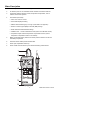
Meter Description
1.
Sensor input: Use caution when inserting the sensor.
2.
PC interface jack: For use with Model 407001 software and interface cable kit
3.
LCD Display: Displays moisture content, temperature compensation, units of
measure, and function symbols
4.
Push-buttons (see below):
• Power: Turn meter on and off
• Hold: Freeze displayed reading
• Material: Select material group 1 through 9 (see Table in the Appendix)
• Record: Track the highest (MAX) and lowest (MIN) readings
• Recall: Review the MAX and MIN readings
• Calibration and ‘+’: Used to calibrate the meter (refer to the calibration section)
• Temperature Adjust: Used for temperature compensation function (refer to
temperature compensation section in this manual)
5.
Battery compartment (back): Remove the rubber protective holster to access the
rear battery compartment
6.
Protective holster: Rubber jacket insulates meter
7.
Sensor pins: Replaceable sensor tips
8.
Sensor handle: Hold the sensor by the handle when taking measurements
1
7
2
3
8
4
5
6
3
Model 407777 Version 2.2 Jan 04