Transcript
Job Aid – Understanding the NETGEAR genie® Advanced tab
U.S. Cellular® 4G LTE™ Router (LG2200D)
UndertheADVANCEDtabareoptionsforuniquesituationssuchaswhen
remoteaccessbyIPorbydomainnamefromtheInternetisneeded.
Usersshouldhaveasolidunderstandingofnetworkingtousethistab.
How To View Status Information
How To Upgrade The Firmware
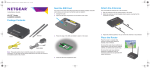
FromtheNETGEARgenieAdvanced>Administration>LTEModem
Upgradescreentheusercanchecktoseeifnewfirmwareisavailableand
toupdatetheirproduct.
TheNETGEARgenieAdvanced>AdvancedHomescreendisplaysthe
statusoftherouter,theInternetconnection,andtheWi-Fisettings.
Theusercanalsoreboottherouterfromthisscreen.
Check For Firmware
Update
How To Change Admin Password
How To User Keywords To Block
Internet sites
Tochangetheadminpassword,selectNETGEARgenieAdvanced>
Administration>SetPassword.Typetheoldpassword,andtypethenew
passwordtwice.
YoucanusekeywordstoblockcertainInternetsitesfromyournetwork.
Youcanchoosetoblockallthetimeorbasedonaschedule.Tosetup
keywordblocking,selecttheNETGEARgenieAdvanced>Security>
BlockSites.
Troubleshooting And Support
BasictroubleshootingsuggestionsarefoundintheNETGEAR
4GLTERouter(LG2200D)UserManual.Toviewthismanualand
othersupportinformationclickontheOnlineSupportlinkinthe
NETGEARgenieorvisitsupport.netgear.com
TocontactU.S.Cellulartechnicalsupport,call1-888-944-9400
(ordial611onaU.S.Cellular®mobilephone).
Visitwww.netgear.comformoreproductandsupportinformation.
4G LTE not available in all areas. See uscellular.com/4G for complete coverage details. 4G LTE service provided through King Street Wireless, a partner of U.S. Cellular. LTE is a trademark of
ETSI. © 2014 NETGEAR, the NETGEAR Logo and NETGEAR genie are trademarks of NETGEAR, Inc. in the United States and/or other countries.
© 2014 NETGEAR, Inc. All rights reserved.