1
14
LEVEL 1 FITNESS 605 MAGNETIC BIKE
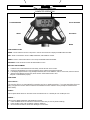
COMPUTER OPERATION
4.
The monitor will beep for 10 seconds at the completion of workout that was preset. Press any button to stop the
beeping.
REMARKS –
1.
2.
It is suggested to preset only one item. If more than one item is set, the first to reach the preset value will sound the
alarm.
For the PULSE function, the monitor will not beep after reaching the preset value. The pulse display will flash
continuously while the actual heartbeat detected is over the preset value.
TIME –
Displays the total workout time from 00:00 up to 99:59 minutes.
DISTANCE –
Displays the training distance from 0.0 to a maximum of 999.9 Kilometers or Miles in increments of 0.1Kilometers or Miles.
CALORIES –
Displays estimated calories burned during training from 0.0 to a maximum of 999.9 KCAL in increments of 0.1 KCAL.
PULSE –
User’s current heart rate is displayed in beats per minute (BPM). Place the palms of your hands on both of the pulse sensors
and wait for 30 seconds for the most accurate reading.
RECOVERY –
The RECOVERY function measures your body’s ability to recover after exercise. You can find the result displayed in the first
left square of the lower screen. Recovery is measured on a scale of F1.0 to F6.0 in increments of 0.1. While F1.0 means the
best, F6.0 means the worst. In addition, your peak heart rate right after exercising is displayed in the second right square of
the lower screen. In order to measure recovery rate accurately, users must test it immediately once the workout is finished
by first pressing the RECOVERY button and then stop exercising completely. After pressing the RECOVERY button be sure
to put both hands on the pulse sensors. The test will last for 1 minute and the result will be displayed on the monitor. You
can improve your recovery rate through exercise. You can exit the RECOVERY mode by pressing the RECOVERY button
again.