1
USER SETTINGS
21
ENG
ENGLISH
USER SETTINGS
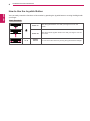
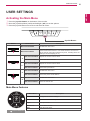
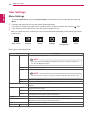
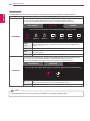
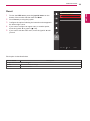
Activating the Main Menu
1 Press the joystick button on the bottom of the monitor.
2 Move the joystick up/down (▲/▼) and left/right (◄/►) to set the options.
3 Press the joystick button once more to exit the main menu.

BLACK
ST.
GAME
MODE
DAS
MODE
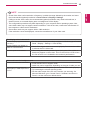
Joystick Button
Button
Menu Status
Description
Main menu disabled
Enables the main menu.
Main menu enabled
Exits the main menu.
(Press and hold the button to turn off the monitor: You can turn
off the monitor using this method at any time, including when the
OSD (On Screen Display) is on.)
◄
►
▲
▼
Main menu disabled
Adjusts the monitor volume level.
Main menu enabled
Enters the menu features.
Main menu disabled
Adjusts the monitor volume level.
Main menu enabled
Enters the input feature.
Main menu disabled
Enables the main menu.
Main menu enabled
Enters the picture mode feature.
Main menu disabled
Enables the main menu.
Main menu enabled
Turns the monitor off.
Main Menu Features

Main Menu
Picture Mode
Menu
Exit
Input
Monitor off

Long Press: Monitor Off.
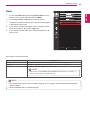
Description
Menu
Configures the screen settings.
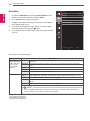
Picture Mode
Optimizes the screen for picture mode.
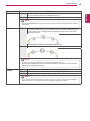
Input
Sets input mode.
Monitor off
Turns off the monitor.
Exit
Exits the main menu.