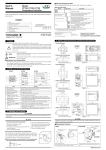
1
2.Letting the controller start from the current PV and run according to time
settings defined for segment 1
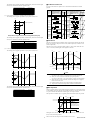
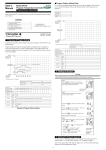
4. Start Program Operation
“Creating the program” must be finished before
starting program operation.
Controller Settings
Step 1:
Confirm that the controller shows
the operating display ➀, ➁ or ➂.
Set the STC (Start Code) program parameter to “2”.
PV
EV
RUN
Target setpoint
a
b
Step 2:
Press the
key for at least 1
second.
“RUN” lamp is lit, and starts the
program operation.
Program setpoint
c
d
EV
RUN
e
Segment
Segment Segment Segment
2
3
4
1
Start
of program operation
Time
Segment
5
“RUN” lamp is lit.
Starting Point of Operation
5. Reset (Stop) Program Operation
Step 1:
Confirm that the controller is in
program operation.
Controller Behavior
a
Begins to run from point a according to the time setting defined for segment 1.
b
Begins to run from point b according to the time setting defined for segment 1.
c
Begins to run from point c according to the time setting defined for segment 1.
d
Begins to run from point d according to the time setting defined for segment 1.
e
Begins to run from point e according to the time setting defined for segment 1.
EV
RUN
3.Letting the controller start from the current PV and run according to ramp
settings defined for segment 1
“RUN” lamp is lit.
Step 2:
Press the
key for at least 1
second.
“RUN” lamp goes out, and
resets(stops) the program
operation.
Controller Settings
Set the STC (Start Code) program parameter to “1”.
EV
RUN
(1)
“RUN” lamp goes out.
Note:
➀ “Program operation” mode can be changed (run/reset) by key
operation, communication or external contact input signal.
➁ When the program operation is reset (stopped), control action is
also stopped, and the control output is to be 0% or OFF.
If segment 2 is a soak segment
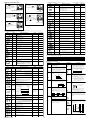
Program operation starts from any of the points A (SSP) to C. For other information, see the following table.
PV
1
2
Program pattern
6. Description of Program Functions
C
3
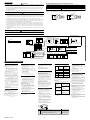
■ Programming
4
Before you begin programming, determine whether your programs are created using the
time unit of “hour and minute” or “minute and second.” The controller is factory-set to
the “hour and minute” time unit. To create programs using the “minute and second”
time unit, change the setpoint of the TMU (Time Unit of Program) setup parameter to
“1”.
A(SSP)
5
Time
Seg.1
Seg.2 Seg.3 Seg.4
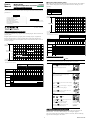
The starting point of program operation is determined by where the measured input
value (PV) is located at the time the operation starts.
As shown in the figure below, this method creates programs by setting a segment time
and a target setpoint on a segment-by-segment basis.
Measured input value (PV) at startup of
program operation
Starting point of
program operation
1
C
2
C
3
C
This single definite line is
referred to as a segment.
Target
setpoint
Target setpoint set for segment
immediately preceding
or the starting target setpoint if this is
the point of starting program operation
Seg.5
Example Where Segment 2 is a Soak Segment
Creating programs by setting target setpoint and segment time
PV
B
(2)
Segment time
4
B
5
A (SSP)
If segment 3 is a soak segment:
The starting point of program operation is any of points A (SSP) to E.
Time
PV
■ Conditions for Starting Program
1
1.Letting the controller run from a starting target setpoint
E
A starting target setpoint refers to a setpoint from which program operation begins. The
controller operates in such a manner that the setpoint changes to the target setpoint over
the segment time set for segment 1, irrespective of what the PV value is.
2
D
3
C
4
B
Controller Settings
Set the STC (Start Code) program parameter to “0”.
5
A(SSP)
Time
PV
Seg.1
Segment 1
Seg.2
Seg.3
Seg.4
Example Where Segment 3 is a Soak Segment
Segment 2
Target setpoint
PV
Starting target setpoint
Program setpoint
1
Time
E
Segment time
Start of program operation
2
D
3
C
4
5
B
A(SSP)
Time
Seg.1
IM05C01F12-02E
2
Seg.2
Seg.3
Seg.4
Example With No Soak Segment