1
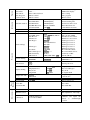
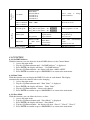
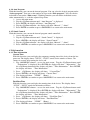
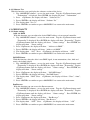
1. Tap <MODE/ESC>button,access the main menu,Tap the <Up/Down>button until
Personality is displayed. Press ENTER, the display will show Personality . Tap the
<Up/Down>button until the display will show
Status settings . Press ENTER, the
display will show
Status settings .
2. Press <Up/Down>, the display will show Movement Speed .
3. Press< ENTER>, the display will show Movement Speed .
4. The display show
Speed 1 ,Press <Up/Down>, the display will show “Speed 2”,
“Speed 3”, “Speed 4”.
5. Press <ENTER> to confirm or press <MODE/ESC> to return to the main menu.
Mic Sensitivity
With this function, the default is 70%, you can select the desired microphone sensitivity
from 0 % to 99 %.
1. Tap <MODE/ESC>button,access the main menu,Tap the <Up/Down>button until
Personality is displayed. Press ENTER, the display will show Personality . Tap the
<Up/Down>button until the display will show
Status settings . Press ENTER, the
display will show
Status settings .
2. Press <Up/Down>, the display will show Mic Sensitivity .
3. Press< ENTER>, the display will show Mic Sensitivity .
4. The display show
70% ,Press <Up/Down>, the display will show
0~99% .
5. Press <ENTER> to confirm or press <MODE/ESC> to return to the main menu.
Hibernation ——Standby mode
The lamp and step motors will be power off if the fixture stay without DMX signal for 15
mins (Factory default).And the fixture will be reset before working once it receive DMX
signal again.
1. Tap <MODE/ESC>button,access the main menu,Tap the <Up/Down>button until
Personality is displayed. Press ENTER, the display will show Personality . Tap the
<Up/Down>button until the display will show
Status settings . Press ENTER, the
display will show
Status settings .
2. Press <Up/Down>, the display will show Hibernation .
3. Press< ENTER>, the display will show Hibernation .
4. The display show
OFF ,Press <Up/Down>, the display will show
01M ,
02M
….
99M .
5. Press <ENTER> to confirm or press <MODE/ESC> to return to the main menu.
8.3.2 Service setting
Service Pass——The Password for this function is “50”.
RDM PID—— With this function you can call up various submenus via RDM.
This device is RDM ready. RDM stands for "remote device management" and makes
remote control of devices connected to the DMX-bus. ANSI E1.20-2006 by ESTA specifies
the RDM standard as an extension of the DMX512 protocol.
Manual settings like adjusting the DMX starting address are no longer needed.
This is especially useful when the device is installed in a remote area.