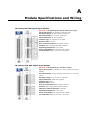
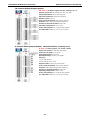
1
ioPAC 8020 Modular RTU Controller User’s Manual Second Edition, July 2011 www.moxa.com/product © 2011 Moxa Inc. All rights reserved. Reproduction without permission is prohibited. ioPAC 8020 Modular RTU Controller User’s Manual The software described in this manual is furnished under a license agreement and may be used only in accordance with the terms of that agreement. Copyright Notice Copyright ©2011 Moxa Inc. All rights reserved. Reproduction without permission is prohibited. Trademarks The MOXA logo is a registered trademark of Moxa Inc. All other trademarks or registered marks in this manual belong to their respective manufacturers. Disclaimer Information in this document is subject to change without notice and does not represent a commitment on the part of Moxa. Moxa provides this document as is, without warranty of any kind, either expressed or implied, including, but not limited to, its particular purpose. Moxa reserves the right to make improvements and/or changes to this manual, or to the products and/or the programs described in this manual, at any time. Information provided in this manual is intended to be accurate and reliable. However, Moxa assumes no responsibility for its use, or for any infringements on the rights of third parties that may result from its use. This product might include unintentional technical or typographical errors. Changes are periodically made to the information herein to correct such errors, and these changes are incorporated into new editions of the publication. Technical Support Contact Information www.moxa.com/support Moxa Americas Moxa China (Shanghai office) Toll-free: 1-888-669-2872 Toll-free: 800-820-5036 Tel: +1-714-528-6777 Tel: +86-21-5258-9955 Fax: +1-714-528-6778 Fax: +86-21-5258-5505 Moxa Europe Moxa Asia-Pacific Tel: +49-89-3 70 03 99-0 Tel: +886-2-8919-1230 Fax: +49-89-3 70 03 99-99 Fax: +886-2-8919-1231 Table of Contents 1. Introduction ...................................................................................................................................... 1-1 ioPAC 8020 Modular RTU Controller....................................................................................................... 1-2 Product Features ................................................................................................................................ 1-2 Package Checklist ............................................................................................................................... 1-2 Available Products .............................................................................................................................. 1-3 Product Specifications ......................................................................................................................... 1-3 Physical Dimensions ............................................................................................................................ 1-5 Hardware Reference ............................................................................................................................ 1-6 Panel Guide ......................................................................................................................... 1-6 LED Indicators for CPU Module .............................................................................................. 1-6 LED Indicators for I/O Modules .............................................................................................. 1-7 2. Initial Setup ...................................................................................................................................... 2-1 System Architecture ............................................................................................................................ 2-2 Installing the ioPAC on a DIN-Rail ......................................................................................................... 2-2 Removing the ioPAC from the DIN-Rail........................................................................................... 2-3 Grounding the ioPAC System ........................................................................................................ 2-3 Inserting/Removing I/O Modules from the ioPAC ............................................................................. 2-4 Connecting the Power System ....................................................................................................... 2-4 Connecting to the Network ........................................................................................................... 2-4 3. Utilities ............................................................................................................................................. 3-1 Introduction to Modular ioAdmin ........................................................................................................... 3-2 Features of ioAdmin ..................................................................................................................... 3-2 Auto search and detection ..................................................................................................... 3-2 Remote Management ........................................................................................................... 3-2 Click&Go™ Logic Editor ......................................................................................................... 3-2 Import/Export files: ............................................................................................................. 3-2 Installing Modular ioAdmin Utility ........................................................................................... 3-3 Connecting your ioPAC 8020 system ...................................................................................... 3-3 Login as Administrator .......................................................................................................... 3-4 Auto Detection of Installed Modules ....................................................................................... 3-5 Modular ioAdmin Main Screen .............................................................................................................. 3-6 Main Screen Overview.................................................................................................................. 3-6 Functions on the Menu Bar ........................................................................................................... 3-6 File ............................................................................................................................. 3-6 System ....................................................................................................................... 3-7 Sort ............................................................................................................................ 3-7 Help ............................................................................................................................ 3-7 Navigation Panel .................................................................................................................. 3-7 Server Context Menu ............................................................................................................ 3-8 Connect ...................................................................................................................... 3-8 Disconnect ................................................................................................................... 3-8 Restart System (Administrator Mode Required) ................................................................ 3-8 Reset to Default (Administrator Mode Required) ............................................................... 3-8 Export/Import System Config (Administrator Mode Required) ............................................ 3-8 Export Modbus Map (Administrator Mode Required) .......................................................... 3-8 Quick Links ......................................................................................................................... 3-9 Main Window (General) ........................................................................................................ 3-9 I/O Configuration Tab (General) ..................................................................................... 3-9 Device Info Tab ............................................................................................................ 3-9 Device Settings Tab (General) ........................................................................................ 3-9 Message Monitor Tab .................................................................................................... 3-9 Administrator Functions ...................................................................................................... 3-10 I/O Configuration Tab (Administrator) ........................................................................... 3-10 Device Settings Tab (Administrator) ..................................................................................... 3-12 Network Tab (Administrator) ............................................................................................... 3-13 Firmware Update Tab (Administrator) ................................................................................... 3-14 Watchdog Tab (Administrator) .................................................................................................... 3-14 Click&Go Logic Tab (Administrator) ............................................................................................. 3-15 SNMP Tab (Administrator) .......................................................................................................... 3-15 Using TFTP to Import/Export Configuration .......................................................................................... 3-16 4. Using the Built-in Web Console ......................................................................................................... 4-1 Overview for ioPAC 8020 ..................................................................................................................... 4-2 Entering the Web Console .................................................................................................................... 4-3 Overview ........................................................................................................................................... 4-3 Basic Settings ............................................................................................................................. 4-3 Network Settings......................................................................................................................... 4-4 General settings .................................................................................................................. 4-4 Ethernet Configuration.......................................................................................................... 4-4 System Management ............................................................................................................ 4-5 Accessible IP ................................................................................................................ 4-5 SNMP Agent ................................................................................................................. 4-6 Network Connection ...................................................................................................... 4-6 Firmware Update .......................................................................................................... 4-6 Import System Config ................................................................................................... 4-7 Export System Config ................................................................................................... 4-7 Change password ......................................................................................................... 4-7 Load Factory Default. .................................................................................................... 4-8 Save/Restart ................................................................................................................ 4-8 5. Click&Go Introduction ....................................................................................................................... 5-1 Overview ........................................................................................................................................... 5-2 Features ............................................................................................................................................ 5-3 Click&Go Logic Basics .......................................................................................................................... 5-3 Working with Rules ............................................................................................................................. 5-4 Developing Your Logic Rules ................................................................................................................ 5-5 Define Global Variables........................................................................................................................ 5-5 Internal Register Settings ............................................................................................................. 5-6 Timer Settings ............................................................................................................................ 5-6 SNMP Trap Server ....................................................................................................................... 5-7 E-Mail Server .............................................................................................................................. 5-7 Active Message Server ................................................................................................................. 5-8 IF/THEN/ELSE Statement .................................................................................................................... 5-9 IF Conditions .............................................................................................................................. 5-9 THEN/ELSE Actions .................................................................................................................... 5-11 Working with Click&Go Rulesets ......................................................................................................... 5-13 Activating the Ruleset ................................................................................................................ 5-13 Upload, Restart and Run ..................................................................................................... 5-13 Rule-set Management Bar ................................................................................................... 5-13 Ruleset Import/Export ........................................................................................................ 5-13 6. Hot-swappable I/O Function ............................................................................................................. 6-1 Hot-swappable I/O Function ................................................................................................................. 6-2 Handling Unmatched Module Combination Events ................................................................................... 6-2 Disable/Enable “Unmatched I/O Modules” Watchdog ............................................................................... 6-3 A. Module Specifications and Wiring...................................................................................................... A-1 B. Using Modbus/TCP ............................................................................................................................ B-1 Modbus Header....................................................................................................................B-1 Modbus Command ...............................................................................................................B-1 Modbus Function Code Introductions ......................................................................................B-1 C. Modbus/TCP Address Mappings ........................................................................................................ C-1 I/O Image Map ...................................................................................................................................C-1 Module Configuration Map (Holding register map) ...................................................................................C-2 System Configuration Map (Input register map) .....................................................................................C-2 Modbus Table .....................................................................................................................................C-3 System Configuration Map ............................................................................................................C-3 Input register map (Read-Only) .............................................................................................C-3 Holding register map(R/W) ...................................................................................................C-3 5xxxx Write Registers (Support function 8) .............................................................................C-4 Module Configuration Map .............................................................................................C-4 For 16Channel Digital Input Module (RM-1600-T): ............................................................C-5 For 10Channel Digital Input Module (RM-1500-T): ............................................................C-5 For 8Channel Analog Input Module (RM-3802-T / RM-3810-T): ..........................................C-5 D. Used Network Port Numbers ............................................................................................................. D-1 E. SNMP MIB file ................................................................................................................................... E-1 F. Factory Default Settings .................................................................................................................... F-1 1 1. Introduction The ioPAC 8020 modular RTU controller is a rugged, modularized, and flexible I/O combination system. It is designed for harsh environments, such as rolling stock, mining facilities, etc. The hot swappable I/O modules can connect to various sensors and on/off switches for automation applications and the CPU module provides local intelligence that can communicate over Ethernet and IP-based networks. The following topics are covered in this chapter: ioPAC 8020 Modular RTU Controller Product Features Package Checklist Available Products Product Specifications Physical Dimensions Hardware Reference ioPAC 8020 Modular RTU Controller Introduction ioPAC 8020 Modular RTU Controller The ioPAC modular RTU controller is an automation system which combines one CPU module with hot swappable I/O modules. This modularity gives the ioPAC 8020 enormous flexibility. The slice type I/O modules that can connect to any combination of sensors and on/off devices, and can transfer the captured data or device status to a host computer via an Ethernet or IP-based networks. The system is designed for applications in harsh environments. It has wider operation temperature of -40 to 70°C and vibration resistance. The rugged aluminum chassis can resist UV rays to prevent wear and tear. The ioPAC modular RTU controller consists of two major components: the CPU Module, which includes empty I/O slots, and the I/O modules themselves. The CPU module provides the capability for daisy-chain communications over Ethernet networks, includes simple logic control, and powers the whole system. Each CPU module is equipped with five I/O slots for different I/O modules. The last module slot can be filled by a backup power module or an additional I/O module. Product Features • Robust and Compact Design for Harsh Environments • Two Ethernet switch ports with M12 or RJ45 connectors for Daisy Chain • Hot-swappable I/O modules • Auto-detection of Installed Modules • Event-based Logic with up to 80 rules and Unicode Active Messages • Built-in Web Console Package Checklist Each ioPAC 8020 and I/O module is packed securely in a small box. ioPAC 8020 (if ordered) • ioPAC 8020 CPU Module with 5 or 9 empty I/O slots × 1 • Software and Documentation CD-ROM × 1 • Accessories Kit × 1 (3 slot covers, 1 DB9 cover, 1 M12 cover, and one RJ45 cabling kit) I/O Module (if ordered) • RM-xxxx I/O module × 1 NOTE: Notify your sales representative if any of the above items are missing or damaged. 1-2 ioPAC 8020 Modular RTU Controller NOTE Introduction The 9th slot of the ioPAC 8020-9 series is reserved for future expansion. All I/O modules may only be installed in slot 1 through slot 8. Available Products ioPAC 8020-5-M12-T: ioPAC 8020 modular RTU controller with dual M12 Ethernet LAN ports and 5 I/O slots, -40 to 75°C operating temperature ioPAC 8020-5-RJ45-T: ioPAC 8020 modular RTU controller with dual RJ45 Ethernet LAN ports and 5 I/O slots, -40 to 75°C operating temperature ioPAC 8020-9-M12-T: ioPAC 8020 modular RTU controller with dual M12 Ethernet LAN ports and 9 I/O slots, -40 to 75°C operating temperature ioPAC 8020-9-RJ45-T: ioPAC 8020 modular RTU controller with dual RJ45 Ethernet LAN ports and 9 I/O slots, -40 to 75°C operating temperature RM-1602-T: ioPAC I/O module with 16 digital inputs, 24 VDC sink/source type, -40 to 75°C operating temperature RM-1050-T: ioPAC I/O module with 10 digital inputs, 110 VDC, -40 to 75°C operating temperature RM-2600-T: ioPAC I/O module with 16 digital outputs, 24 VDC sink type, -40 to 75°C operating temperature RM-3802-T(coming soon): ioPAC I/O module with 8 analog inputs, 4 to 20 mA, -40 to 75°C operating temperature RM-3810-T(coming soon): ioPAC I/O module with 8 analog inputs, 0 to 10 V, -40 to 75°C operating temperature Product Specifications System CPU: ARM9 based CPU, 32-bit/160 Mhz SDRAM/Flash: • ioPAC 8020: 8 MB / 4 MB I/O Scan Time: 100 ms Program Cycle Time: 100 ms Ethernet Interface LAN: 2 auto-sensing 10/100 Mbps switch ports (M12 or RJ45) Ethernet Bypass Relay Function: Hardware Normal Close Serial Interface (reserved) Serial COM1: RS-232/422/485 (DB9 male) Serial Debug Port: RS-232 (4-pin connector for ioPAC 8020-C and 8020-ISaGRAF) Serial Signals (reserved) RS-232: TxD, RxD, DTR, DSR, RTS, CTS, DCD, GND RS-422: TxD+, TxD-, RxD+, RxD-, GND RS-485-4w: TxD+, TxD-, RxD+, RxD-, GND RS-485-2w: Data+, Data-, GND Power Requirements Input Voltage: 12 to 36 VDC Power Consumption: CPU Module: 4.40 W @ 24 VDC 1-3 ioPAC 8020 Modular RTU Controller Introduction Physical Characteristics Housing: Aluminum Mounting: DIN-Rail, wall, rack mounting (with optional kit) Dimensions: 5-slot Version: 191 x 135 x 100 mm (7.52 x 5.31 x 3.94 in) 9-slot Version: 292 x 135 x 100 mm (11.52 x 5.31 x 3.94 in) I/O Module Slots: 5 or 8 slots Environmental Limits Operating Temperature: -40 to 75°C (-40 to 167°F) Storage Temperature: -40 to 85°C (-40 to 185°F) Ambient Relative Humidity: 5 to 95% (non-condensing) Altitude: Up to 2000 m Note: Please contact Moxa if you require products guaranteed to function properly at higher altitudes. Standards and Certifications Safety: UL 508 (Pending) EMI: FCC Part 15 Subpart B Class A, EN 55022 Class A EMS: IEC 61000-4-2 (ESD) Level 2/3, IEC 61000-4-3 (RS) Level 2, IEC 61000-4-4 (EFT) Level 2, IEC 61000-4-5 (Surge) Level 3, IEC 61000-4-6 (CS) Level 2, IEC 61000-4-8 (PM) Level 1, IEC 61000-4-11 (DIPS), IEC 61000-6-2 (ESD) Level 2/3, IEC 61000-6-4 (EFT) Level 2 Shock: IEC 60068-2-27 Freefall: IEC 60068-2-32 Vibration: IEC 60068-2-6 Rail Traffic: EN 50155, EN 50121-3-2, EN 50121-4 Note: Please check Moxa’s website for the most up-to-date certification status. Warranty Warranty Period: 5 years Details: See www.moxa.com/warranty Note: The SD slot and the serial interface are reserved for future function enhancement. 1-4 ioPAC 8020 Modular RTU Controller Introduction Physical Dimensions 1-5 ioPAC 8020 Modular RTU Controller Introduction Hardware Reference Panel Guide NOTE The reset button restarts the server and resets all settings to factory defaults. Use a pointed object such as a straightened paper clip to hold the reset button down for 5 seconds. The READY LED will turn red as you are holding the reset button down. The factory defaults will be loaded once the READY LED turns green again. You may then release the reset button. LED Indicators for CPU Module Group Pins/Description Ethernet On the Plug Printed label Ready Green: Power On & System working Normally Ready Green Flashing: Click&Go Active Interlaced Green/Red Flashing: Safe Mode Red: System Error I/O Off: I/O Module does not exist I/O Green: Connecting I/O Module and working normally Red: I/O Bus or Modules failure Serial Green: Tx Serial Yellow: Rx Steady Red: Communication Fail Power Green: Normal Input 12 to 36V Power Red: Voltage out of range Off: No Power 1-6 ioPAC 8020 Modular RTU Controller Introduction LED Indicators for I/O Modules Each DIO or AIO module is equipped with a Module Status LED indicating operation status. LED Name Status LED Color LED Function Off Not powered or Unknown Module Green Steady On: System ready. Red Steady On: I/O module isn’t in configuration. 1-7 2 2. Initial Setup This chapter includes information about installing the ioPAC 8020 and its I/O Modules. The following topics are covered in this chapter: Installing the ioPAC on a DIN-Rail Removing the ioPAC from the DIN-Rail Grounding the ioPAC System Inserting/Removing I/O Modules from the ioPAC Connecting the Power System Connecting to the Network ioPAC 8020 Modular RTU Controller Initial Setup System Architecture The ioPAC 8020 consists of a CPU module that supports Ethernet and up to 5 RM-xxxx-T I/O modules. The brains of the system is the CPU Module, which collects information from each I/O module and manages their operation. Communication between the ioPAC 8020 and RM-xxxx-T I/O modules occurs through a Modbus/RTU communication bus. Modbus Addresses for each I/O channel are fixed by the ioPAC 8020. The ioPAC 8020 uses 24 VDC power inputs. One power input is required, and a second one can be used as a backup power input. The ioPAC 8020 provides 5 VDC power to all connected I/O modules. When the total current consumption of the I/O modules exceeds 1.5A, you will need to insert an extra power module. Installing the ioPAC on a DIN-Rail The aluminum DIN-Rail attachment plate should already be fixed to the back panel of the ioPAC 8020 when you take it out of the box. If you need to reattach the DIN-Rail attachment plate to the ioPAC 8020, be sure the spring-loaded bracket is situated towards the bottom, as shown in the following figures. NOTE You can purchase a wall-mounting or rack-mounting kit separately. The ioPAC 8020 mounting kit is identical to the one for the EDS-600. STEP 1: If the spring-loaded bracket is locked in place, push the recessed button to release it. Once released, you should feel some resistance from the spring as you slide the bracket up and down a few millimeters in each direction. 2-2 ioPAC 8020 Modular RTU Controller Initial Setup STEP 2: Insert the top of the DIN-Rail into the top slots on the DIN-Rail attachment plate. STEP 3: The DIN-Rail attachment unit will snap into place as shown in the illustration to the right. Removing the ioPAC from the DIN-Rail To remove the ioPAC 8020 from the DIN-Rail, use a screwdriver to push down the spring-loaded bracket until it locks in place, as shown in the diagram to the right. Next, rotate the bottom of the switch upwards and then remove the switch from the DIN-Rail. Grounding the ioPAC System The ioPAC 8020 is grounded to enhance EMS performance. The ioPAC 8020 comes with metal DIN-Rail brackets for grounding the system. For optimal EMS performance, connect the chassis ground nut on the ioPAC 8020 to the grounding point. The ground nut is located on the right side of the ioPAC 8020. 2-3 ioPAC 8020 Modular RTU Controller Initial Setup Inserting/Removing I/O Modules from the ioPAC The ioPAC 8020 comes with flexible, hot swappable I/O modules. It is easy to manually tighten and loosen the screws. When inserting a new I/O module, follow the steps below: Step 1: Feed the I/O module into an empty I/O slot with the PCB clip. Step 2: Push down to the end until the connector is matched. Step 3: Tighten the I/O module screw. While removing the I/O module, following the steps below below Step 1: Loosen the I/O module screws Step 2: Remove the I/O module Connecting the Power System The ioPAC 8020 requires two 24 VDC power sources. One 24 VDC power input is for system power, and the other power input is for backup power. We recommended that the two power inputs are connected to different power supply systems. ATTENTION Disconnect the power before installing and wiring Disconnect the power cord before installing and/or wiring your ioPAC system. Do not exceed the maximum current for the wiring Determine the maximum possible current for each power wire and common wire. Observe all electrical codes dictating the maximum current allowable for each wire size. If the current exceeds the maximum rating, the wiring could overheat, causing serious damage to your equipment. Connecting to the Network The ioPAC 8020 supports standard 10/100 Mbps Ethernet. There are two Ethernet switch ports (both of which use the same MAC address) located on the device’s front panel. For ioPAC 8020-5/9-RJ45 models, these two ports are used to connect to Ethernet-enabled devices. Most users will choose to configure these ports for Auto MDI/MDI-X mode, in which case the port’s pinouts are adjusted automatically depending on the type of Ethernet cable used (straight-through or cross-over), and the type of device (NIC-type or HUB/Switch-type) connected to the port. The following section presents the pinouts for both MDI (NIC-type) ports and MDI-X (HUB/Switch-type) ports. We also give cable wiring diagrams for straight-through and cross-over Ethernet cables. 10/100BaseT(X) RJ45 Pinouts MDI Port Pinouts MDI-X Port Pinouts Pin Signal Pin Signal 1 Tx+ 1 Rx+ 2 Tx- 2 Rx- 3 Rx+ 3 Tx+ 6 Rx- 6 Tx- 2-4 8-pin RJ45 ioPAC 8020 Modular RTU Controller Initial Setup 10/100BaseT(X) M12 Pinouts Suggestion For first-time users, we recommend that you link from your host computer to the ioPAC 8020 over a local Ethernet network for initial IP and system configuration. Once the installation is complete, you may move the entire I/O system to the field. Please note that you can insert any LAN port to make the configuration setting work. Step1. Pick one of the two LAN ports and connect the ioPAC 8020 to the host PC with an Ethernet cable. It doesn’t matter which port you use. For initial setup of the ioPAC 8020, we assume that the ioPAC 8020 is configured using a direct connection to a host computer. Step2. In Windows, you may need to modify the host computer’s IP address to 192.168.127.xxx. (xxx: from 001 to 253) through the Control Panel. Step3. Connect to the ioPAC 8020’s IP address for configuration. The default IP is as below: LAN Port Default IP Address Default Netmask Default Gateway Port 0 /1 192.168.127.254 255.255.255.0 None There are two ways to configure the ioPAC 8020. One is to use Modular_ioAdmin, the other is to use the web console. Once the ioPAC 8020 has been detected, modify the settings as needed for your network environment, then restart the I/O. 3.1: Using Modular_ioAdmin: Please refer to chapter 3 for details. 3.2: Using the web console: Please refer to chapter 4 for details. 2-5 3 3. Utilities This chapter introduces software utilities you can use when configuring the ioPAC modular RTU controller system. These software utilities include: • Modular ioAdmin: The main utility which allows you to configure, monitor, and edit Click&Go™. • TFTP: The utility which allows you to mass deploy the configuration file. The following topics are covered in this chapter: Introduction to Modular ioAdmin Features of ioAdmin Modular ioAdmin Main Screen Main Screen Overview Functions on the Menu Bar Watchdog Tab (Administrator) Click&Go Logic Tab (Administrator) SNMP Tab (Administrator) Using TFTP to Import/Export Configuration ioPAC 8020 Modular RTU Controller Utilities Introduction to Modular ioAdmin The ioPAC system may be managed and configured over the Ethernet with Modular ioAdmin, a Windows utility provided with your ioPAC 8020. Modular ioAdmin’s graphical user interface gives you easy access to all status information and settings. Although ioPAC 8020 also supports configuration by web console, full configuration and management is only available through Modular ioAdmin. Modular ioAdmin includes of following functions: NOTE • Complete function settings • Click&Go™ Logic To support both 5-slot and 9-slot ioPAC 8020 systems, install Modular ioAdmin V1.4 or above. Features of ioAdmin Auto search and detection While connected to the ioPAC 8020, the utility can automatically find how many devices are connected on the network. When you connect successfully, you will see the installed modules on the screen after you login. You do not need to manually add I/O modules to the configuration one by one. What appears on screen is exactly what you’ve installed. In addition, it will solve any IP conflicts when you first install two or more ioPAC 8020s to the same network at the same time. Remote Management Modular ioAdmin allows users to find and configure multiple ioPAC 8020 systems over the Ethernet network, and monitor and configure attached I/O devices. You can also test I/O devices and reset the system. Click&Go™ Logic Editor Click&Go™ is an event-based, front-end intelligent logic control system that makes your I/O system smarter. Modular ioAdmin also includes Click&Go logic control for the configuration of your ioPAC system. Import/Export files: Modular ioAdmin allows the import/export of configuration files and device management lists Modular ioAdmin allows the entire configuration of the ioPAC 8020 system to be saved as a file. The file is viewable as text and can serve as a record or backup of the configuration, or as a template. The file includes file title, date, time, model information, and Click&Go™ rules. Modular ioAdmin can import and export a list of ioPAC 8020 devices that are being managed. This file can make it easier to manage all devices on the network, and includes server name, module type, IP address, and unit ID. 3-2 ioPAC 8020 Modular RTU Controller Utilities Installing Modular ioAdmin Utility Insert the Software CD from the IoPAC 8020’s package into the host computer. Run SETUP.EXE, which is located in the root directory. The installation program will guide you through the installation process and install the ioAdmin utility. After the installation is complete, run Modular ioAdmin from Start Program Files MOXA IO Server Utility Modular ioAdmin. Connecting your ioPAC 8020 system After you open Modular ioAdmin, the auto search window will pop up and guide you to find the I/O system. Click “Start Search” to find the I/O system automatically, or you can click “Exit” and then add the ioPAC 8020 system manually. If two or more I/O systems with the same IP address are found, Modular ioAdmin will ask you to modify the IP address in a pop up window, and then reboot the I/O system. If multiple ioPAC 8020 units are installed on the same network, remember that each unit has the same default IP address. You will need to assign a different IP address to each unit to avoid IP conflicts. Modular ioAdmin automatically detects IP conflicts and gives you a chance to modify each unit’s IP address in the “IP Address” columns. Click the “Set” button to reboot the corresponding unit with its new IP address. Click the “Re-Search” button to refresh the list of units found by Modular ioAdmin. 3-3 ioPAC 8020 Modular RTU Controller Utilities If the connection succeeds, the main screen title will be displayed as below: CAN’T FIND DEVICE If Modular ioAdmin can’t find the device, there are two possible causes, described below: 1. There are multiple network interfaces on the host PC. Before searching for devices, be sure to select the correct network interface at menu bar system Network Interface. 2. The device is not in the same network segment as your host PC. You can add them manually. Click the Device tag in the Navigation Panel, and then choose Add new device. In the pop out window, key in the IP address of the ioPAC you want to add. Check the Ethernet cable if the methods above do not solve the problem. Login as Administrator After the ioPAC 8020 is displayed in the main window, select the “Device Settings” Tab. Type in the password and then click the “login” button in order to enter Administrator Mode. The default password is blank. 3-4 ioPAC 8020 Modular RTU Controller Utilities Auto Detection of Installed Modules Module Order Error Follow the instructions given below if you encounter the Module Order Error window. If you are installing for the first time, you may see the Module Order Error window. This is because the first time the system starts successfully, the ioPAC 8020 will store the current module combination and all their settings. If the module combination changes, the ioPAC 8020 will detect this unmatched module configuration and display the warning window below: There are two solutions to handle the unmatched module combination event: 1. Continue: This action will apply the currently detected I/O module combination to the system. All configurations of old module are preserved. The removed I/O modules will disappear and added modules will be applied with default settings. The system does not clear any Click&Go™ rules you have saved and you can still start it at your own risk. 2. Restore order (Recover to the previous module combination): This option will maintain the previous I/O module configuration on the system. If you do NOT know why the I/O module combination has changed, then choose this. You must shut down the system power and address the incorrect I/O combination problem manually. How to Turn Off the Module Order Check This function cannot be disabled, because incorrect I/O combination are NOT allowed as part of the configuration. 3-5 ioPAC 8020 Modular RTU Controller Utilities Modular ioAdmin Main Screen Main Screen Overview This is Modular ioAdmin’s main screen. After the connection between Modular ioAdmin and ioPAC is established, the main window defaults to the I/O Configuration tab as illustrated below. The picture displays a figure of the ioPAC 8020 with an empty module below it. The other tabs in the main window take you to Device Information and settings, and further functions are available when you log in as an administrator. Note that configuration options are not available until you log in as an administrator. 1 2 5 3 6 4 7 1 Modular ioAdmin Title 5 Quick Link 2 Menu Bar 6 Main Screen 3 Navigation Panel 7 Sync. Rate Information 4 Status Bar Functions on the Menu Bar File From the File menu, you can export the list of devices that are currently displayed in the navigation panel. You also can import a list of devices into Modular ioAdmin. When exporting/importing a device list, you will be prompted to select which devices on the list need to be exported/imported. The file will have a .SLT extension and can be opened as a text file. The device list was made from the record format: <Module Name>=<Module Type>, <Connection String>, <Unit ID>, including the following information for each device: 3-6 ioPAC 8020 Modular RTU Controller • device name • module type • IP address • unit ID Utilities System Several operations are possible from the System menu. Auto Scan Devices will search for ioPAC 8020 devices on the network. When connecting for the first time or recovering from a network disconnection, you can use this command to find I/O systems that are on the network. Network Interface allows you to select a network to use,if the PC has multiple network interfaces installed. I/O Status Refresh Interval is used to adjust how quickly the I/O status synchronizes with Modular ioAdmin. Note that faster sync speeds will result in higher loads on the network. The default value is 500 msec. To change the configuration, fill in the “Interval” column. Note that the unit is in 10 msec increments, so if you enter 100, the refresh rate becomes 1 sec. TCP Socket Timeout Interval allows you to select the preferred timeout value for TCP socket communication. Active Message Listen Port specifies the port number to use for ioPAC 8020 messages. If your network uses a firewall, you can coordinate this setting with your firewall settings to ensure that active messages get through. The default Listen Port is 9001. Sort The Sort menu allows the server list in the navigation panel to be sorted by connection, type, and location. Help In the Help menu, you can view the information about Modular ioAdmin. Navigation Panel On this panel, Modular ioAdmin shows information about the Host IP, and how many I/Os are in your system. They are sorted by Server Location by default. You can change the sorting method with the sorting function or on Quick Link. There are three ways to arrange the I/Os: by connection, by location, and by type. 3-7 ioPAC 8020 Modular RTU Controller Utilities Right click on the ioPAC 8020 tag to add the ioPAC 8020 server manually. Select Add ioPAC 8020 server. In the pop-up window, type in the I/O system IP address which you want to add. Right click the ioPAC 8020 tag to display the Server Context Menu. This menu contains the Connect/Disconnect, Delete I/O server, Restart System, Reset to Default, and Import/Export file functions. Server Context Menu The server context menu is accessed by right clicking on the server model name in the navigation panel. Connect Use this command to have Modular ioAdmin attempt a re-connection over the network to the selected ioPAC 8020. Disconnect Use this command to have Modular ioAdmin drop the network connection with the selected ioPAC 8020. Restart System (Administrator Mode Required) Use this command to restart your ioPAC 8020 system from a remote site. You will need to log in as an administrator to use this function. Reset to Default (Administrator Mode Required) Use this command to reset all settings, including console password, to factory default values. You will need to log in as an administrator to use this function. Export/Import System Config (Administrator Mode Required) Use this command to reload a configuration that was exported to a text file. You will need to log in as an administrator to use this function. You will need to restart the ioPAC 8020 system in order for the new configuration to take effect. This command may be used to restore a configuration after loading the factory defaults, or to duplicate a configuration to multiple ioPAC 8020. Export Modbus Map (Administrator Mode Required) Use this command to export the Modbus Map of the ioPAC 8020 system to a .CSV file. You will need to log in as an administrator to use this function. It is strongly recommended you use this method to record your Modbus Map after you have finished configuring the ioPAC 8020 system for your application. 3-8 ioPAC 8020 Modular RTU Controller Utilities Quick Links Quick links are provided to search for I/O servers on the network and sort the server list. Auto search Device Sort by connection Sort by type Sort by location Main Window (General) I/O Configuration Tab (General) The I/O Configuration tab shows a picture of an ioPAC 8020 when you are not logged in. This is the default tab when you first open Modular ioAdmin. Device Info Tab Device information, such as firmware revision, is displayed on the device info tab. Device Settings Tab (General) The Device Settings tab is where you log in as an administrator. This is required in order to gain access to the ioPAC 8020 configuration options. If no administrator password has been set up, simply click on Login and leave the Password for entry field blank. Additional detail is provided later in this chapter. Message Monitor Tab The Message Monitor tab will display any TCP/UDP I/O messages received from the ioPAC 8020. When you install the ioPAC 8020 for the first time, the active I/O messaging ruleset will not have been defined yet, so there will be no messages in the Message Monitor Tab. Please refer to Chapter 5 for information on how to program the ioPAC 8020’s active I/O messaging system. Once the active I/O messaging system has been configured and activated, TCP/UDP messages sent from the ioPAC 8020 will be viewable in the Message Monitor tab. Messages can be displayed in ASCII, UNICODE or in HEX. To display messages in HEX, make sure that “Toggle HEX” is checked. To display messages in UNICODE, make sure that “UNICODE(UCS-2)” is checked. 3-9 ioPAC 8020 Modular RTU Controller Utilities Administrator Functions For full access to all configuration options, log in as an administrator in the Device Settings tab. This is required whenever you start up ioAdmin or boot up/restart the ioPAC 8020. When you install the ioPAC 8020 for the first time, the password will be blank and you may simply click on Login. Additional functions will available after logging in, including the following new tabs: • Network • Firmware Update • Click & Go Logic • Watchdog • SNMP Setting ATTENTION You must log in to access any administrator function, including Network, Communication Watchdog Timer, Firmware Update and SNMP Setting tabs. If you forget the password, you may hold down the ioPAC 8020’s reset button to clear the password and load factory defaults. This will result in the loss of all configuration settings and your Click&Go Logic active I/O messaging program! When making configuration changes, you will need to click on Update or on Apply to save the changes. Some changes will require a restart of the ioPAC 8020 system in order to take effect, and you will be given the option to restart the computer if necessary. I/O Configuration Tab (Administrator) When logged on as an administrator, you may click on an IO Module picture in the I/O Configuration tab or click the module name displayed on Navigation Panel, and then double click on a channel to configure that channel’s settings. A window will open with Modbus Address, I/O status and Config options (for output module only) for that module. 3-10 ioPAC 8020 Modular RTU Controller Utilities Modbus Address In this sub-Tab, there are two sections, Address and Module Information. The Address section displays the channel’s Modbus type, such as Discrete Input, Coil, and Register. You can also check the module firmware version in the Module Information section. I/O Status This tab displays the channel values and channel names. It also allows you to assign the alias name to the channel and ON or OFF status. You can drag the border to enlarge or reduce the column width. Config (For output modules only) The list in this tab displays the module safe mode settings, such as Power On, Disconnection, and system failure. You can double click to enter the setting. After you double click, the channel setting window will pop up. It allows you to set the safe mode, power on status, test I/O, and assign an alias name. 3-11 ioPAC 8020 Modular RTU Controller Utilities Safe Status Settings Use this field to specify how the I/O channel behaves when the network connection is lost. When the network connection is lost for the amount of time specified in the Host Connection Watchdog, the ioPAC 8020 enters Safe Status, and each I/O channel’s Safe Status settings will go into effect. Power On Settings (Output Channel Only) Use this field to set the initial behavior of the DO/AO channel when the ioPAC 8020 system is powered on. For DO channels, you may configure whether or not the DO is set to OFF or ON at power up. Test I/O You may test the DO channel by using Modular ioAdmin I/O Alias Name You may define your own I/O channel Name and I/O status by using Modular ioAdmin NOTE There are two situations that will cause the ioPAC modular RTU controller to enter Safe Status. One is if the Host connection is lost, the other is if the internal I/O bus fails. When the ioPAC 8020 is in safe mode, the user can not start Click&Go logic and the user can not change the module configuration. 1. Host Connection lost: The “I/O” LED will be lit steady Red. The Host Connection Watchdog is disabled by default. If the Host Connection Watchdog is disabled, the ioPAC 8020 system will never enter Safe Status and the Safe Status settings will have no effect. 2. Hot Plug I/O Module: The “I/O” LED will be lit flashing Red. Please check your I/O system installation. Device Settings Tab (Administrator) There are three sections in this Tab: Password, Management Settings, and Time settings. You may set up a password, device name, location, date, time zone, and time server in the Device Settings tab. Modular ioAdmin supports long device names and a location description of up to 58 chars. 3-12 ioPAC 8020 Modular RTU Controller Utilities Network Tab (Administrator) The Network tab is where you configure IP settings, Modbus/TCP Alive Check Timeout settings, DNS settings, and Web Access settings for the ioPAC 8020. IP Settings: You can set up a static or dynamic IP address for both of the ioPAC 8020 LAN ports, as well as the subnet mask and gateway address. The Accessible IP screen can be used to control network access to the ioPAC 8020 and attached sensors. Network requests that originate from sources that are not listed in the accessible IP list will be unable to use Modbus/TCP or Modular ioAdmin to access the ioPAC 8020. Modbus/TCP Alive Check Timeout Settings: The Modbus/TCP Alive Check Timeout is designed to avoid TCP connection failure. When the host is down, the ioPAC 8020 will continue to wait for a response from the host. This will cause the TCP port to be indefinitely occupied by the host. When the Modbus/TCP idle connection timeout interval is enabled, the ioPAC 8020 will close the TCP connection automatically if there is no TCP activity for the specified time. Please note that Modbus/TCP connections will be blocked when setting up Accessible IP. 3-13 ioPAC 8020 Modular RTU Controller Utilities DNS Settings: Use this field to specify the IP addresses of up to two DNS servers. These two DNS servers may be used to automatically find available e-mail addresses when configuring for ioPAC 8020 e-mail messaging. Web Access Settings: This field enables and disables the ioPAC 8020’s web console. The web console allows the configuration of many settings using a web browser that is directed to the server’s IP address. If the web console is not enabled in this field, you will not be able to access the web console. Firmware Update Tab (Administrator) The ioPAC 8020 supports remote firmware updates through the Firmware Update tab. Enter the path to the firmware file or click on the icon to browse for the file. Click Update to update the firmware. The wizard will lead you through the process until the server is restarted. WARNING Do not interrupt the firmware update process! An interruption in the process may result in your device becoming unrecoverable. After the firmware is updated, the ioPAC 8020 will restart and you must log in again to access administrator functions. Watchdog Tab (Administrator) Click the Watchdog tab to configure the conditions for entering Safe Mode. While the ioPAC 8020 is in Safe Mode, it will stop Click&Go and force each output channel to keep its predefined Safe Status setting. Once the system enters Safe Mode, the LED indicator will blink red and green. 1. Enable Host Connection Watchdog: Check this option to see if the Modbus/TCP connection is still alive. If it isn’t, the system will enter safe mode. When the ioPAC 8020 loses its network connection for the amount of time specified in the timeout, the Host Connection Watchdog will switch the ioPAC 8020 to Safe Status and the output channels will reset to their Safe Status settings. Click&Go will stop and the Ready LED will flash red and green. By default, the Host Connection Watchdog is disabled. When you enable this option, be sure to set a Timeout value and then click the Update button. 2. Unmatched I/O modules: When enabled, the system will check the I/O module combination and sequence while the system is powering on or an I/O module is plugged in or not plugged in. Once the I/O module combination is changed, the watchdog will switch the ioPAC 8020 to Safe Status and the output channels will reset to their Safe Status settings. Click&Go will stop and the I/O LED indicator will flash red and green. This option is enabled by default. 3-14 ioPAC 8020 Modular RTU Controller Utilities After one of these two conditions is enabled, the ioPAC 8020 will enter safe status. Click the Watchdog Tab to exit safe status. The system will display the message Host Connection Lost Alarm or I/O Error, indicating that the system is in safe status. Click Clear Alarm to exit safe status and return to normal operation manually. NOTE While the ioPAC 8020 is in safe mode, you cannot start Click&Go logic nor change the module configuration. These two options are disabled by default. If they are disabled, the ioPAC 8020 system will never enter Safe Status and the Safe Status settings will have no effect. Click&Go Logic Tab (Administrator) The Click&Go Logic tab is where administrators set up the ioPAC 8020’s active I/O messaging program. Instead of the server reacting passively to repeated polling requests from a host for I/O data, the ioPAC 8020 is able to actively send I/O information to the host when an I/O channel satisfies conditions that you specify. Moxa developed Click&Go logic to provide a powerful and easy-to-use tool for defining the conditions under which I/O information will be sent over the network. Please refer to Chapter 6 for more detailed information. Changes made in the Click&Go Logic tab are not effective until the ioPAC 8020 is restarted, just like changes made in other tabs. NOTE Note that when Click&Go Logic is being used, the range and units of I/O channel being used in Click&Go Logic may not be modified. SNMP Tab (Administrator) The ioPAC supports SNMP V1, V2c, and V3 (Simple Network Management Protocol) to monitor network and I/O devices with SNMP Network Management software. It is useful in building automation and telecom applications. Use these fields to enable SNMP and set the read and write community strings for SNMP V1 and V2c, or use authentication for SNMP V3. 3-15 ioPAC 8020 Modular RTU Controller Utilities Using TFTP to Import/Export Configuration TFTP (Trivial File Transfer Protocol) was defined in 1980 to provide basic FTP functionality in a very simple protocol. Due to TFTP’s simplicity, it can be implemented using a very small amount of memory, an important consideration when it was first developed. ioPAC 8020 supports the use of TFTP to import or export configuration files. The following is an example using Windows TFTP and an ioPAC 8020 with an IP address of 192.168.127.254: 1. Enter "TFTP 192.168.127.254 GET ik8020.txt" to get the ioPAC’s configuration file. 2. Enter "TFTP 192.168.127.254 PUT ik8020.txt" to load a configuration file onto the ioPAC. You must use “ik8020.txt” as the destination filename when copying a configuration file to the ioPAC 8020 unit. Otherwise, you will receive an error message as shown below: You can use TFTP in a batch file to transfer configuration files for different units. For example, you might have two configuration files that need to be copied to two different servers: ik8020_1.txt for 192.168.127.253, and ik8020_2.txt for 192.168.127.254. A batch file could be written as follows: tftp 192.168.127.253 put ik8020_1.txt ik8020.txt tftp 192.168.127.254 put ik8020_2.txt ik8020.txt 3-16 4 4. Using the Built-in Web Console This chapter introduces built-in web console when monitoring the ioPAC modular RTU controller system. The following topics are covered in this chapter: Entering the Web Console Overview Basic Settings Network Settings ioPAC 8020 Modular RTU Controller Using the Built-in Web Console Overview for ioPAC 8020 The ioPAC modular RTU controller web console is a browser-based configuration utility which is built into the ioPAC 8020. When the ioPAC modular RTU controller is connected to your network, you may enter the I/O’s IP address in your web browser to access the web console. Note that although most configuration options are available in the web console, some settings are only available through Modular ioAdmin. Furthermore, the web console can be disabled under Web Access Settings in Modular ioAdmin. If you are unable to access the web console, check the Web Access Settings in Modular ioAdmin. The top panel of the web console always shows the device information, such as ioPAC 8020 Model Name, Serial Number, Firmware version, IP, and MAC. The left panel is the navigation panel and contains an expandable menu tree for navigating among the various settings and categories. When you click on a menu item in the navigation panel, the main window will display the corresponding options for that item. The remaining panel is the main window. The window shows the contents of the currently selected page in the navigation panel. For example, if you click on Basic Settings in the navigation panel, the main window will show a page of basic settings that you can configure. You must click on the Submit button after making configuration changes. The Submit button is always located at the bottom of every page that has configurable settings. If you navigate to another page without clicking the Submit button, your changes will not be retained. Submitted changes will not take effect until they are saved and the ioPAC 8020 is restarted! You may save and restart the server in one step by clicking on the Save/Restart button after you submit a change. If you need to make several changes before restarting, you may save your changes without restarting by selecting Save/Restart in the navigation panel. If you restart the ioPAC 8020 without saving your configuration, the ioPAC 8020 will discard all submitted changes. 4-2 ioPAC 8020 Modular RTU Controller Using the Built-in Web Console Entering the Web Console The main configuration interface for ioPAC modular RTU controller relies on the Modular ioAdmin utility. However, information about basic system status is available through the ioPAC 8020’s web console,. Enter the IP address of the The ioPAC modular RTU controller in Internet Explorer. The default IP listed as below: LAN Port Default IP Address Default Netmask Default Gateway Port 0/1 192.168.127.254 255.255.255.0 None Overview When you log in to the web console, you will see the welcome page, which shows all of the I/O statuses and I/O modules for the current system on one page. Press “F5” to refresh the page and update the I/O status. Basic Settings On the Basic Settings page, you may set the ioPAC 8020’s system time or provide the IP address of a time server for time synchronization. 4-3 ioPAC 8020 Modular RTU Controller Using the Built-in Web Console Network Settings General settings On the General Settings page, you may assign a device name and location to assist you in differentiating between different ioPAC 8020s. You may also enable the Host Communication Watchdog and define the timeout value. The Host Connection Watchdog activates Safe Status when the ioPAC 8020 loses its network connection for the specified amount of time. By default, the Watchdog is disabled. When the Watchdog is enabled and a timeout occurs, the ioPAC 8020 will enter Safe Status. You may use Modular ioAdmin to configure how each output channel responds in that channel’s Safe Status settings. To enable the Watchdog, check off Enable connection watchdog, set the timeout value, and restart the I/O system. With Watchdog enabled, the ioPAC 8020 will enter Safe Status after there is disruption in communication that exceeds the time specified. Ethernet Configuration On the Ethernet Configuration page, you may set up a static or dynamic IP address for the ioPAC 8020 I/O system, as well as the subnet mask and gateway address. 4-4 ioPAC 8020 Modular RTU Controller Using the Built-in Web Console System Management Accessible IP You may add a specific address or range of addresses by using a combination of IP address and Netmask, as follows: To allow access to a specific IP address Enter the IP address in the corresponding field; enter 255.255.255.255 for the netmask. To allow access to hosts on a specific subnet For both the IP address and netmask, use 0 for the last digit (e.g., 192.168.1.0 and 255.255.255.0). To allow unrestricted access Deselect the Enable the accessible IP list option. Refer to the following table for additional configuration examples. Allowed Hosts IP address/Netmask Any host Disable 192.168.1.120 192.168.1.120 / 255.255.255.255 192.168.1.1 to 192.168.1.254 192.168.1.0 / 255.255.255.0 192.168.0.1 to 192.168.255.254 192.168.0.0 / 255.255.0.0 192.168.1.1 to 192.168.1.126 192.168.1.0 / 255.255.255.128 192.168.1.129 to 192.168.1.254 192.168.1.128 / 255.255.255.128 4-5 ioPAC 8020 Modular RTU Controller Using the Built-in Web Console SNMP Agent On the SNMP Agent page, you may enable SNMP and set the read and write community strings. The ioPAC 8020 provides SNMP v1/v2c/v3 (Simple Network Management Protocol) to allow monitoring of network and I/O devices with SNMP Network Management software. Network Connection On the Network Connection page, you may view the TCP connections from other hosts. This may assist you in the management of your devices. Firmware Update On the Firmware Update page, you may load new or updated firmware onto the ioPAC 8020. 4-6 ioPAC 8020 Modular RTU Controller Using the Built-in Web Console Import System Config On the Import System Config page, you may import a configuration onto the ioPAC 8020 system. The configuration file can be generated by ioAdmin or through the web console. This function can be used to duplicate settings between ioPAC 8020 systems. You will be prompted for the location of the configuration file (i.e., “ik8020.txt”). Export System Config On the Export System Config page, you may click the file name “ik8020.txt” to save the ioPAC's configuration into a file for backup or import into another ioPAC system. Please be noticed that the system will specify the file name with “ik8020.txt” Change password For all changes to the ioPAC 8020’s password protection settings, you will first need to enter the old password. Leave this blank if you are setting up password protection for the first time. To set up a new password or change the existing password, enter your desired password under both New password and Confirm password. To remove password protection, leave the New password and Confirm password fields blank. 4-7 ioPAC 8020 Modular RTU Controller Using the Built-in Web Console ATTENTION If you forget the password, the ONLY way to configure the ioPAC 8020 is by using the reset button to load the factory defaults. Before you set a password for the first time, it is a good idea to export the configuration to a file when you have finished setting up your ioPAC 8020. Your configuration can then be easily imported back into the ioPAC 8020 if you need to reset the ioPAC 8020 due to a forgotten password or for other reasons. Load Factory Default. This function will reset all of the ioPAC 8020’s settings to the factory default values. All previous settings including the console password will be lost. Save/Restart If you change the configuration, do not forget to reboot the system. 4-8 5 5. Click&Go Introduction Click&Go Logic was developed by Moxa to provide an easy way to program your ioPAC 8020 for active I/O messaging. In the chapter, we will show you how Click&Go Logic works and how to use it to develop your active I/O messaging program. The following topics are covered in this chapter: Overview Features Click&Go Logic Basics Working with Rules Developing Your Logic Rules Define Global Variables Internal Register Settings Timer Settings SNMP Trap Server E-Mail Server Active Message Server IF/THEN/ELSE Statement IF Conditions THEN/ELSE Actions Working with Click&Go Rulesets Activating the Ruleset ioPAC 8020 Modular RTU Controller Click&Go Introduction Overview Anyone can be a programmer! Moxa’s Click&Go local control logic for the ioPAC 8020 eliminates the cumbersome programming generally required for data acquisition, alarm messaging, and local control tasks. No knowledge of the C programming language or PLC ladders is required for field applications. Instead, users familiar with IF-THEN-ELSE statements will have no problem understanding the Click&Go interface and will be able to control I/O channels and alarm messaging after a few simple steps. The configuration utility also makes the control process easy to define and configure. Simply download the control logic to the ioPAC 8020 and Click&Go will be ready-to-go in no time. Click&Go performs various functions including local I/O control, remote output control, alarm generation and messaging, and event-driven or time-based I/O status reporting. Click&Go eliminates the need for host computers to continually poll I/O devices for status. Instead, the server itself is able to monitor the status of each I/O device and take the appropriate action when the I/O status satisfies a user-defined condition. For example, users may need to configure the Moxa ioPAC 8020 s to send a TCP/UDP message only when the switch attached to DI-0 is turned on. This event-based structure results in a much improved response time and a much reduced load on the host computer’s CPU and on network bandwidth. Simple IF–THEN–ELSE statements are used to specify conditions that are required for certain actions to take place. Up to three conditions, three actions, and three opposite actions (ELSE) can be combined in a rule, and you can define up to 24 rules. Supported actions include sending SNMP traps or TCP/UDP messages to up to 10 hosts at a time. Click&Go can also be used to map an input channel on one Moxa ioPAC 8020 to an output channel on another ioPAC 8020 for peer-to-peer I/O communication. Up to five different IP addresses can be entered as the output destination. Peer-to-peer I/O provides a very flexible and easy way to extend I/O signals or connect remote on/off switches. It can be used, for example, to replace or extend the wiring of PLC or DCS systems over Ethernet. Click&Go Logic was developed to provide an easy and intuitive way to configure when and how I/O information is transmitted over the network. Using simple IF-Then-Else statements, you set the conditions that need to be satisfied and the resulting actions. Up to three conditions and three actions can be combined in any one rule, and up to 80 rules can be defined in a ruleset. Each SNMP trap, TCP/UDP message can be transmitted to up to 10 hosts simultaneously. 5-2 ioPAC 8020 Modular RTU Controller Click&Go Introduction Features Click&Go Logic’s key features are as follows: 80 Rules for Intuitive IF-THEN-ELSE Style Programming Users do not need any programming experience to use Click&Go. The easy and straightforward IF-THEN-ELSE programming style greatly simplifies the development and installation of I/O applications. With 80 IF-THEN-ELSE rules pre-installed and up to 3 IF conditions and 3 THEN/ELSE outputs or network actions per rule, Click&Go is suitable for most remote monitoring and alarm applications. Local Monitoring and Local Control Click&Go can continually monitor the local I/O status for each input channel, trigger the status, or direct it to local output channels. Remote Control and Control by Remote Click&Go is capable of accepting control commands from a remote host or an ioPAC 8020. In addition, it can send out commands to remotely control another ioPAC 8020. Time-stamped Active Messaging All alarms, messages, e-mail notices, and TCP, UDP, and SNMP traps are time-stamped with the exact time of the events. Unicode Active Messaging All alarms, messages, e-mail notices, and TCP, UDP, SNMP traps, and SMS can be defined with multiple language of the events’ context. Click&Go Logic Basics To use Click&Go Logic, open Modular ioAdmin and log on as an administrator on the Device Settings tab. Once you are logged on, go to the Click&Go Logic tab. It should appear as follows: 1 2 3 4 1. Global Variables: In this field, you can assign variables for all rules used. 2. Logic Name: In this field, you can assign a name for the set of rules. 3. Rules List: In this area, each rule’s conditions, actions, and status are displayed. 4. Ruleset Management Bar: In this area, you manage the ruleset 5-3 ioPAC 8020 Modular RTU Controller Click&Go Introduction Working with Rules Rules are the building blocks of your ioPAC 8020 system. With rules, you define the exact trigger conditions for transmission of I/O information as well as the content and destination of that information. Output channel operation can also be automated based on input channel trigger conditions. In the main screen, you will see the list of rules in the current ruleset. Double click on a rule to open that rule’s configuration window, or double click on an empty rule to start a new rule. Under Relation between conditions, select AND to specify that all conditions must be satisfied for the actions to take place; select OR to specify that any one of the conditions can be satisfied for the actions to take place. The configuration window is where the rule is defined. Basic If-Then-Else logic is used to set up event-based triggers. The Equivalent Logic Statement at the bottom shows a real-time text-based summary of the rule that you are defining. It can be a useful way to make sure that the rule is designed as you intended. ATTENTION The Alias name of I/O channel is defined on the I/O configuration tab. When an I/O channel is being used in a Click&Go Logic rule, the channel’s range, units, and alias name can not be modified. It is strongly recommended to configure these parameters for the used I/O channel before performing any further configuration or programming. 5-4 ioPAC 8020 Modular RTU Controller Click&Go Introduction Developing Your Logic Rules Each rule consists of three columns. The “IF” column defines I/O conditions, the “THEN” and “Else” column defines actions. When the ioPAC 8020 detects that the IF conditions have been satisfied, the THEN or Else actions will be performed. After searching and setting up the IP address of an ioPAC 8020, Click&Go logic can be developed by following the procedures below: I/O Define Global Work with Configuration Variables Logic Import/Export Activate Configuration Rule-set Define Global Variables Global Variables include the settings of Internal Register Settings, Timer Settings, SNMP Trap Server, E-Mail Server, and Active Message Server. If these functions are going to be used in the Click&Go rule-set, default configuration must first be set in the Global Variable Menu Bar. Active Message Server E-Mail Server SNMP Trap Server Timer Settings Internal Register Settings 5-5 ioPAC 8020 Modular RTU Controller Click&Go Introduction Internal Register Settings Internal Register is a flag that can be used with the Click&Go logic internally or externally. It allows you to control output channel which used in Click&Go rule from remotely site. It is useful for database control system, such as door access system.The 80 sets of the internal registers can be polled and controlled by a SCADA software using standard Modbus/TCP format, or be implemented to redirect the result of one Click&Go logic to another. Default value of an internal register is “0”. Timer Settings The Timer function allows users to delay an action, to trigger an action to run, or repeat an action. A timer is activated by a change of the logic event. After the timed interval has expired, the output will be performed. There are 80 timers that can be implemented in the Click&Go logic, and the default value of their interval is set to “5 seconds” at the “STOP” state. Configure the interval before using them. If default state is set to “START”, the timer will start when the Click&Go logic is activated. 5-6 ioPAC 8020 Modular RTU Controller Click&Go Introduction SNMP Trap Server The ioPAC modular RTU controller provides SNMP v2 (Simple Network Management Protocol) to allow monitoring of the network and I/O devices with SNMP Network Management software. It is useful for building automation and telecom applications. When the system information of an ioPAC 8020 needs to be monitored, or a Click&Go logic is defined to update the I/O status via SNMP traps, one or up to 10 SNMP trap servers must be defined here. E-Mail Server The E-mail Server configures the parameters of the target e-mail servers and the recipient e-mail addresses. The Recipient Database should contain a list of available e-mail addresses for your network environment. The e-mail message defined in the Click&Go logic will be sent to all addresses listed in the Receiver(s) list. To add e-mail addresses to the Available receiver(s) list, enter the Name and Mail Address and click Add finger icons to move addresses to the Recipient Database; use the Remove finger icon to remove it. Under Mail Server Settings, you must configure the address of the SMTP server with your username and password. 5-7 ioPAC 8020 Modular RTU Controller NOTE Click&Go Introduction When using an FQDN (Fully Qualified Domain Name) address, such as ms.moxa.com, users must specify the DNS settings in the ioPAC 8020. Active Message Server The Active Message Server configures one or more destination IP addresses of the Message Servers that receive the event messages generated by the Click&Go logic. Message protocol (TCP or UDP) and the message socket port is also required to be configured here. The active message defined in the Click&Go logic will be sent to all addresses listed in the Message Recipient List. 5-8 ioPAC 8020 Modular RTU Controller Click&Go Introduction IF/THEN/ELSE Statement Rules are the building blocks of your ioPAC 8020 system. With rules, you define the exact trigger conditions for transmission of I/O information as well as the content and destination of that information. Click&Go Logic can be defined with the following manner: IF “A” THEN “B”, ELSE “C” For one control logic rule, there are three “A’s” that can be configured. “A” refers to the IF conditions that trigger an action. These three conditions can operate by “AND” or “OR” logic. Under “AND” logic, all three conditions must be true to trigger the rule. Under “OR” logics, one or more true conditions will trigger the action. A1 A2 A3 0 0 0 0 0 0 1 0 Result of Result of A1 A2 A3 0 0 0 0 0 1 0 0 0 1 1 0 0 0 1 0 1 1 1 0 0 1 1 1 1 0 0 1 1 0 0 1 1 0 1 1 1 0 1 1 1 1 0 1 0 0 0 1 1 1 1 1 1 1 1 1 AND Logic OR Logic All 80 rules are defined individually and executed one by one in a loop. The 2nd rule can only be processed after running the 1st rule and the entire rule-set will start running over again from the beginning after the last rule is processed. Refer to Click&Go V2 Users Manual for more details. IF Conditions IF conditions are events that trigger the THEN/ELSE actions. Under the IF column, you can set up to 3 conditions that must be satisfied for the actions under the THEN/ELSE column to take place. As soon as the IF conditions are satisfied, the specified THEN/ELSE action is performed. For example, an alarm can be activated when a door is opened. Use the pull downs to specify the conditions and units of measurement (e.g. DI-0=OFF). 5-9 ioPAC 8020 Modular RTU Controller Click&Go Introduction IF conditions can be specified as follows: DI DI refers to the status of a digital input channel. Edge detection can be used to refine the conditions. For example, the condition DI-0=OFF is satisfied for as long as DI-0 remains off. The condition DI-0=ON to OFF, however, is only satisfied the instant the DI-0 turns off. The transition of the status change can also be operated using the “Change” operator so it will trigger the related action whether it is ON-to-OFF or OFF-to-ON. Select the IF condition to DI and click on the property button to enter the DI Settings window. AI AI refers to the readings of an analog input channel. Analog input value is specified to trigger an action. Units of the value are defined by the selected analog modes (voltage or current), or the scaling results. For example, AI-0 > 15mA represents the high level of a water tank. Internal Register Internal Register represents a status flag to link the status of the first logic to the second one. Mostly it will be used with the Timer function or to combine other input statuses together. The Internal Register function also allows a PC to control the ioPAC’s local output when the remote output is controlled by Click&Go log (e.g., digital output, active message, e-mail and SNMP Trap). Select the IF condition for the Internal Register and click on the property button to enter the Set Internal Register window. NOTE Internal Registers can be controlled by Modbus/TCP protocol. Refer to the appendix for the address list for all the Internal Registers. Timer The Timer function can be used to control the timing of a logic rule in the IF conditions. “TIMEOUT” is the only operator here. For example, uses can delay the triggering of an action or to repeat an action periodically. Select the IF condition for Timer and click on the property button to enter the Internal Register Settings window. In the above figure, the “Used in:” column indicates this Timer is also used in the Rule-0, which helps the user to identify the relationship between rules. Also the Set Timer button will help to define the default value for the Timer. Schedule The Schedule function allows users to set a starting point or time period for a task. For example, a pump needs to start at 9: 00 PM and stop at 11:00 PM every Monday, Wednesday, and Friday. Select the IF condition to Schedule and click on the property button to enter the setting window. For recurrent actions, select the Recurrence checkbox and select the week days. If there a time period needs to be defined, specify the stop date in the range column. Host Connection Fail The Host Connection Fail function refers to when an ioPAC 8020 detects the timeout from a remote Modbus/TCP host and directs it to one of the IF condition of the Click&Go logic. Timeout can be used to trigger an action such as resetting the attached power line on a DO or relay channel to reboot the device. Select the IF condition to Host Connection Fail and click on the property button to enter the setting window. 5-10 ioPAC 8020 Modular RTU Controller Click&Go Introduction THEN/ELSE Actions Under the THEN column, you can specify up to 3 actions that will be performed when the IF conditions are satisfied. 3 actions under the ELSE column will also be performed when the IF condition is NOT satisfied. Possible actions include changing the status of a DO channel, or sending a message by SNMP trap, TCP, UDP, or e-mail. DO DO refers to the action of controlling the local digital output channels that react to the IF conditions. Select the THEN/ELSE action to DO and click on the property button to enter the DO Settings window. NOTE A Relay output channel is also referred to as a DO channel in the THEN/ELSE action fields. Internal Register The Internal Register represents a status flag to link the status of the first logic to the second one by specifying other actions in the THEN/ELSE fields. Value from 0 to 255 can be configured here. Select the THEN/ELSE action to Timer and click on the property button to enter the Internal Register Settings window. In the above figure, the “Used in:” column indicates that this Internal Register is also used in the Rule-0, which helps the user to identify the relationship between the rules. Also the Set Internal Register button will help to define the default value of the all the registers. NOTE Inter Register can be controlled by Modbus/TCP protocol; refer to the appendix for the address list for all the Internal Registers. Timer The Timer function can be used to control the time settings of a logic rule. Actions such as “START”, STOP, and “RESTART” can be configured here. Select the IF condition to Timer and click on the property button to enter the Internal Register Settings window. In the above figure, the “Used in:” column indicates this Timer is also used in the Rule-0, which helps the user to identify the relationship between the rules. Also, the Set Timer button will help to define the default value for the Timer. NOTE While the “STOP” operator stops the timer and returns to “0”, the “RESTART” operator clears and restarts the timer. The STOP or RESTART operator should always be used to reset or to restart the timer. Without using these operators, the Timer function can only be triggered once. SNMP Trap SNMP Trap function sends an SNMP trap to one or more IP destinations. You can select a trap number between 1 and 20. (You may need to consult with your network administrator to determine how trap numbers will be used and defined in your network.) Select the THEN/ELSE action to SNMP Trap and click on the property button to enter the SNMP Settings window. You can also bind the status of up to three I/O channels within each trap. Click the Set SNMP button to specify up to 10 recipients for the SNMP trap. 5-11 ioPAC 8020 Modular RTU Controller Click&Go Introduction Active Message In response to a proper IF condition, the Active Message function sends a customized message to one or more IP destinations by TCP or UDP packets. Select the THEN/ELSE action to Active Message and click on the property button to enter the Message Content Settings window. Enter your desired message in the Message Content column. Dynamic fields such as time, date, IP address, and I/O status can be inserted in your message by clicking Keyword Lookup. Messages are sent in ASCII by default, but can be sent in HEX by selecting “Message Format” as “HEX (separated by “,”)” checkbox or sent in Unicode by selecting “Message Format” as “UNICODE (UCS-2)” checkbox. Click the Set Active Message button to configure the default parameters such as the messaging protocol (TCP or UDP), socket port (9001 by default), and the up to 10 target message servers. Active Messages can be received by a program using standard sockets, Moxa MXIO library, or Module_ioAdmin’s Message Monitor as in the following example: When sending a message in HEX, each HEX value must be delimited by commas. View the incoming message in the Message Monitor tab, select Toggle HEX checkbox. Note that certain numbers are control characters that will not show up in the Message Monitor, as shown in the following example: E-mail The E-mail function sends a customizable e-mail to one or more mail boxes or Blackberrys. Select the THEN/ELSE action to e-mail and click on the property button to enter the Mail Settings window. After entering the subject of an e-mail, enter the message in the Mail Content area. Dynamic fields such as time, date, IP address, and I/O status can be inserted in your message by clicking Keyword Lookup. NOTE Content in the same logic entry can be sent by either Active Message or e-mail, in which case the content of the messages will be the same. If you would like to send an Active Message and e-mail based on the same event but with different content, you will need to use two separate logic entries, one for the Active Message and one for the e-mail. SMTP server information including username/password, and the recipient database can be configured or by clicking the Set Mail Address button. Clicking the finger icon can move the selected address from the Recipient Database to the Recipient List. To manually add e-mail addresses to the Recipient Database, enter the Name and Mail Address and click Add. Once the address has been added to the Recipient Database, use the finger icons to move it to or from the Recipient List. 5-12 ioPAC 8020 Modular RTU Controller Click&Go Introduction Working with Click&Go Rulesets Activating the Ruleset Upload, Restart and Run In the Click&Go tab, the rules that are displayed in the Click&Go Logic tab comprise the current rule-set, which acts as the brain of your ioPAC 8020 system. The rule-set must be activated for the ioPAC 8020 to commence local control operation as follows: 1. The rule-set must first be downloaded from Modular ioAdmin to the ioPAC. To download the rule-set, click Upload to ioLogik from the Rule-set Management bar. 2. After the rule-set has been downloaded, Modular ioAdmin will prompt to restart the ioPAC 8020 automatically after clicking “yes” to confirm. Do not use the reset button, as that will load all factory defaults and erase your rule-set from memory. 3. After the ioPAC 8020 has been restarted, the rule-set must be activated. After logging into Modular ioAdmin as an administrator, go to the Click&Go Logic tab and click Run in the Rule-set Management bar. The rules in the rule-set will now be active. When the rule-set has been activated, it will remain active even when the ioPAC 8020 is disconnected from the host computer or from the network. If the ioPAC 8020 is turned off, ioPAC 8020 operation will resume when it is turned back on. This allows you to use the ioPAC 8020 for PC-independent automation. Rule-set Management Bar In the Click&Go tab, when the rule-set has been activated, it will remain active even when the ioPAC 8020 is disconnected from the host computer or from the network. If the ioPAC 8020 is turned off, ioPAC 8020 operation will resume when it is turned back on. This allows you to use the ioPAC 8020 for PC-independent automation. • Clear: This erases the rule-set in both Modular ioAdmin and the ioPAC 8020 series. • Retrieve: This copies the rule-set from the ioPAC 8020 series into Modular ioAdmin. • Upload to ioLogik: This copies the rule-set from Modular ioAdmin onto the ioPAC 8020 series. • Run: This activates the rule-set that the ioPAC 8020 booted up with. • Stop: This de-activates the Click&Go rule-set and returns the ioPAC 8020 to normal, passive operation. Ruleset Import/Export Although rulesets alone cannot be imported and exported, the entire system configuration including the current ruleset can be imported and exported. As you make changes to a ruleset, you can export the system configuration in order to save that ruleset. 5-13 6 6. Hot-swappable I/O Function The ioPAC 8020 supports hot-swappable I/O. This chapter describes how it works. The following topics are covered in this chapter: Hot-swappable I/O Function Handling Unmatched Module Combination Events Disable/Enable “Unmatched I/O Modules” Watchdog ioPAC 8020 Modular RTU Controller Hot-swappable I/O Function Hot-swappable I/O Function The ioPAC system supports Hot Swappable I/O modules. which means the ioPAC can auto-detect and update I/O module combinations in real-time. You can check the current I/O module combination in Modular ioAdmin or with the Web console. This function is activated by selecting the “Unmatched I/O Modules” option on the Watchdog tab. The responses triggered by selecting or not selection this option are described below. “Unmatched I/O Modules” is enabled. 1. Module_ioAdmin will be offline if Modular ioAdmin is connected. 2. The I/O LED indicator on the CPU Module will flash red and green to indicate that the ioPAC is in Safe Mode. 3. If you plug in one new I/O module, the Status LED indicator on this module will be a steady red. 4. The I/O channel used by the Click&Go logic will be replaced by “Unknown.” 5. Click&Go will stop and each output channel will remain in its predefined state. 6. If you want to return to normal status, manually reset the Safe Mode Alarm. “Unmatched I/O Modules” is disabled. 1. Module_ioAdmin will be offline if Modular ioAdmin is connected. 2. The I/O LED indicator on the CPU Module will be a steady red to show that the I/O module combination change was detected. 3. If you plug in one new I/O module, the Status LED indicator on this module will be a steady red. 4. An I/O channel using Click&Go logic that is removed and will be replaced by “Unknown.” 5. Click&Go will remain active, and each I/O channel will remain active. 6. After the combination returns to the original status, the I/O LED indicator will return to green. NOTE It is risky to run Click&Go without the correct I/O module. It is possible to cause some damage if the “Unmatched I/O modules” option is disabled. Handling Unmatched Module Combination Events Once the system starts successfully, ioPAC 8020 memorizes the current module combination and all their settings. If you change the module combination, at the next start-up, the ioPAC 8020 will detect an unmatched module combination event and display a warning window. There are two options you can choose to handle the unmatched module combination event: 6-2 ioPAC 8020 Modular RTU Controller Hot-swappable I/O Function 1. Continue and apply all new modules This action does not clear Click&Go settings. Click&Go will continue or stop operating based on whether or not the “Unmatched I/O Modules” option on the Watchdog tab is checked. You should understand that there is some risk to running Click&Go with the watchdog disabled. Selecting this pption will clear the watchdog alarm automatically if the watchdog is enabled. All configurations of the old module will be preserved, and new added modules will be applied with default settings. 2. Restore order (recover the original module combination) You will need to shut down the system power and recover the original module combination yourself. After solving the issue, you must manually clear the Watchdog Alarm. Disable/Enable “Unmatched I/O Modules” Watchdog If you do not want to stop Click&Go when the I/O module combination changes, uncheck the “Unmatched I/O Modules” option on the “Watchdog” tab. 6-3 A A. Module Specifications and Wiring 16-channel 24 VDC Digital Input Module RM-1602-T: 16 digital inputs, 24 VDC, sink/source type Inputs per Module: 16 channels, sink/source type On-state Voltage: 24 VDC nominal, 10 VDC min. OFF-state Voltage: 0 to 3 VDC, 3 VDC max. Input Impedance: 3K ohms (typical) Common Type: 16 channels / 2 DI_COMs Response Time: 100 ms Over Current Protection: 200 mA per channel Isolation: I/O to logic (photocoupler isolation) Operating Temperature: -40 to 75°C Power Consumption: 20 mA @ 24 VDC (typical) I/O Cable Wire: AWG 14 (2.0 mm x mm) max. 10-channel 110 VDC Digital Input Module RM-1050-T: 10 digital inputs, 110 VDC, isolated Inputs per Module: 10 channels, 110 VDC, channel-to-channel isolated On-state Voltage: 72 VDC nominal, 50 VDC (min.) to 175 VDC (max.) Off-state Voltage: 0 to 15 VDC, 15 VDC max. Input Impedance: 120K ohms (typical) Common Type: None Response Time: 100 ms Over Current Protection: 200 mA per channel Isolation: I/O to logic (photocoupler isolation) Channel-to-Channel Isolation: 2.5K VDC Operating Temperature: -40 to 75°C Power Consumption: 24 mA @ 24 VDC (typical) I/O Cable Wire: AWG 14 (2.0 mm x mm) max. ioPAC 8020 Modular RTU Controller Module Specifications and Wiring 16-channel Digital Output Module RM-2600-T: 16 digital outputs, 24 VDC, sink type, 0.2 A Outputs er Module: 16 channels, 24 VDC, sink type Output Impedance: 120m ohms (typical) Off-state Resistance: 500K ohms (typical) Response Time: 100 ms Over Current Protection: 200 mA per channel Isolation: I/O to logic (photocoupler isolation) Channel-to-Channel Isolation: 2.5K VDC Operating Temperature: -40 to 75°C Power Consumption: 24 mA @ 24 VDC (typical) I/O Cable Wire: AWG 14 (2.0 mm x mm) max. 8-channel Analog Input Module, 16-bit Resolution (coming soon) M-3802-T: 8 analog inputs, 4 to 20 mA, 16 bits Inputs per Module: 8 channels, differential Input Current Range: 4 to 20 mA Input Impendence: 120 ohms Resolution Range: 16 bits, 0.24 μA/bit Accuracy: ±0.1%, FSR @ 25°C ±0.3%, FSR @ -40°C, 75°C Response Time: 100 ms for all channels Over Current Protection: 200 mA per channel Isolation: I/O to logic (photocoupler isolation) Channel-to-Channel Isolation: 2.5K VDC Operating Temperature: -40 to 75°C Power Consumption: 30 mA @ 24 VDC (typical) I/O Cable Wire: AWG 14 (2.0 mm x mm) max. A-2 ioPAC 8020 Modular RTU Controller Module Specifications and Wiring 8-channel Analog Input Module, 16-bit Resolution (coming soon) M-3810-T: 8 analog inputs, 0 to 10 V, 16 bits Inputs per Module: 8 channels, differential Input Current Range: 0 to 10 VDC Input Impendence: > 10M ohms Resolution Range: 16 bits, 0.15 μA/bit Data Format: 16-bit integer (2’s complement) Accuracy: ±0.1%, FSR @ 25°C ±0.3%, FSR @ -40°C, 75°C Response Time: 100 ms for all channels Over Current Protection: 200 mA per channel Isolation: I/O to logic (photocoupler isolation) Channel-to-Channel Isolation: 2.5K VDC Operating Temperature: -40 to 75°C Power Consumption: 30 mA @ 24 VDC (typical) I/O Cable Wire: AWG 14 (2.0 mm x mm) max. NOTE The 9th slot of the ioPAC 8020-9 series is reserved for future expansion. All I/O modules may only be installed in slot 1 through slot 8. A-3 B B. Using Modbus/TCP Modbus Packets consist of a Modbus Header and a Modbus Command. Each packet type is described below. Modbus Header Description Size (byte) Example Transaction Identifier Hi 1 0x08 Transaction Identifier Lo 1 0x01 Protocol Identifier Hi 1 0x00 Protocol Identifier Lo 1 0x01 Length 2 0x0006 Unit Identifier 1 0xFF Modbus Command Use this chart of standard function codes as a programming reference.… Code (Hex) Name Usage 01 Read Coil Status Read Discrete Output Bit 02 Read Input Status Read Discrete Input Bit 03 Read Holding Registers Read 16-bit register. Used to read integer 04 Read Input Registers or floating point process data 05 Force Single Coil Write data to force coil ON/OFF 06 Preset Single Register Write data in 16-bit integer format 08 Loop-back Diagnosis Diagnostic testing of the communication port 15 Force Multiple Coils Write multiple data to force coil ON/OFF 16 Preset Multiple Registers Write multiple data in 16-bit integer format Table 5-1 Modbus Function Code Modbus Function Code Introductions Function Code 01 Function code 01 is used to read the discrete output’s ON/OFF status of ioPAC 8020 modules in a binary data format. Request message format for function code 01: Command Body Station Function Start Address Start Address Requested Number of Requested Number Address Code High Byte Low Byte Coil High Byte of Coil Low Byte Example: Read coil number 1 to 8 (address number 00017 to 00024) from ioPAC 8020 Modules 01 01 00 17 00 08 Response message format for function code 01: ioPAC 8020 Modular RTU Controller Using Modbus/TCP Command Body Station Function Byte Address Code Count Data Data --- Example: Coils number 2 and 7 are on, all others are off. 01 01 01 42 In the response the status of coils 1 to 8 is shown as the byte value 42 hex, equal to 0100 0010 binary. Function Code 02 Function code 02 is used to read the discrete ioPAC 8020 input’s ON/OFF status in a binary data format. Request message format for function code 02: Command Body Station Function Start Address Start Address Requested Number of Requested Number Address Code High Byte Low Byte Input High Byte of Input High Byte Example: Read coil number 1 to 8 (address number 00001 to 00008) from ioPAC 8020 modules 01 01 00 01 00 08 Response message format for function code 02: Command Body Station Function Byte Address Code Count Data Data … Example: input number 2 and 3 are on, all others are off. 01 01 01 60 In the response the status of input 1 to 8 is shown as the byte value 60 hex, equal to 0110 0000 binary. Function Code 03/04 Function code 03 or 04 is used to read the binary contents of input registers Request message format for function code 03 or 04: Command Body Station Function Start Address Start Address Requested Number of Requested Number Address Code High Byte Low Byte Register High Byte of Register High Byte Example: Read Analog inputs #1 and #2 in addresses 40001 to 40002 as floating point values from ioPAC 8020 module 01 04 00 01 00 02 Response message format for function code 03 or 04: Command Body Station Function Byte Address Code Count Data Data … Example: Analog input #1 and #2 as floating point values where AI#1=100.0 and AI#2=55.32 01 04 08 42 C8 00 00 47 AE 42 5D Function Code 05 Forces a single coil to either ON or OFF. The requested ON/OFF state is specified by a constant in the query data field. A value of FF 00 hex requests it to be ON. A value of 00 00 hex requests it to be OFF.aAvalue of FF FF hex requests it to release the force. Request message format for function code 05: Command Body Station Function Coil Address Coil Address Low Address Code High Byte Byte B-2 Force Data High Byte Force Data Low Byte ioPAC 8020 Modular RTU Controller Using Modbus/TCP Example: Force coil 3 (address 00003) ON in IOPAC 8020 module 01 05 00 03 FF 00 Response message format for function code 05: The normal response is an echo of the query, returned after the coil state has been forced. Command Body Station Function Coil Address Coil Address Low Address Code High Byte Byte Force Data High Byte Force Data Low Byte Preset Data High Byte Preset Data Low Byte Function Code 06 Presets integer value into a single register. Request message format for function code 06: Command Body Station Function Register Address Register Address Address Code High Byte Low Byte Example: Preset register 40002 to 00 04 hex in IOPAC 8020 module 01 06 00 02 00 04 Response message format for function code 06: The normal response is an echo of the query, returned after the coil state has been preset. Command Body Station Function Register Address Register Address Address Code High Byte Preset Data High Byte Preset Data Low Byte Low Byte Function Code 08 The remote device can be initialized and restarted, and all of its communications event counters are cleared. Most notably, data field 0x55AA makes the remote device restart with EEPROM factory default setings. Request message format for function code 08: Sub Function Data Field (Request) Data Field (Response) Description 0x0001 0xff00 Echo Request Data reset 0x0001 0x55AA Echo Request Data Reset with Factory defaults Function Code 15 (0F hex) Forces each coil in a sequence of coils to either ON or OFF. Request message format for function code 15: Command Body Station Function Start Start Requested Requested Byte Force Data Force Data Address Code Address Address Number of Number of Count High Byte Low Byte High Byte Low Byte Coil High Coil Low Byte Byte Example: Request to force a series of 10 coils starting at address 00017 (11 hex) in ioPAC 8020 module. 01 0F 00 11 00 0A 02 CD 01 The query data contents are two bytes: CD 01 hex, equal to 1100 1101 0000 0001 binary. The binary bits are mapped to the addresses in the following way. Bit: 1 1 0 0 1 1 0 1 0 0 0 0 0 0 0 1 Address (000XX): 24 23 22 21 20 19 18 17 - - - - - - 26 25 Response message format for function code 08: B-3 ioPAC 8020 Modular RTU Controller Using Modbus/TCP The normal responses return the station address, function code, start address, and requested number of coil forced. Command Body Station Function Start Address Start Address Requested Number of Requested Number of Address Code High Byte Low Byte Coil High Byte Coil Low Byte Example: 01 0F 00 11 00 0A Function Code 16 (10 hex) Presets values into a sequence of holding registers. Request message format for function code 16: Command Body Station Function Start Start Address Requested Number Requested Number Byte Address Code Address Low Byte Count High Byte of Register High of Register Low Byte Byte Data Example: Preset constant #1 (address 40009) to 100.0 in ADAM-6000 module. 01 10 00 09 00 02 04 42 C8 00 00 Response message format for function code 08: The normal responses return the station address, function code, start address, and requested number of registers preset. Command Body Station Function Start Address Start Address Requested Number of Requested Number of Address Code High Byte Low Byte Coil High Byte Coil Low Byte Example: 01 10 00 09 00 02 NOTE 1. Command’s station Address = 0x00, or =0x01, or =0xFF will direct to Ethernet I/O itself, and will not be routed to chained 485 device. 2. For detailled Modbus register mapping, you can refer the export Modbus Map file from Modular ioAdmin. B-4 C C. Modbus/TCP Address Mappings The ioPAC 8020 Modbus Map has three categories: 1. IO image map 2. Module configuration map 3. System configuration map The address arrangement is as below: Map Categories Slot-0 Slot-1 Slot-2 Slot-3 Slot-4 System Configuration Map Base Address: 0x6000 Module configuration map 0x3800 0x3600 Base Address: 0x3000 0x3400 0x3200 0x3000 I/O Image Map 0x0800 0x0600 Base Address: 0x0000 0x0400 0x0200 0x0000 I/O Image Map Using I/O image map, users can read/write all the I/O modules’ Input/Output values. You can get the Modbus Table in the Modular ioAdmin utility. I/O Image Map Addressing: Module ID Module Name Map Category Remark 0x8101 RM-1602-T Input Coil Read-Only 0x8102 RM-2600-T Coil Map Readable/Writable 0x8103 RM-1050-T Input Coil Read-Only 0x8104 RM-3802-T Input Register Map Readable/Writable 0x8105 RM-3810-T Holding Register Map Readable/Writable ioPAC 8020 Modular RTU Controller Modbus/TCP Address Mappings How to use: The ioPAC 8020 Modbus addressing is fixed mode; every module occupies 512(0x200) address space. This means that each slot has its own address space of 512. The base address begins at 0x0000. Slot No. Beginning Address Total Address Space 0 0x0000 512 (0x200) 1 0x0200 512 (0x200) 2 0x0400 512 (0x200) 3 0x0600 512 (0x200) 4 0x0800 512 (0x200) Example 1: We have a RM-3802-T module (8 channel Analog Inputs) in slot-4. The input value can be read by the address below. (The analog input value data format is 1 word) Channel No. Modbus Address How to caculate HEX. Value DEC. Value (Input register map, data format: 1 word) 0 0x0801 2049 (0x200*4+0)+1= 2049 1 0x0802 2050 (0x200*4+1)+1= 2563 2 0x0803 2051 (0x200*4+2)+1= 2565 3 0x0804 2052 (0x200*4+3)+1= 2567 4 0x0805 2053 (0x200*4+4)+1= 2569 Example 2: We have a RM-2600-T module (16 channel Digital Outputs) in slot 0. The input value can be read by the address below. (The digital output value data format is 1 bit) Channel No. Modbus Address How to caculate (Coil map, data format: 1 bit) HEX. Value DEC. Value 0 0x0001 1 (0x200*0+0)+1= 1 1 0x0002 2 (0x200*0+1)+1= 1 2 0x0003 3 (0x200*0+2)+1= 1 3 0x0004 4 (0x200*0+3)+1= 1 4 0x0005 5 (0x200*0+4)+1= 1 … … …. … Module Configuration Map (Holding register map) Using Module Configuration Map, users can read the I/O alias name, and power on setting value. The ioPAC 8020 Modbus addressing is fixed mode;every module occupies 512(0x200) address space. This means that each slot has its own address space of 512. The base address begins at 0x3000. Slot No. Beginning Address Total Address Space 0 0x3000 512 (0x200) 1 0x3200 512 (0x200) 2 0x3400 512 (0x200) 3 0x3600 512 (0x200) 4 0x3800 512 (0x200) System Configuration Map (Input register map) Using System Configuration Map, users can read the ioPAC system information. The ioPAC 8020 Modbus addressing is fixed mode; every module occupies 512(0x200) of address space. That means that each slot has its own address space of 512. The base address is begins from 0x6000. C-2 ioPAC 8020 Modular RTU Controller Slot No. Modbus/TCP Address Mappings Beginning Address Total Address Space 0 0x6000 512 (0x200) 1 0x6200 512 (0x200) 2 0x6400 512 (0x200) 3 0x6600 512 (0x200) 4 0x6800 512 (0x200) Modbus Table System Configuration Map Input register map (Read-Only) Address offset Access Data Format 0x0000 ~0x0016 Description Reserved 0x0017 ~ 0x002A R 20 Word Product Name 0x002B ~0x0030 R 2 Word Product Number 0x0031 R 1 Word Number of TCP connection 0x0032 R 3 Word MAC0 0x0037 R 1 Word Click&Go Ready flag Holding register map(R/W) Address offset Access Data Format Description 0x0000 R/W 2 Word LAN-0 IP 0x0002 R/W 2 Word LAN-0 Mask 0x0004 R/W 2 Word Gateway-0 0x0006 R/W 1 Word LAN-0 IP Acquisition mode 0x0007 R/W 2 Word DNS-1 0x0009 R/W 2 Word DNS-2 0x000B R/W 1 Word Connection idle timeout 0x000C R/W 1 Word Local Timer second 0x000D R/W 1 Word Local Timer minute 0x000E R/W 1 Word Local Timer hour 0x000F R/W 1 Word Local Timer day 0x0010 R/W 1 Word Local Timer month 0x0011 R/W 1 Word Local Timer year 0x0012 R/W 1 Word TimeZone 0x0014 R/W 5 Word Password 0x0019 R/W 1 Word Connection watchdog timeout 0x001A R/W 1 Word Safe mode status Bit 0: connection WDT Bit 1: Hot-swap 0x001B R/W 1 Word IP filter enable/disable 0x001C R/W 10 Word IP filter enable list 0x0026 R/W 20 Word IP filter IP list 0x003A R/W 20 Word IP filter mask list 0x004E R/W 20 Word Time server 0x0062 R/W 20 Word Log server 0x0076 R/W 1 Word Log server port number C-3 ioPAC 8020 Modular RTU Controller Modbus/TCP Address Mappings 0x0077 R/W 0x0096 W 30 Word Location 1 Word Memorize the module configuration 0: clear module combination 1: commit current module combination 0x00B3 R/W 1 Word Memorize the module configuration 0: clear module combination 1: commit current module combination 0x00B4 R/W 1 Word Hot-swap safe mode discard 1: NOT go to safe mode if module change 0: go to safe mode if module change 0x00B5 R/W 1 Word SNMP enable/disable 1: Enable 0: Disable 0x00B6 R/W 1 Word 0x2000 R/W 1 SNMP version Bit0:V1, bit 1:V2, Bit2: V3 Click&Go start/stop 1: Start 0: Stop 5xxxx Write Registers (Support function 8) Sub-function (Request) (Response) 0x0001 0xFF00 Echo Request Data Description Reboot 0x0001 0x55AA Echo Request Data Reset with Factory default Module Configuration Map For 16Channel Digital Output Module (RM-2600-T): Address offset Access Data Format Description 0x0000 Read-only 1 Word Module ID 0x0001 Read-only 1 Word HW version 0x0002 Read-only 1 Word FW version 0x0003 Read-only 1 Word Series number 0x0004 Read-only 1 Word Number of channels 0x0005 Read-only 1 Word Channel Occupied by Logic Holding register map(R/W) Address offset Access Data Format Description 0x0000~8N-1 R/W 1 Word Channel alias name 8N~16N-1 R/W 1 Word Alias for ON status 16N~24N-1 R/W 1 Word Alias for OFF status Access Data Format Description Coil map(R/W) Address offset 0x0000~N-1 R/W 1 bit Safe mode action (0:fault value, 1:hold last state) N~2N-1 R/W 1 bit Fault value 2N~3N-1 R/W 1 bit Power-on status C-4 ioPAC 8020 Modular RTU Controller Modbus/TCP Address Mappings For 16Channel Digital Input Module (RM-1600-T): Input register map(R) Address offset Access Data Format Description 0x0000 Read-only 1 Word Module ID 0x0001 Read-only 1 Word HW version 0x0002 Read-only 1 Word FW version 0x0003 Read-only 1 Word Series number 0x0004 Read-only 1 Word Number of channels 0x0005 Read-only 1 Word Channel Occupied by Logic Holding register map((N: Channel Number) Address offset Access Data Format Description 0x0000~8N-1 R/W 8 Word Channel alias name 8N~16N-1 R/W 8 Word Alias for ON status 16N~24N-1 R/W 8 Word Alias for OFF status For 10Channel Digital Input Module (RM-1500-T): Input register map(R) Address offset Access Data Format Description 0x0000 Read-only 1 Word Module ID 0x0001 Read-only 1 Word HW version 0x0002 Read-only 1 Word FW version 0x0003 Read-only 1 Word Series number 0x0004 Read-only 1 Word Number of channels 0x0005 Read-only 1 Word Channel Occupied by Logic Holding register map((N: Channel Number) Address offset Access Data Format Description 0x0000~8N-1 R/W 8 Word Channel alias name 8N~16N-1 R/W 8 Word Alias for ON status 16N~24N-1 R/W 8 Word Alias for OFF status For 8Channel Analog Input Module (RM-3802-T / RM-3810-T): Input register map(R) Address offset Access Data Format Description 0x0000 Read-only 1 Word Module ID 0x0001 Read-only 1 Word HW version 0x0002 Read-only 1 Word FW version 0x0003 Read-only 1 Word Series number 0x0004 Read-only 1 Word Number of channels 0x0005 Read-only 1 Word Channel Occupied by Logic Holding register map (N: Channel Number) Address offset Access Data Format Description 0x0000~8N-1 R/W 8 Word Channel alias name C-5 D D. Used Network Port Numbers ioPAC 8020 Network Port Usage Port Type Usage 80 TCP Web Server 502 TCP Modbus Communication 161 TCP SNMP 68 UDP BOOTPC 68 UDP DHCP 4800 UDP Auto search(handled by MOS) E E. SNMP MIB file The ioPAC 8020 has built-in SNMP(Simple Network Management Protocol) agent software that supports SNMP traps, RFC1317 RS232-like groups, and RFC 1213 MIB-II. The following table lists the standard MIB-II groups, as well as the variable implementation for the ioPAC 8020. RFC1213 MIB-II supported SNMP variables System MIB SysDescr SysObjectID SysUpTime SysContact SysName SysLocation SysServices Private MIB File and SNMP Variables Moxa also provides SNMP support for the I/O MIB file to help you monitor I/O status with SNMP software. You can find the MIB file on the Document and Software CD. Moxa Modular IO MIB moduleName0 moduleName1 moduleName2 ioType0 ioType1 ioType2 numberOfChannels0 numberOfChannels1 numberOfChannels2 di0Index di1Index di2Index di0Status di1Status di2Status do0Index do1Index do2Index do0Status do1Status do2Status ai0Index ai1Index ai2Index ai0Type ai1Type ai2Type ai0Value ai1Value ai2Value ao0Index ao1Index ao2Index ao0Range ao1Range ao2Range ao0Value ao1Value ao2Value rtd0Index rtd1Index rtd2Index rtd0Enable rtd1Enable rtd2Enable rtd0Type rtd1Type rtd1Type rtd0UnitType rtd1UnitType rtd2UnitType rtd0Value rtd1Value rtd2Value tc0Index tc1Index tc2Index tc0Enable tc1Enable tc2Enable tc0Type tc1Type tc2Type tc0UnitType tc1UnitType tc2UnitType tc0Value tc1Value tc2Value moduleName3 moduleName4 maxNumberOfSlots ioType3 ioType4 serverModel ioPAC 8020 Modular RTU Controller numberOfChannels3 SNMP MIB file numberOfChannels4 systemLiveTime di3Index di4Index firmwareVersion di3Status di4Status do3Index do4Index do3Status do4Status ai3Index ai4Index ai3Type ai4Type ai3Value ai4Value ao3Index ao4Index ao3Range ao4Range ao3Value ao4Value rtd3Index rtd4Index rtd3Enable rtd4Enable rtd3Type rtd4Type rtd3UnitType rtd4UnitType rtd3Value rtd4Value tc3Index tc4Index tc3Enable tc4Enable tc3Type tc4Type c3UnitType tc4UnitType tc3Value tc4Value E-2 F F. Factory Default Settings ioPAC 8020 is configured with the following default private IP address: Default LAN IP address: 192.168.127.254 Default LAN Netmask: 255.255.255.0 Default LAN Gateway: 0.0.0.0(None) Time Zone 23 Communication watchdog: Disable Modbus Idle Timeout: 60 secs Click&Go Power-On Status: Stop DO Power-On Status: OFF DO Safe Action: Fault value DO Fault value: OFF Alias name of Channel CH Alias name of on ON Alias name of off OFF Password: “empty” Module Name: ”empty” Module Location: “empty: Password: “empty” SNMP: Enable Read Community: Public Write Community: Private Contact: “empty” Location: “empty”