1
IP - 101
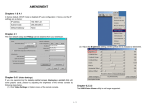
5. Image file set successfully.
6. Open the remote console, you can see the virtual CD as below picture.
Note: the output image extension file name has to be ‘iso’, e.g. CD-Rom_vir.iso.
You may create an ISO image size up to 650Mb. This drive would be in read-only mode and
would not allow you to write any information on this drive but copying only. This drive would
be bootable under DOS mode if the motherboard/BIOS on the host computer supports USB
BOOTABLE function. For emulating DVD Drive, please use Drive Redirection function.
Note: The above information has to be given from the point of view of IP-101 with correct
IP address and device name. Administrative permission is required as regular user may not
have the right to access. Please login as a system administrator (or as “root” on UNIX
systems).
The following information has to be given to mount the image properly:
Share host -- The server name or its IP address.
Share folder name -- The name of the share folder to be used.
46 / 104