1
Digital Phosphor Oscilloscopes
Tektronix 4000 Family • DPO4000 Series • MSO4000 Series
w
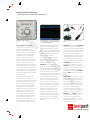
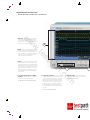
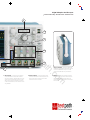
Wave Inspector® controls.
w
Wave Inspector® controls provide unprecedented efficiency in viewing, navigating and
analyzing waveform data.
Wave Inspector® Navigation
w
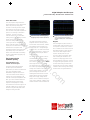
Zoom/Pan – A dedicated, two-tier
front-panel knob provides intuitive
control of both zooming and panning.
The inner knob adjusts the zoom factor
(or zoom scale); turning it clockwise
activates zoom and goes to progressively higher zoom factors, while turning
it counter-clockwise results in lower
zoom factors and eventually turning
zoom off. The outer knob pans the
zoom box across the waveform to
quickly get to the portion of the waveform you are interested in. The outer
knob also utilizes force-feedback to
determine how fast to pan on the
waveform. The farther you turn the
outer knob, the faster the zoom box
moves. Pan direction is changed by
simply turning the knob the other way.
No longer do you need to navigate
through multiple menus to adjust your
zoom view.
Play/Pause – A dedicated play/pause
button on the front panel scrolls the
waveform across the display automatically while you look for anomalies or
an event of interest. Playback speed
and direction are controlled using the
intuitive pan knob. Once again, turning
the knob further makes the waveform
scroll faster and changing direction is as
simple as turning the knob the other way.
User Marks – See something interesting on your waveform? Press the
Set Mark button on the front panel to
leave one or more “bookmarks” on the
waveform. Navigating between marks
is as simple as pressing the Previous
(<
—) and Next (—
>) buttons on the front
panel.
.c
th
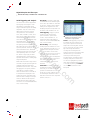
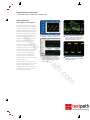
Search Marks – Don’t want to take the
time to inspect the entire acquisition to
find the event you’re looking for? The
4000 Series features a robust waveform search feature that allows you to
search through your long acquisition
based on user-defined criteria. All
occurrences of the event are highlighted with search marks and are easily
navigated to, using the front panel
Previous (<
—) and Next (—
>) buttons.
Search types include edge, pulse
width, runt, logic, setup and hold,
rise/fall time and parallel, I2C, SPI, RS232/422/485/UART, CAN, LIN and
FlexRay packet content.
om
2
The Tektronix 4000 Series redefines
expectations for working with long
record lengths with the following innovative Wave Inspector controls:
pa
The first digital oscilloscopes could
capture and store only 500 points,
which made it very difficult to acquire all
relevant information around the event
being investigated. Over the years,
oscilloscope vendors have provided
longer and longer record lengths to
meet market demands for long capture
windows with high resolution, to the
point that most mid-range oscilloscopes either come standard with, or
can be optionally upgraded to, multimega-point record lengths. These
mega-point record lengths often represent thousands of screens worth of
signal activity. While standard record
st
.te
Imagine trying to efficiently use the
Internet if search engines such as
Google and Yahoo didn’t exist, Web
browser features such as Favorites and
Links didn’t exist, or Internet Service
Providers like AOL or MSN weren’t
around. Now you know how most
modern oscilloscope users feel when
trying to actually use the long record
length in their digital oscilloscope.
Record length, one of the key specifications of an oscilloscope, is the number
of samples it can digitize and store in a
single acquisition. The longer the record
length, the longer the time window you
can capture with high timing resolution
(high sample rate).
lengths have increased greatly over the
years and can now satisfy the vast
majority of applications in the marketplace, tools for effectively and efficiently
viewing, navigating and analyzing long
record length acquisitions have been
sorely neglected until now.
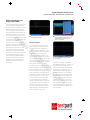
P6516 Mixed Signal Oscilloscope probe.