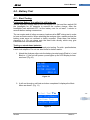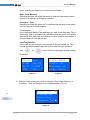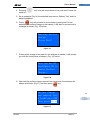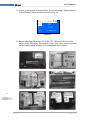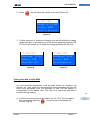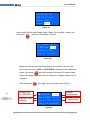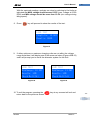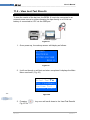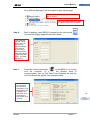
1
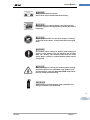
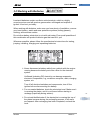
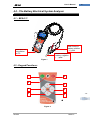
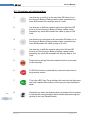
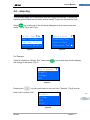
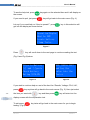
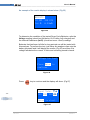
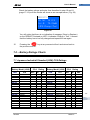
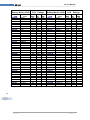
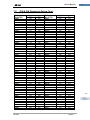
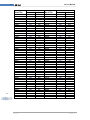
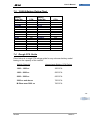
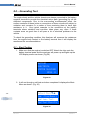
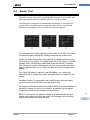
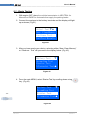
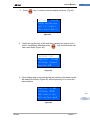
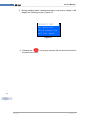
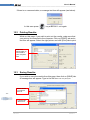
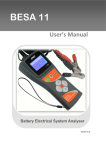
-1- AE Tool User’s Manual _______________________________________________________________________________ BESA 11 Battery Electrical System Analyser -1- User’s Manual Version 11.03 AE Tool BESA 11 AE Tool User’s Manual -2- Table of Contents 1.0 Introduction-----------------------------------------------------------------------------------------1.1 The Product-------------------------------------------------------------------------------------------------------3 1.2 Specifications----------------------------------------------------------------------------------------------------4 2.0 Safety Measures----------------------------------------------------------------------------------2.1 Safety Precautions---------------------------------------------------------------------------------------------5 2.2 Other Precautions----------------------------------------------------------------------------------------------7 3.0 Working with Batteries--------------------------------------------------------------------------8 4.0 The Battery Electrical System Analyser------------------------------------------------------4.1 The Analyser Unit---------------------------------------------------------------------------------------------10 4.2 Key Functions------------------------------------------------------------------------------------------------- 10 4.3 Functions of Individual Key-------------------------------------------------------------------------------11 5.0 HELP Key-----------------------------------------------------------------------------------------12 6.0 Battery Test----------------------------------------------------------------------------------------6.1 Start Testing ---------------------------------------------------------------------------------------------------14 7.0 Battery Rating Charts----------------------------------------------------------------------------7.1 7.2 7.3 7.4 Japanese Industrial Standards (JIS#) Rating Chart-----------------------------------------------24 DIN & EN Standards Rating Charts---------------------------------------------------------------------26 YUASA Battery Rating Chart -----------------------------------------------------------------------------28 Rough CCA Guide-------------------------------------------------------------------------------------------- 28 8.0 Grounding Test ----------------------------------------------------------------------------------8.1 Start Testing----------------------------------------------------------------------------------------------------29 9.0 Starter Test --------------------------------------------------------------------------------------34 9.1 Begin Testing---------------------------------------------------------------------------------------------------35 10.0 Alternator Test----------------------------------------------------------------------------------38 10.1 Start Testing----------------------------------------------------------------------------------------------------38 No load testing at 3,000 RPM-----------------------------------------------------------------------------39 Testing with load at 2,000 RPM---------------------------------------------------------------------------42 11.0 View Last Test Results-----------------------------------------------------------------------45 12.0 Setting Up the PC ready for BESA 11----------------------------------------------------47 12.1 Installing Driver------------------------------------------------------------------------------------------------47 12.2 Printing results-------------------------------------------------------------------------------------------------48 12.3 Saving results--------------------------------------------------------------------------------------------------49 13.0 Warranty Information---------------------------------------------------------------------------13.1 Limited Warranty----------------------------------------------------------------------------------------------53 13.2 Limitations of Warranty-------------------------------------------------------------------------------------53 AE Tool BESA 11 -2- -3- AE Tool User’s Manual _______________________________________________________________________________ 1.0 - Introduction 1.1-The Product: As we all know battery plays a very important role in a vehicle by providing power to all the electrical components and also the initial power to get the engine started. Once the engine runs, the alternator will take over and at the same time it charges the battery. In order these power systems to perform efficiently at all times, they need to be checked regularly during service and maintenance of the vehicle. For quick and convenient way of checking the condition of these power systems, this Battery Electrical System Analyser is designed to perform the following tasks: 1. Battery Test: Analyses the battery condition using microprocessor controlled testing methods without the need of fully charging it before test. The unit consumes very little current during testing hence the test can be repeated numerous times without worry of draining the battery and its results are highly accurate. Extremely safe as it does not create any sparks during clamp on and it takes less than 5 seconds to obtain the full analysed results of tested battery. -3- 2. Grounding Test: AE Tool Analyses the condition of the electrical return circuit contacts resistance which were connected to the engine or chassis body from the battery terminal with results and recommendations display after test. BESA 11 AE Tool User’s Manual -4- 3. Starter Test: Checks the cranking effectiveness of the battery to predict when the battery will fail to crank a vehicle basing on voltage profiles with results and recommendations display. 4. Alternator Test: This test checks the alternator charging condition during load at 2,000 RPM and without load at 3,000 RPM with results and recommendations display after each test. This Analyser is maintenance free and does not require internal batteries. It powers up when connected to the battery posts during testing or through an external 12 Volts DC source for later review of the test results. The operation is fast and simple. When hooked up to the battery posts, the displayed instructions on the screen will lead you through and a warning tone to caution you to perform the correct steps. In event that you need assistance, there is a key. It will display information about each function when selected. Its result is consistent and repeatable and can be performed numerous times without heating up the unit. It is very safe as it does not create any sparks when connected to the battery terminals during testing on the vehicle. After the test, the results will be stored in its memory and can be reviewed again later and it is equipped with an USB port to be connected to the PC to store the results or have it printed out from normal computer printer. 1.2 Specifications: Operating Voltage: 9V ~ 15V DC (max) Analysing Capacity (Amps): CCA: IEC: JIS#: Battery analysing time: Less than 5 seconds. Operating Voltage: 12V DC Dimensions: 181 x 110 x 90 mm AE Tool 100 ~ 1700 100 ~ 1700 100 ~ 1700 EN: DIN: 100 ~ 1000 100 ~ 1000 -4- BESA 11 -5- AE Tool User’s Manual _______________________________________________________________________________ 2.0 Safety Measures: For safety reasons, read this manual thoroughly before operating the Tool. Always refer to and follow the safety instructions and testing procedures provided by the car or equipment manufacturer. The safety messages presented below and throughout this user’s manual are reminders to the operator to exercise extreme care when using this test instrument. 2.1 Safety Precautions: When the engine is running, it produces carbon monoxide, a toxic and poisonous gas. Always operate the vehicle in a well ventilated area. Do not breathe exhaust gases – they are hazardous that can lead to death. To protect your eyes from propellant object such as caustic liquids, always wear safety eye protection. Fuel and battery vapors are highly flammable. DO NOT SMOKE NEAR THE VEHICLE DURING TESTING. When engine is running, many parts (such as pulleys, coolant fan, belts, etc) turn at high speed. To avoid serious injury, always be alert and keep a safe distance from these parts. -5- Before starting the engine for testing or trouble shooting, always make sure the parking brakes is firmly engaged. Put the transmission in Park (automatic transmission) and Neutral (manual transmission). AE Tool BESA 11 AE Tool User’s Manual -6- Always block the drive wheels. Never leave vehicle unattended while testing. Never lay tools on vehicle battery. You may short the terminals together causing harm to yourself, the tools or the battery. Engine parts become very hot when engine is running. To prevent severe burns, avoid contact with hot engine parts. Do not wear loose clothing or jewelry while working on engine. Loose clothing can get caught in fan, pulleys, belts, etc. Jewelry can conduct current and can cause severe burns if comes in contact between power source and ground. When the engine is running, be cautious when working around the ignition coil, distributor cap, ignition wires and spark plugs. They are HIGH VOLTAGE components that can cause electrical Shock. Always keep a fire extinguisher readily available and easily accessible in the workshop. -6- AE Tool BESA 11 -7- AE Tool User’s Manual _______________________________________________________________________________ 2.2 Other Precautions: • This battery analyser is meant for testing of 12 Volts batteries only. • Its operating voltage is from 9V ~ 15V DC and should not be tested on 24V directly. It will cause damage the unit. For 12V x 2 batteries (in series or parallel), disconnect the connections and test them individually. • Battery that has just been charged by the charger contains surface charge and it should be discharged by turning ON the Head lights for 3~5 minutes before testing. • Always attached the analyser clips on the lead side of the battery terminal posts during testing so that it has a good contact. This will provide better and accurate results. • Do not attach the analyser clips directly onto the steel bolt that tightened to the battery terminal posts; this may give inaccurate readings or inconsistent results. (Note: This also applies to all other battery testing methods.) • If the battery terminal posts were oxidised or badly corroded and the connections were bad, the analyser will prompt you to check the connections. In this case, clean the terminal posts and performs testing directly on the terminal posts it-self. • During testing on the battery whist it is still in the car, make sure the engine is OFF. • Do not store the analyser near high humidity or temperature area. Exposing to extreme temperatures will cause damage to the unit. -7- AE Tool BESA 11 AE Tool User’s Manual -8- 3.0 Working with Batteries Lead-acid batteries contain a sulfuric acid electrolyte, which is a highly corrosive poison and will produce gasses when recharged and explode if ignited. It can hurt you badly. When working with batteries, make sure you have plenty of ventilation, remove your hand jewelry, watch and wear protective eyewear (safety glasses), clothing, and exercise caution. Do not allow battery electrolyte to mix with salt water. Even small quantities of this combination will produce chlorine gas that can KILL you! Whenever possible, please follow the manufacturer's instructions for testing, jumping, installing, charging and equalising batteries. Never disconnect a battery cable from a vehicle with the engine running because the battery acts like a filter for the electrical system. Unfiltered [pulsating DC] electricity can damage expensive electronic components, e.g., emissions computer, radio, charging system, etc. Turn off all electrical switches and components; turn off the ignition before disconnecting the battery. For non-sealed batteries, check the electrolyte level. Make sure it is covering the plates, and it is not frozen before starting to recharge (especially during winters). Do not add distilled water if the electrolyte is covering the top of the plates because during the recharging process, it will warm and expand. After recharging has been completed, recheck the level. AE Tool BESA 11 -8- -9- AE Tool User’s Manual _______________________________________________________________________________ Reinstall the vent caps BEFORE recharging, recharge ONLY in well-ventilated areas, and wear protective eye ware (safety goggle) . Do NOT smoke or cause sparks or flames while the battery is being recharged because batteries give off explosive gasses. If your battery is an AGM or a sealed flooded type, do NOT recharge with current ABOVE 12% of the battery's RC rating (or 20% of the ampere-hour rating). Gel cells should be charged over a 20-hour period and never over the manufacturer's recommended level or over 14.1 VDC. Follow the battery and charger manufacturer's procedures for connecting and disconnecting cables and other steps to minimize the possibility of an explosion or incorrectly charging the battery. You should turn the charger OFF before connecting or disconnecting cables to a battery. Do not wiggle the cable clamps while the battery is recharging, because a spark might occur, and this could cause an explosion. Good ventilation or a fan is recommended to disperse the gasses created by the recharging process. If a battery becomes hot, over 110° F (43.3° C), or violent gassing or spewing of electrolyte occurs, turn the charger off temporarily or reduce the charging rate. When charging the battery in the car with an external MANUAL charger, make sure that it will not damage the vehicle's electrical system or components with high voltages. Even if this is a remote possibility, it is best to disconnect the vehicle's battery cables from the battery BEFORE connecting the charger. -9- AE Tool BESA 11 AE Tool User’s Manual - 10 - 4.0 - The Battery Electrical System Analyser 4.1 – BESA 11 Red Clamp to battery positive ( + ) post. USB port for connection to PC. Figure 1 Black Clamp to battery negative ( - ) post. 4.2 - Keypad Functions: 7 6 8 1 4 2 3 - 10 - 5 Figure 2 AE Tool BESA 11 - 11 - AE Tool User’s Manual _______________________________________________________________________________ 4.3 - Functions of Individual key: - 11 - 1. Use this key to scroll up to the next item OR when it is in the keying-in Battery Ratings values mode, press this key once will increase the value by step of 5 units. 2. Use this key to shift the selection tab to the right item OR when it is in the keying-in Battery Ratings values mode, press this key once will increase the value by step of 100 units. 3. Use this key to scroll down to the next item OR when it is in the keying-in Battery Ratings values mode, press this key once will decrease the value by step of 5 units. 4. Use this key to shift the selection tab to the left item OR when it is in the keying-in Battery Ratings values mode, press this key once will decrease the value by step of 100 units. 5. Press this key will get into the selected function or proceed to the next step. 6. To EXIT the function, press this key once will return back to the previous screen. 7. This is the HELP key. Press this key will enter into the help menu and it will explain the functions of the item you have selected in detail. 8. Press this key when the Analyser has connected to the computer to activate the communication which allows data retrieving and printing of the Last Tested Results. AE Tool BESA 11 AE Tool User’s Manual - 12 - 5.0 – Help Key This selection helps you to familiarise with the usage of the BESA 11 as well as explaining the various test functions and its results. To get into this function, just Press key at any one of the functions displayed on the menu screens as shown below (Fig.3 and Fig 4): Battery Test Grounding Test Starter Test Alternator Test Select Test New: ClearMemory Continue Test... LastTest Results Figure 3 Figure 4 EXIT For Example: If help is needed on “Battery Test”, then press will change to as shown (Fig 5) . key on this item and the display How to operate Results Voltage CCA Figure 5 Pressing the key will scroll down to the next item “ Results ” (Fig 6) and so forth until it reaches “Life”. - 12 - Results Voltage CCA Life Figure 6 AE Tool BESA 11 - 13 - AE Tool User’s Manual _______________________________________________________________________________ To see the help text, press the screen. key again on the selected item and it will display on If you need to quit, just press key will go back to the main menu (Fig. 4). Let say if you need help on “How to operate””, press get into the display as shown below: key in this selection will Operation:Engine Must be OFF. Locate battery. Clamp Tester. Figure 7 Press key will scroll down to the next page to continue reading the text (Fig. 8 and Fig 9) below. Clips to Battery [+] and [-]posts Check battery Rating [CCA,EN Figure 8 DIN,JIS# & IEC] and key the value into the Tester Figure 9 If you wish to continue help on rest of the item like “Results, Voltage, CCA, Life”, press - 13 - key anytime will go back to the main menus (Fig. 5). Here just select the item you want with key and then press key will enter into the display screen with the explanation text. To exit press testing. (Fig.4) AE Tool key twice will go back to the main menu for you to begin BESA 11 AE Tool User’s Manual - 14 - 6.0 - Battery Test 6.1 – Start Testing Performing Battery Test whilst it is still in the car: Vehicle that was running has to have its engine OFF first and then switch ON the headlights for 30 seconds to remove the surface charge. After the headlights had switched OFF, let the battery rest for at least 1 minute to recover before testing commences. The car engine and all other accessory loads must be OFF during test in order to have accurate results. When attaching the analyser clips, make sure that the battery posts were not oxidized or badly corroded. Clean them first before clamping to it. Do not clamp onto the steel bolts directly which may give inaccurate and inconsistent results. Testing on stand-alone batteries: Clean the battery posts with a wire brush prior testing. For side - post batteries, install stud adaptors. Do not use steel bolts for better results. 1. Attach the Analyser clips onto the battery terminal posts [Red to (+) and Black to (-)] the unit will power up and lights up the LCD display screen as shown (Fig.10). BATTERY ELECTRICAL SYSTEM ANALYSER BESA 11 Figure 10 2. It will run through a self-test and when completed it displays the Main Menu as shown: (Fig. 11) Select Test New: ClearMemory Continue Test... LastTest Results - 14 - Figure 11 AE Tool BESA 11 - 15 - AE Tool User’s Manual _______________________________________________________________________________ Here, it will let you select your choice from the Menu: New: Clear Memory Selecting this item will allow the tester to clear the last tested results stored in its memory and begin a new test. Continue… Test Selecting this item will allow you to continue the last test on the same car from where you had stopped. For example: If you had done Battery Test and later you wish to do Alternator Test or Grounding Test on the same car, just select this item and it will update the results after each test in its memory so that it can be review later or to be printed out from the printer. Last Test Results Here it will let you review the test results of the last tested car. The results stored will always depends on the tests that you had done. Use or keys to scroll for the pages during viewing. Examples: RESULTS: 12.40V Int.R: LIFE: Good 419 CCA 6.43mΩ 76% ENGINE GROUND Results: OK Resistance is within limits. Figure 12 Figure 13 3. After you have made your choice, selecting “New: Clear Memory” or “Continue…Test ” will proceed to the display below: (Fig. 14) Battery Test Grounding Test Starter Test Alternator Test - 15 - Figure 14 AE Tool BESA 11 AE Tool 4. Pressing need to select it. User’s Manual - 16 - key once will scroll down to the next item if there is a 5. As an example (Fig.14) the selected item was on “Battery Test” and it is being highlighted. 6. Press key will proceed to do the battery testing and if it has detected any surface charge on the battery, it will start to remove and a message is shown (Fig. 15) below. Removing Surface Charge... Please Wait! Figure 15 7. If the surface charge is too great for the analyser to handle, it will prompt you with the instructions as shown: (Fig. 16) below. Turn ign.key ON. Headlights ON to remove Surface Charge... Figure 16 8. Wait until the surface charge removal had completed, the analyser will advise as follows: (Fig.17) and then press key. Surface Charge now removed. Key & headlights OFF Then press Enter - 16 - Figure 17 AE Tool BESA 11 - 17 - AE Tool User’s Manual _______________________________________________________________________________ 9. If there is no surface charge present, then it will straight away enter into “Select Rating” menu screen as shown in Fig. 18 Select Input CCA IEC EN JIS# DIN Unknown Figure 18 10. Before selecting the ratings ‘CCA, EN, IEC, DIN and JIS #’ from the menu, check the battery specification value. This value can be checked on the battery labels as some of the examples shown below: - 17 - AE Tool BESA 11 AE Tool User’s Manual - 18 - If it is selected under JIS # (Japanese Industrial Standard) then the display will prompt you as shown (Fig.19) below. JIS# to CCA: See user manual for conversion Enter to proceed Figure 19 Refer to the battery model (example: 80D26L or NX110-5L) on the Cold Cranking Amps (CCA) Table list supplied separately or from this manual on page 24 & 25 (See example Fig.20 below.) Figure 20 Press key and the display will show: (Fig.21) below: Input Value Set 500 CCA - 18 - Enter to start.. Figure 21 AE Tool BESA 11 - 19 - AE Tool User’s Manual _______________________________________________________________________________ 11. Referring to the Table list (Fig.20) basing on 80D26L, check the battery type: WET, MF, Sealed MF or Closed MF (CMF) as each category has different CCA ratings. For instance, if the battery is a Sealed MF (CMF) then it is rated at 630 CCA. Note: WET MF SMF - Wet Cell Type Maintenance Free Type Closed or Sealed Maintenance Free 12. To enter the value 630, press key will increase the original value of 500 (Fig.21) by step of 100 units to 600. Likewise use key to increase the last two digits (00) to 30 by step of 5 units for each pressing. (Fig. 22) Input Value Set 630 CCA Enter to start.. Figure 22 13. Once the CCA rating of the battery is confirmed, press key will start the testing process. Refer to the display below (Fig. 23). Analysing... Please Wait! ıııııııııııııııı - 19 - Figure 23 AE Tool BESA 11 AE Tool User’s Manual - 20 - 14. For less than 5 seconds, the results of the testing will be displayed on the LCD screen. (Fig. 24) 2 4 5 RESULTS: Good 12.40V 419 CCA Int.R: 6.43mΩ LIFE: 76% 1 3 Figure 24 Interpretations of the above results: 1. RESULTS: Good A very straight forward display of the final results basing on the evaluation of the tested condition. ‘Good’ indicates the battery in good condition. ‘Replace’ indicates that the battery needs to be replaced. If not, the battery will fail anytime without any warning. 2. Voltage : 12.40V This indicates the tested battery voltage (12.46V). It depends on the state of charge on the battery: 100% fully charged 90% charged 75% charged 3. - 13.20V 12.90V 12.45V CCA (Cold Cranking Amps): 419 CCA CCA ratings has been used here, therefore the tested result is in 406 CCA. If other rating (DIN or JIS, or IEC, or EN) were selected, it will base on the respective rating to calculate and show the results in that selected rating. - 20 - Please take Note: This output value (406 CCA) is related to the actual power available in the battery in relation to that battery's rating (630 CCA). On average, a new battery's CCA as measured by this tester will read 10-15 % higher than its stated rating. AE Tool BESA 11 - 21 - AE Tool User’s Manual _______________________________________________________________________________ As the battery ages, the CCA number measured by this tester will decrease so it reads near its rating. While this value is not the same as a CCA test, it is the best available measurement for showing a battery's current condition in relation to its rating. From the above example, a 630 CCA rated battery measuring 406 CCA available power does not mean that the battery would pass a CCA test at 406 CCA. The available power reading shows that the battery is not able to perform up to its rated ability (630 CCA). In comparison to another battery when fully charged, the 630 CCA battery measuring 406 CCA is no stronger than a 400 CCA battery showing 400 CCA available power when fully charged. The available power number is meant for comparison to its own rating. In fact, in this example the 630 CCA battery is failing to perform to its rating, while the 400 CCA battery is still working. Basing on SAE, CCA test is a manufacturing process control test applicable only on new, fully charged batteries. It does not produce an actual value, but is a PASS / FAIL test. It measures the discharge load, in amps, that a battery can supply for 30 seconds at 0°F/-18°C while maintaining a voltage of 1.2 volts per cell (7.2 volts per battery) or higher. Thus, the CCA test shows the minimum power requirement for the battery as rated, which means a battery rated at 400 CCA must measure 7.2 volts or above for 30 seconds when a load of 400 amps is applied at 0°F/ -18°C. The above methods also hold for DIN, IEC, JIS, EN basing on its individual ratings. - 21 - AE Tool 4. Int. R (Internal Resistance): 6.43mΩ In normal condition, the internal resistance should fall between 2.0 mΩ ~ 15.0 mΩ. As a matter of fact, the higher the battery CCA readings obtained the lower the internal resistance should be. 5. LIFE: 76 % This is an indication of the battery life expectancy in percentage. If the life falls below 45 %, the RESULT will display “Replace” and it is time to change to a new battery. BESA 11 AE Tool User’s Manual - 22 - Explanation of the following terms used as shown on the LCD display: • CCA (Cold Cranking Amps) – most commonly used Standard. CCA is a rating used in the battery industry to rate a battery’s ability to start an engine in cold temperatures. This rating is the number of amperes that a new fully charged battery can delivery at 0°F (-18°C) for 30 seconds, while maintaining a voltage of at least 7.2 Volts for a 12V battery. The bigger the CCA will have the greater starting power of the battery. • IEC (International Electro-technical Commission) Standard. IEC amperes rating require that at 0°F (-18°C), the number of amperes that the 12V battery can deliver while maintaining a voltage of at least of 8.4 Volts for 60 seconds during cranking. • EN (European Norms) Standard EN amperes rating require that at 0°F (-18°C), the number of ampere that the 12V battery can deliver while maintaining a voltage of at least 6.0 Volts for 180 seconds during cranking. • JIS# (Japanese Industrial Standard) JIS # amperes’ rating is based on Ampere Hours and is calculated using 20 hours rating. In this manual, it is using CCA ratings reference table list provided basing on the JIS model number (See page 24 & 25). • DIN (Deutsches Institut für Normung) - German Institute for Standardization. Basing on DIN , the rating requires that at 0°F (-18°C), the 12V battery is able to deliver the number of amperes while maintaining a voltage of at least of 9.0 Volts for 30 seconds and 8.0 Volts for 150 seconds during cranking. • Unknown If you are not sure which ratings (CCA, EN, IEC, JIS or DIN) that the battery is based on then choose this setting. It will show the battery’s Voltage, CCA and the Internal Resistance (mΩ) only. This selection can also be used to test 12V - Deep Cycle Batteries. AE Tool BESA 11 - 22 - - 23 - AE Tool User’s Manual _______________________________________________________________________________ An example of the results display is shown below: (Fig.25) RESULTS: 12.40V 419 CCA Int.R: 6.43mΩ Figure 25 To determine the condition of the tested Deep Cycle Batteries, refer the Voltage reading (should not fall below 12.6V when fully charged) and the Internal Resistance [Int.R] (should not more 15mΩ) readings. Batteries that had been left idle for long periods can still be tested with this analyser. To perform the test, just clamp the analyser clips onto the battery terminals and it will display the screen (Fig.26) as shown if its voltage falls below the normal 12 volts and a buzzing sound is heard. Voltage too low! Press Enter to continue.. Figure 26 Press key to continue and the display will show: (Fig.27) Input Value Set 500 CCA - 23 - Enter to start.. Figure 27 AE Tool BESA 11 AE Tool User’s Manual - 24 - Check the battery ratings and enter it as described in step 10 and 11 (page 17~19) and the results will show as an example below: (Fig. 28) RESULTS: 09.76V 38 CCA Int.R: 70.09mΩ LIFE:Charge>Test Figure 28 You will notice that there is no indication of message (Good or Replace) on the RESULTS instead on LIFE; it indicates “Charge > Test”. It means that the battery has to be fully charged and repeat the test again. 15. Pressing the key at any moment will exit and return back to the previous screen. 7.0 – Battery Ratings Charts 7.1 Japanese Industrial Standard (JIS#) CCA Ratings Battery Model (JIS#) NEW 26A17R 26A17L 26A19R 26A19L 28A19R 28A19L 32A19R 32A19L 26A17R 26B17L 28B17R 28B17L 28B19R 28B19L 32B20R 32B20L 32C24R 32C24L 34B17R AE Tool OLD 12N24-4 12N24-3 NT50-N24 NT50-N24L NX60-N24 NX60-N24L NS40S NS40LS NS40 NS40L N40 N40L CCA Rating WET 200 200 200 200 250 250 270 270 200 200 245 245 245 245 270 270 240 240 280 MF CMF SMF 220 220 264 264 295 295 325 325 400 400 Battery Model (JIS#) NEW 34B17L 34B19R 34B19L 34B19RS 34B19LS 36B20R 36B20L 36B20RS 36B20LS 38B20R 38B20RS 38B20L 38B20LS 40B20L 40B20R 42B20L 42B20RS 42B20LS 46B24L OLD NS40ZA NS40ZAL NS40ZAS NS40ZALS NS40Z NS40ZL NS40ZS NS40ZLS NX60-N24 NT60-N24S NX60-24L NX60-24LS NS60L CCA Rating WET 280 270 270 270 270 275 275 275 275 330 330 330 330 330 330 330 330 330 325 MF CMF SMF 325 325 325 325 300 300 300 300 340 340 340 340 400 400 400 400 360 360 360 360 410 410 410 410 360 420 BESA 11 - 24 - - 25 - AE Tool User’s Manual _______________________________________________________________________________ Battery Model (JIS#) NEW 46B24R 46B24RS 46B24LS 46B26R 46B26L 46B26RS 46B26LS 48D26R 48D26L 50B24L 50B24R 50D20R 50D20L 50D23R 50D23L 50D26R 50D26L 55B24R 55B24L 55B24RS 55B24LS 55D23R 55D23L 55D26L 55D26R 60D23R 60D23L 65D23R 65D23L 65D26R 65D26R 65D31R 65D31L 70D23R 70D23L 75D23R 75D23L 75D26R 75D26L 75D31R OLD NS60 NS60S NS60LS NS60 N50 N50L NT80-S6L NT80-S6 85BR60K 85B60K 50D20R 50D20L NX100-S6 NX100-S6L NT80-S6S NT80-S6LS N50ZL N50Z NS70 NS70L N70 N70L 35-60 25-60 F100-5 F100-5L N70Z CCA Ratings WET 325 325 325 360 360 360 360 280 280 390 390 310 310 500 500 435 435 430 430 355 355 350 350 520 520 420 420 415 415 390 390 490 490 500 500 490 490 450 MF 369 360 360 CMF SMF 420 420 420 360 360 420 420 380 380 480 480 370 370 420 420 420 420 480 480 440 440 500 500 500 500 500 500 525 525 540 540 520 520 520 520 540 540 520 520 580 580 625 625 630 630 580 580 580 580 540 735 Battery Model (JIS#) NEW 75D31L 80D23R 80D23L 80D26R 80D26L 85B60K 85BR60K 95D31R 95D31L 95E41R 95E41L 105E41R 105E41L 105F51R 105F51 115E41R 115E41L 115F51R 115F51L 130E41R 130E41L 130F51R 130F51L 145F51R 145F51L 145G51R 150F51R 150F51L 165G51R 165G51L 170F51R 170F51L 180G51R 180G51L 195G51R 195G51L 190H52R 190H52L 245H52R 245H52L OLD N70ZL NX110-5 NX110-5L NX120-7 NX120-7L N100 N100L N100Z N100ZL N100Z N100ZL NS120 NS120L N120 N120L NX200-10 NX200-10L NS150 NS150L N150 NT200-12 NT200-12L NS200 NS200L NX250-12 NX250-12L NT250-15 NT250-15L NX300-51 NX300-51L N200 N200L NX400-20 NX400-20L CCA Ratings MF 540 620 620 515 515 580 580 580 580 650 650 650 650 800 800 800 800 780 780 780 640 640 935 935 1045 1045 1090 1090 1145 1145 925 925 1530 1530 660 660 640 640 720 720 630 630 500 500 850 850 770 770 880 880 800 800 800 800 960 960 960 960 920 920 900 1100 580 580 980 980 1100 1100 1250 1250 - 25 - AE Tool CMF SMF 725 WET 450 580 580 580 580 BESA 11 1300 1300 AE Tool 7.2 User’s Manual DIN & EN Standards Rating Chart Battery Model No. DIN EN Battery Model No. DIN EN 52805 52815 53517 53520 53521 53522 53621 53624 53625 53638 53646 53653 53836 53890 54038 54039 54232 54312 54313 54317 54324 54434 54437 54449 54459 54459L 54464 54465 54466 54469 54519 54523 54524 54533 54537 54545 54551 54577 54578 54579 54580 54584 54590 54612 54801 54827 55040 55041 55042 55044 55046 55048 55056 180 180 175 150 150 150 175 175 175 175 175 175 175 175 175 175 175 210 220 210 220 210 210 210 210 210 220 210 210 210 210 220 220 210 190 190 220 220 220 220 220 220 210 210 190 240 265 220 220 265 300 300 320 240 240 300 240 240 240 300 300 300 300 300 300 300 300 300 300 300 360 330 360 330 360 360 360 360 360 330 360 360 360 360 300 300 360 300 300 300 300 300 300 300 300 330 360 300 360 450 360 360 450 510 540 540 55057 55068 55069 55218 55414 55415 55421 55422 55423 55427 55428 55457 55529 55530 55531 55545 55548 55552 55559 55559L 55563 55564 55565 55565L 55566 55567 55811 56012 56048 56049 56068 56069 56073 56077 56091 56092 56111 56216 56218 56219 56220 56225 56311 56312 56318 56322 56323 56420 56530 56618 56619 56620 56633 320 220 220 255 265 265 265 265 300 300 300 265 220 255 255 255 255 255 255 255 255 255 255 255 265 255 360 230 250 250 250 250 250 300 360 300 300 300 300 300 280 300 300 300 300 300 300 300 300 300 300 300 300 540 390 390 420 450 450 450 450 510 510 510 450 360 420 420 420 420 420 420 420 420 420 420 420 450 420 540 420 390 390 390 390 390 510 540 510 540 510 510 510 510 510 510 510 510 510 510 510 510 510 510 510 510 AE Tool - 26 - Amps Amps BESA 11 - 26 - - 27 - - 27 - AE Tool User’s Manual _______________________________________________________________________________ Battery Model No. DIN EN 56638 56641 55647 56821 56820 56828 57024 57029 57113 57114 57217 57218 57219 57220 57230 57412 57412L 57413 57512 57513 57531 58424 58513 58514 58515 58521 58522 58527 58811 58815 58820 58821 58827 58833 58838 59017 59018 59040 59215 59218 59219 59226 59514 59518 59519 59615 59616 60018 60019 300 300 300 315 315 315 315 315 400 400 420 420 420 420 380 400 400 400 350 350 350 450 320 320 450 320 320 395 440 395 395 395 400 400 400 360 360 360 450 290 290 450 320 395 395 360 360 250 250 510 510 510 540 540 540 540 540 680 680 720 720 720 720 640 680 680 680 570 570 570 760 540 540 760 540 540 640 720 640 640 640 640 680 680 600 600 600 760 480 480 760 540 640 640 600 600 410 410 AE Tool Amps Battery Model No. Amps DIN EN 60026 60038 60044 60527 60528 61017 61018 61023 61047 61048 62034 62038 62045 62529 63013 63545 63549 64020 64028 64035 64036 64317 64318 64323 65513 65514 65515 67043 67045 68021 68032 68034 68040 70027 70029 70036 70038 71014 71015 72512 73011 88038 88046 88056 88066 88156 88074 88092 440 500 500 410 410 400 400 450 450 450 420 420 420 450 470 420 420 325 520 520 460 540 540 540 540 570 570 600 600 570 600 600 570 630 630 570 630 700 700 680 740 175 210 265 300 320 400 400 720 760 760 680 680 680 680 760 760 760 680 680 680 760 680 680 680 550 760 760 760 900 900 900 900 900 900 1000 1000 950 1000 1000 950 1050 1050 950 1050 1150 1150 1150 1200 300 360 450 510 540 680 680 BESA 11 AE Tool 7.3 User’s Manual - 28 - YUASA Battery Rating Chart Battery Model No. 24-500 34-6MF 34-60 34-610MF 34-710 35-580 41-580 55D23R 58-6MF 58-60 58-530 65-70 65-730 65-900 74-60 75-6MF 75-72 7.4 CCA Battery Model No. CCA 500 500 525 610 710 580 580 522 530 525 530 700 730 850 525 615 500 75A-72 75-660 78A-72 78-710 GR40R-MF GR40R-CMF GTH40 GTH40L GTH40S GT50L GTH55DL GTH60L GTH60DL GTH75DL GTH75DR GR96R-MF GR96R-CMF 630 660 670 710 700 820 277 276 275 356 356 325 325 520 521 500 580 Rough CCA Guide Given below is a rough CCA ratings guide for any unknown battery model basing on the capacity of the vehicle: Vehicle Capacity Approximate Battery CCA Rating 1200 ~ 1600 cc 350 CCA 1600 ~ 2000 cc 500 CCA 2000 ~ 3000 cc 650 CCA 3000 cc and above 750 CCA M. Benz over 3000 cc 760 CCA - 28 - AE Tool BESA 11 - 29 - AE Tool User’s Manual _______________________________________________________________________________ 8.0 – Grounding Test The engine body and the vehicle chassis are always connected to the battery negative terminal to provide the electrical return path (grounding) for all the electrical components. Due to the surrounding environmental effect, the surface contacts of these joints or connections of these circuits will subject to oxidation and corrosion in a matter of time rendering them to have high resistance in it. One typical example is the connection at the battery terminals where oxidation and corrosion takes place very often. If these contacts were no good then it will pose a lot of electrical problems to the vehicle. To check the grounding condition, this Analyser will measure the resistance from the engine body contact to the battery terminal then it will display the results and the recommendations. 8.1 – Start Testing 1. Make sure that the engine is switched OFF. Attach the clips onto the battery terminal posts and the analyser will power up and lights up the LCD display screen as shown (Fig.29). BATTERY ELECTRICAL SYSTEM ANALYSER BESA 11 Figure 29 2. It will run through a self-test and when completed it displays the Main Menu as shown: (Fig. 30) Select Test New: ClearMemory Continue Test... LastTest Results - 29 - Figure 30 AE Tool BESA 11 AE Tool User’s Manual - 30 - 3. After you have made your choice, selecting “New: Clear Memory” or “Continue…Test ” will proceed to the display below: (Fig. 31) Battery Test Grounding Test Starter Test Alternator Test Figure 31 4. Pressing (Fig.32) key once will scroll down to the ‘Grounding Test’ Battery test Grounding Test Starter Test Alternator Test Figure 32 5. Press key will proceed to the display as follows: (Fig. 33) Red clip to Batt [+],Black clip To Engine body. Then press Enter - 30 Figure 33 6. Now transfer the BLACK tester clip from the battery [-] terminal to a suitable position on the engine or chassis body leaving the RED clip still attached to the battery [+] terminal. AE Tool BESA 11 - 31 - AE Tool User’s Manual _______________________________________________________________________________ 7. Press key again and it will starts analyzing (Fig. 34) Analysing... Please Wait! ıııııııııııııııı Figure 34 8. Once it has finished analysing, it will prompt you with an instruction (Fig. 35) stating that you have should unclamp the Black tester clip from the engine or chassis body and transfer to the battery negative [-] terminal within 20 seconds time limit if not the testing procedure has to be repeated again as the gathered data will be lost. Now clamp the Black clip to battery [-] post 20sec time limit Figure 35 9. Once the Black clip is clamped onto the battery [-] terminal, the Analyser display will light up as shown. (Fig. 36) GROUNDING TEST: Press Enter to continue. - 31 - Figure 36 AE Tool BESA 11 AE Tool 10. Now you need to press as follows (Figure 37). User’s Manual - 32 - key to proceed and the display will show Analysing... Please Wait! ıııııııııııııııı Figure 37 10. If the measured resistance reading is within limits, then it will display as follows (Fig. 38) ENGINE GROUND Results: OK Resistance is within limits. Figure 38 11. If the measured resistance reading has gone beyond the limits, then it will display the screen as follows (Fig. 39). ENGINE GROUND Results: HIGH Clean contacts And check cables - 32 - Figure 39 AE Tool BESA 11 - 33 - AE Tool User’s Manual _______________________________________________________________________________ Note: The above indicates that the ground contact from the engine body to the battery is bad. Check for rusted or corroded point of contacts. If found, dismantle it for cleaning or replace before fixing back. Repeat the test again after fixing. Another thing is that if you suspect that the result is in question, you may conduct the test with the Black clip clamp at different location. 12. If you did not follow the right procedures during the testing, it will display the results as follows (Fig. 40) below: ENGINE GROUND Not detected... Try again follow right procedure Figure 40 13. To exit the program, pressing the key at any moment will exit and return back to the main menu screen (Fig.30). - 33 - AE Tool BESA 11 AE Tool User’s Manual - 34 - 9.0 – Starter Test This test actually checks the cranking effectiveness of the battery and also can predicts when the battery will fail to crank a vehicle. This Analyser is designed to address the weakness of conventional testers with its cranking power measurements. Simply connect the analyzer to the battery in the vehicle and start the engine! To understand the working principle of the tests, let’s look at the wave form displays taken during the cranking tests with an oscilloscope. Figure (A) above shows the voltage profile of a healthy battery during the cranking of an engine. The graph starts off at the battery's nominal voltage, and a voltage drop is detected when the vehicle is cranked. The voltage recovers to the battery's nominal voltage and eventually rises to approximately 14.4 V when the alternator starts charging the battery. For Figure (B) where a typical 2 year-old battery, you noticed the difference in the voltage drop which indicates that it is weaker but still usable. Whereas Figure (C) represents a very weak battery that can barely crank a car and is due to fail in the very near future. As voltage profiles can indicate the relative ability of the tested battery in starting an engine, so there is no need for knowledge on the starter motor requirement or the battery's rating and size. BESA11 will capture the highest voltage drop and calculate the final results which should not be lower than 9.6V average during cranking and computes the result after the test. AE Tool BESA 11 - 34 - - 35 - AE Tool User’s Manual _______________________________________________________________________________ 9.1– Begin Testing 1. With engine OFF, place the vehicle transmission in NEUTRAL for Manual and PARK for Automatic then apply the parking brake. 2. Connect the analyser to the battery terminals and the display will light up as shown (Fig 41). Select Test New: ClearMemory Continue Test... LastTest Results Figure 41 3. After you have made your choice, selecting either “New: Clear Memory” or “Continue…Test ” will proceed to the display below: (Fig. 42) Battery Test Grounding Test Starter Test Alternator Test Figure 42 4. From the main MENU, select ‘Starter Test ’ by scrolling down using key. (Fig.43) Battery Test Grounding Test Starter Test Alternator Test - 35 - Figure 43 AE Tool BESA 11 AE Tool 2. Press User’s Manual - 36 - key to continue and the display will show: (Fig.44) Voltage: 12.65V Crank engine now until it starts. Then press Enter Figure 44 3. Switch the ignition key to ON and start cranking the engine until it starts. Immediately after that press key and the results will show as follows (Figure 45): CRANKING TEST MinVolts: 10.26V VoltDrop: Normal Results: OK Figure 45 4. If the voltage drop is too great during the cranking, the tested results will display as follows (Figure 46) and will prompt you to check the starter system. MinVolts: 9.56V VoltDrop: HIGH Chk Starter Sys Battery has aged - 36 - Figure 46 AE Tool BESA 11 - 37 - AE Tool User’s Manual _______________________________________________________________________________ 5. During cranking when it detects that there is no drop in voltage, it will display the following screen (Figure 47). CRANKING TEST Not detected... Check connection and test again. Figure 47 6. Pressing the key at any moment will exit and return back to the previous screen. - 37 - AE Tool BESA 11 AE Tool User’s Manual - 38 - 10.0 – Alternator Test An alternator is the device used to produce the electricity the car needs to run and to keep the battery charged. The alternator uses the principle of electromagnetic induction to produce voltage and current. The four main parts of the alternator are the Rotor, Stator, Diode Pack, Voltage Regulator and an Ammeter or Indicator Light to inform the driver of any problems. All of these parts must be in good working order for the alternator to do its job. The Rotor is a coil of wire wound around an iron core. The Rotor rotates as the alternator shaft rotates and current passes through brushes. The Rotor winding passes the Field current. This causes the Rotor to produce a magnetic field. So basically the Rotor is a rotating electro magnet. The Stator is a set of three windings fixed to the case of the alternator and these windings are static i.e. they don’t rotate. As the Rotor rotates its magnetic field “cuts” each Stator winding in turn, this induces a current in each winding. The outputs from the Stator windings are 120 degrees apart and are alternating current (AC). But vehicles run on DC current, so we need something that will convert the AC current to DC current. This is the job of the diode pack. A diode is an electrical one-way check valve that will let current flow in only one direction. The typical diode pack uses four diodes to accomplish this. AC current is feed in on one side of the diode pack and DC current comes out the other side. The diode pack here will rectify the alternating 3 phases from the Stators and combine them into a single Direct Current which also works the dash ammeter or indicator light. Now that we have a DC current that the vehicle can use, we need a way to control that current. That is the job of the voltage regulator. As the name implies, it regulates the voltage going to the battery. It does this by turning current to the field (stator) terminal of the alternator on and off. If the battery voltage goes below 13.5 volts, the voltage regulator sends current to the field terminal and allows the alternator to start charging. Current will then flow into the battery and bring it up to full charge. AE Tool BESA 11 - 38 - - 39 - AE Tool User’s Manual _______________________________________________________________________________ If the voltage goes above 15.0 volts, the voltage regulator shuts off the current to the field terminal and keeps the battery from overcharging and cooking itself. This is how the voltage regulator controls the alternator output. When you first start your vehicle, the alternator needs some current to start working. The voltage regulator supplies this current from the battery to the field (stator) terminal of the alternator to get it started. The state of charge of the battery controls amperage output of the alternator. When the battery has a full charge, the electro-motive force of the voltage lowers the amperage to almost zero. As the battery charge wears down, the electro-motive force is not enough to stop the amperage, so it flows into the battery and charges it again. 10.1 – Start Testing This test is to check the MAX and MIN charging voltages output of the alternator at 3000 RPM without load and 2000 RPM with all loads ON. With this test you can determine the alternator’s condition when in reference with the vehicle’s Service Manual. No load testing at 3,000 RPM 1. With engine OFF, place the vehicle transmission in NEUTRAL for Manual and PARK for Automatic and apply the parking brake. 2. Attach the Analyser clips onto the battery terminal posts and it will power up and lights up the LCD display screen as shown (Fig.48) BATTERY ELECTRICAL SYSTEM ANALYSER BESA 11 - 39 - Figure 48 AE Tool BESA 11 AE Tool User’s Manual - 40 - 3. It will run through a self-test and when completed it displays the Main Menu as shown: (Fig. 49) Select Test New: ClearMemory Continue Test... LastTest Results Figure 49 4. After you have made your choice, selecting either “New: Clear Memory” or “Continue…Test ” will proceed to the display below: (Fig. 50) Battery Test Grounding Test Starter Test Alternator Test Figure 50 Pressing key to scroll down to the ‘Alternator Test ’ (Fig.51) Battery Test Grounding Test Starter Test Alternator Test Figure 51 5. Press key to continue and the display will show: (Fig.52) - 40 - Starter Engine and keeps it running Then press Enter Figure 52 AE Tool BESA 11 - 41 - AE Tool User’s Manual _______________________________________________________________________________ Start the engine and then press key again and the screen will prompt you as shown below (Fig. 53). Rev engine up to 3,000 rpm Enter Continue this rpm for 10 sec. Figure 53 Make sure that all loads (lights, air-condition, etc) are OFF. Rev the engine up to 3,000 ~ 3,500 RPM by referring to the dashboard meter, then press key and maintain it for about 10 seconds and release the pedal. The maximum and minimum voltages values will be captured. After that press No load Test at 3,000 RPM Captured Volts readings key again and it show as below (Fig 54.) 3000RPM 13.96V Max 14.07V <15.0V Min 13.55V >13.3V Enter to proceed Average Charging Volts Normal Charging Volts range Figure 54 - 41 - With the captured readings, analysis can done by referring to the limits as indicated that MAX voltage should not exceed 15.0V (max. voltage at 3,000 RPM) and MIN voltage should be more than 13.3V (min voltage during idling speed). AE Tool BESA 11 AE Tool User’s Manual 6. Press - 42 - key will show the results of the test (Figure 55): NO LOAD TEST ChrgVolts: 13.96V Results: GOOD Enter to proceed Figure 55 7. If either minimum or maximum charging volts are not within the voltage range limits then it will display one of the screen as below (Figures 56 & 57) and it will prompt you to check the charging system for the fault. NO LOAD TEST MinCharge: 12.96V Results: LOW Check Belt/Alt Figure 56 NO LOAD TEST MaxCharge: 15.0V Results: High Check Regulator Figure 57 Testing with load at 2,000 RPM As more electrical accessories, such as lights, heater, air condition, car stereos, etc. were used; the electro-motive force decreases and this will allow more amperage from the alternator to flow into the battery to compensate for the added load. This test is to check the alternator’s behavior during loading. 8. Continue from the previous test (either Fig. 55, 56 or 57); proceed to the next step by pressing key will enter to the display as follows. (Fig.58) AE Tool BESA 11 - 42 - - 43 - AE Tool User’s Manual _______________________________________________________________________________ Switch ON all The Electrical Loads, then press Enter Figure 58 Now, switch ON all loads (Head Lights, Radio, Air-condition, Heater, etc) and press enter key will display: (Fig.59) Rev engine up to 2,000 rpm Enter Continue this rpm for 10 sec. Figure 59 Make sure that all electrical loads (lights, air-condition, etc) are ON. Rev the engine up to 2,000 ~ 2,500 RPM by referring to the dashboard meter, then press key and maintain it for about 10 seconds and release the pedal. The maximum and minimum voltages values will be captured. After that press Loading Test at 2,000 RPM - 43 - Captured Volts readings key again and it show as below (Fig 60.) 2000RPM 13.89V Max 13.96V >13.5V Min 13.76V >12.5V Enter to proceed Average Charging volts. Normal Charging range Figure 60 AE Tool BESA 11 AE Tool User’s Manual - 44 - With the captured readings, analysis can done by referring to the limits as indicated that MAX voltage should exceed 13.5V (max. voltage at 2,000 RPM) and MIN voltage should be more than 12.5V (min voltage during idling speed). 9. Press key will proceed to show the results of the test: LOAD TEST ChrgVolts: 13.96V Results: GOOD Figure 61 9. If either minimum or maximum charging volts are not within the voltage range limits then it will display one of the screen as below (Figures 62& 63) and it will prompt you to check the alternator system for the fault. LOAD TEST MinCharge: 12.45V Results: LOW Check Belt/Alt Figure 62 10. To exit the program, pressing the return back to the previous screen. AE Tool LOAD TEST MaxCharge: 13.36V Results: LOW Check Belt/Alt Figure 63 key at any moment will exit and BESA 11 - 44 - - 45 - AE Tool User’s Manual _______________________________________________________________________________ 11.0 – View Last Test Results To view the results of the last test, the BESA 11 has to be connected to an external power source by either clamping its clips directly to a 12Volt car battery or connected to a PC via the USB port. Figure 64 1. Once power up, the wakeup screen will display as follows: BATTERY ELECTRICAL SYSTEM ANALYSER BESA 11 Figure 65 2. It will run through a self-test and when completed it displays the Main Menu as shown: (Fig. 66) Select Test New: ClearMemory Continue Test... LastTest Results - 45 - Figure 66 3. Pressing Fig. 67 below. AE Tool key once will scroll down to the ‘Last Test Results’ BESA 11 AE Tool User’s Manual - 46 - Select Test New: ClearMemory Continue Test... LastTest Results Figure 67 4. Press key will proceed to display the last test results depending the type of test you had performed earlier. (Fig. 68) RESULTS: Good 12.40V 419 CCA Int.R: 6.43mΩ LIFE: 76% Figure 68 5. To view the next page, press page you want. or key to get to the Some examples below are: (Figs. 69, 70, 71 & 72) CRANKING TEST MinVolts: 10.26V VoltDrop: Normal Results: OK AE Tool ENGINE GROUND Results: OK Resistance is within limits. Figure 69 Figure 70 NO LOAD TEST ChrgVolts: 13.96V Results: GOOD Enter to proceed LOAD TEST MaxCharge: 13.36V Results: LOW Check Belt/Alt Figure 71 Figure 72 BESA 11 - 46 - - 47 - AE Tool User’s Manual _______________________________________________________________________________ 12.0 –Setting up the PC ready for BESA 11 12.1 - Installing Driver. Important Note: Before you start to install the driver, please do not plug BESA 11 into the computer’s USB port or else the installation will fail and the computer cannot detect the proper driver for BESA 11 when connected. If you have made the above error and wish to install the driver the second time, you need to uninstall the previously installed driver first before starting to reinstall again. This time make sure that BESA 11 is not plugged in. Step 1. You can install the driver from the CD provided or download it from our http://www.aetool.com/products website: how.asp?id=1055&sortsid=0&categoryid=219 First unzip the folder: Once unzipped, click to open the folder: You will find the following files: - 47 - Step 2. AE Tool Select the correct driver for your computer operating system and double click on the icon. The installation will start automatically. Typical example below is for Windows XP operating system. BESA 11 AE Tool User’s Manual - 48 - As instructed, click [Next>] tab the program will continue to install the driver on the computer. Once it had finished, it will prompt you as shown below. Click [Finish] tab will restart your computer. Step 3. AE Tool Once the computer has restarted, plug BESA 11 on to any one of the USB port and the computer will start to locate the driver and it will pop up a message box as shown below. BESA 11 - 48 - - 49 - AE Tool User’s Manual _______________________________________________________________________________ Wait for awhile, a different message box will appear stating that the hardware is installed and ready to use. Step 4. Next open this folder again: Look for BESA program (see below), right click to open the task box. Go to [copy] right click it and then go to desktop, right click again to open task box select [paste]. The BESA icon will appear at the desktop. Step 5. Still at the desktop, look for right click on the icon. A task box will pop up. If you do not find this icon on the desktop, then click on [Start] tab at the left hand corner of the screen, the task box will appear. Go to [My Computer] tab, right click to open message box. Go to [Properties] and left click on it. The System Properties window will display. Go to [Hardware] tab; left click to open the page. - 49 - AE Tool BESA 11 AE Tool User’s Manual - 50 - Go to [Device Manager], left click again to open up the page. Look for Ports (COM&LPT), and double left click to extend. Take note of the COM port number. It is different with every computer. Step 6. Back to desktop, open BESA 11 program by left click on the icon and the display page will show as follows: This COM port number should be the same as listed on the Device Manager (refer Step 5) If you find that this field is blank, unplug the BESA 11 and plug back again. The COM will appear. Step 7. Press the communication key on the BESA 11 unit to log onto the computer. To confirm the whether there is communication; click on [Get Data From Analyser] tab and the Last Test Result will appear. See example below. You can type in the particulars here and then click [Add to Test Report] tab to be included in the test report which will be stored and printed out if you wish. AE Tool - 50 - BESA 11 - 51 - AE Tool User’s Manual _______________________________________________________________________________ If there is no communication, a message text box will appear (see below). . In this case press 12.2 key at BESA 11 unit again. Printing Results: While on this page, if you wish to print out the results, make sure that your printer is connected to the computer. Click on [PRINT] tab and a text box will appear. Select the right printer and click [Print] tab to print. Select the printer which is connected to your computer here. 12.3 Saving Results: If you wish to save the results from this page, then click on [SAVE] tab. A message box will appear. Type in the file name and click [Save] tab. Select where you want to save in. - 51 - Type the file name here. AE Tool BESA 11 AE Tool User’s Manual - 52 - Disclaimer All information, illustrations, and specifications contained in this user manual are based on the latest information available at the time of printing. The right is reserved to make any changes at any time without obligation to notify any person or organization of such revisions or changes. Furthermore, the manufacturer or its sales agents are not liable for errors contained herein or for incidental or consequential damages (including lost profits) in connection with the furnishing, performance or use of this material. This user manual tells how to use and perform the required procedures on vehicles. Safe and effective use of this Analyser is very much dependant on the user following the normal practices and procedures outline in this manual. 13.0 – Warranty Information 13.1 – Limited Warranty This limited warranty cover defects in materials and workmanship for a period of twelve (12) months which begins from the date the product is purchased by the end user and is subjected to the following terms and conditions: 1. Within the warranty period, the manufacturer will repair or replace, at their options, any defective parts and return to the owner in good working condition. 2. Any repaired or replaced parts will be warranted for the balance of the original warranty or three months (3) months from the date of repair, whichever is longer. 3. This warranty only extends to the first owner and not assignable or transferable to any subsequent owner. 4. Cost of delivery charges incurred for the repair of the product to and from the manufacturer will be borne by the owner. - 52 - AE Tool BESA 11 - 53 - AE Tool User’s Manual _______________________________________________________________________________ 5. This limited warranty covers only those defects that arises as a result of normal use and does not cover those that arises as a result of: • Unauthorized modifications and repair. • Improper operation or misuse. • Accident or neglect such as dropping the unit onto hard surfaces. • Contact with water, rain or extreme humidity. • Contact with extreme heat. • Cables that have broken, bent contact pins or subject to extreme stress or wear. • Physical damage to the product surface including scratches, cracks or other damage to the display screen or other externally exposed parts. 13.2 - Limitations of Warranty Other than the foregoing limited warranty, the manufacturer does not make any other warranty or condition of any kind, whether express or implied. Any implied warranty of merchantability, or fitness for use shall be limited to the duration of the foregoing limited warranty. Otherwise, the foregoing limited warranty is the owner’s sole and exclusive remedy and is in lieu of all other warranties whether express or implied. The manufacturer or any of its exclusive sales agents shall not be liable for any consequential or incidental damages or losses arising of the loss of uses of this product. All warranty information, product features and specifications are subjected to change without prior notice. - 53 - AE Tool BESA 11