1
Your 900xl Power Amplifier
4
Your 900xl Power Amplifier
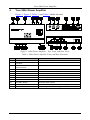
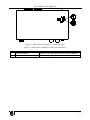
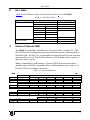
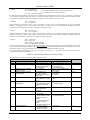
Figure 1, Figure 2, Table 1, and Table 2 define the unit.
Figure 1: 900xl Power Amplifier – Top, Front, and Rear Views
Table 1: 900xl Power Amplifier Front, and Rear Functions
1
2
3
4
5
6
7
8
9
10
11
12
4
#
Feature
12V DC Connector
RS-232 Tx Rx G Terminal Block
Connector
L+ L– R+ R– OUT Terminal
Block Connector
IN 2 RIGHT RCA Connector
IN 2 LEFT RCA Connector
IN 1 3.5mm Mini-jack Connector
INPUT 1 Button
INPUT 2 Button
VOLUME – Button
VOLUME + Button
OVER LED
ON LED
Function
+12V DC for powering the unit
Connect to PC
Speaker output
Connect to stereo audio right input of source 2
Connect to stereo audio left input of source 2
Connect to stereo audio input of source 1
Selects the input from audio source 1
Selects the input from audio source 2
Decreases output volume
Increases output volume
Illuminates red when device is overheating and mutes output
Illuminates green when receiving power
KRAMER: SIMPLE CREATIVE TECHNOLOGY