1
Titan NVR Release Note
NUUO version 1.0.0 release date_2011.9
2. In Playback mode, switch to single layout by double clicking a camera, and drag a camera to the
grid, you may discover the timeline of this channel disappeared. Users can switch to other
layouts when encountering this issue.
3. Some specific cameras, such as Arecont AV 2100, have floating FPS3 problem which may lead to
temporarily repeating video images when playing back.
4. Frame may stay still for a while as searching in Motion Search, which will be improved in coming
version.
5. It's impossible to search any DI event log in Playback if the selected source type is "all", which
implies that the only way to search DI event is selecting source type as "DI".
6. It's likely that system cannot query any event if there are too many events searched. When
encounter this issue, try not to select event name as "all".
7. When playing back videos with both ImmerVision and non-ImmerVision mode recording, there
may be no ImmerVision function icon displayed on camera content toolbar, which will become
normal as refreshing the view by switching LiveView/Playback or switching views and play again.
8. As megapixel ImmerVision Camera switches to Perimeter Mode, the system may hang in a short
period. This is the restraint of ImmerVision and there is no impact on function. If it does matter
to users, please try to lower the resolution to avoid this problem.
9. The keying function doesn't work on cue in/out time of selected video period on Backup Tool
through Playback page, but it works on Backup Tool through LiveView. Recommend to select
time by timeline bar or adjust it by mouse wheel.
[Other Application]
1. In Backup Player, video cannot be updated to the correct time when doing skip forward/backward
under the condition of video pause. There is no this issue on NuClient.
Notice
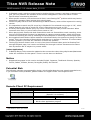
1. Supported languages in this version includes English, Japanese, Traditional Chinese, Spanish,
French, Italian, Russian, Korean, Português (Brasil) and Finnish.
Potential Risk
The following cameras are supported by design, which implies that they may contain potential error;
if you encounter some problems, please contact our Support Team: [email protected].
Camera Package
Potential Risk
Remote Client PC Requirement
Remote PC Minimum Requirements
CPU
Display Card
OS Supported
RAM
User Interface
3
Intel Core 2 Duo, 2.6GHz
nVidia or ATI with 1GB memory
(OpenGL 2.0 and later)
Windows XP 32 bit
Windows 7 32/64 bit
1GB
2GB
1. HTTP Web browser - Internet Explorer 8 and later
2. NUUO client application program
FPS stands for frame per second
2/2
2