1
Free Pascal :
User’s Guide
User’s Guide for Free Pascal, Version 2.4.2
Document version 2.4
November 2010
Michaël Van Canneyt
Florian Klämpfl
Contents
1
2
Introduction
7
1.1
About this document . . . . . . . . . . . . . . . . . . . . . . . . . . . . . . . . . .
7
1.2
About the compiler . . . . . . . . . . . . . . . . . . . . . . . . . . . . . . . . . . .
7
1.3
Getting more information. . . . . . . . . . . . . . . . . . . . . . . . . . . . . . . .
8
Installing the compiler
10
2.1
Before Installation : Requirements . . . . . . . . . . . . . . . . . . . . . . . . . . .
10
2.1.1
Hardware requirements . . . . . . . . . . . . . . . . . . . . . . . . . . . . .
10
2.1.2
Software requirements . . . . . . . . . . . . . . . . . . . . . . . . . . . . .
10
Under DOS . . . . . . . . . . . . . . . . . . . . . . . . . . . . . . . . . . .
10
Under UNIX . . . . . . . . . . . . . . . . . . . . . . . . . . . . . . . . . .
10
Under Windows . . . . . . . . . . . . . . . . . . . . . . . . . . . . . . . .
11
Under OS/2 . . . . . . . . . . . . . . . . . . . . . . . . . . . . . . . . . . .
11
Under Mac OS X . . . . . . . . . . . . . . . . . . . . . . . . . . . . . . . .
11
Installing the compiler. . . . . . . . . . . . . . . . . . . . . . . . . . . . . . . . . .
11
2.2.1
Installing under Windows . . . . . . . . . . . . . . . . . . . . . . . . . . .
11
2.2.2
Installing under DOS or OS/2 . . . . . . . . . . . . . . . . . . . . . . . . .
11
Mandatory installation steps. . . . . . . . . . . . . . . . . . . . . . . . . . .
11
Optional Installation: The coprocessor emulation . . . . . . . . . . . . . . .
13
Installing under Linux . . . . . . . . . . . . . . . . . . . . . . . . . . . . .
13
Mandatory installation steps. . . . . . . . . . . . . . . . . . . . . . . . . . .
13
2.3
Optional configuration steps . . . . . . . . . . . . . . . . . . . . . . . . . . . . . .
14
2.4
Before compiling . . . . . . . . . . . . . . . . . . . . . . . . . . . . . . . . . . . .
15
2.5
Testing the compiler . . . . . . . . . . . . . . . . . . . . . . . . . . . . . . . . . .
15
2.2
2.2.3
3
Compiler usage
16
3.1
File searching . . . . . . . . . . . . . . . . . . . . . . . . . . . . . . . . . . . . . .
16
3.1.1
Command line files . . . . . . . . . . . . . . . . . . . . . . . . . . . . . . .
16
3.1.2
Unit files . . . . . . . . . . . . . . . . . . . . . . . . . . . . . . . . . . . .
16
3.1.3
Include files . . . . . . . . . . . . . . . . . . . . . . . . . . . . . . . . . . .
19
3.1.4
Object files . . . . . . . . . . . . . . . . . . . . . . . . . . . . . . . . . . .
19
1
CONTENTS
4
5
3.1.5
Configuration file . . . . . . . . . . . . . . . . . . . . . . . . . . . . . . . .
20
3.1.6
About long filenames . . . . . . . . . . . . . . . . . . . . . . . . . . . . . .
20
3.2
Compiling a program . . . . . . . . . . . . . . . . . . . . . . . . . . . . . . . . . .
20
3.3
Compiling a unit . . . . . . . . . . . . . . . . . . . . . . . . . . . . . . . . . . . .
21
3.4
Units, libraries and smartlinking . . . . . . . . . . . . . . . . . . . . . . . . . . . .
21
3.5
Reducing the size of your program . . . . . . . . . . . . . . . . . . . . . . . . . . .
21
Compiling problems
23
4.1
General problems . . . . . . . . . . . . . . . . . . . . . . . . . . . . . . . . . . . .
23
4.2
Problems you may encounter under DOS . . . . . . . . . . . . . . . . . . . . . . .
23
Compiler configuration
24
5.1
Using the command line options . . . . . . . . . . . . . . . . . . . . . . . . . . . .
24
5.1.1
General options . . . . . . . . . . . . . . . . . . . . . . . . . . . . . . . . .
24
5.1.2
Options for getting feedback . . . . . . . . . . . . . . . . . . . . . . . . . .
25
5.1.3
Options concerning files and directories . . . . . . . . . . . . . . . . . . . .
26
5.1.4
Options controlling the kind of output. . . . . . . . . . . . . . . . . . . . . .
27
5.1.5
Options concerning the sources (language options) . . . . . . . . . . . . . .
31
Using the configuration file . . . . . . . . . . . . . . . . . . . . . . . . . . . . . . .
33
5.2.1
#IFDEF . . . . . . . . . . . . . . . . . . . . . . . . . . . . . . . . . . . . .
34
5.2.2
#IFNDEF . . . . . . . . . . . . . . . . . . . . . . . . . . . . . . . . . . . .
34
5.2.3
#ELSE . . . . . . . . . . . . . . . . . . . . . . . . . . . . . . . . . . . . .
34
5.2.4
#ENDIF . . . . . . . . . . . . . . . . . . . . . . . . . . . . . . . . . . . . .
35
5.2.5
#DEFINE . . . . . . . . . . . . . . . . . . . . . . . . . . . . . . . . . . . .
35
5.2.6
#UNDEF . . . . . . . . . . . . . . . . . . . . . . . . . . . . . . . . . . . .
35
5.2.7
#WRITE . . . . . . . . . . . . . . . . . . . . . . . . . . . . . . . . . . . .
35
5.2.8
#INCLUDE . . . . . . . . . . . . . . . . . . . . . . . . . . . . . . . . . . .
36
5.2.9
#SECTION . . . . . . . . . . . . . . . . . . . . . . . . . . . . . . . . . . .
36
Variable substitution in paths . . . . . . . . . . . . . . . . . . . . . . . . . . . . . .
36
5.2
5.3
6
The IDE
38
6.1
First steps with the IDE . . . . . . . . . . . . . . . . . . . . . . . . . . . . . . . . .
38
6.1.1
Starting the IDE . . . . . . . . . . . . . . . . . . . . . . . . . . . . . . . .
38
6.1.2
IDE command line options . . . . . . . . . . . . . . . . . . . . . . . . . . .
38
6.1.3
The IDE screen . . . . . . . . . . . . . . . . . . . . . . . . . . . . . . . . .
39
Navigating in the IDE . . . . . . . . . . . . . . . . . . . . . . . . . . . . . . . . . .
40
6.2.1
Using the keyboard . . . . . . . . . . . . . . . . . . . . . . . . . . . . . . .
40
6.2.2
Using the mouse . . . . . . . . . . . . . . . . . . . . . . . . . . . . . . . .
40
6.2.3
Navigating in dialogs . . . . . . . . . . . . . . . . . . . . . . . . . . . . . .
41
Windows . . . . . . . . . . . . . . . . . . . . . . . . . . . . . . . . . . . . . . . .
41
6.3.1
41
6.2
6.3
Window basics . . . . . . . . . . . . . . . . . . . . . . . . . . . . . . . . .
2
CONTENTS
6.3.2
Sizing and moving windows . . . . . . . . . . . . . . . . . . . . . . . . . .
42
6.3.3
Working with multiple windows . . . . . . . . . . . . . . . . . . . . . . . .
43
6.3.4
Dialog windows . . . . . . . . . . . . . . . . . . . . . . . . . . . . . . . .
43
The Menu . . . . . . . . . . . . . . . . . . . . . . . . . . . . . . . . . . . . . . . .
43
6.4.1
Accessing the menu . . . . . . . . . . . . . . . . . . . . . . . . . . . . . .
43
6.4.2
The File menu . . . . . . . . . . . . . . . . . . . . . . . . . . . . . . . . .
44
6.4.3
The Edit menu . . . . . . . . . . . . . . . . . . . . . . . . . . . . . . . . .
45
6.4.4
The Search menu . . . . . . . . . . . . . . . . . . . . . . . . . . . . . . . .
46
6.4.5
The Run menu . . . . . . . . . . . . . . . . . . . . . . . . . . . . . . . . .
46
6.4.6
The Compile menu . . . . . . . . . . . . . . . . . . . . . . . . . . . . . . .
47
6.4.7
The Debug menu . . . . . . . . . . . . . . . . . . . . . . . . . . . . . . . .
47
6.4.8
The Tools menu . . . . . . . . . . . . . . . . . . . . . . . . . . . . . . . . .
48
6.4.9
The Options menu . . . . . . . . . . . . . . . . . . . . . . . . . . . . . . .
48
6.4.10 The Window menu . . . . . . . . . . . . . . . . . . . . . . . . . . . . . . .
49
6.4.11 The Help menu . . . . . . . . . . . . . . . . . . . . . . . . . . . . . . . . .
50
Editing text . . . . . . . . . . . . . . . . . . . . . . . . . . . . . . . . . . . . . . .
50
6.5.1
Insert modes . . . . . . . . . . . . . . . . . . . . . . . . . . . . . . . . . .
50
6.5.2
Blocks . . . . . . . . . . . . . . . . . . . . . . . . . . . . . . . . . . . . .
50
6.5.3
Setting bookmarks . . . . . . . . . . . . . . . . . . . . . . . . . . . . . . .
51
6.5.4
Jumping to a source line . . . . . . . . . . . . . . . . . . . . . . . . . . . .
51
6.5.5
Syntax highlighting . . . . . . . . . . . . . . . . . . . . . . . . . . . . . . .
52
6.5.6
Code Completion . . . . . . . . . . . . . . . . . . . . . . . . . . . . . . . .
52
6.5.7
Code Templates . . . . . . . . . . . . . . . . . . . . . . . . . . . . . . . . .
53
6.6
Searching and replacing . . . . . . . . . . . . . . . . . . . . . . . . . . . . . . . . .
54
6.7
The symbol browser . . . . . . . . . . . . . . . . . . . . . . . . . . . . . . . . . . .
56
6.8
Running programs . . . . . . . . . . . . . . . . . . . . . . . . . . . . . . . . . . .
57
6.9
Debugging programs . . . . . . . . . . . . . . . . . . . . . . . . . . . . . . . . . .
58
6.9.1
Using breakpoints . . . . . . . . . . . . . . . . . . . . . . . . . . . . . . .
58
6.9.2
Using watches . . . . . . . . . . . . . . . . . . . . . . . . . . . . . . . . .
60
6.9.3
The call stack . . . . . . . . . . . . . . . . . . . . . . . . . . . . . . . . . .
61
6.9.4
The GDB window . . . . . . . . . . . . . . . . . . . . . . . . . . . . . . .
61
6.10 Using Tools . . . . . . . . . . . . . . . . . . . . . . . . . . . . . . . . . . . . . . .
62
6.10.1 The messages window . . . . . . . . . . . . . . . . . . . . . . . . . . . . .
62
6.10.2 Grep . . . . . . . . . . . . . . . . . . . . . . . . . . . . . . . . . . . . . . .
63
6.10.3 The ASCII table . . . . . . . . . . . . . . . . . . . . . . . . . . . . . . . .
63
6.10.4 The calculator . . . . . . . . . . . . . . . . . . . . . . . . . . . . . . . . . .
64
6.10.5 Adding new tools . . . . . . . . . . . . . . . . . . . . . . . . . . . . . . . .
65
6.10.6 Meta parameters . . . . . . . . . . . . . . . . . . . . . . . . . . . . . . . .
66
6.10.7 Building a command line dialog box . . . . . . . . . . . . . . . . . . . . . .
68
6.11 Project management and compiler options . . . . . . . . . . . . . . . . . . . . . . .
70
6.4
6.5
3
CONTENTS
7
6.11.1 The primary file . . . . . . . . . . . . . . . . . . . . . . . . . . . . . . . . .
70
6.11.2 The directory dialog . . . . . . . . . . . . . . . . . . . . . . . . . . . . . .
71
6.11.3 The target operating system . . . . . . . . . . . . . . . . . . . . . . . . . .
71
6.11.4 Compiler options . . . . . . . . . . . . . . . . . . . . . . . . . . . . . . . .
72
6.11.5 Linker options . . . . . . . . . . . . . . . . . . . . . . . . . . . . . . . . .
77
6.11.6 Memory sizes . . . . . . . . . . . . . . . . . . . . . . . . . . . . . . . . . .
78
6.11.7 Debug options . . . . . . . . . . . . . . . . . . . . . . . . . . . . . . . . .
79
6.11.8 The switches mode . . . . . . . . . . . . . . . . . . . . . . . . . . . . . . .
80
6.12 Customizing the IDE . . . . . . . . . . . . . . . . . . . . . . . . . . . . . . . . . .
80
6.12.1 Preferences . . . . . . . . . . . . . . . . . . . . . . . . . . . . . . . . . . .
81
6.12.2 The desktop . . . . . . . . . . . . . . . . . . . . . . . . . . . . . . . . . . .
82
6.12.3 The Editor . . . . . . . . . . . . . . . . . . . . . . . . . . . . . . . . . . .
83
6.12.4 Keyboard & Mouse . . . . . . . . . . . . . . . . . . . . . . . . . . . . . . .
85
6.13 The help system . . . . . . . . . . . . . . . . . . . . . . . . . . . . . . . . . . . . .
86
6.13.1 Navigating in the help system . . . . . . . . . . . . . . . . . . . . . . . . .
86
6.13.2 Working with help files . . . . . . . . . . . . . . . . . . . . . . . . . . . . .
86
6.13.3 The about dialog . . . . . . . . . . . . . . . . . . . . . . . . . . . . . . . .
87
6.14 Keyboard shortcuts . . . . . . . . . . . . . . . . . . . . . . . . . . . . . . . . . . .
88
Porting and portable code
92
7.1
Free Pascal compiler modes . . . . . . . . . . . . . . . . . . . . . . . . . . . . . .
92
7.2
Turbo Pascal . . . . . . . . . . . . . . . . . . . . . . . . . . . . . . . . . . . . . . .
93
7.2.1
Things that will not work . . . . . . . . . . . . . . . . . . . . . . . . . . . .
93
7.2.2
Things which are extra . . . . . . . . . . . . . . . . . . . . . . . . . . . . .
94
7.2.3
Turbo Pascal compatibility mode . . . . . . . . . . . . . . . . . . . . . . . .
96
7.2.4
A note on long file names under DOS . . . . . . . . . . . . . . . . . . . . .
98
Porting Delphi code . . . . . . . . . . . . . . . . . . . . . . . . . . . . . . . . . . .
98
7.3.1
Missing language constructs . . . . . . . . . . . . . . . . . . . . . . . . . .
98
7.3.2
Missing calls / API incompatibilities . . . . . . . . . . . . . . . . . . . . . .
99
7.3.3
Delphi compatibility mode . . . . . . . . . . . . . . . . . . . . . . . . . . . 100
7.3.4
Best practices for porting . . . . . . . . . . . . . . . . . . . . . . . . . . . . 100
7.3
7.4
8
Writing portable code . . . . . . . . . . . . . . . . . . . . . . . . . . . . . . . . . . 100
Utilities that come with Free Pascal
103
8.1
Demo programs and examples . . . . . . . . . . . . . . . . . . . . . . . . . . . . . 103
8.2
fpcmake . . . . . . . . . . . . . . . . . . . . . . . . . . . . . . . . . . . . . . . . . 103
8.3
fpdoc - Pascal Unit documenter . . . . . . . . . . . . . . . . . . . . . . . . . . . . . 103
8.4
h2pas - C header to Pascal Unit converter . . . . . . . . . . . . . . . . . . . . . . . 104
8.5
8.4.1
Options . . . . . . . . . . . . . . . . . . . . . . . . . . . . . . . . . . . . . 104
8.4.2
Constructs . . . . . . . . . . . . . . . . . . . . . . . . . . . . . . . . . . . 104
h2paspp - preprocessor for h2pas . . . . . . . . . . . . . . . . . . . . . . . . . . . . 106
4
CONTENTS
8.5.1
Usage . . . . . . . . . . . . . . . . . . . . . . . . . . . . . . . . . . . . . . 106
8.5.2
Options . . . . . . . . . . . . . . . . . . . . . . . . . . . . . . . . . . . . . 106
8.6
ppudump program . . . . . . . . . . . . . . . . . . . . . . . . . . . . . . . . . . . . 106
8.7
ppumove program . . . . . . . . . . . . . . . . . . . . . . . . . . . . . . . . . . . . 107
8.8
ptop - Pascal source beautifier . . . . . . . . . . . . . . . . . . . . . . . . . . . . . 108
8.9
8.8.1
ptop program . . . . . . . . . . . . . . . . . . . . . . . . . . . . . . . . . . 108
8.8.2
The ptop configuration file . . . . . . . . . . . . . . . . . . . . . . . . . . . 109
8.8.3
ptopu unit . . . . . . . . . . . . . . . . . . . . . . . . . . . . . . . . . . . . 110
rstconv program . . . . . . . . . . . . . . . . . . . . . . . . . . . . . . . . . . . . . 111
8.10 unitdiff program . . . . . . . . . . . . . . . . . . . . . . . . . . . . . . . . . . . . . 112
8.10.1 Synopsis . . . . . . . . . . . . . . . . . . . . . . . . . . . . . . . . . . . . 112
8.10.2 Description and usage . . . . . . . . . . . . . . . . . . . . . . . . . . . . . 112
8.10.3 Options . . . . . . . . . . . . . . . . . . . . . . . . . . . . . . . . . . . . . 112
9
Units that come with Free Pascal
114
9.1
Standard units . . . . . . . . . . . . . . . . . . . . . . . . . . . . . . . . . . . . . . 114
9.2
Under DOS . . . . . . . . . . . . . . . . . . . . . . . . . . . . . . . . . . . . . . . 115
9.3
Under Windows . . . . . . . . . . . . . . . . . . . . . . . . . . . . . . . . . . . . . 116
9.4
Under Linux and BSD-like platforms . . . . . . . . . . . . . . . . . . . . . . . . . . 116
9.5
Under OS/2 . . . . . . . . . . . . . . . . . . . . . . . . . . . . . . . . . . . . . . . 117
9.6
Unit availability . . . . . . . . . . . . . . . . . . . . . . . . . . . . . . . . . . . . . 117
10 Debugging your programs
118
10.1 Compiling your program with debugger support . . . . . . . . . . . . . . . . . . . . 118
10.2 Using gdb to debug your program . . . . . . . . . . . . . . . . . . . . . . . . . . . 119
10.3 Caveats when debugging with gdb . . . . . . . . . . . . . . . . . . . . . . . . . . . 120
10.4 Support for gprof, the GNU profiler . . . . . . . . . . . . . . . . . . . . . . . . . . 121
10.5 Detecting heap memory leaks . . . . . . . . . . . . . . . . . . . . . . . . . . . . . . 121
10.6 Line numbers in run-time error backtraces . . . . . . . . . . . . . . . . . . . . . . . 122
10.7 Combining heaptrc and lineinfo . . . . . . . . . . . . . . . . . . . . . . . . . . . . 122
A Alphabetical listing of command line options
124
B Alphabetical list of reserved words
128
C Compiler messages
129
C.1 General compiler messages . . . . . . . . . . . . . . . . . . . . . . . . . . . . . . . 129
C.2 Scanner messages. . . . . . . . . . . . . . . . . . . . . . . . . . . . . . . . . . . . 130
C.3 Parser messages . . . . . . . . . . . . . . . . . . . . . . . . . . . . . . . . . . . . . 135
C.4 Type checking errors . . . . . . . . . . . . . . . . . . . . . . . . . . . . . . . . . . 151
C.5 Symbol handling . . . . . . . . . . . . . . . . . . . . . . . . . . . . . . . . . . . . 156
C.6 Code generator messages . . . . . . . . . . . . . . . . . . . . . . . . . . . . . . . . 159
5
CONTENTS
C.7 Errors of assembling/linking stage . . . . . . . . . . . . . . . . . . . . . . . . . . . 162
C.8 Executable information messages. . . . . . . . . . . . . . . . . . . . . . . . . . . . 164
C.9 Linker messages . . . . . . . . . . . . . . . . . . . . . . . . . . . . . . . . . . . . . 164
C.10 Unit loading messages. . . . . . . . . . . . . . . . . . . . . . . . . . . . . . . . . . 164
C.11 Command line handling errors . . . . . . . . . . . . . . . . . . . . . . . . . . . . . 167
C.12 Whole program optimization messages . . . . . . . . . . . . . . . . . . . . . . . . . 169
C.13 Assembler reader errors. . . . . . . . . . . . . . . . . . . . . . . . . . . . . . . . . 171
C.13.1 General assembler errors . . . . . . . . . . . . . . . . . . . . . . . . . . . . 171
C.13.2 I386 specific errors . . . . . . . . . . . . . . . . . . . . . . . . . . . . . . . 174
C.13.3 m68k specific errors. . . . . . . . . . . . . . . . . . . . . . . . . . . . . . . 175
D Run-time errors
176
E A sample gdb.ini file
180
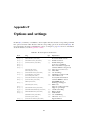
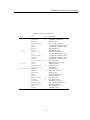
F Options and settings
181
G Getting the latest sources or installers
183
G.1 Download via Subversion . . . . . . . . . . . . . . . . . . . . . . . . . . . . . . . . 183
G.2 Downloading a source zip . . . . . . . . . . . . . . . . . . . . . . . . . . . . . . . . 184
G.3 Downloading a snapshot . . . . . . . . . . . . . . . . . . . . . . . . . . . . . . . . 184
6
Chapter 1
Introduction
1.1
About this document
This is the user’s guide for Free Pascal. It describes the installation and use of the Free Pascal
compiler on the different supported platforms. It does not attempt to give an exhaustive list of all
supported commands, nor a definition of the Pascal language. Look at the Reference Guide for
these things. For a description of the possibilities and the inner workings of the compiler, see the
Programmer’s Guide. In the appendices of this document you will find lists of reserved words and
compiler error messages (with descriptions).
This document describes the compiler as it is/functions at the time of writing. First consult the
README and FAQ files, distributed with the compiler. The README and FAQ files are, in case
of conflict with this manual, authoritative.
1.2
About the compiler
Free Pascal is a 32- and 64-bit Pascal compiler. The current version (2.2) can compile code for the
following processors:
• Intel i386 and higher (i486, Pentium family and higher)
• AMD64/x86_64
• PowerPC
• PowerPC64
• SPARC
• ARM
• The m68K processor is supported by an older version.
The compiler and Run-Time Library are available for the following operating systems:
• DOS
• LINUX
• A MIGA (version 0.99.5 only)
7
CHAPTER 1. INTRODUCTION
• W INDOWS
• Mac OS X
• OS /2 (optionally using the EMX package, so it also works on DOS/Windows)
• F REE BSD
• B E OS
• S OLARIS
• N ET BSD
• N ETWARE
• O PEN BSD
• MorphOS
• Symbian
The complete list is at all times available on the Free Pascal website.
Free Pascal is designed to be, as much as possible, source compatible with Turbo Pascal 7.0 and
Delphi 7 (although this goal is not yet attained), but it also enhances these languages with elements
like operator overloading. And, unlike these ancestors, it supports multiple platforms.
It also differs from them in the sense that you cannot use compiled units from one system for the
other, i.e. you cannot use TP compiled units.
Also, there is a text version of an Integrated Development Environment (IDE) available for Free
Pascal. Users that prefer a graphical IDE can have a look at the Lazarus or MSIDE projects.
Free Pascal consists of several parts :
1. The compiler program itself.
2. The Run-Time Library (RTL).
3. The packages. This is a collection of many utility units, ranging from the whole Windows 32
API, through native ZIP/BZIP file handling to the whole GTK-2 interface.
4. The Free Component Library. This is a set of class-based utility units which give a database
framework, image support, web support, XML support and many many more.
5. Utility programs and units.
Of these you only need the first two, in order to be able to use the compiler. In this document, we
describe the use of the compiler and utilities. The Pascal Language is described in the Reference
Guide, and the available routines (units) are described in the RTL and FCL Unit reference guides.
1.3
Getting more information.
If the documentation doesn’t give an answer to your questions, you can obtain more information on
the Internet, at the following addresses:
• http://www.freepascal.org/ is the main site. It contains also useful mail addresses and links to
other places. It also contains the instructions for subscribing to the mailinglist.
8
CHAPTER 1. INTRODUCTION
• http://community.freepascal.org:10000/ is a forum site where questions can be posted.
Other than that, some mirrors exist.
Finally, if you think something should be added to this manual (entirely possible), please do not
hesitate and contact me at [email protected]. .
Let’s get on with something useful.
9
Chapter 2
Installing the compiler
2.1
2.1.1
Before Installation : Requirements
Hardware requirements
The compiler needs at least one of the following processors:
1. An Intel 80386 or higher processor. A coprocessor is not required, although it will slow down
your program’s performance if you do floating point calculations without a coprocessor, since
emulation will be used.
2. An AMD64 or EMT64 processor.
3. A PowerPC processor.
4. A SPARC processor
5. An ARM processor.
6. Older FPC versions exist for the motorola 68000 processor, but these are no longer maintained.
Memory and disk requirements:
1. 8 Megabytes of free memory. This is sufficient to allow compilation of small programs.
2. Large programs (such as the compiler itself) will require at least 64 MB. of memory, but
128MB is recommended. (Note that the compiled programs themselves do not need so much
memory.)
3. At least 80 MB free disk space. When the sources are installed, another 270 MB are needed.
2.1.2
Software requirements
Under DOS
The DOS distribution contains all the files you need to run the compiler and compile Pascal programs.
Under UNIX
Under UNIX systems (such as LINUX) you need to have the following programs installed :
10
CHAPTER 2. INSTALLING THE COMPILER
1. GNU as, the GNU assembler.
2. GNU ld, the GNU linker.
3. Optionally (but highly recommended) : GNU make. For easy recompiling of the compiler and
Run-Time Library, this is needed.
Under Windows
The W INDOWS distributions (both 32 and 64 bit) contain all the files you need to run the compiler
and compile Pascal programs. However, it may be a good idea to install the mingw32 tools or the
cygwin development tools. Links to both of these tools can be found on http://www.freePascal.org
Under OS/2
While the Free Pascal distribution comes with all necessary tools, it is a good idea to install the EMX
extender in order to compile and run programs with the Free Pascal compiler. The EMX extender
can be found on:
ftp://hobbes.nmsu.edu/pub/os2/dev/emx/v0.9d
Under Mac OS X
Mac OS X 10.1 or higher is required, and the developer tools or XCode should be installed.
2.2
Installing the compiler.
The installation of Free Pascal is easy, but is platform-dependent. We discuss the process for each
platform separately.
2.2.1
Installing under Windows
For W INDOWS, there is a W INDOWS installer, setup.exe. This is a normal installation program,
which offers the usual options of selecting a directory, and which parts of the distribution you want
to install. It will, optionally, associate the .pp or .pas extensions with the text mode IDE.
It is not recommended to install the compiler in a directory which has spaces in it’s path name.
Some of the external tools do not support filenames with spaces in them, and you will have problems
creating programs.
2.2.2
Installing under DOS or OS/2
Mandatory installation steps.
First, you must get the latest distribution files of Free Pascal. They come as zip files, which you
must unzip first, or you can download the compiler as a series of separate files. This is especially
useful if you have a slow connection, but it is also nice if you want to install only some parts of
the compiler distribution. The distribution zip files for DOS or OS/2 contain an installation program
INSTALL.EXE. You must run this program to install the compiler.
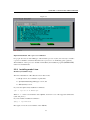
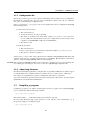
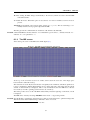
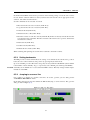
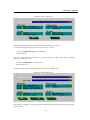
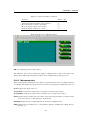
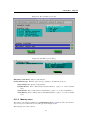
The screen of the DOS or OS/2 installation program looks like figure 2.1.
The program allows you to select:
11
CHAPTER 2. INSTALLING THE COMPILER
Figure 2.1: The DOS install program screen
• What components you wish to install. e.g do you want the sources or not, do you want docs or
not. Items that you didn’t download when downloading as separate files, will not be enabled,
i.e. you can’t select them.
• Where you want to install (the default location is C:\PP).
In order to run Free Pascal from any directory on your system, you must extend your path variable to
contain the C:\PP\BIN directory. Usually this is done in the AUTOEXEC.BAT file. It should look
something like this :
SET PATH=%PATH%;C:\PP\2.2\BIN\i386-DOS
for DOS or
SET PATH=%PATH%;C:\PP\2.2\BIN\i386-OS2
for OS /2. (Again, assuming that you installed in the default location).
On OS /2, Free Pascal installs some libraries from the EMX package if they were not yet installed.
(The installer will notify you if they should be installed). They are located in the
C:\PP\DLL
directory. The name of this directory should be added to the LIBPATH directive in the config.sys
file:
LIBPATH=XXX;C:\PP\DLL
Obviously, any existing directories in the LIBPATH directive (indicated by XXX in the above example) should be preserved.
12
CHAPTER 2. INSTALLING THE COMPILER
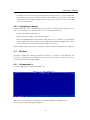
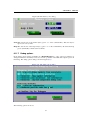
Figure 2.2:
Optional Installation: The coprocessor emulation
For people who have an older CPU type, without math coprocessor (i387) it is necessary to install a
coprocessor emulation, since Free Pascal uses the coprocessor to do all floating point operations.
The installation of the coprocessor emulation is handled by the installation program (INSTALL.EXE)
under DOS and W INDOWS.
2.2.3
Installing under Linux
Mandatory installation steps.
The LINUX distribution of Free Pascal comes in three forms:
• a tar.gz version, also available as separate files.
• a .rpm (Red Hat Package Manager) version, and
• a .deb (Debian) version.
If you use the .rpm format, installation is limited to
rpm -i fpc-X.Y.Z-N.ARCH.rpm
Where X.Y.Z is the version number of the .rpm file, and ARCH is one of the supported architectures
(i386, x86_64 etc.).
If you use Debian, installation is limited to
dpkg -i fpc-XXX.deb
Here again, XXX is the version number of the .deb file.
13
CHAPTER 2. INSTALLING THE COMPILER
You need root access to install these packages. The .tar file allows you to do an installation below
your home directory if you don’t have root permissions.
When downloading the .tar file, or the separate files, installation is more interactive.
In case you downloaded the .tar file, you should first untar the file, in some directory where you have
write permission, using the following command:
tar -xvf fpc.tar
We supposed here that you downloaded the file fpc.tar somewhere from the Internet. (The real
filename will have some version number in it, which we omit here for clarity.)
When the file is untarred, you will be left with more archive files, and an install program: an installation shell script.
If you downloaded the files as separate files, you should at least download the install.sh script, and
the libraries (in libs.tar.gz).
To install Free Pascal, all that you need to do now is give the following command:
./install.sh
And then you must answer some questions. They’re very simple, they’re mainly concerned with 2
things :
1. Places where you can install different things.
2. Deciding if you want to install certain components (such as sources and demo programs).
The script will automatically detect which components are present and can be installed. It will only
offer to install what has been found. Because of this feature, you must keep the original names when
downloading, since the script expects this.
If you run the installation script as the root user, you can just accept all installation defaults. If you
don’t run as root, you must take care to supply the installation program with directory names where
you have write permission, as it will attempt to create the directories you specify. In principle, you
can install it wherever you want, though.
At the end of installation, the installation program will generate a configuration file (fpc.cfg) for the
Free Pascal compiler which reflects the settings that you chose. It will install this file in the /etc
directory or in your home directory (with name .fpc.cfg) if you do not have write permission in the
/etc directory. It will make a copy in the directory where you installed the libraries.
The compiler will first look for a file .fpc.cfg in your home directory before looking in the /etc
directory.
2.3
Optional configuration steps
On any platform, after installing the compiler you may wish to set some environment variables. The
Free Pascal compiler recognizes the following variables :
• PPC_EXEC_PATH contains the directory where support files for the compiler can be found.
• PPC_CONFIG_PATH specifies an alternate path to find the fpc.cfg.
• PPC_ERROR_FILE specifies the path and name of the error-definition file.
• FPCDIR specifies the root directory of the Free Pascal installation. (e.g : C:\PP\BIN)
14
CHAPTER 2. INSTALLING THE COMPILER
These locations are, however, set in the sample configuration file which is built at the end of the
installation process, except for the PPC_CONFIG_PATH variable, which you must set if you didn’t
install things in the default places.
2.4
Before compiling
Also distributed in Free Pascal is a README file. It contains the latest instructions for installing
Free Pascal, and should always be read first.
Furthermore, platform-specific information and common questions are addressed in the FAQ. It
should be read before reporting any bug.
2.5
Testing the compiler
After the installation is completed and the optional environment variables are set as described above,
your first program can be compiled.
Included in the Free Pascal distribution are some demonstration programs, showing what the compiler can do. You can test if the compiler functions correctly by trying to compile these programs.
The compiler is called
• fpc.exe under W INDOWS, OS /2 and DOS.
• fpc under most other operating systems.
To compile a program (e.g demo\text\hello.pp), copy the program to your current working
directory, and simply type :
fpc hello
at the command prompt. If you don’t have a configuration file, then you may need to tell the compiler
where it can find the units, for instance as follows:
fpc -Fuc:\pp\NNN\units\i386-go32v2\rtl hello
under DOS, and under LINUX you could type
fpc -Fu/usr/lib/fpc/NNN/units/i386-linux/rtl hello
(replace NNN with the version number of Free Pascal that you are using). This is, of course, assuming
that you installed under C:\PP or /usr/lib/fpc/NNN, respectively.
If you got no error messages, the compiler has generated an executable called hello.exe under DOS,
OS /2 or W INDOWS, or hello (no extension) under UNIX and most other operating systems.
To execute the program, simply type :
hello
or
./hello
on Unices (where the current directory usually is not in the PATH).
If all went well, you should see the following friendly greeting:
Hello world
15
Chapter 3
Compiler usage
Here we describe the essentials to compile a program and a unit. For more advanced uses of the
compiler, see the section on configuring the compiler, and the Programmer’s Guide.
The examples in this section suppose that you have an fpc.cfg which is set up correctly, and which
contains at least the path setting for the RTL units. In principle this file is generated by the installation
program. You may have to check that it is in the correct place. (see section 5.2 for more information
on this.)
3.1
File searching
Before you start compiling a program or a series of units, it is important to know where the compiler
looks for its source files and other files. In this section we discuss this, and we indicate how to
influence this.
Remark: The use of slashes (/) and backslashes (\) as directory separators is irrelevant, the compiler will
convert to whatever character is used on the current operating system. Examples will be given using
slashes, since this avoids problems on UNIX systems (such as LINUX).
3.1.1
Command line files
The file that you specify on the command line, such as in
fpc foo.pp
will be looked for ONLY in the current directory. If you specify a directory in the filename, then the
compiler will look in that directory:
fpc subdir/foo.pp
will look for foo.pp in the subdirectory subdir of the current directory.
Under case sensitive file systems (such as LINUX and UNIX), the name of this file is case sensitive;
under other operating systems (such as DOS, W INDOWS NT, OS /2) this is not the case.
3.1.2
Unit files
When you compile a unit or program that needs other units, the compiler will look for compiled
versions of these units in the following way:
16
CHAPTER 3. COMPILER USAGE
1. It will look in the current directory.
2. It will look in the directory where the source file resides.
3. It will look in the directory where the compiler binary is.
4. It will look in all the directories specified in the unit search path.
You can add a directory to the unit search path with the (-Fu (see page 26)) option. Every occurrence
of one of these options will insert a directory to the unit search path. i.e. the last path on the command
line will be searched first.
The compiler adds several paths to the unit search path:
1. The contents of the environment variable XXUNITS, where XX must be replaced with one of
the supported targets: GO32V2, LINUX,WIN32, OS2, BEOS, FREEBSD, NETBSD.
2. The standard unit directory. This directory is determined from the FPCDIR environment variable. If this variable is not set, then it is defaulted to the following:
• On LINUX:
/usr/local/lib/fpc/FPCVERSION
or
/usr/lib/fpc/FPCVERSION
whichever is found first.
• On other OSes: the compiler binary directory, with ’../’ appended to it, if it exists. For
instance, on Windows, this would mean
C:\FPC\2.2\units\i386-win32
This is assuming the compiler was installed in the directory
C:\FPC\2.2
After this directory is determined , the following paths are added to the search path:
(a) FPCDIR/units/FPCTARGET
(b) FPCDIR/units/FPCTARGET/rtl
Here target must be replaced by the name of the target you are compiling for: this is a combination of CPU and OS, so for instance
/usr/local/lib/fpc/2.2/units/i386-linux/
or, when cross-compiling
/usr/local/lib/fpc/2.2/units/i386-win32/
The -Fu option accepts a single * wildcard, which will be replaced by all directories found on that
location, but not the location itself. For example, given the directories
rtl/units/i386-linux
fcl/units/i386-linux
packages/base
packages/extra
the command
17
CHAPTER 3. COMPILER USAGE
fpc -Fu"*/units/i386-linux"
will have the same effect as
fpc -Furtl/units/i386-linux -Fufcl/units/i386-linux
since both the rtl and fcl directories contain further units/i386-linux subdirectories. The packages
directory will not be added, since it doesn’t contain a units/i386-linux subdirectory.
The following command
fpc -Fu"units/i386-linux/*"
will match any directory below the units/i386-linux directory, but will not match the units/i386linux directory itself, so you should add it manually if you want the compiler to look for files in this
directory as well:
fpc -Fu"units/i386-linux" -Fu"units/i386-linux/*"
Note that (for optimization) the compiler will drop any non-existing paths from the search path, i.e.
the existence of the path (after wildcard and environment variable expansion) will be tested.
You can see what paths the compiler will search by giving the compiler the -vu option.
On systems where filenames are case sensitive (such as UNIX and LINUX), the compiler will :
1. Search for the original file name, i.e. preserves case.
2. Search for the filename all lowercased.
3. Search for the filename all uppercased.
This is necessary, since Pascal is case-independent, and the statements Uses Unit1; or uses
unit1; should have the same effect.
It will do this first with the extension .ppu (the compiled unit), .pp and then with the extension .pas.
For instance, suppose that the file foo.pp needs the unit bar. Then the command
fpc -Fu.. -Fuunits foo.pp
will tell the compiler to look for the unit bar in the following places:
1. In the current directory.
2. In the directory where the compiler binary is (not under LINUX).
3. In the parent directory of the current directory.
4. In the subdirectory units of the current directory
5. In the standard unit directory.
Also, unit names that are longer than 8 characters will first be looked for with their full length. If the
unit is not found with this name, the name will be truncated to 8 characters, and the compiler will
look again in the same directories, but with the truncated name.
If the compiler finds the unit it needs, it will look for the source file of this unit in the same directory
where it found the unit. If it finds the source of the unit, then it will compare the file times. If the
18
CHAPTER 3. COMPILER USAGE
source file was modified more recent than the unit file, the compiler will attempt to recompile the
unit with this source file.
If the compiler doesn’t find a compiled version of the unit, or when the -B option is specified, then
the compiler will look in the same manner for the unit source file, and attempt to recompile it.
It is recommended to set the unit search path in the configuration file fpc.cfg. If you do this, you
don’t need to specify the unit search path on the command line every time you want to compile
something.
3.1.3
Include files
If you include a file in your source with the {$I filename} directive, the compiler will look for
it in the following places:
1. It will look in the path specified in the include file name.
2. It will look in the directory where the current source file is.
3. it will look in all directories specified in the include file search path.
You can add files to the include file search path with the -I (see page 26) or -Fi (see page 26)
options.
As an example, consider the following include statement in a file units/foo.pp:
{$i ../bar.inc}
Then the following command :
fpc -Iincfiles units/foo.pp
will cause the compiler to look in the following directories for bar.inc:
1. The parent directory of the current directory.
2. The units subdirectory of the current directory.
3. The incfiles subdirectory of the current directory.
3.1.4
Object files
When you link to object files (using the {$L file.o} directive, the compiler will look for this file
in the same way as it looks for include files:
1. It will look in the path specified in the object file name.
2. It will look in the directory where the current source file is.
3. It will look in all directories specified in the object file search path.
You can add files to the object file search path with the -Fo (see page 26) option.
19
CHAPTER 3. COMPILER USAGE
3.1.5
Configuration file
Not all options must be given on the compiler command line. The compiler can use a configuration
file which can contain the same options as on the command line. There can be only one commandline option on each line in the configuration file.
Unless you specify the -n (see page 24) option, the compiler will look for a configuration file fpc.cfg
in the following places:
• Under UNIX (such as LINUX)
1. The current directory.
2. Your home directory, it looks for .fpc.cfg.
3. The directory specified in the environment variable PPC_CONFIG_PATH, and if it is
not set, it will look in the etc directory above the compiler directory. (For instance, if the
compiler is in /usr/local/bin, it will look in /usr/local/etc)
4. The directory /etc.
• Under all other OSes:
1. The current directory.
2. If it is set, the directory specified in the environment variable PPC_CONFIG_PATH.
3. The directory where the compiler is.
Versions prior to version 1.0.6 of the compiler used a configuration file ppc386.cfg. This file is still
searched, but its usage is considered deprecated. For compatibility, fpc.cfg will be searched first,
and if not found, the file ppc386.cfg will be searched and used.
Remark: The searching for ppc386.cfg will be removed from the compiler in version 2.4.0. To indicate this,
the compiler gives a warning as of version 2.3.1 if it uses a ppc386.cfg configuration file.
3.1.6
About long filenames
Free Pascal can handle long filenames on all platforms, except DOS. On Windows, it will use support
for long filenames if it is available (which is not always the case on older versions of Windows).
If no support for long filenames is present, it will truncate unit names to 8 characters.
It is not recommended to put units in directories that contain spaces in their names, since the external
GNU linker doesn’t understand such filenames.
3.2
Compiling a program
Compiling a program is very simple. Assuming that you have a program source in the file prog.pp,
you can compile this with the following command:
fpc [options] prog.pp
The square brackets [ ] indicate that what is between them is optional.
If your program file has the .pp or .pas extension, you can omit this on the command line, e.g. in
the previous example you could have typed:
fpc [options] prog
20
CHAPTER 3. COMPILER USAGE
If all went well, the compiler will produce an executable file. You can execute it straight away; you
don’t need to do anything else.
You will notice that there is also another file in your directory, with extension .o. This contains the
object file for your program. If you compiled a program, you can delete the object file (.o), but don’t
delete it if you compiled a unit. This is because the unit object file contains the code of the unit, and
will be linked in any program that uses it.
3.3
Compiling a unit
Compiling a unit is not essentially different from compiling a program. The difference is mainly that
the linker isn’t called in this case.
To compile a unit in the file foo.pp, just type :
fpc
foo
Recall the remark about file extensions in the previous section.
When all went well, you will be left with 2 (two) unit files:
1. foo.ppu - this is the file describing the unit you just compiled.
2. foo.o - this file contains the actual code of the unit. This file will eventually end up in the
executables.
Both files are needed if you plan to use the unit for some programs. So don’t delete them. If you
want to distribute the unit, you must provide both the .ppu and .o file. One is useless without the
other.
3.4
Units, libraries and smartlinking
The Free Pascal compiler supports smartlinking and the creation of libraries. However, the default
behaviour is to compile each unit into one big object file, which will be linked as a whole into your
program. Shared libraries can be created on most platforms, although current level of FPC support
may vary (they are e.g. not supported for GO32v2 and OS2 targets).
It is also possible to take existing units and put them together in 1 static or shared library (using the
ppumove tool, section 8.7, page 107).
3.5
Reducing the size of your program
When you created your program, it is possible to reduce the size of the resulting executable. This is
possible, because the compiler leaves a lot of information in the program which, strictly speaking,
isn’t required for the execution of the program.
The surplus of information can be removed with a small program called strip.The usage is simple.
Just type
strip prog
On the command line, and the strip program will remove all unnecessary information from your
program. This can lead to size reductions of up to 30 %.
21
CHAPTER 3. COMPILER USAGE
You can use the -Xs switch to let the compiler do this stripping automatically at program compile
time. (The switch has no effect when compiling units.)
Another technique to reduce the size of a program is to use smartlinking. Normally, units (including
the system unit) are linked in as a whole. It is however possible to compile units such that they can
be smartlinked. This means that only the functions and procedures that are actually used are linked
in your program, leaving out any unnecessary code. The compiler will turn on smartlinking with the
-XX (see page 31) switch. This technique is described in full in the programmers guide.
22
Chapter 4
Compiling problems
4.1
General problems
• IO-error -2 at ... : Under LINUX you can get this message at compiler startup. It means
typically that the compiler doesn’t find the error definitions file. You can correct this mistake
with the -Fr (see page 26) option under LINUX.
• Error : File not found : xxx or Error: couldn’t compile unit xxx: This typically happens
when your unit path isn’t set correctly. Remember that the compiler looks for units only in
the current directory, and in the directory where the compiler itself is. If you want it to look
somewhere else too, you must explicitly tell it to do so using the -Fu (see page 26) option. Or
you must set up a configuration file.
4.2
Problems you may encounter under DOS
• No space in environment.
An error message like this can occur if you call SET_PP.BAT in AUTOEXEC.BAT.
To solve this problem, you must extend your environment memory. To do this, search a line in
CONFIG.SYS like
SHELL=C:\DOS\COMMAND.COM
and change it to the following:
SHELL=C:\DOS\COMMAND.COM /E:1024
You may just need to specify a higher value, if this parameter is already set.
• Coprocessor missing
If the compiler writes a message that there is no coprocessor, install the coprocessor emulation.
• Not enough DPMI memory
If you want to use the compiler with DPMI you must have at least 7-8 MB free DPMI memory,
but 16 Mb is a more realistic amount.
23
Chapter 5
Compiler configuration
The output of the compiler can be controlled in many ways. This can be done essentially in two
distinct ways:
• Using command line options.
• Using the configuration file: fpc.cfg.
The compiler first reads the configuration file. Only then are the command line options checked. This
creates the possibility to set some basic options in the configuration file, and at the same time you
can still set some specific options when compiling some unit or program. First we list the command
line options, and then we explain how to specify the command line options in the configuration file.
When reading this, keep in mind that the options are case sensitive.
5.1
Using the command line options
The available options for the current version of the compiler are listed by category. Also, see chapter
A, page 124 for a listing as generated by the current compiler.
5.1.1
General options
-h Print a list of all options and exit.
-? Same as -h, waiting after each screenfull for the enter key.
-i Print copyright and other information. You can supply a qualifier, as -ixxx where xxx can be
one of the following:
D : Returns the compiler date.
V : Returns the short compiler version.
W : Return full compiler version.
SO : Returns the compiler OS.
SP : Returns the compiler processor.
TO : Returns the target OS.
TP : Returns the target processor.
-l Print the Free Pascal logo and version number.
-n Ignore the default configuration file. You can still pass a configuration file with the @ option.
24
CHAPTER 5. COMPILER CONFIGURATION
5.1.2
Options for getting feedback
-vxxx Be verbose. xxx is a combination of the following :
• e : Show errors. This option is on by default.
• i : Display some general information.
• w : Issue warnings.
• n : Issue notes.
• h : Issue hints.
• i : Issue informational messages.
• l : Report number of lines processed (every 100 lines).
• u : Show information on units being loaded.
• t : Show names of files being opened.
• p : Show names of procedures and functions being processed.
• q : Show message numbers.
• c : Notify on each conditional being processed.
• mxxx : xxx is a comma-separated list of messages numbers which should not be shown.
This option can be specified multiple times.
• d : Show additional debugging information.
• 0 : No messages. This is useful for overriding the default setting in the configuration file.
• b : Show all procedure declarations if an overloaded function error occurs.
• x : Show information about the executable (Win32 platform only).
• r : Format errors in RHIDE/GCC compatibility mode.
• a : Show all possible information. (this is the same as specifying all options)
• b : Tells the compiler to write filenames using the full path.
• v : Write copious debugging information to file. fpcdebug.txt..
• s : Write timestamps. Mainly for the compiler developers.
The difference between an error/fatal error/hint/warning/note is the severity:
Fatal The compiler encountered an error, and can no longer continue compiling. It will stop at once.
Error The compiler encountered an error, but can continue to compile (at most till the end of the
current unit).
Warning if there is a warning, it means there is probably an error, i.e. something may be wrong in
your code.
Hint Is issued if the compiler thinks the code could be better, but there is no suspicion of error.
Note Is some noteworthy information, but again there is no error.
The difference between hints and notes is not really very clear. Both can be ignored without too
much risk, but warnings should always be checked.
25
CHAPTER 5. COMPILER CONFIGURATION
5.1.3
Options concerning files and directories
-exxx Specify xxx as the directory containing the executables for the programs as (the assembler)
and ld (the linker).
-FaXYZ load units XYZ after the system unit, but before any other unit is loaded. XYZ is a commaseparated list of unit names. This can only be used for programs, and has the same effect as if
XYZ were inserted as the first item in the program’s uses clause.
-FcXXX Set the input codepage to XXX. Experimental.
-FCxxx Set the RC compiler (resource compiler) binary name to xxx.
-Fd Disable the compiler’s internal directory cache. By default, the compiler caches the names all
files in a directory as soon as it looks for a single file in said directory. This ensures that
the correct case of all file names is used in the debug information and to create compiled
files when compiling on a case-preserving file systems under an OS that also support casesensitive file systems, and it can also increase performance. This feature can however cause
severe slowdowns on networked file systems, especially when compiling trivial programs in
directories containing many files, and such slowdowns can be addressed by disabling the cache
using this switch.
-FD Same as -e.
-Fexxx Write errors, etc. to the file named xxx.
-FExxx Write the executable and units to directory xxx instead of the current directory. If this option
is followed by a -o option -o (see page 29), and this option contains a path component, then
the -o path will override the -FE setting.
-Ffxxx Add xxx to the framework path (only for Darwin).
-Fixxx Add xxx to the include file search path.
-Flxxx Add xxx to the library search path. (This is also passed to the linker.)
-FLxxx (LINUX only) Use xxx as the dynamic linker. The default is /lib/ld-linux.so.2, or /lib/ldlinux.so.1, depending on which one is found first.
-Fmxxx Load the unicode conversion table from file x.txt in the directory where the compiler is
located. Only used when -Fc is also in effect.
-Foxxx Add xxx to the object file search path. This path is used when looking for files that need to
be linked in.
-Frxxx Specify xxx as the file which contain the compiler messages. This will override the compiler’s built-in default messages, which are in english.
-FRxxx set the resource (.res) linker to xxx.
-Fuxxx Add xxx to the unit search path. Units are first searched in the current directory. If they
are not found there then the compiler searches them in the unit path. You must always supply
the path to the system unit. The xxx path can contain a single wildcard (*) which will be
expanded to all possible directory names found at that location. Note that the location itself is
not included in the list. See section 3.1.2, page 16 for more information about this option.
-FUxxx Write units to directory xxx instead of the current directory. It overrides the -FE option.
-Ixxx Add xxx to the include file search path. This option has the same effect as -Fi.
-FWxxx store generated Whole Program Optimization information in file xxx.
-Fwxxx Read Whole Program Optimization information from file xxx.
26
CHAPTER 5. COMPILER CONFIGURATION
5.1.4
Options controlling the kind of output.
For more information on these options, see Programmer’s Guide.
-a Do not delete the assembler files (not applicable when using the internal assembler). This also
applies to the (possibly) generated batch script.
-al Include the source code lines in the assembler file as comments.
-an Write node information in the assember file (nodes are the way the compiler represents statements or parts thereof internally). This is primarily intended for debugging the code generated
by the compiler.
-ap Use pipes instead of creating temporary assembler files. This may speed up the compiler on
OS /2 and LINUX . Only with assemblers (such as GNU if the internal assembler is used.
-ar List register allocation and release info in the assembler file. This is primarily intended for
debugging the code generated by the compiler.
-at List information about temporary allocations and deallocations in the assembler file.
-Axxx specify what kind of assembler should be generated. Here xxx is one of the following :
default Use the built-in default.
as Assemble using GNU as.
nasmcoff Coff (Go32v2) file using Nasm.
nasmelf Elf32 (LINUX) file using Nasm.
nasmwin32 W INDOWS 32-bit file using Nasm.
nasmwdosx W INDOWS 32-bit/DOSX file using Nasm.
nasmobj Object file using Nasm.
masm Object file using Masm (Microsoft).
tasm Object file using Tasm (Borland).
elf Elf32 (LINUX) using internal writer.
coff Coff object file (Go32v2) using the internal binary object writer.
pecoff PECoff object file (Win32) using the internal binary object writer.
-B Re-compile all used units, even if the unit sources didn’t change since the last compilation.
-b Generate browser info. This information can be used by an Integrated Development Environment
(IDE) to provide information on classes, objects, procedures, types and variables in a unit.
-bl The same as -b but also generates information about local variables, types and procedures.
-Caxxx Set the ABI (Application Binary Interface) to xxx. The -i option gives the possible values
for xxx.
-Cb Generate big-endian code.
-Cc Set the default calling convention used by the compiler.
-CD Create a dynamic library. This is used to transform units into dynamically linkable libraries on
LINUX .
-Ce Emulate floating point operations.
-Cfxxx Set the used floating point processor to xxx.
27
CHAPTER 5. COMPILER CONFIGURATION
-CFNN Set the minimal floating point precision to NN. Possible values are 32 and 64.
-Cg Enable generation of PIC code. This should only be necessary when generating libraries on
LINUX or other Unices.
-Chxxx Reserves xxx bytes heap. xxx should be between 1024 and 67107840.
-Ci Generate Input/Output checking code. In case some input/output code of your program returns
an error status, the program will exit with a run-time error. Which error is generated depends
on the I/O error.
-Cn Omit the linking stage.
-Co Generate Integer overflow checking code. In case of integer errors, a run-time error will be
generated by your program.
-CO Check for possible overflow of integer operations.
-CpXXX Set the processor type to XXX.
-CPX=N Set the packing for X to N. X can be PACKSET, PACKENUM or PACKRECORD, and N can
be a value of 1,2,4,8 or one of the keywords DEFAULT or NORMAL.
-Cr Generate Range checking code. If your program accesses an array element with an invalid index,
or if it increases an enumerated type beyond its scope, a run-time error will be generated.
-CR Generate checks when calling methods to verify if the virtual method table for that object is
valid.
-Csxxx Set stack size to xxx.
-Ct Generate stack checking code. If your program performs a faulty stack operation, a run-rime
error will be generated.
-CX Create a smartlinked unit when writing a unit. Smartlinking will only link in the code parts that
are actually needed by the program. All unused code is left out. This can lead to substantially
smaller binaries.
-dxxx Define the symbol name xxx. This can be used to conditionally compile parts of your code.
-D Generate a DEF file (for OS/2).
-Dd Set the description of the executable/library (W INDOWS).
-Dv Set the version of the executable/library (W INDOWS).
-E Same as -Cn.
-g Generate debugging information for debugging with gdb.
-gc Generate checks for pointers. This must be used with the -gh command line option. When this
options is enabled, it will verify that all pointer accesses are within the heap.
-gg Same as -g.
-gh Use the heaptrc unit (see Unit Reference). (Produces a report about heap usage after the program
exits)
-gl Use the lineinfo unit (see Unit Reference). (Produces file name/line number information if the
program exits due to an error.)
28
CHAPTER 5. COMPILER CONFIGURATION
-goXXX set debug information options. One of the options is dwarfsets: It enables dwarf set
debug information (this does not work with gdb versions prior to 6.5.
-gp Preserve case in stabs symbol names. Default is to uppercase all names.
-gs Write stabs debug information.
-gt Trash local variables. This writes a random value to local variables at procedure start. This can
be used to detect uninitialized variables.
-gv Emit info for valgrind.
-gw Emit dwarf debugging info (version 2).
-gw2 Emit dwarf debugging info (version 2).
-gw3 Emit dwarf debugging info (version 3).
-kxxx Pass xxx to the linker.
-Oxxx Optimize the compiler’s output; xxx can have one of the following values :
aPARAM=VALUE Specify alignment of structures and code. PARAM determines what should
be aligned; VALUE specifies the alignment boundary. See the Programmer’s Guide for a
description of the possible values.
g Optimize for size, try to generate smaller code.
G Optimize for time, try to generate faster code (default).
r Keep certain variables in registers (experimental, use with caution).
u Uncertain optimizations
1 Level 1 optimizations (quick optimizations).
2 Level 2 optimizations (-O1 plus some slower optimizations).
3 Level 3 optimizations (-O2 plus -Ou).
oxxx Specify specific optimizations: n can be one of
REGVAR Use register variables
STACKFRAME Skip stack frames
LOOPUNROLL unroll (small) loops
TAILREC change tail recursion to non-recursive loop.
pxxx select processor xxx to optimize for. fpc -i lists all available processor instruction
sets.
Wxxx Generate Whole-Program-Optimization information for feature xxx. fpc -i will
generate a list of possible values.
wxxx Perform Whole-Program-Optimization information for feature xxx. fpc -i will generate a list of possible values.
s Optimize for size rather than speed.
The exact effect of some of these optimizations can be found in the Programmer’s Guide.
-oxxx Use xxx as the name of the output file (executable). For use only with programs. The output
filename can contain a path, and if it does, it will override any previous -FE setting. If the
output filename does not contain a path, the -FE setting is observed.
-pg Generate profiler code for gprof. This will define the symbol FPC_PROFILE, which can be
used in conditional defines.
29
CHAPTER 5. COMPILER CONFIGURATION
-s Do not call the assembler and linker. Instead, the compiler writes a script, PPAS.BAT under DOS,
or ppas.sh under LINUX, which can then be executed to produce an executable. This can be
used to speed up the compiling process or to debug the compiler’s output. This option can take
an extra parameter, mainly used for cross-compilation. It can have one of the following values:
h Generate script to link on host. The generated script can be run on the compilation platform
(host platform).
t Generate script to link on target platform. The generated script can be run on the target
platform. (where the binary is intended to be run)
r Skip register allocation phase (optimizations will be disabled).
-Txxx Specify the target operating system. xxx can be one of the following:
• emx : OS/2 via EMX (and DOS via EMX extender).
• freebsd : FreeBSD.
• go32v2 : DOS and version 2 of the DJ DELORIE extender.
• linux : LINUX.
• netbsd : NetBSD.
• netware : Novell Netware Module (clib).
• netwlibc : Novell Netware Module (libc).
• openbsd : OpenBSD.
• os2 : OS/2 (2.x) using the EMX extender.
• sunos : SunOS/Solaris.
• watcom : Watcom compatible DOS extender
• wdosx : WDOSX extender.
• win32 : W INDOWS 32 bit.
• wince : W INDOWS for handhelds (ARM processor).
The available list of targets depends on the actual compiler binary. Use fpc -i to get a list
of targets supported by the compiler binary.
-uxxx Undefine the symbol xxx. This is the opposite of the -d option.
-Ur Generate release unit files. These files will not be recompiled, even when the sources are available. This is useful when making release distributions. This also overrides the -B option for
release mode units.
-W Set some W INDOWS or OS /2 attributes of the generated binary. It can be one or more of the
following
Bhhh Set preferred base address to hhh (a hexadecimal address)
C Generate a console application (+) or a gui application (-).
D Force use of Def file for exports.
F Generate a FS application (+) or a console application (-).
G Generate a GUI application (+) or a console application (-).
N Do not generate a relocation section.
R Generate a relocation section.
T Generate a TOOL application (+) or a console application (-).
30
CHAPTER 5. COMPILER CONFIGURATION
-Xx Specify executable options. This tells the compiler what kind of executable should be generated.
The parameter x can be one of the following:
• c : (LINUX only) Link with the C library. You should only use this when you start to port
Free Pascal to another operating system.
• d Do not use the standard library path. This is needed for cross-compilation, to avoid
linking with the host platform’s libraries.
• D : Link with dynamic libraries (defines the FPC_LINK_DYNAMIC symbol)
• e use external (GNU) linker.
• g Create debug information in a separate file and add a debuglink section to executable.
• i use internal linker.
• MXXX : Set the name of the program entry routine. The default is ’main’.
• m : Generate linker map file.
• PXXX : Prepend binutils names with XXX for cross-compiling.
• rXXX : Set library path to XXX.
• Rxxx Prepend xxx to all linker search paths. (used for cross compiling).
• s : Strip the symbols from the executable.
• S : Link with static units (defines the FPC_LINK_STATIC symbol).
• t : Link static (passes the -static option to the linker).
• X : Link with smartlinked units (defines the FPC_LINK_SMART symbol).
5.1.5
Options concerning the sources (language options)
For more information on these options, see Programmer’s Guide
-Mmode Set language mode to mode, which can be one of the following:
delphi Try to be Delphi compatible. This is more strict than the objfpc mode, since some
Free Pascal extensions are switched off.
fpc Free Pascal dialect (default).
macpas Try to be compatible with Macintosh Pascal dialects.
objfpc Switch on some Delphi extensions. This is different from Delphi mode, because some
Free Pascal constructs are still available.
tp Try to be TP/BP 7.0 compatible. This means no function overloading etc.
-Mfeature Select language feature feature. As of FPC version 2.3.1, the -M command line
switch can be used to select individual language features. In that case, feature is one of the
following keywords:
CLASS Use object pascal classes.
OBJPAS Automatically include the ObjPas unit.
RESULT Enable the Result identifier for function results.
PCHARTOSTRING Allow automatic conversion of null-terminated strings to strings,
CVAR Allow the use of the CVAR keyword.
NESTEDCOMMENTS Allow use of nested comments.
CLASSICPROCVARS Use classical procedural variables.
MACPROCVARS Use mac-style procedural variables.
31
CHAPTER 5. COMPILER CONFIGURATION
REPEATFORWARD Implementation and Forward declaration must match completely.
POINTERTOPROCVAR Allow silent conversion of pointers to procedural variables.
AUTODEREF Automatic (silent) dereferencing of typed pointers.
INITFINAL Allow use of Initialization and Finalization
POINTERARITHMETICS Allow use of pointer arithmetic.
ANSISTRINGS Allow use of ansistrings.
OUT Allow use of the out parameter type.
DEFAULTPARAMETERS Allow use of default parameter values.
HINTDIRECTIVE Support the hint directives (deprecated, platform etc.)
DUPLICATELOCALS ?
PROPERTIES Allow use of global properties.
ALLOWINLINE Allow inline procedures.
EXCEPTIONS Allow the use of exceptions.
The keyword can be followed by a plus or minus sign to enable or disable the feature.
-Rxxx Specify what kind of assembler you use in your asm assembler code blocks. Here xxx is
one of the following:
att asm blocks contain AT&T-style assembler. This is the default style.
intel asm blocks contain Intel-style assembler.
default Use the default assembler for the specified target.
direct asm blocks should be copied as is in the assembler, only replacing certain variables.
-S2 Switch on Delphi 2 extensions (objfpc mode). Deprecated, use -Mobjfpc instead.
-Sa Include assert statements in compiled code. Omitting this option will cause assert statements to
be ignored.
-Sc Support C-style operators, i.e. *=, +=, /= and -=.
-Sd Try to be Delphi compatible. Deprecated, use -Mdelphi instead.
-SeN The compiler stops after the N-th error. Normally, the compiler tries to continue compiling
after an error, until 50 errors are reached, or a fatal error is reached, and then it stops. With this
switch, the compiler will stop after the N-th error (if N is omitted, a default of 1 is assumed).
Instead of a number, one of n, h or w can also be specified. In that case the compiler will
consider notes, hints or warnings as errors and stop when one is encountered.
-Sg Support the label and goto commands. By default these are not supported. You must also
specify this option if you use labels in assembler statements. (if you use the AT&T style
assember)
-Sh Use ansistrings by default for strings. If this option is specified, the compiler will interpret the
string keyword as an ansistring. Otherwise it is supposed to be a shortstring (TP style).
-Si Support C++ style INLINE.
-SIXXX Set interfaces style to XXX.
-Sk Load the Kylix compatibility unit (fpcylix).
-Sm Support C-style macros.
32
CHAPTER 5. COMPILER CONFIGURATION
-So Try to be Borland TP 7.0 compatible. Deprecated, use -Mtp instead.
-Ss The name of constructors must be init, and the name of destructors should be done.
-St Allow the static keyword in objects.
-Sx Enable exception keywords (default in Delphi/Objfpc mode). This will mark all exception related keywords as keywords, also in Turbo Pascal or FPC mode. This can be used to check for
code which should be mode-neutral as much as possible.
-Un Do not check the unit name. Normally, the unit name is the same as the filename. This option
allows them to be different.
-Us Compile a system unit. This option causes the compiler to define only some very basic types.
5.2
Using the configuration file
Using the configuration file fpc.cfg is an alternative to command line options. When a configuration
file is found, it is read, and the lines in it are treated as if you had typed them as options on the
command line: Specify one option on each line of the configuration file. They are treated before the
options that you type on the command line.
You can specify comments in the configuration file with the # sign. Everything from the # on will
be ignored.
The algorithm to determine which file is used as a configuration file is decribed in 3.1.5 on page 20.
When the compiler has finished reading the configuration file, it continues to treat the command line
options.
One of the command line options allows you to specify a second configuration file: Specifying @foo
on the command line will open file foo, and read further options from there. When the compiler has
finished reading this file, it continues to process the command line.
The configuration file allows a type of preprocessing. It understands the following directives, which
you should place starting on the first column of a line:
#IFDEF
#IFNDEF
#ELSE
#ENDIF
#DEFINE
#UNDEF
#WRITE
#INCLUDE
#SECTION
They work the same way as their {$...} counterparts in Pascal source code. All the default defines
used to compile source code are also defined while processing the configuration file. For example,
if the target compiler is an intel 80x86 compatible linux platform, both cpu86 and linux will be
defined while interpreting the configuration file. For the possible default defines when compiling,
consult Appendix G of the Programmer’s Guide.
What follows is a description of the different directives.
33
CHAPTER 5. COMPILER CONFIGURATION
5.2.1
#IFDEF
Syntax:
#IFDEF name
Lines following #IFDEF are read only if the keyword name following it is defined.
They are read until the keywords #ELSE or #ENDIF are encountered, after which normal processing
is resumed.
Example :
#IFDEF VER2_2_0
-Fu/usr/lib/fpc/2.2.0/linuxunits
#ENDIF
In the above example, /usr/lib/fpc/2.2.0/linuxunits will be added to the path if you’re compiling
with version 2.2.0 of the compiler.
5.2.2
#IFNDEF
Syntax:
#IFNDEF name
Lines following #IFNDEF are read only if the keyword name following it is not defined.
They are read until the keywords #ELSE or #ENDIF are encountered, after which normal processing
is resumed.
Example :
#IFNDEF VER2_2_0
-Fu/usr/lib/fpc/2.2.0/linuxunits
#ENDIF
In the above example, /usr/lib/fpc/2.2.0/linuxunits will be added to the path if you’re NOT compiling with version 2.2.0 of the compiler.
5.2.3
#ELSE
Syntax:
#ELSE
#ELSE can be specified after a #IFDEF or #IFNDEF directive as an alternative. Lines following
#ELSE are read only if the preceding #IFDEF or #IFNDEF was not accepted.
They are skipped until the keyword #ENDIF is encountered, after which normal processing is resumed.
Example :
#IFDEF VER2_2_2
-Fu/usr/lib/fpc/2.2.2/linuxunits
#ELSE
-Fu/usr/lib/fpc/2.2.0/linuxunits
#ENDIF
34
CHAPTER 5. COMPILER CONFIGURATION
In the above example, /usr/lib/fpc/2.2.2/linuxunits will be added to the path if you’re compiling
with version 2.2.2 of the compiler, otherwise /usr/lib/fpc/2.2.0/linuxunits will be added to the path.
5.2.4
#ENDIF
Syntax:
#ENDIF
#ENDIF marks the end of a block that started with #IF(N)DEF, possibly with an #ELSE between
them.
5.2.5
#DEFINE
Syntax:
#DEFINE name
#DEFINE defines a new keyword. This has the same effect as a -dname command line option.
5.2.6
#UNDEF
Syntax:
#UNDEF name
#UNDEF un-defines a keyword if it existed. This has the same effect as a -uname command line
option.
5.2.7
#WRITE
Syntax:
#WRITE Message Text
#WRITE writes Message Text to the screen. This can be useful to display warnings if certain
options are set.
Example:
#IFDEF DEBUG
#WRITE Setting debugging ON...
-g
#ENDIF
If DEBUG is defined, this will produce a line
Setting debugging ON...
and will then switch on debugging information in the compiler.
35
CHAPTER 5. COMPILER CONFIGURATION
5.2.8
#INCLUDE
Syntax:
#INCLUDE filename
#INCLUDE instructs the compiler to read the contents of filename before continuing to process
options in the current file.
This can be useful if you want to have a particular configuration file for a project (or, under LINUX,
in your home directory), but still want to have the global options that are set in a global configuration
file.
Example:
#IFDEF LINUX
#INCLUDE /etc/fpc.cfg
#ELSE
#IFDEF GO32V2
#INCLUDE c:\pp\bin\fpc.cfg
#ENDIF
#ENDIF
This will include /etc/fpc.cfg if you’re on a LINUX machine, and will include c:\pp\bin\fpc.cfg
on a DOS machine.
5.2.9
#SECTION
Syntax:
#SECTION name
The #SECTION directive acts as a #IFDEF directive, only it doesn’t require an #ENDIF directive.
The special name COMMON always exists, i.e. lines following #SECTION COMMON are always read.
5.3
Variable substitution in paths
To avoid having to edit your configuration files too often, the compiler allows you to specify the
following variables in the paths that you feed to the compiler:
FPCFULLVERSION is replaced by the compiler’s version string.
FPCVERSION is replaced by the compiler’s version string.
FPCDATE is replaced by the compiler’s date.
FPCTARGET is replaced by the compiler’s target (combination of CPU-OS)
FPCCPU is replaced by the compiler’s target CPU.
FPCOS is replaced by the compiler’s target OS.
To have these variables subsituted, just insert them with a $ prepended, as follows:
-Fu/usr/lib/fpc/$FPCVERSION/rtl/$FPCOS
36
CHAPTER 5. COMPILER CONFIGURATION
This is equivalent to
-Fu/usr/lib/fpc/2.2.2/rtl/linux
if the compiler version is 2.2.2 and the target OS is LINUX.
These replacements are valid on the command line and also in the configuration file.
On the linux command line, you must be careful to escape the $ since otherwise the shell will attempt
to expand the variable for you, which may have undesired effects.
37
Chapter 6
The IDE
The IDE (Integrated Development Environment) provides a comfortable user interface to the compiler. It contains an editor with syntax highlighting, a debugger, symbol browser etc. The IDE is
a text-mode application which has the same look and feel on all supported operating systems. It is
modelled after the IDE of Turbo Pascal, so many people should feel comfortable using it.
Currently, the IDE is available for DOS, W INDOWS and LINUX.
6.1
6.1.1
First steps with the IDE
Starting the IDE
The IDE is started by entering the command:
fp
at the command line. It can also be started from a graphical user interface such as W INDOWS.
Remark: Under W INDOWS, it is possible to switch between windowed mode and full screen mode by pressing
A LT-E NTER.
6.1.2
IDE command line options
When starting the IDE, command line options can be passed:
fp [-option] [-option] ... <file name> ...
Option is one of the following switches (the option letters are case insensitive):
-N (DOS only) Do not use long file names. W INDOWS 95 and later versions of W INDOWS provide
an interface to DOS applications to access long file names. The IDE uses this interface by
default to access files. Under certain circumstances, this can lead to problems. This switch
tells the IDE not to use the long filenames.
-Cfilename Read IDE options from filename. There should be no whitespace between the file name
and the -C.
-F Use alternative graphic characters. This can be used to run the IDE on LINUX in an X-term or
through a telnet session.
38
CHAPTER 6. THE IDE
-R After starting the IDE, change automatically to the directory which was active when the IDE
exited the last time.
-S Disable the mouse. When this option is used, the use of a mouse is disabled, even if a mouse is
present.
-Tttyname (LINUX/Unix only) Send program output to tty ttyname. This avoids having to continually switch between program output and the IDE.
The files given at the command line are loaded into edit windows automatically.
Remark: Under DOS/Win32, the first character of a command line option can be a / character instead of a character. So /S is equivalent to -S.
6.1.3
The IDE screen
After start up, the screen of the IDE can look like figure (6.1).
Figure 6.1: The IDE screen immediately after startup
At the top of the screen the menu bar is visible, at the bottom the status bar. The empty space
between them is called the desktop.
The status bar shows the keyboard shortcuts for frequently used commands, and allows quick access
to these commands by clicking them with the mouse. At the right edge of the status bar, the current
amount of unused memory is displayed. This is only an indication, since the IDE tries to allocate
more memory from the operating system if it runs out of memory.
The menu provides access to all of the IDE’s functionality, and at the right edge of the menu, a clock
is displayed.
The IDE can be exited by selecting "File|Exit" in the menu 1 or by pressing A LT-X.
Remark: If a file fp.ans is found in the current directory, then it is loaded and used to paint the background.
This file should contain ANSI drawing commands to draw on a screen.
1 "File|Exit"
means select the item ’Exit’ in the menu ’File’.
39
CHAPTER 6. THE IDE
6.2
Navigating in the IDE
The IDE can be navigated both with the keyboard and with a mouse, if the system is equipped with
a mouse.
6.2.1
Using the keyboard
All functionality of the IDE is available through use of the keyboard.
• It is used for typing and navigating through the sources.
• Editing commands such as copying and pasting text.
• Moving and resizing windows.
• It can be used to access the menu, by pressing ALT and the appropriate highlighted menu letter,
or by pressing F10 and navigating through the menu with the arrow keys. More information
on the menu can be found in section 6.4, page 43.
• Many commands in the IDE are bound to shortcuts, i.e. typing a special combination of keys
will execute a command immediately.
Remark:
• When working in a LINUX X-Term or through a telnet session, the key combination with A LT
may not be available. To remedy this, the C TRL -Z combination can be typed first. This means
that e.g. A LT-X can be replaced by C TRL -Z X.
• Alternatively, you can try the key combination ESC-X for A LT-X when working on LINUX.
• A complete reference of all keyboard shortcuts can be found in section 6.14, page 88.
6.2.2
Using the mouse
If the system is equipped with a mouse, it can be used to work with the IDE. The left button is used
to select menu items, press buttons, select text blocks etc.
The right mouse button is used to access the local menu, if available. Holding down the C TRL or
A LT key and clicking the right button will execute user defined functions. See section 6.12.4, page
85.
Remark:
1. Occasionally, the manual uses the term "drag the mouse". This means that the mouse is moved
while the left mouse button is being pressed.
2. The action of mouse buttons may be reversed, i.e. the actions of the left mouse button can be
assigned to the right mouse button and vice versa 2 . Throughout the manual, it is assumed that
the actions of the mouse buttons are not reversed.
3. The mouse is not always available, even if a mouse is installed:
• The IDE is running under LINUX through a telnet connection from a W INDOWS machine.
• The IDE is running under LINUX in an X-term under X-windows. In this case it depends
on the terminal program: under Konsole (the KDE terminal) it works.
2 See
section 6.12.4, page 85 for more information on how to reverse the actions of the mouse buttons.
40
CHAPTER 6. THE IDE
4. On Windows, the console has an option ’Quick edit’, allowing text to be copied to the clipboard
by selecting text in the console window. If this mode is enabled, the mouse will not work. The
’Quick edit’ option should be disabled in the console window’s properties in order for the IDE
to receive mouse events.
6.2.3
Navigating in dialogs
Dialogs usually have a lot of elements in them such as buttons, edit fields, memo fields, list boxes
and so on. To activate one of these fields, choose one of the following methods:
1. Click on the element with the mouse.
2. Press the TAB key till the focus reaches the element.
3. Press the highlighted letter in the element’s label. If the focus is currently on an element that
allows editing, then A LT should be pressed simultaneously with the highlighted letter. For a
button, the action associated with the button will then be executed.
Inside edit fields, list boxes and memos, navigation is carried out with the usual arrow key commands.
6.3
Windows
Nowadays, working with windowed applications should be no problem for most W INDOWS and
LINUX users. Nevertheless, the following section describes how the windows work in order to derive
the most benefit from the Free Pascal IDE.
6.3.1
Window basics
A common IDE window is displayed in figure (6.2).
Figure 6.2: A common IDE window
The window is surrounded by a so-called frame, the white double line around the window.
At the top of the window 4 things are displayed:
41
CHAPTER 6. THE IDE
• At the upper left corner of the window, a close icon is shown. When clicked, the window will
be closed. It can also be closed by pressing A LT-F3 or by selecting the menu item "Window|Close". All open windows can be closed by selecting the menu item "Window|Close
all".
• In the middle, the title of the window is displayed.
• Almost at the upper right corner, a number is visible. This number identifies the editor window,
and pressing A LT-N UMBER will jump to this window. Only the first 9 windows will get such
a number.
• At the upper right corner, a small green arrow is visible. Clicking this arrow zooms the window
so it covers the whole desktop. Clicking this arrow on a zoomed window will restore the old
size of the window. Pressing the F5 key has the same effect as clicking that arrow. The same
effect can be achieved with the menu item "Window|Zoom". Windows and dialogs which
aren’t resizeable can’t be zoomed, either.
The right edge and bottom edges of a window contain scrollbars. They can be used to scroll the
window contents with the mouse. The arrows at the ends of the scrollbars can be clicked to scroll the
contents line by line. Clicking on the dotted area between the arrows and the cyan-coloured rectangle
will scroll the window’s content page by page. By dragging the rectangle the content can be scrolled
continuously.
The star and the numbers in the lower left corner of the window display information about the contents of the window. They are explained in the section about the editor, see section 6.5, page 50.
6.3.2
Sizing and moving windows
A window can be moved and sized using the mouse and the keyboard.
To move a window:
• Using the mouse, click on the title bar and drag the window with the mouse.
• Using the keyboard, go into the size/move mode by pressing C TRL -F5 or selecting the menu
item "Window|Size/Move". The window frame will change to green to indicate that the
IDE is in size/move mode. Now the cursor keys can be used to move the window. Press
E NTER to leave the size/move mode. In this case, the window will keep its size and position.
Alternatively, pressing E SC will restore the old position.
To resize a window:
• Using the mouse, click on the lower right corner of the window and drag it.
• Using the keyboard, go into the size/move mode by pressing C TRL -F5 or selecting the menu
item "Window|Size/Move". The window frame will change to green to indicate that the IDE
is in size/move mode. Now hold down the SHIFT key and press one of the cursor keys in order
to resize the window. Press E NTER to leave the size/move mode. Pressing E SC will restore the
old size.
Not all windows can be resized. This applies, for example, to dialog windows (section 6.3.4, page
43).
A window can also be hidden. To hide a window, the C TRL -F6 key combination can be used, or
the "Window|Hide" menu may be selected. To restore a Hidden window, it is necessary to select it
from the window list. More information about the window list can be found in the next section.
42
CHAPTER 6. THE IDE
6.3.3
Working with multiple windows
When working with larger projects, it is likely that multiple windows will appear on the desktop.
However, only one of these windows will be the active window; all other windows will be inactive.
An inactive window is identified by a grey frame. An inactive window can be made active in one of
several ways:
• Using the mouse, activate a window by clicking on it.
• Using the keyboard, pressing F6 will step through all open windows. To activate the previously
activated window, S HIFT-F6 can be used.
• The menu item "Window|Next" can be used to activate the next window in the list of windows,
while Window|Previous will select the previous window.
• If the window has a number in the upper right corner, it can be activated by pressing A LT< NUMBER >.
• Pressing A LT-0 will pop up a dialog with all available windows which allows a quick activation
of windows which don’t have a number.
The windows can be ordered and placed on the IDE desktop by zooming and resizing them with
the mouse or keyboard. This is a time-consuming task, and particularly difficult with the keyboard.
Instead, the menu items "Window|Tile" and "Window|Cascade" can be used:
Tile will divide the whole desktop space evenly between all resizable windows.
Cascade puts all the windows in a cascaded arrangement.
In very rare cases the screen of the IDE may become mixed up. In this case the whole IDE screen
can be refreshed by selecting the menu item "Window|Refresh display".
6.3.4
Dialog windows
In many cases the IDE displays a dialog window to get user input. The main difference to normal
windows is that other windows cannot be activated while a dialog is active. Also the menu is not
accessible while in a dialog. This behaviour is called modal. To activate another window, the modal
window or dialog must be closed first.
A typical dialog window is shown in figure (6.3).
6.4
The Menu
The main menu (the gray bar at the top of the IDE) provides access to all the functionality of the
IDE. It also contains a clock, displaying the current time. The menu is always available, except when
a dialog is opened. If a dialog is opened, it must be closed first in order to access the menu.
In certain windows, a local menu is also available. The local menu will appear where the cursor is,
and provides additional commands that are context-sensitive.
6.4.1
Accessing the menu
The menu can be accessed in a number of ways:
43
CHAPTER 6. THE IDE
Figure 6.3: A typical dialog window
1. By using the mouse to select items. The mouse cursor should be located over the desired menu
item, and a left mouse click will then select it.
2. By pressing F10. This will switch the IDE focus to the menu. The arrow keys can then be
used to navigate in the menu. The E NTER key should be used to select items.
3. To access menu items directly, A LT-< HIGHLIGHTED MENU LETTER > can be used to select a
menu item. Afterwards submenu entries can be selected by pressing the highlighted letter, but
without A LT. E.g. A LT-S G is a fast way to display the goto line dialog.
Every menu item is explained by a short text in the status bar.
When a local menu is available, it can be accessed by pressing the right mouse button or A LT-F10.
To exit any menu without taking any action, press the ESC key twice.
In the following, all menu entries and their actions are described.
6.4.2
The File menu
The "File" menu contains all menu items that allow the user to load and save files, as well as to exit
the IDE.
New Opens a new, empty editor window.
New from template Prompts for a template to be used, asks to fill in any parameters, and then starts
a new editor window with the template.
Open (F3) Presents a file selection dialog, and opens the selected file in a new editor window.
Print print the contents of the current edit window.
Print setup set up the printer properties.
Reload Reload a file from disk.
Save (F2) Saves the contents of the current edit window with the current filename. If the current
edit window does not yet have a filename, a dialog is presented to enter a new filename.
44
CHAPTER 6. THE IDE
Save as Presents a dialog in which a filename can be entered. The current window’s contents are
then saved to this new filename, and the filename is stored for further save actions.
Save all Saves the contents of all edit windows.
Change dir Presents a dialog in which a directory can be selected. The current working directory is
then changed to the selected directory.
Command shell Executes a command shell. After the shell is exited, the IDE resumes. Which
command shell is executed depends on the system.
Exit (ALT-X) Exits the IDE. If any unsaved files are in the editor, the IDE will ask if these files
should be saved.
Under the "Exit" menu appear some filenames of recently used files. These entries can be used to
quickly reload these files in the editor.
6.4.3
The Edit menu
The "Edit" menu contains entries for accessing the clipboard, and undoing or redoing editing actions. Most of these functions have shortcut keys associated with them.
Undo (ALT-BKSP) Reverses the effect of the last editing action. The editing actions are stored in a
buffer. Selecting this mechanism will move backwards through this buffer, i.e. multiple undo
levels are possible. However, any selections that may have been made are not reproduced.
Redo Repeats the last action that was just undone with Undo. Redo can redo multiple undone
actions.
Cut (S HIFT-DEL) Deletes the selected text from the window and copies it to the clipboard. Any
previous clipboard contents are lost. The new clipboard contents are available for pasting
elsewhere.
Copy (C TRL -INS) Copies the current selection to the clipboard. Any previous clipboard contents
are lost. The new clipboard contents are available for pasting elsewhere.
Paste (S HIFT-INS) Inserts the current clipboard contents in the text at the cursor position. The
clipboard contents remain as they were.
Clear (C TRL -DEL) Clears (i.e. deletes) the current selection.
Select All Selects all text in the current window. The selected text can then be cut or copied to the
clipboard.
Unselect undo the selection.
Show clipboard Opens a window in which the current clipboard contents are shown.
When running an IDE under W INDOWS, the "Edit" menu has two additional entries. The IDE
maintains a separate clipboard which does not share its contents with the W INDOWS clipboard. To
access the W INDOWS clipboard, the following two entries are also present:
Copy to Windows Copy the selection to the W INDOWS clipboard.
Paste from Windows Insert the contents of the W INDOWS clipboard (if it contains text) in the edit
window at the current cursor position.
45
CHAPTER 6. THE IDE
6.4.4
The Search menu
The "Search" menu provides access to the search and replace dialogs, as well as access to the symbol
browser of the IDE.
Find (C TRL -Q F) Presents the search dialog. A search text can be entered, and when the dialog
is closed, the entered text is searched for in the active window. If the text is found, it will be
selected.
Replace (C TRL -Q A) Presents the search and replace dialog. After the dialog is closed, the search
text will be replaced by the replace text in the active window.
Search again (CTRL-L) Repeats the last search or search and replace action, using the same parameters.
Go to line number (A LT-G) Prompts for a line number, and then jumps to this line number.
When the program and units are compiled with browse information, then the following menu entries
are also enabled:
Find procedure Not yet implemented.
Objects Asks for the name of an object and opens a browse window for this object.
Modules Asks for the name of a module and opens a browse window for this module.
Globals Asks for the name of a global symbol and opens a browse window for this global symbol.
Symbol Opens a window with all known symbols, so a symbol can be selected. After the symbol is
selected, a browse window for that symbol is opened.
6.4.5
The Run menu
The "Run" menu contains all entries related to running a program,
Run (C TRL -F9) If the sources were modified, compiles the program. If the compile is successful,
the program is executed. If the primary file was set, then that is used to determine which
program to execute. See section 6.4.6, page 47 for more information on how to set the primary
file.
Step over (F8) Run the program until the next source line is reached. If any calls to procedures are
made, these will be executed completely as well.
Trace into (F7) Execute the current line. If the current line contains a call to another procedure, the
process will stop at the entry point of the called procedure.
Goto cursor (F4) Run the program until the execution point matches the line where the cursor is.
Until return Runs the current procedure until it exits.
Run directory Set the working directory to change to when executing the program.
Parameters Permits the entry of parameters that will be passed to the program when it is being
executed.
Program reset (C TRL -F2) if the program is being run or debugged, the debug session is aborted,
and the running program is killed.
46
CHAPTER 6. THE IDE
6.4.6
The Compile menu
The "Compile" menu contains all entries related to compiling a program or unit.
Compile (A LT-F9) Compiles the contents of the active window, irrespective of the primary file
setting.
Make (F9) Compiles the contents of the active window, and any files that the unit or program depends on and that were modified since the last compile. If the primary file was set, the primary
file is compiled instead.
Build Compiles the contents of the active window, and any files that the unit or program depends
on, whether they were modified or not. If the primary file was set, the primary file is compiled
instead.
Target Sets the target operating system for which the program should be compiled.
Primary file Sets the primary file. If set, any run or compile command will act on the primary file
instead of on the active window. The primary file need not be loaded in the IDE for this to
have effect.
Clear primary file Clears the primary file. After this command, any run or compile action will act
on the active window.
Compiler messages (F12) Displays the compiler messages window. This window will display the
messages generated by the compiler during the most recent compile.
6.4.7
The Debug menu
The "Debug" menu contains menu entries to aid in debugging a program, such as setting breakpoints
and watches.
Output Show user program output in a window.
User screen (A LT-F5) Switches to the screen as it was last left by the running program.
Add watch (C TRL -F7) Adds a watch. A watch is an expression that can be evaluated by the IDE
and will be shown in a special window. Usually this is the content of some variable.
Watches Shows the current list of watches in a separate window.
Breakpoint (C TRL -F8) Sets a breakpoint at the current line. When debugging, program execution
will stop at this breakpoint.
Breakpoint list Shows the current list of breakpoints in a separate window.
Evaluate
Call stack (C TRL -F3) Shows the call stack. The call stack is the list of addresses (and filenames
and line numbers, if this information was compiled in) of procedures that are currently being
called by the running program.
Disassemble Shows the call stack.
Registers Shows the current content of the CPU registers.
Floating point unit Shows the current content of the FPU registers.
Vector unit Shows the current content of the MMX (or equivalent) registers.
GDB window Shows the GDB debugger console. This can be used to interact with the debugger
directly; here arbitrary GDB commands can be typed and the result will be shown in the
window.
47
CHAPTER 6. THE IDE
6.4.8
The Tools menu
The "Tools" menu defines some standard tools. If new tools are defined by the user, they are appended to this menu as well.
Messages (F11) Shows the messages window. This window contains the output from one of the
tools. For more information, see section 6.10.1, page 62.
Goto next (A LT-F8) Goes to the next message.
Goto previous (A LT-F7) Goes to the previous message
Grep (SHIFT-F2) Prompts for a regular expression and options to be given to grep, and then executes grep with the given expression and options. For this to work, the grep program must be
installed on the system, and be in a directory that is in the PATH. For more information, see
section 6.10.2, page 63.
Calculator Displays the calculator. For more information, see section 6.10.4, page 64.
Ascii table Displays the ASCII table. For more information, see section 6.10.3, page 63.
6.4.9
The Options menu
The "Options" menu is the entry point for all dialogs that are used to set options for the compiler
and the IDE, as well as the user preferences.
Mode Presents a dialog to set the current mode of the compiler. The current mode is shown at the
right of the menu entry. For more information, see section 6.11.8, page 80.
Compiler Presents a dialog that can be used to set common compiler options. These options will be
used when compiling a program or unit.
Memory sizes Presents a dialog where the stack size and the heap size for the program can be set.
These options will be used when compiling a program.
Linker Presents a dialog where some linker options can be set. These options will be used when a
program or library is compiled.
Debugger Presents a dialog where the debugging options can be set. These options are used when
compiling units or programs. Note that the debugger will not work unless debugging information is generated for the program.
Directories Presents a dialog where the various directories needed by the compiler can be set. These
directories will be used when a program or unit is compiled.
Browser Presents a dialog where the browser options can be set. The browser options affect the
behaviour of the symbol browser of the IDE.
Tools Presents a dialog to configure the tools menu. For more information, see section 6.10.5, page
65.
Environment Presents a dialog to configure the behaviour of the IDE. A sub menu is presented with
the various aspects of the IDE:
Preferences General preferences, such as whether to save files automatically or not, and
which files should be saved. The video mode can also be set here.
Editor Controls various aspects of the edit windows.
48
CHAPTER 6. THE IDE
CodeComplete Used to set the words which can be automatically completed when typing in
the editor windows.
Codetemplates Used to define code templates, which can be inserted in an edit window.
Desktop Used to control the behaviour of the desktop, i.e. several features can be switched
on or off.
Keyboard & Mouse Can be used to select the cut/copy/paste convention, control the actions
of the mouse, and to assign commands to various mouse actions.
Learn keys Let the IDE learn keystrokes to be assigned to various commands. This is useful
mostly on LINUX and Unix-like platforms, where the actual keys sent to the IDE depend
on the terminal emulation.
Open Presents a dialog in which a file containing editor preferences can be selected. After the dialog
is closed, the preferences file will be read and the preferences will be applied.
Save Saves the current options in the default file.
Save as Saves the current options in an alternate file. A file selection dialog box will be presented
in which the alternate settings file can be specified.
Please note that options are not saved automatically. They should be saved explicitly with the
"Options|Save" command.
6.4.10
The Window menu
The "Window" menu provides access to some window functions. More information on all these
functions can be found in section 6.3, page 41
Tile Tiles all opened windows on the desktop.
Cascade Cascades all opened windows on the desktop.
Close all Closes all opened windows.
Size/move (C TRL -F5) Puts the IDE in Size/move mode; after this command the active window can
be moved and resized using the arrow keys.
Zoom (F5) Zooms or unzooms the current window.
Next (F6) Activates the next window in the window list.
Previous (SHIFT-F6) Activates the previous window in the window list.
Hide (C TRL -F6) Hides the active window.
Close (ALT-F3) Closes the active window.
List (A LT-0) Shows the list of opened windows. From there a window can be activated, closed,
shown and hidden.
Refresh display Redraws the screen.
49
CHAPTER 6. THE IDE
6.4.11
The Help menu
The "Help" menu provides entry points to all the help functionality of the IDE, as well as the means
to customize the help system.
Contents Shows the help table of contents
Index (SHIFT-F1) Jumps to the help Index.
Topic search (CTRL-F1) Jumps to the topic associated with the currently highlighted text.
Previous topic (ALT-F1) Jumps to the previously visited topic.
Using help Displays help on using the help system.
Files Allows the configuration of the help menu. With this menu item, help files can be added to the
help system.
About Displays information about the IDE. See section 6.13.3, page 87 for more information.
6.5
Editing text
In this section, the basics of editing (source) text are explained. The IDE works like many other text
editors in this respect, so mainly the distinguishing points of the IDE will be explained.
6.5.1
Insert modes
Normally, the IDE is in insert mode. This means that any text that is typed will be inserted before
text that is present after the cursor.
In overwrite mode, any text that is typed will replace existing text.
When in insert mode, the cursor is a flat blinking line. If the IDE is in overwrite mode, the cursor is
a cube with the height of one line. Switching between insert mode and overwrite mode happens with
the I NSERT key or with the C TRL -V key.
6.5.2
Blocks
The IDE handles selected text just as the Turbo Pascal IDE handles it. This is slightly different from
the way e.g. W INDOWS applications handle selected text.
Text can be selected in 3 ways:
1. Using the mouse, dragging the mouse over existing text selects it.
2. Using the keyboard, press C TRL -K B to mark the beginning of the selected text, and C TRL -K
K to mark the end of the selected text.
3. Using the keyboard, hold the S HIFT key depressed while navigating with the cursor keys.
There are also some special select commands:
1. The current line can be selected using C TRL -K L.
2. The current word can be selected using C TRL -K T.
50
CHAPTER 6. THE IDE
In the Free Pascal IDE, selected text is persistent. After selecting a range of text, the cursor can be
moved, and the selection will not be destroyed; hence the term ’block’ is more appropriate for the
selection, and will be used henceforth...
Several commands can be executed on a block:
• Move the block to the cursor location (C TRL -K V).
• Copy the block to the cursor location (C TRL -K C).
• Delete the block (C TRL -K Y).
• Write the block to a file (C TRL -K W).
• Read the contents of a file into a block (C TRL -K R). If there is already a block, this block is
not replaced by this command. The file is inserted at the current cursor position, and then the
inserted text is selected.
• Indent a block (C TRL -K I).
• Undent a block (C TRL -K U).
• Print the block contents (C TRL -K P).
When searching and replacing, the search can be restricted to the block contents.
6.5.3
Setting bookmarks
The IDE provides a feature which allows the setting of a bookmark at the current cursor position.
Later, the cursor can be returned to this position by pressing a keyboard shortcut.
Up to 9 bookmarks per source file can be set up; they are set by C TRL -K <N UMBER > (where number
is the number of the bookmark). To go to a previously set bookmark, press C TRL -Q <N UMBER >.
Remark: Currently, the bookmarks are not saved when the IDE is exited. This may change in future implementations of the IDE.
6.5.4
Jumping to a source line
It is possible to go directly to a specific source line. To do this, open the goto line dialog via the
"Search|Goto line number" menu.
In the dialog that appears, the line number the IDE should jump to can be entered. The goto line
dialog is shown in figure (6.4).
Figure 6.4: The goto line dialog.
51
CHAPTER 6. THE IDE
6.5.5
Syntax highlighting
The IDE is capable of syntax highlighting, i.e. the color of certain Pascal elements can be set. As
text is entered in an editor window, the IDE will try to recognise the elements, and set the color of
the text accordingly.
The syntax highlighting can be customized in the colors preferences dialog, using the menu option
"Options|Environment|Colors". In the colors dialog, the group "Syntax" must be selected. The
item list will then display the various syntactical elements that can be colored:
Whitespace The empty text between words. Note that for whitespace, only the background color
will be used.
Comments All styles of comments in Free Pascal.
Reserved words All reserved words of Free Pascal. (See also Reference Guide).
Strings Constant string expressions.
Numbers Numbers in decimal notation.
Hex numbers Numbers in hexadecimal notation.
Assembler Any assembler blocks.
Symbols Recognised symbols (variables, types).
Directives Compiler directives.
Tabs Tab characters in the source can be given a different color than other whitespace.
The editor uses some default settings, but experimentation is the best way to find a suitable color
scheme. A good color scheme helps in detecting errors in sources, since errors will result in wrong
syntax highlighting.
6.5.6
Code Completion
Code completion means the editor will try to guess the text as it is being typed. It does this by
checking what text is typed, and as soon as the typed text can be used to identify a keyword in a list
of keywords, the keyword will be presented in a small colored box under the typed text. Pressing the
E NTER key will complete the word in the text.
There is no code completion yet for filling in function arguments, or choosing object methods as in
e.g. the Lazarus or Delphi IDEs.
Code completion can be customized in the Code completion dialog, reachable through the menu
option "Options|Preferences|Codecomple". The list of keywords that can be completed can be
maintained here. The code completion dialog is shown in figure (6.5).
The dialog shows in alphabetical order the currently defined keywords that are available for completion. The following buttons are available:
Ok Saves all changes and closes the dialog.
Edit Pops up a dialog that allows the editing of the currently highlighted keyword.
New Pops up a dialog that allows the entry of a new keyword which will be added to the list.
Delete Deletes the currently highlighted keyword from the list.
Cancel Discards all changes and closes the dialog.
All keywords are saved and are available the next time the IDE is started. Duplicate names are not
allowed. If an attempt is made to add a duplicate name to the list, an error will follow.
52
CHAPTER 6. THE IDE
Figure 6.5: The code completion dialog.
6.5.7
Code Templates
Code templates are a way to insert large pieces of code at once. Each code templates is identified by
a unique name. This name can be used to insert the associated piece of code in the text.
For example, the name ifthen could be associated to the following piece of code:
If | Then
begin
end
A code template can be inserted by typing its name, and pressing C TRL -J when the cursor is positioned right after the template name.
If there is no template name before the cursor, a dialog will pop up to allow selection of a template.
If a vertical bar (|) is present in the code template, the cursor is positioned on it, and the vertical bar
is deleted. In the above example, the cursor would be positioned between the if and then, ready
to type an expression.
Code templates can be added and edited in the code templates dialog, reachable via the menu option
"Options|Environment|CodeTemplates". The code templates dialog is shown in figure (6.6).
The top listbox in the code templates dialog shows the names of all known templates. The bottom half
of the dialog shows the text associated with the currently highlighted code template. The following
buttons are available:
Ok Saves all changes and closes the dialog.
Edit Pops up a dialog that allows the editing of the currently highlighted code template. Both the
name and text can be edited.
New Pops up a dialog that allows the entry of a new code template which will be added to the list.
A name must be entered for the new template.
Delete Deletes the currently highlighted code template from the list.
Cancel Discards all changes and closes the dialog.
53
CHAPTER 6. THE IDE
Figure 6.6: The code templates dialog.
All templates are saved and are available the next time the IDE is started.
Remark: Duplicates are not allowed. If an attempt is made to add a duplicate name to the list, an error will
occur.
6.6
Searching and replacing
The IDE allows you to search for text in the active editor window. To search for text, one of the
following can be done:
1. Select "Search|Find" in the menu.
2. Press C TRL -Q F.
After that, the dialog shown in figure (6.7) will pop up, and the following options can be entered:
Text to find The text to be searched for. If a block was active when the dialog was started, the first
line of this block is proposed.
Case sensitive When checked, the search is case sensitive.
Whole words only When checked, the search text must appear in the text as a complete word.
Direction The direction in which the search must be conducted, starting from the specified origin.
Scope Specifies if the search should be on the whole file, or just the selected text.
Origin Specifies if the search should start from the cursor position or the start of the scope.
54
CHAPTER 6. THE IDE
Figure 6.7: The search dialog.
After the dialog has closed, the search is performed using the given options.
A search can be repeated (using the same options) in one of 2 ways:
1. Select "Search|Search again" from the menu.
2. Press C TRL -L.
It is also possible to replace occurrences of a text with another text. This can be done in a similar
manner to searching for a text:
1. Select "Search|Replace" from the menu.
2. Press C TRL -Q A.
A dialog, similar to the search dialog will pop up, as shown in figure (6.8).
Figure 6.8: The replace dialog.
In this dialog, in addition to the things that can be filled in in the search dialog, the following things
can be entered:
55
CHAPTER 6. THE IDE
New text Text that will replace the found text.
Prompt on replace Before a replacement is made, the IDE will ask for confirmation.
If the dialog is closed with the ’OK’ button, only the next occurrence of the the search text will be
replaced. If the dialog is closed with the ’Change All’ button, all occurrences of the search text will
be replaced.
6.7
The symbol browser
The symbol browser allows searching all occurrences of a symbol. A symbol can be a variable, type,
procedure or constant that occurs in the program or unit sources.
To enable the symbol browser, the program or unit must be compiled with browser information. This
can be done by setting the browser information options in the compiler options dialog.
The IDE allows to browse several types of symbols:
Procedures Allows quick jumping to a procedure definition or implementation.
Objects Quickly browse for an object.
Modules Browse a module.
Globals Browse any global symbol.
Arbitrary symbol Browse an arbitrary symbol.
In all cases, first a symbol to be browsed must be selected. After that, a browse window appears. In
the browse window, all locations where the symbol was encountered are shown. Selecting a location
and pressing the space bar will cause the editor to jump to that location; the line containing the
symbol will be highlighted.
If the location is in a source file that is not yet displayed, a new window will be opened with the
source file loaded.
After the desired location has been reached, the browser window can be closed with the usual commands.
The behaviour of the browser can be customized with the browser options dialog, using the "Options|Browser" menu. The browser options dialog looks like figure (6.9).
The following options can be set in the browser options dialog:
Symbols Here the types of symbols displayed in the browser can be selected:
Labels Labels are shown.
Constants Constants are shown.
Types Types are shown.
Variables Variables are shown.
Procedures Procedures are shown.
Inherited
Sub-browsing Specifies what the browser should do when displaying the members of a complex
symbol such as a record or class:
New browser The members are shown in a new browser window.
56
CHAPTER 6. THE IDE
Figure 6.9: The browser options dialog.
Replace current The contents of the current window are replaced with the members of the
selected complex symbol.
Preferred pane Specifies what pane is shown in the browser when it is initially opened:
Scope
Reference
Display Determines how the browser should display the symbols:
Qualified symbols
Sort always Sorts the symbols in the browser window.
6.8
Running programs
A compiled program can be run straight from the IDE. This can be done in one of several ways:
1. select the "Run|Run" menu, or
2. press C TRL -F9.
If command line parameters should be passed to the program, then these can be set through the
"Run|Parameters" menu. The program parameters dialog looks like figure (6.10).
Figure 6.10: The program parameters dialog.
Once the program has started, it will continue to run, until
57
CHAPTER 6. THE IDE
1. the program quits normally,
2. an error happens,
3. a breakpoint is encountered, or
4. the program is reset by the user.
The last alternative is only possible if the program is compiled with debug information.
Alternatively, it is possible to position the cursor somewhere in a source file, and run the program till
the execution reaches the source line where the cursor is located. This can be done by
1. selecting "Run|Goto Cursor" in the menu,
2. pressing F4.
Again, this is only possible if the program was compiled with debug information.
The program can also executed line by line. Pressing F8 will execute the next line of the program.
If the program wasn’t started yet, it is started. Repeatedly pressing F8 will execute the program line
by line, and the IDE will show the line to be executed in an editor window. If somewhere in the code
a call occurs to a subroutine, then pressing F8 will cause the whole routine to be executed before
control returns to the IDE. If the code of the subroutine should be stepped through as well, then F7
should be used instead. Using F7 will cause the IDE to execute line by line any subroutine that is
encountered.
If a subroutine is being stepped through, then the "Run|Until return" menu will execute the program
till the current subroutine ends.
If the program should be stopped before it quits by itself, then this can be done by
1. selecting "Run|Program reset" from the menu, or
2. pressing C TRL -F2.
The running program will then be aborted.
6.9
Debugging programs
To debug a program, it must be compiled with debug information. Compiling a program with debug
information allows you to:
1. Execute the program line by line.
2. Run the program up to a certain point (a breakpoint).
3. Inspect the contents of variables or memory locations while the program is running.
6.9.1
Using breakpoints
Breakpoints will cause a running program to stop when the execution reaches the line where the
breakpoint was set. At that moment, control is returned to the IDE, and it is possible to continue
execution.
To set a breakpoint on the current source line, use the "Debug|Breakpoint" menu entry, or press
C TRL -F8.
58
CHAPTER 6. THE IDE
Figure 6.11: The breakpoint list window
A list of current breakpoints can be obtained through the "Debug|Breakpoint list" menu. The
breakpoint list window is shown in figure (6.11).
In the breakpoint list window, the following things can be done:
New Shows the breakpoint property dialog where the properties for a new breakpoint can be entered.
Edit Shows the breakpoint property dialog where the properties of the highlighted breakpoint can
be changed.
Delete Deletes the highlighted breakpoint.
The dialog can be closed with the ’Close’ button. The breakpoint properties dialog is shown in figure
(6.12)
Figure 6.12: The breakpoint properties dialog
The following properties can be set:
Type Set the type of the breakpoint. The following types of breakpoints exist:
59
CHAPTER 6. THE IDE
function Function breakpoint. The program will stop when the function with the given name
is reached.
file-line Source line breakpoint. The program will stop when the source file with given name
and line is reached.
watch Expression breakpoint. An expression may be entered, and the program will stop as
soon as the expression changes.
awatch (access watch) Expression breakpoint. An expression that references a memory location may be entered, and the program will stop as soon as the memory indicated by the
expression is accessed.
Address stop as soon as an address is reached.
rwatch (read watch) Expression breakpoint. An expression that references a memory location may be entered, and the program will stop as soon as the memory indicated by the
expression is read.
Name Name of the function or file where to stop.
Conditions Here an expression can be entered which must evaluate to True for the program to stop
at the breakpoint. The expressions that can be entered must be valid GDB expressions.
Line Line number in the file where to stop. Only for breakpoints of type file-line.
Ignore count The number of times the breakpoint will be ignored before the program stops.
Remark:
1. Because the IDE uses GDB to do its debugging, it is necessary to enter all expressions in
uppercase.
2. Expressions that reference memory locations should be no longer than 16 bytes on LINUX or
go32v2 on an Intel processor, since the Intel processor’s debug registers are used to monitor
these locations.
3. Memory location watches will not function on Win32 unless a special patch is applied.
6.9.2
Using watches
When debugging information is compiled in the program, watches can be used. Watches are expressions which can be evaluated by the IDE and shown in a separate window. When program execution
stops (e.g. at a breakpoint) all watches will be evaluated and their current values will be shown.
Setting a new watch can be done with the "Debug|Add watch" menu command or by pressing
C TRL -F7. When this is done, the watch property dialog appears, and a new expression can be
entered. The watch property dialog is shown in figure (6.13).
In the dialog, the expression can be entered. Any possible previous value and current value are
shown.
Remark: Because the IDE uses GDB to do its debugging, it is necessary to enter all expressions in uppercase
in F REE BSD.
A list of watches and their present value is available in the watches window, which can be opened
with the "Debug|Watches" menu. The watch list window is shown in figure (6.14).
Pressing E NTER or the space bar will show the watch property dialog for the currently highlighted
watch in the watches window.
The list of watches is updated whenever the IDE resumes control when debugging a program.
60
CHAPTER 6. THE IDE
Figure 6.13: The watch property dialog
Figure 6.14: The watch list window.
6.9.3
The call stack
The call stack helps in showing the program flow. It shows the list of procedures that are being
called at this moment, in reverse order. The call stack window can be shown using the "Debug|Call
Stack" menu. It will show the address or procedure name of all currently active procedures with
their filename and addresses. If parameters were passed they will be shown as well. The call stack is
shown in figure (6.15).
By pressing the space bar in the call stack window, the line corresponding to the call will be highlighted in the edit window.
6.9.4
The GDB window
The GDB window provides direct interaction with the GDB debugger. In it, GDB commands can be
typed as they would be typed in GDB. The response of GDB will be shown in the window.
Some more information on using GDB can be found in section 10.2, page 119, but the final reference
is of course the GDB manual itself 3 . The GDB window is shown in figure (6.16).
3 Available
from the Free Software Foundation website.
61
CHAPTER 6. THE IDE
Figure 6.15: The call stack window.
Figure 6.16: The GDB window
6.10
Using Tools
The tools menu provides easy access to external tools. It also has three pre-defined tools for programmers: an ASCII table, a grep tool and a calculator. The output of the external tools can be accessed
through this menu as well.
6.10.1
The messages window
The output of the external utilities is redirected by the IDE and it will be displayed in the messages
window. The messages window is displayed automatically, if an external tool was run. The messages
window can also be displayed manually by selecting the menu item "Tools|Messages" or by pressing
the F11 key. The messages window is shown in figure (6.17).
If the output of the tool contains filenames and line numbers, the messages window can be used to
navigate the source as in a browse window:
1. Pressing E NTER or double clicking the output line will jump to the specified source line and
close the messages window.
62
CHAPTER 6. THE IDE
Figure 6.17: The messages window
2. Pressing the space bar will jump to the specified source line, but will leave the messages
window open, with the focus on it. This allows the quick selection of another message line
with the arrow keys and jump to another location in the sources.
The algorithm which extracts the file names and line numbers from the tool output is quite sophisticated, but in some cases it may fail4 .
6.10.2
Grep
One external tool in the Tools menu is already predefined: a menu item to call the grep utility
("Tools|Grep" or S HIFT-F2). Grep searches for a given string in files and returns the lines which
contain the string. The search string can even be a regular expression. For this menu item to work,
the grep program must be installed, since it is not distributed with Free Pascal.
The messages window displayed in figure (6.17) in the previous section shows the output of a typical
grep session. The messages window can be used in combination with grep to find special occurrences in the text.
Grep supports regular expressions. A regular expression is a string with special characters which
describe a whole class of expressions. The command line in DOS or LINUX has limited support
for regular expressions: entering ls *.pas (or dir *.pas) to get a list of all Pascal files in a
directory. *.pas is something similar to a regular expression. It uses a wildcard to describe a whole
class of strings: those which end on ".pas". Regular expressions offer much more: for example
[A-Z][0-9]+ describes all strings which begin with an upper case letter followed by one or more
digits.
It is outside the scope of this manual to describe regular expressions in great detail. Users of a LINUX
system can get more information on grep using man grep on the command line.
6.10.3
The ASCII table
The tools menu also provides an ASCII table ("Tools|Ascii table"). The ASCII table can be used to
look up ASCII codes as well as to insert characters into the window which was active when invoking
the table.
To reveal the ASCII code of a character in the table, move the cursor onto this character or click it
with the mouse. The decimal and hex values of the character are shown at the bottom on the ASCII
table window.
To insert a character into an editor window either:
1. using the mouse, double click it, or,
2. using the keyboard, press E NTER while the cursor is on it.
4 Suggestions
for improvement, or better yet, patches that improve the algorithm, are always welcome.
63
CHAPTER 6. THE IDE
This is especially useful for pasting graphical characters in a constant string.
The ASCII table remains active till another window is explicitly activated; thus multiple characters
can be inserted at once. The ASCII table is shown in figure (6.18).
Figure 6.18: The ASCII table
6.10.4
The calculator
The calculator allows quick calculations without leaving the IDE. It is a simple calculator, since it
does not take care of operator precedence, and bracketing of operations is not (yet) supported.
The result of the calculations can be pasted into the text using the C TRL -E NTER keystroke. The
calculator dialog is shown in figure (6.19).
The calculator supports all basic mathematical operations such as addition, subtraction, division and
multiplication. They are summarised in table (6.1).
Table 6.1: Basic mathematical operations
Operation
Add two numbers
Subtract two numbers
Multiply two numbers
Divide two numbers
Delete the last typed digit
Clear display
Change the sign
Do per cent calculation
Get result of operation
Button
+
Key
+
*
/
<C
+
%
=
*
/
BACKSPACE
C
%
E NTER
But also more sophisticated mathematical operations such as exponentiation and logarithms are supported. The advanced mathematical operations are shown in table (6.2).
64
CHAPTER 6. THE IDE
Figure 6.19: The calculator dialog
Table 6.2: Advanced mathematical operations
Operation
Calculate power
Calculate the inverse value
Calculate the square root
Calculate the natural logarithm
Square the display contents
.
Button
xˆy
1/x
sqr
log
xˆ2
Key
Like many calculators, the calculator in the IDE also supports storing a single value in memory, and
several operations can be done on this memory value. The available operations are listed in table
(6.3)
6.10.5
Adding new tools
The tools menu can be extended with any external program which is command line oriented. The
output of such a program will be caught and displayed in the messages window.
Adding a tool to the tools menu can be done using the "Options|Tools" menu. This will display the
tools dialog. The tools dialog is shown in figure (6.20).
In the tools dialog, the following actions are available:
New Shows the tool properties dialog where the properties of a new tool can be entered.
Edit Shows the tool properties dialog where the properties of the highlighted tool can be edited.
Delete Removes the currently highlighted tool.
Cancel Discards all changes and closes the dialog.
65
CHAPTER 6. THE IDE
Table 6.3: Advanced calculator commands
Operation
Add the displayed number to the memory
Subtract the displayed number from the memory
Move the memory contents to the display
Move the display contents to the memory
Exchange display and memory contents
Button
M+
MM->
M<M<->
Key
Figure 6.20: The tools configuration dialog
OK Saves all changes and closes the dialog.
The definitions of the tools are written in the desktop configuration file. So unless auto-saving of the
desktop file is enabled, the desktop file should be saved explicitly after the dialog is closed.
6.10.6
Meta parameters
When specifying the command line for the called tool, meta parameters can be used. Meta parameters
are variables and and they are replaced by their contents before passing the command line to the tool.
$CAP Captures the output of the tool.
$CAP_MSG() Captures the output of the tool and puts it in the messages window.
$CAP_EDIT() Captures the output of the tool and puts it in a separate editor window.
$COL Replaced by the column of the cursor in the active editor window. If there is no active window
or the active window is a dialog, then it is replaced by 0.
$CONFIG Replaced by the complete filename of the current configuration file.
$DIR() Replaced by the full directory of the filename argument, including the trailing directory
separator. e.g.
66
CHAPTER 6. THE IDE
$DIR(’d:\data\myfile.pas’)
would return d:\data\.
$DRIVE() Replaced by the drive letter of the filename argument. e.g.
$DRIVE(’d:\data\myfile.pas’)
would return d:.
$EDNAME Replaced by the complete file name of the file in the active edit window. If there is no
active edit window, this is an empty string.
$EXENAME Replaced by the executable name that would be created if the make command was
used. (i.e. from the ’Primary File’ setting or the active edit window).
$EXT() Replaced by the extension of the filename argument. The extension includes the dot. e.g.
$EXT(’d:\data\myfile.pas’)
would return .pas.
$LINE Replaced by the line number of the cursor in the active edit window. If no edit window is
present or active, this is 0.
$NAME() Replaced by the name part (excluding extension and dot) of the filename argument. e.g.
$NAME(’d:\data\myfile.pas’)
would return myfile.
$NAMEEXT() Replaced by the name and extension part of the filename argument. e.g.
$NAMEEXT(’d:\data\myfile.pas’)
would return myfile.pas.
$NOSWAP Does nothing in the IDE; it is provided only for compatibility with Turbo Pascal.
$PROMPT() Prompt displays a dialog box that allows editing of all arguments that come after it.
Arguments that appear before the $PROMPT keyword are not presented for editing.
$PROMPT() can also take an optional filename argument. If present, $PROMPT() will load
a dialog description from the filename argument. E.g.
$PROMPT(cvsco.tdf)
would parse the file cvsco.tdf, construct a dialog with it and display it. After the dialog closed,
the information entered by the user is used to construct the tool command line.
See section 6.10.7, page 68 for more information on how to create a dialog description.
$SAVE Before executing the command, the active editor window is saved, even if it is not modified.
$SAVE_ALL Before executing the command, all unsaved editor files are saved without prompting.
$SAVE_CUR Before executing the command the contents of the active editor window are saved
without prompting if they are modified.
$SAVE_PROMPT Before executing the command, a dialog is displayed asking whether any unsaved files should be saved before executing the command.
$WRITEMSG() Writes the parsed tool output information to a file with name as in the argument.
67
CHAPTER 6. THE IDE
6.10.7
Building a command line dialog box
When defining a tool, it is possible to show a dialog to the user, asking for additional arguments,
using the $PROMPT(filename) command-macro. The Free Pascal distribution contains some
ready-made dialogs, such as a ’grep’ dialog, a ’cvs checkout’ dialog and a ’cvs check in’ dialog. The
files for these dialogs are in the binary directory and have an extension .tdf.
In this section, the file format for the dialog description file is explained. The format of this file
resembles a windows .INI file, where each section in the file describes an element (or control) in the
dialog. An OK and a Cancel button will be added to the bottom of the dialog, so these should not
be specified in the dialog definition.
A special section is the Main section. It describes how the result of the dialog will be passed to the
command line, and the total size of the dialog.
Remark: Keywords that contain a string value should have the string value enclosed in double quotes as in
Title="Dialog title"
The Main section should contain the following keywords:
Title The title of the dialog. This will appear in the frame title of the dialog. The string should be
enclosed in quotes.
Size The size of the dialog, this is formatted as (Cols,Rows), so
Size=(59,9)
means the dialog is 59 characters wide, and 9 lines high. This size does not include the border
of the dialog.
CommandLine specifies how the command line will be passed to the program, based on the entries made in the dialog. The text typed here will be passed on after replacing some control
placeholders with their values.
A control placeholder is the name of some control in the dialog, enclosed in percent (%) characters. The name of the control will be replaced with the text associated with the control.
Consider the following example:
CommandLine="-n %l% %v% %i% %w% %searchstr% %filemask%"
Here the values associated with the controls named l, v, i, w and searchstr and
filemask will be inserted in the command line string.
Default The name of the control that is the default control, i.e. the control that is to have the focus
when the dialog is opened.
The following is an example of a valid main section:
[Main]
Title="GNU Grep"
Size=(56,9)
CommandLine="-n %l% %v% %i% %w% %searchstr% %filemask%"
Default="searchstr"
After the Main section, a section must be specified for each control that should appear on the dialog.
Each section has the name of the control it describes, as in the following example:
68
CHAPTER 6. THE IDE
[CaseSensitive]
Type=CheckBox
Name="~C~ase sensitive"
Origin=(2,6)
Size=(25,1)
Default=On
On="-i"
Each control section must have at least the following keywords associated with it:
Type The type of control. Possible values are:
Label A plain text label which will be shown on the dialog. A control can be linked to this
label, so it will be focused when the user presses the highlighted letter in the label caption
(if any).
InputLine An edit field where a text can be entered.
CheckBox A checkbox which can be in an on or off state.
Origin Specifies where the control should be located in the dialog. The origin is specified as
(left,top) and the top-left corner of the dialog has coordinate (1,1) (not counting the
frame).
Size Specifies the size of the control, which should be specified as (Cols,Rows).
Each control has some specific keywords associated with it; they will be described below.
A label (Type=Label) has the following extra keywords associated with it:
Text the text displayed in the label. If one of the letters should be highlighted so it can be used as a
shortcut, then it should be enclosed in tilde characters (˜). E.g. in
Text="~T~ext to find"
the T will be highlighted.
Link The name of a control in the dialog may be specified. If specified, pressing the label’s highlighted letter in combination with the A LT key will put the focus on the control specified here.
A label does not contribute to the text of the command line; it is for informational and navigational
purposes only. The following is an example of a label description section:
[label2]
Type=Label
Origin=(2,3)
Size=(22,1)
Text="File ~m~ask"
Link="filemask"
An edit control (Type=InputLine) allows entry of arbitrary text. The text of the edit control will
be pasted in the command line if it is referenced there. The following keyword can be specified in a
inputline control section:
Value A standard value (text) for the edit control can be specified. This value will be filled in when
the dialog appears.
The following is an example of an input line section:
69
CHAPTER 6. THE IDE
[filemask]
Type=InputLine
Origin=(2,4)
Size=(22,1)
Value="*.pas *.pp *.inc"
A checkbox control (Type=CheckBox) presents a checkbox which can be in one of two states, on
or off. With each of these states, a value can be associated which will be passed on to the command
line. The following keywords can appear in a checkbox type section:
Name The text that appears after the checkbox. If there is a highlighted letter in it, this letter can be
used to set or unset the checkbox using the A LT-letter combination.
Default Specifies whether the checkbox is checked or not when the dialog appears (value on or
off).
On The text associated with this checkbox if it is in the checked state.
Off The text associated with this checkbox if it is in the unchecked state.
The following is an example of a valid checkbox description:
[i]
Type=CheckBox
Name="~C~ase sensitive"
Origin=(2,6)
Size=(25,1)
Default=On
On="-i"
If the checkbox is checked, then the value -i will be added on the command line of the tool. If it is
unchecked, no value will be added.
6.11
Project management and compiler options
Project management in Pascal is much easier than with C. The compiler knows from the source which
units, sources etc. it needs. So the Free Pascal IDE does not need a full featured project manager
like some C development environments offer. Nevertheless there are some settings in the IDE which
apply to projects.
6.11.1
The primary file
Without a primary file the IDE compiles/runs the source of the active window when a program is
started. If a primary file is specified, the IDE always compiles/runs this source, even if another
source window is active. With the menu item "Compile|Primary file..." a file dialog can be opened
where the primary file can be selected. Only the menu item "Compile|Compile" compiles the active
window regardless. This is useful if a large project is being edited, and only the syntax of the current
source should be checked.
The menu item "Compiler|Clear primary file" restores the default behaviour of the IDE, i.e. the
’compile’ and ’run’ commands apply to the active window.
70
CHAPTER 6. THE IDE
6.11.2
The directory dialog
In the directory dialog, the directories can be specified where the compiler should look for units,
libraries, object files. It also says where the output files should be stored. Multiple directories (except
for the output directory) can be entered, separated by semicolons. The directories dialog is shown in
figure (6.21).
Figure 6.21: The directories configuration dialog
The following directories can be specified:
EXE & PPU directories Specifies where the compiled units and executables will go. (-FE (see
page 26) on the command line.)
Object directories Specifies where the compiler looks for external object files. (-Fo (see page 26)
on the command line.)
Library directories Specifies where the compiler (more exactly, the linker) looks for external libraries. (-Fl (see page 26) on the command line.)
Include directories Specifies where the compiler will look for include files, included with the {$i
} directive. (-Fi (see page 26) or -I (see page 26) on the command line.)
Unit directories Specifies where the compiler will look for compiled units. The compiler always
looks first in the current directory, and also in some standard directories. (-Fu (see page 26)
on the command line.)
6.11.3
The target operating system
The menu item "Compile|Target" allows specification of the target operating system for which the
sources will be compiled. Changing the target doesn’t affect any compiler switches or directories. It
does affect some defines defined by the compiler. The settings here correspond to the option on the
command line -T (see page 30). A sample compilation target dialog is shown in figure (6.22): the
actual dialog will show only those targets that the IDE actually supports.
The following targets can be set (the list depends on the platform for which the IDE was compiled):
Dos (go32v1) This switch will dissapear in time as this target is no longer being maintained.
Dos (go32v2) Compile for DOS, using version 2 of the Go32 extender.
FreeBSD Compile for F REE BSD.
Linux Compile for LINUX.
71
CHAPTER 6. THE IDE
Figure 6.22: The compilation target dialog
OS/2 Compile for OS/2 (using the EMX extender).
Windows Compile for W INDOWS.
The currently selected target operating system is shown in the "Target" menu item in the "Compile"
menu. Initially, this will be set to the operating system for which the IDE was compiled.
6.11.4
Compiler options
The menu "Options|Compiler" allow the settting of options that affect the compilers behaviour.
When this menu item is chosen, a dialog pops up that displays several tabs.
There are six tabs:
Syntax Here options can be set that affect the various syntax aspects of the code. They correspond
mostly to the -S option on the command line (section 5.1.5, page 31).
Code generation These options control the generated code; they are mostly concerned with the -C
and -X command line options.
Verbose These set the verbosity of the compiler when compiling. The messages of the compiler are
shown in the compiler messages window (can be called with F12).
Browser Options concerning the generated browser information. Browser information needs to be
generated for the symbol browser to work.
Assembler Options concerning the reading of assembler blocks (-R on the command line) and the
generated assembler (-A on the command line)
Processor Here the target processor can be selected.
On each tab page, there are two entry boxes: the first for Conditional defines and the second for
additional compiler arguments. The symbols, and arguments, should be separated with semi-colons.
The syntax tab of the compiler options dialog is shown in figure (6.23).
72
CHAPTER 6. THE IDE
Figure 6.23: The syntax options tab
In the syntax options dialog, the following options can be set:
Stop after first error when checked, the compiler stops after the first error. Normally the compiler
continues compiling till a fatal error is reached. (-Se (see page 32) on the command line)
Allow label and goto Allow the use of label declarations and goto statements (-Sg (see page 32)
on the command line).
Enable macros Allow the use of macros (-Sm (see page 32)).
Allow inline Allow the use of inlined functions (-Sc (see page 32) on the command line).
Include assertion code Include Assert statements in the code.
Load kylix compat. unit Load the Kylix compatibility unit.
Allow STATIC in objects Allow the Static modifier for object methods (-St (see page 33) on
the command line)
C-like operators Allows the use of some extended operators such as +=, -= etc. (-Sc (see page
32) on the command line).
Compiler mode select the appropriate compiler mode:
Free Pascal Dialect The default Free Pascal compiler mode (FPC).
Object pascal extensions on Enables the use of classes and exceptions (-Sd (see page 32)
on the command line).
Turbo pascal compatible Try to be more Turbo Pascal compatible (-So (see page 33) on the
command line).
Delphi compatible Try to be more Delphi compatible (-Sd (see page 32) on the command
line).
73
CHAPTER 6. THE IDE
Macintosh Pascal dialect Try to be Macintosh pascal compatible.
The code generation tab of the compiler options dialog is shown in figure (6.24).
Figure 6.24: The code generation options tab
In the code generation dialog, the following options can be set:
Run-time checks Controls what run-time checking code is generated. If such a check fails, a runtime error is generated. The following checking code can be generated:
Range checking Checks the results of enumeration and subset type operations (-Cr (see page
28) command line option).
Stack checking Checks whether the stack limit is not reached (-Cs (see page 28) command
line option).
I/O checking Checks the result of IO operations (-Ci (see page 28) command line option).
Integer overflow checking Checks the result of integer operations (-Co (see page 28) command line option).
Object method call checking Check the validity of the method pointer prior to calling it.
Position independent code Generate PIC code.
Create smartlinkable units Create smartlinkable units.
Optimizations What optimizations should be used when compiling:
Generate faster code Corresponds to the -OG command line option.
Generate smaller code Corresponds to the -Og command line option.
More information on these switches can be found in section 5.1.4, page 27.
The processor tab of the compiler options dialog is shown in figure (6.25).
74
CHAPTER 6. THE IDE
Figure 6.25: The processor selection tab
In the processor dialog, the target processor can be set. The compiler can use different optimizations
for different processors.
The verbose tab of the compiler options dialog is shown in figure (6.26).
In this dialog, the following verbosity options can be set (on the command line: -v (see page 25)):
Warnings Generate warnings. Corresponds to -vw on the command line.
Notes Generate notes. Corresponds to -vn on the command line.
Hints Generate hints. Corresponds to -vh on the command line.
General info Generate general information. Corresponds to -vi on the command line.
User,tried info Generate information on used and tried files. Corresponds to -vut on the command
line.
All Switch on full verbosity. Corresponds to -va on the command line.
Show all procedures if error If an error using overloaded procedure occurs, show all procedures.
Corresponds to -vb on the command line.
The browser tab of the compiler options dialog is shown in figure (6.27).
In this dialog, the browser options can be set:
No browser (default) No browser information is generated by the compiler.
Only global browser Browser information is generated for global symbols only, i.e. symbols defined not in a procedure or function (-b on the command line)
Local and global browser Browser information is generated for all symbols, i.e. also for symbols
that are defined in procedures or functions (-bl on the command line)
75
CHAPTER 6. THE IDE
Figure 6.26: The verbosity options tab
Remark: If no browser information is generated, the symbol browser of the IDE will not work.
The assembler tab of the compiler options dialog is shown in figure (6.28). The actual dialog may
vary, as it depends on the target CPU the IDE was compiled for.
In this dialog, the assembler reader and writer options can be set:
Assembler reader This permits setting the style of the assembler blocks in the sources:
AT&T assembler The assembler is written in AT&T style assembler (-Ratt on the command
line).
Intel style assembler The assembler is written in Intel style assembler blocks (-Rintel
on the command line).
remark that this option is global, but locally the assembler style can be changed with compiler
directives.
Assembler info When writing assembler files, this option decides which extra information is written
to the assembler file in comments:
List source The source lines are written to the assembler files together with the generated
assembler (-al on the command line).
List register allocation The compiler’s internal register allocation/deallocation information
is written to the assembler file (-ar on the command line).
List temp allocation The temporary register allocation/deallocation is written to the assembler file. (-at on the command line).
List node allocation The node allocation/deallocation is written to the assembler file. (-an
on the command line).
use pipe with assembler use a pipe on unix systems when feeding the assembler code to an
external assembler.
76
CHAPTER 6. THE IDE
Figure 6.27: The browser options tab
The latter three of these options are mainly useful for debugging the compiler itself, it should
rarely be necessary to use these.
Assembler output This option tells the compiler what assembler output should be generated.
Use default output This depends on the target.
Use GNU as Assemble using GNU as (-Aas on the command line).
Use NASM coff Produce NASM coff assembler (go32v2, -Anasmcoff on the command
line)
Use NASM elf Produce NASM elf assembler (LINUX, -Anasmelf on the command line).
Use NASM obj Produce NASM obj assembler (-Anasmobj on the command line).
Use MASM Produce MASM (Microsoft assembler) assembler (-Amasm on the command
line).
Use TASM Produce TASM (Turbo Assembler) assembler (-Atasm on the command line).
Use coff Write binary coff files directly using the internal assembler (go32v2, -Acoff on the
command line).
Use pecoff Write binary pecoff files files directly using the internal writer. (Win32)
6.11.5
Linker options
The linker options can be set in the menu "Options|Linker". It permits the specification of how
libraries and units are linked, and how the linker should be called. The linker options dialog is shown
in figure (6.29).
The following options can be set:
Call linker after If this option is set then a script is written which calls the linker. This corresponds
to the s option on the command line (-s (see page 30)).
77
CHAPTER 6. THE IDE
Figure 6.28: The assembler options tab
Figure 6.29: The linker options dialog
Only link to static library Only use static libraries.
Preferred library type With this option, the type of library to be linked in can be set:
Target default This depends on the platform.
Dynamic libraries Tries to link in units in dynamic libraries. (option -XD on the command
line.)
Static libraries Tries to link in units in static libraries. (option -XS on the command line.)
Smart libraries Tries to link in units in smart-linked libraries. (option -XX on the command
line.)
6.11.6
Memory sizes
The memory sizes dialog (reachable via "options|Memory sizes") permits the entry of the memory
sizes for the project. The memory sizes dialog is shown in figure (6.30).
The following sizes can be entered:
78
CHAPTER 6. THE IDE
Figure 6.30: The memory sizes dialog
Stack size Sets the size of the stack in bytes (option -Cs on the command line). This size may be
ignored on some systems.
Heap size Sets the size of the heap in bytes; (option -Ch on the command line). Note that the heap
grows dynamically as much as the OS allows.
6.11.7
Debug options
In the debug options dialog (reachable via "Options|Debugger"), some options for inclusion of
debug information in the binary can be set; it is also possible to add additional compiler options in
this dialog. The debug options dialog is shown in figure (6.31).
Figure 6.31: The debug options dialog
The following options can be set:
79
CHAPTER 6. THE IDE
Debugging information tells the compiler which debug information should be compiled in. One of
the following options can be chosen:
Strip all debug symbols from executable Will strip all debug and symbol information from
the binary. (option -Xs on the command line).
Skip debug information generation Do not generate debug information at all.
Generate debug symbol information Include debug information in the binary (option -g on
the command line). Please note that no debug information for units in the Run-Time
Library will be included, unless a version of the RTL compiled with debug information is
available. Only units specific to the current project will have debug information included.
Generate also backtrace line information Will compile with debug information, and will
additionally include the lineinfo unit in the binary, so that in case of an error the backtrace
will contain the file names and line numbers of procedures in the call-stack. (Option -gl
on the command line.)
Generate valgrind compatible debug info Generate debug information that can be read with
valgrind (a memory checking tool).
Profiling switches Tells the compiler whether or not profile code should be included in the binary.
No profile information Has no effect, as it is the default.
Generate Profile code for gprof If checked, profiling code is included in the binary (option
-p on the command line).
Use another TTY for Debuggee An attempt will be made to redirect the output of the program
being debugged to another window (terminal), whose file name should be entered here.
6.11.8
The switches mode
The IDE allows saving a set of compiler settings under a common name. It provides 3 names under
which the switches can be saved:
Normal For normal (fast) compilation.
Debug For debugging; intended to set most debug switches on. Also useful for setting conditional
defines that e.g. allow including some debug code.
Release For a compile of the program as it should be released, debug information should be off, the
binary should be stripped, and optimizations should be used.
Selecting one of these modes will load the compiler options as they were saved the last time the
selected mode was active, i.e. it doesn’t specifically set or unset options.
When setting and saving compiler options, be sure to select the correct switch mode first; it makes
little sense to set debug options while the release switch is active. The switches mode dialog is shown
in figure (6.32).
6.12
Customizing the IDE
The IDE is configurable over a wide range of parameters: colors can be changed, screen resolution.
The configuration settings can be reached via the sub-menu Environment in the Options menu.
80
CHAPTER 6. THE IDE
Figure 6.32: The switches mode dialog
Figure 6.33: The preferences dialog
6.12.1
Preferences
The preferences dialog is called by the menu item "Options|Environment|Preferences". The preferences dialog is shown in figure (6.33).
Video mode The drop down list at the top of the dialog allows selecting a video mode. The available
video modes depend on the system on which the IDE is running.
Remark:
1. The video mode must be selected by pressing space or clicking on it. If the drop down
list is opened while leaving the dialog, the new video mode will not be applied.
2. For the DOS version of the IDE, the following should be noted: When using VESA
modes, the display refresh rate may be very low. On older graphics card (1998 and
before), it is possible to use the UniVBE driver from SciTech5
Desktop File Specifies where the desktop file is saved: the current directory, or the directory where
the config file was found.
5 It
can be downloaded from http://www.informatik.fh-muenchen.de/ ifw98223/vbehz.htm
81
CHAPTER 6. THE IDE
Auto save Here it is possible to set which files are saved when a program is run or when the IDE is
exited:
Editor files The contents of all open edit windows will be saved.
Environment The current environment settings will be saved.
Desktop The desktop file with all desktop settings (open windows, history lists, breakpoints
etc.) will be saved.
Options Some special behaviours of the IDE can be specified here:
Auto track source
Close on go to source When checked, the messages window is closed when the ’go to source
line’ action is executed.
Change dir on open When a file is opened, the directory of that file is made the current working directory.
6.12.2
The desktop
The desktop preferences dialog allows to specify what elements of the desktop are saved across
sessions, i.e. they are saved when the IDE is left, and they are again restored when the IDE is started
the next time. They are saved in the file fp.dsk. The desktop preferences dialog is shown in figure
(6.34).
Figure 6.34: The desktop preferences dialog
The following elements can be saved and restored across IDE sessions:
History lists Most entry boxes have a history list where previous entries are saved and can be selected. When this option is checked, these entries are saved in the desktop file. On by default.
Clipboard content When checked, the contents of the clipboard are also saved to disk. Off by
default.
82
CHAPTER 6. THE IDE
Watch expressions When checked, all watch expressions are saved in the desktop file. Off by default.
Breakpoints When checked, all breakpoints with their properties are saved in the desktop file. Off
by default.
Open windows When checked, the list of files in open editor windows is saved in the desktop file,
and the windows will be restored the next time the IDE is run. On by default.
Symbol information When checked, the information for the symbol browser is saved in the desktop
file. Off by default.
CodeComplete wordlist When checked, the list of codecompletion words is saved. On by default.
CodeTemplates When checked, the defined code templates are saved. On by default.
Remark: The format of the desktop file changes between editor versions. So when installing a new version, it
may be necessary to delete the fp.dsk files wherever the IDE searches for them.
6.12.3
The Editor
Several aspects of the editor window behaviour can be set in this dialog. The editor preferences
dialog is shown in figure (6.35). Note that some of these options affect only newly opened windows,
not already opened windows (e.g. Vertical Blocks, Highlight Column/Row).
Figure 6.35: The editor preferences dialog
The following elements can be set in the editor preferences dialog:
Create backup files Whenever an editor file is saved, a backup is made of the old file. On by default.
83
CHAPTER 6. THE IDE
Insert mode Start with insert mode.
Auto indent mode Smart indenting is on. This means that pressing E NTER will position the cursor
on the next line in the same column where text starts on the current line. On by default.
Use tab characters When the tab key is pressed, use a tab character. Normally, when the tab key
is pressed, spaces are inserted. When this option is checked, tab characters will be inserted
instead. Off by default.
Backspace unindents Pressing the B KSP key will unindent if the beginning of the text on the current
line is reached, instead of deleting just the previous character. On by default.
Persistent blocks When a selection is made, and the cursor is moved, the selection is not destroyed,
i.e. the selected block stays selected. On by default.
Syntax highlight Use syntax highlighting on the files that have an extension which appears in the
list of highlight extensions. On by default.
Block insert cursor The insert cursor is a block instead of an underscore character. By default the
overwrite cursor is a block. This option reverses that behaviour. Off by default.
Vertical blocks When selecting blocks spanning several lines, the selection doesn’t contain the entirety of the lines within the block; instead, it contains the lines as far as the column on which
the cursor is located. Off by default.
Highlight column When checked, the current column (i.e. the column where the cursor is) is highlighted. Off by default.
Highlight row When checked, the current row (i.e. the row where the cursor is) is highlighted. Off
by default.
Auto closing brackets When an opening bracket character is typed, the closing bracket is also inserted at once. Off by default.
Keep trailing spaces When saving a file, the spaces at the end of lines are stripped off. This option
disables that behaviour; i.e. any trailing spaces are also saved to file. Off by default.
Codecomplete enabled Enable code completion. On by default.
Enable folds Enable code folding. Off by default.
Tab size The number of spaces that are inserted when the TAB key is pressed. The default value is
8.
Indent size The number of spaces a block is indented when calling the block indent function. The
default value is 2.
Highlight extensions When syntax highlighting is on, the list of file masks entered here will be used
to determine which files are highlighted. File masks should be separated with semicolon (;)
characters. The default is *.pas;*.pp;*.inc.
File patterns needing tabs Some files (such as makefiles) need actual tab characters instead of
spaces. Here a series of file masks can be entered to indicate files for which tab characters
will always be used. Default is make*;make*.*.
Remark: These options will not be applied to already opened windows; only newly opened windows will have
these options.
84
CHAPTER 6. THE IDE
6.12.4
Keyboard & Mouse
The Keyboard & mouse options dialog is called by the menu item "Options|Environment|Keyboard
& Mouse". It allows adjusting the behaviour of the keyboard and mouse as well as the sensitivity of
the mouse. The keyboard and mouse options dialog is shown in figure (6.36).
Figure 6.36: The Keyboard & mouse options dialog
Keys for copy, cut and paste Set the keys to use for clipboard operations:
• CUA-91 convention (Shift+Del,Ctrl+Ins,Shift+Ins)
• Microsoft convention (Ctrl+X,Ctrl+C,Ctrl+V)
Mouse double click The slider can be used to adjust the double click speed. Fast means that the
time between two clicks is very short; slow means that the time between two mouse clicks can
be quite long.
Reverse mouse buttons the behaviour of the left and right mouse buttons can be swapped by by
checking the checkbox; this is especially useful for left-handed people.
Ctrl+Right mouse button Assigns an action to a right mouse button click while holding the C TRL
key pressed.
Alt+right mouse button Assigns an action to right mouse button click while holding the A LT key
pressed.
The following actions can be assigned to C TRL-Right mouse button or A LT-right mouse button:
Nothing No action is associated to the event.
85
CHAPTER 6. THE IDE
Topic search The keyword at the mouse cursor is searched in the help index.
Go to cursor The program is executed until the line where the mouse cursor is located.
Breakpoint Set a breakpoint at the mouse cursor position.
Evaluate Evaluate the value of the variable at the mouse cursor.
Add watch Add the variable at the mouse cursor to the watch list.
Browse symbol The symbol at the mouse cursor is displayed in the browser.
6.13
The help system
More information on how to handle the IDE, or about the use of various calls in the RTL, explanations
regarding the syntax of a Pascal statement, can be found in the help system. The help system is
activated by pressing F1.
6.13.1
Navigating in the help system
The help system contains hyperlinks; these are sensitive locations that lead to another topic in the
help system. They are marked by a different color. The hyperlinks can be activated in one of two
ways:
1. by directly clicking the one you want with the mouse, or
2. by using the TAB and S HIFT-TAB keys to move between the different hyperlinks of a page and
then pressing the E NTER key to activate the one you want.
When S HIFT-F1 is pressed, the contents of the help system are displayed. To go back to the previous
help topic, press A LT-F1. This also works if the help window isn’t displayed on the desktop; the
help window will then be activated.
6.13.2
Working with help files
The IDE contains a help system which can display the following file formats:
TPH The help format for the Turbo Pascal help viewer.
INF The OS/2 help format.
NG The Norton Guide Help format.
HTML HTML files.
In future some more formats may be added. However, the above formats should cover already a wide
spectrum of available help files.
Remark: Concerning the support for HTML files the following should be noted:
1. The HTML viewer of the help system is limited, it can only handle the most basic HTML files
(graphics excluded), since it is only designed to display the Free Pascal help files. 6 .
6 ...but
feel free to improve it and send patches to the Free Pascal development team...
86
CHAPTER 6. THE IDE
2. When the HTML help viewer encounters a graphics file, it will try and find a file with the same
name but an extension of .ans; If this file is found, this will be interpreted as a file with ANSI
escape sequences, and these will be used to display a text image. The displays of the IDE
dialogs in the IDE help files are made in this way.
The menu item "Help|Files" permits help files to be added to, and deleted from, the list of files in
the help table of contents. The help files dialog is displayed in figure (6.37).
Figure 6.37: The help files dialog
The dialog lists the files that will be presented in the table of contents window of the help system.
Each entry has a small descriptive title and a filename next to it. The following actions are available
when adding help files:
New Adds a new file. IDE will display a prompt, in which the location of the help file should be
entered.
If the added file is an HTML file, a dialog box will be displayed which asks for a title. This
title will then be included in the contents of help.
Delete Deletes the currently highlighted file from the help system. It is not deleted from the hard
disk; only the help system entry is removed.
Cancel Discards all changes and closes the dialog.
OK Saves the changes and closes the dialog.
The Free Pascal documentation in HTML format can be added to the IDE’s help system. This
way the documentation can be viewed from within the IDE. If Free Pascal has been installed using
the installer, the installer should have added the FPC documentation to the list of help files, if the
documentation was installed as well.
6.13.3
The about dialog
The about dialog, reachable through ("Help|About...") shows some information about the IDE, such
as the version number, the date it was built, what compiler and debugger it uses. When reporting bugs
about the IDE, please use the information given by this dialog to identify the version of the IDE that
was used.
It also displays some copyright information.
87
CHAPTER 6. THE IDE
6.14
Keyboard shortcuts
A lot of keyboard shortcuts used by the IDE are compatible with WordStar and should be well known
to Turbo Pascal users.
Below are the following tables:
1. In table (6.4) some shortcuts for handling the IDE windows and Help are listed.
2. In table (6.5) the shortcuts for compiling, running and debugging a program are presented.
3. In table (6.6) the navigation keys are described.
4. In table (6.7) the editing keys are listed.
5. In table (6.8) all block command shortcuts are listed.
6. In table (6.9) all selection-changing shortcuts are presented.
7. In table (6.10) some general shortcuts, which do not fit in the previous categories, are presented.
Table 6.4: General
Command
Help
Goto last help topic
Search word at cursor position in
help
Help index
Close active window
Zoom/Unzoom window
Move/Zoom active window
Switch to next window
Switch to last window
Menu
Local menu
List of windows
Active another window
Call grep utility
Exit IDE
88
Shortcut key
F1
A LT-F1
C TRL -F1
S HIFT-F1
A LT-F3
F5
C TRL -F5
F6
S HIFT-F6
F10
A LT-F10
A LT-0
A LT-< DIGIT >
S HIFT-F2
A LT-X
Alternative
CHAPTER 6. THE IDE
Table 6.5: Compiler
Command
Reset debugger/program
Display call stack
Run as far as the cursor
Switch to user screen
Trace into
Add watch
Step over
Set breakpoint at current line
Make
Run
Compile the active source file
Message
Compiler messages
Shortcut key
C TRL -F2
C TRL -F3
F4
A LT-F5
F7
C TRL -F7
F8
C TRL -F8
F9
C TRL -F9
A LT-F9
F11
F12
Alternative
Table 6.6: Text navigation
Command
Char left
Char right
Line up
Line down
Word left
Word right
Scroll one line up
Scroll one line down
Page up
Page down
Beginning of Line
End of Line
First line of window
Last line of window
First line of file
Last line of file
Last cursor position
Find matching block delimiter
Find last matching block delimiter
Shortcut key
A RROW LEFT
A RROW RIGHT
A RROW UP
A RROW DOWN
C TRL -A RROW LEFT
C TRL -A RROW RIGHT
C TRL -W
C TRL -Z
PAGE U P
PAGE D OWN
P OS 1
E ND
C TRL -H OME
C TRL -E ND
C TRL -PAGE U P
C TRL -PAGE D OWN
C TRL -Q-P
C TRL -Q-[
C TRL -Q-]
Alternative
C TRL -S
C TRL -D
C TRL -E
C TRL -X
C TRL -A
C TRL -F
C TRL -R
C TRL -Q-S
C TRL -Q-D
C TRL -Q-E
C TRL -Q-X
C TRL -Q-R
C TRL -Q-C
Table 6.7: Edit
Command
Delete char
Delete left char
Delete line
Delete til end of line
Delete word
Insert line
Toggle insert mode
Shortcut key
D EL
BACKSPACE
C TRL -Y
C TRL -Q-Y
C TRL -T
C TRL -N
I NSERT
89
Alternative
C TRL -G
C TRL -H
C TRL -V
CHAPTER 6. THE IDE
Table 6.8: Block commands
Command
Goto Beginning of selected text
Goto end of selected text
Select current line
Print selected text
Select current word
Delete selected text
Copy selected text to cursor position
Move selected text to cursor position
Copy selected text to clipboard
Move selected text to the clipboard
Indent block one column
Unindent block one column
Insert text from clipboard
Insert file
Write selected text to file
Uppercase current block
Lowercase current block
Uppercase word
Lowercase word
Shortcut key
C TRL -Q-B
C TRL -Q-K
C TRL -K-L
C TRL -K-P
C TRL -K-T
C TRL -D EL
C TRL -K-C
C TRL -K-V
C TRL -I NS
S HIFT-D EL
C TRL -K-I
C TRL -K-U
S HIFT-I NSERT
C TRL -K-R
C TRL -K-W
C TRL -K-N
C TRL -K-O
C TRL -K-E
C TRL -K-F
90
Alternative
C TRL -K-Y
CHAPTER 6. THE IDE
Table 6.9: Change selection
Command
Mark beginning of selected text
Mark end of selected text
Remove selection
Extend selection one char to the left
Extend selection one char to the
right
Extend selection to the beginning of
the line
Extend selection to the end of the
line
Extend selection to the same column in the last row
Extend selection to the same column in the next row
Extend selection to the end of the
line
Extend selection one word to the
left
Extend selection one word to the
right
Extend selection one page up
Extend selection one page down
Extend selection to the beginning of
the file
Extend selection to the end of the
file
Shortcut key
C TRL -K-B
C TRL -K-K
C TRL -K-Y
S HIFT-A RROW LEFT
S HIFT-A RROW RIGHT
Alternative
S HIFT-P OS 1
S HIFT-E ND
S HIFT-A RROW UP
S HIFT-A RROW DOWN
S HIFT-E ND
C TRL -S HIFT-A RROW LEFT
C TRL -S HIFT-A RROW RIGHT
S HIFT-PAGE U P
S HIFT-PAGE D OWN
C TRL -S HIFT-P OS 1
C TRL -S HIFT-PAGE U P
C TRL -S HIFT-E ND
C TRL -S HIFT-PAGE U P
Table 6.10: Misc. commands
Command
Save file
Open file
Search
Search again
Search and replace
Set mark
Goto mark
Undo
Shortcut key
F2
F3
C TRL -Q-F
C TRL -L
C TRL -Q-A
C TRL -K- N (where n can be 0..9)
C TRL -Q- N (where n can be 0..9)
A LT-BACKSPACE
91
Alternative
C TRL -K-S
Chapter 7
Porting and portable code
7.1
Free Pascal compiler modes
The Free Pascal team tries to create a compiler that can compile as much as possible code produced
for Turbo Pascal, Delphi or the Mac pascal compilers: this should make sure that porting code that
was written for one of these compilers is as easy as possible.
At the same time, the Free Pascal developers have introduced a lot of extensions in the Object Pascal
language. To reconcile these different goals, and to make sure that people can produce code which
can still be compiled by the Turbo Pascal and Delphi compilers, the compiler has a concepts of
’compiler modes’. In a certain compiler mode, the compiler has certain functionalities switched on
or off. This allows to introduce a compatibility mode in which only features supported by the original
compiler are supported. Currently, 5 modes are supported:
FPC This is the original Free Pascal compiler mode: here all language constructs except classes,
interfaces and exceptions are supported. Objects are supported in this mode. This is the default
mode of the compiler.
OBJFPC This is the same mode as FPC mode, but it also includes classes, interfaces and exceptions.
TP Turbo Pascal compatibility mode. In this mode, the compiler tries to mimic the Turbo Pascal
compiler as closely as possible. Obviously, only 32-bit or 64-bit code can be compiled.
DELPHI Delphi compatibility mode. In this mode, the compiler tries to resemble the Delphi compiler as best as it can: All Delphi 7 features are implemented. Features that were implemented
in the .NET versions of Delphi are not implemented.
MACPAS the Mac Pascal compatibility mode. In this mode, the compiler attempts to allow all constructs that are implemented in Mac pascal. In particular, it attempts to compile the universal
interfaces.
The compiler mode can be set on a per-unit basis: each unit can have its own compiler mode, and it
is possible to use units which have been compiled in different modes intertwined. The mode can be
set in one of 2 ways:
1. On the command line, with the -M switch.
2. In the source file, with the {$MODE } directive.
Both ways take the name of the mode as an argument. If the unit or program source file does not
specify a mode, the mode specified on the command-line is used. If the source file specifies a mode,
then it overrides the mode given on the command-line.
92
CHAPTER 7. PORTING AND PORTABLE CODE
Thus compiling a unit with the -M switch as follows:
fpc -MOBJFPC myunit
is the same as having the following mode directive in the unit:
{$MODE OBJFPC}
Unit myunit;
The MODE directive should always be located before the uses clause of the unit interface or program
uses clause, because setting the mode may result in the loading of an additional unit as the first unit
to be loaded.
Note that the {$MODE } directive is a global directive, i.e. it is valid for the whole unit; Only one
directive can be specified.
The mode has no influence on the availability of units: all available units can be used, independent
of the mode that is used to compile the current unit or program.
7.2
Turbo Pascal
Free Pascal was originally designed to resemble Turbo Pascal as closely as possible. There are, of
course, restrictions. Some of these are due to the fact that Turbo Pascal was developed for 16-bit
architectures whereas Free Pascal is a 32-bit/64-bit compiler. Other restrictions result from the fact
that Free Pascal works on more than one operating system.
In general we can say that if you keep your program code close to ANSI Pascal, you will have no
problems porting from Turbo Pascal, or even Delphi, to Free Pascal. To a large extent, the constructs
defined by Turbo Pascal are supported. This is even more so if you use the -Mtp or -MObjfpc
switches.
In the following sections we will list the Turbo Pascal and Delphi constructs which are not supported
in Free Pascal, and we will list in what ways Free Pascal extends Turbo Pascal.
7.2.1
Things that will not work
Here we give a list of things which are defined/allowed in Turbo Pascal, but which are not supported
by Free Pascal. Where possible, we indicate the reason.
1. Duplicate case labels are permitted in Turbo Pascal, but not in Free Pascal. This is actually a
bug in Turbo Pascal, and so support for it will not be implemented in Free Pascal.
2. In Turbo Pascal, parameter lists of previously defined functions and procedures did not have
to match exactly. In Free Pascal, they must. The reason for this is the function overloading
mechanism of Free Pascal. However, the -M (see page 31) option overcomes this restriction.
3. The Turbo Pascal variables MEM, MEMW, MEML and PORT for memory and port access are
not available in the system unit. This is due to the operating system. Under DOS, the extender
unit (GO32) implements the mem constuct. Under LINUX, the ports unit implements such a
construct for the Ports variable.
4. Turbo Pascal allows you to create procedure and variable names using words that are not
permitted in that role in Free Pascal. This is because there are certain words that are reserved
in Free Pascal (and Delphi) that are not reserved in Turbo Pascal, such as: PROTECTED,
PUBLIC, PUBLISHED, TRY, FINALLY, EXCEPT, RAISE. Using the -Mtp switch
will solve this problem if you want to compile Turbo Pascal code that uses these words (chapter
B, page 128 for a list of all reserved words).
93
CHAPTER 7. PORTING AND PORTABLE CODE
5. The Turbo Pascal reserved words FAR, NEAR are ignored. This is because their purpose was
limited to a 16-bit environment and Free Pascal is a 32-bit/64-bit compiler.
6. The Turbo Pascal INTERRUPT directive will work only on the Free Pascal DOS target. Other
operating systems do not allow handling of interrupts by user programs.
7. By default the Free Pascal compiler uses AT&T assembler syntax. This is mainly because Free
Pascal uses GNU as. However, other assembler forms are available. For more information,
see the Programmer’s Guide.
8. Turbo Pascal’s Turbo Vision is available in Free Pascal under the name of FreeVision, which
should be almost 100% compatible with Turbo Vision.
9. Turbo Pascal’s ’overlay’ unit is not available. It also isn’t necessary, since Free Pascal is a
32/64-bit compiler, so program size shouldn’t be an issue.
10. The command line parameters of the compiler are different.
11. Compiler switches and directives are mostly the same, but some extra exist.
12. Units are not binary compatible. That means that you cannot use a .tpu unit file, produced by
Turbo Pascal, in a Free Pascal project.
13. The Free Pascal TextRec structure (for internal description of files) is not binary compatible
with TP or Delphi.
14. Sets are by default 4 bytes in Free Pascal; this means that some typecasts which were possible
in Turbo Pascal are no longer possible in Free Pascal. However, there is a switch to set the set
size, see Programmer’s Guide for more information.
15. A file is opened for output only (using fmOutput) when it is opened with Rewrite. In
order to be able to read from it, it should be reset with Reset.
16. Turbo Pascal destructors allowed parameters. This is not permitted in Free Pascal: by default,
in Free Pascal, Destructors cannot have parameters. This restriction can be removed by using
the -So switch.
17. Turbo Pascal permits more than one destructor for an object. In Free Pascal, there can be only
one destructor. This restriction can also be removed by using the -So switch.
18. The order in which expressions are evaluated is not necessarily the same. In the following
expression:
a := g(2) + f(3);
it is not guaranteed that g(2) will be evaluated before f(3).
19. In Free Pascal, you need to use the address @ operator when assigning procedural variables.
7.2.2
Things which are extra
Here we give a list of things which are possible in Free Pascal, but which didn’t exist in Turbo Pascal
or Delphi.
1. Free Pascal functions can also return complex types, such as records and arrays.
2. In Free Pascal, you can use the function return value in the function itself, as a variable. For
example:
94
CHAPTER 7. PORTING AND PORTABLE CODE
function a : longint;
begin
a:=12;
while a>4 do
begin
{...}
end;
end;
The example above would work with TP, but the compiler would assume that the a>4 is a
recursive call. If a recursive call is actually what is desired, you must append () after the
function name:
function a : longint;
begin
a:=12;
{ this is the recursive call }
if a()>4 then
begin
{...}
end;
end;
3. In Free Pascal, there is partial support of Delphi constructs. (See the Programmer’s Guide for
more information on this).
4. The Free Pascal exit call accepts a return value for functions.
function a : longint;
begin
a:=12;
if a>4 then
begin
exit(a*67); {function result upon exit is a*67 }
end;
end;
5. Free Pascal supports function overloading. That is, you can define many functions with the
same name, but with different arguments. For example:
procedure DoSomething (a : longint);
begin
{...}
end;
procedure DoSomething (a : real);
begin
{...}
end;
You can then call procedure DoSomething with an argument of type Longint or Real.
This feature has the consequence that a previously declared function must always be defined
with the header completely the same:
95
CHAPTER 7. PORTING AND PORTABLE CODE
procedure x (v : longint); forward;
{...}
procedure x;{ This will overload the previously declared x}
begin
{...}
end;
This construction will generate a compiler error, because the compiler didn’t find a definition
of procedure x (v : longint);. Instead you should define your procedure x as:
procedure x (v : longint);
{ This correctly defines the previously declared x}
begin
{...}
end;
The command line option -So (see page 33) disables overloading. When you use it, the above
will compile, as in Turbo Pascal.
6. Operator overloading. Free Pascal allows operator overloading, e.g. you can define the ’+’
operator for matrices.
7. On FAT16 and FAT32 systems, long file names are supported.
7.2.3
Turbo Pascal compatibility mode
When you compile a program with the -Mtp switch, the compiler will attempt to mimic the Turbo
Pascal compiler in the following ways:
• Assigning a procedural variable doesn’t require an @ operator. One of the differences between
Turbo Pascal and Free Pascal is that the latter requires you to specify an address operator when
assigning a value to a procedural variable. In Turbo Pascal compatibility mode, this is not
required.
• Procedure overloading is disabled. If procedure overloading is disabled, the function header
doesn’t need to repeat the function header.
• Forward defined procedures don’t need the full parameter list when they are defined. Due to
the procedure overloading feature of Free Pascal, you must always specify the parameter list
of a function when you define it, even when it was declared earlier with Forward. In Turbo
Pascal compatibility mode, there is no function overloading; hence you can omit the parameter
list:
Procedure a (L : Longint); Forward;
...
Procedure a ; { No need to repeat the (L : Longint) }
begin
...
end;
96
CHAPTER 7. PORTING AND PORTABLE CODE
• Recursive function calls are handled differently. Consider the following example:
Function expr : Longint;
begin
...
Expr:=L:
Writeln (Expr);
...
end;
In Turbo Pascal compatibility mode, the function will be called recursively when the writeln
statement is processed. In Free Pascal, the function result will be printed. In order to call the
function recursively under Free Pascal, you need to implement it as follows :
Function expr : Longint;
begin
...
Expr:=L:
Writeln (Expr());
...
end;
• Any text after the final End. statement is ignored. Normally, this text is processed too.
• You cannot assign procedural variables to untyped pointers; so the following is invalid:
a: Procedure;
b: Pointer;
begin
b := a; // Error will be generated.
• The @ operator is typed when applied on procedures.
• You cannot nest comments.
Remark: The MemAvail and MaxAvail functions are no longer available in Free Pascal as of version 2.0.
The reason for this incompatibility follows:
On modern operating systems, 1 the idea of "Available Free Memory" is not valid for an application.
The reasons are:
1. One processor cycle after an application asked the OS how much memory is free, another
application may have allocated everything.
2. It is not clear what "free memory" means: does it include swap memory, does it include disk
cache memory (the disk cache can grow and shrink on modern OS’es), does it include memory
allocated to other applications but which can be swapped out, etc.
Therefore, programs using MemAvail and MaxAvail functions should be rewritten so they no
longer use these functions, because it does not make sense any more on modern OS’es. There are 3
possibilities:
1 The DOS extender GO32V2 falls under this definition of "modern" because it can use paged memory and run in multitasked environments.
97
CHAPTER 7. PORTING AND PORTABLE CODE
1. Use exceptions to catch out-of-memory errors.
2. Set the global variable "ReturnNilIfGrowHeapFails" to True and check after each allocation
whether the pointer is different from Nil.
3. Don’t care and declare a dummy function called MaxAvail which always returns High(LongInt)
(or some other constant).
7.2.4
A note on long file names under
DOS
Under W INDOWS 95 and higher, long filenames are supported. Compiling for the W INDOWS target
ensures that long filenames are supported in all functions that do file or disk access in any way.
Moreover, Free Pascal supports the use of long filenames in the system unit and the Dos unit also
for go32v2 executables. The system unit contains the boolean variable LFNsupport. If it is set
to True then all system unit functions and Dos unit functions will use long file names if they are
available. This should be so on W INDOWS 95 and 98, but not on W INDOWS NT or W INDOWS 2000.
The system unit will check this by calling DOS function 71A0h and checking whether long filenames
are supported on the C: drive.
It is possible to disable the long filename support by setting the LFNSupport variable to False;
but in general it is recommended to compile programs that need long filenames as native W INDOWS
applications.
7.3
Porting Delphi code
Porting Delphi code should be quite painless. The Delphi mode of the compiler tries to mimic
Delphi as closely as possible. This mode can be enabled using the -Mdelphi command line switch,
or by inserting the following code in the sources before the unit or program clause:
{$IFDEF FPC}
{$MODE DELPHI}
{$ENDIF FPC}
This ensures that the code will still compile with both Delphi and FPC.
Nevertheless, there are some things that will not work. Delphi compatibility is relatively complete
up to Delphi 7. New constructs in higher versions of Delphi (notably, the versions that work with
.NET) are not supported.
7.3.1
Missing language constructs
At the level of language compatibility, FPC is very compatible with Delphi: it can compile most of
FreeCLX, the free Widget library that was shipped with Delphi 6, Delphi 7 and Kylix.
Currently, the only missing language constructs are:
1. Dynamic methods are actually the same as virtual.
2. Const for a parameter to a procedure does not necessarily mean that the variable or value is
passed by reference.
3. Packages are not supported.
98
CHAPTER 7. PORTING AND PORTABLE CODE
There are some inline assembler constructs which are not supported, and since Free Pascal is designed
to be platform independent, it is quite unlikely that these constructs will be supported in the future.
Note that the -Mobjfpc mode switch is to a large degree Delphi compatible, but is more strict than
Delphi. The most notable differences are:
1. Parameters or local variables of methods cannot have the same names as properties of the class
in which they are implemented.
2. The address operator is needed when assigning procedural variables (or event handlers).
3. AnsiStrings are not switched on by default.
7.3.2
Missing calls / API incompatibilities
Delphi is heavily bound to Windows. Because of this, it introduced a lot of Windows-isms in the API
(e.g. file searching and opening, loading libraries).
Free Pascal was designed to be portable, so things that are very Windows specific are missing, although the Free Pascal team tries to minimize this. The following are the main points that should be
considered:
• By default, Free Pascal generates console applications. This means that you must explicitly
enable the GUI application type for Windows:
{$APPTYPE GUI}
• The Windows unit provides access to most of the core Win32 API. Some calls may have different parameter lists: instead of declaring a parameter as passed by reference (var), a pointer
is used (as in C). For most cases, Free Pascal provides overloaded versions of such calls.
• Widestrings. Widestring management is not automatic in Free Pascal, since various platforms
have different ways of dealing with widestring encodings and Multi-Byte Character Sets. FPC
supports Widestrings, but may not use the same encoding as on Windows.
Note that in order to have correct widestring management, you need to include the cwstring
unit on Unix/LINUX platforms: This unit initializes the widestring manager with the necessary
callbacks which use the C library to implement all needed widestring functionality.
• Threads: At this moment, Free Pascal does not offer native thread management on all platforms; on Unix, linking to the C library is needed to provide thread management in an FPC
application. This means that a cthreads unit must be included to enable threads.
• A much-quoted example is the SetLastOSError call. This is not supported, and will never
be supported.
• Filename Case sensitivity: Pascal is a case-insensitive language, so the uses clause should
also be case insensitive. Free Pascal ensures case insensitive filenames by also searching for
a lowercase version of the file. Kylix does not do this, so this could create problems if two
differently cased versions of the same filename are in the path.
• RTTI is NOT stored in the same way as for Delphi. The format is mostly compatible, but may
differ. This should not be a problem if the API of the TypeInfo unit is used and no direct access
to the RTTI information is attempted.
• By default, sets are of different size than in Delphi, but set size can be specified using directives
or command line switches.
99
CHAPTER 7. PORTING AND PORTABLE CODE
• Likewise, by default enumeration types are of different size than in Delphi. Here again, the
size can be specified using directives or command line switches.
• In general, one should not make assumptions about the internal structure of complex types
such as records, objects, classes and their associated structure. For example, the VMT table
layout is different, the alignment of fields in a record may be different, etc.
• The same is true for basic types: on other processors the high and low bytes of a word or
integer may not be at the same location as on an Intel processor (the endianness is different).
• Names of local variables and method arguments are not allowed to match the name of a property or field of the class: this is bad practise, as there can be confusion as to which of the two
is meant.
7.3.3
Delphi compatibility mode
Switching on Dephi compatibility mode has the following effect:
1. Support for Classes, exceptions and threadvars is enabled.
2. The objpas is loaded as the first unit. This unit redefines some basic types: Integer is 32-bit
for instance.
3. The address operator (@) is no longer needed to set event handlers (i.e. assign to procedural
variables or properties).
4. Names of local variables and method parameters in classes can match the name of properties
or field of the class.
5. The String keyword implies AnsiString by default.
6. Operator overloading is switched off.
7.3.4
Best practices for porting
When encountering differences in Delphi/FPC calls, the best thing to do is not to insert IFDEF
statements whenever a difference is encountered, but to create a separate unit which is only used
when compiling with FPC. The missing/incompatible calls can then be implemented in that unit.
This will keep the code more readable and easier to maintain.
If a language construct difference is found, then the Free Pascal team should be contacted and a bug
should be reported.
7.4
Writing portable code
Free Pascal is designed to be cross-platform. This means that the basic RTL units are usable on
all platforms, and the compiler behaves the same on all platforms (as far as possible). The Object
Pascal language is the same on all platforms. Nevertheless, FPC comes with a lot of units that are
not portable, but provide access to all possibilities that a platform provides.
The following are some guidelines to consider when writing portable code:
• Avoid system-specific units. The system unit, the objects and classes units and the SysUtils
unit are guaranteed to work on all systems. So is the DOS unit, but that is deprecated.
100
CHAPTER 7. PORTING AND PORTABLE CODE
• Avoid direct hardware access. Limited, console-like hardware access is available for most
platforms in the Video, Mouse and Keyboard units.
• Do not use hard-coded filename conventions. See below for more information on this.
• Make no assumptions on the internal representation of types. Various processors store information in different ways (’endianness’).
• If system-specific functionality is needed, it is best to separate this out in a single unit. Porting
efforts will then be limited to re-implementing this unit for the new platform.
• Don’t use assembler, unless you have to. Assembler is processor specific. Some instructions
will not work even on the same processor family.
• Do not assume that pointers and integers have the same size. They do on an Intel 32-bit
processor, but not necessarily on other processors. The PtrInt type is an alias for the integer
type that has the same size as a pointer. SizeInt is used for all size-related issues.
The system unit contains some constants which describe file access on a system:
AllFilesMask a file mask that will return all files in a directory. This is * on Unix-like platforms,
and *.* on dos and windows like platforms.
LineEnding A character or string which describes the end-of-line marker used on the current platform. Commonly, this is one of #10, #13#10 or #13.
LFNSupport A boolean that indicates whether the system supports long filenames (i.e. is not limited to MS-DOS 8.3 filenames).
DirectorySeparator The character which acts as a separator between directory parts of a path.
DriveSeparator For systems that support drive letters, this is the character that is used to separate
the drive indication from the path.
PathSeparator The character used to separate items in a list (notably, a PATH).
maxExitCode The maximum value for a process exitcode.
MaxPathLen The maximum length of a filename, including a path.
FileNameCaseSensitive A boolean that indicates whether filenames are handled case sensitively.
UnusedHandle A value used to indicate an unused/invalid file handle.
StdInputHandle The value of the standard input file handle. This is not always 0 (zero), as is
commonly the case on Unices.
StdOutputHandle The value of the standard output file handle. This is not always 1, as is commonly
the case on Unices.
StdErrorHandle The value of the standard diagnostics output file handle. This is not always 2, as
is commonly the case on Unices.
CtrlZMarksEOF A boolean that indicates whether the #26 character marks the end of a file (an old
MS-DOS convention).
To ease writing portable filesystem code, the Free Pascal file routines in the system unit and sysutils
unit treat the common directory separator characters (/ and \) as equivalent. That means that if you
use / on a W INDOWS system, it will be transformed to a backslash, and vice versa.
This feature is controlled by 2 (pre-initialized) variables in the system unit:
101
CHAPTER 7. PORTING AND PORTABLE CODE
AllowDirectorySeparators A set of characters which, when used in filenames, are treated as directory separators. They are transformed to the DirectorySeparator character.
AllowDriveSeparators A set of characters which, when used in filenames, are treated as drive separator characters. They are transformed to the DriveSeparator character.
102
Chapter 8
Utilities that come with Free Pascal
Besides the compiler and the runtime Library, Free Pascal comes with some utility programs and
units. Here we list these programs and units.
8.1
Demo programs and examples
A suite of demonstration programs comes included with the Free Pascal distribution. These programs
have no other purpose than to demonstrate the capabilities of Free Pascal. They are located in the
demo directory of the sources.
All example programs mentioned in the documentation are available. Check out the directories that
are beneath the same directory as the demo directory. The names of these directories end on ex.
There you will find all example sources.
8.2
fpcmake
fpcmake is the Free Pascal makefile constructor program.
It reads a Makefile.fpc configuration file and converts it to a Makefile suitable for reading by GNU
make to compile your projects. It is similar in functionality to GNU autoconf or Imake for making
X projects.
fpcmake accepts filenames of makefile description files as its command line arguments. For each of
these files it will create a Makefile in the same directory where the file is located, overwriting any
other existing file.
If no options are given, it just attempts to read the file Makefile.fpc in the current directory and tries
to construct a makefile from it. Any previously existing Makefile will be erased.
The format of the fpcmake configuration file is described in great detail in the appendices of the
Programmer’s Guide.
8.3
fpdoc - Pascal Unit documenter
fpdoc is a program which generates fully cross-referenced documentation for a unit. It generates
documentation for each identifier found in the unit’s interface section. The generated documentation
can be in many formats, for instance HTML, RTF, Text, man page and LaTeX. Unlike other documentation tools, the documentation can be in a separate file (in XML format), so the sources aren’t
103
CHAPTER 8. UTILITIES THAT COME WITH FREE PASCAL
cluttered with documentation. Its companion program makeskel creates an empty XML file with
entries for all identifiers, or it can update an existing XML file, adding entries for new identifiers.
fpdoc and makeskel are described in the FPDoc Reference Guide.
8.4
h2pas - C header to Pascal Unit converter
h2pas attempts to convert a C header file to a Pascal unit. it can handle most C constructs that one
finds in a C header file, and attempts to translate them to their Pascal counterparts.
See below (constructs) for a full description of what the translator can handle. The unit with Pascal
declarations can then be used to access code written in C.
The output of the h2pas program is written to a file with the same name as the C header file that was
used as input, but with the extension .pp The output file that h2pas creates can be customized in a
number of ways by means of many options.
8.4.1
Options
The output of h2pas can be controlled with the following options:
-d Use external; for all procedure and function declarations.
-D Use external libname name ’func_name’ for function and procedure declarations.
-e Emit a series of constants instead of an enumeration type for the C enum construct.
-i Create an include file instead of a unit (omits the unit header).
-l libname specify the library name for external function declarations.
-o outfile Specify the output file name. Default is the input file name with the extension replaced by
.pp
-p Use the letter P in front of pointer type parameters instead of .̂
-s Strip comments from the input file. By default comments are converted to comments, but they
may be displaced, since a comment is handled by the scanner.
-t Prepend typedef type names with the letter T (used to follow Borland’s convention that all types
should be defined with T).
-v Replace pointer parameters with call by reference parameters. Use with care because some calls
can expect a Nil pointer.
-w Header file is a win32 header file (adds support for some special macros).
-x Handle SYS_TRAP of the PalmOS header files.
8.4.2
Constructs
The following C declarations and statements are recognized:
defines Defines are changed into Pascal constants if they are simple defines. Macros are changed
- wherever possible - to functions; however the arguments are all integers, so these must be
changed manually. Simple expressions in define staments are recognized, as are most arithmetic operators: addition, substraction, multiplication, division, logical operators, comparison
operators, shift operators. The C construct ( A ? B : C) is also recognized and translated to a
Pascal construct with an IF statement. (This is buggy, however).
104
CHAPTER 8. UTILITIES THAT COME WITH FREE PASCAL
preprocessor statements The conditional preprocessing commands are recognized and translated
into equivalent Pascal compiler directives. The special
#ifdef __cplusplus
is also recognized and removed.
typedef A typedef statement is changed into a Pascal type statement. The following basic types are
recognized:
•
•
•
•
•
•
•
•
•
•
•
•
char changed to char.
float changed to real (=double in Free Pascal).
int changed to longint.
long changed to longint.
long int changed to longint.
short changed to integer.
unsigned changed to cardinal.
unsigned char changed to byte.
unsigned int changed to cardinal.
unsigned long int changed to cardinal.
unsigned short changed to word.
void ignored.
These types are also changed if they appear in the arguments of a function or procedure.
functions and procedures Functions and procedures are translated as well. Pointer types may be
changed to call by reference arguments (using the var argument) by using the -p command
line argument. Functions that have a variable number of arguments are changed to a function
with a cvar modifier. (This used to be the array of const argument.)
specifiers The extern specifier is recognized; however it is ignored. The packed specifier is
also recognised and changed with the PACKRECORDS directive. The const specifier is also
recognized, but is ignored.
modifiers If the -w option is specified, then the following modifiers are recognized:
STDCALL
CDECL
CALLBACK
PASCAL
WINAPI
APIENTRY
WINGDIAPI
as defined in the win32 headers. If additionally the -x option is specified then the
SYS_TRAP
specifier is also recognized.
enums Enum constructs are changed into enumeration types. Bear in mind that, in C, enumeration
types can have values assigned to them. Free Pascal also allows this to a certain degree. If
you know that values are assigned to enums, it is best to use the -e option to change the
enumerations to a series of integer constants.
unions Unions are changed to variant records.
structs Structs are changed to Pascal records, with C packing.
105
CHAPTER 8. UTILITIES THAT COME WITH FREE PASCAL
8.5
h2paspp - preprocessor for h2pas
h2paspp can be used as a simple preprocessor for h2pas. It removes some of the constructs
that h2pas has difficulties with. h2paspp reads one or more C header files and preprocesses them,
writing the result to files with the same name as the originals as it goes along. It does not accept all
preprocesser tokens of C, but takes care of the following preprocessor directives:
#define symbol Defines the new symbol symbol. Note that macros are not supported.
#if symbol The text following this directive is included if symbol is defined.
#ifdef symbol The text following this directive is included if symbol is defined.
#ifndef symbol The text following this directive is included if symbol is not defined.
#include filename Include directives are removed, unless the -I option was given, in which case
the include file is included and written to the output file.
#undef symbol The symbol symbol is undefined.
8.5.1
Usage
h2paspp accepts one or more filenames and preprocesses them. It will read the input, and write the
output to a file with the same name unless the -o option is given, in which case the file is written to
the specified file. Note that only one output filename can be given.
8.5.2
Options
h2paspp has a small number of options to control its behaviour:
-dsymbol Define the symbol symbol before processing is started.
-h Emit a small helptext.
-I Include include files instead of dropping the include statement.
-ooutfile If this option is given, the output will be written to a file named outfile. Note that only one
output file can be given.
8.6
ppudump program
ppudump is a program which shows the contents of a Free Pascal unit. It is distributed with the
compiler. You can just issue the following command
ppudump [options] foo.ppu
to display the contents of the foo.ppu unit. You can specify multiple files on the command line.
The options can be used to change the verbosity of the display. By default, all available information
is displayed. You can set the verbosity level using the -Vxxx option. Here, xxx is a combination of
the following letters:
h: Show header info.
i: Show interface information.
106
CHAPTER 8. UTILITIES THAT COME WITH FREE PASCAL
m: Show implementation information.
d: Show only (interface) definitions.
s: Show only (interface) symbols.
b: Show browser info.
a: Show everything (default if no -V option is present).
8.7
ppumove program
ppumove is a program to make shared or static libraries from multiple units. It can be compared
with the tpumove program that comes with Turbo Pascal.
It is distributed in binary form along with the compiler.
Its usage is very simple:
ppumove [options] unit1.ppu unit2.ppu ... unitn.ppu
where options is a combination of:
-b: Generate a batch file that will contain the external linking and archiving commands that must
be executed. The name of this batch file is pmove.sh on LINUX (and Unix like OSes), and
pmove.bat on W INDOWS and DOS.
-d xxx: Set the directory in which to place the output files to xxx.
-e xxx: Set the extension of the moved unit files to xxx. By default, this is .ppl. You don’t have to
specify the dot.
-o xxx: Set the name of the output file, i.e. the name of the file containing all the units. This
parameter is mandatory when you use multiple files. On LINUX, ppumove will prepend this
name with lib if it isn’t already there, and will add an extension appropriate to the type of
library.
-q: Operate silently.
-s: Make a static library instead of a dynamic one; By default a dynamic library is made on LINUX.
-w: Tell ppumove that it is working under W INDOWS NT. This will change the names of the linker
and archiving program to ldw and arw, respectively.
-h or -?: Display a short help.
The action of the ppumove program is as follows: It takes each of the unit files, and modifies it so
that the compiler will know that it should look for the unit code in the library. The new unit files
will have an extension .ppu; this can be changed with the -e option. It will then put together all
the object files of the units into one library, static or dynamic, depending on the presence of the -s
option.
The name of this library must be set with the -o option. If needed, the prefix lib will be prepended
under LINUX. The extension will be set to .a for static libraries, for shared libraries, the extensions
are .so on linux, and .dll under W INDOWS NT and OS /2.
As an example, the following command
./ppumove -o both -e ppl ppu.ppu timer.ppu
107
CHAPTER 8. UTILITIES THAT COME WITH FREE PASCAL
will generate the following output under LINUX:
PPU-Mover Version 2.1.1
Copyright (c) 1998-2007 by the Free Pascal Development Team
Processing ppu.ppu... Done.
Processing timer.ppu... Done.
Linking timer.o ppu.o
Done.
And it will produce the following files:
1. libboth.so : The shared library containing the code from ppu.o and timer.o. Under W INDOWS
NT, this file would be called both.dll.
2. timer.ppl : The unit file that tells the Free Pascal compiler to look for the timer code in the
library.
3. ppu.ppl : The unit file that tells the Free Pascal compiler to look for the ppu code in the library.
You could then use or distribute the files libboth.so, timer.ppl and ppu.ppl.
8.8
8.8.1
ptop - Pascal source beautifier
ptop program
ptop is a source beautifier written by Peter Grogono based on the ancient pretty-printer by Ledgard,
Hueras, and Singer, modernized by the Free Pascal team (objects, streams, configurability etc).
This configurability, and the thorough bottom-up design are the advantages of this program over the
diverse Turbo Pascal source beautifiers on e.g. SIMTEL.
The program is quite simple to operate:
ptop "[-v] [-i indent] [-b bufsize ][-c optsfile] infile outfile"
The infile parameter is the Pascal file to be processed, and will be written to outfile, overwriting an
existing outfile if it exists.
Some options modify the behaviour of ptop:
-h Write an overview of the possible parameters and command line syntax.
-c ptop.cfg Read some configuration data from configuration file instead of using the internal defaults then. A config file is not required, the program can operate without one. See also -g.
-i ident Set the number of indent spaces used for BEGIN END; and other blocks.
-b bufsize Set the streaming buffersize to bufsize. The default is 255; 0 is considered non-valid and
ignored.
-v Be verbose. Currently only outputs the number of lines read/written and some error messages.
-g ptop.cfg Write ptop configuration defaults to the file "ptop.cfg". The contents of this file can be
changed to your liking, and it can be used with the -c option.
108
CHAPTER 8. UTILITIES THAT COME WITH FREE PASCAL
8.8.2
The ptop configuration file
Creating and distributing a configuration file for ptop is not necessary, unless you want to modify the
standard behaviour of ptop. The configuration file is never preloaded, so if you want to use it you
should always specify it with a -c ptop.cfg parameter.
The structure of a ptop configuration file is a simple building block repeated several (20-30) times,
for each Pascal keyword known to the ptop program. (See the default configuration file or ptopu.pp
source to find out which keywords are known).
The basic building block of the configuration file consists of one or two lines, describing how ptop
should react on a certain keyword. First comes a line without square brackets with the following
format:
keyword=option1,option2,option3,...
If one of the options is "dindonkey" (see further below), a second line - with square brackets - is
needed:
[keyword]=otherkeyword1,otherkeyword2,otherkeyword3,...
As you can see the block contains two types of identifiers: keywords (keyword and otherkeyword1..3
in above example) and options, (option1..3 above).
Keywords are the built-in valid Pascal structure-identifiers like BEGIN, END, CASE, IF, THEN,
ELSE, IMPLEMENTATION. The default configuration file lists most of these.
Besides the real Pascal keywords, some other codewords are used for operators and comment expressions as in table (8.1).
Table 8.1: Keywords for operators
Name of codeword
casevar
becomes
delphicomment
opencomment
closecomment
semicolon
colon
equals
openparen
closeparen
period
Operator
: in a case label ( unequal ’colon’)
:=
//
{ or (*
} or *)
;
:
=
[
]
.
The options codewords define actions to be taken when the keyword before the equal sign is found,
as listed in table (8.2).
The option "dindonkey" given in table table (8.2) requires some further explanation. "dindonkey" is
a contraction of "DeINDent ON associated KEYword". When it is present as an option in the first
line, then a second, square-bracketed, line is required. A de-indent will be performed when any of
the other keywords listed in the second line are encountered in the source.
Example: The lines
else=crbefore,dindonkey,inbytab,upper
[else]=if,then,else
mean the following:
109
CHAPTER 8. UTILITIES THAT COME WITH FREE PASCAL
Table 8.2: Possible options
Option
crsupp
crbefore
blinbefore
dindonkey
dindent
spbef
spaft
gobsym
inbytab
crafter
upper
lower
capital
does what
Suppress CR before the keyword.
Force CR before keyword.
(do not use with crsupp.)
Blank line before keyword.
De-indent on associated keywords.
(see below)
Deindent (always)
Space before
Space after
Print symbols which follow a
keyword but which do not
affect layout. prints until
terminators occur.
(terminators are hard-coded in pptop,
still needs changing)
Indent by tab.
Force CR after keyword.
Prints keyword all uppercase
Prints keyword all lowercase
Capitalizes keyword: 1st letter
uppercase, rest lowercase.
• The keyword this block is about is else because it’s on the LEFT side of both equal signs.
• The option crbefore signals not to allow other code (so just spaces) before the ELSE keyword on the same line.
• The option dindonkey de-indents if the parser finds any of the keywords in the square brackets line (if,then,else).
• The option inbytab means indent by a tab.
• The option upper uppercase the keyword (else or Else becomes ELSE)
Try to play with the configfile step by step until you find the effect you desire. The configurability
and possibilities of ptop are quite large. E.g. I like all keywords uppercased instead of capitalized,
so I replaced all capital keywords in the default file by upper.
ptop is still development software. So it is wise to visually check the generated source and try to
compile it, to see if ptop hasn’t introduced any errors.
8.8.3
ptopu unit
The source of the PtoP program is conveniently split in two files: one is a unit containing an object
that does the actual beautifying of the source, the other is a shell built around this object so it can be
used from the command line. This design makes it possible to include the object in a program (e.g.
an IDE) and use its features to format code.
The object resides in the PtoPU unit, and is declared as follows
TPrettyPrinter=Object(TObject)
110
CHAPTER 8. UTILITIES THAT COME WITH FREE PASCAL
Indent : Integer;
{ How many characters to indent ? }
InS
: PStream;
OutS
: PStream;
DiagS : PStream;
CfgS : PStream;
Constructor Create;
Function PrettyPrint : Boolean;
end;
Using this object is very simple. The procedure is as follows:
1. Create the object, using its constructor.
2. Set the InS stream. This is an open stream, from which Pascal source will be read. This is a
mandatory step.
3. Set the OutS stream. This is an open stream, to which the beautified Pascal source will be
written. This is a mandatory step.
4. Set the DiagS stream. Any diagnostics will be written to this stream. This step is optional. If
you don’t set this, no diagnostics are written.
5. Set the CfgS stream. A configuration is read from this stream. (see the previous section for
more information about configuration). This step is optional. If you don’t set this, a default
configuration is used.
6. Set the Indent variable. This is the number of spaces to use when indenting. Tab characters
are not used in the program. This step is optional. The indent variable is initialized to 2.
7. Call PrettyPrint. This will pretty-print the source in InS and write the result to OutS.
The function returns True if no errors occurred, False otherwise.
So, a minimal procedure would be:
Procedure CleanUpCode;
var
Ins,OutS : PBufStream;
PPRinter : TPrettyPrinter;
begin
Ins:=New(PBufStream,Init(’ugly.pp’,StopenRead,TheBufSize));
OutS:=New(PBufStream,Init(’beauty.pp’,StCreate,TheBufSize));
PPrinter.Create;
PPrinter.Ins:=Ins;
PPrinter.outS:=OutS;
PPrinter.PrettyPrint;
end;
Using memory streams allows very fast formatting of code, and is particularly suitable for editors.
8.9
rstconv program
The rstconv program converts the resource string files generated by the compiler (when you use
resource string sections) to .po files that can be understood by the GNU msgfmt program.
Its usage is very easy; it accepts the following options:
111
CHAPTER 8. UTILITIES THAT COME WITH FREE PASCAL
-i file Use the specified file instead of stdin as input file. This option is optional.
-o file Write output to the specified file. This option is required.
-f format Specify the output format. At the moment, only one output format is supported: po for
GNU gettext .po format. It is the default format.
As an example:
rstconv -i resdemo.rst -o resdemo.po
will convert the resdemo.rst file to resdemo.po.
More information on the rstconv utility can be found in the Programmer’s Guide, under the chapter
about resource strings.
8.10
8.10.1
unitdiff program
Synopsis
unitdiff shows the differences between two unit interface sections.
unitdiff [--disable-arguments] [--disable-private] [--disable-protected]
[--help] [--lang=language] [--list] [--output=filename] [--sparse]
file1 file2
8.10.2
Description and usage
Unitdiff scans one or two Free Pascal unit source files and either lists all available identifiers, or
describes the differences in identifiers between the two units.
You can invoke unitdiff with an input filename as the only required argument. It will then simply list
all available identifiers.
The regular usage is to invoke unitdiff with two arguments:
unitdiff input1 input2
Invoked like this, it will show the difference in interface between the two units, or list the available
identifiers in both units. The output of unitdiff will go to standard output by default.
8.10.3
Options
Most of the unitdiff options are not required. Defaults will be used in most cases.
–disable-arguments Do not check the arguments of functions and procedures. The default action is
to check them.
–disable-private Do not check private fields or methods of classes. The default action is to check
them.
–disable-protected Do not check protected fields or methods of classes. The default action is to
check them.
–help Emit a short help text and exit.
112
CHAPTER 8. UTILITIES THAT COME WITH FREE PASCAL
–lang=language Set the language for the output file. This will mainly set the strings used for the
headers in various parts of the documentation files (by default they’re in English). Currently,
valid options are:
• de: German.
• fr: French.
• nl: Dutch.
–list Display just the list of available identifiers for the unit or units. If only one unit is specified on
the command line, this option is automatically assumed.
–output=filename Specify where the output should go. The default action is to send the output is
sent to standard output (the screen).
–sparse Turn on sparse mode. Output only the identifier names. Do not output types or type descriptions. By default, type descriptions are also written.
113
Chapter 9
Units that come with Free Pascal
Here we list the units that come with the Free Pascal distribution. Since there is a difference in the
supplied units per operating system, we first describe the generic ones, then describe those which are
operating system specific.
9.1
Standard units
The following units are standard and are meant to be ported to all platforms supported by Free Pascal.
A brief description of each unit is also given.
charset A unit to provide mapping of character sets.
cmem Using this unit replaces the Free Pascal memory manager with the memory manager of the C
library.
crt This unit is similar to the unit of the same name of Turbo Pascal. It implements writing to the
console in color, moving the text cursor around and reading from the keyboard.
dos This unit provides basic routines for accessing the operating system. This includes file searching, environment variables access, getting the operating system version, getting and setting
the system time. It is to note that some of these routines are duplicated in functionality in the
sysutils unit.
dynlibs Provides cross-platform access to loading dynamical libraries.
getopts This unit gives you the GNU getopts command line arguments handling mechanism. It
also supports long options.
graph This unit is deprecated. This unit provides basic graphics handling, with routines to draw
lines on the screen, display text etc. It provides the same functions as the Turbo Pascal unit.
heaptrc a unit which debugs the heap usage. When the program exits, it outputs a summary of the
used memory, and dumps a summary of unreleased memory blocks (if any).
keyboard provides basic keyboard handling routines in a platform independent way, and supports
writing custom drivers.
macpas This unit implements several functions available only in MACPAS mode. This unit should
not be included; it’s automatically included when the MACPAS mode is used.
114
CHAPTER 9. UNITS THAT COME WITH FREE PASCAL
math This unit contains common mathematical routines (trigonometric functions, logarithms, etc.)
as well as more complex ones (summations of arrays, normalization functions, etc.).
matrix A unit providing matrix manipulation routines.
mmx This unit provides support for mmx extensions in your code.
mouse Provides basic mouse handling routines in a platform independent way, and supports writing
custom drivers.
objects This unit provides the base object for standard Turbo Pascal objects. It also implements File
and Memory stream objects, as well as sorted and non-sorted collections, and string streams.
objpas Is used for Delphi compatibility. You should never load this unit explicitly; it is automatically
loaded if you request Delphi mode.
printer This unit provides all you need for rudimentary access to the printer using standard I/O
routines.
sockets This gives the programmer access to sockets and TCP/IP programming.
strings This unit provides basic string handling routines for the pchar type, comparable to similar
routines in standard C libraries.
system This unit is available for all supported platforms. It includes among others, basic file I/O
routines, memory management routines, all compiler helper routines, and directory services
routines.
strutils Offers a lot of extended string handling routines.
dateutils Offers a lot of extended date/time handling routines for almost any date and time math.
sysutils Is an alternative implementation of the sysutils unit of Delphi. It includes file I/O access
routines which takes care of file locking, date and string handling routines, file search, date
and string conversion routines.
typinfo Provides functions to access runtime Type Information, just like Delphi.
variants Provides basic variant handling.
video Provides basic screen handling in a platform independent way, and supports writing custom
drivers.
9.2
Under DOS
emu387 This unit provides support for the coprocessor emulator.
go32 This unit provides access to capabilities of the GO32 DOS extender.
ports This implements the various port[] constructs for low-level I/O.
115
CHAPTER 9. UNITS THAT COME WITH FREE PASCAL
9.3
Under Windows
wincrt This implements a console in a standard GUI window, contrary to the crt unit which is for
the Windows console only.
Windows This unit provides access to all Win32 API calls. Effort has been taken to make sure that
it is compatible to the Delphi version of this unit, so code for Delphi is easily ported to Free
Pascal.
opengl Provides access to the low-level opengl functions in W INDOWS.
winmouse Provides access to the mouse in W INDOWS.
ole2 Provides access to the OLE capabilities of W INDOWS.
winsock Provides access to the W INDOWS sockets API Winsock.
Jedi windows header translations The units containing the Jedi translations of the Windows API
headers is also distributed with Free Pascal. The names of these units start with jw, followed
by the name of the particular API.
9.4
Under Linux and BSD-like platforms
baseunix Basic Unix operations, basically a subset of the POSIX specification. Using this unit
should ensure portability across most unix systems.
clocale This unit initializes the internationalization settings in the sysutils unit with settings obtained through the C library.
cthreads This unit should be specified as the first or second unit in the uses clause of your program:
it will use the Posix threads implementation to enable threads in your FPC program.
cwstring If widestring routines are used, then this unit should be inserted as one of the first units
in the uses clause of your program: it will initialize the widestring manager in the system
unit with routines that use C library functions to handle Widestring conversions and other
widestring operations.
errors Returns a string describing an operating system error code.
Libc This is the interface to GLibc on a linux I386 system. It will not work for other platforms, and
is in general provided for Kylix compatibility.
oldlinux This unit is deprecated. This unit provides access to the LINUX operating system. It provides most file and I/O handling routines that you may need. It implements most of the standard
C library constructs that you will find on a Unix system. It is recommended, however, that you
use the baseunix, unixtype and unix units. They are more portable.
ports This implements the various port[] constructs. These are provided for compatibility only,
and it is not recommended to use them extensively. Programs using this construct must be run
as root or setuid root, and are a serious security risk on your system.
termio Terminal control routines, which are compatible to the C library routines.
unix Extended Unix operations.
unixtype All types used commonly on Unix platforms.
116
CHAPTER 9. UNITS THAT COME WITH FREE PASCAL
9.5
Under OS/2
doscalls Interface to doscalls.dll.
dive Interface to dive.dll
emx Provides access to the EMX extender.
pm* Interface units for the Presentation Manager (PM) functions (GUI).
viocalls Interface to viocalls.dll screen handling library.
moucalls Interface to moucalls.dll mouse handling library.
kbdcalls Interface to kbdcalls.dll keyboard handling library.
moncalls Interface to moncalls.dll monitoring handling library.
winsock Provides access to the (emulated) W INDOWS sockets API Winsock.
ports This implements the various port[] constructs for low-level I/O.
9.6
Unit availability
Standard unit availability for each of the supported platforms is given in the FAQ / Knowledge base.
117
Chapter 10
Debugging your programs
Free Pascal supports debug information for the GNU debugger gdb, or its derivatives Insight on
win32 or ddd on LINUX. It can write 2 kinds of debug information:
stabs The old debug information format.
dwarf The new debug information format.
Both are understood by GDB.
This chapter briefly describes how to use this feature. It doesn’t attempt to describe completely the
GNU debugger, however. For more information on the workings of the GNU debugger, see the GDB
User Manual.
Free Pascal also suports gprof, the GNU profiler. See section 10.4 for more information on profiling.
10.1
Compiling your program with debugger support
First of all, you must be sure that the compiler is compiled with debugging support. Unfortunately,
there is no way to check this at run time, except by trying to compile a program with debugging
support.
To compile a program with debugging support, just specify the -g option on the command line, as
follows:
fpc -g hello.pp
This will incorporate debugging information in the executable generated from your program source.
You will notice that the size of the executable increases substantially because of this1 .
Note that the above will only incorporate debug information for the code that has been generated
when compiling hello.pp. This means that if you used some units (the system unit, for instance)
which were not compiled with debugging support, no debugging support will be available for the
code in these units.
There are 2 solutions for this problem.
1. Recompile all units manually with the -g option.
2. Specify the ’build’ option (-B) when compiling with debugging support. This will recompile
all units, and insert debugging information in each of the units.
1A
good reason not to include debug information in an executable you plan to distribute.
118
CHAPTER 10. DEBUGGING YOUR PROGRAMS
The second option may have undesirable side effects. It may be that some units aren’t found, or
compile incorrectly due to missing conditionals, etc.
If all went well, the executable now contains the necessary information with which you can debug it
using GNU gdb.
10.2
Using gdb to debug your program
To use gdb to debug your program, you can start the debugger, and give it as an option the full name
of your program:
gdb hello
Or, under DOS:
gdb hello.exe
This starts the debugger, and the debugger immediately loads your program into memory, but it
does not run the program yet. Instead, you are presented with the following (more or less) message,
followed by the gdb prompt ’(gdb)’:
GNU gdb 6.6.50.20070726-cvs
Copyright (C) 2007 Free Software Foundation, Inc.
GDB is free software, covered by the GNU General Public License, and you are
welcome to change it and/or distribute copies of it under certain conditions.
Type "show copying" to see the conditions.
There is absolutely no warranty for GDB. Type "show warranty" for details.
This GDB was configured as "x86_64-suse-linux".
(gdb)
The actual prompt will vary depending on your operating system and installed version of gdb, of
course.
To start the program you can use the run command. You can optionally specify command line
parameters, which will then be fed to your program, for example:
(gdb) run -option -anotheroption needed_argument
If your program runs without problems, gdb will inform you of this, and return the exit code of
your program. If the exit code was zero, then the message ’Program exited normally’ is
displayed.
If something went wrong (a segmentation fault or such), gdb will stop the execution of your program,
and inform you of this with an appropriate message. You can then use the other gdb commands to
see what happened. Alternatively, you can instruct gdb to stop at a certain point in your program,
with the break command.
Here is a short list of gdb commands, which you are likely to need when debugging your program:
quit Exit the debugger.
kill Stop a running program.
help Give help on all gdb commands.
file Load a new program into the debugger.
119
CHAPTER 10. DEBUGGING YOUR PROGRAMS
directory Add a new directory to the search path for source files.
Remark: My copy of gdb needs ’.’ to be added explicitly to the search path, otherwise it doesn’t find
the sources.
list List the program sources in chunks of 10 lines. As an option you can specify a line number or
function name.
break Set a breakpoint at a specified line or function.
awatch Set a watch-point for an expression. A watch-point stops execution of your program whenever the value of an expression is either read or written.
In appendix E a sample init file for gdb is presented. It produces good results when debugging Free
Pascal programs.
For more information, refer to the gdb User Manual, or use the ’help’ function in gdb.
The text mode IDE and Lazarus both use GDB as a debugging backend. It may be preferable to use
that, as they hide much of the details of the debugger in an easy-to-use user interface.
10.3
Caveats when debugging with gdb
There are some peculiarities of Free Pascal which you should be aware of when using gdb. We list
the main ones here:
1. Free Pascal generates information for GDB in uppercase letters. This is a consequence of the
fact that Pascal is a case insensitive language. So, when referring to a variable or function, you
need to make its name all uppercase.
As an example, if you want to watch the value of a loop variable count, you should type
watch COUNT
Or if you want to stop when a certain function (e.g MyFunction) is called, type
break MYFUNCTION
2. gdb does not know sets.
3. gdb doesn’t know strings. Strings are represented in gdb as records with a length field and an
array of char containing the string.
You can also use the following user function to print strings:
define pst
set $pos=&$arg0
set $strlen = {byte}$pos
print {char}&$arg0.st@($strlen+1)
end
document pst
Print out a Pascal string
end
If you insert it in your gdb.ini file, you can look at a string with this function. There is a sample
gdb.ini in appendix E.
120
CHAPTER 10. DEBUGGING YOUR PROGRAMS
4. Objects are difficult to handle, mainly because gdb is oriented towards C and C++. The
workaround implemented in Free Pascal is that object methods are represented as functions,
with an extra parameter this (all lowercase!). The name of this function is a concatenation
of the object type and the function name, separated by two underscore characters.
For example, the method TPoint.Draw would be converted to TPOINT__DRAW, and you
could stop at it by using:
break TPOINT__DRAW
5. Global overloaded functions confuse gdb because they have the same name. Thus you cannot
set a breakpoint at an overloaded function, unless you know its line number, in which case you
can set a breakpoint at the starting line number of the function.
10.4
Support for gprof, the GNU profiler
You can compile your programs with profiling support. For this, you just have to use the compiler
switch -pg. The compiler will insert the necessary stuff for profiling.
When you have done this, you can run your program as you would normally run it:
yourexe
Where yourexe is the name of your executable.
When your program finishes, a file called gmon.out is generated. Then you can start the profiler to
see the output. You can benefit from redirecting the output to a file, because it could be quite a lot:
gprof yourexe > profile.log
Hint: you can use the -flat option to reduce the amount of output of gprof. It will then only output
the information about the timings.
For more information on the GNU profiler gprof, see its manual.
10.5
Detecting heap memory leaks
Free Pascal has a built in mechanism to detect memory leaks. There is a plug-in unit for the memory
manager that analyses the memory allocation/deallocation and prints a memory usage report after the
program exits.
The unit that does this is called heaptrc. If you want to use it, you should include it as the first unit
in your uses clause. Alternatively, you can supply the -gh switch to the compiler, and it will include
the unit automatically for you.
After the program exits, you will get a report looking like this:
Marked memory at 0040FA50 invalid
Wrong size : 128 allocated 64 freed
0x00408708
0x0040CB49
0x0040C481
Call trace for block 0x0040FA50 size 128
0x0040CB3D
0x0040C481
121
CHAPTER 10. DEBUGGING YOUR PROGRAMS
The output of the heaptrc unit is customizable by setting some variables. Output can also be customized using environment variables.
You can find more information about the usage of the heaptrc unit in the Unit Reference.
10.6
Line numbers in run-time error backtraces
Normally, when a run-time error occurs, you are presented with a list of addresses that represent the
call stack backtrace, i.e. the addresses of all procedures that were invoked when the run-time error
occurred.
This list is not very informative, so there exists a unit that generates the file names and line numbers
of the called procedures using the addresses of the stack backtrace. This unit is called lineinfo.
You can use this unit by giving the -gl option to the compiler. The unit will be automatically
included. It is also possible to use the unit explicitly in your uses clause, but you must make sure
that you compile your program with debug info.
Here is an example program:
program testline;
procedure generateerror255;
begin
runerror(255);
end;
procedure generateanerror;
begin
generateerror255;
end;
begin
generateanerror;
end.
When compiled with -gl, the following output is generated:
Runtime error
0x0040BDE5
0x0040BDF0
0x0040BE0C
0x0040B7B1
255 at 0x0040BDE5
GENERATEERROR255, line 6 of testline.pp
GENERATEANERROR, line 13 of testline.pp
main, line 17 of testline.pp
This is more understandable than the normal message. Make sure that all units you use are compiled
with debug info, because if they are not, no line number and filename can be found.
10.7
Combining heaptrc and lineinfo
If you combine the lineinfo and the heaptrc information, then the output of the heaptrc unit will
contain the names of the files and line numbers of the procedures that occur in the stack backtrace.
In such a case, the output will look something like this:
122
CHAPTER 10. DEBUGGING YOUR PROGRAMS
Marked memory at 00410DA0 invalid
Wrong size : 128 allocated 64 freed
0x004094B8
0x0040D8F9 main, line 25 of heapex.pp
0x0040D231
Call trace for block 0x00410DA0 size 128
0x0040D8ED main, line 23 of heapex.pp
0x0040D231
If lines without filename / line number occur, this means there is a unit which has no debug info
included (in the above case, the getmem call itself).
123
Appendix A
Alphabetical listing of command line
options
The following is an alphabetical listing of all command line options, as generated by the compiler:
Free Pascal Compiler version 2.5.1 [2010/07/11] for x86_64
Copyright (c) 1993-2009 by Florian Klaempfl
/usr/local/lib/fpc/2.5.1/ppcx64 [options] <inputfile> [options]
Put + after a boolean switch option to enable it, - to disable it
-a
The compiler doesn’t delete the generated assembler file
-al
List sourcecode lines in assembler file
-an
List node info in assembler file
-ap
Use pipes instead of creating temporary assembler files
-ar
List register allocation/release info in assembler file
-at
List temp allocation/release info in assembler file
-A<x> Output format:
-Adefault Use default assembler
-Aas
Assemble using GNU AS
-b
Generate browser info
-bl
Generate local symbol info
-B
Build all modules
-C<x> Code generation options:
-Ca<x>
Select ABI, see fpc -i for possible values
-Cb
Generate big-endian code
-Cc<x>
Set default calling convention to <x>
-CD
Create also dynamic library (not supported)
-Ce
Compilation with emulated floating point opcodes
-Cf<x>
Select fpu instruction set to use, see fpc -i for possible values
-CF<x>
Minimal floating point constant precision (default, 32, 64)
-Cg
Generate PIC code
-Ch<n>
<n> bytes heap (between 1023 and 67107840)
-Ci
IO-checking
-Cn
Omit linking stage
-Co
Check overflow of integer operations
-CO
Check for possible overflow of integer operations
-Cp<x>
Select instruction set, see fpc -i for possible values
-CP<x>=<y> packing settings
-CPPACKSET=<y> <y> set allocation: 0, 1 or DEFAULT or NORMAL, 2, 4 and 8
-Cr
Range checking
124
APPENDIX A. ALPHABETICAL LISTING OF COMMAND LINE OPTIONS
-CR
Verify object method call validity
-Cs<n>
Set stack checking size to <n>
-Ct
Stack checking (for testing only, see manual)
-CX
Create also smartlinked library
-d<x> Defines the symbol <x>
-D
Generate a DEF file
-Dd<x>
Set description to <x>
-Dv<x>
Set DLL version to <x>
-e<x> Set path to executable
-E
Same as -Cn
-fPIC Same as -Cg
-F<x> Set file names and paths:
-Fa<x>[,y] (for a program) load units <x> and [y] before uses is parsed
-Fc<x>
Set input codepage to <x>
-FC<x>
Set RC compiler binary name to <x>
-Fd
Disable the compiler’s internal directory cache
-FD<x>
Set the directory where to search for compiler utilities
-Fe<x>
Redirect error output to <x>
-Ff<x>
Add <x> to framework path (Darwin only)
-FE<x>
Set exe/unit output path to <x>
-Fi<x>
Add <x> to include path
-Fl<x>
Add <x> to library path
-FL<x>
Use <x> as dynamic linker
-Fm<x>
Load unicode conversion table from <x>.txt in the compiler dir
-Fo<x>
Add <x> to object path
-Fr<x>
Load error message file <x>
-FR<x>
Set resource (.res) linker to <x>
-Fu<x>
Add <x> to unit path
-FU<x>
Set unit output path to <x>, overrides -FE
-FW<x>
Store generated whole-program optimization feedback in <x>
-Fw<x>
Load previously stored whole-program optimization feedback from <x>
-g
Generate debug information (default format for target)
-gc
Generate checks for pointers
-gh
Use heaptrace unit (for memory leak/corruption debugging)
-gl
Use line info unit (show more info with backtraces)
-go<x>
Set debug information options
-godwarfsets Enable DWARF ’set’ type debug information (breaks gdb < 6.5)
-gostabsabsincludes Store absolute/full include file paths in Stabs
-godwarfmethodclassprefix Prefix method names in DWARF with class name
-gp
Preserve case in stabs symbol names
-gs
Generate Stabs debug information
-gt
Trash local variables (to detect uninitialized uses)
-gv
Generates programs traceable with Valgrind
-gw
Generate DWARFv2 debug information (same as -gw2)
-gw2
Generate DWARFv2 debug information
-gw3
Generate DWARFv3 debug information
-i
Information
-iD
Return compiler date
-iV
Return short compiler version
-iW
Return full compiler version
-iSO
Return compiler OS
-iSP
Return compiler host processor
-iTO
Return target OS
-iTP
Return target processor
125
APPENDIX A. ALPHABETICAL LISTING OF COMMAND LINE OPTIONS
-I<x> Add <x> to include path
-k<x> Pass <x> to the linker
-l
Write logo
-M<x> Set language mode to <x>
-Mfpc
Free Pascal dialect (default)
-Mobjfpc
FPC mode with Object Pascal support
-Mdelphi
Delphi 7 compatibility mode
-Mtp
TP/BP 7.0 compatibility mode
-Mmacpas
Macintosh Pascal dialects compatibility mode
-n
Do not read the default config files
-N<x> Node tree optimizations
-Nu
Unroll loops
-o<x> Change the name of the executable produced to <x>
-O<x> Optimizations:
-ODisable optimizations
-O1
Level 1 optimizations (quick and debugger friendly)
-O2
Level 2 optimizations (-O1 + quick optimizations)
-O3
Level 3 optimizations (-O2 + slow optimizations)
-Oa<x>=<y> Set alignment
-Oo[NO]<x> Enable or disable optimizations, see fpc -i for possible values
-Op<x>
Set target cpu for optimizing, see fpc -i for possible values
-OW<x>
Generate whole-program optimization feedback for optimization <x>, s
-Ow<x>
Perform whole-program optimization <x>, see fpc -i for possible valu
-Os
Optimize for size rather than speed
-pg
Generate profile code for gprof (defines FPC_PROFILE)
-R<x> Assembler reading style:
-Rdefault Use default assembler for target
-S<x> Syntax options:
-S2
Same as -Mobjfpc
-Sc
Support operators like C (*=,+=,/= and -=)
-Sa
Turn on assertions
-Sd
Same as -Mdelphi
-Se<x>
Error options. <x> is a combination of the following:
<n> : Compiler halts after the <n> errors (default is 1)
w : Compiler also halts after warnings
n : Compiler also halts after notes
h : Compiler also halts after hints
-Sg
Enable LABEL and GOTO (default in -Mtp and -Mdelphi)
-Sh
Use ansistrings by default instead of shortstrings
-Si
Turn on inlining of procedures/functions declared as "inline"
-Sk
Load fpcylix unit
-SI<x>
Set interface style to <x>
-SIcom
COM compatible interface (default)
-SIcorba
CORBA compatible interface
-Sm
Support macros like C (global)
-So
Same as -Mtp
-Ss
Constructor name must be init (destructor must be done)
-Sx
Enable exception keywords (default in Delphi/ObjFPC modes)
-s
Do not call assembler and linker
-sh
Generate script to link on host
-st
Generate script to link on target
-sr
Skip register allocation phase (use with -alr)
-T<x> Target operating system:
-Tlinux
Linux
126
APPENDIX A. ALPHABETICAL LISTING OF COMMAND LINE OPTIONS
-u<x> Undefines the symbol <x>
-U
Unit options:
-Un
Do not check where the unit name matches the file name
-Ur
Generate release unit files (never automatically recompiled)
-Us
Compile a system unit
-v<x> Be verbose. <x> is a combination of the following letters:
e : Show errors (default)
0 : Show nothing (except errors)
w : Show warnings
u : Show unit info
n : Show notes
t : Show tried/used files
h : Show hints
c : Show conditionals
i : Show general info
d : Show debug info
l : Show linenumbers
r : Rhide/GCC compatibility mode
s : Show time stamps
q : Show message numbers
a : Show everything
x : Executable info (Win32 only)
b : Write file names messages
p : Write tree.log with parse tree
with full path
v : Write fpcdebug.txt with
lots of debugging info
m<x>,<y> : Don’t show messages numbered <x> and <y>
-We
Use external resources (Darwin)
-X
Executable options:
-Xc
Pass --shared/-dynamic to the linker (BeOS, Darwin, FreeBSD, Linux)
-Xd
Do not use standard library search path (needed for cross compile)
-Xe
Use external linker
-Xg
Create debuginfo in a separate file and add a debuglink section to e
-XD
Try to link units dynamically
(defines FPC_LINK_DYNAMIC)
-Xi
Use internal linker
-Xm
Generate link map
-XM<x>
Set the name of the ’main’ program routine (default is ’main’)
-XP<x>
Prepend the binutils names with the prefix <x>
-Xr<x>
Set the linker’s rlink-path to <x> (needed for cross compile, see th
-XR<x>
Prepend <x> to all linker search paths (BeOS, Darwin, FreeBSD, Linux
-Xs
Strip all symbols from executable
-XS
Try to link units statically (default, defines FPC_LINK_STATIC)
-Xt
Link with static libraries (-static is passed to linker)
-XX
Try to smartlink units
(defines FPC_LINK_SMART)
-?
-h
Show this help
Shows this help without waiting
127
Appendix B
Alphabetical list of reserved words
absolute
abstract
and
array
as
asm
assembler
begin
break
case
cdecl
class
const
constructor
continue
cppclass
deprecated
destructor
div
do
downto
else
end
except
exit
export
exports
external
experimental
fail
false
far
file
finally
for
forward
function
goto
if
implementation
in
index
inherited
initialization
inline
interface
interrupt
is
label
library
mod
name
near
nil
not
object
of
on
operator
or
otherwise
packed
128
popstack
private
procedure
program
property
protected
public
raise
record
reintroduce
repeat
self
set
shl
shr
stdcall
string
then
to
true
try
type
unimplemented
unit
until
uses
var
virtual
while
with
xor
Appendix C
Compiler messages
This appendix is meant to list all the compiler messages. The list of messages is generated from he
compiler source itself, and should be fairly complete. At this point, only assembler errors are not in
the list.
For an explanation of how to control the messages, section 5.1.2, page 25.
C.1
General compiler messages
This section gives the compiler messages which are not fatal, but which display useful information.
The number of such messages can be controlled with the various verbosity level -v switches.
Compiler: arg1 When the -vt switch is used, this line tells you what compiler is used.
Compiler OS: arg1 When the -vd switch is used, this line tells you what the source operating
system is.
Info: Target OS: arg1 When the -vd switch is used, this line tells you what the target operating
system is.
Using executable path: arg1 When the -vt switch is used, this line tells you where the compiler
looks for its binaries.
Using unit path: arg1 When the -vt switch is used, this line tells you where the compiler looks
for compiled units. You can set this path with the -Fu option.
Using include path: arg1 When the -vt switch is used, this line tells you where the compiler looks
for its include files (files used in {$I xxx} statements). You can set this path with the -Fi
option.
Using library path: arg1 When the -vt switch is used, this line tells you where the compiler looks
for the libraries. You can set this path with the -Fl option.
Using object path: arg1 When the -vt switch is used, this line tells you where the compiler looks
for object files you link in (files used in {$L xxx} statements). You can set this path with the
-Fo option.
Info: arg1 lines compiled, arg2 sec arg3 When the -vi switch is used, the compiler reports the
number of lines compiled, and the time it took to compile them (real time, not program time).
Fatal: No memory left The compiler doesn’t have enough memory to compile your program. There
are several remedies for this:
129
APPENDIX C. COMPILER MESSAGES
• If you’re using the build option of the compiler, try compiling the different units manually.
• If you’re compiling a huge program, split it up into units, and compile these separately.
• If the previous two don’t work, recompile the compiler with a bigger heap. (You can use
the -Ch option for this, -Ch (see page 28).)
Info: Writing Resource String Table file: arg1 This message is shown when the compiler writes
the Resource String Table file containing all the resource strings for a program.
Error: Writing Resource String Table file: arg1 This message is shown when the compiler encounters an error when writing the Resource String Table file.
Info: Fatal: Prefix for Fatal Errors.
Info: Error: Prefix for Errors.
Info: Warning: Prefix for Warnings.
Info: Note: Prefix for Notes.
Info: Hint: Prefix for Hints.
Error: Path "arg1" does not exist The specified path does not exist.
Fatal: Compilation aborted Compilation was aborted.
bytes code The size of the generated executable code, in bytes.
bytes data The size of the generated program data, in bytes.
Info: arg1 warning(s) issued Total number of warnings issued during compilation.
Info: arg1 hint(s) issued Total number of hints issued during compilation.
Info: arg1 note(s) issued Total number of notes issued during compilation.
C.2
Scanner messages.
This section lists the messages that the scanner emits. The scanner takes care of the lexical structure
of the pascal file, i.e. it tries to find reserved words, strings, etc. It also takes care of directives and
conditional compilation handling.
Fatal: Unexpected end of file This typically happens in one of the following cases:
• The source file ends before the final end. statement. This happens mostly when the
begin and end statements aren’t balanced;
• An include file ends in the middle of a statement.
• A comment was not closed.
Fatal: String exceeds line There is a missing closing ’ in a string, so it occupies multiple lines.
Fatal: illegal character "arg1" (arg2) An illegal character was encountered in the input file.
Fatal: Syntax error, "arg1" expected but "arg2" found This indicates that the compiler expected
a different token than the one you typed. It can occur almost anywhere it is possible to make
an error against the Pascal language.
130
APPENDIX C. COMPILER MESSAGES
Start reading includefile arg1 When you provide the -vt switch, the compiler tells you when it
starts reading an included file.
Warning: Comment level arg1 found When the -vw switch is used, then the compiler warns you
if it finds nested comments. Nested comments are not allowed in Turbo Pascal and Delphi, and
can be a possible source of errors.
Note: Ignored compiler switch "arg1" With -vn on, the compiler warns if it ignores a switch.
Warning: Illegal compiler switch "arg1" You included a compiler switch (i.e. {$...
the compiler does not recognise.
}) which
Warning: Misplaced global compiler switch The compiler switch is misplaced, and should be located at the start of the unit or program.
Error: Illegal char constant This happens when you specify a character with its ASCII code, as in
#96, but the number is either illegal, or out of range.
Fatal: Can’t open file "arg1" Free Pascal cannot find the program or unit source file you specified
on the command line.
Fatal: Can’t open include file "arg1" Free Pascal cannot find the source file you specified in a
{$include ..} statement.
Error: Illegal record alignment specifier "arg1" You are specifying {$PACKRECORDS n} or
{$ALIGN n} with an illegal value for n. For $PACKRECORDS valid alignments are 1, 2,
4, 8, 16, 32, C, NORMAL, DEFAULT, and for $ALIGN valid alignments are 1, 2, 4, 8, 16, 32,
ON, OFF. Under mode MacPas $ALIGN also supports MAC68K, POWER and RESET.
Error: Illegal enum minimum-size specifier "arg1" You are specifying the {$PACKENUM n}
with an illegal value for n. Only 1,2,4, NORMAL or DEFAULT is valid here.
Error: $ENDIF expected for arg1 arg2 defined in arg3 line arg4 Your conditional compilation statements are unbalanced.
Error: Syntax error while parsing a conditional compiling expression There is an error in the
expression following the {$if ..}, {$ifc } or {$setc } compiler directives.
Error: Evaluating a conditional compiling expression There is an error in the expression following the {$if ..}, if corsetc compiler directives.
Warning: Macro contents are limited to 255 characters in length The contents of macros cannot
be longer than 255 characters.
Error: ENDIF without IF(N)DEF Your {$IFDEF ..} and {$ENDIF} statements aren’t balanced.
Fatal: User defined: arg1 A user defined fatal error occurred. See also the Programmer’s Guide.
Error: User defined: arg1 A user defined error occurred. See also the Programmer’s Guide.
Warning: User defined: arg1 A user defined warning occurred. See also the Programmer’s Guide.
Note: User defined: arg1 A user defined note was encountered. See also the Programmer’s Guide.
Hint: User defined: arg1 A user defined hint was encountered. See also the Programmer’s Guide.
Info: User defined: arg1 User defined information was encountered. See also the Programmer’s
Guide.
Error: Keyword redefined as macro has no effect You cannot redefine keywords with macros.
131
APPENDIX C. COMPILER MESSAGES
Fatal: Macro buffer overflow while reading or expanding a macro Your macro or its result was
too long for the compiler.
Warning: Expanding of macros exceeds a depth of 16. When expanding a macro, macros have
been nested to a level of 16. The compiler will expand no further, since this may be a sign
that recursion is used.
Warning: compiler switches aren’t supported in // styled comments Compiler switches should be
in normal Pascal style comments.
Handling switch "arg1" When you set debugging info on (-vd) the compiler tells you when it is
evaluating conditional compile statements.
ENDIF arg1 found When you turn on conditional messages (-vc), the compiler tells you where it
encounters conditional statements.
IFDEF arg1 found, arg2 When you turn on conditional messages (-vc), the compiler tells you
where it encounters conditional statements.
IFOPT arg1 found, arg2 When you turn on conditional messages (-vc), the compiler tells you
where it encounters conditional statements.
IF arg1 found, arg2 When you turn on conditional messages (-vc), the compiler tells you where it
encounters conditional statements.
IFNDEF arg1 found, arg2 When you turn on conditional messages (-vc), the compiler tells you
where it encounters conditional statements.
ELSE arg1 found, arg2 When you turn on conditional messages (-vc), the compiler tells you
where it encounters conditional statements.
Skipping until... When you turn on conditional messages (-vc), the compiler tells you where it
encounters conditional statements, and whether it is skipping or compiling parts.
Info: Press <return> to continue When the -vi switch is used, the compiler stops compilation
and waits for the Enter key to be pressed when it encounters a {$STOP} directive.
Warning: Unsupported switch "arg1" When warnings are turned on (-vw), the compiler warns
you about unsupported switches. This means that the switch is used in Delphi or Turbo Pascal,
but not in Free Pascal.
Warning: Illegal compiler directive "arg1" When warnings are turned on (-vw), the compiler
warns you about unrecognised switches. For a list of recognised switches, see the Programmer’s Guide.
Back in arg1 When you use the -vt switch, the compiler tells you when it has finished reading an
include file.
Warning: Unsupported application type: "arg1" You get this warning if you specify an unknown
application type with the directive {$APPTYPE}.
Warning: APPTYPE is not supported by the target OS The {$APPTYPE} directive is supported
by certain operating systems only.
Warning: DESCRIPTION is not supported by the target OS The {$DESCRIPTION} directive
is not supported on this target OS.
Note: VERSION is not supported by target OS The {$VERSION} directive is not supported on
this target OS.
132
APPENDIX C. COMPILER MESSAGES
Note: VERSION only for exes or DLLs The {$VERSION} directive is only used for executable
or DLL sources.
Warning: Wrong format for VERSION directive "arg1" The {$VERSION} directive format is
majorversion.minorversion where majorversion and minorversion are words.
Error: Illegal assembler style specified "arg1" When you specify an assembler mode with the
{$ASMMODE xxx} directive, the compiler didn’t recognize the mode you specified.
Warning: ASM reader switch is not possible inside asm statement, "arg1" will be effective only for next
It is not possible to switch from one assembler reader to another inside an assembler block.
The new reader will be used for next assembler statements only.
Error: Wrong switch toggle, use ON/OFF or +/- You need to use ON or OFF or a + or - to toggle
the switch.
Error: Resource files are not supported for this target The target you are compiling for doesn’t
support resource files.
Warning: Include environment "arg1" not found in environment The included environment variable can’t be found in the environment; it will be replaced by an empty string instead.
Error: Illegal value for FPU register limit Valid values for this directive are 0..8 and NORMAL/DEFAULT.
Warning: Only one resource file is supported for this target The target you are compiling for supports only one resource file. The first resource file found is used, the others are discarded.
Warning: Macro support has been turned off A macro declaration has been found, but macro
support is currently off, so the declaration will be ignored. To turn macro support on compile with -Sm on the command line or add {$MACRO ON} in the source.
Error: Illegal interface type specified. Valids are COM, CORBA or DEFAULT. The interface type
that was specified is not supported.
Warning: APPID is only supported for PalmOS The {$APPID} directive is only supported for
the PalmOS target.
Warning: APPNAME is only supported for PalmOS The {$APPNAME} directive is only supported for the PalmOS target.
Error: Constant strings can’t be longer than 255 chars A single string constant can contain at
most 255 chars. Try splitting up the string into multiple smaller parts and concatenate them
with a + operator.
Fatal: Including include files exceeds a depth of 16. When including include files the files have
been nested to a level of 16. The compiler will expand no further, since this may be a sign that
recursion is used.
Fatal: Too many levels of PUSH A maximum of 20 levels is allowed. This error occurs only in
mode MacPas.
Error: A POP without a preceding PUSH This error occurs only in mode MacPas.
Error: Macro or compile time variable "arg1" does not have any value Thus the conditional compile time expression cannot be evaluated.
Error: Wrong switch toggle, use ON/OFF/DEFAULT or +/-/* You need to use ON or OFF or
DEFAULT or a + or - or * to toggle the switch.
133
APPENDIX C. COMPILER MESSAGES
Error: Mode switch "arg1" not allowed here A mode switch has already been encountered, or, in
the case of option -Mmacpas, a mode switch occurs after UNIT.
Error: Compile time variable or macro "arg1" is not defined. Thus the conditional compile time
expression cannot be evaluated. Only in mode MacPas.
Error: UTF-8 code greater than 65535 found Free Pascal handles UTF-8 strings internally as widestrings,
i.e. the char codes are limited to 65535.
Error: Malformed UTF-8 string The given string isn’t a valid UTF-8 string.
UTF-8 signature found, using UTF-8 encoding The compiler found a UTF-8 encoding signature
($ef, $bb, $bf) at the beginning of a file, so it interprets it as a UTF-8 file.
Error: Compile time expression: Wanted arg1 but got arg2 at arg3 The type-check of a compile
time expression failed.
Note: APPTYPE is not supported by the target OS The {$APPTYPE} directive is supported by
certain operating systems only.
Error: Illegal optimization specified "arg1" You specified an optimization with the {$OPTIMIZATION
xxx} directive, and the compiler didn’t recognize the optimization you specified.
Warning: SETPEFLAGS is not supported by the target OS The {$SETPEFLAGS} directive is
not supported by the target OS.
Warning: IMAGEBASE is not supported by the target OS The {$IMAGEBASE} directive is not
supported by the target OS.
Warning: MINSTACKSIZE is not supported by the target OS The {$MINSTACKSIZE} directive is not supported by the target OS.
Warning: MAXSTACKSIZE is not supported by the target OS The {$MAXSTACKSIZE} directive is not supported by the target OS.
Error: Illegal state for $WARN directive Only ON and OFF can be used as state with a {$WARN}
compiler directive.
Error: Illegal set packing value Only 0, 1, 2, 4, 8, DEFAULT and NORMAL are allowed as packset parameters.
Warning: PIC directive or switch ignored Several targets, such as W INDOWS, do not support nor
need PIC, so the PIC directive and switch are ignored.
Warning: The switch "arg1" is not supported by the currently selected target Some compiler switches
like $E are not supported by all targets.
Warning: Framework-related options are only supported for Darwin/Mac OS X Frameworks are
not a known concept, or at least not supported by FPC, on operating systems other than Darwin/Mac OS X.
Error: Illegal minimal floating point constant precision "arg1" Valid minimal precisions for floating point constants are default, 32 and 64, which mean respectively minimal (usually 32 bit),
32 bit and 64 bit precision.
Warning: Overriding name of "main" procedure multiple times, was previously set to "arg1"
The name for the main entry procedure is specified more than once. Only the last name will
be used.
134
APPENDIX C. COMPILER MESSAGES
C.3
Parser messages
This section lists all parser messages. The parser takes care of the semantics of you language, i.e. it
determines if your Pascal constructs are correct.
Error: Parser - Syntax Error An error against the Turbo Pascal language was encountered. This
typically happens when an illegal character is found in the source file.
Error: INTERRUPT procedure can’t be nested An INTERRUPT procedure must be global.
Warning: Procedure type "arg1" ignored The specified procedure directive is ignored by FPC
programs.
Error: Not all declarations of "arg1" are declared with OVERLOAD When you want to use overloading using the OVERLOAD directive, then all declarations need to have OVERLOAD specified.
Error: Duplicate exported function name "arg1" Exported function names inside a specific DLL
must all be different.
Error: Duplicate exported function index arg1 Exported function indexes inside a specific DLL
must all be different.
Error: Invalid index for exported function DLL function index must be in the range 1..$FFFF.
Warning: Relocatable DLL or executable arg1 debug info does not work, disabled. It is currently
not possible to include debug information in a relocatable DLL.
Warning: To allow debugging for win32 code you need to disable relocation with -WN option Stabs
debug info is wrong for relocatable DLL or EXES. Use -WN if you want to debug win32 executables.
Error: Constructor name must be INIT You are declaring an object constructor with a name which
is not init, and the -Ss switch is in effect. See the switch -Ss (see page 33).
Error: Destructor name must be DONE You are declaring an object destructor with a name which
is not done, and the -Ss switch is in effect. See the switch -Ss (see page 33).
Error: Procedure type INLINE not supported You tried to compile a program with C++ style
inlining, and forgot to specify the -Si option (-Si (see page 32)). The compiler doesn’t
support C++ styled inlining by default.
Warning: Constructor should be public Constructors must be in the ’public’ part of an object
(class) declaration.
Warning: Destructor should be public Destructors must be in the ’public’ part of an object (class)
declaration.
Note: Class should have one destructor only You can declare only one destructor for a class.
Error: Local class definitions are not allowed Classes must be defined globally. They cannot be
defined inside a procedure or function.
Fatal: Anonymous class definitions are not allowed An invalid object (class) declaration was encountered, i.e. an object or class without methods that isn’t derived from another object or
class. For example:
Type o = object
a : longint;
end;
135
APPENDIX C. COMPILER MESSAGES
will trigger this error.
Note: The object "arg1" has no VMT This is a note indicating that the declared object has no
virtual method table.
Error: Illegal parameter list You are calling a function with parameters that are of a different type
than the declared parameters of the function.
Error: Wrong number of parameters specified for call to "arg1" There is an error in the parameter list of the function or procedure – the number of parameters is not correct.
Error: overloaded identifier "arg1" isn’t a function The compiler encountered a symbol with the
same name as an overloaded function, but it is not a function it can overload.
Error: overloaded functions have the same parameter list You’re declaring overloaded functions,
but with the same parameter list. Overloaded function must have at least 1 different parameter
in their declaration.
Error: function header doesn’t match the previous declaration "arg1" You declared a function
with the same parameters but different result type or function modifiers.
Error: function header "arg1" doesn’t match forward : var name changes arg2 => arg3 You declared the function in the interface part, or with the forward directive, but defined it with
a different parameter list.
Note: Values in enumeration types have to be ascending Free Pascal allows enumeration constructions as in C. Examine the following two declarations:
type a = (A_A,A_B,A_E:=6,A_UAS:=200);
type a = (A_A,A_B,A_E:=6,A_UAS:=4);
The second declaration would produce an error. A_UAS needs to have a value higher than
A_E, i.e. at least 7.
Error: With cannot be used for variables in a different segment With stores a variable locally on
the stack, but this is not possible if the variable belongs to another segment.
Error: function nesting > 31 You can nest function definitions only 31 levels deep.
Error: range check error while evaluating constants The constants are out of their allowed range.
Warning: range check error while evaluating constants The constants are out of their allowed
range.
Error: duplicate case label You are specifying the same label 2 times in a case statement.
Error: Upper bound of case range is less than lower bound The upper bound of a case label is
less than the lower bound and this is useless.
Error: typed constants of classes or interfaces are not allowed You cannot declare a constant of
type class or object.
Error: functions variables of overloaded functions are not allowed You are trying to assign an
overloaded function to a procedural variable. This is not allowed.
Error: string length must be a value from 1 to 255 The length of a shortstring in Pascal is limited
to 255 characters. You are trying to declare a string with length less than 1 or greater than 255.
136
APPENDIX C. COMPILER MESSAGES
Warning: use extended syntax of NEW and DISPOSE for instances of objects If you have a pointer
a to an object type, then the statement new(a) will not initialize the object (i.e. the constructor isn’t called), although space will be allocated. You should issue the new(a,init)
statement. This will allocate space, and call the constructor of the object.
Warning: use of NEW or DISPOSE for untyped pointers is meaningless
Error: use of NEW or DISPOSE is not possible for untyped pointers You cannot use new(p)
or dispose(p) if p is an untyped pointer because no size is associated to an untyped pointer.
It is accepted for compatibility in TP and DELPHI modes, but the compiler will still warn you
if it finds such a construct.
Error: class identifier expected This happens when the compiler scans a procedure declaration that
contains a dot, i.e., an object or class method, but the type in front of the dot is not a known
type.
Error: type identifier not allowed here You cannot use a type inside an expression.
Error: method identifier expected This identifier is not a method. This happens when the compiler scans a procedure declaration that contains a dot, i.e., an object or class method, but the
procedure name is not a procedure of this type.
Error: function header doesn’t match any method of this class "arg1" This identifier is not a method.
This happens when the compiler scans a procedure declaration that contains a dot, i.e., an object or class method, but the procedure name is not a procedure of this type.
procedure/function arg1 When using the -vd switch, the compiler tells you when it starts processing a procedure or function implementation.
Error: Illegal floating point constant The compiler expects a floating point expression, and gets
something else.
Error: FAIL can be used in constructors only You are using the fail keyword outside a constructor method.
Error: Destructors can’t have parameters You are declaring a destructor with a parameter list.
Destructor methods cannot have parameters.
Error: Only class methods can be referred with class references This error occurs in a situation
like the following:
Type :
Tclass = Class of Tobject;
Var C : TClass;
begin
...
C.free
Free is not a class method and hence cannot be called with a class reference.
Error: Only class methods can be accessed in class methods This is related to the previous error.
You cannot call a method of an object from inside a class method. The following code would
produce this error:
137
APPENDIX C. COMPILER MESSAGES
class procedure tobject.x;
begin
free
Because free is a normal method of a class it cannot be called from a class method.
Error: Constant and CASE types do not match One of the labels is not of the same type as the
case variable.
Error: The symbol can’t be exported from a library You can only export procedures and functions when you write a library. You cannot export variables or constants.
Warning: An inherited method is hidden by "arg1" A method that is declared virtual in a
parent class, should be overridden in the descendant class with the override directive. If
you don’t specify the override directive, you will hide the parent method; you will not
override it.
Error: There is no method in an ancestor class to be overridden: "arg1" You are trying to override
a virtual method of a parent class that does not exist.
Error: No member is provided to access property You specified no read directive for a property.
Warning: Stored property directive is not yet implemented This message is no longer used, as
the stored directive has been implemented.
Error: Illegal symbol for property access There is an error in the read or write directives for
an array property. When you declare an array property, you can only access it with procedures
and functions. The following code would cause such an error.
tmyobject = class
i : integer;
property x [i : integer]: integer read I write i;
Error: Cannot access a protected field of an object here Fields that are declared in a protected
section of an object or class declaration cannot be accessed outside the module where the object
is defined, or outside descendent object methods.
Error: Cannot access a private field of an object here Fields that are declared in a private section of an object or class declaration cannot be accessed outside the module where the class is
defined.
Error: Overridden methods must have the same return type: "arg2" is overriden by "arg1" which has another return
If you declare overridden methods in a class definition, they must have the same return type.
Error: EXPORT declared functions can’t be nested You cannot declare a function or procedure
within a function or procedure that was declared as an export procedure.
Error: Methods can’t be EXPORTed You cannot declare a procedure that is a method for an object as exported.
Error: Call by var for arg no. arg1 has to match exactly: Got "arg2" expected "arg3" When calling a function declared with var parameters, the variables in the function call must be of
exactly the same type. There is no automatic type conversion.
138
APPENDIX C. COMPILER MESSAGES
Error: Class isn’t a parent class of the current class When calling inherited methods, you are trying to call a method of a non-related class. You can only call an inherited method of a parent
class.
Error: SELF is only allowed in methods You are trying to use the self parameter outside an object’s method. Only methods get passed the self parameters.
Error: Methods can be only in other methods called direct with type identifier of the class A construction like sometype.somemethod is only allowed in a method.
Error: Illegal use of ’:’ You are using the format : (colon) 2 times on an expression that is not a
real expression.
Error: range check error in set constructor or duplicate set element The declaration of a set contains an error. Either one of the elements is outside the range of the set type, or two of the
elements are in fact the same.
Error: Pointer to object expected You specified an illegal type in a new statement. The extended
syntax of new needs an object as a parameter.
Error: Expression must be constructor call When using the extended syntax of new, you must
specify the constructor method of the object you are trying to create. The procedure you
specified is not a constructor.
Error: Expression must be destructor call When using the extended syntax of dispose, you
must specify the destructor method of the object you are trying to dispose of. The procedure
you specified is not a destructor.
Error: Illegal order of record elements When declaring a constant record, you specified the fields
in the wrong order.
Error: Expression type must be class or record type A with statement needs an argument that
is of the type record or class. You are using with on an expression that is not of this
type.
Error: Procedures can’t return a value In Free Pascal, you can specify a return value for a function when using the exit statement. This error occurs when you try to do this with a procedure. Procedures cannot return a value.
Error: constructors and destructors must be methods You’re declaring a procedure as destructor
or constructor, when the procedure isn’t a class method.
Error: Operator is not overloaded You’re trying to use an overloaded operator when it is not overloaded for this type.
Error: Impossible to overload assignment for equal types You cannot overload assignment for types
that the compiler considers as equal.
Error: Impossible operator overload The combination of operator, arguments and return type are
incompatible.
Error: Re-raise isn’t possible there You are trying to re-raise an exception where it is not allowed.
You can only re-raise exceptions in an except block.
Error: The extended syntax of new or dispose isn’t allowed for a class You cannot generate an
instance of a class with the extended syntax of new. The constructor must be used for that. For
the same reason, you cannot call dispose to de-allocate an instance of a class, the destructor
must be used for that.
139
APPENDIX C. COMPILER MESSAGES
Error: Procedure overloading is switched off When using the -So switch, procedure overloading
is switched off. Turbo Pascal does not support function overloading.
Error: It is not possible to overload this operator. Related overloadable operators (if any) are: arg1
You are trying to overload an operator which cannot be overloaded. The following operators
can be overloaded :
+, -, *, /, =, >, <, <=, >=, is, as, in, **, :=
Error: Comparative operator must return a boolean value When overloading the = operator, the
function must return a boolean value.
Error: Only virtual methods can be abstract You are declaring a method as abstract, when it is
not declared to be virtual.
Fatal: Use of unsupported feature! You’re trying to force the compiler into doing something it
cannot do yet.
Error: The mix of different kind of objects (class, object, interface, etc) isn’t allowed You cannot derive objects, classes, cppclasses and interfaces intertwined. E.g. a class
cannot have an object as parent and vice versa.
Warning: Unknown procedure directive had to be ignored: "arg1" The procedure directive you
specified is unknown.
Error: absolute can only be associated to one variable You cannot specify more than one variable before the absolute directive. Thus, the following construct will provide this error:
Var Z : Longint;
X,Y : Longint absolute Z;
Error: absolute can only be associated with a var or const The address of an absolute directive can only point to a variable or constant. Therefore, the following code will produce this
error:
Procedure X;
var p : longint absolute x;
Error: Only one variable can be initialized You cannot specify more than one variable with a initial value in Delphi mode.
Error: Abstract methods shouldn’t have any definition (with function body) Abstract methods can
only be declared, you cannot implement them. They should be overridden by a descendant
class.
Error: This overloaded function can’t be local (must be exported) You are defining an overloaded
function in the implementation part of a unit, but there is no corresponding declaration in the
interface part of the unit.
Warning: Virtual methods are used without a constructor in "arg1" If you declare objects or classes
that contain virtual methods, you need to have a constructor and destructor to initialize them.
The compiler encountered an object or class with virtual methods that doesn’t have a constructor/destructor pair.
140
APPENDIX C. COMPILER MESSAGES
Macro defined: arg1 When -vc is used, the compiler tells you when it defines macros.
Macro undefined: arg1 When -vc is used, the compiler tells you when it undefines macros.
Macro arg1 set to arg2 When -vc is used, the compiler tells you what values macros get.
Info: Compiling arg1 When you turn on information messages (-vi), the compiler tells you what
units it is recompiling.
Parsing interface of unit arg1 This tells you that the reading of the interface of the current unit has
started
Parsing implementation of arg1 This tells you that the code reading of the implementation of the
current unit, library or program starts
Compiling arg1 for the second time When you request debug messages (-vd) the compiler tells
you what units it recompiles for the second time.
Error: No property found to override You want to override a property of a parent class, when
there is, in fact, no such property in the parent class.
Error: Only one default property is allowed You specified a property as Default, but the class
already has a default property, and a class can have only one default property.
Error: The default property must be an array property Only array properties of classes can be
made default properties.
Error: Virtual constructors are only supported in class object model You cannot have virtual constructors in objects. You can only have them in classes.
Error: No default property available You are trying to access a default property of a class, but this
class (or one of its ancestors) doesn’t have a default property.
Error: The class can’t have a published section, use the {$M+} switch If you want a published
section in a class definition, you must use the {$M+} switch, which turns on generation of type
information.
Error: Forward declaration of class "arg1" must be resolved here to use the class as ancestor
To be able to use an object as an ancestor object, it must be defined first. This error occurs in
the following situation:
Type ParentClas = Class;
ChildClass = Class(ParentClass)
...
end;
where ParentClass is declared but not defined.
Error: Local operators not supported You cannot overload locally, i.e. inside procedures or function definitions.
Error: Procedure directive "arg1" not allowed in interface section This procedure directive is not
allowed in the interface section of a unit. You can only use it in the implementation
section.
Error: Procedure directive "arg1" not allowed in implementation section This procedure directive is not allowed in the implementation section of a unit. You can only use it in the
interface section.
141
APPENDIX C. COMPILER MESSAGES
Error: Procedure directive "arg1" not allowed in procvar declaration This procedure directive
cannot be part of a procedural or function type declaration.
Error: Function is already declared Public/Forward "arg1" You will get this error if a function
is defined as forward twice. Or if it occurs in the interface section, and again as a
forward declaration in the implementation section.
Error: Can’t use both EXPORT and EXTERNAL These two procedure directives are mutually
exclusive.
Warning: "arg1" not yet supported inside inline procedure/function Inline procedures don’t support this declaration.
Warning: Inlining disabled Inlining of procedures is disabled.
Info: Writing Browser log arg1 When information messages are on, the compiler warns you when
it writes the browser log (generated with the {$Y+ } switch).
Hint: may be pointer dereference is missing The compiler thinks that a pointer may need a dereference.
Fatal: Selected assembler reader not supported The selected assembler reader (with {$ASMMODE
xxx} is not supported. The compiler can be compiled with or without support for a particular
assembler reader.
Error: Procedure directive "arg1" has conflicts with other directives You specified a procedure
directive that conflicts with other directives. For instance cdecl and pascal are mutually
exclusive.
Error: Calling convention doesn’t match forward This error happens when you declare a function or procedure with e.g. cdecl; but omit this directive in the implementation, or vice
versa. The calling convention is part of the function declaration, and must be repeated in the
function definition.
Error: Property can’t have a default value Set properties or indexed properties cannot have a default value.
Error: The default value of a property must be constant The value of a default declared property must be known at compile time. The value you specified is only known at run time. This
happens e.g. if you specify a variable name as a default value.
Error: Symbol can’t be published, can be only a class Only class type variables can be in a published
section of a class if they are not declared as a property.
Error: This kind of property can’t be published Properties in a published section cannot be
array properties. They must be moved to public sections. Properties in a published section
must be an ordinal type, a real type, strings or sets.
Error: An import name is required Some targets need a name for the imported procedure or a
cdecl specifier.
Error: Division by zero A division by zero was encounted.
Error: Invalid floating point operation An operation on two real type values produced an overflow or a division by zero.
Error: Upper bound of range is less than lower bound The upper bound of an array declaration
is less than the lower bound and this is not possible.
142
APPENDIX C. COMPILER MESSAGES
Warning: string "arg1" is longer than "arg2" The size of the constant string is larger than the
size you specified in string type definition.
Error: string length is larger than array of char length The size of the constant string is larger
than the size you specified in the Array[x..y] of char definition.
Error: Illegal expression after message directive Free Pascal supports only integer or string values as message constants.
Error: Message handlers can take only one call by ref. parameter A method declared with the
message directive as message handler can take only one parameter which must be declared
as call by reference. Parameters are declared as call by reference using the var-directive.
Error: Duplicate message label: "arg1" A label for a message is used twice in one object/class.
Error: Self can only be an explicit parameter in methods which are message handlers The Self
parameter can only be passed explicitly to a method which is declared as message handler.
Error: Threadvars can be only static or global Threadvars must be static or global; you can’t declare a thread local to a procedure. Local variables are always local to a thread, because every
thread has its own stack and local variables are stored on the stack.
Fatal: Direct assembler not supported for binary output format You can’t use direct assembler
when using a binary writer. Choose an other output format or use another assembler reader.
Warning: Don’t load OBJPAS unit manually, use \{\$mode objfpc\} or \{\$mode delphi\} instead
You are trying to load the ObjPas unit manually from a uses clause. This is not a good idea.
Use the {$MODE OBJFPC} or {$mode delphi} directives which load the unit automatically.
Error: OVERRIDE can’t be used in objects Override is not supported for objects, use virtual
instead to override a method of a parent object.
Error: Data types which require initialization/finalization can’t be used in variant records Some
data types (e.g. ansistring) need initialization/finalization code which is implicitly generated by the compiler. Such data types can’t be used in the variant part of a record.
Error: Resourcestrings can be only static or global Resourcestring cannot be declared local, only
global or using the static directive.
Error: Exit with argument can’t be used here An exit statement with an argument for the return
value can’t be used here. This can happen for example in try..except or try..finally
blocks.
Error: The type of the storage symbol must be boolean If you specify a storage symbol in a property declaration, it must be a boolean type.
Error: This symbol isn’t allowed as storage symbol You can’t use this type of symbol as storage
specifier in property declaration. You can use only methods with the result type boolean,
boolean class fields or boolean constants.
Error: Only classes which are compiled in $M+ mode can be published A class-typed field in the
published section of a class can only be a class which was compiled in {$M+} or which is derived from such a class. Normally such a class should be derived from TPersistent.
Error: Procedure directive expected This error is triggered when you have a {$Calling} directive without a calling convention specified. It also happens when declaring a procedure
in a const block and you used a ; after a procedure declaration which must be followed by a
procedure directive. Correct declarations are:
143
APPENDIX C. COMPILER MESSAGES
const
p : procedure;stdcall=nil;
p : procedure stdcall=nil;
Error: The value for a property index must be of an ordinal type The value you use to index a
property must be of an ordinal type, for example an integer or enumerated type.
Error: Procedure name too short to be exported The length of the procedure/function name must
be at least 2 characters long. This is because of a bug in dlltool which doesn’t parse the .def
file correctly with a name of length 1.
Error: No DEFFILE entry can be generated for unit global vars
Error: Compile without -WD option You need to compile this file without the -WD switch on the
command line.
Fatal: You need ObjFpc (-S2) or Delphi (-Sd) mode to compile this module You need to use {$MODE
OBJFPC} or {$MODE DELPHI} to compile this file. Or use the corresponding command
line switch, either -Mobjfpc or -MDelphi.
Error: Can’t export with index under arg1 Exporting of functions or procedures with a specified
index is not supported on this target.
Error: Exporting of variables is not supported under arg1 Exporting of variables is not supported
on this target.
Error: Improper GUID syntax The GUID indication does not have the proper syntax. It should
be of the form
{XXXXXXXX-XXXX-XXXX-XXXX-XXXXXXXXXXXX}
Where each X represents a hexadecimal digit.
Warning: Procedure named "arg1" not found that is suitable for implementing the arg2.arg3
The compiler cannot find a suitable procedure which implements the given method of an interface. A procedure with the same name is found, but the arguments do not match.
Error: interface identifier expected This happens when the compiler scans a class declaration
that contains interface function name mapping code like this:
type
TMyObject = class(TObject, IDispatch)
function IUnknown.QueryInterface=MyQueryInterface;
....
and the interface before the dot is not listed in the inheritance list.
Error: Type "arg1" can’t be used as array index type Types like qword or int64 aren’t allowed
as array index type.
Error: Con- and destructors aren’t allowed in interfaces Constructor and destructor declarations
aren’t allowed in interfaces. In the most cases method QueryInterface of IUnknown can
be used to create a new interface.
144
APPENDIX C. COMPILER MESSAGES
Error: Access specifiers can’t be used in INTERFACES The access specifiers public, private,
protected and published can’t be used in interfaces because all methods of an interface
must be public.
Error: An interface can’t contain fields Declarations of fields aren’t allowed in interfaces. An interface can contain only methods and properties with method read/write specifiers.
Error: Can’t declare local procedure as EXTERNAL Declaring local procedures as external is
not possible. Local procedures get hidden parameters that will make the chance of errors very
high.
Warning: Some fields coming before "arg1" weren’t initialized In Delphi mode, not all fields of
a typed constant record have to be initialized, but the compiler warns you when it detects such
situations.
Error: Some fields coming before "arg1" weren’t initialized In all syntax modes but Delphi mode,
you can’t leave some fields uninitialized in the middle of a typed constant record.
Warning: Some fields coming after "arg1" weren’t initialized You can leave some fields at the
end of a type constant record uninitialized (The compiler will initialize them to zero automatically). This may be the cause of subtle problems.
Error: VarArgs directive (or ’...’ in MacPas) without CDecl/CPPDecl/MWPascal and External
The varargs directive (or the “...” varargs parameter in MacPas mode) can only be used with
procedures or functions that are declared with external and one of cdecl, cppdecl and
mwpascal. This functionality is only supported to provide a compatible interface to C functions like printf.
Error: Self must be a normal (call-by-value) parameter You can’t declare Self as a const or var
parameter, it must always be a call-by-value parameter.
Error: Interface "arg1" has no interface identification When you want to assign an interface to
a constant, then the interface must have a GUID value set.
Error: Unknown class field or method identifier "arg1" Properties must refer to a field or method
in the same class.
Warning: Overriding calling convention "arg1" with "arg2" There are two directives in the procedure declaration that specify a calling convention. Only the last directive will be used.
Error: Typed constants of the type "procedure of object" can only be initialized with NIL You
can’t assign the address of a method to a typed constant which has a ’procedure of object’ type,
because such a constant requires two addresses: that of the method (which is known at compile
time) and that of the object or class instance it operates on (which cannot be known at compile
time).
Error: Default value can only be assigned to one parameter It is not possible to specify a default
value for several parameters at once. The following is invalid:
Procedure MyProcedure (A,B : Integer = 0);
Instead, this should be declared as
Procedure MyProcedure (A : Integer = 0; B : Integer = 0);
Error: Default parameter required for "arg1" The specified parameter requires a default value.
145
APPENDIX C. COMPILER MESSAGES
Warning: Use of unsupported feature! You’re trying to force the compiler into doing something
it cannot do yet.
Hint: C arrays are passed by reference Any array passed to a C function is passed by a pointer
(i.e. by reference).
Error: C array of const must be the last argument You cannot add any other argument after an
array of const for cdecl functions, as the size pushed on stack for this argument is not
known.
Hint: Type "arg1" redefinition This is an indicator that a previously declared type is being redefined as something else. This may, or may not be, a potential source of errors.
Warning: cdecl’ared functions have no high parameter Functions declared with the cdecl modifier do not pass an extra implicit parameter.
Warning: cdecl’ared functions do not support open strings Openstring is not supported for functions that have the cdecl modifier.
Error: Cannot initialize variables declared as threadvar Variables declared as threadvar cannot
be initialized with a default value. The variables will always be filled with zero at the start of
a new thread.
Error: Message directive is only allowed in Classes The message directive is only supported for
Class types.
Error: Procedure or Function expected A class method can only be specified for procedures and
functions.
Warning: Calling convention directive ignored: "arg1" Some calling conventions are supported
only by certain CPUs. I.e. most non-i386 ports support only the standard ABI calling convention of the CPU.
Error: REINTRODUCE can’t be used in objects reintroduce is not supported for objects.
Error: Each argument must have its own location If locations for arguments are specified explicitly as it is required by some syscall conventions, each argument must have its own location.
Things like
procedure p(i,j : longint ’r1’);
aren’t allowed.
Error: Each argument must have an explicit location If one argument has an explicit argument
location, all arguments of a procedure must have one.
Error: Unknown argument location The location specified for an argument isn’t recognized by
the compiler.
Error: 32 Bit-Integer or pointer variable expected The libbase for MorphOS/AmigaOS can be
given only as longint, dword or any pointer variable.
Error: Goto statements aren’t allowed between different procedures It isn’t allowed to use goto
statements referencing labels outside the current procedure. The following example shows the
problem:
146
APPENDIX C. COMPILER MESSAGES
...
procedure p1;
label
l1;
procedure p2;
begin
goto l1; // This goto ISN’T allowed
end;
begin
p2
l1:
end;
...
Fatal: Procedure too complex, it requires too many registers Your procedure body is too long for
the compiler. You should split the procedure into multiple smaller procedures.
Error: Illegal expression This can occur under many circumstances. Usually when trying to evaluate constant expressions.
Error: Invalid integer expression You made an expression which isn’t an integer, and the compiler
expects the result to be an integer.
Error: Illegal qualifier One of the following is happening :
• You’re trying to access a field of a variable that is not a record.
• You’re indexing a variable that is not an array.
• You’re dereferencing a variable that is not a pointer.
Error: High range limit < low range limit You are declaring a subrange, and the high limit is less
than the low limit of the range.
Error: Exit’s parameter must be the name of the procedure it is used in Non local exit is not allowed. This error occurs only in mode MacPas.
Error: Illegal assignment to for-loop variable "arg1" The type of a for loop variable must be
an ordinal type. Loop variables cannot be reals or strings. You also cannot assign values to
loop variables inside the loop (Except in Delphi and TP modes). Use a while or repeat loop
instead if you need to do something like that, since those constructs were built for that.
Error: Can’t declare local variable as EXTERNAL Declaring local variables as external is not
allowed. Only global variables can reference external variables.
Error: Procedure is already declared EXTERNAL The procedure is already declared with the
EXTERNAL directive in an interface or forward declaration.
Warning: Implicit uses of Variants unit The Variant type is used in the unit without any used unit
using the Variants unit. The compiler has implicitly added the Variants unit to the uses list. To
remove this warning the Variants unit needs to be added to the uses statement.
Error: Class and static methods can’t be used in INTERFACES The specifier class and directive static can’t be used in interfaces because all methods of an interface must be public.
147
APPENDIX C. COMPILER MESSAGES
Error: Overflow in arithmetic operation An operation on two integer values produced an overflow.
Error: Protected or private expected strict can be only used together with protected or
private.
Error: SLICE can’t be used outside of parameter list slice can be used only for arguments accepting an open array parameter.
Error: A DISPINTERFACE can’t have a parent class A DISPINTERFACE is a special type of
interface which can’t have a parent class.
Error: A DISPINTERFACE needs a guid A DISPINTERFACE always needs an interface identification (a GUID).
Warning: Overridden methods must have a related return type. This code may crash, it depends on a Delphi parser bu
If you declare overridden methods in a class definition, they must have the same return type.
Some versions of Delphi allow you to change the return type of interface methods, and even
to change procedures into functions, but the resulting code may crash depending on the types
used and the way the methods are called.
Error: Dispatch IDs must be ordinal constants The dispid keyword must be followed by an
ordinal constant (the dispid index).
Error: The range of the array is too large Regardless of the size taken up by its elements, an array
cannot have more than high(ptrint) elements. Additionally, the range type must be a subrange
of ptrint.
Error: The address cannot be taken of bit packed array elements and record fields If you declare
an array or record as packed in Mac Pascal mode (or as packed in any mode with {$bitpacking
on}), it will be packed at the bit level. This means it becomes impossible to take addresses
of individual array elements or record fields. The only exception to this rule is in the case of
packed arrays elements whose packed size is a multple of 8 bits.
Error: Dynamic arrays cannot be packed Only regular (and possibly in the future also open) arrays can be packed.
Error: Bit packed array elements and record fields cannot be used as loop variables If you declare an array or record as packed in Mac Pascal mode (or as packed in any mode with
{$bitpacking on}), it will be packed at the bit level. For performance reasons, they
cannot be used as loop variables.
Error: VAR and TYPE are allowed only in generics The usage of VAR and TYPE to declare new
types inside an object is allowed only inside generics.
Error: This type can’t be a generic Only Classes, Objects, Interfaces and Records are allowed to
be used as generic.
Warning: Don’t load LINEINFO unit manually, Use the -gl compiler switch instead Do not use
the lineinfo unit directly, Use the -gl switch which automatically adds the correct unit for
reading the selected type of debugging information. The unit that needs to be used depends on
the type of debug information used when compiling the binary.
Error: No function result type specified for function "arg1" The first time you declare a function you have to declare it completely, including all parameters and the result type.
Error: Specialization is only supported for generic types Types which are not generics can’t be
specialized.
148
APPENDIX C. COMPILER MESSAGES
Error: Generics can’t be used as parameters when specializing generics When specializing a generic,
only non-generic types can be used as parameters.
Error: Constants of objects containing a VMT aren’t allowed If an object requires a VMT either because it contains a constructor or virtual methods, it’s not allowed to create constants of
it. In TP and Delphi mode this is allowed for compatibility reasons.
Error: Taking the address of labels defined outside the current scope isn’t allowed It isn’t allowed
to take the address of labels outside the current procedure.
Error: Cannot initialize variables declared as external Variables declared as external cannot be
initialized with a default value.
Error: Illegal function result type Some types like file types cannot be used as function result.
Error: No common type possible between "arg1" and "arg2" To perform an operation on integers, the compiler converts both operands to their common type, which appears to be an invalid
type. To determine the common type of the operands, the compiler takes the minimum of the
minimal values of both types, and the maximum of the maximal values of both types. The
common type is then minimum..maximum.
Error: Generics without specialization cannot be used as a type for a variable Generics must be
always specialized before being used as variable type.
Warning: Register list is ignored for pure assembler routines When using pure assembler routines, the list with modified registers is ignored.
Error: Implements property must have class or interface type A property which implements an
interface must be of type class or interface.
Error: Implements-property must implement interface of correct type, found "arg1" expected "arg2"
A property which implements an interface actually implements a different interface.
Error: Implements-property must have read specifier A property which implements an interface
must have at least a read specifier.
Error: Implements-property must not have write-specifier A property which implements an interface may not have a write specifier.
Error: Implements-property must not have stored-specifier A property which implements an interface may not have a stored specifier.
Error: Implements-property used on unimplemented interface: "arg1" The interface which is
implemented by a property is not an interface implemented by the class.
Error: Floating point not supported for this target The compiler parsed a floating point expression, but it is not supported.
Error: Class "arg1" does not implement interface "arg2" The delegated interface is not implemented by the class given in the implements clause.
Error: Type used by implements must be an interface The implements keyword must be followed by an interface type.
Error: Variables cannot be exported with a different name on this target, add the name to the declaration using the "ex
On most targets it is not possible to change the name under which a variable is exported inside
the exports statement of a library. In that case, you have to specify the export name at the
point where the variable is declared, using the export and alias directives.
149
APPENDIX C. COMPILER MESSAGES
Error: Weak external symbols are not supported for the current target A "weak external" symbol is a symbol which may or may not exist at (either static or dynamic) link time. This concept
may not be available (or implemented yet) on the current cpu/OS target.
Error: Forward type definition does not match Classes and interfaces being defined forward must
have the same type when being implemented. A forward interface cannot be changed into a
class.
Note: Virtual method "arg1" has a lower visibility (arg2) than parent class arg3 (arg4) The virtual method overrides an method that is declared with a higher visibility. This might give unexpected results. In case the new visibility is private than it might be that a call to inherited in
a new child class will call the higher visible method in a parent class and ignores the private
method.
Error: Fields cannot appear after a method or property definition, start a new visibility section first
Once a method or property has been defined in a class or object, you cannot define any fields
afterwards without starting a new visibility section (such as public, private, etc.). The
reason is that otherwise the source code can appear ambiguous to the compiler, since it is
possible to use modifiers such as default and register also as field names.
Error: Parameters cannot contain local type definitions. Use a separate type definition in a type block.
In Pascal, types are not considered to be identical simply because they are semantically equivalent. Two variables or parameters are only considered to be of the same type if they refer to
the same type definition. As a result, it is not allowed to define new types inside parameter
lists, because then it is impossible to refer to the same type definition in the procedure headers
of the interface and implementation of a unit (both procedure headers would define a separate
type). Keep in mind that expressions such as “file of byte” or “string[50]” also define a new
type.
Error: ABSTRACT and SEALED conflict ABSTRACT and SEALED cannot be used together in
one declaration
Error: Cannot create a descendant of the sealed class "arg1" Sealed means that class cannot be
derived by another class.
Error: SEALED class cannot have an ABSTRACT method Sealed means that class cannot be
derived. Therefore no one class is able to override an abstract method in a sealed class.
Error: Only virtual methods can be final You are declaring a method as final, when it is not declared to be virtual.
Error: Final method cannot be overridden: "arg1" You are trying to override a virtual method
of a parent class that does not exist.
Error: Invalid enumerator identifier: "arg1" Only "MoveNext" and "Current" enumerator identifiers are supported.
Error: Enumerator identifier required "MoveNext" or "Current" identifier must follow the enumerator
modifier.
Error: Enumerator MoveNext pattern method is not valid. Method must be a function with the Boolean return type an
"MoveNext" enumerator pattern method must be a function with Boolean return type and no
required arguments
Error: Enumerator Current pattern property is not valid. Property must have a getter. "Current"
enumerator pattern property must have a getter
Error: Only one enumerator MoveNext method is allowed per class/object Class or Object can
have only one enumerator MoveNext declaration.
150
APPENDIX C. COMPILER MESSAGES
Error: Only one enumerator Current property is allowed per class/object Class or Object can
have only one enumerator Current declaration.
Error: For in loop cannot be used for the type "arg1" For in loop can be used not for all types.
For example it cannot be used for the enumerations with jumps.
C.4
Type checking errors
This section lists all errors that can occur when type checking is performed.
Error: Type mismatch This can happen in many cases:
• The variable you’re assigning to is of a different type than the expression in the assignment.
• You are calling a function or procedure with parameters that are incompatible with the
parameters in the function or procedure definition.
Error: Incompatible types: got "arg1" expected "arg2" There is no conversion possible between
the two types. Another possiblity is that they are declared in different declarations:
Var
A1 : Array[1..10] Of Integer;
A2 : Array[1..10] Of Integer;
Begin
A1:=A2; { This statement also gives this error. It
is due to the strict type checking of Pascal }
End.
Error: Type mismatch between "arg1" and "arg2" The types are not equal.
Error: Type identifier expected The identifier is not a type, or you forgot to supply a type identifier.
Error: Variable identifier expected This happens when you pass a constant to a routine (such as
Inc var or Dec) when it expects a variable. You can only pass variables as arguments to these
functions.
Error: Integer expression expected, but got "arg1" The compiler expects an expression of type
integer, but gets a different type.
Error: Boolean expression expected, but got "arg1" The expression must be a boolean type. It
should be return True or False.
Error: Ordinal expression expected The expression must be of ordinal type, i.e., maximum a
Longint. This happens, for instance, when you specify a second argument to Inc or Dec
that doesn’t evaluate to an ordinal value.
Error: pointer type expected, but got "arg1" The variable or expression isn’t of the type pointer.
This happens when you pass a variable that isn’t a pointer to New or Dispose.
Error: class type expected, but got "arg1" The variable or expression isn’t of the type class.
This happens typically when
1. The parent class in a class declaration isn’t a class.
2. An exception handler (On) contains a type identifier that isn’t a class.
151
APPENDIX C. COMPILER MESSAGES
Error: Can’t evaluate constant expression This error can occur when the bounds of an array you
declared do not evaluate to ordinal constants.
Error: Set elements are not compatible You are trying to perform an operation on two sets, when
the set element types are not the same. The base type of a set must be the same when taking
the union.
Error: Operation not implemented for sets several binary operations are not defined for sets. These
include: div, mod, **, >= and <=. The last two may be defined for sets in the future.
Warning: Automatic type conversion from floating type to COMP which is an integer type An
implicit type conversion from a real type to a comp is encountered. Since comp is a 64 bit
integer type, this may indicate an error.
Hint: use DIV instead to get an integer result When hints are on, then an integer division with the
’/’ operator will produce this message, because the result will then be of type real.
Error: string types doesn’t match, because of $V+ mode When compiling in {$V+} mode, the
string you pass as a parameter should be of the exact same type as the declared parameter of
the procedure.
Error: succ or pred on enums with assignments not possible If you declare an enumeration type
which has C-like assignments in it, such as in the following:
Tenum = (a,b,e:=5);
then you cannot use the Succ or Pred functions with this enumeration.
Error: Can’t read or write variables of this type You are trying to read or write a variable
from or to a file of type text, which doesn’t support that variable’s type. Only integer types,
reals, pchars and strings can be read from or written to a text file. Booleans can only be written
to text files.
Error: Can’t use readln or writeln on typed file readln and writeln are only allowed for text
files.
Error: Can’t use read or write on untyped file. read and write are only allowed for text or
typed files.
Error: Type conflict between set elements There is at least one set element which is of the wrong
type, i.e. not of the set type.
Warning: lo/hi(dword/qword) returns the upper/lower word/dword Free Pascal supports an overloaded version of lo/hi for longint/dword/int64/qword which returns the lower/upper word/dword of the argument. Turbo Pascal always uses a 16 bit lo/hi which always
returns bits 0..7 for lo and the bits 8..15 for hi. If you want the Turbo Pascal behavior you
have to type cast the argument to a word or integer.
Error: Integer or real expression expected The first argument to str must be a real or integer
type.
Error: Wrong type "arg1" in array constructor You are trying to use a type in an array constructor which is not allowed.
Error: Incompatible type for arg no. arg1: Got "arg2", expected "arg3" You are trying to pass
an invalid type for the specified parameter.
Error: Method (variable) and Procedure (variable) are not compatible You can’t assign a method
to a procedure variable or a procedure to a method pointer.
152
APPENDIX C. COMPILER MESSAGES
Error: Illegal constant passed to internal math function The constant argument passed to a ln
or sqrt function is out of the definition range of these functions.
Error: Can’t take the address of constant expressions It is not possible to get the address of a
constant expression, because they aren’t stored in memory. You can try making it a typed
constant. This error can also be displayed if you try to pass a property to a var parameter.
Error: Argument can’t be assigned to Only expressions which can be on the left side of an assignment can be passed as call by reference arguments.
Remark: Properties can be used on the left side of an assignment, nevertheless they cannot be
used as arguments.
Error: Can’t assign local procedure/function to procedure variable It’s not allowed to assign a
local procedure/function to a procedure variable, because the calling convention of a local
procedure/function is different. You can only assign local procedure/function to a void pointer.
Error: Can’t assign values to an address It is not allowed to assign a value to an address of a
variable, constant, procedure or function. You can try compiling with -So if the identifier is a
procedure variable.
Error: Can’t assign values to const variable It’s not allowed to assign a value to a variable which
is declared as a const. This is normally a parameter declared as const. To allow changing the
value, pass the parameter by value, or a parameter by reference (using var).
Error: Array type required If you are accessing a variable using an index ’[<x>]’ then the type
must be an array. In FPC mode a pointer is also allowed.
Error: interface type expected, but got "arg1" The compiler expected to encounter an interface
type name, but got something else. The following code would produce this error:
Type
TMyStream = Class(TStream,Integer)
Hint: Mixing signed expressions and longwords gives a 64bit result If you divide (or calculate
the modulus of) a signed expression by a longword (or vice versa), or if you have overflow
and/or range checking turned on and use an arithmetic expression (+, -, *, div, mod) in which
both signed numbers and longwords appear, then everything has to be evaluated in 64-bit arithmetic which is slower than normal 32-bit arithmetic. You can avoid this by typecasting one
operand so it matches the result type of the other one.
Warning: Mixing signed expressions and cardinals here may cause a range check error If you
use a binary operator (and, or, xor) and one of the operands is a longword while the other one
is a signed expression, then, if range checking is turned on, you may get a range check error
because in such a case both operands are converted to longword before the operation is carried
out. You can avoid this by typecasting one operand so it matches the result type of the other
one.
Error: Typecast has different size (arg1 -> arg2) in assignment Type casting to a type with a different size is not allowed when the variable is used in an assignment.
Error: enums with assignments can’t be used as array index When you declared an enumeration
type which has C-like assignments, such as in the following:
Tenum = (a,b,e:=5);
153
APPENDIX C. COMPILER MESSAGES
you cannot use it as the index of an array.
Error: Class or Object types "arg1" and "arg2" are not related There is a typecast from one class
or object to another while the class/object are not related. This will probably lead to errors.
Warning: Class types "arg1" and "arg2" are not related There is a typecast from one class to
another while the classes are not related. This will probably lead to errors.
Error: Class or interface type expected, but got "arg1" The compiler expected a class or interface name, but got another type or identifier.
Error: Type "arg1" is not completely defined This error occurs when a type is not complete: i.e.
a pointer type which points to an undefined type.
Warning: String literal has more characters than short string length The size of the constant string,
which is assigned to a shortstring, is longer than the maximum size of the shortstring (255 characters).
Warning: Comparison is always false due to range of values There is a comparison between an
unsigned value and a signed constant which is less than zero. Because of type promotion, the
statement will always evaluate to false. Explicitly typecast the constant to the correct range to
avoid this problem.
Warning: Comparison is always true due to range of values There is a comparison between an
unsigned value and a signed constant which is less than zero. Because of type promotion, the
statement will always evaluate to true. Explicitly typecast the constant to the correct range to
avoid this problem.
Warning: Constructing a class "arg1" with abstract method "arg2" An instance of a class is
created which contains non-implemented abstract methods. This will probably lead to a runtime error 211 in the code if that routine is ever called. All abstract methods should be overriden.
Hint: The left operand of the IN operator should be byte sized The left operand of the in operator is not an ordinal or enumeration which fits within 8 bits. This may lead to range check
errors. The in operator currently only supports a left operand which fits within a byte. In
the case of enumerations, the size of an element of an enumeration can be controlled with the
{$PACKENUM} or {$Zn} switches.
Warning: Type size mismatch, possible loss of data / range check error There is an assignment
to a smaller type than the source type. This means that this may cause a range-check error, or
may lead to possible loss of data.
Hint: Type size mismatch, possible loss of data / range check error There is an assignment to a
smaller type than the source type. This means that this may cause a range-check error, or may
lead to possible loss of data.
Error: The address of an abstract method can’t be taken An abstract method has no body, so the
address of an abstract method can’t be taken.
Error: Assignments to formal parameters and open arrays are not possible You are trying to assign a value to a formal (untyped var, const or out) parameter, or to an open array.
Error: Constant Expression expected The compiler expects an constant expression, but gets a
variable expression.
Error: Operation "arg1" not supported for types "arg2" and "arg3" The operation is not allowed for the supplied types.
154
APPENDIX C. COMPILER MESSAGES
Error: Illegal type conversion: "arg1" to "arg2" When doing a type-cast, you must take care that
the sizes of the variable and the destination type are the same.
Hint: Conversion between ordinals and pointers is not portable If you typecast a pointer to a longint
(or vice-versa), this code will not compile on a machine using 64 bits addressing.
Warning: Conversion between ordinals and pointers is not portable If you typecast a pointer to
an ordinal type of a different size (or vice-versa), this can cause problems. This is a warning
to help in finding the 32-bit specific code where cardinal/longint is used to typecast pointers to
ordinals. A solution is to use the ptrint/ptruint types instead.
Error: Can’t determine which overloaded function to call You’re calling overloaded functions with
a parameter that doesn’t correspond to any of the declared function parameter lists. e.g. when
you have declared a function with parameters word and longint, and then you call it with
a parameter which is of type integer.
Error: Illegal counter variable The type of a for loop variable must be an ordinal type. Loop
variables cannot be reals or strings.
Warning: Converting constant real value to double for C variable argument, add explicit typecast to prevent this.
In C, constant real values are double by default. For this reason, if you pass a constant real
value to a variable argument part of a C function, FPC by default converts this constant to
double as well. If you want to prevent this from happening, add an explicit typecast around the
constant.
Error: Class or COM interface type expected, but got "arg1" Some operators, such as the AS
operator, are only applicable to classes or COM interfaces.
Error: Constant packed arrays are not yet supported You cannot declare a (bit)packed array as
a typed constant.
Error: Incompatible type for arg no. arg1: Got "arg2" expected "(Bit)Packed Array" The compiler expects a (bit)packed array as the specified parameter.
Error: Incompatible type for arg no. arg1: Got "arg2" expected "(not packed) Array" The compiler expects a regular (i.e., not packed) array as the specified parameter.
Error: Elements of packed arrays cannot be of a type which need to be initialised Support for packed
arrays of types that need initialization (such as ansistrings, or records which contain ansistrings) is not yet implemented.
Error: Constant packed records and objects are not yet supported You cannot declare a (bit)packed
array as a typed constant at this time.
Warning: Arithmetic "arg1" on untyped pointer is unportable to {$T+}, suggest typecast Addition/subtraction
from an untyped pointer may work differently in {$T+}. Use a typecast to a typed pointer.
Error: Can’t take address of a subroutine marked as local The address of a subroutine marked
as local can’t be taken.
Error: Can’t export subroutine marked as local from a unit A subroutine marked as local can’t
be exported from a unit.
Error: Type is not automatable: "arg1" Only byte, integer, longint, smallint, currency, single,
double, ansistring, widestring, tdatetime, variant, olevariant, wordbool and all interfaces are
automatable.
155
APPENDIX C. COMPILER MESSAGES
Hint: Converting the operands to "arg1" before doing the add could prevent overflow errors.
Adding two types can cause overflow errors. Since you are converting the result to a larger
type, you could prevent such errors by converting the operands to this type before doing the
addition.
Hint: Converting the operands to "arg1" before doing the subtract could prevent overflow errors.
Subtracting two types can cause overflow errors. Since you are converting the result to a larger
type, you could prevent such errors by converting the operands to this type before doing the
subtraction.
Hint: Converting the operands to "arg1" before doing the multiply could prevent overflow errors.
Multiplying two types can cause overflow errors. Since you are converting the result to a larger
type, you could prevent such errors by converting the operands to this type before doing the
multiplication.
Warning: Converting pointers to signed integers may result in wrong comparison results and range errors, use an unsig
The virtual address space on 32-bit machines runs from $00000000 to $ffffffff. Many operating systems allow you to allocate memory above $80000000. For example both W INDOWS
and LINUX allow pointers in the range $0000000 to $bfffffff. If you convert pointers to signed
types, this can cause overflow and range check errors, but also $80000000 < $7fffffff. This can
cause random errors in code like "if p>q".
Error: Interface type arg1 has no valid GUID When applying the as-operator to an interface or
class, the desired interface (i.e. the right operand of the as-operator) must have a valid GUID.
Error: Invalid selector name An Objective-C selector cannot be empty, must be a valid identifier
or a single colon, and if it contains at least one colon it must also end in one.
Error: Expected Objective-C method, but got arg1 A selector can only be created for ObjectiveC methods, not for any other kind of procedure/function/method.
Error: Expected Objective-C method or constant method name A selector can only be created
for Objective-C methods, either by specifying the name using a string constant, or by using an
Objective-C method identifier that is visible in the current scope.
Error: No type info available for this type Type information is not generated for some types, such
as enumerations with gaps in their value range (this includes enumerations whose lower bound
is different from zero).
C.5
Symbol handling
This section lists all the messages that concern the handling of symbols. This means all things that
have to do with procedure and variable names.
Error: Identifier not found "arg1" The compiler doesn’t know this symbol. Usually happens
when you misspell the name of a variable or procedure, or when you forget to declare a variable.
Fatal: Internal Error in SymTableStack() An internal error occurred in the compiler; If you encounter such an error, please contact the developers and try to provide an exact description of
the circumstances in which the error occurs.
Error: Duplicate identifier "arg1" The identifier was already declared in the current scope.
Hint: Identifier already defined in arg1 at line arg2 The identifier was already declared in a previous scope.
156
APPENDIX C. COMPILER MESSAGES
Error: Unknown identifier "arg1" The identifier encountered has not been declared, or is used
outside the scope where it is defined.
Error: Forward declaration not solved "arg1" This can happen in two cases:
• You declare a function in the interface part, or with a forward directive, but do not
implement it.
• You reference a type which isn’t declared in the current type block.
Error: Error in type definition There is an error in your definition of a new array type. One of the
range delimiters in an array declaration is erroneous. For example, Array [1..1.25] will
trigger this error.
Error: Forward type not resolved "arg1" A symbol was forward defined, but no declaration was
encountered.
Error: Only static variables can be used in static methods or outside methods A static method
of an object can only access static variables.
Fatal: record or class type expected The variable or expression isn’t of the type record or class.
Error: Instances of classes or objects with an abstract method are not allowed You are trying to
generate an instance of a class which has an abstract method that wasn’t overridden.
Warning: Label not defined "arg1" A label was declared, but not defined.
Error: Label used but not defined "arg1" A label was declared and used, but not defined.
Error: Illegal label declaration This error should never happen; it occurs if a label is defined outside a procedure or function.
Error: GOTO and LABEL are not supported (use switch -Sg) You must use the -Sg switch to
compile a program which has labels and goto statements. By default, label and goto
aren’t supported.
Error: Label not found A goto label was encountered, but the label wasn’t declared.
Error: identifier isn’t a label The identifier specified after the goto isn’t of type label.
Error: label already defined You are defining a label twice. You can define a label only once.
Error: illegal type declaration of set elements The declaration of a set contains an invalid type
definition.
Error: Forward class definition not resolved "arg1" You declared a class, but you did not implement it.
Hint: Unit "arg1" not used in arg2 The unit referenced in the uses clause is not used.
Hint: Parameter "arg1" not used The identifier was declared (locally or globally) but was not
used (locally or globally).
Note: Local variable "arg1" not used You have declared, but not used, a variable in a procedure
or function implementation.
Hint: Value parameter "arg1" is assigned but never used The identifier was declared (locally or
globally) and assigned to, but is not used (locally or globally) after the assignment.
Note: Local variable "arg1" is assigned but never used The variable in a procedure or function
implementation is declared and assigned to, but is not used after the assignment.
157
APPENDIX C. COMPILER MESSAGES
Hint: Local arg1 "arg2" is not used A local symbol is never used.
Note: Private field "arg1.arg2" is never used The indicated private field is defined, but is never
used in the code.
Note: Private field "arg1.arg2" is assigned but never used The indicated private field is declared
and assigned to, but never read.
Note: Private method "arg1.arg2" never used The indicated private method is declared but is never
used in the code.
Error: Set type expected The variable or expression is not of type set. This happens in an in
statement.
Warning: Function result does not seem to be set You can get this warning if the compiler thinks
that a function return value is not set. This will not be displayed for assembler procedures, or
procedures that contain assembler blocks.
Warning: Type "arg1" is not aligned correctly in current record for C Arrays with sizes not multiples of 4 will be wrongly aligned for C structures.
Error: Unknown record field identifier "arg1" The field doesn’t exist in the record/object definition.
Warning: Local variable "arg1" does not seem to be initialized This message is displayed if the
compiler thinks that a variable will be used (i.e. it appears in the right-hand side of an expression) when it was not initialized first (i.e. appeared in the left-hand side of an assignment).
Warning: Variable "arg1" does not seem to be initialized This message is displayed if the compiler thinks that a variable will be used (i.e. it appears in the right-hand side of an expression)
when it was not initialized first (i.e. appeared in the left-hand side of an assignment).
Error: identifier idents no member "arg1" This error is generated when an identifier of a record,
field or method is accessed while it is not defined.
Hint: Found declaration: arg1 You get this when you use the -vh switch.In the case of an overloaded procedure not being found. Then all candidate overloaded procedures are listed, with
their parameter lists.
Error: Data element too large You get this when you declare a data element whose size exceeds
the prescribed limit (2 Gb on 80386+/68020+ processors).
Error: No matching implementation for interface method "arg1" found There was no matching method found which could implement the interface method. Check argument types and
result type of the methods.
Warning: Symbol "arg1" is deprecated This means that a symbol (a variable, routine, etc...) which
is declared as deprecated is used. Deprecated symbols may no longer be available in newer
versions of the unit / library. Use of this symbol should be avoided as much as possible.
Warning: Symbol "arg1" is not portable This means that a symbol (a variable, routine, etc...)
which is declared as platform is used. This symbol’s value, use and availability is platform specific and should not be used if the source code must be portable.
Warning: Symbol "arg1" is not implemented This means that a symbol (a variable, routine, etc...)
which is declared as unimplemented is used. This symbol is defined, but is not yet implemented on this specific platform.
Error: Can’t create unique type from this type Only simple types like ordinal, float and string
types are supported when redefining a type with type newtype = type oldtype;.
158
APPENDIX C. COMPILER MESSAGES
Hint: Local variable "arg1" does not seem to be initialized This message is displayed if the compiler thinks that a variable will be used (i.e. it appears in the right-hand side of an expression)
when it was not initialized first (i.e. it did not appear in the left-hand side of an assignment).
Hint: Variable "arg1" does not seem to be initialized This message is displayed if the compiler
thinks that a variable will be used (i.e. it appears in the right-hand side of an expression) when
it was not initialized first (i.e. t did not appear in the left-hand side of an assignment).
Warning: Function result variable does not seem to initialized This message is displayed if the
compiler thinks that the function result variable will be used (i.e. it appears in the right-hand
side of an expression) before it is initialized (i.e. before it appeared in the left-hand side of an
assignment).
Hint: Function result variable does not seem to be initialized This message is displayed if the compiler thinks that the function result variable will be used (i.e. it appears in the right-hand side
of an expression) before it is initialized (i.e. it appears in the left-hand side of an assignment)
Warning: Variable "arg1" read but nowhere assigned You have read the value of a variable, but
nowhere assigned a value to it.
Hint: Found abstract method: arg1 When getting a warning about constructing a class/object with
abstract methods you get this hint to assist you in finding the affected method.
Warning: Symbol "arg1" is experimental This means that a symbol (a variable, routine, etc...)
which is declared as experimental is used. Experimental symbols might disappear or
change semantics in future versions. Usage of this symbol should be avoided as much as
possible.
Warning: Forward declaration "arg1" not resolved, assumed external This happens if you declare a function in the interface of a unit in macpas mode, but do not implement it.
Warning: Symbol "arg1" is belongs to a library This means that a symbol (a variable, routine,
etc...) which is declared as library is used. Library symbols may not be available in other
libraries.
Warning: Symbol "arg1" is deprecated: "arg2" This means that a symbol (a variable, routine,
etc...) which is declared as deprecated is used. Deprecated symbols may no longer be
available in newer versions of the unit / library. Use of this symbol should be avoided as much
as possible.
Error: Cannot find an enumerator for the type "arg1" This means that compiler cannot find an
apropriate enumerator to use in the for-in loop. To create an enumerator you need to defind an
operator enumerator or add a public or published GetEnumerator method to the class or object
definition.
Error: Cannot find a "MoveNext" method in enumerator "arg1" This means that compiler cannot find a public MoveNext method with the Boolean return type in the enumerator class or
object definition.
Error: Cannot find a "Current" property in enumerator "arg1" This means that compiler cannot find a public Current property in the enumerator class or object definition.
C.6
Code generator messages
This section lists all messages that can be displayed if the code generator encounters an error condition.
159
APPENDIX C. COMPILER MESSAGES
Error: Parameter list size exceeds 65535 bytes The I386 processor limits the parameter list to 65535
bytes. (The RET instruction causes this.)
Error: File types must be var parameters You cannot specify files as value parameters, i.e., they
must always be declared var parameters.
Error: The use of a far pointer isn’t allowed there Free Pascal doesn’t support far pointers, so
you cannot take the address of an expression which has a far reference as a result. The mem
construct has a far reference as a result, so the following code will produce this error:
var p : pointer;
...
p:=@mem[a000:000];
Error: EXPORT declared functions can’t be called No longer in use.
Warning: Possible illegal call of constructor or destructor The compiler detected that a constructor or destructor is called within a a method. This will probably lead to problems, since constructors / destructors require parameters on entry.
Note: Inefficient code Your statement seems dubious to the compiler.
Warning: unreachable code You specified a construct which will never be executed. Example:
while false do
begin
{.. code ...}
end;
Error: Abstract methods can’t be called directly You cannot call an abstract method directly. Instead, you must call an overriding child method, because an abstract method isn’t implemented.
Register arg1 weight arg2 arg3 Debugging message. Shown when the compiler considers a variable for keeping in the registers.
Stack frame is omitted Some procedure/functions do not need a complete stack-frame, so it is
omitted. This message will be displayed when the -vd switch is used.
Error: Object or class methods can’t be inline. You cannot have inlined object methods.
Error: Procvar calls cannot be inline. A procedure with a procedural variable call cannot be inlined.
Error: No code for inline procedure stored The compiler couldn’t store code for the inline procedure.
Error: Element zero of an ansi/wide- or longstring can’t be accessed, use (set)length instead You
should use setlength to set the length of an ansi/wide/longstring and length to get the
length of such string type.
Error: Constructors or destructors cannot be called inside a ’with’ clause Inside a with clause
you cannot call a constructor or destructor for the object you have in the with clause.
Error: Cannot call message handler methods directly A message method handler method cannot
be called directly if it contains an explicit Self argument.
160
APPENDIX C. COMPILER MESSAGES
Error: Jump in or outside of an exception block It is not allowed to jump in or outside of an exception block like try..finally..end;. For example, the following code will produce
this error:
label 1;
...
try
if not(final) then
goto 1;
// this line will cause an error
finally
...
end;
1:
...
Error: Control flow statements aren’t allowed in a finally block It isn’t allowed to use the control flow statements break, continue and exit inside a finally statement. The following
example shows the problem:
...
try
p;
finally
...
exit;
end;
...
// This exit ISN’T allowed
If the procedure p raises an exception the finally block is executed. If the execution reaches
the exit, it’s unclear what to do: exit the procedure or search for another exception handler.
Warning: Parameters size exceeds limit for certain cpu’s This indicates that you are declaring
more than 64K of parameters, which might not be supported on other processor targets.
Warning: Local variable size exceed limit for certain cpu’s This indicates that you are declaring
more than 32K of local variables, which might not be supported on other processor targets.
Error: Local variables size exceeds supported limit This indicates that you are declaring more
than 32K of local variables, which is not supported by this processor.
Error: BREAK not allowed You’re trying to use break outside a loop construction.
Error: CONTINUE not allowed You’re trying to use continue outside a loop construction.
Fatal: Unknown compilerproc "arg1". Check if you use the correct run time library. The compiler expects that the runtime library contains certain subroutines. If you see this error and you
didn’t change the runtime library code, it’s very likely that the runtime library you’re using
doesn’t match the compiler in use. If you changed the runtime library this error means that
you removed a subroutine which the compiler needs for internal use.
161
APPENDIX C. COMPILER MESSAGES
Fatal: Cannot find system type "arg1". Check if you use the correct run time library. The compiler expects that the runtime library contains certain type definitions. If you see this error and
you didn’t change the runtime library code, it’s very likely that the runtime library you’re using
doesn’t match the compiler in use. If you changed the runtime library this error means that
you removed a type which the compiler needs for internal use.
Hint: Inherited call to abstract method ignored This message appears only in Delphi mode when
you call an abstract method of a parent class via inherited;. The call is then ignored.
Error: Goto label "arg1" not defined or optimized away The label used in the goto definition is
not defined or optimized away by the unreachable code elemination.
C.7
Errors of assembling/linking stage
This section lists errors that occur when the compiler is processing the command line or handling the
configuration files.
Warning: Source operating system redefined The source operating system is redefined.
Info: Assembling (pipe) arg1 Assembling using a pipe to an external assembler.
Error: Can’t create assembler file: arg1 The mentioned file can’t be created. Check if you have
access permissions to create this file.
Error: Can’t create object file: arg1 The mentioned file can’t be created. Check if you have got
access permissions to create this file.
Error: Can’t create archive file: arg1 The mentioned file can’t be created. Check if you have access permissions to create this file.
Error: Assembler arg1 not found, switching to external assembling The assembler program was
not found. The compiler will produce a script that can be used to assemble and link the program.
Using assembler: arg1 An informational message saying which assembler is being used.
Error: Error while assembling exitcode arg1 There was an error while assembling the file using
an external assembler. Consult the documentation of the assembler tool to find out more information on this error.
Error: Can’t call the assembler, error arg1 switching to external assembling An error occurred
when calling an external assembler. The compiler will produce a script that can be used to
assemble and link the program.
Info: Assembling arg1 An informational message stating which file is being assembled.
Info: Assembling with smartlinking arg1 An informational message stating which file is being
assembled using smartlinking.
Warning: Object arg1 not found, Linking may fail ! One of the object files is missing, and linking will probably fail. Check your paths.
Warning: Library arg1 not found, Linking may fail ! One of the library files is missing, and linking will probably fail. Check your paths.
Error: Error while linking Generic error while linking.
162
APPENDIX C. COMPILER MESSAGES
Error: Can’t call the linker, switching to external linking An error occurred when calling an external linker. The compiler will produce a script that can be used to assemble and link the
program.
Info: Linking arg1 An informational message, showing which program or library is being linked.
Error: Util arg1 not found, switching to external linking An external tool was not found. The
compiler will produce a script that can be used to assemble and link or postprocess the program.
Using util arg1 An informational message, showing which external program (usually a postprocessor) is being used.
Error: Creation of Executables not supported Creating executable programs is not supported for
this platform, because it was not yet implemented in the compiler.
Error: Creation of Dynamic/Shared Libraries not supported Creating dynamically loadable libraries is not supported for this platform, because it was not yet implemented in the compiler.
Info: Closing script arg1 Informational message showing when writing of the external assembling
and linking script is finished.
Error: resource compiler "arg1" not found, switching to external mode An external resource compiler was not found. The compiler will produce a script that can be used to assemble, compile
resources and link or postprocess the program.
Info: Compiling resource arg1 An informational message, showing which resource is being compiled.
unit arg1 can’t be statically linked, switching to smart linking Static linking was requested, but
a unit which is not statically linkable was used.
unit arg1 can’t be smart linked, switching to static linking Smart linking was requested, but a unit
which is not smart-linkable was used.
unit arg1 can’t be shared linked, switching to static linking Shared linking was requested, but a
unit which is not shared-linkable was used.
Error: unit arg1 can’t be smart or static linked Smart or static linking was requested, but a unit
which cannot be used for either was used.
Error: unit arg1 can’t be shared or static linked Shared or static linking was requested, but a unit
which cannot be used for either was used.
Calling resource compiler "arg1" with "arg2" as command line An informational message showing which command line is used for the resource compiler.
Error: Error while compiling resources The resource compiler or converter returned an error.
Error: Can’t call the resource compiler "arg1", switching to external mode An error occurred
when calling a resource compiler. The compiler will produce a script that can be used to
assemble, compile resources and link or postprocess the program.
Error: Can’t open resource file "arg1" An error occurred resource file cannot be opened.
Error: Can’t write resource file "arg1" An error occurred resource file cannot be written.
163
APPENDIX C. COMPILER MESSAGES
C.8
Executable information messages.
This section lists all messages that the compiler emits when an executable program is produced, and
only when the internal linker is used.
Fatal: Can’t post process executable arg1 Fatal error when the compiler is unable to post-process
an executable.
Fatal: Can’t open executable arg1 Fatal error when the compiler cannot open the file for the executable.
Size of Code: arg1 bytes Informational message showing the size of the produced code section.
Size of initialized data: arg1 bytes Informational message showing the size of the initialized data
section.
Size of uninitialized data: arg1 bytes Informational message showing the size of the uninitialized
data section.
Stack space reserved: arg1 bytes Informational message showing the stack size that the compiler
reserved for the executable.
Stack space committed: arg1 bytes Informational message showing the stack size that the compiler committed for the executable.
C.9
Linker messages
This section lists messages produced by internal linker.
Fatal: Executable image size is too big for arg1 target. Fatal error when resulting executable is
too big.
Warning: Object file "arg1" contains 32-bit absolute relocation to symbol "arg2". Warning when
64-bit object file contains 32-bit absolute relocations. In such case an executable image can be
loaded into lower 4Gb of address space only.
C.10
Unit loading messages.
This section lists all messages that can occur when the compiler is loading a unit from disk into
memory. Many of these messages are informational messages.
Unitsearch: arg1 When you use the -vt option, the compiler tells you where it tries to find unit
files.
PPU Loading arg1 When the -vt switch is used, the compiler tells you what units it loads.
PPU Name: arg1 When you use the -vu flag, the unit name is shown.
PPU Flags: arg1 When you use the -vu flag, the unit flags are shown.
PPU Crc: arg1 When you use the -vu flag, the unit CRC check is shown.
PPU Time: arg1 When you use the -vu flag, the time the unit was compiled is shown.
PPU File too short The ppufile is too short, not all declarations are present.
164
APPENDIX C. COMPILER MESSAGES
PPU Invalid Header (no PPU at the begin) A unit file contains as the first three bytes the ASCII
codes of the characters PPU.
PPU Invalid Version arg1 This unit file was compiled with a different version of the compiler, and
cannot be read.
PPU is compiled for another processor This unit file was compiled for a different processor type,
and cannot be read.
PPU is compiled for an other target This unit file was compiled for a different target, and cannot
be read.
PPU Source: arg1 When you use the -vu flag, the unit source file name is shown.
Writing arg1 When you specify the -vu switch, the compiler will tell you where it writes the unit
file.
Fatal: Can’t Write PPU-File An error occurred when writing the unit file.
Fatal: Error reading PPU-File This means that the unit file was corrupted, and contains invalid
information. Recompilation will be necessary.
Fatal: unexpected end of PPU-File Unexpected end of file. This may mean that the PPU file is
corrupted.
Fatal: Invalid PPU-File entry: arg1 The unit the compiler is trying to read is corrupted, or generated with a newer version of the compiler.
Fatal: PPU Dbx count problem There is an inconsistency in the debugging information of the unit.
Error: Illegal unit name: arg1 The name of the unit does not match the file name.
Fatal: Too much units Free Pascal has a limit of 1024 units in a program. You can change this
behavior by changing the maxunits constant in the fmodule.pas file of the compiler, and
recompiling the compiler.
Fatal: Circular unit reference between arg1 and arg2 Two units are using each other in the interface part. This is only allowed in the implementation part. At least one unit must contain
the other one in the implementation section.
Fatal: Can’t compile unit arg1, no sources available A unit was found that needs to be recompiled, but no sources are available.
Fatal: Can’t find unit arg1 used by arg2 You tried to use a unit of which the PPU file isn’t found
by the compiler. Check your configuration file for the unit paths.
Warning: Unit arg1 was not found but arg2 exists This error message is no longer used.
Fatal: Unit arg1 searched but arg2 found DOS truncation of 8 letters for unit PPU files may lead
to problems when unit name is longer than 8 letters.
Warning: Compiling the system unit requires the -Us switch When recompiling the system unit
(it needs special treatment), the -Us switch must be specified.
Fatal: There were arg1 errors compiling module, stopping When the compiler encounters a fatal
error or too many errors in a module then it stops with this message.
Load from arg1 (arg2) unit arg3 When you use the -vu flag, which unit is loaded from which unit
is shown.
Recompiling arg1, checksum changed for arg2 The unit is recompiled because the checksum of a
unit it depends on has changed.
165
APPENDIX C. COMPILER MESSAGES
Recompiling arg1, source found only When you use the -vu flag, these messages tell you why the
current unit is recompiled.
Recompiling unit, static lib is older than ppufile When you use the -vu flag, the compiler warns
if the static library of the unit is older than the unit file itself.
Recompiling unit, shared lib is older than ppufile When you use the -vu flag, the compiler warns
if the shared library of the unit is older than the unit file itself.
Recompiling unit, obj and asm are older than ppufile When you use the -vu flag, the compiler
warns if the assembler or object file of the unit is older than the unit file itself.
Recompiling unit, obj is older than asm When you use the -vu flag, the compiler warns if the
assembler file of the unit is older than the object file of the unit.
Parsing interface of arg1 When you use the -vu flag, the compiler warns that it starts parsing the
interface part of the unit.
Parsing implementation of arg1 When you use the -vu flag, the compiler warns that it starts parsing the implementation part of the unit.
Second load for unit arg1 When you use the -vu flag, the compiler warns that it starts recompiling
a unit for the second time. This can happen with interdependent units.
PPU Check file arg1 time arg2 When you use the -vu flag, the compiler shows the filename and
date and time of the file on which a recompile depends.
Warning: Can’t recompile unit arg1, but found modifed include files A unit was found to have
modified include files, but some source files were not found, so recompilation is impossible.
File arg1 is newer than PPU file arg2 A modified source file for a compiler unit was found.
Trying to use a unit which was compiled with a different FPU mode Trying to compile code while
using units which were not compiled with the same floating point format mode. Either all code
should be compiled with FPU emulation on, or with FPU emulation off.
Loading interface units from arg1 When you use the -vu flag, the compiler warns that it is starting to load the units defined in the interface part of the unit.
Loading implementation units from arg1 When you use the -vu flag, the compiler warns that it
is starting to load the units defined in the implementation part of the unit.
Interface CRC changed for unit arg1 When you use the -vu flag, the compiler warns that the
CRC calculated for the interface has been changed after the implementation has been parsed.
Implementation CRC changed for unit arg1 When you use the -vu flag, the compiler warns that
the CRC calculated has been changed after the implementation has been parsed.
Finished compiling unit arg1 When you use the -vu flag, the compiler warns that it has finished
compiling the unit.
Add dependency of arg1 to arg2 When you use the -vu flag, the compiler warns that it has added
a dependency between the two units.
No reload, is caller: arg1 When you use the -vu flag, the compiler warns that it will not reload the
unit because it is the unit that wants to load this unit.
No reload, already in second compile: arg1 When you use the -vu flag, the compiler warns that
it will not reload the unit because it is already in a second recompile.
Flag for reload: arg1 When you use the -vu flag, the compiler warns that it has to reload the unit.
166
APPENDIX C. COMPILER MESSAGES
Forced reloading When you use the -vu flag, the compiler warns that it is reloading the unit because it was required.
Previous state of arg1: arg2 When you use the -vu flag, the compiler shows the previous state of
the unit.
Already compiling arg1, setting second compile When you use the -vu flag, the compiler warns
that it is starting to recompile a unit for the second time. This can happen with interdependent
units.
Loading unit arg1 When you use the -vu flag, the compiler warns that it starts loading the unit.
Finished loading unit arg1 When you use the -vu flag, the compiler warns that it finished loading
the unit.
Registering new unit arg1 When you use the -vu flag, the compiler warns that it has found a new
unit and is registering it in the internal lists.
Re-resolving unit arg1 When you use the -vu flag, the compiler warns that it has to recalculate the
internal data of the unit.
Skipping re-resolving unit arg1, still loading used units When you use the -vu flag, the compiler
warns that it is skipping the recalculation of the internal data of the unit because there is no
data to recalculate.
Unloading resource unit arg1 (not needed) When you use the -vu flag, the compiler warns that it
is unloading the resource handling unit, since no resources are used.
Error: Unit arg1 was compiled using a different whole program optimization feedback input (arg2, arg3); recompile it
When a unit has been compiled using a particular whole program optimization (wpo) feedback
file (-FW<x> -OW<x>), this compiled version of the unit is specialised for that particular
compilation scenario and cannot be used in any other context. It has to be recompiled before
you can use it in another program or with another wpo feedback input file.
C.11
Command line handling errors
This section lists errors that occur when the compiler is processing the command line or handling the
configuration files.
Warning: Only one source file supported, changing source file to compile from "arg1" into "arg2"
You can specify only one source file on the command line. The last one will be compiled, others will be ignored. This may indicate that you forgot a ’-’ sign.
Warning: DEF file can be created only for OS/2 This option can only be specified when you’re
compiling for OS/2.
Error: nested response files are not supported You cannot nest response files with the @file
command line option.
Fatal: No source file name in command line The compiler expects a source file name on the command line.
Note: No option inside arg1 config file The compiler didn’t find any option in that config file.
Error: Illegal parameter: arg1 You specified an unknown option.
Hint: -? writes help pages When an unknown option is given, this message is diplayed.
167
APPENDIX C. COMPILER MESSAGES
Fatal: Too many config files nested You can only nest up to 16 config files.
Fatal: Unable to open file arg1 The option file cannot be found.
Reading further options from arg1 Displayed when you have notes turned on, and the compiler
switches to another options file.
Warning: Target is already set to: arg1 Displayed if more than one -T option is specified.
Warning: Shared libs not supported on DOS platform, reverting to static If you specify -CD for
the DOS platform, this message is displayed. The compiler supports only static libraries under
DOS .
Fatal: In options file arg1 at line arg2 too many \var{\#IF(N)DEFs} encountered The #IF(N)DEF
statements in the options file are not balanced with the #ENDIF statements.
Fatal: In options file arg1 at line arg2 unexpected \var{\#ENDIFs} encountered The #IF(N)DEF
statements in the options file are not balanced with the #ENDIF statements.
Fatal: Open conditional at the end of the options file The #IF(N)DEF statements in the options
file are not balanced with the #ENDIF statements.
Warning: Debug information generation is not supported by this executable It is possible to have
a compiler executable that doesn’t support the generation of debugging info. If you use such
an executable with the -g switch, this warning will be displayed.
Hint: Try recompiling with -dGDB It is possible to have a compiler executable that doesn’t support the generation of debugging info. If you use such an executable with the -g switch, this
warning will be displayed.
Warning: You are using the obsolete switch arg1 This warns you when you use a switch that is
not needed/supported anymore. It is recommended that you remove the switch to overcome
problems in the future, when the meaning of the switch may change.
Warning: You are using the obsolete switch arg1, please use arg2 This warns you when you use
a switch that is not supported anymore. You must now use the second switch instead. It
is recommended that you change the switch to overcome problems in the future, when the
meaning of the switch may change.
Note: Switching assembler to default source writing assembler This notifies you that the assembler has been changed because you used the -a switch, which can’t be used with a binary
assembler writer.
Warning: Assembler output selected "arg1" is not compatible with "arg2"
Warning: "arg1" assembler use forced The assembler output selected cannot generate object files
with the correct format. Therefore, the default assembler for this target is used instead.
Reading options from file arg1 Options are also read from this file.
Reading options from environment arg1 Options are also read from this environment string.
Handling option "arg1" Debug info that an option is found and will be handled.
*** press enter *** Message shown when help is shown page per page. When pressing the ENTER
Key, the next page of help is shown. If you press q and then ENTER, the compiler exits.
Hint: Start of reading config file arg1 Start of configuration file parsing.
Hint: End of reading config file arg1 End of configuration file parsing.
168
APPENDIX C. COMPILER MESSAGES
interpreting option "arg1" The compiler is interpreting an option
interpreting firstpass option "arg1" The compiler is interpreting an option for the first time.
interpreting file option "arg1" The compiler is interpreting an option which it read from the configuration file.
Reading config file "arg1" The compiler is starting to read the configuration file.
found source file name "arg1" Additional information about options. Displayed when you have
the debug option turned on.
Error: Unknown code page An unknown code page for the source files was requested. The compiler is compiled with support for several code pages built-in. The requested code page is not
in that list. You will need to recompile the compiler with support for the codepage you need.
Fatal: Config file arg1 is a directory Directories cannot be used as configuration files.
Warning: Assembler output selected "arg1" cannot generate debug info, debugging disabled The
selected assembler output cannot generate debugging information, debugging option is therefore disabled.
Warning: Use of ppc386.cfg is deprecated, please use fpc.cfg instead Using ppc386.cfg is still supported for historical reasons, however, for a multiplatform system the naming makes no sense
anymore. Please continue to use fpc.cfg instead.
Fatal: In options file arg1 at line arg2 \var{\#ELSE} directive without \var{\#IF(N)DEF} found
An #ELSE statement was found in the options file without a matching #IF(N)DEF statement.
Fatal: Option "arg1" is not, or not yet, supported on the current target platform Not all options
are supported or implemented for all target platforms. This message informs you that a chosen
option is incompatible with the currently selected target platform.
Fatal: The feature "arg1" is not, or not yet, supported on the selected target platform Not all features are supported or implemented for all target platforms. This message informs you that a
chosen feature is incompatible with the currently selected target platform.
Note: DWARF debug information cannot be used with smart linking on this target, switching to static linking
Smart linking is currently incompatble with DWARF debug information on most platforms, so
smart linking is disabled in such cases.
Warning: Option "arg1" is ignored for the current target platform. Not all options are supported
or implemented for all target platforms. This message informs you that a chosen option is ignored for the currently selected target platform.
C.12
Whole program optimization messages
This section lists errors that occur when the compiler is performing whole program optimization.
Fatal: Cannot open whole program optimization feedback file "arg1" The compiler cannot open
the specified feedback file with whole program optimization information.
Processing whole program optimization information in wpo feedback file "arg1" The compiler
starts processing whole program optimization information found in the named file.
Finished processing the whole program optimization information in wpo feedback file "arg1"
The compiler has finished processing the whole program optimization information found in the
named file.
169
APPENDIX C. COMPILER MESSAGES
Error: Expected section header, but got "arg2" at line arg1 of wpo feedback file The compiler expected a section header in the whole program optimization file (starting with %), but did not
find it.
Warning: No handler registered for whole program optimization section "arg2" at line arg1 of wpo feedback file, ignor
The compiler has no handler to deal with the mentioned whole program optimization information section, and will therefore ignore it and skip to the next section.
Found whole program optimization section "arg1" with information about "arg2" The compiler
encountered a section with whole program optimization information, and according to its handler this section contains information usable for the mentioned purpose.
Fatal: The selected whole program optimizations require a previously generated feedback file (use -Fw to specify)
The compiler needs information gathered during a previous compilation run to perform the
selected whole program optimizations. You can specify the location of the feedback file containing this information using the -Fw switch.
Error: No collected information necessary to perform "arg1" whole program optimization found
While you pointed the compiler to a file containing whole program optimization feedback, it
did not contain the information necessary to perform the selected optimizations. You most
likely have to recompile the program using the appropate -OWxxx switch.
Fatal: Specify a whole program optimization feedback file to store the generated info in (using -FW)
You have to specify the feedback file in which the compiler has to store the whole program
optimization feedback that is generated during the compilation run. This can be done using the
-FW switch.
Error: Not generating any whole program optimization information, yet a feedback file was specified (using -FW)
The compiler was instructed to store whole program optimization feedback into a file specified using -FW, but not to actually generated any whole program optimization feedback. The
classes of to be generated information can be speciied using -OWxxx.
Error: Not performing any whole program optimizations, yet an input feedback file was specified (using -Fw)
The compiler was not instructed to perform any whole program optimizations (no -Owxxx parameters), but nevertheless an input file with such feedback was specified (using -Fwyyy).
Since this can indicate that you forgot to specify an -Owxxx parameter, the compiler generates
an error in this case.
Skipping whole program optimization section "arg1", because not needed by the requested optimizations
The whole program optimization feedback file contains a section with information that is not
required by the selected whole program optimizations.
Warning: Overriding previously read information for "arg1" from feedback input file using information in section "arg
The feedback file contains multiple sections that provide the same class of information (e.g.,
information about which virtual methods can be devirtualized). In this case, the information
in last encountered section is used. Turn on debugging output (-vd) to see which class of
information is provided by each section.
Error: Cannot extract symbol liveness information from program when stripping symbols, use -XsCertain symbol liveness collectors extract the symbol information from the linked program. If
the symbol information is stripped (option -Xs), this is not possible.
Error: Cannot extract symbol liveness information from program when when not linking Certain
symbol liveness collectors extract the symbol information from the linked program. If the program is not linked by the compiler, this is not possible.
170
APPENDIX C. COMPILER MESSAGES
Fatal: Cannot find "arg1" or "arg2" to extract symbol liveness information from linked program
Certain symbol liveness collectors need a helper program to extract the symbol information
from the linked program. This helper program is normally ’nm’, which is part of the GNU
binutils.
Error: Error during reading symbol liveness information produced by "arg1" An error occurred
during the reading of the symbol liveness file that was generated using the ’nm’ or ’objdump’
program. The reason can be that it was shorter than expected, or that its format was not understood.
Fatal: Error executing "arg1" (exitcode: arg2) to extract symbol information from linked program
Certain symbol liveness collectors need a helper program to extract the symbol information
from the linked program. The helper program produced the reported error code when it was
run on the linked program.
Error: Collection of symbol liveness information can only help when using smart linking, use -CX -XX
Whether or not a symbol is live is determined by looking whether it exists in the final linked
program. Without smart linking/dead code stripping, all symbols are always included, regardless of whether they are actually used or not. So in that case all symbols will be seen as live,
which makes this optimization ineffective.
Error: Cannot create specified whole program optimisation feedback file "arg1" The compiler
is unable to create the file specified using the -FW parameter to store the whole program optimisation information.
C.13
Assembler reader errors.
This section lists the errors that are generated by the inline assembler reader. They are not the
messages of the assembler itself.
C.13.1
General assembler errors
Divide by zero in asm evaluator This fatal error is reported when a constant assembler expression
performs a division by zero.
Evaluator stack overflow, Evaluator stack underflow These fatal error is reported when a constant assembler expression is too big to be evaluated by the constant parser. Try reducing the
number of terms.
Invalid numeric format in asm evaluator This fatal error is reported when a non-numeric value is
detected by the constant parser. Normally this error should never occur.
Invalid Operator in asm evaluator This fatal error is reported when a mathematical operator is
detected by the constant parser. Normally this error should never occur.
Unknown error in asm evaluator This fatal error is reported when an internal error is detected by
the constant parser. Normally this error should never occur.
Invalid numeric value This warning is emitted when a conversion from octal, binary or hexadecimal to decimal is outside of the supported range.
Escape sequence ignored This error is emitted when a non ANSI C escape sequence is detected in
a C string.
Asm syntax error - Prefix not found This occurs when trying to use a non-valid prefix instruction.
171
APPENDIX C. COMPILER MESSAGES
Asm syntax error - Trying to add more than one prefix This occurs when you try to add more
than one prefix instruction.
Asm syntax error - Opcode not found You have tried to use an unsupported or unknown opcode.
Constant value out of bounds This error is reported when the constant parser determines that the
value you are using is out of bounds, either with the opcode or with the constant declaration
used.
Non-label pattern contains @ This only applied to the m68k and Intel styled assembler. This is
reported when you try to use a non-label identifier with an ’@’ prefix.
Internal error in Findtype()
Internal Error in ConcatOpcode()
Internal Errror converting binary
Internal Errror converting hexadecimal
Internal Errror converting octal
Internal Error in BuildScaling()
Internal Error in BuildConstant()
internal error in BuildReference()
internal error in HandleExtend()
Internal error in ConcatLabeledInstr() These errors should never occur. If they do then you have
found a new bug in the assembler parsers. Please contact one of the developers.
Opcode not in table, operands not checked This warning only occurs when compiling the system
unit, or related files. No checking is performed on the operands of the opcodes.
@CODE and @DATA not supported This Turbo Pascal construct is not supported.
SEG and OFFSET not supported This Turbo Pascal construct is not supported.
Modulo not supported Modulo constant operation is not supported.
Floating point binary representation ignored
Floating point hexadecimal representation ignored
Floating point octal representation ignored These warnings occur when a floating point constant
is declared in a base other than decimal. No conversion can be done on these formats. You
should use a decimal representation instead.
Identifier supposed external This warning occurs when a symbol is not found in the symbol table.
It is therefore considered external.
Functions with void return value can’t return any value in asm code Only routines with a return
value can have a return value set.
Error in binary constant
Error in octal constant
Error in hexadecimal constant
172
APPENDIX C. COMPILER MESSAGES
Error in integer constant These errors are reported when you tried using a constant expression that
is invalid or whose value is out of range.
Invalid labeled opcode
Asm syntax error - error in reference
Invalid Opcode
Invalid combination of opcode and operands
Invalid size in reference
Invalid middle sized operand
Invalid three operand opcode
Assembler syntax error
Invalid operand type You tried using an invalid combination of opcode and operands. Check the
syntax and if you are sure it is correct, please contact one of the developers.
Unknown identifier The identifier you are trying to access does not exist, or is not within the current
scope.
Trying to define an index register more than once
Trying to define a segment register twice
Trying to define a base register twice You are trying to define an index/segment register more than
once.
Invalid field specifier The record or object field you are trying to access does not exist, or is incorrect.
Invalid scaling factor
Invalid scaling value
Scaling value only allowed with index Allowed scaling values are 1,2,4 or 8.
Cannot use SELF outside a method You are trying to access the SELF identifier for objects outside a method.
Invalid combination of prefix and opcode This opcode cannot be prefixed by this instruction.
Invalid combination of override and opcode This opcode cannot be overriden by this combination.
Too many operands on line At most three operand instructions exist on the m68k, and i386, you
are probably trying to use an invalid syntax for this opcode.
Duplicate local symbol You are trying to redefine a local symbol, such as a local label.
Unknown label identifer
Undefined local symbol
local symbol not found inside asm statement This label does not seem to have been defined in the
current scope.
Assemble node syntax error
Not a directive or local symbol The assembler statement is invalid, or you are not using a recognized directive.
173
APPENDIX C. COMPILER MESSAGES
C.13.2
I386 specific errors
repeat prefix and a segment override on <= i386 ... A problem with interrupts and a prefix instruction may occur and may cause false results on 386 and earlier computers.
Fwait can cause emulation problems with emu387 This warning is reported when using the FWAIT
instruction. It can cause emulation problems on systems which use the em387.dxe emulator.
You need GNU as version >= 2.81 to compile this MMX code MMX assembler code can only be
compiled using GAS v2.8.1 or later.
NEAR ignored
FAR ignored NEAR and FAR are ignored in the Intel assemblers, but are still accepted for compatiblity with the 16-bit code model.
Invalid size for MOVSX/MOVZX
16-bit base in 32-bit segment
16-bit index in 32-bit segment 16-bit addressing is not supported. You must use 32-bit addressing.
Constant reference not allowed It is not allowed to try to address a constant memory address in
protected mode.
Segment overrides not supported Intel style (eg: rep ds stosb) segment overrides are not supported
by the assembler parser.
Expressions of the form [sreg:reg...] are currently not supported To access a memory operand
in a different segment, you should use the sreg:[reg...] snytax instead of [sreg:reg...]
Size suffix and destination register do not match In intel AT&T syntax, you are using a register
size which does not concord with the operand size specified.
Invalid assembler syntax. No ref with brackets
Trying to use a negative index register
Local symbols not allowed as references
Invalid operand in bracket expression
Invalid symbol name:
Invalid Reference syntax
Invalid string as opcode operand:
Null label references are not allowed
Using a defined name as a local label
Invalid constant symbol
Invalid constant expression
/ at beginning of line not allowed
NOR not supported
Invalid floating point register name
Invalid floating point constant:
174
APPENDIX C. COMPILER MESSAGES
Asm syntax error - Should start with bracket
Asm syntax error - register:
Asm syntax error - in opcode operand
Invalid String expression
Constant expression out of bounds
Invalid or missing opcode
Invalid real constant expression
Parenthesis are not allowed
Invalid Reference
Cannot use __SELF outside a method
Cannot use __OLDEBP outside a nested procedure
Invalid segment override expression
Strings not allowed as constants
Switching sections is not allowed in an assembler block
Invalid global definition
Line separator expected
Invalid local common definition
Invalid global common definition
assembler code not returned to text
invalid opcode size
Invalid character: <
Invalid character: >
Unsupported opcode
Invalid suffix for intel assembler
Extended not supported in this mode
Comp not supported in this mode
Invalid Operand:
Override operator not supported
C.13.3
m68k specific errors.
Increment and Decrement mode not allowed together You are trying to use dec/inc mode together.
Invalid Register list in movem/fmovem The register list is invalid. Normally a range of registers
should be separated by - and individual registers should be separated by a slash.
Invalid Register list for opcode
68020+ mode required to assemble
175
Appendix D
Run-time errors
Applications generated by Free Pascal might generate run-time errors when certain abnormal conditions are detected in the application. This appendix lists the possible run-time errors and gives
information on why they might be produced.
1 Invalid function number An invalid operating system call was attempted.
2 File not found Reported when trying to erase, rename or open a non-existent file.
3 Path not found Reported by the directory handling routines when a path does not exist or is invalid. Also reported when trying to access a non-existent file.
4 Too many open files The maximum number of files currently opened by your process has been
reached. Certain operating systems limit the number of files which can be opened concurrently,
and this error can occur when this limit has been reached.
5 File access denied Permission to access the file is denied. This error might be caused by one of
several reasons:
• Trying to open for writing a file which is read-only, or which is actually a directory.
• File is currently locked or used by another process.
• Trying to create a new file, or directory while a file or directory of the same name already
exists.
• Trying to read from a file which was opened in write-only mode.
• Trying to write from a file which was opened in read-only mode.
• Trying to remove a directory or file while it is not possible.
• No permission to access the file or directory.
6 Invalid file handle If this happens, the file variable you are using is trashed; it indicates that your
memory is corrupted.
12 Invalid file access code Reported when a reset or rewrite is called with an invalid FileMode
value.
15 Invalid drive number The number given to the Getdir or ChDir function specifies a nonexistent disk.
16 Cannot remove current directory Reported when trying to remove the currently active directory.
176
APPENDIX D. RUN-TIME ERRORS
17 Cannot rename across drives You cannot rename a file such that it would end up on another
disk or partition.
100 Disk read error An error occurred when reading from disk. Typically happens when you try to
read past the end of a file.
101 Disk write error Reported when the disk is full, and you’re trying to write to it.
102 File not assigned This is reported by Reset, Rewrite, Append, Rename and Erase, if
you call them with an unassigned file as a parameter.
103 File not open Reported by the following functions : Close, Read, Write, Seek, EOf,
FilePos, FileSize, Flush, BlockRead, and BlockWrite if the file is not open.
104 File not open for input Reported by Read, BlockRead, Eof, Eoln, SeekEof or SeekEoln
if the file is not opened with Reset.
105 File not open for output Reported by write if a text file isn’t opened with Rewrite.
106 Invalid numeric format Reported when a non-numeric value is read from a text file, and a
numeric value was expected.
150 Disk is write-protected (Critical error)
151 Bad drive request struct length (Critical error)
152 Drive not ready (Critical error)
154 CRC error in data (Critical error)
156 Disk seek error (Critical error)
157 Unknown media type (Critical error)
158 Sector Not Found (Critical error)
159 Printer out of paper (Critical error)
160 Device write fault (Critical error)
161 Device read fault (Critical error)
162 Hardware failure (Critical error)
200 Division by zero The application attempted to divide a number by zero.
201 Range check error If you compiled your program with range checking on, then you can get
this error in the following cases:
1. An array was accessed with an index outside its declared range.
2. Trying to assign a value to a variable outside its range (for instance an enumerated type).
202 Stack overflow error The stack has grown beyond its maximum size (in which case the size of
local variables should be reduced to avoid this error), or the stack has become corrupt. This
error is only reported when stack checking is enabled.
203 Heap overflow error The heap has grown beyond its boundaries. This is caused when trying
to allocate memory explicitly with New, GetMem or ReallocMem, or when a class or object
instance is created and no memory is left. Please note that, by default, Free Pascal provides a
growing heap, i.e. the heap will try to allocate more memory if needed. However, if the heap
has reached the maximum size allowed by the operating system or hardware, then you will get
this error.
177
APPENDIX D. RUN-TIME ERRORS
204 Invalid pointer operation You will get this if you call Dispose or Freemem with an invalid
pointer (notably, Nil).
205 Floating point overflow You are trying to use or produce real numbers that are too large.
206 Floating point underflow You are trying to use or produce real numbers that are too small.
207 Invalid floating point operation Can occur if you try to calculate the square root or logarithm
of a negative number.
210 Object not initialized When compiled with range checking on, a program will report this error
if you call a virtual method without having called its object’s constructor.
211 Call to abstract method Your program tried to execute an abstract virtual method. Abstract
methods should be overridden, and the overriding method should be called.
212 Stream registration error This occurs when an invalid type is registered in the objects unit.
213 Collection index out of range You are trying to access a collection item with an invalid index
(objects unit).
214 Collection overflow error The collection has reached its maximal size, and you are trying to
add another element (objects unit).
215 Arithmetic overflow error This error is reported when the result of an arithmetic operation is
outside of its supported range. Contrary to Turbo Pascal, this error is only reported for 32-bit
or 64-bit arithmetic overflows. This is due to the fact that everything is converted to 32-bit or
64-bit before doing the actual arithmetic operation.
216 General Protection fault The application tried to access invalid memory space. This can be
caused by several problems:
1. Dereferencing a nil pointer.
2. Trying to access memory which is out of bounds (for example, calling move with an
invalid length).
217 Unhandled exception occurred An exception occurred, and there was no exception handler
present. The sysutils unit installs a default exception handler which catches all exceptions
and exits gracefully.
219 Invalid typecast Thrown when an invalid typecast is attempted on a class using the as operator.
This error is also thrown when an object or class is typecast to an invalid class or object and
a virtual method of that class or object is called. This last error is only detected if the -CR
compiler option is used.
222 Variant dispatch error No dispatch method to call from variant.
223 Variant array create The variant array creation failed. Usually when there is not enough memory.
224 Variant is not an array This error occurs when a variant array operation is attempted on a variant which is not an array.
225 Var Array Bounds check error This error occurs when a variant array index is out of bounds.
227 Assertion failed error An assertion failed, and no AssertErrorProc procedural variable
was installed.
229 Safecall error check This error occurs is a safecall check fails, and no handler routine is available.
178
APPENDIX D. RUN-TIME ERRORS
231 Exception stack corrupted This error occurs when the exception object is retrieved and none
is available.
232 Threads not supported Thread management relies on a separate driver on some operating systems (notably, Unixes). The unit with this driver needs to be specified on the uses clause of the
program, preferably as the first unit (cthreads on unix).
179
Appendix E
A sample gdb.ini file
Here you have a sample gdb.ini file listing, which gives better results when using gdb. Under LINUX
you should put this in a .gdbinit file in your home directory or the current directory.
set print demangle off
set gnutarget auto
set verbose on
set complaints 1000
dir ./rtl/dosv2
set language c++
set print vtbl on
set print object on
set print sym on
set print pretty on
disp /i $eip
define pst
set $pos=&$arg0
set $strlen = {byte}$pos
print {char}&$arg0.st@($strlen+1)
end
document pst
Print out a Pascal string
end
180
Appendix F
Options and settings
In table (F.1) a summary of available boolean compiler directives and the corresponding command
line options are listed. Other directives and the corresponding options are shown in table (F.2). For
more information about the command-line options, see chapter 5, page 24. For more information
about the directives, see the Programmer’s Guide.
Table F.1: Boolean Options and directves
Short
$A[+/-]
$B[+/-]
$C[+/-]
$D[+/-]
$E[+/-]
$F[+/-]
$G[+/-]
$H[+/-]
$I[+/-]
$L[+/-]
$M[+/-]
long
$ALIGN[ON/OFF]
$BOOLEVAL[ON/OFF]
$ASSERTIONS[ON/OFF]
$DEBUGINFO[ON/OFF]
Opt
$GOTO[ON/OFF]
$HINTS[ON/OFF]
$LONGSTRINGS[ON/OFF]
$IOCHECKS[ON/OFF]
$INLINE[ON/OFF]
$LOCALSYMBOLS[ON/OFF]
$TYPEINFO[ON/OFF]
$MMX[ON/OFF]
-Sg
-vh
-Sh
-Ci
-Si
$NOTES[ON/OFF]
-vn
-Sa
-g
$N[+/-]
$O[+/-]
$P[+/-]
$Q[+/-]
$R[+/-]
$S[+/-]
$T[+/-]
$OPENSTRINGS[ON/OFF]
$OVERFLOWCHECKS[ON/OFF]
$RANGECHECKS[ON/OFF]
$SMARTLINK[ON/OFF]
$STATIC[ON/OFF]
$TYPEDADDRESS[ON/OFF]
181
-Co
-Cr
-Ct
-CX
-St
Explanation
Data alignment
Boolean evaluation mode
Include assertions
Include debug info
Coprocessor emulation
Far or near function (ignored)
Generate 80286 code (ignored)
Support GOTO and Label
Show hints
Use ansistrings
Check I/O operation result
Allow inline code
Local symbol information
Generate RTTI for classes
Intel MMX support
Floating point support
Emit notes
Support overlays (ignored)
Support open strings
Overflow checking
Range checks
Stack checks
Use smartlinking
Allow use of static
Typed addresses
APPENDIX F. OPTIONS AND SETTINGS
Table F.2: Options and directives
Short
$I file
$L file
$M MIN,MAX
long
$APPTYPE
$ASMMODE
$DEFINE
$DESCRIPTION
$ELSE
$ENDIF
$FATAL
$HINT
$INCLUDE
$IF
$IFDEF NAME
$IFNDEF
$IFOPT
$INCLUDEPATH
$INFO
$LINK
$LIBRARYPATH
$LINKLIB name
$MEMORY
$MACRO
$MESSAGE
$MODE
$NOTE
$OBJECTPATH
$OUTPUT
$PACKENUM
$PACKRECORDS
$SATURATION
$STOP
$UNDEF
Opt
-W
-R
-d
-Fi
-Fl
-Sm
-Fo
-A
-u
182
Explanation
Application type (Win32/OS2)
Assembler reader mode
Define symbol
Set program description
Conditional compilation switch
Conditional compilation end
Report fatal error
Emit hint message
Include file or literal text
Conditional compilation start
Conditional compilation start
Conditional compilation start
Conditional compilation start
Set include path
Emit information message
Link object file
Set library path
Link library
Set memory sizes
Allow use of macros
Emit message
Set compatibility mode
Emit note message
Set object path
Set output format
Enumeration type size
Record element alignment
Saturation (ignored)
Stop compilation
Undefine symbol
Appendix G
Getting the latest sources or installers
Free Pascal is under continuous development. From time to time, a new set of installers with what
are considered stable sources are made: these are the releases. They can be downloaded from the
Free Pascal website. The downloads usually contain the sources from which the release is made.
If for some reason, a newer set of files is needed - for instance, because certain bugs that prevent a
program from functioning correctly have been fixed, it is possible to download the latest source files
and recompile them.
Note that the latest sources may or may not compile: sometimes things get broken, and then the
downloaded sources are useless. For the fixes branches (mentioned below) the sources should always
compile, so it may be best to use these only.
There are 3 ways to get the latest version.
G.1
Download via Subversion
All Free Pascal sources are in subversion, and can be downloaded anonymously from the Subversion
server. With a suitable Subversion client, the following locations can be used:
http://svn.freepascal.org/svn/fpc/trunk/
This repository contains the latest sources of the compiler, RTL and packages. This is the active
development branch.
The documentation and all examples from the documentation are in the following repository
http://svn.freepascal.org/svn/fpcdocs/trunk/
All the files needed to make a release can be retrieved from
http://svn.freepascal.org/svn/fpcbuild/trunk/
This repository contains external links to the other 2 repositories, and contains all scripts, demos and
other files needed to construct a new release of Free Pascal.
Free Pascal maintains a fixes branch, which is used to create new releases after a major version
change. The branches are located in
http://svn.freepascal.org/svn/fpc/branches/fpc_X_Y
183
APPENDIX G. GETTING THE LATEST SOURCES OR INSTALLERS
Where X and Y make up the major release number of Free Pascal. For instance, the fixes used to
make the 2.2.x versions of Free Pascal are available in
http://svn.freepascal.org/svn/fpc/branches/fixes_2_2
The Subversion archive is mirrored on the server
svn2.freepascal.org
G.2
Downloading a source zip
Every day, a zip is made which contains the sources as they are on this day, they are available from
the FTP site:
http://ftp.freepascal.org/develop.var
This will lead to a download of the sources of the development branch:
ftp://ftp.freepascal.org/pub/fpc/snapshot/trunk/source/fpc.zip
and also of the fixes branch:
ftp://ftp.freepascal.org/pub/fpc/snapshot/fixes/source/fpc.zip
The creation of the zip files is an automated process, and so these files are created every day.
G.3
Downloading a snapshot
Some members of the Free Pascal team also maintain installable snapshots. These are installers,
made with the sources of that day. Since the sources are not guaranteed to work, a snapshot of a
certain day may not be available, or the person responsible for it didn’t have the opportunity to make
one: these snapshots may or may not be available. They can be downloaded from the same page as
the daily source zip:
http://ftp.freepascal.org/develop.var
The snapshots are made for the development branch as well as for the fixes branch. They are available
from
ftp://ftp.freepascal.org/pub/fpc/snapshot/trunk/
and
ftp://ftp.freepascal.org/pub/fpc/snapshot/fixes/
respectively.
The FTP site is mirrored, it may be faster to use a mirror.
184