1
Appendix
Appendix
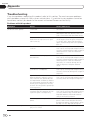
Problems with the disc screen
Cause
Action (Reference)
CD or DVD playback is not possible.
The disc is inserted upside down.
Insert the disc with the label upward.
The disc is dirty.
Clean the disc.
The disc is cracked or otherwise
damaged.
Insert a normal, round disc.
The files on the disc are in an irregular file format.
Check the file format.
The disc format cannot be played
back.
Replace the disc.
The loaded disc is a type this system
cannot play.
Check what type of disc it is.
The parking brake lead is not
connected or applied.
Connect the parking brake lead
correctly, and apply the parking
brake.
The parking brake interlock is
activated.
Park your vehicle in a safe place and
apply the parking brake.
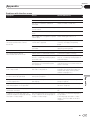
The audio or video skips.
This product is not firmly secured.
Secure This product firmly.
No sounds are produced.
The volume level will not rise.
Cables are not connected correctly.
Connect the cables correctly.
The system is performing still, slow
motion, or frame-by-frame playback
with DVD-Video.
There is no sound during still, slow
motion, or frame-by-frame playback
with DVD-Video.
The system is paused or performing,
fast reverse or forward during the
disc playback.
For the media other than music CD
(CD-DA) there is no sound on fast reverse or forward.
The icon 9 is displayed, and operation is impossible.
The operation is not compatible with
the video configuration.
This operation is not possible. (For
example, the DVD playing does not
feature that angle, audio system,
subtitle language, etc.)
The picture stops (pauses) and this
product cannot be operated.
The reading of data is impossible
during disc playback.
Stop playback once, then restart.
The picture is stretched, with an incorrect aspect ratio.
The aspect setting is incorrect for
the display.
Select the appropriate setting for that
image. (Page 58)
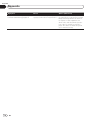
The screen is covered by a caution
message and the video cannot
be shown.
A parental lock message is displayed The parental lock is on.
and DVD playback is not possible.
Turn the parental lock off or change
the level. (Page 58)
The parental lock for DVD playback
cannot be canceled.
Input the correct code number. (Page
58)
The code number is incorrect.
Playback is not with the audio lanThe DVD playing does not feature diguage and subtitle language settings alog or subtitles in the language seselected in “Video Setup”.
lected in “Video Setup”.
Appendix
Symptom
Switching to a selected language is
not possible
if the language selected in “Video
Setup” is not recorded on the disc.
(Page 57)
En
75