1
Appendix C Service
Error Messages
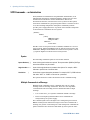
Displaying the SCPI error queue
The entire error queue is read, then emptied, using the following
command: SYST:ERR?
Error List
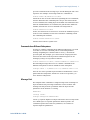
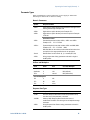
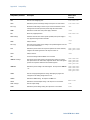
The following table documents the various error messages that the
power supply supports:
132
Error
Device-dependent Errors (these errors set Standard Event Status register bit #3)
0
No error
This is the response to the ERR? query when there are no errors.
100
Too many channels
You have specified more channels than are installed in the mainframe.
101
Calibration state is off
Calibration is not enabled. The instrument will not accept calibration commands.
102
Calibration password is incorrect
The calibration password is incorrect.
104
Bad sequence of calibration commands
Calibration commands have not been entered in the proper sequence.
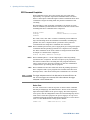
114
CAL:DATE must be yyyy/mm/dd
The calibration date must be entered in the numeric format yyyy=year, mm=month, dd=date
203
Compatibility function not implemented
The requested compatibility function is not available.
204
NVRAM checksum error
A checksum error has occurred in the instrument’s nonvolatile random access memory.
205
NVRAM full
The nonvolatile random access memory of the instrument is full.
206
File not found
The internal calibration file or the internal channel attribute file was not found in NVRAM.
209
Output communications failure
A hardware failure has occurred on the power supply.
302
Option not installed
The option that is programmed by this command is not installed.
351
VOLT setting conflicts with VOLT:PROT setting
Attempted to program the voltage above the over-voltage protection setting.
352
VOLT:PROT setting conflicts with VOLT setting
Attempted to set the over-voltage protection below the voltage setting.
353
VOLT setting conflicts with VOLT:LIM:LOW setting
Attempted to program the voltage below the under-voltage limit setting.
354
VOLT:LIM:LOW setting conflicts with VOLT setting
Attempted to set the under-voltage limit above the voltage setting
Series N8700 User’s Guide