1
Operating Instructions
52LEDLP
High-Definition Television
© Copyright 2006 NuVision Corp.
May be licensed in the United States by one or both of the U.S. Patents Nos. 4,930,158 and 4,930,160 until August 28,
2008.
Reproduction, adaptation, or translation without prior written permission is prohibited, except as allowed under
copyright laws. The information contained herein is subject to change without notice.
The only warranties for NuVision products and services are set forth in the express warranty statements accompanying
such products and services. Nothing herein should be construed as constituting an additional warranty. NuVision shall
not be liable for technical or editorial errors or omissions contained herein.
NiDO (NuVision Intelligent Digital Optimization) is a registered trademark of NuVision US, Inc.
DSDB (Digital Switching Deep Black) is a registered trademark of NuVision US, Inc.
Dolby and the double-D symbol are trademarks of Dolby Laboratories. Manufactured under license from Dolby
Laboratories.
This television incorporates High-Definition Multimedia Interface (HDMI™) technology. HDMI, the HDMI logo, and
High-Definition Multimedia Interface are trademarks or registered trademarks of HDMI Licensing LLC.
HDTV logo is a trademark of the Consumer Electronics Association.
SRS TruSurround XT™ technology is incorporated under license from SRS Labs, Inc.
SRS Labs, Inc.
is a trademark of
Digital Light Processing™, DLP™, the DLP logo and the DLP medallion are trademarks of Texas Instruments, Inc.
NuVision US, Inc.
7901 E. Pierce St. Suite A
Scottsdale, AZ, USA 85257
ii
Safety Markings and Warnings
Labels
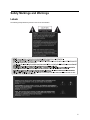
The following safety labels are present on the rear of the television:
iii
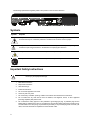
The following representative regulatory label is also present on the rear of the television:
Symbols
Symbol
Purpose
This symbol is intended to alert the user to the presence of dangerous voltage within the television’s
enclosure that may be of sufficient potential to constitute a risk of electric shock to people.
This symbol on the television is intended to alert the user to the presence of important operating and
maintenance (servicing) instructions in the literature accompanying the television.
!
This symbol is intended to alert the user to the presence of a potentially hot surface.
This symbol is intended to alert the user to the presence of a potential tip-over hazard.
Important Safety Instructions
CAUTION:
!
iv
Read and follow these precautions and all other instructions in this manual to reduce the
risk of injury and equipment damage.
1.
Read these instructions.
2.
Keep these instructions.
3.
Heed all warnings.
4.
Follow all instructions.
5.
Do not use this apparatus near water.
6.
Clean only with a dry cloth.
7.
Do not block any ventilation openings. Install in accordance with manufacturer’s instructions.
8.
Do not install near any heat sources such as radiators, heat registers, stoves, or other apparatus
(including amplifiers) that produce heat.
9.
Do not defeat the safety purpose of the polarized or grounding-type plug. A polarized plug has two
blades with one wider than the other. A grounding type plug has two blades and a third grounding prong.
The wide blade or the third prong are provided for your safety. If the provided plug does not fit into your
outlet, consult an electrician for replacement of the obsolete outlet.
10. Protect the power cord from being walked on or pinched particularly at plugs, convenience receptacles,
and the point where they exit from the apparatus.
11. Only use attachments/accessories specified by the manufacturer.
12.
CAUTION:
!
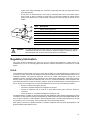
Use only with the cart, stand, tripod, bracket, or table specified by
the manufacturer, or sold with the apparatus. When a cart is used,
use caution when moving the cart/apparatus combination to avoid
injury from tip-over.
13. Unplug this apparatus during lightning storms or when unused for long periods of time.
14. Refer all servicing to qualified service personnel. Servicing is required when the apparatus has been
damaged in any way, such as power-supply cord or plug is damaged, liquid has been spilled or objects
have fallen into the apparatus, the apparatus has been exposed to rain or moisture, does not operate
normally, or has been dropped.
15.
!
CAUTION:
To avoid personal injury or damage to the television, always use at least two
people to lift or move it.
16. If the television is moved from a cold area, do not turn the television on for a few hours. This will allow the
unit to warm sufficiently to evaporate any condensation.
17. Install the television upright on a horizontal, solid, flat surface away from excessive heat, dust, and
vibration.
18. Keep a clearance of at least 4 inches (10 cm) between the vents on the back and/or sides of the
television and nearby walls or enclosures. Allow free air circulation to prevent excessive heat build up
that could cause the set to shut down or damage the television. Keep flammable objects susceptible to
heat damage at least 2 feet (0.5 m) away from the television’s vents.
19. Do not allow food, small objects, or liquid to get inside the television. If this should occur, contact product
support for assistance. There are no user-serviceable parts inside.
20. Operate only from the type of power source indicated on the marking label. If you are not sure of the type
of power supplied to your home, consult your television dealer or local power company.
21. Do not handle the power cord with wet hands. Doing so may cause electric shock.
22. Do not place hands, face, or other objects near the ventilation holes of the television. Because the
ventilation holes release heat, doing so could result in damage to the television or personal injury.
23.
CAUTION:
!
Use only with a cart, stand, tripod, bracket, hardware, or table as
specified by NuVision. When a cart is used, use caution when
moving the television to avoid injury from tipping over. USE WITH
AN UNAPPROVED CART, STAND, BRACKET, HARDWARE, OR
TABLE MAY RESULT IN INSTABILITY AND POSSIBLE INJURY.
24.
!
WARNING!
To prevent electrical shock or injury, do not remove the television cover. There
are no user serviceable parts inside this television. Any servicing should be
referred to qualified service personnel only. Under no circumstances should
anyone other than a qualified service technician attempt to remove the cover of
this television or service it.
v
25. Servicing is required if the television has been damaged in any way, such as if the power cord or power
plug is damaged, liquid has been spilled or objects have fallen into the television, or the television has
been exposed to rain or moisture, does not operate normally, or has been dropped.
26.
!
WARNING!
LED BASED TELEVISION: AT NO TIME SHOULD THIS TELEVISION EVER
BE OPERATED WHILE DISASSEMBLED IN ANY MANNER. THIS
TELEVISION USES LIGHT EMITTING DIODES (LEDs) AS A LIGHT SOURCE,
WHICH PRODUCE EXTREMELY INTENSE LIGHT. EXPOSURE TO THE
LIGHT PRODUCED BY THESE LEDs WITHOUT PROPER EYE
PROTECTION MAY RESULT IN SEVERE AND PERMANENT EYE DAMAGE.
27. If any of the following conditions occur, immediately unplug the television from the wall outlet and contact
a qualified service technician to repair:
If the power cord or plug becomes damaged or frayed, do not attempt to unplug — locate the
appropriate circuit breaker and disable the outlet;
b. If the television has been exposed to rain, water, or other liquid;
c. If the television does not operate normally when operated as instructed in the operating instructions,
adjust only those controls that are covered by the operating instructions – improper adjustment of
other controls may result in damage to the television that could require extensive work by a qualified
technician to restore to the television to normal operation;
d. If the television has been dropped or the cabinet has been damaged;
e. If the television exhibits a distinct change in performance – this usually indicates that service is
required.
28. Should repair become necessary, advise the service technician servicing your television to only use parts
specified by the manufacturer. Unauthorized substitutions may result in fire, electrical shock, or other
hazards.
a.
29.
!
WARNING!
KEEP SMALL PARTS AND OTHER OBJECTS OUT OF THE REACH OF
SMALL CHILDREN. THESE OBJECTS CAN BE ACCIDENTALLY
SWALLOWED AND RESULT IN CHOKING, SUFFOCATION, OTHER
INJURIES AND POSSIBLY DEATH. ADDITIONALLY KEEP ALL PACKAGING
MATERIALS OUT THE REACH OF SMALL CHILDREN. THESE ITEMS MAY
PRESENT A SUFFOCATION HAZARD AND CAUSE SERIOUS INJURY OR
DEATH.
!
WARNING!
Keep all packaging materials out of the reach of small children. These items
may cause choking, suffocation, other serious injury, and possibly death.
30.
In addition to these general precautions, be sure to observe the following precautions when using external
television antennas and cable systems with your new television. Failure to observe these precautions could result
in fire, bodily injury, and damage to your television.
•
•
vi
Call the CATV (cable television) system installer’s attention to Section 820-40 of the NEC (U.S.
National Electrical Code, ANSI/NFPA 70), or Canadian Electrical Code (CAN/CSA-C22.2 No. 1),
which provides guidelines for proper grounding and, in particular, specifies that the cable ground
must be connected to the grounding system of the building, as close to the point of cable entry as
practical.
If an outside antenna or cable system is connected to the television, be sure the antenna or cable
system is electrically grounded to protect against voltage surges and built up static charges. Article
810 of the NEC (U.S. National Electrical Code, ANSI/NFPA 70) or Canadian Electrical Code (CAN/
CSA-C22.2 No. 1) provides information about proper electrical grounding of the mast and supporting
structure, grounding of the “lead-in” wire to an antenna discharge unit, size of grounding conductors,
•
location of the antenna discharge unit, connection to grounding electrodes, and requirements of the
grounding electrode.
Do not place an outside antenna in the vicinity of overhead power lines or other electric light or
power circuits, or where it could fall on power lines or circuits. When installing an outside antenna
system, take extreme care to avoid touching overhead power lines that may be present at your
location.
7
6
5
1
3
2
!
WARNING!
4
Item
Description
1
Electric service equipment
2
Power service grounding electrode system (NEC Art 250, Part H)
3
Ground clamps
4
Grounding conductors (NEC Section 810-21)
5
Antenna discharge unit (NEC Section 810-20)
6
Ground clamp
7
Antenna “lead-in” wire
To reduce the risk of fire or electric shock, do not expose this television to rain or moisture.
The television should not be used outdoors or exposed to dripping or splashing. Objects
filled with liquids such as vases should not be placed on the television.
Regulatory Information
This section presents information that shows how your TV complies with regulations in certain regions. Any
modifications to your TV not expressly approved by NuVision could void the authority to operate the TV in these
regions.
U.S.A.
This equipment has been tested and found to comply with the limits for a Class B digital device, pursuant to Part
15 of the FCC Rules. These limits are designed to provide reasonable protection against harmful interference in a
residential installation. This equipment generates, uses and can radiate radio frequency energy and, if not
installed and used in accordance with the instructions, may cause harmful interference to radio communications.
However, there is no guarantee that interference will not occur in a particular installation. If this equipment does
cause harmful interference to radio or television reception, which can be determined by turning the equipment off
and on, the user is encouraged to try to correct the interference by one or more of the following measures:
•
•
•
Reorient or relocate the receiving antenna.
Increase the separation between the equipment and receiver.
Connect the equipment into an outlet on a circuit different from that to which the receiver is
connected.
• Consult the dealer or an experienced radio/TV technician for help.
This digital television is capable of receiving analog basic and digital basic cable television programming by direct
connection to a cable system providing such programming. Certain advanced and interactive digital cable services
such as video-on-demand, a cable operator's enhanced program guide, and data-enhanced television services
may require the use of a set-top box. For more information call your local cable operator.
When making connections to peripheral devices, to maintain compliance with FCC Rules and Regulations, use
properly shielded cables with this device.
vii
Responsible Party
Manufacturer: NuVision
Responsible Party: NuVision
Address: 7901 E. Pierce St. Suite A Scottsdale, AZ 85257
Telephone: 480.970.1466
Regulatory Model Number: 52LEDLP
viii
Table of Contents
Safety Markings and Warnings. . . . . . . . . . . . . . . . . . . . . . . . . . . . . . . . . . . . . . . . . . iii
. . . . . . . . . . . . . . . . . . . . . . . . . . . . . . . . . . . . . . . . . . . . . . . . . . . . . . . . . . . . . . . . . . . . . . . . . . .iii
. . . . . . . . . . . . . . . . . . . . . . . . . . . . . . . . . . . . . . . . . . . . . . . . . . . . . . . . . . . . . . . . . . . . . . . . . iv
Important Safety Instructions . . . . . . . . . . . . . . . . . . . . . . . . . . . . . . . . . . . . . . . . . . . . . . . . . . . . . . . . . . . iv
Regulatory Information . . . . . . . . . . . . . . . . . . . . . . . . . . . . . . . . . . . . . . . . . . . . . . . . . . . . . . . . . . . . . . . vii
U.S.A. . . . . . . . . . . . . . . . . . . . . . . . . . . . . . . . . . . . . . . . . . . . . . . . . . . . . . . . . . . . . . . . . . . . . . . . vii
Responsible Party . . . . . . . . . . . . . . . . . . . . . . . . . . . . . . . . . . . . . . . . . . . . . . . . . . . . . . . . . . . . . . .viii
Labels
Symbols .
Chapter 1
About the Television . . . . . . . . . . . . . . . . . . . . . . . . . . . . . . . . . . . . . . . . . . . . . . . . . . . . . . . . . . . . . . 1
What’s Included with the Television? .
Accessories . . . . . . . . . . . . . . .
.....................................................
.....................................................
Lifting and Carrying the Television . . . . . . . . . . . . . . . . . . . . . . . . . . . . . . . . . . . . . . . . . . . . . . . . . . . . . . . .
Television Features . . . . . . . . . . . . . . . . . . . . . . . . . . . . . . . . . . . . . . . . . . . . . . . . . . . . . . . . . . . . . . . . . .
Front Panel . . . . . . . . . . . . . . . . . . . . . . . . . . . . . . . . . . . . . . . . . . . . . . . . . . . . . . . . . . . . . . . . . . . .
Right Panel Buttons . . . . . . . . . . . . . . . . . . . . . . . . . . . . . . . . . . . . . . . . . . . . . . . . . . . . . . . . . . . . . .
LED Function . . . . . . . . . . . . . . . . . . . . . . . . . . . . . . . . . . . . . . . . . . . . . . . . . . . . . . . . . . . . . . . .
Right Panel Input Connectors . . . . . . . . . . . . . . . . . . . . . . . . . . . . . . . . . . . . . . . . . . . . . . . . . . . . . . .
Back Panel . . . . . . . . . . . . . . . . . . . . . . . . . . . . . . . . . . . . . . . . . . . . . . . . . . . . . . . . . . . . . . . . . . . . .
Remote Control Functions . . . . . . . . . . . . . . . . . . . . . . . . . . . . . . . . . . . . . . . . . . . . . . . . . . . . . . . . . .
Installing Batteries in the Remote Control . . . . . . . . . . . . . . . . . . . . . . . . . . . . . . . . . . . . . . . . . . . . . . .
1
1
1
1
2
2
3
3
3
4
6
Chapter 2
Connecting the Television . . . . . . . . . . . . . . . . . . . . . . . . . . . . . . . . . . . . . . . . . . . . . . . . . . . . . . . . 7
What You Should Know Before Connecting .
................................................ 7
Connecting Video Equipment . . . . . . . . . . . . . . . . . . . . . . . . . . . . . . . . . . . . . . . . . . . . . . . . . . . . . . . . . . . 7
Available Video Connections . . . . . . . . . . . . . . . . . . . . . . . . . . . . . . . . . . . . . . . . . . . . . . . . . . . . . . . . 7
Connecting Basic Antenna and Cable Service . . . . . . . . . . . . . . . . . . . . . . . . . . . . . . . . . . . . . . . . . . . 10
Connecting to an Antenna Only . . . . . . . . . . . . . . . . . . . . . . . . . . . . . . . . . . . . . . . . . . . . . . . . . . 10
Connecting to an Antenna and Cable . . . . . . . . . . . . . . . . . . . . . . . . . . . . . . . . . . . . . . . . . . . . . 11
Connecting to Standard Cable . . . . . . . . . . . . . . . . . . . . . . . . . . . . . . . . . . . . . . . . . . . . . . . . . . . 11
Connecting to Cable with a Set-Top Cable Box . . . . . . . . . . . . . . . . . . . . . . . . . . . . . . . . . . . . . . . 11
Connecting Miscellaneous Equipment . . . . . . . . . . . . . . . . . . . . . . . . . . . . . . . . . . . . . . . . . . . . . . . . 12
Connecting to a Satellite Receiver . . . . . . . . . . . . . . . . . . . . . . . . . . . . . . . . . . . . . . . . . . . . . . . 12
Connecting to a Satellite Receiver and VCR/DVR . . . . . . . . . . . . . . . . . . . . . . . . . . . . . . . . . . . . . 12
Connecting to Cable with Cable Box/DVR . . . . . . . . . . . . . . . . . . . . . . . . . . . . . . . . . . . . . . . . . . 13
Connecting to a Cable Box and VCR/DVR . . . . . . . . . . . . . . . . . . . . . . . . . . . . . . . . . . . . . . . . . . 13
Connecting to a DVD Player and Video Gaming Device . . . . . . . . . . . . . . . . . . . . . . . . . . . . . . . . . 14
Connecting to a Computer . . . . . . . . . . . . . . . . . . . . . . . . . . . . . . . . . . . . . . . . . . . . . . . . . . . . . 14
Connecting Audio Equipment . . . . . . . . . . . . . . . . . . . . . . . . . . . . . . . . . . . . . . . . . . . . . . . . . . . . . . . . . . 15
Available Audio Connections . . . . . . . . . . . . . . . . . . . . . . . . . . . . . . . . . . . . . . . . . . . . . . . . . . . . . . . 15
Audio Output Connections . . . . . . . . . . . . . . . . . . . . . . . . . . . . . . . . . . . . . . . . . . . . . . . . . . . . . 15
DVI Audio Input Connections . . . . . . . . . . . . . . . . . . . . . . . . . . . . . . . . . . . . . . . . . . . . . . . . . . . . 15
Connecting a Stereo, Surround Sound, or AV Receiver . . . . . . . . . . . . . . . . . . . . . . . . . . . . . . . . . . . . 16
Stereo Sound System . . . . . . . . . . . . . . . . . . . . . . . . . . . . . . . . . . . . . . . . . . . . . . . . . . . . . . . . . 16
Surround Sound or AV Receiver . . . . . . . . . . . . . . . . . . . . . . . . . . . . . . . . . . . . . . . . . . . . . . . . . 16
ix
Chapter 3
Watching Television. . . . . . . . . . . . . . . . . . . . . . . . . . . . . . . . . . . . . . . . . . . . . . . . . . . . . . . . . . . . . . 17
Turning the Television On and Off .
......................................................
Setting Up Available Channels . . . . . . . . . . . . . . . . . . . . . . . . . . . . . . . . . . . . . . . . . . . . . . . . . . . . . . . . .
Antenna Connection . . . . . . . . . . . . . . . . . . . . . . . . . . . . . . . . . . . . . . . . . . . . . . . . . . . . . . . . . . . . .
Cable Connection . . . . . . . . . . . . . . . . . . . . . . . . . . . . . . . . . . . . . . . . . . . . . . . . . . . . . . . . . . . . . . .
Basic Television Operation . . . . . . . . . . . . . . . . . . . . . . . . . . . . . . . . . . . . . . . . . . . . . . . . . . . . . . . . . . . .
Changing the Channel . . . . . . . . . . . . . . . . . . . . . . . . . . . . . . . . . . . . . . . . . . . . . . . . . . . . . . . . . . . .
Adjusting the Volume . . . . . . . . . . . . . . . . . . . . . . . . . . . . . . . . . . . . . . . . . . . . . . . . . . . . . . . . . . . .
17
18
18
18
19
19
19
Chapter 4
Changing the Television Settings . . . . . . . . . . . . . . . . . . . . . . . . . . . . . . . . . . . . . . . . . . . . . . . . 21
Using the On-Screen Display (OSD) .
Available Menus . . . . . . . . . . . .
Picture Settings Menu . . . . .
Image Settings Menu . . . . .
General Settings Menu . . . .
Audio Settings Menu . . . . .
Channel Settings Menu . . . .
Source Settings Menu . . . .
Parental Controls Menu . . .
Using the Picture Settings Menu . . . .
Adjusting the Picture Mode . . . .
Resetting the Picture Settings . .
Adjusting the Picture Color . . . .
....................................................
....................................................
....................................................
....................................................
....................................................
....................................................
....................................................
....................................................
....................................................
....................................................
....................................................
....................................................
....................................................
Using the Image Settings Menu . . . . . . . . . . . . . . . . . . . . . . . . . . . . . . . . . . . . . . . . . . . . . . . . . . . . . . . .
Adjusting the Color Scheme . . . . . . . . . . . . . . . . . . . . . . . . . . . . . . . . . . . . . . . . . . . . . . . . . . . . . . . .
Adjusting Deep Black™ . . . . . . . . . . . . . . . . . . . . . . . . . . . . . . . . . . . . . . . . . . . . . . . . . . . . . . . . . . .
Adjusting the Image Size . . . . . . . . . . . . . . . . . . . . . . . . . . . . . . . . . . . . . . . . . . . . . . . . . . . . . . . . . .
Adjusting the Horizontal Position of the Image . . . . . . . . . . . . . . . . . . . . . . . . . . . . . . . . . . . . . . . . . . .
Adjusting the Vertical Position of the Image . . . . . . . . . . . . . . . . . . . . . . . . . . . . . . . . . . . . . . . . . . . . .
Freezing the Picture . . . . . . . . . . . . . . . . . . . . . . . . . . . . . . . . . . . . . . . . . . . . . . . . . . . . . . . . . . . . .
Using the General Settings Menu . . . . . . . . . . . . . . . . . . . . . . . . . . . . . . . . . . . . . . . . . . . . . . . . . . . . . . .
Changing the OSD Language . . . . . . . . . . . . . . . . . . . . . . . . . . . . . . . . . . . . . . . . . . . . . . . . . . . . . .
Viewing Closed Captions . . . . . . . . . . . . . . . . . . . . . . . . . . . . . . . . . . . . . . . . . . . . . . . . . . . . . . . . . .
Setting the Sleep Timer . . . . . . . . . . . . . . . . . . . . . . . . . . . . . . . . . . . . . . . . . . . . . . . . . . . . . . . . . . .
Changing the OSD Settings . . . . . . . . . . . . . . . . . . . . . . . . . . . . . . . . . . . . . . . . . . . . . . . . . . . . . . . .
Setting the Clock . . . . . . . . . . . . . . . . . . . . . . . . . . . . . . . . . . . . . . . . . . . . . . . . . . . . . . . . . . . . . . .
Resetting the Television Settings . . . . . . . . . . . . . . . . . . . . . . . . . . . . . . . . . . . . . . . . . . . . . . . . . . . .
Using the Audio Settings Menu . . . . . . . . . . . . . . . . . . . . . . . . . . . . . . . . . . . . . . . . . . . . . . . . . . . . . . . . .
Adjusting the Volume . . . . . . . . . . . . . . . . . . . . . . . . . . . . . . . . . . . . . . . . . . . . . . . . . . . . . . . . . . . .
Adjusting the Treble . . . . . . . . . . . . . . . . . . . . . . . . . . . . . . . . . . . . . . . . . . . . . . . . . . . . . . . . . . . . .
Adjusting the Bass . . . . . . . . . . . . . . . . . . . . . . . . . . . . . . . . . . . . . . . . . . . . . . . . . . . . . . . . . . . . . .
Adjusting the Balance . . . . . . . . . . . . . . . . . . . . . . . . . . . . . . . . . . . . . . . . . . . . . . . . . . . . . . . . . . . .
Muting the Audio . . . . . . . . . . . . . . . . . . . . . . . . . . . . . . . . . . . . . . . . . . . . . . . . . . . . . . . . . . . . . . . .
Turning SRS TruSurround XT™ On and Off . . . . . . . . . . . . . . . . . . . . . . . . . . . . . . . . . . . . . . . . . . . .
Adjusting SRS Dialog Clarity . . . . . . . . . . . . . . . . . . . . . . . . . . . . . . . . . . . . . . . . . . . . . . . . . . . . . . .
Adjusting SRS TruBass . . . . . . . . . . . . . . . . . . . . . . . . . . . . . . . . . . . . . . . . . . . . . . . . . . . . . . . . . . .
Adjusting Analog Audio . . . . . . . . . . . . . . . . . . . . . . . . . . . . . . . . . . . . . . . . . . . . . . . . . . . . . . . . . . .
x
21
22
22
22
23
23
24
24
24
25
25
25
25
26
26
26
26
27
27
27
27
28
28
28
29
29
29
30
30
30
30
30
30
31
31
31
32
...........................................................
Using the Channel Settings Menu . . . . . . . . . . . . . . . . . . . . . . . . . . . . . . . . . . . . . . . . . . . . . . . . . . . . . . .
Changing the Channel List . . . . . . . . . . . . . . . . . . . . . . . . . . . . . . . . . . . . . . . . . . . . . . . . . . . . . . . . .
Editing Channels . . . . . . . . . . . . . . . . . . . . . . . . . . . . . . . . . . . . . . . . . . . . . . . . . . . . . . . . . . . . . . .
Editing Favorites . . . . . . . . . . . . . . . . . . . . . . . . . . . . . . . . . . . . . . . . . . . . . . . . . . . . . . . . . . . . . . . .
Using the Source Settings Menu . . . . . . . . . . . . . . . . . . . . . . . . . . . . . . . . . . . . . . . . . . . . . . . . . . . . . . . .
Changing the Input Source . . . . . . . . . . . . . . . . . . . . . . . . . . . . . . . . . . . . . . . . . . . . . . . . . . . . . . . .
Turning Picture-In-Picture On or Off . . . . . . . . . . . . . . . . . . . . . . . . . . . . . . . . . . . . . . . . . . . . . . . . . .
Adjusting the Picture-In-Picture Display . . . . . . . . . . . . . . . . . . . . . . . . . . . . . . . . . . . . . . . . . . . . . . .
Using the Parental Controls Menu . . . . . . . . . . . . . . . . . . . . . . . . . . . . . . . . . . . . . . . . . . . . . . . . . . . . . . .
Changing or Resetting a Password . . . . . . . . . . . . . . . . . . . . . . . . . . . . . . . . . . . . . . . . . . . . . . . . . . .
Viewing a Blocked Program . . . . . . . . . . . . . . . . . . . . . . . . . . . . . . . . . . . . . . . . . . . . . . . . . . . . . . . .
What if you Forget Your Password? . . . . . . . . . . . . . . . . . . . . . . . . . . . . . . . . . . . . . . . . . . . . . . . . . .
Rating Systems . . . . . . . . . . . . . . . . . . . . . . . . . . . . . . . . . . . . . . . . . . . . . . . . . . . . . . . . . . . . . . . .
US Rating System . . . . . . . . . . . . . . . . . . . . . . . . . . . . . . . . . . . . . . . . . . . . . . . . . . . . . . . . . . .
Canadian-English Rating System . . . . . . . . . . . . . . . . . . . . . . . . . . . . . . . . . . . . . . . . . . . . . . . . .
Canadian-French Rating System . . . . . . . . . . . . . . . . . . . . . . . . . . . . . . . . . . . . . . . . . . . . . . . . .
Adjusting Digital Audio
32
32
32
32
33
33
33
33
34
34
35
35
35
36
36
36
37
Chapter 5
Troubleshooting . . . . . . . . . . . . . . . . . . . . . . . . . . . . . . . . . . . . . . . . . . . . . . . . . . . . . . . . . . . . . . . . . 37
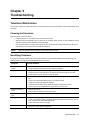
Television Maintenance . . .
Cleaning the Television
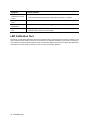
Identifying Problems . .
...........................................................
...........................................................
...........................................................
LED Calibration Test . . . . . . . . . . . . . . . . . . . . . . . . . . . . . . . . . . . . . . . . . . . . . . . . . . . . . . . . . . . . . . . .
37
37
37
38
Chapter 6
Product Support . . . . . . . . . . . . . . . . . . . . . . . . . . . . . . . . . . . . . . . . . . . . . . . . . . . . . . . . . . . . . . . . . 41
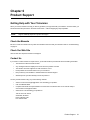
Getting Help with Your Television
Check the Manuals . . . . . . .
Check Our Web Site . . . . . .
Contact Us . . . . . . . . . . . . .
.......................................................
.......................................................
.......................................................
.......................................................
41
41
41
41
Chapter 7
Reference Information . . . . . . . . . . . . . . . . . . . . . . . . . . . . . . . . . . . . . . . . . . . . . . . . . . . . . . . . . . . 43
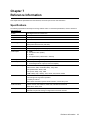
Specifications
. . . . . . . . . . . . . . . . . . . . . . . . . . . . . . . . . . . . . . . . . . . . . . . . . . . . . . . . . . . . . . . . . . . . . 43
. . . . . . . . . . . . . . . . . . . . . . . . . . . . . . . . . . . . . . . . . . . . . . . . . . . . . . . . 44
Open Source Code Information
Limited Warranty . . . . . . . . . . . . . . . . . . . . . . . . . . . . . . . . . . . . . . . . . . . . . . . . . . . . . 45
xi
xii
Chapter 1
About the Television
What’s Included with the Television?
When you unpack the television, verify that the following items are included. If any of these items are missing, contact
NuVision.
•
Television
•
Remote control with two AAA batteries
•
Quick Start Guide
•
Operating Instructions (this manual)
NOTE:
The television does not come with audio or video cables for connecting external equipment. Cables are
included with most external equipment. See your NuVision dealer for any additional required cables.
Keep the packaging materials in case you need to repackage the television later.
!
WARNING!
KEEP ALL PACKAGING MATERIALS OUT OF THE REACH OF SMALL CHILDREN.
THESE ITEMS CAN CAUSE CHOKING, SUFFOCATION, OTHER SERIOUS INJURY,
OR DEATH.
Accessories
NuVision specializes in custom installations and provides various accessories for your NuVision television to enhance
your in-home viewing experience. For further information about accessories and customizations, consult your
NuVision dealer/installer. To locate a NuVision dealer, refer to http://www.nuvision.com/dealer/.
Lifting and Carrying the Television
Lifting and carrying the television requires a minimum of two people. When lifting the television, place the palm of one
hand directly under the corner of the bottom panel from the rear of the TV and the other hand above the corner of the
top panel. Lift the television with your legs. Do not lift with your back.
When carrying the television, ensure that you are holding the panels firmly and that the TV is secure. Carry the
television holding both the upper and bottom panels and avoid touching the screen surface as much as possible.
!
CAUTION:
Carrying the television in a manner other than specified can cause serious personal
injury and/or damage to the television.
Television Features
Your NuVision High-Definition (HD) television incorporates state-of-the-art technologies in order to display brighter,
sharper, and clearer images. You will now be able to experience the brilliant difference that HDTV offers and enjoy the
superior picture quality that your NuVision television delivers.
In order to enhance your viewing experience and receive the best picture quality available, it is important to understand
the features of the television. This section describes the main features of your NuVision HD television.
About the Television
1
Front Panel
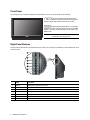
The front panel of your television displays the high-definition screen, as well as decals for the following:
(NuVision Intelligent Digital Optimization) NuVision’s exclusive image enhancement technology that
displays images with excellent resolution and clarity.
(Digital Switching Deep Black) - A proprietary
system that controls the LED’s light output to an incredible
degree of accuracy resulting in deeper, more brilliant, and
lifelike colors.
NOTE:
The decals on the front lower left and right of
the television can be peeled off.
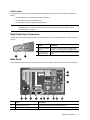
Right Panel Buttons
The right panel of the television includes buttons which allow you to easily access television controls without the use of
a remote control.
1
2
3
4
5
6
7
2
Item
Function
1
Power
Switches the television on and off.
2
Menu
Displays the main menu of the On-Screen Display (OSD).
3
Enter
Selects an item in the OSD.
4
Channel+
Changes the channel to the next highest channel number. Moves up in the OSD.
5
Channel-
Changes the channel to the next lowest channel number. Moves down in the OSD.
6
Volume+
Increases the volume level. Moves right in the OSD.
7
Volume-
Decreases the volume level. Moves left in the OSD.
About the Television
LED Function
The power button on the side panel of the television is illuminated by a blue LED. This LED function operates as
follows:
•
the LED flashes when the television is initially powered on.
•
the LED remains on when the television is on.
•
the LED shuts off when the television is powered off.
NOTE:
If the LED light blinks repeatedly any time other than when the television is initially powered on, it is an
indication that an error has occurred and you should contact NuVision product support. Refer to
“Product Support” on page 41.
Right Panel Input Connectors
The right side panel contains composite input connectors allowing you to connect the television to audio and video
sources.
CVBS
L
1
Item
Function
1
Composite/CVBS
input
Provides composite video input (also called
CVBS, for “composite video, baseline sync”).
2
Composite audio
input connector
Audio input connection for the composite video
input.
R
2
Back Panel
The back panel contains the main input and output connectors to connect audio and video sources to the television.
RS-232 IR INPUT & OUTPUT
1
CABLE
2
1
12
S/PDIF
Pb
L
VIDEO
Pr
R
L
L
R
R
L
SERVICE
3
13
2
Y
HDMI 1
1
2
OUTPUT
S-VIDEO
NuCONTROL
ANT
COMPONENT
R
11
HDMI 2 / DVI
AUDIO INPUT
HIGH DEFINITION DIGITAL INPUT
STANDARD AUDIO & VIDEO OUTPUT
HIGH DEFINITION INPUT
STANDARD INPUT
VIDEO
HDMI 2
4
5
6
7
8
9
10
Item
Function
1
Antenna input connector
Connection for an external VHF/UHF antenna.
2
Cable connector
Connection for cable television service.
About the Television
3
Item
Function
3
Service port
Used by service technicians.
4
HDMI™ input connectors
Connects up to two HDMI or DVI-D sources, and provides video
and audio. Only HDMI-2 can be used for DVI-to-HDMI inputs.
5
NuControl
Used by NuVision dealers/installers. Consult your NuVision dealer/
installer for more information about the NuControl feature. To locate
a NuVision dealer, refer to http://www.nuvision.com/dealer/.
6
Composite video input connectors
Connection for composite video input.
7
Audio input connectors (Composite/Svideo)
Audio input connections for corresponding composite video or Svideo inputs.
8
Component audio connectors
Audio input connections for corresponding component video inputs.
9
Component video connectors
Video input connections for component (YPbPr) video input.
10
DVI audio input
Audio input connection for DVI-to-HDMI connections.
11
Audio outputs
For connection to a home entertainment system.
12
S/PDIF output
Allows transfer of digital audio information to an external A/V
receiver.
13
S-video connectors
Video input connections for up to two S-video sources.
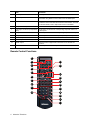
Remote Control Functions
1
4 11
POWER
SRS
Cable
Antenna
2
3
Comp1
Comp2
HDMI 1
HDMI 2
AV1
AV2
AV3
Picture
4
Menu
5
VOL
Select
6
7
8
9
10
12
Guide
CH
VOL
11
13
14
CH
Mute
Display
15
PIP
Mode
Position
Swap
4:3
Panorama
Zoom
16:9
16
1
2
3
Freeze
17
4
5
6
7
8
9
Clear
Prev CH
0
Sleep
Enter
18
19
20
21
4
About the Television
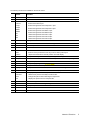
The following functions are available on the remote control.
Button
Function
1
Power
Switches the television on and off.
2
SRS
Turns SRS TruSurround XT™ on and off.
3
Cable
Antenna
Comp1
Comp2
HDMI 1
HDMI 2
AV1
AV2
AV3
•
Selects the Cable input.
•
Selects the Antenna input.
•
Selects the signal from the Component 1 input.
•
Selects the signal from the Component 2 input.
•
Selects the signal from the HDMI 1 input.
•
Selects the signal from the HDMI 2 input.
•
Selects the signal from the Video 1 input.
•
Selects the signal from the Video 2 input.
•
Selects the signal from the Video 3 input.
Menu
Displays the main menu of the OSD or exits the OSD.
4
5
VOL+/VOL-
Increases and decreases the volume. Moves right and left in the OSD.
6
Select
Selects an option in the OSD.
7
Mute
Turns the sound on and off.
8
PIP
Mode
Position
•
Turns Picture-In-Picture on and off.
•
Switches the layout between a PIP layout and a side-by-side layout.
•
Adjusts the horizontal and vertical position of the PIP display.
9
0-9 Keypad
Allows you to directly select a channel by entering values using the numbers 0-9.
10
Sleep
Sets the number of minutes the television will stay on before automatically turning off.
11
Picture
Changes the picture mode.
12
Guide
Displays the program guide for the ATSC tuner.
13
CH+/CH-
Changes the channel. Moves up and down in the OSD.
14
Display
Displays ATSC channel information, such as channel status and signal information.
15
Swap
Alternates the PIP channel with the current channel displayed.
16
4:3
Panorama
Zoom
16:9
•
Displays the picture with a 4:3 aspect ratio.
•
Stretches the picture horizontally to fill the screen.
•
Enlarges the picture without affecting the aspect ratio.
•
Displays the picture with a 16:9 aspect ratio.
17
Freeze
Freezes an image on the screen.
18
Clear
Clears the channel entered using the keypad.
19
Prev CH
Displays the previous channel.
20
Enter
Confirms and selects a channel entered.
21
–
Selects ATSC sub-channels.
About the Television
5
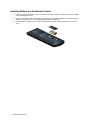
Installing Batteries in the Remote Control
6
1.
Remove the battery compartment cover on the back of the remote control by pressing the latch on the battery
cover and lifting off the cover.
2.
Insert two size AAA batteries into the battery compartment. Ensure that the batteries are inserted properly by
aligning the polarities (+ and -) as indicated inside the battery compartment.
3.
Insert the battery compartment cover’s tab into the remote control and press down to snap the cover into
place.
About the Television
Chapter 2
Connecting the Television
What You Should Know Before Connecting
There are several factors to consider before you connect your television, such as where to place the television, how to
organize your external audio and video equipment, and how to protect your equipment from power surges. The
following suggestions can help you to determine how to receive the most enjoyment from your television.
•
Optimal placement for viewing — It is recommended that viewers watch television at a distance of 9-25 ft.
from the TV. This distance should be measured from the center of the television.
•
Use of indirect light — Position your television in an area of the room where no sunlight or room lighting will
be directed toward the TV. Many people prefer a minimal amount of light when watching television. You
should situate your television in an area of the room where you can easily control the light that shines onto the
television screen.
•
Use of a surge protector — Consider the use of a surge protector to help prevent any damage to your
television due to electrical surges or power outages.
•
Use of a television stand — Consider using a television stand or other type of furniture, such as an
entertainment stand, to help organize audio and video equipment. Placing the television on a sturdy stand or
table will help prevent any instability that may result in the TV toppling over and causing personal injury or
damage to the television. If you are using a television stand or wall mounting the television, use only stands
and wall mount kits that support this television’s specifications and be sure to follow the manufacturer’s
instructions.
•
Proper cable positioning — Insert all cables firmly into the appropriate connections and route all cables
down the sides of the back of the television, rather than directly down the center. For optimal audio and video
quality, place all external devices near the television, and use the shortest possible connection cables.
•
Refrain from blocking ventilation holes — Be sure not to block any ventilation holes on any device. If you
stack devices, arrange them so that air circulates freely and each device has adequate ventilation.
Connecting Video Equipment
To use your television, you’ll need to connect one or more video sources, such as a television antenna, cable box,
VCR, or DVD player. You may also have other components in your entertainment system that you wish to use with your
television, such as an audio/video receiver, satellite receiver, personal digital video recorder (DVR), or video gaming
device. Use the information in the following pages to determine the best way to connect these components to your
television in order to receive the highest possible sound and picture quality.
Available Video Connections
There are multiple ways to connect your television to external video equipment. The way you connect your television
depends on the equipment you want to connect and the quality of the signal you want to receive.
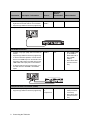
The following table displays how to connect a number of common video devices to your television, as well as lists the
input sources and the cables needed to make these connections. The connections are listed in order from the best
picture quality to the lowest picture quality. Use this table to determine which output connections on your video
equipment will provide the highest quality connection.
NOTE:
The television does not come with audio or video cables for connecting external equipment. Cables are
included with most external equipment.
Connecting the Television
7
Connection
Description / Information
Separate
Sound
Connection?
Cables Needed
HDMI 1*,
HDMI 2
No
HDMI Cable
HDMI 2*
Yes
•
DVI-to-HDMI Cable
(or an HDMI-toHDMI cable with a
DVI-to-HDMI
adapter)
•
Stereo RCA cable
(two RCA connectors)
•
Component-video
cable (three RCA
connectors)
•
Stereo RCA cable
(two RCA connectors)
Source*
HDMI Connection
•
Provides the highest quality of digital video and
digital surround sound audio in one connection.
•
Supports high-definition television programming.
Example: HDMI Connection
RS-232 IR INPUT & OUTPUT
1
S/PDIF
VIDEO
CABLE
OUTPUT
2
Y
NuCONTROL
ANT
COMPONENT
2
S-VIDEO
Pb
L
Pr
R
L
L
R
R
L
SERVICE
HDMI 1
R
HDMI 2 / DVI
AUDIO INPUT
HIGH DEFINITION DIGITAL INPUT
STANDARD INPUT
STANDARD AUDIO & VIDEO OUTPUT
HIGH DEFINITION INPUT
VIDEO
1
HDMI 2
DVI-HDMI Connection
•
Provides a very high quality video and audio connection.
•
Supports high-definition television programming.
•
To use the television speakers, connect the DVI
device to the HDMI 2 input on the television and
the analog audio output of the DVI device to the
HDMI 2/DVI audio input jacks on the television.
•
To use the audio through a sound system, connect DVI devices to the HDMI 1 and HDMI 2
inputs.
Example: DVI-HDMI Connection
RS-232 IR INPUT & OUTPUT
VIDEO
CABLE
1
OUTPUT
2
S/PDIF
Y
NuCONTROL
ANT
COMPONENT
2
S-VIDEO
Pb
L
Pr
R
L
L
R
R
L
SERVICE
HDMI 1
R
HDMI 2 / DVI
AUDIO INPUT
HIGH DEFINITION DIGITAL INPUT
STANDARD AUDIO & VIDEO OUTPUT
STANDARD INPUT
HIGH DEFINITION INPUT
VIDEO
1
HDMI 2
Y
L
AUDIO
PB
PR
DVI
R
Cab le Out
VIDEO
HDTV
S-Video
DIGITAL
AUDIO
OUT
Cab le In
Component-Video Connection (YPbPr)
•
Provides a high quality picture.
•
Supports high-definition television programming.
8
Connecting the Television
Component
1*,
Component 2
Yes
Connection
Description / Information
Separate
Sound
Connection?
Cables Needed
Video 1*,
Video 2
Yes
•
S-video cable
•
Stereo RCA cable
(two RCA connectors)
Video 1*,
Video 2,
Video 3
(located on
the side
panel)
Yes
Source*
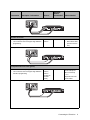
Example: Component-Video Connection
RS-232 IR INPUT & OUTPUT
CABLE
1
OUTPUT
2
S/PDIF
Y
VIDEO
NuCONTROL
ANT
COMPONENT
2
S-VIDEO
Pb
L
Pr
R
L
L
R
R
L
SERVICE
HDMI 1
R
HDMI 2 / DVI
AUDIO INPUT
STANDARD INPUT
HIGH DEFINITION INPUT
STANDARD AUDIO & VIDEO OUTPUT
HIGH DEFINITION DIGITAL INPUT
VIDEO
1
HDMI 2
S-Video Connection
•
Provides a good quality picture.
•
This connection does not support high-definition
programming.
Example: S-Video Connection
RS-232 IR INPUT & OUTPUT
CABLE
1
OUTPUT
2
S/PDIF
Y
VIDEO
NuCONTROL
ANT
COMPONENT
2
S-VIDEO
Pb
L
Pr
R
L
L
R
R
L
SERVICE
HDMI 1
R
HDMI 2 / DVI
AUDIO INPUT
STANDARD INPUT
HIGH DEFINITION INPUT
STANDARD AUDIO & VIDEO OUTPUT
HIGH DEFINITION DIGITAL INPUT
VIDEO
1
HDMI 2
Composite Video Connection (yellow)
•
Provides a standard quality picture.
•
This connection does not support high-definition
television programming.
Composite-video/
audio cable (three
RCA connectors)
—or—
Separate video and
audio cables
Example: Composite Video Connection
RS-232 IR INPUT & OUTPUT
CABLE
1
OUTPUT
2
S/PDIF
Y
VIDEO
NuCONTROL
ANT
COMPONENT
2
S-VIDEO
Pb
L
Pr
R
L
L
R
R
L
SERVICE
HDMI 1
R
HDMI 2 / DVI
AUDIO INPUT
STANDARD INPUT
HIGH DEFINITION INPUT
STANDARD AUDIO & VIDEO OUTPUT
HIGH DEFINITION DIGITAL INPUT
VIDEO
1
HDMI 2
Connecting the Television
9
Connection
Description / Information
Source*
Separate
Sound
Connection?
Cables Needed
No
Coaxial cable
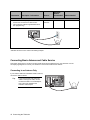
Coaxial Antenna or Cable Connection
•
Provides a standard quality video and audio connection from an antenna or cable service.
•
This connection supports high-definition television programming.
Cable*,
Antenna*
Example:
RS-232 IR INPUT & OUTPUT
CABLE
1
OUTPUT
2
S/PDIF
Y
VIDEO
NuCONTROL
ANT
COMPONENT
2
S-VIDEO
Pb
L
Pr
R
L
L
R
R
L
SERVICE
HDMI 1
R
HDMI 2 / DVI
AUDIO INPUT
STANDARD INPUT
HIGH DEFINITION INPUT
STANDARD AUDIO & VIDEO OUTPUT
HIGH DEFINITION DIGITAL INPUT
VIDEO
1
HDMI 2
*Indicates this is the source used in this cabling example.
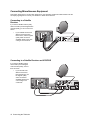
Connecting Basic Antenna and Cable Service
This section shows how to connect a number of basic antenna and cable devices to your television. Use the
accompanying diagrams to connect your television to antenna and cable service devices.
Connecting to an Antenna Only
If your antenna cable has a standard coaxial connector,
connect the cable as shown.
10 Connecting the Television
RS-232 IR INPUT & OUTPUT
1
CABLE
1
OUTPUT
2
S/PDIF
Y
NuCONTROL
ANT
COMPONENT
2
S-VIDEO
Pb
L
VIDEO
Pr
R
L
L
R
R
L
SERVICE
HDMI 1
HDMI 2
R
HDMI 2 / DVI
AUDIO INPUT
HIGH DEFINITION DIGITAL INPUT
STANDARD INPUT
STANDARD AUDIO & VIDEO OUTPUT
If your antenna has a flat, twin-lead
cable or other type of cable, connect
the antenna cable to a coaxial adapter,
then connect the adapter to the
television antenna input.
HIGH DEFINITION INPUT
VIDEO
Tip:
RS-232 IR INPUT & OUTPUT
HIGH DEFINITION DIGITAL INPUT
STANDARD INPUT
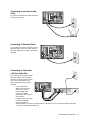
If you have an antenna and a cable connection,
connect them as shown.
STANDARD AUDIO & VIDEO OUTPUT
HIGH DEFINITION INPUT
VIDEO
1
CABLE
1
OUTPUT
2
S/PDIF
Y
Pb
L
VIDEO
Pr
R
L
L
R
R
NuCONTROL
ANT
COMPONENT
2
S-VIDEO
L
HDMI 2 / DVI
AUDIO INPUT
Connecting to an Antenna and
Cable
SERVICE
HDMI 1
R
HDMI 2
Connecting to Standard Cable
RS-232 IR INPUT & OUTPUT
1
CABLE
1
OUTPUT
2
S-VIDEO
S/PDIF
Y
NuCONTROL
ANT
COMPONENT
2
Pb
L
VIDEO
Pr
R
L
L
R
R
L
SERVICE
HDMI 1
R
HDMI 2 / DVI
AUDIO INPUT
HIGH DEFINITION DIGITAL INPUT
STANDARD AUDIO & VIDEO OUTPUT
STANDARD INPUT
HIGH DEFINITION INPUT
VIDEO
If your cable service does not require a set-top
cable box (STB), connect the cable as shown.
This setup enables you to watch unscrambled
channels.
HDMI 2
Connecting to Cable with
a Set-Top Cable Box
•
RS-232 IR INPUT & OUTPUT
1
CABLE
1
OUTPUT
2
S/PDIF
Y
VIDEO
NuCONTROL
ANT
COMPONENT
2
S-VIDEO
Pb
L
Pr
R
L
L
R
R
L
SERVICE
HDMI 1
HDMI 2
R
HDMI 2 / DVI
AUDIO INPUT
STANDARD INPUT
HIGH DEFINITION DIGITAL INPUT
If your cable box has
different connectors than
those shown, use the
highest-quality video
connection available.
Observe the color-coding on
all connectors.
HIGH DEFINITION INPUT
•
VIDEO
STANDARD AUDIO & VIDEO OUTPUT
If your cable service requires a set-top
cable box (STB) to view scrambled
channels, connect the components as
shown. This setup enables you to
watch scrambled and unscrambled
channels.
L
DVI
AUDIO
Cab le Out
Cab le In
R
S-Video
For digital cable, your set-top
cable box (STB) might
require a special twodirectional splitter. Contact your cable provider for information. Or you can omit the splitter and omit the
connection to the television cable input.
Connecting the Television
11
Connecting Miscellaneous Equipment
This section shows how to connect other equipment to your television and lists the cables needed. Use the
accompanying diagrams to connect your television to these various devices.
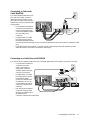
Connecting to a Satellite
Receiver
If you have a satellite receiver (SAT)
without a VCR or personal digital video
recorder (DVR), you can connect it as
shown.
RS-232 IR INPUT & OUTPUT
HIGH DEFINITION DIGITAL INPUT
STANDARD INPUT
HIGH DEFINITION INPUT
VIDEO
CABLE
2
1
OUTPUT
2
S-VIDEO
S/PDIF
Y
NuCONTROL
ANT
COMPONENT
1
Pb
L
VIDEO
Pr
R
L
L
R
R
L
SERVICE
HDMI 1
R
HDMI 2
HDMI 2 / DVI
AUDIO INPUT
If your satellite receiver has
different connectors than
those shown, use the highestquality video connection
available. Observe the colorcoding on all connectors.
STANDARD AUDIO & VIDEO OUTPUT
•
Satellite Out
L
Y
AUDIO
PB
R
PR
DVI
VIDEO
HDTV
Antenna in
S-Video
DIGITAL
AUDIO
OUT
Phone
Jack
Data
Satellite In
Connecting to a Satellite Receiver and VCR/DVR
If you have a satellite receiver
and a VCR or personal digital
video recorder (DVR), connect
them as shown.
RS-232 IR INPUT & OUTPUT
HIGH DEFINITION DIGITAL INPUT
1
CABLE
1
OUTPUT
2
S/PDIF
Y
Pb
Y
VIDEO
Pr
L
L
R
R
HDTV
L
HDMI 1
R
R
DVI
VIDEO
R
SERVICE
Satellite Out
L
AUDIO
PB
L
PR
NuCONTROL
ANT
COMPONENT
2
S-VIDEO
HDMI 2 / DVI
AUDIO INPUT
STANDARD INPUT
VIDEO
HIGH DEFINITION INPUT
If your devices have
different connectors
than those shown, use
the highest-quality
video connections
available. Observe the
color-coding on all
connectors.
STANDARD AUDIO & VIDEO OUTPUT
•
DIGITAL
AUDIO
OUT
Antenna in
S-Video
Satellite In
In
HDMI 2
Out
12 Connecting the Television
Phone
Jack
Data
Connecting to Cable with
Cable Box/DVR
RS-232 IR INPUT & OUTPUT
HIGH DEFINITION DIGITAL INPUT
HIGH DEFINITION INPUT
STANDARD INPUT
If your cable box has different
connectors than those shown,
use the highest-quality video
connection available. Observe
the color-coding on all
connectors.
STANDARD AUDIO & VIDEO OUTPUT
•
VIDEO
1
CABLE
1
Splitter
OUT
S/PDIF
Pb
L
VIDEO
Pr
R
L
L
R
R
L
SERVICE
HDMI 1
IN
OUTPUT
2
OUT
Y
NuCONTROL
ANT
COMPONENT
2
S-VIDEO
HDMI 2 / DVI
AUDIO INPUT
If you have standard cable service and
your cable box includes a personal
digital video recorder (DVR), connect
your system as shown. This setup also
enables you to record one channel while
viewing another.
R
HDMI 2
Cable Out
L
CableI n
AUDIO
DVI
S-Video
•
For digital cable, your cable
box might require a special
two-directional splitter. Contact
your cable provider for information. Or you can omit the splitter and omit the connection to the television cable
input.
•
If all cable channels are scrambled, connect the incoming cable directly to the DVR cable box (omit the
splitter and omit the connection to the television cable input).
Connecting to a Cable Box and VCR/DVR
If you have a set-top cable box (STB) and a VCR or personal digital video recorder (DVR), connect them as shown.
•
OUT
RS-232 IR INPUT & OUTPUT
1
CABLE
1
OUTPUT
2
S/PDIF
Y
L
VIDEO
NuCONTROL
ANT
COMPONENT
2
S-VIDEO
Pb
L
Pr
R
L
L
R
R
L
SERVICE
HDMI 1
R
DVI
S-Video
HDMI 2 / DVI
AUDIO INPUT
HIGH DEFINITION DIGITAL INPUT
STANDARD INPUT
HIGH DEFINITION INPUT
VIDEO
STANDARD AUDIO & VIDEO OUTPUT
For digital cable, your cable
box might require a special
two-directional splitter.
Contact your cable provider
for information. Or you can
omit the splitter and omit the
connection to the television
cable input.
IN
•
Splitter
If your devices have different
connectors than those
shown, use the highestquality video connection
available. Observe the colorcoding on all connectors.
OUT
•
AUDIO
R
Cab le Out
Cab le In
In
HDMI 2
Out
If all channels are scrambled,
connect the incoming cable
directly to the cable box (omit
the splitter and the
connection to the television cable input).
Connecting the Television
13
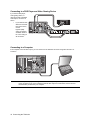
Connecting to a DVD Player and Video Gaming Device
If you have a DVD player,
video gaming device, or
other device with a standard
video output, connect it as
shown.
RS-232 IR INPUT & OUTPUT
HIGH DEFINITION DIGITAL INPUT
STANDARD INPUT
HIGH DEFINITION INPUT
VIDEO
1
CABLE
1
OUTPUT
2
S/PDIF
Y
Pb
L
VIDEO
Pr
R
L
L
R
R
NuCONTROL
ANT
COMPONENT
2
S-VIDEO
L
SERVICE
HDMI 1
R
HDMI 2 / DVI
AUDIO INPUT
If your devices have
different connectors
than those shown,
use the
highest-quality
video connections
available. Observe
the color-coding on
all connectors.
STANDARD AUDIO & VIDEO OUTPUT
•
In
HDMI 2
Out
Connecting to a Computer
If the computer has an S-video output, you can connect it to the television as shown using either S-Video 1 or
S-Video 2.
RS-232 IR INPUT & OUTPUT
CABLE
OUTPUT
2
S/PDIF
Y
VIDEO
Pb
L
Pr
R
L
L
R
R
L
SERVICE
HDMI 1
NOTE:
1
S-VIDEO
NuCONTROL
ANT
COMPONENT
2
R
HDMI 2 / DVI
AUDIO INPUT
HIGH DEFINITION DIGITAL INPUT
STANDARD AUDIO & VIDEO OUTPUT
STANDARD INPUT
HIGH DEFINITION INPUT
VIDEO
1
HDMI 2
If the computer display does not appear on the television, you may need to press a combination of keys
on the computer to turn on the computer’s external video output. For instructions, refer to the user
documentation provided with your computer.
14 Connecting the Television
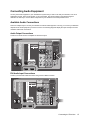
Connecting Audio Equipment
You may have audio equipment in your entertainment system that you wish to use with your television, such as an
audio/video receiver, stereo sound system, or surround system. Use the information in the following pages to
determine the best way to connect these components to your television for the best possible sound.
Available Audio Connections
There are multiple ways to connect your television to external audio equipment. The way you connect your television
depends on the audio equipment you want to connect. The following diagrams display the input and output sources
needed to make audio connections.
Audio Output Connections
Connect to an audio receiver or amplifier for fixed-level output.
RS-232 IR INPUT & OUTPUT
1
2
CABLE
1
OUTPUT
2
S-VIDEO
S/PDIF
Y
Pb
L
VIDEO
Pr
R
L
L
R
R
NuCONTROL
ANT
COMPONENT
L
SERVICE
HDMI 1
R
HDMI 2 / DVI
AUDIO INPUT
HIGH DEFINITION DIGITAL INPUT
STANDARD AUDIO & VIDEO OUTPUT
HIGH DEFINITION INPUT
STANDARD INPUT
VIDEO
HDMI 2
DVI Audio Input Connections
Connect your DVI audio cables here when using a DVI-to-HDMI connection.
RS-232 IR INPUT & OUTPUT
1
CABLE
2
1
OUTPUT
2
S-VIDEO
S/PDIF
Y
NuCONTROL
ANT
COMPONENT
Pb
L
VIDEO
Pr
R
L
L
R
R
L
SERVICE
HDMI 1
R
HDMI 2 / DVI
AUDIO INPUT
HIGH DEFINITION DIGITAL INPUT
STANDARD AUDIO & VIDEO OUTPUT
HIGH DEFINITION INPUT
STANDARD INPUT
VIDEO
HDMI 2
Connecting the Television
15
Connecting a Stereo, Surround Sound, or AV Receiver
The following diagrams display how to connect audio equipment to your television.
Stereo Sound System
You can play the television sound through a stereo system by connecting the stereo as shown. When connecting audio
equipment, adhere to the color-coding used on all connectors.
RS-232 IR INPUT & OUTPUT
CABLE
1
OUTPUT
2
S-VIDEO
S/PDIF
Y
NuCONTROL
ANT
COMPONENT
2
Pb
L
VIDEO
Pr
R
L
L
R
R
L
SERVICE
HDMI 1
R
HDMI 2 / DVI
AUDIO INPUT
HIGH DEFINITION DIGITAL INPUT
STANDARD INPUT
STANDARD AUDIO & VIDEO OUTPUT
HIGH DEFINITION INPUT
VIDEO
1
HDMI 2
SPEAKE RS
Once connected:
•
You can disable the television speakers and listen to only the stereo system speakers.
•
The VOL buttons on the television remote control adjust the television volume, but will not change the volume
of any connected external audio equipment, such as a stereo system.
Surround Sound or AV Receiver
If you have a surround sound system or audio-video (AV) receiver, you can connect the digital audio output of your TV
as shown. You may also connect other equipment to the sound system.
RS-232 IR INPUT & OUTPUT
CABLE
1
OUTPUT
2
S/PDIF
Y
NuCONTROL
ANT
COMPONENT
2
S-VIDEO
Pb
L
VIDEO
Pr
R
L
L
R
R
L
SERVICE
HDMI 1
R
HDMI 2 / DVI
AUDIO INPUT
HIGH DEFINITION DIGITAL INPUT
STANDARD AUDIO & VIDEO OUTPUT
STANDARD INPUT
HIGH DEFINITION INPUT
VIDEO
1
HDMI 2
SUB
SPEAKE RS
•
The digital audio output of the television sends Dolby Digital surround sound only when you are viewing a
source connected to an antenna, cable, or HDMI input, and only if the program contains surround sound.
Otherwise, the digital audio output sends digital stereo (PCM) sound.
•
Other devices with digital audio outputs may be connected directly to the surround sound system so you can
hear surround sound. You may omit the audio connections to the television for those devices.
•
Devices with only analog stereo outputs can be connected directly to the surround sound system or to the
television.
•
If the AV receiver also supports multiple video connections, you can connect video outputs from other
equipment to that device, and then connect the video output from the receiver to the television. Use the
highest-quality video connections available.
16 Connecting the Television
Chapter 3
Watching Television
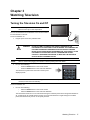
Turning the Television On and Off
NOTE:
Before turning the television on for the first time,
allow it to warm up to room temperature.
You can use the buttons on the television or the remote control to
turn the television on and off.
To turn the television on:
1.
Plug the power cord into a polarized outlet.
!
NOTE:
2.
WARNING!
DO NOT ATTEMPT TO DEFEAT THE SAFETY PURPOSE OF THE
POLARIZED PLUG ATTACHED TO THE TELEVISION. A POLARIZED PLUG
HAS TWO BLADES WITH ONE WIDER THAN THE OTHER. THE WIDE
BLADE OR THE THIRD PRONG IS PROVIDED FOR YOUR SAFETY. IF THE
POLARIZED PLUG DOES NOT FIT INTO YOUR EXISTING OUTLET,
CONTACT A QUALIFIED ELECTRICIAN TO REPLACE THE OBSOLETE
OUTLET WITH A POLARIZED OUTLET.
Wait one minute after plugging the television in before pressing the Power button.
Do one of the following:
•
Press the Power button on the remote control.
•
Press the Power button on the side of the television.
The television may take a few moments to warm up and
display a picture.
POWER
SRS
Cable
Antenna
Comp1
Comp2
HDMI 1
HDMI 2
AV1
AV2
AV3
Picture
Menu
NOTE:
CH
Guide
Parts of the television and the air coming out of its vents are normally warm. If the television starts to
overheat, it shuts down automatically.
To turn the television off:
1.
Do one of the following:
•
Press the Power button on the remote control.
•
Press the Power button on the side of the television.
The internal fans continue to run for a short time during the cool-down period. Even though the television is
off, it continues to use a small amount of power. If you turn the television on again during the cool-down
period, the television may not turn on as quickly as usual.
Watching Television 17
Setting Up Available Channels
After you have finished connecting your television to either an antenna or cable service, you will need to scan for and
set up available channels.
NOTE:
The channel scan feature will only find channels from the antenna and cable inputs. If you have
connected a satellite receiver or cable box to your television, you must set up that device before you
can view channels from that source.
NOTE:
The following steps can take from one minute to more than 30 minutes, depending on the available
channels in your area.
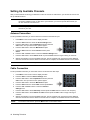
Antenna Connection
To set up available channels if you have an antenna connected to the antenna input:
1.
Press Menu on the remote control to display the OSD.
2.
Press the VOL± buttons to select the Source Settings menu.
3.
Press the CH- button to select Input Source and then press the
VOL+ button. The input source menu options appear.
4.
Press the CH- button to select the Main Source option.
5.
Press the VOL± buttons to select Antenna and then press
Select.
6.
Press the CH+ and VOL- buttons to select the Channel Settings menu.
POWER
SRS
Cable
Comp1
Comp2
HDMI 1
HDMI 2
AV1
AV2
AV3
Picture
Menu
Antenna
Guide
CH
7.
Press the CH- button to select Search on Air an press the VOL+ button to begin scanning for channels.
8.
Wait for the television to scan all available channels. The text “Channel Scan in Progress” will be displayed
while the channels are scanned. When the channel scan is complete, the available channels can be viewed.
NOTE:
To cancel the channel scan, press the Menu button on the remote control.
Cable Connection
To set up available channels if you have cable service connected to the cable input:
1.
Press Menu on the remote control to display the OSD.
2.
Press the VOL± to select the Source Settings menu.
3.
Press the CH- button to select Input Source and then press the
VOL+ button. The input source menu options appear.
POWER
SRS
Cable
Antenna
Comp1
Comp2
HDMI 1
HDMI 2
AV1
AV2
AV3
Picture
4.
Press the CH- button to select the Main Source option.
5.
Press the VOL± buttons to select Cable and then press Select.
6.
Press the CH+ and VOL- buttons to select the Channel
Settings menu.
7.
Press the CH- button to select Scan Freq and then press the VOL± buttons to select a scan frequency.
8.
Press the CH- button to select Search on Cable and then press the VOL+ button to begin scanning for
channels.
9.
Wait for the television to scan all available channels. The text “Channel Scan in Progress” will be displayed
while the channels are scanned. When the channel scan is complete, the available channels can be viewed.
NOTE:
To cancel the channel scan, press the Menu button on the remote control.
18 Watching Television
Menu
CH
Guide
Basic Television Operation
You operate your television using the remote control and a system of on-screen menus built into the television. The
following pages show how to use the remote control to perform basic television operations.
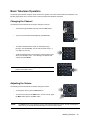
Changing the Channel
Menu
The following various methods can be used to change the channel.
•
•
VOL
To browse through available channels, press the CH± buttons.
VOL
Select
CH
Mute
To go to the channel previously displayed, press Prev CH.
Guide
CH
Display
PIP
Mode
Position
Swap
4:3
Panorama
Zoom
16:9
1
2
3
4
5
6
7
8
9
Freeze
Clear
Prev CH
0
•
To select a standard channel, enter the number(s) using 0
through 9, then press Enter. You can enter channels using 1, 2,
or 3 digits (12, 012, etc.).
1
2
3
4
5
6
7
8
9
Freeze
Clear
•
TIP:
To select a digital channel, use 0 through 9 on the keypad to enter
all two or three digits, press -, use 0 through 9 to enter the subchannel, and press Enter.
To clear a channel entered using the keypad, press the Clear
button on the remote control.
Prev CH
0
Sleep
Enter
4:3
Panorama
Zoom
1
2
3
4
5
6
7
8
9
16:9
Freeze
Clear
Prev CH
0
Adjusting the Volume
Menu
CH
Guide
The following various methods can be used to change the volume:
VOL
•
To change the volume, press the VOL± buttons.
•
To mute the sound, press the Mute button. To turn mute off, press
the Mute button again or the VOL+ button.
NOTE:
Mute
Select
CH
VOL
Display
The VOL± buttons on the television remote control adjust the television volume, but will not change the
volume of any connected external audio devices, such as a stereo system.
Watching Television 19
20 Watching Television
Chapter 4
Changing the Television Settings
Using the On-Screen Display (OSD)
You can adjust television settings, such as picture, color, audio, Picture-In-Picture settings, and parental controls, using
the OSD menus. These menus will guide you through the television’s controls and features.
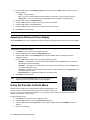
The OSD is accessible by pressing the Menu button on the remote control or the side of the television. The following
steps outline the general procedure for using the menus to adjust television settings.
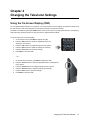
To access and use the on-screen display:
1.
On the remote control, press Menu to display the OSD.
2.
Press the VOL± buttons to select the appropriate menu and
display the menu options.
3.
Press the CH± buttons to navigate through the menu options.
4.
Press the VOL± buttons to adjust the settings as necessary.
5.
Press the Select button to accept the settings.
6.
Press Menu to close the OSD.
POWER
SRS
Cable
Antenna
Comp1
Comp2
HDMI 1
HDMI 2
AV1
AV2
AV3
Picture
Menu
CH
Guide
—or—
1.
On the side of the television, press Menu to display the OSD.
2.
Press the Volume buttons to select the appropriate menu and display the
menu options.
3.
Press the Channel buttons to navigate through the menu options.
4.
Press the Volume buttons to adjust the settings as necessary.
5.
Press the Enter button to select the settings.
6.
Press Menu to close the OSD.
Changing the Television Settings
21
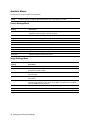
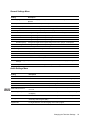
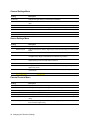
Available Menus
The following menus are available on this television.
NOTE:
The menu options that display depend on the input source and settings you select.
Picture Settings Menu
Setting
Description
Picture Mode
Changes the color and picture settings to one of the pre-defined television modes
designed for different types of viewing situations.
Reset
Restores all picture settings to factory default settings.
Brightness
Adjusts the overall brightness of the picture for the best viewing of dark pictures.
Contrast
Adjusts the difference between the light and dark areas of the picture.
Sharpness
Adjusts the sharpness of the picture edges.
Color
Adjusts the richness of the color in the picture.
Tint
Adjusts the balance between red and green levels in the picture.
Red Color
Adjusts the amount of red in the picture.
Green Color
Adjusts the amount of green in the picture.
Blue Color
Adjusts the amount of blue in the picture.
Image Settings Menu
Setting
Description
Color Scheme
Changes the color scheme between cool, neutral, and warm.
Deep Black™
Turns the Digital Switching Deep Black on or off, which enhances the black areas of
the picture for better contrast.
Image Size
Adjusts the television’s image size. Selections include 4:3, Fill All, 1 to 1, 16:9, Zoom,
and Panorama.
DVI Only Mode
Turns Digital Video Input on or off. This option is only available when the HDMI inputs
are selected.
RGB Range Expansion
Turns RGB range expansion on, which expands the color range on the display, or off
which does not expand the color range on the display. This option is only available
when the HDMI inputs are selected.
H Position
Changes the horizontal position of the image by moving it left or right on the screen.
V Position
Changes the vertical position of the image by moving it up or down on the screen.
Freeze Frame
Freezes an image on the screen.
22 Changing the Television Settings
General Settings Menu
Setting
Description
OSD Language
Selects the language used by the OSD. Selections include English, French, and
Spanish.
CC Setup
Displays the closed caption menu options.
Closed Caption
Turns the closed caption feature on, off, or on only when the television is muted.
Analog CC
Selects the closed caption option for analog channels.
Digital CC
Selects the closed caption option for DTV (Digital Television) channels.
DCC Font Size
Changes the digital closed caption font size between small, large, auto, or standard.
DCC Style
Changes the digital closed caption font style.
DCC FG Color
Changes the digital closed caption foreground color.
DCC BG Color
Changes the digital closed caption background color.
DCC BG Opacity
Changes the digital closed caption background to auto, opaque, or transparent.
DCC Edges
Changes the digital closed caption edges.
Sleep Timer
OSD Settings
Sets a length of time to automatically turn off the television.
Displays the OSD settings that can be adjusted.
OSD Position
Adjusts the position of the OSD on the television screen.
OSD Timeout
Sets the number of seconds the OSD will remain on screen.
Clock Setup
Displays the settings to configure the television clock.
Set Time Zone
Sets the time zone used by the television clock.
Observe Daylight
Savings
Specifies whether or not the television clock is set to observe daylight savings time.
Reset Settings
Restores all television settings to factory default settings.
Audio Settings Menu
Setting
Description
Volume
Adjusts the sound level.
Treble
When SRS TruSurround XT™ is off, this slider adjusts the loudness of higher pitches.
Bass
When SRS TruSurround XT™ is off, this slider adjusts the loudness of lower pitches.
Balance
Adjusts the relative loudness of the left and right channels.
Mute
Turns the volume on the television speakers on or off.
SRS TruSurround XT™
Sets whether virtualized 5.1 surround sound experience over two speakers is turned
on or off.
SRS Dialog Clarity
When SRS TruSurround XT™ is on, this slider adjusts the level of improved dialog
intelligibility.
SRS TruBass
When SRS TruSurround XT™ is on, this slider adjusts the level of bass response.
Analog Audio
For standard television, changes the audio between Monaural, Stereo, and
Secondary Audio Program (SAP).
Digital Audio
For digital television, sets the language of the audio program.
Changing the Television Settings
23
Channel Settings Menu
Setting
Description
Scan Freq
Changes the input frequency received by the television.
Search on Air
Performs a channel scan for valid channels when an antenna input source is being
used.
Search on Cable
Performs a channel scan for valid channels when a cable input source is being used.
Channel Set
Displays the menu options allowing you to adjust channel settings.
Channel List
Changes the channel list from source to favorites.
Edit Channels
Allows you to add or remove channels from the channel list.
Edit Favorites
Allows you to add or remove channels from the favorites list.
Source Settings Menu
Setting
Description
Input Source
Displays the Input Source menu options.
Window Layout
Changes the layout to either a single layout, Picture-In-Picture layout, or side-by-side
layout.
Main Window
Displays a list of input sources, so you can select a main source.
Sec Source
Displays a list of input sources, so you can select a secondary source. This option will
not appear when Single is selected from the Window Layout menu.
PIP Adjust
Displays the Picture-In-Picture adjustment menu options. This menu item will not
appear unless you have the PIP feature turned on.
PIP Size
Changes the size of the Picture-In-Picture display.
H Position
Changes the horizontal position of the Picture-In-Picture display by moving it left or
right on the screen.
V Position
Changes the vertical position of the Picture-In-Picture display by moving it up or down
on the screen.
PIP Transparancy
Sets the transparancy of the Picture-In-Picture window over the main window.
Parental Controls Menu
Setting
Description
Password
Displays the menu options allowing you to set, change, or clear your password.
Set PWD
Allows you to set a password using 6 numbers on the keypad.
Change PWD
Allows you to change your password.
Clear PWD
Allows you to clear your password.
Film Blocking
Allows you to select the movies you want to block based on their MPAA rating.
TV Blocking
Allows you to select the television programs you want to block based on their TV
rating.
Canadian English
Allows you to specify the movies and television programs you want to block based on
their Canadian English rating.
24 Changing the Television Settings
Setting
Description
Canadian French
Allows you to specify the movies and television programs you want to block based on
their Canadian French rating
Dynamic Rating
Allows you to download a rating region table, if one is available in the digital channel.
You can then select the rating region, dimensions, and lock or unlock specific ratings.
Using the Picture Settings Menu
The Picture Settings menu options allow you to adjust the picture display on the television to your specific
preferences. Using these menu options, you can manually adjust picture settings such as brightness, contrast,
sharpness, color, and tint.
Adjusting the Picture Mode
Use the Picture Mode menu option to quickly find an optimal viewing mode by selecting one of the pre-set picture
viewing options.
To adjust the picture mode:
1.
Press Picture on the remote control.
— or —
1.
Press Menu on the remote control to display the OSD.
2.
Press the VOL± buttons to select the Picture Settings menu.
3.
Press the CH- button to select Picture Mode. The available
picture modes are displayed.
4.
Press the VOL± buttons to select the desired mode.
5.
Press Menu to close the OSD.
POWER
SRS
Cable
Antenna
Comp1
Comp2
HDMI 1
HDMI 2
AV1
AV2
AV3
Picture
Menu
Guide
Resetting the Picture Settings
Use the Reset menu option to reset the picture settings to factory defaults.
To reset the picture settings:
1.
Press Menu on the remote control to display the OSD.
2.
Press the VOL± buttons to select the Picture Settings menu.
3.
Press the CH- button to select Reset and then press the VOL+ button to reset the settings.
4.
Press Menu to close the OSD.
Adjusting the Picture Color
Use the Brightness, Contrast, Sharpness, Color, Tint, and Red, Blue, and Green Color options to fine-tune your
television’s picture settings to get the color and image quality you want.
To adjust the picture color, do one of the following:
1.
Press Menu on the remote control to display the OSD.
2.
Press the VOL± buttons to select the Picture Settings menu.
3.
Press the CH± buttons to select the picture setting you want to adjust. You may adjust any of the following
settings:
•
•
•
Brightness — adjusts the overall brightness of the picture.
Contrast — adjusts the contrast between the light and dark areas of the picture.
Sharpness — adjusts the sharpness of the picture edges.
Changing the Television Settings
25
4.
•
Color — adjusts the amount of color in the picture.
•
Tint — adjusts the level of red and green in the picture.
•
Red Color — adjusts the amount of red in the picture.
•
Green Color — adjusts the amount of green in the picture.
•
Blue Color — adjusts the amount of blue in the picture.
Press the VOL± buttons to adjust the setting, as appropriate.
5.
Press Menu to close the OSD.
Using the Image Settings Menu
The Image Settings menu options allow you to adjust the image on the television to your specific preferences. Using
these menu options, you can manually adjust settings, such as the color scheme, image size, and Picture-In-Picture
display.
Adjusting the Color Scheme
Use the Color Scheme menu option to change the color scheme between cool, neutral, and warm.
To adjust the color scheme:
1.
Press Menu on the remote control to display the OSD.
2.
Press the VOL± buttons to select the Image Settings menu.
3.
Press the CH- button to select Color Scheme. The available color schemes are displayed.
4.
Press the VOL± buttons to select the desired color scheme.
5.
Press Menu to close the OSD.
Adjusting Deep Black™
Use the Deep Black™ setting to enhance the black areas of the picture for stronger contrast.
To adjust the Deep Black™ setting:
1.
Press Menu on the remote control to display the OSD.
2.
Press the VOL± buttons to select the Image Settings menu.
3.
Press the CH- button to select Deep Black.
4.
Press the VOL± buttons to turn the Deep Black setting on or off.
5.
Press Menu to close the OSD.
Adjusting the Image Size
Use the Image Size menu option to adjust the television’s image size to find the best size and shape for the picture.
To adjust the image size, do one of the following:
1.
Press Menu on the remote control to display the OSD.
2.
Press the VOL± buttons to select the Image Settings menu.
3.
Press the CH- button to select Image Size.
4.
Press the VOL± buttons to select the desired screen size. You may select any of the following options:
•
•
•
•
•
•
4:3 — displays the picture with a 4:3 aspect ratio.
Fill All — stretches the picture to fill all space. This may distort the picture slightly.
1:1 — displays the picture pixel-by-pixel in its native format.
16:9 — stretches the picture horizontally so that it fills the available screen area.
Zoom — enlarges the picture without affecting the aspect ratio. This may crop the image.
Panorama — stretches the picture horizontally to fill the screen.
26 Changing the Television Settings
5.
TIP:
Press Menu to close the OSD.
You can also press the 4:3, Panorama, Zoom, and 16:9 buttons
on the remote control to change the image size.
Adjusting the Horizontal Position of the
Image
CH
Mute
Display
PIP
Mode
Position
Swap
4:3
Panorama
Zoom
16:9
1
2
3
Freeze
Use the H Position menu option to adjust the horizontal position of the television image.
To adjust the image horizontally:
1.
Press Menu on the remote control to display the OSD.
2.
Press the VOL± buttons to select the Image Settings menu.
3.
Press the CH- button to select H Position.
4.
Press the VOL± buttons to move the image left or right.
5.
Press Menu to close the OSD.
Adjusting the Vertical Position of the Image
Use the V Position menu option to adjust the horizontal position of the television image.
To adjust the image horizontally:
1.
Press Menu on the remote control to display the OSD.
2.
Press the VOL± buttons to select the Image Settings menu.
3.
Press the CH- button to select V Position.
4.
Press the VOL± buttons to move the image left or right.
5.
Press Menu to close the OSD.
Freezing the Picture
Use the Freeze button on the remote control or the Freeze Frame menu option to freeze an image on the screen.
When you select this option, the image on the television freezes on that frame.
To freeze the frame, do one of the following:
1.
Press Freeze on the remote control.
— or —
1.
Press Menu on the remote control to display the OSD.
2.
Press the VOL± buttons to select the Image Settings menu.
3.
Press the CH- button to select Freeze Frame.
4.
Press the VOL± buttons to select ON or OFF.
5.
Press Menu to close the OSD.
TIP:
PIP
Mode
Position
Swap
4:3
Panorama
Zoom
16:9
1
2
3
4
5
6
7
8
9
Freeze
Clear
Press the Freeze button again to unfreeze the picture and display real-time television.
Using the General Settings Menu
The General Settings menu options allow you to adjust the television settings to your specific preferences. Using
these menu options, you can perform such tasks as changing the on-screen display language, turning the closed
caption feature on or off, setting the television’s clock, or setting the sleep timer.
Changing the Television Settings
27
Changing the OSD Language
Use the OSD Language menu option to change the language used by the OSD between English, French, and
Spanish.
To change the OSD language:
1.
Press Menu on the remote control to display the OSD.
2.
Press the VOL± buttons to select the General Settings menu.
3.
Press the CH- button to select OSD Language.
4.
Press the VOL± buttons to select the desired language.
5.
Press Menu to close the OSD.
Viewing Closed Captions
Use the CC Setup menu option to turn the closed caption feature on and off and adjust other closed caption settings.
To view closed captions:
1.
Press Menu on the remote control to display the OSD.
2.
Press the VOL± buttons to select the General Settings menu.
3.
Press the CH- button to select CC Setup and then press the VOL+ button. The closed caption setup options
appear.
4.
Press the CH± buttons to select the following options and press the VOL± buttons to adjust the settings:
•
•
•
•
•
•
•
•
•
5.
Closed Caption — Turns the closed caption feature on, off, or on only when the television is muted.
Analog CC — Selects the closed caption option for analog channels.
Digital CC — Selects the closed caption option for digital television channels.
DCC Font Size — Changes the digital closed caption font size between small, large, auto, or standard.
DCC Style — Changes the digital closed caption font style.
DCC FG Color — Changes the digital closed caption foreground color.
DCC BG Color — Changes the digital closed caption background color.
DCC BG Opacity — Changes the digital closed caption background to auto, opaque, or transparent.
DCC Edges — Changes the digital closed caption edges to Auto, None, Raised, Depressed, Uniform
Shadow Left, or Shadow Right.
Press Menu to close the OSD.
Setting the Sleep Timer
Use the Sleep button on the remote control or the Sleep Timer menu to set the number of minutes the television will
stay on before automatically turning off.
To set the sleep timer, do one of the following:
1.
2.
Press Sleep on the remote control. The text Sleep Off will display on-screen.
Continue to press the Sleep button or the VOL+ button to
increase the timer to 15minutes, 30 minutes, 1 hour, or 2 hours.
4
5
6
7
8
9
Clear
Prev CH
0
Sleep
Enter
— or —
1.
Press Menu on the remote control to display the OSD.
2.
Press the VOL± buttons to select the General Settings menu.
3.
Press the CH- button to select Sleep Timer.
4.
Press the VOL± buttons to increase or decrease the number of minutes before the television turns off.
28 Changing the Television Settings
5.
TIP:
Press Menu to close the OSD.
When the sleep timer is set, pressing the Sleep button on the remote control will display the current number
of minutes until the television turns off.
Changing the OSD Settings
Use the OSD Settings menu to change the on-screen display transparency or the on-screen display timeout.
To change the OSD settings:
1.
Press Menu on the remote control to display the OSD.
2.
Press the VOL± buttons to select the General Settings menu.
3.
Press the CH- button to select OSD Settings and then press the VOL+ button. The OSD settings appear.
4.
Press the CH± buttons to select one of the following settings.
•
5.
OSD Position — Changes the position of the OSD on the television screen. Press the VOL± buttons to
move the OSD to the center, right top or bottom, or left top or bottom areas of the screen.
•
OSD Timeout — Changes the number of seconds the television must be inactive before the OSD
closes. Press the VOL± buttons to increase or decrease the number of seconds between 10, 30, and 60
seconds.
Press Menu to close the OSD.
Setting the Clock
Use the Clock Setup menu to adjust the television clock settings.
To set the clock:
1.
Press Menu on the remote control to display the OSD.
2.
Press the VOL± buttons to select the General Settings menu.
3.
Press the CH- to select Clock Setup and then press the VOL+ button. The clock setup options appear.
4.
Press the CH± buttons to select one of the following options:
•
•
5.
TIP:
Set Time Zone — Sets the time zone used by the television clock. Press the VOL± buttons to select the
desired time zone.
Observe Daylight Savings — Specifies whether or not the television clock observes daylight savings
time. Press the VOL± buttons to select Yes or No.
Press Menu to close the OSD.
The clock on the television is automatically set. If the television loses power, the clock will automatically be
reset.
Resetting the Television Settings
Use the Reset Settings menu option to reset the television setup options to factory defaults. All picture, image, audio,
general, and picture-in-picture settings will be reset to defaults.
To reset the television settings:
1.
Press Menu on the remote control to display the OSD.
2.
Press the VOL± buttons to select the General Settings menu.
3.
Press the CH- button to select Reset Settings and press the VOL+ button. A Confirmation submenu
appears.
4.
Press the Select button to reset the television settings to factory defaults.
5.
Press Menu to close the OSD.
Changing the Television Settings
29
Using the Audio Settings Menu
The Audio Settings menu options allow you to adjust sound quality on the television. Using these menu options, you
can manually adjust audio output settings, such as volume, balance, and dialog clarity.
Adjusting the Volume
Use the Volume menu option to increase or decrease the level of sound.
To adjust the volume:
1.
Press Menu on the remote control to display the OSD.
2.
Press the VOL± buttons to select the Audio Settings menu.
3.
Press the CH- button to select Volume.
4.
Press the VOL± buttons to increase or decrease the volume.
5.
Press Menu to close the OSD.
Adjusting the Treble
Use the Treble menu option to adjust the loudness of higher pitches when SRS TruSurround XT™ is off.
To adjust the treble:
1.
Press Menu on the remote control to display the OSD.
2.
Press the VOL± buttons to select the Audio Settings menu.
3.
Press the CH- button to select Treble.
4.
Press the VOL± buttons to increase or decrease the treble.
5.
Press Menu to close the OSD.
Adjusting the Bass
Use the Bass menu option to adjust the loudness of lower pitches when SRS TruSurround XT™ is off.
To adjust the bass:
1.
Press Menu on the remote control to display the OSD.
2.
Press the VOL± buttons to select the Audio Settings menu.
3.
Press the CH- button to select Bass.
4.
Press the VOL± buttons to increase or decrease the bass.
5.
Press Menu to close the OSD.
Adjusting the Balance
Use the Balance menu option to adjust the relative loudness of the left and right channels.
To adjust the balance:
1.
Press Menu on the remote control to display the OSD.
2.
Press the VOL± buttons to select the Audio Settings menu.
3.
Press the CH- button to select Balance.
4.
Press the VOL± buttons to adjust the balance between the right and the left speakers.
5.
Press Menu to close the OSD.
Muting the Audio
Use the Mute button on the remote control or the Mute menu option to turn the volume on the television speaker off.
30 Changing the Television Settings
To mute the television, do one of the following:
1.
Press Mute on the remote control.
VOL
VOL
Select
— or —
1.
Press Menu on the remote control to display the OSD.
2.
Press the VOL± buttons to select the Audio Settings menu.
3.
Press the CH- button to select Mute.
4.
Press the VOL± buttons to turn the sound on or off.
5.
Press Menu to close the OSD.
NOTE:
Mute
PIP
CH
Mode
Display
Position
Swap
Pressing the Mute button again or the VOL± buttons on the remote control will unmute the television.
Turning SRS TruSurround XT™ On and Off
Use the SRS button on the remote control or the SRS TruSurround XT™ menu option to set whether virtualized 5.1
surround sound experience over two speakers is turned on or off.
To turn SRS TruSurround XT™ on or off, do one of the following:
1.
Press SRS on the remote control.
— or —
1.
Press Menu on the remote control to display the OSD.
2.
Press the VOL± buttons to select the Audio Settings menu.
3.
Press the CH- button to select SRS TruSurround XT™.
4.
Press the VOL± buttons to turn this setting on or off.
5.
Press Menu to close the OSD.
POWER
SRS
Cable
Antenna
Comp1
Comp2
HDMI 1
HDMI 2
AV1
AV2
AV3
Picture
Adjusting SRS Dialog Clarity
Use the SRS Dialog Clarity menu option to adjust the level of improved dialog intelligibility when SRS TruSurround
XT™ is on.
To adjust dialog clarity:
1.
Press Menu on the remote control to display the OSD.
2.
Press the VOL± buttons to select the Audio Settings menu.
3.
Press the CH- button to select SRS Dialog Clarity.
4.
Press the VOL± buttons to turn this setting on or off.
5.
Press Menu to close the OSD.
Adjusting SRS TruBass
Use the SRS TruBass menu option to adjust the level of bass response when SRS TruSurround XT™ is on.
To adjust TruBass:
1.
Press Menu on the remote control to display the OSD.
2.
Press the VOL± buttons to select the Audio Settings menu.
3.
Press the CH- button to select SRS TruBass
4.
Press the VOL± buttons to turn this setting on or off.
5.
Press Menu to close the OSD.
Changing the Television Settings
31
Adjusting Analog Audio
Use the Analog Audio menu option to change the audio between mono, stereo, and SAP.
To adjust analog audio:
1.
Press Menu on the remote control to display the OSD.
2.
Press the VOL± buttons to select the Audio Settings menu.
3.
Press the CH- button to select Analog Audio.
4.
Press the VOL± buttons to select one of the following settings:
•
•
•
5.
Mono — used for channels that are broadcast in monaural.
Stereo — used for channels that broadcast in stereo.
SAP — (Second Audio Program) allows you to listen to the audio in a second language when one is
available (this is usually a foreign-language translation of the program).
Press Menu to close the OSD.
Adjusting Digital Audio
Use the Digital Audio menu option to set the language of the audio program.
To adjust digital audio:
1.
Press Menu on the remote control to display the OSD.
2.
Press the VOL± buttons to select the Audio Settings menu.
3.
Press the CH- button to select Digital Audio.
4.
Press the VOL± buttons to select the appropriate language:
5.
Press Menu to close the OSD.
Using the Channel Settings Menu
The Channel Settings menu options allow you to select a scan frequency and automatically scan for and set up
available channels, as well as edit your favorites and channel lists. For complete steps on setting up available
channels, refer to “Setting Up Available Channels” on page 18.
Changing the Channel List
Use the Channel Set menu option to change the channel list and favorite channels.
To change channel settings:
1.
Press Menu on the remote control to display the OSD.
2.
Press the VOL± buttons to select the Channel Settings menu.
3.
Press the CH- button to select Channel Set and then press the VOL+ button. The channel settings appear.
4.
Press the CH- button to select Channel List.
5.
Press the VOL± buttons to select the channel list setting - either Favorites or Source Valid.
6.
Press Menu to close the OSD.
Editing Channels
Use the Edit Channels menu option to add or remove channels from the channel list.
To edit channels:
1.
Press Menu on the remote control to display the OSD.
2.
Press the VOL± buttons to select the Channel Settings menu.
3.
Press the CH- button to select Channel Set and then press the VOL+ button. The channel settings appear.
32 Changing the Television Settings
4.
Press the CH- button to select Edit Channels and then press the VOL+ button. The Edit Channels submenu
appears.
5.
Press the CH± buttons to move to the next or previous channel in the list.
6.
Press the VOL± buttons to add or remove channels in the channel list.
7.
Press Menu to close the OSD.
Editing Favorites
Use the Edit Favorites menu option to add or remove channels from the favorites list.
To edit favorites:
1.
Press Menu on the remote control to display the OSD.
2.
Press the VOL± buttons to select the Channel Settings menu.
3.
Press the CH- button to select Channel Set and then press the VOL+ button. The channel settings appear.
4.
Press the CH- button to select Edit Channels and then press the VOL+ button. The Edit Channels submenu
appears.
5.
Press the CH± buttons to move to the next or previous channel in the favorites list.
6.
Press the VOL± buttons to add or remove channels in the favorites channel list.
7.
Press Menu to close the OSD.
Using the Source Settings Menu
The Source Settings menu options allow you to turn on the Picture-In-Picture feature and change the main and
secondary window input sources.
Changing the Input Source
Use the Main Source and Sec Source menus to change input sources for the main and secondary windows.
To change the input source:
1.
Press Menu on the remote control to display the OSD.
2.
Press the VOL± buttons to select the Source Settings menu.
3.
Press the CH- buttons to select the following input source options:
•
4.
Main Window Source — Changes the input source for the main display. Press the VOL± buttons to
select the desired source.
•
Sec Window Source — Changes the input source for the secondary (PIP) display. Press the VOL±
buttons to select the desired source. (This option will not appear when Single is selected from the
Window Layout menu.)
Press Menu to close the OSD.
Turning Picture-In-Picture On or Off
Use the PIP button on the remote control or the Window Layout menu to turn the Picture-In-Picture feature on or off.
To turn Picture-In-Picture on or off, do one of the following:
1.
Select
Press PIP on the remote control.
— or —
CH
Mute
Display
1.
Press Menu on the remote control to display the OSD.
PIP
Mode
Position
Swap
2.
Press the VOL± buttons to select the Source Settings menu.
4:3
Panorama
Zoom
16:9
1
2
3
Changing the Television Settings
33
3.
Press the CH- button to select Window Layout, if necessary. Press the VOL± buttons to select one of the
following settings:
4.
•
Single — Normal viewing.
•
PIP — Turns on a second smaller picture that appears in the bottom, right corner of the television.
•
Side by Side — Turns on a second picture that appears side-by-side with the existing picture.
Press the CH- button to select Main Source.
5.
Press the VOL± buttons to select the input source for the main window.
6.
Press the CH- button to select Sec Source.
7.
Press the VOL± buttons to select the input source for the second window.
8.
Press Menu to close the OSD.
TIP:
Press Swap on the remote control to alternate the PIP channel with the current channel displayed.
Adjusting the Picture-In-Picture Display
Use the PIP Adjust menu option to adjust the size and horizontal and vertical position of the Picture-In-Picture display.
NOTE:
The Picture-In-Picture feature must be turned on for these options to be available.
To adjust the Picture-In-Picture display:
1.
Press Menu on the remote control to display the OSD.
2.
Press the VOL± buttons to select the Image Settings menu.
3.
Press the CH- button to select PIP Adjust and then press the VOL+ button. The Picture-In-Picture
adjustments appear:
4.
Press the CH± buttons to select one of the following settings to adjust:
•
•
•
•
5.
TIP:
PIP Size — Changes the size of the Picture-In-Picture display. Press the VOL± buttons to increase or
decrease the size of the PIP display.
H Position — Changes the horizontal position of the Picture-In-Picture display. Press the VOL± buttons
to move the display left or right.
V Position — Changes the vertical position of the Picture-In-Picture display. Press the VOL± buttons to
move the display up or down.
PIP Transparency — Adjusts the transparency of the PIP window.
Press Menu to close the OSD.
You can also press the Position button on the remote control to
adjust the horizontal and vertical position of the PIP display.
Using the Parental Controls Menu
CH
Mute
Display
PIP
Mode
Position
Swap
4:3
Panorama
Zoom
16:9
1
2
3
Parental controls enable you to restrict and block television programming you do
Freeze
not want children to watch. Most television programs now include a rating, such
as TV-Y or G, which is encoded into the program. You can use the remote control to block specific movies and
television shows based on these ratings.
To apply parental controls:
1.
Press Menu on the remote control to display the OSD.
2.
Press the VOL± buttons to select the Parental Controls menu.
3.
Press the CH- button to select Password and then press the VOL+ button. The Set PWD menu option
appears.
4.
Do one of the following:
34 Changing the Television Settings
•
5.
If a password is not set, use the number keypad on the remote control to enter a password 6 numbers in
length and then press Select.
•
If a password is already set, use the number keypad to enter the existing password and then press
Select.
Press the CH± buttons to select one of the following:
•
•
•
•
6.
Film Blocking — Press the VOL+ button. Select the film ratings that you want to block by selecting the
rating and then pressing Select. All blocked ratings are indicated with a lock.
TV Blocking — Press the VOL+ button. Select the television ratings that you want to block by selecting
the rating and then pressing Select. All blocked ratings are indicated with a lock.
Canadian English — Press the VOL+ button. Select the ratings that you want to block by selecting the
rating and then pressing Select. All blocked ratings are indicated with a lock.
Canadian French — Press the VOL+ button. Select the ratings that you want to block by selecting the
rating and then pressing Select. All blocked ratings are indicated with a lock.
Press Menu to close the OSD.
NOTE:
Some programs are not rated, such as sports, news, and general interest programs.
Changing or Resetting a Password
Your parental control password allows you to change parental controls and prevents other viewers from watching
programs or changing the parental controls without permission. The password must also be used to view blocked
programs.
To change or reset a password:
1.
Press Menu on the remote control to display the OSD.
2.
Press the VOL± buttons to select the Parental Controls menu.
3.
Press the CH- button to select Password and then press the VOL+ button. The Set PWD menu option
appears.
4.
Press the CH- button to select one of the following:
•
5.
Change PWD — With Change PWD selected, use the number keypad to enter a new password and
press Select.
•
Clear PWD — With Clear PWD selected, press Select to clear the password. Note that this does not
remove the parental controls from the television.
Press Menu to close the OSD.
Viewing a Blocked Program
If you want to watch a show that is normally blocked by your parental control settings, you can temporarily turn off the
controls by entering your password.
To view a blocked program:
1.
Tune to the channel or program that you want to watch.
2.
When the password prompt appears on screen, enter the password using the number keypad on the remote
control and press the Select button.
What if you Forget Your Password?
If you have parental controls set on your television and forget your password, you must perform the following steps and
then create a new password.
1.
Turn off the television.
2.
Press the following sequence of six buttons on the remote control: Menu, 0,0,0, Enter, Power.
This allows access to the Lock menu without entering a password, but only until you turn off the television. You must
create a new password before you can change lock settings or view blocked programs.
Changing the Television Settings
35
Rating Systems
A rating icon appears in the upper left-hand corner of the television screen for the first 15 seconds of every rated
program of 30 minutes or less. For every rated program that lasts more than an hour, a rating icon appears in the upper
left-hand corner of the screen at the beginning of each half hour. A rating icon is also displayed after every commercial
break for all rated programs.
NOTE:
For further information about US rating descriptions, refer to http://www.fcc.gov/vchip/.
US Rating System
Rating
Description
Television Ratings
Y
All children
TV-Y7
Children age 7 and older
TV-G
General audience
TV-PG
Parental guidance suggested
TV-14
Suitable for age 14 and older
TV-MA
Mature audiences only
Movie Ratings
G
General
PG
Parental guidance suggested
PG-13
Parents strongly cautioned
R
Restricted (parental guidance suggested for children under 17)
NC-17
No one age 17 or under allowed
X
No one age 17 or under allowed
NR
Not rated
Canadian-English Rating System
Rating
Description
C
All children
C8+
Children 8 years and older
G
General programming
PG
Parental guidance
14+
Viewers 14 and older
18+
Adult Programming
36 Changing the Television Settings
Canadian-French Rating System
Rating
Description
G
General programming
8+
Not recommended for young children
13+
Not recommended for ages under 13
16+
Not recommended for ages under 16
18+
Programming restricted to adults
Changing the Television Settings
37
38 Changing the Television Settings
Chapter 5
Troubleshooting
Television Maintenance
The television requires very little maintenance. For best performance, keep the television clean and seek repair when
necessary.
Cleaning the Television
Keep the television clean as follows:
•
Keep the television in an area free from excessive dust and dirt.
•
Wipe the screen and case with a soft, dry cloth. Do not use water, polish, solvent, or other substances. Do not
attempt to clean any of the television’s internal surfaces.
•
Use a vacuum cleaner to remove dust from the air vents on the back and sides of the television. Do this at
least monthly, or more often if there is visible accumulation.
NOTE:
Unplug the television when cleaning it to avoid risk of electric shock.
Identifying Problems
If you are encountering problems with your NuVision television, use the following table to help identify the type of
problem that is occurring and the possible solutions to the problem.
Symptom
Possible Solution
“Ghost” or double
images
•
This may be caused by obstruction to the antenna due to high-rise buildings or hills.
Using a highly directional antenna may improve the picture.
No power
•
Check that the AC power cord is plugged into the socket.
•
Unplug the power cord and wait for one minute. Re-insert the plug into the main
socket, wait one minute, and turn on the unit again.
•
Check antenna connections at rear of the unit to see if it is properly connected to the
unit.
•
There may be broadcast station trouble. Try another channel.
•
Adjust the contrast and brightness settings.
•
Check the closed caption setup. Some text modes could block the screen.
•
There may be a non-compatible input signal. Select a correct input.
Good picture but no
sound
•
Increase the volume.
•
Ensure that the television has not been muted.
Good sound but poor
color
•
Adjust the contrast, color, and brightness settings.
Poor picture
•
Poor picture quality may occur when having activated an S-VHS camera or camcorder connected and having connected another peripheral at the same time. In this
case, switch off one of the other peripherals.
•
Check whether the room is too bright.
•
This may be caused by electrical interference, such as a hair dryer or nearby neon
lights. Turn off the electrical equipment.
No picture
Horizontal dotted line
Troubleshooting
37
Symptom
Possible Solution
Television not
responding to remote
control
•
Replace the batteries if necessary.
•
Ensure that the batteries have been inserted with the polarity (+,-) aligned.
Snowy picture and
noise
•
Check the antenna connection.
No output from one of
the speakers
•
Adjust the balance in the Audio Settings OSD menu.
Control buttons do not
work
•
Unplug the power cord and wait for one minute. Re-insert the plug into the socket,
wait one minute, and turn on the unit again.
LED Calibration Test
Periodically, the LED-based televisions will conduct a calibration test to ensure brightness and color consistency in the
picture. When the power button is turned off on the television, the television will display (in full screen) a sequence of
cyan, magenta, and yellow before finally turning off. The television displays these colors and makes any adjustments
necessary to ensure the quality of the picture. This is a normal cycle for this television.
38 Troubleshooting
Chapter 6
Product Support
Getting Help with Your Television
When you need it, NuVision can help you with any problems you might have with your television. For best results, you
should first follow the procedure in the order shown below — without skipping any steps if possible.
NOTE:
Support availability depends on product and region.
Check the Manuals
Be sure to check the manuals and any other documentation that came with your television. Refer to “Troubleshooting”
on page 37.
Check Our Web Site
Visit our Web site: http://www.nuvision.com/support/.
Contact Us
If you need to contact NuVision for repair service, you should be able to provide them with the following information:
•
The television model and serial numbers.
•
Any messages that were displayed on-screen when the problem occurred.
•
The situation when this happened or what caused it to occur?
•
If this problem has occurred before? Can you re-create it?
•
Did you add any new hardware or software before this situation began?
•
What steps have you taken already to solve the problem?
You may contact NuVision using any of the following methods:
•
Send an e-mail to [email protected] describing your problem.
•
Call us at 800-605-8022.
•
Complete and submit the required fields in the Comments or Questions area of our web site at http://
www.nuvision.com/support/contact/.
•
Send mail or a fax describing your problem to:
7901 E. Pierce St. Suite A
Scottsdale, AZ 85257
Phone: 480.970.1466
Fax: 602.532.7965
Product Support
41
42 Product Support
Chapter 7
Reference Information
This chapter lists the specifications for the television, as well as open source code information.
Specifications
The following specifications are subject to change without notice. For the latest specifications, visit our web site at
www.nuvision.com.
Screen
52" diagonal size 16:9 widescreen
Size
52 inch: 50" x 37" x 15"
Weight
TV only: <100 lbs.
Resolution
1920 x 1080
Technology
DLP technology
Dual picture with dual tuner (PIP, PBP)
Connection Panel
Accessible from rear and side
RF Inputs
1- Antenna (F-type) 1 - Cable (F-type)
Video Inputs
2 - HDMI
2 - Component-video (YPbPr)
2 - S-video
3 - Composite-video (2-Rear I/O & 1-Side I/O)
Audio Inputs
6 - Stereo (left and right RCA)
Audio Outputs
1 - Stereo (left and right RCA) fixed-output level
1 - Coaxial Digital-Audio output (for external amplifier)
Video Compatibility
Antenna: NTSC, ATSC, 480i/p, 720p, 1080i
Cable: NTSC, QAM, ClearQAM, 480i/p, 720p, 1080i
Composite/S-video: NTSC, 480i
Component: 480i/p, 720p, 1080i
HDMI: 480i/p, 720p, 1080i/p*, VGA, SVGA, XGA, WXGA, SXGA
Audio Features
2 Channel Stereo sound system
Left and right full range stereo speakers
15 watts per channel
Auto volume correction, Dynamic audio correction, can be set by user
Audio Functions
Volume control, mute, balance, treble, bass, Virtual Surround Sound
MTS: Mono, Stereo, SAP
Security
V-chip for antenna and cable inputs
Parental lock prevents viewing of unapproved content and channels
Reference Information
43
Power
120 V nominal at 60 Hz
220 W (LED) maximum
Environment
Operating:
Temperature: 5 to 35 °C (41 to 95 °F)
Humidity: 10 to 85% RH, non-condensing
Altitude: up to 3,000 m (10,000 ft), up to 25 °C (77 °F)
Storage:
Temperature: -20 to 60 °C (-4 to 140 °F)
Humidity: 10 to 85% RH, non-condensing
Altitude: up to 9,000 m (30,000 ft)
Open Source Code Information
This product may include software licensed under the GNU General Public License (“GPL”), the GNU Lesser General
Public License (“LGPL”), and other open source software licenses. The full text of the GPL license can be found at
http://www.gnu.org/licenses/gpl.html and the full text of the LGPL license can be found at http://www.gnu.org/licenses/
lgpl.html. The source code for the open source components that require distribution may be downloaded for free at
www.nuvision.com.
44 Reference Information
Limited Warranty
Please retain this information in a safe place for future reference.
Who is Protected
This warranty protects the original consumer owner of this new NuVision product and is non-transferable.
The NuVision limited warranty only covers NuVision products purchased from authorized NuVision dealers.
To verify that you are purchasing from an authorized NuVision dealer, use our dealer locator or contact
NuVision at 480-970-1466.
What is Covered and How Long
This warranty covers the cost of replacing internal operating parts and service/labor to repair or replace those parts.
Each NuVision product is covered for 2 years labor and 2 years parts from the date of purchase, defined as follows: (1)
Original Consumer Retail Purchase, (2) First Rental Purchase Agreement, or (3) First Lease Purchase Agreement (the
“Warranty Period”). NuVision will, at its sole option, repair or replace the product with a similar product. Replacement
product or parts may include remanufactured or refurbished parts or components. The NuVision Warranty
Administrator shall have no liability for service under this warranty if non-OEM (Original Equipment Manufacturer)
replacement parts are used in the repair of your NuVision product.
NuVision product that has been factory re-furbished by NuVision are covered for 1 year labor and 1 years parts.
NuVision products are covered for 1 year labor and 1 year parts when used in commercial, educational or industrial
applications.
NOTE
NuVision is not responsible for any returned product without an RMA assigned by NuVision. Shipping and handling will
be covered by NuVision if the product is within 90 days from the date of purchase. After 90 days from the date of
purchase, the customer is responsible for shipping the defective product to NuVision. NuVision will pay for the return
shipping cost.
What the Owner Must Do If Service is Required
For information on obtaining warranty service, visit www.nuvision.com or call NuVision Customer Care at 800-6058022. From outside the U.S. call +1-480-970-1466.
What are the Exceptions
This warranty does not cover: (1) Damage from misuse, abuse, neglect or accident, natural disasters, or Acts of God;
(2) Cabinetry, decorative parts, knobs, or buttons or consumable items; (3) A NuVision product which has been
electronically or mechanically modified in any way or incorporated into other products; (4) Installation and set-up
service adjustments; or (5) Owner instruction.
Your Owner’s Guide provides information regarding operating instructions and user controls. For additional
information, contact your authorized NuVision dealer.
This Exclusive Limited Warranty excludes all incidental and consequential damages. Some states do not allow
the exclusion of incidental and consequential damages, so the above exclusion may not apply to you.
ALL IMPLIED WARRANTIES, INCLUDING IMPLIED WARRANTIES OF MERCHANTABILITY AND FITNESS FOR A
PARTICULAR PURPOSE ARE LIMITED IN DURATION TO THE DURATION OF THIS WARRANTY PERIOD.
Some states do not allow limitations on how long an implied warranty lasts, so the above limitation may not apply to
you. This Exclusive Limited Warranty gives you specific legal rights and you may also have other rights which vary
from state to state.
45
IMPORTANT!
In case service is required, please retain your original receipt and store it in a safe place as proof of purchase.
Also, please keep the original carton and foam in case your NuVision product needs to be shipped back to
NuVision for repair or replacement.
Sales Outside the U.S.A and Canada
For NuVision products sold outside the U.S. and Canada, contact your NuVision dealer or NuVision for warranty
information and service.
Product Registration
To register your product, please visit our web site at http://www.nuvision.com/support/register/ and complete the
required registration fields.
NOTE:
Your failure to complete and return the Product Registration Form will not diminish your rights under
NuVision's Exclusive Limited Warranty.
NOTE:
Please keep your original receipt for proof of warranty.
46
Index
—A—
Accessories 1
Antenna input connector
location 3
Audio outputs
locations 4
—B—
Back panel 3
connectors 3
Buttons
side panel 2
—C—
Cable connector
location 3
Channel
changing 2, 5
Components
connecting 7, 15
Composite A/V inputs
locations 4
Composite video input
connecting 3
Composite/CVBS input
location 2, 3, 37
Connections
HDMI 8
video 7
Connectors
antenna 3
audio input 4
audio output 4
back panel 3
cable 3
component 4
composite 4
NuControl 4
Right panel 3
service port 4
S-video 4
connectors
HDMI 4
Left channel audio input
location 3
—O—
On-Screen Display (OSD)
using 21
—P—
Power
LED 3
—Q—
Quick Start Guide 1
—R—
Regulatory
information vii
Remote control 1
overview 4
Right panel
buttons 2
connectors 3
—S—
Side panel
buttons 2
S-video connectors
locations 4
—T—
Television
accessories 1
back panel 3
front panel 1
—V—
Video
connections 7
Video sources
connecting 7
Volume
controlling 2, 5
—D—
DVI audio input
location 4
—E—
Entertainment system
connecting 7, 15
—F—
Front panel 1
—H—
HDMI
Connections 8
HDMI™ input connectors
location 4
—L—
LED
power 3
47