1
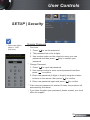
User Controls SETUP | Security Pass-code default value is “1234” (first time). Change Password First time: 1. Press “ ” to set the password. 2. The password has to be 4 digits. 3. Use number button on the remote to enter your new password and then press “ ” key to confirm your password. Change Password: 1. Press “ ” to input old password. 2. Use number button to enter current password and then press “ ” to confirm. 3. Enter new password (4 digits in length) using the number buttons on the remote, then press “ ” to confirm. 4. Enter new password again and press “ ” to confirm. If the incorrect password is entered 3 times, the projector will automatically shut down. If you have forgotten your password, please contact your local office for support. 39 English