1
Troubleshooting
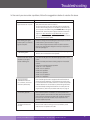
In the event you encounter a problem, follow the suggestions below to resolve the issue.
Problem
Resolution
Signal booster has no power
Verify that the booster switch is turned on.
Connect the power supply to an alternate power source. Be sure
the AC outlet is working and is not controlled by a wall switch that
can cut power to the outlet. If the green POWER LED on the signal
booster is OFF, return the power supply to SureCall. Contact tech
support at 1-888- 365-6283 or [email protected], or go to
www.surecall.com and log on to online support to receive a Return
Merchandise Authorization (RMA).
After installing your signal
booster system, you have no
signal or reception.
Check the strength of the outside signal as close as you can to the
outside antenna. (see instructions on page 7)
Double-check all signal booster and antenna cable connections.
Be sure your signal booster’s dB gain is turned up to full power on
each dial. (see apge 14
LED flashing yellow
This means that the Automatic Gain Control (AGC) is adjusting
which is part of the boosters normal operation
One of the red LEDs next to
the dials on your signal
booster is flashing red.
Turn down the dB gain on the dial until the light goes OFF or turns
yellow.
Be sure the inside panel antenna is facing away from the outside
antenna.
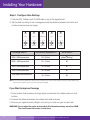
Use the recommended antenna separation:
72dB: 100-110 ft. separation
65dB: 75-80 ft. separation
55dB: 60 ft. separation
50dB: 50 ft. separation
45dB: 15-20 ft. separation
40dB: 5-6 ft. separation
Your signal booster
restarted and shut down
for 15 minutes, and is now
shut down permanently.
Each SureCall signal booster is equipped with Auto Shutdown to
prevent cell tower interference. The outside antenna may be close
to a cell tower. Move the outside antenna to a location that provides
sufficient distance from the cell tower to prevent the signal booster
from automatically enabling Auto Shutdown. Once away from the
original location, perform the procedure under step 3 on page 10
The red LED goes ON.
More antenna separation is needed. If you cannot provide more
antenna separation and the Alert LEDs flash after the initial activation
period, lower the dial above the blinking LED by 5dB (for example,
from 50 to 45) and monitor the bars on your cell phone to see
whether reception improves.
The Power LED does not
turn ON
Be sure the AC outlet is working and is not controlled by a wall
switch that can cut power to the outlet.
SureCall | 48346 Milmont Dirve, Fremont CA 94538 | 1-888-365-6283 | [email protected]
15