1
2)
3)
4)
5)
There are 8 ~ 30-digit dial modes for PSTN call.
Number 0 should be added before PSTN number.
Press “#”key or PTT button to call.
If “DTMF dialing while PSTN call” function has been set by PC
software, and “forbid data keypad” function is not activated,
you can make DTMF call by inputting the number while holding
down PTT button.
NPD Transfer
1) Make sure that“Non-prescribed data transfer”function has been
set by PC software.
2) Press *+1+9+8+3+# to initiate Emergency NP data system-widecall.
3) Press *+1+9+8+4+# to initiate Priority NP data system-wide-call.
Network Operator Service Call
1) If your transceiver requires network service, it needs the
cooperation of the relevant base station.
2) Before calling the dispatch station, you need make sure that“
Network Operator Service Call”function has been set.
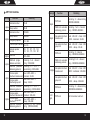
3) Input the number of the dispatch station (see Appendix MPT1343
Dial Mode table) + “#” /PTT to call the dispatch station.
Don't Disturb
1) This function allows transceiver to refuse calls from other
transceivers under special circumstances.
2) Make sure that“Don't Disturb”has been set by PC software.
3) Dial in the sequence of *+4+9+# to refuse all calls.
4) Dial in the sequence of *+4+9+1+# to refuse voice calls.
5) Dial in the sequence of*+4+9+2+# to refuse data calls.
22
6) When the setting is completed, warning tone sounds (if it has
been set by PC software) and“Complete”or“SUCCESS”
appears on the screen.
Cancel “Don't Disturb”
1) Dial in the sequence of # +4+9+# to cancel all“Don't Disturb”.
2) Dial in the sequence of # +4+9+1+# to cancel voice“Don't
Disturb”.
3) Dial in the sequence of # +4+9+2+# to cancel data“Don't
Disturb”.
4) When the setting is completed, warning tone sounds (if it has
been set by PC software) and “Complete”or “SUCCESS”
appears on the screen.
Special Features
Remote Kill & Reactivate
1) The base station can give remote killing order to the lost or stolen
transceiver to prohibit its operating. And the base station can also
give reactivating order to resume its normal working.
2) After receiving remote killing instruction, “Killed”displays.
3) If switch on the transceiver again,“Killed”still displays. Only
after receiving the reactivating order from the base station, the
remote killed transceiver can return to normal operation.
Dynamic Group
1) Dynamic grouping function allows base station to group units as a
new team by remote control.
2) The address (number) of this dynamic group is sent to your
transceiver by the system, and therefore you may become a
23