1
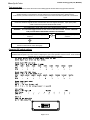
Trouble shooting guide (150, MCS590)
MotorCycle Cruise
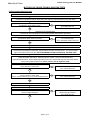
Is the cruise connected to the bikes original clutch switch
No
Skip clutch switch check
Yes
Operate the clutch lever. WARNING: - The bike may have to be in gear as often the neutral light is linked to the
same circuit as the clutch switch. The rear wheel must not touch the ground if the engine is running.
Red LED on computer (but not the control switch) comes
on with clutch operation?
Yes
Tap SET key and RES keys
Indicator and LED flashes, clicks heard or felt in actuator?
No
Test switch (no flashes)
Go to actuator test (no clicks)
Yes
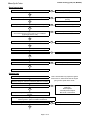
Start engine
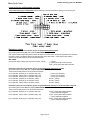
Press SET and RES keys to raise and lower engine speed. Delay can occur during these operations. CAUTION:be careful not to over rev engine. Use brakes or kill switch to switch off engine if revs are too high.
Engine speed goes up with SET key, down with RES key
No
Go to vacuum test, actuator test,
actuator cable test, CIU test
Yes
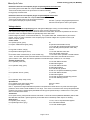
Speed sensor signal test can only be performed on the center stand on bikes that have speed signal generated
from the rear wheel, either from a sensor or from the speedometer sender unit. Engage 3rd or 4th gear and
release the clutch GENTLY. If no center stand is fitted, or speed signal comes from the front wheel, ride the bike
and observe the indicator on the cruise control switch and/or LED on computer. Increase the wheel speed to about
50~60kph (30~35mph). Observe the control switch indicator and/or computer LED.
The flash rate from the LED depends on the dip switch settings (the switches under the rubber cover on the back
end of the cruise control computer) being correct. If the DIP switch settings are correct, at 60 kph (about 37 mph)
the LED should flash approximately once per second (10 flashes over 10 seconds, between 9 and 11 seconds
is OK). If the switch settings are wrong, the flash rate will be significantly different. For example if 10 flashes
takes 8 or 12 seconds, then the DIP switch settings may be incorrect.
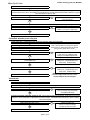
Indicator and LED flashing?
No
Go to speed sensor test
Yes
Speed signal OK
Diagnostic test OK. Switch ignition switch OFF to release cruise from diagnostic mode.
Computer power test
Remove 16 pin plug from computer. Turn ingnition switch ON
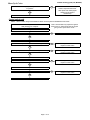
Check 12V on pink wire from fuse (pin 10)
No
Check fuse/power from brake circuit
No
Connect or relocate ground
Yes
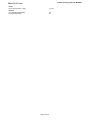
Check ground (earth) on black wire (pin 8)
Yes
Computer power OK
Page 3 of 12