1
2BChapter 3: Network and streaming configuring
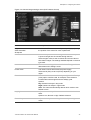
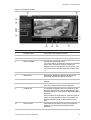
Figure 8: Network subfolder window
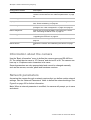
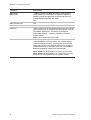
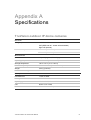
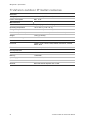
Table 4: Network parameters
Parameters
Description
Network
NIC type: Specifies the NIC type. Default is 10M/100M Auto. Other
options include: 10M half-dup, 10M full-dup, 100M half-dup and 100M
full-dup and 10M/100M auto. Default is 10M/100M.
IP address: Specifies the IP address of the camera.
Subnet mask: Specifies the subnet mask. Default value is
255.255.255.0.
Gateway: Specifies the gateway IP address. Default value is 0.0.0.0.
DNS server: Specifies the DNS server for your network. Default value is
0.0.0.0.
HTTP port: Specifies the port used for the Internet Explorer (IE)
browser. Default value is 80.
PPPoE
Use this option to retrieve a dynamic IP address.
DDNS
Specifies either DynDNS or IP server.
E-mail
Specifies the e-mail address to which messages are sent when an
alarm occurs. It is not possible to send an attachment with the e-mail.
To define the network parameters:
1. In the “Network Parameters” folder click the Network setting subfolder to
open its window.
From the NIC Type drop-down list, select the required value. Enter the values
for the IP address, subnet mask, gateway, DNS server and HTTP port. Click
Save to save changes.
TruVision Outdoor IP Camera User Manual
23