1
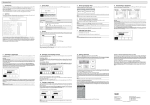
User Guide Revision 1.12 IP20 Quick Start Up Guide AC Supply Connection 3 Phase Units: Connect L1 L2 L3, PE 1 Phase Units: Connect L1, L2, PE Supply Voltage 200 – 240 Volts + / ‐ 10% 380 – 380 Volts + / ‐ 10% Fuses or MCB o Check the Drive Rating Information on page 48 Fuses or MCB Help Card Display Keypad Operation can be found on page27 IMPORTANT! Hardware Enable Circuit Link the terminals as shown, optionally through switch contacts to enable drive operation Control Terminals Based on the factory default parameter settings M Run – Stop 10K Speed Pot Close the switch to run (enable), open to stop Motor Cable o For correct cable size, see Technical Data on page 48 o Observe the maximum permissible motor cable length o For Motor cable lengths > 50 metres, an output filter is recommended o Use a screened (shielded cable) Motor Connection Check for Star or Delta Connection Enter the Motor Nameplate Data into the drive Parameters as follows o Motor Rated Voltage : P1‐07 o Motor Rated Current : P1‐08 o Motor Rated Frequency : P1‐09 o Motor Rated Speed (Optional) : P1‐10 www.beijerelectronics.com 2