1
OPERATION : UPDATING SOFTWARE
3
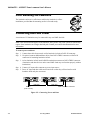
Transferring Software From Luminaire to Luminaire
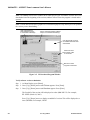
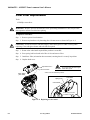
It is possible to transfer specific software versions between luminaires. As in the case of installing new
software versions, multiple luminaires can be programmed at the same time if they are data linked
together (refer to “Connecting Data and Power” on page 14), however a maximum of 32 luminaires
can be updated at once.
Hardware Requirements
Data cables used in this process must have two twisted pairs and a shield. It is also recommended that
cables meet all other USITT DMX specification requirements. Refer to “Data Cables” on page 9.
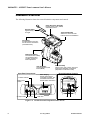
A DMX termination connector is used in this process. Refer to page 14 for more information regarding
the construction of this connector.
Master luminaire containing
software version to download
Luminaire 1
requiring update
AC PWR
~
AC IN
Luminaire 2
requiring update
AC PWR
DATA IN
~
DATA THRU
AC IN
MENU ENTER
AC PWR
DATA IN
~
DATA THRU
AC IN
DATA IN
DATA THRU
MENU ENTER
Data Thru
MENU ENTER
Data Thru
DMX Termination Connector
Figure 3-6: Software Transfer Setup
Transfer Procedure
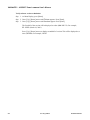
This procedure is used to transfer software versions between luminaires.
Step
1. At last luminaire, install DMX termination connector into DATA THRU XLR connector.
Step
2. At master luminaire (first in chain) Menu Display, press [Menu].
Step
3. Press [Up] / [Down] arrows until Fixture appears.
Step
4. Press [Up] / [Down] arrows until Download appears. Press [Enter].
Step
5. OK? will be displayed. Press [Enter] to accept.
Step
6. Download will proceed. (Download will take 4-5 seconds.) The number of blocks displayed
will be less in a luminaire-to-luminaire download than in a PC-to-luminaire download for
the same software version.
Step
7. Once download is complete, luminaire will automatically recalibrate. Once recalibration is
complete, reset (recalibrate again) luminaire.
02.9 678.00 19 0
31-July-2004
41