1
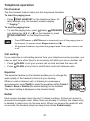
Telephone operation
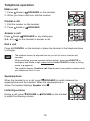
Make a call
1. Press
/FLASH or
/SPEAKER on the handset.
2. When you hear a dial tone, dial the number.
Predial a call
1. Dial the number on the handset.
2. Press
/FLASH
or
/SPEAKER.
Answer a call
Press /FLASH, /SPEAKER or any dialing key
(0-9, # or
) on the handset to answer a call.
End a call
Press OFF/CANCEL on the handset or place the handset in the telephone base
or charger.
•
The handset shows the elapsed time as you talk (in hours, minutes and
seconds).
•
When predialing (preview numbers before dialing), press MUTE/DELETE to
backspace and delete a digit; press and hold REDIAL/PAUSE to insert a dialing
pause (a p appears).
•
The handset displays Unable to call. Line in use if you predial a number while
your telephone line is in use.
Speakerphone
When the handset is on a call, press /SPEAKER to switch between the
speakerphone and the handset. When the speakerphone is
active, the handset displays Speaker and .
Listening volume
During a call, press /VOLUME or /VOLUME on the handset
to adjust the listening volume.
19