1
The DXSpider User Manual v1.49: Filtering (From version 1.45)
10.3 Filter options
You can filter in several different ways. The options are listed in the various helpfiles for accept, reject and filter.
10.4 Advanced filtering
Once you are happy with the results you get, you may like to experiment.
The previous example that filters hf/cw spots and accepts vhf/uhf spots from EU can be written with a mixed filter, for
example ...
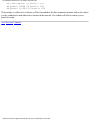
rej/spot on hf/cw
acc/spot on 0/30000
acc/spot 2 on 50000/1400000 and (by_zone 14,15,16 or call_zone 14,15,16)
Note that the first filter has not been specified with a number. This will automatically be assumed to be number 1. In this
case, we have said reject all HF spots in the CW section of the bands but accept all others at HF. Also accept anything in
VHF and above spotted in or by operators in the zones 14, 15 and 16. Each filter slot actually has a 'reject' slot and an
'accept' slot. The reject slot is executed BEFORE the accept slot.
It was mentioned earlier that after a reject test that doesn't match, the default for following tests is 'accept', the reverse is
true for 'accept'. In the example what happens is that the reject is executed first, any non hf/cw spot is passed to the accept
line, which lets through everything else on HF. The next filter line lets through just VHF/UHF spots from EU.
Next Previous Contents
http://www.dxcluster.org/main/usermanual-10.html (3 of 3) [2/9/2002 11:42:59 AM]