1
User Manual
• Please read this manual before operating this scanner.
• After you finish reading this manual, store it in a safe place for future
reference.
FCC REGULATIONS (For 120 V model)
RÈGLEMENT SUR LE BROUILLAGE RADIOÉLECTRIQUE
(For 120 V models)
Document Scanner, Model M111081
This device complies with Part 15 of the FCC Rules. Operation is
subject to the following two conditions: (1) This device may not cause
harmful interference, and (2) this device must accept any interference
received, including interference that may cause undesired operation.
Note: This equipment has been tested and found to comply with the
limits for a Class B digital device, pursuant to Part 15 of the FCC
Rules. These limits are designed to provide reasonable protection
against harmful interference in a residential installation. This
equipment generates, uses, and can radiate radio frequency energy
and, if not installed and used in accordance with the instructions, may
cause harmful interference to radio communications. However, there
is no guarantee that interference will not occur in a particular
installation. If this equipment does cause harmful interference to radio
or television reception, which can be determined by turning the
equipment OFF and ON, the user is encouraged to try to correct the
interference by one or more of the following measures:
– Reorient or relocate the receiving antenna.
– Increase the separation between the equipment and receiver.
– Connect the equipment into an outlet on a circuit different from that
to which the receiver is connected.
– Consult the dealer or an experienced radio/TV technician for help.
Use of shielded cable is required to comply with Class B limits in
Subpart B of Part 15 of FCC Rules.
Do not make any changes or modifications to the equipment unless
otherwise specified in the manual. If such changes or modifications
should be made, you could be required to stop operation of the
equipment.
Canon U.S.A. Inc.
One Canon Plaza, Lake Success NY 11042, U.S.A.
Tel. No. (516)328-5000
Cet appareil numérique respecte les limites de bruits radioélectriques
applicables aux appareils numériques de Classe B prescrites dans la
norme sur le matériel brouilleur: “Appareils Numériques”, NMB-003
édictée par l’Industrie Canada.
International ENERGY STAR® Office Equipment Program
As an ENERGY STAR® Partner, CANON
ELECTRONICS INC. has determined that this
machine meets the ENERGY STAR® Program
guidelines for energy efficiency.
The International ENERGY STAR® Office Equipment
Program is an international program that promotes
energy saving through the use of computers and other office
equipment. The program backs the development and dissemination of
products with functions that effectively reduce energy consumption. It
is an open system in which business proprietors can participate
voluntarily. The targeted products are office equipment, such as
computers, monitors, printers, fax, machine, copiers, and scanners.
The standards and logos are uniform among participating nations.
European Union (and EEA) only.
This symbol indicates that this product is not to be disposed
of with your household waste, according to the WEEE
Directive (2002/96/EC) and your national law. This product
should be handed over to a designated collection point,
e.g., on an authorized one-for-one basis when you buy a
new similar product or to an authorized collection site for recycling
waste electrical and electronic equipment (EEE). Improper handling of
this type of waste could have a possible negative impact on the
environment and human health due to potentially hazardous
substances that are generally associated with EEE. At the same time,
your cooperation in the correct disposal of this product will contribute
to the effective usage of natural resources. For more information
about where you can drop off your waste equipment for recycling,
please contact your local city office, waste authority, approved WEEE
scheme or your household waste disposal service. For more
information regarding return and recycling of WEEE products, please
visit www.canon-europe.com/environment.
(EEA: Norway, Iceland and Liechtenstein)
RADIO INTERFERENCE REGULATIONS (For 120 V
models)
This digital apparatus does not exceed the Class B limits for radio
noise emissions from digital apparatus as set out in the interferencecausing equipment standard entitled “Digital Apparatus”, ICES-003 of
the Industry Canada.
2
Für EMVG
Disclaimers
Dieses Produkt ist zum Gebrauch im Wohnbereich, Geschäfts-und
Gewerbebereich sowie in Kleinbetrieben vorgesehen.
The information in this document is subject to change without notice.
CANON ELECTRONICS INC. MAKES NO WARRANTY OF ANY
KIND WITH REGARD TO THIS MATERIAL, EITHER EXPRESS OR
IMPLIED, EXPECT AS PROVIDED HEREIN, INCLUDING WITHOUT
LIMITATION, THEREOF, WARRANTIES AS TO MARKETABILITY,
MERCHANTABILITY, FITNESS FOR A PARTICULAR PURPOSE
OF USE OR NON-INFRINGEMENT. CANON ELECTRONICS INC.
SHALL NOT BE LIABLE FOR ANY DIRECT, INCIDENTAL, OR
CONSEQUENTIAL DAMAGES OF ANY NATURE, OR LOSSES OR
EXPENSES RESULTING FROM THE USE OF THIS MATERIAL.
Model Names
The following names may be provided for the safety regulations in
each sales region of the Document Scanner.
DR-C125: Model M111081
Trademarks
• Canon and the Canon logo are registered trademarks, of Canon Inc.
in the United States and may also be trademarks or registered
trademarks in other countries.
• imageFORMULA is a trademark of CANON ELECTRONICS INC.
• Microsoft, Windows, Windows Vista, PowerPoint, and SharePoint
are registered trademarks or trademarks of Microsoft Corporation in
the United States and other countries.
• Microsoft product screen shot(s) reprinted with permission from
Microsoft Corporation.
• Macintosh and Mac OS are registered trademarks of Apple Inc. in
the United States and other countries.
• ENERGY STAR® is a registered trademark of the United States
Environmental Protection Agency.
• ISIS is a registered trademark of Emc Corporation in the United
States.
• Google and Google docs are trademarks of Google Inc.
• Copyright © 1995-2011 Nuance Communications, Inc. All rights
reserved. Nuance, eCopy, OmniPage, and PaperPort are
trademarks and/or registered trademarks of Nuance
Communications, Inc. and/or its affiliates in the United States and/or
other countries.
• Other product and company names herein may be the trademarks
of their respective owners. However, the TM and ® symbols are not
used in this document.
CANON ELECTRONICS INC. IS NOT LIABLE FOR THE STORAGE
AND HANDLING OF DOCUMENTS SCANNED WITH THIS
PRODUCT, OR THE STORAGE AND HANDLING OF RESULTING
SCANNED IMAGE DATA.
IF YOU INTEND TO DISCARD THE ORIGINALS OF SCANNED
DOCUMENTS, YOU THE CUSTOMER ARE RESPONSIBLE FOR
INSPECTING THE SCANNED IMAGES AND VERIFYING THAT
DATA IS INTACT.
THE MAXIMUM LIABILITY OF CANON ELECTRONICS INC.
UNDER THIS WARRANTY IS LIMITED TO THE PURCHASE PRICE
OF THE PRODUCT COVERED BY THE WARRANTY.
Copyright
Copyright 2011 by CANON ELECTRONICS INC. All rights reserved.
No part of this publication may be reproduced or transmitted in any
form or by any means, electronic or mechanical, including
photocopying and recording, or by any information storage or retrieval
system without the prior written permission of CANON
ELECTRONICS INC.
3
Setup Guide
STEP 1
Please read first.
Checking the Accessories
If any of the items listed below are missing or damaged, contact your local authorized Canon dealer or service representative.
Scanner
USB Cable
Type A/Type B (Length: 1.8 m)
Reference Guide
AC Adapter/Power Cord
(Connected length: 2.6 m)
Before Use
Setup Disc
Warranty Card
(U.S.A. and Canada only)
• Items included in this manual are subject to change without notice.
• You must keep the machine’s packaging and packing materials for storing or transporting the machine.
• A print version of Reference Guide is supplied in English.
The content of the Reference Guide can be found in other languages in the User Manual on the Setup Disc.
• The shape of the power plug varies by country and region.
Remove the scanner from the box, and remove the orange tape and protective sheets (▼) from the scanner.
4
Setup Disc Contents
IMPORTANT
Install the following software necessary for using the scanner from the
supplied Setup Disc.
• CaptureOnTouch
This is a dedicated scanning utility for this product.
• Scanner Driver
This is the scanner driver for this product.
Cloud Service Software
Third-Party Software
For some of the supplied third-party software, a cloud service account
is required to use some or all of their functions.
When scanning with third-party software, user the scanner driver of
this scanner to configure scanning conditions. For details on how to
open the scanner driver, refer to the manuals supplied with each
software application.
The following software applications are also included on the supplied
Setup Disc.
• Presto! BizCard
Business card management software from NewSoft Technology
Corp. For Mac OS X, run the installer (BizCard/BCRInstaller) from
the Setup Disc to install.
* Presto! BizCard is a registered trademark of NewSoft Technology
Corp.
• OmniPage SE 4 (Windows only)
Optical character recognition (OCR) software from Nuance
Communications Inc. with multiple language support.
The languages supported by the OmniPage software bundled with
this scanner are English, French, German, Italian, and Spanish. The
software cannot be installed on operating systems of other
languages.
• PaperPort® (Windows only)
File management application from Nuance Communications Inc.
that makes it easy to store, organize, and retrieve digital documents.
– In order to receive support of this product, you need to upgrade to
a Professional version. For details on upgrading, visit the following
URL. http://www.nuance.com/partneroffer/canon
• eCopy PDF Pro Office (Windows only)
Nuance Communications PDF creation/editing software.
• Presto! PageManager (Mac OS X only)
Photo and document management software from NewSoft
Technology Corp. Run the following installer (PageManager/
PM8Installer) from the Setup Disc to install.
• Evernote
Multi-platform document filing software from Evernote Corp.
– Files required for installing this software must be downloaded via
the Internet. For details, refer to page 7 (Windows) or page 11
(Mac OS X).
– For more information on this software, visit the following URL:
http://www.evernote.com/about/intl/en/
Software
Cloud service used
Google docs plug-in for
CaptureOnTouch
Google docs
Evernote
Evernote
You will be asked to agree to terms of service when obtaining an
account. For details, refer to the website of your cloud service
provider.
Simple installation of the above software does not require an account.
5
STEP 2
Installing the Software
System requirements
• Use the USB interface provided as standard with your computer.
However, normal operation is not guaranteed with all USB
interfaces, even if present as standard equipment on the computer.
For details, consult your local authorized Canon dealer.
• Scanning speeds are lower if your computer’s standard USB
interface is USB Full-Speed (equal to USB 1.1.)
• The USB cable you are using should be the one originally included
with the scanner.
• If the CPU, memory, interface card, and other specifications do not
satisfy the installation requirements, the scanning speed may be
greatly reduced and transmission may take a long time.
• Even if the computer satisfies the recommended specifications, the
scanning speed may vary, depending on the specified scan
settings.
• The scanner drivers provided with the scanner do not necessarily
operate on all ISIS (only for Windows) or TWAIN-compatible
applications. For details, contact your application software retailer.
The following system requirements are recommended for optimal use
of this scanner.
Computer
CPU:
Memory:
Hard disk:
USB interface:
Monitor:
Optical drive:
Intel Core 2 Duo 1.66 GHz or faster
1 GB or more
3 GB or more available space required for
installation of all software
Hi-Speed USB 2.0
Resolution of 1024 x 768 (XGA) or better
recommended.
Drive capable of reading DVDs.
Operating system
• Microsoft Windows XP Service Pack 3 or later
• Microsoft Windows XP x64 Edition Service Pack 2 or later
• Microsoft Windows Vista Service Pack 2 or later (32-bit and 64-bit
editions)
• Microsoft Windows 7 Service Pack 1 or later (32-bit and 64-bit
editions)
• Mac OS X 10.5.8, 10.6.8, 10.7
Precautions for Use in 64-bit Operating Systems
• The scanner driver supplied with this product supports scanning
with 32bit applications only.
• Even with 32-bit applications, not all ISIS/TWAIN compliant
applications are guaranteed to operate.
• Scanning speed may vary depending on the specifications of your
computer.
Other requirement
• An ISIS-compatible application (Windows only) or a TWAINcompatible application that is compatible with the above operating
systems.
• .NET Framework 3.5 or later (Windows only)
Precautions for Use in Mac OS X
On a Macintosh computer equipped with a PowerPC CPU, the
scanner driver of this product cannot be used with Classic
Environment.
The driver will not run correctly when Classic Environment is running
so use the scanner when Classic Environment is not running.
IMPORTANT
• If you do not know the requirements for your computer system,
contact the store where you purchased the computer or the
manufacturer of the computer for more information.
• If you use the scanner with Windows, use the latest USB 2.0 driver
made available by Microsoft. For details, consult your local
authorized Canon dealer.
6
Installing in Windows
2
Click [Typical Installation].
IMPORTANT
• Install the software before connecting the scanner to the computer.
• Log on to Windows as an Administrator.
• Close all other applications before installing the software.
1
Insert the Setup Disc into the DVD drive of the computer.
The setup menu automatically starts up when you insert the disc
into the drive. (If the menu does not start up, execute setup.exe
from the disc.)
About Installation of Third-Party Software
If you select [Custom Installation], you can choose third-party
software applications for installation.
Hint
• If you choose Evernote, the Web browser will start and display
a webpage for downloading the software during the installation.
Download and install the software following the instructions on
the webpage.
To install Evernote, you need a connection to the Internet.
• If you want to reinstall only specific software that you have
previously uninstalled, select [Custom Installation] and specify
the software.
For Windows 7/Vista
If the [User Account Control] screen appears, click [Yes] or
[Allow].
3
7
Click [Install].
4
5
Click [Next].
Read the license agreement, and click [I accept the terms
in the license agreement] and then [Next] if you agree to
it.
8
6
Click [Install].
7
When the driver installation is complete, click [Finish].
8
Click [Next].
9
11 Specify whether to install plug-in for Evernote, Microsoft
Read the license agreement, and click [Yes] if you agree
to it.
SharePoint and Google docs, and click [Next].
10 Click [Next].
12 When CaptureOnTouch installation is complete, click
[Finish].
9
13 Select the language you want to use, and click [Next].
15 Click [Exit] to finish installing the software.
Installing in Mac OS X
IMPORTANT
• Install the software before connecting the scanner to the computer.
• Close all other applications before installing the software.
1
14 When the User Manual installation is complete, click
[Finish].
10
Insert the Setup Disc into the DVD drive of the computer.
2
4
Click [DR-C125 Installer].
5
About Installation of Third-Party Software
If you open the folder containing the software instead of selecting
[DR-C125 Installer], you can choose third-party software
applications for installation.
Click [Continue].
Read the license agreement and click [Continue] to
accept it.
Hint
If you choose Evernote, the Web browser will start and display a
webpage for downloading the software during the installation.
Download and install the software following the instructions on
the webpage.
To install Evernote, you need a connection to the Internet.
3
Click [Continue].
6
11
Click [Agree].
7
8
9
Click [Install].
Enter the user name and the password with administrator
privileges, and click [OK].
When the installation is complete, click [Close].
12
STEP 3
Connecting to a Computer
Connect the scanner to the computer and the power supply.
Hint
IMPORTANT
You can secure the cables to the back of the scanner. Make sure
there is sufficient slack in the cable when doing so to reduce stress
on the connector.
• Do not connect the scanner to the computer before installing the
software.
• Before connecting the scanner to the computer, verify that the
power of the scanner is OFF. If the power is ON, turn it OFF.
AC adapter (included
with the scanner)
To the power outlet
USB cable (included
with the scanner)
To computer
USB port
13
STEP 4
Turning the Power ON
The power of the scanner can be turned ON and OFF with the power
button on the front of the scanner.
1
2
When the scanner is properly connected to the computer, the
(CaptureOnTouch) icon appears on the taskbar (or menu bar) as
follows.
Make sure that the scanner and computer are connected
properly.
Windows taskbar
Press the power button.
Mac OS X menu bar
Power button
If the taskbar icon appears as
( ), the scanner is not properly
connected to the computer. Check the status of the power switch and
USB cable.
Turning Off the Power
Press and hold the power button until the indicator goes out.
IMPORTANT
The power button lights blue when the power turns ON.
• After turning the scanner off, wait at least 10 seconds before turning
it back on.
• If you will not be using the scanner for an extended period, you
should disconnect the power cord from the AC outlet for safety.
Hint
In Windows, a balloon message such as shown below appears on the
task bar. If you wait a while, automatic scanner recognition will end
and the scanner will become ready to use.
Hint
The scanner’s auto power off setting is enabled by default, and the
scanner will turn off automatically if it is not operated for 4 hours.
For details on how to disable this setting, see “Auto Power Off Setting”
on p. 91.
Ð
This completes setup.
14
Introduction
Thank you for purchasing the Canon imageFORMULA DR-C125
Document Scanner.
Please read the following manuals carefully and familiarize yourself
with the functions of the scanner before use to ensure you sufficiently
understand the functions and make the most of the scanner’s
capabilities. After reading the manuals, store them in a safe place for
future reference.
Symbols Used in This Manual
The following symbols are used in this manual to explain procedures,
restrictions, handling precautions, and instructions that should be
observed for safety.
WARNING
Manuals for the Scanner
Indicates a warning concerning operations that may lead to death
or injury to persons if not performed correctly. To use the scanner
safely, always pay attention to these warnings.
Documentation for this scanner consists of the following manuals.
● Reference Guide
This describes setup procedures for the scanner. Read this manual
when you first use the scanner.
● User Manual (this manual)
This manual contains complete explanations for operations on the
scanner. This manual is stored on the supplied Setup Disc as a PDF
electronic manual.
CAUTION
Indicates a caution concerning operations that may lead to injury to
persons, or damage to property if not performed correctly. To use
the scanner safely, always pay attention to these cautions.
Hint
IMPORTANT
If you are using Windows, the User Manual will be registered to the
following location in the start menu after you install the software on the
Setup Disc.
Indicates operational requirements and restrictions. Be sure to
read these items carefully to operate the scanner correctly, and
avoid damaging the scanner.
Hint
Indicates a clarification of an operation, or contains additional
explanations for a procedure. Reading these notes is highly
recommended.
15
Table of Contents
Setup Guide ......................................................................... 4
Introduction ....................................................................... 15
Scanning in Mac OS X................................ 59
Symbols Used in This Manual.................................................... 15
What is CaptureOnTouch?.................................................... 59
Launching and Quitting CaptureOnTouch............................. 59
Scan First .............................................................................. 60
Select Scan Job .................................................................... 62
Scanning with Start Button .................................................... 65
Scanner Settings ................................................................... 66
Setting the Output Method .................................................... 69
Environmental Settings ......................................................... 70
Scanning with CaptureOnTouch (Mac OS X)............. 59
Before Using the Scanner.......................... 17
Important Safety Instructions ..................................... 17
Installation Location .............................................................. 17
AC Adapter............................................................................ 17
Moving the Scanner .............................................................. 18
Handling ................................................................................ 18
Disposal ................................................................................ 19
When sending the scanner for repairs .................................. 19
Setting the Scanner Driver (Mac OS X) ...................... 72
Features of the Scanner .............................................. 20
Names and Functions of Parts ................................... 22
Configuration of the Scanner Driver ...................................... 72
Setting Basic Scanning Conditions ....................................... 73
Scan Panel ............................................................................ 80
Basic Operation ......................................... 24
Maintenance .............................................. 81
Documents ................................................................... 24
How to Place Documents ............................................ 26
Daily Maintenance ........................................................ 81
Cleaning the Outside of the Scanner .................................... 81
Cleaning the Inside of the Scanner ....................................... 81
Cleaning the Scanning Glass and the Rollers....................... 81
Adjusting the Reduction Ratio ............................................... 84
Replacing Consumable Parts................................................ 86
Auto Power Off Setting.......................................................... 91
Switching the Feed and Eject Methods................................. 26
Placing Documents for Standard Feeding ............................ 26
Placing Documents for Non Separation Feeding .................. 29
Placing Cards........................................................................ 30
Placing Folded Documents ................................................... 31
Setting the Long Document Mode......................................... 32
Troubleshooting ......................................... 92
Scanning in Windows ................................. 35
Common Problems and Solutions.............................. 92
Software Troubleshooting........................................... 94
Useful tips ..................................................................... 95
Clearing a Paper Jam................................................... 97
Uninstalling the Software .......................................... 100
Scanning with CaptureOnTouch (Windows) ............. 35
What is CaptureOnTouch?.................................................... 35
Starting and Exiting CaptureOnTouch .................................. 35
Scan First .............................................................................. 36
Select Scan Job .................................................................... 38
Scanning with Start Button.................................................... 41
Scanner Settings................................................................... 42
Setting the Output Method .................................................... 44
Environmental Settings ......................................................... 45
Uninstalling on Windows ..................................................... 100
Uninstalling on Mac OS X ................................................... 100
Appendix .................................................. 101
Specifications ............................................................. 101
Setting the Scanner Driver (Windows)....................... 48
Replacement parts .............................................................. 102
Option.................................................................................. 102
About the Flatbed Scanner Unit 101 ................................... 102
Dimensions.......................................................................... 103
Configuration and Functions of the Scanner Driver .............. 48
Setting Basic Scanning Conditions ....................................... 49
Scan Panel............................................................................ 57
Settings for Third Party Software .......................................... 57
Index .............................................................................104
16
Before Using the Scanner
Important Safety Instructions
● Avoid exposing the scanner to rapid changes in temperature. If the
room in which the scanner is installed is cold but rapidly heated,
water droplets (condensation) may form inside the scanner. This
may result in a noticeable degradation in scanning quality. The
following conditions are recommended for optimal scanning quality:
Room temperature: 10°C to 32.5°C (50°F to 90.5°F)
Humidity: 20% to 80% RH
● Avoid installing the scanner near equipment that generates a
magnetic field (e.g. speakers, televisions, or radios.)
To ensure the safe operation of this scanner, be sure to read the
safety warnings and precautions described below.
Installation Location
The performance of this scanner is affected by the environment in
which it is installed. Make sure that the location where the scanner is
installed meets the following environmental requirements.
● Provide adequate space around the scanner for operation,
maintenance, and ventilation.
AC Adapter
● Connect only to a power outlet of the rated voltage and power
supply frequency (120 V, 60 Hz or 220-240 V, 50/60 Hz depending
on your region).
● Do not connect other electrical equipment to the same power outlet
to which the scanner is connected. Also, when using an extension
cord, make sure that the extension cord is rated for the current
requirements of the scanner.
● Never try to take the AC adapter apart or modify it in any way, as
this is dangerous.
● The power cord may become damaged if it is often stepped on or if
heavy objects are placed on it.
● Do not use the power cord while it is coiled.
● Do not pull directly on the power cord. When disconnecting the
power cord, grasp the plug and remove it from the outlet.
● Keep the area around the power cord clear of objects so that the
power cord can be disconnected easily in an emergency.
● Do not use an AC adapter other than the one provided with the
scanner. Do not use the AC adapter provided with the scanner with
other products.
● If you have any questions regarding the power supply, contact your
local authorized Canon dealer or service representative for further
information.
100 mm
(3.94")
100 mm
(3.94")
100 mm
(3.94")
● When scanning documents using the straight path, provide
adequate space in front of the scanner for scanned document
output.
● Avoid installing the machine in direct sunlight. If this is unavoidable,
use curtains to shade the scanner.
● Avoid locations where a considerable amount of dust accumulates.
● Avoid warm or humid locations, such as in the vicinity of a water
faucet, water heater, or humidifier. Avoid locations where ammonia
gas is emitted. Avoid locations near volatile or flammable materials,
such as alcohol or paint thinner.
● Avoid locations that are subject to vibration.
17
● Never try to take the AC adapter apart or modify it in any way, as
this is dangerous.
● Do not use flammable spray near the scanner.
● When cleaning the scanner, push the power button to turn it OFF
and disconnect the power cord from the power supply.
● Clean the scanner using a slightly dampened cloth which has been
well wrung out. Never use alcohol, benzene, paint thinner, or any
other flammable substances.
● If the scanner makes strange noises, or gives off smoke, heat, or
strange odors, or the scanner does not function or other
abnormalities occur when you use the machine, immediately push
the power button to turn it off, and disconnect the power plug from
the power outlet. Then, contact your local authorized Canon dealer
or service representative to have the unit serviced.
● Do not drop the scanner, or subject it to impact or strong shock.
Should the scanner ever become damaged, immediately push the
power button to turn it OFF, and disconnect the power plug from the
power outlet. Then, contact your local authorized Canon dealer or
service representative to have the unit serviced.
● Before moving the scanner, be sure to push the power button to turn
it OFF, and disconnect the power plug from the power outlet
Moving the Scanner
● When moving the scanner, always hold it with both hands to avoid
dropping it. The scanner weighs approximately 2.6 kg (5.73 lb).
● Make sure to disconnect the interface cable and AC adapter before
moving the scanner. If the scanner is transported with these items
connected, the plugs and connectors may be damaged.
Handling
CAUTION
WARNING
● Do not install the scanner on a surface that is unstable or tilted, or
in an area subject to excessive vibrations, as this may cause the
scanner to fall, resulting in personal injury or damage to the
scanner.
● Never place small metal objects such as staples, paper clips, or
jewelry on the scanner. These items may fall into the scanner, and
cause a fire or electric shock. Should such objects ever fall inside
the scanner, immediately push the power button to turn it OFF, and
disconnect the power plug from the power outlet. Then, contact
your local authorized Canon dealer or service representative to
have the unit serviced.
● Do not install the scanner in a humid or dusty location. Doing so
might cause a fire or electric shock.
● Do not place objects on top of the scanner. Such objects may tip or
fall over, resulting in personal injury.
● Connect only to a power outlet of the rated voltage and power
supply frequency (120 V, 60 Hz or 220-240 V, 50/60 Hz depending
on your region).
Note the following precautions whenever using the scanner. Failure to
do so may result in a fire or electric shock.
● Never use alcohol, benzene, paint thinner, aerosol sprays, or any
other highly flammable substance near the scanner.
● Do not cut, damage, or modify the power cord. Do not place heavy
objects on the power cord, and do not pull or excessively bend the
power cord.
● Never connect the power cord when your hands are wet.
● Do not connect the scanner to a multi plug power strip.
● Do not knot or coil the power cord as this may result in a fire or
electric shock. When connecting the power cord, make sure that the
power plug is securely and completely inserted into the power
outlet.
● Do not use a power cord or AC adapter other than the ones
provided with this scanner.
● Do not take the scanner apart or modify it.
18
● When unplugging the power cord, grasp it firmly by its plug. Do not
pull directly on the power cord, as this may damage or expose the
cord’s internal wiring, resulting in a fire or electric shock.
● Leave sufficient space around the power plug so that it can be
unplugged easily. If objects are placed around the power plug, you
will be unable to unplug it in an emergency.
● Do not allow water or flammable substances (alcohol, paint thinner,
benzene, etc.) to spill into the scanner, as this may result in a fire or
electric shock.
● Push the power button to turn the scanner OFF for safety when not
using the scanner for a long period of time, such as overnight. Also,
push the power switch to turn it OFF, and disconnect the power cord
from the power outlet for safety when the machine will not be used
for an extended period of time, such as during consecutive
holidays.
● Do not wear loose clothing or jewelry that may get caught in the
scanner while you are using it. This may result in personal injury. Be
extra careful of neckties and long hair. If anything becomes caught
in the scanner, immediately disconnect the power cord to stop the
scanner.
● Be careful when loading paper into the scanner and when removing
jammed paper. It is possible to cut your hand on the edge of a sheet
of paper.
Disposal
When disposing of this scanner, be sure to follow all local ordinances
and laws or consult with the retailer who sold you the scanner.
When sending the scanner for repairs
When a request is made for repairs, the scanner needs to be sent to
the specified address. When sending the scanner, use the packing
box in which it came. Firmly secure the scanner with packaging
material when you place it in the packing box.
19
Features of the Scanner
● Auto Color Detection
The scanner detects whether the scanned document is in color,
grayscale, or black and white (binary), and saves the image
accordingly.
● Full Auto Mode
A Full Auto Mode is provided in CaptureOnTouch and the scanner
driver to allow scanning under automatically determined conditions.
Scanning conditions such as the color mode and page size are set
automatically based on the document being scanned.
● Auto Resolution Detection
When enabled in the CaptureOnTouch or scanner driver settings,
this function detects the content of documents and determines the
scanning resolution automatically.
● Folio Scan
You can scan folded documents. The scanner will scan both sides
and combine the scanned images into a single image.
● Deskew
The scanner straightens scanned images when it detects that the
document was placed askew.
● Ultrasonic Double Feed Detection
Ultrasonic waves are used to detect pages that are fed at the same
time as well as the space between pages. Scanning stops if a
double feed is detected.
● Text Enhancement Modes
The scanner is equipped with the Advanced Text Enhancement
Mode (only for Windows), for enhancing the text of documents with
dark or uneven backgrounds, and the Advanced Text Enhancement
II mode, for enhancing the text when both the text and background
are light.
These modes may not work, depending on the type of document.
● Color Drop-out
The scanner is equipped with a Color Drop-out function that
enables you to specify a color for the scanner to omit from the
scanned image during black and white or grayscale scanning.
The main features of the document scanner DR-C125 are described
below.
● Compact Design
The scanner has a compact size of 300 (W) x 336 (H) x 235 (D)
(11.81" (W) x 13.2" (H) x 9.25" (D)) mm when the document feed is
open. A newly designed feed mechanism saves space by
eliminating the need for space to eject paper at the front of the
scanner.
● Fast Document Feeding
Documents can be scanned at a speed of up to 25 pages per
minute (when scanning one-sided or two-sided documents of A4
size at 200 dpi).
● Two Eject Paths for Scanning a Variety of Documents
Use the U-turn path to scan paper of standard thickness, or use the
straight path to scan cards and other thick documents.
● High Image Quality
The 600 dpi optical resolution sensor incorporated in the scanner
enables documents to be scanned with high image quality.
● USB 2.0 Interface
The scanner supports Hi-Speed USB 2.0.
● Color/Grayscale Support
Documents can be scanned in 24-bit color or 256-level grayscale.
● Supports a Variety of Scanning Modes
The scanner supports the following scanning modes, depending on
the document type:
• Single-sided or double-sided scanning (with Skip Blank Page
function)
• Continuous or single sheet feed
● Card Scan
You can scan business or ID cards.
● Paper Size Detection
The scanner automatically detects the size of a scanned document
and eliminates any unnecessary space around the edges of the
image when storing the image, even when storing a document of
irregular size.
20
● Skip Blank Page Function
The scanner is equipped with a Skip Blank Page function that
enables you to scan a document without storing images of blank
pages, regardless of whether each page of the document is twosided or one-sided. Both sides are scanned, but saving the image
is skipped for scan images judged to be from a blank page.
● Prescan Function
The scanner is equipped with a Prescan function that allows you to
adjust the contrast and brightness of a prescanned image and then
send the adjusted image to the application software, without
needing to scan the document again.
● Character/Line Emphasis Function
If characters and lines in scanned images are not clearly visible, you
can use this function to adjust their thickness during scanning.
● Scan First
Pressing Start Button starts CaptureOnTouch. You can then
perform a scan simply by following the on-screen guidance.
● Select Scan Job
You can register scanning conditions and methods for processing
scanned images as jobs, and register up to 10 jobs in
CaptureOnTouch. By simply selecting a registered job, you can
perform scanning operations in a determined order.
● Auto Start
The scanner is equipped with an auto start function, which enables
scanning to be automatically started when a document placed in the
feeder is detected.
● Sleep Mode
The scanner is designed to save energy by entering the sleep mode
when it is not scanning documents.
IMPORTANT
Depending on the bundled software you are using, all of the
preceding features may not be available.
21
Names and Functions of Parts
F Document Feed Tray
Front View
Open this when loading documents for scanning.
C
G Power Button
This turns the scanner ON and OFF.
D
H Start Button
This starts scanning the document loaded in the document feed
tray
E
I Feed Selection Indicator
F
A
This indicates the way documents are currently being fed in
accordance with the position of the feed selection lever.
G
H
I
J
B
Lever position
Indicator color
Upper (non separation feeding)
Orange
Lower (standard feeding)
Black
J Feed Selection Lever
K
This changes the way documents are fed.
K Connectors
L
Connectors for connecting an AC adapter and USB cable are
available. (See p. 23)
A Front Unit
L Eject Selection Lever
Open this when removing paper jammed inside the scanner,
cleaning the inside of the scanner, or replacing rollers.
Use this lever to change the way documents are ejected.
B Document Eject Pocket
Scanned documents are output here.
C Feed Extension Plates
Pull this out when loading long documents.
D Eject Support
Open this when loading long documents.
E Feed Support
Pull out this to support loaded documents.
22
Connectors
Back View
A
A
B
A Power Connector
B
Connect the supplied AC adapter to this connector.
B USB Connector
Connect the supplied USB cable to this connector.
C
A OPEN Button
Press this button to open the front unit.
B Kensington Slot
Connect an anti-theft key chain or the like.
C Cable Grooves
Secure the USB cable and power cord that are connected to the
scanner along the rear of the scanner. Use these when you want
to run the cables on the side opposite the connectors.
23
Basic Operation
Documents
• Use the straight path when scanning documents that are 70 mm
(2.76") long or less.
• Scanning documents before the ink is dry can cause problems with
the scanner. Always make sure that the ink on a document is dry
before scanning it.
• Scanning documents that are written in pencil or similar material
may make the rollers and scanning glass dirty, which can lead to
smudges on the scanned image and transfer the dirt to subsequent
documents. Always clean the internal parts of the scanner after
scanning such documents.
• When scanning a two-sided document that is printed on thin paper,
the image on the opposite side of each page may show through. In
this case, adjust the scanning intensity in the application software
before scanning the document.
• It is recommended that thin documents are fed one sheet at a time.
• Scanning the following types of documents can cause a paper jam
or malfunction. To scan such a document, make a photocopy of the
document and then scan the photocopy.
The scanner can scan documents ranging in size from business cards
to Legal/A4. The document sizes that this scanner can scan are
shown below.
Plain Paper
Size
Width: 50.8 mm to 216 mm (2" to 8.5")
Length: 53.9 mm to 356 mm (2.12" to 14")*
Paper thickness:
When U-turn path: 52 to 128 g/m2 (14 to 34 lb bond)
0.06 to 0.15 mm (0.0024" to 0.0059")
When straight path: 40 to 209 g/m2 (11 to 58 lb bond)
0.05 to 0.25 mm (0.002" to 0.0098")
* Setting the scanner to Long Document mode enables documents
up to 3,000 mm (118.1") long to be scanned. For details on Long
Document mode, refer to “Setting the Long Document Mode” on
p. 32.
IMPORTANT
The documents to be scanned must satisfy certain criteria. Read the
following items carefully.
• When scanning multiple documents of different sizes, place the
documents so that they cover the entire span of the feed rollers.
There are creases or
fold lines.
Carbon paper
There are curls.
The surface is coated.
There are tears.
Extremely thin document
such as semi-transparent
thin paper.
There are clips or
staples.
Documents with excessive
paper dust particles.
Business Card
Size:
Paper weight:
Orientation:
Feed rollers
50 mm x 53.9 mm (1.97" x 2.12") or larger
300 g/m2 (80 lb bond) 0.35 mm (0.0138") or less
Vertical feeding only
IMPORTANT
• It is recommended that documents exceeding 356 mm (14") in size
are fed one sheet at a time.
If a stack of business cards cannot be fed properly, reduce the
number of cards in the stack.
24
Card (plastic or laminated)
Size:
53.9 mm x 85.5 mm (2.12" x 3.37") (ISO standard)
Card thickness: 0.76 mm (0.03") or less, 1.4 mm (0.055") or less for
the embossment
Orientation:
Horizontal feeding only
Feed path:
Straight path only
Embossed cards can be scanned.
CAUTION
• Use the straight path when scanning cards.
• If you place cards to be fed vertically, they may not be ejected
properly, and cards that get jammed may be damaged when you
remove them. Take care of the orientation when placing cards.
• Embossed cards may not be able to be scanned correctly,
depending on the type of embossment.
25
How to Place Documents
Switching the Feed and Eject
Methods
Placing Documents for Standard
Feeding
Use the two levers on the scanner to switch the feed and eject
methods based on the type of document you are scanning.
Ordinarily, standard feeding should be used when scanning multiple
documents of a standard size at one time. Standard feeding enables
the multiple documents to be fed while separating each page.
Feed Selection Lever
Standard Feeding Non Separation
Feeding
1
Open the document feed tray.
2
Pull out the feed support.
Eject Selection Lever
U-turn Path
Straight Path
The feed and eject methods and lever positions for each document
type are as follows.
Document type
Feed method (lever
position)
Eject method (lever
position)
Standard paper
and business
cards
Standard feeding
(lower)
U-turn path (upper) or
straight path (lower)
Plastic cards, thick
paper, thin paper,
and bound or
fastened paper
Non separation
feeding (upper)
Straight path (lower)
26
3
4
When scanning long documents, pull out the feed
extension plates and eject support.
Set the feed selection lever and the eject selection lever.
Set the feed selection lever to the standard feeding position (lower
position).
Set the eject selection lever to the U-turn path position ( ).
When scanning documents that contain both standard paper and
plastic cards, use the straight path.
5
27
Adjust the document guides to fit the width of the
document to be scanned.
6
IMPORTANT
Place the document.
• When placing documents into the feed tray, take care not to cut
your hands on the edges of the paper.
• Make sure that the document does not exceed the loading limit
marks ( ) on the document guides. Up to 30 pages of ordinary
plain paper (80 g/m2) can be loaded at the same time.
• Before you place a document, check to make sure it does not
contain paper clips, staples, or other small metal objects. These
items may cause a fire or electrical shock, damage the document,
or cause a paper jam or scanner malfunction.
• Do not wear loose clothing or jewelry that may get caught in the
scanner while you are using it. This may result in personal injury. Be
extra careful of neckties and long hair. If anything gets caught in the
scanner, immediately turn OFF the power switch, and disconnect
the power cord from the power outlet to stop scanning.
• Always smooth out any folds or curls in your documents before
placing them into the feeder. If the leading edge of a document is
curled, it may cause a paper jam.
• If feeding stops due to a system error or paper jam while the
scanner is scanning, resolve the problem, make sure that the
scanned image of the last page that was successfully fed has been
stored, and then resume scanning the remaining document pages.
• After you finish scanning, close the document feed tray to prevent
damage to the scanner while it is not being used.
• Although standard feeding can be used in combination with the
straight path when scanning, multi-page documents will be ejected
in reverse order in such cases.
• If you select the [Upside-down feeding] check box in the scanner
driver settings, you can insert documents into the scanner in the
opposite orientation (see p. 53, p. 78).
Insert the document in the feed tray so that the front is facing
forward and the top is facing upward.
After inserting the document in the document feeder, align the
document guides with both edges of the document.
28
Default
[Upside-down
feeding] selected
Placing Documents for Non
Separation Feeding
When scanning a thick document one page at a time or scanning a
document that has multiple pages fastened together, set document
feeding to non separation mode. This enables the placed document to
be scanned without the pages being separated, regardless of the
number of pages.
1
2
Set the feed selection lever and the eject selection lever.
Set the feed selection lever to the non separation position (upper
position). The feed selection indicator will light orange.
Set the eject selection lever to the straight path position ( ).
29
Adjust the document guides to fit the width of the
document.
3
Placing Cards
Place the document in the document feed tray.
IMPORTANT
1
• With the straight path, documents are ejected at the front of the
scanner. Do not place anything that will block output near the
document eject area. Also, install the scanner on a smooth
surface to enable documents to be smoothly ejected.
Set the feed selection lever and the eject selection lever.
Set the feed selection lever to the non separation position (upper
position). The feed selection indicator will light orange.
Set the eject selection lever to the straight path position ( ).
2
• When scanning multiple page documents that are fastened
together, such as invoices, place the documents so that the
edge that is fastened together is facing down.
30
Adjust the document guides to fit the width of the card to
be scanned.
3
IMPORTANT
Place the card horizontally with the top edge facing
upward.
With the straight path, documents are ejected at the front of the
scanner. Do not place anything that will block output near the
document eject area. Also, install the scanner on a smooth surface to
enable documents to be smoothly ejected.
CAUTION
• Place the card one at a time.
• If you place cards to be fed vertically, they may not be ejected
properly, and cards that get jammed may be damaged when you
remove them. Take care of the orientation when placing cards.
Placing Folded Documents
Folio Scan enables you to scan documents that are larger than LTR/
A4 and therefore do not fit in the feeder. (The maximum size is 11" x
17"/A3.) To use the function, fold the document in half lengthwise and
place it into the feeder. The DR-C125 will scan both sides and
combine the scanned images into a single image.
1
Set the feed selection lever and the eject selection lever.
Set the feed selection lever to the non separation position (upper
position). The feed selection indicator will light orange.
Set the eject selection lever to the straight path position ( ).
• Ultrasonic double feed detection will not function properly when
scanning cards. Clear the [Detect by Ultrasonic] check box in the
[Feeding] tab.
31
2
Setting Scanning Conditions
Fold the document in half.
Configure scanning conditions as follows when scanning folded
documents.
Align the left and right sides of the document, and crease the
document firmly. If the document is not folded properly, paper
jams may occur or distortions may appear in the combined
scanned image.
Scanner driver (Windows)
Configure the following settings in the [Basic] tab. (See p. 49)
• Set [Page Size] to half the size of the document (set to [Match
original size] when scanning an atypical document size)
• Set [Scanning Side] to [Folio].
IMPORTANT
A portion of the scanned image will be missing at the fold line.
3
Scanner driver (Mac OS X)
Configure the following settings. (See p. 73)
• Set [Page Size] to half the size of the document (set to [Detect
automatically] when scanning an atypical document size)
• Set [Scanning Side] to [Folio].
Place the document in the document feed tray.
Under default conditions, place the document with the folded edge
facing right. If the [Upside-down feeding] check box is selected in
the scanner driver settings, place the document with the folded
edge facing left.
Setting the Long Document Mode
The length of documents that can be scanned with the scanner is
normally 356 mm (14"), but you can scan documents up to 3,000 mm
(118.1") long by setting the scanner to the Long Document mode.
IMPORTANT
Note the following when using the Long Document mode:
• When scanning in the Long Document mode, if the document is
placed on the scanner in a skewed position, it may hit the edges of
the feeding area and be damaged. Be careful to place the
document so that it is not skewed.
• When scanning with the Long Document mode, paper jam
detection may react slowly, resulting in damage to the document.
Be careful to avoid paper jams.
• When scanning long documents, make sure to set the feed
selection lever to the non separation position, and scan the
documents one at a time.
• When scanning large-sized documents with the Long Document
mode, scanning may be slower. Errors may also occur due to
memory shortage and scanning may be disabled.
IMPORTANT
Adjust the document guides to fit the width of the document.
Otherwise, the image may scan as skewed or shifted.
Hint
• The side of the folded document that is facing forward will be the left
side of the combined image.
• The maximum size for the combined image is A3.
32
Under Windows
1
2
4
Start Windows and log in as a user with administrator
privileges.
Click the [Maintenance] tab, and then select a Long
Document mode.
Select [Long Document mode (1,000 mm)] or [Long Document
mode (3,000 mm)] depending on the length of the document.
Click the Start button, and then click [All Programs],
[Canon DR-C125], and [Canon imageFORMULA Utility].
imageFORMULA Utility starts.
3
Click [CANON DR-C125 USB] and click [Properties].
5
Click [OK].
Setting Scanning Conditions
Configure scanning conditions as follows when scanning documents
in Long Document mode.
CaptureOnTouch
Set [Page Size] to [Match original size] under [Scanner setting]. (See
p. 42)
Scanner driver
Set [Page Size] to [Match original size] in the [Basic] tab. (See p. 49)
33
Setting procedure under Mac OS X
1
2
3
4
5
6
9
Starts CaptureOnTouch.
Select [Long Document mode (1,000 mm)] or [Long
Document mode (3,000 mm)] depending on the length of
the document.
Click [Scan First].
Click [OFF] of [Scan in Full Auto mode].
Click [Scanner Setting] button.
Click [OFF] of [Use Advanced Settings dialog box].
Click
.
This will open the advanced settings dialog box for the scanner.
7
Click
to display the [Scanner Information] dialog box.
10 Click
The [Scanner Information] dialog box appears.
to close the dialog box.
Setting Scanning Conditions
Configure scanning conditions as follows when scanning documents
in Long Document mode.
CaptureOnTouch
Set [Page Size] to [Match original size] under [Scanner setting]. (See
p. 66)
8
Scanner driver
Set [Page Size] to [Detect automatically]. (See p. 73)
Click [Maintenance].
The [Maintenance] dialog box appears.
34
Scanning in Windows
Scanning with CaptureOnTouch (Windows)
Scan with Start Button
What is CaptureOnTouch?
Scan First is pre-assigned to the Start button of the scanner, so you
can load a document and then start scanning by just pressing the Start
button. You can also assign any job to the Start button.
CaptureOnTouch is a scanning application that allows you to scan a
document with a simple operation by following the instructions on the
screen.
Cloud Service
Save to folder
Save the file to a
specified folder.
File Formats of Saved Images
You can specify one of the following file formats for scanned images
when using any output method other than [Print].
• PDF
• TIFF
• JPEG
• BMP
• PPTX (file format for Microsoft PowerPoint 2007 or later)
Print
Print with a specified
printer.
(Network)
Starting and Exiting CaptureOnTouch
Send to application
Open the scanned image file
in a specified application.
Scanner
By default, CaptureOnTouch becomes resident in the system when
you start your computer.
Double-click
(CaptureOnTouch icon) in the taskbar to start
CaptureOnTouch and display the main window.
Attach to E-mail
Start the e-mail application
and attach the scanned image
file to new e-mail
Hint
• You can also start CaptureOnTouch from the Start menu. Click
[Start] – [All Programs] – [Canon DR-C125] – [DR-C125
CaptureOnTouch].
• The first time you start CaptureOnTouch on a computer with
Evernote installed, a message for confirming the registration of jobs
for sending scanned images to Evernote appears. If you click the
[Yes] button, two jobs for Evernote are registered to
CaptureOnTouch.
• The interval between the time you press the Start button on the
scanner and the time scanning begins is shortened when the [Make
CaptureOnTouch resident] check box is selected in the [Basic
settings] tab of the [Environmental settings] dialog box. For details,
see “Environmental Settings” on p. 45.
CaptureOnTouch is provided with multiple scanning methods that can
be selected according to the purpose and application.
Scan First
Scan a document and then select the output method. This method
allows you to easily scan a document by just following the instructions
on the screen.
Select Scan Job
Register scanning settings from the scanning conditions to the output
method as jobs, and then scan a document by just selecting the job
that suits your purpose. This method is convenient when you want to
repeat scanning using a set procedure.
35
Exiting CaptureOnTouch
Scan First
To close the CaptureOnTouch window, click
at the top of the
window. This closes the window, but CaptureOnTouch will continue to
reside in the system.
To quit the CaptureOnTouch application, click
(CaptureOnTouch
icon) in the taskbar, and select [Exit] from the menu.
Operation Flow
Scan the document
▼
Configure the output settings
▼
Output the scanned images
1
2
Place the document in the scanner.
Click [Scan First].
CaptureOnTouch becomes no longer resident in the system and the
icon disappears from the taskbar.
Restarting CaptureOnTouch
To use CaptureOnTouch after it has been made not resident in the
system, use one of the following procedures to restart it.
CaptureOnTouch will start and become resident in the system again.
• Click [Start] – [All Programs] – [Canon DR-C125] – [DR-C125
CaptureOnTouch].
• Press the Start button on the scanner (in this case, the main screen
of CaptureOnTouch will open and scanning will start using the scan
method assigned to the Start button).
The top screen of Scan First appears.
36
3
IMPORTANT
Set the scan method in the top screen.
If you configure scanning conditions that consume a large
amount of the computer’s memory, scanning may stop because
of insufficient memory. If an error message appears due to
insufficient memory while scanning is in progress, exit the
application, change the scanning conditions, and then try
scanning again.
A
B
Hint
A Specify whether to enable continuous scanning. When
previewing the scanned image or splitting up a large document
to scan in parts, select [ON] to enable continuous scanning.
B Specify whether to scan the document in full auto mode. When
you want to specify arbitrary scanning conditions, select [OFF]
and configure the scanner settings. (See p. 42)
4
If a document is scanned when [Enable continuous scanning] is
set to [ON], the continuous scanning screen (see p. 43) appears
when scanning of the document is finished.
Click the Start button.
If you place the next document and click [Scan], scanning of the
document starts.
When scanning of all the documents is finished, click [Next step].
The document is scanned. While scanning is in progress, the
number of pages scanned is displayed in addition to the scanner
settings.
When scanning is finished, the Output settings screen appears.
37
5
Select Scan Job
Configure the settings related to output and then output
the scanned images.
Operation Flow
Register the job
▼
Select the job
▼
A
Scan the document
▼
B
Output the scanned images
Registering and Editing Jobs
In CaptureOnTouch, up to 10 jobs can be registered for use with
Select Scan Job.
A Configure the settings related to output. (See p. 44)
B Click this button to output the scanned images. The button
name differs for each output method. For example, it is [Save]
when the output method is set to [Save to folder].
When output is finished, the complete screen appears. Scan First
is now finished.
1
Hint
• Clicking [Return to top] returns to the main screen of Scan First.
• When [Attach to E-mail] or [Print] is specified as the output method,
you can click [Open storage folder] to open the folder in which the
scanned images were saved.
38
Click the
button.
2
4
Enter the job name, and press the Enter key.
Click [Output setting], and configure the output settings.
The output setting items differ depending on the specified output
method. For details on the setting items, see the Help of
CaptureOnTouch.
3
Specify the output method of the job. (See p. 44)
Hint
You can assign the job to the Start button by selecting [Start
button] for [Button assignment]. (See p. 41)
39
Selecting a Job and Scanning
1
3
Click the Start button.
Place the document in the scanner. (See p. 26)
The top screen of Select Scan Job appears.
2
Click a job.
The document is scanned. While scanning is in progress, the
number of pages scanned is displayed in addition to the scanner
settings.
When all the pages of the document are scanned, the scanned
images are output according to the registered job settings and the
complete screen appears.
Hint
• If you set [Check output after scanning] to [ON], you can check
the output settings after scanning.
• If you set [Enable continuous scanning] to [ON], you can
continue scanning after all the pages of the document are
scanned.
IMPORTANT
If you configure scanning conditions that consume a large amount of
the computer’s memory, scanning may stop because of insufficient
memory. If an error message appears due to insufficient memory
while scanning is in progress, exit the application, change the
scanning conditions, and then try scanning again.
40
Hint
• Clicking [Return to top] returns to the top screen of Select Scan Job.
• When [Attach to E-mail] or [Print] is specified as the output method,
you can click [Open storage folder] to open the folder in which the
scanned images were saved.
When [Enable continuous scanning] is set to [ON]
The continuous scanning screen (see p. 43) appears when all the
pages of the document are scanned.
If you want to scan another document, place the document in the
scanner and then click [Scan].
When scanning of all the documents is finished, click [Next step].
Scanning with Start Button
By default, Scan First is pre-assigned to the Start button.
Start button
When [Check output after scanning] is set to [ON]
The Output Confirmation screen appears before the scanned images
are output.
Change the settings for the output method if necessary and then click
the output button. The name of the output button differs for each
selected output method.
If you place the document and press the Start button,
CaptureOnTouch starts and scanning starts.
Hint
You can also assign any job to the Start button. If a job is assigned,
the document is scanned and the scanned images are output
according to the settings of the job. The main window of
CaptureOnTouch closes automatically 5 seconds after the output
process finishes.
41
Setting Basic Items
Scanner Settings
Scanner settings include the basic items that are configured in
[Scanner setting], and the setting items that are configured in the
advanced settings dialog box. The settings in the advanced settings
dialog box are applied for settings other than the basic items.
The settings in the driver settings dialog box are applied for any other
settings.
By default, CaptureOnTouch scans with scanning conditions that
match the document because scanning in full auto mode is enabled.
If you want to specify, for example, the scanning mode and document
size, you can configure the desired scanning conditions in the scanner
settings.
The scanner setting items are common to Scan First and Select Scan
Job.
Color mode
Select from the following modes for scanning documents.
Detect automatically Automatically determines the color mode based
on the document content and scans
accordingly.
24-bit Color
Scans the document in color.
Grayscale
Scans the document in Grayscale.
Black and White
Scans the document in black and white
(binary).
When Scan First:
Page Size
Specify the page size of the document.
If you specify [Match original size], the page size of the scanned
document is detected and the images are saved at the detected size.
Dots per inch
For Scan First, configure the scanner settings before you start
scanning.
Specify the scanning resolution.
When [Detect automatically] is specified, the resolution is detected
automatically from the content of the scanned document.
When Select Scan Job:
Scanning Side
Specify whether to scan only one side or both sides of a document.
When [Skip blank page] is specified, any blank paged detected within
the document is skipped during scanning.
Automatically straightens skewed images
When a document is scanned skewed, the skewed scanned images
are detected and then straightened.
Rotate image to match orientation of text
The orientation of text in scanned images is detected, and the images
are rotated so that the text is correctly oriented.
For Select Scan Job, configure the scanner settings for each job.
42
Operation in Continuous Scanning
Screen
Use advanced settings dialog box
Configure scanner settings other than the basic items in the advanced
settings dialog box (scanner driver). To open the scanner driver,
select [ON] and then click the
button.
When [Enable continuous scanning] is set to [ON] in the Start screen,
the continuous scanning screen appears when all of the pages of the
placed document have been fed. You can confirm the scanned
images and then continue scanning.
A
For details on the setting items, see the Help of the driver settings
dialog box.
B
Hint
The driver settings dialog box includes setting items that are the
same as the basic items in [Scanner setting], but the setting for each
of the them is stored separately. Which settings are used during
scanning differs as follows depending on the setting of the [Use
advanced settings dialog box] check box.
Setting of [Use
advanced settings
dialog box]
Basic items
Other than basic
items
OFF
Settings of [Scanner
setting]
Settings of the
advanced settings
dialog box of the
scanner driver
ON
Settings of the advanced settings dialog box
of the scanner driver
C
A Thumbnail Display Area
Displays the thumbnail images of the scanned document. The
following operations are possible.
Click a thumbnail image to display a preview of that scanned image
in the preview area.
Drag thumbnail images to change the positions of pages (Scan
First only).
Click
on a thumbnail image to delete the scanned image for that
page (Scan First only).
B Preview Area
Displays the preview images of the scanned document.
43
C Preview Controls
Control the preview images and cancel or continue scanning with
the following buttons.
Tools (Name)
Setting the Output Method
CaptureOnTouch is provided with various output methods for
processing scanned images.
The output method specification is common to Scan First and Select
Scan Job.
Description
(Zoom in)
Enlarges the preview image.
(Fit page)
Enlarges or reduces the preview image
to fit the current window size.
For Scan First, select an output method in the output method selection
screen that appears after scanning, and then specify each of the
output method items.
(Zoom out)
Reduces the preview image.
When Select Scan Job:
(Rotate left)
Rotates the image 90 degrees
counterclockwise. (Scan First only)
(Rotate right)
Rotates the image 90 degrees
clockwise. (Scan First only)
For Select Scan Job, specify the output method separately for each
job.
The setting items related to output differ depending on the output
method.
(Rotate 180)
Rotates the image 180 degrees. (Scan
First only)
(Cancel)
Cancels the image scanning operation
and returns to the top screen.
When Scan First:
(Scan)
Starts scanning of the next document.
(Next step)
Proceeds to the next step in the scan
process.
(Page Number /
Total Number of
Pages)
Displays the current page and total
number of pages.
Save to folder
Saves the scanned images to a specified folder. When you specify this
output method, configure the settings for the image files to be saved.
Attach to E-mail
Attaches the scanned images to new e-mail in the e-mail application.
When you specify this output method, configure the settings for the
image files to be attached to e-mail.
To use this feature, an e-mail application such as Windows Mail or
Outlook Express (both of these applications come standard with the
operating system) that supports MAPI (Messaging Application
Programming Interface) needs to be specified as the default program
of the operating system.
44
Print
• Save in Microsoft SharePoint
In an environment in which Microsoft SharePoint has been
introduced, you can save the scanned images to a Microsoft
SharePoint site. When using this output method, open the advanced
settings screen by clicking
next to [Detail Settings], and configure
settings such as the URL of the Microsoft SharePoint site, the
account information, and the destination file settings. For details on
the settings, see the Help (click the [Help] button in the settings
screen).
Prints the scanned images with a specified printer. When you specify
this output method, specify the printer for printing.
Send to application
IMPORTANT
To use the [Save in Google docs] and [Save in Evernote] output
methods, the respective cloud service accounts are required. (See
p. 5)
Saves the scanned image file in a specified folder and then opens it
with a specified application. When you specify this output method,
click the
button next to [Application] and specify the executable file
of an application that can open image files. In addition, configure the
settings of the image file to be saved.
Environmental Settings
To configure the environmental settings of CaptureOnTouch, open the
[Environmental settings] dialog box.
Click
(CaptureOnTouch icon) in the taskbar, and select
[Environmental settings] from the menu.
Other Output Methods
The following describes the setting items of each tab displayed in the
[Environmental settings] dialog box.
Depending on the plug-ins you installed during installation of
CaptureOnTouch, you can select the following output methods. You
must configure settings for the saved image file, regardless of your
output method selection.
• Save in Google docs
Saves the scanned images to Google docs. When using this output
method, open the settings screen by clicking
next to [Detail
Settings], and then enter the account information and configure the
destination settings. For details on the settings, see the Help (click
the [Help] button in the settings screen).
• Save in Evernote
Saves the scanned images to Evernote.
[Basic settings] Tab
On the [Basic settings] tab, configure the following settings.
45
Launch method setting
[E-mail settings] Tab
By default, CaptureOnTouch becomes resident in the system when
you start your computer. Clear the [Make CaptureOnTouch resident]
check box to not make CaptureOnTouch resident in the system.
On the [E-mail settings] tab, set the maximum size for the image files
to be attached to e-mail.
Display setting for when scanner connected
Select the [CaptureOnTouch appears when the scanner is connected]
checkbox to open the main screen of CaptureOnTouch automatically
when the scanner is connected to the computer. This setting is only
enabled when CaptureOnTouch is running (or resident in the system).
Back Up / Restore
Use the [Back Up] and [Restore] buttons to back up the configuration
file (settings, registered jobs, etc.) of CaptureOnTouch and restore the
settings from the backup data.
IMPORTANT
Please note that when a job with the output method set to [Save in
Microsoft SharePoint] is registered, the setting items related to
Microsoft SharePoint will not be backed up.
Maximum size of attached file
Select the [Display confirmation message if file size exceeds the
above] check box to display a confirmation message when an
attached file exceeds the maximum size.
• For Scan First, a confirmation message appears if the file size of
scanned images is larger than the file size set here.
• For Select Scan Job, a confirmation message appears if the set file
size is exceeded during scanning.
[Back Up] button
Back up the settings of CaptureOnTouch to a backup file (*.cot). You
can store the initial settings of CaptureOnTouch by performing a
backup before you first use CaptureOnTouch.
[Restore] button
Restore the settings from the backup file.
When using multiple computers, you can back up the environmental
settings of one computer and then perform a restore on the other
computers so that all of the computers have the same settings.
46
[Theme] Tab
[Maintenance] Tab
On the [Theme] tab, specify the appearance of the main screen of
CaptureOnTouch.
On the [Maintenance] tab, output the log file for maintenance of
CaptureOnTouch.
Select theme
Specify the appearance type for the main screen of CaptureOnTouch
with [Select theme].
[Plugin] Tab
On the [Plugin] tab, confirm the plugins that have been added to
CaptureOnTouch.
47
Setting the Scanner Driver (Windows)
When you scan a document in an ISIS compatible or TWAIN
compatible application (CaptureOnTouch, etc.), open the scanner
driver and configure the scanning conditions and other settings.
This section describes the configuration and functions of the scanner
driver.
Hint
Depending on the ISIS compatible application, the application may
have its own screen for setting scanning conditions. If the scanner
driver is opened in such an application, setting items related to the
functions provided by the scanner driver other than scanning
conditions will be displayed on the [Basic] tab.
Configuration and Functions of the
Scanner Driver
The scanner driver consists of the following five tabs.
Hint
For details on the setting screen, see the Help of the scanner driver.
Click the [Help] button of the driver to display help related to the
corresponding tab or dialog box.
[Basic] Tab
[Brightness] Tab
Configure basic scanning conditions such as the mode, page size,
resolution, and scanning side.
In addition, you can click the [Area] button and specify the area to be
scanned.
Adjust the brightness and contrast of scanned images.
In addition, you can also click [Gamma] and set the gamma correction
value for scanned images.
48
[Image processing] Tab
Setting Basic Scanning Conditions
This section provides an overview of the basic setting items that are
the minimum requirements when configuring the scanner settings.
Confirming Basic Conditions for
Scanning
When you scan a document, make sure you confirm the [Color mode],
[Page Size], [Dots per inch], and [Scanning Side] basic conditions in
the Basic settings dialog box.
Set the processing method for scanned images.
[Feeding] Tab
Color mode
Select the scanning mode.
Specify scanner operations related to document feeding.
[Others] Tab
• [Advanced Text Enhancement] and [Advanced Text Enhancement
II] remove or process the background color and background
surrounding text to enhance the text for easy reading. When
[Advanced Text Enhancement II] is selected, you can make the text
in scanned images easier to read by adjusting the contrast on the
[Brightness] tab.
• [Detect automatically] detects whether the document is in color,
grayscale, or black and white. You can configure advanced settings
related to the detection method by clicking [Setting]. For details, see
the Help.
Configure settings for specialized scanning and image processing.
49
Scanning Documents of Unregistered
Page Sizes
Page Size
Select the page size that matches the document to be scanned.
Configuring the following settings allows you to scan a document of an
unregistered page size.
You can register a non-standard page size that has not been
registered as a page size by naming and registering it as a custom
page size in the Custom Paper Size dialog box, which is opened from
the [Save] button on the [Basic] tab.
If [Match original size] is selected, the edges of the document are
detected and images that match the size of the document are saved.
Dots per inch
Select the scanning resolution.
• Higher resolutions provide clearer images but result in larger file
sizes and slower scanning.
• When [Detect automatically] is specified, the resolution is detected
automatically from the content printed in the document.
Specifying the Scan Area
Configure the following settings when you want to specify the area of
the document to be scanned.
Scanning Side
Specifying an area
Select which of the sides of the document to scan.
Specify the area of the document to be scanned in the Scan Area
dialog box, which is opened from the [Area] button on the [Basic] tab.
If the scanning side is set to [Skip Blank Page], the images of blank
pages are deleted when images are saved.
50
Configuring Scanner Settings According
to Purpose
Set the scanning conditions according to the scanning purpose.
When you want to delete the images of the blank pages in
two-sided documents
Set the scanning side setting to [Skip Blank Page] on the [Basic] tab
to delete the images of the blank pages in the document.
When you want to enhance the color red
Specify [Red Enhance] for [Color drop-out] on the [Image processing]
tab to enhance the color red in the document.
If [Skip Blank Page] is selected, the [Setting] button is enabled, and
you can adjust the level for judging whether pages are blank.
When you want to enhance contours in images
When you do not want to scan colored lines and text
Adjust the edge emphasis setting on the [Image processing] tab.
Specify the color (red, blue, or green) to be ignored (dropped out) in
the color drop-out settings on the [Image processing] tab, and that
color will not be scanned.
51
When you want to make lines or characters in the
scanned images thicker
• Advanced Text Enhancement is suitable for a document with a light
background color or a document with a non-uniform background
(such as a pattern). If the background is uniform, it is removed where
it surrounds the text, and if the background is non-uniform, it is
processed to enhance text readability.
• Advanced Text Enhancement II is suitable for scanning a document
with a uniform background color and light text and background. If the
background is non-uniform, such as a pattern, the background may
not be able to be completely removed and the text may become
difficult to read. If necessary, you can make the text in scanned
images easier to read by adjusting the contrast on the [Brightness]
tab.
Drag the slider for [Character Emphasis] on the [Image processing]
tab to make the lines and characters that appear in the scanned image
thicker.
When you want to detect multiple pages fed at the same
time
Select the [Double Feed Detection] check box on the [Feeding] tab.
You can enable either one or both of [Detect by Ultrasonic] and
[Detect by Length].
When you want to enhance text that is difficult to read
because of factors such as the background of the
scanned document
Select [Advanced Text Enhancement] or [Advanced Text
Enhancement II] in the mode setting on the [Basic] tab. The
background behind the text is removed or processed so that the text
is emphasized for better readability.
Hint
Even if [Detect by Ultrasonic] is enabled, a double feed may not be
detected if the document is small.
52
When you want to scan a document placed upside-down
When you want to rotate the images of a document placed
horizontally to correct the orientation
Select the [Upside-down feeding] check box on the [Feeding] tab if
you want to insert documents into the scanner upside-down (i.e., with
the top edge of the document facing down).
Specify the rotation angle in [Document Orientation] on the [Others]
tab.
When you want to match the orientation of images to the
text when scanning a mixture of pages with different text
orientations
When you want to set the scanner conditions
automatically
Set [Full Automatic Mode] in [User Preference] to scan with scanning
conditions that match the document.
Select [Text orientation recognition] in [Document Orientation] on the
[Others] tab. The text orientation on each page is detected, and the
scanned image is rotated in 90-degree increments to correct the
orientation.
Hint
When [Full Automatic Mode] is selected, [Color mode], [Page Size],
and [Dots per inch] are all detected automatically. In addition, the
[Scanning Side] setting becomes [Skip blank page] and [Document
Orientation] becomes [Text orientation recognition].
53
When you want to use batch separation for scanning
When you want to use multistream settings for scanning
When you want to divide and scan a document, you can separate a
batch at the timing with which each next document is placed and
scanned. In this case, set the scanner driver as follows.
• Set [Feeding Option] on the [Feeding] tab to [Panel-Feeding] or
[Automatic Feeding].
Multistream settings allow you to output multiple different scanned
images with a single scan operation, and output scanned images with
different scanning conditions for each of the front and back pages.
IMPORTANT
• The multistream settings can only be used in Windows.
• Depending on the application program, these settings may not
appear.
When you want to use the multistream settings for scanning, select
the [Use MultiStream] checkbox on the [Others] tab to display the
setting items related to multistream, and then configure the setting
items in the following order.
• Set [Batch Separation] on the [Others] tab to [Auto] or [Panel].
A When you want to specify different scanning conditions for the front
and back pages of a document, select [Skip Blank Page] or [Both]
for [Scanning Side] on the [Basic] tab in advance.
B Specify the number of scanning conditions to apply in [Stream
count of Front]. Up to three can be specified.
C Select [Front 1st], and then open the other tabs and set the
scanning conditions. Depending on the value specified for [Stream
count of Front], configure the remaining [Front 2nd] and [Front 3rd]
in the same way.
When [Batch Separation] is set to [Auto], the batch is separated after
the next document is placed and scanning is continued. When [Panel]
is set, the batch is separated after the [Batch Separation] check box
of “Scan Panel” on p. 57 is selected and then scanning is continued.
Hint
This function is only enabled for applications that support batch
separation.
54
D When specifying the scanning conditions of the back, configure the
settings in the same way as described in B to C. In this case,
specify [Stream count of Back], and then set the scanning
conditions for each of [Back 1st] to [Back 3rd].
Hint
The preregistered [Full Automatic Mode] cannot be deleted from
[User Preference].
Hint
The following shows the setting conditions that can be set in the
multistream settings.
Tab
Items that can be set
[Basic] tab
[Color mode] and [Dots per inch]
(excluding [Detect automatically] for
both)
[Brightness] tab
[Brightness] and [Contrast]
[Edge emphasis], [Color drop-out] and
[Image processing] tab
[Character Emphasis]
[Feeding] tab
None (all disabled)
[Others] tab
None (only [Use MultiStream] is enabled)
When you want to save a scanner driver setting
When you finish configuring a setting, click the [Save] button of [User
Preference] to save the setting.
The saved setting is registered to the list. You can delete a setting
from the list with the [Delete] button, and save or load a configuration
file with the [Back Up] or [Restore] button.
55
Function Restrictions Depending on Mode Setting
Some of the setting items in each of the driver tabs are disabled as follows depending on the setting for [Color Mode] on the [Basic] tab.
[Brightness] tab
[Others] Tab
Setting value
Contrast
Setting value
Prescan
Detect automatically
O
Detect automatically
X
Black and White
O
Black and White
O
Error Diffusion
O
Error Diffusion
O
Advanced Text Enhancement
X
Advanced Text Enhancement
O
Advanced Text Enhancement II
O
Advanced Text Enhancement II
O
256-level Gray
O
256-level Gray
O
24-bit Color
O
24-bit Color
O
(O: Available for setting, X: Not available for setting)
(O: Available for setting, X: Not available for setting)
[Image processing] tab
Edge emphasis
Color drop-out
Background
smoothing
Prevent Bleed Through /
Remove Background
Character
Emphasis
Detect automatically
O
X
O
1O*1
*2O*2
Black and White
O
O
X
O
O
Error Diffusion
O
O
X
O
O
Advanced Text Enhancement
O
O
X
X
O
Advanced Text Enhancement II
X
O
X
X
O
256-level Gray
O
O
O
O
X
24-bit Color
O
X
O
O
X
Setting value
(O: Available for setting, X: Not available for setting)
*1 Not available for setting if all of the following conditions in the [Auto Image Type Detection Settings] dialog box are met.
• [Detection mode] is not set to [Color or Gray]
• [Mode in case of binary] in the [Settings for in case of binary] tab is set to [Advanced Text Enhancement] or [Advanced Text Enhancement II]
*2 Not available for setting when [Detection Mode] is set to [Color or Gray] in the [Auto Image Type Detection Settings] dialog box.
56
Scan Panel
Settings for Third Party Software
Scan Panel is software for controlling scanning operations such as
feeding documents and stopping scanning when scanning multiple
documents one after the other.
Scan Panel runs when [Feeding Option] is set to [Panel-Feeding] in
the settings dialog box of the scanner driver. In this case, the Scan
Panel appears when you are not scanning and the scanner enters the
wait state.
Precautions for using PaperPort
If you use the bundled software PaperPort with the settings still set to
the defaults, scanning will not be able to be performed properly when
the page size is detected automatically with the scanner driver of this
product. After installing the scanner driver of this product and
PaperPort, use the following procedure to start Scanner Setup Wizard
and change the settings.
1
2
3
If you place the next document and then click the Start button in Scan
Panel, scanning of the placed document starts.
You can stop scanning part way through by clicking the [STOP] button
of Scan Panel.
Click the Start button, and then click [All Programs],
[ScanSoft PaperPort11], and [Scanner Setup Wizard].
Click [Next] three times.
Click [Yes] and then click [Next] when the following
screen appears
Hint
When [Batch Separation] on the [Others] tab is set to [Panel], you can
separate the batch by selecting [Batch Separation] in Scan Panel
and then clicking [Start].
Hint
Click [Yes] when the following screen appears.
57
4
5
Click [Next].
Click [Advanced settings] when the following screen
appears.
Hint
This wizard was not started for the purpose of performing a
scanner test so we recommend clearing all of the checkboxes
displayed for [Please select the steps you want to run].
6
7
8
Click [Transfer image via native mode] of [Transfer
Mechanism] and then click [OK].
Click [Next].
Click [Finish] to end the wizard.
58
Scanning in Mac OS X
Scanning with CaptureOnTouch (Mac OS X)
Scan with Start Button
What is CaptureOnTouch?
Scan First is pre-assigned to the Start button of the scanner, so you
can load a document and then start scanning by just pressing the Start
button. You can also assign any job to the Start button.
CaptureOnTouch is a scanning application that allows you to scan a
document with a simple operation by following the instructions on the
screen.
Cloud Service
Save to folder
Save the file to a
specified folder.
File Formats of Saved Images
You can specify one of the following file formats for scanned images
when using any output method other than [Print].
• PDF
• TIFF
• JPEG
Print
Print with a specified
printer.
Launching and Quitting
CaptureOnTouch
(Network)
Send to application
Open the scanned image file
in a specified application.
Scanner
By default, CaptureOnTouch becomes resident in the system when
you start your computer.
Click
(CaptureOnTouch icon) in the menu bar and then click
[Launch CaptureOnTouch] from the menu which appears to start
CaptureOnTouch and display the main window.
Attach to E-mail
Start the e-mail application
and attach the scanned image
file to new e-mail
Hint
CaptureOnTouch is provided with multiple scanning methods that can
be selected according to the purpose and application.
• The first time you launch CaptureOnTouch on a computer with
Evernote installed, a message for confirming the registration of jobs
for sending scanned images to Evernote appears. If you click the
[OK] button, two jobs for Evernote are registered to
CaptureOnTouch.
• The interval between the time you press the Start button on the
scanner and the time scanning begins is shortened when the [Make
CaptureOnTouch resident] check box is selected in the [Basic
settings] tab of the [Environmental settings] dialog box. For details,
see “Environmental Settings” on p. 70.
Scan First
Scan a document and then select the output method. This method
allows you to easily scan a document by just following the instructions
on the screen.
Select Scan Job
Register scanning settings from the scanning conditions to the output
method as jobs, and then scan a document by just selecting the job
that suits your purpose. This method is convenient when you want to
repeat scanning using a set procedure.
59
Quitting CaptureOnTouch
Scan First
To close the CaptureOnTouch window, click
at the top of the
window. This closes the window, but CaptureOnTouch will continue to
reside in the system.
To quit the CaptureOnTouch application, click
(CaptureOnTouch
icon) in the menubar, and select [Exit] from the menu.
Operation Flow
Scan the document
▼
Configure the output settings
▼
Output the scanned images
1
2
Place the document in the scanner.
Click [Scan First].
Restarting CaptureOnTouch
To use CaptureOnTouch after it has been made not resident in the
system, use one of the following procedures to restart it.
CaptureOnTouch will launch and become resident in the system
again.
• Open [Applications] - [Canon DR-C125] folder from the Finder, and
double-click [CaptureOnTouch DR-C125].
• Press the Start button on the scanner (in this case, the main screen
of CaptureOnTouch will open and scanning will start using the scan
method assigned to the Start button).
The top screen of Scan First appears.
60
3
IMPORTANT
Set the scan method in the top screen.
If you configure scanning conditions that consume a large
amount of the computer’s memory, scanning may stop because
of insufficient memory. If an error message appears due to
insufficient memory while scanning is in progress, exit the
application, change the scanning conditions, and then try
scanning again.
A
B
Hint
If a document is scanned when [Enable continuous scanning] is
set to [ON], the continuous scanning screen (see p. 68) appears
when scanning of the document is finished.
A Specify whether to enable continuous scanning. When
previewing the scanned image or splitting up a large document
to scan in parts, select [ON] to enable continuous scanning.
B Specify whether to scan the document in full auto mode. When
you want to specify arbitrary scanning conditions, select [OFF]
and configure the scanner settings. (See p. 66)
4
Click the Start button.
If you place the next document and click [Scan], scanning of the
document starts.
When scanning of all the documents is finished, click [Next].
The document is scanned. While scanning is in progress, the
number of pages scanned is displayed in addition to the scanner
settings.
When scanning is finished, the Output settings screen appears.
61
5
Select Scan Job
Configure the settings related to output and then output
the scanned images.
Operation Flow
Register the job
▼
Select the job
A
▼
Scan the document
B
▼
Output the scanned images
Registering and Editing Jobs
In CaptureOnTouch, up to 10 jobs can be registered for use with
Select Scan Job.
A Configure the settings related to output. (See p. 69)
B Click this button to output the scanned images. The button
name differs for each output method. For example, it is [Save]
when the output method is set to [Save to folder].
When output is finished, the complete screen appears. Scan First
is now finished.
1
Hint
• Clicking [Return to top] returns to the main screen of Scan First.
• When [Attach to E-mail] or [Print] is specified as the output method,
you can click [Open storage folder] to open the folder in which the
scanned images were saved.
62
Click the
button.
2
4
Enter the job name, and press the Enter key.
Click [Output setting], and configure the output settings.
The output setting items differ depending on the specified output
method. For details on the setting items, see the Help of
CaptureOnTouch.
3
Specify the output method of the job. (See p. 69)
Hint
You can assign the job to the Start button by selecting [Start
button] for [Button assignment]. (See p. 65)
63
Selecting a Job and Scanning
1
3
Click the Start button.
Place the document in the scanner. (See p. 26)
The top screen of Select Scan Job appears.
2
Click a job.
The document is scanned. While scanning is in progress, the
number of pages scanned is displayed in addition to the scanner
settings.
When all the pages of the document are scanned, the scanned
images are output according to the registered job settings and the
complete screen appears.
Hint
• If you set [Check output after scanning] to [ON], you can check
the output settings after scanning.
• If you set [Enable continuous scanning] to [ON], you can
continue scanning after all the pages of the document are
scanned.
IMPORTANT
If you configure scanning conditions that consume a large amount of
the computer’s memory, scanning may stop because of insufficient
memory. If an error message appears due to insufficient memory
while scanning is in progress, exit the application, change the
scanning conditions, and then try scanning again.
64
When [Check output after scanning] is set to [ON]
Hint
The Output Confirmation screen appears before the scanned images
are output.
Change the settings for the output method if necessary and then click
the output button. The name of the output button differs for each
selected output method.
• Clicking [Return to top] returns to the top screen of Select Scan Job.
• When [Attach to E-mail] or [Print] is specified as the output method,
you can click [Open storage folder] to open the folder in which the
scanned images were saved.
When [Enable continuous scanning] is set to [ON]
The continuous scanning screen (see p. 68) appears when all the
pages of the document are scanned.
If you want to scan another document, place the document in the
scanner and then click [Scan].
When scanning of all the documents is finished, click [Next].
Scanning with Start Button
By default, Scan First is pre-assigned to the Start button.
Start button
If you place the document and press the Start button,
CaptureOnTouch launches and scanning starts.
65
When Select Scan Job:
Hint
If a job is assigned to the Start button, the document is scanned and
the scanned images are output according to the settings of the job.
CaptureOnTouch ends automatically 5 seconds after the output
process finishes.
Scanner Settings
By default, CaptureOnTouch scans with scanning conditions that
match the document because scanning in full auto mode is enabled.
If you want to specify, for example, the scanning mode and document
size, you can configure the desired scanning conditions in the scanner
settings.
The scanner setting items are common to Scan First and Select Scan
Job.
When Scan First:
For Select Scan Job, configure the scanner settings for each job.
Setting Basic Items
Scanner settings include the basic items that are configured in
[Scanner setting], and the setting items that are configured in the
advanced settings dialog box. The settings in the advanced settings
dialog box are applied for settings other than the basic items.
The settings in the driver settings dialog box are applied for any other
settings.
Color mode
Select from the following modes for scanning documents.
Detect automatically Automatically determines the color mode based
on the document content and scans
accordingly.
24-bit Color
Scans the document in color.
Grayscale
Scans the document in Grayscale.
Black and White
Scans the document in black and white
(binary).
For Scan First, configure the scanner settings before you start
scanning.
Page Size
Specify the page size of the document.
If you specify [Match original size], the page size of the scanned
document is detected and the images are saved at the detected size.
66
Dots per inch
Hint
Specify the scanning resolution.
When [Detect automatically] is specified, the resolution is detected
automatically from the content of the scanned document.
The driver settings dialog box includes setting items that are the
same as the basic items in [Scanner setting], but the setting for each
of the them is stored separately. Which settings are used during
scanning differs as follows depending on the setting of the [Use
advanced settings dialog box] check box.
Scanning Side
Specify whether to scan only one side or both sides of a document.
When [Skip blank page] is specified, any blank paged detected within
the document is skipped during scanning.
Setting of [Use
advanced settings
dialog box]
Automatically straightens skewed images
When a document is scanned skewed, the skewed scanned images
are detected and then straightened.
Basic items
Other than basic
items
OFF
Settings of [Scanner
setting]
Settings of the
advanced settings
dialog box of the
scanner driver
ON
Settings of the advanced settings dialog box
of the scanner driver
Rotate image to match orientation of text
The orientation of text in scanned images is detected, and the images
are rotated so that the text is correctly oriented.
Use advanced settings dialog box
Configure scanner settings other than the basic items in the advanced
settings dialog box. To open the advanced settings dialog box, select
[ON] and then click the
button.
For details on the setting items, see the Help of the driver settings
dialog box.
67
C Preview Controls
Control the preview images and cancel or continue scanning with
the following buttons.
Operation in Continuous Scanning
Screen
If a document is scanned with either Scan First or Select Scan Job
when [Enable continuous scanning] is set to [ON] in the Start screen,
the continuous scanning screen appears when all of the pages of the
placed document have been fed. You can confirm the scanned
images and then continue scanning.
Tools (Name)
A
(Zoom in)
Enlarges the preview image.
(Fit page)
Enlarges or reduces the preview image
to fit the current window size.
(Zoom out)
Reduces the preview image.
(Rotate left)
Rotates the image 90 degrees
counterclockwise. (Scan First only)
(Rotate right)
Rotates the image 90 degrees
clockwise. (Scan First only)
(Rotate 180)
Rotates the image 180 degrees. (Scan
First only)
(Cancel)
Cancels the image scanning operation
and returns to the top screen.
(Scan)
Starts scanning of the next document.
(Next)
Proceeds to the next step in the scan
process.
(Page Number /
Total Number of
Pages)
Displays the current page and total
number of pages.
B
C
A Thumbnail Display Area
Displays the thumbnail images of the scanned document. The
following operations are possible.
Click a thumbnail image to display a preview of that scanned image
in the preview area.
Drag thumbnail images to change the positions of pages (Scan
First only).
Click
on a thumbnail image to delete the scanned image for that
page (Scan First only).
B Preview Area
Displays the preview images of the scanned document.
68
Description
Print
Setting the Output Method
CaptureOnTouch is provided with various output methods for
processing scanned images.
The output method specification is common to Scan First and Select
Scan Job.
Prints the scanned images with a specified printer. When you specify
this output method, specify the printer for printing.
When Scan First:
Send to application
For Scan First, select an output method in the output method selection
screen that appears after scanning, and then specify each of the
output method items.
When Select Scan Job:
For Select Scan Job, specify the output method separately for each
job.
The setting items related to output differ depending on the output
method.
Saves the scanned image file in a specified folder and then opens it
with a specified application. When you specify this output method,
specify the executable file of an application that can open image files.
In addition, configure the settings of the image file to be saved.
Save to folder
Save in Google docs
Saves the scanned images to a specified folder. When you specify this
output method, configure the settings for the image files to be saved.
Attach to E-mail
Sends the scanned images to Google docs. When you specify this
output method, configure the settings for the image files to be saved.
A Google account is required to use this output method. If you click the
button next to [Detail Settings], you can enter account information
and configure destination settings.
Attaches the scanned images to new e-mail in the e-mail application.
When you specify this output method, configure the settings for the
image files to be attached to e-mail.
To use this feature, your e-mail application needs to be specified as
the default program of the operating system. The following shows
examples of typical software that is supported.
• Mail (application that comes standard with the operating system)
• Microsoft Entourage 2004 for Mac
69
[Back Up] button
Environmental Settings
Back up the settings of CaptureOnTouch to a backup file (*.plist). You
can store the initial settings of CaptureOnTouch by performing a
backup before you first use CaptureOnTouch.
To configure the preferences of CaptureOnTouch, open the
[Environmental Settings] dialog box.
Click [Preferences] from the [CaptureOnTouch DR-C125] menu while
the main screen of CaptureOnTouch is displayed.
[Restore] button
Restore the settings from the backup file.
When using multiple computers, you can back up the environmental
settings of one computer and then perform a restore on the other
computers so that all of the computers have the same settings.
The following describes the setting items of each tab displayed in the
[Environmental Settings] dialog box.
[Basic settings] Tab
On the [Basic settings] tab, configure the following settings.
[E-mail settings] Tab
On the [E-mail settings] tab, set the maximum size for the image files
to be attached to e-mail.
Maximum size of attached file
Select the [Display confirmation message if file size exceeds the
above] check box to display a confirmation message when an
attached file exceeds the maximum size.
• For Scan First, a confirmation message appears if the file size of
scanned images is larger than the file size set here.
• For Select Scan Job, a confirmation message appears if the set file
size is exceeded during scanning.
Launch method setting
By default, CaptureOnTouch becomes resident in the system when
you start your computer. Clear the [Make CaptureOnTouch resident]
check box to not make CaptureOnTouch resident in the system.
Display setting for when scanner connected
Select the [Launch CaptureOnTouch when scanner is connected]
checkbox to open the main screen of CaptureOnTouch automatically
when the scanner is connected to the computer. This setting is only
enabled when CaptureOnTouch is running (or resident in the system).
Back Up / Restore
Use the [Back Up] and [Restore] buttons to back up the configuration
file (settings, registered jobs, etc.) of CaptureOnTouch and restore the
settings from the backup data.
70
[Theme] Tab
On the [Theme] tab, specify the appearance of the main screen of
CaptureOnTouch.
Select theme
Specify the appearance type for the main screen of CaptureOnTouch
with [Select theme].
[Plugin] Tab
On the [Plugin] tab, confirm the plugins that have been added to
CaptureOnTouch.
Deleting plugins
Click the [Delete] button to delete a plugin selected in the list.
71
Setting the Scanner Driver (Mac OS X)
When you scan a document in an TWAIN compatible application
(CaptureOnTouch, etc.), open the scanner driver and configure the
scanning conditions and other settings.
This section describes the how to open and the functions of the
scanner driver.
Hint
When you access the settings screen of the scanner driver from a
TWAIN compatible application, you can switch the settings screen
between Simple Mode and Advanced Mode screens shown below.
Simple Mode
Configuration of the Scanner Driver
When the scanner driver is opened from CaptureOnTouch, the
following settings screen of the scanner driver appears.
72
Advanced Mode
• [Detect automatically] detects whether a document is color,
grayscale, or black and white based on its content. When this is
selected, you can configure detailed settings for the detection
method. Refer to the Help for details.
Setting Basic Scanning Conditions
This section provides an overview of the basic setting items that are
the minimum requirements when configuring the scanner settings.
Dots per inch
Confirming Basic Conditions for
Scanning
Select the scanning resolution.
When you scan a document, make sure you confirm the [Color mode],
[Dots per inch], [Page Size], and [Scanning Side] basic conditions in
the settings screen of the scanner driver.
• Higher resolutions provide clearer images but result in larger file
sizes and slower scanning.
• When [Detect automatically] is specified, the resolution is detected
automatically from the content printed in the document.
Page Size
Select the page size that matches the document to be scanned.
If [Detect automatically] is selected, the edges of the document are
detected and images that match the size of the document are saved.
Color mode
Scanning Side
Select the scanning mode.
Select which of the sides of the document to scan.
If the scanning side is set to [Skip blank page], the images of blank
pages are deleted when images are saved.
• [Advanced Text Enhancement II] removes or processes the
background color and background surrounding text to enhance the
text for easy reading.
73
Scanning Documents of Unregistered
Page Sizes
Also, if you scan the document when [Check the image of the first
page] is selected, only one page of the document is scanned and the
corresponding scanned image is displayed in the preview window.
Configuring the following settings allows you to scan a document of an
unregistered page size.
When scanning a document of a non-standard page size, select [Add/
Delete] for [Page Size] to display the [Add/Delete Page Size] dialog
box. Name and register the unregistered page size in [Page Size].
Configuring Scanner Settings According
to Purpose
Set the scanning conditions according to the scanning purpose.
When you want to delete the images of the blank pages in
two-sided documents
Set the scanning side setting to [Skip blank page] to delete the images
of the blank pages in the document.
Specifying the Scan Area
Configure the following settings when you want to specify the area of
the document to be scanned.
Specifying an area
Select the [Set Scanning Area] check box and then specify the area of
the document to be scanned.
If [Skip blank page] is selected, you can adjust the level for judging
whether pages are blank.
74
When you do not want to scan colored lines and text
When you want to enhance contours in images
Click [Image processing] and specify the color (red, blue, or green) to
be ignored (dropped out) in the dialog box that appears, and that color
will not be scanned.
Click [Image processing] and adjust the edge emphasis settings in the
dialog box that appears.
When you want to make lines or characters in the
scanned images thicker
When you want to enhance the color red
Click [Image processing] and drag the [Character Emphasis] slider in
the dialog box that appears to make lines and text in scanned images
appear thicker.
Click [Image processing] and specify [Red Enhance] for [Color dropout] in the dialog box that appears to enhance the color red in the
document.
75
When you want to enhance text that is difficult to read
because of factors such as the background of the
scanned document
When you want to match the orientation of images to the
text when scanning a mixture of pages with different text
orientations
Select [Advanced Text Enhancement II] in the [Color mode] setting.
The background behind the text is removed or processed so that the
text is emphasized for better readability.
Select the [Text Orientation Recognition] check box. The text
orientation on each page is detected, and the scanned image is
rotated in 90-degree increments to correct the orientation.
Hint
When the [Text Orientation Recognition] check box is selected,
[Document Orientation] is unavailable.
76
When you want to detect multiple pages fed at the same
time
When you want to set the scanner conditions
automatically
Select the [Double Feed Detection] check box, and then select any
one of [Detect by Ultrasonic], [Detect by Length], and [Detect by
Ultrasonic and Length].
Set [Full Automatic Mode] in [Favorite Settings] to scan with scanning
conditions that match the document.
Hint
Even if [Detect by Ultrasonic] or [Detect by Ultrasonic and Length] is
selected, a double feed may not be detected if the document is small.
77
When you want to save a scanner driver setting
When you want to scan a document placed upside-down
When you finish configuring a setting, select [Add/Delete] of [Favorite
Settings] to save the setting.
Select the [Upside-down feeding] check box in the dialog box that
appears when you click [More] if you want to insert documents into the
scanner upside-down (i.e., with the top edge of the document facing
down).
Clicking the [Add] button registers the current setting to [Favorite
Setting List]. Use the [Delete] button to delete a setting from the list.
Hint
The preregistered [Full Automatic Mode] cannot be deleted from
[Favorite Setting List].
When you want to rotate the images of a document placed
horizontally to correct the orientation
Click [Image processing] and specify the rotation angle in [Document
Orientation] in the dialog box that appears.
78
Function Restrictions Depending on Color Mode Setting
Some of the setting items are disabled as follows depending on the setting for [Color Mode] in the settings screen of the scanner driver.
Simple Mode
Setting value
Check the image of the first page
Detect automatically
X
Black and White
O
Error Diffusion
O
Advanced Text Enhancement II
O
256-level Gray
O
24-bit Color
O
(O: Available for setting, X: Not available for setting)
Advanced Mode
Setting value
Enable Back Side Brightness
Enable Back Side Contrast
Detect automatically
O
O
Black and White
O
O
Error Diffusion
O
O
Advanced Text Enhancement II
X
X
256-level Gray
O
O
24-bit Color
O
O
(O: Available for setting, X: Not available for setting)
[Image processing] dialog box
Edge emphasis
Background
smoothing
Detect automatically
O
*O*
X
X
X
Black and White
O
X
O
O
O
Error Diffusion
O
X
O
O
O
Advanced Text Enhancement II
X
X
X
O
O
256-level Gray
O
O
O
O
X
24-bit Color
O
O
O
X
X
Setting value
Prevent Bleed Through /
Remove Background
Color drop-out
(O: Available for setting, X: Not available for setting)
* Only when [Detection mode] is set to [Color or Gray] in the settings screen that appears after [Detect automatically] is selected.
79
Character
Emphasis
Scan Panel
Scan Panel is software for controlling scanning operations such as
feeding documents and stopping scanning when scanning multiple
documents one after the other.
If you click [More] in the settings screen of the scanner driver and then
set [Feeding Option] to [Panel-Feeding] or [Automatic Feeding] in the
dialog box that appears, Scan Panel appears when the scanner starts.
When scanning of the first document finishes, Scan Panel appears
and the scanner enters the wait state. If you place the next document
and then click [Continue scanning], scanning of the placed document
starts.
You can stop scanning part way through by clicking [Finish].
80
Maintenance
Daily Maintenance
Clean the scanner on a regular basis, as described below, to maintain
peak scanning quality.
Cleaning the Inside of the Scanner
Dust or paper particles inside the scanner may cause lines or
smudges to appear on scanned images. Use compressed air to
periodically clean dust and paper particles from the document feed
opening and the inside of the scanner. After finishing a large scanning
job, turn OFF the scanner and then clean out any paper particles
remaining inside the scanner.
WARNING
• When cleaning the scanner and the inside of the scanner, turn OFF
the power switch and disconnect the power cord from the power
outlet.
• Do not use spray cleaners to clean the scanner. Precision
mechanisms, such as the light source, may get wet, and cause a
malfunction.
• Never use paint thinner, alcohol, or other organic solvents to clean
the scanner. The exterior of the scanner may become deformed,
discolored, or melted. Such solvents may also cause a fire or
electric shock.
Cleaning the Scanning Glass and the
Rollers
If scanned images contain streaks, or if the scanned documents
become dirty, the scanning glass or rollers inside the scanner may be
dirty. Clean them periodically.
Cleaning the Outside of the Scanner
1
To clean the outside of the scanner, wipe off any dirt with a cloth that
has been dampened with water or mild detergent solution and
thoroughly wrung out, and then wipe the scanner dry with a clean dry
cloth.
2
81
Open the document feed tray. Press the OPEN button and
pull open the front unit toward you.
Use compressed air to remove dust and paper particles
from the inside of the scanner.
3
4
Clean the scanning glass.
Wipe the scanning glass with a cloth that has been dampened
with water and thoroughly wrung out, and then use a dry, soft cloth
to wipe away any moisture.
Clean the rollers.
Wipe the rollers with a cloth that has been dampened with water
and thoroughly wrung out, and then use a dry, soft cloth to wipe
away any moisture.
Rollers
Scanning glass
5
CAUTION
Do not spray water or neutral detergent directly on the scanner.
Precision mechanisms, such as the light source, may get wet, and
cause a malfunction.
Remove the retard roller and feed roller. (See p. 89, p. 88)
IMPORTANT
Remove the retard roller and feed roller from the scanner to clean
them, and make sure to reattach them to the scanner when
cleaning is finished.
IMPORTANT
Scratches on the scanning glass may cause marks on the images, as
well as feeding errors. If there are scratches on the scanning glass,
contact your local authorized Canon dealer or service representative.
82
6
7
8
9
Wipe the removed rollers with a cloth that has been
dampened with water and thoroughly wrung out.
Reattach the retard roller and feed roller. (See p. 89, p. 88)
Close the document feed tray.
10 Open the document eject pocket.
Close the front unit by gently pushing it up on both sides
until it clicks into place. Make sure that the front unit is
completely closed by pushing until you hear a click.
83
11 Clean the rollers inside the document eject pocket.
Adjusting the Reduction Ratio
Wipe the rollers with a cloth that has been dampened with water
and thoroughly wrung out, and then use a dry, soft cloth to wipe
away any moisture.
As the rollers installed in the scanner wear out, scanned images may
become stretched in the vertical direction. If this happens, you can
reduce the amount of stretching of the image by adjusting the
reduction ratio.
Under Windows
1
2
Start Windows and log in as a user with administrator
privileges.
Click the Start button, and then click [All Programs],
[Canon DR-C125], and [Canon imageFORMULA Utility].
imageFORMULA Utility starts.
12 Close the document eject pocket.
84
3
Under Mac OS X
Click [CANON DR-C125 USB] and click [Properties].
1
2
3
4
5
6
Scanner properties are displayed.
Start CaptureOnTouch.
Click [Scan First].
Click [OFF] next to [Scans in the full auto mode].
Click the [Scanner setting] button.
Click [ON] next to [Use advanced settings dialog box].
Click
.
This will open the advanced settings dialog box for the scanner.
7
4
Click
to display the [Scanner Information] dialog box.
Click the [Maintenance] tab and then change the value of
[Reduction ratio adjustment].
The adjustment value can be set within the range from -3.0% to
3.0%.
8
5
Click [OK] to close the scanner properties.
85
Click [Maintenance] to display the [Maintenance] dialog
box.
9
Change the value of [Reduction ratio adjustment].
Replacing Consumable Parts
The adjustment value can be set within the range from -3.0% to
3.0%.
The two rollers (feed roller and retard roller) installed in the scanner
are consumable parts. The feed roller and retard roller wear with
scanning. If the feed roller and retard roller are worn, documents may
not feed correctly and paper jams or double-feed errors may occur.
When more than 100,000 pages have been fed (total number of pages
fed by the scanner), a message prompting you to replace the rollers is
displayed when the computer is started.
10 Click
If this message begins to be displayed at startup, purchase an
exchange roller kit and replace the worn parts with the consumable
parts included in the kit (feed roller and retard roller). For details on the
exchange roller kit, see p. 102.
Furthermore, the counter in the scanner that records the number of
pages fed also needs to be reset when you replace the rollers. (See
p. 89)
to close the [Maintenance] dialog box.
86
Opening and Closing the Front Unit
1
2
Open the document feed tray. Press the OPEN button and
pull open the front unit toward you.
3
Hint
The location of each of the consumable parts is shown below.
Feed roller/document
holding guide (inside the
front unit)
Retard roller
87
When closing the front unit, make sure that it is
completely closed by gently pressing the left and right
until you hear a click.
Close the document feed tray.
Replacing the Feed Roller
1
4
5
2
3
Slide the roller to the right to secure it.
Open the roller cover.
Slide the feed roller to the left, and then remove it.
Install the new feed roller. When installing the feed roller,
align the notch on the roller with the shaft of the front unit.
88
Close the roller cover. Make sure that it is completely
closed by pressing until you hear a click.
Replacing the Retard Roller
Resetting the Counters
1
Under Windows
Open the roller cover.
1
2
Start Windows and log in as a user with administrator
privileges.
Click the Start button, and then click [All Programs],
[Canon DR-C125], and [Canon imageFORMULA Utility].
imageFORMULA Utility starts.
2
Remove the retard roller and then install the new retard
roller. When installing the retard roller, align the notch on
the roller with the shaft of the main unit.
3
Click [CANON DR-C125 USB] and click [Properties].
The scanner’s properties appear.
3
Close the roller cover. Make sure that it is completely
closed by pressing until you hear a click.
89
4
7
Click the [Maintenance] tab, and click [Reset].
8
9
Click
to display the [Scanner Information] dialog box.
Click [Maintenance] to display the [Maintenance] dialog
box.
Click [Reset].
The counter for [Current Rollers] resets.
5
Click [OK] to close the scanner properties.
Under Mac OS X
1
2
3
4
5
6
Start CaptureOnTouch.
Click [Scan First].
Click [OFF] next to [Scans in the full auto mode].
10 Click
Click the [Scanner setting] button.
Click [ON] next to [Use advanced settings dialog box].
Click
.
This will open the advanced settings dialog box for the scanner.
90
to close the [Maintenance] dialog box.
3
Auto Power Off Setting
Click [CANON DR-C125 USB] and click [Properties].
Scanner properties are displayed.
The scanner automatically turns off if 4 hours elapse without scanning
or another operation being performed.
To disable this setting, follow the procedure below.
IMPORTANT
The Auto Power Off setting is only available in Windows.
1
2
Start Windows and log in as a user with administrator
privileges.
Click the Start button, and then click [All Programs],
[Canon DR-C125], and [Canon imageFORMULA Utility].
imageFORMULA Utility starts.
4
5
91
Click the [Maintenance] tab and then clear the [Turn off
automatically after 4 hours] check box.
Click [OK] to close the scanner properties.
Troubleshooting
Common Problems and Solutions
This section provides recommended solutions to common problems.
If you have a problem that is not solved by the following, contact your
local authorized Canon dealer.
Problem 1
The scanner will not turn on.
Solutions
Confirm that the AC adapter is plugged firmly into a
power outlet.
Problem 2
The scanner is not recognized.
Solutions
(1) Confirm that the scanner is properly connected to
the computer with a USB cable.
(2) Confirm that the scanner is turned on. See the
previous “Problem 1” if the scanner does not turn
on.
(3) The computer’s USB interface may not support the
scanner. The scanner cannot be guaranteed to
work with all USB interfaces.
(4) Confirm that the supplied USB cable is used to
connect the scanner to the computer. The scanner
cannot be guaranteed to work with all available USB
cables.
(5) If the scanner is connected to the computer via a
USB hub, try removing the hub and connecting
directly to the computer.
Problem 3
Documents feed askew (scanned images are
slanted).
Solutions
(1) Align the document guides to fit the documents as
closely as possible, and load the documents so that
they feed straightly.
(2) Enable [Automatically straightens skewed images]
(or [Deskew]) in the scanner driver settings.
(3) If many pages have been scanned since roller
cleaning, clean the rollers. If documents still feed
askew, roller replacement or other maintenance
may be needed. See Maintenance (p. 81) for roller
replacement procedures.
92
Problem 4
Documents are not scanned according to the
settings configured in the scanner driver.
Solutions
When you scan using a job registered with
CaptureOnTouch, the registered job settings have
priority over the scanner driver settings. Edit existing job
settings, or create a new job using the desired scanning
conditions.
Problem 5
If white lines or streaks appear in scanned images.
Solutions
Clean both sides of the scanner glass, and the rollers. If
a sticky substance such as glue or correction fluid is
found, carefully wipe with just enough pressure to clean
the area where the lines appear. If the problem cannot
be solved by cleaning, the internal glass may be
scratched. Contact your local authorized Canon dealer.
Problem 6
Pages are missing.
Solutions
Then the scanner driver’s [Scanning Side] setting is
[Skip blank page], documents with very little black may
be unintentionally skipped. Decrease the [Set the
likelihood of skipping blank page] value (see p. 51,
p. 74), or select another scan mode setting such as
[Simplex] or [Duplex]. If pages are skipped due to the
document double feeding, see “Problem 7 Documents
jam (or double-feed)”.
Problem 7
Documents jam (or double-feed).
Solutions
(1) If the roller has been installed correctly, clean it if
necessary.
(2) Proper scanning may not be possible when
document pages stick together due to static
electricity. Fan the documents before you load
them.
(3) Set the feed selection lever to the non separation
position, and manually feed the scanner one page at
a time.
Problem 8
Multiple pages of scanned images cannot be saved
to a single file.
Solutions
Depending on the file format, multiple scanned image
pages cannot be saved as a single file with
CaptureOnTouch Lite and CaptureOnTouch.
File type
Processing for multiple pages
BMP (Windows
only), JPEG
Scanned images are always saved one
page per file.
PPTX (Windows
only)
Multi-page images are always saved to a
single file.
TIFF, PDF
You can save multiple pages to a single
file by clicking
and selecting [Save all
pages as one file] in the displayed dialog
box.
Problem 9
All of the placed documents have been scanned, but
the scanned image does not appear on the
application.
Solutions
When [Panel-Feeding] or [Automatic Feeding] is
selected as the feeding method on the scanner driver’s
setting screen, a scanning operation will not continue
after all of the documents are fed, as the scanner awaits
additional documents to be fed. You can finish the
operation and send the scanned images to the
application by pressing the [STOP] button on the
operating panel.
Problem 10 Memory becomes insufficient and scanning stops.
Solutions
If you configure scanning conditions that use a large
amount of the computer's memory, scanning may stop
because of insufficient memory. Although this depends
on the computer's memory size, the possibility of
insufficient memory increases if any of the following
scanning conditions overlap.
• [Color Mode] is set to [24-bit Color]
• A large page size (e.g. Legal) is specified as the [Page
Size]. Alternatively, the page size is set to [Scanner's
Maximum].
• A high resolution (600dpi etc.) is specified for [Dots per
inch].
If an error message appears due to insufficient memory
while scanning is in progress, exit the application,
change the scanning conditions (e.g. reduce the
resolution or page size) and then try scanning again. In
addition, the amount of memory used can be contained
by turning off [Moire Reduction] and [Please change
prevent bleed through and remove] if they are set to on.
Problem 11 Scanned images are upside down.
Solutions
93
Confirm the scanner driver settings.
In Windows, confirm that the [Upside-down feeding]
check box in the [Feeding] tab is cleared.
In Mac OS X, confirm that the [Upside-down feeding]
check box in the [More] dialog box is cleared.
Software Troubleshooting
This section describes troubleshooting problems and solutions for
operating the supplied software (CaptureOnTouch).
If scanning is too slow
(1) Close other running programs, if any.
(2) Scanning can be slowed down by memory shortage caused by
memory-resident applications such as anti-virus programs. Close
such memory-resident programs if necessary to free up memory
space.
(3) When insufficient hard disk space is available, the scanner may
be unable to create the necessary temporary files for scanned
data. Delete unneeded data on the hard disk to free up more
space.
(4) Scanning is slow if the computer’s USB port is not Hi-Speed USB
2.0 compliant.
(5) If using a common USB cable that is not Hi-Speed USB 2.0
compliant, replace the cable with the supplied compliant cable.
(6) When the scanner is connected to the computer via a USB hub
that is not Hi-Speed USB 2.0 compliant, remove the hub and
connect the scanner directly to the computer.
If scanned image files cannot be opened in an application
(1) Scanned images saved as multi-page TIFF files can be opened
only by programs that support this file format.
(2) Images saved as compressed TIFF files (single- as well as multipage) can only be opened by programs that support the
compressed format. This can occur with programs that are not
compatible with CaptureOnTouch. In this case, select “None” as
the image file compression format before scanning.
94
Useful tips
Here are some useful tips for scanning documents.
What rules apply to scanned image file names?
In CaptureOnTouch, scanned image file names are constructed
according to the settings in the [File name settings] dialog box. This
dialog box appears when you click the
button on the [File name] on
the Scan First output settings screen, and on the [Output settings] tab
on the [Register new job] screen.
Scanned image file names are constructed partly or wholly according
to the following three settings in the dialog box.
Where are scanned images saved? Can the save destination be
changed?
Images are saved to the following locations, according to program
settings.
For example, save locations such as the following can be set in
CaptureOnTouch.
• For Scan First scanning, files are saved in the folder specified on the
Output Settings screen.
• For selected job scanning, files are saved in the folder specified on
the [Output settings] during job registration.
How are the scan settings configured?
The settings can be configured in CaptureOnTouch as follows.
• For Scan First scanning, click [Scanner setting] on the first (top)
screen to display available scan settings.
• For selected job scanning, click [Scanner setting] during job
registration to display available scan settings.
How do I save multiple pages in one file, or save one file per
page?
When scanned images are saved in BMP or JPEG format, each image
is always saved in a separate file.
When scanned images are saved in PDF or TIFF format, you can
specify multi- or single-page files. See also “Problem 8” in “Common
Problems and Solutions”.
Setting
Description
Start file name with
character string
Any specified text string to be included in the
file name.
Add date and time
Appends the date and time to file names.
Select the date format from the list box.
YYYY = year, MM = month, and DD = day of
month. The time is appended after the date.
Add counter to file
names
Append serial numbers in the order of
scanned image saving. Specify the number of
digits and starting number.
A sample file name is displayed as the [File name] in the [File name
settings] dialog box.
How do I scan half-folded documents (folio scanning)?
Set the feed method to non separation feeding, and set the folded
document in the scanner with the fold at the right (If [Upside-down
feeding] is enabled in the scanner driver settings, set the document
with the fold at the left.). Specify half-size document (the size after
folding) and select [Folio] for the [Scanning Side] in the scanner
settings, then scan. For details, see p. 31.
Can I copy or back up scanner setting configurations?
Scanner settings can be backed up by CaptureOnTouch
environmental settings. See also the following question, “Can I copy
or back up CaptureOnTouch settings?”.
Can I copy or back up CaptureOnTouch settings?
The setting configurations can be backed up and restored using
[Backup/Restore] on the [Basic settings] tab on the [Environmental
settings] dialog box.
How can I skip blank pages, and scan only non-blank pages?
Specify [Skip Blank Page] on the scanner driver setting screen, then
scan.
How do I scan cards?
Set the eject method to straight path, and set the card in the landscape
orientation into the scanner. Specify the same size as the card (or
auto-detection), then scan. For details, see p. 30.
95
How do I load and scan documents with mixed sizes?
Set [Page Size] to [Match original size] (or [Detect automatically]) on
the scanner driver settings screen, then scan. For details, see p. 50
(Windows) or see p. 73 (Mac OS X).
What’s the best way to scan business cards or photos?
Set [Page Size] to [Match original size] (or [Detect automatically]) on
the scanner driver settings screen, then scan. Alternatively, register
the size of the cards or photos to be scanned. For details, see p. 50
(Windows) or see p. 74 (Mac OS X).
Condition
Modes that can be detected
When [Color mode] is set to
[Detect automatically] in the
CaptureOnTouch scanner
settings
[Color or Gray]
When [Full Automatic Mode] is
selected in the scanner driver
When [Color mode] is set to
[Detect automatically] in the
scanner driver and advanced
settings for auto-detection are
set
How do I print scanned data?
The settings can be configured in CaptureOnTouch as follows.
• For Scan First scanning, select [Print] on the output method
selection screen.
• For selected job scanning, select [Print] as the [Output method
selection] when registering the job.
How do I save scanned data in a shared folder?
The settings can be configured in CaptureOnTouch as follows.
• For Scan First scanning, select [Save to folder] on the output method
selection screen, and specify the shared folder as the save
destination on the Output Setting screen.
• For selected job scanning, select [Save to folder] in [Output method
selection] during job registration, and specify the shared folder as
the save destination on the Output Setting screen.
How can I attach scanned data to an e-mail (or send it as e-mail)?
The settings can be configured in CaptureOnTouch as follows.
• For Scan First scanning, select [Attach to E-mail] on the output
method selection screen.
• For selected job scanning, select [Attach to E-mail] in [Output
method selection] during job registration.
How do I use the automatic document color detection function?
The scanner driver for this scanner includes a function that
automatically detects the color mode from the contents of a document.
The color modes that can be detected automatically by this function
depend on the application and scanner driver settings you are using
as follows.
96
One of the following can be
selected:
• [Color or Gray]
• [Color or Binary]
• [Color, Gray or Binary]
Clearing a Paper Jam
When paper jams occur during scanning, use the following procedure
to clear them.
2
WARNING
When the jammed document is on the document ejecting
side, open the document eject tray.
Be careful when removing jammed paper. It is possible to cut your
hand on the edge of a sheet of paper.
1
Remove any documents that have been left in the eject
tray.
3
97
Remove the jammed document.
4
6
Return the document eject tray to its original position.
Make sure that it is completely closed by pushing until
you hear a click.
Remove the jammed document.
IMPORTANT
5
Make sure to pull the document out carefully, without applying too
much force. If the jammed paper tears while you are pulling it out,
make sure to remove any remaining pieces from inside the
scanner.
Press the OPEN button and pull open the front unit
toward you.
98
7
Close the front unit by gently pushing it up on both sides
until it clicks into place. Make sure that the front unit is
completely closed by pushing until you hear a click.
After removing the jammed paper, check to see if the last page
was scanned correctly, and then continue scanning.
Hint
When a paper jam or other problem occurs while [Rapid recovery
system] is enabled in the scanner driver, the image of the last
document that was scanned properly is saved before scanning is
stopped. Therefore, you can quickly resume scanning after resolving
the cause of the interruption. As the image of the document that was
being fed at the time of the interruption may not be saved in such
cases, be sure to verify the last scanned image before resuming the
operation.
99
Uninstalling the Software
If the scan driver, CaptureOnTouch is not operating normally, follow
the procedure below to uninstall them. Then, re-install the software
from the Setup disc. (See p. 7, p. 10)
Uninstalling on Windows
IMPORTANT
Log on to Windows as an Administrator.
1
2
From the Windows task bar, click the [Start] button, and
then [Control Panel].
Click [Uninstall a program] ([Add or Remove Programs]
for Windows XP).
The [Uninstall or change a program] dialog box appears.
3
From the Programs list, select the software you want to
remove and then click [Remove].
The delete confirmation screen appears.
4
Click [Yes].
Uninstallation of the software is now complete.
Uninstalling on Mac OS X
No uninstaller is provided for Mac OS X drivers. To uninstall, use
Finder to delete the following files.
/Library/Image Capture/TWAIN Data Sources/DRC125.ds
/Applications/Canon DR-C125
100
Appendix
Specifications
Main Unit
Scanning Speed (Conditions: Core 2 Duo 3.0GHz CPU, 2 GB
memory, A4 document size)
Black and white Simplex 200dpi 25 pages/min.
300dpi 25 pages/min.
Duplex
200dpi 50 images/min.
300dpi 50 images/min.
Grayscale
Simplex 200dpi 25 pages/min.
300dpi 25 pages/min.
Duplex
200dpi 50 images/min.
300dpi 50 images/min.
24-bit Color
Simplex 200dpi 25 pages/min.
300dpi 15 pages/min.
Duplex
200dpi 50 images/min.
300dpi 30 images/min.
Interface
Hi-Speed USB 2.0
Other functions
Folio scanning
External Dimensions
300 mm (11.81")(W) x 217 mm (8.54")(H) x 156
mm (6.14")(D)
(with the feed tray close).
300 mm (11.81")(W) x 336 mm (13.2")(H) x 235
mm (9.25")(D)
(with the feed tray open).
Weight (without AC adapter)
Approximately 2.6 kg (5.73 lb)
Power Supply (using AC adapter)
DC16V 1.0A
Power Consumption
100V
Scanning: maximum 12.7 W; in the sleep mode:
maximum 1.8 W; with power switch OFF:
maximum 0.5 W
120V
Scanning: maximum 12.7 W; in the sleep mode:
maximum 1.8 W; with power switch OFF:
maximum 0.5 W
200 - 240V
Scanning: maximum 12.8 W; in the sleep mode:
maximum 1.9 W; with power switch OFF:
maximum 0.5 W
Noise
Not more than 56 dB
Type
Desktop sheetfed scanner
Scanning Document Size
Plain Paper
Size
Width: 50.8 mm to 216 mm (2" to 8.5")
Length: 53.9 mm to 356 mm (2.12" to 14")
(You can scan documents up to 3,000 mm
(118.1") long by setting the scanner to the Long
Document mode.)
Thickness
When U-turn path: 52 to 128 g/m2 (14 to 34 lb
bond) 0.06 to 0.15 mm (0.0024" to 0.0059")
When straight path: 40 to 209 g/m2 (11 to 58 lb
bond) 0.05 to 0.25 mm (0.002" to 0.0098")
Business Card
Size:
50 mm x 53.9 mm (1.97" x 2.12") or larger
Paper weight: 300 g/m2 (80 lb bond) 0.35 mm (0.0138") or less
Orientation:
Vertical feeding only
Card
Size:
53.9 mm x 85.5 mm (2.12" x 3.37") (ISO standard)
Card thickness: 0.76 mm (0.03") or less, 1.4 mm (0.055") or less
for the embossment
Orientation:
Horizontal feeding only
Feed path:
Straight path only
Embossed cards can be scanned.
Document Feeding Method
Automatic
Scanning Sensor Contact image sensor
Light source
LED
Scanning Side
Simplex/duplex
Scanning modes Black and White, Error Diffusion, 256-level
Grayscale, Advanced Text Enhancement,
Advanced Text Enhancement II, 24-bit Color
Scanning resolution
150 x 150dpi/200 x 200dpi/300 x 300dpi/
400 x 400dpi/600 x 600dpi
101
Operating Environment
Temperature: 10°C to 32.5°C (50°F to 90.5°F)
Humidity: 20% to 80% RH
The unit cannot be used with Mac OS X.
AC Adapter (100 to 240 V type)
About Use with CaptureOnTouch
Model Number
Input
Output
Weight
About Assigning Function to Start Button
Hint
MG1-4578
AC 100 to 240 V, 50/60 Hz, 0.3 to 0.53 A
DC 16 V, 1.8 A
Approximately 0.2 kg (0.44 lb) (excluding power
cord)
When you connect Flatbed Scanner Unit 101, you can assign Scan
First of CaptureOnTouch or any job to the start button of Flatbed
Scanner Unit 101.
● When Scan First:
Scan First is assigned to the start button of both this scanner and
Flatbed Scanner Unit 101. This enables scanning to be started by
pressing the start button of the one where the document has been
placed.
● When job:
A different job can be assigned to the start button of each of this
scanner and Flatbed Scanner Unit 101.
Replacement parts
Exchange roller kit (product code: 5484B001)
Kit to replace the rollers (feed roller, retard roller) and document
holding guide.
• For the replacement procedure, see “Replacing Consumable Parts”
on p. 86.
• Contact your local authorized Canon dealer or service
representative for detailed information about the replacement parts.
Limitation of Full Auto Mode
When a document is scanned with Flatbed Scanner Unit 101, Full
Auto mode of CaptureOnTouch may not function effectively.
Option
Limitation of Restarting with Start Button
Flatbed Scanner Unit 101 (product code: 4101B001)
Flatbed scanner unit that can be connected to and used with a DR
scanner. Connecting the unit to this scanner enables you to use this
scanner as a flatbed scanner with an automatic document feeder.
When CaptureOnTouch is set not to be resident in memory,
CaptureOnTouch cannot be restarted by pressing the start button on
Flatbed Scanner Unit 101 after you end CaptureOnTouch.
About Scanner Driver Settings
Specifications are subject to change without notice due to product
improvements.
If a function of this scanner cannot be selected in the settings dialog
box of the Flatbed Scanner Unit 101, click [Option] in the dialog box to
open the scanner driver for this scanner, and configure the functions
you want to use.
About the Flatbed Scanner Unit 101
The optional Flatbed Scanner Unit 101 can be connected to and used
with this scanner.
System requirements
The computer must comply with the necessary system requirements
of Flatbed Scanner Unit 101.
The scanner driver of Flatbed Scanner Unit 101 needs to be installed
to use the unit.
102
Dimensions
217 mm
(8.54")
300 mm (11.81")
336 mm
(13.2")
156 mm (6.14")
235 mm (9.25")
103
Index
A
F
Adjusting the Reduction Ratio .................................................... 84
Advanced Mode ......................................................................... 72
Auto Power Off Setting ............................................................... 91
B
C
Feed Extension Plates ............................................................... 22
Feed Roller .......................................................................... 86, 88
Feed Selection Indicator ............................................................. 22
Feed Selection Lever ................................................................. 22
Feed Support .............................................................................. 22
Flatbed Scanner Unit 101 ......................................................... 102
Folding ........................................................................................ 31
Front Unit ............................................................................. 22, 87
Batch Separation ..................................................................54, 57
CaptureOnTouch ..................................................................35, 59
Environmental Settings ..................................................45, 70
Launching ............................................................................ 59
Restarting ......................................................................36, 60
Scan First .......................................................................36, 60
Select Scan Job ................................................................... 62
Select Scan Jobt .................................................................. 38
Starting ................................................................................ 35
Cards
How to Place ........................................................................ 30
Connecting ................................................................................. 13
Connectors ................................................................................. 23
Continuous Scanning ...........................................................43, 68
Counters ..................................................................................... 89
Custom Page Size ...............................................................50, 74
I
Installation
Mac OS X ............................................................................. 10
Third-party software ........................................................ 7, 11
Windows ................................................................................ 7
J
Job
Editing .................................................................................. 62
Registering ........................................................................... 62
Select and scan ............................................................ 40, 64
Jobs
Editing .................................................................................. 38
Registering ........................................................................... 38
D
L
Document Eject Tray .................................................................. 22
Document Feed Tray ................................................................. 22
Document Guides ...................................................................... 27
Documents ................................................................................. 24
Cards ................................................................................... 30
Folding ................................................................................. 31
How to Place ........................................................................ 26
Loading Limit Marks ................................................................... 28
Long Document Mode ................................................................ 32
M
Maintenance ............................................................................... 81
Multistream Settings ................................................................... 54
N
Non separation feeding .............................................................. 29
E
O
Eject Selection Lever ................................................................. 22
Eject Support .............................................................................. 22
OPEN Button .............................................................................. 23
Output Method ..................................................................... 44, 69
104
P
Paper Jam .................................................................................. 97
Power ......................................................................................... 14
Power Button .............................................................................. 22
R
Resetting
Counters .............................................................................. 89
Retard Roller ........................................................................86, 89
Rollers ........................................................................................ 82
Cleaning ............................................................................... 81
Replacing ............................................................................. 86
S
Scan Area ............................................................................50, 74
Scan First .............................................................................36, 60
Scan Panel ...........................................................................57, 80
Scanner Driver .....................................................................48, 72
Basic Settings ................................................................49, 73
Configuring Settings According to Purpose ...................51, 74
Scanner Settings ........................................................................ 42
Scanning Glass .......................................................................... 82
Cleaning ............................................................................... 81
Select Scan Job ...................................................................38, 62
Setup ............................................................................................ 4
Simple Mode .............................................................................. 72
Start Button ................................................................................ 22
Start button
Scan with Start Button ...................................................41, 65
Straight Path .............................................................................. 29
System Requirements .................................................................. 6
T
Third-Party Software .................................................................... 5
U
Uninstallation ............................................................................ 100
U-turn Path ................................................................................. 27
105
CANON ELECTRONICS INC.
1248, SHIMOKAGEMORI, CHICHIBU-SHI, SAITAMA 369-1892, JAPAN
CANON U.S.A. INC.
ONE CANON PLAZA, LAKE SUCCESS, N.Y. 11042, U.S.A.
CANON CANADA INC.
6390 DIXIE ROAD, MISSISSAUGA, ONTARIO L5T 1P7, CANADA
CANON EUROPA N.V.
BOVENKERKERWEG 59-61, P.O.BOX 2262, 1180 EG AMSTELVEEN, THE NETHERLANDS
CANON LATIN AMERICA, INC.
703 WATERFORD WAY, SUITE 400 MIAMI, FLORIDA 33126, U.S.A.
CANON AUSTRALIA PTY. LTD.
1 THOMAS HOLT DRIVE, NORTH RYDE, SYDNEY. N.S.W, 2113. AUSTRALIA
CANON SINGAPORE PTE. LTD.
1 HARBOUR FRONT AVENUE #04-01, KEPPEL BAY TOWER, SINGAPORE 098632
CANON HONGKONG COMPANY LTD.
19TH FLOOR, THE METROPOLIS TOWER, 10 METROPOLIS DRIVE, HUNGHOM, KOWLOON, HONG KONG.
CANON KOREA BUSINESS SOLUTIONS INC.
168-12 SAMSEONG-DONG, GANGNAM-GU, SEOUL, KOREA
PUB. CE-IM-844-E1.20
© CANON ELECTRONICS INC. 2011

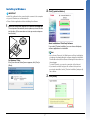

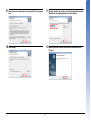
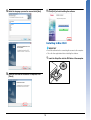


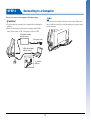
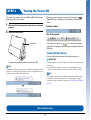


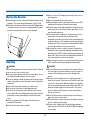



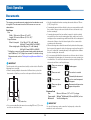


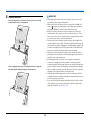
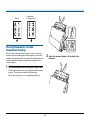
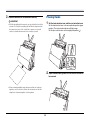


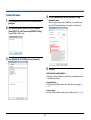


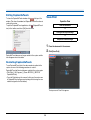

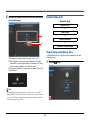
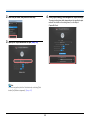

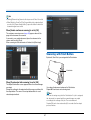


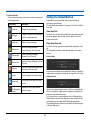
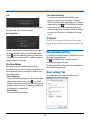
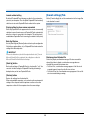
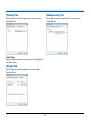


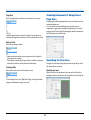

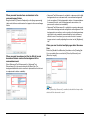
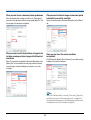


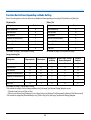
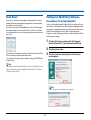

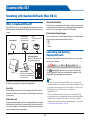
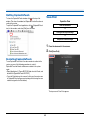


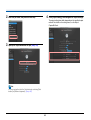
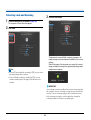
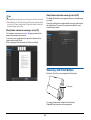

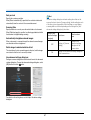
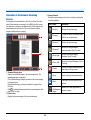
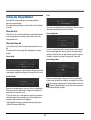

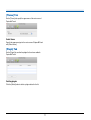
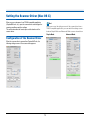
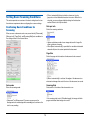
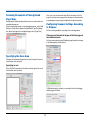

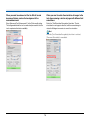
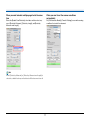




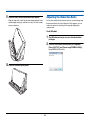
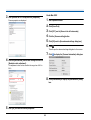

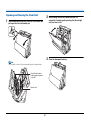

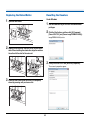

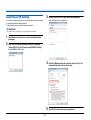
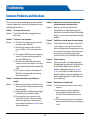

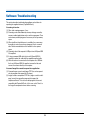

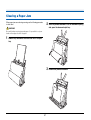

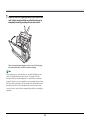
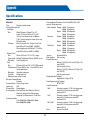



![Clique no botão Start [Iniciar]](http://vs1.manualzilla.com/store/data/006041791_1-478c128503a987820ff31ba94c46c492-150x150.png)