1
2
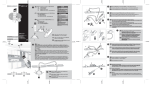
Quick reference guide
Automatic FM station search sensitivity
FM/DAB memory pre-sets
2”
1” FM/DAB station scan
Delete all FM/DAB tuning pre-sets
Store all FM/DAB stations detected
6”
Step forward and back for iPod® playing list.
6”
Audio level adjustment
volume/bass/treble/balance/loudness
Delete individual FM/DAB tuning pre-sets
2”
Store individual FM/DAB station pre-sets
Update DAB receivable broadcasts
Store “IDEAL” setting
Store turn-on mode (on/off)
Play/pause for iPod® playing list
2”
DAB
UPDATE DAB
6”
2”
”IDEAL” mode
2”
6”
Program MONO for all sound sources
6”
Select sound source
Select +/- keys function
volume/bass/treble/balance/loudness
AUDIO IN
KBSOUND ® DOCK link
iPOD
Numeric keypad
Directly keying
FM station frequency (e.g. 95.8 MHz)
UPDATE DAB
UPDATE DAB
Clear
To illustrate that an operation requires holding down a
key on the remote control for a specific amount of time,
the
symbol will appear in the manual next to the
key. The screen will display the F symbol.
FM Forced Mono
On/off
F
CC-1157ENG-01