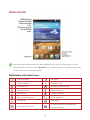
1
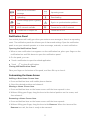
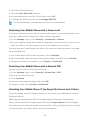
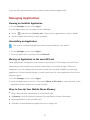
New text or multimedia Upcoming event message Uploading Downloading Phone storage space is getting Sign-in or synchronization problem low Wi-Fi network available Connected to a Wi-Fi network Portable Wi-Fi hotspot on Connected to a PC Notification Panel Your mobile phone will notify you when you receive a new message or there is an upcoming event. The notification panel also informs you of alarms and settings. Open the notification panel to see your network operator or to view a message, reminder, or event notification. Opening the Notification Panel 1. When a new notification icon appears on the notification bar, place your finger on the notification bar and flick down to open the notification panel. 2. On the panel, you can: Touch a notification to open the related application. Touch to clear all notifications. Closing the Notification Panel Place your finger on the bottom of the panel, and then flick up to close it. Customizing the Home Screen Adding a New Home Screen Item 1. Press and hold an item until mobile phone vibrates. 2. Select the desired position and release it. Moving a Home Screen Item 1. Press and hold an item on the home screen until the item expands in size. 2. Without lifting your finger, drag the item to the desired position on the screen, and then release it. Removing a Home Screen Item 1. Press and hold an item on the home screen until the item expands. 2. Without lifting your finger, drag the item to the Remove. When the item and the Remove turn red, the item is ready to be removed. 11