1
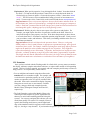
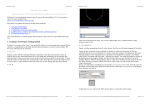
Hot Topics: Biological Self-Organization Summer 2013 Exploration 4. What special properties, if any, distinguish flock “leaders” from other birds in the flock? (To help answer this question, Control-click on a single bird at the head of a flock to bring up a menu of options. Choose the last option (“turtle i”), then select “watch turtle i”. This will create a circle around that bird, letting you track its movements more easily. To remove the circle, Control-click on the same bird and choose reset-‐perspective.) Suggested answer: There is no intrinsic difference between flock leaders and other birds. As the simulation runs, flocks will split and merge, with different birds emerging as (temporary) leaders. Each bird’s position within the flock emerges purely from local interactions between interchangeable agents, a defining property of self-organizing systems. Exploration 5. Working in pairs, choose some aspect of the system to study further. For example, you might explore the effect of a particular variable on the birds’ behavior, or analyze the change in some property over time. Write down the question you have chosen to research, then take 15-20 minutes to study that question using the model. Clearly record your procedures, results, and inferences. Then share your findings with the entire class as a one-minute presentation. Suggested answer: Results will depend on the questions chosen. However, each group should produce a clearly stated question, an appropriate experimental design, and a general statement of their results. For example, students exploring how visual range affects flock size might run the model for values of vision ranging from 0 to 10 patches. They might then report that no flocking occurs when vision ≤ 1.0 patches, but that flock size rapidly increases thereafter, eventually producing a single large flock when vision ≥ approximately 8 patches. They might also note that the simulation runs more slowly for larger values of vision (because the model must make more calculations as each bird sees more and more of its neighbors). VII. Extensions Once you have worked with the Flocking model for a little while, you may want to customize the display, add more complex and realistic behaviors, or explore other models of self-organizing systems. NetLogo’s built-in tutorials, user manual, and code examples provide many resources to help you do so. A few particularly useful features: • You can add plots and controls using the toolbar on the Interface tab (see screenshot at right). For example, add a switch to turn a particular property on or off, or put in a monitor to output the value of a specific variable within the model. Plots can be customized to display frequency histograms or to track one or more numeric variables over time, using pre-built code examples from the Models Library (Histogram Example and Tutorial 3, respectively). • The Code Examples section of the Models Library also contains pre-built examples of specific agent behaviors that may be useful when modeling particular biological systems. You can copy and paste this code into your own model, then modify it as needed. For example, when an agent in the Flocking model moves past the right-hand edge of the simulated world, it reappears on the left-hand edge (i.e., the edges “wrap around”). If you instead want agents in your model to bounce like Page 5 of 6