1
1588
Vol 06, Article 08622; August 2015
http://ijves.com
International Journal of VLSI and Embedded Systems-IJVES
ISSN: 2249 – 6556
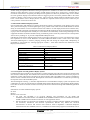
After sending this buffer, Receiver gets the whole packet and Computer Checksum on his side. If it’s Correct
receiver sends back a Reply Message Format. Sender receives it and does Computer Checksum. If it’s Correct, It
displays “CRC has been verified”
3.3 Receiver side Working. Enable/disable the discarding of received packets for which the CRC verification
has failed. When this feature is enabled, the library automatically removes the CRC bytes from the packets that
passed the CRC verification: ST_EnableReceive crc(TRUE);
When the address filtering mode is enabled, perform the following actions:
Set the radio PAN identifier:uint16_tpanid = USER_PAN_ID;
/* set the panid for filtering received packets */
ST_SetPanId(panid);
Set the node identifier if the user application requires filtering on the 16-bit short address (or node
identifier):uint16_tnodeid = USER_NODE_ID;
/*set the nodeid (short address) for filtering received packets*/
ST_SetNodeID(nodeid);
processReceivedPackets(void) prints the data that is received in uint8_t rxPacket[128] variable. This function is
called in While loop.
The function in turn checks packetReceived variable which is set by ST_ReceiveIsrCallback() when data arrives.
ST_ReceiveIsrCallback() is a call-back function called by Simple MAC library when data arrives. It is via
interrupt mechanisms.
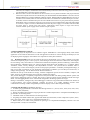
3.4 Communication. For CGDBs the display information is bundled into a single packet for all coaches
information of a particular train on designated platform; and will be sent to the respective PDCH of the platform
(or even to a MDCH as the case may be), after sending all CGDBs connected ports enable command to the same
HUB. Hence this entire packet will be circulated to all the CGDBs of that particular platform.
Further each CGDB will pick up train number (from a fixed location in the packet) and coach string with respect
to its board id (which corresponds to its physical position from first CGDB of the platform). No responses will be
generated from any of the CGDBs, as this will give rise to collisions among competing transmitters. The
application software has to ensure by some means that the packet has reached correctly to the destination. This
can be done by issuing previous command status function code and analyzing its responses from each individual
boards to whom reception has to be ensured. Display Timeout Value gives the time out value of the data present
on the CGDB in minutes. Data on CGDB will be cleared after no activity from application (i.e. no command
packet received, etc.) for this duration of time. The response for the configuration settings is given by the CGDB
3.5 Docklight. For RS232 full-duplex monitoring applications, recommend the Docklight Tap USB accessory, or
our Docklight Monitoring Cable is recommended. Docklight is a testing, analysis and simulation tool for serial
communication protocols (RS232, RS485/422 and others). It allows you to monitor communications between two
serial devices or to test the serial communication of a single device. Docklight is easy to use and works on almost
any standard PC running Windows8, Windows7, Windows Vista and Windows XP. Docklight's key functions
include simulating serial protocols - Docklight can send out user-defined sequences according to the protocol used
and it can react to incoming sequences.
4. CONCLUSIONS
Implementation of Coach Guidance Display System is done using Dot Net Framework and IPIS Configuration
Bytes. The result is error free display with desired brightness. The IPIS application allows to send the data to the
display board.The start of application window has the details to be selected by the user,as per their use. There it
has the configuration settings and intensity settings for the user.The application window also holds details status
of the data transmission and COM port detailsand it has the complete details of the train. The arrival/departure
and time its platform number theseall details can be selected by the user.Type of display is also one of the option
provided in the IPIS application window.The user can choose Train Arrival Departure Display board(TADDB)
or the Coach Guidance Display Board(CGDB).
The main aim is for easy identification of coach positions by passengers is achieved. Using Keil IDE the code can
be ported on Coach Guidance Display Board’s control card. The combination of cortex microcontroller kit and
SMD LED display board displayed the train number and coach number alternatively.
The coach position is displayed in multiple languages. Individual coach display board across the platform shown
the position of the coaches like GEN, D1, S10, B1, A1, H1 in English and “अना., डी-1, एस-10, बी-1, ए-1, एच1”etc. and train number. Intensity control of coach guidance display board is made 25%.Implementation of Coach
Guidance Display System helps in learning Display Board Concepts that are used in Railways.
2010-2015 – IJVES
Indexing in Process - EMBASE, EmCARE, Electronics & Communication Abstracts, SCIRUS, SPARC, GOOGLE Database, EBSCO, NewJour, Worldcat,
DOAJ, and other major databases etc.,