1
Dr. S. I. Gorelsky, AOMix manual (www.sg-chem.net)
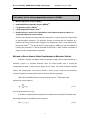
Keyword (and its possible and
default values)
LCFO=ON, OFF
Updated on July 23, 2015
AOMix
execution
Keyword description
FO option
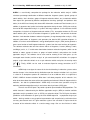
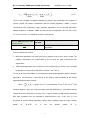
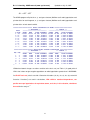
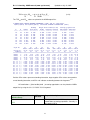
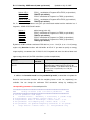
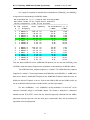
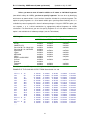
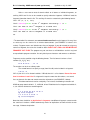
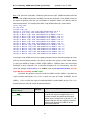
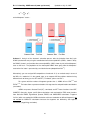
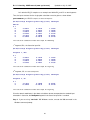
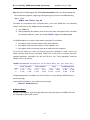
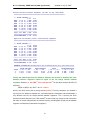
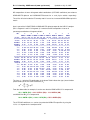
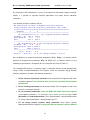
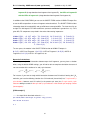
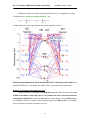
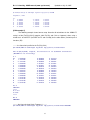
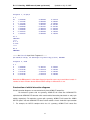
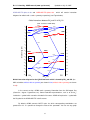
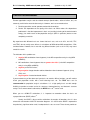
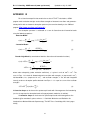
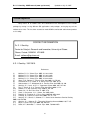
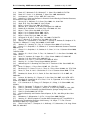
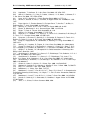
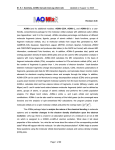
The keyword controls printing of the LCFO-MO
matrix.
THE LCFO-MO MATRIX:
MO:
1
2
3
HOMO-7 HOMO-6 HOMO-5
E(eV): -44.37 -26.31 -21.04
============================
1 1: 0.043 0.598 -0.600
2 1: 0.000 0.000 0.000
3 1: 0.000 0.000 0.000
4 0: 0.035 0.174 0.002
5 0: -0.017 -0.057 -0.005
6 0: 0.000 0.000 0.000
7 0: 0.000 0.000 0.000
============================
1 1: 0.998 -0.049 0.018
2 1: 0.018 0.710 0.689
3 1: 0.000 0.000 0.000
4 1: 0.000 0.000 0.000
5 1: -0.011 -0.316 0.402
6 0: 0.000 0.000 0.000
7 0: 0.000 0.000 0.000
8 0: 0.001 -0.048 0.054
4
5
6
7
8
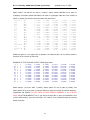
HOMO-4 HOMO-3 HOMO-2 HOMO-1
HOMO
-18.59 -18.59 -14.11 -11.07 -11.07
Fragment 1 ======================
0.000 0.000 0.514 0.000 0.000
-0.016 0.110 0.000 -0.975 0.048
0.110 0.016 0.000 0.048 0.975
0.000 0.000 -0.400 0.000 0.000
0.000 0.000 0.101 0.000 0.000
0.024 0.004 0.000 0.001 0.031
-0.004 0.024 0.000 -0.031 0.001
Fragment 2 ======================
0.000 0.000 0.002 0.000 0.000
0.000 0.000 0.009 0.000 0.000
-0.993 0.011 0.000 0.023 0.113
0.011 0.993 0.000 0.113 -0.023
0.000 0.000 0.752 0.000 0.000
-0.006 0.028 0.000 -0.179 -0.001
0.028 0.006 0.000 -0.001 0.179
0.000 0.000 0.023 0.000 0.000
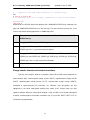
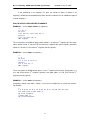
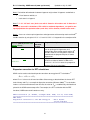
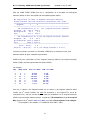
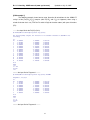
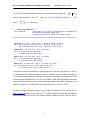
Note. In order to produce concise output files, AOMix prints LCFO-MO coefficients in the LONG
FORM only if they are no less than the threshold value (the default value is 0.1%; a user can
increase it to 1% by using the FORMAT.P = 0 keyword or decrease it to 0.01% by using the
FORMAT.P = 2 keyword in the AOMix parameter file).
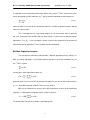
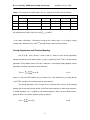
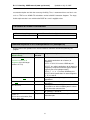
Keyword (and its possible and
default values)
FORMAT.P=0, 1, 2
AOMix
execution
Keyword description
FO option
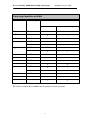
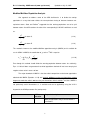
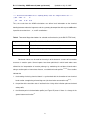
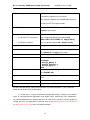
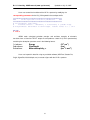
The number defines the cutoff limit for the LONG
FORM of AOMix-FO output files.
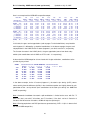
So, if some LCFO-MO coefficients “went missing” in the LONG FORM of your AOMix-FO output,
this is not a software bug.
64