1
Overview
• Press and hold to erase the
missed call indicator when the
phone is not in use.
• While the phone is ringing,
press to silence the base ringer
temporarily.
CID
• Press to scroll down while in
menus and lists.
• While entering or modifying names
or numbers, press to move the
cursor to the left.
• Press to view the caller ID log
when the base is not in use.
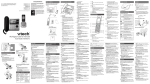
Telephone base overview
l
a
k
b
c
d
j
i
e
hg f
• Press to scroll up while in menus
and lists.
• While entering or modifying names
or numbers, press to move the
cursor to the right.
• Press to review the directory when
the base is not in use.
MENU/SELECT
• Press to show a menu.
• While in a menu, press to select
an item, or save an entry or
setting.
INT
• Press to initiate or answer an
intercom call, or to transfer a call.
FIND HANDSET
• Press to page all handsets when
the phone is not in use.
4–
/PLAY/STOP
• Press to start or stop message
playback.
• Flashes when there are new
messages or memos in the
answering system.
1 – LCD display
2 – IN USE light
• On when the phone is in use, or
when the answering system is
answering an incoming call.
• On when a handset is being
registered.
• Flashes when there is an incoming
call.
• Flashes when handsets are being
deregistered.
• Flashes when another telephone
on the same line is in use.
3 – FLASH
• During a call, press to answer an
incoming call when you receive a
call waiting alert.
CANCEL
• While in a menu, press to cancel
an operation, back up to the
previous menu or exit the menu
display.