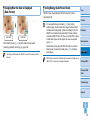
1
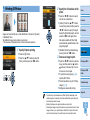
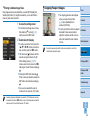
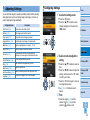
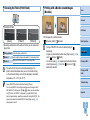
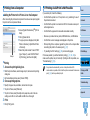
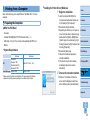
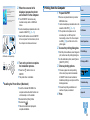
Cover
Contents
Part Names
Basic Operations
Printer User Guide
Print Settings
Printing via Wi-Fi
ENGLISH
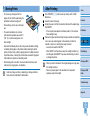
• Make sure you read this guide, including the “Safety
Precautions” section, before using the printer.
• Reading this guide will help you learn to use the printer
properly.
• Store this guide safely so that you can use it in the
future.
• Click the buttons in the lower right to access other pages.
: Next page
: Previous page
: Page before you clicked a link
• To jump to the beginning of a chapter, click the chapter
title at right.
From chapter title pages, you can access topics by
clicking their titles.
© CANON INC. 2014
CEL-SU9VA210
Printing via USB
Cable
Troubleshooting
Appendix
1
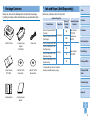
Package Contents
Ink and Paper (Sold Separately)
Before use, make sure the following items are included in the package.
If anything is missing, contact the retailer where you purchased the printer.
Color Ink / Paper Set
Product Name
Color Ink / Paper Set KP-36IP
(Postcard)
Color Ink / Paper Set KP-108IN
(Photo Paper)
□ SELPHY Printer
□ Compact Power
Adapter
CA-CP200 B
□ Power Cord
Paper Size
Postcard Size
108
Color Ink / Label Set KC-18IF
(Full-Page Label)
□ SELPHY CP910
Manuals Disk
Necessary Paper
Cassette
Contents
Paper Cassette
PCP-CP400
(included with
SELPHY)
Part Names
Paper Cassette
PCC-CP400*
Print Settings
Basic Operations
36
18
Card Size
Color Ink / Label Set KC-18IS
(Square Labels)
□ SELPHY CP910
Solution Disk
Number of
Possible
Prints
36
Color Ink / Paper Set KC-36IP
Color Ink / Label Set KC-18IL
(8 Labels per Page)
□ Paper Cassette
PCP-CP400
Cover
Before use, purchase a Color Ink / Paper Set.
* Purchase with the Color Ink / Paper Set.
Accessory availability varies by region.
18
18
Printing via Wi-Fi
Printing via USB
Cable
Troubleshooting
Appendix
□ Getting Started
□ Warranty System
Booklet
2
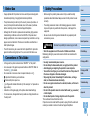
Before Use
• Images printed with this product are to be used for personal enjoyment.
Unauthorized printing of copyrighted material is prohibited.
• The printer warranty is valid only in the country or area of purchase. In
case of printer problems while abroad, return to the area of purchase
before contacting a Canon Customer Support Help Desk.
• Although the LCD monitor is produced under extremely high-precision
manufacturing conditions and more than 99.99% of the pixels meet
design specifications, in rare cases some pixels may be defective or may
appear as red or black dots. This does not constitute a malfunction or
affect printed images.
• The LCD monitor may be covered with a thin plastic film for protection
against scratches during shipment. If so, remove the film before use.
Conventions in This Guide
• In this guide, the printer is referred to as “SELPHY” or “the printer”.
• Icons are used in this guide to represent buttons on SELPHY. Refer to
“Controls” (= 6) for details.
• On-screen text or icons are shown in square brackets, as in [ ].
• : Important information you should know
• : Notes and tips for expert use
• =xx: Pages with related information (In this example, “xx” represents a
page number.)
• Instructions in this guide apply to the printer under default settings.
• For convenience, all supported memory cards are simply referred to as
“memory card”.
Safety Precautions
Cover
• Before using the product, please ensure that you read the safety
precautions described below. Always ensure that the product is used
correctly.
Contents
• The safety precautions noted on the following pages are intended
to prevent injuries to yourself and other persons, or damage to the
equipment.
Part Names
• Be sure to also check the guides included with any separately sold
accessories you use.
Basic Operations
Warning
Denotes the possibility of serious injury or death.
• Store this equipment out of the reach of children and infants.
Mistakenly putting the power cord around a child’s neck could result in
asphyxiation.
• Use only recommended power sources.
• Do not attempt to disassemble, alter, or apply heat to the product.
• Avoid dropping or subjecting the product to severe impacts.
• To avoid the risk of injury, do not touch the interior of the product if
it has been dropped or otherwise damaged.
• Stop using the product immediately if it emits smoke, a strange
smell, or otherwise behaves abnormally.
• Do not use organic solvents such as alcohol, benzine, or thinner to
clean the product.
• Do not let the product come into contact with water (e.g. sea water)
or other liquids.
• Do not allow liquids or foreign objects to enter the product.
This could result in electrical shock or fire.
If liquid comes into contact with the product, unplug it from the outlet and
consult your retailer or a Canon Customer Support Help Desk.
Print Settings
Printing via Wi-Fi
Printing via USB
Cable
Troubleshooting
Appendix
3
• Do not touch the printer or the power plug during thunderstorms.
This could result in electrical shock or fire. Immediately stop using the
equipment and distance yourself from it.
• Unplug the power cord periodically, and using a dry cloth, wipe away
any dust or dirt that has collected on the plug, the exterior of the
power outlet, and the surrounding area.
• Do not handle the power cord with wet hands.
• Do not use the equipment in a manner that exceeds the rated
capacity of the electrical outlet or wiring accessories. Do not use if
the power cord or plug are damaged, or not fully plugged into the
outlet.
• Do not allow dirt or metal objects (such as pins or keys) to contact
the terminals or plug.
• Do not cut, damage, alter, or place heavy items on the power cord.
This could result in electrical shock or fire.
This may cause overheating of or damage to the printer or adapter, which
may result in electric shock, burns or other injury, or fire.
High temperature may deform the product or adapters.
Caution
Denotes the possibility of damage to the equipment.
• Unplug the product from the power outlet when you are not using it.
• Do not place anything, such as cloth, on top of the printer while in
use.
Leaving the unit plugged in for a long period of time may cause it to
overheat and distort, resulting in fire.
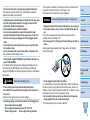
• Never reuse paper for printing, even if most of the paper is blank, as
shown.
Reusing paper may damage the printer if paper jams or the ink sheet
adheres to the paper.
• Do not play the supplied CD-ROM(s) in any CD player that does not
support data CD-ROMs.
It is possible to suffer hearing loss from listening with headphones to the
loud sounds of a CD-ROM played on a music CD player. Additionally,
playing the CD-ROM(s) in an audio CD player (music player) could damage
the speakers.
Caution
Denotes the possibility of injury.
• Do not stick any part of your hand into the printer interior.
• Place SELPHY in a safe location where people will not trip over the
power cord.
Failure to do this may lead to injury or printer damage.
• Avoid using, placing, or storing the product in the following places:
• Places subject to direct sunlight
• Places subject to temperatures above 40 °C (104 °F)
• Humid or dusty places • Places subject to strong vibration
Cover
Contents
Part Names
Basic Operations
Print Settings
Printing via Wi-Fi
Printing via USB
Cable
• Do not unplug the printer while it is printing.
If you accidentally turn the printer off while printing, restart it and wait until
the paper is ejected. If paper jams and cannot be removed, contact your
retailer or a Canon Customer Support Help Desk. Do not attempt to remove
jammed paper by force, which may damage the printer.
• Do not use the printer near motors or other devices that generate
strong magnetic fields, or in dusty environments.
This may damage the printer or cause malfunction.
Troubleshooting
Appendix
4
Contents
Package Contents .........................2
Ink and Paper (Sold Separately) ....2
Before Use .....................................3
Conventions in This Guide .............3
Safety Precautions .........................3
Contents.........................................5
Part Names ....................................5
Part Names
Cover
Printing via Wi-Fi ............ 30
Printing from a Smartphone .........31
Printing from a Camera ................34
Printing from a Computer .............36
Other Wi-Fi Functions ..................44
Printing via AirPrint.......................46
Basic Operations ............. 7
Printing via USB Cable ... 48
Initial Preparations .........................8
Supported Cards/Images .............13
Printing Images ............................14
Storing Prints ...............................17
After Printing ................................17
Printing from a Computer .............49
Printing from a Camera ................52
Troubleshooting ............. 53
Print Settings ................. 18
Appendix ........................ 58
Printing All Images .......................19
Cropping Images .........................20
Printing ID Photos ........................21
Adjusting Settings ........................23
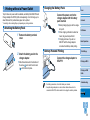
Printing without a Power Outlet ...59
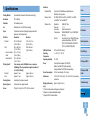
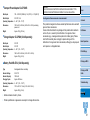
Specifications ...............................60
Handling and Maintenance ..........62
Wi-Fi (Wireless LAN)
Precautions ..................................62
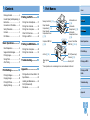
Memory Card Slot (= 13)
Ink Cassette Lock
(= 15)
Paper Cassette
Compartment (= 10)
Paper Cassette
Compartment Cover
(= 10)
Ink Cassette
Compartment (= 10)
Ink Cassette
Compartment Cover
(= 10)
Computer USB Port
(= 50)
Camera / Flash Drive
USB Port (= 16, 52)
Air Vent (= 62)
DC IN (Power Input)
Terminal (= 10)
Paper Ejection
Slot
Security Slot*
Contents
Part Names
Basic Operations
Print Settings
Printing via Wi-Fi
* Security cables, such as a Kensington lock, can be attached to this slot.
Printing via USB
Cable
Troubleshooting
Appendix
5
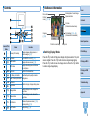
Controls
On-Screen Information
Cover
Shooting date of current image
Paper orientation
File number
Port/slot
in use (= 13, 16)
Contents
Print size
(Postcard size shown here)
Part Names
Print settings (= 24 – 29)
(Dimmed when unavailable)
Cropping
(= 20)
Basic Operations
Prints of current image
Icons in This
Guide
–
Name
Screen (LCD monitor)
Function
Displays images, setting screens, or
error messages (= 57)
<q> ON button
Turns SELPHY on or off (= 12)
<k> MENU button
Displays the menu screen (= 12)
Displays the editing menu and rotates
the crop frame
Confirms the selected item
–
EDIT button
<o> OK button
<u> Up / More prints button
Total prints
Specifies the print quantity or selects
<d> Down / Fewer prints button setting items
<l> Left button
Switches images, changes setting values
<r> Right button
Switches display modes, enlarges the
<-> Enlarge button
crop frame
Switches display modes, reduces the
<0> Reduce button
crop frame
<v> BACK button
Restores the previous screen (= 23),
cancels printing (= 15)
<p> PRINT button
Starts printing (= 15)
Switching Display Modes
Press the <-> button for full-screen display at higher resolution. The print
area is outlined. Press the <-> button to restore single-image display.
Press the <0> button to view nine images at once. Press the <0> button
to restore single-image display.
Print Settings
Printing via Wi-Fi
Printing via USB
Cable
Troubleshooting
Appendix
6
Basic Operations
Cover
Contents
This chapter introduces basic printing operations such as preparing the printer, selecting images
on a memory card, and specifying the number of prints.
Part Names
Basic Operations
Print Settings
Printing via Wi-Fi
Printing via USB
Cable
Troubleshooting
Initial Preparations .................................................................................... 8
Printing Images ....................................................................................... 14
Preparing the Ink Cassette................................................................................8
Preparing the Paper Cassette ...........................................................................9
Loading the Cassettes ....................................................................................10
Installing and Plugging in SELPHY .................................................................10
Display Language ...........................................................................................12
Avoiding Left Over Paper ................................................................................16
Printing from USB Flash Drives ......................................................................16
Making One Print from a Selected Image .......................................................16
Supported Cards/Images........................................................................ 13
Appendix
Storing Prints .......................................................................................... 17
After Printing ........................................................................................... 17
Supported Memory Cards ...............................................................................13
Supported Images ...........................................................................................13
7
Initial Preparations
Prepare for printing as follows. This example shows a Postcard-size (4x6
in.) Color Ink / Paper Set (sold separately, = 2), but the same steps are
followed for other sizes.
Avoid getting dust on ink sheets or paper, which may cause banding or
damage the printer (= 4).
Preparing the Ink Cassette
Check the ink cassette and ink
sheet.
• Do not hold the ink cassette with wet hands. Avoid touching the
ink sheet, and avoid getting dust on it. Dirt or moisture may cause
banding or affect print quality, tear ink sheets and prevent printing,
or damage the printer (= 4).
• When turning the sprocket, turn it gently, only until the sheet is taut.
Forcing the sprocket or overtightening it may tear ink sheets and
prevent printing, or SELPHY may run out of ink before paper.
• Never reuse ink cassettes, which may damage the printer or cause
malfunction.
Cover
Contents
Part Names
Basic Operations
zz
Holding the ink cassette without touching
Ink sheet
the ink sheet, check the size (such as
“Postcard (4x6 in.) Size” or “Card Size”)
to make sure it matches the size of paper
you will print on.
zz
Make sure the ink sheet is taut. Loose
ink sheets may tear when loaded. If
the sheet is loose, turn the sprocket as
shown.
Print Settings
Printing via Wi-Fi
Printing via USB
Cable
zz
For an ink cassette that has a lock on
the bottom, press the lock (as shown)
to release it as you turn the sprocket to
make the sheet taut.
Troubleshooting
Appendix
8
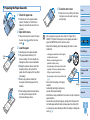
Preparing the Paper Cassette
1 Check the paper size.
zz
Check the size on the paper cassette
4 Close the inner cover.
into place. Leave the outer cover open
when printing.
(such as “Postcard” or “Card Size”) to
make sure it matches the size of the ink
cassette.
the outer cover ( ), and then the inner
cover ( ).
3 Load the paper.
Glossy
side
zz
Load the paper in the paper cassette.
zz
The paper cassette holds up to 18
sheets. Loading 19 or more sheets may
damage the printer or cause malfunction.
zz
Holding the paper as shown, load it with
the glossy side up. (Do not touch the
glossy side of the paper, which may affect
print quality.)
zz
Remove any protective sheets from
the paper, and load only paper into the
cassette.
zz
When making postcard prints with space
for a stamp, load the paper with the
stamp area facing as shown.
Contents
Part Names
2 Open both covers.
zz
There are two layers of covers. First open
Cover
zz
Close the inner cover firmly until it clicks
• Use only paper in a genuine Canon Color Ink / Paper Set for
SELPHY CP printers. Other paper, such as regular postcards or
paper for SELPHY ES printers, cannot be used.
• Never do the following, which may damage the printer or cause
malfunction.
- Loading paper upside-down, with the glossy
and back sides reversed
- Bending or separating paper at the
perforations before printing
- Using label paper whose upper label surface
is peeling off or has been partially pulled up
- Writing on paper before printing
- Reusing paper, as by printing on blank areas
(= 4)
• Do not touch the springs on the paper
Springs
cassette.
Accidentally bending the springs may
prevent efficient paper feeding.
• Note that one spring is attached in the center on the top of card-size
paper cassettes.
• Avoid touching or rubbing the glossy, printing side of the paper. Do
not handle paper with wet hands, and keep paper free of dust. Dirt
or moisture may cause banding or affect print quality, or damage the
printer (= 4).
Basic Operations
Print Settings
Printing via Wi-Fi
Printing via USB
Cable
Troubleshooting
Appendix
9
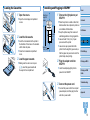
Loading the Cassettes
1 Open the covers.
zz
Open the ink and paper compartment
covers.
Installing and Plugging in SELPHY
zz
Insert the ink cassette into the printer in
the direction of the arrow on the cassette
until it clicks into place.
zz
Close the ink cassette compartment
cover.
3 Load the paper cassette.
zz
Making sure the outer cover is open
(= 9), insert the paper cassette all
the way into the compartment.
SELPHY.
zz
Place the printer on a table or other flat,
Minimum
10 cm
(4 in.)
2 Load the ink cassette.
Minimum
10 cm (4 in.)
Cover
1 Choose the right place to put
More than
length of
paper
stable surface. Never place the printer on
an unstable or tilted surface.
zz
Keep the printer away from sources of
electromagnetism or strong magnetism.
zz
Leave at least 10 cm (4 in.) of open
space around the printer.
zz
Leave more open space behind the
printer than the length of paper used, so
that the paper can pass in and out of the
printer freely when printing.
2 Plug the adapter cord into
Contents
Part Names
Basic Operations
Print Settings
Printing via Wi-Fi
SELPHY.
zz
Insert the adapter plug fully into the
power inlet on SELPHY.
3 Connect the power cord.
Printing via USB
Cable
Troubleshooting
zz
Connect the power cord to the compact
power adapter, and then plug the other
end into a power outlet.
Appendix
10
• Do not use the printer near motors or other devices that generate
strong magnetic fields, or in dusty environments. This may damage
the printer or cause malfunction.
• Do not place the printer near televisions or radios. This may cause
the printer to malfunction.
Cover
Contents
Part Names
Basic Operations
Print Settings
Printing via Wi-Fi
Printing via USB
Cable
Troubleshooting
Appendix
11
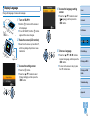
Display Language
4 Access the language setting
Change the language of menus and messages.
1 Turn on SELPHY.
zz
Hold the <q> button until the screen at
screen.
Cover
zz
Press the <u><d> buttons to select
Language], and then press the
[
<o> button.
Contents
left is displayed.
Part Names
zz
To turn off SELPHY, hold the <q> button
again until the screen changes.
2 Raise the screen (LCD monitor).
Basic Operations
zz
Never force the screen up more than 45°,
which may damage the printer or cause
malfunction.
5 Choose a language.
Print Settings
zz
Press the <u><d><l><r> buttons
Approx. 45°
3 Access the setting screen.
zz
Press the <k> button.
zz
Press the <u><d> buttons to select
[Change Settings], and then press the
<o> button.
to select a language, and then press the
<o> button.
zz
To return to the screen in step 2, press
the <v> button twice.
Printing via Wi-Fi
Printing via USB
Cable
Troubleshooting
Appendix
12
Supported Cards/Images
Supported Memory Cards
No Adapter Required
• SD Memory Card
• SDHC Memory Card
• SDXC Memory Card
Adapter Required (Sold Separately)
•
•
•
•
•
miniSD Memory Card
miniSDHC Memory Card
microSD Memory Card
microSDHC Memory Card
microSDXC Memory Card
• For memory cards that require an adapter, always insert the card
into the adapter before inserting the adapter into the card slot.
If you mistakenly insert the memory card into the card slot without
an adapter, you may not be able to remove the card from the printer.
• Use a memory card formatted with the device you shot the photos
with. Images on cards formatted with a computer may not be
recognized.
• For instructions, refer to the memory card or adapter user manual.
USB Flash Drives
Supported Images
Cover
JPEG images conforming to the Exif standard can be printed with SELPHY.
• Images may not be displayed or printed correctly depending on their size or if
they have been edited on a computer.
Contents
Part Names
Basic Operations
Print Settings
Printing via Wi-Fi
Printing via USB
Cable
Troubleshooting
You can print images on USB flash drives (sold separately) by inserting the
drive into the USB port on SELPHY (= 16).
Appendix
13
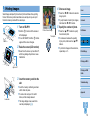
Printing Images
4 Choose an image.
Cover
zz
Press the <l><r> buttons to select an
Select images and specify the number of prints as follows. Here, printing
from an SD memory card is described as an example, but you can print
from other memory cards with the same steps.
image to print.
zz
To jump forward or back by five images,
Contents
hold down the <l><r> buttons.
5 Specify the number of prints.
1 Turn on SELPHY.
zz
Hold the <q> button until the screen at
left is displayed.
zz
To turn off SELPHY, hold the <q> button
again until the screen changes.
2 Raise the screen (LCD monitor).
zz
Never force the screen up more than 45°,
Prints of current image
Total prints
zz
Press the <u><d> buttons to specify
the number of prints.
zz
To increase or decrease the quantity
by five prints, hold down the <u><d>
buttons.
zz
To print other images at the same time,
repeat steps 4 – 5.
Part Names
Basic Operations
Print Settings
which may damage the printer or cause
malfunction.
Printing via Wi-Fi
Approx. 45°
Printing via USB
Cable
3 Insert the memory card into the
slot.
Troubleshooting
zz
Insert the memory card facing as shown
until it clicks into place.
zz
To remove the card, push it in until it
Label side
Appendix
clicks, and then slowly release it.
zz
The image display screen used in the
next step is displayed (= 6).
14
6 Print.
zz
Press the <p> button to start printing.
zz
While printing, paper passes in and out
of the back of SELPHY several times.
Do not touch the paper until printing is
finished and the print is ejected onto the
paper cassette.
zz
Do not allow 19 or more prints to
collect in the ejection area on the paper
cassette.
zz
To cancel printing in progress, always
press the <v> button.
7 Add more paper as needed.
zz
If a message indicates that the paper
has run out, remove the paper cassette
without turning off the power.
zz
Add more paper to the cassette (= 9)
and reinsert the cassette in SELPHY
(= 10).
• Never pull out the paper cassette, open the ink cassette
compartment cover, or remove a memory card while printing or
when you hear printer operation sounds immediately after it has
been turned on. This may damage the printer.
• To cancel printing in progress, always press the <v> button.
Printing cannot be canceled by pressing the <q> button, and
unplugging the printer may damage it.
• Image display in step 4 may take some time when memory cards contain
many images.
• If a message indicates that DPOF images remain, see “Printing Using Camera
Settings (DPOF Print)” (= 52).
• You can specify up to 99 images in step 4 and up to 99 prints per image in
step 5. However, the total number of prints cannot exceed 999.
• Even if you press the <v> button to cancel printing, the printer will continue
printing until the current sheet is finished.
Cover
Contents
Part Names
Basic Operations
Print Settings
Printing via Wi-Fi
Printing via USB
Cable
8 Change the ink cassette as
needed.
zz
If a message indicates that the ink
has run out, open the ink cassette
compartment cover without turning off the
power.
zz
To remove the ink cassette, move the
lock in the direction shown. Insert a new
ink cassette (= 8, 10).
Troubleshooting
Appendix
15
Avoiding Left Over Paper
Note the following to prevent wasted paper, which occurs if ink is consumed
faster than the paper.
• Do not turn the sprocket too much when removing slack from the ink
sheet (= 8).
• To cancel printing in progress, always press the <v> button; after
pressing the <v> button, never turn off the power before SELPHY is
finished printing (step 6).
• If a message indicates that the paper has run out, add paper without
turning off the printer or removing the ink cassette (step 7). Otherwise,
press the <v> button to cancel printing (step 6).
Note that under some conditions, even if you follow these instructions, ink
may be consumed faster than the paper, leaving you with excess paper.
Making One Print from a Selected Image
Cover
For a convenient way to make a single print of a selected image, follow
these steps.
Contents
Choose and print an image.
zz
Choose an image as described in steps
1 – 4 of “Printing Images” (= 14).
Part Names
zz
Press the <p> button for a single print
of the selected image.
Basic Operations
• A single print is not produced this way if you follow steps 4 – 5 in
“Printing Images” (= 14) to choose images and the number
of prints. To use this method for individual prints, make sure the
number of prints is [0] in step 4 on = 14 beforehand.
Print Settings
Printing from USB Flash Drives
Images on USB flash drives (sold separately) can be printed the same way
as images on memory cards.
Insert a USB flash drive.
zz
Remove any inserted memory cards.
zz
Insert a USB flash drive as shown.
zz
After this, all steps are the same as for
printing images from memory cards
(= 14 – 15).
Printing via Wi-Fi
Printing via USB
Cable
Troubleshooting
Appendix
• Some USB flash drives may be more difficult than others to insert and remove,
and some may not work as expected.
• For instructions, refer to the flash drive user manual.
16
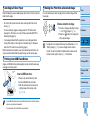
Storing Prints
• To remove any extra paper from the
edges of a print, fold the paper along the
perforations and tear the edges off.
• When writing on prints, use an oil-based
pen.
• To prevent discoloration, do not store
prints where temperatures exceed 40 °C
(104 °F), in humid or dusty places, or in
direct sunlight.
• Also avoid the following actions, which may cause discoloration, fading,
or bleeding: sticking tape on the printed surface, allowing the printed
surface to contact vinyl or plastic, applying alcohol or volatile solvents to
the printed surface, or leaving the printed surface pressed firmly against
other surfaces or objects over extended periods.
• When storing prints in an album, choose an album with photo covers
made of nylon, polypropylene, or cellophane.
• Color may change over time or depending on storage conditions.
Canon cannot be held liable for discoloration.
After Printing
Turn off SELPHY (= 12) and remove any memory cards or USB
flash drives.
Lower the screen for storage.
Unplug the power cord from the outlet and disconnect the adapter plug
from SELPHY.
• If the compact power adapter is still warm, wait for it to cool down
before putting it away.
Remove the paper cassette and close the paper cassette compartment
cover. Leave any remaining paper in the cassette, and store the
cassette in a dark, cool, and dry place away from dust.
• Leave the ink cassette in SELPHY.
• Store SELPHY on a flat surface, away from sunlight and dust. Any
dust that gets inside SELPHY may cause white banding on photos
or damage the printer.
• Store any extra ink cassettes in the original package or a bag, away
from sunlight and dust.
• Store any unused paper or ink cassettes in their unopened
packages, away from sunlight.
Cover
Contents
Part Names
Basic Operations
Print Settings
Printing via Wi-Fi
Printing via USB
Cable
Troubleshooting
Appendix
17
Print Settings
Cover
Contents
Explore a variety of printing features in this chapter, such as cropping images, preparing ID
photos, and enhancing images.
Part Names
Basic Operations
Print Settings
Printing via Wi-Fi
Printing via USB
Cable
Troubleshooting
Printing All Images .................................................................................. 19
Cropping Images ..................................................................................... 20
Printing ID Photos ................................................................................... 21
Cropping Passport Images..............................................................................22
Adjusting Settings .................................................................................. 23
Configuring Settings ........................................................................................23
Choosing the Finish (Print Finish) ...................................................................24
Printing with a Border around Images (Borders) .............................................24
Choosing a Layout (Page Layout)...................................................................25
Optimal Prints with Auto Correction (Image Optimize) ....................................26
Adjusting the Brightness .................................................................................26
Making Skin Look Smooth (Smooth Skin).......................................................27
Adjusting the Color Tone (My Colors) .............................................................27
Reducing the Appearance of Red-Eye (Correct Red-Eye)..............................28
Printing with the Date (Date) ...........................................................................28
Changing How the Date Is Displayed (Date Format) ......................................29
Saving Energy (Auto Power Down).................................................................29
Appendix
18
Printing All Images
3 Choose the number of prints.
Cover
zz
Press the <u><d> buttons to specify
Print all images on a memory card at once as follows.
the number of prints.
Contents
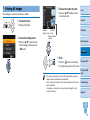
1 Access the menu.
zz
Press the <k> button.
2 Access the setting screen.
Prints per
Number of
images on card image
Number of sheets
required
Part Names
Basic Operations
zz
Press the <u><d> buttons to select
[Print All Images], and then press the
<o> button.
Print Settings
4 Print.
zz
Press the <p> button to start printing.
zz
To cancel printing, press the <v> button.
Printing via Wi-Fi
Printing via USB
Cable
• If the memory card contains more than 1,000 images, the 999 most recent
images are printed, as determined by shooting date.
• You can specify up to 99 prints in step 3. However, the total number of prints
cannot exceed 999.
(For example, you can specify up to nine prints of each image if the card
contains 100 images.)
Troubleshooting
Appendix
19
Cropping Images
Print only selected areas of an image as follows.
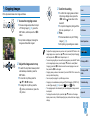
1 Access the cropping screen.
zz
Choose an image as described in step 4
of “Printing Images” (= 14), press the
EDIT button, and then press the <o>
button.
zz
A crop frame is displayed, showing the
image area that will be cropped.
2 Adjust the image area to crop.
zz
To switch the crop frame between portrait
and landscape orientation, press the
EDIT button.
zz
To move the crop frame, press the
<u><d><l><r> buttons.
zz
To enlarge the crop frame, press the
<-> button, and to reduce it, press the
<0> button.
3 Confirm the setting.
Cover
zz
To confirm the cropping area and return
to the image display screen, press the
is now shown in the
<o> button.
lower left.
zz
To crop other images for printing with the
first one, repeat steps 1 – 3.
4 Print.
Contents
Part Names
zz
Print as described in step 6 of “Printing
Images” (= 15).
Basic Operations
zz
After printing, crop settings are cleared.
• To adjust the cropping area once you have set it, press the EDIT button on the
image display screen, press the <u><d> buttons to select [Adjust Cropping],
and then press the <o> button. Repeat steps 2 – 3.
• To cancel cropping after you have set the cropping area, press the EDIT button
on the image display screen, press the <u><d> buttons to select [Reset
Cropping], press the <o> button to access the reset cropping screen, and
then press the <o> button again.
• Cropping areas you have set are cleared if you turn off SELPHY or remove the
memory card before printing.
• You can specify cropping for up to 99 images at once.
• Cropping is not available when printing with [Print All Images] or [DPOF Print]
Index] or [
Shuffle].
or when [Page Layout] (= 25) is set to [
• The cropping aspect ratio indicated by the frame displayed on images cannot
be adjusted.
• To change the number of prints, press the <u><d> buttons on the image
display screen in step 3. Note that specifying zero prints will not clear cropping
settings.
Print Settings
Printing via Wi-Fi
Printing via USB
Cable
Troubleshooting
Appendix
20
Printing ID Photos
2 Specify the finished size of the
photo.
Cover
zz
Press the <l><r> buttons to specify
how the size is determined.
Contents
zz
[Custom]: Press the <u><d> buttons
Images can be printed for use in photo identification. Choose from [Custom]
or [Standard]* sizes.
Two different images can be printed on each sheet.
* The dimensions of [Standard] conform to ICAO international standards.
1 Specify ID photo printing.
zz
Press the <k> button.
zz
Press the <u><d> buttons to select [ID
Photo], and then press the <o> button.
to select [Long Side], and then press the
<l><r> buttons to specify the length.
Specify the [Short Side] length, and then
press the <o> button again. Note
that options available for [Short Side]
are automatically updated based on the
[Long Side] length.
zz
[Standard]: Check the indicated image
size and press the <o> button.
Part Names
Basic Operations
Print Settings
3 Choose an image to print.
zz
Press the <l><r> buttons to select an
image, and then press the <u> button.
is shown in the lower right. You can
choose one or two images.
zz
To specify the cropping area (= 20),
press the EDIT button.
zz
Print as described in step 6 of “Printing
Images” (= 15).
zz
Settings are cleared after printing.
• The photo may not be accepted as an official ID photo, depending on the
intended purpose. For details, contact the institution that requires the photo.
• Card-size paper cannot be used.
• [Borders] settings are not applied, and dates are not printed.
• Selecting two images in step 3 will produce an equal number of prints of each
image per sheet, in your specified layout. Note that for layouts with an odd
number of prints per sheet, the center frame on the sheet will be blank.
Printing via Wi-Fi
Printing via USB
Cable
Troubleshooting
Appendix
21
Filtering Candidate Image Sizes
Many image size options are listed when you select [ID Photo] ► [Size
Selection] ► [Custom]. To simplify size selection, you can edit the list to
show only sizes used most often.
1 Access the setting screen.
zz
On the ID photo settings screen, choose
[Size Selection] ► [Custom] (= 21),
and then press the EDIT button.
2 Select sizes for display.
zz
To remove a size from the list, press the
<u><d><l><r> buttons to select the
size, and then press the <o> button.
zz
The check mark ( ) is cleared, and the
size will no longer be listed on the [ID
Photo Settings] screen (= 21). To
include a size in the list, press the <o>
button again to select the size, displaying
.
zz
Pressing the EDIT button clears all .
When no sizes are selected, pressing the
EDIT button selects all sizes, displaying
.
zz
Once you have selected the sizes to
include in the list, press the <v> button.
Cropping Passport Images
Cover
zz
Two cropping guide lines are displayed
when you access the crop frame
(= 20) when [Standard] size is
selected in [ID Photo].
zz
To print a photo that conforms to passport
standards for face size and position,
adjust the crop frame so that one line is
above the head and the other is below
the chin.
• For specific requirements other than face size and position, contact the
institution that requires the photo.
Contents
Part Names
Basic Operations
Print Settings
Printing via Wi-Fi
Printing via USB
Cable
Troubleshooting
Appendix
• A warning message is displayed if you press the <v> button when no sizes
are selected. Press the <o> button to return to the [Sizes] screen. Select at
least one size to list, and then press the <v> button.
22
Adjusting Settings
Configuring Settings
You can enhance images in several ways before printing. Add the shooting
date, adjust colors, and more. Settings apply to all images, so there is no
need to adjust each image individually.
Configurable Items
Description
Print Finish (= 24)
Choose the surface finish of prints.
Borders (= 24)
Print images with or without a border.
Page Layout (= 25)
Choose the number of images per sheet.
Image Optimize (= 26)
Automatically correct images, for optimal quality.
Brightness (= 26)
Adjust image brightness in a range of –3 to +3.
Smooth Skin (= 27)
Make skin appear smooth and beautiful.
My Colors (= 27)
Choose special color tones to make prints look
distinctive, or choose sepia or black-and-white prints.
Correct Red-Eye (= 28)
Correct images affected by red-eye.
Date (= 28)
Add camera shooting dates when you print.
Date Format (= 29)
Adjust the date format.
Auto Power Down (= 29)
Specify automatic power-off when the printer is idle.
Language (= 12)
Change the language of menus and messages.
Cover
1 Access the setting screen.
zz
Press the <k> button.
zz
Press the <u><d> buttons to select
[Change Settings], and then press the
<o> button.
Contents
Part Names
Basic Operations
Print Settings
2 Select an item and adjust the
setting.
zz
Press the <u><d> buttons to select an
Printing via Wi-Fi
item.
zz
Press the <l><r> buttons to adjust the
settings, and then press the <v> button
to confirm your choice.
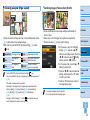
zz
Press the <v> button again to return to
the image display screen.
zz
See = 24 – 29 for details on each
feature.
3 Print.
Printing via USB
Cable
Troubleshooting
Appendix
zz
Select the images (= 14) and the
number of prints (= 14), and then
press the <p> button to print.
23
Printing with a Border around Images
(Borders)
Choosing the Finish (Print Finish)
Cover
Contents
Example of finish
Part Names
[Glossy]
[Pattern 1]
[Pattern 2]
zz
By adding a subtle texture to the surface of prints, you can create a less
glossy finish.
Glossy (default) Prints with a glossy surface finish.
Pattern 1
Applies a slightly rough surface pattern, for a less glossy finish.
Pattern 2
Applies a fine surface pattern, for a less glossy finish.
• The surface finish may be less noticeable depending on the
printer’s internal temperature when you turn it on. Before turning
on the printer and printing, wait until it has adjusted to an ambient
temperature of 10 – 35 °C (50 – 95 °F).
• Turning off SELPHY will restore the default setting of [Glossy].
• You can have SELPHY retain configured settings even after being turned off.
With SELPHY off, hold down the <k><u><p> buttons, and then hold down
the <q> button until “SELPHY” is displayed. If you prefer SELPHY not to
retain configured settings, repeat this procedure after turning SELPHY off. This
procedure also determines whether SELPHY retains [Page Layout] (= 25)
settings when turned off.
zz
Print images with or without a border.
zz Borderless (default) /
Bordered
• Turning off SELPHY will restore the default setting of [
Borderless].
• Images are printed without borders when [Page Layout] (= 25) is
set to [
Index] or [
Shuffle].
• On card-size paper (= 2), images are printed without borders
when [Page Layout] (= 25) is set to [
8-up] even if [
Bordered] is selected.
Basic Operations
Print Settings
Printing via Wi-Fi
Printing via USB
Cable
Troubleshooting
Appendix
24
Choosing a Layout (Page Layout)
Combining Images of Various Sizes (Shuffle)
Cover
Contents
zz
Use the shuffle feature to have images arranged automatically in a
Part Names
variety of sizes.
zz
Choose the number of images per sheet. Your specified quantity of prints
(= 14) will be printed in the configured layout.
zz
With Color Ink / Label Set KC-18IL (8 Labels per Page, = 2), specify
[
8-up].
1-up (default)
2-up
4-up
One image per sheet
Two images per
sheet
Four images per
sheet
8-up
Index
Shuffle
Eight images per sheet
Many small, uniform size
images per sheet
Images in a variety of
sizes on a single sheet
• Turning off SELPHY will restore the default setting of [
1-up].
• You can have SELPHY retain the configured layout even after being turned off
(= 24).
• The position of images cannot be specified.
• Depending on the configured layout, images may not be printed with the
settings in [Date] (= 28), [Image Optimize] (= 26), [Correct Red-Eye]
(= 28), [Borders] (= 24), [Smooth Skin] (= 27), or [Brightness]
(= 26).
Index] selected, allows you
• Carrying out [Print All Images] (= 19) with [
to print all images on the memory card as an index.
zz
Groups of up to 8 or 20 images can be printed on a single sheet.
zz
Postcard-size paper (= 2) can be used for printing.
Basic Operations
zz
On the screen in step 2 of “Configuring
Settings” (= 23), press the <u><d>
buttons to select [Page Layout]. Press the
Shuffle],
<l><r> buttons to select [
and then press the <o> button.
zz
On the screen at left, press the <u><d>
buttons to select an item.
zz
Press the <l><r> buttons to adjust the
settings, and then press the <v> button
to confirm your choice.
zz
Press the <v> button twice to return to
the image display screen.
• The position of images cannot be specified.
• It may take some time before printing begins.
Print Settings
Printing via Wi-Fi
Printing via USB
Cable
Troubleshooting
Appendix
25
Optimal Prints with Auto Correction
(Image Optimize)
Adjusting the Brightness
Cover
Contents
zz
Automatically correct images, for optimal quality.
zz Off /
On (default)
• Some images may not be adjusted correctly.
• Turning off SELPHY will restore the default setting of [
On].
Index] is selected in [Page Layout] (= 25), [Image Optimize] is
• When [
not applied.
• The degree of correction may vary depending on layout and paper size.
zz
Adjust image brightness in a range of –3 to +3.
zz
Choose larger positive values to make images brighter, or larger negative
values to make them darker.
• Turning off SELPHY will restore the default setting of [±0].
Index] is selected in [Page Layout] (= 25), settings in
• When [
[Brightness] are not applied.
Part Names
Basic Operations
Print Settings
Printing via Wi-Fi
Printing via USB
Cable
Troubleshooting
Appendix
26
Making Skin Look Smooth (Smooth Skin)
zz
Make skin appear smooth and beautiful.
zz Off (default) / On
Adjusting the Color Tone (My Colors)
Cover
zz
Choose special color tones to make prints look distinctive, or choose
sepia or black-and-white prints.
Contents
• Correction may be applied to image areas other than skin in some
cases, and results may not be as expected.
• The default setting of [
Off] is restored after printing, when SELPHY is
turned off, or when a memory card is removed.
Index] is selected in [Page Layout] (= 25), [Smooth Skin] is not
• When [
applied.
Off (default)
Vivid
Neutral
–
Vivid prints with greater
contrast and color
saturation
Subdued prints with
less contrast and color
saturation
PositiveFilm
Saturated, natural
colors, as produced
with positive film
Sepia
Sepia-tone
B/W
Black and white
Part Names
Basic Operations
Print Settings
• Turning off SELPHY will restore the default setting of [
Off].
• Some color options may prevent red-eye correction (= 28).
Printing via Wi-Fi
Printing via USB
Cable
Troubleshooting
Appendix
27
Reducing the Appearance of Red-Eye
(Correct Red-Eye)
Printing with the Date (Date)
Cover
Contents
08/08/2013
zz
Add camera shooting dates when you print.
zz Off (default) /
On
zz
Correct images affected by red-eye.
zz Off (default) /
On
• Red-eye correction may mistakenly be applied to areas of the image
other than the affected eyes. To avoid this, select [
On] only for
images affected by red-eye.
• Turning off SELPHY or removing the memory card will restore the default
Off].
setting of [
• Red-eye may not be detected or corrected well on faces covering a very large/
small area of the screen, on bright/dark faces, in shots from the side of or at an
angle to the face, or when part of the face is not visible.
• Red-eye correction is not applied when [Page Layout] (= 25) is set to [
4-up], [
8-up], or [
Index].
2-up], [
• Similarly, red-eye correction is not applied when [My Colors] (= 27) is set to
Sepia] or [
B/W].
[
• The degree of correction may vary depending on cropping, page layout, and
paper size.
• To prevent two instances of the date on images already labeled by
the camera, select [
Off].
• Turning off SELPHY will restore the default setting of [
Off].
• The date added to prints cannot be changed, because it is the date assigned
by the camera when the photos were taken.
• To change how the date displays, adjust [Date Format] (= 29).
Index] or
• Dates are not printed when [Page Layout] (= 25) is set to [
Shuffle].
[
Part Names
Basic Operations
Print Settings
Printing via Wi-Fi
Printing via USB
Cable
Troubleshooting
Appendix
28
Changing How the Date Is Displayed
(Date Format)
Saving Energy (Auto Power Down)
Cover
zz
SELPHY turns off automatically if left idle for about five minutes.
zz
On (default) / Off
Contents
08/08/2013
2013/08/08
zz
When adding the date (= 28), adjust the date format as needed.
zz
mm/dd/yyyy (default), dd/mm/yyyy, or yyyy/mm/dd
• The setting is retained even when SELPHY is turned off or memory cards are
removed.
• If an unsupported image is included (= 13) when printing
multiple images, [Could not print some images! Cancel printing?]
is displayed and printing stops. If [Auto Power Down] is [On] and
SELPHY is not operated for approximately 5 minutes, printing is
canceled and SELPHY turns off. When you turn SELPHY on again,
a blank sheet of paper may be ejected, but never reuse ejected
paper (= 4).
Note that after printing stops, SELPHY will continue to consume
battery power, if powered by a battery pack (= 59), until power
saving begins.
• SELPHY does not turn off automatically when connected to other devices via
USB or Wi-Fi, or when an error message is displayed.
Part Names
Basic Operations
Print Settings
Printing via Wi-Fi
Printing via USB
Cable
Troubleshooting
Appendix
29
Printing via Wi-Fi
Cover
This chapter describes how to wirelessly print images saved to Wi-Fi®*1-compatible smartphones
and computers.
• This printer is a Wi-Fi certified product. You can wirelessly print images from Wi-Fi-supporting smartphones*2, tablets*2,
cameras*3, and computers.
*1
*2
*3
Wi-Fi is a brand name that indicates interoperability certification of wireless LAN devices.
Requires installation of the dedicated Canon Easy-PhotoPrint app on your smartphone or tablet. (There is no need to install the
dedicated application when printing from an AirPrint-compatible application (= 46).) Visit the Canon website for application details,
including supported devices and available functions. For convenience in this manual, smartphones and tablets are collectively referred
to as “smartphone”.
Devices must be compatible with DPS over IP, the PictBridge standard for Wi-Fi connections.
• Before using Wi-Fi, be sure to read “Wi-Fi (Wireless LAN) Precautions” (= 62).
• Some features are not available when printing via Wi-Fi.
Contents
Part Names
Basic Operations
Print Settings
Printing via Wi-Fi
• For convenience in this manual, wireless routers and other base stations are referred to as “access point”.
Printing via USB
Cable
Printing from a Smartphone................................................................... 31
Subsequent Printing ........................................................................................33
Printing from a Camera .......................................................................... 34
Subsequent Printing ........................................................................................35
Printing from a Computer....................................................................... 36
Confirming Access Point Compatibility............................................................36
Connecting the Printer to the Access Point .....................................................37
Subsequent Connections ................................................................................41
Preparing the Computer ..................................................................................42
Printing from the Computer .............................................................................43
Other Wi-Fi Functions............................................................................. 44
Disabling Wi-Fi ................................................................................................44
Checking Wi-Fi Settings Information ...............................................................44
Changing the Printer Name.............................................................................44
Specifying the Communication Protocol .........................................................44
Returning the Wi-Fi Settings to Default ...........................................................45
Entering Information ........................................................................................45
Printing via AirPrint................................................................................. 46
Troubleshooting
Appendix
Preparing for AirPrint .......................................................................................46
Printing from an iPad, iPhone or iPod touch ...................................................46
Printing from a Computer ................................................................................47
If Printing via AirPrint is Not Possible ..............................................................47
Changing the Connection Method...................................................................44
30
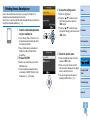
Printing from a Smartphone
Even in places without an access point, you can print directly from a
smartphone connected wirelessly to the printer.
Also, there is no need to install the dedicated application when printing from
an AirPrint-compatible application (= 46).
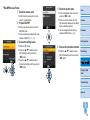
1 Install the dedicated application
on your smartphone.
zz
For an iPhone, iPad, or iPod touch, visit
the App Store and download and install
Canon Easy-PhotoPrint.
zz
For an Android device, download and
install Canon Easy-PhotoPrint from
Google Play.
2 Prepare SELPHY.
zz
Remove any inserted memory cards or
USB flash drives.
zz
Insert a loaded paper cassette and an
ink cassette in SELPHY. Refer to “Initial
Preparations” (= 8) for details.
3 Access the setting screen.
zz
Press the <k> button.
zz
Press the <u><d> buttons to select
[Wi-Fi Settings], and then press the
<o> button.
zz
Press the <u><d> buttons to select
[Connection Settings], and then press the
<o> button.
Cover
Contents
Part Names
Basic Operations
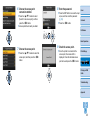
4 Check the printer name.
Print Settings
zz
Check the displayed printer name and
press the <o> button.
Printing via Wi-Fi
zz
When you connect devices via Wi-Fi,
this name will be displayed on the target
device to identify the printer.
zz
You can change the printer name by
pressing the EDIT button (= 44).
Printing via USB
Cable
Troubleshooting
Appendix
31
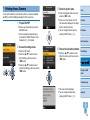
5 Choose the connection method.
zz
Press the <u><d> buttons to select
[Direct Connection], and then press the
<o> button.
7 Use your smartphone to print.
Cover
zz
Start Canon Easy-PhotoPrint,
choose images, and print.
Contents
zz
Once printing begins, the screen at left is
displayed.
zz
Do not disconnect the devices or close
the application while this screen is
displayed. Images may not be printed
correctly or completely.
zz
The screen at left is displayed.
zz
You can change the password by
zz
The standby screen at left is displayed
when printing is finished.
Part Names
Basic Operations
Print Settings
pressing the EDIT button (= 45).
Printing via Wi-Fi
6 Use your smartphone to join the
network displayed on the printer
screen.
zz
In the smartphone’s Wi-Fi settings, select
the SSID (network name) displayed on
the printer.
zz
Enter the password displayed on the
printer into the password field.
• Printing in progress cannot be canceled from SELPHY by using the <v>
button. Use the smartphone to stop printing.
• You can also connect the printer to a smartphone via an existing access point.
In this case, connect the printer and smartphone to the same access point. For
details on how to connect the printer to an access point, see “Connecting the
Printer to the Access Point” (= 37).
• The printer does not enable communication between the devices connected
to it.
Printing via USB
Cable
Troubleshooting
Appendix
32
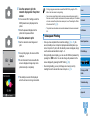
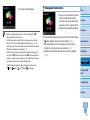
Subsequent Printing
• Once you have completed the connection settings (= 31 – 32), the
second, standby screen in step 7 on = 32 is displayed automatically
when you turn on the printer. To print, after the standby screen is
displayed, simply use the smartphone as described in steps 6 – 7 on
= 32.
Cover
Contents
• During standby-screen display, you can view the SSID and password by
pressing the <o> button. You can also change the password on the
screen displayed by pressing the EDIT button (= 45).
Part Names
• Even during standby, you can print images on a memory card by
inserting the card to access the screen in step 4 on = 14.
Basic Operations
Print Settings
Printing via Wi-Fi
Printing via USB
Cable
Troubleshooting
Appendix
33
Printing from a Camera
You can print as follows by connecting the printer to a camera compatible
with DPS over IP, the PictBridge standard for Wi-Fi connections.
1 Prepare SELPHY.
zz
Remove any inserted memory cards or
USB flash drives.
zz
Insert a loaded paper cassette and an
3 Check the printer name.
press the <o> button.
zz
When you connect devices via Wi-Fi,
this name will be displayed on the target
device to identify the printer.
zz
You can change the printer name by
pressing the EDIT button (= 44).
ink cassette in SELPHY. Refer to “Initial
Preparations” (= 8) for details.
2 Access the setting screen.
zz
Press the <k> button.
zz
Press the <u><d> buttons to select
[Wi-Fi Settings], and then press the
<o> button.
zz
Press the <u><d> buttons to select
[Connection Settings], and then press the
<o> button.
Cover
zz
Check the displayed printer name and
Contents
Part Names
Basic Operations
4 Choose the connection method.
zz
Press the <u><d> buttons to select
[Direct Connection], and then press the
<o> button.
Print Settings
Printing via Wi-Fi
Printing via USB
Cable
Troubleshooting
zz
The screen at left is displayed.
zz
You can change the password by
Appendix
pressing the EDIT button (= 45).
34
5 Use the camera to join the
network displayed on the printer
screen.
zz
In the camera’s Wi-Fi settings, select the
SSID (network name) displayed on the
printer.
zz
Enter the password displayed on the
printer into the password field.
6 Use the camera to print.
zz
Use the camera to select images and
print.
zz
Once printing begins, the screen at left is
displayed.
zz
Do not disconnect the devices while this
screen is displayed. Images may not be
printed correctly or completely.
• Printing in progress cannot be canceled from SELPHY by using the <v>
button. Use the camera to stop printing.
• You can also connect the printer to a camera via an existing access point. In
this case, connect the printer and camera to the same access point. For details
on how to connect the printer to an access point, see “Connecting the Printer
to the Access Point” (= 37).
• The printer does not enable communication between the devices connected
to it.
Cover
Contents
Part Names
Subsequent Printing
Basic Operations
• Once you have completed the connection settings (= 34 – 35), the
second, standby screen in step 6 is displayed automatically when you
turn on the printer. To print, after the standby screen is displayed, simply
use the camera as described in steps 5 – 6.
Print Settings
• During standby-screen display, you can view the SSID and password by
pressing the <o> button. You can also change the password on the
screen displayed by pressing the EDIT button (= 45).
Printing via Wi-Fi
• Even during standby, you can print images on a memory card by
inserting the card to access the screen in step 4 on = 14.
Printing via USB
Cable
zz
The standby screen at left is displayed
when the camera is no longer connected.
Troubleshooting
Appendix
35
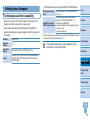
Printing from a Computer
Confirming Access Point Compatibility
• Before you can print via Wi-Fi from a computer, the computer with the
images to send must be connected to an access point.
• Use an access point that supports the following Wi-Fi standards. To
check the standards your access point supports, refer to the access point
user manual.
Standards
Supported
Channels
Transmission
Methods
Security
IEEE 802.11b/g
1 – 11
• Confirm that the access point supports WPS (Wi-Fi Protected Setup).
Connect as described in “WPS-Compatible Access
Points” (= 37)*.
Check the following information and connect as
described in “Non-WPS Access Points” (= 39).
- Network name (SSID/ESSID)
Non-WPS Access Points
Or WPS Support Unknown - Network authentication / data encryption (encryption
method or mode)
- Password (network key)
WPS-Compatible Access
Points
Cover
Contents
Part Names
* WPS connections are not possible for access points set up for WEP security. Connect
as described in “Non-WPS Access Points” (= 39).
Basic Operations
• If your network is managed by a system administrator, ask the
administrator for network setting details.
DSSS (IEEE 802.11b) and OFDM (IEEE 802.11g)
Print Settings
No security, 64- and 128-bit WEP (open system authentication),
WPA-PSK (TKIP), WPA-PSK (AES), WPA2-PSK (TKIP), and
WPA2-PSK (AES)
Printing via Wi-Fi
Printing via USB
Cable
Troubleshooting
Appendix
36
Connecting the Printer to the Access Point
How to connect varies depending on whether the access point is WPScompatible (= 37) or not (= 39).
4 Check the printer name.
press the <o> button.
zz
When you connect devices via Wi-Fi,
WPS-Compatible Access Points
1 Check the access point.
zz
Confirm that the access point is on and
ready for communication.
this name will be displayed on the target
device to identify the printer.
zz
You can change the printer name by
pressing the EDIT button (= 44).
2 Prepare SELPHY.
USB flash drives.
cassette in SELPHY (= 8 – 10).
3 Access the setting screen.
zz
Press the <k> button.
zz
Press the <u><d> buttons to select
[Wi-Fi Settings], and then press the
<o> button.
zz
Press the <u><d> buttons to select
[Connection Settings], and then press the
<o> button.
Contents
Part Names
Basic Operations
zz
Remove any inserted memory cards or
zz
Insert a loaded paper cassette and an ink
Cover
zz
Check the displayed printer name and
5 Choose the connection method.
zz
Press the <u><d> buttons to select
Print Settings
[Via Wi-Fi Network], and then press the
<o> button.
Printing via Wi-Fi
Printing via USB
Cable
Troubleshooting
Appendix
37
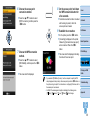
6 Choose the access point
connection method.
zz
Press the <u><d> buttons to select
[WPS Connection], and then press the
<o> button.
8 On the access point, hold down
the WPS connection button for
a few seconds.
zz
For details on where the button is located
zz
On the printer, press the <o> button.
zz
[Connecting] is displayed on the printer,
followed by [Connected to access point]
when connected. Press the <o>
button.
method.
zz
Press the <u><d> buttons to select
Contents
and how long to press it, check the
access point user manual.
9 Establish the connection.
7 Choose the WPS connection
Cover
zz
The screen at left is displayed, indicating
Part Names
Basic Operations
Print Settings
the name of the access point.
Printing via Wi-Fi
[PBC Method], and then press the <o>
button.
Printing via USB
Cable
zz
The screen at left is displayed.
• If you selected [PIN Method] in step 7, use the computer to specify the PIN
code (displayed on the printer) on the access point, press the <o> button on
the printer, and go to step 9. For instructions on configuring PIN codes, refer to
the access point user manual.
• On SELPHY, wireless signal strength is indicated by the following icons.
] High, [ ] Medium, [ ] Low, [ ] Weak, [
] Out-of-range
[
Troubleshooting
Appendix
38
Non-WPS Access Points
4 Check the printer name.
1 Check the access point.
zz
Confirm that the access point is on and
ready for communication.
2 Prepare SELPHY.
zz
Remove any inserted memory cards or
USB flash drives.
zz
Insert a loaded paper cassette and an ink
Cover
zz
Check the displayed printer name and
press the <o> button.
zz
When you connect devices via Wi-Fi,
this name will be displayed on the target
device to identify the printer.
zz
You can change the printer name by
pressing the EDIT button (= 44).
Contents
Part Names
cassette in SELPHY (= 8 – 10).
Basic Operations
3 Access the setting screen.
zz
Press the <k> button.
zz
Press the <u><d> buttons to select
[Wi-Fi Settings], and then press the
<o> button.
zz
Press the <u><d> buttons to select
[Connection Settings], and then press the
<o> button.
5 Choose the connection method.
zz
Press the <u><d> buttons to select
Print Settings
[Via Wi-Fi Network], and then press the
<o> button.
Printing via Wi-Fi
Printing via USB
Cable
Troubleshooting
Appendix
39
6 Choose the access point
connection method.
zz
Press the <u><d> buttons to select
[Search for an access point], and then
press the <o> button.
zz
Access points found nearby are listed.
8 Enter the password.
Cover
zz
Press the EDIT button to access the input
screen, and then enter the password
(= 45).
zz
Press the <o> button.
Contents
Part Names
Basic Operations
7 Choose the access point.
zz
Press the <u><d> buttons to select the
access point, and then press the <o>
button.
9 Check the access point.
zz
Once the printer is connected to the
access point, the screen at left is
displayed. Check the indicated access
point name and press the <o> button.
Print Settings
Printing via Wi-Fi
Printing via USB
Cable
Troubleshooting
Appendix
40
Subsequent Connections
zz
The screen at left is displayed.
Cover
zz
Once you have connected to an access
point, the printer will automatically
reconnect to the previous access point
whenever you turn it on again, and the
standby screen at left will be displayed.
Contents
Part Names
• Selecting an unprotected access point in step 7 and pressing the <o>
button will display the screen in step 9.
• Up to 20 access points are listed. If your desired access point is not listed,
press the <v> button and select [Manual Settings] in step 6 on = 40 to
specify the access point manually. Follow on-screen instructions and enter the
SSID, security settings, and the password (= 45).
• If WEP security is used and you enter the wrong password in step 8, when
you press the <o> button and then press the <o> button again after the
message, you will go to step 9, but printing is not possible. Check the access
point password and try to connect again, starting at step 3.
• On SELPHY, wireless signal strength is indicated by the following icons.
] High, [ ] Medium, [ ] Low, [ ] Weak, [
] Out-of-range
[
zz
If connection fails because the access point is off or for another reason,
[
] will be displayed. Check access point settings (= 56).
Basic Operations
zz
Even during standby, you can print images on a memory card by
inserting the card to access the screen in step 4 on = 14.
zz
Automatic access point connection at startup can also be disabled
Print Settings
(= 44).
Printing via Wi-Fi
Printing via USB
Cable
Troubleshooting
Appendix
41
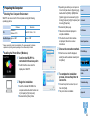
zz
Depending on whether your computer is
Preparing the Computer
Checking Your Computer Environment
SELPHY can connect via Wi-Fi to computers running the following
operating systems.
Windows
OS
Windows 8
Windows 7 SP1
Free Disk Space Approx. 5 MB*
Macintosh
Mac OS X 10.6.8 – 10.8
Approx. 7 MB*
* Space required for printer driver installation. The space required for software
operation and printing varies depending on the software and print data.
Installing the Printer Driver (Windows)
1 Confirm that SELPHY is
connected to the access point.
32- or 64-bit (as shown in [System type]),
double-click the [32Bit] or [64Bit] folder.
[System type] can be accessed by rightclicking [Computer] or [My Computer] and
choosing [Properties].
zz
Double-click [Setup.exe].
zz
Follow the instructions displayed to
complete installation.
zz
If the User Account Control window
is displayed, follow the on-screen
instructions.
3 Choose the connection method.
zz
When the screen at left is displayed,
select [Use with a wireless network] and
click [Next].
Cover
Contents
Part Names
Basic Operations
Print Settings
Printing via Wi-Fi
zz
Confirm that the screen at left is
displayed on SELPHY.
4 To complete the installation
2 Begin the installation.
zz
Insert the included CD-ROM in the
computer and double-click the disc icon
in [Computer] or [My Computer].
zz
Double-click the [Driver] folder.
process, choose the printer to
connect to.
zz
Choose the printer to connect to, and
Printing via USB
Cable
Troubleshooting
then click [Next].
zz
The printer driver is installed.
Appendix
42
Installing the Printer Driver and Registering the Printer
(Macintosh)
1 Confirm that SELPHY is
connected to the access point.
zz
Confirm that the screen at left is
displayed on SELPHY.
2 Install the printer driver.
zz
Insert the included CD-ROM in the
computer and double-click the disc icon
on the desktop or in the sidebar.
zz
Double-click the [Driver] folder.
zz
Double-click [ ].
zz
Follow the on-screen instructions to
install the printer driver.
3 Register the printer.
cnybmscp
zz
Access [System Preferences] ► [Print &
Scan].
zz
Click [+] below the list.
zz
If a pop-up menu is displayed, click [Add
Printer or Scanner] or [Add Other Printer
or Scanner].
zz
Select the printer named “Canon CP910”
(type: “cnybmscp”) and click [Add].
Printing from the Computer
Cover
Use photo software to print as follows.
1 Confirm that SELPHY is
Contents
connected to the access point.
zz
Confirm that the screen at left is
displayed on SELPHY.
Part Names
Basic Operations
2 Access the printing dialog box.
zz
Start the photo software, select images to
print, and access the printing dialog box.
Print Settings
zz
As the destination printer, select [Canon
(SELPHY) CP910 (WS)].
3 Choose printing options.
Printing via Wi-Fi
zz
Choose a paper size corresponding
to the size of paper and ink cassettes
in SELPHY. Also choose bordered or
borderless printing as an option with the
listed paper sizes.
zz
Choose the printing orientation and
number of copies, as desired.
Printing via USB
Cable
Troubleshooting
4 Print.
Appendix
• Printing in progress cannot be canceled from SELPHY by using the
<v> button. Use the computer to stop printing.
• For computer or photo software instructions, refer to the relevant
user manual.
43
Other Wi-Fi Functions
Changing the Connection Method
You can change the connection method to suit how you use the printer.
zz
Press the <k> button and then the <u><d> buttons to select [Wi-Fi
Settings], and then press the <o> button.
zz
Press the <u><d> buttons to select [Connection Method], and then
press the <o> button.
zz
Press the <u><d> buttons to select a connection method, and then
press the <o> button.
Disabling Wi-Fi
Disable Wi-Fi connections as follows.
zz
Press the <k> button and then the <u><d> buttons to select [Wi-Fi
Settings], and then press the <o> button.
zz
Press the <u><d> buttons to select [Wi-Fi], and then press the
<o> button.
zz
Press the <u><d> buttons to select [Disable], and then press the
<o> button.
zz
To re-enable Wi-Fi connections, repeat these steps and select [Enable].
Checking Wi-Fi Settings Information
Check printer information (including the printer name and IP address) as
follows.
zz
Press the <k> button and then the <u><d> buttons to select [Wi-Fi
Settings], and then press the <o> button.
zz
Press the <u><d> buttons to select [Confirm Settings], and then
press the <o> button.
zz
Press the <u><d> buttons to check setting information.
zz
Press the <v> button to exit.
Changing the Printer Name
Change the printer name (= 39) as follows.
zz
Press the <k> button and then the <u><d> buttons to select [Wi-Fi
Settings], and then press the <o> button.
zz
Press the <u><d> buttons to select [Other Settings], and then press
the <o> button.
zz
Press the <u><d> buttons to select [Set Printer Name], and then
press the <o> button.
zz
Press the EDIT button to access the input screen, and then enter a new
printer name (= 45).
Cover
Contents
Part Names
Basic Operations
Specifying the Communication Protocol
Select the IP version.
Print Settings
1 Select the IP version.
zz
Press the <k> button and then the <u><d> buttons to select [Wi-Fi
Settings], and then press the <o> button.
zz
Press the <u><d> buttons to select [Other Settings], and then press
the <o> button.
zz
Press the <u><d> buttons to select [IPv4/IPv6 Settings], and then
press the <o> button.
zz
Press the <u><d> buttons to select the version, and then press the
<o> button.
zz
Check the indicated information and press the <o> button.
zz
When selecting [IPv4], go to step 2.
zz
If you chose [IPv6], setup is now finished.
Printing via Wi-Fi
Printing via USB
Cable
Troubleshooting
Appendix
44
2 Choose auto or manual IP address configuration.
zz
For automatic IP address configuration, choose [Auto] and press the
<o> button. Setup is now finished.
zz
To enter the IP address manually, choose [Manual] and press the
<o> button. Go to step 3.
3 Enter the IP address.
zz
Press the <l><r> buttons to move the cursor, press the <u><d>
buttons to specify the value, and then press the <o> button.
4 Enter the subnet mask.
zz
Press the <l><r> buttons to move the cursor, press the <u><d>
buttons to specify the value, and then press the <o> button.
5 Check the settings.
zz
Review the indicated setting details and press the <o> button.
Returning the Wi-Fi Settings to Default
Reset Wi-Fi settings such as the printer name, access point information,
and password as follows.
zz
Press the <k> button and then the <u><d> buttons to select [Wi-Fi
Settings], and then press the <o> button.
zz
Press the <u><d> buttons to select [Reset Settings], and then press
the <o> button.
zz
Confirm your intent by pressing the <o> button.
Entering Information
Cover
When entering a printer name, password, or other information, press the
EDIT button to access the input screen.
Contents
Entering information
zz
Press the <u><d><l><r> buttons to
select a letter, number, or symbol, and
then press the <o> button. To enter
a space, select [Space] and press the
<o> button.
Part Names
Basic Operations
Deleting information
zz
Press the <u><d><l><r> buttons to
select [
button.
], and then press the <o>
Print Settings
Switching input modes
zz
To switch from uppercase to lowercase
letters and then symbols, press the EDIT
button repeatedly.
Returning to the previous screen
Printing via Wi-Fi
Printing via USB
Cable
zz
To confirm input and return to
the previous screen, press the
<u><d><l><r> buttons to select
[Finish], and then press the <o>
button.
zz
To cancel input and return to the previous
screen, press the <v> button.
Troubleshooting
Appendix
45
Printing via AirPrint
Using AirPrint, you can print directly from an Apple device (such as an iPad,
iPhone, iPod touch, or Macintosh computer) without installing a printer
driver or dedicated application.
AirPrint requires one of the following devices.
• iPad (all models)*
• iPhone (3GS or later)*
• iPod touch (third generation or later)*
• Macintosh computer (running OS X 10.7 – 10.8)
* Make sure the latest version of iOS is installed.
Preparing for AirPrint
Without an Access Point
Even without an access point, you can print directly from an Apple device
connected wirelessly to the printer.
Connect the devices as described in steps 2 – 6 of “Printing from a
Smartphone” (= 31 – 32).
With an Access Point
Connect the printer and Apple device to the same access point.
How to connect varies depending on whether the access point is WPScompatible (= 37) or not (= 39). Follow one of these procedures to
establish a connection.
Printing from an iPad, iPhone or iPod touch
Cover
1 Choose [Print].
zz
In the application on your Apple device, tap [
], and in the menu
options displayed, tap [Print].
Contents
2 Configure printer options.
zz
In [Printer], choose [Canon CP910].
zz
Specify the number of copies.
Part Names
3 Print.
zz
Tap [Print] to print.
• [Printer Options] may not be displayed in step 2, depending on
AirPrint compatibility of the application. If printer options are not
available, printing is not possible from the application.
• To perform another operation while printing is in progress, press the Home
button twice. The [Print Center] icon will be displayed.
- To check the status:
Tap the [Print Center] icon.
- To cancel printing:
Tap the [Print Center] icon, and then tap [Cancel Printing].
Basic Operations
Print Settings
Printing via Wi-Fi
Printing via USB
Cable
Troubleshooting
Appendix
46
Printing from a Computer
Adding the Printer to the Printer List on the Computer
After connecting the printer and computer to the same access point, register
the printer on the computer as follows.
zz
Access [System Preferences] ► [Print &
Bonjour
Scan].
zz
Click [+] below the list.
zz
If a pop-up menu is displayed, click [Add
Printer or Scanner] or [Add Other Printer
or Scanner].
zz
Select the printer named “Canon CP910”
(type: “Bonjour”), select “AirPrint Printer”
in [Print Using], and then click [Add].
Printing
1 Access the printing dialog box.
zz
Start the photo software, select images to print, and access the printing
dialog box.
zz
As the destination printer, select [Canon CP910].
2 Choose printing options.
zz
Specify the paper size, orientation, and number of copies.
zz
To print at P size, select [Postcard].
zz
To print at C size, select [Custom] as the paper size, and in the size
If Printing via AirPrint is Not Possible
If you cannot print, check the following.
• Confirm that the printer is on. If the printer is on, try restarting it to see if
the problem is resolved.
Cover
Contents
• Confirm that the printer is connected via Wi-Fi to the same access point
as the Apple device.
• Confirm that the paper and ink cassettes are loaded correctly.
Part Names
• Remove any inserted memory cards, USB flash drives, or USB cables.
• Confirm that no error messages are displayed on the printer.
Basic Operations
• When printing from a computer, register the printer on the computer after
connecting the printer to the access point (= 37).
• Try resetting the Wi-Fi settings (= 45) and connecting again.
If the issue persists, try another method of printing (= 31, 34, 36) to
make sure the printer can print correctly. If printing is still not possible, see
“Troubleshooting” (= 53).
• It may take a few minutes after you turn on the printer before Wi-Fi
communication is possible. Confirm that the printer is connected to the access
point (= 41) before you attempt to print.
Print Settings
Printing via Wi-Fi
Printing via USB
Cable
Troubleshooting
Appendix
settings, enter 54 mm as the width and 86 mm as the height.
3 Print.
zz
Click [Print] to print.
47
Printing via USB Cable
Cover
Contents
This chapter describes how to connect a camera or computer via a USB cable for printing.
Part Names
Basic Operations
Print Settings
Printing via Wi-Fi
Printing via USB
Cable
Troubleshooting
Appendix
Printing from a Computer....................................................................... 49
Printing from a Camera .......................................................................... 52
Preparing the Computer ..................................................................................49
Printing from the Computer .............................................................................50
Printing Using Camera Settings (DPOF Print) ................................................52
48
Printing from a Computer
Here, instructions are given using Windows 7 and Mac OS X 10.7 as an
example.
Preparing the Computer
What You Will Need
• Computer
• Included CD-ROM (SELPHY CP910 Solution Disk, = 2)
• USB cable, 2.5 m (8.2 ft.) or shorter, sold separately (SELPHY port:
Mini-B)
System Requirements
Windows
Windows 8
Windows 7 SP1
OS
Windows Vista SP2
Windows XP SP3
Free Disk Space Approx. 5 MB*
Macintosh
Mac OS X 10.6.8 – 10.8
Approx. 7 MB*
* Space required for printer driver installation. The space required for software
operation and printing varies depending on the software and print data.
Installing the Printer Driver (Windows)
1 Begin the installation.
Cover
zz
Insert the included CD-ROM in the
computer and double-click the disc icon
in [Computer] or [My Computer].
zz
Double-click the [Driver] folder.
zz
Depending on whether your computer is
32- or 64-bit (as shown in [System type]),
double-click the [32Bit] or [64Bit] folder.
[System type] can be accessed by rightclicking [Computer] or [My Computer] and
choosing [Properties].
zz
Double-click [Setup.exe].
zz
Follow the instructions displayed to
complete installation.
zz
If the User Account Control window
is displayed, follow the on-screen
instructions.
2 Choose the connection method.
Contents
Part Names
Basic Operations
Print Settings
Printing via Wi-Fi
Printing via USB
Cable
zz
Windows 7 or Windows 8: When the
screen at left is displayed, select [Use
with a USB connection] and click [Next].
Troubleshooting
Appendix
49
3 When the screen at left is
displayed, prepare the printer
and connect it to the computer.
zz
Turn off SELPHY and remove any
inserted memory cards or USB flash
drives.
zz
Insert a loaded paper cassette and an ink
cassette in SELPHY (= 8 – 10).
zz
Use the USB cable to connect SELPHY
to the computer. For instructions, refer to
the computer or cable user manual.
Printing from the Computer
Cover
1 Prepare SELPHY.
zz
Remove any inserted memory cards or
USB flash drives.
Contents
zz
Insert a loaded paper cassette and an ink
cassette in SELPHY (= 8 – 10).
zz
If the printer and computer are not
connected yet, turn off the printer
momentarily, connect it to the computer
via USB (= 50), and then turn on the
printer again.
Part Names
Basic Operations
2 Access the printing dialog box.
zz
Start the photo software, select images to
USB cable, sold separately
4 Turn on the printer to complete
the installation process.
print, and access the printing dialog box.
zz
As the destination printer, select [Canon
(SELPHY) CP910].
zz
Choose a paper size corresponding
SELPHY.
zz
The printer driver is installed.
to the size of paper and ink cassettes
in SELPHY. Also choose bordered or
borderless printing as an option with the
listed paper sizes.
zz
Choose the printing orientation and
number of copies, as desired.
zz
Insert the included CD-ROM in the
computer and double-click the disc icon
on the desktop or in the sidebar.
zz
Double-click the [Driver] folder.
zz
Double-click [ ].
zz
Follow the instructions displayed to
complete installation.
Printing via Wi-Fi
3 Choose printing options.
zz
Press the <q> button to turn on
Installing the Printer Driver (Macintosh)
Print Settings
4 Print.
Printing via USB
Cable
Troubleshooting
Appendix
50
• Printing in progress cannot be canceled from SELPHY by using the
<v> button. To cancel printing, use the computer to delete the print
job.
• The printer may not work correctly if it is connected to a computer
via a USB hub.
• The printer may not work correctly if USB devices other than a
USB mouse or keyboard are used at the same time. In this case,
disconnect the other USB devices and reconnect the printer.
• Avoid allowing your computer to enter sleep or standby mode while
the printer is connected via USB. If the computer enters standby
mode with the printer connected via USB, wake the computer
without disconnecting the USB cable. If recovery fails, restart the
computer.
• For computer or photo software instructions, refer to the relevant
user manual.
• If an error message is displayed on SELPHY, also check for any error
messages displayed on the computer (in desktop mode). Messages will be
automatically dismissed once you resolve the issue indicated.
• If a message is displayed on the computer, you can also click [Cancel] to
cancel printing.
• Macintosh: If [Canon CP910] is not available as a destination printer, register
the printer on the computer as follows.
Access [System Preferences] ► [Print & Scan] (or [Print & Fax]).
Click [+] below the list.
Choose [Canon CP910].
Click [Add].
Cover
Contents
Part Names
Basic Operations
Print Settings
Printing via Wi-Fi
Printing via USB
Cable
Troubleshooting
Appendix
51
Printing from a Camera
By connecting a PictBridge-compatible camera, you can choose images
with the camera and print.
Here, printing instructions are given using a Canon compact digital camera
as an example. If your camera is operated differently, refer to the camera
user manual.
Printing Using Camera Settings (DPOF Print)
1 Prepare SELPHY.
zz
Confirm that no memory cards are
inserted in SELPHY.
2 Connect SELPHY to the camera
using the USB cable (= 49).
3 Turn on SELPHY and then the
camera, and enter Playback
mode.
zz
Some cameras will display a
• Printing in progress cannot be canceled from SELPHY by using the <v>
button. Use the camera to stop printing.
• This product uses PictBridge technology to print via USB.
PictBridge technical standards facilitate direct connection of cameras, printers,
and other devices for easy printing. This product is compliant with the DPS
over IP standard that allows the use of PictBridge in network environments.
icon.
4 On the camera, choose images
and prepare to print.
zz
Use the camera to start printing.
zz
After printing, turn off SELPHY and the
camera and disconnect the cable.
Inserting a memory card with DPOF information configured on a camera
will display [DPOF images remain / Print images?]. To review the printing
information set on the camera, press the <o> button, and to print all
designated images at once, press the <p> button.
• For instructions on configuring DPOF information, refer to the camera user
manual.
• Dates and file numbers are DPOF information set on the camera that cannot
be changed on SELPHY.
• Images prepared with a [Print Type] of [Standard] on Canon cameras are
printed according to the settings in “Adjusting Settings” (= 23 – 29).
• You can also review the printing information set on the camera by pressing the
<k> button, selecting [DPOF Print], and pressing the <o> button.
However, [DPOF Print] is only displayed when a camera-configured memory
card is inserted.
Cover
Contents
Part Names
Basic Operations
Print Settings
Printing via Wi-Fi
Printing via USB
Cable
Troubleshooting
Appendix
52
Troubleshooting
Cover
Contents
Refer to these troubleshooting tips to resolve problems with SELPHY. If the problem persists,
contact a Canon Customer Support Help Desk.
Part Names
Basic Operations
Print Settings
Printing via Wi-Fi
Printing via USB
Cable
Troubleshooting
Appendix
Power ..............................................................................................................54
Screen .............................................................................................................54
Printing ............................................................................................................54
Paper...............................................................................................................55
Wi-Fi ................................................................................................................56
Error Messages ...............................................................................................57
53
Power
Cannot turn on SELPHY
• Confirm that the power cord is connected and plugged in correctly (= 10).
• Hold the <q> button until the startup screen is displayed (= 12).
• When using Battery Pack NB-CP2L and Charger Adapter CG-CP200 (both sold
separately), confirm that the battery pack is charged and inserted correctly, and that
the cable is connected correctly.
Screen
[?] is displayed instead of images
• Display is not possible because the image has no thumbnail. You can check the
image before printing by pressing the <-> button for full-screen display.
Cannot display or print images on memory cards or USB flash drives
• Confirm that the memory card is fully inserted in the correct slot, with the label faceup (= 13, 14).
• Confirm that the USB flash drive is fully inserted, right-side up (= 16).
• Confirm that the image format is supported (= 13).
Cannot print
• Confirm that SELPHY is on (= 12).
• Confirm that the paper and ink cassettes are loaded correctly (= 10).
• Confirm that the ink sheet is not loose (= 8).
• Confirm that you are using paper designed especially for SELPHY (= 9).
• Replace the ink cassette and refill the paper cassette as needed (= 15).
• Confirm that you are using the correct combination of paper, paper cassette, and ink
cassette (= 8).
• SELPHY will temporarily halt printing if it exceeds a specific temperature; this does
not indicate a problem. Wait until the printer cools off. During continuous printing, in
hot environments, or if the printer’s interior becomes hot because the rear-side air
vent (= 5) is blocked, SELPHY may temporarily stop printing, causing printing to
take longer.
Contents
• Confirm that a memory card requiring the use of an adapter has not been inserted
without its adapter (= 13).
Cannot print from a camera
Part Names
• Confirm that your camera supports PictBridge (= 52).
• Confirm that SELPHY and the camera are connected correctly (= 52).
• Confirm that your camera batteries have enough charge left. If the batteries are
depleted, replace them with fully charged or new ones.
Basic Operations
Cannot print from a computer
• Confirm that you have installed the printer driver correctly (= 49).
Printing
Cover
Print Settings
• Remove any inserted memory cards or USB flash drives.
• When printing via Wi-Fi, confirm that both SELPHY and the computer are correctly
connected to the access point (= 37).
Printing via Wi-Fi
• When printing via USB, confirm that SELPHY is connected directly to the computer
with the USB cable (= 50).
• Windows: Confirm that the printer is not offline. If so, right-click the printer icon and
bring the printer online.
Printing via USB
Cable
• Macintosh: Confirm that you have added SELPHY to the Printer List (= 43).
No date when printing from memory cards or USB flash drives
Troubleshooting
• Confirm that SELPHY is set up to print the date (= 28).
Note that in DPOF printing, date printing is configured on the camera.
No date when printing from cameras
Appendix
• Confirm that the date setting is enabled on the camera. Note that under standard
camera settings, the date setting on SELPHY will be used.
54
Print quality is poor
• Confirm that the ink sheet and paper are free of dirt or dust.
Paper
• Confirm that SELPHY’s interior is free of dust (= 62).
Paper does not fit in the cassette
• Confirm that no condensation has formed on SELPHY (= 62).
• Confirm that the paper is the same size as the paper cassette (= 2).
• Confirm that SELPHY is away from sources of electromagnetic waves or strong
magnetic fields (= 10).
Printed colors do not match on-screen colors
• Computer monitors employ a different method of color development from printers.
Colors may also look different depending on the intensity and color temperature of
lighting in the monitor viewing environment, as well as monitor color calibration.
Paper feed problems or frequent paper jams occur
Cover
Contents
• Confirm that the paper and cassette are inserted correctly (= 9, 10).
• Confirm that there are less than 19 sheets in the cassette.
• Confirm that 19 or more prints have not collected on the paper cassette.
Part Names
• Confirm that you are using paper designed especially for SELPHY (= 9).
Individual images are printed reduced, in only one layout position
Cannot print the correct quantity (unused paper left after ink runs out)
• Change the [Page Layout] settings (= 25). When a layout in [Page Layout] other
than [1-up] is selected, individual images are printed in one layout position per sheet
if you print from a camera or other device that can only send one image at a time.
Paper jams
Basic Operations
• Some unused paper may remain if the ink runs out first (= 16).
• If paper protrudes from the front or back paper ejection slot (= 5), carefully pull it
out. If you cannot remove the paper by gently pulling it out, never force it out. Turn the
printer off and then on. Repeat until the paper is ejected. If you accidentally turn the
printer off while printing, restart it and wait until the paper is ejected. If paper jams and
cannot be removed, contact your retailer or a Canon Customer Support Help Desk.
Do not attempt to remove jammed paper by force, which may damage the printer.
Print Settings
Printing via Wi-Fi
Printing via USB
Cable
Troubleshooting
Appendix
55
Wi-Fi
Do not use the printer near sources of Wi-Fi signal interference, such as
microwave ovens, Bluetooth devices, or other equipment operating on the
2.4 GHz band.
Cannot connect via Wi-Fi
• Try restarting SELPHY. If a connection still cannot be established, check the settings
of the access point or other device for the Wi-Fi connection.
• If connection via [WPS Connection] is not possible, try connecting by using [Search
for an access point] (= 39) or [Manual Settings] (= 41).
Printer SSID (network name) not displayed when connecting to a
camera or smartphone
Can connect to access point, but cannot print
• As the connection method, choose [Direct Connection] (= 32, 34).
• Printing is not possible when the printer is already printing a job from another device,
or when the printer is connected to a camera.
• Keep the printer near the camera or smartphone, without objects between them.
Access point not displayed on the printer
Cannot connect the printer to the access point
• As the connection method, choose [Via Wi-Fi Network] (= 37).
• Confirm that the access point is on and ready for communication. For instructions on
how to check, refer to the access point user manual.
• If there are many access points but the required one is not listed, connect using WPS
(= 37) or manually (= 41).
• Keep the printer near the access point, without objects between them.
• Confirm that the password is correct, and try connecting again.
• Confirm that the access point channel is between 1 – 11. Instead of auto channel
assignment, it is advisable to specify a channel in this range manually. For
instructions on checking or adjusting the settings, refer to the access point user
manual.
• If the access point filters communication by MAC or IP addresses, on the access
point, register the printer information shown when you check the settings (= 44).
Also try disabling any access point isolation or privacy separation functions.
For instructions on checking or adjusting the settings, refer to the access point user
manual.
• In WEP networks without DHCP, set the IP address manually (= 44).
Cover
Contents
• Remove any inserted memory cards or USB flash drives.
Part Names
• When printing from a smartphone, install Canon Easy-PhotoPrint (= 31).
• Confirm that the camera, smartphone, or computer you are printing from is connected
to the same access point as SELPHY.
Basic Operations
• Check the access point password and try to connect again (= 41).
• If a message is displayed after you enter the correct password and press the <o>
button (= 41), confirm that DHCP server functionality is enabled on the access
point, and make sure connection settings on SELPHY such as the IP address are
correct (= 44).
Printing takes too long, or the Wi-Fi connection is lost
• Do not use the printer near sources of Wi-Fi signal interference, such as microwave
ovens, Bluetooth devices, or other equipment operating on the 2.4 GHz band.
] is displayed, image transmission may take some time.
Note that even when [
• In direct connections (= 31, 34), keep the printer near the camera or
smartphone, without objects in between.
• In connections via an access point (= 37), keep the printer near the access point,
without objects in between.
Print Settings
Printing via Wi-Fi
Printing via USB
Cable
Troubleshooting
Cannot connect via Wi-Fi from the computer
• Check the OS version to confirm that you are using Windows 8, Windows 7 SP1, or
Mac OS X 10.6.8 – 10.8.
Appendix
• Install a driver.
• In Windows, enable [Network Discovery].
• In OS X, register the printer on the computer (= 43).
56
Message displayed when connecting a camera or smartphone
• Using [Direct Connection], you can connect up to 10 devices at a time. Attempting
to connect more than 10 devices will display a message. In this case, use one of
the connected devices to disconnect from the printer, press the <o> button on
the printer to clear the message, and then use the device for the new connection
to connect to the printer. If disconnection is not possible using a connected device,
turn off the printer momentarily to disconnect all devices, and then turn the printer on
again.
Error Messages
Error messages indicate problems with SELPHY. When error messages
include troubleshooting tips, follow the instructions. If only an error message
is displayed, follow the suggestions in “Troubleshooting” (= 53).
If the problem persists, contact a Canon Customer Support Help Desk.
• If a problem occurs while SELPHY is connected to a camera, an error
message may also be displayed on the camera. Check both SELPHY and the
camera.
Cover
Contents
Part Names
Basic Operations
Print Settings
Printing via Wi-Fi
Printing via USB
Cable
Troubleshooting
Appendix
57
Appendix
Cover
Contents
Instructions for battery-powered printing with an optional battery pack are given here, along with
printer specifications and handling and maintenance tips.
Part Names
Basic Operations
Print Settings
Printing via Wi-Fi
Printing via USB
Cable
Troubleshooting
Appendix
Printing without a Power Outlet............................................................. 59
Attaching the Battery Pack ..............................................................................59
Charging the Battery Pack ..............................................................................59
Battery-Powered Printing ................................................................................59
Specifications .......................................................................................... 60
Handling and Maintenance..................................................................... 62
Wi-Fi (Wireless LAN) Precautions ......................................................... 62
Radio Wave Interference Precautions ............................................................63
Security Precautions .......................................................................................63
While Printing ..................................................................................................64
58
Printing without a Power Outlet
To print where no power outlet is available, use Battery Pack NB-CP2L and
Charger Adapter CG-CP200 (both sold separately). On a full charge, up to
about 36 sheets* of postcard-size paper can be printed.
* According to Canon testing. May vary depending on printing conditions.
Attaching the Battery Pack
1 Remove the battery terminal
cover.
Charging the Battery Pack
Connect the power cord to the
charger adapter with the battery
pack inserted.
charger adapter.
zz
Slide the terminal-end in the direction of
Contents
zz
Battery charging begins, and the orange
lamp is lit.
zz
When charging is finished in about four
Part Names
hours, the green lamp will be lit.
zz
Charging continues if you turn on
SELPHY with the charger adapter
connected but will stop while printing.
2 Attach the battery pack to the
Cover
Battery-Powered Printing
Connect the charger adapter to
SELPHY.
the arrow ( ) and insert the other end
( ) until it clicks into place.
Basic Operations
Print Settings
Printing via Wi-Fi
Printing via USB
Cable
• For battery precautions, refer to the battery user manual.
• Keep the charger adapter on a desk or other stable surface while it is
connected to SELPHY, and be careful not to unplug the cable by mistake.
Troubleshooting
Appendix
59
Interfaces
Specifications
Printing Method
Dye-sublimation thermal transfer (with overcoating)
Resolution
300 x 300 dpi
Gradation
256 shades per color
Ink
Dedicated color ink (Y/M/C/overcoating)
Paper
Postcard and card size (including full-page label and 8
labels per sheet configuration)
Print Size
Borderless
Bordered
100.0 x 148.0 mm
(3.94 x 5.83 in.)
54.0 x 86.0 mm
(2.13 x 3.39 in.)
22.0 x 17.3 mm
(0.87 x 0.68 in.)
50.0 x 50.0 mm
(1.97 x 1.97 in.)
91.3 x 121.7 mm
(3.59 x 4.79 in.)
49.9 x 66.6 mm
(1.96 x 2.62 in.)
–
Postcard
Card
Label on 8-label
sheet
Square labels
1
Printing Speed*
Postcard
Card
Hi-Speed USB
Type A port for PictBridge-compatible devices
Mini-B port for computers
Memory Cards
SD, SDHC, SDXC, miniSD*2, miniSDHC*2, microSD*2,
microSDHC*2 and microSDXC*2
Wireless LAN
Standards:
Channels:
Connection:
Transmission:
Security:
IEEE 802.11b/g
1 – 11
Infrastructure mode*3
DSSS (IEEE 802.11b) or OFDM (IEEE
802.11g)
No security, 64- and 128-bit WEP (open
system authentication), WPA-PSK
(TKIP), WPA-PSK (AES), WPA2-PSK
(TKIP), and WPA2-PSK (AES)
USB Flash Drives
FAT or exFAT format only
Operating
Temperature
Operating Humidity
5 – 40 °C (41 – 104 °F)
From memory cards, USB flash drives, or cameras
(PictBridge) (Time in parentheses applies to patterns 1
or 2 in [Print Finish])
Power
Compact Power Adapter CA-CP200 B
Battery Pack NB-CP2L (sold separately)
Charger Adapter CG-CP200 (sold separately)
Approx. 47 sec.
Approx. 27 sec.
Power Consumption
60 W or less (standby: 4 W or less)
Dimensions
178.0 x 127.0 x 60.5 mm (7.01 x 5.00 x 2.38 in.) excluding
protrusions
Weight (printer body
only)
Approx. 810 g (28.6 oz.)
–
(Approx. 58 sec.)
(Approx. 32 sec.)
Feeding System
Auto feeding from paper cassette
Ejection System
Auto ejection onto paper cassette
Screen
Tilting 6.75 cm (2.66 in.) TFT LCD color monitor
20 – 80%
*1 From the initial yellow printing pass until ejection.
*2 Requires an optional dedicated adapter.
*3 Supports Wi-Fi Protected Setup
Cover
Contents
Part Names
Basic Operations
Print Settings
Printing via Wi-Fi
Printing via USB
Cable
Troubleshooting
Appendix
60
Compact Power Adapter CA-CP200 B
Rated Input
Rated Output
Operating Temperature
Dimensions
Weight
100 – 240 V AC (50/60 Hz), 1.5 A (100 V) – 0.75 A (240 V)
24 V DC, 1.8 A
0 – 45 °C (32 – 113 °F)
122.0 x 60.0 x 30.5 mm (4.80 x 2.36 x 1.20 in.) excluding
power cord
Approx. 310 g (10.9 oz.)
Charger Adapter CG-CP200 (Sold Separately)
Rated Input
Rated Output
Operating Temperature
Dimensions
Weight
24 V DC
24 V DC
5 – 40 °C (41 – 104 °F)
156.2 x 49.0 x 35.5 mm (6.15 x 1.93 x 1.40 in.)
Approx. 134 g (4.7 oz.)
Battery Pack NB-CP2L (Sold Separately)
Type
Nominal Voltage
Nominal Capacity
Charging Cycles
Operating Temperature
Dimensions
Weight
Rechargeable lithium-ion battery
22.2 V DC
1200 mAh
Approx. 300 times
5 – 40 °C (41 – 104 °F)
110.0 x 40.7 x 37.5 mm (4.33 x 1.60 x 1.48 in.)
Approx. 230 g (8.1 oz.)
CAUTION
RISK OF EXPLOSION IF BATTERY IS REPLACED BY AN INCORRECT TYPE.
DISPOSE OF USED BATTERIES ACCORDING TO LOCAL REGULATION.
Use of genuine Canon accessories is recommended.
This product is designed to achieve excellent performance when used with
genuine Canon accessories.
Canon shall not be liable for any damage to this product and/or accidents
such as fire, etc., caused by the malfunction of non-genuine Canon
accessories (e.g., a leakage and/or explosion of a battery pack). Please
note that this warranty does not apply to repairs arising out of the
malfunction of non-genuine Canon accessories, although you may request
such repairs on a chargeable basis.
Cover
Contents
Part Names
Basic Operations
Print Settings
Printing via Wi-Fi
Printing via USB
Cable
Troubleshooting
Appendix
• All data is based on tests by Canon.
• Printer specifications or appearance are subject to change without notice.
61
Handling and Maintenance
Wi-Fi (Wireless LAN) Precautions
• Do not subject the printer to excessive force, which may damage the
printer or cause paper jams.
• This product is embedded with a wireless device. The model number is
CD1112 (including WLAN module model WM318).
• Do not expose the printer to insecticides or other volatile substances.
Additionally, do not store the printer in contact with rubber, vinyl, or plastic
products over extended periods, which may deteriorate the casing.
• Countries and Regions Permitting WLAN Use
- Use of WLAN is restricted in some countries and regions, and illegal
use may be punishable under national or local regulations. To avoid
violating WLAN regulations, visit the Canon website to check where use
is allowed.
Note that Canon cannot be held liable for any problems arising from
WLAN use in other countries and regions.
• Doing any of the following may incur legal penalties:
- Disassembling or modifying the product
- Removing the certification labels from the product
• According to foreign exchange and foreign trade law regulations, export
permission (or service transaction permission) from the Japanese
government is necessary to export strategic resources or services
(including this product) outside Japan.
• Avoid condensation on the printer, which may happen when moving
the printer from cold to warm environments. Put the printer in a sealed
plastic bag and allow it to adjust to the new temperature before removing
the bag. If condensation forms, allow the printer to dry naturally at room
temperature before using again.
• When the printer becomes dirty, wipe it with a soft, dry cloth.
• If the air vent (= 5) becomes dusty, remove the ink cassette
(= 15) before wiping the dust away, to prevent dust from getting inside
and affecting print quality.
• Never wipe the printer with solvents, such as benzene or thinner, or
neutral detergent, which may cause deformation or peeling of the
casing.
• Because this product includes American encryption software, it falls
under U.S. Export Administration Regulations, and cannot be exported to
or brought into a country under U.S. trade embargo.
• Be sure to make notes of the wireless LAN settings you use.
The wireless LAN settings saved to this product may change or be
erased due to incorrect operation of the product, the effects of radio
waves or static electricity, or accident or malfunction. Be sure to make
notes of wireless LAN settings as a precaution. Please note that Canon
accepts no responsibility for direct or indirect damages or loss of
earnings resulting from a degradation or disappearance of content.
Cover
Contents
Part Names
Basic Operations
Print Settings
Printing via Wi-Fi
Printing via USB
Cable
Troubleshooting
Appendix
• When transferring this product to another person, disposing of it, or
sending it for repair, be sure to note the wireless LAN settings and reset
the product to its default settings (erase settings) if necessary.
62
• Canon will not make compensation for damages resulting from loss or
theft of the product.
Canon accepts no responsibility for damages or loss resulting from
unauthorized access or use of target devices registered on this product
due to loss or theft of the product.
• Be sure to use the product as directed in this guide.
Be sure to use the wireless LAN function of this product within the
guidelines noted in this guide. Canon accepts no responsibility for
damages or loss if the function and product are used in ways other than
as described in this guide.
• Do not use the wireless LAN function of this product near medical
equipment or other electronic equipment.
Use of the wireless LAN function near medical equipment or other
electronic equipment may affect operation of those devices.
Radio Wave Interference Precautions
This product may receive interference from other devices that emit radio
waves.
To avoid interference, be sure to use this product as far away as possible
from such devices, or avoid using the devices at the same time as this
product.
This product is installed with the WLAN Module which is certified to
standards set by IDA Singapore.
Security Precautions
Because Wi-Fi uses radio waves to transmit signals, security precautions
more stringent than when using a LAN cable are required.
Keep the following points in mind when using Wi-Fi.
• Use only networks you are authorized to use.
This product searches for Wi-Fi networks in the vicinity and displays the
results on the screen.
Networks you are not authorized to use (unknown networks) may also
be displayed. However, attempting to connect to or using such networks
could be regarded as unauthorized access. Be sure to use only networks
you are authorized to use, and do not attempt to connect to other
unknown networks.
If security settings have not been properly set, the following problems may
occur.
• Transmission monitoring
Third parties with malicious intent may monitor Wi-Fi transmissions and
attempt to acquire the data you are sending.
• Unauthorized network access
Third parties with malicious intent may gain unauthorized access to the
network you are using to steal, modify, or destroy information.
Additionally, you could fall victim to other types of unauthorized access
such as impersonation (where someone assumes an identity to gain
access to unauthorized information) or springboard attacks (where
someone gains unauthorized access to your network as a springboard to
cover their tracks when infiltrating other systems).
To prevent these types of problems from occurring, be sure to thoroughly
secure your Wi-Fi network.
Only use this product’s Wi-Fi function with a proper understanding of
Wi-Fi security, and balance risk and convenience when adjusting security
settings.
Cover
Contents
Part Names
Basic Operations
Print Settings
Printing via Wi-Fi
Printing via USB
Cable
Troubleshooting
Appendix
63
While Printing
Do not disconnect the printer from other devices until printing is finished,
which may cause incomplete or incorrect prints.
This product can print using PictBridge over wireless LANs.
PictBridge technical standards facilitate direct connection of cameras,
printers, and other devices for easy printing. Support for the PictBridge
DPS over IP standard enables the product to print wirelessly in network
environments.
WPA Supplicant License
WPA Supplicant
Copyright (c) 2003-2012, Jouni Malinen <[email protected]> and contributors All Rights
Reserved.
This program is licensed under the BSD license (the one with advertisement clause
removed).
If you are submitting changes to the project, please see CONTRIBUTIONS file for more
instructions.
License
This software may be distributed, used, and modified under the terms of BSD license:
Redistribution and use in source and binary forms, with or without modification, are
permitted provided that the following conditions are met:
1. Redistributions of source code must retain the above copyright notice, this list of
conditions and the following disclaimer.
2. Redistributions in binary form must reproduce the above copyright notice, this list of
conditions and the following disclaimer in the documentation and/or other materials
provided with the distribution.
3. Neither the name(s) of the above-listed copyright holder(s) nor the names of its
contributors may be used to endorse or promote products derived from this software
without specific prior written permission.
THIS SOFTWARE IS PROVIDED BY THE COPYRIGHT HOLDERS AND
CONTRIBUTORS “AS IS” AND ANY EXPRESS OR IMPLIED WARRANTIES,
INCLUDING, BUT NOT LIMITED TO, THE IMPLIED WARRANTIES OF
MERCHANTABILITY AND FITNESS FOR A PARTICULAR PURPOSE
ARE DISCLAIMED. IN NO EVENT SHALL THE COPYRIGHT OWNER OR
CONTRIBUTORS BE LIABLE FOR ANY DIRECT, INDIRECT, INCIDENTAL, SPECIAL,
EXEMPLARY, OR ONSEQUENTIAL DAMAGES (INCLUDING, BUT NOT LIMITED TO,
PROCUREMENT OF SUBSTITUTE GOODS OR SERVICES; LOSS OF USE, DATA,
OR PROFITS; OR BUSINESS INTERRUPTION) HOWEVER CAUSED AND ON ANY
THEORY OF LIABILITY, WHETHER IN CONTRACT, STRICT LIABILITY, OR TORT
(INCLUDING NEGLIGENCE OR OTHERWISE) ARISING IN ANY WAY OUT OF THE
USE OF THIS SOFTWARE, EVEN IF ADVISED OF THE POSSIBILITY OF SUCH
DAMAGE.
Cover
Contents
Part Names
Basic Operations
Print Settings
Printing via Wi-Fi
Printing via USB
Cable
Troubleshooting
Appendix
64
Trademarks and Licenses
Cover
• Microsoft and Windows are trademarks or registered trademarks of
Microsoft Corporation in the United States and/or other countries.
• Macintosh and Mac OS are trademarks of Apple Inc., registered in the
U.S. and other countries.
Contents
• App Store, iPhone, and iPad are trademarks of Apple Inc.
• The SDXC logo is a trademark of SD-3C, LLC.
• Wi-Fi®, Wi-Fi Alliance®, WPA™, WPA2™ and Wi-Fi Protected Setup™
are trademarks or registered trademarks of the Wi-Fi Alliance.
• All other trademarks are the property of their respective owners.
Part Names
Basic Operations
• This device incorporates exFAT technology licensed from Microsoft.
• Portions of the code used in this firmware are based in part on the work
of the Independent JPEG Group.
Disclaimer
Print Settings
Printing via Wi-Fi
• Reprinting, transmitting, or storing in a retrieval system any part of this
guide without the permission of Canon is prohibited.
• Canon reserves the right to change the contents of this guide at any time
without prior notice.
• Illustrations and screenshots in this guide may differ slightly from the
actual equipment.
Printing via USB
Cable
Troubleshooting
• The above items notwithstanding, Canon accepts no liability for damages
due to mistaken operation of the products.
Appendix
65