1
HARDWARE INSTALLATION
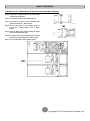
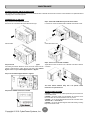
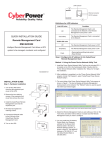
VERTICAL/TOWER INSTALLATION
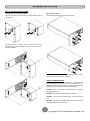
Step 1: Rotate the Multifunction LCD Module
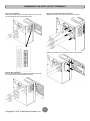
Step 2: Attach the base stands
Unscrew the right panel of the Power module. Separate the right panel
from the UPS. Gently lift the LCD module out. Rotate it to the tower
orientation. Reinstall it for a tower configuration.
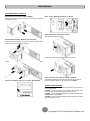
Secure the tie bracket with the screws (M5X8*4pcs). Tighten the screws
(M5X12*4pcs) of the base stands (rackmount ears) onto the bottom of
the power module and the battery module.
Step 3: Attach dust covers
Insert dust covers into the rackmount ear screw holes that are not being
used.
ELECTRICAL INSTALLATION
After completing the hardware installation of the UPS, you are now ready
to plug in the UPS and connect your equipment.
4
Copyright © 2011 CyberPower Systems, Inc.