1
www.zerouav.com
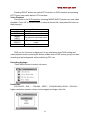
Pressing RIGHT button can switch FPV interface to DVR interface and pressing
LEFT button can switch back to FPV interface.
Video Playback
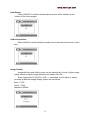
First,switch to the DVR interface, pressing MODE (RIGHT) button can start video
playback. Press UP or DOWN button to select a desired file, then press OK button to
start playing it.
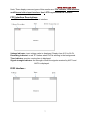
UP
DOWN
MENU
(LEFT)
MODE
(RIGHT)
OK
Functions
Move cursor up
Move cursor down
Po pup/exit menu/sub menu
Enter/exit video playback
mode
Confirm selection /play/stop
DVR can run front-end or back-end. In any interface except DVR setting and
video playback mode, pressing OK button (middle one of DVR control group) can start
recording in the background, without affecting FPV use.
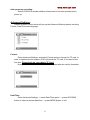
Recording Settings:
Press MENU button to select sub menu:
Resolution:
D1(720×576(PAL)),720×480(NTSC)),VGA(640×480) QVGA(320×240),
higher resolution results in clearer video images and larger video file.
10