1
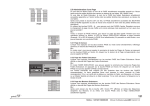
Left - Right the fixtures will be displayed with ascending ID numbers side by side; set the number of columns
using COLUMNS
Top - Bottom The fixtures will be displayed with ascending ID numbers from top to bottom
WRAP AROUND:
If “On“ has been selected, the size of the Channels will be adjusted automatically, when the number of Channels
changes.
NAME FIELD:
ON The Fixture names will be displayed
OFF The Fixture names will not be displayed
COLUMNS:
Here, you can enter the number of columns on display (1 - 60)
NOTE: If you choose too many columns, it will not be possible to display the values in the cells completely.
ATTRIBUTE MASK
With the MASK function, you can choose parameters to be displayed in the CompFixture Sheet. One touch on the
parameter in the INCLUDE column will transfer this parameter to the EXCLUDED column and it will not be displayed
in the Sheet any longer. Vice versa, you can beam a parameter from the EXCLUDED column to the INCLUDED
column.
ATTRIBUTE SORT
With the SORT-function, you can change the position of the parameters .
select Parameter (blue line)
change position with UP or DOWN
3 . 4 . 1 The ALIGN Function
The ALIGN function allows you to apply ratios to ranges of parameters. Four different modes are available.
ALIGN key pressed once (LED is on).The values will be distributed between the first and last selected fixture; i.e. not
the ID numbers, but the selection order will determine, what the „box“ will look like. Example: if you select the
fixtures in the order 1 through 10, pressing ALIGN once will have the result displayed in the graphics on the left.
The order 10 through 1 will result in a mirrored version. An irregular selection will yield an irregular graphics.
e.g. 1 x Align + Dimm value
ALIGN key pressed once (LED is on).
When changing the activated values, the value of the first selected Channel/Fixture will be taken as the starting
value (will not be changed), while the value of the last selected Channel/Fixture value will be the one modified
most, and all values in between will be distributed evenly.
e.g. 2 x Align + Dimm value
ALIGN key pressed twice (LED is on).
When changing the activated values, the value of the last selected Channel/Fixture will be taken as the starting
value (will not be changed), while the value of the first selected Channel/Fixture will be the one modified most,
and all values in between will be distributed evenly.
61
Hotline: +49 5251 688865-99 . Operating Manual grandMA Version 5.7