1
•
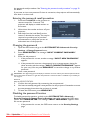
If you wish to use this connection method when the projector is in standby mode, make sure the
Monitor Out function is turned on in the SYSTEM SETUP: Advanced menu. See "Standby Settings"
on page 43 for details.
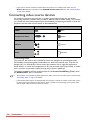
Connecting video source devices
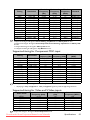
You need only connect the projector to a video source device using just one of the
connecting methods, however each provides a different level of video quality. The method
you choose will most likely depend upon the availability of matching terminals on both the
projector and the video source device as described below:
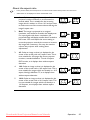
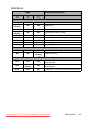
Terminal name
Terminal appearance
Picture quality
HDMI
Best
Component Video
Better
S-Video
Good
Video
Normal
Connecting audio
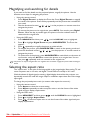
The projector has built-in mono speaker(s) which are designed to provide basic audio
functionality accompanying data presentations for business purposes only. They are not
designed for, nor intended for stereo audio reproduction use as might be expected in
home theater or home cinema applications. Any stereo audio input (if provided), is mixed
into a common mono audio output through the projector speaker(s).
The built-in speaker(s) will be muted (except for the Power On/Off Ring Tone) when
the AUDIO OUT jack is connected.
•
The projector is only capable of playing mixed mono audio, even if a stereo audio input is connected. See
"Connecting audio" on page 16 for details.
•
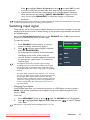
If the selected video image is not displayed after the projector is turned on and the correct video source
has been selected, check that the video source device is turned on and operating correctly. Also check
that the signal cables have been connected correctly.
16
Connection
Downloaded
from ProjectorsManual.com Manuals