1
04.1.20 11:06 AM
Page 3 (1,1)
New2001
SUPPLIED ACCESSORIES AND ATTACHMENTS
2
ï Battery pack
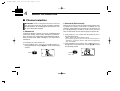
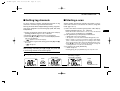
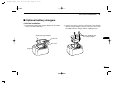
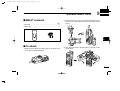
To remove the battery pack:
Turn the screw counterclockwise, then pull the battery pack
in the direction of the arrow as shown below.
NOTE: When removing or attaching the battery pack, use
a coin or flat-blade screwdriver to loosen or tighten the bottom screw.
To attach the battery pack:
Insert the battery pack in the IC-M32 completely, then turn the
screw clockwise.
CAUTION!:
When attaching or removing a battery pack, make sure the
rubber seal is set in the groove of the battery pack correctly. If the seal is not neatly in the groove it may be damaged when attaching the battery pack.
If the seal is damaged, waterproofing is not guaranteed.
NEVER remove or insert the battery pack when the transceiver is wet or soiled. This may result water or dust getting into the transceiver/battery pack and may result in the
transceiver being damaged.
2
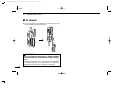
NOTE:
When attaching a battery pack, make sure dust or else does
not adhere to the rubber seal. If dust or else is on the seal
when attaching a battery pack, the water resistant may be
reduced.
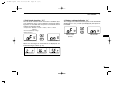
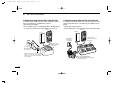
Make sure both the rubber seal (purple) is set to the groove
correctly and dust or else does not adhere to it.
LO
CK
Screw position
when removing battery
OPEN
Incorrect position
Correct position
Rubber seal
CK
Screw position
when attaching battery
LO
IC-M32-2.qxd
OPEN
Groove
Battery pack
Battery pack
3