1
LINUX Rute Users Tutorial and Exposition
Version 0.9.1
For purchasing and support, visit http://www.icon.co.za/˜psheer
http://rute.sourceforge.net/
http://rute.sourceforge.net/rute.pdf
http://rute.sourceforge.net/rute.ps.gz
http://rute.sourceforge.net/rute.dvi.gz
http://rute.sourceforge.net/rute-HTML.zip
http://rute.sourceforge.net/rute-HTML.tar.gz
c 2000, 2001
Copyright °
Paul Sheer
May 5, 2001
Copying
This license dictates the conditions under which you may copy, modify and distribute
this work. Email the author for purchasing information.
TERMS AND CONDITIONS
1. This work may not be reproduced in hard copy except for personal use. Further, it
may not be reproduced in hard copy for training material, nor for commercial gain,
nor for public or organisation-wide distribution. Further, it may not be reproduced in
hard copy except where the intended reader of the hard copy initiates the process of
converting the work to hard copy.
2. The work may not be modified except by a generic format translation utility, as
may be appropriate for viewing the work using an alternative electronic media. Such
a modified version of the work must clearly credit the author, display this license, and
include all copyright notices. Such a modified version of the work must clearly state
the means by which it was translated, as well as where an original copy may be
obtained.
3. Verbatim copies of the work may be redistributed through any electronic media.
Modified versions of the work as per 2. above may be redistributed same, provided
that they can reasonably be said to include, albeit in translated form, all the original
source files.
4. The work is not distributed to promote any product, computer program or
operating system. Even if otherwise cited, all of the opinions expressed in the work
are exclusively those of the author. The author withdraws any implication that any
statement made within this work can be justified, verified or corroborated.
NO WARRANTY
5. THE COPYRIGHT HOLDER(S) PROVIDE NO WARRANTY FOR THE
ACCURACY OR COMPLETENESS OF THIS WORK, OR TO THE FUNCTIONALITY
OF THE EXAMPLE PROGRAMS OR DATA CONTAINED THEREIN, INCLUDING,
BUT NOT LIMITED TO, THE IMPLIED WARRANTIES OF MERCHANTABILITY
AND FITNESS FOR A PARTICULAR PURPOSE.
6. IN NO EVENT UNLESS REQUIRED BY APPLICABLE LAW WILL ANY
COPYRIGHT HOLDER, OR ANY OTHER PARTY WHO MAY MODIFY AND/OR
REDISTRIBUTE THE WORK AS PERMITTED ABOVE, BE LIABLE TO YOU FOR
DAMAGES, INCLUDING ANY GENERAL, SPECIAL, INCIDENTAL OR
CONSEQUENTIAL DAMAGES ARISING OUT OF THE USE OR INABILITY TO
USE THE WORK (INCLUDING BUT NOT LIMITED TO LOSS OF DATA OR DATA
BEING RENDERED INACCURATE OR LOSSES SUSTAINED BY YOU OR THIRD
PARTIES), EVEN IF SUCH HOLDER OR OTHER PARTY HAS BEEN ADVISED OF
ii
THE POSSIBILITY OF SUCH DAMAGES.
END OF TERMS AND CONDITIONS
—
TRANSLATING INTO OTHER LANGUAGES
Several people have requested that they may be permitted to make translations into
other languages. If you are interested in translating Rute, please contact the author.
You will be sent several chapters in source form for you to translate. These will then
be reviewed. Should your translation be acceptable, an agreement well be drawn up
which will outline your commitments and remuneration to the project. Note that
translation work will be ongoing, since Rute is continually being added to and
improved.
iii
[email protected]
+27 21 761-7224
Linux
Linux development — cryptography
installations — support — training
iv
Changes
0.9.1 Acknowledgements added.
0.9.0 X configuration completed. Samba Chapter added.
Reviewers comments integrated.
0.8.9 Complex routing example. PPP dialup. UUCP chapter added.
Apache chapter complete with CGI’s and virtual hosting.
0.8.8 (9 Apr 2001) Apache chapter mostly complete. Advanced
scripting chapter added. NFS chapter added. Section on
binary, octal and hex added. Lots of corrections,
additions and examples.
0.8.7 (14 Mar 2001) Package verification section added.
Security chapter ammended. Preinstalled doc chap
updated.
0.8.6 (19 Feb 2001) Unix security chapter. Comments
assimilated.
0.8.5 /etc/aliases expl added under exim chapter. exim
command-line ops.
0.8.4 Lecture Schedule added. More indexing done. Comments
assimilated. Thanks to all those that contributed.
Please reitereate comments that were not fulfilled.
0.8.3 Ethernet interface aliasing.
0.8.2 2000-10-21 Inetd/xinetd chapter added. FAQ updated.
0.8.1 Init and mgetty chapter added. Faxing sections added.
0.8.0 Kernel Source chapter added
0.7.0 LPI and RHCE summaries added
0.6.0
0.5.0
v
0.4.0
0.3.0 First public release
vi
Contents
1
2
Introduction
1
1.1
What this book covers . . . . . . . . . . . . . . . . . . . . . . . . . . . . .
1
1.2
Read this next. . .
. . . . . . . . . . . . . . . . . . . . . . . . . . . . . . . .
1
1.3
What do I need to get started . . . . . . . . . . . . . . . . . . . . . . . . .
1
1.4
More about this book . . . . . . . . . . . . . . . . . . . . . . . . . . . . . .
2
1.5
I get very frustrated with U NIX documentation that I don’t understand .
2
1.6
LPI and RHCE requirements . . . . . . . . . . . . . . . . . . . . . . . . . .
3
1.7
Not RedHat: RedHat-like . . . . . . . . . . . . . . . . . . . . . . . . . . . .
3
Computing Sub-basics
5
2.1
Binary, octal, decimal and hexadecimal . . . . . . . . . . . . . . . . . . . .
5
2.2
Files . . . . . . . . . . . . . . . . . . . . . . . . . . . . . . . . . . . . . . . .
7
2.3
Commands . . . . . . . . . . . . . . . . . . . . . . . . . . . . . . . . . . . .
8
2.4
Logging in and changing your password . . . . . . . . . . . . . . . . . .
8
2.5
Listing and creating files . . . . . . . . . . . . . . . . . . . . . . . . . . . .
9
2.6
Command line editing keys . . . . . . . . . . . . . . . . . . . . . . . . . .
9
2.7
Console switching . . . . . . . . . . . . . . . . . . . . . . . . . . . . . . . .
10
2.8
Creating files . . . . . . . . . . . . . . . . . . . . . . . . . . . . . . . . . . .
11
2.9
Allowable characters for filenames . . . . . . . . . . . . . . . . . . . . . .
11
2.10 Directories . . . . . . . . . . . . . . . . . . . . . . . . . . . . . . . . . . . .
11
vii
CONTENTS
3
4
5
CONTENTS
PC Hardware
13
3.1
Motherboard . . . . . . . . . . . . . . . . . . . . . . . . . . . . . . . . . . .
13
3.2
Master/Slave IDE . . . . . . . . . . . . . . . . . . . . . . . . . . . . . . . .
17
3.3
CMOS . . . . . . . . . . . . . . . . . . . . . . . . . . . . . . . . . . . . . .
18
Basic Commands
19
4.1
The ls command, hidden files, command-line options . . . . . . . . . .
19
4.2
Error messages . . . . . . . . . . . . . . . . . . . . . . . . . . . . . . . . .
20
4.3
Wildcards, names, extensions and glob expressions . . . . . . . . . . . . .
23
4.4
Usage summaries and the copy command . . . . . . . . . . . . . . . . . .
27
4.5
Manipulating directories . . . . . . . . . . . . . . . . . . . . . . . . . . . .
28
4.6
Relative vs. absolute pathnames . . . . . . . . . . . . . . . . . . . . . . . .
29
4.7
System manual pages . . . . . . . . . . . . . . . . . . . . . . . . . . . . . .
29
4.8
System info pages . . . . . . . . . . . . . . . . . . . . . . . . . . . . . . .
30
4.9
Some basic commands . . . . . . . . . . . . . . . . . . . . . . . . . . . . .
31
4.10 Multimedia commands for fun . . . . . . . . . . . . . . . . . . . . . . . .
34
4.11 Terminating commands . . . . . . . . . . . . . . . . . . . . . . . . . . . .
35
4.12 Compressed files . . . . . . . . . . . . . . . . . . . . . . . . . . . . . . . .
35
4.13 Searching for files . . . . . . . . . . . . . . . . . . . . . . . . . . . . . . . .
36
4.14 Searching within files . . . . . . . . . . . . . . . . . . . . . . . . . . . . . .
37
4.15 Copying to MSDOS and Windows formatted floppy disks . . . . . . . .
38
4.16 Archives and backups . . . . . . . . . . . . . . . . . . . . . . . . . . . . .
39
4.17 The PATH where commands are searched for . . . . . . . . . . . . . . . .
40
Regular Expressions
43
5.1
Basic regular expression exposition . . . . . . . . . . . . . . . . . . . . . .
43
5.2
The fgrep command . . . . . . . . . . . . . . . . . . . . . . . . . . . . . .
45
5.3
Regular expression \{ \} notation . . . . . . . . . . . . . . . . . . . . . . .
45
viii
CONTENTS
6
7
8
CONTENTS
5.4
+ ? \< \> ( ) | notation . . . . . . . . . . . . . . . . . . . . . . . . . . . .
46
5.5
Regular expression sub-exressions . . . . . . . . . . . . . . . . . . . . . .
46
Editing Text Files
47
6.1
vi . . . . . . . . . . . . . . . . . . . . . . . . . . . . . . . . . . . . . . . . .
47
6.2
Syntax highlighting . . . . . . . . . . . . . . . . . . . . . . . . . . . . . . .
51
6.3
Editors . . . . . . . . . . . . . . . . . . . . . . . . . . . . . . . . . . . . . .
51
6.3.1
Cooledit . . . . . . . . . . . . . . . . . . . . . . . . . . . . . . . . .
52
6.3.2
vi and vim . . . . . . . . . . . . . . . . . . . . . . . . . . . . . . .
52
6.3.3
Emacs . . . . . . . . . . . . . . . . . . . . . . . . . . . . . . . . . .
52
6.3.4
Other editors . . . . . . . . . . . . . . . . . . . . . . . . . . . . . .
53
Shell Scripting
55
7.1
Introduction . . . . . . . . . . . . . . . . . . . . . . . . . . . . . . . . . . .
55
7.2
Looping: the while and until statements . . . . . . . . . . . . . . . . .
56
7.3
Looping: the for statement . . . . . . . . . . . . . . . . . . . . . . . . . .
57
7.4
breaking out of loops and continueing . . . . . . . . . . . . . . . . . .
59
7.5
Looping over glob expressions . . . . . . . . . . . . . . . . . . . . . . . .
60
7.6
The case statement . . . . . . . . . . . . . . . . . . . . . . . . . . . . . . .
60
7.7
Using functions: the function keyword . . . . . . . . . . . . . . . . . .
61
7.8
Properly processing command line args: shift . . . . . . . . . . . . . .
62
7.9
More on command-line arguments: $@ and $0 . . . . . . . . . . . . . . .
64
7.10 Single forward quote notation . . . . . . . . . . . . . . . . . . . . . . . . .
64
7.11 Double quote notation . . . . . . . . . . . . . . . . . . . . . . . . . . . . .
64
7.12 Backward quote substitution . . . . . . . . . . . . . . . . . . . . . . . . .
65
Streams and sed — the stream editor
67
8.1
Introduction . . . . . . . . . . . . . . . . . . . . . . . . . . . . . . . . . . .
67
8.2
Tutorial . . . . . . . . . . . . . . . . . . . . . . . . . . . . . . . . . . . . . .
68
ix
CONTENTS
9
CONTENTS
8.3
Piping using | notation . . . . . . . . . . . . . . . . . . . . . . . . . . . . .
68
8.4
A complex piping example . . . . . . . . . . . . . . . . . . . . . . . . . .
69
8.5
Redirecting streams with >& . . . . . . . . . . . . . . . . . . . . . . . . . .
69
8.6
Using sed to edit streams . . . . . . . . . . . . . . . . . . . . . . . . . . .
71
8.7
Regular expression sub-expressions . . . . . . . . . . . . . . . . . . . . .
71
8.8
Inserting and deleting lines . . . . . . . . . . . . . . . . . . . . . . . . . .
73
Processes and environment variables
75
9.1
Introduction . . . . . . . . . . . . . . . . . . . . . . . . . . . . . . . . . . .
75
9.2
Tutorial . . . . . . . . . . . . . . . . . . . . . . . . . . . . . . . . . . . . . .
76
9.2.1
Controlling jobs . . . . . . . . . . . . . . . . . . . . . . . . . . . . .
76
9.2.2
killing a process, sending a process a signal . . . . . . . . . . . .
79
9.2.3
List of comman signals . . . . . . . . . . . . . . . . . . . . . . . . .
80
9.2.4
Niceness of processes, and scheduling priority . . . . . . . . . . .
80
9.2.5
Listing process CPU/Memory consumption with top . . . . . .
82
9.2.6
Environment’s of processes . . . . . . . . . . . . . . . . . . . . . . .
84
10 Mail
91
10.1 Sending and reading mail . . . . . . . . . . . . . . . . . . . . . . . . . . .
92
10.2 The SMTP protocol — sending mail raw to port 25 . . . . . . . . . . . . .
93
11 User accounts and ownerships
95
11.1 Users and Groups . . . . . . . . . . . . . . . . . . . . . . . . . . . . . . . .
95
11.2 File ownerships . . . . . . . . . . . . . . . . . . . . . . . . . . . . . . . . .
96
11.3 The password file /etc/passwd . . . . . . . . . . . . . . . . . . . . . . .
96
11.4 Shadow password file: /etc/shadow . . . . . . . . . . . . . . . . . . . .
97
11.5 The groups command and /etc/group . . . . . . . . . . . . . . . . . .
98
11.6 Manually creating a user account . . . . . . . . . . . . . . . . . . . . . . .
99
11.7 Automatically: useradd and groupadd . . . . . . . . . . . . . . . . . . 100
x
CONTENTS
CONTENTS
11.8 User logins . . . . . . . . . . . . . . . . . . . . . . . . . . . . . . . . . . . . 100
12 Using Internet Services
105
12.1 ssh, not telnet or rlogin . . . . . . . . . . . . . . . . . . . . . . . . . . 105
12.2 FTP . . . . . . . . . . . . . . . . . . . . . . . . . . . . . . . . . . . . . . . . 106
12.3 finger . . . . . . . . . . . . . . . . . . . . . . . . . . . . . . . . . . . . . . 107
12.4 Sending files by email . . . . . . . . . . . . . . . . . . . . . . . . . . . . . 107
13 L INUX resources
109
13.1 FTP sites and the sunsite mirror . . . . . . . . . . . . . . . . . . . . . . 109
13.2 HTTP — web sites . . . . . . . . . . . . . . . . . . . . . . . . . . . . . . . 110
13.3 Mailing lists . . . . . . . . . . . . . . . . . . . . . . . . . . . . . . . . . . . 111
13.4 Newsgroups . . . . . . . . . . . . . . . . . . . . . . . . . . . . . . . . . . . 112
13.5 RFC’s . . . . . . . . . . . . . . . . . . . . . . . . . . . . . . . . . . . . . . . 113
14 Permission and Modification Times
115
14.1 Permissions . . . . . . . . . . . . . . . . . . . . . . . . . . . . . . . . . . . 115
14.2 Modification times: stat . . . . . . . . . . . . . . . . . . . . . . . . . . . 118
15 Symbolic and Hard Links
119
15.1 Soft links . . . . . . . . . . . . . . . . . . . . . . . . . . . . . . . . . . . . . 119
15.2 Hard links . . . . . . . . . . . . . . . . . . . . . . . . . . . . . . . . . . . . 121
16 Pre-installed Documentation
123
17 Overview of the U NIX Directory Layout
129
18 U NIX devices
135
18.1 Device files . . . . . . . . . . . . . . . . . . . . . . . . . . . . . . . . . . . . 135
18.2 Block and character devices . . . . . . . . . . . . . . . . . . . . . . . . . . 136
18.3 Major and Minor device numbers . . . . . . . . . . . . . . . . . . . . . . . 137
xi
CONTENTS
CONTENTS
18.4 Miscellaneous devices . . . . . . . . . . . . . . . . . . . . . . . . . . . . . 137
18.5 dd, tar and tricks with block devices . . . . . . . . . . . . . . . . . . . . 140
18.6 Creating devices with mknod and /dev/MAKEDEV . . . . . . . . . . . . . 144
19 Partitions, file-systems, formatting, mounting
145
19.1 The physical disk structure . . . . . . . . . . . . . . . . . . . . . . . . . . 145
19.2 Partitioning a new disk . . . . . . . . . . . . . . . . . . . . . . . . . . . . . 147
19.3 Formatting devices . . . . . . . . . . . . . . . . . . . . . . . . . . . . . . . 151
19.4 mounting devices . . . . . . . . . . . . . . . . . . . . . . . . . . . . . . . . 155
19.5 File-system repair: fsck . . . . . . . . . . . . . . . . . . . . . . . . . . . . 156
19.6 Filesystem errors on boot . . . . . . . . . . . . . . . . . . . . . . . . . . . . 157
19.7 Automatic mounts: fstab . . . . . . . . . . . . . . . . . . . . . . . . . . . 157
19.8 RAM and loopback devices . . . . . . . . . . . . . . . . . . . . . . . . . . 159
20 Advanced Shell Scripting
163
20.1 Lists of commands . . . . . . . . . . . . . . . . . . . . . . . . . . . . . . . 163
20.2 Special parameters: $?, $* etc. . . . . . . . . . . . . . . . . . . . . . . . . 164
20.3 Expansion . . . . . . . . . . . . . . . . . . . . . . . . . . . . . . . . . . . . 165
20.4 Built-in commands . . . . . . . . . . . . . . . . . . . . . . . . . . . . . . . 167
20.5 Trapping signals — the trap command . . . . . . . . . . . . . . . . . . . 169
20.6 Internal settings — the set command . . . . . . . . . . . . . . . . . . . . 170
20.7 Useful scripts and commands . . . . . . . . . . . . . . . . . . . . . . . . . 170
20.7.1 chroot . . . . . . . . . . . . . . . . . . . . . . . . . . . . . . . . . 170
20.7.2 if conditionals . . . . . . . . . . . . . . . . . . . . . . . . . . . . . 171
20.7.3 patching and diffing . . . . . . . . . . . . . . . . . . . . . . . . 171
20.7.4 Internet connectivity test . . . . . . . . . . . . . . . . . . . . . . . . 172
20.7.5 Recursive grep (search) . . . . . . . . . . . . . . . . . . . . . . . . 173
20.7.6 Recursive search and replace . . . . . . . . . . . . . . . . . . . . . 173
xii
CONTENTS
CONTENTS
20.7.7 cut and awk — manipulating text file fields . . . . . . . . . . . . 174
20.7.8 Calculations with bc . . . . . . . . . . . . . . . . . . . . . . . . . . 175
20.7.9 Convert graphics formats of many files . . . . . . . . . . . . . . . 175
20.7.10 Persistent background processes . . . . . . . . . . . . . . . . . . . 176
20.7.11 Processing the process list . . . . . . . . . . . . . . . . . . . . . . . 176
20.8 Shell initialisation . . . . . . . . . . . . . . . . . . . . . . . . . . . . . . . . 178
20.8.1 Customising the PATH and LD LIBRARY PATH . . . . . . . . . . . 178
20.9 File locking . . . . . . . . . . . . . . . . . . . . . . . . . . . . . . . . . . . . 179
20.9.1 Locking a mailbox file . . . . . . . . . . . . . . . . . . . . . . . . . 179
20.9.2 Locking over NFS . . . . . . . . . . . . . . . . . . . . . . . . . . . . 181
20.9.3 Directory versus File locking . . . . . . . . . . . . . . . . . . . . . 182
20.9.4 Locking inside C programs . . . . . . . . . . . . . . . . . . . . . . 182
21 System Services and lpd
183
21.1 Using lpr . . . . . . . . . . . . . . . . . . . . . . . . . . . . . . . . . . . . 183
21.2 Downloading and installing . . . . . . . . . . . . . . . . . . . . . . . . . . 184
21.3 LPRng vs. legacy lpr-0.nn . . . . . . . . . . . . . . . . . . . . . . . . . . 185
21.4 Package elements . . . . . . . . . . . . . . . . . . . . . . . . . . . . . . . . 185
21.5 The printcap file in detail . . . . . . . . . . . . . . . . . . . . . . . . . . 189
21.6 Postscript and the print filter . . . . . . . . . . . . . . . . . . . . . . . . . 190
21.7 Access control . . . . . . . . . . . . . . . . . . . . . . . . . . . . . . . . . . 192
21.8 Troubleshooting . . . . . . . . . . . . . . . . . . . . . . . . . . . . . . . . . 193
21.9 Useful programs . . . . . . . . . . . . . . . . . . . . . . . . . . . . . . . . . 194
21.10Printing to things besides printers . . . . . . . . . . . . . . . . . . . . . . 194
22 Trivial introduction to C
197
22.1 C fundamentals . . . . . . . . . . . . . . . . . . . . . . . . . . . . . . . . . 197
22.1.1 The simplest C program . . . . . . . . . . . . . . . . . . . . . . . . 197
xiii
CONTENTS
CONTENTS
22.1.2 Variables and types . . . . . . . . . . . . . . . . . . . . . . . . . . . 199
22.1.3 Functions . . . . . . . . . . . . . . . . . . . . . . . . . . . . . . . . 200
22.1.4 for, while, if and switch statements . . . . . . . . . . . . . . 201
22.1.5 Strings, arrays and memory allocation . . . . . . . . . . . . . . . . 203
22.1.6 String operations . . . . . . . . . . . . . . . . . . . . . . . . . . . . 205
22.1.7 File operations . . . . . . . . . . . . . . . . . . . . . . . . . . . . . 207
22.1.8 Reading command-line arguments inside C programs . . . . . . 208
22.1.9 A more complicated example . . . . . . . . . . . . . . . . . . . . . 208
22.1.10 #include and prototypes . . . . . . . . . . . . . . . . . . . . . . 210
22.1.11 C comments . . . . . . . . . . . . . . . . . . . . . . . . . . . . . . . 210
22.1.12 #define and #if — C macros . . . . . . . . . . . . . . . . . . . . 211
22.2 C Libraries . . . . . . . . . . . . . . . . . . . . . . . . . . . . . . . . . . . . 212
22.3 C projects — Makefiles . . . . . . . . . . . . . . . . . . . . . . . . . . . . 215
23 Shared libraries
219
23.1 What is a DLL? . . . . . . . . . . . . . . . . . . . . . . . . . . . . . . . . . 219
23.2 Creating DLL .so files . . . . . . . . . . . . . . . . . . . . . . . . . . . . . 219
23.3 DLL versioning . . . . . . . . . . . . . . . . . . . . . . . . . . . . . . . . . 220
23.4 Installing DLL .so files . . . . . . . . . . . . . . . . . . . . . . . . . . . . 221
24 Source and Binary Packages
223
24.1 Building GNU source packages . . . . . . . . . . . . . . . . . . . . . . . . 223
24.2 Redhat and Debian binary packages . . . . . . . . . . . . . . . . . . . . . 226
24.3 Source packages . . . . . . . . . . . . . . . . . . . . . . . . . . . . . . . . . 232
25 Introduction to IP
233
25.1 Internet Communication . . . . . . . . . . . . . . . . . . . . . . . . . . . . 233
25.2 Special IP Addresses . . . . . . . . . . . . . . . . . . . . . . . . . . . . . . 235
25.3 Network Masks and Addresses . . . . . . . . . . . . . . . . . . . . . . . . 235
xiv
CONTENTS
CONTENTS
25.4 Computers on a LAN . . . . . . . . . . . . . . . . . . . . . . . . . . . . . . 236
25.5 Configuring Interfaces . . . . . . . . . . . . . . . . . . . . . . . . . . . . . 236
25.6 Configuring Routing . . . . . . . . . . . . . . . . . . . . . . . . . . . . . . 238
25.7 Configuring startup scripts . . . . . . . . . . . . . . . . . . . . . . . . . . 239
25.8 Complex routeing — a many-hop example . . . . . . . . . . . . . . . . . 242
25.9 Interface aliasing — many IP’s on one physical card . . . . . . . . . . . . 245
25.10Diagnostic utilities . . . . . . . . . . . . . . . . . . . . . . . . . . . . . . . 246
25.10.1 ping . . . . . . . . . . . . . . . . . . . . . . . . . . . . . . . . . . . 246
25.10.2 traceroute . . . . . . . . . . . . . . . . . . . . . . . . . . . . . . 247
25.10.3 tcpdump . . . . . . . . . . . . . . . . . . . . . . . . . . . . . . . . . 247
26 TCP and UDP
249
26.1 The TCP header . . . . . . . . . . . . . . . . . . . . . . . . . . . . . . . . . 250
26.2 A sample TCP session . . . . . . . . . . . . . . . . . . . . . . . . . . . . . 252
26.3 User Datagram Protocol (UDP) . . . . . . . . . . . . . . . . . . . . . . . . 254
26.4 /etc/services file . . . . . . . . . . . . . . . . . . . . . . . . . . . . . . 255
26.5 Encrypted/forwarded TCP . . . . . . . . . . . . . . . . . . . . . . . . . . 256
27 DNS and Name Resolution
259
27.1 Top Level Domains (TLD’s) . . . . . . . . . . . . . . . . . . . . . . . . . . 259
27.2 Resolving DNS names to IP addresses . . . . . . . . . . . . . . . . . . . . 260
27.3 Configuring your local machine . . . . . . . . . . . . . . . . . . . . . . . . 263
27.4 Reverse lookups . . . . . . . . . . . . . . . . . . . . . . . . . . . . . . . . . 267
27.5 Authoritive for a domain . . . . . . . . . . . . . . . . . . . . . . . . . . . . 267
27.6 The host, ping and whois command . . . . . . . . . . . . . . . . . . . . 267
27.7 The nslookup command . . . . . . . . . . . . . . . . . . . . . . . . . . . 268
27.7.1 NS, MX, PTR, A and CNAME records . . . . . . . . . . . . . . . . . . 269
27.8 The dig command . . . . . . . . . . . . . . . . . . . . . . . . . . . . . . . 270
xv
CONTENTS
CONTENTS
28 NFS
273
28.1 Software . . . . . . . . . . . . . . . . . . . . . . . . . . . . . . . . . . . . . 273
28.2 Configuration example . . . . . . . . . . . . . . . . . . . . . . . . . . . . . 274
28.3 Access permissions . . . . . . . . . . . . . . . . . . . . . . . . . . . . . . . 276
28.4 Security . . . . . . . . . . . . . . . . . . . . . . . . . . . . . . . . . . . . . . 277
28.5 Kernel NFS . . . . . . . . . . . . . . . . . . . . . . . . . . . . . . . . . . . . 277
29 Services Running Under inetd
279
29.1 The inetd package . . . . . . . . . . . . . . . . . . . . . . . . . . . . . . . 279
29.2 Invoking services using /etc/inetd.conf . . . . . . . . . . . . . . . . 280
29.3 Various service explanations . . . . . . . . . . . . . . . . . . . . . . . . . . 282
29.4 The xinetd alternative . . . . . . . . . . . . . . . . . . . . . . . . . . . . 283
29.5 Security . . . . . . . . . . . . . . . . . . . . . . . . . . . . . . . . . . . . . . 285
30 exim and sendmail
287
30.1 Why exim? . . . . . . . . . . . . . . . . . . . . . . . . . . . . . . . . . . . 287
30.2 exim package contents . . . . . . . . . . . . . . . . . . . . . . . . . . . . . 288
30.3 exim configuration file . . . . . . . . . . . . . . . . . . . . . . . . . . . . . 288
30.4 Full blown mailserver . . . . . . . . . . . . . . . . . . . . . . . . . . . . . 292
30.5 Shell commands for exim administration . . . . . . . . . . . . . . . . . . 294
30.6 The queue . . . . . . . . . . . . . . . . . . . . . . . . . . . . . . . . . . . . 295
30.7 /etc/aliases for equivalent addresses . . . . . . . . . . . . . . . . . . 296
30.8 Realtime Blocking List — combating spam . . . . . . . . . . . . . . . . . 297
30.8.1 What is spam? . . . . . . . . . . . . . . . . . . . . . . . . . . . . . . 297
30.8.2 Basic spam prevention . . . . . . . . . . . . . . . . . . . . . . . . . 298
30.8.3 Realtime Blocking List . . . . . . . . . . . . . . . . . . . . . . . . . 299
30.8.4 Mail administrator and user responsibilities . . . . . . . . . . . . 299
30.9 Sendmail . . . . . . . . . . . . . . . . . . . . . . . . . . . . . . . . . . . . . 300
xvi
CONTENTS
CONTENTS
31 lilo, initrd and Booting
303
31.1 Usage . . . . . . . . . . . . . . . . . . . . . . . . . . . . . . . . . . . . . . . 303
31.2 Theory . . . . . . . . . . . . . . . . . . . . . . . . . . . . . . . . . . . . . . 304
31.3 lilo.conf and the lilo command . . . . . . . . . . . . . . . . . . . . . 305
31.4 Creating boot floppy disks . . . . . . . . . . . . . . . . . . . . . . . . . . . 307
31.5 SCSI installation complications and initrd . . . . . . . . . . . . . . . . 308
32 init, ?getty and U NIX run-levels
311
32.1 init — the first process . . . . . . . . . . . . . . . . . . . . . . . . . . . . 311
32.2 /etc/inittab . . . . . . . . . . . . . . . . . . . . . . . . . . . . . . . . . 312
32.3 Useful runlevels . . . . . . . . . . . . . . . . . . . . . . . . . . . . . . . . . 314
32.4 getty invocation . . . . . . . . . . . . . . . . . . . . . . . . . . . . . . . . 315
32.5 Bootup summary . . . . . . . . . . . . . . . . . . . . . . . . . . . . . . . . 315
32.6 Incoming faxes and modem logins . . . . . . . . . . . . . . . . . . . . . . 316
33 Sending Faxes
321
33.1 Fax through printing . . . . . . . . . . . . . . . . . . . . . . . . . . . . . . 321
34 uucp and uux
325
34.1 Command-line operation . . . . . . . . . . . . . . . . . . . . . . . . . . . 326
34.2 Configuration . . . . . . . . . . . . . . . . . . . . . . . . . . . . . . . . . . 326
34.3 Modem dial . . . . . . . . . . . . . . . . . . . . . . . . . . . . . . . . . . . 329
34.4 tty/UUCP Lock files . . . . . . . . . . . . . . . . . . . . . . . . . . . . . 330
34.5 Debugging . . . . . . . . . . . . . . . . . . . . . . . . . . . . . . . . . . . . 331
34.6 Using uux with exim . . . . . . . . . . . . . . . . . . . . . . . . . . . . . . 332
34.7 Scheduling dialouts . . . . . . . . . . . . . . . . . . . . . . . . . . . . . . . 334
35 The L INUX Filesystem Standard
335
35.1 Introduction . . . . . . . . . . . . . . . . . . . . . . . . . . . . . . . . . . . 337
xvii
CONTENTS
CONTENTS
35.1.1 Status of the Standard . . . . . . . . . . . . . . . . . . . . . . . . . 337
35.1.2 Organization of the Standard . . . . . . . . . . . . . . . . . . . . . 337
35.1.3 Conventions . . . . . . . . . . . . . . . . . . . . . . . . . . . . . . . 337
35.1.4 Background of the FHS . . . . . . . . . . . . . . . . . . . . . . . . 338
35.1.5 Scope . . . . . . . . . . . . . . . . . . . . . . . . . . . . . . . . . . . 338
35.1.6 General Guidelines . . . . . . . . . . . . . . . . . . . . . . . . . . . 339
35.1.7 Intended Audience . . . . . . . . . . . . . . . . . . . . . . . . . . . 339
35.1.8 Conformance with this Document . . . . . . . . . . . . . . . . . . 339
35.2 The Filesystem . . . . . . . . . . . . . . . . . . . . . . . . . . . . . . . . . . 340
35.3 The Root Directory . . . . . . . . . . . . . . . . . . . . . . . . . . . . . . . 342
35.3.1 /bin : Essential user command binaries (for use by all users) . . 344
35.3.2 Required files for /bin: . . . . . . . . . . . . . . . . . . . . . . . . 344
35.3.3 /boot : Static files of the boot loader . . . . . . . . . . . . . . . . 345
35.3.4 /dev : Device files . . . . . . . . . . . . . . . . . . . . . . . . . . . 345
35.3.5 /etc : Host-specific system configuration . . . . . . . . . . . . . 345
35.3.6 Required files for /etc: . . . . . . . . . . . . . . . . . . . . . . . . 346
35.3.7 /home : User home directories (optional) . . . . . . . . . . . . . . 347
35.3.8 /lib : Essential shared libraries and kernel modules . . . . . . . 347
35.3.9 /mnt : Mount point for temporarily mounted filesystems . . . . 348
35.3.10 /opt : Add-on application software packages . . . . . . . . . . . 348
35.3.11 /root : Home directory for the root user (optional) . . . . . . . . 349
35.3.12 /sbin : System binaries (binaries once kept in /etc) . . . . . . . . 349
35.3.13 Required files for /sbin: . . . . . . . . . . . . . . . . . . . . . . . 350
35.3.14 /tmp : Temporary files . . . . . . . . . . . . . . . . . . . . . . . . . 350
35.4 The /usr Hierarchy . . . . . . . . . . . . . . . . . . . . . . . . . . . . . . 351
35.4.1 /usr/X11R6 : X Window System, Version 11 Release 6 . . . . . . 351
35.4.2 /usr/bin : Most user commands . . . . . . . . . . . . . . . . . . 352
xviii
CONTENTS
CONTENTS
35.4.3 /usr/include : Directory for standard include files. . . . . . . 352
35.4.4 /usr/lib : Libraries for programming and packages . . . . . . . 352
35.4.5 /usr/local : Local hierarchy . . . . . . . . . . . . . . . . . . . . 353
35.4.6 /usr/sbin : Non-essential standard system binaries . . . . . . . 354
35.4.7 /usr/share : Architecture-independent data . . . . . . . . . . . 354
35.4.8 Recommended files for /usr/share/dict: . . . . . . . . . . . . 355
35.4.9 /usr/src : Source code . . . . . . . . . . . . . . . . . . . . . . . . 359
35.5 The /var Hierarchy . . . . . . . . . . . . . . . . . . . . . . . . . . . . . . 359
35.5.1 /var/account : Process accounting logs (if supported) . . . . . 360
35.5.2 /var/cache : Application cache data . . . . . . . . . . . . . . . . 360
35.5.3 /var/crash : System crash dumps (if supported) . . . . . . . . 362
35.5.4 /var/games : Variable game data . . . . . . . . . . . . . . . . . . 362
35.5.5 /var/lib : Variable state information . . . . . . . . . . . . . . . 362
35.5.6 /var/lock : Lock files . . . . . . . . . . . . . . . . . . . . . . . . 363
35.5.7 /var/log : Log files and directories . . . . . . . . . . . . . . . . . 364
35.5.8 /var/mail : User mailbox files . . . . . . . . . . . . . . . . . . . 364
35.5.9 /var/opt : Variable data for /opt . . . . . . . . . . . . . . . . . . 364
35.5.10 /var/run : Run-time variable data . . . . . . . . . . . . . . . . . 365
35.5.11 /var/spool : Application spool data . . . . . . . . . . . . . . . . 365
35.5.12 /var/tmp : Temporary files preserved between system reboots . 366
35.5.13 /var/yp : Network Information Service (NIS) database files . . 366
35.6 Operating System Specific Annex . . . . . . . . . . . . . . . . . . . . . . . 367
35.6.1 Linux . . . . . . . . . . . . . . . . . . . . . . . . . . . . . . . . . . . 367
35.6.2 Optional files for /sbin: . . . . . . . . . . . . . . . . . . . . . . . . 368
35.7 Appendix . . . . . . . . . . . . . . . . . . . . . . . . . . . . . . . . . . . . 370
35.7.1 The FHS mailing list . . . . . . . . . . . . . . . . . . . . . . . . . . 370
35.7.2 Acknowledgments . . . . . . . . . . . . . . . . . . . . . . . . . . . 370
xix
CONTENTS
CONTENTS
35.7.3 Contributors . . . . . . . . . . . . . . . . . . . . . . . . . . . . . . . 370
36 httpd — Apache Web Server
371
36.1 Web server basics . . . . . . . . . . . . . . . . . . . . . . . . . . . . . . . . 371
36.2 Installing and configuring Apache . . . . . . . . . . . . . . . . . . . . . . 375
36.2.1 Sample httpd.conf . . . . . . . . . . . . . . . . . . . . . . . . . 375
36.2.2 Common directives . . . . . . . . . . . . . . . . . . . . . . . . . . . 376
36.2.3 User HTML directories . . . . . . . . . . . . . . . . . . . . . . . . . 380
36.2.4 Aliasing . . . . . . . . . . . . . . . . . . . . . . . . . . . . . . . . . 380
36.2.5 Fancy indexes . . . . . . . . . . . . . . . . . . . . . . . . . . . . . . 381
36.2.6 Encoding and language negotiation . . . . . . . . . . . . . . . . . 381
36.2.7 Server-side includes — SSI . . . . . . . . . . . . . . . . . . . . . . 382
36.2.8 CGI — Common Gateway Interface . . . . . . . . . . . . . . . . . 383
36.2.9 Forms and CGI . . . . . . . . . . . . . . . . . . . . . . . . . . . . . 385
36.2.10 Setuid CGIs . . . . . . . . . . . . . . . . . . . . . . . . . . . . . . . 388
36.2.11 Apache modules and PHP . . . . . . . . . . . . . . . . . . . . . . . 389
36.2.12 Virtual Hosts . . . . . . . . . . . . . . . . . . . . . . . . . . . . . . 390
37 crond and atd
393
37.1 /etc/crontab configuration file . . . . . . . . . . . . . . . . . . . . . . 393
37.2 The at command . . . . . . . . . . . . . . . . . . . . . . . . . . . . . . . . 395
38 postgres SQL server
397
38.1 SQL . . . . . . . . . . . . . . . . . . . . . . . . . . . . . . . . . . . . . . . . 397
38.2 postgres . . . . . . . . . . . . . . . . . . . . . . . . . . . . . . . . . . . . 398
38.3 postgres package content . . . . . . . . . . . . . . . . . . . . . . . . . . 398
38.4 Installing and initialising postgres . . . . . . . . . . . . . . . . . . . . . 399
38.5 Querying your database with psql . . . . . . . . . . . . . . . . . . . . . . 400
38.6 An introduction to SQL . . . . . . . . . . . . . . . . . . . . . . . . . . . . . 402
xx
CONTENTS
CONTENTS
39 smbd — Samba NT Server
409
39.1 Introduction . . . . . . . . . . . . . . . . . . . . . . . . . . . . . . . . . . . 409
39.2 Configuring Samba . . . . . . . . . . . . . . . . . . . . . . . . . . . . . . . 416
39.3 Configuring Windows . . . . . . . . . . . . . . . . . . . . . . . . . . . . . 418
39.4 Configuring a Windows printer . . . . . . . . . . . . . . . . . . . . . . . . 419
39.5 Configuring swat . . . . . . . . . . . . . . . . . . . . . . . . . . . . . . . . 419
39.6 Windows NT caveats . . . . . . . . . . . . . . . . . . . . . . . . . . . . . . 420
40 named — Domain Name Server
423
40.1 Configuring named for dialup use . . . . . . . . . . . . . . . . . . . . . . 431
40.2 Secondary or slave DNS servers . . . . . . . . . . . . . . . . . . . . . . . . 433
41 Point to Point Protocol — Dialup Networking
435
41.1 Basic Dialup . . . . . . . . . . . . . . . . . . . . . . . . . . . . . . . . . . . 435
41.1.1 Determining your chat script . . . . . . . . . . . . . . . . . . . . 437
41.1.2 CHAP and PAP . . . . . . . . . . . . . . . . . . . . . . . . . . . . . 438
41.1.3 Running pppd . . . . . . . . . . . . . . . . . . . . . . . . . . . . . 438
41.2 Demand-dial, masquerading . . . . . . . . . . . . . . . . . . . . . . . . . 440
41.3 Dynamic DNS . . . . . . . . . . . . . . . . . . . . . . . . . . . . . . . . . . 441
41.4 Dial-in servers . . . . . . . . . . . . . . . . . . . . . . . . . . . . . . . . . . 443
41.5 Using tcpdump . . . . . . . . . . . . . . . . . . . . . . . . . . . . . . . . . 445
41.6 ISDN instead of Modems . . . . . . . . . . . . . . . . . . . . . . . . . . . . 445
42 Kernel Source, Modules, Hardware
447
42.1 Kernel constitution . . . . . . . . . . . . . . . . . . . . . . . . . . . . . . . 447
42.2 Kernel version numbers . . . . . . . . . . . . . . . . . . . . . . . . . . . . 448
42.3 Modules, insmod command and siblings . . . . . . . . . . . . . . . . . . 448
42.4 Interrupts, IO-ports and DMA Channels . . . . . . . . . . . . . . . . . . . 450
42.5 Module options and device configuration . . . . . . . . . . . . . . . . . . 451
xxi
CONTENTS
CONTENTS
42.6 Configuring various devices . . . . . . . . . . . . . . . . . . . . . . . . . . 454
42.7 More on LILO: options . . . . . . . . . . . . . . . . . . . . . . . . . . . . 465
42.8 Building the kernel . . . . . . . . . . . . . . . . . . . . . . . . . . . . . . . 465
42.8.1 Unpacking and patching . . . . . . . . . . . . . . . . . . . . . . . . 465
42.8.2 Configuring . . . . . . . . . . . . . . . . . . . . . . . . . . . . . . . 466
42.9 Using packaged kernel source . . . . . . . . . . . . . . . . . . . . . . . . . 467
42.10Building, installing . . . . . . . . . . . . . . . . . . . . . . . . . . . . . . . 467
43 X
469
43.1 The X protocol . . . . . . . . . . . . . . . . . . . . . . . . . . . . . . . . . . 469
43.2 Widget libraries and desktops . . . . . . . . . . . . . . . . . . . . . . . . . 474
43.2.1 Background . . . . . . . . . . . . . . . . . . . . . . . . . . . . . . . 475
43.2.2 Qt . . . . . . . . . . . . . . . . . . . . . . . . . . . . . . . . . . . . . 475
43.2.3 Gtk . . . . . . . . . . . . . . . . . . . . . . . . . . . . . . . . . . . . 475
43.2.4 GNUStep . . . . . . . . . . . . . . . . . . . . . . . . . . . . . . . . 476
43.3 XFree86 . . . . . . . . . . . . . . . . . . . . . . . . . . . . . . . . . . . . . . 476
43.4 The X distribution . . . . . . . . . . . . . . . . . . . . . . . . . . . . . . . . 480
43.5 X documentation . . . . . . . . . . . . . . . . . . . . . . . . . . . . . . . . 480
43.6 Configuring X . . . . . . . . . . . . . . . . . . . . . . . . . . . . . . . . . . 481
43.7 Visuals . . . . . . . . . . . . . . . . . . . . . . . . . . . . . . . . . . . . . . 487
43.8 The startx and xinit commands . . . . . . . . . . . . . . . . . . . . . . . 488
43.9 Login screen . . . . . . . . . . . . . . . . . . . . . . . . . . . . . . . . . . . 488
43.10X Font naming conventions . . . . . . . . . . . . . . . . . . . . . . . . . . 489
43.11 Font configuration . . . . . . . . . . . . . . . . . . . . . . . . . . . . . . . 490
43.12The font server . . . . . . . . . . . . . . . . . . . . . . . . . . . . . . . . . . 491
44 Unix Security
493
44.1 Common attacks . . . . . . . . . . . . . . . . . . . . . . . . . . . . . . . . 494
xxii
CONTENTS
CONTENTS
44.1.1 Buffer overflow attacks . . . . . . . . . . . . . . . . . . . . . . . . 494
44.1.2 Setuid programs . . . . . . . . . . . . . . . . . . . . . . . . . . . . 496
44.1.3 Network client programs . . . . . . . . . . . . . . . . . . . . . . . 496
44.1.4 /tmp file vulnerability . . . . . . . . . . . . . . . . . . . . . . . . . 496
44.1.5 Permission problems . . . . . . . . . . . . . . . . . . . . . . . . . . 497
44.1.6 Environment variables . . . . . . . . . . . . . . . . . . . . . . . . . 497
44.1.7 Password sniffing . . . . . . . . . . . . . . . . . . . . . . . . . . . . 497
44.1.8 Denial of service attacks . . . . . . . . . . . . . . . . . . . . . . . . 497
44.2 Other types of attack . . . . . . . . . . . . . . . . . . . . . . . . . . . . . . 498
44.3 Counter measures . . . . . . . . . . . . . . . . . . . . . . . . . . . . . . . . 498
44.4 Important reading . . . . . . . . . . . . . . . . . . . . . . . . . . . . . . . . 505
44.5 Security Quick-Quiz . . . . . . . . . . . . . . . . . . . . . . . . . . . . . . 505
44.6 Soap . . . . . . . . . . . . . . . . . . . . . . . . . . . . . . . . . . . . . . . . 505
A Lecture Schedule
507
A.1 Hardware requirements . . . . . . . . . . . . . . . . . . . . . . . . . . . . 507
A.2 Student selection . . . . . . . . . . . . . . . . . . . . . . . . . . . . . . . . 508
A.3 Lecture Style . . . . . . . . . . . . . . . . . . . . . . . . . . . . . . . . . . . 508
B LPI Certification Cross-reference
513
C RHCE Certification Cross-reference
525
D Linux Advocacy FAQ
533
D.1 Linux Overview . . . . . . . . . . . . . . . . . . . . . . . . . . . . . . . . . 533
D.2 Linux, GNU and Licensing . . . . . . . . . . . . . . . . . . . . . . . . . . . 539
D.3 Linux Distributions . . . . . . . . . . . . . . . . . . . . . . . . . . . . . . . 543
D.4 Linux Support . . . . . . . . . . . . . . . . . . . . . . . . . . . . . . . . . . 547
D.5 Linux Compared to Other Systems . . . . . . . . . . . . . . . . . . . . . . 549
xxiii
CONTENTS
CONTENTS
D.6 Technical . . . . . . . . . . . . . . . . . . . . . . . . . . . . . . . . . . . . . 553
E The GNU General Public License Version 2
xxiv
559
Strangely, the thing that least intrigued me was how they’d managed to get it all
done. I suppose I sort of knew. If I’d learnt one thing from travelling, it was that
the way to get things done was to go ahead and do them. Don’t talk about going to
Borneo. Book a ticket, get a visa, pack a bag, and it just happens.
The Beach
Alex Garland
xxv
CONTENTS
CONTENTS
xxvi
Acknowledgments
A special thanks goes to Abraham van der Merwe for his careful reviewing of the
text. Thanks to Jonathan Maltz, Jarrod Cinman and Alan Tredgold for introducing
me to GNU/Linux back in 1994 or so. Credits are owed to all the Free software
developers that went into LATEX, TEX, GhostScript, GhostView, Autotrace, XFig, XV,
Gimp, the Palatino font, the various LATEX extension styles, DVIPS, DVIPDFM, ImageMagick, XDVI and LaTeX2HTML without which this document would scarcely be
possible. To name a few: John Bradley, David Carlisle, Eric Cooper, John Cristy, Peter Deutsch, Nikos Drakos, Mark Eichin, Carsten Heinz, Spencer Kimball, Paul King,
Donald Knuth, Peter Mattis, Frank Mittelbach, Johannes Plass, Sebastian Rahtz, Tomas
Rokicki, Bob Scheifler, Rainer Schoepf, Brian Smith, Supoj Sutanthavibul, Tim Theisen,
Paul Vojta, Martin Weber, Mark Wicks, Ken Yap, Herman Zapf. Thanks of course go to
the countlesss developers of Free software, and the many readers that gave valuable
feedback on the web site.
xxvii
CONTENTS
CONTENTS
xxviii
Chapter 1
Introduction
1.1
What this book covers
While books shelved beside this one will get your feet wet, this one lets you actually
paddle for a bit, then thrusts your head underwater while feeding you oxygen.
This book covers GNU /L INUX system administration, for popular distributions like RedHat and Debian , as a tutorial for new users and a reference for advanced administrators. It aims to give concise, thorough explanations and practical
examples of each aspect of a U NIX system. Anyone who wants a comprehensive text
on (what is commercially called) “L INUX” can look no further — there is little that is
not covered here.
1.2
Read this next. . .
The ordering of the chapters is carefully designed to allow them to be read in sequence
without missing anything. You should hence read from beginning to end, in order that
later chapters do not reference unseen material. I have also packed in useful examples
which must be practised as you read.
1.3
What do I need to get started
You will need to install a basic L INUX system. There are a number of vendors now
shipping point-and-click-install CD’s: you should try get a Debian or “RedHat-like”
1
1.4. More about this book
1. Introduction
distribution. One hint: try and install as much as possible so that when I mention a
software package in this text, you are likely to have it installed already, and can use
it immediately. Most cities with a sizable IT infrastructure will have a L INUX user
group to help you source a cheap CD. These are getting really easy to install, and there
is no longer much of a need to read lengthy installation instructions.
1.4
More about this book
Chapter 16 contains a fairly comprehensive list of all reference documentation available on your system. This book aims to supplement this material with a tutorial that is
both comprehensive and independent of any previous U NIX knowledge.
It also aims to satisfy the requirements for course notes for a GNU /L INUX
training course. Here in South Africa &I wrote with South African users in mind, and hence give
links to South African resources and examples derived from a South African context. I hope to keep the
identity of the text in this way. Of course this does not detract from the applicability of the text in other
countries. , I use the initial chapters as part of a 36 hour GNU
/L INUX training
-
course given in 12 lessons. The details of the layout for this course is given in Appendix
A.
Note that all “L INUX ” systems are really composed mostly of GNU
software, but from now on I will refer to the GNU
system as “L INUX ” in the way
almost everyone (incorrectly) does.
1.5
I get very frustrated with U NIX documentation that I
don’t understand
Any system reference will require you to read it at least three times before you get
a reasonable picture of what to do. If you need to read it more than three times, then
there is probably some other information that you really should be reading first. If you
are only reading a document once, then you are being too impatient with yourself.
It is very important to identify the exact terms that you fail to understand in a
document. Always try to back-trace to the precise word before you continue.
Its also probably not a good idea to learn new things according to deadlines. Your
U NIX knowledge should evolve by grace and fascination, rather than pressure.
2
1. Introduction
1.6
1.6. LPI and RHCE requirements
Linux Professionals Institute (LPI) and RedHat Certified Engineer (RHCE) requirements
The difference in being able to pass an exam, and actually do something useful, is of
course huge.
The LPI and RHCE are two certifications that will give you an introduction to
Linux. This book covers far more than both these two certifications in most places, but
occasionally leaves out minor items as an exercise. It certainly covers in excess of what
you need to know to pass both these certifications.
The LPI and RHCE requirements are given in Appendix B and C.
These two certifications are merely introductions to U NIX. They do not expect
a user to write nifty shell scripts to do tricky things, or understand the subtle or advanced features of many standard services, let alone expect a wide overview of the
enormous numbers of non-standard and very useful applications out there. To be
blunt: you can pass these courses and still be considered quite incapable by the standards of companies that do system integration &System integration is my own term. It refers to
the act of getting L INUX to do non-basic functions, like writing complex shell scripts; setting up wide area
dialup networks; creating custom distributions; or interfacing database, web and email services together. .
-
In fact, these certifications make no reference to computer programming whatsoever.
1.7
Not RedHat: RedHat-like
Throughout this book I refer to “RedHat” and “Debian ” specific examples. What I
actually mean by this are systems that use .rpm (redHat package manager) packages
as opposed to systems that use .deb (debian) packages — there are lots of both. This
just means that there is no reason to avoid using a distribution like Mandrake, which
is .rpm based, and possibly viewed by many as being better than RedHat.
In short, brand names no longer have any meaning in the Free software community.
3
1.7. Not RedHat: RedHat-like
1. Introduction
4
Chapter 2
Computing Sub-basics
This chapter explains some basics that most computer users of any sort will already
be familiar with. If you are new to U NIX however, you may want to gloss over the
commonly used key bindings for reference.
The best way of thinking about how a computer stores and manages information
is to ask yourself how you would. Most often the way a computer works is exactly
the way one would expect it to if you were inventing it for the first time. The only
limitation on this are those imposed by logical feasibility and imagination, but most
anything else is allowed.
2.1
Binary, octal, decimal and hexadecimal
When you first learned to count, you did so with 10 digits, and hence ordinary numbers
(like telphone numbers) are called “base ten” numbers. Postal codes that include letters
and digits are called “base 36” numbers because of the addition of 26 letters onto the
usual 10 digits. The simplest base possible is “base two” using only two digits: 0 and
1. Now a 7 digit telephone number has 10 × 10 × 10 × 10 × 10 × 10 × 10 = 107 =
|
{z
}
7 digits
10000000 possible combinations. A postal code with four characters has 364 = 1679616
possible combinations. However an 8 digit binary number only has 28 = 256 possible
combinations.
Since the internal representation of numbers within a computer is binary, and
since it is rather tedious to convert between decimal and binary, computer scientists
have come up with new bases to represent numbers: these are “base sixteen” and
“base eight” known as hexadecimal and octal respectively. Hexadecimal numbers use
5
2.1. Binary, octal, decimal and hexadecimal
2. Computing Sub-basics
the digits 0 through 9 and the letters A through F, while octal numbers use only the
digits 0 through 7. Hexadecimal is often abbreviated as hex.
Now consider a 4 digit binary number. It has 24 = 16 possible combinations and
can therefore be easily represented by one of the sixteen hex digits. A 3 digit binary
number has 23 = 8 possible combinations and can thus be represented by a single
octal digit. Hence a binary number can be represented with hex or octal digits without
having to do much calculation, as follows:
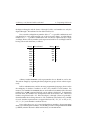
Binary
0000
0001
0010
0011
0100
0101
0110
0111
1000
1001
1010
1011
1100
1101
1110
1111
Hexadecimal
0
1
2
3
4
5
6
7
8
9
A
B
C
D
E
F
Binary
000
001
010
011
100
101
110
111
Octal
0
1
2
3
4
5
6
7
A binary number 01001011 can be represented in hex as 4B and in octal as 113.
This is done simply by separating the binary digits into groups of four or three respectively.
In U NIX administration, and also in many programming languages, there is often
the ambiguity of whether a number is in fact a hex, decimal or octal number. For
instance a hex number 56 is 01010110, but an octal number 56 is 101110, while a decimal
number 56 is 111000 (computed through a more tedious calculation). To distinguish
between them, hex numbers are often prefixed with the characters “0x”, while octal
numbers are prefixed with a “0”. If the first digit is 1 through 9, then it is probably a
decimal number that is being referred to. We would then write 0x56 for hex, and 056
for octal. Another representation is to append the letter “H”, “D”, “O” or “B” (or “h”,
“d”, “o”, “b”) to the number to indicate its base.
U NIX makes heavy use of 8, 16 and 32 digit binary numbers, often representing
them as 2, 4 and 8 digit hex numbers. You should get used to seeing numbers like 0xffff
(or FFFFh) which in decimal is 65535 and in binary is 1111111111111111.
6
2. Computing Sub-basics
2.2
2.2. Files
Files
Common to every computer system invented is the file. A file holds a single contiguous
block of data. Any kind of data can be stored in a file and there is no data that cannot
be stored in a file. Furthermore, there is no kind of data that is stored anywhere else
except in files. A file holds data of the same type, for instance a single picture will be
stored in one file. During production, this book had each chapter stored in a file. It is
uncommon for different types of data (say text and pictures) to be stored together in
the same file because it is inconvenient. A computer will typically contain about 10000
files that have a great many purposes. Each file will have its own name. The file name
on a L INUX or U NIX machine can be up to 256 characters long and may almost any
character.
The file name is usually explanatory — you might call a letter you wrote to
your friend something like Mary Jones.letter (from now on, whenever you see
the typewriter font &A style of print: here is typewrite font.-, it means that those are
words that might be read off the screen of the computer). The name you choose has
no meaning to the computer, and could just as well be any other combination of letters or digits, however you will refer to that data with that file name whenever you
give an instruction to the computer regarding that data, hence you would like it to be
descriptive. &It is important to internalise the fact that computers do not have an interpretation for
anything. A computer operates with a set of interdependent logical rules. Interdependent means that the rules
have no apex, in the sense that computers have no fixed or single way of working; for example, the reason
a computer has files at all is because computer programmers have decided that this is the most universal and
convenient way of storing data, and if you think about it, it really is.
-
The data in each file is merely a long list of numbers. The size of the file is
just the length of the list of numbers. Each number is called a byte. Each byte contains 8 bits. Each bit is either a one or a zero and therefore, once again, there are
2 × 2 × 2 × 2 × 2 × 2 × 2 × 2 = |{z}
256 possible combinations. Hence a byte can only
|
{z
}
8 bits
1 byte
hold a number as large as this. There is no type of data which cannot be represented as
a list of bytes. Bytes are sometimes also called octets. Your letter to Mary will be encoded
into bytes in order to be stored on the computer. We all know that a television picture
is just a sequence of dots on the screen that scan from left to right — it is in this way
that a picture might be represented in a file: i.e. as a sequence of bytes where each byte
is interpreted as a level of brightness; 0 for black, and 255 for white. For your letter, the
convention is to store an A as 65 a B as 66 and so on. Each punctuation character also
has a numerical equivalent.
7
2.3. Commands
2.3
2. Computing Sub-basics
Commands
The second thing common to every computer system invented is the command. You tell
the computer what to do with single words — one at a time — typed into the computer.
Modern computers appear to have done away the typing in of commands by having
beautiful graphical displays that work with a mouse, but, fundamentally, all that is
happening is that commands are being secretely typed in for you. Using commands is
still the only way to have complete power over the computer. You don’t really know
anything about a computer until you get to grips with the commands it uses. Using a
computer will very much involve typing in a word, pressing the enter key, and then
waiting for the computer screen to spit something back at you. Most commands are
typed in to do something useful to a file.
2.4
Logging in and changing your password
Turn on your L INUX box. After a few minutes of initialisation, you will see the
login prompt. A prompt is one or more characters displayed on the screen that you are
expected to type something in after. Here this may state the name of the computer
(each computer has a name — typically consisting of about eight lowercase letters)
and then the word login:. L INUX machines now come with a graphical desktop
by default (most of the time), so you might get a pretty graphical login with the same
effect. Now you should type your login name — a sequence of about eight lower case
letters that would have been assigned to you by your computer administrator — and
then press the ‘Enter’ (or ‘Return’) key (i.e.
). A password prompt will appear
after which you should type your password. Your password may be the same as your
login name. Note that your password will not be shown on the screen as you type it,
but will be invisible. After typing your password, press the ‘Enter’ or ‘Return’ key
again. The screen might show some message and prompt you for a login again — in
this case you have probably typed something incorrectly and should give it another
try. From now on, you will be expected to know that the ‘Enter’ or ‘Return’ key should
be pressed at the end of every line you type in, analogous to the mechanical typewriter.
You will also be expected to know that human error is very common — when you type
something incorrectly the computer will give an error message, and you should try
again until you get it right. It is very uncommon for a person to understand computer
concepts after a first reading, or to get commands to work on the first try.
Now that you have logged in, you will see a shell prompt — a shell is place where
you are able to type commands. prompt. This is where you will spend most of your
time as a system administrator &Computer manager.-, but it needn’t look as bland as you
see now. Your first exercise is to change your password. Type the command passwd.
You will then be asked for a new password and then asked to confirm that password.
8
2. Computing Sub-basics
2.5. Listing and creating files
The password you choose consist of letters, numbers and punctuation — you will see
later on why this security measure is a good idea. Take good note of your password for
the next time you log in. Then you will arrive back in the shell. The password you have
chosen will take effect immediately, replacing the previous password that you used to
log in. The password command might also have given some message indicating what
effect it actually had. You may not understand the message, but you should try to get
an idea of whether the connotation was positive or negative.
When you are using a computer, it is useful to imagine yourself as being in different places within the computer, rather than just typing commands into it. After you
entered the passwd command, you were no longer in the shell, but moved into the
password place. You could not use the shell until you had moved out of the passwd
command.
2.5
Listing and creating files
Type in the command ls. ls is short for list, abbreviated to two letters like most other
U NIX commands. ls will list all your current files. You may find that ls does nothing,
but just returns you back to the shell. This would be because you have no files just yet.
Most U NIX commands do not give any kind of message unless something went wrong
(the passwd command above was an exception). If there were files, you would see
their names listed rather blandly in columns with no indication of what they are for.
2.6
Command line editing keys
The following keys are useful for editing the command line. Note that U NIX has had a
long and twisted evolution from the mainframe, and the Home, End etc. keys may not
work properly. The following keys bindings are however common throughout many
L INUX applications:
Ctrl-a Move to the beginning of the line (Home).
Ctrl-e Move to the end of the line (End).
Ctrl-h Erase backwards (back space).
Ctrl-d Erase forwards (Delete).
Ctrl-f Move forward one character (right arrow).
Ctrl-b Move backward one character (left arrow).
9
2.7. Console switching
2. Computing Sub-basics
Alt-f Move forward one word.
Alt-b Move backward one word.
Alt-Ctrl-f Erase forward one word.
Alt-Ctrl-b Erase backward one word.
Ctrl-p Previous command (up arrow).
Ctrl-n Next command (down arrow).
Note the prefixes Alt for
, Ctrl for
, and Shift for
, indicate to
hold the key down through the pressing and releasing of the letter key. These are
known as key modifiers. Note also, that the Ctrl key is always case insensitive; hence
Ctrl-D (i.e.
modifier (i.e.
–
–
) and Ctrl-d (i.e.
–
) are identical. The Alt
–?) is in fact a short way of pressing and releasing
before
entering the key combination; hence Esc then f is the same as Alt-f — U NIX is different
to other operating systems’ use of Esc. The Alt modifier is not case insensitive although
some applications will make a special effort to respond insensitively. The Alt key is
also sometimes referred to as the Meta key. All of these keys are sometimes referred to
by their abbreviations: for example C-a for Ctrl-a, or M-f for Meta-f and Alt-f.
Your command-line keeps a history off all the commands you have typed in.
Ctrl-p and Ctrl-n will cycle through previous commands entered. New users seem to
gain tremendous satisfaction from typing in lengthy commands over and over. Never
type in anything more than once — use your command history instead.
Ctrl-r will allow you to search your command history. Hitting Ctrl-r in the middle of a search will find the next match while Ctrl-s will revert to the previous match.
The Tab command is tremendously useful for saving key strokes. Typing a partial directory name, file name or command, and then pressing Tab once or twice in
sequence will complete the word for you without you having to type it all in full.
2.7
Console switching
If you are in text mode, you can type Alt-F2 to switch to a new independent login.
Here you can login again and run a separate session. There are six of these virtual
consoles — Alt-F1 through Alt-F6 — to choose from; also called virtual terminals. If you
are in graphical mode, you will have to instead press Ctrl-Alt-F? because the Alt-F?
keys are often used by applications. The convention is that the seventh virtual console
is graphical, hence Alt-F7 will always get you back to graphical mode.
10
2. Computing Sub-basics
2.8
2.8. Creating files
Creating files
There are many ways of creating a file. Type cat > Mary Jones.letter and then
type out a few lines of text. You will use this file in later examples. The cat command
is used here to write from the keyboard into a file Mary Jones.letter. At the end of
the last line, press Enter one more time and then press
–
. Now, if you type
ls again, you will see the file Mary Jones.letter listed with any other files. Type
cat Mary Jones.letter without the >. You will see that the command cat writes
the contents of a file to the screen, allowing you to view your letter. It should match
exactly what you typed in.
2.9
Allowable characters for filenames
Although U NIX filenames can contain almost any character, standards dictate that only
the following characters are preferred in filenames:
¨
¥
A B C D E F G H I J K L M N O P Q R S T U V W X Y Z
a b c d e f g h i j k l m n o p q r s t u v w x y z
0 1 2 3 4 5 6 7 8 9 . _ - ˜
§
Hence never use other punctuation characters, brackets or control characters to name
files. Also, never use the space or tab character in a filename, and never begin a file
name with a - character.
2.10
Directories
Before we mentioned that a system may typically contain 10000 files. It would be
combersome if you were to see all 10000 of them whenever you typed ls, hence files
are placed in different “cabinets” so that files of the same type get placed together
and can be easily isolated from other files. For instance your letter above might go
in a seperate “cabinet” with other letters. A “cabinet” in computer terms is actually
called a directory. This is the third commonality between all computer systems: all
files go in one or other directory. To get and idea of how this works, type the command
mkdir letters where mkdir stands for make directory. Now type ls. This will show
the file Mary Jones.letter as well as a new file letters. The file letters is not
really a file at all, but the name of a directory in which a number of other files can be
placed. To go into the directory letters you can type cd letters where cd stands
for change directory. Since the directory is newly created, you would not expect it to
contain any files, and typing ls will verify this by not listing anything. You can now
11
¦
2.10. Directories
2. Computing Sub-basics
create a file using the cat command as you did before (try this). To go back into the
original directory that you were in you can use the command cd .. where the .. has
a special meaning of taking you out of the current directory. Type ls again to verify
that you have actually gone up a directory.
It is however bothersome that one cannot tell the difference between files and
directories. The way to do this is with the ls -l command. -l stands for long format.
If you enter this command you will see a lot of details about the files that may not
yet be comprehensible to you. The three things you can watch for are the filename on
the far right, the file size (i.e. the number of bytes that the file contains) in the fifth
column from the left, and the file type on the far left. The file type is a string of letters
of which you will only be interested in one: the character on the far left is either a
- or a d. A - indicates a regular file, and a d indicates a directory. The command
ls -l Mary Jones.letter will list only the single file Mary Jones.letter and
is useful for finding out the size of a single file.
In fact, there is no limitation on how many directories you can create within each
other. In what follows, you will get a glimpse of the layout of all the directories on the
computer.
Type the command cd / where the / has the special meaning to go to the top
most directory on the computer called the root directory. Now type ls -l. The listing
may be quite long and may go off the top of the screen — in this case try ls -l |
less (then use PgUp and PgDn, and press q when done). You will see that most, if
not all, are directories. You can now practice moving around the system with the cd
command, not forgetting that cd .. takes you up and cd / takes you to the root
directory.
At any time you can type pwd (present working directory) to show you the directory
you are currently in.
When you have finished, log out of the computer using the logout command.
12
Chapter 3
PC Hardware
This will explain a little about PC hardware. Anyone that has built their own PC,
or has experience configuring devices on Windows can probably skip this section. It
is added purely for completeness. This chapter actually comes under the subject of
Microcomputer Organisation, i.e. how your machine is electronically structured.
3.1
Motherboard
Inside your machine you will find a single large circuit board called the motherboard. It
gets powered by a humming power-supply, and has connector leads to the keyboard
and other, peripherals devices &Anything that is not the motherboard, not the power supply and not
purely mechanical.-.
The motherboard contains several large microchips chips on it and many small
ones. The important ones are:
RAM Random Access Memory or just memory. The memory is a single linear sequence
of bytes that get erased when there is no power. It contains sequences of simple
coded instructions of 1 to several bytes in length, that do things like: add this
number to that; move this number to this device; go to another part of RAM to
get other instructions; copy this part of RAM to this other part etc. When your
machine has “64 megs” (64 MegaBytes) it means it has 64 × 1024 × 1024 bytes
of RAM. Locations within that space then called memory address’s, so that saying
“memory address 1000” means the 1000th byte in memory.
ROM A small part of RAM does not reset when the computer switches off. It is called
ROM, Read Only Memory. It is factory fixed and usually never changes through
13
3.1. Motherboard
3. PC Hardware
%
$
'
#
"
&
"
!
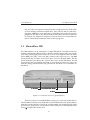
Figure 3.1: Partially assembled motherboard
14
3. PC Hardware
3.1. Motherboard
the life of a PC, hence the name. It overlaps the area of RAM close to the end of
the first megabyte of memory, so that area of RAM is not physically usable. ROM
contains instructions to start up the PC and access certain peripherals.
CPU Stands for Central Processing Unit. It is the thing that is called 80486, 80586, Pentium or whatever. On startup, it jumps to memory address 1040475 (0xFE05B)
and starts reading instructions. The first instructions it gets are actually to fetch
more instructions from disk, and give a Boot failure message to the screen if
it finds nothing useful. The CPU requires a timer to drive it. The timer operates
at a high speed of hundreds of millions of ticks per second (Hertz), and causes
the machine to be named, for example, a “400MHz” (400 MegaHertz) machine.
The MHz of the machine is roughly proportional to the number of instructions it
can process from RAM per second.
IO-ports Stands for Input Output ports. This is a block of RAM that sits in parallel to
the normal RAM. There are 65536 IO ports, hence IO is small compared to RAM.
IO-ports are used to write to peripherals. When the CPU writes a byte to IO-port
632 (0x278), it is actually sending out a byte through your parallel port. Most
IO-ports are not used. There is no specific IO-port chip though.
Other things on the motherboard are:
ISA slots ISA (eye-sah) is a shape of socket for plugging in peripheral devices like modem cards and sound cards. Each card expects to be talked to via an IO-port (or
several consecutive IO-ports). What IO-port the card uses is sometimes configured by the manufacturer, and other times is selectable on the card using jumpers
&Little pin bridges that you can pull off with your fingers.- or switches on the card. Other
times still, it can be set by the CPU using a system called Plug and Pray &This
means that you plug the device in, then beckon your favourite diety for spiritual assistance. Actually,
some people complained that this might be taken seriously — no, its a joke: the real term is Plug ’n
Play
or PnP. The cards also sometimes need to signal the CPU to indicate that it
-
is ready to send or receive more bytes through an IO-port. They do this through
one of 16 connectors inside the ISA slot called Interrupt Request lines or IRQ
lines (or sometimes just Interrupts), numbered 0 through 15. Like IO-ports, the
IRQ your card uses is sometimes also jumper selectable, sometimes not. If you
unplug an old ISA card, you can often see the actual copper thread that goes from
the IRQ jumper to the edge connector. Finally, ISA cards can also access memory
directly through one of eight Direct Memory Access Channels or DMA Channels,
which are also possibly selectable by jumpers. Not all cards use DMA however.
In summary there are three things that the peripheral and the CPU need to cooperate on: The IO Port, the IRQ, and the DMA. If any two cards clash by using
either the same IO-port, IRQ number or DMA channel then they won’t work
(at worst your machine will crash &Come to a halt and stop responding.-).
15
3.1. Motherboard
3. PC Hardware
“8 bit” ISA slots Old motherboards have shorter ISA slots. You will notice yours is
a double slot (called “16 bit” ISA) with a gab between them. The larger slot can
still take an older “8 bit” ISA card: like many modem cards.
PCI slots PCI (pee-see-eye) slots are like ISA, but are a new standard aimed at high
performance peripherals like networking cards and graphics cards. They also use
an IRQ, IO-port and possibly a DMA channel. These however are automatically
configured by the CPU as a part of the PCI standard, hence there will rarely be
jumpers on the card.
AGP slots AGP slots are even higher performance slots for Accelerated Graphics Processors. In other words, cards that do 3D graphics for games. The are also autoconfigured.
Serial ports A serial port connection may come straight off your motherboard to a
socket on your case. There are usually two of these. They may drive an external
modem, and some kinds of mice and printers. Serial is a simple and cheap way to
connect a machine where relatively slow (less that 10 kilobytes per second) data
transfer speeds are needed. Serial ports have their own “ISA card” built into the
motherboard that uses IO-port 0x3F8–0x3FF and IRQ 4 for the first serial port
(also called COM1 under DOS/Windows) and IO-port 0x2F8–0x2FF and IRQ 3
for COM2.
Parallel port Normally only your printer would plug in here. Parallel ports are however extremely fast (being able to transfer 50 kilobytes per second), and hence
many types of parallel port devices are available (like CDROM drives that plug
into a parallel port). Parallel port cables however can only be a few meters in
length before you start getting transmission errors. The parallel port uses IO-port
0x378–0x37A and IRQ 7. A second parallel port usually would use 0x278–0x27A
and not use an IRQ at all.
USB port The Universal Serial Bus aims to allow any type of hardware to plug into one
plug. The idea is that one day all serial and parallel ports will be scrapped in
favour of a single USB socket that all external peripherals will daisy chain from.
IDE ribbon The IDE ribbon plugs into your hard disk drive or
C: drive on
Windows/DOS and also into your CDROM drive (sometimes called an IDE
CDROM). The IDE cable actually attaches to its own PCI card internal to the
motherboard. There are two IDE connectors that use IO-ports 0xF000–0xF007
and 0xF008–0xF00F, and IRQ 14 and 15 respectively. Most IDE CDROM’s are
also ATAPI CDROM’s. ATAPI is a standard (similar to SCSI, below) that allows
many different kinds of devices to plug into an IDE ribbon cable. You get special
floppy drives, tape drives and other devices that plug into the same ribbon. They
will all be called ATAPI-(this or that).
SCSI ribbon Another ribbon may be present coming out of a card (called the SCSI
host adaptor or SCSI card) or your motherboard. Home PC’s will rarely have
16
3. PC Hardware
3.2. Master/Slave IDE
this, since these are expensive and used mostly for high end servers. SCSI cables
are more densely wired than an IDE cable. They will also end in a disk drive,
tape drive, CDROM, or some other device. SCSI cables are not allowed to just-beplugged-in: they have to be connected end on end with the last device connected
in a special way called SCSI termination. There are however a few SCSI devices
that are automatically terminated. More on this on page 461.
3.2
Master/Slave IDE
Two IDE hardrives can be connected to a single IDE ribbon. The ribbon alone has
nothing to distinguish which is which, so the drive itself has jumper pins on it (usually
close to the power supply) which can be set to one of several options. These are either
Master (MA), Slave (SL), Cable Select (CS) or Master-only/Single-Drive/etc. The MA
option means that your drive is the “first” drive of two on this IDE ribbon. The SL
option means that your drive is the “second” drive of two on this IDE ribbon. The CS
option means that your machine will make its own decision (some boxes only work
with this setting), and the Master-only option means that there is no second drive on
this ribbon.
,.-0/1" 22
*
!"#$%&'()
*+
Figure 3.2: Connection end of a typical IDE drive
There may also be a second IDE ribbon, giving you a total of 4 possible drives.
The first ribbon is known as IDE1 (labeled on your motherboard) or the primary ribbon,
while the second is known as IDE2 or the secondary ribbon. You four drives then called
primary master, primary slave, secondary master and secondary slave. Their labeling under
L INUX is discussed in Section 18.4.
17
3.3. CMOS
3.3
3. PC Hardware
CMOS
The “CMOS”
&
Stands for Complementary Metal Oxide Semiconductor, which has to do with the technology used to store setup information through power downs.
is a small application built into
-
ROM. It is also known as the ROM BIOS configuration. You can start it instead of your
operating system by pressing F2 or Del (or something else) just after you switch your
machine on. There will usually be a message Press <key> to enter setup. to
explain this. Inside you will be able to change your machine’s configuration. CMOS
programs are different for each motherboard.
Inside the CMOS, you will be able to enable or disabled builtin devices (like your
mice and serial ports); set your machine’s “hardware clock” (so that your machine has
the correct time and date); and select the boot sequence (whether to load the operating
system off the hard-drive or CDROM — which you will need for installing L INUX
from a bootable CDROM). Boot means to startup the computer &The term comes from
the lack of resources with which to begin: the operating system is on disk, but you might need the operating system to load from the disk — like trying to lift yourself up from your “bootstraps”. . You
-
will also be able to configure your hard drive. You should always select Hardrive
auto-detection whenever installing a new machine, or adding/removing disks.
Different CMOS’s will have different ways of doing this, so browse through all the
menus to see what your CMOS can do.
The CMOS is important when it comes to configuring certain devices built into
the motherboard. Modern CMOS’s allow you set the IO-Ports and IRQ numbers that
you would like particular devices to use. For instance you can make your CMOS
switch COM1 with COM2, or use an IO-Port for your parallel port that is non-standard.
When it comes to getting such devices to work under L INUX , you will often have to
power down your machine to see what the CMOS has to say about that device. More
on this in Chapter 42.
18
Chapter 4
Basic Commands
All of U NIX is case sensitive. A command with even a single
letter’s capitalisation altered, is considered to be a completely
different command. The same goes for files, directories, configuration file formats and the syntax all native programming
languages.
4.1
The ls command, hidden files, command-line options
In addition to directories and ordinary text files, there are other types of files, although
all files contain the same kind of data (i.e. a list of bytes). The hidden file is a file
that will not ordinarily appear when you type the command ls to list the contents
of a directory. To see a hidden file you have to use the command ls -a. The -a
option means to list all files as well as hidden files. Another variant ls -l which
lists the contents in long format. The - is used in this way to indicate variations on a
command. These are called command-line options or command-line arguments, and most
U NIX commands can take a number of them. They can be strung together in any way
that is convenient &Commands under the GNU free software license are superior in this way: they
have a greater number of options than traditional U NIX commands and are therefore more flexable.-, for
example ls -a -l, ls -l -a or ls -al — either of these will list all files in long
format.
All GNU
commands take an additional argument -h and --help. You can
type a command with just this on the command line and get a usage summary. This is
some brief help that will summarise options that you may have forgotten if you are
19
4.2. Error messages
4. Basic Commands
already familiar with the command — it will never be an exhaustive description of the
usage. See the later explanation about man pages.
The difference between a hidden file and an ordinary file is merely that the file
name of a hidden file starts with a period. Hiding files in this way is not for security,
but for convenience.
The option ls -l is somewhat cryptic for the novice. Its more explanatory version is ls --format=long. Similarly, the all option can be given as ls --all, and
will mean the same thing as ls -a.
4.2
Error messages
Although commands usually do not display a message when they execute &The com- succesfully, commands do report errors in a
consistant format. The format will vary from one command to another, but will often
appear as follows: command-name: what was attempted: error message. For example,
the command ls -l qwerty will give an error ls: qwerty: No such file or
directory. What actually happened was that the command ls attempted to read the
file qwerty. Since this file does not exist, an error code 2 arose. This error code corresponds to a situation when a file or directory is not found. The error code is automatically translated into the sentance No such file or directory. It is important
to understand the distinction between an explanatory message that a command gives
(such as the messages reported by the passwd command in the previous chapter) and
an error code that was just translated into a sentance. This is because a lot of different
kinds of problems can result in an identical error code (there are only about a hundred
different error codes). Experience will teach you that error messages do not tell you
what to do, only what went wrong, and should not be taken as gospel.
puter accepted and processed the command.
A
complete
list
of basic error codes can be found in /usr/include/asm/errno.h. In addition to
these, several other header files &Files ending in .h- may define their own error codes.
Under U NIX however, these are 99% of all the errors you are ever likely to get. Most of
them will be meaningless to you at the moment, but are included here as a reference:
¨
¥
#ifndef _I386_ERRNO_H
#define _I386_ERRNO_H
5
10
#define
#define
#define
#define
#define
#define
#define
EPERM
ENOENT
ESRCH
EINTR
EIO
ENXIO
E2BIG
1
2
3
4
5
6
7
/*
/*
/*
/*
/*
/*
/*
Operation not permitted */
No such file or directory */
No such process */
Interrupted system call */
I/O error */
No such device or address */
Arg list too long */
20
4. Basic Commands
15
20
25
30
35
40
45
50
55
60
65
4.2. Error messages
#define
#define
#define
#define
#define
#define
#define
#define
#define
#define
#define
#define
#define
#define
#define
#define
#define
#define
#define
#define
#define
#define
#define
#define
#define
#define
#define
#define
#define
#define
#define
#define
#define
ENOEXEC
EBADF
ECHILD
EAGAIN
ENOMEM
EACCES
EFAULT
ENOTBLK
EBUSY
EEXIST
EXDEV
ENODEV
ENOTDIR
EISDIR
EINVAL
ENFILE
EMFILE
ENOTTY
ETXTBSY
EFBIG
ENOSPC
ESPIPE
EROFS
EMLINK
EPIPE
EDOM
ERANGE
EDEADLK
ENAMETOOLONG
ENOLCK
ENOSYS
ENOTEMPTY
ELOOP
8
9
10
11
12
13
14
15
16
17
18
19
20
21
22
23
24
25
26
27
28
29
30
31
32
33
34
35
36
37
38
39
40
/*
/*
/*
/*
/*
/*
/*
/*
/*
/*
/*
/*
/*
/*
/*
/*
/*
/*
/*
/*
/*
/*
/*
/*
/*
/*
/*
/*
/*
/*
/*
/*
/*
#define
#define
#define
#define
#define
#define
#define
#define
#define
#define
#define
#define
#define
#define
#define
#define
#define
EWOULDBLOCK
ENOMSG
EIDRM
ECHRNG
EL2NSYNC
EL3HLT
EL3RST
ELNRNG
EUNATCH
ENOCSI
EL2HLT
EBADE
EBADR
EXFULL
ENOANO
EBADRQC
EBADSLT
EAGAIN
42
43
44
45
46
47
48
49
50
51
52
53
54
55
56
57
/*
/*
/*
/*
/*
/*
/*
/*
/*
/*
/*
/*
/*
/*
/*
/*
/*
#define EDEADLOCK
EDEADLK
#define EBFONT
59
Exec format error */
Bad file number */
No child processes */
Try again */
Out of memory */
Permission denied */
Bad address */
Block device required */
Device or resource busy */
File exists */
Cross-device link */
No such device */
Not a directory */
Is a directory */
Invalid argument */
File table overflow */
Too many open files */
Not a typewriter */
Text file busy */
File too large */
No space left on device */
Illegal seek */
Read-only file system */
Too many links */
Broken pipe */
Math argument out of domain of func */
Math result not representable */
Resource deadlock would occur */
File name too long */
No record locks available */
Function not implemented */
Directory not empty */
Too many symbolic links
encountered */
Operation would block */
No message of desired type */
Identifier removed */
Channel number out of range */
Level 2 not synchronized */
Level 3 halted */
Level 3 reset */
Link number out of range */
Protocol driver not attached */
No CSI structure available */
Level 2 halted */
Invalid exchange */
Invalid request descriptor */
Exchange full */
No anode */
Invalid request code */
Invalid slot */
/* Bad font file format */
21
4.2. Error messages
70
75
80
85
90
95
100
105
110
115
120
4. Basic Commands
#define
#define
#define
#define
#define
#define
#define
#define
#define
#define
#define
#define
#define
#define
#define
#define
ENOSTR
ENODATA
ETIME
ENOSR
ENONET
ENOPKG
EREMOTE
ENOLINK
EADV
ESRMNT
ECOMM
EPROTO
EMULTIHOP
EDOTDOT
EBADMSG
EOVERFLOW
60
61
62
63
64
65
66
67
68
69
70
71
72
73
74
75
/*
/*
/*
/*
/*
/*
/*
/*
/*
/*
/*
/*
/*
/*
/*
/*
#define
#define
#define
#define
ENOTUNIQ
EBADFD
EREMCHG
ELIBACC
76
77
78
79
/*
/*
/*
/*
#define ELIBBAD
80
/*
#define ELIBSCN
#define ELIBMAX
81
82
/*
/*
#define ELIBEXEC
83
/*
#define EILSEQ
#define ERESTART
84
85
/*
/*
#define
#define
#define
#define
#define
#define
#define
#define
#define
#define
86
87
88
89
90
91
92
93
94
95
/*
/*
/*
/*
/*
/*
/*
/*
/*
/*
#define EPFNOSUPPORT
#define EAFNOSUPPORT
96
97
/*
/*
#define
#define
#define
#define
#define
98
99
100
101
102
/*
/*
/*
/*
/*
103
104
105
/*
/*
/*
ESTRPIPE
EUSERS
ENOTSOCK
EDESTADDRREQ
EMSGSIZE
EPROTOTYPE
ENOPROTOOPT
EPROTONOSUPPORT
ESOCKTNOSUPPORT
EOPNOTSUPP
EADDRINUSE
EADDRNOTAVAIL
ENETDOWN
ENETUNREACH
ENETRESET
#define ECONNABORTED
#define ECONNRESET
#define ENOBUFS
Device not a stream */
No data available */
Timer expired */
Out of streams resources */
Machine is not on the network */
Package not installed */
Object is remote */
Link has been severed */
Advertise error */
Srmount error */
Communication error on send */
Protocol error */
Multihop attempted */
RFS specific error */
Not a data message */
Value too large for defined data
type */
Name not unique on network */
File descriptor in bad state */
Remote address changed */
Can not access a needed shared
library */
Accessing a corrupted shared
library */
.lib section in a.out corrupted */
Attempting to link in too many shared
libraries */
Cannot exec a shared library
directly */
Illegal byte sequence */
Interrupted system call should be
restarted */
Streams pipe error */
Too many users */
Socket operation on non-socket */
Destination address required */
Message too long */
Protocol wrong type for socket */
Protocol not available */
Protocol not supported */
Socket type not supported */
Operation not supported on transport
endpoint */
Protocol family not supported */
Address family not supported by
protocol */
Address already in use */
Cannot assign requested address */
Network is down */
Network is unreachable */
Network dropped connection because
of reset */
Software caused connection abort */
Connection reset by peer */
No buffer space available */
22
4. Basic Commands
4.3. Wildcards, names, extensions and glob expressions
#define EISCONN
106
#define ENOTCONN
#define ESHUTDOWN
107
108
#define
#define
#define
#define
#define
#define
#define
#define
#define
#define
#define
#define
#define
#define
109
110
111
112
113
114
115
116
117
118
119
120
121
122
/* Transport endpoint is already
connected */
/* Transport endpoint is not connected */
/* Cannot send after transport endpoint
shutdown */
/* Too many references: cannot splice */
/* Connection timed out */
/* Connection refused */
/* Host is down */
/* No route to host */
/* Operation already in progress */
/* Operation now in progress */
/* Stale NFS file handle */
/* Structure needs cleaning */
/* Not a XENIX named type file */
/* No XENIX semaphores available */
/* Is a named type file */
/* Remote I/O error */
/* Quota exceeded */
123
124
/* No medium found */
/* Wrong medium type */
125
130
135
ETOOMANYREFS
ETIMEDOUT
ECONNREFUSED
EHOSTDOWN
EHOSTUNREACH
EALREADY
EINPROGRESS
ESTALE
EUCLEAN
ENOTNAM
ENAVAIL
EISNAM
EREMOTEIO
EDQUOT
140
#define ENOMEDIUM
#define EMEDIUMTYPE
#endif
§
4.3
¦
Wildcards, names, extensions and glob expressions
ls can produce a lot of output if there are a large number of files in a directory. Now
say that we are only interested in files that ended with the letters tter. To list only
these files you can use ls *tter. The * matches any number of any other characters. So, for example, the files Tina.letter, Mary Jones.letter and the file
splatter, would all be listed if they were present. While a file Harlette would not
be listed. While the * matches any length of characters, then ? matches only one character. For example the command ls ?ar* would list the files Mary Jones.letter
and Harlette.
When naming files, it is a good idea to choose names that group files of the
same type together. We do this by adding an extension to the file name that describes the type of file it is. We have already demonstrated this by calling a file
Mary Jones.letter instead of just Mary Jones. If you keep this convention, you
will be able to easily list all the files that are letters by entering ls *.letter. The
file-name Mary Jones.letter is then said to be composed of two parts: the name,
Mary Jones, and the extension, letter.
Some common U NIX extentions you may see are
.a Archive. lib*.a is a static library.
23
4.3. Wildcards, names, extensions and glob expressions
4. Basic Commands
.alias X Window System font alias catalogue.
.avi Video format.
.au Audio format (original Sun Microsystems generic sound file).
.awk awk program source file.
.bib bibtex LATEX bibliography source file.
.bmp Microsoft Bitmap file image format.
.bz2 File compressed with the bzip2 compression program.
.cc, .cxx, .C, .cpp C++ program source code.
.cf, .cfg Configuration file or script.
.cgi Executable script that produces web page output.
.conf, .config Configuration file.
.csh csh Shell script.
.c C program source code.
.db Database file.
.dir X Window System font/other database directory.
.deb Debian
package for the Debian distribution.
.diff Output of the diff program indicating the difference between files or source
trees.
.dvi Device independent file. Formatted output of .tex LATEX file.
.el Lisp program source.
.gif, .giff Giff image file.
.gz File compressed with the gzip compression program.
.htm, .html, .shtm, .html Hyper Text Markup Language. A web page of some
sort.
.h C/C++ program header file.
.i SWIG source, or C preprocessor output.
.in configure input file.
.info Info pages read with the info command.
24
4. Basic Commands
4.3. Wildcards, names, extensions and glob expressions
.jpg, .jpeg JPEG image file.
.lj LaserJet file. Suitable input to a HP laserjet printer.
.log Log file of a system service. This file grows with status messages of some system
program.
.lsm L INUX
Software Map entry.
.lyx LyX word processor document.
.man Man page.
.mf Meta-Font font program source file.
.pbm PBM image file format.
.pcf PCF image file — intermediate representation for fonts. X Window System font.
.pcx PCX image file.
.pfb X Window System font file.
.pdf Formatted document similar to postscript or dvi.
.php PHP program source code (used for web page design).
.pl Perl program source code.
.ps PostScript file, for printing or viewing.
.py Python program source code.
.rpm RedHat Package Manager rpm file.
.sgml Standard Generalized Markup Language. Used to create documents to be converted to many different formats.
.sh sh Shell script.
.so Shared object file. dynamically linked library lib*.so is a Dynamically Linked
Library &Executable program code shared by more than one program to save disk space and
memory.-.
.spd Speedo X Window System font file.
.tar tarred directory tree.
.tcl Tcl/Tk source code (programming language).
.texi, .texinfo Texinfo source. This is from what info pages are compiled.
25
4.3. Wildcards, names, extensions and glob expressions
4. Basic Commands
.tex TEX or LATEX document. LATEX is for document processing and typesetting.
.tga TARGA image file.
.tgz tarred and gzipped directory tree. Also a package for the Slackware distribution.
.tiff Tiff image file.
.tfm LATEX font metric file.
.ttf True type font.
.txt Plain English text file.
.voc Audio format (Sound Blaster’s own format).
.wav Audio format (sound files common to Microsoft Windows).
.xpm XPM image file.
.y yacc source file.
.Z File compressed with the compress compression program.
.zip File compressed with the pkzip (or PKZIP.EXE for DOS) compression program.
.1, .2 . . . Man page.
In addition, files that have no extension and a capitalised descriptive name are usually
plain English text and meant for your reading. This will come bundled with packages
and are for documentation purposes. You will see the hanging around all over the
place.
Some full file names you may see are
AUTHORS List of people who contributed to or wrote a package.
ChangeLog List of developer changes made to a package.
COPYING Copyright (usually GPL) for a package.
INSTALL Instalation instructions.
README Help information to be read first, pertaining to the directory the README is
in.
TODO List of future desired work to be done to package.
BUGS List of errata.
26
4. Basic Commands
4.4. Usage summaries and the copy command
NEWS Info about new features and changes for the layman about this package.
THANKS List of contributors to a package.
VERSION Version information of the package.
Glob expressions
There is also a way to restrict characters of a file-name within certain ranges, like if
you only want to list the files that begin with A through M, you can do ls [A-M]*.
Here the brackets have a special meaning — they match a single character like a ?,
but only those given by the range. You can use this in a variety of ways, for example
[a-dJW-Y]* matches all files beginning with a, b, c, d, J, W, X or Y; while *[a-d]id
matches all files ending with aid, bid, cid or did; and *.{cpp,c,cxx} matches all
files ending in .cpp, .c or .cxx. This way of specifying a file-name is called a glob
expression. Glob expressions are used in many different contexts as you will see later.
4.4
Usage summaries and the copy command
The command cp stands for copy and is used to make a duplicate of one file or a number of files. The format is
cp <file> <newfile>
cp <file> [<file> ...] <dir>
or
cp file newfile
cp file [file ...] dir
The above lines are called a usage summary. The < and > signs mean that you don’t
actually type out these characters but replace <file> with a file-name of your own.
These are also sometimes written in italics like, cp file newfile. In rare cases they are
written in capitals like, cp FILE NEWFILE. <file> and <dir> are called parameters.
Sometimes they are obviously numeric, like a command that takes <ioport> &Anyone
emailing me to ask why typing in literal, <, i, o, p, o, r, t and > characters did not work will get a rude
reply . These are common conventions used to specify the usage of a command. The
-
[ and ] brackets are also not actually typed but mean that the contents between them
are optional. The ellipses ... mean that <file> can be given repeatedly, and these
27
4.5. Manipulating directories
4. Basic Commands
also are never actually typed. From now on you will be expected to substitute your
own parameters by interpretting the usage summary. You can see that the second of
the above lines is actually just saying that one or more file names can be listed with a
directory name last.
From the above usage summary it is obvious that there are two ways to use the
cp command. If the the last name is not a directory then cp will copy that file and
rename it to the filename given. If the last name is a directory then cp will copy all the
files listed into that directory.
The usage summary of the ls command would be as follows:
¨
ls [-l, --format=long] [-a, --all] <file> <file> ...
ls -al
§
¥
¦
where the comma indicates that either option is valid. Similarly with the passwd
command:
¨
¥
passwd [<username>]
¦
§
You should practice using the cp command now by moving some of your files from
place to place.
4.5
Manipulating directories
The cd command is used to take you to different directories. Create a directory
new with mkdir new. You could create a directory one by doing cd new and then
mkdir one, but there is a more direct way of doing this with mkdir new/one. You
can then change directly to the one directory with cd new/one. And similarly you
can get back to where you were with cd ../... In this way, the / is used to represent
directories within directories. The directory one is called a subdirectory of new.
The command pwd stands for present working directory (also called the current directory) and is used to tell you what directory you are currently in. Entering pwd will
give you some output like /home/<username>. Experiment by changing to the root
directory (with cd /) and then back into the directory /home/<username> (with
cd /home/<username>). The directory /home/<username> is called your home directory, and is where all your personal files are kept. It can be used at any time with the
abbreviation ˜. In other words, entering cd /home/<username> is the same as entering cd ˜. The process whereby a ˜ is substituted for your home directory is called
tilde expansion.
To remove a file use the command rm <filename>. To remove a directory use
the command rmdir <dir>. Practice using these two commands. Note that you
28
4. Basic Commands
4.6. Relative vs. absolute pathnames
cannot remove a directory unless it is empty. To remove a directory as well as any
contents it might contain, use the command rm -R <dir>. The -R option indicates to
dive into any subdirectories of <dir> and delete their contents. The process whereby a
command dives into subdirectories of subdirectories etc. is called recursion. -R stands
for recursively. This is a very dangerous command.
The cp command also takes the -R option, allowing it to copy whole directories. The mv command is used to move files and directories. It really just renames a file to a different directory. Note that with cp you should use the option
-p and -d with -R to preserve all attributes of a file and properly reproduce symlinks (discussed later). Hence always use cp -dpR <dir> <newdir> instead of
cp -R <dir> <newdir>.
4.6
Relative vs. absolute pathnames
Command can be given file name arguments in two ways. If you are in the same directory as the file (i.e. the file is in the current directory), then you can just enter the
file name on its own (eg. cp my file new file). Otherwise, you can enter the full
path name, like cp /home/jack/my file /home/jack/new file. Very often administrators use the notation ./my file to be clear about the distinction, for instance:
cp ./my file ./new file. The leading ./ makes it clear that both files are relative
to the current directory. Filenames not starting with a / are called relative pathnames,
and otherwise, absolute pathnames.
4.7
System manual pages
(See Chapter 16 for a complete overview of all documentation on the system, and also
how to print manual pages out in a properly typeset format.)
documentation
documentation
The command man [<section>|-a] <command> is used to get help on a particular topic and stands for manual. Every command on the entire system is documented
in so named man pages. In the past few years a new format of documentation has
evolved called info. These are considered the modern way to document commands,
but most system documentation is still available only through man. There are very few
packages that are not documented in man however. Man pages are the authoritative
reference on how a command works because they are usually written by the very programmer who created the command. Under U NIX, any printed documentation should
be considered as being second hand information. Man pages however will often not
contain the underlying concepts needed to understand in what context a command is
used. Hence it is not possible for a person to learn about U NIX purely from man pages.
29
4.8. System info pages
4. Basic Commands
However once you have the necessary background for a command, then its man page
becomes an indispensable source of information and other introductory material may
be discarded.
Now, man pages are divided into sections, numbered 1 through 9. Section 1 contains all man pages for system commands like the ones you have been using. Sections
2-7 also exist, but contain information for programmers and the like, which you will
probably not have to refer to just yet. Section 8 contains pages specifically for system
administration commands. There are some additional sections labelled with letters;
other than these, there are no manual pages outside of the sections 1 through 9. sections
/man1
/man2
/man3
/man4
/man5
/man6
/man7
/man8
/man9
User programs
System calls
Library calls
Special files
File formats
Games
Miscellaneous
System administration
Kernel documentation
You should now use the man command to look up the manual pages for all
the commands that you have learned. Type man cp, man mv, man rm, man mkdir,
man rmdir, man passwd, man cd, man pwd and of course man man. Much of the
information may be incomprehensible to you at this stage. Skim through the pages to
get an idea of how they are structured, and what headings they usually contain. Man
pages are referenced using a notation like, cp(1), for the cp command in Section 1,
which can be read with man 1 cp.
4.8
System info pages
info pages contain some excellent reference and tutorial information in hypertext
linked format. Type info on its own to go to the top level menu of the entire info
hierarchy. You can also type info <command> for help on many basic commands.
Some packages will however not have info pages, and other U NIX systems do not support info at all.
info is an interactive program with keys to navigate and search documentation. Typing info will bring you to a top-level menu. Typing h will then envoke the help screen.
30
4. Basic Commands
4.9
4.9. Some basic commands
Some basic commands
You should practice using each of these commands.
bc A calculator program that handles arbitrary precision (very large) numbers. It is
useful for doing any kind of calculation on the command line. Its use is left as an
exercise.
cal [[0-12] 1-9999] Prints out a nicely formatted calender of the current month,
or a specified month, or a specified whole year. Try cal 1 for fun, and
cal 9 1752, when the pope had a few days scrapped to compensate for roundoff error.
cat <filename> [<filename> ...] Writes the contents of all the files listed to
the
screen.
cat
can
join
a
lot
of
files
together
with cat <filename> <filename> ... > <newfile>. <newfile> will
be an end on end concatination of all the files given.
clear Erases all the text in the current terminal.
date Prints out the current date and time. (The command time though does something entirely different.)
du <directory> Stands for disk usage, and prints out the amount of space occupied
by a directory. It recurses into any subdirectories and can print only a summary with du -s <directory>. Also try du --max-depth=1 /var, and
du -x /, on a system with /usr and /home on separate partitions &See footnote
on page 137-.
df Stands for disk free. This tells you how much free space is left on your system. The
available space usually has the units of kilobytes (1024 bytes) (although on some
other U NIX systems this will be 512 bytes or 2048 bytes). The right most column
tells the directory (in combination with any directories below that) under which
that much space is available.
dircmp Directory compare. This can be used to compare directories to see if changes
have been made between them. You will often want to see where two trees
different (eg. check for missing files) possibly on different computers. Do a
man dircmp. (This is a System 5 command and is not present on L INUX . You
can however do directory comparisons with the Midnight Commander mc).
free Prints out available free memory. You will notice two listings: swap space and
physical memory. These are contigous as far as the user is concerned. The swap
space is a continuation of your installed memory that exists on disk. It is obviously slow to access, but provides the illusion of having much more RAM which
avoids ever running out of memory (which can be quite fatal).
31
4.9. Some basic commands
4. Basic Commands
echo Prints
a
message
to
the
terminal.
Try
echo ’hello there’, echo $[10*3+2], echo ‘$[10*3+2]’. echo -e
allows interpretation of certain backslash sequences, for example echo -e "\a",
which prints a bell, or in other words, beeps the terminal. echo -n does the same
without printing the trailing newline. In other words it does not cause a wrap to
the next line after the text is printed. echo -e -n "\b", will print a back-space
character only which will erase the last character printed.
expr <expression> Calculate the numerical expression expression. Most arithmetic operations that you are used to will work. Try expr 5 + 10 ’*’ 2.
Observe how mathematical precidence is obeyed (i.e. the * is worked out before
the +).
file <filename> This command prints out the type of data contained in
a file.
file portrate.jpg will tell you that portrate.jpg is a
JPEG image data, JFIF standard. file detects an enormous amount of
file types, across every platform. file works by checking whether the first few
bytes of a file match certain tell-tail byte sequences. The byte sequences are called
magic numbers. Their complete list is stored in in /usr/share/magic &The word
“magic” under U NIX normally refers to byte sequences or numbers that have a specific meaning or
implication. So-called magic-numbers are invented for source code, file formats and file-systems. .
-
kbdrate -r <chars-per-second> -d <repeat-delay> Changes the repeat
rate of your keys. Most users will like this set to kbdrate -r 32 -d 250
which unfortunately is the fastest the PC can go.
more Displays a long file by stopping at the end of each page. Do the following:
ls -l /bin > bin-ls, and then more bin-ls. The first command creates
a file with the contents of the output of ls. This will be a long file because the
directory /bin has a great many entries. The second command views the file.
The space bar can be used to page through the file. When you get bored, just
press q. you can also try ls -l /bin | more which will do the same thing in
one go.
less This is the GNU version of more, but has extra features. On your system the
two commands may be the same. With less, you can use the arrow keys to page
up and down through the file. You can do searches by pressing / then typing in
a word to search for and then pressing Enter. Found words will be highlighted,
and the text will be scrolled to the first found word. The important command
are:
G Go to the end of a file.
? Searches backward through a file.
/ssss Searches forward through a file for the text ssss &Actually ssss is a regular expression see the chapter on regular expressions for more info.-.
32
4. Basic Commands
4.9. Some basic commands
F Scroll forward and keep trying to read more of the file in case some other program is appending to it — useful for log files.
nnng Goes to line nnn of the file.
q Quit. (Used by many U NIX text based applications.)
(less can be made to stop beeping in the irritating way that it does by editing
the file /etc/profile and adding the lines,
¨
¥
LESS=-Q
export LESS
§
¦
and then logging out and logging in again. But this is an aside that will make
more sense later.)
lynx <url> Opens up a URL &URL stands for Uniform Resource Locator — a web address.- at
the console. Try lynx http://lwn.net/.
links <url> Another text based web browser.
nohup <command> & Runs a command in the background, appending any output
the command may produce to the file nohup.out in your home directory.
nohup has the useful feature that the command will continue to run even after
you have logged out. Uses for nohup will become obvious later.
sort <filename> Prints out a file with lines sorted in alphabetical order. Create a
file called telephone with each line containing a short telephone book entry.
Then type sort telephone, or sort telephone | less and see what happens. sort takes many interesting options to sort in reverse (sort -r), to eliminate duplicate entries (sort -u), ignore leading whitespace (sort -b), and so
on. See the man page for details.
strings [-n <len>] <filename> Prints out a binary file, but strips any unreadable characters. Readable groups of characters are placed on separate lines. If
you have a binary file that you think may contain something interesting, but
looks completely garbelled when viewed normally, use strings to sift out the interesting stuff: try less /bin/cp and then try strings /bin/cp. By default
strings does not print sequences smaller than 4. The -n option can alter this
limit.
split ... Splits a file into many seperate files. This might have been used when
a file was too big to be copied onto a floppy disk and needed to be split into,
say, 360kB pieces. Its sister, csplit, can split files along specified lines of text
within the file. The commands are seldom used but are actually very useful when
writing programs that manipulate text.
33
4.10. Multimedia commands for fun
4. Basic Commands
tac <filename> [<filename> ...] Writes the contents of all the files listed to
the screen, reversing the order of the lines — i.e. printing the last line of the file
first. tac is cat backwards and behaves similarly.
tail [-f] [-n <lines>] <filename> Prints out the last <lines> lines of a file
or 10 lines if the -n option is not given. The -f option means to watch the file for
lines being appended to the end of it.
head [-n <lines>] <filename> Prints out the first <lines> lines of a file or 10
lines if the -n option is not given.
uname Prints out the name of the U NIX operating system1 you are currently using.
uniq <filename> Prints out a file with duplicate lines deleted. The file must first
be sorted.
wc [-c] [-w] [-l] <filename> Counts the number characters/bytes (with -c),
words (with -w) or lines (with -l) in a file.
whoami Prints out your login name.
4.10
Multimedia commands for fun
You should practice using each of these commands if you have your sound card configured &I don’t want to give the impression that L INUX does not have graphical applications to do
all the functions in this section, but you should be aware that for every graphical application, there is a text
mode one that works better and consumes less resources. . You may also find that some of these
-
packages are not installed, in which case you can come back to this later.
play [-v <volume>] <filename> Plays linear audio formats out through your
sound card. These formats are .8svx, .aiff, .au, .cdr, .cvs, .dat, .gsm,
.hcom, .maud, .sf, .smp, .txw, .vms, .voc, .wav, .wve, .raw, .ub, .sb,
.uw, .sw or .ul files. In other words, it plays almost every type of “basic” sound
file there is: most often this will be a simple Windows .wav file. <volume> is in
percent.
rec ¡filename¿ Records from your microphone into a file. play and rec are from the
same package.
mpg123 <filename> Plays audio from MPEG files level 1, 2 or 3. Useful options
are -b 1024 (for increasing the buffer size to prevent jumping) and --2to1
(down samples by a factor of 2 for reducing CPU load). MPEG files contain sound
and/or video, stored very compactly using digital processing techniques that the
software industry seems to think are very sophisticated.
1 The
brand of U NIX — there are number of different vendors and for each hardware platform.
34
4. Basic Commands
4.11. Terminating commands
cdplay Plays a regular music CD
. cdp is the interactive version.
aumix Sets your sound card’s volumn, gain, recording volume etc. You can use it
interactively, or just enter aumix -v <volume> to immediately set the volume
in percent. Note that this is a dedicated mixer program, and is considered to be a
separate application to any that play music. Rather do not set the volume from
within a sound playing application, even if it claims this feature — you have
much better control with aumix.
mikmod --interpolate -hq --renice Y <filename> Plays Mod files. Mod
files are a special type of audio format that stores only the duration and pitch of
the notes that comprise a song, along with samples of each musical instrument
needed to play the song out. This makes for high quality audio with phenomenally small file size. mikmod supports 669, AMF, DSM, FAR, GDM, IMF, IT, MED,
MOD, MTM, S3M, STM, STX, ULT, UNI and XM audio formats — i.e. probably
every type in existence. Actually there is a lot of excellent listening music available on the Internet in Mod file format. The most common formats are .it,
.mod, .s3m and .xm &Original .mod file are the product of Atari computers (?) and had only
four tracks. Todays 16 and more track Mod files are comparable to any recorded music.-.
4.11 Terminating commands
You usually use
–
to stop an application or command that runs continuously.
You must type this at the same prompt where you entered the command. If this doesn’t
work, wait until the section on processes (Section 9.2.2), to learn more about signalling
running applications to quit.
4.12
Compressed files
Files typically contain a lot of data they one can imagine might be represented with a
smaller number of bytes. Take for example the letter you typed out. The word ‘the’ was
probably repeated many times. You were probably also using lowercase letters most
of the time. The file was by far not a completely random set of bytes and repeatedly
used spaces as well as using some letters more than others &English text in fact contains,
on average, only about 1.3 useful bits (there are eight bits in a byte) of data per byte.-. Because of this
the file can be compressed to take up less space. Compression envolves representing
the same data using a smaller number of bytes, in such a way that the original data
can be reconstructed exactly. This usually involves finding patterns in the data. The
command to compress a file is gzip <filename> which stands for GNU zip. gzip a
file in your home directory and then do an ls to see what happened. Now use more to
35
4.13. Searching for files
4. Basic Commands
view the compressed file. To uncompress the file you can use gzip -d <filename>.
Now use more to view the file again. There are many files on the system which are
stored in compressed format. For example man pages are often stored compressed
and are uncompressed automatically when you read them.
You used the command cat previously to view a file. You can use the command zcat to do the same thing with a compressed file. Gzip a file and then type
zcat <filename>. You will see that the contents of the file are written to the screen.
Generally, when commands and files have a z in them they have something to do with
compression — z stands for zip. You can use zcat <filename> | less, to view a
compressed file proper. You can also use the command zless <filename>, which
does the same as zcat <filename> | less. (Note that your less may actually
have the functionality of zless combined.)
A new addition to the arsenal is bzip2. This is a compression program very
much like gzip, except that it is slower and compresses 20%-30% better. It is useful
for compressing files that will be downloaded from the Internet (to reduce the transfer).
Files that are compressed with bzip2 have an extension .bz2. Note that the improvement in compression depends very much on the type of data being compressed. Sometimes there will be negligable improvement at the expense of a huge speed penalty,
while occasionality there is a substantial reduction in size over gzip making it well
worth it. Files that are frequently compressed and un-compressed should never use
bzip2.
4.13
Searching for files
The command find can be used to search for files. Change to the root directory, and
enter find. It will spew out all the files it can see by recursively descending &Goes into
each subdirectory and all its subdirectories, and repeats the command find. - into all subdirectories.
In other words, find, when executed while in the root directory, will print out all the
files on the system. find will work for a long time if you enter it as you have — press
–
to stop it.
Now change back to your home directory and type find again. You will see all
your personal files. There are a number of options find can take to look for specific
files.
find -type d will show only directories and not the files they contain.
find -type f will show only files and not the directories that contain them, even
though it will still descend into all directories.
36
4. Basic Commands
4.14. Searching within files
find -name <filename> will find only files that have the name <filename>. For
instance, find -name ’*.c’. Will find all files that end in a .c extension
(find -name *.c without the quote characters will not work. You will see
why later). find -name Mary Jones.letter will find the file with the name
Mary Jones.letter.
find -size [[+|-]]<size> will find only files that have a size larger (for +) or
smaller (for -) than <size> kilobytes, or the same as <size> kilobytes if the
sign is not specified.
find <directory> [<directory> ...] will start find in each of the directories given.
There are many more of these options for doing just about any type of search for a
file. See the find man page for more details. find however has the deficiency of
actively reading directories to find files. This is slow, especially when you start from
the root directory. An alternative command is locate <filename>. This searches
through a previously created database of all the files on the system, and hence finds
files instantaneously. Its counterpart updatedb is used to update the database of files
used by locate. On some systems updatedb runs automatically every day at 04h00.
Try these (updatedb will take several minutes):
¨
5
¥
updatedb
locate rpm
locate passwd
locate HOWTO
locate README
§
4.14
¦
Searching within files
Very often one would like to search through a number of files to find a particular word
or phrase. An example might be where a number of files contain lists of telephone
numbers with peoples names and addresses. The command grep does a line by line
search through a file and prints out only those lines that contain a word that you have
specified. grep has the command summary:
¨
¥
grep [options] <pattern> <filename> [<filename> ...]
§
&The words word, string or pattern are used synonomously in this context, basically meaning a short length
of letters and/or numbers that you are trying to find matches for. A pattern can also be a string with kinds
of wildcards in it that match different characters, as we shall see later.
-
37
¦
4.15. Copying to MSDOS and Windows formatted floppy disks
4. Basic Commands
Do a grep for the word “the” to display all lines containing it:
’the’ Mary Jones.letter. Now try grep ’the’ *.letter.
grep
grep -n <pattern> <filename> will show the line number in the file where the
word was found.
grep -<num> <pattern> <filename> will print out <num> of the lines that
came before and after each of the lines in which the word was found.
grep -A <num> <pattern> <filename> will print out <num> of the lines that
came After each of the lines in which the word was found.
grep -B <num> <pattern> <filename> will print out <num> of the lines that
came Before each of the lines in which the word was found.
grep -v <pattern> <filename> will print out only those lines that do not contain the word you are searching for & You may think that the -v option is no longer doing
the same kind of thing that grep is advertised to do: i.e. searching for strings. In fact U NIX commands
often suffer from this — they have such versatility that their functionality often overlaps with those
of other commands. One actually never stops learning new and nifty ways of doing things hidden in
the dark corners of man pages. .
-
grep -i <pattern> <filename> does the same as an ordinary grep but is case
insensitive.
4.15
Copying to MSDOS and Windows formatted floppy
disks
There is a package called the mtools package that enables reading and writing to MSDOS/Windows floppy disks. These are not standard U NIX commands but are packaged with most L INUX distributions. It supports long filename type floppy disks.
Put an MSDOS disk in your A: drive. Try
¨
¥
mdir A:
touch myfile
mcopy myfile A:
mdir A:
§
¦
Note that there is no such thing as an A: disk under L INUX . Only the mtools package
understand A: in order to retain familiarity for MSDOS users. The complete list of
commands is
38
4. Basic Commands
4.16. Archives and backups
¨
5
¥
mattrib
mbadblocks
mcd
mcopy
mdel
mdeltree
mdir
mdu
mformat
mkmanifest
§
mlabel
minfo
mmd
mmount
mmove
mpartition
mrd
mren
mshowfat
mtoolstest
mzip
xcopy
¦
and can be gotten by typing info mtools. In general you can take any MSDOS
command, put it into lower case and add an m in front of it, to give you a command
that you can use on L INUX .
4.16
Archives and backups
One of the primary activities of a system administrator is to make backups. It is a
essential never to underestimate the volatility &Ability to evaporate or become chaotic. - of
information in a computer. Backups are therefore continually made of data. A backup
is a duplicate of your files, that can be used as a replacement should any or all of the
computer be destroyed. The idea is that all of the data in a directory &As usual, meaning
a directory and all its subdirectories and all the files in those subdirectories etc. - are stored in a
seperate place — often compressed — and can be retrieved in case of an emergency.
When we want to store a number of files in this way, it is useful to be able to pack many
files into one file so that we can perform operations on that single file only. When many
files are packed together into one, this packed file is called an archive. Usually archives
have the extension .tar, which stands for tape archive.
¨
To create an archive of a directory the tar command is used:
tar -c -f <filename> <directory>
§
¥
¦
Create a directory with a few files in it and run the tar command to back it up. A
file of <filename> will be created. Take careful note of any error messages that tar
reports. List the file and check that its size is appropriate for the size of the directory
you are archiving. You can also use the verify option (see the man page) of the tar
command to check the integrity of <filename>. Now remove the directory, and then
restore it with the extract option of the tar command:
¨
¥
tar -x -f <filename>
§
¦
You should see your directory recreated with all its files intact. A nice option to give to
tar is -v. This will list all the files that are being added to or extracted from the archive
as they are processed, and is useful to watch the progress of archiving. It is obvious
39
4.17. The PATH where commands are searched for
4. Basic Commands
that you can call your archive anything you like, however the common practice is to
call it <directory>.tar, which makes it clear to all exactly what it is.
Once you have your tar file, you would probably want to compress it with
gzip. This will create a file <directory>.tar.gz, which is sometimes also called
<directory>.tgz for brevity.
A second kind of archiving utility is cpio. cpio is actually more powerful than
tar, but is considered to be more cryptic to use. The principles of cpio are quite similar
and its usage is left as an exercise.
4.17
The PATH where commands are searched for
When you type a command at the shell prompt, it has to be read off disk out of one or
other directory. On U NIX all such executable commands are located in one of about four
directories. A file is located in the directory tree according to its type, rather than according to what software package it belongs to. Hence, for example, a word processor
may have its actual executable stored in a directory with all other executables, while
its font files are stored in a director with other fonts from all other packages.
The shell has a procedure for searching for executables when you type them in.
If you type in a command with slashes, like /bin/cp then it tries to run the named
program, cp, out of the /bin directory. If you just type cp on its own, then it tries
to find the cp command in each of the subdirectories of your PATH. To see what your
PATH is, just type
¨
¥
echo $PATH
§
¦
You will see a colon separated list of four or more directories. Note that the current
directory
.
is not listed. It is very important that the current directory not be
listed for security reasons. To execute a command in the current directory, we hence
always type ./<command>.
To append for example a new directory /opt/gnome/bin to your PATH, do
¨
¥
PATH="$PATH:/opt/gnome/bin"
export PATH
§
L INUX
¨
¦
supports the convenience of doing this in one line:
¥
export PATH="$PATH:/opt/gnome/bin"
¦
§
40
4. Basic Commands
4.17. The PATH where commands are searched for
There is also a command which, to check if a command is in the PATH. Sometimes there are two commands of the same name, in different directories of the PATH
&This is more often true of Solaris systems than LINUX .-. Typing which <command> will
locate the one that your shell would execute. Try:
¨
¥
which
which
which
which
§
ls
cp mv rm
which
cranzgots
¦
which is also useful in shell scripts to tell if there is a command at all, and hence check
if a particular package is installed, like which netscape.
41
4.17. The PATH where commands are searched for
42
4. Basic Commands
Chapter 5
Regular Expressions
5.1
Basic regular expression exposition
A regular expression is a sequence of characters that forms a template used to search
for strings &Words, phrases, or just about sequence of characters. - within text. In other words,
it is a search pattern. To get an idea of when one would need to do this, consider the
example where you have a list of names and telephone numbers. If you would like
to find a telephone number that contains a 3 in the second place and ends with an 8,
then regular expressions provide a way of doing these kinds of searches. Also consider
where you would like to send an email to fifty people, but replacing the word after the
“Dear” with their own name to make the letter more personal. Regular expressions allow for this type of searching and replacing. Many utilities use the regular expression
to give them greater power when manipulating text. The grep command is an example. Previously you used the grep command to locate only simple letter sequences in
text. Now we will use it to search for regular expressions.
In the previous chapter you learned that the ? character can be used to signify
that any character can take its place. This is said to be a wildcard and works with
filenames. With regular expressions, the wildcard to use is the . character. So you can
use the command grep .3....8 <filename> to find the seven character telephone
number that you are looking for in the above example.
Regular expressions are used for line by line searches. For instance, if the seven
characters were spread over two lines (i.e. they had a line break in the middle), then
grep wouldn’t find them. In general a program that uses regular expressions will
consider searches one line at a time.
Here are some examples that will teach you the regular expression basics. We
43
5.1. Basic regular expression exposition
5. Regular Expressions
will use the grep command to show the use of regular expressions (remember that the
-w option matches whole words only). Here the expression itself will be enclosed in ’
quotes for reasons which will be explained later.
grep -w ’t[a-i]e’ Matches the words tee, the and tie. The brackets have a
special significance. They mean to match one characters that can be anything
from a to i.
grep -w ’t[i-z]e’ Matches the words tie and toe.
grep -w ’cr[a-m]*t’ Matches
the
words
credit,
craft, credit and cricket. The * means to match any number of the previous character, which in this case is any character from a through m.
grep -w ’kr.*n’ Matches the words kremlin and krypton, because the .
matches any character and the * means to match the dot any number of times.
egrep -w ’(th|sh).*rt’ Matches the words shirt, short, and thwart. The
| means to match either the th or the sh. egrep is just like grep but supports
extended regular expressions which allow for the | feature & The | character often de-
notes a logical OR, meaning that either the thing on the left or the right of the | is applicable. This is
true of many programming languages.
. Note how the square brackets mean-one-of-
-
several-characters while the round brackets with |’s mean one-of-several-words.
grep -w ’thr[aeiou]*t’ Matches the words threat and throat. As you can
see, a list of possible characters may be placed inside the square brackets.
grep -w ’thr[ˆa-f]*t’ Matches the words throughput and thrust. The ˆ after the first bracket means to match any character except the characters listed.
Hence, for example, the word thrift is not matched because it contains an f.
The above regular expressions all match whole words (because of the -w option). If the
-w option was not present they might match parts of words which would result in a far
greater number of matches. Also note that although the * means to match any number
of characters, it also will match no characters as well, for example: t[a-i]*e could
actually match the letter sequence te. i.e a t and an e with zero characters between
them.
Usually, you will use regular expression to search for whole lines that match, and
sometimes you would like to match a line that begins or ends with a certain string.
The ˆ character is used to specify the beginning of a line and the $ character for the
end of the line. For example ˆThe matches all lines that start with a The, while hack$
matches all lines that end with hack, and ’ˆ *The.*hack *$’ matches all lines that
begin with The and end with hack, even if there is whitespace at the beginning or end
of the line.
44
5. Regular Expressions
5.2. The fgrep command
Because regular expression use certain characters in a special way (these are . \
[ ] * + ?), these characters cannot be used to match characters. This provides a severe
limitation when trying to match, say, file-names which often use the . character. To
match a . you can use the sequence \. which forces interpretation as an actual . and
not as a wildcard. Hence the regular expression myfile.txt might match the letter sequence myfileqtxt or myfile.txt, but the regular expression myfile\.txt
will match only myfile.txt.
Most special characters can be specified by adding a \ character before them, eg
use \[ for an actual [, a \$ for an actual $, a \\ for and actual \, \+ for an actual +, and
\? for an actual ?. (? and + are explained below.)
5.2
The fgrep command
fgrep is an alternative to grep. The difference is that while grep (the more commonly
used command) matches regular expressions, fgrep matches literal strings. In other
words you can use fgrep where you would like to search for an ordinary string that
is not a regular expression, instead of preceding special characters with \.
5.3
Regular expression \{ \} notation
x* matches zero to infinite instances of a character x. You can specify other ranges of
numbers of characters to be matched with, for example x\{3,5\}, which will match at
least three, but not more than five x’s, that is xxx, xxxx, or xxxx.
x\{4\}, can then be used to match 4 x’s exactly and no more and no less. x\{7,\}
will match seven or more x’s — the upper limit is omitted to mean that there is no
maximum number of x’s.
As in all the examples above, the x can be a range of characters (like [a-k]) just
as well as a single charcter.
grep -w ’th[a-t]\{2,3\}t’ Matches the words theft, thirst, threat,
thrift and throat.
grep -w ’th[a-t]\{4,5\}t’ Matches the words theorist, thicket and
thinnest.
45
5.4. + ? \< \> ( ) | notation
5.4
5. Regular Expressions
Extended regular expression + ? \< \> ( ) | notation
with egrep
There is an enhanced version of regular expressions that allows for a few more useful
features. Where these conflict with existing notation, they are only available through
the egrep command.
+ is analogous to \{1,\}, it does the same as *, but matches one or more character,
instead of zero or more characters.
? is analogous to \{1\}, it matches zero or one characters.
\< \> can surround a string to match only whole words.
( ) can surround several strings, separated by |. This will match any of these strings.
(egrep only.)
\( \) can surround several strings, separated by \|. This will match any of these
strings. (grep only.)
The following examples should make the last two notations clearer.
grep ’trot’ Matches the words electrotherapist, betroth and so on, but
grep ’\<trot\>’ Matches only the word trot.
egrep -w ’(this|that|c[aeiou]*t)’ Matches the words this, that, cot,
coat, cat and cut.
5.5 Regular expression sub-exressions
These are covered in the Chapter 8.
46
Chapter 6
Editing Text Files
6.1
vi
To edit a text file means to interactively modify its content. The creation and modification of an ordinary text file is known as text-editing. A word processor is a kind of
editor, but more basic than that is the U NIX or DOS text editor. The important editor
to learn how to use is vi. After that you can read why, and a little more about other,
more user friendly editors.
Type simply,
¨
¥
vi <filename>
§
¦
to edit any file, or the compatable, but more advanced
¨
¥
vim <filename>
§
¦
To exit out of vi, press <ESC>, then the key sequence :q! and then press
.
vi has a short tutorial which should get you going in 20 minutes. If you get bored in
the middle, you can skip it and learn vi as you need to edit things. To read the tutorial,
enter:
¨
¥
vimtutor
¦
§
which
edits
the
file
/usr/share/vim/vim56/tutor/tutor
47
/usr/doc/vim-common-5.7/tutor,
or
6.1. vi
6. Editing Text Files
/usr/share/doc/vim-common-5.7/tutor/tutor, depending on your distribution &By this you should be getting an idea of the kinds of differences there are between different L INUX
distributions.-. You will then see the following on the top of your screen:
¨
¥
===============================================================================
=
W e l c o m e
t o
t h e
V I M
T u t o r
Version 1.4
=
===============================================================================
Vim is a very powerful editor that has many commands, too many to
explain in a tutor such as this. This tutor is designed to describe
enough of the commands that you will be able to easily use Vim as
an all-purpose editor.
5
10
§
The approximate time required to complete the tutor is 25-30 minutes,
You are supposed to edit the tutor file itself as practice, following through 6 lessons.
Copy it first to your home directory.
The following table is a quick reference for vi, it contains only a few of the many
hundreds of commands under vi, but is enough to do all basic editing operations.
vi has several modes of operation. If you type the i key you enter insert-mode. You
then enter text as you would in a normal DOS text editor, but you cannot arbitrarily move
the cursor and delete characters while in insert-mode. Pressing <ESC> will get you out of
insert-mode, where you are not able to insert characters, but can now do things like
arbitrary deletions, moves etc.
Typing : gets you into command-line-mode, where you can do operations like import
a file, save the current file etc. Typically, you type : then some text, and then hit
<ENTER>.
The word register is used below. A register is a hidden clipboard.
A useful tip is to enter :set ruler before doing anything. This shows you what line
and column you are on in the bottom right corner of the screen.
Key combination
h (or left arrow key, etc.)
l
k
j
b
w
{
}
ˆ
$
Function
Cursor left
Cursor right
Cursor up
Cursor down
Cursor left one word
Cursor right one word
Cursor up one paragraph
Cursor down one paragraph
Cursor to line start
Cursor to line end
48
¦
6. Editing Text Files
6.1. vi
gg
G
Cursor to first line
Cursor to last line
Get out of current mode
i
o
Start insert mode
Insert a blank line below the current line and then start insert
mode
Insert a blank line above the current line and then start insert
mode
Append (start insert mode after
the current character)
Replace (start insert mode with
overwrite)
Save (write) and quit
Quit
Quit forced (without checking if a
save is required)
Delete (delete under cursor and
copy to register)
Backspace (delete left of cursor
and copy to register)
Delete line (and copy to register)
Join line (remove newline at end
of current line)
Same
Undo
Redo
Delete to word end (and copy to
register)
Delete to word start (and copy to
register)
Delete to line end (and copy to
register)
Delete to line beginning (and
copy to register)
Delete current line (and copy to
register)
Delete two lines (and copy to register)
O
a
R
:wq
:q
:q!
x
X
dd
:j!
Ctrl-J
u
Ctrl-R
de
db
d$
dˆ
dd
2dd
49
6.1. vi
6. Editing Text Files
5dd
p
Ctrl-G
5G
16G
G
/search-string
?search-string
:-1,$s/search-string/replace-string/gc
:,$s/search-string/replace-string/gc
:,$s/\<search-string\>/replace-string/gc
:8,22s/search-string/replace-string/g
:%s/search-string/replace-string/g
:w filename
:5,20w filename
:5,$w! filename
:r filename
v
y
d
p
Press v, then move cursor
down a few lines, then,
:s/search-string/replace-string/g
Delete five lines (and copy to register)
Paste clipboard (insert register)
Show cursor position
Cursor to line five
Cursor to line sixteen
Cursor to last line
Search forwards for search-string
Search backwards for searchstring
Search and replace with confirmation starting at current line
Search and replace with confirmation starting at line below cursor
Search and replace whole words
Search and replace in lines 8
through 22 without confirmation
Search and replace whole file
without confirmation
Save to file filename
Save lines 5 through 20 to file filename (use Ctrl-G to get line numbers if needed)
Force save lines 5 through to last
line to file filename
Insert file filename
Visual mode (start highlighting)
Copy highlighted text to register
Delete highlighted text (and copy
to register)
Paste clipboard (insert register)
Search and replace within highlighted text
Reference manual (open new
window with help screen inside
— probably the most important
command here!)
Open new blank window
Open new window with filename
Close current window
:help
:new
:split filename
:q
50
6. Editing Text Files
6.2. Syntax highlighting
Close all windows
Move cursor to window below
Move cursor to window above
Make window smaller
Make window larger
:qa
Ctrl-W j
Ctrl-W k
Ctrl-W Ctrl-W +
6.2
Syntax highlighting
Something all U NIX users are used to (and have come to expect) is syntax highlighting.
This basically means that a bash (explained later) script will look like:
instead of
Syntax highlighting is meant to preempt programming errors by colourising correct
keywords. You can set syntax highlighting in vim using :syntax on (but not in vi).
Enable syntax highlighting whenever possible — all good text editors support it.
6.3
Editors
Although U NIX has had full graphics capability for a long time now, most administration of low level services still takes place inside text configuration files. Word processing is also best accomplished with typesetting systems that require creation of ordinary
text files &This is in spite of all the hype regarding the WYSIWYG (what you see is what you get) word
processor. This document itself was typeset using LATEX and the Cooledit text editor. -.
Historically the standard text editor used to be ed. ed allows the user to only see
one line of text of a file at a time (primitive by todays standards). Today ed is mostly
used in its streaming version, sed. ed has long since been superceded by vi.
The editor is the place you will probably spend most of your time. Whether you
are doing word processing, creating web pages, programming or administrating. It is
your primary interactive application.
51
6.3. Editors
6. Editing Text Files
6.3.1 Cooledit
(Read this if you “just-want-to-open-a-file-and-start-typing-like-under-Windows”.)
The best editor for day to day work is Cooledit &As Cooledit’s author, I am probably
-, available from the Cooledit web page <http://cooledit.org/>.
Cooledit is a graphical (runs under X) editor. It is also a full featured Integrated Development Environment (IDE), for whatever you may be doing. Those considering
buying an IDE for development can look no further than installing Cooledit for free.
biased in this view.
People coming from a Windows background will find this the easiest and most
powerful editor to use. It requires no tutelage, just enter cooledit under X and start
typing. Its counterpart in text mode is mcedit which comes with the GNU
Midnight Commander package mc. The text mode version is inferior to other text mode
editors like emacs and jed, but is adequate if you don’t spend a lot of time in text
mode.
Cooledit has pull down menus and intuitive keys. It is not necessary to read any
documentation before using Cooledit.
6.3.2
vi and vim
Today vi is considered the standard. It is the only editor which will be installed by
default on any U NIX system. vim is the GNU version that (as usual) improves upon
the original vi with a host of features. It is important to learn the basics of vi even
if your day to day editor is not going to be vi. This is because every administrator is
bound to one day have to edit a text file over some really slow network link and vi is
the best for this.
On the other hand, new users will probably find vi unintuitive and tedious, and
will spend a lot of time learning and remembering how to do all the things they need
to. I myself cringe at the thought of vi pundits recommending it to new U NIX users.
In defence of vi, it should be said that many people use it exclusively, and it is
probably the only editor that really can do absolutely everything. It is also one of the
few editors that has working versions and consistent behaviour across all U NIX and
non-U NIX systems. vim works on AmigaOS, AtariMiNT, BeOS, DOS, MacOS, OS/2,
RiscOS, VMS, and Windows (95/98/NT4/NT5/2000) as well as all U NIX variants.
6.3.3 Emacs
Emacs stands for Editor MACroS. It is the monster of all editors and can do almost
everything one could imagine a single software package to be able to do. It has become
52
6. Editing Text Files
6.3. Editors
a de facto standard alongside vi.
Emacs is more than just a text editor, but a complete system of using a computer.
There is an X Window version available which can even browse the web, do file management and so forth.
6.3.4
Other editors
Other editors to watch out for are joe, jed, nedit, pico, nano, and many others that
try to emulate the look and feel of well known DOS, Windows or AppleMac development environments, or bring better interfaces using Gtk/Gnome or Qt/KDE. The list
gets longer each time I look. In short, don’t think that the text editors that your vendor
has chosen to put on your CD are the best or only free ones out there. The same goes
for other applications.
53
6.3. Editors
6. Editing Text Files
54
Chapter 7
Shell Scripting
7.1
Introduction
This chapter will introduce you to the concept of computer programming. So far, you
have entered commands one at a time. Computer programming is merely the idea of
getting a number of commands to be executed, that in combination do some unique
powerful function.
To see a number of commands get executed in sequence, create a file with a .sh
extension, into which you will enter your commands. The .sh extension is not strictly
necessary, but serves as a reminder that the file contains special text called a shell script.
From now on, the word script will be used to describe and sequence of commands
placed in a text file. Now do a,
¨
¥
chmod 0755 myfile.sh
§
¦
which allow the file to be run in the explained way.
Edit the file using your favourite text editor. The first line should be as follows
with no whitespace &Whitespace are tabs and spaces, and in some contexts, newline (end of line)
characters. -.
¨
¥
#!/bin/sh
§
¦
which dictates that the following program is a shell script, meaning that it accepts the
same sort of commands that you have normally been typing at the prompt. Now enter
a number of commands that you would like to be executed. You can start with
¨
¥
55
7.2. Looping: the while and until statements
echo
echo
read
echo
§
7. Shell Scripting
"Hi there"
"what is your name? (Type your name here and press Enter)"
NM
"Hello $NM"
¦
Now exit out of your editor and type ./myfile.sh. This will execute &Cause the com- the file. Note
that typing ./myfile.sh is no different from typing any other command at the shell
prompt. Your file myfile.sh has in fact become a new U NIX command all of its own.
puter to read and act on your list of commands, also called running the program.
Now note what the read command is doing. It creates a pigeon-hole called NM,
and then inserts text read from the keyboard into that pigeon hole. Thereafter, whenever the shell encounters NM, its contents are written out instead of the letters NM
(provided you write a $ in front of it). We say that NM is a variable because its contents
can vary.
¨
5
echo
echo
read
echo
read
echo
§
You can use shell scripts like a calculator. Try,
¥
"I will work out X*Y"
"Enter X"
X
"Enter Y"
Y
"X*Y = $X*$Y = $[X*Y]"
¦
The [ and ] mean that everything between must be evaluated &Substituted, worked-out, or
-
reduced to some simplified form.
as a numerical expression
between them.
. You can in fact do a calculation at any
¨
-
&Sequence of numbers with +, -, * etc.
time by typing it at the prompt:
echo $[3*6+2*8+9]
§
&
¦
Note that the Bash shell that you are using allows such [ ] notation. On some U NIX systems you will
have to use the expr command to get the same effect.
7.2
¥
-
Looping to repeat commands: the while and until
statements
The shell reads each line in succession from top to bottom: this is called program flow.
Now suppose you would like a command to be executed more than once — you would
like to alter the program flow so that the shell reads particular commands repeatedly.
The while command executes a sequence of commands many times. Here is an example (-le stands for less than or equal):
56
7. Shell Scripting
7.3. Looping: the for statement
¨
5
¥
N=1
while test "$N" -le "10"
do
echo "Number $N"
N=$[N+1]
done
§
¦
The N=1 creates a variable called N and places the number 1 into it. The while command executes all the commands between the do and the done repetatively until the
“test” condition is no longer true (i.e until N is greater than 10). The -le stands for
-less-than-or-equal-to. Do a man test to see the other types of tests you can do on variables. Also be aware of how N is replaced with a new value that becomes 1 greater
with each repetition of the while loop.
You should note here that each line is distinct command — the commands are
newline-separated. You can also have more than one command on a line by seperating
them with a semicolon as follows:
¨
¥
N=1 ; while test "$N" -le "10"; do echo "Number $N"; N=$[N+1] ; done
§
¦
(Try counting down from 10 with -ge (-greater-than-or-equal).) It is easy to see that
shell scripts are extremely powerful, because any kind of command can be executed
with conditions and loops.
The until statement is identical to while except that the reverse logic is applied. The same functionality can be achieved using -gt (greater-than):
¨
¥
N=1 ; until test "$N" -gt "10"; do echo "Number $N"; N=$[N+1] ; done
§
7.3
¦
Looping to repeat commands: the for statement
The for command also allows execution of commands multiple times. It works like
this::
¨
¥
5
for i in cows sheep chickens pigs
do
echo "$i is a farm animal"
done
echo -e "but\nGNUs are not farm animals"
§
The for command takes each string after the in, and executes the lines between do
and done with i substituted for that string. The strings can be anything (even num57
¦
7.3. Looping: the for statement
7. Shell Scripting
bers) but are often filenames.
The if command executes a number of commands if a condition is met (-gt stands for
greater than, -lt stands for less than). The if command executes all the lines between
the if and the fi (‘if’ spelled backwards).
¨
¥
5
5
X=10
Y=5
if test "$X" -gt "$Y" ; then
echo "$X is greater than $Y"
fi
§
¦
The if command in its full form can contain as much as,
¨
¥
X=10
Y=5
if test "$X" -gt "$Y" ; then
echo "$X is greater than $Y"
elif test "$X" -lt "$Y" ; then
echo "$X is less than $Y"
else
echo "$X is equal to $Y"
fi
§
¦
Now let us create a script that interprets its arguments. Create a new script called
backup-lots.sh, containing:
¨
¥
#!/bin/sh
for i in 0 1 2 3 4 5 6 7 8 9 ; do
cp $1 $1.BAK-$i
done
§
¦
Now
create
a
file
important data
with anything in it and then run ./backup-lots.sh important data, which will
copy the file ten times with ten different extensions. As you can see the variable $1 has
a special meaning — it is the first argument on the command line. Now lets get a little
bit more sophisticated (-e test if the file exists):
¨
¥
5
#!/bin/sh
if test "$1" = "" ; then
echo "Usage: backup-lots.sh <filename>"
exit
fi
for i in 0 1 2 3 4 5 6 7 8 9 ; do
NEW_FILE=$1.BAK-$i
if test -e $NEW_FILE ; then
58
7. Shell Scripting
7.4. breaking out of loops and continueing
echo "backup-lots.sh: **warning** $NEW_FILE"
echo "
already exists - skipping"
10
else
cp $1 $NEW_FILE
fi
done
¦
§
7.4
breaking out of loops and continueing
A loop that requires premature termination can include the break statement within it:
¨
¥
5
10
#!/bin/sh
for i in 0 1 2 3 4 5 6 7 8 9 ; do
NEW_FILE=$1.BAK-$i
if test -e $NEW_FILE ; then
echo "backup-lots.sh: **error** $NEW_FILE"
echo "
already exists - exitting"
break
else
cp $1 $NEW_FILE
fi
done
§
¦
which causes program execution to continue from after the done. If two loops are
nested within each other, then the command break 2 will cause program execution
to break out of both loops; and so on for values above 2.
The continue statement is also useful for terminating the current iteration of
the loop. This means that if a continue statement is encountered, execution will
immediately continue from the top of the loop, thus ignoring the remainder of the
body of the loop:
¨
¥
5
10
#!/bin/sh
for i in 0 1 2 3 4 5 6 7 8 9 ; do
NEW_FILE=$1.BAK-$i
if test -e $NEW_FILE ; then
echo "backup-lots.sh: **warning** $NEW_FILE"
echo "
already exists - skipping"
continue
fi
cp $1 $NEW_FILE
done
§
59
¦
7.5. Looping over glob expressions
7. Shell Scripting
Note that both break and continue work inside for, while and until loops.
7.5
Looping over glob expressions
We know that the shell can expand file names when given wildcards. For instance, we
can type ls *.txt to list all files ending with .txt. This applies equally well in any
situation: for instance:
¨
¥
#!/bin/sh
for i in *.txt ; do
echo "found a file:" $i
done
§
¦
The *.txt is expanded to all matching files. These files are searched for in the current
directory. If you include an absolute path then the shell will search in that directory:
¨
¥
#!/bin/sh
for i in /usr/doc/*/*.txt ; do
echo "found a file:" $i
done
§
¦
Which demonstrates the shells ability to search for matching files and expand to an
absolute path.
7.6
The case statement
The case statement can make a potentially complicated program very short. It is best
explained with an example.
¨
¥
5
10
#!/bin/sh
case $1 in
-{}-test|-t)
echo "you used the -{}-test option"
exit 0
;;
-{}-help|-h)
echo "Usage:"
echo "
myprog.sh {[}-{}-test|-{}-help|-{}-version{]}"
exit 0
;;
-{}-version|-v)
echo "myprog.sh version 0.0.1"
exit 0
60
7. Shell Scripting
7.7. Using functions: the function keyword
;;
-*)
15
echo
echo
echo
exit
20
"No such option $1"
"Usage:"
"
myprog.sh {[}-{}-test|-{}-help|-{}-version{]}"
1
;;
esac
echo "You typed \"$1\" on the command line"
§
¦
Above you can see that we are trying to process the first argument to a program. It can
be one of several options, so using if statements will come to a long program. The
case statement allows us to specify several possible statement blocks depending on
the value of a variable. Note how each statement block is separated by ;;. The strings
before the ) are glob expression matches. The first successful match causes that block
to be executed. The | symbol allows us to enter several possible glob expressions.
7.7
Using functions: the function keyword
So far our programs execute mostly from top to bottom. Often, code needs to be repeated, but it is considered bad programming practice to repeat groups of statements
that have the same functionality. Function definitions provide a way to group statement blocks into one. A function groups a list of commands and assigns it a name. For
example:
¨
¥
#!/bin/sh
5
10
15
function usage ()
{
echo "Usage:"
echo "
myprog.sh [--test|--help|--version]"
}
case $1 in
--test|-t)
echo "you used the --test option"
exit 0
;;
--help|-h)
usage
;;
--version|-v)
echo "myprog.sh version 0.0.2"
exit 0
61
7.8. Properly processing command line args: shift
7. Shell Scripting
;;
-*)
20
echo "Error: no such option $1"
usage
exit 1
;;
25
esac
echo "You typed \"$1\" on the command line"
§
¦
Whereever the usage keyword appears, it is effectively substituted for the two lines
inside the { and }. There are obvious advantages to this approach: if you would like
to change the program usage description, you only need to change it in one place in
the code. Good programs use functions so liberally that they never have more than 50
lines of program code in a row.
7.8
Properly processing command line arguments: the
shift keyword
Most programs we have seen can take many command-line arguments, sometimes in
any order. Here is how we can make our own shell scripts with this functionality. The
command-line arguments can be reached with $1, $2, etc. the script,
¨
¥
#!/bin/sh
echo "The first argument is: $1, second argument is: $2, third argument is: $3"
§
¦
Can be run with,
¨
¥
myfile.sh dogs cats birds
§
¦
and prints,
¨
¥
The first argument is: dogs, second argument is: cats, third argument is: birds
§
¦
Now we need to loop through each argument and decide what to do with it. A script
like
¨
¥
for i in $1 $2 $3 $4 ; do
<statments>
done
§
¦
62
7. Shell Scripting
7.8. Properly processing command line args: shift
doesn’t give us much flexibilty. The shift keyword is meant to make things easier.
It shifts up all the arguments by one place so that $1 gets the value of $2, $2 gets the
value of $3 and so on. (!= tests if the "$1" is not equal to "", i.e. if it is empty and is
hence past the last argument.) Try:
¨
¥
while test "$1" != "" ; do
echo $1
shift
done
¦
§
and run the program with lots of arguments. Now we can put any sort of condition
statements within the loop to process the arguments in turn:
¨
¥
#!/bin/sh
5
10
15
20
25
30
function usage ()
{
echo "Usage:"
echo "
myprog.sh [--test|--help|--version] [--echo <text>]"
}
while test "$1" != "" ; do
case $1 in
--echo|-e)
echo "$2"
shift
;;
--test|-t)
echo "you used the --test option"
;;
--help|-h)
usage
exit 0
;;
--version|-v)
echo "myprog.sh version 0.0.3"
exit 0
;;
-*)
echo "Error: no such option $1"
usage
exit 1
;;
esac
shift
done
§
myprog.sh can now run with multiple arguments on the command-line.
63
¦
7.9. More on command-line arguments: $@ and $0
7.9
7. Shell Scripting
More on command-line arguments: $@ and $0
Whereas $1, $2, $3 etc. expand to the individual arguments passed to the program,
$@ expands to all arguments. This is useful for passing all remaining arguments onto
a second command. For instance,
¨
¥
if test "$1" = "--special" ; then
shift
myprog2.sh "$@"
fi
§
¦
$0 means the name of the program itself and not any command line argument. It
is the command used to envoke the current program. In the above cases it will be
./myprog.sh. Note that $0 is immune to shift’s.
7.10
Single forward quote notation
Single forward quotes ’ protect the enclosed text from the shell. In other words,
you can place any odd characters inside forward quotes and the shell will treat them
literally and reproduce your text exactly. For instance you may want to echo an actual
$ to the screen to produce an output like costs $1000. You can use echo ’costs
$1000’ instead of echo "costs $1000".
7.11 Double quote notation
Double quotes
"
have the oposite sence to single quotes. They allow all shell
interpretations to take place inside them. The reason they are used at all is only to
group text containing white-space into a single word, becuase the shell will usually
break up text along whitespace boundaries. Try,
¨
¥
for i in "henry john mary sue" ; do
echo "$i
is
a
person"
done
§
¦
compared to,
¨
¥
for i in henry john mary sue ; do
echo $i
is
a
person
done
§
¦
64
7. Shell Scripting
7.12
7.12. Backward quote substitution
Backward quote substitution
Backward quote ‘ have a special meaning to the shell. When a command is inside
backward quotes it means that the command should be run and its output substituted
in place of the backquotes. Take for example the cat command. Create a small file
to be catted with only the text daisy inside it. Create a shell script
¨
¥
X=‘cat to_be_catted‘
echo $X
§
¦
The value of X is set to the output of the cat command, which in this case is the word
daisy. This is a powerful tool. Consider the expr command:
¨
¥
X=‘expr 100 + 50 ’*’ 3‘
echo $X
¦
§
Hence we can use expr and backquotes to do mathematics inside our shell script.
Here is function to calculate factorials. Note how we enclose the * in forward quotes.
This is to prevent the shell from thinking that we want it to expand the * into matching
file-names:
¨
¥
5
10
function factorial ()
{
N=$1
A=1
while test $N -gt 0 ; do
A=‘expr $A ’*’ $N‘
N=‘expr $N - 1‘
done
echo $A
}
§
¦
We can see that the square braces used further above can actually suffice for most of
the times where we would like to use expr. (However $[] notation is an extension
of the GNU
shells, and is not a standard feature on all varients of U NIX.) We can
now run factorial 20 and see the output. If we would like to assign the output to
a variable, this can be done with, X=‘factorial 20‘.
Note that another notation for the backward quote is $(command) instead of
‘command‘. Here I will always use the older backward quote style.
65
7.12. Backward quote substitution
7. Shell Scripting
66
Chapter 8
Streams and sed — the stream
editor
8.1
Introduction
&The ability to use pipes is one of the powers of UNIX. This is one of the principle deficiancies of some
non-U NIX systems. Pipes used on the command line as explained in this section are a neat trick, but Pipes
used inside C programs enormously simplify program interaction. Without pipes, huge amounts of complex
and buggy code usually needs to be written to perform simple tasks. It is hoped that these ideas will give
the reader an idea of why U NIX is such a ubiquitous and enduring standard.-The commands grep,
echo, df and so on print some output to the screen. In fact, what is happening on a
lower level is that they are printing characters one by one into a theoretical data stream
(also called a pipe) called the stdout pipe. The shell itself performs the action of reading
those characters one by one and displaying them on the screen. The word pipe itself
means exactly that: a program places data in the one end of a funnel while another
program reads that data from the other end. The reason for pipes is to allow two
seperate programs to perform simple communications with each other. In this case,
the program is merely communicating with the shell in order to display some output.
The same is true with the cat command explained previously. This command
run with no arguments reads from the stdin pipe. By default this is the keyboard. One
further pipe is the stderr pipe which a program writes error messages to. It is not possible to see whether a program message is caused by the program writing to its stderr
or stdout pipe, because usually both are directed to the screen. Good programs however always write to the appropriate pipes to allow output to be specially separated
for diagnostic purposes if need be.
67
8.2. Tutorial
8.2
8. Streams and sed — the stream editor
Tutorial
Create a text file with lots of lines that contain the word GNU and one line that contains
the word GNU as well the word Linux. Then do grep GNU myfile.txt. The result
is printed to stdout as usual. Now try grep GNU myfile.txt > gnu lines.txt.
What is happening here is that the output of the grep command is being redirected into
a file. The > gnu lines.txt tells the shell to create a new file gnu lines.txt and
fill it with any output from stdout, instead of displaying the output as it usually does.
If the file already exists, it will be truncated &Shortened to zero length -.
Now suppose you want to append further output to this file. Using >> instead
of > will not truncate the file but append any output to it. Try this:
¨
¥
echo "morestuff" >> gnu_lines.txt
¦
§
Then view the contents of gnu lines.txt.
8.3
Piping using | notation
The real power of pipes is when one program can read from the output of another program. Consider the grep command which reads from stdin when given no arguments:
run grep with one argument on the command line:
¨
¥
5
# grep GNU
A line without that word in it
Another line without that word in it
A line with the word GNU in it
A line with the word GNU in it
I have the idea now
ˆC
#
§
grep’s default is to read from stdin when no files are given. As you can see, it is
doing its usual work of printing out lines that have the word GNU in them. Hence lines
containing GNU will be printed twice - as you type them in and again when grep reads
them and decides that they contain GNU.
Now try grep GNU myfile.txt | grep Linux. The first grep outputs all
lines with the word GNU in them to stdout. The | tells that all stdout is to be typed as
stdin (us we just did above) into the next command, which is also a grep command.
The second grep command scans that data for lines with the word Linux in them.
68
¦
8. Streams and sed — the stream editor
8.4. A complex piping example
grep is often used this way as a filter &Something that screens data. - and be used multiple
times eg. grep L myfile.txt | grep i | grep n | grep u | grep x.
The < character redirects the contents of a file in place of stdin. In other words,
the contents of a file replaces what would normally come from a keyboard. Try:
¨
¥
grep GNU < gnu_lines.txt
§
8.4
¦
A complex piping example
In a previous chapter we used grep on a dictionary to demonstrate regular expressions.
This is how a dictionary of words can be created (your dictionary may however be
under /var/share/ or under aspell instead):
¨
¥
cat /usr/lib/ispell/english.hash | strings | tr ’A-Z’ ’a-z’ \
| grep ’ˆ[a-z]’ | sort -u > mydict
§
&
A backslash \ as the last character on a line indicates that the line is to be continued. You can leave
out the \but then you must leave out the newline as well.
The file english.hash contains
the U NIX dictionary normally used for spell checking. With a bit of filtering you can
-
create a dictionary that will make solving crossword puzzles a breese. First we use
the command strings explained previously to extract readable bits of text. Here we
are using its alternate mode of operation where it reads from stdin when no files are
specified on its command-line. The command tr (abbreviated from translate see the
tr man page.) then converts upper to lower case. The grep command then filters
out lines that do not start with a letter. Finally the sort command sorts the words in
alphabetical order. The -u option stands for unique, and specifies that there should
be not duplicate lines of text. Now try less mydict.
8.5
Redirecting streams with >&
Try the command ls nofile.txt > A. ls should give an error message if the file
doesn’t exist. The error message is however displayed, and not written into the file A.
This is because ls has written its error message to stderr while > has only redirected
stdout. The way to get both stdout and stderr to both go to the same file is to use
a redirection operator. As far as the shell is concerned, stdout is called 1 and stderr is
called 2, and commands can be appended with a redirection like 2>&1 to dictate that
stderr is to be mixed into the output of stdout. The actual words stderr and stdout are
only used in C programming. Try the following:
69
¦
8.5. Redirecting streams with >&
8. Streams and sed — the stream editor
¨
¥
touch existing_file
rm -f non-existing_file
ls existing_file non-existing_file
§
¦
ls will output two lines: a line containing a listing for the file existing file and
a line containing an error message to explain that the file non-existing file does
not exist. The error message would have been written to stderr or file descriptor number
2, and the remaining line would have been written to stdout or file descriptor number
1. Next we try
¨
¥
ls existing_file non-existing_file 2>A
cat A
§
¦
Now A contains the error message, while the remaining output came to the screen.
Now try,
¨
¥
ls existing_file non-existing_file 1>A
cat A
§
¦
The notation 1>A is the same as >A because the shell assumes that you are referring to
file descriptor 1 when you don’t specify any. Now A contains the stdout output, while
the error message has been redirected to the screen. Now try,
¨
¥
ls existing_file non-existing_file 1>A 2>&1
cat A
§
¦
Now A contains both the error message and the normal output. The >& is called a
redirection operator. x>&y tells to write pipe x into pipe y. Redirection is specified from
right to left on the command line. Hence the above command means to mix stderr
into stdout and then to redirect stdout to the file A. Finally,
¨
¥
ls existing_file non-existing_file 2>A 1>&2
cat A
§
¦
We notice that this has the same effect, except that here we are doing the reverse: redirecting stdout into stderr, and then redirecting stderr into a file A. To see what happens
if we redirect in reverse order, we can try,
¨
¥
ls existing_file non-existing_file 2>&1 1>A
cat A
§
which means to redirect stdout into a file A, and then to redirect stderr into stdout.
This will therefore not mix stderr and stdout because the redirection to A came first.
70
¦
8. Streams and sed — the stream editor
8.6
8.6. Using sed to edit streams
Using sed to edit streams
ed used to be the standard text editor for U NIX. It is cryptic to use, but is compact
and programmable. sed stands for stream editor, and is the only incarnation of ed
that is commonly used today. sed allows editing of files non-interactively. In the
way that grep can search for words and filter lines of text; sed can do search-replace
operations and insert and delete lines into text files. sed is one of those programs
with no man page to speek of. Do info sed to see sed’s comprehensive info pages
with examples. The most common usage of sed is to replace words in a stream with
alternative words. sed reads from stdin and writes to stdout. Like grep, it is line
buffered which means that it reads one line in at a time and then writes that line out
again after performing whatever editing operations. Replacements are typically done
with:
¨
¥
cat <file> | sed -e ’s/<search-regexp>/<replace-text>/<option>’ \
> <resultfile>
§
¦
where search-regexp is a regular expression, replace-text is the text you would like to
replace each found occurance with, and option is nothing or g, which means to replace
every occurance in the same line (usually sed just replaces the first occurance of the
regular expression in each line). (There are other options, see the sed info page.) For
demonstration, type
¨
¥
sed -e ’s/e/E/g’
§
¦
and type out a few lines of english text.
sed is actually an extremely powerful and important system of editing. A complete overview will be done later. Here we will concentrate on searching and replacing
regular expressions.
8.7
Regular expression sub-expressions
The section explains how to do the apparently complex task of moving text around
within lines. Consider for example the output of ls: now say you want to automatically strip out only the size column — sed can do this sort of editing using the special
\( \) notation to group parts of the regular expression together. Consider the following example:
¨
¥
sed -e ’s/\(\<[ˆ ]*\>\)\([ ]*\)\(\<[ˆ ]*\>\)/\3\2\1/g’
§
71
¦
8.7. Regular expression sub-expressions
8. Streams and sed — the stream editor
Here sed is searching for the expression \<.*\>[ ]*\<.*\>. From the chapter on
regular expressions, we can see that it matches a whole word, an arbitrary amount of
whitespace, and then another whole word. The \( \) groups these three so that they
can be referred to in replace-text. Each part of the regular expression inside \( \) is
called a sub-expression of the regular expresion. Each sub-expression is numbered —
namely \1, \2 etc. Hence \1 in replace-text is the first \<[ˆ ]*\>, \2 is [ ]*, and
finally, \3 is the second \<[ˆ ]*\>. Now test to see what happens when you run this:
¨
¥
sed -e ’s/\(\<[ˆ ]*\>\)\([ ]*\)\(\<[ˆ ]*\>\)/\3\2\1/g’
GNU Linux is cool
Linux GNU cool is
§
¦
To return to our ls example (note that this is just an example, to count file sizes you
should rather use the du command), think about if we would like to sum the bytes
sizes of all the files in a directory:
¨
¥
expr 0 ‘ls -l | grep ’ˆ-’ | \
sed ’s/ˆ\([ˆ ]*[ ]*\)\\{4,4\\}\([0-9]*\).*$/ + \2/’‘
§
¦
We know that ls -l output lines start with - for ordinary files. So we use grep to
strip lines not starting with -. If we do an ls -l, we see the output is divided into
four columns of stuff we are not interested in, and then a number indicating the size
of the file. A column (or field) can be described by the regular expression [ˆ ]*[ ]*,
i.e. a length of text with no whitespace, followed by a length of whitespace. There are
four of these, so we bracket it with \( \), and then use the \{ \} notation to indicate
that we want exactly 4. After that comes our number [0-9]*, and then any trailing
characters which we are not interested in, .*$. Notice here that we have neglected
to use \< \> notation to indicate whole words. This is because sed tries to match the
maximum number of characters legally allowed, and in the situation we have here, has
exactly the same effect.
If you haven’t yet figured it out, we are trying to get that column of bytes sizes
into the format like,
¨
¥
+
+
+
+
§
438
1525
76
92146
¦
. . . so that expr can understand it. Hence we replace each line with sub-expression
\2 and a leading + sign. Backquotes give the output of this to expr, which sums them
studiously, ignoring any newline characters as though the summation were typed in on
a single line. There is one minor problem here: the first line contains a + with nothing
before it, which will cause expr to complain. To get around this, we can just add a 0
72
8. Streams and sed — the stream editor
8.8. Inserting and deleting lines
to the expression, so that it becomes 0 + . . . .
8.8
Inserting and deleting lines
sed can perform a few operations that make it easy to write scripts that edit configuration files for you. For instance,
¨
¥
sed -e ’7a\
an extra line.\
another one.\
one more.’
§
¦
appends three lines after line 7, while
¨
¥
sed -e ’7i\
an extra line.\
another one.\
one more.’
§
¦
inserts three lines before line 7. Then
¨
¥
sed -e ’3,5D’
§
¦
Deletes lines 3 through 5.
In sed terminology, the numbers here are called addresses, which can also be regular
expressions matches. To demonstrate
¨
¥
sed -e ’/Dear Henry/,/Love Jane/D’
§
¦
deletes all the lines starting from a line matching the regular expression Dear Henry
up until a line matching Love Jane (or the end of the file if one does not exist).
This applies just as well to to insertions:
¨
¥
sed -e ’/Love Jane/i\
Love Carol\
Love Beth’
§
¦
Note that the $ symbol indicates the last line:
¨
¥
sed -e ’$i\
The new second last line\
73
8.8. Inserting and deleting lines
8. Streams and sed — the stream editor
The new last line.’
§
¦
and finally, the negation symbol, !, is used to match all lines not specified, for instance
¨
¥
sed -e ’7,11!D’
§
¦
deletes all lines except lines 7 through 11.
74
Chapter 9
Processes and environment
variables
9.1
Introduction
On U NIX, when you run a program (like any of the shell commands you have been
using) the actual computer instructions are read out of a file on disk out of one of the
bin/ directories and placed in RAM. The program then gets executed in memory and
becomes a process. A process is some command/program/shell-script that is being run
(or executed) in memory. When the process is finished running, it is removed from
memory. There are usually about 50 processes running simultaneously at any one time
on a system with one person logged in. The CPU hops between each of them to give a
share of its execution time &Time given to carry out the instructions of a particular program. Note this
is in contrast to Windows or DOS where the program itself has to allow the others a share of the CPU: under
U NIX, the process has no say in the matter.
.Each process is given a process number called
-
the PID (Process ID). Besides the memory actually occupied by the process, the process
itself ceases addition memory for its operations.
In the same way that a file is owned by a particular user and group, a process also
has an owner — usually the person who ran the program. Whenever a process tries
to access a file, its ownerships is compared to that of the file to decide if the access is
permissable. Because all devices are files, the only way a process can do anything is
through a file, and hence file permission restrictions are the only kind of restrictions
there need ever be on U NIX. This is how U NIX security works.
The center of this operation is called the U NIX kernel. The kernel is what actually does
the hardware access, execution, allocation of Process IDs, sharing of CPU time and
75
9.2. Tutorial
9. Processes and environment variables
ownership management.
9.2
Tutorial
Login on a terminal and type the command ps. You should get some output like:
¨
PID TTY STAT TIME COMMAND
5995
2 S
0:00 /bin/login -- myname
5999
2 S
0:00 -bash
6030
2 R
0:00 ps
§
¥
¦
ps with no options shows 3 processes to be running. These are the only three processes
visible to you as a user, although there are other system processes not belonging to you.
The first process was the program that logged you in by displaying the login prompt
and requesting a password. It then ran a second process call bash, the Bourne Again
Shell &The Bourne shell was the original U NIX shell- where you have been typing commands.
Finally you ran ps, hence it must have found itself when it checked for what processed
were running, but then exited immediately afterward.
9.2.1
Controlling jobs
The shell has many facilities for controlling and executing processes — this is called
job control. Create a small script called proc.sh:
¨
¥
#!/bin/sh
echo "proc.sh: is running"
sleep 1000
§
¦
Run the script with chmod 0755 proc.sh and then ./proc.sh. The shell will block
waiting for the process to exit. Now hit ˆZ &ˆ means to hold down the Ctrl key and press the Z
key. -. This will stop the process. Now do a ps again. You will see your script listed.
However it is not presently running because it is in the condition of being stopped.
Type bg standing for background. The script will now be un-stopped and run in the
background. You can now run other processes in the mean time. Type fg and the
script will return to the foreground. You can then type ˆC to interrupt the process.
Creating background processes
Create a program that does something a little more interesting:
76
9. Processes and environment variables
9.2. Tutorial
¨
5
¥
#!/bin/sh
echo "proc.sh: is running"
while true ; do
echo -e ’\a’
sleep 2
done
§
¦
Now perform the ˆZ, bg, fg and ˆC operations from before. To put a process immediately into the background, you can use:
¨
¥
./proc.sh &
¦
§
The JOB CONTROL section of the bash man page (bash(1)) looks like this:
Job control refers to the ability to selectively stop (suspend) the execution of
processes and continue (resume) their execution at a later point. A user typically employs this facility via an interactive interface supplied jointly by
the system’s terminal driver and bash.
The shell associates a job with each pipeline &What does this mean? It means that
each time you execute something in the background, it gets its own unique number called
the job number. . It keeps a table of currently executing jobs, which may be
-
listed with the jobs command. When bash starts a job asynchronously (in
the background), it prints a line that looks like:
[1] 25647
indicating that this job is job number 1 and that the process ID of the last
process in the pipeline associated with this job is 25647. All of the processes
in a single pipeline are members of the same job. Bash uses the job abstraction as the basis for job control.
To facilitate the implementation of the user interface to job control, the
system maintains the notion of a current terminal process group ID. Members of this process group (processes whose process group ID is equal to
the current terminal process group ID) receive keyboard-generated signals
such as SIGINT. These processes are said to be in the foreground. Background processes are those whose process group ID differs from the terminal’s; such processes are immune to keyboard-generated signals. Only
foreground processes are allowed to read from or write to the terminal.
Background processes which attempt to read from (write to) the terminal
are sent a SIGTTIN (SIGTTOU) signal by the terminal driver, which, un77
9.2. Tutorial
9. Processes and environment variables
less caught, suspends the process.
If the operating system on which bash is running supports job control, bash
allows you to use it. Typing the suspend character (typically ˆZ, Control-Z)
while a process is running causes that process to be stopped and returns
you to bash. Typing the delayed suspend character (typically ˆY, Control-Y)
causes the process to be stopped when it attempts to read input from the
terminal, and control to be returned to bash. You may then manipulate the
state of this job, using the bg command to continue it in the background,
the fg command to continue it in the foreground, or the kill command to
kill it. A ˆZ takes effect immediately, and has the additional side effect of
causing pending output and typeahead to be discarded.
There are a number of ways to refer to a job in the shell. The character
% introduces a job name. Job number n may be referred to as %n. A job
may also be referred to using a prefix of the name used to start it, or using
a substring that appears in its command line. For example, %ce refers to
a stopped ce job. If a prefix matches more than one job, bash reports an
error. Using %?ce, on the other hand, refers to any job containing the string
ce in its command line. If the substring matches more than one job, bash
reports an error. The symbols %% and %+ refer to the shell’s notion of the
current job, which is the last job stopped while it was in the foreground. The
previous job may be referenced using %-. In output pertaining to jobs (e.g.,
the output of the jobs command), the current job is always flagged with a
+, and the previous job with a -.
Simply naming a job can be used to bring it into the foreground: %1 is a
synonym for “fg %1”, bringing job 1 from the background into the foreground. Similarly, “%1 &” resumes job 1 in the background, equivalent to
“bg %1”.
The shell learns immediately whenever a job changes state. Normally, bash
waits until it is about to print a prompt before reporting changes in a job’s
status so as to not interrupt any other output. If the -b option to the set
builtin command is set, bash reports such changes immediately. (See also
the description of notify variable under Shell Variables above.)
If you attempt to exit bash while jobs are stopped, the shell prints a message warning you. You may then use the jobs command to inspect their
status. If you do this, or try to exit again immediately, you are not warned
again, and the stopped jobs are terminated.
78
9. Processes and environment variables
9.2.2
9.2. Tutorial
killing a process, sending a process a signal
To terminate a process, use the kill command:
¨
kill <PID>
§
¥
¦
The kill command actually sends a signal to the process causing it to execute some
function. In some cases, the developers would not have bothered to account for this
signal and some default behaviour happens.
To send a signal to a process you can name the signal on the command-line or
use its numerical equivalent:
¨
¥
kill -SIGTERM 12345
§
¦
or
¨
¥
kill -15 12345
§
¦
Which is the signal that kill normally sends: the termination signal.
To unconditionally terminate a process:
¨
¥
kill -SIGKILL 12345
§
¦
or
¨
¥
kill -9 12345
§
¦
Which should only be used as a last resort.
It is cumbersome to have to constantly look up the PID of a process. Hence the
GNU
utilities have a command killall which sends a signal to all processes of
the same name:
¨
¥
killall -<signal> <process_name>
§
¦
This is useful when you are sure that there is only one of a process running, either
because there is no one else logged in on the system, or because you are not logged in
as super user.
The list of signals can be gotten from signal(7).
79
9.2. Tutorial
9. Processes and environment variables
9.2.3 List of comman signals
SIGHUP Hang up. If the terminal becomes disconnected from a process, this signal is
sent automatically to the process. Sending a process this signal often causes it
to reread its configuration files, so it is useful instead of restarting the process.
Always check the man page to see if a process has this behaviour.
SIGINT Interrupt from keyboard. Issued if you press ˆC.
SIGQUIT Quit from keyboard. Issued if you press ˆD.
SIGFPE Floating Point Exception. Issued automatically to a program performing some
kind of illegal mathematical operation.
SIGKILL Kill Signal. This is one of the signals that can never be caught by a process.
If a process gets this signal it has to quit immediately and will not perform any
clean-up operations (like closing files or removing temporary files). You can send
a process a SIGKILL signal if there is no other means of destroying it.
SIGSEGV Segmentation Violation. Issued automatically when a process tries to access
memory outside of its allowable address space. I.e. equivalent to a Fatal Exception under Windows. Note that programs with bugs or programs in the process
of being developed often get these. A program receiving a SIGSEGV however
can never cause the rest of the system to be compromised. If the kernel itself
were to receive such an error, it would cause the system to come down, but such
is extremely rare.
SIGPIPE Pipe died. A program was writing to a pipe, the other end of which is no
longer available.
SIGTERM Terminate. Cause the program to quit gracefully
9.2.4
Niceness of processes, and scheduling priority
All processes are allocated execution time by the kernel. If all processes were allocated
the same amount of time, performance would obviously get worse as the number of
processes increased. The kernel uses heuristics &Sets of rules.- to guess how much time
each process should be allocated. The kernel tries to be fair, hence when two users are
competing for CPU usage, they should both get the same.
Most processes spend their time waiting for either a key press, or some network input,
or some device to send data, or some time to elapse. They hence do not consume CPU.
On the other hand, when more than one process runs flat out, it can be difficult for the
kernel to decide if it should be given greater priority, than another process. What if a
process is doing some more important operation than another process? How does the
80
9. Processes and environment variables
9.2. Tutorial
kernel tell? The answer is the U NIX feature of scheduling priority or niceness. Scheduling
priority ranges from +20 to -20. You can set a process’s niceness with the renice
command.
¨
¥
renice <priority> <pid>
renice <priority> -u <user>
renice <priority> -g <group>
§
¦
&
A typical example is the SETI SETI stands for Search for Extraterrestrial Intelligence. SETI is an
initiative funded by various obscure sources to scan the skies for radio signals from other civilisations. The
data that SETI gathers has to be intensively processed. SETI distributes part of that data to anyone who
wants to run a seti program in the background. This puts the idle time of millions of machines to “good”
use. There is even a SETI screen-saver that has become quite popular. Unfortunately for the colleague in my
office, he runs seti at -19 instead of +19 scheduling priority, so nothing on his machine works right. On
the other hand, I have inside information that the millions of other civilisations in this galaxy and others are
- program. Set its priority to +19 with:
probably not using radio signals to communicate at all :-)
¨
renice +19 <pid>
¥
¦
§
to make it disrupt your machine as little as possible.
Note that nice values have the reverse meaning that you would expect: +19 means
a process that eats little CPU, while -19 is a process that eats lots. Only superuser
can set processes to negative nice values.
Mostly multimedia applications and some device utilities will be the only processes
that need negative renicing, and most of these will have their own command-line options to set the nice value. See for example cdrecord(1) and mikmod(1) — a negative
nice value will prevent skips in your playback &L INUX will soon have so called real time process
scheduling. This is a kernel feature that reduces scheduling latency (the gaps between CPU execution time
of a process, as well as the time it takes for a process to wake.) There are already some kernel patches that
accomplish this. .
-
Also useful is the -u and -g options which set the priority of all the processes that a
user or group owns.
Further, there is the nice command which starts a program under a defined niceness
relative to the current nice value of the present user. For example
¨
¥
nice +<priority> <pid>
nice -<priority> <pid>
§
¦
Finally, there is the snice command which can set, but also display the current niceness. This command doesn’t seem to work.
¨
¥
snice -v <pid>
81
9.2. Tutorial
9. Processes and environment variables
§
¦
9.2.5 Listing process CPU/Memory consumption with top
The top command sorts all process by their CPU and memory consumption and displays top twenty or so in a table. top is to be used whenever you want to see whats
hogging your system. top -q -d 2 is useful for scheduling the top command itself
to a high priority, so that it is sure to refresh its listing without lag. top -n 1 -b >
top.txt is useful for listing all process, and top -n 1 -b -p <pid> prints info on
one process.
top has some useful interactive responses to key presses:
f Shows a list of displayed fields that you can alter interactively. By default the only
fields shown are USER PRI NI SIZE RSS SHARE STAT %CPU %MEM TIME
COMMAND which is usually what you are most interested in. (The field meanings
are given below.)
r renices a process.
k kills a process.
The top man page describes the field meanings. Some of these are confusing and
assume knowledge of the internals of C programs. The main question people ask is:
How much memory is a process using? This is given by the RSS field, which stands
for Resident Set Size. RSS means the amount of RAM that a process consumes alone.
The following show totals for all process running on my system (which had 65536
kilobytes RAM at the time.). They represent the total of the SIZE, RSS and SHARE
fields respectively.
¨
¥
echo ‘echo ’0 ’ ; top -q -n 1 -b | sed -e ’1,/PID *USER *PRI/D’ | \
awk ’{print "+" $5}’ | sed -e ’s/M/\\*1024/’‘ | bc
68016
5
10
echo ‘echo ’0 ’ ; top -q -n 1 -b | sed -e ’1,/PID *USER *PRI/D’ | \
awk ’{print "+" $6}’ | sed -e ’s/M/\\*1024/’‘ | bc
58908
echo ‘echo ’0 ’ ; top -q -n 1 -b | sed -e ’1,/PID *USER *PRI/D’ | \
awk ’{print "+" $7}’ | sed -e ’s/M/\\*1024/’‘ | bc
30184
§
The SIZE represents the total memory usage of a process. RSS is the same, but excludes memory not needing actual RAM (this would be memory swapped to the swap
partition). SHARE is the amount shared between processes.
82
¦
9. Processes and environment variables
9.2. Tutorial
Other fields are described by the top man page as:
uptime This line displays the time the system has been up, and the three
load averages for the system. The load averages are the average number of process ready to run during the last 1, 5 and 15 minutes. This
line is just like the output of uptime(1). The uptime display may be
toggled by the interactive l command.
processes The total number of processes running at the time of the last
update. This is also broken down into the number of tasks which are
running, sleeping, stopped, or undead. The processes and states display may be toggled by the t interactive command.
CPU states Shows the percentage of CPU time in user mode, system
mode, niced tasks, and idle. (Niced tasks are only those whose nice
value is negative.) Time spent in niced tasks will also be counted
in system and user time, so the total will be more than 100%. The
processes and states display may be toggled by the t interactive command.
Mem Statistics on memory usage, including total available memory, free
memory, used memory, shared memory, and memory used for buffers.
The display of memory information may be toggled by the m interactive command.
Swap Statistics on swap space, including total swap space, available swap
space, and used swap space. This and Mem are just like the output of
free(1).
PID The process ID of each task.
PPID The parent process ID each task.
UID The user ID of the task’s owner.
USER The user name of the task’s owner.
PRI The priority of the task.
NI The nice value of the task. Negative nice values are lower priority. (Actually higher — quoted directly from the man page: seems to a typo.)
SIZE The size of the task’s code plus data plus stack space, in kilobytes, is
shown here.
TSIZE The code size of the task. This gives strange values for kernel processes and is broken for ELF processes.
DSIZE Data + Stack size. This is broken for ELF processes.
TRS Text resident size.
SWAP Size of the swapped out part of the task.
D Size of pages marked dirty.
83
9.2. Tutorial
9. Processes and environment variables
LIB Size of use library pages. This does not work for ELF processes.
RSS The total amount of physical memory used by the task, in kilobytes,
is shown here. For ELF processes used library pages are counted here,
for a.out processes not.
SHARE The amount of shared memory used by the task is shown in this
column.
STAT The state of the task is shown here. The state is either S for sleeping, D for uninterruptible sleep, R for running, Z for zombies, or T for
stopped or traced. These states are modified by a trailing ¡ for a process with negative nice value, N for a process with positive nice value,
W for a swapped out process (this does not work correctly for kernel
processes).
WCHAN depending on the availablity of either /boot/psdatabase or the kernel link map /boot/System.map this shows the address or the name
of the kernel function the task currently is sleeping in.
TIME Total CPU time the task has used since it started. If cumulative mode
is on, this also includes the CPU time used by the process’s children
which have died. You can set cumulative mode with the S command
line option or toggle it with the interactive command S. The header
line will then be changed to CTIME.
%CPU The task’s share of the CPU time since the last screen update, expressed as a percentage of total CPU time per processor.
%MEM The task’s share of the physical memory.
COMMAND The task’s command name, which will be truncated if it is too
long to be displayed on one line. Tasks in memory will have a full
command line, but swapped-out tasks will only have the name of the
program in parentheses (for example, ”(getty)”).
9.2.6
Environment’s of processes
Each process that runs does so with the knowledge of several var=value text pairs. All
this means is that a process can look up the value of some variable that it may have
inherited from its parent process. The complete list of these text pairs is called the
environment of the process, and each var is called an environment variable. Each process
has its own environment, which is copied from the parent processes environment.
After you have logged in and have a shell prompt, the process you are using
(the shell itself) is just like any other process with an environment with environment
variables. To get a complete list of these variables, just type:
¨
¥
set
§
¦
84
9. Processes and environment variables
9.2. Tutorial
This is useful to find the value of an environment variable whose name you are unsure
of:
¨
¥
set | grep <regexp>
§
¦
Try set | grep PATH to see the PATH environment variable discussed previously.
The purpose of an environment is just to have an alternative way of passing
parameters to a program (in addition to command-line arguments). The difference
is that an environment is inherited from one process to the next: i.e. a shell might
have certain variable set (like the PATH) and may run a file manager which may run
a word-processor. The word-processor inherited its environment from file-manager
which inherited its environment from the shell.
¨
Try
¥
X="Hi there"
echo $X
§
¦
You have set a variable. But now run
¨
¥
bash
¦
§
You have now run a new process which is a child of the process you were just in. Type
¨
¥
echo $X
§
¦
You will see that X is not set. This is because the variable was not exported as an
environment variable, and hence was not inherited. Now type
¨
¥
exit
§
¦
Which returns you to the parent process. Then
¨
¥
export X
bash
echo $X
¦
§
You will see that the new bash now knows about X.
Above we are setting an arbitrary variable for our own use. bash (and many
other programs) automatically set many of their own environment variables. The bash
man page lists these (when it talks about unsetting a variable, it means using the command unset <variable>). You may not understand some of these at the moment,
but they are included here as a complete reference for later:
85
9.2. Tutorial
9. Processes and environment variables
Shell Variables
The following variables are set by the shell:
PPID The process ID of the shell’s parent.
PWD The current working directory as set by the cd command.
OLDPWD The previous working directory as set by the cd command.
REPLY Set to the line of input read by the read builtin command when no
arguments are supplied.
UID Expands to the user ID of the current user, initialized at shell startup.
EUID Expands to the effective user ID of the current user, initialized at
shell startup.
BASH Expands to the full pathname used to invoke this instance of bash.
BASH VERSION Expands to the version number of this instance of bash.
SHLVL Incremented by one each time an instance of bash is started.
RANDOM Each time this parameter is referenced, a random integer is
generated. The sequence of random numbers may be initialized by
assigning a value to RANDOM. If RANDOM is unset, it loses its special properties, even if it is subsequently reset.
SECONDS Each time this parameter is referenced, the number of seconds
since shell invocation is returned. If a value is assigned to SECONDS.
the value returned upon subsequent references is the number of seconds since the assignment plus the value assigned. If SECONDS is
unset, it loses its special properties, even if it is subsequently reset.
LINENO Each time this parameter is referenced, the shell substitutes
a decimal number representing the current sequential line number
(starting with 1) within a script or function. When not in a script or
function, the value substituted is not guaranteed to be meaningful.
When in a function, the value is not the number of the source line that
the command appears on (that information has been lost by the time
the function is executed), but is an approximation of the number of
simple commands executed in the current function. If LINENO is unset,
it loses its special properties, even if it is subsequently reset.
HISTCMD The history number, or index in the history list, of the current
command. If HISTCMD is unset, it loses its special properties, even
if it is subsequently reset.
OPTARG The value of the last option argument processed by the getopts
builtin command (see SHELL BUILTIN COMMANDS below).
OPTIND The index of the next argument to be processed by the getopts
builtin command (see SHELL BUILTIN COMMANDS below).
86
9. Processes and environment variables
9.2. Tutorial
HOSTTYPE Automatically set to a string that uniquely describes the type
of machine on which bash is executing. The default is systemdependent.
OSTYPE Automatically set to a string that describes the operating system
on which bash is executing. The default is system-dependent.
There are also many variables that bash uses which may be set by the user. These
are:
The following variables are used by the shell. In some cases, bash assigns
a default value to a variable; these cases are noted below.
IFS The Internal Field Separator that is used for word splitting after expansion and to split lines into words with the read builtin command. The
default value is “<space><tab><newline>”.
PATH The search path for commands. It is a colon-separated list of directories in which the shell looks for commands (see COMMAND
EXECUTION below). The default path is system-dependent, and
is set by the administrator who installs bash. A common value is
“/usr/gnu/bin:/usr/local/bin:/usr/ucb:/bin:/usr/bin:.”.
HOME The home directory of the current user; the default argument for
the cd builtin command.
CDPATH The search path for the cd command. This is a colon-separated
list of directories in which the shell looks for destination directories
specified by the cd command. A sample value is ‘‘.:˜:/usr’’.
ENV If this parameter is set when bash is executing a shell script, its
value is interpreted as a filename containing commands to initialize
the shell, as in .bashrc. The value of ENV is subjected to parameter expansion, command substitution, and arithmetic expansion before being interpreted as a pathname. PATH is not used to search for the
resultant pathname.
MAIL If this parameter is set to a filename and the MAILPATH variable
is not set, bash informs the user of the arrival of mail in the specified
file.
MAILCHECK Specifies how often (in seconds) bash checks for mail. The
default is 60 seconds. When it is time to check for mail, the shell does
so before prompting. If this variable is unset, the shell disables mail
checking.
MAILPATH A colon-separated list of pathnames to be checked for mail.
The message to be printed may be specified by separating the pathname from the message with a ‘?’. $ stands for the name of the current mailfile. Example:
87
9.2. Tutorial
9. Processes and environment variables
Bash supplies a
default value for this variable, but the location of the user mail files
that it uses is system dependent (e.g., /usr/spool/mail/$USER).
MAILPATH=’/usr/spool/mail/bfox?"You have mail":˜/shell-mail?"$_ has mail!"’
MAIL WARNING If set, and a file that bash is checking for mail has been
accessed since the last time it was checked, the message “The mail in
mailfile has been read” is printed.
PS1 The value of this parameter is expanded (see PROMPTING below)
and used as the primary prompt string. The default value is “bash\$
”.
PS2 The value of this parameter is expanded and used as the secondary
prompt string. The default is “> ”.
PS3 The value of this parameter is used as the prompt for the select command (see SHELL GRAMMAR above).
PS4 The value of this parameter is expanded and the value is printed before each command bash displays during an execution trace. The first
character of PS4 is replicated multiple times, as necessary, to indicate
multiple levels of indirection. The default is “+ ”.
HISTSIZE The number of commands to remember in the command history (see HISTORY below). The default value is 500.
HISTFILE The name of the file in which command history is saved. (See
HISTORY below.) The default value is ˜/.bash history. If unset, the
command history is not saved when an interactive shell exits.
HISTFILESIZE The maximum number of lines contained in the history
file. When this variable is assigned a value, the history file is truncated,
if necessary, to contain no more than that number of lines. The default
value is 500.
OPTERR If set to the value 1, bash displays error messages generated by
the getopts builtin command (see SHELL BUILTIN COMMANDS
below). OPTERR is initialized to 1 each time the shell is invoked or a
shell script is executed.
PROMPT COMMAND If set, the value is executed as a command prior
to issuing each primary prompt.
IGNOREEOF Controls the action of the shell on receipt of an EOF character as the sole input. If set, the value is the number of consecutive EOF
characters typed as the first characters on an input line before bash
exits. If the variable exists but does not have a numeric value, or has
no value, the default value is 10. If it does not exist, EOF signifies the
end of input to the shell. This is only in effect for interactive shells.
TMOUT If set to a value greater than zero, the value is interpreted as the
number of seconds to wait for input after issuing the primary prompt.
88
9. Processes and environment variables
9.2. Tutorial
Bash terminates after waiting for that number of seconds if input does
not arrive.
FCEDIT The default editor for the fc builtin command.
FIGNORE A colon-separated list of suffixes to ignore when performing
filename completion (see READLINE below). A filename whose suffix
matches one of the entries in FIGNORE is excluded from the list of
matched filenames. A sample value is “.o:˜”.
INPUTRC The filename for the readline startup file, overriding the default
of ˜/.inputrc (see READLINE below).
notify If set, bash reports terminated background jobs immediately, rather
than waiting until before printing the next primary prompt (see also
the -b option to the set builtin command).
history control
HISTCONTROL If set to a value of ignorespace, lines which begin with a
space character are not entered on the history list. If set to a value of
ignoredups, lines matching the last history line are not entered. A value
of ignoreboth combines the two options. If unset, or if set to any other
value than those above, all lines read by the parser are saved on the
history list.
command oriented history If set, bash attempts to save all lines of a
multiple-line command in the same history entry. This allows easy
re-editing of multi-line commands.
glob dot filenames If set, bash includes filenames beginning with a ‘.’ in
the results of pathname expansion.
allow null glob expansion If set, bash allows pathname patterns which
match no files (see Pathname Expansion below) to expand to a null
string, rather than themselves.
histchars The two or three characters which control history expansion and
tokenization (see HISTORY EXPANSION below). The first character
is the history expansion character, that is, the character which signals the
start of a history expansion, normally ‘!’. The second character is the
quick substitution character, which is used as shorthand for re-running
the previous command entered, substituting one string for another in
the command. The default is ‘ˆ’. The optional third character is the
character which signifies that the remainder of the line is a comment,
when found as the first character of a word, normally ‘#’. The history
comment character causes history substitution to be skipped for the
remaining words on the line. It does not necessarily cause the shell
parser to treat the rest of the line as a comment.
nolinks If set, the shell does not follow symbolic links when executing
commands that change the current working directory. It uses the
89
9.2. Tutorial
9. Processes and environment variables
physical directory structure instead. By default, bash follows the logical chain of directories when performing commands which change the
current directory, such as cd. See also the description of the -P option
to the set builtin ( SHELL BUILTIN COMMANDS below).
hostname completion file
HOSTFILE Contains the name of a file in the same format as /etc/hosts that
should be read when the shell needs to complete a hostname. The file
may be changed interactively; the next time hostname completion is
attempted bash adds the contents of the new file to the already existing database.
noclobber If set, bash does not overwrite an existing file with the >, >&,
and <> redirection operators. This variable may be overridden when
creating output files by using the redirection operator >— instead of
> (see also the -C option to the set builtin command).
auto resume This variable controls how the shell interacts with the user
and job control. If this variable is set, single word simple commands
without redirections are treated as candidates for resumption of an existing stopped job. There is no ambiguity allowed; if there is more than
one job beginning with the string typed, the job most recently accessed
is selected. The name of a stopped job, in this context, is the command
line used to start it. If set to the value exact, the string supplied must
match the name of a stopped job exactly; if set to substring, the string
supplied needs to match a substring of the name of a stopped job. The
substring value provides functionality analogous to the %? job id (see
JOB CONTROL below). If set to any other value, the supplied string
must be a prefix of a stopped job’s name; this provides functionality
analogous to the % job id.
no exit on failed exec If this variable exists, a non-interactive shell will
not exit if it cannot execute the file specified in the exec builtin command. An interactive shell does not exit if exec fails.
cdable vars If this is set, an argument to the cd builtin command that is
not a directory is assumed to be the name of a variable whose value is
the directory to change to.
90
Chapter 10
Mail
Electronic Mail or email is the way most people first come into contact with the internet.
Although you may have used email in a graphical environment, here we will show you
how mail was first intended to be used on a multi-user system. To a large extent what
applies here is really what is going on in the background of any system that supports
mail.
A mail message is a block of text sent from one user to another using some mail
command or mailer program. Although a mail message will usually be also be accompanied by a subject explaining what the mail is about. The idea of mail is that a message
can be sent to someone even though he may not be logged in at the time and the mail
will be stored for him until he is around to read it. An email address is probably familiar to you, such as: [email protected]. This means that bruce has a user
account on a computer called kangeroo.co.au. The text after the @ is always the
name of the machine. Todays Internet does not obey this exactly, but there is always
a machine that bruce does have an account on where mail is eventually sent. &That
-
machine is also usually a Unix machine.
When mail is received for you (from another user on the system or from a user
from another system) it is appended to the file /var/spool/mail/<username>
called the mail file or mail box file. Where <username> is your login name. You then
run some program which interprets your mail file, allowing you to browse the file as a
sequence of mail messages and read and reply to them.
¨
5
An actual addition to your mail file might look like this:
From [email protected] Mon Jun 1 21:20:21 1998
Return-Path: <[email protected]>
Received: from lava.cranzgot.co.za ([email protected] [192.168.2.254])
by ra.cranzgot.co.za (8.8.7/8.8.7) with ESMTP id VAA11942
for <[email protected]>; Mon, 1 Jun 1998 21:20:20 +0200
Received: from mail450.icon.co.za (mail450.icon.co.za [196.26.208.3])
91
¥
10.1. Sending and reading mail
10
15
20
25
30
35
10. Mail
by lava.cranzgot.co.za (8.8.5/8.8.5) with ESMTP id VAA19357
for <[email protected]>; Mon, 1 Jun 1998 21:17:06 +0200
Received: from smtp02.inetafrica.com (smtp02.inetafrica.com [196.7.0.140])
by mail450.icon.co.za (8.8.8/8.8.8) with SMTP id VAA02315
for <[email protected]>; Mon, 1 Jun 1998 21:24:21 +0200 (GMT)
Received: from default [196.31.19.216] (fullmoon)
by smtp02.inetafrica.com with smtp (Exim 1.73 #1)
id 0ygTDL-00041u-00; Mon, 1 Jun 1998 13:57:20 +0200
Message-ID: <[email protected]>
Date: Mon, 01 Jun 1998 13:56:15 +0200
From: a person <[email protected]>
Reply-To: [email protected]
Organization: private
X-Mailer: Mozilla 3.01 (Win95; I)
MIME-Version: 1.0
To: paul sheer <[email protected]>
Subject: hello
Content-Type: text/plain; charset=us-ascii
Content-Transfer-Encoding: 7bit
Status: RO
X-Status: A
hey paul
its me
how r u doing
i am well
what u been upot
hows life
hope your well
amanda
§
¦
Each mail message begins with a From at the beginning of a line, followed by a
space. Then comes the mail header, explaining where the message was routed from to
get it to your mail box, who sent the message, where replies should go to, the subject of
the mail, and various other fields. Above, the header is longer than the mail messages.
Examine the header carefully.
The header ends with the first blank line. The message itself (or body) starts right
after. The next header in the file will once again start with a From. From’s on the
beginning of a line never exist within the body. If they do, the mailbox is considered
to be corrupt.
Some mail readers store their messages in a different format. However the above
format (called the mbox format) is the most common for U NIX.
10.1
Sending and reading mail
The simplest way to send mail is to use the mail command.
Type mail
-s "hello there" <username>. mail will then wait for you to type out your
message. When you are finished, enter a . on its own on a single line. The username will be another user on your system. If no one else is on your system then send
mail to root with mail -s "Hello there" root or mail -s "Hello there"
92
10. Mail
10.2. The SMTP protocol — sending mail raw to port 25
root@localhost (if the @ is not present then local machine, localhost, is implied).
You can use mail to view your mailbox. This is a primitive utility in comparison
to modern graphical mail readers but is probably the only mail reader that can handle
arbitrary sized mailboxes. Sometimes you may get a mailbox that is over a gigabyte
in size, and mail is the only way to delete messages from it. To view your mailbox,
type mail, and then z to read your next window of messages, and z- to view the
previous window. Most commands work like command message number, eg delete
14 or reply 7 etc. The message number is the left column with an N next to it for
new mail, etc.
For the state of the art in terminal based mail readers, try mutt and pine.
There are also some graphical mail readers in various stages of development. At
the time I am writing this, I have been using balsa for a few months, which was the
best mail reader I could find.
10.2
The SMTP protocol — sending mail raw to port 25
To send mail, it is actually not necessary to have a mail client at all. The mail client
just follows SMTP (Simple Mail Transfer Protocol), which you can type in from the
keyboard.
For example, you can send mail by telneting to port 25 of a machine that has an
MTA (Mail Transfer Agent — also called the mailer daemon) running. The word daemon
is used to denote programs that run silently without user intervention.
&
This is in fact how, so-called, anonymous mail or spam mail Spam is a term used to
indicate unsolicited email — that is junk mail that is posted in bulk to large numbers of arbitrary email
- is sent on the Internet. A mailer daemon
runs in most small institutions in the world, and has the simple task of receiving mail
requests and relaying them onto other mail servers. Try this for example (obviously
substituting mail.cranzgot.co.za for the name of a mail server that you normally
use):
¨
¥
address. This is considered unethical Internet practice.
5
10
[root@cericon tex]# telnet mail.cranzgot.co.za 25
Trying 192.168.2.1...
Connected to 192.168.2.1.
Escape character is ’ˆ]’.
220 ra.cranzgot.co.za ESMTP Sendmail 8.9.3/8.9.3; Wed, 2 Feb 2000 14:54:47 +0200
HELO cericon.cranzgot.co.za
250 ra.cranzgot.co.za Hello cericon.ctn.cranzgot.co.za [192.168.3.9], pleased to meet you
MAIL FROM:[email protected]
250 [email protected]... Sender ok
RCPT TO:[email protected]
250 [email protected]... Recipient ok
DATA
354 Enter mail, end with "." on a line by itself
hi there
93
10.2. The SMTP protocol — sending mail raw to port 25
15
20
10. Mail
heres a short message
.
250 OAA04620 Message accepted for delivery
QUIT
221 ra.cranzgot.co.za closing connection
Connection closed by foreign host.
[root@cericon tex]#
§
¦
The above causes the message “hi there here is a short message” to
be delivered to [email protected] (the ReCiPienT). Of course I can enter any
address that I like as the sender, and it can be difficult to determine who sent the message.
Now, you may have tried this and got a rude error message. This might be because the MTA is configured not to relay mail except from specific trusted machines
— say only those machines within that organisation. In this way anonymous email is
prevented.
On the other hand, if you are connecting to the very users own mail server, it
has to necessarily receive the mail. Hence the above is a useful way to supply a bogus
FROM address and thereby send mail almost anonymously. By “almost” I mean that
the mail server would still have logged the machine from which you connected and
the time of connection.
94
Chapter 11
User Accounts and User
Ownerships
11.1 Users and Groups
U NIX intrinsically supports multiple users. Each user has a personal home directory
/home/<username> in which their own files are stored, hidden from other users.
So far you may have been using the machine as the root user, who is the system
administrator and has complete access to every file on the system. The home directory
of the root user is /root. Note that there is an ambiguity here: the root directory is
the top most directory, known as the / directory. The root user’s home directory is
/root and is called the home directory of root.
Other than root, every other user has limited access to files and directories. Always use your machine as a normal user. Login as root only to do system administration. This will save you from the destructive power that the root user has. Here
we will show how to manually and automatically create new users.
Users are also divided into sets, called groups. A user may belong to several
groups and there can be as many groups on the system as you like. Each group is
defined by a list of users that are part of that set. In addition each user has a group of
the same name, to which only he belongs.
95
11.2. File ownerships
11. User accounts and ownerships
11.2 File ownerships
Each file on a system is owned by a particular user and also owned by a particular group.
When you do an ls -al you can see the user that owns the file in the third column
and the group that owns the file in the fourth column (these will often be identical
indicating that the file’s group is a group to which only the user belongs). To change
the ownership of the file simply use the chown, change ownerships, command as follows.
¨
¥
chown <user>[:<group>] <filename>
§
¦
11.3 The password file /etc/passwd
The only place in the whole system where a user name is registered is in this file &Ex-
ceptions to this rule are several distributed authentication schemes, and the Samba package, but you needn’t
worry about these for now. . Once a user is added to this file, they exist on the system. If
-
you might have thought that user accounts where stored in some unreachable dark
corner then this should dispel this idea. This is also known as the password file to administrators. View this file with less:
¨
¥
5
10
15
root:x:0:0:Paul Sheer:/root:/bin/bash
bin:x:1:1:bin:/bin:
daemon:x:2:2:daemon:/sbin:
adm:x:3:4:adm:/var/adm:
lp:x:4:7:lp:/var/spool/lpd:
sync:x:5:0:sync:/sbin:/bin/sync
shutdown:x:6:0:shutdown:/sbin:/sbin/shutdown
halt:x:7:0:halt:/sbin:/sbin/halt
mail:x:8:12:mail:/var/spool/mail:
news:x:9:13:news:/var/spool/news:
uucp:x:10:14:uucp:/var/spool/uucp:
gopher:x:13:30:gopher:/usr/lib/gopher-data:
ftp:x:14:50:FTP User:/home/ftp:
nobody:x:99:99:Nobody:/:
alias:x:501:501::/var/qmail/alias:/bin/bash
paul:x:509:510:Paul Sheer:/home/paul:/bin/bash
jack:x:511:512:Jack Robbins:/home/jack:/bin/bash
silvia:x:511:512:Silvia Smith:/home/silvia:/bin/bash
§
Above is an extract of my own password file. Each user is stored on a separate line.
Many of these are not human login accounts, but are used by other programs.
Each line contains seven fields separated by colons. The account for jack looks
like this:
96
¦
11. User accounts and ownerships
11.4. Shadow password file: /etc/shadow
jack The users login name.
x The users encrypted password. If this is an x, it indicates that it is stored in a separate
file, /etc/shadow. This shadow password file is a later addition to U NIX systems
that contains additional information about the user.
511 The user’s user identification number, UID &This is used by programs as short alternative
to the users login name. In fact, internally, the login name is never used, only the UID.-.
512 The user’s group identification number, GID &Similar applies to the GID. Groups will be
discussed later-.
Jack Robbins The user’s full name &Few programs ever make use of this field.-.
/home/jack The user’s home directory. The HOME environment variable will be set
to this when the user logs in.
/bin/bash The shell to start when the user logs in.
11.4 Shadow password file: /etc/shadow
The problem with traditional passwd files is that they had to be world readable &Everyone on the system can read the file- in order for programs to extract information about the
user: such as the users full name. This means that everyone can see the encrypted password in the second field. Anyone can copy any other user’s password field and then
try billions of different passwords to see if they match. If you have a hundred users
on the system, there is bound to be several that chose passwords that match some
word in the dictionary. The so-called dictionary attack will simply try all 80000 English
words until a match is found. If you think you are clever to add a number in front
of an easy-to-guess dictionary word, password cracking algorithms know about these
as well &And about every other trick you can think of.-. To solve this problem the shadow
password file was invented. The shadow password file is used only for authentication
&Verifying that the user is the genuine owner of the account.- and is not world readable — there
is no information in the shadow password file that a common program will ever need
— no regular user has permission see the encrypted password field. The fields are
colon separated just like the passwd file.
Here is an example line from a /etc/shadow file:
¨
¥
jack:Q,Jpl.or6u2e7:10795:0:99999:7:-1:-1:134537220
§
jack The user’s login name.
97
¦
11.5. The groups command and /etc/group
11. User accounts and ownerships
Q,Jpl.or6u2e7 The user’s encrypted password known as the hash of the password. This is the user’s 8 character password with a one way hash function applied to it. It is simply a mathematical algorithm applied to the password that
is known to produce a unique result for each password. To demonstrate: the
(rather poor) password Loghimin hashes to :lZ1F.0VSRRucs: in the shadow
file. An almost identical password loghimin gives a completely different hash
:CavHIpD1W.cmg:. Hence trying to guess the password from the hash can only
be done by trying every possible password, and is therefore considered computationally expensive but not impossible. To check if an entered password matches,
just apply the identical mathematical algorithm to it: if it matches then the password is correct. This is how the login command works. Sometimes you will see a
* in place of a hashed password. This means that the account has been disabled.
10795 Days since the January 1, 1970 that the password was last changed.
0 Days before which password may not be changed. Usually zero. This field is not
often used.
99999 Days after which password must be changed. This is also rarely used, and will
be set to 99999 by default.
7 Days before password is to expire that user is warned of pending password expiration.
-1 Days after password expires that account is considered inactive and disabled. -1
is used to indicate infinity — i.e. to mean we are effectively not using this feature.
-1 Days since January 1, 1970 when account will be disabled.
134537220 Flag reserved for future use.
11.5 The groups command and /etc/group
On a U NIX system you may want to give a number of users the same access rights. For
instance, you may have five users that should be allowed to access some privileged file,
and another ten users that are allowed to run a certain program. You can group these
users into, for example, two groups previl and wproc and then make the relevant
file and directories owned by that group with, say,
¨
¥
chown root:previl /home/somefile
chown root:wproc /usr/lib/wproc
¦
§
Permissions &explained later.- will dictate the kind of access, but for the mean time, the
file/directory must at least be owned by that group.
98
11. User accounts and ownerships
¨
11.6. Manually creating a user account
The /etc/group file is also colon separated. A line might look like this:
wproc:x:524:jack,mary,henry,arthur,sue,lester,fred,sally
§
wproc The name of the group. There should really also be a user of this name as well.
x The groups password. This field is usually set with an x and is not used.
524 The GID group ID. This must be unique in the groups file.
jack,mary,henry,arthur,sue,lester,fred,sally The list of users that belong to the group.
This must be comma separated with no spaces.
The groups command
You can obviously study the group file to find out which groups a user belongs to
&That is, not “which users is a group comprised of”, which is easy to see at a glance.-, but when
there are a lot of groups it can be tedious to scan through the entire file. The groups
command prints out this information.
11.6 Manually creating a user account
The following steps will create a user account:
/etc/passwd entry To create an entry in this file, simply edit it and copy an existing
line &When editing configuration files, never write out a line from scratch if it has some kind of
special format. Always copy an existing entry that has proven itself to be correct, and then edit in
the appropriate changes. This will prevent you from making errors . Always add users from
-
the bottom and try to preserve the “pattern” of the file — i.e. if you see numbers
increasing, make yours fit in; if you are adding a normal user, add it after the
existing lines of normal users. Each user must have a unique UID and should
usually have a unique GID. So if you are adding a line to the end of the file, make
your new UID and GID the same as the last line but incremented by one.
/etc/shadow entry Create a new shadow password entry. At this stage you do not
know what the hash is, so just make it a *. You can set the password with the
passwd command later.
/etc/group entry Create a new group entry for the user’s group. Make sure the
number in the group entry matches that in the passwd file.
99
¥
¦
11.7. Automatically: useradd and groupadd
11. User accounts and ownerships
/etc/skel This directory contains a template home directory for the user. Copy
the entire directory and all its contents into /home directory, renaming it to the
name of the user. In the case of our jack example, you should have a directory
/home/jack.
Home directory ownerships You need to now change the ownerships of the home directory to match the user. The command chown -R jack:jack /home/jack
will accomplish this.
Setting the password Use passwd <username> to set the users password.
11.7 Automatically: useradd and groupadd
The above process is tedious. Two commands that perform all these updates automatically are useradd, userdel and usermod. The man pages will explain the use of
these commands in detail. Note that different flavours of U NIX have different commands to do this. Some may even have graphical programs or web interfaces to assist
in creating users.
In addition, there are the commands groupadd, groupdel and groupmod
which do the same with respect to groups.
11.8 User logins
The login command
A user most often gains access to the system through the login program. This looks
up the UID and GID from the passwd and group file, and authenticates the user.
The following is quoted from the login man page:
login is used when signing onto a system. It can also be used to switch
from one user to another at any time (most modern shells have support for
this feature built into them, however).
If an argument is not given, login prompts for the username.
If the user is not root, and if /etc/nologin exists, the contents of this file are
printed to the screen, and the login is terminated. This is typically used to
prevent logins when the system is being taken down.
If special access restrictions are specified for the user in /etc/usertty, these
must be met, or the log in attempt will be denied and a syslog &System error
100
11. User accounts and ownerships
11.8. User logins
-
log program — syslog writes all system messages are to the file /var/log/messages]
message will be generated. See the section on ”Special Access Restrictions”.
If the user is root, then the login must be occuring on a tty listed in
/etc/securetty &If this file is not present, then root logins will be allowed from anywhere. It
is worth deleting this file if your machine is protected by a firewall and you would like to eas-
&
-.
-.
ily login from another machine on your LAN
Local Area Network — see Chapter 25.1
If /etc/securetty is present, then logins are only allowed from the terminals it lists.
Failures will be logged with the syslog facility.
After these conditions are checked, the password will be requested and
checks (if a password is required for this username). Ten attempts are allowed before login dies, but after the first three, the response starts to get
very slow. Login failures are reported via the syslog facility. This facility is
also used to report any successful root logins.
If the file .hushlogin exists, then a ”quiet” login is performed (this disables
the checking of the checking of mail and the printing of the last login time
and message of the day). Otherwise, if /var/log/lastlog exists, the last login
time is printed (and the current login is recorded).
Random administrative things, such as setting the UID and GID of the tty
are performed. The TERM environment variable is preserved, if it exists
(other environment variables are preserved if the -p option is used). Then
the HOME, PATH, SHELL, TERM, MAIL, and LOGNAME environment
variables are set. PATH defaults to /usr/local/bin:/bin:/usr/bin:. &Note that the
-
. — the current directory — is listed in the PATH. This is only the default PATH however.
for normal users, and to /sbin:/bin:/usr/sbin:/usr/bin for root. Last, if this is
not a ”quiet” login, the message of the day is printed and the file with the
user’s name in /usr/spool/mail will be checked, and a message printed if it
has non-zero length.
The user’s shell is then started. If no shell is specified for the user in
/etc/passwd, then /bin/sh is used. If there is no directory specified in
/etc/passwd, then / is used (the home directory is checked for the .hushlogin
file described above).
The set user, su command
To temporarily become another user, you can use the su program:
¨
su jack
¥
¦
§
This will prompt you for a password unless you are the root user to start off with.
This does nothing more than change the current user to have the access rights of jack.
Most environment variables will remain the same. The HOME, LOGNAME and USER
101
11.8. User logins
11. User accounts and ownerships
environment variables will be set to jack, but all other environment variables will be
inherited. su is therefore not the same as a normal login.
To use su to give you the equivalent of a login, do
¨
su - jack
§
¥
¦
This will cause all initialisation scripts that are normally run when the user logs in to be
executed &What actually happens is that the subsequent shell is started with a - in front of the zero’th
argument. This makes the shell read the user’s personal profile. The login command also does this.-.
Hence after running su with the - option, you are as though you had logged in with
the login command.
The who, w and users commands to see who is logged in
who and w gives list of users logged into the system and how much CPU they are using
etc. who --help gives:
¨
¥
Usage: who [OPTION]... [ FILE | ARG1 ARG2 ]
-H,
-i,
-m
-q,
-s
-T,
5
10
15
--heading
-u, --idle
--count
-w, --mesg
--message
--writable
--help
--version
print line of column headings
add user idle time as HOURS:MINUTES, . or old
only hostname and user associated with stdin
all login names and number of users logged on
(ignored)
add user’s message status as +, - or ?
same as -T
same as -T
display this help and exit
output version information and exit
If FILE is not specified, use /var/run/utmp. /var/log/wtmp as FILE is common.
If ARG1 ARG2 given, -m presumed: ‘am i’ or ‘mom likes’ are usual.
§
A little more information can be gathered from the info pages for this command.
The idle time indicates how long since the user has last pressed a key. Most often, one
just types who -Hiw.
w is similar. Its man page says:
w displays information about the users currently on the machine, and their
processes. The header shows, in this order, the current time, how long the
system has been running, how many users are currently logged on, and the
system load averages for the past 1, 5, and 15 minutes.
The following entries are displayed for each user: login name, the tty name,
the remote host, login time, idle time, JCPU, PCPU, and the command line
102
¦
11. User accounts and ownerships
11.8. User logins
of their current process.
The JCPU time is the time used by all processes attached to the tty. It does
not include past background jobs, but does include currently running background jobs.
The PCPU time is the time used by the current process, named in the
”what” field.
Finally, from a shell script the users command is useful for just seeing who is
logged in. You can use in a shell script, for example:
¨
¥
for user in ‘users‘ ; do
<etc>
§
¦
The id command and effective UID
id prints your real and effective UID and GID. A user will normally have a UID and a
GID but may also have an effective UID and GID as well. The real UID and GID are
what a process will generally think you are logged in as. The effective UID and GID
are the actual access permissions that you have when trying to read, write and execute
files. These will be discussed in more detail later (possibly unwritten) chapters.
103
11.8. User logins
11. User accounts and ownerships
104
Chapter 12
Using Internet Services
This chapter should make you aware of the various methods for transferring files and
data over the Internet, and remotely accessing U NIX machines.
12.1
ssh, not telnet or rlogin
telnet is a program for talking to a U NIX network service. It is most often used to do
a remote login. Try
¨
¥
telnet <remote_machine>
telnet localhost
§
¦
to login to your remote machine. It needn’t matter if there is no physical network,
network services always work regardless, because the machine always has an internal
link to itself.
rlogin is like a minimal version of telnet that allows login access only. You
can type
¨
¥
rlogin -l <username> <remote_machine>
rlogin -l jack localhost
§
if the system is configured to support remote logins.
Both these services are the domain of old world U NIX; for security reasons, ssh is now
the preferable service for logging in remotely:
105
¦
12.2. FTP
12. Using Internet Services
¨
¥
ssh -l <username> <remote_machine>
§
12.2
¦
FTP
FTP stands for File Transfer Protocol. If FTP is set up on your local machine, then other
machines can download files. Type
¨
¥
ftp metalab.unc.edu
§
¦
or
¨
¥
ncftp metalab.unc.edu
¦
§
ftp was the tradition command-line U NIX FTP client &“client” always indicates the user
program accessing some remote service.-, while ncftp is a more powerful client that will not
always be installed.
You will now be inside an FTP session. You will be asked for a login name and
a password. The site metalab.unc.edu is one that allows anonymous logins. This
means that you can type anonymous as your username, and then anything you like as
a password. You will notice that it will ask you for an email address as your password.
Any sequence of letters with a @ symbol will suffice, but you should put your actual
email address out of politeness.
The FTP session is like a reduced shell. You can type cd, ls and ls -al to
view file lists. help brings up a list of commands and you can also type help
<command> to get help on a specific command. You can download a file using the
get <filename> command, but before you do this, you must set the transfer type to
binary. The transfer type indicates whether or not new-line characters will be translated
to DOS format or not. Typing ascii turns this on, while binary turns it off. You may also
want to enter hash which will print a # for every 1024 bytes of download. This is useful
to watch the progress of a file. Goto a directory that has a README file in it and enter,
¨
¥
get README
§
¦
The file will be downloaded into your current directory.
You can also cd to the /incoming directory and upload files. Try,
¨
¥
put README
§
¦
106
12. Using Internet Services
12.3. finger
to upload the file that you have just downloaded. Most FTP sites have an /incoming
directory which is flushed periodically.
FTP allows far more than just uploading of files, although the administrator has
the option to restrict access to any further features. You can create directories, change
ownerships and do almost anything you can on a local file system.
If you have several machines on a LAN, all should have FTP enabled to allow
users to easily copy files between machines. configuring the FTP server will be dealt
with later.
12.3
finger
finger is a service for telling who is logged in on a remote system. Try finger
@<hostname> to see who is logged in on <hostname>. The finger service will often
be disabled on machines for security reasons.
12.4
Sending files by email
uuencode and uudecode
Mail is becoming used more and more for transferring files between machines. It is
bad practice to send mail messages over 64 kilobytes over the Internet because it tends
to excessively load mail servers. Any file larger than 64 kilobytes should be uploaded
by FTP onto some common FTP server. Most small images are smaller than this size,
hence sending a small JPEG &A common internet image file format. These are especially compressed
and are usually under 100 kilobytes for a typical screen sized photograph.- image is considered acceptable.
To send files by mail if you have to is best accomplished using uuencode. This
utility takes binary files and packs them into a format that mail servers can handle. If
you send a mail message containing arbitrary binary data, it will more than likely be
corrupted in the way, because mail agents are only designed to handle a limited range
of characters. uuencode takes a binary file and represents it in allowable characters
albeit taking up slightly more space.
Here is a neat trick to pack up a directory and send it to someone by mail.
¨
¥
tar -czf - <mydir> | uuencode <mydir>.tar.gz \
| mail -s "Here are some files" <user>@<machine>
§
107
¦
12.4. Sending files by email
¨
12. Using Internet Services
To unpack a uuencoded file, use the uudecode command:
uudecode <myfile>.uu
§
¥
¦
MIME encapsulation
Most mail readers have the ability to attach files to mail messages and read these attachments. The way they do this is not with uuencode but in a special format known
as MIME encapsulation. MIME is way of representing multiple files inside a single mail
message. The way binary data is handled is similar to uuencode, but in a format
known as base64.
If needed, there are two useful command-line utilities in the same vein as
uuencode that can create and extract MIME messages. These are mpack and
munpack.
108
Chapter 13
L INUX resources
Very often it is not even necessary to connect to the Internet to find the information you
need. Chapter 16 contains a description of most of the documentation on a L INUX
distribution.
It is however essential to get the most up to date information where security
and hardware driver support is concerned. It is also fun and worthwhile to interact
with L INUX users from around the globe. The rapid development of free software
could mean that you may miss out on important new features that could streamline IT
services. Hence reviewing web news, reading newsgroups and subscribing to mailing
lists are essential parts of a system administrators role.
13.1
FTP sites and the sunsite mirror
The metalab.unc.edu FTP site is considered the primary site for free software the
world over. It is mirrored in almost every country that has a significant IT infrastructure.
Our local South Africa mirror’s are ftp.is.co.za in the directory
/linux/sunsite, and also somewhere on the site ftp.sdn.co.za.
It is advisable to browse around these ftp sites. In particular you should try to
find the locations of:
• The directory where all sources for official GNU
packages are stored. This
would be a mirror of the Free Software Foundation’s FTP archives. These are
packages that were commissioned by the FSF, and not merely released under the
109
13.2. HTTP — web sites
13. L INUX resources
GPL. The FSF will distribute them in source form (.tar.gz) for inclusion into
various distributions. They will of course compile and work under any U NIX.
• The mirror of the metalab. This is known as the sunsite mirror because it
used to be called metalab.unc.edu. It contains enumerable U NIX packages in
source and binary form, categorised in a directory tree. For instance, mail clients
have their own directory with many mail packages inside. metalab is the place
where a new developer can host some new software that they have produced.
There are instructions on the FTP site to upload software and to request it to be
placed into a directory.
• The kernel sources. This is a mirror of the kernel archives where Linus and other
maintainers upload new stable &Meaning that the software is well tested and free of serious
bugs.- and beta &Meaning that the software is in its development stages.- kernel versions
and kernel patches.
• The various distributions. RedHat, Debian
butions will be mirrored.
and possibly other popular distri-
This list is by no means exhaustive. Depending on the willingness of the site
maintainer, there may be mirrors to far more sites from around the world.
The FTP site is how you will download free software. Often, maintainers will
host their software on a a web site, but every popular package will almost always have
an FTP site where versions are persistently stored. An example is metalab.unc.edu
in the directory /pub/Linux/apps/editors/X/cooledit/ where the author’s
own Cooledit package is distributed.
13.2 HTTP — web sites
Most users should already be familiar with using a web browser. You should
also become familiar with the concept of a web search. This is when you point
your web browser to a popular search engine like http://www.google.com/,
http://www.google.com/linux,
http://infoseek.go.com/,
http://www.altavista.com/ or http://www.yahoo.com/ and search for a
particular key word. Searching is a bit of a black art with the billions of web pages
out there. Always consult the search engine’s advanced search options to see how you
can do more complex searches than just plain word searches.
The web sites in the FAQ (excluding the list of known distributions) should all be
consulted to get a overview on some of the primary sites of interest to L INUX users.
Especially important is that you keep up to do with the latest L INUX news.
I find the Linux Weekly News http://lwn.net/ excellent for this. Also, The fa110
13. L INUX resources
13.3. Mailing lists
mous (and infamous) SlashDot http://slashdot.org/ web site gives daily updates
about “stuff that matters” and therefore contains a lot about free software.
Fresh Meat http://freshmeat.net/ is a web site devoted to new software
releases. You will find new or updated packages uploaded every few hours or so.
Linux Planet http://www.linuxplanet.com/ seems to be a new (?) web site
that I just found while writing this. It looks like it contains lots of tutorial information
on L INUX .
Realistically though, a new L INUX web site is created every week; almost anything prepended or append to “linux” is probably a web site already.
13.3
Mailing lists
A mailing list is a special address that when posted to, automatically sends email a
long list of other addresses. One usually subscribes to a mailing list by sending some
especially formatted email, or requesting a subscription from the mailing list manager.
Once you have subscribed to a list, any email you post to the list will be sent to
every other subscriber, and every other subscribers posts to the list will be sent to you.
There are mostly three types of mailing lists. Those over the majordomo type,
those of the listserv type, and those of the *-request type.
Majordomo and Listserv
To
subscribe
to
the majordomo type variety send mail message to majordomo@<machine> with no
subject and a one line message:
¨
¥
subscribe <mailing-list-name>
§
¦
This
will
subscribe
you
to
the
mailing
<mailing-list-name>@<machine>, where messages are posted to.
list
Do the same for listserv type lists, by sending the same message to
listserv@<machine>.
For instance, if you are an administrator for any machine that is exposed to the
Internet you should get on bugtraq. Send an email
¨
¥
subscribe bugtraq
§
¦
111
13.4. Newsgroups
13. L INUX resources
to [email protected], and become one of the tens of thousands of users
that read and report security problems about L INUX .
To unsubscribe to a list is just as simple, send an email message,
¨
¥
unsubscribe <mailing-list-name>
§
¦
Never send subscribe or unsubscribe messages to the mailing list itself. Send subscribe or unsubscribe messages only to to the address majordomo@<machine> or listserv@<machine>.
*-request
These can be subscribed to by sending an empty email message
to <mailing-list-name>-request@<machine> with the word subscribe as
the subject. The same email with the word unsubscribe will remove you from the
list.
Once again, never send subscribe or unsubscribe messages to the mailing
list itself..
13.4
Newsgroups
A newsgroup is a notice board that everyone in the world can see. There are tens of
thousands of newsgroups and each group is unique in the world.
The client software you will use to read a newsgroup is called a news reader. rtin
is a popular text mode reader, while netscape is graphical. pan is an excellent graphical one that I use.
Newsgroups are named like Internet hosts. One you might be interested in is
comp.os.linux.announce. The comp is the broadest subject description for computers, os stands for operating systems, etc. There are many other linux newsgroups
devoted to various L INUX issues.
Newsgroups servers are big hungry beasts. They form a tree like structure on the
Internet. When you send mail to a newsgroups it takes about a day or so for the mail
you sent to propagate to every other server in the world. Likewise you can see a list of
all the messages posted to each newsgroup by anyone anywhere.
What’s the difference between a newsgroup and a mailing list? The advantage of
a newsgroup is that you don’t have to download the messages you are not interested
112
13. L INUX resources
13.5. RFC’s
in. If you are on a mailing list, you get all the mail sent to the list. With a newsgroup
you can look at the message list and retrieve only the messages you are interested in.
Why not just put the mailing list on a web page? If you did, then everyone in the
world will have to go over international links to get to the web page. It would load
the server in proportion to the number of subscribers. This is exactly what SlashDot
is. However your newsgroup server is local, hence you retrieve mail over a faster link
and save Internet traffic.
13.5
RFC’s
An indispensable source of information for serious administrators or developers are
the RFC’s. RFC stands for Request For Comments. RFC’s are Internet standards written
by authorities to define everything about Internet communication. Very often documentation will refer to RFC’s &There are also a few nonsense RFC’s out there also. For example
there is an RFC to communicate using pigeons, and one to facilitate an infinite number of monkeys trying to
write the complete works of Shakespeare. Keep a close eye on slashdot.org <http://slashdot.org/> to
catch these. .
-
metalab.unc.edu <ftp://metalab.unc.edu/pub/docs/rfc/> (and mirrors)
has the complete RFC’s archived for download. There are about 2500 of them. The
index file rfc-index.txt is probably where you should start. It has entries like:
¨
¥
2045 Multipurpose Internet Mail Extensions (MIME) Part One: Format of
Internet Message Bodies. N. Freed & N. Borenstein. November 1996.
(Format: TXT=72932 bytes) (Obsoletes RFC1521, RFC1522, RFC1590)
(Updated by RFC2184, RFC2231) (Status: DRAFT STANDARD)
5
2046 Multipurpose Internet Mail Extensions (MIME) Part Two: Media
Types. N. Freed & N. Borenstein. November 1996. (Format: TXT=105854
bytes) (Obsoletes RFC1521, RFC1522, RFC1590) (Status: DRAFT STANDARD)
§
¦
and,
¨
¥
2068 Hypertext Transfer Protocol -- HTTP/1.1. R. Fielding, J. Gettys,
J. Mogul, H. Frystyk, T. Berners-Lee. January 1997. (Format:
TXT=378114 bytes) (Status: PROPOSED STANDARD)
§
Well, you get the idea.
113
¦
13.5. RFC’s
13. L INUX resources
114
Chapter 14
Permission and Modification
Times
14.1
Permissions
Every file and directory on a U NIX system, besides being owned by a user and a group,
has access flags &A switch that can either be on or off- dictating what kind of access that user
and group has to the file.
Doing an ls -ald /bin/cp /etc/passwd /tmp will give you a listing:
¨
-rwxr-xr-x
-rw-r--r-drwxrwxrwt
§
¥
1 root
1 root
5 root
root
root
root
28628 Mar 24 1999 /bin/cp
1151 Jul 23 22:42 /etc/passwd
4096 Sep 25 15:23 /tmp
In the left most column are these flags, which give a complete description of the
access rights to the file.
The furthest flag to the left is, so far, either - or d indicating an ordinary file or
directory. The remaining nine have a - to indicate an unset value or one of several
possible characters. Table 14.1 gives a complete description of file system permissions.
The chmod command
The chmod command is used to change the permissions of a file. It usually used like:
115
¦
14.1. Permissions
Possible
chars, for unset
r
User, u
w
x s S
r
Group, g
w
x s S
r
Other, o
w
x t T
14. Permission and Modification Times
Effect for directories
Effect for files
User can read the contents of the
directory.
With x or s, user can create and
remove files in the directory.
User can access the contents of
the files in a directory for x or s.
S has no effect.
User can read the file.
Group can read the contents of
the directory.
With x or s, group can create
and remove files in the directory.
Group can access the contents of
the files in a directory for x. For
s force all files in this directory
to the same group as the directory. S has no effect.
Everyone can read the contents
of the directory.
With x or t, everyone can create
and remove files in the directory.
Everyone can access the contents of the files in a directory
for x and t. t, is known as
the sticky bit, and prevents users
from removing files that they do
not own, hence they are free to
append to the directory, but not
remove other users’ files. T has
no effect.
User can write to the file.
User can execute the file for x
or s. s, known as the setuid bit,
means to set the user owner of
the subsequent process to that of
the file. S has no effect.
Group can read the file.
Group can write to the file.
Group can execute the file for x
or s. s, known as the setgid bit,
means to set the group owner of
the subsequent process to that of
the file. S has no effect.
Everyone can read the file.
Everyone can write to the file.
Group can execute the file for x
or t. For t save the processes
text image to the swap device so
that future loads will be faster (I
don’t know if this has an effect
on L INUX ). T has no effect.
Table 14.1: File and directory permissions
¨
¥
chmod [-R] [u|g|o|a][+|-][r|w|x|s|t] <file> [<file>] ...
§
¦
For example
¨
¥
chmod u+x myfile
§
¦
adds execute permissions for the user of myfile. And,
116
14. Permission and Modification Times
14.1. Permissions
¨
¥
chmod a-rx myfile
§
¦
removes read and execute permissions for all — i.e. user, group and other.
The -R options once again means recursive, diving into subdirectories as usual.
Permission bits are often represented in their binary form, especially when programming. It is convenient to show the rwxrwxrwx set in octal &See Section 2.1-, where
each digit fits conveniently into three bits. Files on the system are usually created with
mode 0644, meaning rw-r--r--. You can set permissions explicitly with an octal
number:
¨
¥
chmod 0755 myfile
§
¦
Gives myfile the permissions rwxr-xr-x. For a full list of octal values for all kinds
of permissions and file types, see /usr/include/linux/stat.h.
In the table you can see s, the setuid or setgid bit. If it is used without execute permissions then it has no meaning and is written capitalised as an S. This bit effectively
colourises a x into an s, hence you should read an s as execute with the setuid or setgid
bit set. t is known as the sticky bit. It also has no meaning if there are no execute
permissions and is written as a capital T.
The leading 0 can in be ignored, but is preferred in order to be explicit. It can take
on a value representing the three bits, setuid (4), setgid (2) and sticky (1). Hence a value
of 5764 is 101 111 110 100 in binary and gives -rwsrw-r-T.
The umask command
umask sets the default permissions for newly created files, it is usually 022. This
means that the permissions of any new file you create (say with the touch command)
will be masked with this number. 022 hence excludes write permissions of group and of
other. A umask of 006 would exclude read and write permissions of other, but allow
read and write of group. Try
¨
¥
5
umask
touch <file1>
ls -al <file1>
umask 026
touch <file2>
ls -al <file2>
§
¦
117
14.2. Modification times: stat
14. Permission and Modification Times
026 is probably closer to the kind of mask we like as an ordinary user. Check your
/etc/profile file to see what umask your login defaults to, when and also why.
14.2
Modification times: stat
In addition to permissions, each file has three integers associated with it that represent
in seconds, the last time the file was accessed (read), when it was last modified (written
to), and when its permissions were last changed. These are known as the atime, mtime
and ctime of a file respectively.
To get a complete listing of the file’s permissions, use the stat command. Here
is the result of stat /etc:
¨
¥
5
File:
Size:
Mode:
Device:
Access:
Modify:
Change:
§
"/etc"
4096
Filetype: Directory
(0755/drwxr-xr-x)
Uid: (
0/
3,1
Inode: 14057
Links: 41
Sat Sep 25 04:09:08 1999(00000.15:02:23)
Fri Sep 24 20:55:14 1999(00000.22:16:17)
Fri Sep 24 20:55:14 1999(00000.22:16:17)
root)
Gid: (
0/
root)
The Size: quoted here is the actual amount of disk space used in order to store the
directory listing, and is the same as reported by ls. In this case it is probably four disk
blocks of 1024 bytes each. The size of a directory as quoted here does not mean the
sum of all files contained under it.
118
¦
Chapter 15
Symbolic and Hard Links
15.1
Soft links
Very often, a file is required to be in two different directories at the same time. Think
for example of a configuration file that is required by two different software packages
that are looking for the file in different directories. The file could simple be copied, but
this would create an administrative nightmare to have to replicate changes in more
than one place. Also consider a document that must be present in many directories,
but which would be easier to update at one point. The way two (or more) files can have
the same data is with links.
Try
¨
5
10
¥
touch myfile
ln -s myfile myfile2
ls -al
cat > myfile
a
few
lines
of
text
ˆD
cat myfile
cat myfile2
¦
§
You will notice that the ls -al listing has the letter l on the far left next to
myfile2 while the usual - next to myfile. This indicates that the file is a soft link
119
15.1. Soft links
15. Symbolic and Hard Links
(also known as a symbolic link or symlink) to some other file.
A symbolic link contains no data of its own, only a reference to another file. It can
even contain a reference to a directory. In either case, programs operating on the link
will actually see the file or directory it points to.
¨
5
Try
¥
mkdir mydir
ln -s mydir mydir2
ls -al .
touch ./mydir/file1
touch ./mydir2/file2
ls -al ./mydir
ls -al ./mydir2
§
¦
The directory mydir2 is a symbolic link to mydir2 and appears as though it is a replica
of the original. Once again the directory mydir2 does not consume additional disk
space — a program that reads from the link is unaware that it is seeing into a different
directory.
¨
Symbolic links can also be copied and retain their value:
cp mydir2 /
ls -al /
cd /mydir2
§
¥
¦
You have now copied the link to the root directory. However the link points to a relative
path mydir in the same directory as the link. Since there is no mydir here, an error is
raised.
¨
Try
¥
rm -f mydir2 /mydir2
ln -s ‘pwd‘/mydir mydir2
ls -al
§
¦
Now you will see mydir2 has an absolute path. You can try
¨
¥
cp mydir2 /
ls -al /
cd /mydir2
§
¦
and notice that it does now work.
One of the common uses of symbolic links is to make mounted (see Section 19.4)
120
15. Symbolic and Hard Links
15.2. Hard links
file systems accessible from a different directory. For instance, you may have a large
directory that has to be split over several physical disks. For clarity, you can mount the
disks as /disk1, /disk2 etc. and then link the various sub-directories in a way that
makes efficient use of the space you have.
Another example is the linking of /dev/cdrom to, say, /dev/hdc so that programs accessing the device (see Chapter 18) file /dev/cdrom, actually access the correct IDE drive.
15.2
Hard links
U NIX allows the data of a file to have more than one name in separate places in the
same file system. Such a file with more than one name for the same data is called a
hard linked file and is very similar to a symbolic link. Try
¨
¥
touch mydata
ln mydata mydata2
ls -al
§
¦
The files mydata2 and mydata2 are indistinguishable. They share the same data, and
have a 2 in second column of the ls -al listing. This means that they are hard linked
twice (that there are two names for this file).
The reason why hard links are sometimes used in preference to symbolic links is
that some programs are not fooled by a symbolic link: if you, say, have a script that
uses cp to copy a file, it will copy the symbolic link instead of the file it points to &cp
actually has an option to override this behaviour-. A hard link however will always be seen as
a real file.
Hard links however cannot be made between files on different file-systems. They
also cannot be made between directories.
121
15.2. Hard links
15. Symbolic and Hard Links
122
Chapter 16
Pre-installed Documentation
This chapter describes where to find documentation on a common L INUX distribution. This was derived from a RedHat distribution, but this is no less applicable
to other distributions, although the exact locations might be different. One difference between distributions is the migration of documentation source from /usr/????
to /usr/share/???? — the proper place for them — on account of them being
shareable between different machines. See Chapter 35 for why documentation goes
where it does. In many cases, documentation may not be installed, or be in completely
different locations. Unfortunately, I cannot keep track of what the twenty major vendors are doing, so it is likely that this chapter will quickly become out of date.
For many proprietary operating systems, the definitive reference for their operating system are printed texts. For L INUX , much of documentation is written by the
authors themselves and is included with the source code. A typical L INUX distribution will package this along with the compiled binaries. Common distributions come
with hundreds of megabytes of printable, hyper-linked, and plain text documentation.
There is often no need to go the the World Web Wide unless something is outdated.
¨
If you have not already tried this, run
ls -ld /usr/*/doc /usr/*/*/doc /usr/share/*/*/doc \
/opt/*/doc /opt/*/*/doc
§
¥
¦
This is a somewhat unreliable way to search for potential documentation directories,
but gives at least the following list of directories for an official RedHat 7.0 with a complete set of installed packages:
¨
¥
/opt/koala/doc
/opt/koala/share/doc
/usr/X11R6/doc
/usr/share/doc
/usr/share/gphoto/doc
/usr/share/lout/doc
123
16. Pre-installed Documentation
5
/usr/lib/X11/doc
/usr/local/doc
§
/usr/share/texmf/doc
/usr/share/vim/vim57/doc
¦
Kernel documentation: /usr/src/linux/Documentation/
This contains information on all hardware drivers except graphics. The kernel has built
in drivers for networking cards, SCSI controllers, sound cards and so on. Hence if you
need to find out if one of these is supported, this is the first place to look.
X
Window
System
/usr/X11R6/lib/X11/doc/
graphics
hardware
support:
(This is the same as /usr/X11R6/doc/) X installs in a separate directory super structure, In here you will find documentation on all of the graphics hardware supported
by X, how to configure X, tweak video modes, cope with incompatible graphics cards,
and so on. See Section 43.5 for details.
TEX and Metafont reference: /usr/share/texmf/doc/
This is an enormous and comprehensive (and possibly exhaustive) reference to the TEX
typesetting language and the Metafont font generation package.
LATEX
HTML
documentation:
/usr/share/texmf/doc/latex/latex2e-html/
This is a complete reference to the LATEX typesetting language. (This book itself was
typeset using LATEX.)
Frequently
Asked
/usr/share/doc/FAQ
Questions:
/usr/doc/FAQ
or
This contains some beginners documentation. RedHat seems to no longer ship this
with their base set of packages.
124
16. Pre-installed Documentation
Howto’s: /usr/doc/HOWTO or /usr/share/doc/HOWTO
This is an excellent source of laymen tutorials for setting up almost any kind of service
you can imagine. RedHat seems to no longer ship this with their base set of packages.
It is worth listing the contents here to emphasise diversity of topics covered. These are
mirrored all over the Internet, hence you should have no problem finding this from a
search engine:
5
10
15
20
25
3Dfx-HOWTO
AX25-HOWTO
Access-HOWTO
Alpha-HOWTO
Assembly-HOWTO
Bash-Prompt-HOWTO
Benchmarking-HOWTO
Beowulf-HOWTO
BootPrompt-HOWTO
Bootdisk-HOWTO
Busmouse-HOWTO
CD-Writing-HOWTO
CDROM-HOWTO
COPYRIGHT
Chinese-HOWTO
Commercial-HOWTO
Config-HOWTO
Consultants-HOWTO
Cyrillic-HOWTO
DNS-HOWTO
DOS-Win-to-Linux-HOWTO
DOS-to-Linux-HOWTO
DOSEMU-HOWTO
Danish-HOWTO
Distribution-HOWTO
ELF-HOWTO
Emacspeak-HOWTO
Esperanto-HOWTO
Ethernet-HOWTO
Finnish-HOWTO
Firewall-HOWTO
French-HOWTO
Ftape-HOWTO
GCC-HOWTO
German-HOWTO
Glibc2-HOWTO
HAM-HOWTO
Hardware-HOWTO
Hebrew-HOWTO
INDEX.html
INFO-SHEET
IPCHAINS-HOWTO
IPX-HOWTO
IR-HOWTO
ISP-Hookup-HOWTO
Installation-HOWTO
Intranet-Server-HOWTO
Italian-HOWTO
Java-CGI-HOWTO
Kernel-HOWTO
Keyboard-and-Console-HOWTO
KickStart-HOWTO
LinuxDoc+Emacs+Ispell-HOWTO
META-FAQ
MGR-HOWTO
MILO-HOWTO
MIPS-HOWTO
Mail-HOWTO
Modem-HOWTO
Multi-Disk-HOWTO
Multicast-HOWTO
NET-3-HOWTO
NFS-HOWTO
NIS-HOWTO
Networking-Overview-HOWTO
Optical-Disk-HOWTO
Oracle-HOWTO
PCI-HOWTO
PCMCIA-HOWTO
PPP-HOWTO
PalmOS-HOWTO
Parallel-Processing-HOWTO
Pilot-HOWTO
Plug-and-Play-HOWTO
Polish-HOWTO
Portuguese-HOWTO
PostgreSQL-HOWTO
Printing-HOWTO
Printing-Usage-HOWTO
Quake-HOWTO
README
RPM-HOWTO
Reading-List-HOWTO
Root-RAID-HOWTO
SCSI-Programming-HOWTO
SMB-HOWTO
SRM-HOWTO
Security-HOWTO
Serial-HOWTO
Serial-Programming-HOWTO
Shadow-Password-HOWTO
Slovenian-HOWTO
Software-Release-Practice-HOWTO
Sound-HOWTO
Sound-Playing-HOWTO
Spanish-HOWTO
TeTeX-HOWTO
Text-Terminal-HOWTO
Thai-HOWTO
Tips-HOWTO
UMSDOS-HOWTO
UPS-HOWTO
UUCP-HOWTO
Unix-Internet-Fundamentals-HOWTO
User-Group-HOWTO
VAR-HOWTO
VME-HOWTO
VMS-to-Linux-HOWTO
Virtual-Services-HOWTO
WWW-HOWTO
WWW-mSQL-HOWTO
XFree86-HOWTO
XFree86-Video-Timings-HOWTO
XWindow-User-HOWTO
Mini
Howto’s:
/usr/doc/HOWTO/mini
/usr/share/doc/HOWTO/mini
These are smaller quickstart tutorials in the same vein:
5
10
15
20
3-Button-Mouse
ADSL
ADSM-Backup
AI-Alife
Advocacy
Alsa-sound
Apache+SSL+PHP+fp
Automount
Backup-With-MSDOS
Battery-Powered
Boca
BogoMips
Bridge
Bridge+Firewall
Bzip2
Cable-Modem
Cipe+Masq
Clock
Coffee
Colour-ls
Cyrus-IMAP
DHCP
DHCPcd
DPT-Hardware-RAID
Diald
Diskless
Ext2fs-Undeletion
Fax-Server
Firewall-Piercing
GIS-GRASS
GTEK-BBS-550
Hard-Disk-Upgrade
INDEX
INDEX.html
IO-Port-Programming
IP-Alias
IP-Masquerade
IP-Subnetworking
ISP-Connectivity
Install-From-ZIP
Kerneld
LBX
LILO
Large-Disk
Leased-Line
Linux+DOS+Win95+OS2
Linux+FreeBSD
Linux+FreeBSD-mini-HOWTO
Linux+NT-Loader
Linux+Win95
Loadlin+Win95
Loopback-Root-FS
Mac-Terminal
Mail-Queue
Mail2News
Man-Page
Modules
Multiboot-with-LILO
NCD-X-Terminal
NFS-Root
NFS-Root-Client
Netrom-Node
Netscape+Proxy
Netstation
News-Leafsite
Offline-Mailing
125
PLIP
Partition
Partition-Rescue
Path
Pre-Installation-Checklist
Process-Accounting
Proxy-ARP-Subnet
Public-Web-Browser
Qmail+MH
Quota
RCS
README
RPM+Slackware
RedHat-CD
Remote-Boot
Remote-X-Apps
SLIP-PPP-Emulator
Secure-POP+SSH
Sendmail+UUCP
Sendmail-Address-Rewrite
Small-Memory
Software-Building
Software-RAID
Soundblaster-AWE
StarOffice
Term-Firewall
TkRat
Token-Ring
Ultra-DMA
Update
Upgrade
VAIO+Linux
VPN
Vesafb
Visual-Bell
Windows-Modem-Sharing
WordPerfect
X-Big-Cursor
XFree86-XInside
Xterm-Title
ZIP-Drive
ZIP-Install
or
16. Pre-installed Documentation
L INUX
Documentation
/usr/share/doc/LDP
Project:
/usr/doc/LDP
or
These are several online books in HTML format, such as the System Administrators
Guide, SAG, the Network Administrators Guide, NAG, the Linux Programmers Guide, LPG.
RedHat seems to no longer ship this with their base set of packages.
Web documentation: /var/www/html
Some packages may install documentation here so that it goes online automatically if your web server is running. In older distributions this directory was
/home/httpd/html.
Apache Reference: /var/www/html/manual
Apache keeps this reference material online, so that it is the default web page shown
when you install Apache for the first time. Apache is the most popular web server.
Individual package documentation
All packages installed on the system have their own individual documentation
directory. A package foo will most probably have a documentation directory
/usr/doc/foo (or /usr/share/doc/foo). This most often contains documentation released with the sources of the package, such as release information, feature
news, example code, FAQ’s that are not part of the FAQ package, etc. If you have a
particular interest in a package, you should always scan its directory in /usr/doc (or
/usr/share/doc) or, better still, download its source distribution.
These are the /usr/doc (or /usr/share/doc) directories that contained more
than a trivial amount of documentation for that package. In some cases, the package
had complete references. (For example, the complete Python references were contained
nowhere else.)
5
10
15
ImageMagick-5.2.2
LPRng-3.6.24
ORBit-0.5.3
SDL-devel-1.1.4
SVGATextMode-1.9
WindowMaker-0.62.1
XFree86-KOI8-R-1.0
XFree86-doc-4.0.1
abiword-0.7.10
am-utils-6.0.4s5
amanda-2.4.1p1
aspell-0.32.5
audiofile-0.1.9
automake-1.4
awesfx-0.4.3a
bash-2.04
gawk-3.0.6
gcc-2.96
gcc-c++-2.96
gcc-chill-2.96
gcc-g77-2.96
gcc-java-2.96
gd-1.8.3
gdb-5.0
gdk-pixbuf-0.8.0
gedit-0.9.0
ghostscript-5.50
gimp-1.1.25
glade-0.5.9
glib-1.2.8
glib-gtkbeta-1.3.1b
glibc-2.1.92
jed-common-0.98.7
jikes-1.12
joystick-1.2.15
kaffe-1.0.6
kdelibs-devel-1.1.2
kernel-doc-2.2.16
kernel-ibcs-2.2.16
kernel-pcmcia-cs-2.2.16
krb5-devel-1.2.1
krb5-server-1.2.1
krb5-workstation-1.2.1
lam-6.3.3b28
libgcj-2.96
libglade-0.13
libglade-devel-0.13
libgtop-1.0.9
126
ncftp-3.0.1
ncurses-devel-5.1
netpbm-9.5
netscape-common-4.75
nfs-utils-0.1.9.1
njamd-0.7.0
nss_ldap-113
ntp-4.0.99j
nut-0.44.0
octave-2.0.16
openjade-1.3
openldap-devel-1.2.11
openssh-2.1.1p4
openssl-0.9.5a
p2c-1.22
pam-0.72
samba-2.0.7
sane-1.0.3
sawfish-0.30.3
sendmail
sgml-tools-1.0.9
shadow-utils-19990827
slang-devel-1.4.1
slrn-0.9.6.2
specspo-7.0
squid-2.3.STABLE4
stunnel-3.8
stylesheets-1.54.13rh
sudo-1.6.3
taper-6.9b
tcp_wrappers-7.6
texinfo-4.0
16. Pre-installed Documentation
20
25
30
35
40
bash-doc-2.04
bind-8.2.2_P5
blt-2.4u
cdrecord-1.9
console-tools-19990829
control-center-1.2.1
cvs-1.10.8
cyrus-sasl-1.5.24
db1-devel-1.85
db3-devel-3.1.14
db3-utils-3.1.14
desktop-backgrounds-1.1
dia-0.84
dialog-0.9a
doxygen-1.2.1
emacs-20.7
esound-0.2.19
exmh-2.2
ext2ed-0.1
fetchmail-5.5.0
fileutils-4.0x
freetype-1.3.1
fvwm2-2.2.4
gated-3.6
gnome-applets-1.2.1
gnome-libs-1.2.4
gnumeric-0.54
gnupg-1.0.2
gnuplot-3.7.1
gphoto-0.4.3
gtk+-1.2.8
gtk+-devel-1.2.8
gtk+-gtkbeta-1.3.1b
gtk+-gtkbeta-devel-1.3.1b
gtk+10-1.0.6
guile-1.3.4
gv-3.5.8
ical-2.2
im-130
imap-devel-4.7c2
imlib-devel-1.9.8.1
initscripts-5.49
inn-2.2.3
ipchains-1.3.9
iproute-2.2.4
ircii-4.4M
isapnptools-1.22
isdn4k-utils-3.1
libjpeg-devel-6b
libodbc++-devel-0.2.2pre2
libpng-1.0.8
libstdc++-devel-2.96
libtiff-devel-3.5.5
libtool-1.3.5
libungif-devel-4.1.0
libxml-1.8.9
licq-0.85
lilo-21.4.4
lm_sensors-2.5.2
lsof-4.47
lynx-2.8.4
man-pages-ja-0.4
mars-nwe-0.99pl19
mc-4.5.51
mgetty-1.1.22
minicom-1.83.1
mkisofs-1.9
mod_perl-1.24
mutt-1.2.5i
mysql-3.23.22
nasm-doc-0.98
nc-1.10
pam_krb5-1
pango-gtkbeta-0.12b
parted-1.2.8
pdksh-5.2.14
php-4.0.1pl2
pine-4.21
pinfo-0.6.0
pmake-2.1.34
pnm2ppa-1.0
postgresql-7.0.2
postgresql-tk-7.0.2
ppp-2.3.11
procmail-3.14
psgml-1.2.1
pspell-0.11.2
pwdb-0.61.1
pygnome-1.0.53
pygtk-0.6.6
python-docs-1.5.2
qt-devel-2.2.0
qt1x-devel-1.45
rpm-4.0
rpm2html-1.4
rxvt-2.6.3
tin-1.4.4
tripwire-2.3
ucd-snmp-4.1.2
unixODBC-1.8.12
util-linux-2.10m
uucp-1.06.1
vim-common-5.7
vnc-doc-3.3.3r1
w3c-libwww-5.2.8
wu-ftpd-2.6.1
x3270-3.1.1.9
xchat-1.4.2
xemacs-21.1.12
xlispstat-3.52.18
xmms-1.2.2
xpaint-2.4.9
xpat2-1.06
xpilot-4.2.1
xsane-0.61
zip-2.3
zsh-3.0.8
Manual Pages — man: /usr/man/ or /usr/share/man/
Manual pages were discussed in Section 4.7. There may be other directory super structures that contain man pages — on some other U NIX’s man pages are littered everywhere.
To convert a man page to PostScript (for printing or viewing), use for example
(for the cp command),
¨
¥
groff -Tps -mandoc /usr/man/man1/cp.1 > cp.ps ; gv cp.ps
groff -Tps -mandoc /usr/share/man/man1/cp.1 > cp.ps ; gv cp.ps
§
info pages: /usr/info/ or /usr/share/info/
Info pages were discussed in Section 4.8.
127
¦
16. Pre-installed Documentation
128
Chapter 17
Overview of the U NIX Directory
Layout
Here will be given an overview of how U NIX directories are structured. This is a simplistic overview and not a specification of the L INUX file-system. Chapter 35 contains
proper details of permitted directories and the kinds of files allowed within them.
Packages
L INUX systems are divided into hundreds of small packages each performing some
logical group of operations. On L INUX , many small self-contained packages interoperate to give greater functionality than would large self-contained pieces of software.
There is also no clear distinction between what is part of the operating system and what
is an application — everything is just a package.
A software package on a RedHat type system is distributed in a single RedHat
Package Manager (RPM) file that has a .rpm extension. On a Debian distribution, the
equivalent is a .deb package file, and on the Slackware distribution there are Slackware
.tgz files.
Each package will unpack to many files which are placed all over the system.
Packages generally do not create major directories but unpack files to existing directories.
Note that on a newly installed system there are practically no files anywhere that
do not belong to some kind of package.
129
17. Overview of the U NIX Directory Layout
U NIX Directory Superstructure
The root directory on a U NIX system typically looks like:
¨
5
10
drwxr-xr-x
drwxr-xr-x
drwxr-xr-x
drwxr-xr-x
drwxr-xr-x
drwxr-xr-x
drwxr-xr-x
drwxr-xr-x
dr-xr-xr-x
drwxr-xr-x
drwxrwxrwt
drwxr-xr-x
§
¨
5
10
15
2
2
7
41
24
4
2
7
80
3
5
25
root
root
root
root
root
root
root
root
root
root
root
root
§
5
10
¥
Aug
Sep
Aug
Sep
Sep
May
Dec
Jun
Sep
Sep
Sep
May
25
16
26
24
27
19
15
7
16
23
28
29
14:04
10:36
17:08
20:55
11:01
10:05
1998
11:47
10:36
23:41
18:12
10:23
bin
boot
dev
etc
home
lib
lost+found
mnt
proc
sbin
tmp
usr
root
root
root
root
root
root
root
root
root
root
root
root
root
root
root
root
May
Sep
May
Sep
Sep
May
Mar
Sep
Sep
Sep
May
May
May
Sep
Sep
Dec
15
28
13
26
3
15
21
12
7
28
13
13
15
12
4
16
11:49
17:18
16:46
10:55
08:07
10:02
1999
17:06
09:05
17:17
16:21
16:35
10:02
17:07
14:38
1998
X11R6
bin
dict
doc
etc
games
i386-redhat-linux
include
info
lib
libexec
man
sbin
share
src
var
3
2
4
2
5
2
9
12
2
15
root
root
root
root
root
root
root
root
root
root
root
root
root
root
root
root
root
root
root
root
¦
¥
1024
27648
1024
7168
1024
2048
1024
7168
9216
12288
1024
1024
4096
1024
1024
1024
The /usr/local directory typically looks like:
drwxr-xr-x
drwxr-xr-x
drwxr-xr-x
drwxr-xr-x
drwxr-xr-x
drwxr-xr-x
drwxr-xr-x
drwxr-xr-x
drwxr-xr-x
drwxr-xr-x
§
2048
1024
35840
4096
1024
3072
12288
1024
0
3072
4096
1024
The usr directory typically looks like:
drwxr-xr-x
9 root
drwxr-xr-x
6 root
drwxr-xr-x
2 root
drwxr-xr-x 261 root
drwxr-xr-x
7 root
drwxr-xr-x
2 root
drwxr-xr-x
4 root
drwxr-xr-x 36 root
drwxr-xr-x
2 root
drwxr-xr-x 79 root
drwxr-xr-x
3 root
drwxr-xr-x 15 root
drwxr-xr-x
2 root
drwxr-xr-x 39 root
drwxr-xr-x
3 root
drwxr-xr-x
3 root
¨
root
root
root
root
root
root
root
root
root
root
root
root
4096
1024
1024
1024
1024
1024
2048
1024
1024
1024
Sep 27 13:16 bin
Feb 6 1996 doc
Sep 3 08:07 etc
Feb 6 1996 games
Aug 21 19:36 include
Sep 7 09:08 info
Aug 21 19:44 lib
Aug 2 1998 man
Feb 6 1996 sbin
Sep 7 09:08 share
and the /usr/X11R6 directory also looks similar. What is apparent here is that
all these directories contain a similar set of subdirectories. This set of subdirectories
130
¦
¥
¦
17. Overview of the U NIX Directory Layout
is called a directory superstructure or superstructure
previously used by U NIX administrators.-.
&To my knowledge this is a new term not
The superstructure will always contain a bin and lib subdirectory, but most all
others are optional.
Each package will install under one of these superstructures, meaning that it will
unpack many files into various subdirectories of the superstructure. A RedHat package
would always install under the /usr or / superstructure, unless it is a graphical X Window System application which installs under the /usr/X11R6 superstructure. Some
very large applications may install under a /opt/<package-name> superstructure,
and home-made packages usually install under the /usr/local/ superstructure. The
directory superstructure under which a package installs is often called the installation
prefix Packages almost never install files across different superstructures. &An excep-
-
tion to this are configuration files mostly stored in /etc/.
Typically, most of the system is under /usr. This directory can be read only,
since packages should never need to write to this directory — any writing is done
under /var or /tmp (/usr/var and /usr/tmp are often just symlinked to /var or
/tmp respectively). The small amount under / that is not part of another superstructure (usually about 40 megabytes) perform essential system administration functions.
These are commands needed to bring up or repair the system in the absence of /usr.
The list of superstructure sub-directories and their descriptions is as follows:
bin Binary executables. Usually all bin directories are in the PATH environment variable so that the shell will search all these directories for binaries.
sbin Superuser binary executables. These are programs for system administration only.
Only the super user will have these in their PATH.
lib Libraries. All other data needed by programs goes in here. Most packages have
there own subdirectory under lib to store data files into. Dynamically Linked
Libraries (DLL’s or .so files.) &Executable program code shared by more than one program
in the bin directory to save disk space and memory.- are stored directly in lib.
etc Etcetera. Configuration files.
var Variable data. Data files that are continually being recreated or updated.
doc Documentation. This directory is discussed in Chapter 16.
man Manual pages. This directory is discussed in Chapter 16.
info INFO pages. This directory is discussed in Chapter 16.
share Shared data. Architecture independent files. Files that are independent of the
hardware platform go in here. This allows them to be shared across different
machines, even though they may have a different kind of processor altogether.
131
17. Overview of the U NIX Directory Layout
include C header files. These are for development.
src C source files. These are sources to the kernel or locally built packages.
tmp Temporary files. A convenient place for running programs to create a file for temporarily use.
L INUX on a single 1.44 megabyte floppy disk
You can get L INUX to run on a 1.44 megabyte floppy disk if you trim all unneeded
files off an old Slackware distribution with a 2.0.3x kernel. You can compile a small
2.0.3x kernel to about 400 kilobytes (compressed). A file-system can be reduced to 2–3
megabytes of absolute essentials, and when compressed will fit into 1 megabyte. If the
total is under 1.44 megabytes, then you have your L INUX on one floppy. The file-list
might be as follows (includes all links):
5
10
15
20
25
30
35
/bin
/bin/sh
/bin/cat
/bin/chmod
/bin/chown
/bin/cp
/bin/pwd
/bin/dd
/bin/df
/bin/du
/bin/free
/bin/gunzip
/bin/gzip
/bin/hostname
/bin/login
/bin/ls
/bin/mkdir
/bin/mv
/bin/ps
/bin/rm
/bin/stty
/bin/su
/bin/sync
/bin/zcat
/bin/dircolors
/bin/mount
/bin/umount
/bin/bash
/bin/domainname
/bin/head
/bin/kill
/bin/tar
/bin/cut
/bin/uname
/bin/ping
/bin/ln
/bin/ash
/etc
/etc/default
/etc/fstab
/etc/group
/etc/host.conf
/etc/hosts
/etc/inittab
/etc/issue
/etc/utmp
/etc/networks
/etc/passwd
/etc/profile
/etc/protocols
/etc/rc.d
/etc/rc.d/rc.0
/etc/rc.d/rc.K
/etc/rc.d/rc.M
/etc/rc.d/rc.S
/etc/rc.d/rc.inet1
/etc/rc.d/rc.6
/etc/rc.d/rc.4
/etc/rc.d/rc.inet2
/etc/resolv.conf
/etc/services
/etc/termcap
/etc/motd
/etc/magic
/etc/DIR_COLORS
/etc/HOSTNAME
/etc/mtools
/etc/ld.so.cache
/etc/psdevtab
/etc/mtab
/etc/fastboot
/lib
/lib/ld.so
/lib/libc.so.5
/lib/ld-linux.so.1
/lib/libcurses.so.1
/lib/libc.so.5.3.12
/lib/libtermcap.so.2.0.8
/lib/libtermcap.so.2
/lib/libext2fs.so.2.3
/lib/libcom_err.so.2
/lib/libcom_err.so.2.0
/lib/libext2fs.so.2
/lib/libm.so.5.0.5
/lib/libm.so.5
/lib/cpp
/usr
/usr/adm
/usr/bin
/usr/bin/less
/usr/bin/more
/usr/bin/sleep
/usr/bin/reset
/usr/bin/zless
/usr/bin/file
/usr/bin/fdformat
/usr/bin/strings
/usr/bin/zgrep
/usr/bin/nc
/usr/bin/which
/usr/bin/grep
/usr/sbin
/usr/sbin/showmount
/usr/sbin/chroot
/usr/spool
/usr/tmp
/sbin
/sbin/e2fsck
/sbin/fdisk
/sbin/fsck
/sbin/ifconfig
/sbin/iflink
/sbin/ifsetup
/sbin/init
/sbin/mke2fs
/sbin/mkfs
/sbin/mkfs.minix
/sbin/mklost+found
/sbin/mkswap
/sbin/mount
/sbin/route
/sbin/shutdown
/sbin/swapoff
/sbin/swapon
/sbin/telinit
/sbin/umount
/sbin/agetty
/sbin/update
/sbin/reboot
/sbin/netcfg
/sbin/killall5
/sbin/fsck.minix
/sbin/halt
/sbin/badblocks
/sbin/kerneld
/sbin/fsck.ext2
/var
/var/adm
/var/adm/utmp
/var/adm/cron
/var/spool
/var/spool/uucp
/var/spool/uucp/SYSLOG
/var/spool/uucp/ERRLOG
/var/spool/locks
/var/tmp
/var/run
/var/run/utmp
/home/user
/mnt
/proc
/tmp
/dev/<various-devices>
Note that the etc directory differs slightly from a RedHat distribution. The system startup files /etc/rc.d are greatly simplified under Slackware.
The /lib/modules directory has been stripped for the creation of this floppy.
/lib/modules/2.0.36 would contain dynamically loadable kernel drivers (modules). Instead, all needed drivers are compiled into the kernel for simplicity.
At some point, creating a single floppy distribution should be attempted as an
exercise. This would be most instructive to a serious system administrator. At the very
132
17. Overview of the U NIX Directory Layout
least, the reader should look through all of the commands in the bin directories and
the sbin directories above and browse through the man pages of any those that are
unfamiliar.
¨
The above file-system comes from the morecram-1.3 package available at:
http://rute.sourceforge.net/morecram-1.3.tar.gz
§
and can be downloaded to give you a very useful rescue and setup disk.
133
¥
¦
17. Overview of the U NIX Directory Layout
134
Chapter 18
U NIX devices
18.1
Device files
U NIX has a beautifully consistent method of allowing programs to access hardware.
Under U NIX, every piece of hardware is a file. To demonstrate this, try view the file
/dev/hda (you will have to be root to run this command):
¨
¥
less -f /dev/hda
§
¦
/dev/hda is not really a file at all. When you read from it, you are actually reading
directly from the first physical hard disk of your machine. /dev/hda is known as a
device file, and all of them are stored under the /dev directory.
Device files allow access to hardware. If you have a sound card install and configured, you can try:
¨
¥
cat /dev/dsp > my_recording
§
¦
Say something into your microphone and then type:
¨
¥
cat my_recording > /dev/dsp
§
¦
Which will play out the sound through your speakers (note that this will not always
work, since the recording volume may not be set correctly, nor the recording speed.)
¨
If no programs are currently using your mouse, you can also try:
cat /dev/mouse
135
¥
18.2. Block and character devices
18. U NIX devices
§
¦
If you now move the mouse, the mouse protocol commands will be written directly to
your screen (it will look like garbage). This is an easy way to see if your mouse is working. On occasion this test doesn’t work if some command has previously configured
the serial port in some odd way. In this case, also try:
¨
¥
cu -s 1200 -l /dev/mouse
§
¦
At a lower level, programs that access device files do so in two basic ways:
• They read and write to the device to send and retrieve bulk data. (Much like
less and cat above).
• They use the C ioctl (IO Control) function to configure the device. (In the case
of the sound card, this might set mono versus stereo, recording speed etc.)
Because every kind of device that one can think of can be twisted to fit these two
modes of operation (except for network cards), U NIX’s scheme has endured since its
inception and is considered the ubiquitous method of accessing hardware.
18.2
Block and character devices
Hardware devices can generally be categorised into random access devices like disk
and tape drives, and serial devices like mouses, sound cards and terminals.
Random access devices are usually accessed in large contiguous blocks of data
that are stored persistently. They are read from in discrete units (for most disks, 1024
bytes at a time). These are known as block devices. Doing an ls -l /dev/hda shows
that your hard disk is a block device by the b on the far left of the listing:
¨
¥
brw-r-----
§
1 root
disk
3,
64 Apr 27
1995 /dev/hdb
¦
Serial devices on the other hand are accessed one byte at a time. Data can be read
or written only once. For example, after a byte has been read from your mouse, the
same byte cannot be read by some other program. These are called character devices
and are indicated by a c on the far left of the listing. Your /dev/dsp (Digital Signal
Processor — i.e. sound card) device looks like:
¨
¥
crw-r--r--
§
1 root
sys
14,
136
3 Jul 18
1994 /dev/dsp
¦
18. U NIX devices
18.3
18.3. Major and Minor device numbers
Major and Minor device numbers
Devices are divided into sets called major device numbers. For instance, all SCSI disks
are major number 8. Further, each individual device has a minor device number like
/dev/sda which is minor device 0). The major and minor device number is what identifies the device to the kernel. The file-name of the device is really arbitrary and is
chosen for convenience and consistency. You can see the major and minor device number (8,
0) in the ls listing for /dev/sda:
¨
¥
brw-rw----
§
18.4
1 root
disk
8,
0 May
5
1998 /dev/sda
Miscellaneous devices
A list of common devices and their descriptions follows.
The major numbers are shown in braces.
The complete reference for Devices is the file
/usr/src/linux/Documentation/devices.txt.
/dev/hd?? hd stands for Hard Disk, but refers here only to IDE devices — i.e. common hard disks. The first letter after the hd dictates the physical disk drive:
/dev/hda (3) First drive, or primary master.
/dev/hdb (3) Second drive, or primary slave.
/dev/hdc (22) Third drive, or secondary master.
/dev/hdd (22) Fourth drive, or secondary slave.
When accessing any of these devices, you would be reading raw from the actual
physical disk starting at the first sector of the first track, sequentially, until the
last sector of the last track.
Partitions &With all operating systems, disk drives are divided into sections called partitions. A
typical disk might have 2 to 10 partitions. Each partition acts as a whole disk on its own, giving
the effect of having more than one disk. For instance, you might have Windows installed on one
are named /dev/hda1, /dev/hda2 etc.
partition, and L INUX installed on another.
-
indicating the first, second etc. partition on physical drive a.
/dev/sd?? (8) sd stands for SCSI Disk, the high end drives mostly used by servers.
sda is the first physical disk probed and so on. Probing goes by Scsi ID and has
a completely different system to IDE devices. /dev/sda1 is the first partition on
the first drive etc.
/dev/ttyS? (4) These are serial devices devices numbered from 0 up. /dev/ttyS0
is your first serial port (COM1 under DOS). If you have a multi-port card, these
can go up to 32, 64 etc.
137
¦
18.4. Miscellaneous devices
18. U NIX devices
/dev/psaux (10) PS/2 mouse.
/dev/mouse Is just a symlink to /dev/ttyS0 or /dev/psaux. There are other
mouse devices supported also.
/dev/modem Is just a symlink to /dev/ttyS1 or whatever port your modem is on.
/dev/cua? (4) Identical to ttyS? but now fallen out of use.
/dev/fd? (2) Floppy disk. fd0 is equivalent to your A: drive and fd1 your B: drive.
The fd0 and fd1 devices auto-detect the format of the floppy disk, but you can
explicitly specify a higher density by using a device name like /dev/fd0H1920
which gives you access to 1.88MB formatted 3.5 inch floppies.
See Section 19.3 on how to format these devices.
Floppy devices are named /dev/fdlmnnnn
l
0
A: drive
1
B: drive
“double density”, “360kB” 5.25 inch
m
d
“high density”, “1.2MB” 5.25 inch
h
“quad density” 5.25 inch
q
“double density”, “720kB” 3.5 inch
D
“high density”, “1.44MB” 3.5 inch
H
Extra density 3.5 inch.
E
u
nnnn
360 410 420 720
800 820 830 880
1040 1120 1200
1440 1476 1494
1600 1680 1722
1743 1760 1840
1920 2880 3200
3520 3840
Any 3.5 inch floppy. Note that u is now
replacing D, H and E, thus leaving it up
to the user to decide if the floppy has
enough density for the format.
The size of the format. With D, H and
E, 3.5 inch floppies only have devices
for the sizes that are likely to work.
For instance there is no /dev/fd0D1440
because double density disks won’t
manage 1440kB. /dev/fd0H1440 and
/dev/fd0H1920 are probably the ones
you are most interested in.
/dev/par? (6) Parallel port. /dev/par0 is your first parallel port or LPT1 under DOS.
138
18. U NIX devices
18.4. Miscellaneous devices
/dev/lp? (6) Line printer. Identical to /dev/par?.
/dev/random Random number generator. Reading from this device give pseudo random numbers.
/dev/st? (9) SCSI tape. SCSI backup tape drive.
/dev/zero (1) Produces zero bytes, and as many of them us you need. This is useful
if you need to generate a block of zeros for some reason. Use dd (see below) to
read a specific number of zeros.
/dev/null (1) Null device. Reads nothing. Anything you write to the device is discarded. This is very useful for discarding output.
/dev/pd? parallel port IDE disk.
/dev/pcd? parallel port ATAPI CDROM.
/dev/pf? parallel port ATAPI disk.
/dev/sr? SCSI CDROM.
/dev/scd? SCSI CDROM (Identical, alternate name).
/dev/sg? SCSI Generic. This is a general purpose SCSI command interface for devices
like scanners.
/dev/fb? (29) Frame buffer. This represents the kernels attempt at a graphics driver.
/dev/cdrom Is just a symlink to /dev/hda, /dev/hdb or /dev/hdc. It also my be
linked to your SCSI CDROM.
/dev/ttyI? ISDN Modems.
/dev/tty? (4) Virtual console. This is the terminal device for the virtual console itself
and is numbered /dev/tty1 through /dev/tty63.
/dev/tty?? (3) and /dev/pty?? (2) Other TTY devices used for emulating a terminal. These are called pseudo-TTY’s and are identified by two lower case letters
and numbers, such as ttyq3. To non-developers, these are mostly of theoretical
interest.
The file /usr/src/linux/Documentation/devices.txt also has this to say:
Recommended links
It is recommended that these links exist on all systems:
139
18.5. dd, tar and tricks with block devices
/dev/core
/dev/ramdisk
/dev/ftape
/dev/bttv0
/dev/radio
/dev/i2o*
/dev/scd?
/proc/kcore
ram0
qft0
video0
radio0
/dev/i2o/*
sr?
18. U NIX devices
symbolic
symbolic
symbolic
symbolic
symbolic
symbolic
hard
Backward compatibility
Backward compatibility
Backward compatibility
Backward compatibility
Backward compatibility
Backward compatibility
Alternate SCSI CD-ROM
name
Locally defined links
The following links may be established locally to conform to the configuration of
the system. This is merely a tabulation of existing practice, and does not constitute
a recommendation. However, if they exist, they should have the following uses.
/dev/mouse
/dev/tape
/dev/cdrom
/dev/cdwriter
/dev/scanner
/dev/modem
/dev/root
/dev/swap
mouse port
tape device
CD-ROM device
CD-writer
scanner
modem port
root device
swap device
symbolic
symbolic
symbolic
symbolic
symbolic
symbolic
symbolic
symbolic
Current mouse device
Current tape device
Current CD-ROM device
Current CD-writer device
Current scanner device
Current dialout device
Current root filesystem
Current swap device
/dev/modem should not be used for a modem which supports dialin as well as
dialout, as it tends to cause lock file problems. If it exists, /dev/modem should
point to the appropriate primary TTY device (the use of the alternate callout devices
is deprecated).
For SCSI devices, /dev/tape and /dev/cdrom should point to the “cooked”
devices (/dev/st* and /dev/sr*, respectively), whereas /dev/cdwriter and
/dev/scanner should point to the appropriate generic SCSI devices (/dev/sg*).
/dev/mouse may point to a primary serial TTY device, a hardware mouse device,
or a socket for a mouse driver program (e.g. /dev/gpmdata).
Sockets and pipes
Non-transient sockets and named pipes may exist in /dev. Common entries are:
/dev/printer
/dev/log
/dev/gpmdata
18.5
socket
socket
socket
lpd local socket
syslog local socket
gpm mouse multiplexer
dd, tar and tricks with block devices
dd probably originally stood for disk dump. It is actually just like cat except it can
read and write in discrete blocks. It essentially reads and writes between devices while
converting the data in some way. It is generally used in one of these ways:
¨
¥
dd if=<in-file> of=<out-file> [bs=<block-size>] \
[count=<number-of-blocks>] [seek=<output-offset>] \
140
18. U NIX devices
18.5. dd, tar and tricks with block devices
[skip=<input-offset>]
5
dd if=<in-file> [bs=<block-size>] [count=<number-of-blocks>] \
[skip=<input-offset>] > <outfile>
dd of=<out-file> [bs=<block-size>] [count=<number-of-blocks>] \
[seek=<output-offset>] < <infile>
§
¦
dd works by specifying an input file and an output file with the if= and of=
options. If the of= option is omitted, then dd writes to stdout. If the if= option is
omitted, then dd reads from stdin.
Note that dd is an unforgiving and destructive command that should be used with
caution.
Create boot disks from boot images
To create a new RedHat boot floppy, find the boot.img file on ftp.redhat.com,
and with a new floppy, do:
¨
¥
dd if=boot.img of=/dev/fd0
§
¦
This will write the raw disk image directly to the floppy disk.
Erasing disks
If you have ever tried to repartition a L INUX disk back into a DOS/Windows disk,
you will know that DOS/Windows FDISK has bugs in it that prevent it from recreating
the partition table. A quick:
¨
¥
dd if=/dev/zero of=/dev/hda bs=1024 count=10240
§
¦
will write zeros to the first ten megabytes of your first IDE drive. This will wipe out
the partition table as well as any file-system and give you a “brand new” disk.
To zero a floppy disk is just as easy:
¨
¥
dd if=/dev/zero of=/dev/fd0 bs=1024 count=1440
§
141
¦
18.5. dd, tar and tricks with block devices
18. U NIX devices
Identifying data on raw disks
Here is a nice trick to find out something about a hard drive:
¨
dd if=/dev/hda1 count=1 bs=512 | file -
§
¥
¦
gives x86 boot sector.
To discover what a floppy disk is, try
¨
¥
dd if=/dev/fd0 count=1 bs=512 | file -
§
¦
gives x86 boot sector, system )k?/bIHC, FAT (12 bit) for DOS floppies.
Duplicating a disk
If you have two IDE drives that are of identical size, provided that you are sure that
they contain no bad sectors, and provided neither are not mounted, you can do
¨
¥
dd if=/dev/hdc of=/dev/hdd
§
¦
to copy the entire disk and avoid having to install an operating system from scratch.
It doesn’t matter what is on the original (Windows, L INUX or whatever) since each
sector is identically duplicated, the new system will work perfectly.
(If they are not the same size, you will have to use tar or mirrordir to replicate the
filesystem exactly.)
Floppy backups
tar can be used to backup to any device. Consider periodic backups to an ordinary
IDE drive instead of a tape. Here we backup to the secondary slave:
¨
¥
tar -cvzf /dev/hdd /bin /boot /dev /etc /home /lib /sbin /usr /var
§
¦
tar can also backup accross multiple floppy disks:
¨
¥
tar -cvMf /dev/fd0 /home/simon
§
¦
142
18. U NIX devices
18.5. dd, tar and tricks with block devices
Tape backups
tar traditionally backs up onto tape drives. The command
¨
mt -f /dev/st0 rewind
tar -cvf /dev/st0 /home
§
¥
¦
rewinds scsi tape 0 and archives the /home directory onto it. You should not try
to use compression with tape drives, because they are error prone, and a single error
could make the archive irrecoverable. The mt command stands for magnetic tape, and
is used to control generic SCSI tape devices. See also mt(1).
Hiding program output, creating blocks of zeros
If you don’t want to see any program output, just append > /dev/null to the command. For example, we aren’t often interested in the output of make &make will be
discussed later.-, only the error messages:
¨
¥
make > /dev/null
§
¦
And,
¨
¥
make >& /dev/null
¦
§
also absorbs all error messages. /dev/null finds enumerable uses in shell scripting to suppress the output of a command or feed a command dummy (empty) input.
/dev/null is a safe file from a security point of view, and is often used where a file is
required for some feature in some configuration script, where you would like the particular feature disabled. For instance, specifying the users shell to /dev/null inside
the password file will certainly prevent insecure use of a shell, and is an explicit way
of saying that that account does not allow shell logins.
/dev/null can also be used to create a file containing nothing:
¨
¥
cat /dev/null > myfile
§
¦
or alternatively, to create a file containing only zeros, try
¨
¥
dd if=/dev/zero bs=1024 count=<number-of-kilobytes> > myfile
§
143
¦
18.6. Creating devices with mknod and /dev/MAKEDEV
18.6
18. U NIX devices
Creating devices with mknod and /dev/MAKEDEV
Although all devices are listed in the /dev directory, you can create a device anywhere
in the file system using the mknod command:
¨
¥
mknod [-m <mode>] <file-name> [b|c] <major-number> <minor-number>
§
¦
The letters b and c are for creating a block or character device respectively.
¨
To demonstrate, try
¥
mknod -m 0600 ˜/my-floppy b 2 0
ls -al /dev/fd0 ˜/my-floppy
¦
§
my-floppy can be used just like /dev/fd0
Note carefully the mode (i.e. the permissions) of /dev/fd0. /dev/fd0 should
be readable and writable only to root and to users belonging to the floppy group,
since we obviously don’t want an arbitrary user to be able to login (remotely) and write
over a floppy disk.
In fact, this is the reason for having devices represented as files in the first place.
U NIXfiles naturally support group access control, and therefore so also do devices.
To create devices that are missing from your /dev directory (some esoteric devices will not be present by default). Simply look up the device’s major and minor
number in /usr/src/linux/Documentation/devices.txt and use the mknod
command. This is however somewhat tedious, and the script /dev/MAKEDEV is usually present for convenience. You must be in the /dev directory before you run this
script.
¨
Typically example usage of MAKEDEV is,
cd /dev
./MAKEDEV -v fd0
./MAKEDEV -v fd1
¥
¦
§
to create a complete set of floppy disk devices.
The man page for MAKEDEV contains more details, and explains the following:
Note that programs giving the error “ENOENT: No such file or directory”
normally means that the device file is missing, whereas “ENODEV: No such
device” normally means the kernel does not have the driver configured or
loaded.
144
Chapter 19
Partitions, file-systems,
formatting, mounting
19.1
The physical disk structure
Cylinders, heads and sectors
Physical disks are divided into partitions &See footnote on page 137-. Information as to
how the disk is partitioned up, is stored in a partition table, which is a small area of the
disk separate from the partitions themselves.
The physical drive itself is usually comprised of several actual disks of which
both sides are used. The sides are labelled 0, 1, 2, 3 etc. and are also called heads because
there is a magnetic head per side to do the actual reading and writing. Each side/head
has tracks and each track is divided into segments called sectors. Each sector typically
holds 512 bytes. The total amount of space on the drive in bytes is therefore:
512 * (sectors-per-track) * (tracks-per-side) * (number-of-sides).
A single track and all the tracks of the same diameter (on all the sides) are called a
cylinder. Disks are normally talked about in terms of “cylinders and sectors” instead of
“sides, tracks and sectors”. Partitions are (usually) divided along cylinder boundaries.
Hence disks do not have arbitrarily sized partitions; rather the size of the partition is
usually a multiple of the amount of data held in a single cylinder. Partitions therefore
have a definite inner and outer diameter.
145
19.1. The physical disk structure
19. Partitions, file-systems, formatting, mounting
Partition
Sector
Cylinder
Side 0
Side 1
Side 2
Side 3
Side 4
Side 5
Figure 19.1: Hard drive platters and sector layout
LBA Mode
The above system is quite straight forward except for the curious limitation that partition tables have only 10 bits to store the partition’s cylinder offset. This means that
no disk can have more than 1024 cylinders. This was overcome by multiplying up the
number of heads in software to reduce the number of cylinders &Called LBA (Large Block
Addressing) mode- hence portraying a disk of impossible proportions. The user however
need never be concerned that the physical disk is completely otherwise.
Extended partitions
The partition table has room for only four partitions. To have more partitions, one of
these four partitions can be divided into many smaller partitions, called logical partitions. The original four are then called primary partitions. If a primary partition is
subdivided in this way, then it is known as an extended primary or extended partition.
Typically, the first primary partition will be small (/dev/hda1, say). The second primary partition will fill the rest of the disk as an extended partition (/dev/hda2, say).
/dev/hda3 and /dev/hda4’s entries in the partition table will be left blank. The
146
19. Partitions, file-systems, formatting, mounting
19.2. Partitioning a new disk
extended partition can be subdivided repeatedly to give /dev/hda5, /dev/hda6 etc.
19.2
Partitioning a new disk
A new disk will have no partition information. Typing fdisk will start an interactive
partitioning utility. The command,
¨
¥
fdisk /dev/hda
§
¦
fdisks your primary master.
What follows is an example of the partitioning of a new hard drive. Most distributions these days have a simpler graphical system for creating partitions, hence
using fdisk will not be necessary at installation time. However, adding a new drive
or transferring/copying a L INUX system to new hardware will require partitioning.
On U NIX, each partition has its own directory. Hence files in one directory might
be stored on a different disk or a different partition to files in another directory. Typically, the /var directory (and all sub-directories beneath it) will be stored on a separate
partition from the /usr directory (and all sub-directories beneath it).
Table 19.1 gives a general guideline as to how a server machine should be set up
(with home computers, you can be far more liberal — most home PC’s can do with
a swap and / partition only.). When installing a new server, you distribution should
allow you to customise your partitions to match this table.
If you have another operating system already installed in the first partition, you
can type p and might see:
¨
¥
Command (m for help): p
Disk /dev/hda: 255 heads, 63 sectors, 788 cylinders
Units = cylinders of 16065 * 512 bytes
5
Device Boot
/dev/hda1
§
Start
1
End
312
Blocks
2506108+
Id
c
System
Win95 FAT32 (LBA)
¦
In which case, you can just start adding partitions after it.
If you have a SCSI disk the exact same procedure applies. The only difference is
that /dev/hd? changes to /dev/sd?.
A partition session with fdisk is now shown:
¨
[root@cericon /root]# fdisk /dev/hda
Device contains neither a valid DOS partition table, nor Sun or SGI disklabel
147
¥
19.2. Partitioning a new disk
19. Partitions, file-systems, formatting, mounting
Directory
Size
(Megabytes)
Why?
swap
Twice
the
size of your
RAM
This is where memory gets drawn from when you run out. It gives programs the impression that you have more RAM than you actually do, by swapping data in and out of this
partition.
Swap partitions cannot be over 128MB, but you can have many of them. This limitation
has been removed in newer kernels.
/boot
5–10
/var
100–1000
/tmp
50
/usr
500–1500
/home
Remainder
of disk
/
50–100
Disk access is obviously slow compared to direct RAM, but when a lot of programs are
running that are idle for most of the time, swapping to disk allows more real RAM for
needy programs.
This directory need not be on a different partition to your / partition (below). Whatever
you choose, there must be no chance that a file under /boot could span sectors that
are over the 1024 cylinder boundary (i.e. outside of the first 500 megabytes of your hard
drive). This is why /boot (or /) is often made the first primary partition of the hard
drive. If this requirment is failed, you get the famous LI prompt on a non-booting system.
See Section 31.2.
Here is variable data, like log files, mail spool files, database files and your web proxy
cache (web cache and databases may need to be much bigger though). If you are going
to be using a web cache, either store the stuff in a separate partition/disk or make your
/var partition huge. Also, Log files can grow to enormous sizes when there are problems
and you wouldn’t want a full /var partition to make the rest of your disk full. This is
why it goes in its own partition.
Here is temporary data. Programs access this frequently and need it to be fast. It goes in
a separate partition because programs really need to create a temporary file sometimes,
and this should not be effected by other partitions becoming full.
Here is your distribution (Debian , RedHat, Mandrake etc.). It can be mounted readonly. If you have a disk whose write access can physically be disabled (like some SCSI
drives), then you can put /usr on a separate drive. This will make for a much more
secure system. Since /usr is stock standard, this is the partition you can most afford to
loose. Note however that /usr/local/ may be important to you — possibly link this
elsewhere.
Here are your users’ home directories, and any local data that this site serves (like FTP
files or web pages). This is data that is most likely to fill up the partition by accident and
is also the most important data to the site.
Anything not in any of the other directories is directly under your / directory. These
are your /bin (5MB), (possibly) /boot (3MB), /dev (100kb), /etc (4MB), /lib (20MB),
/mnt (0), /proc (0) and /sbin (4MB) directories. They are essential for the system to
startup, and contain minimal utilities for recovering the other partitions in an emergency.
As stated above, if the /boot directory is in a separate partition then / must be below
the 1024 cylinder boundary (i.e. within the first 500 megabytes of your hard drive).
Table 19.1: What directories should have their own partitions, and their partitions’
sizes
5
Building a new DOS disklabel. Changes will remain in memory only,
until you decide to write them. After that, of course, the previous
content won’t be recoverable.
§
¦
First we use the p option to print current partitions. . .
¨
¥
Command (m for help): p
Disk /dev/hda: 255 heads, 63 sectors, 788 cylinders
Units = cylinders of 16065 * 512 bytes
5
§
Device Boot
Start
End
Blocks
148
Id
System
¦
19. Partitions, file-systems, formatting, mounting
19.2. Partitioning a new disk
. . . of which there are clearly none. Now n lets us add a new partition:
¨
5
Command (m for help): n
Command action
e
extended
p
primary partition (1-4)
p
¥
§
¦
We wish to define the first physical partition starting at the first cylinder:
¨
¥
Partition number (1-4): 1
First cylinder (1-788, default 1): 1
§
¦
We would like an 80 Megabyte partition. fdisk calculates the last cylinder automatically with:
¨
¥
Last cylinder or +size or +sizeM or +sizeK (1-788, default 788): +80M
§
¦
Our next new partition is going to span the rest of the disk, and will be an extended
partition:
¨
¥
5
5
10
15
Command (m for help): n
Command action
e
extended
p
primary partition (1-4)
e
Partition number (1-4): 2
First cylinder (12-788, default 12): 12
Last cylinder or +size or +sizeM or +sizeK (12-788, default 788): 788
§
¦
Our remaining logical partitions fit within the extended partition:
¨
¥
Command (m for help): n
Command action
l
logical (5 or over)
p
primary partition (1-4)
l
First cylinder (12-788, default 12): 12
Last cylinder or +size or +sizeM or +sizeK (12-788, default 788): +64M
Command (m for help): n
Command action
l
logical (5 or over)
p
primary partition (1-4)
l
First cylinder (21-788, default 21): 21
Last cylinder or +size or +sizeM or +sizeK (21-788, default 788): +100M
Command (m for help): n
Command action
149
19.2. Partitioning a new disk
l
p
20
19. Partitions, file-systems, formatting, mounting
logical (5 or over)
primary partition (1-4)
l
First cylinder (34-788, default 34): 34
Last cylinder or +size or +sizeM or +sizeK (34-788, default 788): +200M
25
30
35
Command (m for help): n
Command action
l
logical (5 or over)
p
primary partition (1-4)
l
First cylinder (60-788, default 60): 60
Last cylinder or +size or +sizeM or +sizeK (60-788, default 788): +1500M
Command (m for help): n
Command action
l
logical (5 or over)
p
primary partition (1-4)
l
First cylinder (252-788, default 252): 252
Last cylinder or +size or +sizeM or +sizeK (252-788, default 788): 788
§
¦
The default partition type is a single byte that the operating system will look at to determine what kind of file system is stored there. Entering l lists all known types:
¨
¥
Command (m for help): l
5
0 Empty
[...]
8 AIX
9 AIX bootable
[...]
12 Compaq diagnost
14 Hidden FAT16 <3
§
16
Hidden FAT16
4d
4e
56
5c
61
SpeedStor
a6
OpenBSD
QNX4.x
82
QNX4.x 2nd part 83
Linux swap
Linux
db
e1
CP/M / CTOS / .
DOS access
Golden Bow
Priam Edisk
BSD/386
ff
BBT
a5
¦
fdisk will set the type to Linux by default. We only need to explicitly set the type of
the swap partition:
¨
¥
Command (m for help): t
Partition number (1-9): 5
Hex code (type L to list codes): 82
Changed system type of partition 5 to 82 (Linux swap)
§
¦
Now we need to set the bootable flag on the first partition, since BIOS’s will not boot a
disk without at least one bootable partition:
¨
¥
Command (m for help): a
Partition number (1-10): 1
§
¦
Displaying our results gives:
150
19. Partitions, file-systems, formatting, mounting
19.3. Formatting devices
¨
¥
Command (m for help): p
Disk /dev/hda: 255 heads, 63 sectors, 788 cylinders
Units = cylinders of 16065 * 512 bytes
5
10
Device Boot
/dev/hda1
*
/dev/hda2
/dev/hda5
/dev/hda6
/dev/hda7
/dev/hda8
/dev/hda9
§
Start
1
12
12
21
34
60
252
End
11
788
20
33
59
251
788
Blocks
88326
6241252+
72261
104391
208813+
1542208+
4313421
Id
83
5
82
83
83
83
83
System
Linux
Extended
Linux swap
Linux
Linux
Linux
Linux
¦
At this point, nothing has been committed to disk. We write it as follows (Note: this
step is irreversible):
¨
¥
Command (m for help): w
The partition table has been altered!
5
Calling ioctl() to re-read partition table.
Syncing disks.
WARNING: If you have created or modified any DOS 6.x
partitions, please see the fdisk manual page for additional
information.
§
¦
Even having written the partition, fdisk may give a warning that the kernel does
not know about the new partitions. In this case you will need to reboot. For the above
partition, the kernel will give the following information at boot time:
¨
¥
Partition check:
hda: hda1 hda2 < hda5 hda6 hda7 hda8 hda9 >
§
¦
The < . . . > shows that partition hda2 is extended and is subdivided into five smaller
partitions.
19.3
Formatting devices
Disk drives are usually read in blocks of 1024 bytes (two sectors). From the point of
view of anyone accessing the device, blocks are stored consecutively — there is no need
to think about cylinders or heads — so that any program can read the disk as though
it were a linear tape. Try
¨
¥
less /dev/hda1
151
19.3. Formatting devices
19. Partitions, file-systems, formatting, mounting
less -f /dev/hda1
§
¦
Now a directory structure with files of arbitrary size has to be stored in this contiguous partition. This poses the problem of what to do with a file that gets deleted
and leaves data “hole” in the partition, or a file that has to be split into parts because
there is no single contiguous space big enough to hold it. Files also have to be indexed
in such a way that they can be found quickly (consider that there can easily be 10000
files on a system), and U NIX’s symbolic/hard links and devices files also have to be
stored.
To cope with this complexity, operating systems have a format for storing files
called the file-system (fs). Like MSDOS’s FAT file-system or Windows’ FAT32 filesystem, L INUX has a file-system called the 2nd extended file-system, or ext2 &There
are three other file-systems which may soon become standards. These are SGI’s XFS, ext3fs, and reiserfs.
The purpose of these is to support fast and reliable recovery in the event of a power failure. This is called
journaling because it works by pre-writing disk writes to a separate table. .
-
mke2fs
To create a file-system on a blank partition, the command mkfs or one of its variants is
used. To create a L INUX ext2 file-system on the first partition of the primary master:
¨
¥
mkfs -t ext2 -c /dev/hda1
§
¦
or, alternatively
¨
¥
mke2fs -c /dev/hda1
§
¦
The -c option means to check for bad blocks by reading through the entire disk first.
This is a read-only check and will cause unreadable blocks to be flagged as such and
not be used. To do a full read-write check, use the badblocks command. This will
write to and verify every bit in that partition. Although the -c option should always
be used on a new disk, doing a full read-write test is probably pedantic. For the above
partition, this would be:
¨
¥
badblocks -o blocks-list.txt -s -w /dev/hda1 88326
mke2fs -l blocks-list.txt /dev/hda1
§
¦
After running mke2fs, we will find
¨
¥
dd if=/dev/hda1 count=8 bs=1024 | file -
§
152
¦
19. Partitions, file-systems, formatting, mounting
19.3. Formatting devices
gives Linux/i386 ext2 filesystem.
Formatting floppies and removable drives
New kinds of removable devices are being released all the time. Whatever the device,
the same formatting procedure is used. Most are IDE compatible, which means you
can access them through /dev/hd?.
The following examples are a parallel port IDE disk drive, a parallel port ATAPI
CDROM drive, a parallel port ATAPI disk drive, and your “A:” floppy drive respectively:
¨
¥
mke2fs
mke2fs
mke2fs
mke2fs
§
-c
-c
-c
-c
/dev/pda1
/dev/pcd0
/dev/pf0
/dev/fd0
¦
Actually, using an ext2 file-system on a floppy drive wastes a lot of space.
Rather use an MSDOS file-system which has less overhead, and can be read by anyone
(see Section 19.3).
You often will not want to be bothered with partitioning a device that is only
going to have one partition anyway. In this case you can use the whole disk as one
partition. An example is a removable IDE drive as a primary slave &LS120 disks and Jazz
drives as well as removable IDE brackets, are commercial examples.-:
¨
¥
mke2fs -c /dev/hdb
§
¦
Creating MSDOS floppies
Accessing files on MSDOS/Windows floppies is explained in Section 4.15. The command mformat A: will format a floppy, but this command merely initialises the filesystem, it does not check for bad blocks or do the low level formatting necessary to
reformat floppies to odd storage sizes.
&
There is a command called superformat from the fdutils package You may
have to find this package on the Internet. See Chapter 24 for how to compile and install source packages.
-
that formats a floppy in any way that you like. It verifies that each track is working
properly and compensates for variations between the mechanics of different floppy
drives. To format a 3.5 inch 1440kB, 1680kB or 1920kB floppy respectively, do:
¨
¥
cd /dev
153
19.3. Formatting devices
5
19. Partitions, file-systems, formatting, mounting
./MAKEDEV -v fd0
superformat /dev/fd0H1440
superformat /dev/fd0H1690
superformat /dev/fd0H1920
§
¦
Note that these are “long filename” floppies (VFAT), not old 13 character filename
MSDOS floppies.
Most would have only ever used a 3.5 inch floppy as a “1.44MB” floppy. In fact
the disk media and magnetic head can write much more densely than this specification,
allowing 24 sectors per track to be stored instead of the usual 18. This is why there is
more than one device file for the same drive. Some inferior disks will however give
errors when trying to format that densely — superformat will show errors when this
happens.
See page 138 for how floppy devices are named, and their many respective formats.
mkswap, swapon and swapoff
The mkswap command formats a partition to be used as a swap device. For our disk:
¨
¥
mkswap -c /dev/hda5
§
¦
-c has the same meaning as previously — to check for bad-blocks.
Once it is formatted, the kernel can be signalled to use that partition as a swap
partition with
¨
¥
swapon /dev/hda5
§
¦
and to stop usage,
¨
¥
swapoff /dev/hda5
§
¦
Swap partitions cannot be larger than 128MB, although you can have as many of them
as you like. You can swapon many different partitions simultaneously.
154
19. Partitions, file-systems, formatting, mounting
19.4
19.4. mounting devices
mounting devices
(i.e accessing the filesystem on an arbitrary disk)
The question of how to access files on an arbitrary disk (without C:, D: etc. notation,
of course) is answered here.
In U NIX, there is only one root file-system that spans many disks. Different directories may actually exist on a different physical disk.
To bind a directory to a physical device (like a partition or a
CDROM), in order that the device’s file-system can be read, is
called mounting the device.
¨
The mount device usually is used,
¥
mount [-t <fstype>] [-o <option>] <device> <directory>
umount [-f] [<device>|<directory>]
§
¦
The -t option tells what kind of file-system it is, and can often be omitted since
L INUX can auto-detect most file-systems. <fstype> can be one of adfs, affs,
autofs, coda, coherent, devpts, efs, ext2, hfs, hpfs, iso9660, minix, msdos,
ncpfs, nfs, ntfs, proc, qnx4, romfs, smbfs, sysv, ufs, umsdos, vfat, xenix or
xiafs. The most common ones are discussed below. The -o option is not usually
used. See the mount(8) page for all possible options.
¨
Put your distribution CDROM disk into your CDROM drive and mount it with,
ls /mnt/cdrom
mount -t iso9660 -o ro /dev/hdb /mnt/cdrom
§
¥
¦
(Your CDROM might be /dev/hdc or /dev/hdd however — in this case you should
make a soft link /dev/cdrom pointing to the correct device.) Now cd to your
/mnt/cdrom directory. You will notice that it is no longer empty, but “contains” the
CDROM’s files. What is happening is that the kernel is redirecting all lookups from the
directory /dev/cdrom to read from the CDROM disk. You can browse around these
files as thought they were already copied onto your hard drive. This is what makes
U NIX cool.
¨
When you are finished with the CDROM unmount it with,
umount /dev/hdb
155
¥
19.5. File-system repair: fsck
19. Partitions, file-systems, formatting, mounting
eject /dev/hdb
§
¨
¦
Instead of using mtools, you could mount the floppy disk with:
mkdir /mnt/floppy
mount -t vfat /dev/fd0 /mnt/floppy
¥
§
¦
or, for older MSDOS floppies:
¨
¥
mkdir /mnt/floppy
mount -t msdos /dev/fd0 /mnt/floppy
§
¦
Before you eject the floppy, it is essential to
¨
¥
umount /dev/fd0
¦
§
in order that cached data is committed to the disk. Failing to umount a floppy before
ejecting will probably cause its file-system to be corrupted.
mounting Windows and NT partitions
Mounting a Windows partition can also be done with the vfat file-system, and NT
partitions (read only) with the ntfs file-system. VAT32 is auto-detected and supported. For example,
¨
¥
mkdir
mount
mkdir
mount
§
19.5
/windows
-t vfat /dev/hda1 /windows
/nt
-t ntfs /dev/hda2 /nt
¦
File-system repair: fsck
fsck stands for file system check. fsck scans the file-system, reporting and fixing errors. Errors would normally occur because the kernel halted before umounting the
file-system. In this case, it may have been in the middle of a write operation which left
the file-system in an incoherent state. This usually would happen because of a power
failure. The file-system is then said to be unclean.
It is used as follows:
156
19. Partitions, file-systems, formatting, mounting
19.6. Filesystem errors on boot
¨
¥
fsck [-V] [-a] [-t <fstype>] <device>
§
¦
-V means to produce verbose output. -a means to check the file-system noninteractively — meaning to not ask the user before trying to make any repairs. This
is what you would normally do with L INUX if you don’t know a whole lot about the
ext2 file-system:
¨
¥
fsck -a -t ext2 /dev/hda1
§
¦
although the -t option can be omitted as L INUX auto-detects the file-system. Note
that you cannot run fsck on a mounted file-system.
fsck actually just runs a program specific to that file-system. In the case of ext2,
the command e2fsck (also known as fsck.ext2) is run. Do a e2fsck(8) to get
exhaustive details.
When doing a interactive check (without the -a option, or with the -r option
— the default). Various questions may be asked of you, as regards fixing and saving
things. Best to save stuff if you aren’t sure; it will be placed in the lost+found directory at the top of that particular device. In the hierarchy just below there would be
a /lost+found, /tmp/lost+found, /var/lost+found, /usr/lost+found etc.
After doing a check on say, /dev/hda9, check the /home/lost+found directory and
delete what you think you don’t need. These will usually be temporary files and log
files (files that change often). Its extremely rare to loose a real files because of an unclean
un-mount.
19.6
Filesystem errors on boot
Just read Section 19.5 again and run fsck on the file-system that reported the error.
19.7
Automatic mounts: fstab
Above, manual mounts are explained for new and removable disks. It is of course necessary for file-systems to be automatically mounted at boot time. What gets mounted
and how is specified in the configuration file /etc/fstab.
¨
It will usually look something like this for the disk we partitioned above:
/dev/hda1
/dev/hda6
/
/tmp
ext2
ext2
157
defaults
defaults
1 1
1 2
¥
19.7. Automatic mounts: fstab
5
10
/dev/hda7
/dev/hda8
/dev/hda9
/dev/hda5
/dev/fd0
/dev/cdrom
none
none
§
19. Partitions, file-systems, formatting, mounting
/var
/usr
/home
swap
/mnt/floppy
/mnt/cdrom
/proc
/dev/pts
ext2
ext2
ext2
swap
auto
iso9660
proc
devpts
defaults
defaults
defaults
defaults
noauto,user
noauto,ro,user
defaults
mode=0622
1
1
1
0
0
0
0
0
2
2
2
0
0
0
0
0
¦
For the moment we are interested in the first six lines only. The first three fields
(columns) dictate the partition, the directory where it is to be mounted, and the filesystem type, respectively. The fourth field gives options (the -o option to mount).
The fifth field tells whether the file-system contains real files. It is used by the
dump to decide if it can should be backed up. This is not commonly used.
The last field tells the order in which an fsck should be done on the partitions.
The / partition should come first with a 1, and all other partitions should come directly
after. By placing 2’s everywhere else, it ensures that partitions on different disks can
be checked in parallel, which speeds things up slightly at boot time.
The floppy and cdrom entries allow you to use an abbreviated form of the
mount command. mount will just look up the corresponding directory and file-system
type from /etc/fstab. Try
¨
¥
mount /dev/cdrom
§
¦
These entries also have the user option which allows ordinary users to mount these
devices. The ro option once again tells to mount the CDROM read only, and the
noauto command tells mount not to mount these file-systems at boot time. (See below.)
proc is a kernel info database that looks like a file-system. For example
/proc/cpuinfo is not any kind of file that actually exists on a disk somewhere. Try
cat /proc/cpuinfo.
Many programs use /proc to get information on the status and configuration of
your machine. More on this will be discussed in Section 42.4.
The devpts file-system is another pseudo-file-system that generates terminal
master/slave pairs for programs. This is mostly of concern to developers.
mounting your /proc filesystem
The /proc filesystem can be mounted with the command
158
19. Partitions, file-systems, formatting, mounting
19.8. RAM and loopback devices
¨
¥
mount -t proc /proc /proc
§
¦
This is an exception to the normal mount usage. Note that all common L INUX installations require /proc to be mounted at boot time. The only time you will need this
command is for manual startup, or when doing a chroot. (See page 171.)
19.8
RAM and loopback devices
A RAM device is a block device that can be used as a disk, but really points to a physical
area of RAM.
A loopback device is a block device that can be used as a disk, but really points to
an ordinary file somewhere.
If your imagination isn’t already running wild, consider creating a floppy disk
with file-system, files and all, without actually having a floppy disk; and then writing
the results to a file that can be dd’d to a floppy at any time. You can do this with
loopback and RAM devices.
You can have a whole other L INUX system inside a 500MB file on a Windows
partition and boot into it — thus obviating having to repartition a Windows machine
just to run L INUX .
Formatting a floppy inside a file
The operations are quite trivial. To create an ext2 floppy inside a 1440kB file, do:
¨
5
dd if=/dev/zero of=˜/file-floppy count=1440 bs=1024
losetup /dev/loop0 ˜/file-floppy
mke2fs /dev/loop0
mkdir ˜/mnt
mount /dev/loop0 ˜/mnt
ls -al ˜/mnt
¥
§
¦
When you are finished copying the files that you want into /mnt, merely
¨
¥
umount ˜/mnt
losetup -d /dev/loop0
§
¦
To dump the file-system to a floppy,
159
19.8. RAM and loopback devices
19. Partitions, file-systems, formatting, mounting
¨
¥
dd if=˜/file-floppy of=/dev/fd0 count=1440 bs=1024
5
§
¦
A similar procedure for RAM devices
¨
¥
dd if=/dev/zero of=/dev/ram0 count=1440 bs=1024
mke2fs /dev/ram0
mkdir ˜/mnt
mount /dev/ram0 ˜/mnt
ls -al ˜/mnt
§
¦
When you are finished copying the files that you want into /mnt, merely
¨
¥
umount ˜/mnt
§
¦
To dump the file-system to a floppy or file respectively:
¨
¥
dd if=/dev/ram0 of=/dev/fd0 count=1440 bs=1024
dd if=/dev/ram0 of=˜/file-floppy count=1440 bs=1024
§
¦
CDROM files
Another trick is to move your CDROM to a file for high speed access. Here we use a
shortcut instead of the losetup command:
¨
¥
dd if=/dev/cdrom of=some_name.iso
mount -t iso9660 -o ro,loop=/dev/loop0 some_name.iso /cdrom
§
¦
Remounting from read-write to read-only
A filesystem that is already mounted as read-only can be remounted as read-write for
example with:
¨
¥
mount -o rw,remount /dev/hda1 /
§
¦
This is useful when you login in single user mode with no write access to your root
partition.
160
19. Partitions, file-systems, formatting, mounting
19.8. RAM and loopback devices
syncing your disk
The kernel caches writes in memory for performance reasons. These flush every so
often, but you sometimes want to force a flush. This is done simply with:
¨
¥
sync
§
¦
161
19.8. RAM and loopback devices
19. Partitions, file-systems, formatting, mounting
162
Chapter 20
Advanced Shell Scripting
This chapter will complete your knowledge of sh shell scripting begun in Chapter 7
and expanded on in Chapter 9. These three chapters represent almost everything you
can do with the bash shell.
20.1
Lists of commands
The special operator && and || can be used to execute functions in sequence. For
instance:
¨
¥
grep ’ˆharry:’ /etc/passwd || useradd harry
§
¦
The || means to only execute the second command if the first command returns an
error. In the above case, grep will return an exit code of 1 if harry is not in the
/etc/passwd file, causing useradd to be executed.
An alternate representation is
¨
¥
grep -v ’ˆharry:’ /etc/passwd && useradd harry
§
¦
where the -v option inverts the sense of matching of grep. && has the opposite meaning to ||: i.e. to execute the second command only if the first succeeds.
Adept script writers often string together many commands to create the most succinct
representation of an operation:
¨
¥
grep -v ’ˆharry:’ /etc/passwd && useradd harry || \
163
20.2. Special parameters: $?, $* etc.
20. Advanced Shell Scripting
echo "‘date‘: useradd failed" >> /var/log/my_special_log
§
20.2
Special parameters: $?, $* etc.
An ordinary variable can be expanded with $VARNAME. Commonly used variables
like PATH and special variables like PWD and RANDOM were covered in Chapter 9. There
are further expansions which are documented under the section Special Parameters in
the bash man page. My comments are give in braces:
The shell treats several parameters specially. These parameters may only
be referenced; assignment to them is not allowed.
$* Expands to the positional parameters (i.e. the command-line arguments
passed to the shell script, with $1 being the first argument, $2 the second etc.), starting from one. When the expansion occurs within double
quotes, it expands to a single word with the value of each parameter
separated by the first character of the IFS special variable. That is, ”$*”
is equivalent to ”$1c$2c...”, where c is the first character of the value
of the IFS variable. If IFS is unset, the parameters are separated by
spaces. If IFS is null, the parameters are joined without intervening
separators.
$@ Expands to the positional parameters, starting from one. When the expansion occurs within double quotes, each parameter expands to a
separate word. That is, ”$@” is equivalent to ”$1” ”$2” ... When there
are no positional parameters, ”$@” and $@ expand to nothing (i.e.,
they are removed). (Hint: this is very useful for writing wrapper shell
scripts that just add one argument.)
$# Expands to the number of positional parameters in decimal (i.e. the
number of command-line arguments).
$? Expands to the status of the most recently executed foreground pipeline
(i.e. the exit code of the last command).
$- Expands to the current option flags as specified upon invocation, by the
set builtin command, or those set by the shell itself (such as the -i
option).
$$ Expands to the process ID of the shell. In a () subshell, it expands to the
process ID of the current shell, not the subshell.
$! Expands to the process ID of the most recently executed background
(asynchronous) command. (i.e. after executing a background command with command &, the variable $! will give its process ID.)
164
¦
20. Advanced Shell Scripting
20.3. Expansion
$0 Expands to the name of the shell or shell script. This is set at shell initialization. If bash is invoked with a file of commands, $0 is set to the
name of that file. If bash is started with the -c option, then $0 is set
to the first argument after the string to be executed, if one is present.
Otherwise, it is set to the file name used to invoke bash, as given by argument zero. (Note that basename $0 is a useful way to get the name
of the current command without the leading path.)
$- At shell startup, set to the absolute file name of the shell or shell script
being executed as passed in the argument list. Subsequently, expands
to the last argument to the previous command, after expansion. Also
set to the full file name of each command executed and placed in the
environment exported to that command. When checking mail, this
parameter holds the name of the mail file currently being checked.
20.3
Expansion
Expansion refers to the way bash will modify the command-line before executing it.
bash will perform several textual modifications to the command-line, proceeded in
the following order:
Brace expansion We have already shown how you can use, for example, the shorthand
touch file {one,two,three}.txt to create multiple files file one.txt,
file two.txt and file three.txt. This is known as brace expansion and
occurs before any other kind of modification to the command-line.
Tilde expansion The special character ˜ is replaced with the full path contained in the
HOME environment variable, or the home directory of users login (if $HOME is
null). ˜+ is replaced with the current working directory and ˜- is replaced with
the most recent previous working directory. The latter two are rarely used.
Parameter expansion This refers to expanding anything that begins with a $. Note
that $VAR and ${VAR} do exactly the same thing, except in the latter case, VAR
can contain non-“whole-word” characters that would normally confuse bash.
There are several parameter expansion tricks that you can use to do string manipulation. Most shell programmers never bother with these, probably because
they are not well supported by other U NIX’s.
${VAR:-default} This will result in $VAR unless VAR is unset or null, in which
case it will result in default.
${VAR:=default} Same as previous except that default is also assigned to VAR if
it is empty.
165
20.3. Expansion
20. Advanced Shell Scripting
${VAR:-default} This will result in an empty string if VAR is unset or null,
otherwise it will result in default. This is the opposite behaviour of
${VAR:-default}.
${VAR:?message} This will result in $VAR unless VAR is unset or null, in which
case an error message containing message will be displayed.
${VAR:offset} or ${VAR:n:l} This produces the nth character of $VAR and
then the following l characters. If l is not present, then all characters to
the right of the nth character are produced. This is useful to split up strings.
Try:
¨
¥
TEXT=scripting_for_phun
echo ${TEXT:10:3}
echo ${TEXT:10}
¦
§
${#VAR} Gives the length of $VAR.
${!PRE*} Gives a list of all variables whose names begin with PRE.
${VAR#pattern} $VAR is returned with the glob expression pattern removed
from the leading part of the string. For instance ${TEXT#scr} in the above
example will return ripting for phun.
${VAR##pattern} This is the same as the previous expansion except that if pattern contains wild-cards, then it will try to match the maximum length of
characters.
${VAR%pattern} The same as ${VAR#pattern} except that characters are removed from the trailing part of the string.
${VAR%%pattern} The same as ${VAR##pattern} except that characters are removed from the trailing part of the string.
${VAR/search/replace} $VAR is returned with the first occurrence of the string
search replaced with replace.
${VAR/#search/replace} Same as ${VAR/search/replace} except that the match
is attempted from the leading part of $VAR.
${VAR/%search/replace} Same as ${VAR/search/replace} except that the match
is attempted at the trailing part of $VAR.
${VAR//search/replace} Same as ${VAR/search/replace} except that all instances of search are replaced.
Backquote expansion We have already shown back-quote expansion in 7.12. Note that
the additional notation $(command) is equivalent to ‘command‘ except that escapes (i.e. \) are not required for special characters.
Arithmetic expansion We have already shown arithmetic expansion on page 56. Note
that the additional notation $((expression)) is equivalent to $[expression].
166
20. Advanced Shell Scripting
20.4. Built-in commands
Finally The last modifications to the command line are the splitting of the commandline into words according to the white-space between them. The IFS (Internal
Field Separator) environment variable is used to determine what characters delimit command-line words (usually white-space). Having divided the commandline into words, path names are expanded according to glob wild cards. You
should consult bash(1) for a comprehensive description of the pattern matching
options that most people don’t know about.
20.4
Built-in commands
Many commands operate some built-in functionality of bash or are especially interpreted. These do not invoke an executable off the file-system. Some of these were
described in Chapter 7, and a few more are discussed here. For an exhaustive description, consult bash(1).
: A single colon by itself does nothing. It is useful for a “no-operation” line such as:
¨
5
¥
if <command> ; then
:
else
echo "<command> was unsuccessful"
fi
§
¦
source filename args ... Read filename into the current current shell environment.
This is useful for executing a shell script where any environment variables set
by that script must be preserved.
. filename args ... A single dot is the same as the source command.
alias command=value Creates a pseudonym for a command. Try:
¨
¥
alias necho="echo -n"
necho "hello"
¦
§
Some distributions alias the mv, cp and rm commands to the same with the -i
(interactive) option set. This prevents files from being deleted without prompting, but can be irritating for the administrator. See your /.bashrc file for these
settings.
unalias command Remove an alias created with the alias built-in.
167
20.4. Built-in commands
20. Advanced Shell Scripting
alias -p Print a list of aliases.
eval arg ... Executes args as a line of shell script.
exec command arg ... Begins executing command under the same process ID as the
current script. This is most often used for shell scripts that are mere “wrapper”
scripts for real programs. The wrapper script will set any environment variables
and then exec the real program binary an its last line. exec should never return.
local var=value Assigns a value to a variable. The resulting variable will be visible
only within the current function.
pushd directory and popd These two commands are useful for jumping around directories. pushd can be used instead of cd, but unlike cd the directory is saved
onto a list of directories. At any time, entering popd will return you to the previous directory. This is nice for navigation since it remembers where you have
been to any level.
printf format args ... This is like the C printf function. It outputs to the terminal
like echo but is useful for more complex formatting of output. See printf(3)
for details and try printf "%10.3e\n" 12 as an example.
pwd Print the present working directory.
set Print the value of all environment variables. See also the section on set below.
times Print the accumulated user and system times for the shell and for processes
run from the shell.
type command Tells whether command is an alias, a built-in or a system executable.
ulimit Prints and sets various user resource limits like memory usage limits and
CPU limits. See bash(1) for details.
umask umask was discussed in Section 14.1.
unset VAR Delete a variable or environment variable.
unset -f func Delete a function.
wait Pauses until all background jobs have completed.
wait PID Pauses until background process with process ID of PID has exited, then
returns the exit code of the background process.
wait %job Same w.r.t. a job spec.
168
20. Advanced Shell Scripting
20.5
20.5. Trapping signals — the trap command
Trapping signals — the trap command
You will often want to make your script perform certain actions in response to a signal.
A list of signals can be found on Page 79. To trap a signal, create a function and then
use the trap command to bind the function to the signal:
¨
¥
#!/bin/sh
5
function on_hangup ()
{
echo ’Hangup (SIGHUP) signal recieved’
}
trap on_hangup SIGHUP
10
while true ; do
sleep 1
done
exit 0
§
¦
Run the above script and then send the process ID the -HUP signal to test it.
An important function of an program is to clean up after itself on exit. The special
signal EXIT (not really a signal) is used to execute code on exit of the script:
¨
¥
#!/bin/sh
5
function on_exit ()
{
echo ’I should remove temp files now’
}
trap on_exit EXIT
10
while true ; do
sleep 1
done
exit 0
§
¦
Breaking the above program will cause it to print its own epitaph.
If - is given instead of a function name, then the signal is unbound (i.e. set to its
default value).
169
20.6. Internal settings — the set command
20.6
20. Advanced Shell Scripting
Internal settings — the set command
The set command can modify certain behavioural settings of the shell. Your current
options can be displayed with echo $-. Various set commands are usually entered
at the top of a script or given as command-line options to bash. Using set +option
instead of set -option disables the option. Here are a few examples:
set -e Exit immediately if any simple command gives an error.
set -h Cache the location of commands in your PATH. If your L INUX installation
changes, this can confuse the shell. This option is enabled by default.
set -n Read commands without executing them. This is useful for syntax checking.
set -o posix Comply exactly with the POSIX 1003.2 standard.
set -u Report an error when trying to reference a variable that is unset. Usually
bash just fills in an empty string.
set -v Print each line of script as it is executed.
set -x Display each command expansion as it is executed.
set -C Do not overwrite existing files when using >. >| can be used to force overwriting.
20.7
Useful scripts and commands
Here is a collection of useful utility scripts that people are always asking for on the
mailing lists. Page 499 for several security check scripts.
20.7.1
chroot
The chroot command makes a process think that its root filesystem is not actually /.
For example, on one system I have a complete Debian installation residing under a
directory, say, /mnt/debian. I can issue the command,
¨
¥
chroot /mnt/debian bash -i
¦
§
to run the bash shell interactively, under the root filesystem /mnt/debian. This will
hence run the command /mnt/debian/bin/bash -i. All further commands processed under this shell will have no knowledge of the real root directory, so I can use
170
20. Advanced Shell Scripting
20.7. Useful scripts and commands
my Debian installation without having to reboot. All further commands will effectively behave as though they are inside a separate U NIX machine. One caveat: you
may have to remount your /proc filesystem inside your chroot’d filesystem. See
page 158.
This is good for security, because insecure network services can change to a different
root directory — any corrupting will not effect the real system.
Most rescue disks have a chroot command. After booting the disk, you can manually
mount the filesystems on your hard drive, and then issue a chroot to begin using your
machine as usual. Note that the command chroot <new-root> without arguments
invokes a shell by default.
20.7.2
if conditionals
The if test ... was used to control program flow in Chapter 7. Bash however has a
built-in alias for the test function: the left square brace, [.
Using [ instead of test adds only elegance:
¨
¥
if [ 5 -le 3 ] ; then
echo ’5 < 3’
fi
¦
§
It is important at this point to realise that the if command understands nothing of
arithmetic. It merely executes a command test (or in this case [) and tests the exit
code. If the exit code is zero, then the command is considered to be successful and if
proceeds with the body of the if statement block. The onus is on the test command
to properly evaluate the expression given to it.
if can equally well be used with any command:
¨
¥
if echo "$PATH" | grep -qwv /usr/local/bin ; then
export PATH="$PATH:/usr/local/bin"
fi
§
conditionally adds /usr/local/bin if grep does not find it in your PATH.
20.7.3
patching and diffing
You may often want to find the differences between files, for example to see what
changes have been made to a file between versions. Or, a large batch of source code
171
¦
20.7. Useful scripts and commands
20. Advanced Shell Scripting
may have been updated —- it is silly to download the entire directory tree if there have
been only a few small changes — you would want a list of alterations instead.
The diff utility dumps the lines that differ between two files with,
¨
diff -u <old-file> <new-file>
§
¥
¦
and patch against a directory tree, that can be used to see changes, as well as bring the
old directory tree up to date, can be created with,
¨
¥
diff -u --recursive --new-file <old-dir> <new-dir> > <patch-file>.diff
§
¦
Patch files may also end in .patch and are often gzipped. The patch file can be
applied to <old-dir> with,
¨
¥
cd <old-dir>
patch -p1 -s < <patch-file>.diff
¦
§
which will make it identical to <new-dir>. The -p1 strips the leading directory name
from the patch file, which often confuses a patching procedure.
20.7.4 Internet connectivity test
The acid test for an Internet connection is a successful DNS query. You can use ping
to test if a server is up, but some networks filter ICMP messages, and ping does not
check if your DNS is working. dig will send a single UDP packet similar to ping.
Unfortunately it takes rather long to time out, so we fudge in a kill after 2 seconds.
This script blocks until it successfully queries a remote name-server. Typically,
the next few lines of following script would run fetchmail and mail server queue
flush, or possibly uucp. Do set the name-server IP to something appropriate like that
of your local ISP; and increase the 2 second time-out if your name-server typically takes
longer to respond:
¨
¥
MY_DNS_SERVER=197.22.201.154
5
10
while true ; do
(
dig @$MY_DNS_SERVER netscape.com IN A &
DIG_PID=$!
{ sleep 2 ; kill $DIG_PID ; } &
wait $DIG_PID
) 2>/dev/null | grep -q ’ˆ[ˆ;]*netscape.com’ && break
done
§
172
¦
20. Advanced Shell Scripting
20.7. Useful scripts and commands
20.7.5 Recursive grep (search)
Recursively searching through a directory tree can be done easily with the find and
xargs commands. You should consult both these man pages. The following command
pipe searches through the kernel source for anything about the “pcnet” ethernet card,
printing also the line number:
¨
¥
find /usr/src/linux -follow -type f | xargs grep -iHn pcnet
§
¦
(You will notice how this returns rather a lot of data. However going through it carefully can be quite instructive.)
Limiting to a certain file extension is just another common use of this pipe sequence:
¨
find /usr/src/linux -follow -type f -name ’*.[ch]’ | xargs grep -iHn pcnet
§
¥
¦
20.7.6 Recursive search and replace
One often wants to perform a search and replace throughout all the files in an entire
source tree. A typical example is the changing of a function call name throughout lots
of C source. The following script is a must for any /usr/local/bin/. Notice the
way it recursively calls itself:
¨
¥
#!/bin/sh
N=‘basename $0‘
5
10
15
if [ "$1" = "-v" ] ; then
VERBOSE="-v"
shift
fi
if [ "$3" = "" -o "$1" = "-h" -o "$1" = "--help" ] ; then
echo "$N: Usage"
echo "
$N [-h|--help] [-v] <regexp-search> \
<regexp-replace> <glob-file>"
echo
exit 0
fi
S="$1" ; shift ; R="$1" ; shift
T=$$replc
20
if echo "$1" | grep -q / ; then
173
20.7. Useful scripts and commands
20. Advanced Shell Scripting
for i in "$@" ; do
SEARCH=‘echo "$S" | sed ’s,/,\\\\/,g’‘
REPLACE=‘echo "$R" | sed ’s,/,\\\\/,g’‘
cat $i | sed "s/$SEARCH/$REPLACE/g" > $T
D="$?"
if [ "$D" = "0" ] ; then
if diff -q $T $i >/dev/null ; then
:
else
if [ "$VERBOSE" = "-v" ] ; then
echo $i
fi
cat $T > $i
fi
rm -f $T
fi
done
25
30
35
else
find . -type f -name "$1" | xargs $0 $VERBOSE "$S" "$R"
40
fi
§
20.7.7
¦
cut and awk — manipulating text file fields
The cut command is useful for slicing files into fields; try:
¨
cut -d: -f1 /etc/passwd
cat /etc/passwd | cut -d: -f1
§
¥
¦
The awk program is an interpreter for a complete programming language call AWK.
Its primary use today is in field stripping. Its slightly more flexible than cut,
¨
¥
cat /etc/passwd | awk -F : ’{print $1}’
§
¦
especially where white space gets in the way:
¨
¥
ls -al | awk ’{print $6 " " $7 " " $8}’
ls -al | awk ’{print $5 " bytes"}’
§
¦
which isolates the time and size of the file respectively.
Get your non-local IP addresses with:
¨
¥
ifconfig | grep ’inet addr:’ | fgrep -v ’127.0.0.’ | \
cut -d: -f2 | cut -d’ ’ -f1
§
174
¦
20. Advanced Shell Scripting
20.7. Useful scripts and commands
And reverse an IP address with:
¨
¥
echo 192.168.3.2 | awk -F . ’{print $4 "." $3 "." $2 "." $1 }’
§
¦
20.7.8 Calculations with bc
Scripts can easily use bc to do calculations that expr can’t handle. For example, convert to decimal with:
¨
¥
echo -e ’ibase=16;FFFF’ | bc
§
¦
to binary with
¨
¥
echo -e ’obase=2;12345’ | bc
§
¦
or work out the SIN of 45 degrees with:
¨
¥
pi=‘echo "scale=10; 4*a(1)" | bc -l‘
echo "scale=10; s(45*$pi/180)" | bc -l
§
¦
20.7.9 Convert graphics formats of many files
The convert program of the ImageMagick package is a command many Windows
users would love. It can easily be used to convert multiple files from one format
to another. Changing a file’s extension can be done with echo filename — sed e ’s/\.old$/.new/’‘, while convert does the rest:
¨
¥
5
for i in *.pcx ; do
CMD="convert -quality 625 $i ‘echo $i | sed -e ’s/\.pcx$/.png/’‘"
# Show the command line to the user:
echo $CMD
# Execute the command line:
eval $CMD
done
§
Note that the search and replace expansion mechanism could also be used to replace
the extensions: ${i/%.pcx/.png} produces the desired result.
Incidentally, the above nicely compresses hi resolution pcx files — possibly the output of a scanning operation, or a LATEX compilation into PostScript rendered with
GhostScript (i.e. gs -sDEVICE=pcx256 -sOutputFile=page%d.pcx file.ps).
175
¦
20.7. Useful scripts and commands
20.7.10
20. Advanced Shell Scripting
Persistent background processes
Consider wanting to run a process, say the rxvt terminal, in the background. This can
be done simply with:
¨
¥
rxvt &
§
¦
However, rxvt still has its output connected to the shell, and is a child process of the
shell. When a login shell exits, it may take its child processes with it. rxvt may also
die of its own accord out of trying to read or write to a terminal that does not exists
without the parent shell. Now try:
¨
¥
{ rxvt >/dev/null 2>&1 </dev/null & } &
§
¦
This is known as forking twice, and redirecting the terminal to dev null. The shell can know
about its child processes, but not about the its “grand-child” processes. We have hence
create a daemon process proper with the above command.
Now it is easy to create a daemon process that restarts itself if it happens to die.
Although such functionality is best accomplished within C (which you will get a taste
of in Chapter 22), you can make do with:
¨
¥
{ { while true ; do rxvt ; done ; } >/dev/null 2>&1 </dev/null & } &
§
¦
You will notice the effects of all these tricks with:
¨
¥
ps awwwxf
¦
§
20.7.11 Processing the process list
The following command uses the custom format option of ps to print every conceivable attribute of a process:
¨
¥
5
10
ps -awwwxo %cpu,%mem,alarm,args,blocked,bsdstart,bsdtime,c,caught,cmd,comm,\
command,cputime,drs,dsiz,egid,egroup,eip,esp,etime,euid,euser,f,fgid,fgroup,\
flag,flags,fname,fsgid,fsgroup,fsuid,fsuser,fuid,fuser,gid,group,ignored,\
intpri,lim,longtname,lstart,m_drs,m_trs,maj_flt,majflt,min_flt,minflt,ni,\
nice,nwchan,opri,pagein,pcpu,pending,pgid,pgrp,pid,pmem,ppid,pri,rgid,rgroup,\
rss,rssize,rsz,ruid,ruser,s,sess,session,sgi_p,sgi_rss,sgid,sgroup,sid,sig,\
sig_block,sig_catch,sig_ignore,sig_pend,sigcatch,sigignore,sigmask,stackp,\
start,start_stack,start_time,stat,state,stime,suid,suser,svgid,svgroup,svuid,\
svuser,sz,time,timeout,tmout,tname,tpgid,trs,trss,tsiz,tt,tty,tty4,tty8,ucomm,\
uid,uid_hack,uname,user,vsize,vsz,wchan
§
176
¦
20. Advanced Shell Scripting
20.7. Useful scripts and commands
best piped to a file and viewed with a non-wrapping text editor. More interestingly,
the awk command can print the Process ID of a command like:
¨
¥
ps awx | grep -w ’htt[p]d’ | awk ’{print $1}’
§
¦
prints all the processes having httpd in the command name or command line. This is
useful for killing netscape as follows:
¨
¥
kill -9 ‘ps awx | grep ’netsc[a]pe’ | awk ’{print $1}’‘
§
¦
(Note that the [a] in the regular expression prevents grep from finding itself in the
process list.)
Other useful ps’s are:
¨
5
ps
ps
ps
ps
ps
§
¥
awwxf
awwxl
awwxv
awwxu
awwxs
¦
The f option is most useful for showing parent-child relationships. It stands for forest,
and shows the full process tree. For example, here I am running an X desktop with two
windows:
¨
¥
5
10
15
20
25
PID
1
2
3
4
5
6
262
272
341
447
480
506
507
508
509
514
515
524
748
749
5643
5645
25292
11780
TTY
?
?
?
?
?
?
?
?
?
?
?
tty1
tty2
tty3
?
?
?
?
?
pts/0
pts/0
pts/6
pts/6
?
STAT
S
SW
SW
SW
SW
SW<
S
S
S
S
S
S
S
S
S
S
S
S
S
S
S
S
R
S
TIME
0:05
0:02
0:02
0:00
0:01
0:00
0:02
0:00
0:00
0:00
0:02
0:00
0:00
0:00
0:00
7:04
0:00
0:18
0:08
0:00
0:09
0:02
0:00
0:16
COMMAND
init [5]
[kflushd]
[kupdate]
[kpiod]
[kswapd]
[mdrecoveryd]
syslogd -m 0
klogd
xinetd -reuse -pidfile /var/run/xinetd.pid
crond
xfs -droppriv -daemon
/sbin/mingetty tty1
/sbin/mingetty tty2
/sbin/mingetty tty3
/usr/bin/gdm -nodaemon
\_ /etc/X11/X -auth /var/gdm/:0.Xauth :0
\_ /usr/bin/gdm -nodaemon
\_ /opt/icewm/bin/icewm
\_ rxvt -bg black -cr green -fg whi
|
\_ bash
|
\_ mc
|
\_ bash -rcfile .bashrc
|
\_ ps awwxf
\_ /usr/lib/netscape/netscape-commu
177
20.8. Shell initialisation
11814 ?
15534 pts/6
15535 pts/6
§
S
S
S
20. Advanced Shell Scripting
0:00
\_ (dns helper)
3:12 cooledit -I /root/.cedit/projects/Rute
6:03 \_ aspell -a -a
¦
The u option shows the useful user format, while the others show virtual memory,
signal and long format.
20.8
Shell initialisation
Here I will briefly discuss what initialisation takes place after logging in, and how to
modify it.
The interactive shell invoked after logging in will be the shell specified in the last
field of the user’s entry in the /etc/passwd file. The login program will invoke
the shell after authenticating the user, placing a - in front of the the command name,
which indicates to the shell that it is a login shell, meaning that it reads and execute
several scripts to initialise the environment. In the case of bash, the files it reads are:
/etc/profile, /.bash profile, /.bash login and /.profile, in that order. In addition, an interactive shell that is not a login shell also read /.bashrc.
Note that traditional sh shells only read /etc/profile and /.profile.
20.8.1 Customising the PATH and LD LIBRARY PATH
Administrators can customise things like the environment variables by modifying
these startup scripts. Consider the classic case of an installation tree under /opt/.
Often a package like /opt/staroffice/ or /opt/oracle/ will require the PATH
and LD LIBRARY PATH variables to be adjusted accordingly. In the case of RedHat, a
script,
¨
¥
5
10
for i in /opt/*/bin /usr/local/bin ; do
test -d $i || continue
echo $PATH | grep -wq "$i" && continue
PATH=$PATH:$i
export PATH
done
if test ‘id -u‘ -eq 0 ; then
for i in /opt/*/sbin /usr/local/sbin ; do
test -d $i || continue
echo $PATH | grep -wq "$i" && continue
PATH=$PATH:$i
export PATH
178
20. Advanced Shell Scripting
20.9. File locking
done
15
20
fi
for i in /opt/*/lib /usr/local/lib ; do
test -d $i || continue
echo $LD_LIBRARY_PATH | grep -wq "$i" && continue
LD_LIBRARY_PATH=$LD_LIBRARY_PATH:$i
export LD_LIBRARY_PATH
done
§
can be placed as /etc/profile.d/my local.sh with execute permissions. This
will take care of anything installed under /opt/ or /usr/local/. For Debian , the
script can be inserted directly into /etc/profile.
Page 222 of Chapter 22 contains details of exactly what LD LIBRARY PATH is.
(Unrelated, but you should also edit your /etc/man.config to add man page
paths that appear under all installation trees under /opt/.)
20.9
File locking
Often, one would like a process to have exclusive access to a file. By this we mean that
only one process can access the file at any one time. Consider a mail folder: if two
processes were to write to the folder simultaneously it could become corrupted. We
also sometimes want to ensure that a program can never be run twice at the same time;
this is another use for “locking”.
In the case of a mail folder, if the file is being written to, then no other process should
try read it or write to it: and we would like to create a write lock on the file. However
if the file is being read from, no other process should try to write to it: and we would
like to create a read lock on the file. Write locks are sometimes called exclusive locks,
while read locks are sometimes called shared locks. Often exclusive locks are preferred
for simplicity.
Locking can be implemented by simply creating a temporary file to indicate to
other processes to wait before trying some kind of access. U NIX also has some more
sophisticated builtin functions.
20.9.1 Locking a mailbox file
There are currently four methods of file locking &The exim sources seem to indicate thorough
-
research in this area, so this is what I am going on.
179
¦
20.9. File locking
20. Advanced Shell Scripting
1. “dot lock” file locking. Here, a temporary file is created with the same name as
the mail folder and the extension .lock added. So long as this file exists, no
program should try to access the folder. This is an exclusive lock only. It is easy
to write a shell script to do this kind of file locking.
2. “MBX” file locking. Similar to 1. but a temporary file is created in /tmp. This is
also an exclusive lock.
3. fcntl locking. Databases require areas of a file to be locked. fcntl is a system
call to be used inside C programs.
4. flock file locking. Same as fcntl, but locks whole files.
The following shell function does proper mailbox file locking:
¨
5
10
15
20
25
30
function my_lockfile ()
{
TEMPFILE="$1.$$"
LOCKFILE="$1.lock"
echo $$ > $TEMPFILE 2>/dev/null || {
echo "You don’t have permission to access ‘dirname $TEMPFILE‘"
return 1
}
ln $TEMPFILE $LOCKFILE 2>/dev/null && {
rm -f $TEMPFILE
return 0
}
STALE_PID=‘< $LOCKFILE‘
test "$STALE_PID" -gt "0" >/dev/null || {
return 1
}
kill -0 $STALE_PID 2>/dev/null && {
rm -f $TEMPFILE
return 1
}
rm $LOCKFILE 2>/dev/null && {
echo "Removed stale lock file of process $STALE_PID"
}
ln $TEMPFILE $LOCKFILE 2>/dev/null && {
rm -f $TEMPFILE
return 0
}
rm -f $TEMPFILE
return 1
}
§
¥
¦
(Note how instead of ‘cat $LOCKFILE‘, we use ‘< $LOCKFILE‘ which is faster.)
You can include this in scripts that need to lock any kind file as follows:
¨
# wait for a lock
180
¥
20. Advanced Shell Scripting
20.9. File locking
until my_lockfile /etc/passwd ; do
sleep 1
done
5
# The body of the program might go here
# [...]
10
# Then to remove the lock,
rm -f /etc/passwd.lock
§
¦
There are a couple of interesting bits in this script: note how the ln function is used
to ensure “exclusivity”. ln is one of the few U NIX functions that is atomic, meaning
that only one link of the same name can exist, and its creation excludes the possibility
that another program would think that it had successfully created the same link. One
might naively expect that the program,
¨
¥
5
function my_lockfile ()
{
LOCKFILE="$1.lock"
test -e $LOCKFILE && return 1
touch $LOCKFILE
return 0
}
§
is sufficient for file locking. However consider if two programs running simultaneously executed line 4 at the same time. Both would think that the lock did not exist and
proceed to line 5. Then both would successfully create the lockfile — not what you
wanted.
The kill command is then useful for checking if a process is running. Sending the 0
signal does nothing to the process, but fails if the process does not exist. This can be
used to remove a lock of a process that died before doing so itself: i.e. a stale lock.
20.9.2 Locking over NFS
The above script does not work if your file system is mounted over NFS (networked file
system — see Chapter 28). This is obvious because it relies on the PID of the process,
which could clash across different machines. Not so obvious is that the ln function
does not work exactly right over NFS — you need to stat the file and actually check
that the link count has increased to 2.
There is a program that comes with the procmail package called lockfile and another that comes with the mutt email reader called mutt dotlock (perhaps not distributed). These do similar file locking, but do not store the PID in the lock file. Hence
181
¦
20.9. File locking
20. Advanced Shell Scripting
it is not possible to detect a stale lock file. For example to search your mailbox, you can
do:
¨
¥
lockfile /var/spool/mail/mary.lock
grep freddy /var/spool/mail/mary
rm -f /var/spool/mail/mary.lock
§
which will ensure that you are searching a clean mailbox even if /var is a remote NFS
share.
20.9.3 Directory versus File locking
File locking is a headache for the developer. The problem with U NIX is that whereas
we are intuitively thinking about locking a file, what we really mean is locking a file
name within a directory. File locking per se should only be used on perpetual files, such
as database files. For mailbox and passwd files we need directory locking &My own
term.-, meaning the exclusive access of one process to a particular directory entry. In
my opinion, lack of such a feature is a serious deficiency in U NIX, but because it will
require kernel, NFS, and (possibly) C library extensions, will probably not come into
being any time soon.
20.9.4
Locking inside C programs
This is certainly outside of the scope of this text, except to say that you should consult
the source code of reputed packages rather than invent your own locking scheme.
182
¦
Chapter 21
System Services and lpd — the
Printer Service
This chapter covers a wide range of concepts about the way U NIX services function.
Every function of U NIX is provided by one or other package. For instance, mail
is often handled by the sendmail or other package, web by the apache package.
Here we will examine how to obtain, install and configure a package, using lpd
as an example. You can then apply this to any other package, and later chapters will
assume that you know these concepts. This will also suffice as an explanation of how
to set up and manage printing.
21.1
Using lpr
Printing under U NIX on a properly configured machine is as simple as typing lpr
-Plp <filename> (or cat <filename> | lpr -Plp). The “lp” in -Plp is the
name of the printer queue on the local machine you would like to print to, and can be
omitted if you are printing to the default (i.e. the first listed) queue. A queue belongs
to a physical printer, so that users can predict where paper will come spewing out, by
what queue they print to. Queues are conventionally named lp, lp0, lp1 and so on,
and any number of them may have been redirected to any other queue on any other
machine on the network.
The command lprm removes pending jobs from a print queue while lpq reports jobs
in progress.
183
21.2. Downloading and installing
21. System Services and lpd
The service that facilitates this all is called lpd. The lpr user program makes a network connection to the lpd background process, sending it the print job. lpd then
queues, filters and feeds the job until it appears in the print tray.
21.2
Downloading and installing
The following should relieve the questions of “Where do I get <xxx> service/package
from?” and “How do I install it?”. Full coverage of package management will come in
Section 24.2. This is will show you briefly how to use package managers with respect
to a real system service.
Let us say we know nothing of the service except that it has something to do with a
file /usr/sbin/lpd. First we use our package managers to find where the file comes
from (Debian commands are shown in braces):
¨
¥
rpm -qf /usr/sbin/lpd
( dpkg -S /usr/sbin/lpd )
§
¦
Will return lpr-0.nn-n (for RedHat 6.2, or LPRng-n.n.nn-n on RedHat 7.0, or lpr
on Debian ). On RedHat you may have to try this on a different machine because rpm
does not know about packages that are not installed. Alternatively, if we would like to
see if a package is installed whose name contains the letters lpr:
¨
¥
rpm -qa | grep -i lpr
( dpkg -l ’*lpr*’ )
§
¦
If the package is not present, the package file will be on your CDROM and is easy to
install it with (RedHat 7.0 and Debian in braces):
¨
¥
rpm -i lpr-0.50-4.i386.rpm
( rpm -i LPRng-3.6.24-2 )
( dpkg -i lpr_0.48-1.deb )
¦
§
(Much more about package management is covered in Chapter 24.)
The list of files of which the lpr package is comprised (easily obtained with
rpm -ql lpr or dpkg -L lpr), is approximately as follows:
¨
¥
5
/etc/init.d/lpd
/etc/cron.weekly/lpr
/usr/sbin/lpf
/usr/sbin/lpc
/usr/sbin/lpd
/usr/sbin/pac
/usr/share/man/man1/lprm.1.gz
/usr/share/man/man5/printcap.5.gz
/usr/share/man/man8/lpc.8.gz
/usr/share/man/man8/lpd.8.gz
/usr/share/man/man8/pac.8.gz
/usr/share/man/man8/lpf.8.gz
184
21. System Services and lpd
10
/usr/bin/lpq
/usr/bin/lpr
/usr/bin/lprm
/usr/bin/lptest
/usr/share/man/man1/lpr.1.gz
/usr/share/man/man1/lptest.1.gz
/usr/share/man/man1/lpq.1.gz
§
21.3
21.3. LPRng vs. legacy lpr-0.nn
/usr/share/doc/lpr/README.Debian
/usr/share/doc/lpr/copyright
/usr/share/doc/lpr/examples/printcap
/usr/share/doc/lpr/changelog.gz
/usr/share/doc/lpr/changelog.Debian.gz
/var/spool/lpd/lp
/var/spool/lpd/remote
LPRng vs. legacy lpr-0.nn
(The word legacy with regard to software means outdated, superseded, obsolete or just
old.)
RedHat 7.0 has now switched to using LPRng rather than the legacy lpr that
Debian and other distributions use. LPRng is a more modern and comprehensive
package, and supports the same /etc/printcap file and identical binaries as did the
legacy lpr on RedHat 6.2. The only differences will be in the control files created in
your spool directories, and a different access control mechanism (discussed below).
Note that LPRng has strict permissions requirements on spool directories and is not
trivial to install from source.
21.4
Package elements
A package’s many files can be loosely grouped into the following elements:
Documentation files
Documentation should be your first and foremost interest. man pages will not always
be the only documentation provided. Above we see that lpr does not install very
much into the /usr/share/doc directory. However other packages, like rpm -ql
apache reveal a huge user manual (in /home/httpd/html/manual/), while rpm
-ql wu-ftpd shows lots inside /usr/doc/wu-ftpd-2.5.0.
Web pages, mailing lists, and download points
Every package will probably have a team that maintains it that will have a web page.
In the case of lpd, however, the code is very old, and the various CD vendors do maintenence on it themselves. A better example is the lprNG package. Goto the lprNG web
page <http://www.astart.com/lprng/LPRng.html> with your web browser.
185
¦
21.4. Package elements
21. System Services and lpd
There you can see the authors, mailing lists and points of download. If a particular
package is of much interest to you, then you should get familiar with these resources.
Good web pages will also have additional documentation like trouble-shooting guides
and FAQ’s (Frequently Asked Questions). Some may even have archives of their mailing lists. Note that some web pages are geared more toward CD vendors who are
trying to create their own distribution, and will not have packages for download that
beginner users can easily install.
User programs
These will be in one or other bin directory. In this case we can see lpq, lpr, lprm and
lptest, as well as their associated man pages.
Daemon and administrator programs
These will be in one or other sbin directory. In this case we can see lpc, lpd, lpf and
pac, as well as their associated man pages. The only daemon (background) program is
really the lpd program itself which is the core of the whole package.
Configuration files
The file /etc/printcap controls lpd. Most system services will have a file in /etc.
printcap is a plain text file that lpd reads on startup. Configuring any service primarily involves editing its configuration file. There are several graphical configuration
tools available that avoid this inconvenience (linuxconf, and printtool which is
especially for lpd) but these actually just silently produce the same configuration file.
Because printing is so integral to the system, printcap is not actually provided
by the lpr package. Trying rpm -qf /etc/printcap gives setup-2.3.4-1,
while dpkg -S /etc/printcap shows it to not be owned (i.e. part of the base system).
Service initialisation files
The files in /etc/rc.d/init.d/ (or /etc/init.d/) are the startup and shutdown
scripts to run lpd on boot and shutdown. You can start lpd yourself on the command
line with,
¨
¥
/usr/sbin/lpd
§
¦
186
21. System Services and lpd
21.4. Package elements
But it is preferably to use the given script:
¨
¥
/etc/rc.d/init.d/lpd start
/etc/rc.d/init.d/lpd stop
§
¦
(or /etc/init.d/lpd). It has other uses as well:
¨
¥
/etc/rc.d/init.d/lpd status
/etc/rc.d/init.d/lpd restart
§
¦
(or /etc/init.d/lpd).
To make sure that lpd runs on startup, you can check that it has a symlink under the
appropriate runlevel. This is explained by running,
¨
¥
ls -al ‘find /etc -name ’*lpd*’‘
§
¦
showing,
¨
5
10
-rw-r--r--rw-r--r--rwxr-xr-x
lrwxrwxrwx
lrwxrwxrwx
lrwxrwxrwx
lrwxrwxrwx
lrwxrwxrwx
lrwxrwxrwx
lrwxrwxrwx
§
1
1
1
1
1
1
1
1
1
1
¥
root
root
root
root
root
root
root
root
root
root
root
root
root
root
root
root
root
root
root
root
17335
10620
2277
13
13
13
13
13
13
13
Sep
Sep
Sep
Mar
Mar
Mar
Mar
Mar
Mar
Mar
25
25
25
21
21
21
24
21
28
21
2000
2000
2000
14:03
14:03
14:03
01:13
14:03
23:13
14:03
/etc/lpd.conf
/etc/lpd.perms
/etc/rc.d/init.d/lpd
/etc/rc.d/rc0.d/K60lpd
/etc/rc.d/rc1.d/K60lpd
/etc/rc.d/rc2.d/S60lpd
/etc/rc.d/rc3.d/S60lpd
/etc/rc.d/rc4.d/S60lpd
/etc/rc.d/rc5.d/S60lpd
/etc/rc.d/rc6.d/K60lpd
->
->
->
->
->
->
->
../init.d/lpd
../init.d/lpd
../init.d/lpd
../init.d/lpd
../init.d/lpd
../init.d/lpd
../init.d/lpd
The “3” in rc3.d is the one we are interested in. Having S60lpd symlinked to lpd
under rc3.d means that lpd will be started when the system enters runlevel 3, which
is the system’s usual operation.
Note that under RedHat you can run the command setup which has a menu option
System Services. This will allow you to manage what services come alive on boot,
thus creating the above symlinks automatically. For Debian check the man page for
the update-rc.d command.
More details on bootup are in Chapter 32.
Spool files
Systems services like lpd, innd, sendmail and uucp create intermediate files in the
course of processing each request. These are called spool files and are stored in one or
other /var/spool/ directory, usually to be processed then deleted in sequence.
lpd has a spool directory /var/spool/lpd, which may have been created on installation. You can create spool directories for the two printers in the example below, with
187
¦
21.4. Package elements
21. System Services and lpd
¨
¥
mkdir -p /var/spool/lpd/lp /var/spool/lpd/lp0
§
¦
Log files
U NIX has a strict policy of not reporting error messages to the user interface where
there might be no user around to read those messages. While error messages of interactive commands are sent to the terminal screen, error or information messages produced by non-interactive commands are “logged” to files in the directory /var/log/.
A log file is a plain text file that has one liner status messages appended to it
continually by a daemon process. The usual directory for log files is /var/log. The
main log files are /var/log/messages and possibly /var/log/syslog. It contains
kernel messages and messages from a few primary services. Where a service would
produce large log files (think web access with thousands of hits per hour) the service
would use its own log file. sendmail for example uses /var/log/maillog. lpd
does not have a log file of its own (one of its failings).
View the system log file with the follow option to tail:
¨
tail -f /var/log/messages
¥
§
¦
restarting the lpd service gives messages like:
¨
¥
Jun 27 16:06:43 cericon lpd: lpd shutdown succeeded
Jun 27 16:06:45 cericon lpd: lpd startup succeeded
§
Log file rotation
Log files are rotated daily or weekly by the logrotate package. Its configuration file
is /etc/logrotate.conf. For each package that happens to produce a log file, there
is an additional configuration file under /etc/logrotate.d/. It is also easy to write
your own by copying one from a standard service. Rotation means that the log file is
renamed with a .1 extension and then truncated to zero length. The service is notified
by the logrotate program, usually with a SIGHUP. Your /var/log/ may contain a
number of old log files named .2, .3 etc. The point of log file rotation is to prevent log
files growing indefinitely.
188
¦
21. System Services and lpd
21.5. The printcap file in detail
Environment Variables
Most user commands of services make use of some environment variables. These can
be defined in your shell startup scripts as usual. For lpr, if no printer is specified on
the command line, the PRINTER environment variable is used to determine the print
queue. An export PRINTER=lp? is all you need.
21.5
The printcap file in detail
The printcap (printer capabilities) is similar (and based on) the termcap file (terminal capabilities). Configuring a printer means adding or removing text in this file.
printcap contains a list of one line entries, one for each printer. Lines can be broken
by a \ before the newline. Here is an example of a printcap file for two printers.
¨
¥
lp:\
:sd=/var/spool/lpd/lp:\
:mx#0:\
:sh:\
:lp=/dev/lp0:\
:if=/var/spool/lpd/lp/filter:
5
lp0:\
10
§
:sd=/var/spool/lpd/lp0:\
:mx#0:\
:sh:\
:rm=edison:\
:rp=lp3:\
:if=/bin/cat:
¦
Printers are named by the first field: in this case lp is the first printer and lp0 the
second printer. Each printer usually refers to a different physical device with its own
queue. The lp printer should always be listed first and is the default print queue used
when no other is specified. Here lp refers to a local printer on the device /dev/lp0
(first parallel port). lp0 refers to a remote print queue lp3 on a machine edison.
The printcap has a comprehensive man page. However the following fields are explained, and are most of what you will ever need:
sd Spool directory. This directory contains status and spool files.
mx Maximum file size. In this case unlimited.
sh Suppress headers. The header is a few informational lines printed before or after
the print job. This should always be off.
189
21.6. Postscript and the print filter
21. System Services and lpd
lp Line printer device.
if Input filter. This is an executable script into which printer data is piped. The output
of this script is fed directly to the printing device, or remote machine. This filter
will hence translate from the applications output into the printer’s native code.
rm Remote machine. If the printer queue is non-local, this is the machine name.
rp Remote printer queue name. The remote machine will have its own printcap file
with possibly several printers defined. This specifies which.
21.6
Postscript and the print filter
On U NIX the standard format for all printing is the PostScript file. PostScript .ps
files are graphics files representing arbitrary scalable text, lines and images. PostScript
is actually a programming language specifically designed to draw things on a page,
hence .ps files are really postscript programs. The last line in any PostScript program
will always be showpage, indicating that, having completed all drawing operations,
that the page can now be displayed. Hence it is easy to see the number of pages inside
a PostScript file, by grepping for the string showpage.
The procedure for printing on U NIX is to convert whatever you would like to
print into PostScript. PostScript files can be viewed using a PostScript “emulator”,
like the gv (ghostview) program. A program called gs (ghostscript) is the standard
utility for converting the PostScript into a format suitable for your printer. The idea
behind PostScript is that it is a language that can easily be built into any printer. The
so-call “PostScript printer” is one that directly interprets a PostScript file. However
these printers are relatively expensive, and most printers only understand the lesser
PCL (printer control language) dialect or some other format.
In short, any of the hundreds of different formats of graphics and text has a utility that will convert it into PostScript, whereafter gs will convert it for any of the hundreds of different kinds of printers &There are actually many printers not supported by gs at the
time of this writing. This is mainly because manufacturers refuse to release specifications to their printer
communication protocols. . The print filter is the work horse of this whole operation.
-
Most applications, conveniently output PostScript whenever printing. For example, netscape’s
menu selection shows
190
21. System Services and lpd
21.6. Postscript and the print filter
which sends PostScript though the stdin of lpr. All applications without their own
printer drivers will do the same. This means that we can generally rely on the fact
that the print filter will always receive PostScript. gs on the other hand can convert
PostScript for any printer, so all that remains is to determine its command-line options.
Note that filter programs should not be used with remote filters, remote printer
queues can send their PostScript as-is with :if=/bin/cat: (as in the example
printcap file above). This way, the machine connected to the device need be the
only one configured for it.
The filter program we are going to use for the local print queue will be a shell script
/var/spool/lpd/lp/filter. Create the filter with
¨
¥
touch /var/spool/lpd/lp/filter
chmod a+x /var/spool/lpd/lp/filter
§
¦
then edit it so that it looks like
¨
¥
#!/bin/bash
cat | gs -sDEVICE=ljet4 -sOutputFile=- -sPAPERSIZE=a4 -r600x600 -q exit 0
§
The -sDEVICE option describes the printer. In this example a Hewlett Packard LaserJet 1100. Many printers have very similar or compatible formats, hence there are far
fewer DEVICE’s than different makes of printers. To get a full list of supported devices,
use gs -h and also consult the file /usr/doc/ghostscript-?.??/devices.txt
(or
/usr/share/doc/ghostscript-?.??/Devices.htm,
or
/usr/share/doc/gs/devices.txt.gz).
The -sOutputFile=- sets to write to stdout (as required for a filter). The
-sPAPERSIZE can be set to one of 11x17, a3, a4, a5, b3, b4, b5, halfletter,
ledger, legal, letter, note and others listed in the man page. You can also use
-g<width>x<height> to set the exact page size in pixels. -r600x600 sets the resolution, in this case 600 dpi (dots per inch). -q means to set quiet mode, suppressing
any informational messages which would otherwise corrupt the postscript output, and
finally - means to read from stdin and not from a file.
Our printer configuration is now complete. What remains is to start lpd and test print.
191
¦
21.7. Access control
21. System Services and lpd
This can be done on the command line with the enscript package. enscript is a
program to convert ordinary ascii text into nicely formatted PostScript pages. The man
page for enscript shows an enormous number of options, but we can simply try:
¨
¥
echo hello | enscript -p - | lpr
§
21.7
¦
Access control
Note that you should be very careful about running lpd on any machine that is exposed to the Internet. lpd has had numerous security reports and should really only
be used within a trusted LAN.
To prevent any remote machine from using your printer, lpd first looks in the
file /etc/hosts.equiv. This is a simple list of all machines allowed to print to your
printers. My own file looks like:
¨
¥
192.168.3.8
192.168.3.9
192.168.3.10
192.168.3.11
§
¦
The file /etc/hosts.lpd does the same, but doesn’t give those machines administrative control to the print queues. Note that other services like sshd and rshd (or
in.rshd) also check the hosts.equiv file and consider any machine listed to be
equivalent. This means that they are completed trusted and rshd will not request
user logins between machines to be authenticated. This is hence a security concern.
LPRng on RedHat 7.0 has a different access control facility. It can arbitrarily limit access
in a variety of ways depending on the remote user and the action (such as who is
allowed to manipulate queues). The file /etc/lpd.perms contains the configuration.
The file format is simple, although LPRng’s capabilities are rather involved — to make
a long story short, the equivalent hosts.equiv becomes in lpd.perms:
¨
¥
5
ACCEPT SERVICE=*
ACCEPT SERVICE=*
ACCEPT SERVICE=*
ACCEPT SERVICE=*
DEFAULT REJECT
REMOTEIP=192.168.3.8
REMOTEIP=192.168.3.9
REMOTEIP=192.168.3.10
REMOTEIP=192.168.3.11
¦
§
Large organisations with many untrusted users should look more closely at the
LPRng-HOWTO in /usr/share/doc/LPRng-n.n.nn. It will explain how to limit access in more complicated ways.
192
21. System Services and lpd
21.8
21.8. Troubleshooting
Troubleshooting
Here is a convenient order for checking what is not working.
1 Check if your printer is plugged in, and working. All printers have a way of
printing a test page. Get your printer manual and try it.
2 Check your printer cable.
3 Check your CMOS settings for your parallel port.
4 Check your printer cable.
5 Try echo hello > /dev/lp0 to check if the port is operating. The printer
should do something indicating that data has at least been received. Chapter 42
explains how to get your parallel port kernel module installed.
6 Use the lpc program to query the lpd daemon. Try help, then status lp and
so on.
7 Check that there is enough space in your /var and /tmp devices for any intermediate files needed by the print filter. For a large print job, this can be hundred
of megabytes. lpd may not given any kind of error for a print filter failure: the
print job may just dissappear into nowhere. If you are using legacy lpr, then
complain to your distribution vendor about your print filter not properly logging to a file.
8 For legacy lpr, stop lpd and remove all of lpd’s runtime files in
/var/spool/lpd and from any of its subdirectories. (New LPRng will not
require this.) These are .seq, lock, status, lpd.lock, and any left over
spool files that failed to dissappear with lprm (these files are recognisable by
long file names with a hostname and random key embedded in the file name).
Then restart lpd.
9 For remote queues check that you can do forward and reverse lookups on
both machines of both machine’s hostnames, and IP address. If not, you
may get Host name for your address (ipaddr) unknown error messages
when trying an lpq. Test with the command host <ip-address> and also
host <machine-name> on both machines. If any of these do not work, add
entries for both machines in /etc/hosts from the example on Page 264. Note
that the host command may be ignorant of the file /etc/hosts and may still
fail.
10 Legacy lpd is a bit of a quirky package — meditate.
193
21.9. Useful programs
21.9
21. System Services and lpd
Useful programs
printtool is a graphical printer setup program that is useful for very quickly setting
up lpd. It will immediately generate a printcap file and magic filter without you
having to know anything about lpd configuration.
apsfilter stands for any to postscript filter. The setup described above requires
everything be converted to PostScript before printing, but a filter could foreseeably
use the file command to determine the type of data coming in and then invoke a
program to convert it to PostScript, before piping it through gs. This would enable
JPEG, GIF, ascii text, DVI files or even gzipped HTML to be printed directly, since
PostScript converters have been written for each of these. apsfilter is such a filter,
which are generally called magic filters &This is because the file command uses magic numbers.
See Page 32-.
I personally find this feature a gimmick rather than a genuine utility, since most
of the time you want to layout the graphical object on a page before printing, which
requires previewing it, and hence converting it to PostScript manually. For most situations, the straight PostScript filter above will work adequately, provided users know
to use enscript instead of lpr when printing plain ascii text.
mpage is a very useful utility for saving the trees. It takes PostScript input and
resizes so that two, four or eight pages fit on one. Change your print filter to:
¨
¥
#!/bin/bash
cat | mpage -4 | gs -sDEVICE=ljet4 -sOutputFile=- -sPAPERSIZE=a4 -r600x600 -q exit 0
§
¦
There is also a package psutils that contains a variety of command-line
PostScript manipulation programs — a must for anyone doing fancy things with filters.
21.10
Printing to things besides printers
The printcap allows anything to be specified as the printer device. If we set it to
/dev/null and let our filter forcefully output to an alternative device, then we can
use lpd to redirect “print” jobs to any kind of service imaginable.
Here, my filter.sh is a script that might send the print job through an SMB (Windows NT) print share (using smbclient — see Chapter 39), to a printer previewer, or
to a script that emails the job somewhere.
¨
¥
lp1:\
:sd=/var/spool/lpd/lp1:\
194
21. System Services and lpd
5
§
21.10. Printing to things besides printers
:mx#0:\
:sh:\
:lp=/dev/null:\
:if=/usr/local/bin/my_filter.sh:
I will show the specific example of a redirecting print jobs to a fax machine in Chapter
33.
195
¦
21.10. Printing to things besides printers
21. System Services and lpd
196
Chapter 22
Trivial introduction to C
The C programming language was invented for the purposes of writing an operating
system that could be recompiled (ported) to different hardware platforms (different
CPU’s). It is hence also the first choice for writing any kind of application that has to
communicate efficiently with the operating system.
Many people who don’t program in C very well think of C as an arbitrary language out of many. This point should be made at once: C is the fundamental basis of all
computing in the world today. U NIX, Microsoft Windows, office suites, web browsers
and device drivers are all written in C. 99% of your time spent at a computer is probably spent inside a C application &C++ is also quite popular. It is, however, not as fundamental to
computing, although it is more suitable in many situations.-.
There is also no replacement for C. Since it fulfils its purpose without much flaw,
there will never be a need to replace it. Other languages may fulfil other purposes, but C
fulfils its purpose most adequately. For instance, all future operating systems will probably be written in C for a long time to come.
It is for these reasons that your knowledge of U NIX will never be complete until
you can program in C.
22.1
C fundamentals
22.1.1 The simplest C program
A simple C program is:
¨
¥
197
22.1. C fundamentals
22. Trivial introduction to C
#include <stdlib.h>
#include <stdio.h>
5
int main (int argc, char *argv[])
{
printf ("Hello World!\n");
return 3;
}
§
¦
Save this program in a file hello.c. We will now compile the program &Compiling is the
process of turning C code into assembler instructions. Assembler instructions are the program code that your
80?86/Sparc/RS6000 CPU understands directly. The resulting binary executable is fast because it is executed
natively by your processor — it is the very chip that you see on your motherboard that fetches hello byte
for byte from memory and executes each instruction. This is what is meant by million instructions per second
(MIPS). The Megahertz of the machine quoted by hardware vendors is very roughly the number of MIPS.
Interpreted languages (like shell scripts) are much slower because the code itself is written in something not
understandable to the CPU. The /bin/bash program has to interpret the shell program. /bin/bash itself is
written in C, but the overhead of interpretation makes scripting languages many orders of magnitude slower
than compiled languages. Shell scripts therefore do not need to be compiled. . Run the command
-
¨
gcc -Wall -o hello hello.c
§
¥
¦
the -o hello option tells gcc &GNU C Compiler. cc on other U NIX systems.- to produce
the binary file hello instead of the default binary file name a.out &Called a.out out
of historical reasons.-. The -Wall option means to report all Warnings during the compilation. This is not strictly necessary but most helpful for correcting possible errors in
your programs.
Then run the program with
¨
¥
./hello
§
¦
Previously you should have familiarised yourself with bash functions (See Section 7.7). In C all code is inside a function. The first function to be called (by the
operating system) in the main function.
Type echo $? to see the return code of the program. You will see it is 3, indicating the return value of the main function.
Other things to note are the " on either side of the string to be printed. Quotes
are required around string literals. Inside a string literal \n escape sequence indicates a
newline character. ascii(7) shows some other escape sequences. You can also see a
proliferance of ; everywhere in a C program. Every statement in C is separated by a ;
unlike with shell scripts where a ; is optional.
Now try:
198
22. Trivial introduction to C
22.1. C fundamentals
¨
¥
#include <stdlib.h>
#include <stdio.h>
5
int main (int argc, char *argv[])
{
printf ("number %d, number %d\n", 1 + 2, 10);
exit (3);
}
§
¦
printf may be thought of as the command to send output to the terminal. It is also
what is known as a standard C library function. In other words, it is specified that a C
implementation should always have the printf function and that it should behave in
a certain way.
The %d indicates that a decimal should go in at that point in the text. The number
to be substituted will be the first argument to the printf function after the string literal
— i.e. the 1 + 2. The next %d is substituted with the second argument — i.e. the 10.
The %d is known as a format specifier. It essentially converts an integer number into a
decimal representation. See printf(3) for more details.
22.1.2 Variables and types
With bash you could use a variable anywhere anytime, and the variable would just
be blank if it was never used before. In C you have to tell the compiler what variables
you are going to need before each block of code.
¨
This is done with a variable declaration:
¥
#include <stdlib.h>
#include <stdio.h>
5
10
int main (int argc, char *argv[])
{
int x;
int y;
x = 10;
y = 2:
printf ("number %d, number %d\n", 1 + y, x);
exit (3);
}
§
The int x is a variable declaration. It tells the program to reserve space for one
integer variable and that it will later be referred to as x. int is the type of the variable.
x = 10 assigned the variable with the value 10. There are types for each of the kind
of numbers you would like to work with, and format specifiers to convert them for
printing:
199
¦
22.1. C fundamentals
22. Trivial introduction to C
¨
¥
#include <stdlib.h>
#include <stdio.h>
5
10
15
20
int main (int argc, char *argv[])
{
char a;
short b;
int c;
long d;
float e;
double f;
long double g;
a = ’A’;
b = 10;
c = 10000000;
d = 10000000;
e = 3.14159;
f = 10e300;
g = 10e300;
printf ("%c, %hd, %d, %ld, %f, %f, %Lf\n", a, b, c, d, e, f, g);
exit (3);
}
§
¦
You will notice that %f is used for both floats and doubles. This is because
floats are always converted to doubless during an operation like this. Also try
replacing %f with %e to print in exponential notation — i.e. less significant digits.
22.1.3 Functions
Functions are implemented as follows:
¨
¥
#include <stdlib.h>
#include <stdio.h>
5
10
void mutiply_and_print (int x, int y)
{
printf ("%d * %d = %d\n", x, y, x * y);
}
int main (int argc, char *argv[])
{
mutiply_and_print (30, 5);
mutiply_and_print (12, 3);
exit (3);
}
§
¦
Here we have a non-main function called by the main function. The function is
first declared with
¨
¥
200
22. Trivial introduction to C
22.1. C fundamentals
void mutiply_and_print (int x, int y)
§
¦
This declaration states the return value of the function (void for no return value);
the function name (mutiply and print) and then the arguments that are going to be
passed to the function. The numbers passed to the function are given their own names,
x and y, and are converted to the type of x and y before being passed to the function
— in this case, int and int. The actual C code of which the function is comprised
goes between curly braces { and }.
In other word, the above function is the same as:
¨
5
void mutiply_and_print ()
{
int x;
int y;
x = <first-number-passed>
y = <second-number-passed>
printf ("%d * %d = %d\n", x, y, x * y);
}
§
¥
¦
(Note that this is not permissable C code.)
22.1.4
for, while, if and switch statements
As with shell scripting, we have the for, while and if statements:
¨
#include <stdlib.h>
#include <stdio.h>
5
int main (int argc, char *argv[])
{
int x;
x = 10;
10
15
20
if (x == 10) {
printf ("x is exactly 10\n");
x++;
} else if (x == 20) {
printf ("x is equal to 20\n");
} else {
printf ("No, x is not equal to 10 or 20\n");
}
if (x > 10) {
printf ("Yes, x is more than 10\n");
}
while (x > 0) {
201
¥
22.1. C fundamentals
22. Trivial introduction to C
printf ("x is %d\n", x);
x = x - 1;
25
}
for (x = 0; x < 10; x++) {
printf ("x is %d\n", x);
}
30
switch (x) {
case 9:
printf
break;
case 10:
printf
break;
case 11:
printf
break;
default:
printf
break;
}
35
40
45
("x is nine\n");
("x is ten\n");
("x is eleven\n");
("x is huh?\n");
return 0;
}
§
¦
It is easy to see the format that these take, although they are vastly different from shell
scripts. C code works in statement blocks between curly braces, in the same way that
shell scripts have do’s and done’s.
Note that with most programming languages when we want to add 1 to a variable we have to write, say x = x + 1. In C the abbreviation x++ is used, meaning to
increment a variable by 1.
The for loop takes three statements between ( . . . ). These are, a statement to
start things off, a comparison, and a statement to be executed everytime after the statement block. The statement block after the for is executed until the comparison is
untrue.
The switch statement is like case in shell scripts. switch considers the argument inside its ( . . . ) and decides which case line to jump to. In this case it will
obviously be printf ("x is ten\n"); because x was 10 when the previous for
loop exited. The break tokens means we are done with the switch statement and
that execution should continue from Line 46.
Note that in C the comparison == is used instead of =. = means to assign a value
to a variable, while == is an equality operator.
202
22. Trivial introduction to C
22.1. C fundamentals
22.1.5 Strings, arrays and memory allocation
You can define a list of numbers with:
¨
¥
int y[10];
§
¦
This is called an array:
¨
¥
#include <stdlib.h>
#include <stdio.h>
5
10
15
int main (int argc, char *argv[])
{
int x;
int y[10];
for (x = 0; x < 10; x++) {
y[x] = x * 2;
}
for (x = 0; x < 10; x++) {
printf ("item %d is %d\n", x, y[x]);
}
return 0;
}
§
¨
If an array is of type character then it is called a string:
¦
¥
#include <stdlib.h>
#include <stdio.h>
5
10
15
int main (int argc, char *argv[])
{
int x;
char y[11];
for (x = 0; x < 10; x++) {
y[x] = 65 + x * 2;
}
for (x = 0; x < 10; x++) {
printf ("item %d is %d\n", x, y[x]);
}
y[10] = 0;
printf ("string is %s\n", y);
return 0;
}
§
Note that a string has to be null-terminated. This means that the last character must be a
zero. The code y[10] = 0 sets the eleventh item in the array to zero. This also means
that strings need to be one char longer than you would think.
(Note that the first item in the array is y[0], not y[1], like some other programming languages.)
203
¦
22.1. C fundamentals
22. Trivial introduction to C
In the above example, the line char y[11] reserved 11 bytes for the string. Now
what if you want a string of 100000 bytes? C allows you to allocate memory for your
100k which means requesting memory from the kernel. Any non-trivial program will
allocate memory for itself and there is no other way of getting getting large blocks of
memory for your program to use. Try:
¨
¥
#include <stdlib.h>
#include <stdio.h>
5
10
15
int main (int argc, char *argv[])
{
int x;
char *y;
y = malloc (11);
printf ("%ld\n", y);
for (x = 0; x < 10; x++) {
y[x] = 65 + x * 2;
}
y[10] = 0;
printf ("string is %s\n", y);
free (y);
return 0;
}
§
¦
The declaration char *y would be new to you. It means to declare a variable (a number) called y that points to a memory location. The * (asterix) in this context means
pointer. Now if you have a machine with perhaps 256 megabytes of RAM + swap, then
y will have a range of about this much. The numerical value of y is also printed with
printf ("%ld\n", y);, but is of no interest to the programmer.
When finished using memory it should be given back to the operating system.
This is done with free. Programs that don’t free all the memory they allocate are
said to leak memory.
Allocating memory often requires you to perform a calculation to determine the
amount of memory required. In the above case we are allocating the space of 11 char’s.
Since each char is really a single byte, this presents no problem. But what if we were
allocating 11 int’s? An int on a PC is 32 bits — four bytes. To determine the size of a
type, we use the sizeof keyword:
¨
¥
#include <stdlib.h>
#include <stdio.h>
5
10
int main (int argc, char *argv[])
{
int a;
int b;
int c;
int d;
int e;
204
22. Trivial introduction to C
22.1. C fundamentals
int f;
int g;
a = sizeof (char);
b = sizeof (short);
c = sizeof (int);
d = sizeof (long);
e = sizeof (float);
f = sizeof (double);
g = sizeof (long double);
printf ("%d, %d, %d, %d, %d, %d, %d\n", a, b, c, d, e, f, g);
return 0;
15
20
}
§
¦
Here you can see the number of bytes required by all of these types. Now we can easily
allocate arrays of things other than char.
¨
¥
#include <stdlib.h>
#include <stdio.h>
5
10
15
int main (int argc, char *argv[])
{
int x;
int *y;
y = malloc (10 * sizeof (int));
printf ("%ld\n", y);
for (x = 0; x < 10; x++) {
y[x] = 65 + x * 2;
}
for (x = 0; x < 10; x++) {
printf ("%d\n", y[x]);
}
free (y);
return 0;
}
§
¦
On many machines an int is four bytes (32 bits), but you should never assume this.
Always use the sizeof keyword to allocate memory.
22.1.6 String operations
C programs probably do more string manipulation than anything else. Here is a program that divides a sentence up into words:
¨
¥
#include <stdlib.h>
#include <stdio.h>
#include <string.h>
5
int main (int argc, char *argv[])
{
int length_of_word;
205
22.1. C fundamentals
22. Trivial introduction to C
int i;
int length_of_sentace;
char p[256];
char *q;
10
strcpy (p, "hello there, my name is fred.");
length_of_sentace = strlen (p);
15
length_of_word = 0;
for (i = 0; i <= length_of_sentace; i++) {
if (p[i] == ’ ’ || i == length_of_sentace) {
q = malloc (length_of_word + 1);
if (q == 0) {
perror ("malloc failed");
abort ();
}
strncpy (q, p + i - length_of_word, length_of_word);
q[length_of_word] = 0;
printf ("word: %s\n", q);
free (q);
length_of_word = 0;
} else {
length_of_word = length_of_word + 1;
}
}
return 0;
20
25
30
35
}
§
¦
Here we introduce three more standard C library functions. strcpy stands for
stringcopy. It copies memory from one place to another. Line 13 of this program
copies text into the character array p, which is called the target of the copy.
strlen stands for stringlength. It determines the length of a string, which is
just a count of the number of characters up to the null character.
We need to loop over the length of the sentence. The variable i indicates the
current position in the sentence.
Line 20 says that if we find a character 32 (denoted by ’ ’) we know we have
reached a word boundary. We also know that the end of the sentence is a word boundary even though there may not be a space there. The token || means OR. At this point
we can allocate memory for the current word, and copy the word into that memory.
The strncpy function is useful for this. It copies a string, but only up to a limit of
length of word characters (the last argument). Like strcpy, the first argument is
the target, and the second argument is the place to copy from.
To calculate the position of the start of the last word, we use p + i length of word. This means that we are adding i to the memory location p and then
going back length of word counts thus pointing strncpy to the exact position.
206
22. Trivial introduction to C
22.1. C fundamentals
Finally, we null terminate the string on Line 23. We can then print q, free the
used memory, and begin with the next word.
To get a complete list of string operations, see string(3).
22.1.7 File operations
Under most programming languages, file operations involve three steps: opening a
file, reading or writing to the file, and then closing the file. The command fopen is
commonly uses to tell the operating system that you are ready to begin working with
a file:
The following program opens a file and spits it out on the terminal:
¨
¥
#include <stdlib.h>
#include <stdio.h>
#include <string.h>
5
int main (int argc, char *argv[])
{
int c;
FILE *f;
f = fopen ("mytest.c", "r");
for (;;) {
c = fgetc (f);
if (c == -1)
break;
printf ("%c", c);
}
fclose (f);
return 0;
10
15
}
§
¦
A new type is presented here: FILE *. It is a file operations variable that has to be
initialised with fopen before we can use it. The fopen function takes two arguments:
the first is the name of the file and the second is string explaining how we want to open
the file — in this case "r" means reading from the start of the file. Other options are
"w" for writing and several more described in fopen(3).
The command fgetc gets a character from the file. It retrieves consecutive bytes
from the file until it reaches the end of the file, where it returns a -1. The break
statement indicates to immediately terminate the for loop, whereupon execution will
continue from Line 17. break statements can appear inside while loops as well.
You will notice that the for loop is empty. This is allowable C code and means
to loop forever.
207
22.1. C fundamentals
22. Trivial introduction to C
Some other file functions are fread, fwrite, fputc, fprintf and fseek. See
fwrite(3), fputc(3), fprintf(3) and fseek(3).
22.1.8 Reading command-line arguments inside C programs
Up until now, you are probably wondering what the (int argc, char *argv[])
are for. These are the command-line arguments passed to the program by the shell.
argc is the number of command-line arguments and argv is an array of strings of
each argument. Printing them out is easy:
¨
¥
#include <stdlib.h>
#include <stdio.h>
#include <string.h>
5
10
int main (int argc, char *argv[])
{
int i;
for (i = 0; i < argc; i++) {
printf ("argument %d is %s\n", i, argv[i]);
}
return 0;
}
§
¦
22.1.9 A more complicated example
Here we put this altogether in a program that reads in lots of files and dumps them as
words. Some new things in the following program are: != is the inverse of ==. It tests
if not-equal-to; realloc reallocates memory — it resizes an old block of memory so that
any bytes of the old block are preserved; \n, \t mean the newline character, 10, or the
tab character, 9, respectively.
¨
¥
#include <stdlib.h>
#include <stdio.h>
#include <string.h>
5
10
void word_dump (char *filename)
{
int length_of_word;
int amount_allocated;
char *q;
FILE *f;
int c;
c = 0;
15
f = fopen (filename, "r");
if (f == 0) {
perror ("fopen failed");
exit (1);
}
20
length_of_word = 0;
25
amount_allocated = 256;
q = malloc (amount_allocated);
if (q == 0) {
208
22. Trivial introduction to C
22.1. C fundamentals
perror ("malloc failed");
abort ();
}
30
while (c != -1) {
if (length_of_word >= amount_allocated) {
amount_allocated = amount_allocated * 2;
q = realloc (q, amount_allocated);
if (q == 0) {
perror ("realloc failed");
abort ();
}
}
35
40
c = fgetc (f);
q[length_of_word] = c;
if (c == -1 || c == ’ ’ || c == ’\n’ || c == ’\t’) {
if (length_of_word > 0) {
q[length_of_word] = 0;
printf ("%s\n", q);
}
amount_allocated = 256;
q = realloc (q, amount_allocated);
if (q == 0) {
perror ("realloc failed");
abort ();
}
length_of_word = 0;
} else {
length_of_word = length_of_word + 1;
}
45
50
55
}
60
fclose (f);
}
65
int main (int argc, char *argv[])
{
int i;
if (argc < 2) {
printf ("Usage:\n\twordsplit <filename> ...\n");
exit (1);
}
70
for (i = 1; i < argc; i++) {
word_dump (argv[i]);
}
75
return 0;
}
¦
§
This program is more complicated than you might immediately expect. Reading
in a file where we know that a word will never exceed 30 characters is simple. But what
if we have a file that contains some words that are 100000 characters long? GNU
programs are expected to behave correctly under these circumstances.
To cope with normal as well as extreme circumstances, we assume to start off
with that a word will never be more than 256 characters. If it appears that the word
is growing passed 256 characters, we reallocate the memory space to double its size
(Line 32 amd 33). When we start with a new word, we can free up memory again, so
we realloc back to 256 again (Line 48 and 49). In this way are only use the minimum
amount of memory at each point in time.
We have hence created a program that can work efficiently with a 100 Gigabyte
file just as easily as with a 100 byte file. This is part of the art of C programming.
Experiences C programmers may actually scoff at the above listing because it
really isn’t as “minimalistic” as you may be able to write it with more experience. In
209
22.1. C fundamentals
22. Trivial introduction to C
fact it is really a truly excellent listing for the simple reason that, firstly, it is easy to
understand, and secondly, it is an efficient algorithm (albeit not optimal). Readability in
C is your first priority — it is imperative that what you do is obvious to anyone reading the
code.
22.1.10
#include and prototypes
At the start of each program will be one or more #include statements. These tell the
compiler to read in another C program. Now “raw” C does not have a whole lot in the
way of protecting against errors: for example the strcpy function could just as well
be used with one, three or four arguments, and the C program would still compile.
It would however reek havoc with the internal memory and cause the program to
crash. These other .h C programs are called header files that contain templates for how
functions are meant to be called. Every function you might like to use is contained in
one or other template file. The templates are called function prototypes.
A function prototype is written the same as the function itself, but without the
code. A function prototype for word dump would simply be:
¨
¥
void word_dump (char *filename);
§
¦
The trailing ; is essential and distinguishes a function from a function prototype.
After a function prototype, any attempt to use the function in a way other than
intended — say, passing to few arguments or arguments of the wrong type — will be
met with fierce opposition from gcc.
You will notice that the #include <string.h> appeared when we started
using string operations. Recompiling these programs without the #include
<string.h> line give the warning message:
¨
¥
mytest.c:21: warning: implicit declaration of function ‘strncpy’
§
Which is quite to the point.
The function prototypes give a clear definition of how every function is to be
used. man pages will always first state the function prototype so that you are clear on
what arguments are to be passed, and what types they should have.
22.1.11 C comments
A C comment is denoted with /* <comment lines> */. Anything between the /*
and */ is ignored and can span multiple lines. Every function should be commented,
210
¦
22. Trivial introduction to C
22.1. C fundamentals
and all non-obvious code should be commented. It is a good rule that a program that
needs lots of comments to explain it is badly written. Also, never comment the obvious
and explain why you do things rather that what you are doing. It is advisable not to
make pretty graphics between each function, so rather:
¨
¥
/* returns -1 on error, takes a positive integer */
int sqr (int x)
{
<...>
5
§
¦
than
¨
¥
/***************************----SQR----******************************
*
x = argument to make the square of
*
*
return value =
*
*
-1 (on error)
*
*
square of x (on success)
*
********************************************************************/
int sqr (int x)
{
<...>
§
¦
which is liable to give people nausea. Under C++, the additional comment // is allowed, which ignores everything between the // and the end of the line. It is accepted
under gcc, but should not be used unless you really are programming in C++. In addition, programmers often “comment out” lines by placing an #if 0 . . . #endif around
them, which really does exactly the same thing as a comment (see Section 22.1.12), but
allows you to comment out comments as well eg:
¨
¥
5
int x;
x = 10;
#if 0
printf ("debug: x is %d\n", x);
#endif
y = x + 10;
<...>
/* print debug information */
§
¦
comments out Line 4.
22.1.12
#define and #if — C macros
Anything starting with a # is not actually C, but a C preprocessor directive. A C program
is first run through a preprocessor which removes all spurious junk, like comments and
#include statements. C programs can be made much more readable by defining
macros instead of literal values. For instance:
¨
¥
#define START_BUFFER_SIZE 256
211
22.2. C Libraries
22. Trivial introduction to C
§
¦
in our example program #defines the text START BUFFER SIZE to be the text 256.
Thereafter wherever in the C program we have a START BUFFER SIZE, the text 256
will be seen by the compiler, and we can use START BUFFER SIZE instead. This is a
much cleaner way of programming, because, if say we would like to change the 256 to
some other value, we only need to change it in one place. START BUFFER SIZE is also
more meaningful than a number, making the program more readable.
Whenever you have a literal constant like 256, you should replace it with a macro
defined near the top of your program.
You can also check for the existence of macros with the #ifdef and #ifndef
directive. # directives are really a programming language all on their own:
¨
¥
5
/* Set START_BUFFER_SIZE to fine tune performance before compiling: */
#define START_BUFFER_SIZE 256
/* #define START_BUFFER_SIZE 128 */
/* #define START_BUFFER_SIZE 1024 */
/* #define START_BUFFER_SIZE 16384 */
#ifndef START_BUFFER_SIZE
#error This code did not define START_BUFFER_SIZE. Please edit
#endif
10
#if START_BUFFER_SIZE <= 0
#error Wooow! START_BUFFER_SIZE must be greater than zero
#endif
15
20
25
#if START_BUFFER_SIZE < 16
#warning START_BUFFER_SIZE to small, program may be inefficient
#elif START_BUFFER_SIZE > 65536
#warning START_BUFFER_SIZE to large, program may be inefficient
#else
/* START_BUFFER_SIZE is ok, do not report */
#endif
void word_dump (char *filename)
{
<...>
amount_allocated = START_BUFFER_SIZE;
q = malloc (amount_allocated);
<...>
§
22.2
C Libraries
We made reference to the Standard C Library. The C language on its own does almost
nothing; everything useful is an external function. External functions are grouped into
212
¦
22. Trivial introduction to C
22.2. C Libraries
libraries. The Standard C Library is the file /lib/libc.so.6. To list all the C library
functions, do:
¨
¥
nm /lib/libc.so.6
nm /lib/libc.so.6 | grep ’ T ’ | cut -f3 -d’ ’ | grep -v ’ˆ_’ | sort -u | less
§
¦
many of these have man pages, however some will have no documentation and require
you to read the comments inside the header files. It is better not to use functions unless
you are sure that they are standard functions in the sense that they are common to other
systems.
To create your own library is simple. Lets say we have two files that contain
functions that we would like to create a library out of, simple math sqrt.c,
¨
¥
#include <stdlib.h>
#include <stdio.h>
5
static int abs_error (int a, int b)
{
if (a > b)
return a - b;
return b - a;
}
10
15
20
int simple_math_isqrt (int x)
{
int result;
if (x < 0) {
fprintf (stderr,
"simple_math_sqrt: taking the sqrt of a negative number\n");
abort ();
}
result = 2;
while (abs_error (result * result, x) > 1) {
result = (x / result + result) / 2;
}
return result;
}
§
¦
and, simple math pow.c
¨
¥
#include <stdlib.h>
#include <stdio.h>
5
10
int simple_math_ipow (int x, int y)
{
int result;
if (x == 1 || y == 0)
return 1;
if (x == 0 && y < 0) {
fprintf (stderr,
"simple_math_pow: raising zero to a negative power\n");
213
22.2. C Libraries
22. Trivial introduction to C
abort ();
}
if (y < 0)
return 0;
result = 1;
while (y > 0) {
result = result * x;
y = y - 1;
}
return result;
15
20
}
§
¦
We would like to call the library simple math. It is good practice to name all the
functions in the library simple math ??????. The function abs error is not going to
be used outside of the file simple math sqrt.c and hence has the keyword static
in front of it, meaning that it is a local function.
¨
We can compile the code with:
¥
gcc -Wall -c simple_math_sqrt.c
gcc -Wall -c simple_math_pow.c
§
¦
The -c option means the compile only. The code is not turned into an executable. The
generated files are simple math sqrt.o and simple math pow.o. These are called
object files.
We now need to archive these files into a library. We do this with the ar command (a
predecessor to tar):
¨
¥
ar libsimple_math.a simple_math_sqrt.o simple_math_pow.o
ranlib libsimple_math.a
§
¦
The ranlib command indexes the archive.
The library can now be used. Create a file mytest.c:
¨
¥
#include <stdlib.h>
#include <stdio.h>
5
int main (int argc, char *argv[])
{
printf ("%d\n", simple_math_ipow (4, 3));
printf ("%d\n", simple_math_isqrt (50));
return 0;
}
§
¦
and run:
¨
¥
gcc -Wall -c mytest.c
214
22. Trivial introduction to C
22.3. C projects — Makefiles
gcc -o mytest mytest.o -L. -lsimple_math
§
¦
The first command compiles the file mytest.c into mytest.o, while the second function is called linking the program, which assimilates mytest.o and the libraries into a
single executable. The option L. means to look in the current directory for any libraries
(usually only /lib and /usr/lib are searched). The option -lsimple math means
to assimilate the library libsimple math.a (lib and .a are added automatically).
This operation is called static &Nothing to do with the “static” keyword.- linking because
it happens before the program is run, and includes all object files into the executable.
As an aside, note that it is often the case where many static libraries are linked into
the same program. Here order is important: the library with the least dependencies
should come last, or you will get so-called symbol referencing errors.
We can also create a header file simple math.h for using the library.
¨
¥
/* calculates the integer square root, aborts on error */
int simple_math_isqrt (int x);
5
/* calculates the integer power, aborts on error */
int simple_math_ipow (int x, int y);
§
¦
Add the line #include "simple math.h" to the top of mytest.c:
¨
¥
#include <stdlib.h>
#include <stdio.h>
#include "simple_math.h"
§
¦
This will get rid of the implicit declaration of function warning messages.
Usually #include <simple math.h> would be used, but here this is a header
file in the current directory — our own header file — and this is where we use
"simple math.h" instead of <simple math.h>.
22.3
C projects — Makefiles
Now what if you make a small change to one of the files (as you are likely to do very
often when developing)? You could script the process of compiling and linking, but
the script would build everything, and not just the changed file. What we really need
is a utility that only recompiles object files whose sources have changed: make is such
a utility.
make is a program that looks inside a Makefile in the current directory then
does a lot of compiling and linking. Makefiles contain lists of rules and dependencies
describing how to build a program.
215
22.3. C projects — Makefiles
22. Trivial introduction to C
Inside a Makefile you need to state a list of what-depends-on-what dependencies
that make can work through, as well as the shell commands needed to achieve each
goal.
Our first (last?) dependency in the process of completing the compilation is
that mytest depends-on both the library, libsimple math.a, and the object file,
mytest.o. In make terms we create a Makefile line that looks like:
¨
¥
mytest:
§
libsimple_math.a mytest.o
¦
meaning simply that the files libsimple math.a mytest.o must exist and be updated before mytest. mytest: is called a make target. Beneath this line, we also need
to state how to build mytest:
¨
¥
§
gcc -Wall -o $@ mytest.o -L. -lsimple_math
¦
The $@ means the name of the target itself which is just substituted with mytest. Note
that the space before the gcc is a tab character and not 8 space characters.
The next dependency is that libsimple math.a depends on simple math sqrt.o
simple math pow.o. Once again we have a dependency, along with a shell script to
build the target. The full Makefile rule is:
¨
¥
libsimple_math.a: simple_math_sqrt.o simple_math_pow.o
rm -f $@
ar rc $@ simple_math_sqrt.o simple_math_pow.o
ranlib $@
§
¦
Note again that the left margin consists of a single tab character and not spaces.
The
final
dependency is that the files simple math sqrt.o and simple math pow.o depend
on the files simple math sqrt.c and simple math pow.c. The requires two make
target rules, but make has a short way of stating such a rule for where there are many
C source files,
¨
¥
.c.o:
§
gcc -Wall -c -o $*.o $<
¦
which means that any .o files needed can be built from a .c file of a similar name using
the command gcc -Wall -c -o $*.o $<. $*.o means the name of the object file
and $< means the name of the file that $*.o depends on, one at a time.
216
22. Trivial introduction to C
22.3. C projects — Makefiles
Putting it all together
Makefiles can in fact have their rules put in any order, so its best to state the most
obvious rules first for readability.
There is also a rule you should always state at the outset:
¨
all:
§
libsimple_math.a mytest
¥
¦
The all: target is the rule that make tries to satisfy when make is run with no
command-line arguments. This just means that libsimple math.a and mytest are
the last two files to be built, i.e. the top-level dependencies.
Makefiles also have their own form of environment variables, like shell scripts. You
can see that we have used the text simple math in three of our rules. It makes sense
to define a macro for this so that if we can easily change to a different library name.
Our final Makefile is:
¨
¥
# Comments start with a # (hash) character like shell scripts.
# Makefile to build libsimple_math.a and mytest program.
# Paul Sheer <[email protected]> Sun Mar 19 15:56:08 2000
5
OBJS
= simple_math_sqrt.o simple_math_pow.o
LIBNAME = simple_math
CFLAGS = -Wall
all:
lib$(LIBNAME).a mytest
mytest:
lib$(LIBNAME).a mytest.o
gcc $(CFLAGS) -o $@ mytest.o -L. -l${LIBNAME}
10
15
lib$(LIBNAME).a: $(OBJS)
rm -f $@
ar rc $@ $(OBJS)
ranlib $@
.c.o:
gcc $(CFLAGS) -c -o $*.o $<
20
clean:
§
rm -f *.o *.a mytest
¦
We can now easily type
¨
¥
make
§
¦
in the current directory to cause everything to be built.
217
22.3. C projects — Makefiles
22. Trivial introduction to C
You can see we have added an additional disconnected target clean:. Targets can be
run explictly on the command-line like:
¨
¥
make clean
¦
§
which removes all built files.
Makefiles have far more uses than just building C programs. Anything that needs to
be built from sources can employ a Makefile to make things easier.
218
Chapter 23
Shared libraries
23.1
What is a DLL?
DLL stands for Dynamically Loadable Library. This chapter follows directly from our
construction of static (.a) libraries in Chapter 22. Creating a DLL is not as relevant
as installing them. Here I will show you both so that you have a good technical
overview of how DLL’s work on U NIX. You can then promptly forget everything except ldconfig and LD LIBRARY PATH discussed below.
The .a library file is good for creating functions that many programs can include. This is called code reuse. But note how the .a file is linked into (included) in
the executable mytest above. mytest is enlarged by the size of libsimple math.a.
Where there are hundreds of programs that use the same .a file, that code is effectively
duplicated all over the file-system. Such inefficiency was deemed unacceptable since
long before L INUX , so library files were invented that only link with the program
when it runs — a process known as dynamic linking. Instead of .a files, similar .so
(shared object) files live in /lib/ and /usr/lib/ that get automatically linked to a
program when it runs.
23.2
Creating DLL .so files
To create a DLL requires several changes to the Makefile on page 217:
¨
OBJS
LIBNAME
SONAME
SOVERSION
=
=
=
=
simple_math_sqrt.o simple_math_pow.o
simple_math
libsimple_math.so.1.0.0
libsimple_math.so.1.0
219
¥
23.3. DLL versioning
5
CFLAGS
all:
10
15
23. Shared libraries
= -Wall
lib$(LIBNAME).so mytest
mytest: lib$(LIBNAME).so mytest.o
gcc $(CFLAGS) -o $@ mytest.o -L. -l${LIBNAME}
lib$(LIBNAME).so: $(OBJS)
gcc -shared $(CFLAGS) $(OBJS) -lc -Wl,-soname -Wl,$(SOVERSION) \
-o $(SONAME) && \
ln -sf $(SONAME) $(SOVERSION) && \
ln -sf $(SONAME) lib$(LIBNAME).so
.c.o:
gcc -fPIC -DPIC $(CFLAGS) -c -o $*.o $<
20
clean:
§
rm -f *.o *.a *.so mytest
¦
The -shared option to gcc builds our shared library. The -W options are linker options that set the version number of the library that linking programs will load at run
time. The -fPIC -DPIC means to generate position-independent code, i.e. code suitable
for dynamic linking. After running make we have,
¨
¥
lrwxrwxrwx
lrwxrwxrwx
-rwxr-xr-x
-rwxr-xr-x
§
23.3
1
1
1
1
root
root
root
root
root
root
root
root
23
23
6046
13677
Sep
Sep
Sep
Sep
17
17
17
17
22:02
22:02
22:02
22:02
libsimple_math.so -> libsimple_math.so.1.0.0
libsimple_math.so.1.0 -> libsimple_math.so.1.0.0
libsimple_math.so.1.0.0
mytest
¦
DLL versioning
You may observe that our three .so files are similar to the many in /lib/ and
/usr/lib/. This complicated system of linking and symlinking is part of the process of library versioning. Although generating a DLL is out of the scope of most system
admin’s tasks, library version is important to understand:
DLL’s have a problem. Consider a DLL that is outdated or buggy: simply copying the DLL over with a new one will effect all the applications that use it. If these
applications rely on certain behaviour of the DLL code, then they will probably crash
with the fresh DLL. U NIX has elegantly solved this problem by allowing multiple versions of DLL’s to be present simultaneously. The programs themselves have their required version number built into them. Try,
¨
¥
ldd mytest
§
¦
which will show the DLL files that mytest is scheduled to link with:
220
23. Shared libraries
23.4. Installing DLL .so files
¨
¥
libsimple_math.so.1.0 => ./libsimple_math.so.1.0 (0x40018000)
libc.so.6 => /lib/libc.so.6 (0x40022000)
/lib/ld-linux.so.2 => /lib/ld-linux.so.2 (0x40000000)
§
¦
At the moment we are interested in libsimple math.so.1.0. Note how it
matches the SOVERSION variable in the Makefile. Note also how we have chosen our symlinks. We are effectively allowing mytest to link with any future
libsimple math.so.1.0.? (were our simple math library to be upgraded to a
new version) purely because of the way we have chosen our symlinks. However, it
will not link with any library libsimple math.so.1.1.? for example. As developers of libsimple math, we are deciding that libraries of a different minor &For this
example we are considering libraries to be named libname.so.major.minor.patch- version number
will be incompatible, while libraries of a different patch level will not be incompatible.
We could also change SOVERSION to libsimple math.so.1. This would effectively be saying that future libraries of different minor version number are compatible; only a change in the major version number would dictate incompatibility.
23.4
Installing DLL .so files
If we try to run ./mytest you will be greeted with an error while loading
shared libraries message. This is because the dynamic linker does not search
the current directory for .so files. To run your program, you will have to install your
library:
¨
¥
mkdir -p /usr/local/lib
install -m 0755 libsimple_math.so libsimple_math.so.1.0 \
libsimple_math.so.1.0.0 /usr/local/lib
§
¦
Then edit the /etc/ld.so.conf file and add a line
¨
¥
/usr/local/lib
§
¦
Then reconfigure your libraries with
¨
¥
ldconfig
§
¦
Finally, run your program with
¨
¥
export LD_LIBRARY_PATH="$LD_LIBRARY_PATH:/usr/local/lib"
./mytest
§
221
¦
23.4. Installing DLL .so files
23. Shared libraries
ldconfig configures all libraries on the system. It recreates appropriate symlinks
(as we did) and rebuilds a lookup cache. The library directories it considers are
/lib, /usr/lib and those listed in /etc/ld.so.config. The ldconfig command should be run automatically when the system boots and manually whenever
libraries are installed or upgraded.
The LD LIBRARY PATH environment variable is relevant to every executable on the
system, and similar to the PATH environment variable. LD LIBRARY PATH dictates
what directories should be searched when looking for library files. Here, we appended
/usr/local/lib to the search path in case it was missing. Note that even with
LD LIBRARY PATH unset, /lib and /usr/lib will always be searched.
222
Chapter 24
Source and Binary Packages
Here you will, first and foremost, learn to build packages from source, following on
from your knowledge of Makefiles in Chapter 22. Most packages however also come
as .rpm (RedHat) or .deb (Debian ) files which are discussed further below.
24.1
Building GNU source packages
Almost all packages originally come as C sources, tar’ed and available from one of
the many public ftp sites, like metalab.unc.edu. Thoughtful developers would
have made their packages GNU
standards compliant. This means that untaring
the package will reveal the following files inside the top-level directory:
INSTALL This is a standard document beginning with the line “These are
generic installation instructions.”. Since all GNU
packages are
install the same way, this file should always be the same.
NEWS News of interest to users.
README Any essential information. This is usually an explanation of what the package
does, promotional material, and anything special that need be done to install it.
COPYING The GNU
General Public License.
AUTHORS A list of major contributors.
ChangeLog A especially formatted list, containing a history of all changes ever done
to the package, by whom, and on what date. Used to track work on the package.
223
24.1. Building GNU source packages
24. Source and Binary Packages
Being GNU
standards compliant should also mean that the package will install using only the three following commands:
¨
¥
./configure
make
make install
§
¦
It also usually means that packages will compile on any U NIX system. Hence this section should be a good guide to getting L INUX software to work on non-L INUX machines.
An
example
will
now
go
through these steps. Begin by downloading cooledit from metalab.unc.edu in
the directory /pub/Linux/apps/editors/X/cooledit, using ftp. Make a directory /opt/src where you are going to build such custom packages. Now
¨
¥
cd /opt/src
tar -xvzf cooledit-3.17.2.tar.gz
cd cooledit-3.17.2
¦
§
You will notice that most sources have the name package-major.minor.patch.tar.gz.
The major version of the package is changed when the developers make a substantial
feature update or when they introduce incompatibilities to previous versions. The
minor version is usually updated when small features are added. The patch number
(also known as the patch level) is updated whenever a new release is made, and usually
indicates bug fixes.
At this point you can apply any patches you may have as per Section 20.7.3.
You can now ./configure the package. The ./configure script is generated
by autoconf — a package used by developers to create C source that will compile
on any type of U NIX system. The autoconf package also contains the GNU Coding
Standards to which all software should comply &autoconf is the remarkable work of David
MacKenzie. I often hear the myth that U NIX systems have so diverged that they are no longer compatible.
The fact that sophisticated software like cooledit (and countless others) compiles on almost any U NIX
machine should dispel this nonsense. There is also hype surrounding developers “porting” commercial
software from other U NIX systems to L INUX. If they had written their software in the least bit properly to
begin with, there would be no porting to be done. In short, all L INUX software runs on all U NIX’s. The only
exceptions are a few packages that uses some custom features of the L INUX kernel. .
-
¨
./configure --prefix=/opt/cooledit
§
Here, --prefix indicates the top-level directory under which the package will be
installed. (See Section 17.). Always also try:
224
¥
¦
24. Source and Binary Packages
24.1. Building GNU source packages
¨
¥
./configure --help
§
¦
to see package specific options. Another trick sets compile options:
¨
¥
CFLAGS=’-O2 -fomit-frame-pointer -s -pipe’ ./configure --prefix=/opt/cooledit
§
¦
-O2 Sets compiler optimisations to be as-fast-as-possible-without-making-the-binary-larger. (-O3 almost never provides an advantage).
-fomit-frame-pointer Permits the compiler to use one extra register that would
normally be used for debugging. Use this option only when you are absolutely
sure you have no interest in analysing any running problems with the package.
-s Strips the object code. This reduces the size of the object code by eliminating any
debugging data.
-pipe Don’t use temporary files. Rather use pipes to feed the code through the different stages of compilation. This usually speeds compilation.
Compile the package. This can take anything up to several hours depending on
the amount of code and your CPU power &cooledit will compile in under 10 minutes on any
entry level machine at the time of writing.-.
¨
¥
make
§
¦
You can also do
¨
¥
make CFLAGS=’-O0 -g’
§
¦
if you decide that you would rather compile with debug support after all.
¨
Install the package with,
¥
make install
§
¦
A nice trick to install into a different subdirectory is &Not always supported.-:
¨
¥
mkdir /tmp/cooledit
make install prefix=/tmp/cooledit
§
¦
You can use this to pack up the completed build for taring onto a different system.
You should however never try to run a package from a different directory to the one
225
24.2. Redhat and Debian binary packages
24. Source and Binary Packages
it was --prefix’d to install into, since most packages compile-in the location of data
they install.
Using a source package is often the best way to install when you want the package to work the way the developers intended. You will also tend to find more documentation, where vendors have neglected to include certain files.
24.2
Redhat and Debian binary packages
Through this section we will place Debian examples inside braces, ( . . . ). Since
these are examples from actual systems they will not always correspond.
Package versioning
The package numbering for RedHat and Debian
though this is far from a rule):
¨
packages is often as follows (al-
<package-name>-<source-version>-<package-version>.<hardware-platform>.rpm
( <package-name>_<source-version>-<package-version>.deb )
¥
§
¦
For example:
¨
¥
bash-1.14.7-22.i386.rpm
( bash_2.03-6.deb )
§
¦
is the Bourne Again Shell you are using, major version 1, minor version 14, patch
7, package version 22, compiled for an Intel 386 processor. Sometimes the Debian
package will have the architecture appended to the version number, in the above case,
perhaps bash 2.03-6 i386.deb.
The <source-version> is the version on the original tar file (as
above). The <package-version> refers to the .rpm file itself, in this case,
bash-1.14.7-22.i386.rpm has been packed together for the 8th time, possibly
with minor improvements to the way it installs with each new number. The i386 is
called the architecture and could also be sparc for a Sparc &Type of processor used in Sun
Microsystems’ workstations- machine, ppc for a Power PC &Another non-Intel workstation-,
alpha for a DEC Alpha &High end 64 bit server/workstation- machine, or several others.
226
24. Source and Binary Packages
24.2. Redhat and Debian binary packages
Installing, upgrading and deleting
To install a package, run the following command on the .rpm or .deb file:
¨
rpm -i mirrordir-0.10.48-1.i386.rpm
( dpkg -i mirrordir_0.10.48-2.deb )
§
Upgrading can be done with, for example (Debian
if the package is already present):
¨
¥
¦
automatically chooses an upgrade
rpm -U mirrordir-0.10.49-1.i386.rpm
( dpkg -i mirrordir_0.10.49-1.deb )
¥
§
¦
and then completely un-installing with
¨
¥
rpm -e mirrordir
( dpkg --purge mirrordir )
§
¦
With Debian , a package removal does not remove configuration files, allowing you
to reinstall later:
¨
¥
dpkg -r mirrordir
§
¦
If you need to reinstall a package (perhaps because of a file being corrupted), use
¨
¥
rpm -i --force python-1.6-2.i386.rpm
§
Debian
reinstalls automatically if the package is present.
Dependencies
Packages often require other packages to already be installed in order to work. The
package database keeps a track of these dependencies. Often you will get an error:
failed dependencies: (or dependency problems for Debian ) message when
trying to install. This means that other packages must be installed first. The same
might happen when trying to remove packages. If two packages mutually require
each other, you must place them both on the command-line at once when installing.
Sometimes a package requires something that is not essential, or is already provided
by an equivalent package. For example, a program may require sendmail to be installed where exim is an adequate substitute. In such cases the option --nodeps skips
dependency checking.
227
¦
24.2. Redhat and Debian binary packages
24. Source and Binary Packages
¨
¥
rpm -i --nodeps <rpm-file>
( dpkg -i --ignore-depends=<required-package> <deb-file> )
§
¦
Note that Debian is far more fastidious about its dependencies, override them only
when you are sure what is going on underneath.
Package queries
.rpm and .deb packages are more than a way of archiving files; otherwise we could
just use .tar files. Each package has its file list stored in a database that can be queried.
The following are some of the more useful queries that can be done. Note that these
are queries on already installed packages only:
To get a list of all packages (query all, llist),
¨
rpm -qa
( dpkg -l ’*’ )
¥
§
¦
To search for a package name,
¨
¥
rpm -qa | grep <regular-expression>
( dpkg -l <glob-expression> )
§
¦
Try,
¨
¥
rpm -qa | grep util
( dpkg -l ’*util*’ )
§
¦
To query for the existence of a package, say textutils ((query, llist) status)
¨
¥
rpm -q textutils
( dpkg -l textutils )
§
¦
gives the name and version,
¨
¥
textutils-2.0e-7
( ii textutils
§
2.0-2
The GNU text file processing utilities. )
To get info on a package,
¨
¦
¥
rpm -qi <package>
( dpkg -s <package> )
§
¦
228
24. Source and Binary Packages
24.2. Redhat and Debian binary packages
To list libraries and other packages required by a some package,
¨
rpm -qR <package>
( dpkg -s <package> | grep Depends )
§
¥
¦
To list what other packages require this one (with Debian
a remove with the --no-act option to merely test),
¨
we can check be attempting
rpm -q --whatrequires <package>
( dpkg --purge --no-act <package> )
§
¥
¦
File lists and file queries
To get a file list contained by a package
installed.-,
¨
&Once again, not for files but packages already
rpm -ql <package>
( dpkg -L <package> )
¥
¦
§
Package file lists are especially useful for finding what commands a package provides,
as well as what documentation. Users are often frustrated by a package, that they
“don’t know what to do with”. Listing files owned by the package is where to start.
To find out what package a file belongs to,
¨
rpm -qf <filename>
( dpkg -S <filename> )
§
¥
¦
For
example rpm -qf /etc/rc.d/init.d/httpd gives apache-mod ssl-1.3.12.2.6.6-1
on my system, and rpm -ql fileutils-4.0w-3 | grep bin gives a list of all
other commands from fileutils. A trick to find all the sibling files of a command in
your PATH is:
¨
¥
rpm -ql ‘rpm -qf \‘which --skip-alias <command> \‘‘
( dpkg -L ‘dpkg -S \‘which <command> \‘ | cut -f1 -d:‘ )
§
Package verification
You sometimes might want to query if a package’s files have been modified since installation (possibly by a hacker or an incompetent system administrator). To verify all
229
¦
24.2. Redhat and Debian binary packages
24. Source and Binary Packages
packages is time consuming, but provides some very instructive output:
¨
¥
rpm -V ‘rpm -qa‘
( debsums -a )
§
¦
However there is not yet a way of saying that the package installed is the real package
(see Section 44.3). To check this, you need to get your actual .deb or .rpm file and
verify it with:
¨
¥
rpm -Vp openssh-2.1.1p4-1.i386.rpm
( debsums openssh_2.1.1p4-1_i386.deb )
§
¦
Finally, even if you have the package file, how can you be absolutely sure that it is the
package that the original packager created, and not some trojan substitution? This can
be done with the md5sum command:
¨
¥
md5sum openssh-2.1.1p4-1.i386.rpm
( md5sum openssh_2.1.1p4-1_i386.deb )
§
¦
md5sum uses the MD5 mathematical algorithm to calculate a numeric hash value based
on the file contents, in this case: 8e8d8e95db7fde99c09e1398e4dd3468. This is
identical to password hashing described on page 97. There is no feasible computational
method of forging a package to give the same MD5 hash; hence packagers will often
publish their md5sum results on their web page, and you can check these against your
own as a security measure.
Special queries
To query package a file that have not been installed, use for example:
¨
¥
rpm -qp --qf ’[%{VERSION}\n]’ <rpm-file>
( dpkg -f <deb-file> Version )
§
230
¦
24. Source and Binary Packages
24.2. Redhat and Debian binary packages
Here, VERSION is a query tag applicable to .rpm files. A list of other tags that can be
BUILDHOST
OBSOLETES
RPMTAG PREUN
BUILDTIME
OS
RPMVERSION
CHANGELOG
PACKAGER
SERIAL
CHANGELOGTEXT PROVIDES
SIZE
CHANGELOGTIME RELEASE
SOURCERPM
REQUIREFLAGS
SUMMARY
queried is: COPYRIGHT
DESCRIPTION
REQUIRENAME
VENDOR
DISTRIBUTION
REQUIREVERSION VERIFYSCRIPT
GROUP
RPMTAG POSTIN
VERSION
LICENSE
RPMTAG POSTUN
NAME
RPMTAG PREIN
For
Debian ,
Version
is
a
control
field.
Conffiles
Maintainer
Replaces
Conflicts
Package
Section
Depends
Pre-Depends Source
Others are
It is further possible
Description
Priority
Status
Essential
Provides
Suggests
Installed-Size Recommends
Version
to extract all scripts, config and control files from a .deb file with:
¨
¥
dpkg -e <deb-file> <out-directory>
§
¦
Which will create a directory <out-directory> and place the files in them. You can
also dump the package as a tar file with:
¨
¥
dpkg --fsys-tarfile <deb-file>
§
¦
or for an .rpm file,
¨
¥
rpm2cpio <rpm-file>
§
¦
Finally package files lists can be queried with,
¨
¥
rpm -qip <rpm-file>
( dpkg -I <deb-file> )
rpm -qlp <rpm-file>
( dpkg -c <deb-file> )
§
¦
analogous to similar queries on already-installed packages.
231
24.3. Source packages
24. Source and Binary Packages
dpkg/apt versus rpm
Only a taste of Debian package management was provided above. Debian has
two higher level tools: APT (Advanced Package Tool — comprised of the commands
apt-cache, apt-cdrom, apt-config and apt-get); and dselect which is an interactive text based package selector. When you first install Debian I suppose the
first thing you are supposed to do is run dselect (there are other graphical frontends — do a search on Freshmeat <http://freshmeat.net/>) and then install and
configure all the things you skipped over during installation. Between these you can
do some sophisticated time-saving things like recursively resolving package dependencies through automatic downloads — i.e. just mention the package and APT will
find it and what it depends on, then download and install everything for you. See
apt(8), sources.list(5) and apt.conf(5) for more info.
There are also numerous interactive graphical applications for managing RPM packages. Most are purely cosmetic.
Experience will clearly demonstrate the superiority of Debian packages over most
others. You will also notice that where RedHat-like distributions have chosen a selection of packages that they thought you would find useful, Debian has hundreds of
volunteer maintainers selecting what they find useful. Almost every Free U NIX package on the Internet has been included into Debian .
24.3
Source packages — building Redhat and Debian
packages
Both RedHat and Debian binary packages begin life as source files from which
their binary versions are compiled. Source RedHat packages will end in .src.rpm
while Debian packages will always appear under the source tree in the distribution. The RPM-HOWTO details the building of RedHat source packages, and Debian ’s
dpkg-dev and packaging-manual packages contain a complete reference to the
Debian package standard and packaging methodologies (try dpkg -L dpkg-dev
and dpkg -L packaging-manual).
Actually building packages will not be covered in this edition.
232
Chapter 25
Introduction to IP
25.1
Internet Communication
IP stands for Internet Protocol. It is the method by which data gets transmitted over
the Internet. At a hardware level, network cards are capable of transmitting packets
(also called datagrams) of data between one another. A packet contains a small block of
say, 1 kilobyte of data. (In contrast to serial lines which transmit continuously.) All Internet communication occurs via transmission of packets, which travel intact between
machines on either side of the world.
Each packet contains a header preceding the data of 24 bytes or more. Hence
slightly more than the said 1 kilobyte of data would be found on the wire. When a
packet is transmitted, the header would obviously contain the destination machine.
Each machine is hence given a unique IP address — a 32 bit number. There are no
machines on the Internet that do not have an IP address.
The header bytes are shown in Table 25.1.
Version will for the mean time be 4, although IP Next Generation (version 6) is
in the process of development. IHL is the length of the header divided by 4. TOS
(Type of Service) is a somewhat esoteric field for tuning performance and will not be
explained. The Length field is the length in bytes of the entire packet inclusive of the
header. The Source and Destination are the IP addresses from and to where the packet
is coming/going.
The above description constitutes the view of the Internet that a machine has.
However, physically, the Internet consists of many small high speed networks (like a
company or a university) called Local Area Networks, or LANs. These are all connected
to each other via lower speed long distance links. On a LAN, the raw medium of
233
25.1. Internet Communication
Bytes
0
1
2–3
4–5
6–7
8
9
10–11
12–15
16–19
20–IHL*4-1
25. Introduction to IP
Description
bits 0–3: Version, bits 4–7: Internet Header Length (IHL)
Type of service (TOS)
Length
Identification
bits 0-3: Flags, bits 4-15: Offset
Time to live (TTL)
Type
Checksum
Source IP address
Destination IP address
Options + padding to round up to four bytes
Data begins at IHL*4 and ends at Length-1
Table 25.1: IP header bytes
transmission is not a packet but an Ethernet frame. Frames are analogous to packets
(having both a header and a data portion) but are sized to be efficient with particular
hardware. IP packets are encapsulated within frames, where the IP packet fits within
the Data part of the frame. A frame may however be to small to hold an entire IP
packet, in which case the IP packet is split into several smaller packets. This group
of smaller IP packets is then given an identifying number and each smaller packet
will then have the Identification field set with that number and the Offset field set
to indicate its position within the actual packet. On the other side, the destination
machine will reconstruct a packet from all the smaller sub-packets that have the same
Identification field.
The convention for writing IP address in human readable form in dotted decimal notation like 152.2.254.81, where each number is a byte and is hence in the
range of 0 to 255. Hence the entire address space is in the range of 0.0.0.0 to
255.255.255.255. Now to further organise the assignment of addresses, each 32
bit address is divided into two parts, a network and a host part of the address.
0
1
2
3
4
5
6
7
8
9
10 11 12 13 14 15 16 17 18 19 20 21 22 23 24 25 26 27 28 29 30 31
Class A: 0 network part
Class B: 1 0
Class C: 1 1 0
host part
network part
host part
network part
host part
The network part of the address designates the LAN and the host part the par234
25. Introduction to IP
25.2. Special IP Addresses
ticular machine on the LAN. Now, because it was unknown at the time of specification
whether there would one day be more LANs or more machines on a LAN, three different classes of address were created. Class A addresses begin with the first bit of the
network part set to 0 (hence a Class A address always has the first dotted decimal number less than 128). The next 7 bits give the identity of the LAN and the remaining 24
bits give the identity of an actual machine on that LAN. A Class B address begins with
a 1 and then a 0 (first decimal number is 128 through 192). The next 14 bits give the
LAN and the remaining 16 bits give the machine — most universities, like the address
above, are Class B addresses. Finally, Class C addresses start with a 1 1 0 (first decimal
number is 192 through 223), and the next 21 bits and then the next 8 bits are the LAN
and machine respectively. Small companies tend use Class C addresses.
In practice, there are few organisations that require Class A addresses. A university or large company might use a Class B address, but then it would have its own further subdivisions, like using the third dotted decimal as a department (bits 16 through
23) and the last dotted decimal (bits 24 through 31) as the machine within that department. In this way the LAN becomes a micro Internet in itself. Here the LAN is called a
network and the various departments are each called a subnet.
25.2
Special IP Addresses
There are also some IP addresses that have special purposes that are never used
on the open Internet. 192.168.0.0–192.168.255.255 are private addresses perhaps used inside a local LAN that does not communicate directly with the Internet.
127.0.0.0–127.255.255.255 are used for communication with the localhost — i.e.
the machine itself. Usually 127.0.0.1 is an IP address pointing to the machine itself.
Then 172.16.0.0–172.31.255.255 are additional private addresses for very large
internal networks, and 10.0.0.0–10.255.255.255 are for even larger ones.
25.3
Network Masks and Addresses
Consider again the example of a University with a Class B address. It might have
an IP address range of the 137.158.0.0–137.158.255.255. It has decided that
the astronomy department should get 512 of its own IP addresses 137.158.26.0–
137.158.27.255. We say that astronomy has a network address of 137.158.26.0.
The machines there all have a network mask of 255.255.254.0. A particular machine
in astronomy may have an IP address of 137.158.27.158. This terminology will be
used later.
235
25.4. Computers on a LAN
25. Introduction to IP
Netmask
Dotted IP
255 . 255 . 254 .
Network address
IP address
137 . 158 . 26 . 0
137 . 158 . 27 . 158
Host part
25.4
0
.
0
.
1
0
. 158
Binary
1111
1111
1111
1111
1111 111}0 0000 0000
|
{z
z
}|
{
1000 1001 1001 1110 0001 1010 0000 0000
1000 1001 1001 1110 0001 1011
| 1001
{z1110}
z
}|
{
0000 0000 0000 0000 0000 0001 1001 1110
Computers on a LAN
Here we will define the term LAN as a network of computers that are all more-or-less
connected directly together by Ethernet cables (this is common for the small business
with up to about 50 machines). Each machine has an Ethernet card which is refered
to as eth0 when configuring the network from the commandline. If there is more
than one card on a single machine, then these are named eth0, eth1, eth2 etc. and
are each called a network interface (or just interface) of the machine. LANs work as
follows: network cards transmit a frame to the LAN and other network cards read that
frame from the LAN. If any one network card transmits a frame then all other network
cards can see that frame. If a card starts to transmit a frame while another card is in
the process of transmitting a frame, then a clash is said to have occurred and the card
waits a random amount of time and then tries again. Each network card has a physical
address (that is inserted at the time of its manufacture, and has nothing to do with IP
addresses) of 48 bits called the hardware address. Each frame has a destination address
in its header that tells what network card it is destined for, so that network cards ignore
frames that are not addressed to them.
Now since frame transmission is governed by the network cards, the destination
hardware address must be determined from the destination IP address before sending
a packet to a particular machine. The way this is done is through a protocol called
the Address Resolution Protocol (ARP). A machine will transmit a special packet that
asks ‘What hardware address is this IP address?’. The guilty machine then responds
and the transmitting machine stores the result for future reference. Of course if you
suddenly switch network cards, then other machines on the LAN will have the wrong
information, so ARP has timeouts and re-requests built into the protocol. Try type the
command arp to get a list of hardware address to IP mappings.
25.5
Configuring Interfaces
Most distributions have a generic way to configure your interfaces. Here we will show
the raw method.
We first have to create a lo interface. This is called the loopback device (and has nothing
236
25. Introduction to IP
25.5. Configuring Interfaces
to do with loopback block devices: /dev/loop? files). This is an imaginary device that
is used to communicate with the machine itself, if for instance you are telneting to
the local machine, you are actually connecting via the loopback device. The ifconfig
(interfaceconfigure) command is used to do anything with interfaces. First run,
¨
¥
/sbin/ifconfig lo down
/sbin/ifconfig eth0 down
§
¦
to delete any existing interfaces, then
¨
¥
/sbin/ifconfig lo 127.0.0.1
¦
§
which creates the loopback interface.
The Ethernet interface can be created with:
¨
/sbin/ifconfig eth0 192.168.3.9 broadcast 192.168.3.255 netmask 255.255.255.0
§
¥
¦
The broadcast address is a special address that all machines respond to. It is usually
the last address of the particular network.
Now do
¨
¥
/sbin/ifconfig
¦
§
to view the interfaces. The output will be,
¨
eth0
Link encap:Ethernet HWaddr 00:00:E8:3B:2D:A2
inet addr:192.168.3.9 Bcast:192.168.3.255 Mask:255.255.255.0
UP BROADCAST RUNNING MULTICAST MTU:1500 Metric:1
RX packets:1359 errors:0 dropped:0 overruns:0 frame:0
TX packets:1356 errors:0 dropped:0 overruns:0 carrier:0
collisions:0 txqueuelen:100
Interrupt:11 Base address:0xe400
lo
Link encap:Local Loopback
inet addr:127.0.0.1 Mask:255.0.0.0
UP LOOPBACK RUNNING MTU:3924 Metric:1
RX packets:53175 errors:0 dropped:0 overruns:0 frame:0
TX packets:53175 errors:0 dropped:0 overruns:0 carrier:0
collisions:0 txqueuelen:0
5
10
§
which shows various interesting bits, like the 48 bit hardware address of the network
card (00:00:E8:3B:2D:A2).
237
¥
¦
25.6. Configuring Routing
25.6
25. Introduction to IP
Configuring Routing
The interfaces are now active, however there is nothing telling the kernel what packets
should go to what interface, even though we might expect such behaviour to happen
on its own. With U NIX, you must explicitly tell the kernel to send particular packets to
particular interfaces.
Any packet arriving through any interface is pooled by the kernel. The kernel then
looks at each packet’s destination address and decides based on the destination where
it should be sent. It doesn’t matter where the packet came from, once the kernel has it,
its what its destination address says that matters. Its up to the rest of the network to
ensure that packets do not arrive at the wrong interfaces in the first place.
We know that any packet having the network address 127.???.???.??? must go to
the loopback device (this is more or less a convention. The command,
¨
¥
/sbin/route add -net 127.0.0.0 netmask 255.0.0.0 lo
§
¦
adds a route to the network 127.0.0.0 albeit an imaginary one.
The eth0 device can be routed as follows:
¨
¥
/sbin/route add -net 192.168.3.0 netmask 255.255.255.0 eth0
§
¦
The command to display the current routes is:
¨
¥
/sbin/route -n
§
¦
(-n causes route to not print IP addresses as hostnames) gives the output
¨
¥
Kernel IP routing table
Destination
Gateway
127.0.0.0
0.0.0.0
192.168.3.0
0.0.0.0
Genmask
255.0.0.0
255.255.255.0
§
Flags Metric Ref
U
0
0
U
0
0
Use Iface
0 lo
0 eth0
This has the meaning: “packets with destination address 127.0.0.0/255.0.0.0
&The
notation
network/mask
is
often
- must be sent to the loopback device”, and “packets
used to denote ranges of IP address.
with destination address 192.168.3.0/255.255.255.0 must be sent to the eth0”
Gateway is zero, hence is not set (see later).
The routing table now routes 127. and 192.168.3. packets. Now we need
a route for the remaining possible IP addresses. U NIX can have a route that says to
send packets with particular destination IP addresses to another machine on the LAN,
238
¦
25. Introduction to IP
25.7. Configuring startup scripts
from where they might be forwarded elsewhere. This is sometimes called the gateway
machine. The command is:
¨
¥
/sbin/route add -net <network-address> netmask <netmask> gw \
<gateway-ip-address> <interface>
§
¦
This is the most general form of the command, but its often easier to just type:
¨
¥
/sbin/route add default gw <gateway-ip-address> <interface>
§
¦
when we want to add a route that applies to all packets. The default signifies all
packets; it is the same as
¨
¥
/sbin/route add -net 0.0.0.0 netmask 0.0.0.0 gw <gateway-ip-address> \
<interface>
§
¦
but since routes are ordered according to netmask, more specific routes are used in
preference to less specific ones.
Finally, you can set your hostname with:
¨
¥
hostname cericon.cranzgot.co.za
5
§
¦
A summary of the example commands so far:
¨
¥
/sbin/ifconfig lo down
/sbin/ifconfig eth0 down
/sbin/ifconfig lo 127.0.0.1
/sbin/ifconfig eth0 192.168.3.9 broadcast 192.168.3.255 netmask 255.255.255.0
/sbin/route add -net 127.0.0.0 netmask 255.0.0.0 lo
/sbin/route add -net 192.168.3.0 netmask 255.255.255.0 eth0
/sbin/route add default gw 192.168.3.254 eth0
hostname cericon.cranzgot.co.za
§
Although these 7 commands will get your network working, you should not
do such a manual configuration. The next section explains how to configure your
startup scripts.
25.7
Configuring startup scripts
Most distributions will have an modular and extensible system of startup scripts which
initiate networking.
239
¦
25.7. Configuring startup scripts
25. Introduction to IP
RedHat networking scripts
RedHat systems contain the directory /etc/sysconfig/, which contains configuration files to bring up networking automatically.
¨
5
5
The file /etc/sysconfig/network-scripts/ifcfg-eth0 contains:
DEVICE=eth0
IPADDR=192.168.3.9
NETMASK=255.255.255.0
NETWORK=192.168.3.0
BROADCAST=192.168.3.255
ONBOOT=yes
¥
§
¦
The file /etc/sysconfig/network contains:
¨
¥
NETWORKING=yes
FORWARD_IPV4=false
HOSTNAME=cericon.cranzgot.co.za
DOMAINNAME=cranzgot.co.za
GATEWAY=192.168.3.254
§
¦
You can see that these two files are equivalent to the example configuration done
above. There are an enormous amount of options that these two files can take for
the various protocols besides TCP/IP, but this is the most common configuration.
The file /etc/sysconfig/network-scripts/ifcfg-lo for the loopback device
will be configured automatically at installation, you should never need to edit it.
To stop and and start networking (i.e. bring up and down the interfaces and routing),
type (alternative commands in braces):
¨
¥
/etc/init.d/network stop
( /etc/rc.d/init.d/network stop )
/etc/init.d/network start
( /etc/rc.d/init.d/network start )
§
¦
which will indirectly read your /etc/sysconfig/ files.
You
can
add
further
files,
say /etc/sysconfig/network-scripts/ifcfg-eth1 for a secondary Ethernet
device. For example,
¨
¥
DEVICE=eth1
IPADDR=192.168.4.1
NETMASK=255.255.255.0
240
25. Introduction to IP
5
25.7. Configuring startup scripts
NETWORK=192.168.4.0
BROADCAST=192.168.4.255
ONBOOT=yes
§
¦
and then set FORWARD IPV4=true (above) to enable packet forwarding between your
two interfaces.
Debian networking scripts
Debian , on the other hand, has a directory /etc/network/ containing a file
/etc/network/interfaces &As usual, Debian has a neat and clean approach.-. (See also
interfaces(5).) For the same configuration as above, this file would contain:
¨
¥
5
iface lo inet loopback
iface eth0 inet static
address 192.168.3.9
netmask 255.255.255.0
gateway 192.168.3.254
§
¦
There is also a file /etc/network/options which contains the same forwarding
(and some other) options:
¨
¥
ip_forward=no
spoofprotect=yes
syncookies=no
¦
§
To stop and start networking (i.e. bring up and down the interfaces and routing), type
¨
¥
/etc/init.d/networking stop
/etc/init.d/networking start
§
¦
which will indirectly read your /etc/network/interfaces file.
Actually, the /etc/init.d/networking script merely runs the ifup and ifdown
commands. See ifup(8). So you can alternatively run these commands directly for
finer control.
We add further interfaces similar to the RedHat example above, by appending to
the /etc/network/interfaces file. The Debian equivalent would be,
¨
¥
iface lo inet loopback
iface eth0 inet static
address 192.168.3.9
241
25.8. Complex routeing — a many-hop example
5
25. Introduction to IP
netmask 255.255.255.0
gateway 192.168.3.254
iface eth1 inet static
address 192.168.4.1
netmask 255.255.255.0
§
¦
and then set ip forward=yes in your /etc/network/options file.
Finally, whereas RedHat sets its hostname from the line HOSTNAME=. . .
in /etc/sysconfig/network, Debian
sets it from the contents of the file
/etc/hostname which would contain just
¨
¥
cericon.cranzgot.co.za
¦
§
in the present case.
25.8
Complex routeing — a many-hop example
Consider two distant LAN’s that need to communicate. Two dedicated machines, one
on each LAN, are linked via a some alternative method (in this case a permanent serial
line).
This arrangement can be summarised by five machines X, A, B, C and D. Machines X,
A and B form LAN 1 on subnet 192.168.1.0/26. Machines C and D form LAN 2
on subnet 192.168.1.128/26. Note how we use the “/26” to indicate that only the
first 26 bits are network address bits, while the remaining 6 bits are host address bits.
This means that we can have at most 26 = 64 IP addresses on each of LAN 1 and 2.
Our dedicate serial link comes between machines B and C.
Machine X has IP address 192.168.1.1. This machine is the gateway to the
Internet. The Ethernet port of machine B is simply configured with an IP address
of 192.168.1.2 with a default gateway of 192.168.1.1. Note that the broadcast
address is 192.168.1.63 (the last 6 bits set to 1).
The Ethernet port of machine C is configured with an IP address of 192.168.1.129.
No default gateway should be set until serial line is configured.
We will make the network between B and C subnet 192.168.1.192/26. It is
effectively a LAN on its own, even though only two machines can ever be connected.
Machines B and C will have IP addresses 192.168.1.252 and 192.168.1.253 respectively on their facing interfaces.
This is a real life example with an unreliable serial link. To keep the link up requires
pppd and a shell script to restart it if it dies. The pppd program will be covered in
242
25. Introduction to IP
25.8. Complex routeing — a many-hop example
Figure 25.1: Two remotely connected networks
Chapter 41. The script for Machine B is:
¨
5
¥
#!/bin/sh
while true ; do
pppd lock local mru 296 mtu 296 nodetach nocrtscts nocdtrcts \
192.168.1.252:192.168.1.253 /dev/ttyS0 115200 noauth \
lcp-echo-interval 1 lcp-echo-failure 2 lcp-max-terminate 1 lcp-restart 1
done
§
¦
Note that if the link were an Ethernet link instead (on a second Ethernet card), and/or
a genuine LAN between machines B and C (with subnet 192.168.1.252/26), then
the same script would be just:
¨
¥
/sbin/ifconfig eth1 192.168.1.252 broadcast 192.168.1.255 netmask \
255.255.255.192
§
in which case all “ppp0” would change to “eth1” in the scripts that follow.
Routeing on machine B is achieved with the following script provided the link is up.
This script must be executed whenever pppd has negotiated the connection, and can
243
¦
25.8. Complex routeing — a many-hop example
25. Introduction to IP
hence be placed in the file /etc/pppd/ip-up, which pppd will execute automatically
as soon as the ppp0 interface is available:
¨
¥
/sbin/route
/sbin/route
/sbin/route
/sbin/route
del
add
add
add
default
-net 192.168.1.192 netmask 255.255.255.192 dev ppp0
-net 192.168.1.128 netmask 255.255.255.192 gw 192.168.1.253
default gw 192.168.1.1
5
echo 1 > /proc/sys/net/ipv4/ip_forward
§
¦
Our full routeing table and interface list for machine B then looks like &RedHat 6 likes to
-:
¨
¥
add explicit routes to each device. These may not be necessary on your system
5
Kernel IP routing table
Destination
Gateway
192.168.1.2
0.0.0.0
192.168.1.253
0.0.0.0
192.168.1.0
0.0.0.0
192.168.1.192
0.0.0.0
192.168.1.128
192.168.1.253
127.0.0.0
0.0.0.0
0.0.0.0
192.168.1.1
Genmask
255.255.255.255
255.255.255.255
255.255.255.192
255.255.255.192
255.255.255.192
255.0.0.0
0.0.0.0
Flags
UH
UH
U
U
UG
U
UG
Metric
0
0
0
0
0
0
0
Ref
0
0
0
0
0
0
0
Use
0
0
0
0
0
0
0
Iface
eth0
ppp0
eth0
ppp0
ppp0
lo
eth0
10
eth0
lo
15
ppp0
§
Link
inet
Link
inet
Link
inet
encap:Ethernet HWaddr 00:A0:24:75:3B:69
addr:192.168.1.2 Bcast:192.168.1.63 Mask:255.255.255.192
encap:Local Loopback
addr:127.0.0.1 Mask:255.0.0.0
encap:Point-to-Point Protocol
addr:192.168.1.252 P-t-P:192.168.1.253 Mask:255.255.255.255
On machine C we can similar run,
¨
5
¦
¥
#!/bin/sh
while true ; do
pppd lock local mru 296 mtu 296 nodetach nocrtscts nocdtrcts \
192.168.1.253:192.168.1.252 /dev/ttyS0 115200 noauth \
lcp-echo-interval 1 lcp-echo-failure 2 lcp-max-terminate 1 lcp-restart 1
done
§
¦
and then create routes with,
¨
¥
/sbin/route del default
/sbin/route add -net 192.168.1.192 netmask 255.255.255.192 dev ppp0
/sbin/route add default gw 192.168.1.252
5
echo 1 > /proc/sys/net/ipv4/ip_forward
§
¦
Our full routeing table for machine C then looks like:
¨
¥
Kernel IP routing table
244
25. Introduction to IP
5
10
Destination
192.168.1.129
192.168.1.252
192.168.1.192
192.168.1.128
127.0.0.0
0.0.0.0
eth0
lo
ppp0
15
§
Link
inet
Link
inet
Link
inet
25.9. Interface aliasing — many IP’s on one physical card
Gateway
0.0.0.0
0.0.0.0
0.0.0.0
0.0.0.0
0.0.0.0
192.168.1.252
Genmask
255.255.255.255
255.255.255.255
255.255.255.192
255.255.255.192
255.0.0.0
0.0.0.0
Flags
UH
UH
U
U
U
UG
Metric
0
0
0
0
0
0
Ref
0
0
0
0
0
0
Use
0
0
0
0
0
0
Iface
eth0
ppp0
ppp0
eth0
lo
ppp0
encap:Ethernet HWaddr 00:A0:CC:D5:D8:A7
addr:192.168.1.129 Bcast:192.168.1.191 Mask:255.255.255.192
encap:Local Loopback
addr:127.0.0.1 Mask:255.0.0.0
encap:Point-to-Point Protocol
addr:192.168.1.253 P-t-P:192.168.1.252 Mask:255.255.255.255
¦
Machine D can be configured like any ordinary machine on a LAN. It just sets its
default gateway to 192.168.1.129. Machine A however has to know to send packets
destined for subnet 192.168.1.128/26 through machine B. Its routeing table has an
extra entry for the 192.168.1.128/26 LAN. The full routeing table for machine A
is:
¨
¥
5
Kernel IP routing table
Destination
Gateway
192.168.1.0
0.0.0.0
192.168.1.128
192.168.1.2
127.0.0.0
0.0.0.0
0.0.0.0
192.168.1.1
§
Genmask
255.255.255.192
255.255.255.192
255.0.0.0
0.0.0.0
Flags
U
UG
U
UG
Metric
0
0
0
0
Ref
0
0
0
0
Use
0
0
0
0
Iface
eth0
eth0
lo
eth0
¦
The above configuration allowed machines to properly send packets between machines A and D, and out through the Internet. One caveat: ping was sometimes not
able work even though telnet did. This may be a peculiarity of the kernel version
we were using **shrug**.
25.9
Interface aliasing — many IP’s on one physical card
(The file /usr/src/linux/Documentation/networking/alias.txt contains
the kernel documentation on this.)
If you have one network card which you would like to double as several different
IP addresses, this is easy to do. Simply name the interface eth0:n where n is from 0
to some large integer. You can use ifconfig as before as many times as you like on
the same network card
¨
¥
/sbin/ifconfig eth0:0 192.168.4.1 broadcast 192.168.4.255 netmask 255.255.255.0
/sbin/ifconfig eth0:1 192.168.5.1 broadcast 192.168.5.255 netmask 255.255.255.0
/sbin/ifconfig eth0:2 192.168.6.1 broadcast 192.168.6.255 netmask 255.255.255.0
§
245
¦
25.10. Diagnostic utilities
25. Introduction to IP
in addition to your regular eth0 device. Here, the same interface can communicate to
3 LAN’s having networks 192.168.4.0, 192.168.5.0 and 192.168.6.0. Don’t
forget to add routes to these networks as above.
25.10
Diagnostic utilities
25.10.1
ping
The ping command is the most common network utility. IP packets come in three
types on the Internet, represented in the Type field of the IP header: UDP, TCP and
ICMP. (The former two will be discussed later, and represent the two basic methods of
communication between two programs running on different machines.) ICMP however, stands for Internet Control Message Protocol, and are diagnostic packets that are
responded to in a special way. Try:
¨
¥
ping metalab.unc.edu
5
§
¦
or some other well known host. You will get output like:
¨
¥
PING metalab.unc.edu (152.19.254.81) from 192.168.3.9 : 56(84) bytes of data.
64 bytes from 152.19.254.81: icmp_seq=0 ttl=238 time=1059.1 ms
64 bytes from 152.19.254.81: icmp_seq=1 ttl=238 time=764.9 ms
64 bytes from 152.19.254.81: icmp_seq=2 ttl=238 time=858.8 ms
64 bytes from 152.19.254.81: icmp_seq=3 ttl=238 time=1179.9 ms
64 bytes from 152.19.254.81: icmp_seq=4 ttl=238 time=986.6 ms
64 bytes from 152.19.254.81: icmp_seq=5 ttl=238 time=1274.3 ms
64 bytes from 152.19.254.81: icmp_seq=6 ttl=238 time=930.7 ms
§
What is happening is that ping is sending ICMP packets to metalab.unc.edu which
is automatically responding with a return ICMP packet. Being able to ping a machine
is often the acid test of whether you have a correctly configured and working network
interface. Note that some sites explicitly filter out ICMP packets, hence, for example,
ping cnn.com won’t work.
ping sends a packet every second and measures the time it takes to receive the return
packet — like a submarine sonar “ping”. Over the Internet, you can get times in excess
of 2 seconds if the place is remote enough. On a local LAN this will drop to under a
millisecond.
If ping does not even get to the line PING metalab.unc.edu. . . , it means that it
cannot resolve the hostname. You should then check that your DNS is set up correctly
— see Chapter 27. If it gets to that line, but no further, it means that the packets are not
getting there, or are not getting back. In all other cases, ping gives an error message
indicating either the absence of routes or interfaces.
246
¦
25. Introduction to IP
25.10.2
25.10. Diagnostic utilities
traceroute
traceroute is a rather fascinating utility to identify where a packet has been. It uses
UDP packets or, with the -I option, ICMP packets to detect the routing path. On my
machine,
¨
¥
traceroute metalab.unc.edu
5
10
15
20
§
¦
gives,
¨
¥
traceroute to metalab.unc.edu (152.19.254.81), 30 hops max, 38 byte packets
1 192.168.3.254 (192.168.3.254) 1.197 ms 1.085 ms 1.050 ms
2 192.168.254.5 (192.168.254.5) 45.165 ms 45.314 ms 45.164 ms
3 cranzgate (192.168.2.254) 48.205 ms 48.170 ms 48.074 ms
4 cranzposix (160.124.182.254) 46.117 ms 46.064 ms 45.999 ms
5 cismpjhb.posix.co.za (160.124.255.193) 451.886 ms 71.549 ms 173.321 ms
6 cisap1.posix.co.za (160.124.112.1) 274.834 ms 147.251 ms 400.654 ms
7 saix.posix.co.za (160.124.255.6) 187.402 ms 325.030 ms 628.576 ms
8 ndf-core1.gt.saix.net (196.25.253.1) 252.558 ms 186.256 ms 255.805 ms
9 ny-core.saix.net (196.25.0.238) 497.273 ms 454.531 ms 639.795 ms
10 bordercore6-serial5-0-0-26.WestOrange.cw.net (166.48.144.105) 595.755 ms 595.174 ms *
11 corerouter1.WestOrange.cw.net (204.70.9.138) 490.845 ms 698.483 ms 1029.369 ms
12 core6.Washington.cw.net (204.70.4.113) 580.971 ms 893.481 ms 730.608 ms
13 204.70.10.182 (204.70.10.182) 644.070 ms 726.363 ms 639.942 ms
14 mae-brdr-01.inet.qwest.net (205.171.4.201) 767.783 ms * *
15 * * *
16 * wdc-core-03.inet.qwest.net (205.171.24.69) 779.546 ms 898.371 ms
17 atl-core-02.inet.qwest.net (205.171.5.243) 894.553 ms 689.472 ms *
18 atl-edge-05.inet.qwest.net (205.171.21.54) 735.810 ms 784.461 ms 789.592 ms
19 * * *
20 * * unc-gw.ncren.net (128.109.190.2) 889.257 ms
21 unc-gw.ncren.net (128.109.190.2) 646.569 ms 780.000 ms *
22 * helios.oit.unc.edu (152.2.22.3) 600.558 ms 839.135 ms
§
So you can see that there were twenty machines
¦
&
This is actually good argument for why
“enterprise” level web servers have no use in non-US markets: there isn’t even the network speed to load
- (or hops) between
such servers, thus making any kind of server speed comparisons superfluous.
mine and metalab.unc.edu.
25.10.3
tcpdump
tcpdump watches a particular interface for all the traffic that passes it — i.e. all the
traffic of all the machines connected to the same hub. A network card usually grabs
only the frames destined for it, but tcpdump puts the card into promiscuous mode,
meaning for it to retrieve all frames regardless of their destination hardware address.
Try
¨
¥
tcpdump -n -N -f -i eth0
§
¦
tcpdump is also discussed in Section 41.5. Deciphering the output of tcpdump is left
for now as an exercise for the reader. More on the tcp part of tcpdump in Chapter 26.
247
25.10. Diagnostic utilities
25. Introduction to IP
248
Chapter 26
Transmission Control Protocol
(TCP) and User Datagram
Protocol (UDP)
In the previous chapter we talked about communication between machines in a generic
sense. However, when you have two applications on either side of the Atlantic ocean,
being able to send a packet that may or may not reach the other side, is not sufficient.
What you need is reliable communication.
Ideally a programmer wants to be able to establish a link to a remote machine and
then feed bytes in one at a time, and be sure that the bytes are being read on the other
end, and visa-versa. Such communication is called reliable stream communication.
To implement a reliable stream having only data packets at our disposal is tricky.
You can send single packets and then wait for the remote machine to indicate that it
has received it, but this is inefficient (packets can take a long time to get to and from
their destination) — you really want to be able to send as many packets as possible
at once, and then have some means of negotiating with the remote machine when to
resend packets that were not received. What TCP does is to send data packets one way,
and then acknowledge packets the other way, saying how much of the stream has been
properly received.
We hence say that TCP is implemented on top of IP. This is why Internet communication is sometimes called TCP/IP.
TCP communication has three stages: negotiation, transfer and detachment &This is
-.
all my own terminology. This is also somewhat of a schematic representation.
249
26.1. The TCP header
26. TCP and UDP
Negotiation: The client application (say a web browser) first initiates the connection using a C connect() (connect(2)) function. This causes the kernel to send a
SYN (SYNchronisation) packet to the remote TCP server (in this case a web server).
The web server responds with a SYN-ACK packet (ACKnowledge), and finally the
client responds with a final SYN packet. This packet negotiation is unbeknown to
the programmer.
Transfer: The programmer will use the send() (send(2)) and recv() (recv(2))
C function calls to send and receive an actual stream of bytes. The stream of bytes will
be broken into packets and the packets send individually to the remote application. In
the case of the web server, the first bytes sent would be the line GET /index.html
HTTP/1.0<CR><NL><CR><NL>. On the remote side, reply packets (so also called
ACK packets) are sent back as the data arrives, indicating if parts of the stream went
missing and require retransmission. Communication is full-duplex — meaning that
there are streams in both directions — both data and acknowledge packets are going
both ways simultaneously.
Detachment: The programmer will use the C function call close() (close(2))
and/or shutdown() (shutdown(2)) to terminate the connection. A FIN packet will
be sent and TCP communication will cease.
26.1
The TCP header
TCP packets are obviously encapsulated within IP packets. The TCP packet is inside the
Data begins at. . . part of the IP packet. A TCP packet has a header part and a data
part. The data part may sometimes be empty (such as in the Negotiation stage).
Here is the full TCP/IP header:
250
26. TCP and UDP
26.1. The TCP header
Bytes
Description
0
bits 0–3: Version, bits 4–7: Internet Header Length (IHL)
1
Type of service (TOS)
2–3
Length
4–5
Identification
6–7
bits 0-3: Flags, bits 4-15: Offset
8
Time to live (TTL)
9
Type
10–11
Checksum
12–15
Source IP address
16–19
Destination IP address
20–IHL*4-1
Options + padding to round up to four bytes
0–1
Source Port
2–3
Destination Port
4–7
Sequence Number
8–11
Acknowledgement Number
12
bits 0–3: number of bytes of additional TCP Options / 4
13
Control
14–15
Window
16–17
Checksum
18–19
Urgent Pointer
20–20+Options*4
Options + padding to round up to four bytes
TCP Data begins at IHL*4+20+Options*4 and ends at Length-1
The minimum combined TCP/IP header is thus 40 bytes.
With Internet machines, several applications often communicate simultaneously. To
identify a particular stream the Source Port and Destination Port fields are used. In
the case of web communication, the destination port (from the clients point of view) is
port 80, and hence all outgoing traffic will have the number 80 filled in this field. The
source port port (from the clients point of view) is chosen randomly to any unused port
number above 1024 before the connection is negotiated — these too are filled into outgoing packets. No two streams have the same combinations of source and destination
port numbers. The kernel uses the port numbers on incoming packets to determine
which application requires those packets, and similarly for the remote machine.
Sequence Number is the offset within the stream that this particular packet of
data belongs to. The Acknowledge Number is the point in the stream up to which all
data has been received. Control are various other flag bits. Window is the maximum
amount that the receiver is prepared to accept. Checksum is to verify data integrity,
and Urgent Pointer is for interrupting data. Data needed by extensions to the protocol
are appended after the header as options.
251
26.2. A sample TCP session
26.2
26. TCP and UDP
A sample TCP session
Its easy to see TCP working by using telnet. You are probably familiar with using
telnet to login to remote systems, but telnet is actually a generic program to connect to any TCP socket. Here we will try connect to cnn.com’s web page.
We first need to get an IP address of cnn.com:
¨
[root@cericon]# host cnn.com
cnn.com has address 207.25.71.20
¥
§
¦
Now in one window we run:
¨
¥
[root@cericon]# tcpdump \
’( src 192.168.3.9 and dst 207.25.71.20 ) or ( src 207.25.71.20 and dst 192.168.3.9 )’
Kernel filter, protocol ALL, datagram packet socket
tcpdump: listening on all devices
§
¦
which says list all packets having source (src) or destination (dst) addresses of either
us or CNN.
Then we use the HTTP protocol to grab the page. Type in the HTTP command
GET / HTTP/1.0 and then press Enter twice (as required by the HTTP protocol).
The first and last few lines of the sessions are shown below:
¨
¥
5
10
15
[root@cericon root]# telnet 207.25.71.20 80
Trying 207.25.71.20...
Connected to 207.25.71.20.
Escape character is ’ˆ]’.
GET / HTTP/1.0
HTTP/1.0 200 OK
Server: Netscape-Enterprise/2.01
Date: Tue, 18 Apr 2000 10:55:14 GMT
Set-cookie: CNNid=cf19472c-23286-956055314-2; expires=Wednesday, 30-Dec-2037 16:00:00 GMT; path=/; domain=.cnn.com
Last-modified: Tue, 18 Apr 2000 10:55:14 GMT
Content-type: text/html
<HTML>
<HEAD>
<TITLE>CNN.com</TITLE>
<META http-equiv="REFRESH" content="1800">
<!--CSSDATA:956055234-->
<SCRIPT src="/virtual/2000/code/main.js" language="javascript"></SCRIPT>
<LINK rel="stylesheet" href="/virtual/2000/style/main.css" type="text/css">
<SCRIPT language="javascript" type="text/javascript">
<!--//
if ((navigator.platform==’MacPPC’)&&(navigator.ap
20
25
..............
..............
30
</BODY>
</HTML>
Connection closed by foreign host.
§
¦
The above produces the front page of CNN’s web site in raw html. This is easy to paste
into a file and view off-line.
In the other window, tcpdump is showing us what packets are being exchanged.
tcpdump nicely shows us hostnames instead of IP addresses and the letters www in252
26. TCP and UDP
26.2. A sample TCP session
stead of the port number 80. The local “random” port in this case was 4064:
¨
5
10
15
20
25
30
¥
[root@cericon]# tcpdump \
’( src 192.168.3.9 and dst 207.25.71.20 ) or ( src 207.25.71.20 and dst 192.168.3.9 )’
Kernel filter, protocol ALL, datagram packet socket
tcpdump: listening on all devices
12:52:35.467121 eth0 > cericon.cranzgot.co.za.4064 > www1.cnn.com.www:
S 2463192134:2463192134(0) win 32120 <mss 1460,sackOK,timestamp 154031689 0,nop,wscale 0> (DF)
12:52:35.964703 eth0 < www1.cnn.com.www > cericon.cranzgot.co.za.4064:
S 4182178234:4182178234(0) ack 2463192135 win 10136 <nop,nop,timestamp 1075172823 154031689,nop,wscale 0,mss 1460>
12:52:35.964791 eth0 > cericon.cranzgot.co.za.4064 > www1.cnn.com.www:
. 1:1(0) ack 1 win 32120 <nop,nop,timestamp 154031739 1075172823> (DF)
12:52:46.413043 eth0 > cericon.cranzgot.co.za.4064 > www1.cnn.com.www:
P 1:17(16) ack 1 win 32120 <nop,nop,timestamp 154032784 1075172823> (DF)
12:52:46.908156 eth0 < www1.cnn.com.www > cericon.cranzgot.co.za.4064:
. 1:1(0) ack 17 win 10136 <nop,nop,timestamp 1075173916 154032784>
12:52:49.259870 eth0 > cericon.cranzgot.co.za.4064 > www1.cnn.com.www:
P 17:19(2) ack 1 win 32120 <nop,nop,timestamp 154033068 1075173916> (DF)
12:52:49.886846 eth0 < www1.cnn.com.www > cericon.cranzgot.co.za.4064:
P 1:278(277) ack 19 win 10136 <nop,nop,timestamp 1075174200 154033068>
12:52:49.887039 eth0 > cericon.cranzgot.co.za.4064 > www1.cnn.com.www:
. 19:19(0) ack 278 win 31856 <nop,nop,timestamp 154033131 1075174200> (DF)
12:52:50.053628 eth0 < www1.cnn.com.www > cericon.cranzgot.co.za.4064:
. 278:1176(898) ack 19 win 10136 <nop,nop,timestamp 1075174202 154033068>
12:52:50.160740 eth0 < www1.cnn.com.www > cericon.cranzgot.co.za.4064:
P 1176:1972(796) ack 19 win 10136 <nop,nop,timestamp 1075174202 154033068>
12:52:50.220067 eth0 > cericon.cranzgot.co.za.4064 > www1.cnn.com.www:
. 19:19(0) ack 1972 win 31856 <nop,nop,timestamp 154033165 1075174202> (DF)
12:52:50.824143 eth0 < www1.cnn.com.www > cericon.cranzgot.co.za.4064:
. 1972:3420(1448) ack 19 win 10136 <nop,nop,timestamp 1075174262 154033131>
12:52:51.021465 eth0 < www1.cnn.com.www > cericon.cranzgot.co.za.4064:
. 3420:4868(1448) ack 19 win 10136 <nop,nop,timestamp 1075174295 154033165>
..............
..............
35
40
45
50
55
60
65
12:53:13.856919 eth0 > cericon.cranzgot.co.za.4064 > www1.cnn.com.www:
. 19:19(0) ack 53204 win 30408 <nop,nop,timestamp 154035528 1075176560> (DF)
12:53:14.722584 eth0 < www1.cnn.com.www > cericon.cranzgot.co.za.4064:
. 53204:54652(1448) ack 19 win 10136 <nop,nop,timestamp 1075176659 154035528>
12:53:14.722738 eth0 > cericon.cranzgot.co.za.4064 > www1.cnn.com.www:
. 19:19(0) ack 54652 win 30408 <nop,nop,timestamp 154035615 1075176659> (DF)
12:53:14.912561 eth0 < www1.cnn.com.www > cericon.cranzgot.co.za.4064:
. 54652:56100(1448) ack 19 win 10136 <nop,nop,timestamp 1075176659 154035528>
12:53:14.912706 eth0 > cericon.cranzgot.co.za.4064 > www1.cnn.com.www:
. 19:19(0) ack 58500 win 30408 <nop,nop,timestamp 154035634 1075176659> (DF)
12:53:15.706463 eth0 < www1.cnn.com.www > cericon.cranzgot.co.za.4064:
. 58500:59948(1448) ack 19 win 10136 <nop,nop,timestamp 1075176765 154035634>
12:53:15.896639 eth0 < www1.cnn.com.www > cericon.cranzgot.co.za.4064:
. 59948:61396(1448) ack 19 win 10136 <nop,nop,timestamp 1075176765 154035634>
12:53:15.896791 eth0 > cericon.cranzgot.co.za.4064 > www1.cnn.com.www:
. 19:19(0) ack 61396 win 31856 <nop,nop,timestamp 154035732 1075176765> (DF)
12:53:16.678439 eth0 < www1.cnn.com.www > cericon.cranzgot.co.za.4064:
. 61396:62844(1448) ack 19 win 10136 <nop,nop,timestamp 1075176864 154035732>
12:53:16.867963 eth0 < www1.cnn.com.www > cericon.cranzgot.co.za.4064:
. 62844:64292(1448) ack 19 win 10136 <nop,nop,timestamp 1075176864 154035732>
12:53:16.868095 eth0 > cericon.cranzgot.co.za.4064 > www1.cnn.com.www:
. 19:19(0) ack 64292 win 31856 <nop,nop,timestamp 154035829 1075176864> (DF)
12:53:17.521019 eth0 < www1.cnn.com.www > cericon.cranzgot.co.za.4064:
FP 64292:65200(908) ack 19 win 10136 <nop,nop,timestamp 1075176960 154035829>
12:53:17.521154 eth0 > cericon.cranzgot.co.za.4064 > www1.cnn.com.www:
. 19:19(0) ack 65201 win 31856 <nop,nop,timestamp 154035895 1075176960> (DF)
12:53:17.523243 eth0 > cericon.cranzgot.co.za.4064 > www1.cnn.com.www:
F 19:19(0) ack 65201 win 31856 <nop,nop,timestamp 154035895 1075176960> (DF)
12:53:20.410092 eth0 > cericon.cranzgot.co.za.4064 > www1.cnn.com.www:
F 19:19(0) ack 65201 win 31856 <nop,nop,timestamp 154036184 1075176960> (DF)
12:53:20.940833 eth0 < www1.cnn.com.www > cericon.cranzgot.co.za.4064:
. 65201:65201(0) ack 20 win 10136 <nop,nop,timestamp 1075177315 154035895>
103 packets received by filter
§
¦
The above requires some explanation: Line 5, 7 and 9 are the Negotiation
stage. tcpdump uses the format <Sequence Number>:<Sequence Number +
data length>(<data length>) on each line to show the context of the packet
within the stream. The Sequence Number however is chosen randomly at the outset,
hence tcpdump prints the relative sequence number after the first two packets to make
it clearer what the actual position is within the stream. Line 11 is where I pressed Enter
the first time, and Line 15 was Enter with an empty line. The ack 19’s indicates up
253
26.3. User Datagram Protocol (UDP)
26. TCP and UDP
to where CNN’s web server has received incoming data — in this case we only ever
typed in 19 bytes, hence the web server sets this value in every one of its outgoing
packets, while our own outgoing packets are mostly empty of data.
Line 61 and 63 are the Detachment stage.
More information about the tcpdump output can be had from tcpdump(8) under the
section TCP Packets.
26.3
User Datagram Protocol (UDP)
You don’t always need reliable communication.
Sometimes you want to have direct control of packets for efficiency reasons, or because
you don’t really mind if packets get lost. Two examples are nameserver communications, where single packet transmissions are desired, or voice transmissions where reducing lag time is more important than data integrity. Another is NFS (Network File
System) which uses UDP to implement exclusively high bandwidth data transfer.
With UDP the programmer sends and receives individual packets again incapsulated
within IP. Ports are used in the same way as with TCP, but these are merely identifiers
and there is no concept of a stream. The full UDP/IP header is very simple:
Bytes
Description
0
bits 0–3: Version, bits 4–7: Internet Header Length (IHL)
1
Type of service (TOS)
2–3
Length
4–5
Identification
6–7
bits 0-3: Flags, bits 4-15: Offset
8
Time to live (TTL)
9
Type
10–11
Checksum
12–15
Source IP address
16–19
Destination IP address
20–IHL*4-1
Options + padding to round up to four bytes
0–1
Source Port
2–3
Destination Port
4–5
Length
6–7
Checksum
UDP Data begins at IHL*4+8 and ends at Length-1
254
26. TCP and UDP
26.4
26.4. /etc/services file
/etc/services file
There are various standard port numbers used exclusively for particular types of services. 80 is always web as shown above. Port numbers 1 through 1023 are reserved for
such standard services which are each given convenient names.
All services are defined for both TCP as well as UDP, even though there is, for example,
no such thing as UDP FTP access, etc.
Port numbers below 1024 are used exclusively for root uid programs such as mail,
DNS, and web services. Programs of ordinary users are not allowed to bind to ports
below 1024. The place where these ports are defined is the /etc/services file. The
/etc/services file is mostly for descriptive purposes — programs can look up port
names and numbers — /etc/services has nothing to do with the availability of a
service.
An extract of the /etc/services file is
¨
5
10
15
20
25
30
tcpmux
echo
echo
discard
discard
systat
daytime
daytime
netstat
qotd
msp
msp
chargen
chargen
ftp-data
ftp
fsp
ssh
ssh
telnet
smtp
time
time
rlp
nameserver
whois
re-mail-ck
re-mail-ck
domain
domain
mtp
bootps
bootps
bootpc
1/tcp
7/tcp
7/udp
9/tcp
9/udp
11/tcp
13/tcp
13/udp
15/tcp
17/tcp
18/tcp
18/udp
19/tcp
19/udp
20/tcp
21/tcp
21/udp
22/tcp
22/udp
23/tcp
25/tcp
37/tcp
37/udp
39/udp
42/tcp
43/tcp
50/tcp
50/udp
53/tcp
53/udp
57/tcp
67/tcp
67/udp
68/tcp
¥
# TCP port service multiplexer
sink null
sink null
users
quote
# message send protocol
# message send protocol
ttytst source
ttytst source
fspd
# SSH Remote Login Protocol
# SSH Remote Login Protocol
mail
timserver
timserver
resource
name
nicname
# resource location
# IEN 116
nameserver
nameserver
# Remote Mail Checking Protocol
# Remote Mail Checking Protocol
# name-domain server
# deprecated
# BOOTP server
# BOOTP client
255
26.5. Encrypted/forwarded TCP
35
40
bootpc
tftp
gopher
gopher
rje
finger
www
www
§
26.5
68/udp
69/udp
70/tcp
70/udp
77/tcp
79/tcp
80/tcp
80/udp
26. TCP and UDP
# Internet Gopher
netrjs
http
# WorldWideWeb HTTP
# HyperText Transfer Protocol
¦
Encrypted/forwarded TCP
The TCP stream can easily be reconstructed by anyone listening on a wire that happens
to see your network traffic. This is known as an inherently insecure service. We would
like to encrypt our data so that anything captured between the client and server will
appear garbled. Such an encrypted stream should have several properties:
1. It should ensure that the connecting client really is connecting to the server in
question. In other words it should authenticate the server to ensure that the
server is not a “trojan”.
2. It should prevent any information being gained by a snooper. This means that
any traffic read should appear cryptographically garbled.
3. It should be impossible for a listener to modify the traffic without detection.
The above is relatively easily accomplished using at least two packages. Take the
example where we would like to use POP3 to retrieve mail from a remote machine.
First, POP3 can be verified to be working by logging in on the POP3 server, and then
from within the shell running a telnet to port 110 (i.e. the POP3 service) :
¨
¥
5
telnet localhost 110
Connected to localhost.localdomain.
Escape character is ’ˆ]’.
+OK POP3 localhost.localdomain v7.64 server ready
QUIT
+OK Sayonara
Connection closed by foreign host.
§
¦
For our first example, we use the OpenSSH package. We can initialise and run the
sshd Secure Shell Daemon if it has not been initialised before. This would be run on
the POP3 server:
¨
¥
ssh-keygen -b 1024 -f /etc/ssh/ssh_host_key -q -N ’’
ssh-keygen -d -f /etc/ssh/ssh_host_dsa_key -q -N ’’
256
26. TCP and UDP
26.5. Encrypted/forwarded TCP
sshd
§
¦
Client
(telnet locahost 12345)
(ssh . . . 12345:pop:110 pop)
12345
Pop
(sshd)
(ipop3d)
22
110
Figure 26.1: Forwarding between to machines
To create an encrypted channel we use the ssh client login program in a special way.
We would like it to listen on a particular TCP port and then encrypt and forward all
traffic to the remote TCP port 110 on the server. This is known as (encrypted) port forwarding. On the client machine we choose an arbitrary unused port to listen on, in this
case 12345:
¨
¥
ssh -C -c arcfour -N -n -2 -L 12345:<pop3-server.doma.in>:110 \
<pop3-server.doma.in> -l <user> -v
§
¦
where <user> is the name of a shell account on the POP3 server. Finally, also on the
client machine, we run:
¨
¥
telnet localhost 12345
Connected to localhost.localdomain.
257
26.5. Encrypted/forwarded TCP
5
26. TCP and UDP
Escape character is ’ˆ]’.
+OK POP3 localhost.localdomain v7.64 server ready
QUIT
+OK Sayonara
Connection closed by foreign host.
§
¦
Here we get the identical results to above, because, as far as the server is concerned, the
POP3 connection comes from a client on the server machine itself, unknowing of the
fact that it has originated from sshd which in turn is forwarding from a remote ssh
client. In addition, the -C option compresses all data (useful for low speed connections). Also note that you should generally never use any encryption besides arcfour
and SSH Protocol 2 (option -2).
The second method is the forward program of the mirrordir package which
was written by myself. It has a unique encryption protocol that does much of what
OpenSSH can, although the protocol has not been validated by the community at large.
On the server machine you can just type secure-mcserv. On the client run,
¨
¥
forward <user>@<pop3-server.doma.in> <pop3-server.doma.in>:110 \
12345 --secure -z -K 1024
§
and then run telnet 12345 to test as before.
With forwarding enabled you can use any POP3 client as normal. Be sure though
to set your host and port addresses to localhost and 12345 within your POP3 client.
This example can of course be applied to almost any service. Some services will
not work if they do special things like create reverse TCP connections back to the client
(for example FTP). Your luck may vary. You can also leave out the --secure option.
258
¦
Chapter 27
DNS and Name Resolution
We know that each computer on the Internet has its own IP address. Although this is
sufficient to identify a computer for purposes of transmitting packets, it is not particularly accommodating to people. Also, if a computer were to be relocated we would
like to still identify it by the same name.
Hence each computer is given a descriptive textual name. The basic textual name
of a machine is called the unqualified-hostname &This is my own terminology.- and is usually less than eight characters and contains only lowercase letters and numbers (and
especially no dots). Groups of computers have a domainname. The full name of machine is unqualified-hostname.domainname and is called the fully qualified hostname &Standard terminology- or the qualified-hostname &My terminology.- For example, my computer
is cericon. The domainname of my company is cranzgot.co.za, and hence the
qualified-hostname of my computer is cericon.cranzgot.co.za, although the IP
address might be 160.124.182.1.
Often the word domain is synonymous with domainname, and the word hostname
on its own can mean either the qualified or unqualified hostname.
This system of naming computers is called the Domain Name System (DNS)
27.1
Top Level Domains (TLD’s)
Domain’s always end in a standard set of things. Here is a complete list of things that
the last bit of a domain can be:
.com A US or international company proper. In fact, any organisation might have a
259
27.2. Resolving DNS names to IP addresses
27. DNS and Name Resolution
.com domain.
.gov A US government organisation.
.edu A US university.
.mil A US military department.
.int An organisation established by international treaties.
.org A US or non-profit organisation. In fact, anyone can have a .org domain.
.net An Internet service providor. In fact, any bandwidth reseller, IT company or any
company at all might have a .net domain.
Besides the above, the domain could end in a two letter country code.
The complete list of country codes follows is given in Table 27.1. The .us domain
is rarely used, since in the US .com, .edu, .org, .mil, .gov, .int, or .net are
mostly used.
Within each country, a domain may have things before it for better description.
Each country may implement a different structure. Some examples are:
.co.za A South African company. (za = Zuid Afrika, for the old Dutch postal codes.)
.org.za A South African non-profit organisation.
.ac.za A South African academic university.
.edu.au An australian tertiary educational institution.
.gov.za A South African government organisation.
Note that a South African company might choose a .com domain or a .co.za
domain. In our case we use cranzgot.co.za. The same applies everywhere, so there
is no hard and fast rule to locate an organisation from its domain.
27.2
Resolving DNS names to IP addresses
In practice, a user will type a hostname (say www.cranzgot.co.za) into some application like a web browser. The application has to then try find the IP address associated
with that name, in order to send packets to it. This section describes the query structure
used on the Internet so that everyone can find out anyone else’s IP address.
260
27. DNS and Name Resolution
.af Afghanistan
.al Albania
.dz Algeria
.as American samoa
.ad Andorra
.ao Angola
.ai Anguilla
.aq Antarctica
.ag Antigua and barbuda
.ar Argentina
.am Armenia
.aw Aruba
.au Australia
.at Austria
.az Bzerbaijan
.bs Bahamas
.bh Bahrain
.bd Bangladesh
.bb Barbados
.be Belgium
.bz Belize
.bj Benin
.bm Bermuda
.bt Bhutan
.bo Bolivia
.ba Bosnia Hercegovina
.bw Botswana
.bv Bouvet Island
.br Brazil
.io British Indian Ocean Territory
.bn Brunei Darussalam
.bg Bulgaria
.bf Burkina Faso
.bi Burundi
.by Celarus
.kh Cambodia
.cm Cameroon
.ca Canada
.cv Cape Verde
.ky Cayman Islands
.cf Central African Rep.
.td Chad
.cl Chile
.cn China
.cx Christmas Island
.cc Cocos (Keeling) Islands
.co Colombia
.km Comoros
.cg Congo
.ck Cook Islands
.cr Costa Rica
.ci Cote D’ivoire
.hr Croatia
.cu Cuba
.cy Cyprus
.cz Czech Rep.
.cs Dzechoslovakia
.dk Denmark
.dj Djibouti
.dm Dominica
.do Eominican Rep.
.tp East Timor
.ec Ecuador
.eg Egypt
.sv El Salvador
.gq Equatorial Guinea
.ee Estonia
.et Fthiopia
.fk Falkland Islands (Malvinas)
.fo Faroe Islands
.fj Fiji
.fi Finland
.fr France
.gf French Guiana
.pf French Polynesia
.tf Grench Southern Territories
.ga Gabon
.gm Gambia
.ge Georgia
.de Germany
.gh Ghana
.gi Gibraltar
.gr Greece
.gl Greenland
.gd Grenada
.gp Guadeloupe
.gu Guam
.gt Guatemala
.gn Guinea
.gw Guinea-Bissau
.gy Huyana
.ht Haiti
.hm Heard and Mc Donald Islands
.hn Honduras
.hk Hong Kong
.hu Iungary
.is Iceland
.in India
.id Indonesia
.ir Iran (Islamic Rep. of)
.iq Iraq
.ie Ireland
.il Israel
.it Jtaly
.jm Jamaica
.jp Japan
.jo Kordan
.kz Kazakhstan
.ke Kenya
.ki Kiribati
.kp Korea, Demo. People’s Rep.of
.kr Korea, Rep. of
.kw Kuwait
.kg Lyrgyzstan
.la Lao People’s Demo. Rep.
.lv Latvia
.lb Lebanon
.ls Lesotho
.lr Liberia
.ly Libyan Arab Jamahiriya
27.2. Resolving DNS names to IP addresses
.li Liechtenstein
.lt Lithuania
.lu Muxembourg
.mo Macau
.mg Madagascar
.mw Malawi
.my Malaysia
.mv Maldives
.ml Mali
.mt Malta
.mh Marshall Islands
.mq Martinique
.mr Mauritania
.mu Mauritius
.mx Mexico
.fm Micronesia
.md Moldova, Rep. of
.mc Monaco
.mn Mongolia
.ms Montserrat
.ma Morocco
.mz Mozambique
.mm Nyanmar
.na Namibia
.nr Nauru
.np Nepal
.nl Netherlands
.an Netherlands Antilles
.nt Neutral Zone
.nc New Caledonia
.nz New Zealand
.ni Nicaragua
.ne Niger
.ng Nigeria
.nu Niue
.nf Norfolk Island
.mp Northern Mariana Islands
.no Oorway
.om Pman
.pk Pakistan
.pw Palau
.pa Panama
.pg Papua New Guinea
.py Paraguay
.pe Peru
.ph Philippines
.pn Pitcairn
.pl Poland
.pt Portugal
.pr Querto Rico
.qa Ratar
.re Reunion
.ro Romania
.ru Russian Federation
.rw Swanda
.sh St. Helena
.kn Saint Kitts and Nevis
.lc Saint Lucia
.pm St. Pierre and Miquelon
.vc St. Vincent and the Grenadines
.ws Samoa
.sm San Marino
.st Sao Tome and Principe
.sa Saudi Arabia
.sn Senegal
.sc Seychelles
.sl Sierra Leone
.sg Singapore
.sk Slovakia
.si Slovenia
.sb Solomon Islands
.so Somalia
.za South Africa
.es Spain
.lk Sri Lanka
.sd Sudan
.sr Suriname
.sj Svalbard and Jan Mayen Is.
.sz Swaziland
.se Sweden
.ch Switzerland
.sy Tyrian Arab Rep.
.tw Taiwan, Province of China
.tj Tajikistan
.tz Tanzania, United Rep. of
.th Thailand
.tg Togo
.tk Tokelau
.to Tonga
.tt Trinidad and Tobago
.tn Tunisia
.tr Turkey
.tm Turkmenistan
.tc Turks and Caicos Islands
.tv Uuvalu
.ug Uganda
.ua Ukraine
.ae United Arab Emirates
.gb United Kingdom
.us United States
.um US Minor Outlying Islands
.uy Uruguay
.su USSR
.uz Vzbekistan
.vu Vanuatu
.va Vatican City State (Holy See)
.ve Venezuela
.vn Viet Nam
.vg Virgin Islands (British)
.vi Wirgin Islands (U.S.)
.wf Wallis and Futuna Islands
.eh Yestern Sahara
.ye Yemen, Rep. of
.yu Zugoslavia
.zr Zaire
.zm Zambia
.zw Zimbabwe
Table 27.1: ISO country codes
An obvious way to do this is to distribute a long table of hostname vs. IP numbers
to every machine on the Internet. But as soon as you have more than a few thousand
machines, this becomes impossible.
Another obvious way to do this is to have one huge computer on the Internet
somewhere who’s IP address is known by everyone. This computer would be responsible for servicing requests for IP numbers, and the said application running on your
local machine would just query this big machine. Of course with their being billions of
machines out their, this will obviously create far too much network traffic &Actually, A
Microsoft LAN kind of works this way — i.e. not very well-.
261
27.2. Resolving DNS names to IP addresses
27. DNS and Name Resolution
The DNS structure on the Internet actually works like this:
There are computers that service requests for IP numbers — millions of them.
They are called name servers (or DNS servers), and a request is called a DNS lookup.
However, each name server only has information about a specific part of the Internet,
and they constantly query each other.
There are 13 root name servers on the Internet
-:
&This
list can be gotten from
ftp://ftp.rs.internic.net/domain/named.root
¨
5
10
a.root-servers.net
b.root-servers.net
c.root-servers.net
d.root-servers.net
e.root-servers.net
f.root-servers.net
g.root-servers.net
h.root-servers.net
i.root-servers.net
j.root-servers.net
k.root-servers.net
l.root-servers.net
m.root-servers.net
§
198.41.0.4
128.9.0.107
192.33.4.12
128.8.10.90
192.203.230.10
192.5.5.241
192.112.36.4
128.63.2.53
192.36.148.17
198.41.0.10
193.0.14.129
198.32.64.12
202.12.27.33
Each country also has a name server, and in turn each organisation has a name
server. Each name server only has information about machines in its own domain,
as well as information about other name servers. The root name servers only have
information on the IP addresses of the name servers of .com, .edu, .za etc. The
.za name server only has information on the IP addresses of the name servers of
.org.za, .ac.za, .co.za etc. The .co.za name server only has information on the
name servers of all South African companies, like .cranzgot.co.za, .icon.co.za,
.mweb.co.za, etc. The .cranzgot.co.za, name server only has info on the machines at Cranzgot Systems, like www.cranzgot.co.za.
Your own machine will have a name server defined in its configuration files that
is geographically close to it. The responsibility of this name server will be to directly
answer any queries about its own domain that it has information about, and also to
answer any other queries by querying as many other name servers on the Internet as
is necessary.
Now our application is presented with www.cranzgot.co.za. The following
sequence of lookups take place to resolve this name into an IP address. This procedure
is called hostname resolution and the algorithm that performs this operation is called the
resolver.
1. The application will check certain special databases on the local machine. If it
262
¥
¦
27. DNS and Name Resolution
27.3. Configuring your local machine
can get an answer directly from these, it proceeds no further.
2. The application will look up a geographically close name server from the local
machines configuration file. Lets say this machine is called ns.
3. The application will query ns with “www.cranzgot.co.za?”.
4. ns will decide if that IP has been recently looked up before. If it has, there is no
need to ask further, since the result would be stored in a local cache.
5. ns will see if the domain is local. I.e. if it is a computer that it has direct information about. In this case this would only be true if the ns were Cranzgot’s very
own name server.
6. ns will strip out the TLD (Top Level Domain) .za It will query a root name
server, asking what name server is responsible for .za The answer will be
ucthpx.uct.ac.za of IP address 137.158.128.1.
7. ns will strip out the next highest domain co.za It will query 137.158.128.1,
asking what name server is responsible for co.za The answer will be
secdns1.posix.co.za of IP address 160.124.112.10.
8. ns will strip out the next highest domain cranzgot.co.za It will
query 160.124.112.10, asking what name server is responsible for
cranzgot.co.za The answer will be lava.cranzgot.co.za of IP address
196.28.133.1.
9. ns
will
query
196.28.133.1 asking what the IP address is of www.cranzgot.co.za The
answer will be 160.124.182.1.
10. ns will return the result to the application.
11. ns will store each of these results in a local cache with an expiry date. To avoid
having to look them up a second time.
27.3
Configuring your local machine
We made reference to “configuration files” above. These are actually the files:
/etc/host.conf, /etc/hosts, and /etc/resolv.conf. These are the three and
only files that specify how applications are going to lookup IP numbers, and have nothing to do with the configuration files of the nameserver daemon itself, even thought a
nameserver daemon might be running on the local machine.
When an application requires to lookup a hostname it goes through the following
procedure &What is actually happening is that the application is making a C library call to the function
263
27.3. Configuring your local machine
27. DNS and Name Resolution
gethostbyname(), hence all these configuration files really belong to the C library packages glibc or
libc. However this is a detail you need not be concerned about. . The following are equivalent
-
steps 1, 2 and 3 above with the details of the configuration files filled in. The configuration files that follow are taken as they my might be on my own personal machine:
1. The application will check the file /etc/host.conf. This file will usually have
a line order hosts,bind in it, specifying that it should first (hosts) check the
local database file /etc/hosts, and then (bind) query the name server specified in /etc/resolv.conf. The file /etc/hosts contains a text readable list
of IP addresses and names. An example is given below. If it can get an answer
directly from /etc/hosts, it proceeds no further.
2. The application will check in the file /etc/resolv.conf for a line
nameserver <nameserver>. There can actually be three of these lines, so that
if one nameserver fails, the application can try the next in turn.
3. The application will query that name server with the hostname. If the hostname
is unqualified, then it appends the domainname of the local machine to it before trying the query. If the keyword search <domain1> <domain2> ...
<domainN> appears in the configuration file, then it tries a query with each of
<domain1>, <domain2> etc. appended in turn until the query successfully returns an IP. This just saves you having to type in the full hostname for computers
within your own organisation.
4. The nameserver will proceed with the hierarchical queries described from step 4
onward.
¨
The /etc/hosts file should look something like this:
127.0.0.1
192.168.3.9
192.168.3.10
192.168.2.1
§
localhost.localdomain
cericon.cranzgot.co.za
aragorn.cranzgot.co.za
ra.cranzgot.co.za
¥
localhost
cericon
aragorn
ra
¦
The hosts aragorn, cericon and ra are the hosts I am most interested in, and
hence are listed here. cericon is my local machine and must be listed. You can list
any hosts that you want fast lookups too, or hosts that might need to be known in spite
of nameservers being down.
The /etc/host.conf might look like this. All of the lines are optional:
¨
order
hosts, bind, nis
trim
some.domain
spoofalert
nospoof
264
¥
27. DNS and Name Resolution
5
multi
reorder
27.3. Configuring your local machine
on
§
¦
order The order in which lookups are done. Don’t try fiddling with this value. It
never seems to have any effect. You should leave it as order hosts,bind
(or order hosts,bind,nis if you are using NIS — discussed in later (possibly unwritten) chapters) &Search for the NIS-HOWTO on the web.-. Once again, bind
means to then go and check the /etc/resolv.conf which holds the nameserver query options.
trim Strip the domain some.domain from the end of a hostname before trying a
lookup. You will probably never require this feature.
spoofalert Try reverse lookups on a hostname after looking up the IP (i.e. do a
query to find the name from the IP.) If this query does not return the correct result,
it could mean that someone is trying to make it look like they are a machine
that they aren’t. This is a hackers trick called spoofing. This warns you of such
attempts in your log file /var/log/messages.
nospoof Disallows results that fail this spoof test.
multi on Return more than one result if there are aliases. Actually, a host can have
several IP numbers and an IP number can have several hostnames. Consider
a computer that might want more than one name (ftp.cranzgot.co.za and
www.cranzgot.co.za are the same machine.) Or a machine that has several
networking cards and an IP address for each. This should always be turned
on. multi off is the alternative. Most applications use only the first value
returned.
reorder Reorder says that if more than one IP is returned by a lookup, then that list
should be sorted according to the IP that has the most convenient network route.
Despite this array of options, an /etc/host.conf file almost always looks simply
like:
¨
¥
order
multi
§
hosts, bind
on
¦
The /etc/resolv.conf file could look something like this:
¨
5
nameserver 192.168.2.1
nameserver 160.124.182.1
nameserver 196.41.0.131
search cranzgot.co.za ct.cranzgot.co.za uct.ac.za
sortlist 192.168.3.0/255.255.255.0 192.168.2.0/255.255.255.0
265
¥
27.3. Configuring your local machine
27. DNS and Name Resolution
options ndots:1 timeout:30 attempts:2 rotate no-check-names inet6
§
¦
nameserver Specifies a nameserver to query. No more than three may be listed. The
point of having more than one is to safeguard against a nameserver being down
— the next in the list will then just be queried.
search If given a hostname with less than ndots dots (i.e. 1 in this case), add each
of the domains in turn to the hostname, trying a lookup with each. This allows
you to type in an unqualified hostname and have application work out what
organisation it is belongs to from the search list. You can have up to six domains,
but then queries would be a time-consuming.
domain The line “domain ct.cranzgot.co.za” is the same as “search
ct.cranzgot.co.za cranzgot.co.za co.za”. Always use search explicitly instead of domain to reduce the number of queries to a minimum.
sortlist If more than one host is returned, sort them according to the following
network/masks.
options Various additional parameters can be specified in this one line:
ndots Explained under search above. The default is one.
timeout How long to wait before considering a query to have failed. The default is 30 seconds.
attempts Number of attempts to make before failing. This defaults to 2. This
means that a down nameserver will cause your application to wait 1 full
minute before deciding that it can’t resolve the IP.
rotate Try the nameservers at in round robin fashion. This distributes load
across nameservers.
no-check-names Don’t check for invalid characters in hostnames.
inet6 The man page for resolv.conf (resolver(5)) says:
inet6
sets RES_USE_INET6 in _res.options . This has the effect of trying a AAAA query before an A query inside
the gethostbyname function, and of mapping IPv4 responses in IPv6 ‘‘tunnelled form’’ if no AAAA records
are found but an A record set exists.
An AAAA query is a 128 bit “next generation”, or “IPV6” Internet address.
Despite this array of options, an /etc/resolv.conf file almost always looks simply
like:
¨
¥
nameserver 192.168.2.254
search cranzgot.co.za
§
¦
266
27. DNS and Name Resolution
27.4
27.4. Reverse lookups
Reverse lookups
A reverse lookup was mentioned under nospoof above. This is the determining of the
hostname from the IP address. The course of queries is similar to forward lookups
using part of the IP address to find out what machines are responsible for what ranges
of IP address.
A forward lookup is an ordinary lookup of the IP address from the hostname.
27.5
Authoritive for a domain
It has been emphasised that name servers only hold information for their own domains. Any other information they may have about another domain is cached, temporary data that has an expiry date attached to it.
The domain that a name server has information about is said to be the domain that a name server is authoritive for. Alternatively we say: “a name server is
authorative for the domain”. For instance, the server ns2.cranzgot.co.za is authoritive for the domain cranzgot.co.za. Hence lookups from anywhere on the
Internet having the domain cranzgot.co.za ultimately are the responsibility of
ns2.cranzgot.co.za, and originate (albeit via a long series of caches) from the host
ns2.cranzgot.co.za.
27.6
The host, ping and whois command
The command host looks up a hostname or an IP address, by doing a nameserver
query. Try:
¨
¥
host www.cnn.com
§
¦
for an example of a host with lots of IP address. Keep typing host over and over.
Notice that the order of the hosts keeps changing randomly. This is to distribute load
amidst the many cnn.com servers.
Now pick one of the IP addresses and type
¨
host <ip-address>
§
¥
¦
This will return the hostname cnn.com.
Note that the host command is not available on all U NIX’s.
267
27.7. The nslookup command
27. DNS and Name Resolution
The ping command has nothing directly to do with DNS, but is a quick way of getting
an IP address, and checking if a host is responding at the same time. It is often used as
the acid test for network and DNS connectivity. See Section 25.10.1.
Now enter:
¨
¥
whois [email protected]
§
¦
(Note that original BSD whois worked like whois -h <host> <user>) You will
get a response like:
¨
¥
[rs.internic.net]
Whois Server Version 1.1
5
Domain names in the .com, .net, and .org domains can now be registered
with many different competing registrars. Go to http://www.internic.net
for detailed information.
Domain Name: CNN.COM
Registrar: NETWORK SOLUTIONS, INC.
Whois Server: whois.networksolutions.com
Referral URL: www.networksolutions.com
Name Server: NS-01A.ANS.NET
Name Server: NS-01B.ANS.NET
Name Server: NS-02A.ANS.NET
Name Server: NS-02B.ANS.NET
Updated Date: 22-sep-1999
10
15
20
>>> Last update of whois database: Thu, 20 Jan 00 01:39:07 EST <<<
The Registry database contains ONLY .COM, .NET, .ORG, .EDU domains and
Registrars.
§
¦
&An example of Y2K non-compliancy(Internic happens to have this database of .com, .net, .org and .edu domains.)
27.7
The nslookup command
nslookup is a program to interactively query a nameserver. If you run
¨
nslookup
§
¥
¦
you will get a > prompt where you can type commands. If you type in a hostname,
nslookup will return its IP address(s) and visa versa. Also typing
268
27. DNS and Name Resolution
27.7. The nslookup command
¨
¥
help
§
¦
any time will return a complete list of commands. By default, nslookup uses the first
nameserver listed in /etc/resolv.conf for all its queries. However, the command
¨
¥
server <nameserver>
§
¦
can be used to explicitly use a particular server.
27.7.1
NS, MX, PTR, A and CNAME records
The word record is a piece of DNS information.
¨
Now enter the command:
¥
set type=NS
¦
§
This tells nslookup to return the second type of information that a DNS can deliver:
the authoritive name server for a domain or the NS record of the domain. You can enter
any domain here. For instance, enter
¨
¥
set type=NS
cnn.com
5
10
§
¦
It will return
¨
¥
Non-authoritative answer:
cnn.com nameserver = NS-02B.ANS.NET
cnn.com nameserver = NS-02A.ANS.NET
cnn.com nameserver = NS-01B.ANS.NET
cnn.com nameserver = NS-01A.ANS.NET
Authoritative answers can be found
NS-02B.ANS.NET internet address =
NS-02A.ANS.NET internet address =
NS-01B.ANS.NET internet address =
NS-01A.ANS.NET internet address =
§
from:
207.24.245.178
207.24.245.179
199.221.47.8
199.221.47.7
This tells us that their are four name servers authoritive for the domain cnn.com (one
plus three backups). It also tells us that it did not get this answer from an authoritive
source, but via a cached source. It also tells us what nameservers are authorative for
this very information.
269
¦
27.8. The dig command
27. DNS and Name Resolution
Now switch to a nameserver that is authoritive for cnn.com:
¨
server NS-02B.ANS.NET
¥
§
¦
and run the same query:
¨
¥
cnn.com
§
¦
The new result is somewhat more emphatic, but no different.
There are only a few other kinds of records that you can get from a nameserver. Try
¨
set type=MX
cnn.com
¥
¦
§
to get the so-called MX record for that domain. The MX record is the server responsible
for handling mail destined to that domain. MX records also have a priority (usually
10 or 20). This tells any mail server to try the 20 one should the 10 one fail, and so on.
There are usually only one or two MX records. Mail is actually the only Internet service
handled by DNS. (For instance there is no such thing as a NEWSX record for news, nor
a WX record for web pages, whatever kind of information we may like such records to
hold.)
Also try
¨
5
¥
set type=PTR
<ip-address>
set type=A
<hostname>
set type=CNAME
<hostname>
§
¦
So-called PTR records are reverse lookups, or PoinTeRs to hostnames. So-called
A records are forward lookups (the default type of lookup when you first invoke
nslookup), or Address lookups. So-called CNAME records are lookups of Canonical
NAMEes. DNS allows one to alias a computer to many different names, even though
each has one real name (called the canonical name). CNAME lookups returns the machine name proper.
27.8
The dig command
dig stands for domain information groper, and sends single requests to a DNS server for
testing or scripting purposes (it is very similar to nslookup, but non-interactive).
270
27. DNS and Name Resolution
¨
27.8. The dig command
It is usually used
¥
dig @<server> <domain> <query-type>
§
¦
Where <server> is the machine running the DNS daemon to query, <domain> is the
domain of interest and <query-type> is one of A, ANY, MX, NS, SOA, HINFO or AXFR,
of which the non-obvious ones you can check about in the man page.
¨
Useful is the AXFR record. For instance
dig @dns.dial-up.net icon.co.za AXFR
§
lists the entire domain of one of our local ISP’s.
271
¥
¦
27.8. The dig command
27. DNS and Name Resolution
272
Chapter 28
NFS
This chapter covers NFS: the file sharing capabilities of U NIX, showing you how to
setup directories share-able to other U NIX machines.
NFS stands for Network File System. As soon as one thinks of high speed Ethernet,
the logical possibility of sharing a file-system across a network comes to mind. DOS,
OS/2 and Windows have their own file sharing schemes (IPX, SMB etc.), and NFS is
the U NIX equivalent.
Consider your hard drive with its 10000 or so files. Ethernet is fast enough that
one should be able to entirely use the hard drive of another machine, transferring
needed data as required as network packets; or make a directory tree visible to several computers. Doing this efficiently is a complex task. NFS is a standard, a protocol
and (on L INUX ) a software suite that accomplishes this task in an efficient manner.
It is really easy to configure as well. Unlike some other sharing protocols, NFS merely
shares files and does not facilitate printing or messaging.
28.1
Software
Depending on your distribution, these can be located in any of the bin or sbin directories. These are all daemon processes that should be started in the order given
here.
portmap (also sometimes called rpc.portmap) This maps service names to ports.
Client and server processes may request a TCP port number based on a service
name, and portmap handles these requests. It is basically a network version of
your /etc/services file.
273
28.2. Configuration example
28. NFS
rpc.mountd (also sometimes called mountd) This handles the initial incoming request from a client to mount a file-system, and checks that the request is allowable.
rpc.nfsd (also sometimes called nfsd) This is the core — the file-server program
itself.
rpc.lockd (also sometimes called lockd) This handles shared locks between different machines on the same file over the network.
The acronym RPC stands for Remote Procedure Call. RPC was developed along
with NFS by Sun Microsystems. It is an efficient way for a program to call a function
on another machine, and can be used by any service that wishes to have efficient distributed processing. These days its not really used for much except NFS, having been
superseded by technologies like CORBA &The “Object-Oriented” version of RPC-. You can
however still write distributed applications using L INUX ’s RPC implementation.
28.2
Configuration example
To share a directory to a remote machine, requires that forward and reverse DNS
lookups be working for the server machine as well as all client machines. This is covered in Chapter 27 and Chapter 40. If you are just testing NFS, and you are sharing
directories to your local machine (what we will do now) you may find NFS to still
work without a proper DNS setup. You should at least have proper entries in your
/etc/hosts file for your local machine (see Page 27.3).
The first step is deciding on the directory you would like to share. A useful trick
is to share your CDROM to your whole LAN. This is perfectly safe considering that
CDs are read-only. Create an /etc/exports file with the following in it:
¨
¥
/mnt/cdrom
§
192.168.1.0/24(ro)
localhost(ro)
¦
You can immediately see that the format of the /etc/exports file is simply a line
for each share-able directory. Next to each directory name goes a list of hosts that are
allowed to connect. In this case, those allowed access are all IP addresses having the
upper 24 bits matching 192.168.1, as well as the localhost.
You should then mount your CDROM as usual with
¨
mkdir -p /mnt/cdrom
mount -t iso9660 -o ro /dev/cdrom /mnt/cdrom
§
Now start each of the NFS processes in sequence:
274
¥
¦
28. NFS
28.2. Configuration example
¨
¥
portmap
rpc.mountd
rpc.nfsd
rpc.lockd
§
¦
Whenever making any changes to your /etc/exports file you should also do a:
¨
¥
exportfs -r
§
¦
which causes a re-reading of the /etc/exports file. Entering the exportfs command with no options should then show:
¨
¥
/mnt/cdrom
/mnt/cdrom
§
192.168.1.0/24
localhost.localdomain
¦
indicating the list of directories and hosts allowed to access them.
It is useful to test mounts from your local machine before testing from a remote machine. Here we perform the NFS mounting operation proper:
¨
¥
mkdir /mnt/nfs
mount -t nfs localhost:/mnt/cdrom /mnt/nfs
§
¦
You can see that the mount command sees the remote machine’s directory as a “device”
of sorts, although the type is nfs instead of ext2, vfat or iso9660. The remote
hostname is followed by a colon followed by the directory on that remote machine
relative to the root directory. This is unlike many other kinds of services that name all
files relative to some “top-level” directory (eg. FTP and web servers). The acid test
now is to ls the /mnt/nfs directory to verify that its contents are indeed the same
as /mnt/cdrom. Now if our server is called say cdromserver, we can run the same
command on all client machines:
¨
¥
mkdir /mnt/nfs
mount -t nfs cdromserver:/mnt/cdrom /mnt/nfs
§
¦
If anything went wrong, you might like to search your process list for all processes with
an rpc, mount, nfs or portmap in them. Completely stopping NFS means clearing
all of these processes if you really want to start from scratch. It is useful to also keep a,
¨
¥
tail -f /var/log/messages
¦
§
running in a separate console to watch for any error (or success) messages (actually
true of any configuration you are doing). Note that it is not always obvious that NFS
275
28.3. Access permissions
28. NFS
is failing because of a forward or reverse DNS lookup, so double check beforehand
that these are working — mount will not usually be more eloquent than the classic NFS error message: “mount: <xyz> failed, reason given by server:
Permission denied”. A faulty DNS is also indicated by whole minute pauses in
operation.
Most distributions will not require you to manually start and stop the daemon processes above. Like most services, RedHat’s NFS implementation can be invoked simple
with:
¨
¥
/etc/init.d/nfs start
/etc/init.d/nfslock start
¦
§
(or /etc/rc.d/init.d/). On Debian
¨
similarly,
¥
/etc/init.d/nfs-common start
/etc/init.d/nfs-kernel-server start
§
28.3
¦
Access permissions
Above, we used 192.168.1.0/24(ro) to indicate that we want to give read-only
access to a range of IP addresses. You can actually put hostnames with wildcards also;
for example:
¨
¥
/mnt/cdrom
§
*.mynet.mydomain.co.za(ro)
Then also allow read-write access with, say:
¨
/home
§
*.mynet.mydomain.co.za(rw)
¦
¥
¦
One further option, no root squash, disables NFS’s special treatment of root
owned files. This is useful if you are finding certain files strangely inaccessible. This
is really only for systems (like diskless workstations) that need full root access to a
file-system. An example is:
¨
¥
/
§
*.very.trusted.net(rw,no_root_squash)
The man page for /etc/exports, exports(5) contains an exhaustive list of options.
276
¦
28. NFS
28.4
28.4. Security
Security
NFS requires a number of services to be running that have no use anywhere else. Many
naive administrators create directory exports with impunity, thus exposing those machines to opportunistic hackers. An NFS server should be well hidden behind a firewall, and any Internet server exposed to the Internet should never run the portmap or
RPC services.
28.5
Kernel NFS
There are actually two versions of the NFS implementation for L INUX . Although
this is a technical caveat it is worth understanding that the NFS server was originally
implemented by an ordinary daemon process before the L INUX kernel itself supported NFS. Debian supports both implementations in two packages, nfs-server
and nfs-kernel-server, although the configuration should be identical. Depending on the versions of these implementations and the performance you require, one or
the other may be better. You are advised to at least check the status of the kernel NFS
implementation on the kernel web pages. Of course NFS as a client must necessarily
by supported by the kernel as a regularly file-system type in order to be able to mount
anything.
277
28.5. Kernel NFS
28. NFS
278
Chapter 29
Services Running Under inetd
There are some hundred odd services that a standard L INUX server supports. For all
of these to be running simultaneously would be a strain. Hence a daemon process exists that watches for incoming TCP connections and then starts the relevant executable,
saving that executable from having to run all the time. This is used only for sparsely
used services — i.e. not web, mail or DNS.
The daemon that does this is traditionally call inetd; the subject of this chapter.
(Section 36.1 contains an example of writing your own network service in shell
script to run under inetd.)
29.1
The inetd package
The package that inetd comes under depends on the taste of your distribution. Further, under RedHat, version 7.0 switched to xinetd, a welcomed move that departs
radically from the traditional U NIX inetd. xinetd will be discussed below. The
important inetd files are: the configuration file /etc/inetd.conf, the executable
/usr/sbin/inetd, the inetd and inetd.conf man pages and the startup script
/etc/init.d/inet (or /etc/rc.d/init.d/inetd or /etc/init.d/inetd).
Another important file is /etc/services discussed previously in Section 26.4.
279
29.2. Invoking services using /etc/inetd.conf 29. Services Running Under inetd
29.2
Invoking services using /etc/inetd.conf
To start most services can be done in one of three methods: firstly as a standalone
(resource hungry, as discussed) daemon, secondly under inetd, or thirdly as a “TCP
wrapper” moderated inetd service. However, some services will run using only one
method. Here we will give an example showing all three methods. You will need to
have an ftp package installed for this example (either wuftpd on RedHat or ftpd on
Debian ).
Invoking a standalone service
Try the following (alternative commands in round braces):
¨
/usr/sbin/in.ftpd -D
( /usr/sbin/in.wuftpd -s )
§
¥
¦
The -D option indicates to start in Daemon mode (or standalone mode). This represents the first way of running an Internet service.
Invoking an inetd service
Next we can let inetd run the service for us. Edit your /etc/inetd.conf file and
add/edit the line (alternatives in round braces):
¨
¥
ftp
( ftp
§
stream tcp
nowait root /usr/sbin/in.ftpd in.ftpd
stream tcp
nowait root /usr/sbin/in.wuftpd in.wuftpd )
Then restart the inetd service with,
¨
¦
¥
/etc/init.d/inet restart
( killall -1 inetd )
( /etc/rc.d/init.d/inet restart )
§
¦
and test with,
¨
¥
ps awx | grep ftp
ftp localhost
¦
§
The fields in the /etc/inetd.conf file have the following meanings:
280
29. Services Running Under inetd 29.2. Invoking services using /etc/inetd.conf
ftp The name of the service. Looking in the /etc/services file, we can see that
this is TCP port 21.
stream tcp Socket type and protocol. In this case a TCP stream socket, and hardly
ever anything else.
nowait Do not wait for the process to exit before listening for a further incoming
connection. Compare to wait and respawn in Chapter 32.
root The initial user ID under which the service must run.
/usr/sbin/in.ftpd ( /usr/sbin/in.wuftpd ) The actual executable.
in.ftpd The command-line. In this case, just the program name and no options.
This represents the first way of running an Internet service.
Invoking an inetd “TCP wrapper” service
Next we can let inetd run the service for us under the tcpd wrapper command. This
is almost the same as before, but with a slight change in the /etc/inetd.conf entry:
¨
¥
ftp
( ftp
§
stream tcp
nowait root /usr/sbin/tcpd /usr/sbin/in.ftpd
stream tcp
nowait root /usr/sbin/tcpd /usr/sbin/in.wuftpd )
¦
Then restart the inetd service as before. What this does is allow tcpd to invoke
in.ftpd (or in.wuftpd) on inetd’s behalf. The tcpd command does various
checks on the incoming connection to decide whether it should be trusted. tcpd
checks what host the connection originates from and compares it against entries in
the file /etc/hosts.allow and /etc/hosts.deny. It can refuse connections from
selected hosts, thus giving you finer access control to services. This is the third method
of running an Internet service.
Consider the above /etc/inetd.conf entry with the following line in your
/etc/hosts.allow file:
¨
¥
in.ftpd: LOCAL, .my.domain
( in.wuftpd: LOCAL, .my.domain )
§
¦
as well as the following line in the file /etc/hosts.deny:
¨
¥
in.ftpd: ALL
( in.wuftpd: ALL )
§
¦
281
29.3. Various service explanations
29. Services Running Under inetd
This will deny connections from all machines with hostname’s not ending in
.my.domain but allow connections from the local &The same machine on which inetd is running- machine. It is useful at this point to try making an ftp connection from different machines to test access control. A complete explanation of
the /etc/hosts.allow and /etc/hosts.deny file format can be obtained from
hosts access(5). Another example is (/etc/hosts.deny):
¨
¥
ALL: .snake.oil.com, 146.168.160.0/255.255.240.0
§
¦
which would deny access for ALL services to all machines inside the 146.168.160.0
(first 20 bits) network, as well as all machines under the snake.oil.com domain.
Distribution conventions
Note that the above methods can not be used simultaneously — if a service is
already running via one method, trying to start it via another will fail, possibly
with a “port in use” error message. Your distribution would have already decided
whether to make the service an inetd entry or a standalone daemon. In the former case a line in /etc/inetd.conf will be present, while in the latter case, a script
/etc/init.d/<service> (or /etc/rc.d/init.d/<service>) will be present to
start or stop the daemon. Typically there will be no /etc/init.d/ftpd script,
while there will be /etc/init.d/httpd and /etc/init.d/named scripts. Note
that there will always be a /etc/init.d/inet script.
29.3
Various service explanations
All these services are potential security holes.
Don’t
take chances: disable them all by commenting out all
/etc/inetd.conf lines.
A typical /etc/inetd.conf file (without the comment lines) looks something like:
¨
¥
5
ftp
telnet
shell
login
talk
ntalk
pop-3
imap
uucp
stream
stream
stream
stream
dgram
dgram
stream
stream
stream
tcp
tcp
tcp
tcp
udp
udp
tcp
tcp
tcp
nowait
nowait
nowait
nowait
wait
wait
nowait
nowait
nowait
root
root
root
root
nobody.tty
nobody.tty
root
root
uucp
282
/usr/sbin/tcpd
/usr/sbin/tcpd
/usr/sbin/tcpd
/usr/sbin/tcpd
/usr/sbin/tcpd
/usr/sbin/tcpd
/usr/sbin/tcpd
/usr/sbin/tcpd
/usr/sbin/tcpd
in.ftpd -l -a
in.telnetd
in.rshd
in.rlogind
in.talkd
in.ntalkd
ipop3d
imapd
/usr/sbin/uucico -l
29. Services Running Under inetd
10
tftp
bootps
finger
auth
§
dgram
dgram
stream
stream
udp
udp
tcp
tcp
wait
wait
nowait
wait
29.4. The xinetd alternative
root
/usr/sbin/tcpd
root
/usr/sbin/tcpd
nobody
/usr/sbin/tcpd
root
/usr/sbin/in.identd
in.tftpd
bootpd
in.fingerd
in.identd -e -o
The above services have the following purposes:
ftp File Transfer Protocol as shown above.
telnet Telnet login access.
shell rsh Remote Shell script execution service.
login rlogin Remote Login login service.
talk, ntalk User communication gimmick.
pop-3 Post Office Protocol mail retrieval service — how most people get their mail
through their ISP.
imap Internet Mail Access Protocol – a more sophisticated version of POP.
uucp Unix to Unix Copy operating over TCP.
tftp Trivial FTP service used, for example, by diskless workstations to retrieve a kernel image.
bootpd BOOTP IP configuration service for LAN’s that want automatic IP assignment.
finger User lookup service.
auth This is used to determine what user owns a particular TCP connection. If you
run a machine with lots of users, administrators of other machines can see which
users are connecting to them from your machine. Some IRC and FTP servers
require this, and it can be useful for tracking purposes. Disable this if only you
are ever going to login to your box.
29.4
The xinetd alternative
Instead of the usual inetd + tcpd combination, RedHat switched to the xinetd
package as of version 7.0. I hope that this becomes a standard. The xinetd
package combines the features if tcpd and inetd into one neat package. The
xinetd package consists of a top-level config file, /etc/xinetd.conf; an executable /usr/sbin/xinetd; and then a config file for each service under the directory /etc/xinetd.d/. This allows a package like ftpd control over its own configuration
through its own separate file.
283
¦
29.4. The xinetd alternative
29. Services Running Under inetd
The default top-level config file is /etc/xinetd.conf looks simply like:
¨
5
¥
defaults
{
instances
= 60
log_type
= SYSLOG authpriv
log_on_success
= HOST PID
log_on_failure
= HOST RECORD
}
includedir /etc/xinetd.d
§
¦
Which dictates respectively that xinetd: limit the number of simultaneous connections of each service to 60; log to the syslog facility using syslog’s authprov channel; log the HOST and Process ID for each successful connection; and finally also log the
HOST (and also RECORD info about the connection attempt) for each failed connection.
In other words, /etc/xinetd.conf really says nothing interesting at all.
The last line says to look in /etc/xinetd.d/ for more service specific files. Our FTP
service would have a file /etc/xinetd.d/wu-ftpd containing:
¨
5
10
service ftp
{
socket_type
server
server_args
wait
user
log_on_success
log_on_failure
nice
}
¥
= stream
= /usr/sbin/in.ftpd
= -l -a
= no
= root
+= DURATION USERID
+= USERID
= 10
§
¦
This is similar to our /etc/inetd.conf line above, albeit more verbosely. Respectively, this file dictates to: listen with a stream TCP socket; run the executable
/usr/sbin/in.ftpd on a successful incoming connection; pass the arguments
-l -a on the command-line to in.ftpd (see ftpd(8)); never wait for in.ftpd to
exit before accepting the next incoming connection; run in.ftpd as user root; additionally log the DURATION and USERID of successful connections; additionally log the
USERID of failed connections; and finally to be nice to the CPU by running in.ftpd
at a priority of 10.
284
29. Services Running Under inetd
29.5. Security
Limiting access
The security options of xinetd allow much flexibility. Most important is the
only from option to limit the remote hosts allowed to use a service. The most extreme use is to add only from 127.0.0.1 to the top level config file:
¨
¥
5
defaults
{
only_from
.
.
.
= 127.0.0.1 mymachine.local.domain
¦
§
which allows no remote machines to use any xinetd service at all. Alternatively, you
can add a only from line to any of the files in /etc/xinetd.d/ to restrict access on
a per-service bases.
only from can also take IP address ranges of the form nnn.nnn.nnn.nnn/bits, as
well as domain names. For example,
¨
¥
§
only_from
=
127.0.0.1
192.168.128.0/17
.somewhere.friendly.com
¦
which in the last case allows access from all machines with host names ending in
.somewhere.friendly.com.
Finally there is the no access option which works identically to only from, dictating
hosts and IP ranges from where connections are not allowed:
¨
¥
§
no_access
29.5
=
.snake.oil.net
¦
Security
It may be thought that using /etc/hosts.deny ( or only from = ) to deny access to
all remote machines should be enough to secure a system. This is not true: even a local
user being able to access a local service is a potential security hole, since the service
usually has higher privileges than the user. It is hence best to remove all services that
are not absolutely necessary. For Internet machines, do not hesitate to hash out every
last service or even un-install inetd ( or xinetd ) entirely.
See also Chapter 44.
285
29.5. Security
29. Services Running Under inetd
286
Chapter 30
exim and sendmail
This chapter will effectively explain how to get L INUX
server.
up and running as a mail
exim and sendmail are MTA’s (mail transfer agent). An MTA is just a daemon
process that listens on port 25 for incoming mail connections, spools &See page 187 about
spooling in general.- that mail in a queue (for exim, the /var/spool/exim/input/ directory, for sendmail, the /var/spool/mqueue/ directory), then re-sends that mail
to some other MTA or delivers it locally to some user’s mailbox. In other words, the
MTA is the very package that handles all mail spooling, routing and delivery. We saw
in Section 10.2 how to do a manual connection to an MTA. In that example sendmail
version 8.9.3 was the MTA running on machine mail.cranzgot.co.za.
sendmail is the original and popular U NIX MTA. It is probably necessary to
learn how to use because so many organisations standardise on it. However, because
exim is so easy to configure, it is worthwhile replacing sendmail wherever you see
it — there are at least three MTA’s that are preferable to sendmail. I will explain the
minimum of what you need to know about sendmail later on, and explain exim in
detail.
30.1
Why exim?
The exim home page <http://www.exim.org/> will give you a full rundown. Here
I will just say that exim is the simplest to configure. Moreover, its configuration file
works the same way you imagine mail to. Its really easy to customise the exim configuration to do some really weird things. The whole package fits together cleanly,
logically, and intuitively. This is in contrast to sendmail’s sendmail.cf file, which
287
30.2. exim package contents
30. exim and sendmail
is widely considered to be extremely cryptic and impractical. exim also seems to
have been written with proper considerations to security, although many argue that
postfix and qmail are the last word in secure mail.
30.2
exim package contents
You can get exim as a .rpm or .deb file.
After installation, the file
/usr/share/doc/exim-?.??/doc/spec.txt &or /usr/doc/- contains the complete exim documentation. There is also an HTML version on their web page, while
the man page contains only command-line usage. exim is a drop in replacement for
sendmail, meaning that for every critical sendmail command, there is an exim command of the same name that takes the same options, so that needy scripts won’t know
the difference. These are:
¨
¥
5
/etc/aliases
/usr/bin/mailq
/usr/bin/newaliases
/usr/bin/rmail
/usr/lib/sendmail
/usr/sbin/sendmail
¦
§
Finally, there is the exim binary itself /usr/sbin/exim and configuration file
/etc/exim/config, /etc/exim.conf or /etc/exim/exim.conf, depending
on your L INUX
distribution.
Then there are the usual start/stop scripts,
/etc/init.d/exim &or /etc/rc.d/init.d/exim-.
30.3
exim configuration file
As a preliminary example, here we create a simple spooling mailserver for a personal
workstation, cericon.cranzgot.co.za.
Most applications that send mail will have a “preferences” setting where the “SMTP
gateway” can be specified, to satisfy their requirements for an MTA. Having the MTA a
remote machine can be an irritation if the machine goes down or becomes unreachable.
exim runnning on the local workstation, will allow all applications to use localhost
as their SMTP gateway: i.e. exim takes care of periodic retries.
Here is the configuration for this.
mailserver is actually very slight.
¨
The different between this and a full blown
¥
#################### MAIN CONFIGURATION SETTINGS #####################
log_subject
288
30. exim and sendmail
5
10
30.3. exim configuration file
errors_address = postmaster
freeze_tell_mailmaster = yes
queue_list_requires_admin = false
prod_requires_admin = false
trusted_users = psheer
local_domains = localhost : ${primary_hostname}
never_users = root
# relay_domains = my.equivalent.domains : more.equivalent.domains
host_accept_relay = localhost : *.cranzgot.co.za : 192.168.0.0/16
exim_user = mail
exim_group = mail
end
15
20
25
30
35
40
45
###################### TRANSPORTS CONFIGURATION ######################
remote_smtp:
driver = smtp
hosts = 192.168.2.1
hosts_override
local_delivery:
driver = appendfile
file = /var/spool/mail/${local_part}
delivery_date_add
envelope_to_add
return_path_add
group = mail
mode_fail_narrower =
mode = 0660
end
###################### DIRECTORS CONFIGURATION #######################
localuser:
driver = localuser
transport = local_delivery
end
###################### ROUTERS CONFIGURATION #########################
lookuphost:
driver = lookuphost
transport = remote_smtp
literal:
driver = ipliteral
transport = remote_smtp
end
###################### RETRY CONFIGURATION ###########################
*
*
F,2h,15m; G,16h,1h,1.5; F,4d,8h
end
50
###################### REWRITE CONFIGURATION #########################
*@cericon.cranzgot.co.za [email protected]
§
The exim config file is divided into six logical sections separated by the end keyword.
The top or MAIN section contains global settings. The settings have the following meanings:
289
¦
30.3. exim configuration file
30. exim and sendmail
log subject Tell exim to log the subject in the mail log file. For example T="I
LOVE YOU" will be added to the log file.
errors address The mail address where errors are to be sent. It doesn’t matter what
you put here, because all mail will get rewritten to [email protected] as we
will see later.
freeze tell mailmaster Tell errors address about frozen messages. frozen
messages are messages that could not be delivered for some reason (like a permissions problem), and are flagged to sit idly in the mail queue, and not be processed any further. Note that frozen messages usually mean something is wrong
with your system or mail configuration.
local domains Each mail message received gets processed in one of two ways: either a local or remote delivery. A local delivery is one to a user on the local machine, while a remote deliver is somewhere else on the Internet. local domains
distinguishes between these two. According to the config line above, a message
destined to psheer@localhost or [email protected] is
local, while a message to [email protected] is remote. Note that the
list is colon delimited.
never users Never become this user. Just for security.
host accept relay, relay domains Discussed below.
exim user What user should exim run as?
exim group What group should exim run as?
The host accept relay option
These are machines that are allowed to use cericon.cranzgot.co.za as a relay. A
relay is a host that will send mail on another machine’s behalf: i.e. we are a relay if we
process a mail message that did neither originate from our machine, nor is destined for
a user on our machine.
We never want to relay from an untrusted host. Why? Because it may, for example,
allow someone to send 100000 messages to 100000 different emails, each with us in the
message header.
host accept relay gives a list of trusted hosts who are allowed to send such arbitrary messages through us. Note again that the list is colon delimited. Here we don’t
really need to put in addresses of other machines on our LAN, except if we are feeling
friendly.
relay domains gives an additional condition in which an arbitrary host is allowed to
use us as a relay. Consider if we are a backup mail server for a particular domain; mail
290
30. exim and sendmail
30.3. exim configuration file
to the domain does not originate from us, nor is destined for us, yet must be allowed
only if the destination address matches the domains for which we are a backup. We put such
domains under relay domains.
Transports
The transport section comes immediately after the main configuration options. It defines various methods of delivering mail that we are going to refer to later in the configuration file. Our manual telneting to port 25 was transporting a mail message
by SMTP. Appending a mail message to the end of a mail folder is also a transport
method. These are represented by the remote smtp: and local delivery: labels
respectively.
For remote smtp there are sub-options that are explained as follows:
driver The actual method of delivery. driver = always specifies the kind of transport, director, or router.
hosts override and hosts Using these two options together in this way overrides
any list of hosts that may have been looked up using DNS MX queries. By
“hosts” we mean machines that we might like to make an SMTP delivery to,
which though we have established from the recipients email address, are not going to use. Instead we send all mail to 192.168.2.1, which is my company’s
internal mail server.
For local delivery there are further:
driver The actual method of delivery. driver = always specifies the kind of transport, director, or router.
file The file to append the mail message to. ${local part} is replaced with everything before the @ character of the recipients address.
delivery date add, envelope to add and return path add Various things to
add to the header.
group, mode fail narrower and mode Various permission settings.
(It is obvious at this stage what these two transports are going to be used for. As far
as MTU’s are concerned the only two things that ever happen to an email message are
that it either (a) gets sent via SMTP to another host, or (b) gets appended to a file.)
291
30.4. Full blown mailserver
30. exim and sendmail
Directors
If a message arrives and it is listed in local domains, exim will attempt a local delivery. This means working through the list of directors until it finds one that does not fail.
The only director listed here is the one labelled localuser: with local delivery
as its transport. So quite simply, email address listed under local domains get appended to the user’s mailbox file — not very complicated.
A director directs mail to a mailbox.
Routers
If a message arrives and it is not listed in local domains, exim will attempt a remote
delivery. Similarly, this means working through the list of routers until it finds one that
does not fail.
There are two routers listed here. The first is for common email addresses. It uses the
lookuphost driver, which does a DNS MX query on the domain part of the email
address (i.e. everything after the @). The MX records found are then passed to the
remote smtp transport (and in our case, then ignored). The lookuphost driver will
fail if the domain part of the email address is a bracketed literal IP address.
This sends mail directly to
The second router uses the ipliteral driver.
an IP address in the case of bracketed literal email addresses. For example
root@[111.1.1.1].
A router routes mail to another host.
30.4
Full blown mailserver
An actual mail server config file contains very little extra. This one is the example
config file that comes by default with exim-3.16:
¨
¥
5
10
#################### MAIN CONFIGURATION SETTINGS #####################
# primary_hostname =
# qualify_domain =
# qualify_recipient =
# local_domains =
never_users = root
# host_accept_relay = localhost
# host_accept_relay = my.friends.host : 131.111.0.0/16
# relay_domains = my.equivalent.domains : more.equivalent.domains
host_lookup = 0.0.0.0/0
# receiver_unqualified_hosts =
# sender_unqualified_hosts =
292
30. exim and sendmail
15
20
25
30
35
40
45
50
55
60
65
30.4. Full blown mailserver
rbl_domains = rbl.maps.vix.com
no_rbl_reject_recipients
rbl_warn_header
# rbl_domains = rbl.maps.vix.com:dul.maps.vix.com:relays.orbs.org
# percent_hack_domains = *
end
###################### TRANSPORTS CONFIGURATION ######################
remote_smtp:
driver = smtp
# procmail transport goes here <--local_delivery:
driver = appendfile
file = /var/spool/mail/${local_part}
delivery_date_add
envelope_to_add
return_path_add
group = mail
mode = 0660
address_pipe:
driver = pipe
return_output
address_file:
driver = appendfile
delivery_date_add
envelope_to_add
return_path_add
address_reply:
driver = autoreply
end
###################### DIRECTORS CONFIGURATION #######################
# routers because of a "self=local" setting (not used in this configuration).
system_aliases:
driver = aliasfile
file = /etc/aliases
search_type = lsearch
user = mail
group = mail
file_transport = address_file
pipe_transport = address_pipe
userforward:
driver = forwardfile
file = .forward
no_verify
no_expn
check_ancestor
# filter
file_transport = address_file
pipe_transport = address_pipe
reply_transport = address_reply
# procmail director goes here <--localuser:
driver = localuser
transport = local_delivery
end
###################### ROUTERS CONFIGURATION #########################
293
30.5. Shell commands for exim administration
70
75
80
30. exim and sendmail
# widen_domains = "sales.mycompany.com:mycompany.com"
lookuphost:
driver = lookuphost
transport = remote_smtp
# widen_domains =
literal:
driver = ipliteral
transport = remote_smtp
end
###################### RETRY CONFIGURATION ###########################
*
*
F,2h,15m; G,16h,1h,1.5; F,4d,8h
end
######################################################################
§
¦
For procmail support simply add
¨
¥
procmail:
driver = pipe
command = "/usr/bin/procmail -Y -d ${local_part}"
§
¦
after your remote smtp transport, and then also,
¨
¥
procmail:
driver = localuser
transport = procmail
require_files = /usr/bin/procmail
§
¦
after your user forward director.
30.5
Shell commands for exim administration
As with other daemons, you can stop exim, start exim, and cause exim to reread its
configuration file with:
¨
¥
/etc/init.d/exim stop
/etc/init.d/exim start
/etc/init.d/exim reload
¦
§
You should always do a reload in order take effect on any config file changes. The
startup script actually just runs exim -bd -q30m, which tells exim to start as a
standalone daemon, listening for connections on port 25, and then do a runq (explained below) every 30 minutes.
To cause exim &and many other MTAs for that matter- to loop through the queue of pending
messages and consider each one for deliver, do
294
30. exim and sendmail
30.6. The queue
¨
¥
runq
§
¦
Which is the same as exim -q. To list mail that is queued for delivery, use
¨
¥
mailq
§
¦
Which is the same as exim -bp. To forcibly attempt delivery on any mail in the queue,
use
¨
¥
exim -qf
§
¦
and then to forcibly retry even frozen messages in the queue, use
¨
¥
exim -qff
§
¦
If you would like to delete a message from the queue, use
¨
¥
exim -Mrm <message-id>
§
¦
The man page exim(8) contains exhaustive treatment of command-line options. These
above are most of what you will use however.
30.6
The queue
It is often useful to check the queue directory /var/spool/exim/input/ for mail
messages, just to get an inside look at whats going on. The simple session:
¨
¥
cericon:/# mailq
0m
320 14Epss-0008DY-00 <[email protected]>
[email protected]
0m
5
10
304 14Ept8-0008Dg-00 <[email protected]>
[email protected]
cericon:/# ls -l /var/spool/exim/input/
total 16
-rw------1 root
root
25
-rw------1 root
root
550
-rw------1 root
root
25
-rw------1 root
root
530
§
295
Jan
Jan
Jan
Jan
6
6
6
6
11:43
11:43
11:43
11:43
14Epss-0008DY-00-D
14Epss-0008DY-00-H
14Ept8-0008Dg-00-D
14Ept8-0008Dg-00-H
¦
30.7. /etc/aliases for equivalent addresses
30. exim and sendmail
Shows exactly that their are two messages queued for delivery. The files ending in -H
are headers, while those ending in -D are message bodies. The spec.txt document
will show you how to interpret the contents of the header files.
Don’t be afraid to manually rm files from this directory, but always delete them in pairs
(i.e. remove the both the header and the body file), and make sure exim is not running
when you do.
30.7
/etc/aliases for equivalent addresses
Often we would like certain local addresses to actually deliver to other addresses. For
instance we would like all mail destined to user MAILER-DAEMON to actually go to
user postmaster; or perhaps some user has two accounts but would like to read mail
from only one of them.
The /etc/aliases file performs this mapping. This file has become somewhat
of an institution, however you can see that in exims case, aliasing is completely arbitrary: you can specify a lookup on any file under the system aliases: director
provided that file is colon delimited.
A default /etc/aliases file could contain as much as the following, and
you should check that the postmaster account does exist on your system, and test
whether you can read, send and receive mail as user postmaster:
¨
¥
# This is a combination of what I found in the Debian
# and RedHat distributions.
5
10
15
20
MAILER-DAEMON:
abuse:
anonymous:
backup:
backup-reports:
bin:
daemon:
decode:
dns:
dns-admin:
dumper:
fetchmail-daemon:
games:
gnats:
ingres:
info:
irc:
list:
listmaster:
lp:
mail:
postmaster
postmaster
postmaster
postmaster
postmaster
postmaster
postmaster
postmaster
postmaster
postmaster
postmaster
postmaster
postmaster
postmaster
postmaster
postmaster
postmaster
postmaster
postmaster
postmaster
postmaster
296
30. exim and sendmail
25
30
35
40
mailer-daemon:
majordom:
man:
manager:
msql:
news:
nobody:
operator:
postgres:
proxy:
root:
sync:
support:
sys:
system:
toor:
uucp:
warnings:
web-master:
www-data:
30.8. Realtime Blocking List — combating spam
postmaster
postmaster
postmaster
postmaster
postmaster
postmaster
postmaster
postmaster
postmaster
postmaster
postmaster
postmaster
postmaster
postmaster
postmaster
postmaster
postmaster
postmaster
postmaster
postmaster
45
# some users who want their mail redirected
arny:
[email protected]
larry:
[email protected]
§
You may remove a lot of these, since they assume services to be running that may not
be installed — games, ingres etc. Aliases can do two things: firstly, anticipate what
mail a person is likely to use if they need to contact the administrator; and secondly,
catch any mail sent by system daemons: for example the email address of the DNS
administrator is dictated by the DNS config files as explained on page 429.
Note that an alias in the /etc/aliases file does not have to have an account on
the system — larry and arny do not have to have have entries in the /etc/passwd
file.
30.8
Realtime Blocking List — combating spam
30.8.1 What is spam?
(See also the footnote on page 93). Spam refers to unsolicited &Not looked for or requested;
unsought- bulk mail sent to users usually for promotional purposes. I.e. mail sent automatically to many people whom the sender has no relationship with, and where
the recipient did nothing to prompt the mail; all on the off chance that the recipient
may be interested in the subject matter. Alternatively spam can be thought of as any
mail sent to email addresses, where those addresses were obtained without their owners consent. More practically, anyone who has had an email account for very long will
297
¦
30.8. Realtime Blocking List — combating spam
30. exim and sendmail
have gotten messages like Subject: Fast way to earn big $$$!, which clutters my mailbox. The longer you have an email address, the more of these messages
you will get, and the more irritated you will get.
To send spam is easy. Work your way around the Internet till you find a mailserver that allows relaying. Then send it 10000 email addresses and a message about
where to get pictures of naked underage girls. Now you are a genuine worthy-ofbeing-arrested spammer. Unfortunately for the unsuspecting administrator of that
machine, and provided you have even a little of a clue what you’re doing, he will
probably never be able to track you down. There are several other tricks employed to
get the most out of your $100-for-1000000-genuine-email-addresses.
Note that spam is not merely emails you are not interested in. People often confuse mail with other types of communication. . . like telephone calls: if you get a telephone call, you have to pick up the phone then and there — the call is an an invasion of
your privacy. The beauty of email is that you never need to have your privacy invaded.
You can simply delete the mail. If you are irritated by the presumption of the hidden
sender, then thats your problem. The point at which email becomes intrusive is purely
a question of volume, much like airwave advertisements; but with email you can always filter mail from addresses that become bothersome. Spam however is email sent
opportunistically to random addresses, that cumulatively consume a lot of resources.
Because it comes from a different place each time, you cannot protect yourself against
it with a simple mail filter.
Further, typical spam mails will begin with a spammers subject Create Wealth
From Home Now!! and then have the audacity to append the footer:
This is not a SPAM. You are receiving this because you are on a list of email
addresses that I have bought. And you have opted to receive information about business opportunities. If you did not opt in to receive information on business opportunities then please accept our apology. To be
REMOVED from this list simply reply with REMOVE as the subject. And
you will NEVER receive another email from me.
Need we say that you should be wary of replying with REMOVE, since it clearly
tells the sender that your email is a valid address.
30.8.2 Basic spam prevention
You can start at least by adding the following lines to your MAIN configuration section:
¨
¥
headers_check_syntax
headers_sender_verify
sender_verify
298
30. exim and sendmail
30.8. Realtime Blocking List — combating spam
receiver_verify
§
¦
The option headers check syntax, causes exim to check all headers of incoming
mail messages for correct syntax, failing them otherwise. The next three options check
that one of the Sender:, Reply-To: or From: headers, as well as the addresses in
the SMTP MAIL and RCPT commands, are genuine email addresses.
The reasoning here is that spammers will often use malformed headers to trick the
MTA into sending things it ordinarily wouldn’t, I am not sure exactly how this applies
in exim’s case, but these are for the good measure of rejecting email messages at the
point where the SMTP exchange is being initiated.
30.8.3 Realtime Blocking List
To find out a lot more about spamming, banning hosts, reporting spam and email usage in general, see MAPS (Mail Abuse Prevention System LLC) <http://maps.vix.
com/>, as well as, Open Relay Behaviour-modification System <http://www.orbs.
org/>.
Realtime Blocking Lists RBL or RBL’s are a not-so-new idea that has been incorporated into exim as a feature. It works as follows. The spammer will have to use a
host that allows relays. The IP of that relay host will be clear to the MTA at the time
of connection. The MTA can then check that against a database of publicly available
banned IP addresses of relay hosts. For exim, this means the list under rbl domains.
If the rbl domains friendly has this IP blacklisted, then exim denies it also. You can
enable this with
¨
¥
rbl_domains = rbl.maps.vix.com : dul.maps.vix.com
# rbl_domains = rbl.maps.vix.com : dul.maps.vix.com : relays.orbs.org
rbl_reject_recipients
recipients_reject_except = [email protected]
§
in your MAIN configuration section.
Also remember to remove the line
no rbl reject recipients otherwise exim will only log a warning message, and
not actually refuse email.
30.8.4 Mail administrator and user responsibilities
Mail administrator and email users are expected to be aware of the following:
• Spam is evil.
299
¦
30.9. Sendmail
30. exim and sendmail
• Spam is caused by poorly configured mail-servers.
• It is the responsibility of the mail administrator to ensure that proper measures
have been taken to prevent spam.
• Even as a user, you should followup spam by checking where it came from and
complaining to those administrators.
• Many mail administrators are not aware there is an issue. Remind them.
30.9
Sendmail
sendmail’s configuration file is /etc/sendmail.cf. This file format was inherited from the first U NIX servers and references simpler files under the directory
/etc/mail/. You can do most ordinary things by editing one or other file under
/etc/mail/ without having to deal with the complexities of /etc/sendmail.cf.
Like most stock MTA’s shipped with L INUX distributions, the sendmail package will work by default as a mailer without any configuration. However, as always,
you will have to add a list of relay hosts. This is done in the file /etc/mail/access
for sendmail-8.10 and above. To relay from yourself and, say, the hosts on network
192.168.0.0/16, as well as, say, the domain hosts.trusted.com, you must have at
least:
¨
¥
5
localhost.localdomain
localhost
127.0.0.1
192.168
trusted.com
§
RELAY
RELAY
RELAY
RELAY
RELAY
¦
which is exactly what the host accept relay option does in the case of exim.
The domains for which you are acting as a backup mail-server must be listed in the
file /etc/mail/relay-domains, each on a single line. This is analogous to the
relay domains option of exim.
Then of course, the domains for which sendmail is going to receive mail must also be
specified. This is analogous to the local domains option of exim. These are listed in
the file /etc/mail/local-host-names, each on a single line.
The same /etc/aliases file is used by exim and sendmail.
Having configured anything under /etc/mail/ you should now run a make in this
directory. This will rebuild lookup tables for these files. You also have to run the
300
30. exim and sendmail
30.9. Sendmail
command newaliases whenever you modify the /etc/aliases file. In both cases,
you must restart sendmail.
sendmail has received a large number of security alerts in its time. It is imperative
that you install the latest version. Note that older versions of sendmail have configurations that allowed relaying by default — another reason to upgrade.
A useful resource to find out more tricks with sendmail is The Sendmail FAQ <http:
//www.sendmail.org/faq/>.
301
30.9. Sendmail
30. exim and sendmail
302
Chapter 31
lilo, initrd and Booting
lilo stands for linux loader. LILO: is the prompt you first see after boot up, where
you are usually able to choose the OS you would like to boot, and give certain boot
options to the kernel. This chapter will explain how to configure lilo, kernel boot
options, and get otherwise non-booting systems to boot.
The lilo package itself contains the files
¨
¥
/boot/boot.b
/boot/message
/boot/chain.b
/boot/os2_d.b
/usr/share/doc/lilo-<version>
/sbin/lilo
/usr/bin/keytab-lilo
§
¦
which is not that interesting, except to know that the technical and user documentation
is there if hard core details are needed.
31.1
Usage
When you first start your L INUX system, the LILO: prompt will appear where you
can first enter boot options. Pressing the Tab key will give you a list of things to type.
The purpose of this is to allow the booting of different L INUX installations on the
same machine, or different operating systems stored in different partitions on the same
disk. Later you can actually view the file /proc/cmdline to see what boot options
(including default boot options) where used.
303
31.2. Theory
31.2
31. lilo, initrd and Booting
Theory
Kernel boot sequence
To boot a U NIX kernel, requires it to be loaded into memory off disk and be executed.
The execution of the kernel will cause it to uncompress itself, and then run &The word
boot itself comes from the concept that a computer cannot begin executing without program code, and program code cannot get into memory without other program code — like trying to lift yourself up by your
bootstraps, and hence the name. . The first thing the kernel does after it runs, is initialise
-
various hardware devices. It then mounts the root file system off a previously defined
partition. Once the root file-system is mounted, the kernel executes /sbin/init to
begin the U NIX operating system. This is how all U NIX systems begin life.
Master Boot Record
PC’s begin life with a small program in the ROM BIOS that loads the very first sector
of the disk into memory, called the boot sector of the Master Boot Record or MBR. This
piece of code is up to 512 bytes long and is expected to start the operating system.
In the case of L INUX , the boot sector loads the file /boot/map, which contains a
list of the precise location of the disk sectors that the L INUX kernel (usually the file
/boot/vmlinuz) spans. It loads each of these sectors, thus reconstructing the kernel
image in memory. Then it jumps to the kernel to execute it.
You may ask how it is possible to load a file off a file-system when the file-system
is not mounted. Further, the boot partition is a small and simple program, and certainly does not have support for the many possibly types of file-system that the kernel
image may reside in. Actually, lilo doesn’t have to support a file-system to access
a file, so long as it has a list of the sectors that the file spans, and is prepared to use
the BIOS interrupts &Nothing to do with “interrupting” or hardware interrupts, but refers to BIOS
functions that are available to programs (that the L INUX kernel actually never uses itself).-. If the file
is never modified, that sector list will never change; this is how the /boot/map and
/boot/vmlinuz files are loaded.
Booting partitions
In addition to the MBR, each primary partition has a boot sector that can boot the
operating system in that partition. MSDOS (Windows) partitions have this, and hence
lilo can optionally load and execute these partition boot sectors, to start a Windows
installation in another partition.
304
31. lilo, initrd and Booting
31.3. lilo.conf and the lilo command
Limitations
There are several limitations that BIOS’s have inherited, due to lack of foresight of their
designers. Firstly, some BIOS’s do not support more than one IDE &At least according to
the lilo documentation.-. I myself have not come across this as a problem.
The second limitation is most important to note. As explained, lilo uses BIOS
functions to access the IDE drive, but the BIOS of a PC is limited to accessing the first
1024 cylinders of the disk. Hence whatever LILO reads, it must reside within the first
1024 cylinders (the first 500 Megabytes of disk space). Here is the list of things whose
sectors are required to be within this space:
1. /boot/vmlinuz,
2. Various lilo files /boot/*.b.
3. Any non-L INUX partition boot sector you would like to boot.
However a L INUX root partition can reside anywhere, because the boot sector program never reads this partition except for the abovementioned files: a scenario where
the /boot/ directory is a small partition below the 500 Megabyte boundary, and the /
partition is above the 500 Megabyte boundary, is quite common. See page 147.
Note that newer “LBA” BIOS’s support more than the first 512 Megabytes — even up
to 8 Gigabytes. I personally do not count on this.
31.3
lilo.conf and the lilo command
To “do a lilo” requires you run the lilo command as root, with a correct
/etc/lilo.conf file. The lilo.conf file will doubtless have been set up by your
distribution (check yours). A typical lilo.conf file that allows booting of a Windows
partition and two L INUX partitions, is as follows:
¨
¥
5
10
boot=/dev/hda
prompt
timeout = 50
compact
vga = extended
lock
password = jAN]")Wo
restricted
append = ether=9,0x300,0xd0000,0xd4000,eth0
image = /boot/vmlinuz-2.2.17
label = linux
305
31.3. lilo.conf and the lilo command
15
20
31. lilo, initrd and Booting
root = /dev/hda5
read-only
image = /boot/vmlinuz-2.0.38
label = linux-old
root = /dev/hda6
read-only
other = /dev/hda2
label = win
table = /dev/hda
§
¦
Running lilo will install into the MBR a boot loader, that understands
where to get the /boot/map file, which in turn understands where to get the
/boot/vmlinuz-2.2.12-20 file. It will give some output like:
¨
¥
Added linux *
Added linux-old
Added win
¦
§
It also backs up your existing MBR if this has not previously been done into a file
/boot/boot.0300 (where 0300 refers to the devices major and minor number).
Let’s go through the options:
boot This tells the device to boot. It will most always be /dev/hda or /dev/sda.
prompt This tell the loader to give you a prompt, asking which OS you would like to
boot.
timeout How many tenths of a seconds to display the prompt (after which the first
image is booted).
compact String adjacent sector reads together. This makes the kernel load much faster.
vga We would like 80 × 50 text mode. Your startup scripts may reset this to 80 × 25 —
search /etc/rc.d recursively for any file containing “textmode”.
lock Always default to boot the last OS booted
used.-.
&A very useful feature which is seldom
append This is a kernel boot option. Kernel boot options are central to lilo and kernel
modules, but will be discussed in Chapter 42.5. They are mostly not needed in
simple installations.
image A L INUX
kernel to boot.
label The text to type at the boot prompt to get this kernel to boot.
root The root file-system that the kernel must mount.
306
31. lilo, initrd and Booting
31.4. Creating boot floppy disks
read-only The root file-system must be mounted read only to start.
other Some other operating system to boot: in this case a Windows partition.
password Means that someone will have to type in a password to boot the machine.
restricted Means that a password only need be entered if parameters are entered
at the LILO: prompt.
table Partition table info to be passed to the partition boot sector.
Further other = partitions may follow, and many image = kernel images are allowed.
The above lilo.conf file assumed a partition scheme as follows:
/dev/hda1 10 Megabyte ext2 partition to be mounted on /boot.
/dev/hda2 Windows 98 partition over 500 Megabytes in size.
/dev/hda3 Extended partition.
/dev/hda4 Unused primary partition.
/dev/hda5 ext2 root file-system.
/dev/hda6 second ext2 root file-system containing an older distribution.
/dev/hda? L INUX
31.4
swap, /home etc. partitions.
Creating boot floppy disks
This is easy. We require a floppy disk containing the kernel image, to boot and then
immediately mount a particular partition as root. This is required for a system where
LILO is broken or absent. To boot the first ext2 partition of the above setup, insert a
new floppy into a working L INUX system, and overwrite it with the following:
¨
¥
dd if=/boot/vmlinuz-2.2.17 of=/dev/fd0
rdev /dev/fd0 /dev/hda5
§
Then simply boot the floppy. The above merely requires a second L INUX installation.
Without even this, you will have to download the RAWRITE.EXE utility and a raw boot
disk image to create the floppy from a DOS prompt.
307
¦
31.5. SCSI installation complications and initrd
31.5
31. lilo, initrd and Booting
SCSI installation complications and initrd
Some of the following may be difficult to understand without knowledge of kernel modules
explained in Chapter 42. You may like to come back to it later.
Consider a system with zero IDE disks and one SCSI disk containing a L INUX installation. There are BIOS interrupts to read the SCSI disk, just like there were for
the IDE, so LILO can happily access a kernel image somewhere inside the SCSI partition. However, the kernel is going to be lost without a kernel module &See Chapter 42. The
kernel doesn’t support every kind of piece of hardware out there all by itself. It is actually divided into a
main part (being the kernel image discuss in this chapter) and hundreds of modules (loadable parts that sit
- that
understands the particular SCSI driver. So though the kernel can load and execute, it
won’t be able to mount its root file-system without loading a SCSI module first. But the
module itself resides in root file-system in /lib/modules/. This is a tricky situation
to solve and is done in one of two ways: either (a) using a kernel with a pre-enabled
SCSI support; or (b) using what is known as an initrd preliminary root file-system image.
in /lib/modules/) that support the many type of SCSI, network, sound etc. peripheral devices.
The first method is what I recommend. Its a straight forward (though time consuming) procedure to create a kernel that has SCSI support for your SCSI card builtin
(and not in a separate module). Builtin SCSI and network drivers will also auto-detect
cards most of the time allowing immediate access to the device— they will work without being given any options &Discussed in Chapter 42- and, most importantly, without
you having to read up how to configure them. This is known as compiled in support for
a hardware driver (as opposed to module support for the driver). The resulting kernel
image will be larger by an amount equal to the size of module. Chapter 42 discusses
such kernel compiles.
The second method is faster but more tricky. L INUX has support for what is
known as an initrd image (initial rAM disk image). This is a small 1.5 Megabyte
or so file-system that is loaded by LILO, and mounted by the kernel instead of the
real file-system. The kernel mounts this file-system as a RAM disk, executes the file
/linuxrc, and then only mounts the real file-system.
Creating an initrd image
Start by creating a small file-system. Make a directory /initrd and copy the following files into it.
¨
¥
drwxr-xr-x
drwxr-xr-x
-rwxr-xr-x
7 root
2 root
1 root
root
root
root
1024 Sep 14 20:12 initrd/
1024 Sep 14 20:12 initrd/bin/
436328 Sep 14 20:12 initrd/bin/insmod
308
31. lilo, initrd and Booting
5
10
15
-rwxr-xr-x
drwxr-xr-x
crw-r--r-crw-r--r-brw-r--r-crw-r--r-crw-r--r-crw-r--r-crw-r--r-crw-r--r-drwxr-xr-x
drwxr-xr-x
-rwxr-xr-x
drwxr-xr-x
§
1
2
1
1
1
1
1
1
1
1
2
2
1
2
root
root
root
root
root
root
root
root
root
root
root
root
root
root
root
root
root
root
root
root
root
root
root
root
root
root
root
root
31.5. SCSI installation complications and initrd
424680
1024
5,
1
1,
3
1,
1
4,
0
4,
1
4,
1
4,
1
4,
1
1024
1024
76
1024
Sep
Sep
Sep
Sep
Sep
Sep
Sep
Sep
Sep
Sep
Sep
Sep
Sep
Sep
14
14
14
14
14
14
14
14
14
14
14
14
14
14
20:12
20:12
20:12
20:12
20:12
20:12
20:12
20:12
20:12
20:12
20:12
20:12
20:12
20:12
initrd/bin/sash
initrd/dev/
initrd/dev/console
initrd/dev/null
initrd/dev/ram
initrd/dev/systty
initrd/dev/tty1
initrd/dev/tty2
initrd/dev/tty3
initrd/dev/tty4
initrd/etc/
initrd/lib/
initrd/linuxrc
initrd/loopfs/
¦
On my system the file initrd/bin/insmod is the statically linked &Meaning
it does not require shared libraries.- version in /sbin/insmod.static from the
modutils-2.3.13 package. initrd/bin/sash is a statically linked shell from the
sash-3.4 package.
Now copy into the initrd/lib/ directory the SCSI modules you require. Taking
the example that we have an Adaptec AIC-7850 SCSI adaptor, we would require the
aic7xxx.o module from /lib/modules/<version>/scsi/aic7xxx.o. Then
place it in the initrd/lib/ directory.
¨
¥
-rw-r--r--
§
1 root
root
129448 Sep 27
1999 initrd/lib/aic7xxx.o
¦
The file initrd/linuxrc should contain a script to load all the modules needed for
the kernel to access the SCSI partition. In this case, just the aic7xxx module &insmod
can take options such as the IRQ and IO-port for the device. See Chapter 42.-:
¨
¥
#!/bin/sash
aliasall
5
echo "Loading aic7xxx module"
insmod /lib/aic7xxx.o
§
¦
Now double check all your permissions and create a file-system image similar to that
done in Section 19.8:
¨
¥
5
dd if=/dev/zero of=˜/file-inird count=1500 bs=1024
losetup /dev/loop0 ˜/file-inird
mke2fs /dev/loop0
mkdir ˜/mnt
mount /dev/loop0 ˜/mnt
cp -a initrd/* ˜/mnt/
umount ˜/mnt
309
31.5. SCSI installation complications and initrd
31. lilo, initrd and Booting
losetup -d /dev/loop0
§
¦
Finally, gzip the file-system to an appropriately named file:
¨
¥
gzip -c ˜/file-inird > initrd-<kernel-version>
§
¦
Modifying lilo.conf for initrd
Your lilo.conf file can be changed slightly to force use of an initrd file-system.
Simply add the initrd option. For example:
¨
¥
5
10
boot=/dev/sda
prompt
timeout = 50
compact
vga = extended
linear
image = /boot/vmlinuz-2.2.17
initrd = /boot/initrd-2.2.17
label = linux
root = /dev/sda1
read-only
§
Notice the use of the linear option. This is a BIOS trick that you can read about
in lilo(5). It is often necessary, but can make SCSI disks non-portible to different
BIOS’s (meaning that you will have to rerun lilo if you move the disk to a different
computer).
Using mkinitrd
Now that you have learned the manual method of create an initrd image, you can
read the mkinitrd man page. It creates an image in a single command.
310
¦
Chapter 32
init, ?getty and U NIX
run-levels
This chapter will explain how L INUX (and a U NIX system in general) initialises itself.
It follows on from the kernel boot explained in Section 31.2. We will also go into some
advanced uses for mgetty, like receiving of faxes.
32.1
init — the first process
After the kernel has been unpacked into memory, it begins to execute, initialising hardware. The last thing it does is mount the root file-system which will necessarily contain
a program /sbin/init, which the kernel executes. init is one of the only programs
the kernel ever executes explicitly; the onus is then on init to bring the U NIX system
up. init will always have the process ID 1.
For the purposes of init the (rather arbitrary) concept of a U NIX run-level was
invented. The run-level is the current operation of the machine, numbered run-level 0
through run-level 9. When the U NIX system is at a particular run-level it means that a
certain selection of services are running. In this way the machine could be a mail-server
or an X Window workstation depending on what run-level it is in.
The traditionally defined run-levels are:
0 - Halt.
1 - Single user mode.
311
32.2. /etc/inittab
32. init, ?getty and U NIX run-levels
2 - Multiuser, without network file-system (NFS).
3 - Full multiuser mode.
4 - Unused.
5 - X Windows Workstation (usually identical to run-level 3).
6 - Reboot.
7 - Undefined.
8 - Undefined.
9 - Undefined.
The idea here is that init begins at a particular run-level which can then be manually changed to any other by the superuser. There is a list of scripts for each run-level
used by init to start or stop each of the many services pertaining to that run-level.
These scripts are /etc/rc?.d/KNNservice or /etc/rc?.d/SNNservice &On some systems /etc/rc.d/rc?.d/. . . .-, where NN, K or S are prefixes to dictate the order of execution (since the files are executed in alphabetical order).
These scripts all take the options start and stop on the command-line, to begin or
terminate the service.
For example when init enters, say, run-level 5 from run-level 3, it executes the particular scripts from /etc/rc3.d/ and /etc/rc5.d/ to bring up or down the appropriate services. This may involve, say, executing
¨
¥
/etc/rc3.d/S20exim stop
§
¦
and others.
32.2
/etc/inittab
init has one config file: /etc/inittab. A minimal inittab file might consists of
the following.
¨
¥
id:3:initdefault:
si::sysinit:/etc/rc.d/rc.sysinit
5
l0:0:wait:/etc/rc.d/rc 0
l1:1:wait:/etc/rc.d/rc 1
312
32. init, ?getty and U NIX run-levels
10
l2:2:wait:/etc/rc.d/rc
l3:3:wait:/etc/rc.d/rc
l4:4:wait:/etc/rc.d/rc
l5:5:wait:/etc/rc.d/rc
l6:6:wait:/etc/rc.d/rc
32.2. /etc/inittab
2
3
4
5
6
ud::once:/sbin/update
15
1:2345:respawn:/sbin/getty
2:2345:respawn:/sbin/getty
3:2345:respawn:/sbin/getty
4:2345:respawn:/sbin/getty
38400
38400
38400
38400
tty1
tty2
tty3
tty4
20
S0:2345:respawn:/sbin/mgetty -n 3 -s 115200 ttyS0 57600
S4:2345:respawn:/sbin/mgetty -r -s 19200 ttyS4 DT19200
x:5:respawn:/usr/bin/X11/xdm -nodaemon
§
The lines are colon separated fields and have the following meaning (lots more can be
gotten from inittab(5)):
id:3:initdefault: This dictates that the default run-level is 3. It is the run-level
that the system will boot up into. This usually has a 3 or a 5 in it which are most
often the only two run-levels that the system ever sits in.
si::sysinit:/etc/rc.d/rc.sysinit This says to run a script on bootup to initialise the system. If you view the file /etc/rc.d/rc.sysinit you will see
a fairly long script, that; mounts the proc file-system; initialises the keyboard
maps; the console font; NIS domains; hostname; swap partitions; runs isapnp,
depmod -a; cleans the utmp file; and possibly other things. This is only run once
on bootup. On Debian this is a script /etc/init.d/rcS which runs everything under /etc/rcS.d/ &As usual, Debian gravitated to the most clean, elegant and
extensible solution.-.
l3:3:wait:/etc/rc.d/rc 3 The first field is a descriptive tag, and could be anything. The second is a list of run-levels under which the particular script (last
field) is to be invoked: in this case this /etc/rc.d/rc 3 is to be run when entering run-level 3. The wait means to pause until /etc/rc.d/rc has finished
execution. If you view the file /etc/rc.d/rc you will see it merely executes
scripts under under /etc/rc?.d/ as appropriate for a run-level change.
ud::once:/sbin/update Flush the disk cache on each run-level change.
1:2345:respawn:/sbin/getty 38400 tty1 When in run level 2 through 5, run
the command /sbin/getty 38400 tty1. respawn means to restart the process if it dies.
313
¦
32.3. Useful runlevels
32. init, ?getty and U NIX run-levels
x:5:respawn:/usr/bin/X11/xdm -nodaemon When in run level 5 run the command /usr/bin/X11/xdm -nodaemon. This is the X Windows graphical login
program.
Rereading the inittab file
If you modify the inittab file, init will probably not notice until you issue it a
SIGHUP. This is the same as typing
¨
¥
telinit q
¦
§
which causes it to reread /etc/inittab.
Respawning to fast errors
&These errors are common and very
-: like a getty running on non-
You get these when an inittab line makes no sense
irritating when doing console work, hence an explicit section on it.
functioning serial port. Simply comment out or delete the appropriate line and then
¨
telinit q
¦
§
32.3
¥
Useful runlevels
Switching run-levels manually is something that is rarely done. The most common
way of shutting the machine is to use:
¨
¥
shutdown -h now
§
¦
which effectively goes to runlevel 0, and
¨
¥
shutdown -r now
§
¦
which effectively goes to runlevel 6.
¨
You can also specify the run-level at the LILO: prompt. Type
linux 1
§
¥
¦
or
314
32. init, ?getty and U NIX run-levels
32.4. getty invocation
¨
¥
linux single
§
¦
to enter single user mode when booting your machine. You change to single user mode
on a running system with:
¨
¥
telinit S
§
¦
You can forcefully enter any run level with
¨
¥
telinit <N>
¦
§
32.4
getty invocation
The getty man page begins:
getty opens a tty port, prompts for a login name and invokes the /bin/login
command. It is normally invoked by init(8).
Note that getty, agetty, fgetty and mingetty are just different implementations
of getty.
The most noticeable effect of init running at all is that it spawns a login to each of the
L INUX virtual consoles. It is the getty &Or perhaps mingetty on RedHat- command
as specified in the inittab line above that displays this login. Once the login name
is entered, getty invokes the /bin/login program which then prompts the user for
their password.
The login program (discussed in Section 11.8) then executes a shell. When the
shell dies (as a result of the user exiting their session) getty is just respawned.
32.5
Bootup summary
At this point you should get a complete picture of the entire bootup process:
1. 1st sector loaded into RAM and executed — LILO: prompt appears.
2. Kernel loaded from sector list.
3. Kernel executed — unpacks.
315
32.6. Incoming faxes and modem logins
32. init, ?getty and U NIX run-levels
4. Kernel initialises hardware.
5. Kernel mounts root file-system, say /dev/hda1.
6. Kernel executes /sbin/init as PID 1.
7. init executes all scripts for default run level.
8. init spawns getty programs on each terminal.
9. getty prompts for login.
10. getty executes /bin/login to authentic user.
11. login starts shell.
32.6
Incoming faxes and modem logins
mgetty with character terminals
The original purpose of getty was to manage character terminals on main frame computers. mgetty is a more comprehensive getty that deals with proper serial devices.
A typical inittab entry is
¨
¥
S4:2345:respawn:/sbin/mgetty -r -s 19200 ttyS4 DT19200
§
which would open a login on a terminal connected to a serial line on /dev/ttyS4.
See Page 463 for info on configuring multiport serial cards.
(The L INUX devices /dev/tty1 through /dev/tty12 as used by getty emulate
classic terminals in this way.)
mgetty log files
mgetty will log to /var/log/mgetty.log.ttyS?. This log file contain everything
you need for troubleshooting. It is worthwhile doing a tail -f on them while watching a login take place.
mgetty with modems
Running mgetty (see mgetty(8)) is a common and trivial way to get a dial login to a
L INUX machine. Your inittab entry is just,
316
¦
32. init, ?getty and U NIX run-levels
32.6. Incoming faxes and modem logins
¨
¥
S0:2345:respawn:/sbin/mgetty -n 3 -s 115200 ttyS0 57600
§
¦
where -n 3 says to answer the phone after the 3rd ring. Nothing more is needed than
to plug your modem into a telephone. You can then use dip -t, as done in Section
41.1.1, to dial this machine from on another L INUX box. Here is an example session:
¨
¥
# dip -t
DIP: Dialup IP Protocol Driver version 3.3.7o-uri (8 Feb 96)
Written by Fred N. van Kempen, MicroWalt Corporation.
5
10
15
DIP> port ttyS0
DIP> speed 57600
DIP> term
[ Entering TERMINAL mode. Use CTRL-] to get back ]
ATZ
OK
ATDT5952521
CONNECT 19200/ARQ/V34/LAPM/V42BIS
Red Hat Linux release 6.1 (Cartman)
Kernel 2.2.12-20 on an i686
remote.dialup.provate login:
§
¦
Note that this is purely a login session having nothing to do with PPP dialup.
mgetty receiving faxes
mgetty recieves faxes by default, provided your modem supports it
&
If you modem
says it supports it, and this still does not work, you will have to spend a lot of time reading through you
modem’s AT command set manual, as well as the mgetty info documentation.-, and provided it
has not been explicitly disabled with the -D option. An appropriate inittab line is,
¨
¥
S0:2345:respawn:/sbin/mgetty -x 4 -n 3 -s 57600 -I ’27 21 7654321’ ttyS0 57600
§
¦
the options mean respectively to; set the debug level to 4; answer after 3 rings; set the
port speed to 57600; and set the fax ID number to 27 21 7654321. Alternatively,
you can use the line,
¨
¥
S0:2345:respawn:/sbin/mgetty ttyS0 57600
§
and
put
your
configuration
/etc/mgetty+sendfax/mgetty.config
¨
debug 4
317
¦
options
in
the
file
¥
32.6. Incoming faxes and modem logins
32. init, ?getty and U NIX run-levels
rings 3
speed 57600
fax-id 27 21 7654321
§
¦
Faxes end up in /var/spool/fax/incoming/ as useless .g3 format files, but note
how the command,
¨
¥
strings /sbin/mgetty | grep new_fax
§
¦
gives,
¨
¥
/etc/mgetty+sendfax/new_fax
¦
§
which is a script that mgetty secretly runs when new faxes arrive. It can be
used to convert faxes into something (like .gif graphics files &I recommend .png over
.gif any day however.-) readable by typical office programs. The following example
/etc/mgetty+sendfax/new fax script puts incoming faxes into /home/fax/ as
.gif files that all users can access &Modified from the mgetty contribs.-. Note how it uses
the CPU intensive convert program from the ImageMagic package:
¨
¥
#!/bin/sh
# you must have pbm tools and they must be in your PATH
PATH=/usr/bin:/bin:/usr/X11R6/bin:/usr/local/bin
5
HUP="$1"
SENDER="$2"
PAGES="$3"
10
15
20
25
30
shift 3
P=1
while [ $P -le $PAGES ] ; do
FAX=$1
BASENAME=‘basename $FAX‘
RES=‘echo $BASENAME | sed ’s/.\(.\).*/\1/’‘
if [ "$RES" = "n" ] ; then
STRETCH="-s"
else
STRETCH=""
fi
nice g32pbm $STRETCH $FAX > /tmp/$BASENAME.pbm \
&& rm -f $FAX \
&& nice convert -colorspace gray -colors 16 -geom \
’50%x50%’ /tmp/$BASENAME.pbm /home/fax/$BASENAME.gif \
&& rm -f /tmp/$BASENAME.pbm \
&& chmod 0666 /home/fax/$BASENAME.gif
shift
P=‘expr $P + 1‘
done
318
32. init, ?getty and U NIX run-levels
32.6. Incoming faxes and modem logins
exit 0
§
¦
319
32.6. Incoming faxes and modem logins
32. init, ?getty and U NIX run-levels
320
Chapter 33
Sending Faxes
This chapter discusses the sendfax program, with reference to the specific example
of setting up an artificial printer that will automatically use a modem to send its print
jobs to remote fax machines.
33.1
Fax through printing
Following on from Section 21.10. . .
You should go now and read the sendfax section of the info page for mgetty.
The sendfax command is just one program that sends faxes through the modem.
Like mgetty, it reads a config file in /etc/mgetty+sendfax/. This one is just
sendfax.config and can contain as little as
¨
¥
5
verbose y
debug 5
fax-devices ttyS0
fax-id 27 21 7654321
max-tries 3
max-tries-continue y
§
¦
Here, fax filter.sh is a script that sends the print job through the fax machine after
requesting the telephone number through the gdialog &gdialog is part of the gnomeutils package.-. An appropriate /etc/printcap entry is:
¨
¥
fax:\
:sd=/var/spool/lpd/fax:\
321
33.1. Fax through printing
5
§
33. Sending Faxes
:mx#0:\
:sh:\
:lp=/dev/null:\
:if=/var/spool/lpd/fax/fax_filter.sh:
The file fax filter.sh itself could contain a script like this
/var/log/fax log file — see page 188.- for a modem on /dev/ttyS0:
¨
#!/bin/sh
exec 1>>/var/log/fax
exec 2>>/var/log/fax
5
echo
echo
echo $@
10
echo "Starting fax ‘date‘: I am ‘id‘"
export DISPLAY=localhost:0.0
export HOME=/home/lp
15
20
25
function error()
{
gdialog --title "Send Fax" --msgbox "$1" 10 75 || \
echo ’Huh? no gdialog on this machine’
cd /
rm -Rf /tmp/$$fax || \
gdialog \
--title "Send Fax" \
--msgbox "rm -Rf /tmp/$$fax failed" \
10 75
exit 1
}
mkdir /tmp/$$fax || error "mkdir /tmp/$$fax failed"
cd /tmp/$$fax || error "cd /tmp/$$fax failed"
30
cat > fax.ps
35
40
45
if /usr/bin/gdialog \
--title "Send Fax" \
--inputbox "Enter the phone number to fax:" \
10 75 "" 2>TEL ; then
:
else
echo "gdialog failed ‘< TEL‘"
rm -Rf /tmp/$$fax
exit 0
fi
TEL=‘< TEL‘
test -z "$TEL" && error ’no telephone number given’
322
¦
&Note to rotate the
¥
33. Sending Faxes
33.1. Fax through printing
cat fax.ps | gs -r204x98 -sOutputFile=- -sDEVICE=faxg3 -dBATCH -q - \
1>fax.ps.g3 || error ’gs failed’
50
ls -al /var/lock/
/usr/sbin/sendfax -x 5 -n -l ttyS0 $TEL fax.ps.g3 || \
error "sendfax failed"
rm -Rf /tmp/$$fax
55
exit 0
§
¦
This is not enough however. Above, sendfax requires access to the /dev/ttyS0
device as well as the /var/lock/ directory (to create a modem lock file). It cannot do
this as the lp user (under which the above filter runs) &This may not be true on some systems
(like Debian ) where there are special groups specifically for dialout. In this case such permissions would
have already been sorted out and you can just add the lp user to the dialout group. . On RedHat,
-
the command ls -ald /var/lock /dev/ttyS0 reveals that only uucp is allowed
to access modems. We can get around this by creating a sticky (see Section 14.1) binary
that runs as the uucp user. Do this by compiling the C program,
¨
¥
#include
#include
#include
#include
<stdlib.h>
<string.h>
<stdio.h>
<unistd.h>
5
10
15
20
25
30
35
int main (int argc, char **argv)
{
char **a;
char *p;
int i;
/* set the Group ID to that of the sticky */
if (setgid (getegid ())) {
perror ("sendfax_wrapper: setgid failed: "
"make sure permissions are -rwxr-s---, owner lp:uucp");
exit (1);
}
/* copy all arguments */
a = (char **) malloc ((argc + 1) * sizeof (char *));
for (i = 0; i < argc; i++)
a[i] = (char *) strdup (argv[i]);
a[argc] = NULL;
/* recall a program of the same name without the ‘_wrapper’ */
if (!(p = (char *) strstr (a[0], "_wrapper"))) {
fprintf (stderr,
"this executable must be named sendfax_wrapper\n");
exit (1);
}
*p = ’\0’;
execvp (a[0], a);
/* exit on failure */
exit (1);
}
§
¦
323
33.1. Fax through printing
33. Sending Faxes
using the commands,
¨
¥
gcc sendfax_wrapper.c -o sendfax_wrapper -Wall
chown lp:uucp sendfax_wrapper
chmod g+s,o-rwx sendfax_wrapper
§
in the same directory as the sendfax executable. Then replace sendfax with
sendfax wrapper in the filter script. You can see that sendfax wrapper just executes sendfax after changing the Group ID to the effective group ID as obtained from
the getegid function on line 13. The effective group ID is uucp because of the sticky
group bit (i.e. g+s) in the chmod command, and hence sendfax runs under the uucp
group with full access to the modem device.
The more enlightened will realise that the above wrapper should not be necessary.
However, it is a good exercise in security awareness to implement this, and then try to
figure out if it is vulnerable to exploitation.
324
¦
Chapter 34
uucp and uux
uucp is a command to copy a file from one U NIX system to another. uux executes a
command on another U NIX system, even if that command is recieving data through
stdin on the local system. This is extremely useful for automating many kinds of distributed functions, like mail and news.
The uucp and uux commands both come as part of the uucp package which stands
for Unix to Unix Copy. uucp may sound ridiculous considering the availability of modern commands like rcp (remote copy), rsh (remote shell) or even FTP transfers (which
accomplish the same thing), but uucp has features that these do not, making it an essential, albeit antiquated, utility. For instance, uucp never executes jobs immediately.
It will, for example, queue a file copy for later processing, and then dial the remote
machine during the night to complete the operation.
uucp predates the Internet: it was originally used to implement a mail system using
only modems and telephone lines. It hence has sophisticated protocols for ensuring
that your file/command really does get there, with the maximum possible fault tolerance and the minimum of retransmission. This is why it should always be used for
automated tasks wherever there are unreliable (i.e. modem) connections. The uucp
version that comes with most L INUX distributions is called Taylor UUCP after its
author.
Especially important is that when a uucp operation is interrupted by a line break,
the connection time is not waisted: uucp would not have discarded any partially
transmitted data. This means that no matter how slow or error prone the connection,
progress is always made. Compare this to an SMTP or POP3/IMAP connection: any
line break half way through a large mail message will cause the entire operation to be
restarted from scratch.
325
34.1. Command-line operation
34.1
34. uucp and uux
Command-line operation
To copy a file from one machine to another, simply enter
¨
uucp <filename> <machine>!<path>
¥
§
¦
You can also run commands on the remote system, like
¨
¥
echo -n ’Hi, this is a short message\n\n-paul’ | \
uux - ’somemachine!rmail’ ’john’
§
¦
which runs rmail on the remote system cericon, feeding some text to the rmail
program. Note how you should quote the ! character to prevent it from being interpreted by the shell. These commands will almost always fail with permission
denied by remote. The error will come in a mail message to the user that ran the
command.
34.2
Configuration
uucp
comes
with
comprehensive documentation in HTML format (/usr/share/doc/uucp-version/uucp.html
or /usr/doc/uucp-version/uucp.html) on RedHat, and info format on Debian
and RedHat. Here I will sketch over a basic and typical configuration.
The uucp package has a long history of revisions, beginning with the first modem based mail networks. The latest GNU editions that come with L INUX distributions have a configuration file format that will probably differ from what old uucp
hands are used to.
Dialup networks today will typically use uucp in combination with normal PPP dialup, probably not using uucp’s dialin facilities at all. For example, if you are deploying a number of remote hosts that are using modems, these should always use uucp to
upload and retrieve mail, rather than POP3/IMAP or straight SMTP. This is because of
the re-transmition problem discussed above. In other words, uucp is really working
as an ordinary TCP service, albeit with far more fault tolerance.
To make uucp into a TCP server, place it into /etc/inetd.conf as follows:
¨
uucp
§
stream tcp
nowait uucp
/usr/sbin/tcpd /usr/lib/uucp/uucico -l
being also very carefully to limit what hosts can connect by using the techniques discussed in Chapter 29. Similarly for xinetd, create a file /etc/xinetd.d/uucp containing,
326
¥
¦
34. uucp and uux
34.2. Configuration
¨
5
10
¥
service uucp
{
only_from
socket_type
wait
user
server
server_args
disable
}
=
=
=
=
=
=
=
127.0.0.1 192.168.0.0/16
stream
no
uucp
/usr/lib/uucp/uucico
-l
no
§
¦
uucp configuration files are stored in /etc/uucp. I will now should how you
can configure a client machine, machine1.cranzgot.co.za to send mail via
server1.cranzgot.co.za, where server1.cranzgot.co.za is running the
uucico service above.
uucp has an antiquated authentication mechanism that uses its own list of users
and password completely distinct from ordinary U NIX accounts. We must first add
a common “user” and password to both machines for authentication purposes. For
machine1.cranzgot.co.za we can add to the file /etc/uucp/call the lines,
¨
¥
server1
§
machine1login
pAsSwOrD123
¦
which tells uucp to use the login machine1login whenever trying to speak
to server1.
while on server1.cranzgot.co.za we can add to the file
/etc/uucp/passwd the lines,
¨
¥
machine1login
§
pAsSwOrD123
¦
Note
that
the uucp name server1 was chosen for the machine server1.cranzgot.co.za
for convenience. uucp names however have nothing to do with domain names.
Next, we need to tell uucp about the intentions of machine1. Any machine to which
you might connect to or from must be listed in the /etc/uucp/sys file. Our entry
looks like,
¨
¥
5
system machine1
call-login *
call-password *
commands rmail
protocol t
§
¦
and you can have as many entries as you like. The only things server1 has to know
about machine1 are the user and password and the preferred protocol. The *’s mean
327
34.2. Configuration
34. uucp and uux
to look up the user and password in the /etc/uucp/passwd file, while protocol t
means to use a simple non-error correcting protocol (as appropriate for use over TCP).
The commands option takes a space separated list of commands that may be executed
— commands not in this list may not be executed for security reasons.
The /etc/uucp/sys file on machine1 will contain:
¨
5
system server1
call-login *
call-password *
time any
port TCP
address 192.168.3.2
protocol t
¥
¦
§
Here time any specifies what times of the day uucp may make calls to server1. The
default is time Never &See the uucp documentation under Time Strings for more info.-. The
option port TCP means that we are using a modem named TCP to execute the dialout.
All modems are defined in the file /etc/uucp/ports. We can add our modem entry
as follows,
¨
¥
port TCP
type tcp
§
¦
which clearly is not really a modem at all.
Finally we can queue a mail transfer job with,
¨
echo -e ’Hi Jack\n\nHow are you?\n\n-jill" | \
uux - --nouucico ’server1!rmail’ ’[email protected]’
¥
§
¦
and copy a file with
¨
¥
uucp --nouucico README ’cericon!/var/spool/uucppublic’
§
Note that /var/spool/uucppublic/ is the only directory you are allowed access to
by default. You should probably keep it this way for security.
uucico
Although we have queued a job for processing, nothing will transfer until the program
uucico is run (which stands for Unix-to-Unix copy in copy out). The idea is that both
server1 and machine1 may have queued a number of jobs; then when uucico is
328
¦
34. uucp and uux
34.3. Modem dial
running on both machines, and talking to each other, all jobs on both machines are
processed in turn, regardless of which machine initiated the connection.
Usually uucico is run from a crond script every hour. Here we can
tail -f /var/log/uucp/Log while running uucico manually as follows:
¨
¥
uucico --debug 3 --force --system server1
§
¦
The higher the debug level, the more verbose output you will see in the Log file. This
will --forceably dial the --system server1 regardless of when it last dialed (usually there are constraints on calling soon after a failed call: --force overrides this).
If your mail server on server1 is configured correctly, it should now have queued the
message on the remote side.
34.3
Modem dial
If you are really going to use uucp the old fashioned way, you can use mgetty to
answer uucp calls on server1 by adding the following to your /etc/inittab file:
¨
¥
S0:2345:respawn:/sbin/mgetty -s 57600 ttyS0
§
and then the line
¨
machine1login
§
uucp
¦
¥
machine1login
/usr/sbin/uucico -l -u machine1login
¦
to
the
file
/etc/mgetty+sendfax/login.config
(/etc/mgetty/login.config for Debian ). You will then also have to add a
U NIX account machine1login with password pAsSwOrD123. (The reason why this
works is because mgetty and uucico have the same login prompt and password
prompt, but mgetty uses /etc/passwd instead of /etc/uucp/passwd to authenticate.) Also, for a modem connection, protocol t is going to be error prone: change
this to protocol g which has small packet sizes and error correction.
Note that the above also supports faxes, logins, voice and PPP (see Chapter 41.4)
on the same modem, because mgetty only starts uucico if the username is
machine1login.
To dial out from machine1, you need to first add a modem device besides TCP to your
/etc/uucp/port file:
¨
¥
port ACU
type modem
device /dev/ttyS0
329
34.4. tty/UUCP Lock files
5
34. uucp and uux
dialer hayes
speed 57600
§
¦
ACU is antiquated terminology and stands for Automatic Calling Unit (i.e. a modem). We
have to specify the usual types of things for serial ports, like the device (/dev/ttyS0
for a modem on COM1) and speed of the serial line. We also must specify a means to
initialise the modem — the dialer hayes option. A file /etc/uucp/dial should
then contain an entry for our type of modem matching “hayes” as follows:
¨
¥
5
10
dialer hayes
chat "" ATZ\r\d\c OK\r \dATL0E1Q0\r\d\c OK\r ATDT\D CONNECT
chat-fail RING
chat-fail NO\sCARRIER
chat-fail ERROR
chat-fail NO\sDIALTONE
chat-fail BUSY
chat-fail NO\sANSWER
chat-fail VOICE
complete \d\d+++\d\dATM0H\r\c
abort \d\d+++\d\dATM0H\r\c
§
¦
Hayes is a generic modem command set, hence the above will work for most modems.
More about modems and dialing will be covered with pppd in Chapter 41.
With the modem properly specified, we can change our entry in the sys file to
¨
5
system server1
call-login *
call-password *
time any
port ACU
phone 555-6789
protocol g
§
¦
The same uux commands should now work over dialup.
34.4
¥
tty/UUCP Lock files
You will have noticed by now that several services make use serial devices, and many
of them can use the same device at different times. This creates a possibly conflict
when two services wish to use the same device at the same time. For instance, what if
someone wants to send a fax, will another person is dialing in?
330
34. uucp and uux
34.5. Debugging
The solution is the UUCP lock file. This is a file created in /var/lock/ of the form
LCK..device. For instance, when doing a sendfax through a modem connected on
/dev/ttyS0, a file /var/lock/LCK..ttyS0 appears — all mgetty programs obey
the UUCP lock file convention. The contents of this file actually contain the Process ID
of the program using the serial device, so it is easy to check if the lock file is bogus. A
lock file of such a dead process is called a stale lock file, and can be removed manually.
34.5
Debugging
uucp implementations will rarely run smoothly the first time. There are a variety of verbose debugging options. uucico takes the --debug option to specify the level of debug output. You should examine the file /var/log/uucp/Log,
/var/log/uucp/Debug and /var/log/uucp/Stats to get an idea about
what is going on in the background. Also important is the spool directory
/var/spool/uucp/. You can specify the debugging level with --debug level where
level is in the range of 0 through 11. You can also use --debug chat to only see modem communication details. A full of other options is &Credits to the uucp documentation.:
--debug abnormal Output debugging messages for abnormal situations, such as
recoverable errors.
--debug chat Output debugging messages for chat scripts.
--debug handshake Output debugging messages for the initial handshake.
--debug uucp proto’ Output debugging messages for the UUCP session protocol.
--debug proto Output debugging messages for the individual link protocols.
--debug port Output debugging messages for actions on the communication port.
--debug config Output debugging messages while reading the configuration files.
--debug spooldir Output debugging messages for actions in the spool directory.
--debug execute Output debugging messages whenever another program is executed.
--debug incoming List all incoming data in the debugging file.
--debug outgoing List all outgoing data in the debugging file.
--debug all All of the above.
331
34.6. Using uux with exim
34.6
34. uucp and uux
Using uux with exim
On machine1 we would like exim to spool all mail through uucp. This requires
using a pipe transport. exim merely sends mail through stdin of the uux command
and then forgets about it. uux is then responsible for executing rmail on server1.
The complete exim.conf file is simply:
¨
¥
5
10
15
20
25
30
35
40
#################### MAIN CONFIGURATION SETTINGS #####################
log_subject
errors_address = admin
local_domains = localhost : ${primary_hostname} : machine1 : \
machine1.cranzgot.co.za
host_accept_relay = 127.0.0.1 : localhost : ${primary_hostname} : \
machine1 : machine1.cranzgot.co.za
never_users = root
exim_user = mail
exim_group = mail
end
###################### TRANSPORTS CONFIGURATION ######################
uucp:
driver = pipe
user = nobody
command = "/usr/bin/uux - --nouucico ${host}!rmail \
${local_part}@${domain}"
return_fail_output = true
local_delivery:
driver = appendfile
file = /var/spool/mail/${local_part}
delivery_date_add
envelope_to_add
return_path_add
group = mail
mode_fail_narrower =
mode = 0660
end
###################### DIRECTORS CONFIGURATION #######################
localuser:
driver = localuser
transport = local_delivery
end
###################### ROUTERS CONFIGURATION #########################
touucp:
driver = domainlist
route_list = "* server1"
transport = uucp
end
###################### RETRY CONFIGURATION ###########################
*
*
F,2m,1m
end
§
On machine server1, exim must however be running as a full blown mail server to
properly route the mail elsewhere. Of course on server1, rmail is the sender, hence
332
¦
34. uucp and uux
34.6. Using uux with exim
it appears to exim that the mail is coming from the local machine. This means that no
extra configuration is required to support mail coming from a uux command.
Note that further domains can be added to your route list so that your dialouts occur directly to the recipient’s machine. For instance:
¨
¥
5
§
route_list = "machine2.cranzgot.co.za
machine2
machine3.cranzgot.co.za
machine3
*
machine2
machine2
machine3
machine3
server1"
;
;
;
;
\
\
\
\
You can then add further entries to your /etc/uucp/sys file as follows:
¨
5
10
15
¦
¥
system machine2
call-login *
call-password *
time any
port ACU
phone 555-6789
protocol g
system machine3
call-login *
call-password *
time any
port ACU
phone 554-3210
protocol g
¦
§
The exim.conf file on server1 must also have a router to get mail back to
machine1. This will look like:
¨
¥
5
10
###################### ROUTERS CONFIGURATION #########################
touucp:
driver = domainlist
route_list = "machine2.cranzgot.co.za machine2 ; \
machine2
machine2 ; \
machine3.cranzgot.co.za machine3 ; \
machine3
machine3"
transport = uucp
lookuphost:
driver = lookuphost
transport = remote_smtp
end
§
333
¦
34.7. Scheduling dialouts
34. uucp and uux
Which sends all mail matching our dialin hosts through the uucp transport while all
other mail (destined for the Internet) falls through to the lookuphost router.
34.7
Scheduling dialouts
Above we use uucico only manually. uucico does not operate as a daemon process on its own, and must be invoked by crond. All systems that use uucp have a
/etc/crontab entry or a script under /etc/cron.hourly.
A typical /etc/crontab for machine1 might contain:
¨
45 *
* * * uucp /usr/lib/uucp/uucico --master
40 8,13,18 * * * root /usr/bin/uux -r server1!
§
The option --master tells uucico to loop through all pending jobs and call any machines for which jobs are queued. It does this every hour. The second line queues a null
command three times daily for the machine server1. This will force uucico to dial
out to server1 at least three times a day on the appearance of real work to be done.
The point of this to pick up any jobs coming the other way. This process is known as
creating a poll file.
Clearly you can use uucp over a TCP link initiated by pppd. If a dial link is running in
demand mode, a uucp call will trigger a dialout, and make a straight TCP connection
through to the remote host. A common situation is where a number of satellite systems
are dialing an ISP that has no uucp facility of its own. Here a separate uucp server with
no modems of its own will sit with a permanent Internet connection and listen on TCP
for uucp transfers.
334
¥
¦
Chapter 35
The L INUX Filesystem Standard
This chapter is a reproduction of the Filesystem Hierarchy Standard, translated into LATEX
with some minor formatting changes. An original can be obtained from the FHS home
page <http://www.pathname.com/fhs/>.
If you have ever asked the questions “where in my file-system does file xxx go?”
or “what is directory yyy for?”, then this document should be consulted. It can be considered to provide the final word on such matters. Although this is mostly a reference
for people creating new L INUX distributions, all administrators can benefit from an
understanding of the rulings and explanations provided here.
Filesystem Hierarchy Standard — Version 2.1
edited by Daniel Quinlan
Filesystem Hierarchy Standard Group
This standard consists of a set of requirements and guidelines for file and directory placement
under U NIX-like operating systems. The guidelines are intended to support interoperability
of applications, system administration tools, development tools, and scripts as well as greater
uniformity of documentation for these systems.
April 12 2000
335
35. The L INUX Filesystem Standard
All trademarks and copyrights are owned by their owners, unless specifically noted otherwise.
Use of a term in this document should not be regarded as affecting the validity of any trademark
or service mark.
c 1994-2000 Daniel Quinlan
Copyright °
Permission is granted to make and distribute verbatim copies of this standard provided the
copyright and this permission notice are preserved on all copies.
Permission is granted to copy and distribute modified versions of this standard under the conditions for verbatim copying, provided also that the title page is labeled as modified including a
reference to the original standard, provided that information on retrieving the original standard
is included, and provided that the entire resulting derived work is distributed under the terms
of a permission notice identical to this one.
Permission is granted to copy and distribute translations of this standard into another language,
under the above conditions for modified versions, except that this permission notice may be
stated in a translation approved by the copyright holder.
336
35. The L INUX Filesystem Standard
35.1
35.1. Introduction
Introduction
35.1.1 Status of the Standard
This is version 2.1 of the Filesystem Hierarchy Standard (FHS 2.1).
Comments on this standard are welcome from interested parties. Suggestions for changes
should be in the form of a proposed change of text, together with appropriate supporting comments.
The guidelines in this standard are subject to modification. Use of information contained in this
document is at your own risk.
35.1.2 Organization of the Standard
This standard is divided into these sections:
1. Introduction
2. The Filesystem: a statement of some guiding principles.
3. The Root Directory.
4. The /usr Hierarchy.
5. The /var Hierarchy.
6. Operating System Specific Annex.
Within each section, the subdirectories are arranged in ASCII order (uppercase letters first, then
in alphabetical order) for easy reference.
35.1.3 Conventions
A constant-width font is used for displaying the names of files and directories.
Components of filenames that vary are represented by a description of the contents enclosed in
”<” and ”>” characters, <thus>. Electronic mail addresses are also enclosed in ”<” and ”>”
but are shown in the usual typeface.
Optional components of filenames are enclosed in ”[” and ”]” characters and may be combined
with the ”<” and ”>” convention. For example, if a filename is allowed to occur either with or
without an extension, it might be represented by <filename>[.<extension>].
Variable substrings of directory names and filenames are indicated by ”*”.
337
35.1. Introduction
35. The L INUX Filesystem Standard
35.1.4 Background of the FHS
The process of developing a standard filesystem hierarchy began in August 1993 with an effort
to restructure the file and directory structure of Linux. The FSSTND, a filesystem hierarchy
standard specific to the Linux operating system, was released on February 14, 1994. Subsequent
revisions were released on October 9, 1994 and March 28, 1995.
In early 1995, the goal of developing a more comprehensive version of FSSTND to address not
only Linux, but other U NIX-like systems was adopted with the help of members of the BSD
development community. As a result, a concerted effort was made to focus on issues that were
general to U NIX-like systems. In recognition of this widening of scope, the name of the standard
was changed to Filesystem Hierarchy Standard or FHS for short.
Volunteers who have contributed extensively to this standard are listed at the end of this document. This standard represents a consensus view of those and other contributors.
35.1.5
Scope
This document specifies a standard filesystem hierarchy for FHS filesystems by specifying the
location of files and directories, and the contents of some system files.
This standard has been designed to be used by system integrators, package developers, and
system administrators in the construction and maintenance of FHS compliant filesystems. It
is primarily intended to be a reference and is not a tutorial on how to manage a conforming
filesystem hierarchy.
The FHS grew out of earlier work on FSSTND, a filesystem organization standard for the Linux
operating system. It builds on FSSTND to address interoperability issues not just in the Linux
community but in a wider arena including 4.4BSD-based operating systems. It incorporates
lessons learned in the BSD world and elsewhere about multi-architecture support and the demands of heterogeneous networking.
Although this standard is more comprehensive than previous attempts at filesystem hierarchy
standardization, periodic updates may become necessary as requirements change in relation to
emerging technology. It is also possible that better solutions to the problems addressed here will
be discovered so that our solutions will no longer be the best possible solutions. Supplementary
drafts may be released in addition to periodic updates to this document. However, a specific
goal is backwards compatibility from one release of this document to the next.
Comments related to this standard are welcome. Any comments or suggestions for changes
should be directed to the FHS editor (Daniel Quinlan <[email protected]>), or if you
prefer, the FHS mailing list. Typographical or grammatical comments should be directed to the
FHS editor.
Before sending mail to the mailing list it is requested that you first contact the FHS editor in order
to avoid excessive re-discussion of old topics. Improper messages will not be well-received on
the mailing list.
Questions about how to interpret items in this document may occasionally arise. If you have
338
35. The L INUX Filesystem Standard
35.1. Introduction
need for a clarification, please contact the FHS editor. Since this standard represents a consensus
of many participants, it is important to make certain that any interpretation also represents their
collective opinion. For this reason it may not be possible to provide an immediate response
unless the inquiry has been the subject of previous discussion.
35.1.6 General Guidelines
Here are some of the guidelines that have been used in the development of this standard:
• Solve technical problems while limiting transitional difficulties.
• Make the specification reasonably stable.
• Gain the approval of distributors, developers, and other decision-makers in relevant development groups and encourage their participation.
• Provide a standard that is attractive to the implementors of different U NIX-like systems.
35.1.7 Intended Audience
The intended audience of this standard includes, but is not limited to the following groups of
people:
• System Developers
• System Integrators and Distributors
• Application Developers
• Documentation Writers
• System Administrators and other interested parties (for information purposes)
35.1.8 Conformance with this Document
This section defines the meanings of the terms ”compliant” and ”compatible” with respect to
this standard, as well as ”partial” compliance and ”partial” compatibility.
An ”implementation” here refers to a distribution, an installed system, a program, a package (or
some similar piece of software or data), or some component thereof.
An implementation is fully compliant with this standard if every requirement in this standard
is met. Every file or directory which is part of the implementation must be physically located
as specified in this document. If the contents of a file are described here the actual contents
must correspond to the description. The implementation must also attempt to find any files or
directories, even those external to itself, primarily or exclusively in the location specified in this
standard.
For short, ”compliant” may be equivalently used instad of ”fully compliant”.
339
35.2. The Filesystem
35. The L INUX Filesystem Standard
An implementation is fully compatible with this standard if every file or directory which it contains can be found by looking in the location specified here and will be found with the contents
as specified here, even if that is not the primary or physical location of the file or directory in
question. The implementation must, when it attempts to find any files or directories which are
not part of it, do so in the location specified in this standard, though it may also attempt to find
it in other (non-standard) locations.
For short, ”compatible” may be equivalently used instad of ”fully compatible”.
An implementation is partially compliant or partially compatible respectively if it complies with
or is compatible with a significant subset of this document. Partial compliance and partial compatibility are only intended to apply to distributions and not to separate programs. The phrase ”a
significant subset” is admittedly subjective, and in borderline cases, the concerned party should
contact the FHS editor. It is anticipated that some variation will be tolerated in borderline cases.
To qualify as partially FHS compliant or partially FHS compatible an implementation must provide a list of all places at which it and the FHS document differ in addition to a brief explanation
of the reasoning for this difference. This list shall be provided with the implementation in question, and also reported and made available to the FHS mailing list or the FHS editor.
The terms ”must”, ”should”, ”contains”, ”is” and so forth should be read as requirements for
compliance or compatibility.
Note that an implementation does not need to contain all the files and directories specified in
this standard to be compliant or compatible. Only the files and directories an implementation
actually contains need to be located appropriately. For example, if a particular filesystem is not
supported by a distribution, the tools for that filesystem need not be included, even though they
may be explicitly listed in this standard.
Furthermore, certain portions of this document are optional. In this case this will be stated
explicitly, or indicated with the use of one or more of ”may”, ”recommend”, or ”suggest”. Items
marked as optional have no bearing on the compliance or conformance of an implementation;
they are suggestions meant to encourage common practice, but may be located anywhere at the
implementor’s choice.
35.2
The Filesystem
The U NIX filesystem is characterized by:
• A hierarchical structure
• Consistent treatment of file data
• Protection of file data
This standard assumes that the operating system underlying an FHS-compliant file system supports the same basic security features found in most U NIX filesystems. Note that this standard
does not attempt to agree in every possible respect with any particular U NIX system’s implementation. However, many aspects of this standard are based on ideas found in U NIX and other
U NIX-like systems.
340
35. The L INUX Filesystem Standard
35.2. The Filesystem
This is after careful consideration of other factors, including:
• Traditional and well-considered practices in U NIX-like systems.
• The implementation of other filesystem structures
• Applicable standards
It is possible to define two independent categories of files: shareable vs. unshareable and variable vs. static.
Shareable data is that which can be shared between several different hosts; unshareable is that
which must be specific to a particular host. For example, user home directories are shareable
data, but device lock files are not.
Static data includes binaries, libraries, documentation, and anything that does not change without system administrator intervention; variable data is anything else that does change without
system administrator intervention.
For ease of backup, administration, and file-sharing on heterogenous networks of systems with
different architectures and operating systems, it is desirable that there be a simple and easily
understandable mapping from directories (especially directories considered as potential mount
points) to the type of data they contain.
Throughout this document, and in any well-planned filesystem, an understanding of this basic
principle will help organize the structure and lend it additional consistency.
The distinction between shareable and unshareable data is needed for several reasons:
• In a networked environment (i.e., more than one host at a site), there is a good deal of data
that can be shared between different hosts to save space and ease the task of maintenance.
• In a networked environment, certain files contain information specific to a single host.
Therefore these filesystems cannot be shared (without taking special measures).
• Historical implementations of U NIX-like filesystems interspersed shareable and unshareable data in the same hierarchy, making it difficult to share large portions of the filesystem.
The ”shareable” distinction can be used to support, for example:
• A /usr partition (or components of /usr) mounted (read-only) through the network
(using NFS).
• A /usr partition (or components of /usr) mounted from read-only media. A CD-ROM
is one copy of many identical ones distributed to other users by the postal mail system
and other methods. It can thus be regarded as a read-only filesystem shared with other
FHS-compliant systems by some kind of ”network”.
The ”static” versus ”variable” distinction affects the filesystem in two major ways:
• Since / contains both variable and static data, it needs to be mounted read-write.
341
35.3. The Root Directory
35. The L INUX Filesystem Standard
• Since the traditional /usr contains both variable and static data, and since we may want to
mount it read-only (see above), it is necessary to provide a method to have /usr mounted
read-only. This is done through the creation of a /var hierarchy that is mounted readwrite (or is a part of another read-write partition, such as /), taking over much of the
/usr partition’s traditional functionality.
Here is a summarizing chart. This chart is only an example for a common FHS-compliant system,
other chart layouts are possible within FHS-compliance.
static
variable
35.3
shareable
/usr
/opt
/var/mail
/var/spool/news
unshareable
/etc
/boot
/var/run
/var/lock
The Root Directory
This section describes the root directory structure. The contents of the root filesystem should be
adequate to boot, restore, recover, and/or repair the system:
• To boot a system, enough must be present on the root partition to mount other filesystems.
This includes utilities, configuration, boot loader information, and other essential startup data. /usr, /opt, and /var are designed such that they may be located on other
partitions or filesystems.
• To enable recovery and/or repair of a system, those utilities needed by an experienced
maintainer to diagnose and reconstruct a damaged system should be present on the root
filesystem.
• To restore a system, those utilities needed to restore from system backups (on floppy, tape,
etc.) should be present on the root filesystem.
The primary concern used to balance these considerations, which favor placing many things
on the root filesystem, is the goal of keeping root as small as reasonably possible. For several
reasons, it is desirable to keep the root filesystem small:
• It is occasionally mounted from very small media.
• The root filesystem contains many system-specific configuration files. Possible examples
include a kernel that is specific to the system, a specific hostname, etc. This means that the
root filesystem isn’t always shareable between networked systems. Keeping it small on
servers in networked systems minimizes the amount of lost space for areas of unshareable
files. It also allows workstations with smaller local hard drives.
• While you may have the root filesystem on a large partition, and may be able to fill it
to your heart’s content, there will be people with smaller partitions. If you have more
files installed, you may find incompatibilities with other systems using root filesystems
on smaller partitions. If you are a developer then you may be turning your assumption
into a problem for a large number of users.
342
35. The L INUX Filesystem Standard
35.3. The Root Directory
• Disk errors that corrupt data on the root filesystem are a greater problem than errors on
any other partition. A small root filesystem is less prone to corruption as the result of a
system crash.
Software should never create or require special files or subdirectories in the root directory. Other
locations in the FHS hierarchy provide more than enough flexibility for any package.
BEGIN RATIONALE
There are several reasons why introducing a new subdirectory of the root filesystem
is prohibited:
• It demands space on a root partition which the system administrator may
want kept small and simple for either performance or security reasons.
• It evades whatever discipline the system administrator may have set up for
distributing standard file hierarchies across mountable volumes.
END RATIONALE
/ the root directory
/bin Essential command binaries
/boot Static files of the boot loader
/dev Device files
/etc Host-specific system configuration
/home User home directories
/lib Essential shared libraries and kernel modules
/mnt Mount point for mounting a filesystem temporarily
/opt Add-on application software packages
/root Home directory for the root user
/sbin Essential system binaries
/tmp Temporary files
/usr Secondary hierarchy
/var Variable data
Each directory listed above is specified in detail in separate subsections below. /usr and /var
each have a complete section in this document due to the complexity of those directories.
The operating system kernel image should be located in either / or /boot. Additional information on kernel placement can be found in the section regarding /boot, below.
343
35.3. The Root Directory
35.3.1
35. The L INUX Filesystem Standard
/bin : Essential user command binaries (for use by all users)
/bin contains commands that may be used by both the system administrator and by users, but
which are required when no other filesystems are mounted (e.g. in single user mode). It may
also contain commands which are used indirectly by scripts.
There should be no subdirectories within /bin.
Command binaries that are not essential enough to place into /bin should be placed in
/usr/bin, instead. Items that are required only by non-root users (the X Window System,
chsh, etc.) are generally not essential enough to be placed into the root partition.
35.3.2
Required files for /bin:
• General commands:
The following commands have been included because they are essential, except for a few
commands being present because of their traditional placement in /bin.
{ cat, chgrp, chmod, chown, cp, date, dd, df, dmesg, echo, ed, false, kill, ln,
login, ls, mkdir, mknod, more, mount, mv, ps, pwd, rm, rmdir, sed, setserial,
sh, stty, su, sync, true, umount, uname }
If /bin/sh is Bash, then /bin/sh should be a symbolic or hard link to /bin/bash since
Bash behaves differently when called as sh or bash. pdksh, which may be the /bin/sh
on install disks, should likewise be arranged with /bin/sh being a symlink to /bin/ksh.
The use of a symbolic link in these cases allows users to easily see that /bin/sh is not a
true Bourne shell.
The de-facto standard location of the C-shell is /bin/csh. A C-shell or equivalent (such
as tcsh), if available on the system, should be located at /bin/csh. /bin/csh may be
a symbolic link to /bin/tcsh or /usr/bin/tcsh.
Note: The [ and test commands are built into most commonly used Bourne shell (/bin/sh)
replacements. These two commands do not have to be placed in /bin; they may be placed in
/usr/bin. They must be included as separate binaries with any U NIX or U NIX-like system
attempting to comply with the POSIX.2 standard.
• Restoration commands:
These commands have been added to make restoration of a system possible (provided
that / is intact).
{ tar, gzip, gunzip (link to gzip), zcat link to gzip }
If system backups are made using programs other than gzip and tar, then the root partition should contain the minimal necessary restoration components. For instance, many
systems should include cpio as it is the next most commonly used backup utility after
tar.
Conversely, if no restoration from the root partition is ever expected, then these binaries
may be omitted (e.g., a ROM chip root, mounting /usr through NFS). If restoration of a
system is planned through the network, then ftp or tftp (along with everything necessary to get an ftp connection) should be available on the root partition.
344
35. The L INUX Filesystem Standard
35.3. The Root Directory
Non-vital restoration commands may appear in either /bin or /usr/bin on different
systems.
• Networking commands:
These are the only necessary networking binaries that both root and users will want or
need to execute other than the ones in /usr/bin or /usr/local/bin.
{ domainname, hostname, netstat, ping }
35.3.3
/boot : Static files of the boot loader
This directory contains everything required for the boot process except configuration files and
the map installer. Thus /boot stores data that is used before the kernel begins executing usermode programs. This may include saved master boot sectors, sector map files, and other data
that is not directly edited by hand. Programs necessary to arrange for the boot loader to be able
to boot a file should be placed in /sbin. Configuration files for boot loaders should be placed
in /etc.
The operating system kernel should be located in either / or /boot.
Note: On some i386 machines, it may be necessary for /boot to be located on a separate partition located
completely below cylinder 1024 of the boot device due to hardware constraints.
Certain MIPS systems require a /boot partition that is a mounted MS-DOS filesystem or whatever
other filesystem type is accessible for the firmware. This may result in restrictions with respect to usable
filenames for /boot (only for affected systems).
35.3.4
/dev : Device files
The /dev directory is the location of special or device files.
If it is possible that devices in /dev will need to be manually created, /dev shall contain
a command named MAKEDEV, which can create devices as needed. It may also contain a
MAKEDEV.local for any local devices.
If required, MAKEDEV should have provisions for creating any device that may be found on the
system, not just those that a particular implementation installs.
35.3.5
/etc : Host-specific system configuration
/etc contains configuration files and directories that are specific to the current system.
No binaries should be located under /etc.
/etc Host-specific system configuration
. . . /X11 Configuration for the X Window System
345
35.3. The Root Directory
35. The L INUX Filesystem Standard
. . . /opt Configuration for /opt
The following section is intended partly to illuminate the description of the contents of /etc
with a number of examples; it is definitely not an exhaustive list.
35.3.6 Required files for /etc:
• General files:
{ adjtime, csh.login, disktab, fdprm, fstab, gettydefs, group, inittab,
confissue, ld.so.conf, lilo.conf, motd, mtab, mtools, passwd, profile,
securetty, shells, syslog.conf, ttytype }
• Networking files:
{ exports, ftpusers, gateways, host.conf, hosts, hosts.allow,
hosts.deny, hosts.equiv, hosts.lpd, inetd.conf, networks, printcap,
protocols, resolv.conf, rpc, services }
Notes:
The setup of command scripts invoked at boot time may resemble System V or BSD models. Further
specification in this area may be added to a future version of this standard.
Systems that use the shadow password suite will have additional configuration files in /etc
(/etc/shadow and others) and programs in /usr/sbin (useradd, usermod, and others).
/etc/X11 : Configuration for the X Window System
/etc/X11 is the recommended location for all X11 host-specific configuration. This directory
is necessary to allow local control if /usr is mounted read only. Files that should be in this
directory include Xconfig (and/or XF86Config) and Xmodmap.
Subdirectories of /etc/X11 may include those for xdm and for any other programs (some window managers, for example) that need them. We recommend that window managers with only
one configuration file which is a default .*wmrc file should name it system.*wmrc (unless
there is a widely-accepted alternative name) and not use a subdirectory. Any window manager
subdirectories should be identically named to the actual window manager binary.
/etc/X11/xdm holds the configuration files for xdm. These are most of the files normally found
in /usr/lib/X11/xdm. Some local variable data for xdm is stored in /var/lib/xdm.
/etc/opt : Configuration files for /opt
Host-specific configuration files for add-on application software packages shall be installed
within the directory /etc/opt/<package>, where <package> is the name of the subtree
346
35. The L INUX Filesystem Standard
35.3. The Root Directory
in /opt where the static data from that package is stored. No structure is imposed on the internal arrangement of /etc/opt/<package>.
If a configuration file must reside in a different location in order for the package or system to
function properly, it may be placed in a location other than /etc/opt/<package>.
BEGIN RATIONALE
Refer to the rationale for /opt.
END RATIONALE
35.3.7
/home : User home directories (optional)
/home is a fairly standard concept, but it is clearly a site-specific filesystem. The setup will differ
from host to host. This section describes only a suggested placement for user home directories;
nevertheless we recommend that all FHS-compliant distributions use this as the default location
for home directories.
On small systems, each user’s directory is typically one of the many subdirectories of /home
such as /home/smith, /home/torvalds, /home/operator, etc.
On large systems (especially when the /home directories are shared amongst many hosts using
NFS) it is useful to subdivide user home directories. Subdivision may be accomplished by using
subdirectories such as /home/staff, /home/guests, /home/students, etc.
Different people prefer to place user accounts in a variety of places. Therefore, no program
should rely on this location. If you want to find out a user’s home directory, you should use the
getpwent(3) library function rather than relying on /etc/passwd because user information
may be stored remotely using systems such as NIS.
35.3.8
/lib : Essential shared libraries and kernel modules
The /lib directory contains those shared library images needed to boot the system and run the
commands in the root filesystem.
/lib essential shared libraries and kernel modules
. . . /modules Loadable kernel modules
This includes /lib/libc.so.*, /lib/libm.so.*, the shared dynamic linker /lib/ld.so,
and other shared libraries required by binaries in /bin and /sbin.
Shared libraries that are only necessary for binaries in /usr (such as any X Window binaries)
do not belong in /lib. Only the shared libraries required to run binaries in /bin and /sbin
should be here. The library libm.so.* may also be placed in /usr/lib if it is not required by
anything in /bin or /sbin.
347
35.3. The Root Directory
35. The L INUX Filesystem Standard
For compatibility reasons, /lib/cpp needs to exist as a reference to the C preprocessor installed on the system. The usual placement of this binary is /usr/lib/gcclib/<target>/<version>/cpp. /lib/cpp can either point at this binary, or at any other
reference to this binary which exists in the filesystem. (For example, /usr/bin/cpp is also
often used.)
The specification for /lib/modules is forthcoming.
35.3.9
/mnt : Mount point for temporarily mounted filesystems
This directory is provided so that the system administrator may temporarily mount filesystems
as needed. The content of this directory is a local issue and should not affect the manner in
which any program is run.
We recommend against the use of this directory by installation programs, and suggest that a
suitable temporary directory not in use by the system should be used instead.
35.3.10
/opt : Add-on application software packages
/opt Add-on application software packages
. . . /<package> Static package objects
/opt is reserved for the installation of add-on application software packages.
A package to be installed in /opt shall locate its static files in a separate /opt/<package>
directory tree, where <package> is a name that describes the software package.
Programs to be invoked by users shall be located in the directory /opt/<package>/bin. If
the package includes U NIX manual pages, they shall be located in /opt/<package>/man and
the same substructure as /usr/share/man shall be used.
The directories /opt/bin, /opt/doc, /opt/include, /opt/info, /opt/lib, and
/opt/man are reserved for local system administrator use. Packages may provide ”front-end”
files intended to be placed in (by linking or copying) these reserved directories by the local system administrator, but shall function normally in the absence of these reserved directories.
Package files that are variable (change in normal operation) should be installed in /var/opt.
See the section on /var/opt for more information.
Host-specific configuration files should be installed in /etc/opt. See the section on /etc for
more information.
No other package files should exist outside the /opt, /var/opt, and /etc/opt hierarchies
except for those package files that must reside in specific locations within the filesystem tree in
order to function properly. For example, device lock files must be placed in /var/lock and
devices must be located in /dev.
Distributions may install software in /opt, but should not modify or delete software installed
by the local system administrator without the assent of the local system administrator.
348
35. The L INUX Filesystem Standard
35.3. The Root Directory
BEGIN RATIONALE
The use of /opt for add-on software is a well-established practice in the U NIX community. The System V Application Binary Interface [AT&T 1990], based on the System V Interface Definition (Third Edition), provides for an /opt structure very similar to the one defined here.
The Intel Binary Compatibility Standard v. 2 (iBCS2) also provides a similar structure for /opt.
Generally, all data required to support a package on a system should be
present within /opt/<package>, including files intended to be copied into
/etc/opt/<package> and /var/opt/<package> as well as reserved directories in /opt.
The minor restrictions on distributions using /opt are necessary because conflicts
are possible between distribution-installed and locally-installed software, especially
in the case of fixed pathnames found in some binary software.
END RATIONALE
35.3.11
/root : Home directory for the root user (optional)
/ is traditionally the home directory of the root account on U NIX systems. /root is used on
many Linux systems and on some U NIX systems (in order to reduce clutter in the / directory).
The root account’s home directory may be determined by developer or local preference. Obvious
possibilities include /, /root, and /home/root.
If the home directory of the root account is not stored on the root partition it will be necessary to
make certain it will default to / if it can not be located.
Note: we recommend against using the root account for mundane things such as mail and news, and that
it be used solely for system administration. For this reason, we recommend that subdirectories such as
Mail and News not appear in the root account’s home directory, and that mail for administration roles
such as root, postmaster and webmaster be forwarded to an appropriate user.
35.3.12
/sbin : System binaries (binaries once kept in /etc)
Utilities used for system administration (and other root-only commands) are stored in /sbin,
/usr/sbin, and /usr/local/sbin. /sbin typically contains binaries essential for booting
the system in addition to the binaries in /bin. Anything executed after /usr is known to be
mounted (when there are no problems) should be placed into /usr/sbin. Local-only system
administration binaries should be placed into /usr/local/sbin.
Deciding what things go into "sbin" directories is simple: If a normal (not a system administrator) user will ever run it directly, then it should be placed in one of the "bin" directories.
Ordinary users should not have to place any of the sbin directories in their path.
Note: For example, files such as chfn which users only occasionally use should still be placed in
/usr/bin. ping, although it is absolutely necessary for root (network recovery and diagnosis) is often
used by users and should live in /bin for that reason.
349
35.3. The Root Directory
35. The L INUX Filesystem Standard
We recommend that users have read and execute permission for everything in /sbin except,
perhaps, certain setuid and setgid programs. The division between /bin and /sbin was not
created for security reasons or to prevent users from seeing the operating system, but to provide a good partition between binaries that everyone uses and ones that are primarily used for
administration tasks. There is no inherent security advantage in making /sbin off-limits for
users.
35.3.13 Required files for /sbin:
• General commands:
{ hwclock, getty, init, update, mkswap, swapon, swapoff }
• Shutdown commands:
{ fastboot, fasthalt, halt, reboot, shutdown }
(Or any combination of the above, so long as shutdown is included.)
• Filesystem management commands:
{ fdisk, fsck, fsck.*, mkfs, mkfs.* }
* = one or more of ext, ext2, minix, msdos, xia and perhaps others
• Networking commands:
{ ifconfig, route }
35.3.14
/tmp : Temporary files
The /tmp directory shall be made available for programs that require temporary files.
Although data stored in /tmp may be deleted in a site-specific manner, it is recommended that
files and directories located in /tmp be deleted whenever the system is booted.
Programs shall not assume that any files or directories in /tmp are preserved between invocations of the program.
BEGIN RATIONALE
IEEE standard P1003.2 (POSIX, part 2) makes requirements that are similar to the
above section.
FHS added the recommendation that /tmp be cleaned at boot time on the basis
of historical precedent and common practice, but did not make it a requirement
because system administration is not within the scope of this standard.
END RATIONALE
350
35. The L INUX Filesystem Standard
35.4
35.4. The /usr Hierarchy
The /usr Hierarchy
/usr is the second major section of the filesystem. /usr is shareable, read-only data. That
means that /usr should be shareable between various hosts running FHS-compliant and should
not be written to. Any information that is host-specific or varies with time is stored elsewhere.
No large software packages should use a direct subdirectory under the /usr hierarchy. An
exception is made for the X Window System because of considerable precedent and widelyaccepted practice. This section of the standard specifies the location for most such packages.
/usr Secondary Hierarchy
. . . /X11R6 X Window System, version 11 release 6
. . . /bin Most user commands
. . . /games Games and educational binaries
. . . /include Header files included by C programs
. . . /lib Libraries
. . . /local Local hierarchy (empty after main installation)
. . . /sbin Non-vital system binaries
. . . /share Architecture-independent data
. . . /src Source code
The following symbolic links to directories may be present. This possibility is based on the need
to preserve compatibility with older systems until all implementations can be assumed to use
the /var hierarchy.
/usr/spool -> /var/spool
/usr/tmp -> /var/tmp
/usr/spool/locks -> /var/lock
Once a system no longer requires any one of the above symbolic links, the link may be removed,
if desired.
35.4.1
/usr/X11R6 : X Window System, Version 11 Release 6
This hierarchy is reserved for the X Window System, version 11 release 6, and related files.
To simplify matters and make XFree86 more compatible with the X Window System on other
systems, the following symbolic links should be present:
/usr/bin/X11 -> /usr/X11R6/bin
/usr/lib/X11 -> /usr/X11R6/lib/X11
/usr/include/X11 -> /usr/X11R6/include/X11
351
35.4. The /usr Hierarchy
35. The L INUX Filesystem Standard
In general, software should not be installed or managed via the above symbolic links. They are
intended for utilization by users only. The difficulty is related to the release version of the X
Window System — in transitional periods, it is impossible to know what release of X11 is in use.
Host-specific data in /usr/X11R6/lib/X11 should be interpreted as a demonstration file.
Applications requiring information about the current host (from files such as Xconfig,
XF86Config, or system.twmrc) must reference a configuration file in /etc/X11, which may
be linked to a file in /usr/X11R6/lib.
35.4.2
/usr/bin : Most user commands
This is the primary directory of executable commands on the system.
/usr/bin Binaries that are not needed in single-user mode
. . . /mh Commands for the MH mail handling system
. . . /X11 Symlink to /usr/X11R6/bin
Because shell script interpreters (invoked with #!<path> on the first line of a shell script) cannot rely on a path, it is advantageous to standardize their locations. The Bourne shell and C-shell
interpreters are already fixed in /bin, but Perl, Python, and Tcl are often found in many different places. /usr/bin/perl, /usr/bin/python, and /usr/bin/tcl should reference the
perl, python, and tcl shell interpreters, respectively. They may be symlinks to the physical
location of the shell interpreters.
35.4.3
/usr/include : Directory for standard include files.
This is where all of the system’s general-use include files for the C and C++ programming languages should be placed.
/usr/include Include files
. . . /X11 Symlink to /usr/X11R6/include/X11
. . . /bsd BSD compatibility include files (if required)
. . . /g++ GNU C++ include files
35.4.4
/usr/lib : Libraries for programming and packages
/usr/lib includes object files, libraries, and internal binaries that are not intended to be executed directly by users or shell scripts.
Applications may use a single subdirectory under /usr/lib. If an application uses a subdirectory, all architecture-dependent data exclusively used by the application should be placed
within that subdirectory. For example, the perl5 subdirectory for Perl 5 modules and libraries.
352
35. The L INUX Filesystem Standard
35.4. The /usr Hierarchy
Miscellaneous architecture-independent application-specific static files and subdirectories
should be placed in /usr/share.
Some executable commands such as makewhatis and sendmail have also been traditionally
placed in /usr/lib. makewhatis is an internal binary and should be placed in a binary directory; users access only catman. Newer sendmail binaries are now placed by default in
/usr/sbin; a symbolic link should remain from /usr/lib. Additionally, systems using a
sendmail-compatible mail transport agent should provide /usr/sbin/sendmail as a symbolic link to the appropriate executable.
A symbolic link /usr/lib/X11 pointing to the lib/X11 directory of the default X distribution
is required if X is installed.
Note: No host-specific data for the X Window System should be stored in /usr/lib/X11. Host-specific
configuration files such as Xconfig or XF86Config should be stored in /etc/X11. This should
include configuration data such as system.twmrc even if it is only made a symbolic link to a more
global configuration file (probably in /usr/X11R6/lib/X11).
35.4.5
/usr/local : Local hierarchy
The /usr/local hierarchy is for use by the system administrator when installing software
locally. It needs to be safe from being overwritten when the system software is updated. It may
be used for programs and data that are shareable amongst a group of hosts, but not found in
/usr.
/usr/local Local hierarchy
. . . /bin Local binaries
. . . /games Local game binaries
. . . /include Local C header files
. . . /lib Local libraries
. . . /sbin Local system binaries
. . . /share Local architecture-independent hierarchy
. . . /src Local source code
This directory should always be empty after first installing a FHS-compliant system. No exceptions to this rule should be made other than the listed directory stubs.
Locally installed software should be placed within /usr/local rather than /usr unless it is
being installed to replace or upgrade software in /usr.
Note that software placed in / or /usr may be overwritten by system upgrades (though we
recommend that distributions do not overwrite data in /etc under these circumstances). For
this reason, local software should not be placed outside of /usr/local without good reason.
353
35.4. The /usr Hierarchy
35.4.6
35. The L INUX Filesystem Standard
/usr/sbin : Non-essential standard system binaries
This directory contains any non-essential binaries used exclusively by the system administrator.
System administration programs that are required for system repair, system recovery, mounting
/usr, or other essential functions should be placed in /sbin instead.
Typically, /usr/sbin contains networking daemons, any non-essential administration tools,
and binaries for non-critical server programs.
These server programs are used when entering the System V states known as ”run level 2”
(multi-user state) and ”run level 3” (networked state) or the BSD state known as ”multi-user
mode”. At this point the system is making services available to users (e.g., printer support) and
to other hosts (e.g., NFS exports).
Locally installed system administration programs should be placed in /usr/local/sbin.
35.4.7
/usr/share : Architecture-independent data
/usr/share Architecture-independent data
. . . /dict Word lists
. . . /doc Miscellaneous documentation
. . . /games Static data files for /usr/games
. . . /info GNU Info system’s primary directory
. . . /locale Locale information
. . . /man Online manuals
. . . /nls Native language support
. . . /misc Miscellaneous architecture-independent data
. . . /terminfo Directories for terminfo database
. . . /tmac troff macros not distributed with groff
. . . /zoneinfo Timezone information and configuration
The /usr/share hierarchy is for all read-only architecture independent data files. Much of
this data originally lived in /usr (man, doc) or /usr/lib (dict, terminfo, zoneinfo). This
hierarchy is intended to be shareable among all architecture platforms of a given OS; thus, for
example, a site with i386, Alpha, and PPC platforms might maintain a single /usr/share directory that is centrally-mounted. Note, however, that /usr/share is generally not intended
to be shared by different OSes or by different releases of the same OS.
Any program or package which contains or requires data that doesn’t need to be modified
should store that data in /usr/share (or /usr/local/share, if installed locally). It is recommended that a subdirectory be used in /usr/share for this purpose.
Note that Linux currently uses DBM-format database files. While these are not architectureindependent, they are allowed in /usr/share in anticipation of a switch to the architectureindependent DB 2.0 format.
354
35. The L INUX Filesystem Standard
35.4. The /usr Hierarchy
Game data stored in /usr/share/games should be purely static data. Any modifiable files,
such as score files, game play logs, and so forth, should be placed in /var/games.
It is recommended that application-specific, architecture-independent directories be placed here.
Such directories include groff, perl, ghostscript, texmf, and kbd (Linux) or syscons
(BSD). They may, however, be placed in /usr/lib for backwards compatibility, at the distributor’s discretion. Similarly, a /usr/lib/games hierarchy may be used in addition to the
/usr/share/games hierarchy if the distributor wishes to place some game data there.
/usr/share/dict : Word lists
35.4.8 Recommended files for /usr/share/dict:
{ words }
Traditionally this directory contains only the English words file, which is used by look(1)
and various spelling programs.
words may use either American or British spelling.
Sites that require both may link words to /usr/share/dict/american-english or
/usr/share/dict/british-english.
Word lists for other languages may be added using the English name for that language, e.g.,
/usr/share/dict/french, /usr/share/dict/danish, etc. These should, if possible, use
an ISO 8859 character set which is appropriate for the language in question; if possible the Latin1
(ISO 8859-1) character set should be used (this is often not possible).
Other word lists, such as the web2 ”dictionary” should be included here, if present.
BEGIN RATIONALE
The reason that only word lists are located here is that they are the only files common to all spell checkers.
END RATIONALE
/usr/share/man : Manual pages
This section details the organization for manual pages throughout the system, including
/usr/share/man. Also refer to the section on /var/cache/man.
Manual pages are stored in <mandir>/<locale>/man<section>/<arch>. An explanation of <mandir>, <locale>, <section>, and <arch> is given below.
<mandir>/<locale> A manual page hierarchy
. . . /man1 User programs
. . . /man2 System calls
. . . /man3 Library calls
. . . /man4 Special files
355
35.4. The /usr Hierarchy
35. The L INUX Filesystem Standard
. . . /man5 File formats
. . . /man6 Games
. . . /man7 Miscellaneous
. . . /man8 System administration
The primary <mandir> of the system is /usr/share/man. /usr/share/man contains manual information for commands and data under the / and /usr filesystems. Obviously, there
are no manual pages in / because they are not required at boot time nor are they required in
emergencies.
The component <section> describes the manual section.
Provisions must be made in the structure of /usr/share/man to support manual pages which
are written in different (or multiple) languages. These provisions must take into account the
storage and reference of these manual pages. Relevant factors include language (including
geographical-based differences), and character code set.
This naming of language subdirectories of /usr/share/man is based on Appendix E of the
POSIX 1003.1 standard which describes the locale identification string — the most well-accepted
method to describe a cultural environment. The <locale> string is:
<language>[ <territory>][.<character-set>][,<version>]
The <language> field shall be taken from ISO 639 (a code for the representation of names of
languages). It shall be two characters wide and specified with lowercase letters only.
The <territory> field shall be the two-letter code of ISO 3166 (a specification of representations of countries), if possible. (Most people are familiar with the two-letter codes used for the
country codes in email addresses.) It shall be two characters wide and specified with uppercase
letters only.
A major exception to this rule is the United Kingdom, which is ‘GB’ in the ISO 3166, but
&
‘UK’ for most email addresses.
-
The <character-set> field should represent the standard describing the character set. If the
<character-set> field is just a numeric specification, the number represents the number of
the international standard describing the character set. It is recommended that this be a numeric representation if possible (ISO standards, especially), not include additional punctuation
symbols, and that any letters be in lowercase.
A
parameter
specifying
a
<version>
of
the
profile
may be placed after the <character-set> field, delimited by a comma. This may be used
to discriminate between different cultural needs; for instance, dictionary order versus a more
systems-oriented collating order. This standard recommends not using the <version> field,
unless it is necessary.
Systems which use a unique language and code set for all manual pages may omit the
<locale> substring and store all manual pages in <mandir>. For example, systems
which only have English manual pages coded with ASCII, may store manual pages (the
man<section> directories) directly in /usr/share/man. (That is the traditional circumstance and arrangement, in fact.)
356
35. The L INUX Filesystem Standard
35.4. The /usr Hierarchy
Countries for which there is a well-accepted standard character code set may omit the
<character-set> field, but it is strongly recommended that it be included, especially for
countries with several competing standards.
Various examples:
Language
English
English
English
French
French
German
German
German
German
Japanese
Japanese
Japanese
Territory
—
United Kingdom
United States
Canada
France
Germany
Germany
Germany
Switzerland
Japan
Japan
Japan
Character Set
ASCII
ASCII
ASCII
ISO 8859-1
ISO 8859-1
ISO 646
ISO 6937
ISO 8859-1
ISO 646
JIS
SJIS
UJIS (or EUC-J)
Directory
/usr/share/man/en
/usr/share/man/en
/usr/share/man/en
/usr/share/man/fr
/usr/share/man/fr
/usr/share/man/de
/usr/share/man/de
/usr/share/man/de
/usr/share/man/de
/usr/share/man/ja
/usr/share/man/ja
/usr/share/man/ja
GB
US
CA
FR
DE.646
DE.6937
DE.88591
CH.646
JP.jis
JP.sjis
JP.ujis
Similarly, provision must be made for manual pages which are architecture-dependent, such
as documentation on device-drivers or low-level system administration commands. These
should be placed under an <arch> directory in the appropriate man<section> directory; for example, a man page for the i386 ctrlaltdel(8) command might be placed in
/usr/share/man/<locale>/man8/i386/ctrlaltdel.8.
Manual pages for commands and data under /usr/local are stored in /usr/local/man.
Manual pages for X11R6 are stored in /usr/X11R6/man. It follows that all manual page hierarchies in the system should have the same structure as /usr/share/man. Empty directories
may be omitted from a manual page hierarchy. For example, if /usr/local/man has no manual pages in section 4 (Devices), then /usr/local/man/man4 may be omitted.
The cat page sections (cat<section>) containing formatted manual page entries are also
found within subdirectories of <mandir>/<locale>, but are not required nor should they
be distributed in lieu of nroff source manual pages.
The numbered sections ”1” through ”8” are traditionally defined. In general, the file name for
manual pages located within a particular section end with .<section>.
In addition, some large sets of application-specific manual pages have an additional suffix appended to the manual page filename. For example, the MH mail handling system manual pages
should have mh appended to all MH manuals. All X Window System manual pages should have
an x appended to the filename.
The practice of placing various language manual pages in appropriate subdirectories of
/usr/share/man also applies to the other manual page hierarchies, such as /usr/local/man
and /usr/X11R6/man. (This portion of the standard also applies later in the section on the optional /var/cache/man structure.)
A description of each section follows:
357
35.4. The /usr Hierarchy
35. The L INUX Filesystem Standard
• man1: User programs
Manual pages that describe publicly accessible commands are contained in this chapter.
Most program documentation that a user will need to use is located here.
• man2: System calls
This section describes all of the system calls (requests for the kernel to perform operations).
• man3: Library functions and subroutines
Section 3 describes program library routines that are not direct calls to kernel services.
This and chapter 2 are only really of interest to programmers.
• man4: Special files
Section 4 describes the special files, related driver functions, and networking support
available in the system. Typically, this includes the device files found in /dev and the
kernel interface to networking protocol support.
• man5: File formats
The formats for many nonintuitive data files are documented in the section 5. This includes various include files, program output files, and system files.
• man6: Games
This chapter documents games, demos, and generally trivial programs. Different people
have various notions about how essential this is.
• man7: Miscellaneous
Manual pages that are difficult to classify are designated as being section 7. The troff and
other text processing macro packages are found here.
• man8: System administration
Programs used by system administrators for system operation and maintenance are documented here. Some of these programs are also occasionally useful for normal users.
/usr/share/misc : Miscellaneous architecture-independent data
This directory contains miscellaneous architecture-independent files which don’t require a separate subdirectory under /usr/share. It is a required directory under /usr/share.
The following files, if present, should be located under /usr/share/misc:
{ ascii, magic, termcap, termcap.db }
Other (application-specific) files may appear here, but a distributor may place them in
/usr/lib at their discretion. Some such files include:
{ airport, birthtoken, eqnchar, getopt, gprof.callg, gprof.flat,
inter.phone,
ipfw.samp.filters,
ipfw.samp.scripts,
keycap.pcvt,
mail.help,
mail.tildehelp,
man.template,
map3270,
mdoc.template, more.help, na.phone, nslookup.help, operator, scsi modes,
sendmail.hf, style, units.lib, vgrindefs, vgrindefs.db, zipcodes }
358
35. The L INUX Filesystem Standard
35.4.9
35.5. The /var Hierarchy
/usr/src : Source code
Any non-local source code should be placed in this subdirectory.
35.5
The /var Hierarchy
/var Variable data
. . . /account Process accounting logs (if supported)
. . . /cache Application cache data
. . . /crash System crash dumps (if supported)
. . . /games Variable game data
. . . /lib Variable state information
. . . /lock Lock files
. . . /log Log files and directories
. . . /mail User mailbox files
. . . /opt Variable data for /opt
. . . /run Data relevant to running processes
. . . /spool Application spool data
. . . /tmp Temporary files preserved between system reboots
. . . /yp Network Information Service (NIS) database files
/var contains variable data files. This includes spool directories and files, administrative and
logging data, and transient and temporary files.
Some portions of /var are not shareable between different systems.
For instance,
/var/log, /var/lock, and /var/run. Other portions may be shared, notably /var/mail,
/var/cache/man, /var/cache/fonts, and /var/spool/news.
/var is specified here in order to make it possible to mount /usr read-only. Everything that
once went into /usr that is written to during system operation (as opposed to installation and
software maintenance) must be in /var.
If /var cannot be made a separate partition, it is often preferable to move /var out of the root
partition and into the /usr partition. (This is sometimes done to reduce the size of the root
partition or when space runs low in the root partition.) However, /var should not be linked to
/usr because this makes separation of /usr and /var more difficult and is likely to create a
naming conflict. Instead, link /var to /usr/var.
Applications should generally not add directories to the top level of /var. Such directories
should only be added if they have some system-wide implication, and in consultation with the
FHS mailing list.
359
35.5. The /var Hierarchy
35. The L INUX Filesystem Standard
The cache, lock, log, run, spool, lib, and tmp directories must be included and used in
all distributions; the account, crash, games, mail, and yp directories must be included and
used if the corresponding applications or features are provided in the distribution.
Several directories are ‘reserved’ in the sense that they should not be used arbitrarily by some
new application, since they would conflict with historical and/or local practice. They are:
/var/backups
/var/cron
/var/lib
/var/local
/var/msgs
/var/preserve
35.5.1
/var/account : Process accounting logs (if supported)
This directory holds the current active process accounting log and the composite process usage
data (as used in some U NIX-like systems by lastcomm and sa).
35.5.2
/var/cache : Application cache data
/var/cache Cache directories
. . . /fonts Locally-generated fonts
. . . /man Locally-formatted manual pages
. . . /www WWW proxy or cache data
. . . /<package> Package specific cache data
/var/cache is intended for cached data from applications. Such data is locally generated as
a result of time-consuming I/O or calculation. The application must be able to regenerate or
restore the data. Unlike /var/spool, the cached files can be deleted without data loss. The
data should remain valid between invocations of the application and rebooting the system.
Files located under /var/cache may be expired in an application specific manner, by the system administrator, or both. The application should always be able to recover from manual deletion of these files (generally because of a disk space shortage). No other requirements are made
on the data format of the cache directories.
BEGIN RATIONALE
The existence of a separate directory for cached data allows system administrators
to set different disk and backup policies from other directories in /var.
END RATIONALE
360
35. The L INUX Filesystem Standard
35.5. The /var Hierarchy
/var/cache/fonts : Locally-generated fonts
The directory /var/cache/fonts should be used to store any dynamically-created fonts. In
particular, all of the fonts which are automatically generated by mktexpk should be located in
appropriately-named subdirectories of /var/cache/fonts.
Note: this standard does not currently incorporate the TEX Directory Structure (a document that
describes the layout TEX files and directories), but it may be useful reading. It is located at
ftp://ctan.tug.org/tex/.
Other dynamically created fonts may also be placed in this tree, under appropriately-named
subdirectories of /var/cache/fonts.
/var/cache/man : Locally-formatted manual pages (optional)
This directory provides a standard location for sites that provide a read-only /usr partition, but
wish to allow caching of locally-formatted man pages. Sites that mount /usr as writable (e.g.,
single-user installations) may choose not to use /var/cache/man and may write formatted
man pages into the cat<section> directories in /usr/share/man directly. We recommend
that most sites use one of the following options instead:
• Preformat all manual pages alongside the unformatted versions.
• Allow no caching of formatted man pages, and require formatting to be done each time a
man page is brought up.
• Allow local caching of formatted man pages in /var/cache/man.
The structure of /var/cache/man needs to reflect both the fact of multiple man page hierarchies and the possibility of multiple language support.
Given
an
unformatted
manual
page
that
normally
appears
in
<path>/man/<locale>/man<section>, the directory to place formatted man pages in
is /var/cache/man/<catpath>/<locale>/cat<section>, where <catpath> is derived from <path> by removing any leading usr and/or trailing share pathname components. (Note that the <locale> component may be missing.)
/usr/share/man/man1/ls.1
is
formatted
into
For
example,
/var/cache/man/cat1/ls.1, and /usr/X11R6/man/<locale>/man3/XtClass.3x
into /var/cache/man/X11R6/<locale>/cat3/XtClass.3x.
Man pages written to /var/cache/man may eventually be transferred to the appropriate preformatted directories in the source man hierarchy or expired; likewise formatted man pages in
the source man hierarchy may be expired if they are not accessed for a period of time.
If preformatted manual pages come with a system on read-only media (a CD-ROM, for instance),
they shall be installed in the source man hierarchy (e.g. /usr/share/man/cat<section>).
/var/cache/man is reserved as a writable cache for formatted manual pages.
BEGIN RATIONALE
361
35.5. The /var Hierarchy
35. The L INUX Filesystem Standard
Release 1.2 of the standard specified /var/catman for this hierarchy. The path
has been moved under /var/cache to better reflect the dynamic nature of the
formatted man pages. The directory name has been changed to man to allow for
enhancing the hierarchy to include post-processed formats other than ”cat”, such
as PostScript, HTML, or DVI.
END RATIONALE
35.5.3
/var/crash : System crash dumps (if supported)
This directory holds system crash dumps. As of the date of this release of the standard, system
crash dumps were not supported under Linux.
35.5.4
/var/games : Variable game data
Any variable data relating to games in /usr should be placed here. /var/games should hold
the variable data previously found in /usr; static data, such as help text, level descriptions, and
so on, should remain elsewhere, such as /usr/share/games.
BEGIN RATIONALE
/var/games has been given a hierarchy of its own, rather than leaving it merged
in with the old /var/lib as in release 1.2. The separation allows local control
of backup strategies, permissions, and disk usage, as well as allowing inter-host
sharing and reducing clutter in /var/lib. Additionally, /var/games is the path
traditionally used by BSD.
END RATIONALE
35.5.5
/var/lib : Variable state information
/var/lib Variable state information
. . . /<editor> Editor backup files and state
. . . /misc Miscellaneous state data
. . . /xdm X display manager variable data
. . . /<pkgtool> Packaging support files
. . . /<package> State data for packages and subsystems
This hierarchy holds state information pertaining to an application or the system. State information is data that programs modify while they run, and that pertains to one specific host. Users
should never need to modify files in /var/lib to configure a package’s operation.
State information is generally used to preserve the condition of an application (or a group of
inter-related applications) between invocations and between different instances of the same application. State information should generally remain valid after a reboot, should not be logging
output, and should not be spooled data.
362
35. The L INUX Filesystem Standard
35.5. The /var Hierarchy
An application (or a group of inter-related applications) should use a subdirectory of /var/lib
for its data. There is one required subdirectory, /var/lib/misc, which is intended for state
files that don’t need a subdirectory; the other subdirectories should only be present if the application in question is included in the distribution.
/var/lib/<name> is the location that should be used for all distribution packaging support.
Different distributions may use different names, of course.
An important difference between this version of this standard and previous ones is that applications are now required to use a subdirectory of /var/lib.
/var/lib/<editor> : Editor backup files and state
These directories contain saved files generated by any unexpected termination of an editor (e.g.,
elvis, jove, nvi).
Other editors may not require a directory for crash-recovery files, but may require a welldefined place to store other information while the editor is running. This information should
be stored in a subdirectory under /var/lib (for example, GNU Emacs would place lock files
in /var/lib/emacs/lock).
Future editors may require additional state information beyond crash-recovery files and lock
files — this information should also be placed under /var/lib/<editor>.
BEGIN RATIONALE
Previous Linux releases, as well as all commercial vendors, use /var/preserve
for vi or its clones. However, each editor uses its own format for these crashrecovery files, so a separate directory is needed for each editor.
Editor-specific lock files are usually quite different from the device or resource lock
files that are stored in /var/lock and, hence, are stored under /var/lib.
END RATIONALE
/var/lib/misc : Miscellaneous variable data
This directory contains variable data not placed in a subdirectory in /var/lib. An attempt
should be made to use relatively unique names in this directory to avoid namespace conflicts.
Note that this hierarchy should contain files stored in /var/db in current BSD releases. These
include locate.database and mountdtab, and the kernel symbol database(s).
35.5.6
/var/lock : Lock files
Lock files should be stored within the /var/lock directory structure.
363
35.5. The /var Hierarchy
35. The L INUX Filesystem Standard
Device lock files, such as the serial device lock files that were originally found in either
/usr/spool/locks or /usr/spool/uucp, must now be stored in /var/lock. The naming convention which must be used is
LCK.. followed by the base name of the device file. For example, to lock /dev/cua0 the file
LCK..cua0 would be created.
The format used for device lock files must be the HDB UUCP lock file format. The HDB format is
to store the process identifier (PID) as a ten byte ASCII decimal number, with a trailing newline.
For example, if process 1230 holds a lock file, it would contain the eleven characters: space,
space, space, space, space, space, one, two, three, zero, and newline.
Then, anything wishing to use /dev/cua0 can read the lock file and act accordingly (all locks
in /var/lock should be world-readable).
35.5.7
/var/log : Log files and directories
This directory contains miscellaneous log files. Most logs should be written to this directory or
an appropriate subdirectory.
lastlog
messages
wtmp
35.5.8
record of last login of each user
system messages from syslogd
record of all logins and logouts
/var/mail : User mailbox files
The mail spool must be accessible through /var/mail and the mail spool files must take the
form <username>. /var/mail may be a symbolic link to another directory.
User mailbox files in this location should be stored in the standard U NIX mailbox format.
BEGIN RATIONALE
The logical location for this directory was changed from /var/spool/mail in order to bring FHS in-line with nearly every U NIX implementation. This change is
important for inter-operability since a single /var/mail is often shared between
multiple hosts and multiple U NIX implementations (despite NFS locking issues).
It is important to note that there is no requirement to physically move the mail
spool to this location. However, programs and header files should be changed to
use /var/mail.
END RATIONALE
35.5.9
/var/opt : Variable data for /opt
Variable data of the packages in /opt should be installed in /var/opt/<package>, where
<package> is the name of the subtree in /opt where the static data from an add-on software
364
35. The L INUX Filesystem Standard
35.5. The /var Hierarchy
package is stored, except where superseded by another file in /etc. No structure is imposed on
the internal arrangement of /var/opt/<package>.
BEGIN RATIONALE
Refer to the rationale for /opt.
END RATIONALE
35.5.10
/var/run : Run-time variable data
This directory contains system information data describing the system since it was booted. Files
under this directory should be cleared (removed or truncated as appropriate) at the beginning
of the boot process. Programs may have a subdirectory of /var/run; this is encouraged for
programs that use more than one run-time file.
Note: programs that run as non-root users may be unable to create files under /var/run and therefore
need a subdirectory owned by the appropriate user.
Process identifier (PID) files, which were originally placed in /etc, should be placed in
/var/run. The naming convention for PID files is <program-name>.pid. For example,
the crond PID file is named /var/run/crond.pid.
The internal format of PID files remains unchanged. The file should consist of the process identifier in ASCII-encoded decimal, followed by a newline character. For example, if crond was
process number 25, /var/run/crond.pid would contain three characters: two, five, and newline.
Programs that read PID files should be somewhat flexible in what they accept; i.e., they should
ignore extra whitespace, leading zeroes, absence of the trailing newline, or additional lines in the
PID file. Programs that create PID files should use the simple specification located in the above
paragraph.
The utmp file, which stores information about who is currently using the system, is located in
this directory.
Programs that maintain transient U NIX-domain sockets should place them in this directory.
35.5.11
/var/spool : Application spool data
/var/spool Spool directories
. . . /lpd Printer spool directory
. . . /mqueue Outgoing mail queue
. . . /news News spool directory
. . . /rwho Rwhod files
. . . /uucp Spool directory for UUCP
365
35.5. The /var Hierarchy
35. The L INUX Filesystem Standard
/var/spool contains data which is awaiting some kind of later processing. Data in
/var/spool represents work to be done in the future (by a program, user, or administrator);
often data is deleted after it has been processed.
UUCP lock files must be placed in /var/lock. See the above section on /var/lock.
/var/spool/lpd : Line-printer daemon print queues
/var/spool/lpd Printer spool directory
. . . /<printer> Spools for a specific printer (optional)
The lock file for lpd, lpd.lock, should be placed in /var/spool/lpd. It is suggested that
the lock file for each printer be placed in the spool directory for that specific printer and named
lock.
/var/spool/rwho : Rwhod files
This directory holds the rwhod information for other systems on the local net.
BEGIN RATIONALE
Some BSD releases use /var/rwho for this data; given its historical location in
/var/spool on other systems and its approximate fit to the definition of ‘spooled’
data, this location was deemed more appropriate.
END RATIONALE
35.5.12
/var/tmp : Temporary files preserved between system reboots
The /var/tmp directory is made available for programs that require temporary files or directories that are preserved between system reboots. Therefore, data stored in /var/tmp is more
persistent than data in /tmp.
Files and directories located in /var/tmp must not be deleted when the system is booted. Although data stored in /var/tmp is typically deleted in a site-specific manner, it is recommended
that deletions occur at a less frequent interval than /tmp.
35.5.13
/var/yp : Network Information Service (NIS) database files
Variable data for the Network Information Service (NIS), formerly known as the Sun Yellow
Pages (YP), shall be placed in this directory.
366
35. The L INUX Filesystem Standard
35.6. Operating System Specific Annex
BEGIN RATIONALE
/var/yp is the standard directory for NIS (YP) data and is almost exclusively used
in NIS documentation and systems.
NIS should not be confused with Sun NIS+, which uses a different directory,
/var/nis.
END RATIONALE
35.6
Operating System Specific Annex
This section is for additional requirements and recommendations that only apply to a specific
operating system. The material in this section should never conflict with the base standard.
35.6.1 Linux
This is the annex for the Linux operating system.
/ : Root directory
On Linux systems, if the kernel is located in /, we recommend using the names vmlinux or
vmlinuz, which have been used in recent Linux kernel source packages.
/dev : Devices and special files
All devices and special files in /dev should adhere to the Linux Allocated Devices document, which is available with the Linux kernel source. It is maintained by H. Peter Anvin
<[email protected]>.
Symbolic links in /dev should not be distributed with Linux systems except as provided in the
Linux Allocated Devices document.
BEGIN RATIONALE
The requirement not to make symlinks promiscuously is made because local setups
will often differ from that on the distributor’s development machine. Also, if a distribution install script configures the symbolic links at install time, these symlinks
will often not get updated if local changes are made in hardware. When used responsibly at a local level, however, they can be put to good use.
END RATIONALE
367
35.6. Operating System Specific Annex
35. The L INUX Filesystem Standard
/proc : Kernel and process information virtual filesystem
The proc filesystem is the de-facto standard Linux method for handling process and system
information, rather than /dev/kmem and other similar methods. We strongly encourage this for
the storage and retrieval of process information as well as other kernel and memory information.
/sbin : Essential system binaries
Linux systems place these additional files into /sbin.
• Second extended filesystem commands (optional):
{ badblocks, dumpe2fs, e2fsck, mke2fs, mklost+found, tune2fs }
• Boot-loader map installer:
{ lilo }
35.6.2 Optional files for /sbin:
• Static binaries:
{ ldconfig, sln, ssync }
Static ln (sln) and static sync (ssync) are useful when things go wrong. The primary
use of sln (to repair incorrect symlinks in /lib after a poorly orchestrated upgrade) is no
longer a major concern now that the ldconfig program (usually located in /usr/sbin)
exists and can act as a guiding hand in upgrading the dynamic libraries. Static sync is
useful in some emergency situations. Note that these need not be statically linked versions
of the standard ln and sync, but may be.
The ldconfig binary is optional for /sbin since a site may choose to run ldconfig at
boot time, rather than only when upgrading the shared libraries. (It’s not clear whether
or not it is advantageous to run ldconfig on each boot.) Even so, some people like
ldconfig around for the following (all too common) situation:
1. I’ve just removed /lib/<file>.
2. I can’t find out the name of the library because ls is dynamically linked, I’m using
a shell that doesn’t have ls built-in, and I don’t know about using ”echo *” as a
replacement.
3. I have a static sln, but I don’t know what to call the link.
• Miscellaneous:
{ ctrlaltdel, kbdrate }
So as to cope with the fact that some keyboards come up with such a high repeat rate as
to be unusable, kbdrate may be installed in /sbin on some systems.
368
35. The L INUX Filesystem Standard
35.6. Operating System Specific Annex
Since the default action in the kernel for the Ctrl-Alt-Del key combination is an instant
hard reboot, it is generally advisable to disable the behavior before mounting the root
filesystem in read-write mode. Some init suites are able to disable Ctrl-Alt-Del, but
others may require the ctrlaltdel program, which may be installed in /sbin on those
systems.
/usr/include : Header files included by C programs
These symbolic links are required if a C or C++ compiler is installed and only for systems not
based on glibc.
/usr/include/asm -> /usr/src/linux/include/asm-<arch>
/usr/include/linux -> /usr/src/linux/include/linux
/usr/src : Source code
For systems based on glibc, there are no specific guidelines for this directory. For systems based
on Linux libc revisions prior to glibc, the following guidelines and rationale apply:
The only source code that should be placed in a specific location is the Linux kernel source code.
It is located in /usr/src/linux.
If a C or C++ compiler is installed, but the complete Linux kernel source code is not installed,
then the include files from the kernel source code shall be located in these directories:
/usr/src/linux/include/asm-<arch>
/usr/src/linux/include/linux
<arch> is the name of the system architecture.
Note: /usr/src/linux may be a symbolic link to a kernel source code tree.
BEGIN RATIONALE
It is important that the kernel include files be located in /usr/src/linux and not
in /usr/include so there are no problems when system administrators upgrade
their kernel version for the first time.
END RATIONALE
/var/spool/cron : cron and at jobs
This directory contains the variable data for the cron and at programs.
369
35.7. Appendix
35.7
35. The L INUX Filesystem Standard
Appendix
35.7.1 The FHS mailing list
The FHS mailing list is located at <[email protected]>. To subscribe to the list send mail to
<[email protected]> with body ”ADD fhs-discuss”.
Thanks to Network Operations at the University of California at San Diego who allowed us to
use their excellent mailing list server.
As noted in the introduction, please do not send mail to the mailing list without first contacting
the FHS editor or a listed contributor.
35.7.2 Acknowledgments
The developers of the FHS wish to thank the developers, system administrators, and users
whose input was essential to this standard. We wish to thank each of the contributors who
helped to write, compile, and compose this standard.
The FHS Group also wishes to thank those Linux developers who supported the FSSTND, the
predecessor to this standard. If they hadn’t demonstrated that the FSSTND was beneficial, the
FHS could never have evolved.
35.7.3 Contributors
Brandon S. Allbery
Keith Bostic
Drew Eckhardt
Rik Faith
Stephen Harris
Ian Jackson
John A. Martin
Ian McCloghrie
Chris Metcalf
Ian Murdock
David C. Niemi
Daniel Quinlan
Eric S. Raymond
Mike Sangrey
David H. Silber
Theodore Ts’o
Stephen Tweedie
Fred N. van Kempen
Bernd Warken
<[email protected]>
<[email protected]>
<[email protected]>
<[email protected]>
<[email protected]>
<[email protected]>
<[email protected]>
<[email protected]>
<[email protected]>
<[email protected]>
<[email protected]>
<[email protected]>
<[email protected]>
<[email protected]>
<[email protected]>
<[email protected]>
<[email protected]>
<[email protected]>
<[email protected]>
370
Chapter 36
httpd — Apache Web Server
Here we will show how to set up a web server running virtual domains, and dynamic
CGI web pages. HTML is not covered, and you are expected to have some understanding of what HTML is, or at least where to find documentation about it.
36.1
Web server basics
In Section 26.2 we showed a simple HTTP session using the telnet command. A web
server is really nothing more than a program that reads files off disk at the request of
GET /filename.html HTTP/1.0 requests coming in from a particular port. Here we
will show a simple web server written in shell script &Not by me. The author did not put his
name in the source, so if you are out there, please drop me an email.-. You will need to add the line
¨
¥
www stream
§
tcp
nowait
nobody
/usr/local/sbin/sh-httpd
¦
to your /etc/inetd.conf file. If you are running xinetd, then you will need to add
a file containing,
¨
¥
5
service www
{
socket_type
wait
user
server
}
=
=
=
=
stream
no
nobody
/usr/local/sbin/sh-httpd
§
¦
371
36.1. Web server basics
36. httpd — Apache Web Server
to your /etc/xinetd.d/ directory. Then you must stop any already running web
servers and restart inetd (or xinetd).
You will also have to create a log file (/usr/local/var/log/sh-httpd.log) and
at least one web page (/usr/local/var/sh-www/index.html) for your server to
serve. It can contain, say:
¨
¥
5
10
<HTML>
<HEAD>
<TITLE>My First Document</TITLE>
</HEAD>
<BODY bgcolor=#CCCCCC text="#000000">
This is my first document<P>
Please visit
<A HREF="http://rute.sourceforge.net/">
The Rute Home Page
</A>
for more info.</P>
</BODY>
</HTML>
§
¦
Note that the server runs as nobody so the log file must be writable by the nobody
user, while the index.html file must be readable. Also note the use of the
getpeername command which can be changed to PEER="" if you do not have the
netpipes package installed &I am not completely sure if there are other commands used here
which are not available on other U NIX systems.-.
¨
¥
5
10
15
20
#!/bin/sh
VERSION=0.1
NAME="ShellHTTPD"
DEFCONTENT="text/html"
DOCROOT=/usr/local/var/sh-www
DEFINDEX=index.html
LOGFILE=/usr/local/var/log/sh-httpd.log
log() {
local
local
local
local
REMOTE_HOST=$1
REFERRER=$2
CODE=$3
SIZE=$4
echo "$REMOTE_HOST $REFERRER - [$REQ_DATE] \
\"${REQUEST}\" ${CODE} ${SIZE}" >> ${LOGFILE}
}
print_header() {
echo -e "HTTP/1.0 200 OK\r"
echo -e "Server: ${NAME}/${VERSION}\r"
echo -e "Date: ‘date‘\r"
}
372
36. httpd — Apache Web Server
25
30
35
36.1. Web server basics
print_error() {
echo -e "HTTP/1.0 $1 $2\r"
echo -e "Content-type: $DEFCONTENT\r"
echo -e "Connection: close\r"
echo -e "Date: ‘date‘\r"
echo -e "\r"
echo -e "$2\r"
exit 1
}
guess_content_type() {
local FILE=$1
local CONTENT
case ${FILE##*.} in
html) CONTENT=$DEFCONTENT ;;
gz) CONTENT=application/x-gzip ;;
*) CONTENT=application/octet-stream ;;
esac
40
echo -e "Content-type: $CONTENT"
45
}
50
55
60
do_get() {
local DIR
local NURL
local LEN
if [ ! -d $DOCROOT ]; then
log ${PEER} - 404 0
print_error 404 "No such file or directory"
fi
if [ -z "${URL##*/}" ]; then
URL=${URL}${DEFINDEX}
fi
70
DIR="‘dirname $URL‘"
if [ ! -d ${DOCROOT}/${DIR} ]; then
log ${PEER} - 404 0
print_error 404 "Directory not found"
else
cd ${DOCROOT}/${DIR}
NURL="‘pwd‘/‘basename ${URL}‘"
URL=${NURL}
fi
75
if [ ! -f ${URL} ]; then
log ${PEER} - 404 0
print_error 404 "Document not found"
fi
65
print_header
guess_content_type ${URL}
373
36.1. Web server basics
36. httpd — Apache Web Server
LEN="‘ls -l ${URL} | tr -s ’ ’ | cut -d ’ ’ -f 5‘"
echo -e "Content-length: $LEN\r\n\r"
log ${PEER} - 200 ${LEN}
cat ${URL}
sleep 3
80
}
85
read_request() {
local DIRT
local COMMAND
read REQUEST
read DIRT
90
REQ_DATE="‘date +"%d/%b/%Y:%H:%M:%S %z"‘"
REQUEST="‘echo ${REQUEST} | tr -s [:blank:]‘"
COMMAND="‘echo ${REQUEST} | cut -d ’ ’ -f 1‘"
URL="‘echo ${REQUEST} | cut -d ’ ’ -f 2‘"
PROTOCOL="‘echo ${REQUEST} | cut -d ’ ’ -f 3‘"
95
case $COMMAND in
HEAD)
print_error 501 "Not implemented (yet)"
;;
GET)
do_get
;;
*)
print_error 501 "Not Implemented"
;;
esac
100
105
110
}
115
#
# It was supposed to be clean - without any non-standard utilities
# but I want some logging where the connections come from, so
# I use just this one utility to get the peer address
#
# This is from the netpipes package
PEER="‘getpeername | cut -d ’ ’ -f 1‘"
120
read_request
exit 0
§
¦
Now telnet localhost 80 as in Section 26.2. If that works, and your log files are
being properly appended, you can try connect to http://localhost/ with a web
browser likeNetscape.
Notice also that a command getsockname (which tells you which of your own IP
addresses the remote client connected to) could allow the script to serve pages from a
different directory for each IP address. This is virtual domains in a nutshell &Groovy baby
I’m in a giant nutshell.... how do I get out?-.
374
36. httpd — Apache Web Server
36.2
36.2. Installing and configuring Apache
Installing and configuring Apache
Because all distributions package Apache in a different way, here I will assume Apache
to have been installed from its source tree, rather than be installed from a .deb
or .rpm package. You can refer to Section 24.1 on how to install Apache from its
source .tar.gz file like any other GNU
package. (You can even install it under Win95/NT and OS/2.) The source tree is of course available from The Apache
Home Page <http://www.apache.org>. Here I will assume you have installed it
in --prefix=/opt/apache/. In the process, Apache will dump a huge reference
manual into /opt/apache/htdocs/manual/.
36.2.1 Sample httpd.conf
Apache has several legacy configuration files access.conf and srm.conf. These
files are now depreciated and should be left empty. A single configuration file
/opt/apache/conf/httpd.conf may contain at minimum:
¨
¥
5
10
15
20
25
30
ServerType standalone
ServerRoot "/opt/apache"
PidFile /opt/apache/logs/httpd.pid
ScoreBoardFile /opt/apache/logs/httpd.scoreboard
Port 80
User nobody
Group nobody
HostnameLookups Off
ServerAdmin [email protected]
UseCanonicalName On
ServerSignature On
DefaultType text/plain
ErrorLog /opt/apache/logs/error_log
LogLevel warn
LogFormat "%h %l %u %t \"%r\" %>s %b" common
CustomLog /opt/apache/logs/access_log common
DocumentRoot "/opt/apache/htdocs"
DirectoryIndex index.html
AccessFileName .htaccess
<Directory />
Options FollowSymLinks
AllowOverride None
Order Deny,Allow
Deny from All
</Directory>
<Files ˜ "ˆ\.ht">
Order allow,deny
Deny from all
</Files>
<Directory "/opt/apache/htdocs">
Options Indexes FollowSymLinks MultiViews
AllowOverride All
375
36.2. Installing and configuring Apache
35
40
36. httpd — Apache Web Server
Order allow,deny
Allow from all
</Directory>
<Directory "/opt/apache/htdocs/home/*/www">
Options Indexes MultiViews
AllowOverride None
Order allow,deny
Allow from all
</Directory>
UserDir /opt/apache/htdocs/home/*/www
§
¦
With the config file ready, you can move the index.html file above to
/opt/apache/htdocs/. You will notice the complete Apache manual and a demo
page already install there, which you can move to another directory for the time being.
Now run
¨
¥
/opt/apache/bin/httpd -X
¦
§
and then point your web browser to http://localhost/ as before.
36.2.2 Common directives
Here is a description of the options.
Each option is called a directive in
Apache terminology.
There is a complete list of basic directives in the file
/opt/apache/htdocs/manual/mod/core.html.
ServerType As discussed in Section 29.2, some services can run standalone or from
inetd (or xinetd). This directive can be exactly standalone or inetd. If
inetd is chosen, the you will need to add an appropriate line into your inetd
configuration, although a web server should almost certainly choose standalone
mode.
ServerRoot This is the directory superstructure &See page 131.- under which Apache
is installed. It will always be the same as the value passed to --prefix=.
PidFile Many system services store the Process ID in a file for shutdown and monitoring purposes. On most distributions /var/run/httpd.pid.
ScoreBoardFile Used for communication between Apache parent and child processes on some non-U NIX systems.
Port TCP port to listen on for standalone servers.
User, Group This is important for security. It forces httpd to user nobody privileges.
If the web server is ever hacked, the attack will not be able to gain more than the
privileges of the nobody user.
376
36. httpd — Apache Web Server
36.2. Installing and configuring Apache
HostnameLookups If you would like to force a reverse DNS lookup on every connecting host, set this directive to on. If you want to force a forward lookup on every reverse lookup, set this to double. This is for logging purposes since access
control does a reverse and forward reverse lookup anyway. It should certainly
be off if you want to reduce latency.
ServerAdmin Error messages include this email address.
UseCanonicalName If Apache has to return a URL for any reason it will normally
try return the full name of the server. Setting to off uses the very hostname sent
by the client.
ServerSignature Causes addition of the server name to HTML error messages.
DefaultType All files returned to the client have a type field saying how they should
be displayed. In the case of Apache being unable to deduce the type, the files are
assumed to be of Mime Type text/plain.
ErrorLog Where errors get logged, usually /var/log/httpd/error log
LogLevel How much info to log.
LogFormat Define a new log format. Here we defined a log format and call it
common. Multiple lines are allowed. Lots of interesting info can actually
be logged: see /opt/apache/htdocs/manual/mod/mod log config.html
for a full description.
CustomLog The log file and its (previously defined) format.
DocumentRoot This is the top level directory that client connections will see. The
string /opt/apache/htdocs/ will be prepended to any file lookup, and
hence a URL http://localhost/manual/index.html.en will return the
file /opt/apache/htdocs/manual/index.html.en.
DirectoryIndex This gives the default file to try serve for URL’s that contain only
a directory name. If a file index.html does not exist under that directory, an
index of the directory will be sent to the client. Other common configurations
use index.htm or default.html etc.
AccessFileName Before serving a file to a client, Apache will read additional directives from a file .htaccess in the same directory as the requested file. If a
parent directory contains a .htaccess instead, this one will take priority. The
.htaccess file contains directives that limit access to the directory. This will
discussed below.
The above is merely the general configuration of Apache. To actually serve pages,
you need to defined directories, each with a particular purpose, containing particular
HTML or graphic files. The Apache configuration file is very much like an HTML
377
36.2. Installing and configuring Apache
36. httpd — Apache Web Server
document. Sections are started with <section parameter> and ended with </section>.
The most common directive of this sort is <Directory /directory> which does such
directory definition. Before defining any directories, we need to limit access to the root
directory. This is critical for security:
¨
¥
5
<Directory />
Options FollowSymLinks
Deny from All
Order Deny,Allow
AllowOverride None
</Directory>
§
¦
This tells Apache about the root directory, giving clients very restrictive access to it.
The directives are &Some of this is shamelessly plagiarised from the Apache manual.-:
Options
The Options directive controls which server features are available in a particular directory. There is also the syntax +option or -option to include the options of
the parent directory. For example, Options +FollowSymLinks -Indexes.
FollowSymLinks The server will follow any symbolic links beneath the directory. Be careful about what symbolic links you have beneath directories
with FollowSymLinks. You can for example give everyone access to the
root directory by having a link ../../../ under htdocs — not what you
want.
ExecCGI Execution of CGI scripts is permitted.
Includes Server-side includes are permitted (more on this later).
IncludesNOEXEC Server-side includes are permitted, but the #exec command
and #include of CGI scripts are disabled.
Indexes If a client asks for a directory by name, and there is no index.html
file (or whatever DirectoryIndex file you specified) present, then an listing of the contents of that directory is created returned. For security you
may want to turn this option off.
MultiViews Content negotiated MultiViews are allowed (more on this later).
SymLinksIfOwnerMatch The server will only follow symbolic links for which
the target file or directory is owned by the same user id as the link (more on
this later).
All All options except for MultiViews. This is the default setting.
Deny This specifies what hosts are not allowed to connect. You can specify a hostname
or IP address for example as:
378
36. httpd — Apache Web Server
36.2. Installing and configuring Apache
¨
¥
Deny from 10.1.2.3
Deny from 192.168.5.0/24
Deny from cranzgot.co.za
§
¦
which will deny access to 10.1.2.3, all hosts beginning with 192.168.5. and
all hosts ending in .cranzgot.co.za, include the host cranzgot.co.za.
Allow This specifies what hosts are allowed to connect, using the same syntax as
Deny.
Order If order is Deny,Allow then the Deny directives are checked first, and any
client which does not match a Deny directive or does match an Allow directive
will be allowed access to the server.
If order is Allow,Deny then the Allow directives are checked first any client
which does not match an Allow directive or does match a Deny directive will be
denied access to the server.
AllowOverride In addition to the directives specified here, additional directives
will be read from the file specified by AccessFileName, usually called
.htaccess. This file would usually exist alongside your .html files; or otherwise in a parent directory. If the file exists, its contents are read into the
current <Directory . . . > directive. AllowOverride says what directives
the .htaccess file is allowed to squash. The complete list can be found in
/opt/apache/htdocs/manual/mod/core.html
You can see above that we give very restrictive Options to the root directory, as well
as very restrictive access. The only server feature we allow is FollowSymLinks, then
we Deny any access, and then we remove the possibility that a .htaccess file could
override our restrictions.
The <Files . . . > directive sets restrictions on all files matching a particular regular
expression. As a security measure, we use it to prevent access to all .htaccess files
as follows:
¨
¥
<Files ˜ "ˆ\.ht">
Order allow,deny
Deny from all
</Files>
§
¦
We are now finally ready to add actual web page directories. These take a less restrictive set of access controls:
¨
¥
<Directory "/opt/apache/htdocs">
Options Indexes FollowSymLinks MultiViews
AllowOverride All
379
36.2. Installing and configuring Apache
5
36. httpd — Apache Web Server
Order allow,deny
Allow from all
</Directory>
§
¦
36.2.3 User HTML directories
Now our users may require that Apache knows about their private web page directories /www/. This is easy to add with the special UserDir directive:
¨
¥
5
<Directory "/opt/apache/htdocs/home/*/www">
Options Indexes MultiViews
AllowOverride None
Order allow,deny
Allow from all
</Directory>
UserDir /opt/apache/htdocs/home/*/www
§
¦
For this to work, you must symlink /opt/apache/htdocs/home to /home,
Hitting
and create a directory www/ under each user’s home directory.
the URL http://localhost/ jack/index.html will then retrieve the file
/opt/apache/htdocs/home/jack/www/index.html. You will find that Apache
gives a Forbidden error message when trying to do this. This is probably because
jack’s home directory permissions are too restrictive. Your choices vary between now
making jack’s home directory less restrictive, or increase the privileges of Apache.
Running Apache under the www group by using Group www, and then doing
¨
¥
groupadd -g 65 www
chown jack:www /home/jack /home/jack/www
chmod 0750 /home/jack /home/jack/www
§
¦
is a reasonable compromise.
36.2.4 Aliasing
Sometimes HTML documents will want to refer to a file or graphic using a simple prefix, rather than a long directory name. Other times you want two different references
to source the same file. The Alias directive creates virtual links between directories.
For example, adding this line, means that a URL /icons/bomb.gif will serve the file
/opt/apache/icons/bomb.gif:
¨
¥
Alias /icons/ "/opt/apache/icons/"
§
380
¦
36. httpd — Apache Web Server
36.2. Installing and configuring Apache
We do of course need to tell Apache about this directory:
¨
5
<Directory "/opt/apache/icons">
Options None
AllowOverride None
Order allow,deny
Allow from all
</Directory>
§
¥
¦
36.2.5 Fancy indexes
You will find the directory lists generated by the above configuration rather bland. The
directive:
¨
¥
IndexOptions FancyIndexing
§
¦
causes nice descriptive icons to be printed to the left of the filename. What icons match
what file types is a trick issue. You can start with:
¨
¥
5
AddIconByEncoding (CMP,/icons/compressed.gif) x-compress x-gzip
AddIconByType (TXT,/icons/text.gif) text/*
AddIconByType (IMG,/icons/image2.gif) image/*
AddIconByType (SND,/icons/sound2.gif) audio/*
AddIconByType (VID,/icons/movie.gif) video/*
AddIcon /icons/compressed.gif .Z .z .tgz .gz .zip
AddIcon /icons/a.gif .ps .eps
AddIcon /icons/layout.gif .html .shtml .htm
§
¦
This requires the Alias directive above to be present. The default Apache configuration contains a far more extensive map of file types.
36.2.6
Encoding and language negotiation
You can get Apache to serve gzipped files with:
¨
AddEncoding x-compress Z
AddEncoding x-gzip gz
¥
¦
§
Now if a client requests a file index.html, whereas only a file index.html.gz exists, Apache will decompress it on the fly. Note that you must have the MultiViews
options enabled.
381
36.2. Installing and configuring Apache
36. httpd — Apache Web Server
The next options causes Apache to serve index.html.language-code when
index.html is requested, filling in the preferred language code sent by the web
browser. Adding these directives will cause your Apache manual to display correctly,
and will properly show documents that have non-English translations. Here also, the
MultiViews must be present:
¨
¥
5
10
AddLanguage en .en
AddLanguage da .dk
AddLanguage nl .nl
AddLanguage et .ee
AddLanguage fr .fr
AddLanguage de .de
AddLanguage el .el
AddLanguage ja .ja
AddLanguage ru .ru
LanguagePriority en da nl et fr de el ja ru
§
¦
The LanguagePriority directive indicates the preferred language if the browser did
not specify any.
Now some files may contain a .koi8-r extension indicating a Russian character set
encoding for this file. Many languages have such custom character sets. Russian files
will be named webpage.html.ru.koi8-r. Apache must tell the web browser about
the encoding type based on the extension. Here are directives for Japanese, Russian,
and UTF-8 &UTF-8 is a Unicode character set encoding useful for any language.-, as follows:
¨
¥
AddCharset ISO-2022-JP
AddCharset KOI8-R
AddCharset UTF-8
§
.jis
.koi8-r
.utf8
¦
Once again, the default Apache configuration contains a far more extensive map of
languages and character sets.
36.2.7 Server-side includes — SSI
Apache actually has a builtin programming language that interprets .shtml files as
scripts. The output of such a script is returned to the client. Most of a typical .shtml
file will be ordinary HTML which will be served unmodified. However lines like:
¨
¥
<!--#echo var="DATE_LOCAL" -->
§
¦
will be interpreted, and their output included into the HTML — hence the name serverside includes. Server-side includes are ideal for HTML pages that contain mostly static
382
36. httpd — Apache Web Server
36.2. Installing and configuring Apache
HTML with small bits of dynamic content. To demonstrate, add the following to your
httpd.conf:
¨
¥
5
5
AddType text/html .shtml
AddHandler server-parsed .shtml
<Directory "/opt/apache/htdocs/ssi">
Options Includes
AllowOverride None
Order allow,deny
Allow from all
</Directory>
§
¦
Create a directory /opt/apache/htdocs/ssi with the index file index.shtml:
¨
¥
<HTML>
The date today is <!--#echo var="DATE_LOCAL" -->.<P>
Here is a directory listing:<br>
<PRE>
<!--#exec cmd="ls -al" -->
</PRE>
<!--#include virtual="footer.html" -->
</HTML>
§
¦
and then a file footer.html containing anything you like. It is obvious how useful
this is for creating many documents with the same banner using a #include statement. If you are wondering what other variables you can print besides DATE LOCAL,
try the following:
¨
¥
5
<HTML>
<PRE>
<!--#printenv -->
</PRE>
</HTML>
§
¦
You can also goto http://localhost/manual/howto/ssi.html to see some
other examples.
36.2.8 CGI — Common Gateway Interface
(I have actually never managed to figure out why CGI is called CGI.) CGI is where
a URL points to a script. What comes up in your browser is the output of the script
(were it to be executed) instead of the contents of the script itself. To try this, create a
file /opt/apache/htdocs/test.cgi:
383
36.2. Installing and configuring Apache
36. httpd — Apache Web Server
¨
¥
#!/bin/sh
5
10
15
echo
echo
echo
echo
echo
echo
echo
echo
echo
echo
echo
echo
echo
echo
echo
§
’Content-type: text/html’
’<HTML>’
’ <HEAD>’
’ <TITLE>My First CGI</TITLE>’
’ </HEAD>’
’ <BODY bgcolor=#CCCCCC text="#000000">’
’This is my first CGI<P>’
’Please visit’
’ <A HREF="http://rute.sourceforge.net/">’
’
The Rute Home Page’
’ </A>’
’for more info.</P>’
’ </BODY>’
’</HTML>’
¦
Make this script executable with chmod a+x test.cgi and test the output by running it on the command line. Add the line,
¨
¥
AddHandler cgi-script .cgi
§
¦
to your httpd.conf file.
Next, modify your Options for the directory
/opt/apache/htdocs to include ExecCGI like,
¨
¥
5
<Directory "/opt/apache/htdocs">
Options Indexes FollowSymLinks MultiViews ExecCGI
AllowOverride All
Order allow,deny
Allow from all
</Directory>
§
¦
After
restarting
Apache
you
should
be
able
to visit the URL http://localhost/test.cgi. If you run into problems, don’t
forget to tail /opt/apache/logs/error log to get a full report.
To get a full list of environment variables available to your CGI program, try the following:
¨
¥
#!/bin/sh
5
echo ’Content-type: text/html’
echo
echo ’<HTML>’
384
36. httpd — Apache Web Server
36.2. Installing and configuring Apache
echo ’<PRE>’
set
echo ’</PRE>’
echo ’</HTML>’
§
¦
This will show ordinary bash environment variables as well as more interesting variables like QUERY STRING: Change your script to,
¨
¥
#!/bin/sh
5
echo
echo
echo
echo
echo
echo
echo
§
’Content-type: text/html’
’<HTML>’
’<PRE>’
$QUERY_STRING
’</PRE>’
’</HTML>’
¦
and
then
goto
the
URL
http://divinian.localdomain/test/test.cgi?xxx=2&yyy=3. It is easy to
see how variables can be passed to the shell script.
The above is not very interesting. However where it gets useful is when scripts have
complex logic and/or can access information that Apache can’t on its own. In Chapter
38 we will see how to deploy an SQL database. When you have covered this, you can
come back here and replace your CGI script with,
¨
¥
#!/bin/sh
echo ’Content-type: text/html’
echo
5
psql -d template1 -H -c "SELECT * FROM pg_tables;"
¦
§
This will dump the table list of the template1 database if it exists. Apache will have
to run as a user that can access this database which means changing User nobody to
User postgres &Note that you should really limit who can connect to the postgres database for
security — see Section 38.4-.
36.2.9
Forms and CGI
To create a functional form, use the HTTP <FORM> tag as follows.
/opt/apache/htdocs/test/form.html could contain:
385
A file
36.2. Installing and configuring Apache
36. httpd — Apache Web Server
¨
5
10
15
20
25
¥
<HTML>
<FORM name="myform" action="test.cgi" method="get">
<TABLE>
<TR>
<TD colspan="2" align="center">
Please enter your personal details:
</TD>
</TR>
<TR>
<TD>Name:</TD><TD><INPUT type="text" name="name"></TD>
</TR>
<TR>
<TD>Email:</TD><TD><INPUT type="text" name="email"></TD>
</TR>
<TR>
<TD>Tel:</TD><TD><INPUT type="text" name="tel"></TD>
</TR>
<TR>
<TD colspan="2" align="center">
<INPUT type="submit" value="Submit">
</TD>
</TR>
</TABLE>
</FORM>
</HTML>
§
¦
Which looks like:
Note how this form calls our existing test.cgi script. Here is a script that adds the
entered data to a postgres SQL table:
¨
¥
#!/bin/sh
echo ’Content-type: text/html’
386
36. httpd — Apache Web Server
36.2. Installing and configuring Apache
echo
5
opts=‘echo "$QUERY_STRING" | \
sed -e ’s/[ˆA-Za-z0-9 %&+,.\/:=@_˜-]//g’ -e ’s/&/ /g’ -e q‘
10
15
20
25
30
for opt in $opts ; do
case $opt in
name=*)
name=${opt/name=/}
;;
email=*)
email=${opt/email=/}
;;
tel=*)
tel=${opt/tel=/}
;;
esac
done
if psql -d template1 -H -c "\
INSERT INTO people (name, email, tel) \
VALUES (’$name’, ’$email’, ’$tel’)" 2>&1 | grep -q ’ˆINSERT ’ ; then
echo "<HTML>Your details \"$name\", \"$email\" and \"$tel\"<BR>"
echo "have been succesfully recorded.</HTML>"
else
echo "<HTML>Database error, please contact our webmaster.</HTML>"
fi
exit 0
§
¦
Note how the first lines of script remove all unwanted characters from QUERY STRING.
This is imperative for security because shell scripts can easily execute commands
should characters like $ and ‘ be present in a string.
To use the alternative “POST” method, change your FORM tag to
¨
§
<FORM name="myform" action="test.cgi" method="post">
¥
¦
The POST method sends the query text through stdin of the CGI script. Hence you
need to also change your opts= line to
¨
¥
opts=‘cat | \
sed -e ’s/[ˆA-Za-z0-9 %&+,.\/:=@_˜-]//g’ -e ’s/&/ /g’ -e q‘
§
387
¦
36.2. Installing and configuring Apache
36.2.10
36. httpd — Apache Web Server
Setuid CGIs
Running Apache as a privileged user has security implications. Another way to get
this script to execute as user postgres is to create a setuid binary. To do this, create a
file test.cgi by compiling the following C program.
¨
¥
#include <unistd.h>
5
int main (int argc, char *argv[])
{
setreuid (geteuid (), geteuid ());
execl ("/opt/apache/htdocs/test/test.sh", "test.sh", 0);
return 0;
}
§
¦
Then
run chown postgres:www test.cgi and chmod a-w,o-rx,u+s test.cgi (or
chmod 4550 test.cgi). Recreate your shell script as test.sh and goto the URL
again. Apache runs test.cgi which becomes user postgres and then executes the
script as the postgres user. Even with Apache as User nobody your script will
still work. Note how your setuid program is insecure: it takes no arguments and performs only a single function, however it takes environment variables (or input from
stdin) that could influence its functionality. If a login user could execute the script,
they could send data via these variables that could cause the script to behave in an
unforeseen way. An alternative is:
¨
¥
#include <unistd.h>
5
int main (int argc, char *argv[])
{
char *envir[] = {0};
setreuid (geteuid (), geteuid ());
execle ("/opt/apache/htdocs/test/test.sh", "test.sh", 0, envir);
return 0;
}
§
This nullifies the environment before starting the CGI, thus forcing you to use the POST
method only. Because the only information that can be passed to the script is a single line of text (via the -e q option to sed), and because that line of text is carefully
stripped of unwanted characters, we can be much more certain of security.
388
¦
36. httpd — Apache Web Server
36.2. Installing and configuring Apache
36.2.11 Apache modules and PHP
CGI execution is extremely slow if Apache has to invoke a shell script each time.
Apache has a number of facilities for built-in interpreters that will parse script files
with high efficiency. A well known programming language developed specifically
for the web is PHP. PHP can be downloaded as source from The PHP Home Page
<http://www.php.net>, and contains the usual GNU installation instructions.
Apache has the facility for adding functionality at run time using what it calls DSO
Dynamic Shared Object files. This feature is for distribution vendors who want to
ship split installs of Apache that enable users to only install the parts of Apache
they like. This is conceptually the same as what we saw in Section 23.2: to give
your program some extra feature provided by some library, you can either statically
link the library to your program or compile the library as a shared .so file to be
linked at run time. The difference here is that the library files are (usually) called
mod name and are stored in /opt/apache/libexec/. They are also only loaded
if a LoadModule name module appears in httpd.conf. To enable DSO support,
rebuild and re-install Apache starting with:
¨
¥
./configure --prefix=/opt/apache --enable-module=so
§
¦
Any source package that creates an Apache module can now use the Apache utility
/opt/apache/bin/apxs to tell it about the current Apache installation, hence you
should make sure this is in your PATH.
You
can
now
follow
the
instructions
for installing PHP, possibly beginning with ./configure --prefix=/opt/php
--with-apxs=/opt/apache/bin/apxs --with-pgsql=/usr. (This assumes
that you want to enable support for the postgres SQL database and have postgres
previously installed as a package under /usr.) Finally, check that a file libphp4.so
eventually ends up in /opt/apache/libexec/.
Your httpd.conf then needs to know about PHP scripts. Add the following lines,
¨
LoadModule php4_module /opt/apache/libexec/libphp4.so
AddModule mod_php4.c
AddType application/x-httpd-php .php
5
¥
§
¦
then create a file /opt/apache/htdocs/hello.php containing,
¨
¥
<html>
<head>
<title>Example</title>
</head>
<body>
389
36.2. Installing and configuring Apache
36. httpd — Apache Web Server
<?php echo "Hi, I’m a PHP script!"; ?>
</body>
</html>
§
¦
and test by visiting the URL http://localhost/hello.php.
Programming in the PHP language is beyond the scope of this book.
36.2.12 Virtual Hosts
Virtual hosting is where a single web server serves the web pages of more than one
domain. Although the web browser seems to be connecting to a web site that is an
isolated entity, that web site may in fact be hosted alongside many others on the same
machine.
This is rather trivial to configure.
Let us say that we have three domains
www.domain1.com, www.domain2.com and www.domain3.com.
We would
like domains www.domain1.com and www.domain2.com to share IP address
196.123.45.1, while www.domain3.com has its own IP address of 196.123.45.2.
The sharing of a single IP address is called name-based virtual hosting, while the use of a
different IP address for each domain is called IP-based virtual hosting.
If our machine has one IP address 196.123.45.1, we may need to configure a separate IP address on the same network card as follows (see Section 25.9):
¨
¥
ifconfig eth0:1 196.123.45.2 netmask 255.255.255.0 up
§
¦
Now
we
create
a
top-level
directory for each domain /opt/apache/htdocs/www.domain?.com/. We need
to tell Apache that we intend to use the IP address 196.123.45.1 for several hosts.
This is done with the NameVirtualHost directive. Then for each host, we have to
specify a top level directory as follows:
¨
¥
NameVirtualHost 196.123.45.1
5
10
<VirtualHost 196.123.45.1>
ServerName www.domain1.com
DocumentRoot /opt/apache/htdocs/www.domain1.com/
</VirtualHost>
<VirtualHost 196.123.45.1>
ServerName www.domain2.com
DocumentRoot /opt/apache/htdocs/www.domain2.com/
</VirtualHost>
390
36. httpd — Apache Web Server
15
36.2. Installing and configuring Apache
<VirtualHost 196.123.45.2>
ServerName www.domain3.com
DocumentRoot /opt/apache/htdocs/www.domain3.com/
</VirtualHost>
§
All that remains is to configure a correct DNS zone for each domain so that lookups of
www.domain1.com and www.domain2.com return 196.123.45.1 while lookups
of www.domain3.com return 196.123.45.2.
You can then add index.html files to each directory.
391
¦
36.2. Installing and configuring Apache
36. httpd — Apache Web Server
392
Chapter 37
crond and atd
crond and atd are two very simple and important services that everyone should be
familiar with. crond does the job of running commands periodically (daily, weekly),
while atd’s main feature is run a command once at some future time.
These two services are so basic that we are not going to detail their package contents
and invocation.
37.1
/etc/crontab configuration file
The /etc/crontab file dictates a list of periodic jobs to be run — like updating the
locate and whatis databases, rotating logs, and possibly performing backup tasks.
If there is anything that needs to be done periodically, you can schedule that job in this
file. /etc/crontab is read by crond on startup. crond will already be running on
all but the most broken of U NIX systems.
After modifying /etc/crontab,
/etc/rc.d/init.d/crond restart.
you
should
restart
crond
with
/etc/crontab
consists
of
single line definitions for what time of the day/week/month a particular command
should be run.
Each line has the form:
¨
¥
<time> <user> <executable>
§
¦
393
37.1. /etc/crontab configuration file
37. crond and atd
<time> is a time pattern that the current time must match for the command to be executed. <user> tells under what user the command is to be executed. <executable>
is the command to be run.
The time pattern gives the minute, hour, month-day, month, and week-day that the
current time is compared. The comparison is done at the start of every single minute. If
crond gets a match, it will execute the command. A simple time pattern is as follows.
¨
¥
50 13 2 9 6 root /usr/bin/play /etc/theetone.wav
§
¦
Which will play the given WAV file on Sat Sep 2 13:50:00 every year, while
¨
¥
50 13 2 * * root /usr/bin/play /etc/theetone.wav
§
¦
will play it at 13:50:00 on the 2nd of every month, and
¨
¥
50 13 * * 6 root /usr/bin/play /etc/theetone.wav
§
¦
will do the same on every Saturday. Further,
¨
¥
50 13,14 * * 5,6,7 root /usr/bin/play /etc/theetone.wav
§
¦
will play at 13:50:00 and at 14:50:00 on both Friday, Saturday and Sunday, while
¨
¥
*/10 * * * 6 root /usr/bin/play /etc/theetone.wav
§
¦
Will play every 10 minutes the whole of Saturday. The / is a special notation meaning
“in steps of”.
In the above examples, the play command is executed as root.
The following is an actual /etc/crontab file:
¨
5
10
# Environment variables first
SHELL=/bin/bash
PATH=/sbin:/bin:/usr/sbin:/usr/bin
MAILTO=root
HOME=/
# Time specs
30 20 * * * root /etc/cron-alarm.sh
35 19 * * * root /etc/cron-alarm.sh
58 18 * * * root /etc/cron-alarm.sh
01 * * * * root run-parts /etc/cron.hourly
02 4 * * * root run-parts /etc/cron.daily
394
¥
37. crond and atd
37.2. The at command
22 4 * * 0 root run-parts /etc/cron.weekly
42 4 1 * * root run-parts /etc/cron.monthly
§
¦
Note that the # character is used for comments as usual. crond also allows you to
specify environment variables under which commands are to be run.
Your time additions should come like mine have, to remind me of the last three Metro
trains of the day.
The last four entries are vendor supplied. The run-parts command is a simple script
to run all the commands listed under /etc/cron.hourly, /etc/cron.daily etc.
Hence, if you have a script which needs to be run every day, but not at a specific
time, you needn’t edit your crontab file: rather just place the script with the others in
/etc/cron.<interval>.
My own /etc/cron.daily/ directory contains:
¨
5
10
total 14
drwxr-xr-x
drwxr-xr-x
-rwxr-xr-x
-rwxr-xr-x
-rwxr-xr-x
-rwxr-xr-x
-rwxr-xr-x
-rwxr-xr-x
-rwxr-xr-x
§
2
59
1
1
1
1
1
1
1
root
root
root
root
root
root
root
root
root
root
root
root
root
root
root
root
root
root
1024
6144
140
51
390
459
99
103
104
Sep
Aug
Aug
Jun
Sep
Mar
Jul
Sep
Aug
¥
2
31
13
16
14
25
23
25
30
13:22
13:11
16:16
1999
1999
1999
23:48
1999
1999
.
..
backup
logrotate
makewhatis.cron
radiusd.cron.daily
slocate.cron
tetex.cron
tmpwatch
¦
It is advisable to go through each of these now to see what your system is doing to
itself behind your back.
37.2
The at command
at will execute a command at some future time, and only once. I suppose it is essential
to know, although I never used it myself until writing this chapter. at is the front end
to the atd daemon which, like crond will almost definitely be running.
Try our wave file example, remembering to press
–
Of Text):
¨
5
to get the <EOT> (End
¥
[root@cericon /etc]# at 14:19
at> /usr/bin/play /etc/theetone.wav
at> <EOT>
warning: commands will be executed using /bin/sh
job 3 at 2000-09-02 14:19
395
37.2. The at command
37. crond and atd
§
¦
You can the type atq to get a list of current jobs:
¨
3
§
2000-09-02 14:19 a
¥
¦
a means is the queue name, 3 is the job number, and 2000-09-02 14:19 is the scheduled time of execution. While play is executing, atq will give:
¨
¥
3
§
2000-09-02 14:19 =
¦
The at and atd man pages contain additional information.
Note that atd should generallybe disabled for security.
396
Chapter 38
postgres SQL server
This chapter will show you how to set up an SQL server for free.
38.1
SQL
Structured Query Language (SQL) is a programming language developed specifically to
access data arranged in tables of rows and columns – as in a database — as well as do
searching, sorting and cross-referencing of that data.
Typically, the database tables will sit in files, managed by an SQL server daemon process. The SQL server will listen on a TCP socket for incoming requests from client
machines, and service those requests.
SQL has become a de facto industry standard. However the protocols (over TCP/IP)
via which those SQL requests are sent are different from implementation to implementation.
SQL requests can usually be punched in manually using a command-line interface.
This is difficult for most users, hence a GUI interface will usually hide this process
from the user.
SQL servers are a major branch of server software. Management of database tables
is actually a complicated affair. A good SQL server will properly streamline multiple
simultaneous requests that may access and modify rows in the same table. Doing this
efficiently, along with the many types of complex searches and cross-referencing, while
also ensuring data integrity, is a complex task.
397
38.2. postgres
38.2
38. postgres SQL server
postgres
postgres (PostGreSQL) is a Free SQL server written under the BSD license.
postgres supports an extended subset of SQL92 &The definitive SQL standard.- — it
does a lot of very nifty things that no other database can (it seems). About the only
commercial equivalent worth buying over postgres is a certain very expensive industry leader. postgres runs on every flavour of U NIX and also Windows NT.
The postgres documentation proudly states:
The Object-Relational Database Management System now known as PostgreSQL (and briefly called Postgres95) is derived from the Postgres package written at Berkeley. With over a decade of development behind it,
PostgreSQL is the most advanced open-source database available anywhere, offering multi-version concurrency control, supporting almost all
SQL constructs (including subselects, transactions, and user-defined types
and functions), and having a wide range of language bindings available
(including C, C++, Java, perl, tcl, and python).
postgres is also fairly dry. Most people ask why it doesn’t have a graphical
front-end. Considering that it runs on so many different platforms, it makes sense for
it to be purely a backend engine. A graphical interface is a different kind of software
project, that would probably support more than one type of database server at the
back, and possibly run under only one kind of graphical interface.
The postgres consists of the following files:
38.3
postgres package content
The postgres packages consists of the user programs
¨
createdb
createlang
createuser
§
dropdb
droplang
dropuser
pg_dump
pg_dumpall
pg_id
¦
and the server programs
¨
initdb
initlocation
ipcclean
§
pg_ctl
pg_encoding
pg_passwd
¥
psql
vacuumdb
¥
pg_upgrade
pg_version
postgres
postgresql-dump
postmaster
Each of these has a man page which you should get an inkling of.
398
¦
38. postgres SQL server
38.4. Installing and initialising postgres
Further man pages will provide references to actual SQL commands. Try man l
select (explained further on):
¨
¥
SELECT(l)
SELECT(l)
NAME
SELECT - Retrieve rows from a table or view.
5
10
15
SYNOPSIS
SELECT [ ALL | DISTINCT [ ON ( expression [, ...] )
expression [ AS name ] [, ...]
[ INTO [ TEMPORARY | TEMP ] [ TABLE ] new_table
[ FROM table [ alias ] [, ...] ]
[ WHERE condition ]
[ GROUP BY column [, ...] ]
[ HAVING condition [, ...] ]
[ { UNION [ ALL ] | INTERSECT | EXCEPT } select
[ ORDER BY column [ ASC | DESC | USING operator
[ FOR UPDATE [ OF class_name [, ...] ] ]
LIMIT { count | ALL } [ { OFFSET | , } start ]
] ]
]
]
] [, ...] ]
§
¦
Most important is the enormous amount of HTML documentation that comes with
postgres. Point your web browser to /usr/doc/postgresql-?.?.?, then dive
into the admin, user, programmer, tutorial and postgres directories.
Finally there are the start and stop script in /etc/rc.d/init.d/ and the directory in which the database tables themselves are stored: /var/lib/pgsql/.
38.4
Installing and initialising postgres
postgres can be gotten prepackaged for your favourite distribution. Simply install
the package then follow the following instructions.
Stop the postgres server if it is running; the init.d script may be called postgres
or postgresql:
¨
¥
/etc/rc.d/init.d/postgresql stop
/etc/rc.d/init.d/postgres stop
§
¦
Edit the init.d script to support TCP requests. There will be a line like what follows
that you can add the -i option to. Mine looks like:
¨
¥
su -l postgres -c "/usr/bin/pg_ctl -D $PGDATA \
-p /usr/bin/postmaster -o ’-i -o -e’ start >/dev/null 2>&1"
§
399
¦
38.5. Querying your database with psql
38. postgres SQL server
which also (via the -o -e option) forces European date formats (28/4/1984 instead of 4/28/1984). Note that hosts will not be able to connect unless you edit
your /var/lib/pgsql/data/pg hba.conf (/etc/postgresql/pg hba.conf
on Debian ) file, and add lines like,
¨
¥
host
§
mydatabase
192.168.4.7
255.255.255.255
trust
¦
In either case, you should check this file to ensure that only trusted hosts can connect
to your database, or remove the -i option altogether if you are only connecting from
the local machine. To a limited extent, you can also limit what users can connect within
this file.
Note that it would be nice if the UNIX domain socket that postgres listens
on (i.e. /tmp/.s.PGSQL.5432) had permissions 0770 instead of 0777.
This
way you could limit connections to only those users belonging to the postgres
group.
You can set this by searching for the C chmod command within
src/backend/libpq/pqcomm.c inside the postgres-7.0 sources. Later versions
may have added a feature to set the permissions on this socket.
To run postgres you need a user of that name. If you do not already have one then
enter,
¨
¥
/usr/sbin/useradd postgres
§
¦
Then restart the server with,
¨
¥
/etc/rc.d/init.d/postgresql restart
§
¦
The postgres init.d script initialises a template database on first run, so you may
have to start it twice.
Now you can create your own database. The following creates a database finance as
well as a postgres user finance. It does these creations while being user postgres
(this is what the -U option is for). You should run these commands as user root or as
user postgres without the -U postgres.
¨
¥
/usr/sbin/useradd finance
createuser -U postgres --adduser --createdb finance
createdb -U finance finance
§
38.5
Querying your database with psql
Now that the database exists, you can begin running sql queries:
400
¦
38. postgres SQL server
38.5. Querying your database with psql
¨
¥
# psql -U finance
Welcome to psql, the PostgreSQL interactive terminal.
Type:
5
10
15
20
25
30
35
40
\copyright for distribution terms
\h for help with SQL commands
\? for help on internal slash commands
\g or terminate with semicolon to execute query
\q to quit
finance=# select * from pg_tables;
tablename
| tableowner | hasindexes | hasrules | hastriggers
----------------+------------+------------+----------+------------pg_type
| postgres
| t
| f
| f
pg_attribute
| postgres
| t
| f
| f
pg_proc
| postgres
| t
| f
| f
pg_class
| postgres
| t
| f
| f
pg_group
| postgres
| t
| f
| f
pg_database
| postgres
| f
| f
| f
pg_variable
| postgres
| f
| f
| f
pg_log
| postgres
| f
| f
| f
pg_xactlock
| postgres
| f
| f
| f
pg_attrdef
| postgres
| t
| f
| f
pg_relcheck
| postgres
| t
| f
| f
pg_trigger
| postgres
| t
| f
| f
pg_inherits
| postgres
| t
| f
| f
pg_index
| postgres
| t
| f
| f
pg_statistic
| postgres
| t
| f
| f
pg_operator
| postgres
| t
| f
| f
pg_opclass
| postgres
| t
| f
| f
pg_am
| postgres
| t
| f
| f
pg_amop
| postgres
| t
| f
| f
pg_amproc
| postgres
| f
| f
| f
pg_language
| postgres
| t
| f
| f
pg_aggregate
| postgres
| t
| f
| f
pg_ipl
| postgres
| f
| f
| f
pg_inheritproc | postgres
| f
| f
| f
pg_rewrite
| postgres
| t
| f
| f
pg_listener
| postgres
| t
| f
| f
pg_description | postgres
| t
| f
| f
pg_shadow
| postgres
| f
| f
| t
(28 rows)
§
¦
The above are postgres’s internal tables Some are actual tables, while some are views
of tables &A selective representation of an actual table.-.
To get a list of databases, try:
¨
5
¥
finance=# select * from pg_database;
datname | datdba | encoding | datpath
-----------+--------+----------+----------template1 |
24 |
0 | template1
finance
|
26 |
0 | finance
(2 rows)
401
38.6. An introduction to SQL
38. postgres SQL server
§
38.6
¦
An introduction to SQL
The following are 99% of the commands you are ever going to use. (Note that all SQL
commands require a semi-colon at the end — you won’t be the first person to ask why
nothing happens when you press
without the semi-colon).
Creating tables
To create a table called people, with three columns:
¨
CREATE TABLE people ( name text, gender bool, address text );
§
The created table will title the columns, name, gender and address. Columns are
typed. This means that only the kind of data that was specified at the time of creation
can go in that the column. In the case of gender, it can only be true or false for the
boolean type, which we will associate to the male and female genders. There is probably no reason to use the boolean value here: using an integer or text field can often
be far more descriptive and flexible. In the case of name and address, these can hold
anything, since they are of the text type that is the most ubiquitous type of all.
Note: in the postgres documentation, a “column” is called an “attribute” for
historical reasons.
You are warned to choose types according to the kind of searches you are going to do
and not according to the data it holds. Here are most of the useful types you would like
to use as well as their SQL92 equivalents. The types in bold are to be used in preference
to other similar types for greater range or precision:
The list of types of available to postgres is:
Postgres Type
bool
box
SQL92 or SQL3 Type
boolean
char(n)
character(n)
cidr
402
Description
logical boolean (true/false)
rectangular box in 2D
plane
fixed-length
character
string
IP version 4 network or
host address
¥
¦
38. postgres SQL server
38.6. An introduction to SQL
circle
date
date
decimal
decimal(p,s)
float4
float(p), p ¡ 7
float8
float(p), 7 ¡= p ¡ 16
inet
int2
int4
int8
interval
line
lseg
money
numeric
smallint
int, integer
interval
decimal(9,2)
numeric(p,s)
path
point
polygon
serial
time
text
time
timetz
time with time zone
timestamp
timestamp with time zone
varchar(n)
character varying(n)
403
circle in 2D plane
calendar date without time
of day
exact numeric for p ¡= 9, s =
0
floating-point
number
with precision p
floating-point
number
with precision p
IP version 4 network or
host address
signed two-byte integer
signed 4-byte integer
signed 8-byte integer
general-use time span
infinite line in 2D plane
line segment in 2D plane
US-style currency
exact numeric for p == 9, s
=0
open and closed geometric
path in 2D plane
geometric point in 2D
plane
closed geometric path in
2D plane
unique id for indexing and
cross-reference
time of day
arbitrary length text (up to
8k for postgres 7)
time of day, including time
zone
accurate high range, high
precision date/time with
zone
variable-length character
string
38.6. An introduction to SQL
38. postgres SQL server
Listing a table
The SELECT statement is the most widely used statement in SQL. It returns data from
tables and can do searches:
¨
¥
finance=# SELECT * FROM PEOPLE;
name | gender | address
------+--------+--------(0 rows)
§
¦
Adding a column
The ALTER statement changes something:
¨
5
finance=# ALTER TABLE people ADD COLUMN phone text;
ALTER
finance=# SELECT * FROM people;
name | gender | address | phone
------+--------+---------+------(0 rows)
§
¥
¦
Delete/dropping a column
You cannot drop columns in postgres, you have to create a new table from the old
table without the column. How to do this will become obvious further on.
Delete/dropping a table
The DROP command is used to delete most things:
¨
DROP TABLE people;
§
¥
¦
Inserting rows, “object relational”
Insert a row with (you can continue on the next line):
¨
finance=# INSERT INTO people (name, gender, address, phone)
finance-# VALUES (’Paul Sheer’, true, ’Earth’, ’7617224’);
INSERT 20280 1
§
404
¥
¦
38. postgres SQL server
38.6. An introduction to SQL
the return value is the oid (Object ID) of the row. postgres is an Object Relational
database. This term gets thrown around a lot, but really means that every table has a
hidden column called the oid column that stores a unique identity number for each
row. The identity number is unique across the entire database. Because it uniquely
identifies rows across all tables, you could call the rows “objects”. The oid feature is
most useful to programmers.
Locating rows
The oid of the above row is 20280, to find it:
¨
5
finance=# SELECT * FROM people WHERE oid = 20280;
name
| gender | address | phone
------------+--------+---------+--------Paul Sheer | true
| Earth
| 7617224
(1 row)
§
¥
¦
Listing selected columns, and the oid column
To list selected columns, try:
¨
¥
SELECT name, address FROM people;
SELECT oid, name FROM people;
SELECT oid, * FROM people;
§
¦
it should be obvious what these do.
Creating tables from other tables
Here we create a new table and fill two of its columns from columns in our original
table
¨
¥
finance=# CREATE TABLE sitings (person text, place text, siting text);
CREATE
finance=# INSERT INTO sitings (person, place) SELECT name, address FROM people;
INSERT 20324 1
§
Deleting rows
Delete selected rows, like
405
¦
38.6. An introduction to SQL
38. postgres SQL server
¨
¥
finance=# DELETE FROM people WHERE name = ’Paul Sheer’;
DELETE 1
§
¦
Searches
About the simplest search you can do with postgres:
¨
SELECT * FROM people WHERE name LIKE ’%Paul%’;
¥
§
¦
Or alternatively, case insensitively and across the address field:
¨
¥
SELECT * FROM people WHERE lower(name) LIKE ’%paul%’ OR lower(address) LIKE ’%paul%’;
§
¦
The first % is a wildcard that matches any length of text before the Paul, while the
final % matches any text after — it is the usual way of searching with a field, instead of
trying to get an exact match.
The possibilities are endless:
¨
¥
SELECT * FROM people WHERE gender = true AND phone = ’8765432’;
§
¦
Migrating from another database/dumping and restoring table as
plain text
The command,
¨
¥
COPY people TO ’/tmp/people.txt’;
§
¦
dumps the people table to /tmp/people.txt, as tab delimeter, newline terminated
rows.
The command,
¨
¥
COPY people WITH OIDS TO ’/tmp/people.txt’ DELIMITERS ’,’ WITH NULL AS ’(null)’;
§
dumps the people table to /tmp/people.txt, as comma delimited, newline terminated rows, with (null) where-ever there is supposed to be a zero byte.
Similarly the command,
406
¦
38. postgres SQL server
38.6. An introduction to SQL
¨
¥
COPY people FROM ’/tmp/people.txt’;
§
inserts into the table people the rows from /tmp/people.txt. It assumes one line
per row, and the tab character between each cell.
Note: unprintable characters are escaped with a backslash \ in both output and the
interpretation of input.
Hence it is simple to get data from another database. You just have to work out how to
dump it as text.
More advanced searches
When you have some very complicated set of tables in front of you, you are likely to
want to merge, select, search and cross-reference them in enumerable ways to get the
information you want out of them.
Being able to efficiently query the database in this way is the true power of SQL, but
this is about as far as I am going to go here. The postgres documentation cited above
contains details on everything you can do.
407
¦
38.6. An introduction to SQL
38. postgres SQL server
408
Chapter 39
smbd — Samba NT Server
The following introduction is quoted from the samba documentation.
39.1
Introduction
A lot of emphasis has been placed on peaceful coexistence between Unix and Windows. The Usenix Association has even created an annual conference (LISA/NT–July
14-17, 1999) around this theme. Unfortunately, the two systems come from very different cultures and they have difficulty getting along without mediation. . . . and that, of
course, is Samba’s job. Samba <http://samba.org/> runs on Unix platforms, but
speaks to Windows clients like a native. It allows a Unix system to move into a Windows ”Network Neighborhood” without causing a stir. Windows users can happily
access file and print services without knowing or caring that those services are being
offered by a Unix host.
All of this is managed through a protocol suite which is currently known as the
”Common Internet File System”, or CIFS <http://www.cifs.com>. This name was
introduced by Microsoft, and provides some insight into their hopes for the future. At
the heart of CIFS is the latest incarnation of the Server Message Block (SMB) protocol,
which has a long and tedious history. Samba is an open source CIFS implementation,
and is available for free from the http://samba.org/ mirror sites.
Samba and Windows are not the only ones to provide CIFS networking. OS/2
supports SMB file and print sharing, and there are commercial CIFS products for Macintosh and other platforms (including several others for Unix). Samba has been ported
to a variety of non-Unix operating systems, including VMS, AmigaOS, & NetWare.
CIFS is also supported on dedicated file server platforms from a variety of vendors. In
409
39.1. Introduction
39. smbd — Samba NT Server
other words, this stuff is all over the place.
History — the (hopefully) Untedious Version
It started a long time ago, in the early days of the PC, when IBM and Sytec codeveloped a simple networking system designed for building small LANs. The system included something called NetBIOS, or Network Basic Input Output System. NetBIOS was a chunk of software that was loaded into memory to provide an interface
between programs and the network hardware. It included an addressing scheme that
used 16-byte names to identify workstations and network-enabled applications. Next,
Microsoft added features to DOS that allowed disk I/O to be redirected to the NetBIOS
interface, which made disk space sharable over the LAN. The file-sharing protocol that
they used eventually became known as SMB, and now CIFS.
Lots of other software was also written to use the NetBIOS API (Application
Programmer’s Interface), which meant that it would never, ever, ever go away. Instead,
the workings beneath the API were cleverly gutted and replaced. NetBEUI (NetBIOS
Enhanced User Unterface), introduced by IBM, provided a mechanism for passing NetBIOS packets over Token Ring and Ethernet. Others developed NetBIOS LAN emulation over higher-level protocols including DECnet, IPX/SPX and, of course, TCP/IP.
NetBIOS and TCP/IP made an interesting team. The latter could be routed between interconnected networks (internetworks), but NetBIOS was designed for isolated LANs. The trick was to map the 16-byte NetBIOS names to IP addresses so that
messages could actually find their way through a routed IP network. A mechanism
for doing just that was described in the Internet RFC1001 and RFC1002 documents. As
Windows evolved, Microsoft added two additional pieces to the SMB package. These
were service announcement, which is called ”browsing”, and a central authentication
and authorization service known as Windows NT Domain Control.
Meanwhile, on the Other Side of the Planet. . .
Andrew Tridgell, who is both tall and Australian, had a bit of a problem. He needed to
mount disk space from a Unix server on his DOS PC. Actually, this wasn’t the problem
at all because he had an NFS (Network File System) client for DOS and it worked just
fine. Unfortunately, he also had an application that required the NetBIOS interface.
Anyone who has ever tried to run multiple protocols under DOS knows that it can
be...er...quirky.
So Andrew chose the obvious solution. He wrote a packet sniffer, reverse engineered the SMB protocol, and implemented it on the Unix box. Thus, he made the
Unix system appear to be a PC file server, which allowed him to mount shared filesystems from the Unix server while concurrently running NetBIOS applications. Andrew
410
39. smbd — Samba NT Server
39.1. Introduction
published his code in early 1992. There was a quick, but short succession of bug-fix
releases, and then he put the project aside. Occasionally he would get E’mail about it,
but he otherwise ignored it. Then one day, almost two years later, he decided to link
his wife’s Windows PC with his own Linux system. Lacking any better options, he
used his own server code. He was actually surprised when it worked.
Through his E’mail contacts, Andrew discovered that NetBIOS and SMB were actually (though nominally) documented. With this new information at his fingertips he
set to work again, but soon ran into another problem. He was contacted by a company
claiming trademark on the name that he had chosen for his server software. Rather
than cause a fuss, Andrew did a quick scan against a spell-checker dictionary, looking for words containing the letters ”smb”. ”Samba” was in the list. Curiously, that
same word is not in the dictionary file that he uses today. (Perhaps they know it’s been
taken.)
The Samba project has grown mightily since then. Andrew now has a whole team
of programmers, scattered around the world, to help with Samba development. When
a new release is announced, thousands of copies are downloaded within days. Commercial systems vendors, including Silicon Graphics, bundle Samba with their products. There are even Samba T-shirts available. Perhaps one of the best measures of the
success of Samba is that it was listed in the ”Halloween Documents”, a pair of internal
Microsoft memos that were leaked to the Open Source community. These memos list
Open Source products which Microsoft considers to be competitive threats. The absolutely best measure of success, though, is that Andrew can still share the printer with
his wife.
What Samba Does
Samba consists of two key programs, plus a bunch of other stuff that we’ll get to later.
The two key programs are smbd and nmbd. Their job is to implement the four basic
modern-day CIFS services, which are:
• File & print services
• Authentication and Authorization
• Name resolution
• Service announcement (browsing)
File and print services are, of course, the cornerstone of the CIFS suite. These
are provided by smbd, the SMB Daemon. Smbd also handles ”share mode” and ”user
mode” authentication and authorization. That is, you can protect shared file and print
services by requiring passwords. In share mode, the simplest and least recommended
411
39.1. Introduction
39. smbd — Samba NT Server
scheme, a password can be assigned to a shared directory or printer (simply called a
”share”). This single password is then given to everyone who is allowed to use the
share. With user mode authentication, each user has their own username and password and the System Administrator can grant or deny access on an individual basis.
The Windows NT Domain system provides a further level of authentication refinement for CIFS. The basic idea is that a user should only have to log in once to have
access to all of the authorized services on the network. The NT Domain system handles this with an authentication server, called a Domain Controller. An NT Domain
(which should not be confused with a Domain Name System (DNS) Domain) is basically
a group of machines which share the same Domain Controller.
The NT Domain system deserves special mention because, until the release of
Samba version 2, only Microsoft owned code to implement the NT Domain authentication protocols. With version 2, Samba introduced the first non-Microsoft-derived
NT Domain authentication code. The eventual goal, of course, it to completely mimic
a Windows NT Domain Controller.
The other two CIFS pieces, name resolution and browsing, are handled by nmbd.
These two services basically involve the management and distribution of lists of NetBIOS names.
Name resolution takes two forms: broadcast and point-to-point. A machine may
use either or both of these methods, depending upon its configuration. Broadcast resolution is the closest to the original NetBIOS mechanism. Basically, a client looking for
a service named Trillian will call out "Yo! Trillian! Where are you?",
and wait for the machine with that name to answer with an IP address. This can generate a bit of broadcast traffic (a lot of shouting in the streets), but it is restricted to the
local LAN so it doesn’t cause too much trouble.
The other type of name resolution involves the use of an NBNS (NetBIOS Name
Service) server. (Microsoft called their NBNS implementation WINS, for Windows Internet Name Service, and that acronym is more commonly used today.) The NBNS
works something like the wall of an old fashioned telephone booth. (Remember those?)
Machines can leave their name and number (IP address) for others to see.
Hi, I’m node Voomba.
Call me for a good time!
192.168.100.101
It works like this: The clients send their NetBIOS names & IP addresses to the
NBNS server, which keeps the information in a simple database. When a client wants
to talk to another client, it sends the other client’s name to the NBNS server. If the
name is on the list, the NBNS hands back an IP address. You’ve got the name, look up
the number.
Clients on different subnets can all share the same NBNS server so, unlike broadcast, the point-to-point mechanism is not limited to the local LAN. In many ways the
412
39. smbd — Samba NT Server
39.1. Introduction
NBNS is similar to the DNS, but the NBNS name list is almost completely dynamic
and there are few controls to ensure that only authorized clients can register names.
Conflicts can, and do, occur fairly easily.
Finally, there’s browsing. This is a whole ’nother kettle of worms, but Samba’s
nmbd handles it anyway. This is not the web browsing we know and love, but a browsable list of services (file and print shares) offered by the computers on a network.
On a LAN, the participating computers hold an election to decide which of them
will become the Local Master Browser (LMB). The ”winner” then identifies itself by
claiming a special NetBIOS name (in addition to any other names it may have). The
LMBs job is to keep a list of available services, and it is this list that appears when you
click on the Windows ”Network Neighborhood” icon.
In addition to LMBs, there are Domain Master Browsers (DMBs). DMBs coordinate browse lists across NT Domains, even on routed networks. Using the NBNS, an
LMB will locate its DMB to exchange and combine browse lists. Thus, the browse list
is propagated to all hosts in the NT Domain. Unfortunately, the synchronization times
are spread apart a bit. It can take more than an hour for a change on a remote subnet
to appear in the Network Neighborhood.
Other Stuff
Samba comes with a variety of utilities. The most commonly used are:
smbclient A simple SMB client, with an interface similar to that of the FTP utility. It
can be used from a Unix system to connect to a remote SMB share, transfer files,
and send files to remote print shares (printers).
nmblookup A NetBIOS name service client. Nmblookup can be used to find NetBIOS
names on a network, lookup their IP addresses, and query a remote machine for
the list of names the machine believes it ownes.
swat The Samba Web Administration Tool. Swat allows you to configure Samba remotely, using a web browser.
There are more, of course, but describing them would require explaining even
more bits and pieces of CIFS, SMB, and Samba. That’s where things really get tedious,
so we’ll leave it alone for now.
SMB Filesystems for Linux
One of the cool things that you can do with a Windows box is use an SMB file share as
if it were a hard disk on your own machine. The N: drive can look, smell, feel, and act
413
39.1. Introduction
39. smbd — Samba NT Server
like your own disk space, but it’s really disk space on some other computer somewhere
else on the network.
Linux systems can do this too, using the smbfs filesystem. Built from Samba
code, smbfs (which stands for SMB Filesystem) allows Linux to map a remote SMB
share into its directory structure. So, for example, the /mnt/zarquon directory might
actually be an SMB share, yet you can read, write, edit, delete, and copy the files in that
directory just as you would local files.
The smbfs is nifty, but it only works with Linux. In fact, it’s not even part of
the Samba suite. It is distributed with Samba as a courtesy and convenience. A more
general solution is the new smbsh (SMB shell, which is still under development at the
time of this writing). This is a cool gadget. It is run like a Unix shell, but it does some
funky fiddling with calls to Unix libraries. By intercepting these calls, smbsh can make
it look as though SMB shares are mounted. All of the read, write, etc. operations are
available to the smbsh user. Another feature of smbsh is that it works on a per-user,
per shell basis, while mounting a filesystem is a system-wide operation. This allows
for much finer-grained access controls.
Setup and Management
Samba is configured using the smb.conf file. This is a simple text file designed to
look a lot like those *.ini files used in Windows. The goal, of course, is to give network
administrators familiar with Windows something comfortable to play with. Over time,
though, the number of things that can be configured in Samba has grown, and the
percentage of Network Admins willing to edit a Windows *.ini file has shrunk. For
some people, that makes managing the smb.conf file a bit daunting.
Still, learning the ins and outs of smb.conf is a worth-while penance. Each of
the smb.conf variables has a purpose, and a lot of fine tuning can be accomplished.
The file structure contents are fully documented, so as to give administrators a running
head start, and smb.conf can be manipulated using swat, which at least makes it
nicer to look at.
The Present
Samba 2.0 was released in January 1999. One of the most significant and cool features
of the 2.0 release was improved speed. Ziff-Davis Publishing used their Netbench
software to benchmark Samba 2.0 on Linux against Windows NT4. They ran all of their
tests on the same PC hardware, and their results showed Samba’s throughput under
load to be at least twice that of NT. Samba is shipped with all major Linux distributions,
and Ziff-Davis tested three of those.
414
39. smbd — Samba NT Server
39.1. Introduction
Another milestone was reached when Silicon Graphics (SGI) became the first
commercial Unix vendor to support Samba. In their December 1998 press release, they
claimed that their Origin series servers running Samba 2.0 were the most powerful line
of file servers for Windows clients available. SGI now offers commercial support for
Samba as do several other providers, many of which are listed on the Samba web site
(see http://samba.org/). Traditional Internet support is, of course, still available
via the comp.protocols.smb newsgroup and the [email protected] mailing list.
The Samba Team continues to work on new goodies. Current interests include
NT ACLs (Access Control Lists), support for LDAP (the Lightweight Directory Access
Protocol), NT Domain Control, and Microsoft’s DFS (Distributed File System).
The Future
Windows 2000 looms on the horizon like a lazy animal peeking its head over the edge
of its burrow while trying to decide whether or not to come out. No one is exactly sure
about the kind of animal it will be when it does appear, but folks are fairly certain that
it will have teeth.
Because of their dominance on the desktop, Microsoft gets to decide how CIFS
will grow. Windows 2000, like previous major operating system releases, will give us a
whole new critter to study. Based on the beta copies and the things that Microsoft has
said, here are some things to watch for:
CIFS Without NetBIOS Microsoft will attempt to decouple CIFS and NetBIOS. NetBIOS won’t go away, mind you, but it won’t be required for CIFS networking
either. Instead, the SMB protocol will be carried natively over TCP/IP. Name
lookups will occur via the DNS.
Dynamic DNS Microsoft will implement Dynamic DNS, a still-evolving system designed by the IETF (Internet Engineering Task Force). Dynamic DNS allows names
to be added to a DNS server on-the-fly.
Kerberos V Microsoft has plans to use Kerberos V. The Microsoft K5 tickets are supposed to contain a Privilege Attribute Certificate (PAC) <http://www.usenix.
org/publications/login/1997-11/embraces.html>, which will include user and group ID information from the Active Directory. Servers will
be looking for this PAC when they grant access to the services that they provide.
Thus, Kerberos may be used for both authentication and authorization.
Active Directory The Active Directory appears to be at the heart of Windows 2000
networking. It is likely that legacy NetBIOS services will register their names in
the Active Directory.
415
39.2. Configuring Samba
39. smbd — Samba NT Server
Hierarchical NT Domains Instead of isolated Domain Controllers, the NT Domain
system will become hierarchical. The naming system will change to one that
is remarkably similar to that of the DNS.
One certainty is that W2K (as it is often called) is, and will be, under close
scrutiny. Windows has already attracted the attention of some of the Internet Wonderland’s more curious inhabitants, including security analysts, standards groups, crackers dens, and general all-purpose geeks. The business world, which has finally gotten
a taste of the freedom of Open Source Software, may be reluctant to return to the world
of proprietary, single-vendor solutions. Having the code in your hands is both reassuring and empowering.
Whatever the next Windows animal looks like, it will be Samba’s job to help
it get along with its peers in the diverse world of the Internet. The Samba Team, a
microcosm of the Internet community, are among those watching W2K to see how it
develops. Watching does not go hand-in-hand with waiting, though, and Samba is
an on-going and open effort. Visit the Samba web site, join the mailing lists, and see
what’s going on.
Participate in the future
39.2
Configuring Samba
That said, configuring smbd is really easy. A typical LAN will require a U NIX
machine that can share /home/* directories to Windows clients, where each user
can login as the name of their home directory. It must also act as a print share
that redirects print jobs through lpr; and then in PostScript, the way we like
it. Consider a Windows machine divinian.cranzgot.co.za on a local LAN
192.168.3.0/24. The user of that machine would have a U NIX login psheer on
the server cericon.cranzgot.co.za.
The usual place for Samba’s configuration file is /etc/samba/smb.conf on
most distributions. A minimalist configuration file to perform the above functions
might be:
¨
¥
5
10
[global]
workgroup = MYGROUP
server string = Samba Server
hosts allow = 192.168. 127.
printcap name = /etc/printcap
load printers = yes
printing = bsd
log file = /var/log/samba/%m.log
max log size = 0
security = user
416
39. smbd — Samba NT Server
15
20
39.2. Configuring Samba
socket options = TCP_NODELAY SO_RCVBUF=8192 SO_SNDBUF=8192
encrypt passwords = yes
smb passwd file = /etc/samba/smbpasswd
[homes]
comment = Home Directories
browseable = no
writable = yes
[printers]
comment = All Printers
path = /var/spool/samba
browseable = no
guest ok = no
printable = yes
§
¦
The SMB protocol stores passwords differently to U NIX. It therefore needs its own
password file, usually /etc/samba/smbpasswd there is also a mapping between
U NIX logins and Samba logins in /etc/samba/smbusers, but for simplicity we will
use the same U NIX name as the Samba login name. We can add a new U NIX user and
Samba user, and set both their passwords with
¨
¥
smbadduser psheer:psheer
useradd psheer
smbpasswd psheer
passwd psheer
§
¦
Note that with SMB there are all sorts of issues with case interpretation — an incorrectly typed password could still work with Samba but obviously won’t with U NIX.
To start Samba, run the familiar,
¨
¥
/etc/init.d/smbd start
( /etc/rc.d/init.d/smbd start )
( /etc/init.d/samba start )
¦
§
For good measure, there should also be a proper DNS configuration with forward and
reverse lookups for all client machines.
At this point you can test your Samba server from the U NIX side. L INUX has native
support for SMB shares with the smbfs file-system. Try mounting a share served by
the local machine:
¨
¥
mkdir -p /mnt/smb
mount -t smbfs -o username=psheer,password=12345 //cericon/psheer /mnt/smb
§
¦
You can now tail -f /var/log/samba/cericon.log. It should contain messages like:
¨
¥
417
39.3. Configuring Windows
39. smbd — Samba NT Server
cericon (192.168.3.2) connect to service psheer as user psheer (uid=500, gid=500) (pid 10854)
§
¦
where a “service” means either a directory share or a print share.
The useful utility smbclient is a generic tool for running SMB requests, but is
mostly useful for printing. Make sure your printer daemon is running (and working)
and then try,
¨
¥
echo hello | smbclient //cericon/lp 12345 -U psheer -c ’print -’
§
¦
which will create a small entry in the lp print queue. Your log file will be appended
with:
¨
¥
cericon (192.168.3.2) connect to service lp as user psheer (uid=500, gid=500) (pid 13281)
§
39.3
Configuring Windows
Configuration from Windows begins with a working TCP/IP configuration:
Next, you need to Log Off from the Start menu and log back in as your Samba user.
418
¦
39. smbd — Samba NT Server
39.4. Configuring a Windows printer
Finally, go to Run. . . in the Start menu and enter \\cericon\psheer. You will be
prompted for a password which you should enter as the same as for the smbpasswd
program above.
This should bring up your home directory like you have probable never seen it before.
39.4
Configuring a Windows printer
Under Settings in your Start menu, you will be able to add new printers. Your U NIX
lp print queue is visible as the \\cericon\lp network printer, and should be entered
as such in the configuration wizard. For a printer driver, you should choose “Apple
Color Laserwriter”, since this driver just produces regular PostScript output. In the
printer driver options you should also select to optimise for “portability”.
39.5
Configuring swat
419
39.6. Windows NT caveats
39. smbd — Samba NT Server
swat is a service run from inetd that listens for HTTP connections on port 901. It
allows complete remote management of Samba from a web browser. To configure, add
the service swat 901/tcp to your /etc/services file, and the following to your
/etc/inetd.conf file:
¨
¥
swat stream tcp nowait root /usr/sbin/tcpd /usr/sbin/swat
§
¦
being careful who you allow connections from. If you are running xinetd, create a
file /etc/xinetd.d/swat:
¨
¥
5
10
service swat
{
port
socket_type
wait
only_from
user
server
server_args
log_on_failure
disable = no
}
= 901
= stream
= no
= localhost 192.168.0.0/16
= root
= /usr/sbin/swat
= -s /etc/samba/smb.conf
+= USERID
§
¦
After restarting inetd (or xinetd) you can point your web browser to
http://cericon:901/. The web page interface is extremely easy to use and, being written by the Samba developers themselves, can be trusted to produce working
configurations. The web page also gives a convenient interface to all the documentation. Do note that it will completely write over your existing configuration file.
39.6
Windows NT caveats
Windows SMB servers compete to be the name server of their domain by version number and uptime. By this we again mean the Windows name service and not the DNS
service. How exactly this works I will not cover here &Probably because I have no idea what
I am talking about.-, but do be aware that configuring a Samba server on a network of
420
39. smbd — Samba NT Server
39.6. Windows NT caveats
many NT machines, and getting it to work, can be a nightmare. A solution once attempted was to shut down all machines on the LAN, then pick one as the domain
server, then bring it up first after waiting an hour for all possible timeouts to have
elapsed. After verifying that it was working properly, the rest of the machines were
booted.
Then of course don’t forget your nmblookup command.
421
39.6. Windows NT caveats
39. smbd — Samba NT Server
422
Chapter 40
named — Domain Name Server
This chapter follows on from Chapter 27.
There seems to be a lot of hype that elevates the name server to something mystical and illusive. In fact, setting up a nameserver is a standard and trivial exercise.
A nameserver daemon is also no heavyweight service: The named executable is
500kB, and consumes little CPU.
The package that the name server comes in is called bind. This chapter assumes
a bind of approximately bind-8.2 or later. bind stands for Berkeley Internet Name
Domain.
The difficulty with setting up a nameserver is that the configuration files are impossible to construct from the specification without making some kind of typing error.
The solution is quite simple: never create a nameserver config file from scratch.
always copy one from an existing working name server. Here we will give more example configuration files than explanation. You can copy these examples to create your
own nameserver.
Please note before running bind that it has security vulnerabilities. Hence it may
be possible for someone to hack your machine if you are running an old version. Many
are also sceptical about even the latest versions of bind (9.1 at the time of writing) even
though no security holes have been announced at the time of writing. An alternative
is djbdns which is purported to be the ultimate DNS server.
Before you even start working on nameserver configuration, you should start a
new terminal window with the command:
¨
¥
tail -f /var/log/messages
§
¦
423
40. named — Domain Name Server
Keep this window throughout the entire setup and testing procedure. From now on,
when I refer to messages I am refering to a message in this window.
Documentation
The man page for named are hostname(7), named-xfer(8), named(8), and ndc(8).
The man pages reference a document called the “Name Server Operations Guide
for
BIND”.
What
they
actually mean is a text file /usr/doc/bind-8.2/bog/file.lst or a PostScript file
/usr/doc/bind-8.2/bog/file.psf for printing.
The problem with some of this documentation is that it is still based
on the old (now depreciated) named.boot configuration file. There is a program /usr/doc/bind-8.2/named-bootconf/named-bootconf that reads a
named.boot file from stdin and writes a named.conf file to stdout. I found it useful
to echo "old config line" | named-bootconf to see what a new style equivalent would be.
The most important info is in /usr/doc/bind-8.2/html which contains a
complete reference to configuration.
There are also FAQ documents in /usr/doc/bind-8.2/misc and various
thesis on security. /usr/doc/bind-8.2/misc/style.txt contains the recommended layout of the configuration files for consistent spacing and readability. Finally
/usr/doc/bind-8.2/rfc contains the relevant RFC’s (See Section 13.5).
Configuration files
There is only one main configuration file for named: /etc/named.conf. The named
service once used a file /etc/named.boot but this has been scrapped. If there is a
named.boot file in your /etc directory then it is not being used, except possibly by
a very old version of bind.
The named.conf file will have a line in it directory "/var/named"; or
directory "/etc/named";. This directory holds various files containing textual
lists of name to IP address mappings. The following example is a nameserver for a
company that has been given a range of IP address (196.28.133.20–30), as well as
one single IP address (160.124.182.44). It also must support a range of internal IP
addresses (192.168.2.0–255) The trick is not to think about how everything works.
If you just copy and edit things in a consistent fashion, carefully reading the comments,
this will work fine.
424
40. named — Domain Name Server
The /etc/name.conf file should look like:
¨
5
10
15
20
25
30
35
/*
* The ‘‘directory’’ line tells named that any further file name’s
* given are under the /var/named/ directory.
*/
options {
directory "/var/named";
/*
* If there is a firewall between you and nameservers you want
* to talk to, you might need to uncomment the query-source
* directive below. Previous versions of BIND always asked
* questions using port 53, but BIND 8.1 uses an unprivileged
* port by default.
*/
// query-source address * port 53;
};
/* The list of root servers: */
zone "." {
type hint;
file "named.ca";
};
/* Forward lookups of hosts in my domain: */
zone "cranzgot.co.za" {
type master;
file "named.cranzgot.co.za";
};
/* Reverse lookups of the localhost: */
zone "0.0.127.in-addr.arpa" {
type master;
file "named.local";
};
/* Reverse lookups of local IP numbers: */
zone "1.168.192.in-addr.arpa" {
type master;
file "named.192.168.1";
};
40
45
/* Reverse lookups of 196.28.133.* Internet IP numbers: */
zone "133.28.196.in-addr.arpa" {
type master;
file "named.196.28.133";
};
425
¥
40. named — Domain Name Server
50
5
10
15
20
25
/* Reverse lookup of 160.124.182.44 only: */
zone "44.182.124.160.in-addr.arpa" {
type master;
file "named.160.124.182.44";
};
§
¦
The /var/named/named.ca file should look like:
¨
¥
; Get the original of this file from ftp://ftp.rs.internic.net/domain/named.root
;
; formerly ns.internic.net
.
3600000 IN NS
a.root-servers.net.
a.root-servers.net.
3600000
A
198.41.0.4
.
3600000
NS
b.root-servers.net.
b.root-servers.net.
3600000
A
128.9.0.107
.
3600000
NS
c.root-servers.net.
c.root-servers.net.
3600000
A
192.33.4.12
.
3600000
NS
d.root-servers.net.
d.root-servers.net.
3600000
A
128.8.10.90
.
3600000
NS
e.root-servers.net.
e.root-servers.net.
3600000
A
192.203.230.10
.
3600000
NS
f.root-servers.net.
f.root-servers.net.
3600000
A
192.5.5.241
.
3600000
NS
g.root-servers.net.
g.root-servers.net.
3600000
A
192.112.36.4
.
3600000
NS
h.root-servers.net.
h.root-servers.net.
3600000
A
128.63.2.53
.
3600000
NS
i.root-servers.net.
i.root-servers.net.
3600000
A
192.36.148.17
.
3600000
NS
j.root-servers.net.
j.root-servers.net.
3600000
A
198.41.0.10
.
3600000
NS
k.root-servers.net.
k.root-servers.net.
3600000
A
193.0.14.129
.
3600000
NS
l.root-servers.net.
l.root-servers.net.
3600000
A
198.32.64.12
.
3600000
NS
m.root-servers.net.
m.root-servers.net.
3600000
A
202.12.27.33
§
¦
The /var/named/named.cranzgot.co.za file should look like:
¨
¥
$TTL 259200
@
IN
SOA
2000012101
10800
3600
3600000
259200 )
ns1.cranzgot.co.za. root.ns1.cranzgot.co.za. (
; Serial number
; Refresh every 3 hours
; Retry every hour
; Expire after 42 days
; Minimum Time to Live (TTL) of 3 days
IN
IN
NS
NS
ns1.cranzgot.co.za.
ns2.cranzgot.co.za.
IN
IN
IN
A
MX
MX
160.124.182.44
10 mail1.cranzgot.co.za.
20 mail2.cranzgot.co.za.
ns1
ns2
ftp
IN
IN
IN
A
A
A
196.28.144.1
196.28.144.2
196.28.133.3
www
IN
CNAME
cranzgot.co.za.
5
10
15
20
426
40. named — Domain Name Server
25
30
mail1
mail2
gopher
pop
proxy
IN
IN
IN
IN
IN
CNAME
CNAME
CNAME
CNAME
CNAME
ns1.cranzgot.co.za.
ns2.cranzgot.co.za.
ftp.cranzgot.co.za.
mail1.cranzgot.co.za.
ftp.cranzgot.co.za.
http
IN
CNAME
www.cranzgot.co.za.
pc1
pc2
pc3
pc4
IN
IN
IN
IN
A
A
A
A
192.168.2.1
192.168.2.2
192.168.2.3
192.168.2.4
§
¦
The /var/named/named.local file should look like:
¨
$TTL 259200
@
5
IN
SOA
2000012101
10800
3600
3600000
259200 )
localhost. root.localhost. (
; Serial number
; Refresh every 3 hours
; Retry every hour
; Expire after 42 days
; Minimum Time to Live (TTL) of 3 days
IN
NS
localhost.
IN
PTR
localhost.
¥
10
1
§
The /var/named/named.192.168.1 file should look like:
¨
$TTL 259200
@
5
IN
SOA
2000012101
10800
3600
3600000
259200 )
localhost. root.localhost. (
; Serial number
; Refresh every 3 hours
; Retry every hour
; Expire after 42 days
; Minimum Time to Live (TTL) of 3 days
IN
NS
localhost.
IN
IN
IN
IN
PTR
PTR
PTR
PTR
pc1.cranzgot.co.za.
pc2.cranzgot.co.za.
pc3.cranzgot.co.za.
pc4.cranzgot.co.za.
¦
¥
10
1
2
3
4
§
The /var/named/named.196.28.133 file should look like:
¨
$TTL 259200
@
5
IN
SOA
2000012101
10800
3600
3600000
259200 )
ns1.cranzgot.co.za. dnsmaster.ns1.cranzgot.co.za. (
; Serial number
; Refresh every 3 hours
; Retry every hour
; Expire after 42 days
; Minimum Time to Live (TTL) of 3 days
427
¦
¥
40. named — Domain Name Server
10
1
2
3
§
IN
IN
NS
NS
ns1.cranzgot.co.za.
ns2.cranzgot.co.za.
IN
IN
IN
PTR
PTR
PTR
ns1.cranzgot.co.za.
ns2.cranzgot.co.za.
ftp.cranzgot.co.za.
The /var/named/named.160.124.182.44 file should look like:
¨
$TTL 259200
@
5
10
§
IN
SOA
2000012101
10800
3600
3600000
259200 )
ns1.cranzgot.co.za. dnsmaster.ns1.cranzgot.co.za. (
; Serial number
; Refresh every 3 hours
; Retry every hour
; Expire after 42 days
; Minimum Time to Live (TTL) of 3 days
IN
IN
NS
NS
ns1.cranzgot.co.za.
ns2.cranzgot.co.za.
IN
PTR
www.cranzgot.co.za.
Run the appropriate lines:
¨
10
¥
¦
¥
/etc/rc.d/init.d/named start
/etc/rc.d/init.d/named stop
/etc/rc.d/init.d/named restart
5
¦
§
¦
You should get messages like:
¨
¥
Jan 21 13:41:04 ns1 named[24996]: starting. named 8.2 Fri Jan 20 11:15:20 EST 1999 ˆ[email protected]:
/usr/src/bs/BUILD/bind-8.2/src/bin/named
Jan 21 13:41:04 ns1 named[24996]: cache zone "" (IN) loaded (serial 0)
Jan 21 13:41:04 ns1 named[24996]: master zone "cranzgot.co.za" (IN) loaded (serial 2000012101)
Jan 21 13:41:04 ns1 named[24996]: master zone "0.0.127.in-addr.arpa" (IN) loaded (serial 2000012101)
Jan 21 13:41:04 ns1 named[24996]: master zone "1.168.192.in-addr.arpa" (IN) loaded (serial 2000012101)
Jan 21 13:41:04 ns1 named[24996]: master zone "133.28.196.in-addr.arpa" (IN) loaded (serial 2000012101)
Jan 21 13:41:04 ns1 named[24996]: master zone "44.182.124.160.in-addr.arpa" (IN) loaded (serial 2000012101)
Jan 21 13:41:04 ns1 named[24996]: listening on [127.0.0.1].53 (lo)
Jan 21 13:41:04 ns1 named[24996]: listening on [192.168.3.9].53 (eth0)
Jan 21 13:41:04 ns1 named[24996]: Forwarding source address is [0.0.0.0].1060
Jan 21 13:41:04 ns1 named[24997]: Ready to answer queries.
§
If you have made typing errors, or named files incorrectly, you will get appropriate
error messages. Novice administrators are want to edit named configuration files
and restart named without checking /var/log/messages for errors. NEVER do
this.
Configuration file details
The top-level configuration file /etc/named.conf has an obvious C style format.
Comments are designated by /* */ or //.
428
¦
40. named — Domain Name Server
The options section in our case specifies only one parameter: the directory for
locating any files.
/usr/doc/bind-8.2/html/options.html has a complete list of options.
The lines zone "." {. . . will be present in almost all nameserver configurations.
It tells named that the whole Internet is governed by the file named.ca. named.ca in
turn contains the list of root nameservers.
The lines zone "0.0.127.in-addr.arpa" {. . . will also always be present.
It specifies that reverse lookups for the IP address range 127.0.0.0–255 are stored
in the file named.local. (Note that 0.0.127 is 127.0.0 written backwards. In fact,
reverse lookups are just forward lookups under the domain .in-addr.arpa.
The rest of the file is the configuration specific to our domain.
The lines zone "cranzgot.co.za" {. . . says that info for forward lookups is
located in the file named.cranzgot.co.za.
The lines zone "1.168.192.in-addr.arpa" {. . . says that info for reverse lookups on the IP address range 192.168.1.0–255 is located in the file
named.192.168.1.
The lines zone "44.182.124.160.in-addr.arpa" {. . . says that info for
reverse lookups on the IP address 160.124.182.44 is located in the file
named.160.124.182.44.
Domain SOA records
Each of the above named. files has a similar format. They begin with $TTL line and
then an @ IN SOA. TTL stands for Time To Live, the default expiry time for all subsequent entries. This not only prevents a No default TTL set. . . warning message,
but really tells the rest of the Internet how long to cache an entry. If you plan on moving your site soon/often, set this to a smaller value. SOA stands for Start of Authority.
The hostname on the first line specifies the authority for that domain, and the adjacent
<user>.<hostname> specifies the email address of the responsible person.
The next few lines contain timeout specifications for cached data and data propagation across the net. These are reasonable defaults, but if you would like to tune these
values, consult the relevant documentation listed above. The values are all in seconds.
The serial number for the file (i.e. 2000012101) is used to tell when a change
has been made and hence that new data should be propagated to other servers. When
updating the file in any way, this serial number should be incremented. The format
is conventionally YYYYMMDDxx — exactly ten digits. xx begins with, say, 01 and is
incremented with each change made during a day.
429
40. named — Domain Name Server
It is absolutely essential that the serial number be updated whenever a file is
edited. If not, the changes will not be reflected through the rest of the Internet.
Dotted and non-dotted hostnames
If a hostname ends in a . then it signifies that it a fully qualified hostname. If it does
not end in a . then it signifies that the domain should be appended to the hostname.
This feature is purely to make files more elegant.
For instance, The line
¨
ftp
§
¥
IN
A
196.28.133.3
A
196.28.133.3
could just as well be written
¨
ftp.cranzgot.co.za.
§
IN
¦
¥
¦
Always be careful to properly end qualified hostnames with a dot, since failing to
do so causes named to append a further domain.
Empty hostnames
An omitted hostname is substitute with the domain. The purpose of this notation is
also for elegance. For example
¨
¥
§
IN
NS
ns1.cranzgot.co.za.
IN
NS
ns1.cranzgot.co.za.
is the same as
¨
cranzgot.co.za.
§
¦
¥
NS, MX, PTR, A and CNAME records
Each DNS record appears on a single line, associating some hostname/domain or IP
address with some other hostname or IP address.
It is hence easy to construct a file that makes the Internet think anything you
want it to about your organisation.
430
¦
40. named — Domain Name Server
40.1. Configuring named for dialup use
The most basic type of record is the A and PTR records. They simply associates a
hostname with an IP number, or an IP number with a hostname respectively. You
should not have more than one host associated to a particular IP number.
The CNAME record says that a host is just an alias to another host. So rather have
¨
ns1
mail1
§
IN
IN
A
CNAME
196.28.144.1
ns1.cranzgot.co.za.
IN
IN
A
A
196.28.144.1
196.28.144.1
NS
MX
<nameserver>
<mailserver>
than,
¨
¦
¥
ns1
mail1
§
Finally, NS and MX records,
¨
<domain>
<domain>
§
¥
IN
IN
¦
¥
¦
just state that domain <domain> has a nameserver/mailserver <nameserver> or
<mailserver> respectively.
40.1
Configuring named for dialup use
If you have a dialup connection, the nameserver should be configured as what is called
a caching-only nameserver. Of course their is no such thing as a caching-only nameserver — it just means that the name. files have only a few essential records in them.
The point of a caching server is to prevent spurious DNS lookups that may eat modem bandwidth or cause a dial-on-demand server to initiate a dialout. It also prevents applications blocking waiting for DNS lookup. (A typical example of this is
sendmail, which blocks for couple of minutes when a machine is turned on without
the network plugged in; and netscape 4, which tries to look up the IP address of
news.<localdomain>.)
The /etc/name.conf file should look as follows. Replace <naneserver> with
the IP address of the nameserver your ISP has given you. Your local machine name is
assumed to be cericon.priv.ate. (The following listings are minus superfluous
comments and newlines for the purposes of brevity):
¨
¥
options {
forwarders {
<nameserver>;
};
431
40.1. Configuring named for dialup use
40. named — Domain Name Server
directory "/var/named";
5
};
10
zone
zone
zone
zone
§
"." { type hint; file "named.ca"; };
"priv.ate" { type master; file "named.priv.ate"; };
"0.0.127.in-addr.arpa" { type master; file "named.local"; };
"168.192.in-addr.arpa" { type master; file "named.192.168"; };
The /var/named/named.ca file is the same
/var/named/named.priv.ate file should look like:
¨
5
5
5
as
before.
¦
The
$TTL 259200
@
IN
SOA
cericon.priv.ate. root.cericon.priv.ate.
( 2000012101 10800 3600 3600000 259200 )
IN
NS
cericon.priv.ate.
cericon IN
A
192.168.1.1
news
IN
A
192.168.1.2
¥
§
¦
The /var/named/named.local file should look like:
¨
¥
$TTL 259200
@
IN
SOA
localhost. root.localhost.
( 2000012101 10800 3600 3600000 259200 )
IN
NS
localhost.
1
IN
PTR
localhost.
§
¦
The /var/named/named.192.168 file should look like:
¨
¥
$TTL 259200
@
IN
SOA
localhost. root.localhost.
( 2000012101 10800 3600 3600000 259200 )
IN
NS
localhost.
1.1
IN
PTR
cericon.priv.ate.
§
In addition to the above, your hostname and domainname have to be configured as
per Chapter 27.
Dynamic IP addresses
The one contingency of dialup machines is that IP addresses are often dynamically
assigned. So your 192.168. addresses aren’t going to apply. Probably one way to
get around this is to get a feel for what IP addresses you are likely to get by dialling in
a few times. Assuming you know that your ISP always gives you 196.26.x.x, you
432
¦
40. named — Domain Name Server
40.2. Secondary or slave DNS servers
can have a reverse lookup file named.196.26 with nothing in it. This will just cause
reverse lookups to fail instead of blocking.
This is actually a bad idea because an application may legitimately need to reverse lookup in this range. The real complete solution would involve creating a script
to modify the named.conf file and restart named upon each dialup.
For instance, pppd (from the ppp-2.x.x package) executes a user defined script
upon a successful dial. This script would be run by pppd after determining the new IP
address. The script should create a complete named configuration based on the current
IP and then restart named.
In Section 41.3 we show a dynamic DNS configuration that does this.
Both of these plans may be unnecessary. It is probably best to identify the particular application that is causing a spurious dial-out, or causing a block, and then
apply your creativity for the particular case. For instance, in my own case, a setup had
netscape taking minutes to start up — rather irritating to the user. I immediately
diagnosed that netscape was trying to do a reverse lookup of some sort. An strace
revealed that it was actually trying to find a news server on the local domain. Simply
creating a news record pointing to the local machine fixed the problem &Actually it could
also have been fixed in the Netscape configuration were the news server can be specified.-.
40.2
Secondary or slave DNS servers
named can operate as a backup server to another server also called a slave or secondary
server.
Like the caching-only server there is no such thing as a secondary server. Its just
the same named running with reduced info.
Lets say we would like ns2.cranzgot.co.za to be a secondary to
ns1.cranzgot.co.za. The named.conf file would look as follows:
¨
¥
options {
directory "/var/named";
// query-source address * port 53;
};
5
10
/* The list of root servers: */
zone "." {
type hint;
file "named.ca";
};
/* Forward lookups of hosts in my domain: */
433
40.2. Secondary or slave DNS servers
15
40. named — Domain Name Server
zone "cranzgot.co.za" {
type slave;
file "named.cranzgot.co.za";
masters {
196.28.144.1;
};
};
20
25
30
/* Reverse lookups of the localhost: */
zone "0.0.127.in-addr.arpa" {
type master;
file "named.local";
};
/* Reverse lookups of local IP numbers: */
zone "1.168.192.in-addr.arpa" {
type slave;
file "named.192.168.1";
masters {
196.28.144.1;
};
};
35
40
45
50
/* Reverse lookups of 196.28.133.* Internet IP numbers: */
zone "133.28.196.in-addr.arpa" {
type slave;
file "named.196.28.133";
masters {
196.28.144.1;
};
};
/* Reverse lookup of 160.124.182.44 only: */
zone "44.182.124.160.in-addr.arpa" {
type slave;
file "named.160.124.182.44";
masters {
196.28.144.1;
};
};
§
Where an entry has a “master” in it, you must supply the appropriate file. Where
an entry has a “slave” in it, named will automatically download the file from
196.28.144.1 (i.e. ns1.cranzgot.co.za) the first time a lookup is required from
that domain.
An that’s DNS!
434
¦
Chapter 41
Point to Point Protocol — Dialup
Networking
Dial up networking is unreliable and difficult to configure. This is simply because telephones were not designed for data. However, considering that the telephone network
is by far the largest electronic network on the globe, it makes sense to make use of it.
This is why modems were created. On the other hand the recent advent of ISDN is
slightly more expensive and a better choice for all but home dial-up. See Section 41.6
for more info.
41.1
Basic Dialup
For
home
use,
dial
up
network
is
not
all that difficult to configure. /usr/doc/HOWTO/PPP-HOWTO contains lots on this.
For my machine this boils down to creating the files /etc/ppp/chap-secrets and
/etc/ppp/pap-secrets both containing the following line of text,
¨
¥
<username>
§
*
<password>
*
¦
although only one of the files will be used. And then running the following command
at a shell prompt:
¨
¥
5
pppd connect \
"chat -S -s -v \
’’ ’AT S7=45 S0=0 L1 V1 X4 &c1 E1 Q0’ \
OK ATDT<tel-number> CONNECT ’’ \
name: <username> assword: ’\q<password>’ \
435
41.1. Basic Dialup
10
§
41. Point to Point Protocol — Dialup Networking
con: ppp" \
/dev/<modem> 57600 debug crtscts modem lock nodetach \
hide-password defaultroute \
user <username> \
noauth
This is a minimalists dial in command and it’s specific to my ISP only. Don’t use the
exact command unless you have an account with the Internet Solution ISP in South
Africa, prior to the year 2000.
The command-line options are explained as follows:
connect <script> This is the script that pppd is going to use to start things up.
When you use a modem manually (as you will be shown further below), you
need to go through the steps of initialising the modem, causing a dial, connecting,
logging in, and finally telling the remote computer that you would like to start
modem data communication mode, called the point to point protocol, or PPP. The
<script> is the automation of this manual procedure.
chat -S -s -v <expect> <send> <expect> <send> ... This
is
the
<script> proper. chat has a man page and other uses besides with modem
communications. -S means to log messages to the terminal and not to SYSLOG;
-s means to log to stderr; -v means verbose output. After the options, comes a
list of things the modem is likely to say, alternated with appropriate responses.
This is called an expect–send sequence. The AT S7=... sequence initialises the
modem to something we would like. For many modems this could just be ATZ.
What works best for your modem can be discovered by looking in the manual
that came with it. It will talk about the AT command set in detail and is essential
reading for anyone doing serious PPP work. \q means to not print the password
amidst the debug output — very important.
/dev/tty?? This tells the device you are going to use. This will usually be
/dev/ttyS0, /dev/ttyS1, /dev/ttyS2 or /dev/ttyS3.
57600 The speed the modem is to be set to. This is only the speed between the PC and
the modem, and has nothing to do with the actual data throughput. It should be
set as high as possible except in the case of very old machines whose serial ports
may possibly only handle 38400. It’s best to choose 115200 unless it doesn’t
work.
debug is to output debug information. This is useful for diagnosing problems.
crtscts Use hardware flow control.
modem Use modem control lines. This is actually the default.
436
¦
41. Point to Point Protocol — Dialup Networking
41.1. Basic Dialup
lock Create a UUCP style lock file in /var/lock/. This is just a file of the form
/var/lock/LCK..tty?? that tells other applications that the serial device is in
use. For this reason, you must not call the device /dev/modem or /dev/cua?.
nodetach Don’t go into the background. This allows you to watch pppd run and
stop it with ˆC.
defaultroute Create an IP route after PPP comes alive. Henceforth, packets will go
to the right place.
hide-password Do not show the password in the logs. This is important for security.
user <username> Specifies the line from the /etc/ppp/chap-secrets and
/etc/ppp/pap-secrets file to use. There is usually only one.
41.1.1 Determining your chat script
To determine the list of expect–send sequences, you need to do a manual dial in. The
command
¨
¥
dip -t
§
¦
stands for dial-IP and talks directly to your modem.
The following session demonstrates a manual dial for user psheer. Using dip manually like this is a game of trying to get the garbage lines you see below: this is PPP
starting to talk. When you get this junk you have won, and can press ˆC. Then paste
your session for future reference.
¨
¥
[root@cericon root]# dip -t
DIP: Dialup IP Protocol Driver version 3.3.7o-uri (8 Feb 96)
Written by Fred N. van Kempen, MicroWalt Corporation.
15
DIP> port ttyS0
DIP> speed 57600
DIP> term
[ Entering TERMINAL mode. Use CTRL-] to get back ]
ATZ
OK
ATDT4068500
CONNECT 26400/ARQ/V34/LAPM/V42BIS
Checking authorization, lease wait...
name:psheer
password:
20
c2-ctn-icon:ppp
Entering PPP mode.
Async interface address is unnumbered (FastEthernet0)
Your IP address is 196.34.157.148. MTU is 1500 bytes
5
10
437
41.1. Basic Dialup
25
41. Point to Point Protocol — Dialup Networking
˜y}#A!}!e} }3}"}&} }*} } }˜}&4}2Iq}’}"}(}"N$˜˜y}#A!}!r} }4}"}&} }
[ Back to LOCAL mode. ]
DIP> quit
You have mail in /var/spool/mail/root
[root@cericon root]#
§
¦
Now you can modify the above chat script as you need. The kinds of things that will
differ are trivial: like having login: instead of name:. Some also require you to type
something instead of ppp, and some require nothing to be typed after your password.
Some further require nothing to be typed at all, thus immediately entering PPP mode.
Note that dip creates UUCP lock files as explained in Section 34.4.
41.1.2
CHAP and PAP
You
may
ask
why
there
are
/etc/ppp/chap-secrets and /etc/ppp/pap-secrets files if a username and
password is already specified inside the the chat script. CHAP (Challenge Handshake
Authentication Protocol) and PAP (Password Authentication Protocol) are authentication mechanisms used after logging in — in other words, somewhere amidst the
˜y}#A!}!e} }3}"}&} }*} } }˜}&4}2Iq}’}"}(}"N$˜˜y}#A!}!r} }4}"}&} }.
41.1.3 Running pppd
If you run the pppd command above, you will get output something like this:
¨
5
10
15
send (AT S7=45 S0=0 L1 V1 X4 &c1 E1 Q0ˆM)
expect (OK)
AT S7=45 S0=0 L1 V1 X4 &c1 E1 Q0ˆMˆM
OK
-- got it
send (ATDT4068500ˆM)
expect (CONNECT)
ˆM
ATDT4068500ˆMˆM
CONNECT
-- got it
send (ˆM)
expect (name:)
45333/ARQ/V90/LAPM/V42BISˆM
Checking authorization, Please wait...ˆM
username:
-- got it
20
25
30
send (psheerˆM)
expect (assword:)
psheerˆM
password:
-- got it
send (??????)
expect (con:)
ˆM
ˆM
c2-ctn-icon:
438
¥
41. Point to Point Protocol — Dialup Networking
41.1. Basic Dialup
-- got it
35
40
45
50
55
send (pppˆM)
Serial connection established.
Using interface ppp0
Connect: ppp0 <--> /dev/ttyS0
sent [LCP ConfReq id=0x1 <asyncmap 0x0> <magic 0x88c5a54f> <pcomp> <accomp>]
rcvd [LCP ConfReq id=0x3d <asyncmap 0xa0000> <magic 0x3435476c> <pcomp> <accomp>]
sent [LCP ConfAck id=0x3d <asyncmap 0xa0000> <magic 0x3435476c> <pcomp> <accomp>]
rcvd [LCP ConfAck id=0x1 <asyncmap 0x0> <magic 0x88c5a54f> <pcomp> <accomp>]
sent [IPCP ConfReq id=0x1 <addr 192.168.3.9> <compress VJ 0f 01>]
sent [CCP ConfReq id=0x1 <deflate 15> <deflate(old#) 15> <bsd v1 15>]
rcvd [IPCP ConfReq id=0x45 <addr 168.209.2.67>]
sent [IPCP ConfAck id=0x45 <addr 168.209.2.67>]
rcvd [IPCP ConfRej id=0x1 <compress VJ 0f 01>]
sent [IPCP ConfReq id=0x2 <addr 192.168.3.9>]
rcvd [LCP ProtRej id=0x3e 80 fd 01 01 00 0f 1a 04 78 00 18 04 78 00 15 03 2f]
rcvd [IPCP ConfNak id=0x2 <addr 196.34.157.131>]
sent [IPCP ConfReq id=0x3 <addr 196.34.157.131>]
rcvd [IPCP ConfAck id=0x3 <addr 196.34.157.131>]
local IP address 196.34.25.95
remote IP address 168.209.2.67
Script /etc/ppp/ip-up started (pid 671)
Script /etc/ppp/ip-up finished (pid 671), status = 0x0
Terminating on signal 2.
Script /etc/ppp/ip-down started (pid 701)
sent [LCP TermReq id=0x2 "User request"]
rcvd [LCP TermAck id=0x2]
§
¦
You can see the expect–send sequences working, so its easy to correct if you made a
mistake somewhere.
At this point you might want to type route -n and ifconfig in another terminal:
¨
¥
5
Kernel IP routing table
Destination
Gateway
168.209.2.67
0.0.0.0
127.0.0.0
0.0.0.0
0.0.0.0
168.209.2.69
§
Genmask
255.255.255.255
255.0.0.0
0.0.0.0
Flags
UH
U
UG
Metric
0
0
0
Ref
0
0
0
Use
0
0
0
Iface
ppp0
lo
ppp0
¨
¥
lo
Link encap:Local Loopback
inet addr:127.0.0.1 Mask:255.0.0.0
UP LOOPBACK RUNNING MTU:3924 Metric:1
RX packets:2547933 errors:0 dropped:0 overruns:0 frame:0
TX packets:2547933 errors:0 dropped:0 overruns:0 carrier:0
collisions:0 txqueuelen:0
ppp0
Link encap:Point-to-Point Protocol
inet addr:196.34.25.95 P-t-P:168.209.2.67 Mask:255.255.255.255
UP POINTOPOINT RUNNING NOARP MULTICAST MTU:1500 Metric:1
RX packets:7 errors:0 dropped:0 overruns:0 frame:0
TX packets:7 errors:0 dropped:0 overruns:0 carrier:0
collisions:0 txqueuelen:10
5
10
§
¦
This clearly shows what pppd has done: both creating a network device as well as a
route to it.
If
your
name server is configured, you should now be able to ping metalab.unc.edu or
some well known host.
439
¦
41.2. Demand-dial, masquerading
41. Point to Point Protocol — Dialup Networking
Note that pppd creates UUCP lock files as explained in Section 34.4.
41.2
Demand-dial, masquerading
Dial-on-demand really just envolves adding the demand option to the pppd commandline above. The other way of doing dial-on-demand is using the diald package, but
here we discuss the pppd implementation.
With the demand option, you will notice that spurious dial-outs take place. You
need to add some filtering rules to ensure that only the services you are interested in
cause a dial-out. This is not ideal since there is still the possibility of other services
connecting on ports outside of the 1-1024 range. In addition you should also make
sure there are no services running except the ones you are interested in.
A firewall script might look as follows. This uses the old ipfwadm command
possibly called /sbin/ipfwadm-wrapper on your machine &The newer ipchains command is soon to be superceded by a completed different packet filtering system in kernel 2.4 hence I see
no reason to change from ipfwadm at this point.
The ports 21, 22, 25, 53, 80, 113 and 119
-
represent ftp, ssh (Secure Shell), smtp (Mail), domain (DNS), www, auth and nntp
(News) services respectively. The auth service is not needed, but should be kept open
so that connecting services get a failure instead of waiting for a timeout. You can comment out the auth line in /etc/inetd.conf for security.
¨
¥
# enable ip forwarding and dynamic address changing
echo 1 > /proc/sys/net/ipv4/ip_forward
echo 1 > /proc/sys/net/ipv4/ip_dynaddr
5
10
15
20
# masquerading for ftp requires special handling
/sbin/modprobe ip_masq_ftp
# clear all firewall rules
/sbin/ipfwadm -O -f
/sbin/ipfwadm -I -f
# Allow all local comms
/sbin/ipfwadm -O -a accept
/sbin/ipfwadm -O -a accept
/sbin/ipfwadm -O -a accept
/sbin/ipfwadm -O -a accept
/sbin/ipfwadm -I -a accept
/sbin/ipfwadm -I -a accept
/sbin/ipfwadm -I -a accept
/sbin/ipfwadm -I -a accept
-D
-D
-D
-D
-S
-S
-S
-S
192.168.0.0/16
192.168.0.0/16
127.0.0.0/24
127.0.0.0/24
192.168.0.0/16
192.168.0.0/16
127.0.0.0/24
127.0.0.0/24
# allow ports outgoing
/sbin/ipfwadm -O -a accept -P tcp -D 0.0.0.0/0 20 21 22 25 53 80 119
/sbin/ipfwadm -O -a accept -P udp -D 0.0.0.0/0 53
25
440
41. Point to Point Protocol — Dialup Networking
41.3. Dynamic DNS
# restrict all other ports outgoing
/sbin/ipfwadm -O -a deny -P tcp -D 0.0.0.0/0 1:1023
/sbin/ipfwadm -O -a deny -P udp -D 0.0.0.0/0 1:1023
30
35
# allow ports incoming
/sbin/ipfwadm -I -a accept -P tcp -D 0.0.0.0/0 20 113
# restrict all other ports
/sbin/ipfwadm -I -a deny -P tcp -D 0.0.0.0/0 1:1023
/sbin/ipfwadm -I -a deny -P udp -D 0.0.0.0/0 1:1023
# deny anything else
/sbin/ipfwadm -I -a deny -P icmp -D 0.0.0.0/0
/sbin/ipfwadm -O -a deny -P icmp -D 0.0.0.0/0
§
IP masquerading can be done with:
¨
# Masquerade the
/sbin/ipfwadm -F
/sbin/ipfwadm -F
/sbin/ipfwadm -F
§
¦
¥
domain 192.168.2.0/255.255.128.0
-f
-p deny
-a m -S 192.168.0.0/17 -D 0.0.0.0/0
¦
The pppd script becomes (note that you need pppd-2.3.11 or later for this to work
as I have it here):
¨
¥
5
10
pppd connect \
"chat -S -s -v \
’’ ’AT S7=45 S0=0 L1 V1 X4 &c1 E1 Q0’ \
OK ATDT<tel-number> CONNECT ’’ \
name: <username> assword: ’\q<password>’ \
con: ppp" \
/dev/ttyS0 57600 debug crtscts modem lock nodetach \
hide-password defaultroute \
user <username> \
demand \
:10.112.112.112 \
idle 180 \
holdoff 30
§
41.3
Dynamic DNS
(See also Chapter 40 for other named setups, and Chapter 27 for configuring your machine’s DNS lookups.)
Having pppd give IP connectivity on demand is not enough. You also need to
your DNS configuration to change dynamically to reflect the current IP address that
your ISP would have assigned you.
441
¦
41.3. Dynamic DNS
41. Point to Point Protocol — Dialup Networking
Now on creation of a connection, pppd runs /etc/ppp/ip-up, which in turn
runs /etc/ppp/ip-up.local. Creating /etc/ppp/ip-up.local as the following
script, correctly sets up bind. This script assumes that you have one eth0 interface
with the IP 192.168.1.1 and that this interface is the gateway for a LAN of four
machines masq-a, masq-b, masq-c and masq-d. The domain name of your LAN
should be some non-existing name like my-lan.priv.
¨
¥
#!/bin/sh
#
$1
$2
$3
$4
$5
$6
# interface-name tty-device speed local-IP-address remote-IP-address ipparam
5
mkdir /etc/named-dynamic/ >& /dev/null
10
15
SERIAL=‘expr 2000000000 + \‘date ’+%s’\‘ / 10‘
IP=$4
ARPA=‘echo $IP | cut -f4 -d.‘.‘echo $IP | cut -f3 -d.‘.‘echo $IP | cut -f2 -d.‘.‘echo $IP | cut -f1 -d.‘
NAMESERVER=<name-server-of-your-isp>
HOST=‘hostname | cut -f1 -d.‘
DOMAIN=‘hostname | cut -f2,3,4,5,6 -d.‘
cat > /etc/resolv.conf <<EOF
search $DOMAIN
nameserver 127.0.0.1
options timeout:18 attempts:4
EOF
20
cat > /etc/host.conf <<EOF
order hosts,bind
multi on
EOF
25
30
35
40
45
50
55
60
65
70
cat > /etc/named.conf <<EOF
options {
forwarders { $NAMESERVER; }; directory "/etc/named-dynamic/";
dialup yes; notify no; forward only
};
zone "."
{ type hint;
file "named.ca";
zone "0.0.127.in-addr.arpa"
{ type master; file "named.local";
zone "1.168.192.in-addr.arpa"
{ type master; file "named.192.168.1";
zone "$ARPA.in-addr.arpa"
{ type master; file "named.$IP";
zone "$DOMAIN"
{ type master; file "named.$DOMAIN";
EOF
cat > /etc/named-dynamic/named.local <<EOF
@
IN
SOA
localhost. root.localhost.
IN
NS
localhost.
1
IN
PTR
localhost.
EOF
cat > /etc/named-dynamic/named.ca <<EOF
.
3600000 IN NS
A.ROOT-SERVERS.NET.
3600000
A
.
3600000
NS
B.ROOT-SERVERS.NET.
3600000
A
.
3600000
NS
C.ROOT-SERVERS.NET.
3600000
A
.
3600000
NS
D.ROOT-SERVERS.NET.
3600000
A
.
3600000
NS
E.ROOT-SERVERS.NET.
3600000
A
.
3600000
NS
F.ROOT-SERVERS.NET.
3600000
A
.
3600000
NS
G.ROOT-SERVERS.NET.
3600000
A
.
3600000
NS
H.ROOT-SERVERS.NET.
3600000
A
.
3600000
NS
I.ROOT-SERVERS.NET.
3600000
A
.
3600000
NS
J.ROOT-SERVERS.NET.
3600000
A
.
3600000
NS
K.ROOT-SERVERS.NET.
3600000
A
.
3600000
NS
L.ROOT-SERVERS.NET.
3600000
A
.
3600000
NS
M.ROOT-SERVERS.NET.
3600000
A
EOF
};
};
};
};
};
( $SERIAL 28800 14400 3600000 345600 )
A.ROOT-SERVERS.NET.
198.41.0.4
B.ROOT-SERVERS.NET.
128.9.0.107
C.ROOT-SERVERS.NET.
192.33.4.12
D.ROOT-SERVERS.NET.
128.8.10.90
E.ROOT-SERVERS.NET.
192.203.230.10
F.ROOT-SERVERS.NET.
192.5.5.241
G.ROOT-SERVERS.NET.
192.112.36.4
H.ROOT-SERVERS.NET.
128.63.2.53
I.ROOT-SERVERS.NET.
192.36.148.17
J.ROOT-SERVERS.NET.
198.41.0.10
K.ROOT-SERVERS.NET.
193.0.14.129
L.ROOT-SERVERS.NET.
198.32.64.12
M.ROOT-SERVERS.NET.
202.12.27.33
cat > /etc/named-dynamic/named.$IP <<EOF
@
IN
SOA
localhost. root.localhost.
( $SERIAL 28800 14400 3600000 345600 )
442
41. Point to Point Protocol — Dialup Networking
75
IN
IN
NS
PTR
41.4. Dial-in servers
$HOST.$DOMAIN.
$HOST.$DOMAIN.
EOF
80
85
90
95
cat > /etc/named-dynamic/named.192.168.1 <<EOF
@
IN
SOA
localhost. root.localhost.
IN
NS
$HOST.$DOMAIN.
1
IN
PTR
$HOST.$DOMAIN.
2
IN
PTR
masq-a.$DOMAIN.
3
IN
PTR
masq-b.$DOMAIN.
4
IN
PTR
masq-c.$DOMAIN.
5
IN
PTR
masq-d.$DOMAIN.
EOF
cat > /etc/named-dynamic/named.$DOMAIN <<EOF
@
IN
SOA
localhost. root.localhost.
IN
NS
$HOST.$DOMAIN.
$HOST
IN
A
$IP
masq-a IN
A
192.168.1.2
masq-b IN
A
192.168.1.3
masq-c IN
A
192.168.1.4
masq-d IN
A
192.168.1.5
EOF
( $SERIAL 28800 14400 3600000 345600 )
( $SERIAL 28800 14400 3600000 345600 )
killall -1 named
§
¦
The options dialup yes; notify no; forward first tell bind to use
the link as little as possible; not send notify messages (there are no slave servers on
our LAN to notify; and try forward requests to the name server under forwarders
before trying to answer them itself; respectively.
There is one problem with this configuration. Queued DNS requests are flushed
when the configuration is reread with killall -1 named. When you try, say
ftp sunsite.unc.edu, the first DNS request by ftp causes a dial-out, but then
is discarded. The next DNS request (18 seconds later — options timeout:18
attempts:4) also doesn’t make it (dial-outs take more than 30 seconds on my machine). Only the third request gets through. What is really needed is a DNS program
designed especially for masquerading dynamically-assigned-IP servers.
The above scripts are probably over-kill, so use them sparingly. For example,
there is probably no application that really needs forward and reverse lookups on the
ppp0 device, hence you can do with a DNS configuration that doesn’t need restarting
on every dial-out. The bind documentation promises better support for dialup servers
in the future.
There is a further option: that is to use the dnrd, a DNS package especially for
dial-out servers. It was not created with dial-on-demand in mind though, hence it has
some limitations.
41.4
Dial-in servers
If you consider that pppd is really just a way to initiate a network device over a serial
port, regardless of whether you initiate or listen for a connection. As long as there is a
serial connection between two machines, pppd will negotiate a link.
443
41.4. Dial-in servers
41. Point to Point Protocol — Dialup Networking
To listen for a pppd dial-in, you need just add the following line to your
/etc/inittab file:
¨
¥
S0:2345:respawn:/sbin/mgetty -s 115200 ttyS0
§
and then the line
¨
/AutoPPP/ - a_ppp
§
¦
¥
/usr/sbin/pppd
¦
to
the
file
/etc/mgetty+sendfax/login.config
(/etc/mgetty/login.config for Debian). For security you would probably want
to chmod a-s /usr/sbin/pppd, since mgetty runs pppd as root anyway. Your
/etc/ppp/options file could contain,
¨
¥
proxyarp mtu 552 mru 552 require-chap <hostname>:
§
¦
The proxyarp setting adds the remote client to the ARP tables. This enables your client
to connect through to the Internet on the other side of the connection without extra
routes. The file /etc/ppp/chap-secrets can be filled with lines like,
¨
¥
dialup * <passwd> 192.168.254.123
¦
§
to specify the IP address and password of each user.
Next, add a user dialup and perhaps set their password to that in the chap-secrets
file. You can then test your configuration from a remote machine with dip -t as
above. If that works (i.e. mgetty answers, and you get your garbage lines like above),
then a proper pppd dial-in should also. The /etc/ppp/chap-secrets file can contain:
¨
¥
dialup * <passwd> *
5
§
¦
and pppd can connect with:
¨
¥
pppd \
connect "chat -S -s -v ’’ ATZ OK ATDT<telephone> CONNECT ’’"
/dev/<modem> 57600 debug crtscts modem lock nodetach
hide-password defaultroute \
user dialup \
noauth
§
You should be carefully to have a proper DNS configuration for forward and reverse
lookups of your pppd IP addresses. This is so that no services block with long timeouts,
and also so that other Internet machines will be friendly to your user’s connections.
444
¦
41. Point to Point Protocol — Dialup Networking
41.5. Using tcpdump
Note that the above also supports faxes, logins, voice and uucp (see Section
34.3) on the same modem, because mgetty only starts pppd if it sees an LCP request (part of the PPP protocol). If you just want PPP, read the config files in
/etc/mgetty+sendfax/ (Debian /etc/mgetty/) to disable the other services.
41.5
Using tcpdump
If a dial out does occur unexpectedly, you can run tcpdump to dump packets going
to your ppp0 device. This will probably highlight the error. You can then look at the
TCP port of the service and try to figure out what process the packet might have come
from. The command is:
¨
¥
tcpdump -n -N -f -i ppp0
¦
§
tcpdump is also discussed in Section 25.10.3.
41.6
ISDN instead of Modems
A lot of companies will see a regular modem as the best way to get connected to the
Internet. Because ISDN is considered esoteric, they may have not looked at it as an
option. In fact ISDN is preferable everywhere except for single user dial-up (i.e. home
use).
For those who are not familiar with ISDN, this paragraph will give you a quick
summary. ISDN stands for Integrated Services Digital Network. ISDN lines are like regular telephone lines, except that an ISDN line comes with two analogue and two digital
channels. The analogue channels are regular telephone lines in every respect — just
plug your phone in and start making calls. The digital lines each support 64 kilobits/second data transfer — only ISDN communication equipment is meant to plug
into these. To communicate over the digital line you need to dial an ISP just like with
a regular telephone. Now it used to be that only very expensive ISDN routers could
work with ISDN, but ISDN modems and ISDN ISA/PCI cards have become cheap
enough to allow anyone to use ISDN, while most telephone companies will install an
ISDN line as readily as a regular telephone line. So you may ask whats with the “Integrated Services”. I suppose it was thought that this service, in both allowing data
as well as regular telephone, would be the ubiquitous communications service. This
remains to be seen.
If you have a hundred ISDN boxes to setup, it would be well worth it to buy
internal ISDN cards: they are really low priced these days. Configuring these is not
covered here for now. However, if you have one ISDN box to configure and no clue
445
41.6. ISDN instead of Modems
41. Point to Point Protocol — Dialup Networking
about ISDN, an internal card is going to waist your time. In this case a ISDN external
modem is the best option. These are devices designed as drop in replacements to a
normal external modem — they plug into your serial port and accept (probably ignore)
the same AT command strings as a normal modem.
Although these are supposed to be drop in replacements, ISDN is a completely
different technology. In particular, there are different protocols for different countries
which have to be specified to the modem. Some cheap tricks are:
For an Asyscom modem running on a particular ISP here in South Africa we had
to enter the AT commands:
¨
¥
ATB4
ATP=17
§
¦
and also add asyncmap 0x00000000 to the pppd command-line.
Also ATDTXXXXXXX should become just ATDXXXXXXX.
Another source of info recommends for Zyxel modems ATB20 for V.120 Standard
LAPD and euro DSS1 protocols, and ATB40 for 64K sync PPP used with CISCO ISP
equipment. And then also
¨
¥
AT&ZI4=0
AT&W0
ATZ0
§
¦
This should give you an idea of what you may have to change to get ISDN working, it is by no means a product endorsement, or exhaustive treatment. There is also a
large amount of HOWTO information on ISDN out there on the Internet. You should
have no problem finding reading material.
Be weary when setting up ISDN. ISDN dials really fast. It can dial out a thousand
times in a few minutes which is expensive.
446
Chapter 42
The L INUX Kernel Source,
Modules and Hardware Support
This chapter will explain how to configure, patch and build a kernel from source.
42.1
Kernel constitution
A kernel installation consists of the kernel boot image, the kernel modules, the
System.map file, the kernel headers (needed only for development) and various support daemons (already provided by your distribution). This constitutes everything
that is called “Linux” under L INUX , and is built from about 50 megabytes of C
code of around 1.5 million lines. This is also why you should rather call L INUX
“GNU/Linux”, because most of the important base libraries and utilities, including the
C compiler, were the efforts of the Free Software Foundation who began the GNU
project &On the other hand, I personally feel that a critical part of L INUX is the X Window System which
runs on all U NIX’s and is not GNU. It comprises over 2 million lines of code, containing copyrights that go
back to 1985. “GNU/X-Windows-System/Linux” anyone? .
-
• The L INUX kernel image is a 400–600 kilobyte file that sits in /boot/ (See
Chapter 31). If you look in this directory you may see several of them, which to
boot is probably available to you to choose at boot time, through lilo.
The kernel in /boot/ is compressed. I.e. it is gzip compressed and is actually
about twice the size when unpacked into memory on boot.
• The kernel also has detached parts called modules.
447
These all sit in
42.2. Kernel version numbers
42. Kernel Source, Modules, Hardware
/lib/modules/<version>/. They are categorised into the subdirectories below this directory. In kernel 2.2 there were about 400 modules totalling about 9
megabytes.
Modules are actually just shared object files, like the .o files we created in Section 23.2. They are not quite the same as Windows device drivers, in that it
is not generally possibly to use a module on another kernel besides the one
it was compile for — hence the name “module” is used instead of “driver”.
Modules are separated out of the kernel image purely to save RAM. Modules
are sometimes compiled into the kernel in the same way that our test program was statically linked on page 215. In this case they would be absent from
/lib/modules/<version>/, and should not really be called modules. Further below, I show how to create compiled-in or compiled-out versions of modules when rebuilding the kernel.
• Next there is the System.map file in /boot also. It is used by klogd to resolve
kernel address references to symbols, so as to write logs about them, and then
also by depmod to work out module dependencies (what modules need what other
modules to be loaded first).
• Finally the kernel headers /usr/src/linux/include are used when certain
packages are built.
• The “various support daemons” should be running already. Since 2.2 these have
been reduced to klogd only. The other kernel daemons that appear to be running
are generated by the kernel itself.
42.2
Kernel version numbers
The kernel is versioned like other packages: linux-major.minor.patch. Development
kernels are given odd minor version numbers, while stable kernels are given even
minor version numbers. At the time of writing, the stable kernel was 2.2.17, and
2.4.0 was soon to be released. By the time you read this, 2.4.0 will be available.
This chapter should be entirely applicable to future stable releases of 2.4.
42.3
Modules, insmod command and siblings
A module is usually a device driver pertaining to some device node generated with
the mknod command, or already existing in the /dev/ directory. For instance, the
SCSI driver automatically locks onto device major = 8, minor = 0, 1,. . . , when it loads;
and the Sound module onto device major = 14, minor = 3 (/dev/dsp), and others. The
448
42. Kernel Source, Modules, Hardware 42.3. Modules, insmod command and siblings
modules people most often play with are SCSI, Ethernet, and Sound modules. There
are also many modules that support extra features instead of hardware.
Modules are loaded with the insmod command, and removed with the rmmod
command. This is somewhat like the operation of linking shown in the Makefile on
page 219. To list currently loaded modules, use lsmod. Try: (kernel 2.4 paths are
different and are given in braces)
¨
¥
5
insmod /lib/modules/<version>/fs/fat.o
( insmod /lib/modules/<version>/kernel/fs/fat/fat.o )
lsmod
rmmod fat
lsmod
§
¦
rmmod -a further removes all unused modules.
Modules sometimes need other modules to be present in order to load. If
you try to load a module and it gives <module-name>: unresolved symbol
<symbol-name> error messages, then it requires something else to be loaded first.
The modprobe command loads a module along with other modules that it depends
on. Try,
¨
¥
insmod /lib/modules/2.2.12-20/fs/vfat.o
( insmod /lib/modules/<version>/kernel/fs/vfat/vfat.o )
modprobe vfat
§
¦
modprobe however requires a table of module dependencies. This table is the
file /lib/modules/<version>/modules.dep is generated automatically by your
startup scripts with the command,
¨
¥
/sbin/depmod -a
§
¦
although you can run it manually at any time. The lsmod listing also shows module
dependencies in square braces:
¨
¥
5
10
Module
de4x5
parport_probe
parport_pc
lp
parport
slip
slhc
sb
uart401
sound
soundlow
Size
41396
3204
5832
4648
7320
7932
4504
33812
6224
57464
420
Used by
1 (autoclean)
0 (autoclean)
1 (autoclean)
0 (autoclean)
1 (autoclean) [parport_probe parport_pc lp]
2 (autoclean)
1 (autoclean) [slip]
0
0 [sb]
0 [sb uart401]
0 [sound]
449
42.4. Interrupts, IO-ports and DMA Channels 42. Kernel Source, Modules, Hardware
15
soundcore
loop
nls_iso8859-1
nls_cp437
vfat
fat
2596
7872
2272
3748
9372
30656
§
42.4
6
2
1
1
1
1
[sb sound]
(autoclean)
(autoclean)
(autoclean)
(autoclean)
(autoclean) [vfat]
¦
Interrupts, IO-ports and DMA Channels
A loaded module that drives hardware will often consume IO-ports, IRQs, and possibly a DMA channel as explained in Chapter 3. You can get a full list of occupied
resources from the /proc/ directory:
¨
¥
[root@cericon]# cat /proc/ioports
5
10
15
20
25
0000-001f
0020-003f
0040-005f
0060-006f
0070-007f
0080-008f
00a0-00bf
00c0-00df
00f0-00ff
0170-0177
01f0-01f7
0220-022f
02f8-02ff
0330-0333
0376-0376
0378-037a
0388-038b
03c0-03df
03f0-03f5
03f6-03f6
03f7-03f7
03f8-03ff
e400-e47f
f000-f007
f008-f00f
:
:
:
:
:
:
:
:
:
:
:
:
:
:
:
:
:
:
:
:
:
:
:
:
:
dma1
pic1
timer
keyboard
rtc
dma page reg
pic2
dma2
fpu
ide1
ide0
soundblaster
serial(auto)
MPU-401 UART
ide1
parport0
OPL3/OPL2
vga+
floppy
ide0
floppy DIR
serial(auto)
DC21140 (eth0)
ide0
ide1
[root@cericon]# cat /proc/interrupts
30
0:
CPU0
8409034
XT-PIC
timer
450
42. Kernel Source, Modules, Hardware 42.5. Module options and device configuration
35
40
1:
2:
3:
5:
6:
7:
8:
11:
13:
14:
15:
NMI:
157231
0
104347
2
82
2
1
8
1
237337
16919
0
XT-PIC
XT-PIC
XT-PIC
XT-PIC
XT-PIC
XT-PIC
XT-PIC
XT-PIC
XT-PIC
XT-PIC
XT-PIC
keyboard
cascade
serial
soundblaster
floppy
parport0
rtc
DC21140 (eth0)
fpu
ide0
ide1
45
[root@cericon]# cat /proc/dma
50
§
1:
2:
4:
5:
SoundBlaster8
floppy
cascade
SoundBlaster16
¦
The above configuration is typical. Note that the second column of the IRQ listing
shows the number of interrupts signals received from the device. Moving my mouse a
little, and listing the IRQs again gives me:
¨
¥
§
3:
104851
XT-PIC
serial
showing that several hundred interrupts were since received. Another useful entry is
/proc/devices, which shows what major devices numbers of allocated and being
used. It is extremely useful for seeing what is peripherals are “alive” on you system.
42.5
Module options and device configuration
Device modules often need information about their hardware configuration. For instance, ISA device drivers need to know the IRQ and IO-port that the ISA card is physically configured to access. This information is passed to the module as module options
that the module uses to initialise itself. Note that most devices will not need options
at all. PCI cards mostly auto-detect; it is mostly ISA cards that require these options.
There are five ways to pass options to a module.
1. If a module is compiled into the kernel, then the module will be initialised at
boot time. lilo passes module options to the kernel from the command-line at
the LILO: prompt. For instance, at the LILO: prompt, you can type &See Section
4.4-:
451
¦
42.5. Module options and device configuration 42. Kernel Source, Modules, Hardware
¨
¥
linux aha1542=<portbase>[,<buson>,<busoff>[,<dmaspeed>]]
§
¦
to initialise the Adaptec 1542 SCSI driver.
What these options are,
and exactly what goes in them can be gotten from reading the file
/usr/src/linux-<version>/drivers/scsi/aha1542.c. Near the top of
the file are comments explaining the meaning of these options.
2. If you are using LOADLIN.EXE or some other DOS or Windows kernel loader,
then it too can take similar options. I will not go into these.
3. /etc/lilo.conf can take the append = option as discussed on page 306. This
passes options to the kernel as though you had typed them at the LILO: prompt,
¨
¥
append = aha1542=<portbase>[,<buson>,<busoff>[,<dmaspeed>]]
§
¦
This is the most common way of giving kernel boot options.
4. The insmod and modprobe commands can take options that are passed to the
module. These are vastly different to the way you pass options using append =.
For instance, you can give a compiled-in Ethernet module options like,
¨
¥
append = ether=9,0x300,0xd0000,0xd4000,eth0
append = ether=0,0,eth1
§
¦
from within /etc/lilo.conf. But then, using modprobe on the same
“compiled-out” modules, these options have to be specified like:
¨
¥
modprobe wd irq=9 io=0x300 mem=0xd0000 mem_end=0xd4000
modprobe de4x5
§
Note that the 0xd0000,0xd4000 are only applicable to a few Ethernet modules
and are usually omitted. Also, the 0’s in ether=0,0,eth1 mean to try autodetect. To find out what options a module will take you can use the modinfo
command shows that the wd driver is one of the few Ethernet drivers where you
can set their RAM usage &This has not been discussed, but cards can sometimes use areas of
memory directly.-.
452
¦
42. Kernel Source, Modules, Hardware 42.5. Module options and device configuration
¨
5
¥
[root@cericon]# modinfo -p /lib/modules/<version>/net/wd.o
( [root@cericon]# modinfo -p /lib/modules/<version>/kernel/drivers/net/wd.o )
io int array (min = 1, max = 4)
irq int array (min = 1, max = 4)
mem int array (min = 1, max = 4)
mem_end int array (min = 1, max = 4)
§
¦
5. The file /etc/modules.conf &Also sometimes called /etc/conf.modules, but now
depreciated.- contains default options for modprobe, instead of giving them on
the modprobe command-line. This is the preferred and most common way of
giving module options. Our Ethernet example becomes:
¨
¥
alias eth0 wd
alias eth1 de4x5
options wd irq=9 io=0x300 mem=0xd0000 mem_end=0xd4000
§
Having set up an /etc/modules.conf file allows module dynamic loading to
take place. This means that the kernel automatically loads the necessary module whenever the device is required (like when ifconfig is first used for Ethernet devices). The kernel merely tries an /sbin/modprobe eth0, while the
alias line hints to modprobe to actually do a /sbin/modprobe wd. Further the options line means to do a /sbin/modprobe wd irq=9 io=0x300
mem=0xd0000 mem end=0xd4000. In this way, /etc/modules.conf maps
devices to drivers.
Module documentation sources
You may like to see a complete summary of all module options with examples of each
of the five ways of passing options. No such summary exists at this point, simply
because there is no overall consistency, and because people are mostly interested in
getting one particular device to work which will doubtless have peculiarities best discussed in a specialised document. Further, some specialised modules are mostly used
in compiled-out form, while others are mostly used in compiled-in form.
To
get
an old or esoteric device working, it is best to read the appropriate HOWTO documents. These are: BootPrompt-HOWTO, Ethernet-HOWTO and Sound-HOWTO. The
device may also be documented in /usr/linux-<version>/Documentation/ or
under one of its subdirectories, like sound/ and networking/. This is documentation written by the driver authors themselves. Of particular interest is the file
/usr/src/linux/Documentation/networking/net-modules.txt, which, although outdated, has a fairly comprehensive list of networking modules and the
453
¦
42.6. Configuring various devices
42. Kernel Source, Modules, Hardware
module options they take. Another source of documentation is the driver C code itself, like the aha1542.c example above. It may explain the /etc/lilo.conf or
/etc/modules.conf options to use, but will often be quite cryptic. A driver is often
written with only one of compiled-in or compiled-out support in mind (even though
it really supports both) — rather choose whether to compile-in or compiled-out based
on what is implied in the documentation or C source.
Further examples on getting common devices to work now follow.
42.6
Configuring various devices
Only a few devices are discussed here. See the documentation sources above for more
info. I am going to concentrate here on what is normally done.
Sound and pnpdump
Plug and play (PnP) ISA sound cards (like Sound Blaster cards) are possibly the more
popular of anything that people have gotten working under L INUX . Here we use
the sound card example to show how to get a PnP ISA cards working in a few minutes.
This is of course applicable to cards other than sound.
There is a utility called isapnp.
It takes one argument, the file
/etc/isapnp.conf, and configures all ISA plug and play devices to the IRQs and
IO-ports specified therein. /etc/isapnp.conf is a complicated file but can be generated with another utility, pnpdump. pnpdump outputs a example isapnp.conf file
to stdout, which contains IRQ and IO-port values allowed by your devices. You must
edit these to unused values. Alternatively, you can use pnpdump --config to get a
/etc/isapnp.conf file with the correct IRQ, IO-port and DMA channels automatically guessed based on an examination of the /proc/ entries. This comes down to,
¨
¥
[root@cericon]# pnpdump --config | grep -v ’ˆ\(#.*\|\)$’ > /etc/isapnp.conf
[root@cericon]# isapnp /etc/isapnp.conf
5
Board 1 has Identity c9 00 00 ab fa 29 00 8c 0e: CTL0029 Serial No 44026 [checksum c9]
CTL0029/44026[0]{Audio
}: Ports 0x220 0x330 0x388; IRQ5 DMA1 DMA5 --- Enabled OK
CTL0029/44026[1]{IDE
}: Ports 0x168 0x36E; IRQ10 --- Enabled OK
CTL0029/44026[2]{Game
}: Port 0x200; --- Enabled OK
§
¦
which gets any ISA PnP card configured with just two commands. Note that the
/etc/isapnp.gone file can be used to make pnpdump avoid using certain IRQ and
IO-ports. Mine contains,
¨
¥
IO 0x378,2
IRQ 7
454
42. Kernel Source, Modules, Hardware
42.6. Configuring various devices
§
¦
to avoid conflicting with my parallel port. isapnp /etc/isapnp.conf must be run
each time at boot, and is probably already in your startup scripts.
Now that your ISA card is enabled. You can install necessary modules. You can
read the /etc/isapnp.conf file and also isapnp’s output above to reference the
IO-ports to the correct module options:
¨
¥
5
10
alias sound-slot-0 sb
alias sound-service-0-0 sb
alias sound-service-0-1 sb
alias sound-service-0-2 sb
alias sound-service-0-3 sb
alias sound-service-0-4 sb
alias synth0 sb
post-install sb /sbin/modprobe "-k" "adlib_card"
options sb io=0x220 irq=5 dma=1 dma16=5 mpu_io=0x330
options adlib_card io=0x388
# FM synthesizer
§
¦
Now tail -f /var/log/messages and then, at another terminal type,
¨
¥
depmod -a
modprobe sb
¦
§
If you get no kernel or other errors, then the devices are working.
Now we want to set up dynamic loading of the module. Remove all the sound and
other modules with rmmod -a and/or manually, and then try:
¨
¥
aumix
§
¦
You should get a kernel log like,
¨
¥
Sep 24 00:45:19 cericon kernel: Soundblaster audio driver
Copyright (C) by Hannu Savolainen 1993-1996
Sep 24 00:45:19 cericon kernel: SB 4.13 detected OK (240)
§
¦
Then try:
¨
¥
playmidi <somefile>.mid
§
¦
You should get a kernel log like,
¨
¥
455
42.6. Configuring various devices
5
Sep 24 00:51:34 cericon
Copyright (C) by Hannu
Sep 24 00:51:34 cericon
Sep 24 00:51:35 cericon
Copyright (C) by Hannu
§
42. Kernel Source, Modules, Hardware
kernel: Soundblaster audio driver
Savolainen 1993-1996
kernel: SB 4.13 detected OK (240)
kernel: YM3812 and OPL-3 driver
Savolainen, Rob Hooft 1993-1996
¦
Note that if you had to comment out the alias lines, then a kernel message
like modprobe: Can’t locate module sound-slot-0 would result. This
indicates that the kernel is attempting a /sbin/modprobe sound-slot-0: a
cue to insert an alias line.
Actually, sound-service-0-0,1,2,3,4 are the
/dev/mixer,sequencer,midi,dsp,audio devices respectively. sound-slot-0
means a card that should supply all of these. The post-install option means to run
an additional command after installing the sb module; this takes care of the Adlib sequencer driver &I was tempted to try removing the post-install line and adding a alias soundservice-0-1 adlib card. This works, but not if you run aumix before playmidi — *shrug*-.
Parallel port
The parallel port module is much less trouble:
¨
alias parport_lowlevel parport_pc
options parport_lowlevel io=0x378 irq=7
§
¥
¦
Merely make sure that your IRQ and IO-Port match those in your CMOS (see Section
3.3), and that it does not conflict with any other devices.
NIC — Ethernet, PCI and old ISA
Here I will demonstrate non-PnP ISA cards and PCI cards using Ethernet devices as an
example. (NIC stands for Network Interface Cards, i.e. an Ethernet 10 or 100 Mb card.)
For old ISA cards with jumpers, you will need to check your /proc/ files for
unused IRQ and IO-ports and then physically set the jumpers. Now you can do a
modprobe as usual, for example:
¨
¥
modinfo -p ne
modprobe ne io=0x300 irq=9
§
¦
Of course, for dynamic loading, your /etc/modules.conf file must have the lines:
¨
¥
alias eth0 ne
options ne io=0x300 irq=9
456
42. Kernel Source, Modules, Hardware
42.6. Configuring various devices
§
¦
On some occasions you will come across a card that has software configurable
jumpers, like PnP, but which can only be configured using a DOS utility. In this case
compiling the module into the kernel will cause it to be autoprobed on startup without
needing any other configuration.
A worst case scenario is a card whose make is unknown, as well its IRQ/IO-ports.
The chip number on the card may sometimes give you a hint (grep the kernel sources
for this number), but not always. To get this card working, compile in support for
several modules that you think the card is likely to be. Experience will help you make
better guesses. If one of your guesses is correct, your card will almost certainly be
discovered on reboot. You can find its IRQ/IO-port values in /proc/ and run a dmesg
to see the autoprobe message line; the message will begin with eth0: and contain
some info about the driver. This information can be used if you decide later to use
modules instead of your custom kernel.
As explained, PCI devices almost never require IRQ or IO-ports to be given as
options. So long as you have the correct module, a simple
¨
¥
modprobe <module>
§
¦
will always work. Finding the correct module can still be a problem however, because
suppliers will call a card all sorts of marketable things besides the actual chipset it is
compatible with. There is a utility scanpci (which is actually part of X) that checks
your PCI slots for PCI devices. Running scanpci might output something like:
¨
¥
5
.
.
.
pci bus 0x0 cardnum 0x09 function 0x0000: vendor 0x1011 device 0x0009
Digital DC21140 10/100 Mb/s Ethernet
pci bus 0x0 cardnum 0x0b function 0x0000: vendor 0x8086 device 0x1229
Intel 82557/8/9 10/100MBit network controller
10
pci bus 0x0 cardnum 0x0c function 0x0000: vendor 0x1274 device 0x1371
Ensoniq es1371
§
¦
Another utility is lspci from the pciutils package, which gives comprehensive
information where scanpci sometimes gives none. Then a simple script (kernel 2.4
paths in braces again),
¨
¥
for i in /lib/modules/<version>/net/* ; do strings $i \
| grep -q -i 21140 && echo $i ; done
( for i in /lib/modules/<version>/kernel/drivers/net/* \
; do strings $i | grep -q -i 21140 && echo $i ; done )
457
42.6. Configuring various devices
5
42. Kernel Source, Modules, Hardware
for i in /lib/modules/<version>/net/* ; do strings $i \
| grep -q -i 8255 && echo $i ; done
( for i in /lib/modules/<version>/kernel/drivers/net/* \
; do strings $i | grep -q -i 8255 && echo $i ; done )
§
¦
faithfully outputs three modules de4x5.o, eepro100.o and tulip.o, of which two
are correct. On another system lspci gave,
¨
¥
5
.
.
.
00:08.0 Ethernet controller: Macronix, Inc. [MXIC] MX987x5 (rev 20)
00:0a.0 Ethernet controller: Accton Technology Corporation SMC2-1211TX (rev 10)
§
¦
and the same for. . . grep. . . Accton gave rtl8139.o and tulip.o (the former of
which was correct), and for. . . grep. . . Macronix (or even 987) gave tulip.o, which
hung the machine. I have yet to get that card working, although Eddie across the the
room claims he got a similar card working fine. Cards are cheap — there are enough
working brands to not have to waist your time on difficult ones.
PCI and Sound
The scanpci output just above also shows the popular Ensoniq Sound card, sometimes built into motherboards. Simply adding the line
¨
¥
alias sound es1371
§
¦
to your modules.conf file will get this card working. It is relatively easy to find the
type of card from the card itself — Ensoniq cards actually have es1371 printed on one
of the chips.
Commercial Sound drivers
If your card is not listed in /usr/src/<version>/Documentation/sound/ then
you might be able to get a driver from Open Sound <http://www.opensound.com>.
If you still can’t find a driver, complain to the manufacturer by email.
There are a lot of sound (and other) cards whose manufacturers refuse to supply the
Free software community with specs. Disclosure of programming information would enable
L INUX users to buy their cards; Free software developers would produce a driver at no cost.
Actually, manufacturers’ reasons are often just pigheadedness.
458
42. Kernel Source, Modules, Hardware
42.6. Configuring various devices
The ALSA sound project
The ALSA (Advanced Linux Sound Architecture <http://www.alsa-project.
org/>) project aims to provide better kernel sound support. If your card is not supported by the standard kernel, or you are not getting the most out of the standard
kernel drivers, then do check this web site.
Multiple Ethernet cards
If you have more than one Ethernet card it is easy to specify both in your
modules.conf file as shown in Section 42.5 above. Modules compiled into the kernel
only probe a single card (eth0) by default. Adding the line,
¨
¥
append = "ether=0,0,eth1 ether=0,0,eth2 ether=0,0,eth3"
§
¦
will cause eth1, eth2 and eth3 to be probed as well. Further, replacing the 0’s with
actual values can force certain interfaces to certain physical cards. If all your cards are
PCI however, you will have to get the order of assignment by experimentation &Do the
probes happen in order of PCI slot number?-.
If you have two of the same card, your kernel may complain when you try to
load the same module twice. The -o option to insmod specifies a different internal
name for the driver to trick the kernel into thinking that the driver is not really loaded:
¨
¥
alias eth0 3c509
alias eth1 3c509
options eth0 -o 3c509-0 io=0x280 irq=5
options eth1 -o 3c509-1 io=0x300 irq=7
§
¦
However with the following two PCI cards this was not necessary:
¨
¥
alias eth0 rtl8139
alias eth1 rtl8139
§
¦
SCSI disks
SCSI (pronounced scuzzy) stands for Small Computer System Interface. SCSI is a ribbon
spec and electronic protocol for communicating between devices and computers. Like
your IDE ribbons, SCSI ribbons can connect to their own SCSI harddisks. SCSI ribbons
have gone through some versions to make SCSI faster, the latest “Ultra-Wide” SCSI ribbons are thin, with a dense array of pins. Unlike your IDE, SCSI can also connect tape
459
42.6. Configuring various devices
42. Kernel Source, Modules, Hardware
drives, scanners, and many other types of peripherals. SCSI theoretically allows multiple computers to share the same device, although I have not seen this implemented
in practice. Because many U NIX hardware platforms only support SCSI, it has become
an integral part of U NIX operating systems.
SCSI’s also introduce the concept of LUN’s (which stands for Logical Unit Number),
Buses’s and ID’s. These are just numbers given to each device in order of the SCSI
cards you are using (if more than one), the SCSI cables on those cards, and the SCSI
devices on those cables — the SCSI standard was designed to support a great many
of these. The kernel assigns each SCSI drive in sequence as it finds them: /dev/sda,
/dev/sdb etc. so these details are usually irrelevant.
An enormous amount should be said on SCSI, but the bare bones is that, for 90%
of situations, insmod <pci-scsi-driver> is all you are going to need. You can
then immediately begin accessing the device through /dev/sd? for disks, /dev/st?
for tapes, /dev/scd? for CDROM’s or /dev/sg? for scanners &Scanner user programs
will have docs on what devices they access.-. SCSI’s often also come with their own BIOS that
you can enter on startup (like your CMOS). This will enable you to set certain things.
In some cases, where your distribution compiles-out certain modules, you may have to
load one of sd mod.o, st.o, sr mod.o or sg.o respectively. The core scsi mod.o
module may also need loading, and /dev/ devices may need to be created. A safe bet
is to run,
¨
¥
5
cd /dev
./MAKEDEV
./MAKEDEV
./MAKEDEV
./MAKEDEV
§
-v
-v
-v
-v
sd
st0 st1 st2 st3
scd0 scd1 scd2 scd3
sg
¦
to ensure that all necessary device files exist in the first place.
It is recommended that you compile into your kernel support for your SCSI
card (also called the SCSI Host Adapter) that you have, as well as support for tapes,
CDROMs, etc. When your system next boots, everything will just autoprobe. An example system with a SCSI disk and tape gives the following in bootup:
¨
¥
5
10
(scsi0) <Adaptec AIC-7895 Ultra SCSI host adapter> found at PCI 0/12/0
(scsi0) Wide Channel A, SCSI ID=7, 32/255 SCBs
(scsi0) Cables present (Int-50 YES, Int-68 YES, Ext-68 YES)
(scsi0) Illegal cable configuration!! Only two
(scsi0) connectors on the SCSI controller may be in use at a time!
(scsi0) Downloading sequencer code... 384 instructions downloaded
(scsi1) <Adaptec AIC-7895 Ultra SCSI host adapter> found at PCI 0/12/1
(scsi1) Wide Channel B, SCSI ID=7, 32/255 SCBs
(scsi1) Downloading sequencer code... 384 instructions downloaded
scsi0 : Adaptec AHA274x/284x/294x (EISA/VLB/PCI-Fast SCSI) 5.1.28/3.2.4
<Adaptec AIC-7895 Ultra SCSI host adapter>
scsi1 : Adaptec AHA274x/284x/294x (EISA/VLB/PCI-Fast SCSI) 5.1.28/3.2.4
460
42. Kernel Source, Modules, Hardware
15
20
25
30
42.6. Configuring various devices
<Adaptec AIC-7895 Ultra SCSI host adapter>
scsi : 2 hosts.
(scsi0:0:0:0) Synchronous at 40.0 Mbyte/sec, offset 8.
Vendor: FUJITSU
Model: MAE3091LP
Rev: 0112
Type:
Direct-Access
ANSI SCSI revision: 02
Detected scsi disk sda at scsi0, channel 0, id 0, lun 0
(scsi0:0:3:0) Synchronous at 10.0 Mbyte/sec, offset 15.
Vendor: HP
Model: C1533A
Rev: A708
Type:
Sequential-Access
ANSI SCSI revision: 02
Detected scsi tape st0 at scsi0, channel 0, id 3, lun 0
scsi : detected 1 SCSI tape 1 SCSI disk total.
SCSI device sda: hdwr sector= 512 bytes. Sectors= 17826240 [8704 MB] [8.7 GB]
.
.
.
Partition check:
sda: sda1
hda: hda1 hda2 hda3 hda4
hdb: hdb1
§
You should also check Section 31.5 to find out how to boot SCSI disks when the
needed module,. . . is on a file-system,. . . inside a SCSI disk,. . . that needs the module.
For actually using a tape drive, see page 143.
SCSI Termination and Cooling
This is the most important section to read regarding SCSI. You may be used to IDE
ribbons that just plug in and work. SCSI ribbons are not of this variety, they need to be
impedance matched and terminated. These are electrical technicians’ terms. Basically,
it means that you must use high quality SCSI ribbons and terminate your SCSI device.
SCSI ribbons allow many SCSI disks/tapes to be connected to one ribbon. Terminating
means setting certain jumpers or switches on the last devices on the ribbon. It may
also mean plugging the last cable connector into something else. Your adaptor documentation and disk documentation should explain what to do. If terminate incorrectly,
everything may work fine, but you may get disk errors later in the life of the machine.
Also note that some SCSI devices have automatic termination.
Cooling is another important consideration. When a disk drives documentation
recommends forced air cooling for the drive, they usually mean it. SCSI drives get
extremely hot and can burn out in time. Forced air cooling can mean as little as buying
a cheap circuit box fan and tieing it in a strategic position. You should also use very
large cases with several inches of space between drives. Anyone who has opened up a
some expensive high end servers will see the attention paid to air cooling.
461
¦
42.6. Configuring various devices
42. Kernel Source, Modules, Hardware
CD Writers
A system with an ATAPI (IDE) CD
sage on bootup like,
¨
-Writer and ordinary CDROM will give a mes¥
hda: FUJITSU MPE3084AE, ATA DISK drive
hdb: CD-ROM 50X L, ATAPI CDROM drive
hdd: Hewlett-Packard CD-Writer Plus 9300, ATAPI CDROM drive
§
¦
We will explain how to get these to work in this section. (Note that these devices
should give BIOS messages before LILO: starts to indicate that they are correctly
installed.)
The /etc/modules.conf lines to get the CD Writer working are:
¨
alias
scd0 sr_mod
alias
scsi_hostadapter ide-scsi
options ide-cd ignore="hda hdc hdd"
§
# load sr_mod upon access of /dev/scd0
# SCSI hostadaptor emulation
# Our normal IDE CD is on /dev/hdb
¥
¦
The alias scd0 line must be left out if sr mod it is compiled into the kernel — search
your /lib/modules/<version>/ directory. Note that the kernel does not support
ATAPI CD Writers directly. The ide-scsi module emulates a SCSI adaptor on behalf
of the ATAPI CDROM. CD Writer software expects to speak to /dev/scd?, and the
ide-scsi module makes this device appear like a real SCSI CD Writer &Real SCSI CD
Writers are much more expensive.-. There is one caveat: your ordinary IDE CDROM driver,
ide-cd, will also want to probe your CD Writer like it were a normal CDROM. The
ignore option makes the ide-cd module overlook any drives that should not be
probed — on this system, this would be the hard disk, CD Writer and non-existent secondary master. However, there is no way of giving an ignore option to a compiled-in
ide-cd module (which is how many distributions ship), hence read on.
An alternative is to compile in support for ide-scsi and completely leave out
support for ide-cd. Your normal CDROM will work perfectly as a read only CDROM
under SCSI emulation &Even with music CD’s.-. This means setting the relevant sections
of your kernel configuration menu:
¨
¥
<*> Enhanced IDE/MFM/RLL disk/cdrom/tape/floppy support
< >
Include IDE/ATAPI CDROM support
<*>
SCSI emulation support
5
<*> SCSI support
<*> SCSI CD-ROM support
[*]
Enable vendor-specific extensions (for SCSI CDROM)
<*> SCSI generic support
§
462
¦
42. Kernel Source, Modules, Hardware
42.6. Configuring various devices
No further configuration is needed, and on bootup, you will find messages like:
¨
5
10
scsi0 : SCSI host adapter emulation for IDE ATAPI devices
scsi : 1 host.
Vendor: E-IDE
Model: CD-ROM 50X L
Rev: 12
Type:
CD-ROM
ANSI SCSI revision: 02
Detected scsi CD-ROM sr0 at scsi0, channel 0, id 0, lun 0
Vendor: HP
Model: CD-Writer+ 9300
Rev: 1.0b
Type:
CD-ROM
ANSI SCSI revision: 02
Detected scsi CD-ROM sr1 at scsi0, channel 0, id 1, lun 0
scsi : detected 2 SCSI generics 2 SCSI cdroms total.
sr0: scsi3-mmc drive: 4x/50x cd/rw xa/form2 cdda tray
Uniform CD-ROM driver Revision: 3.10
sr1: scsi3-mmc drive: 32x/32x writer cd/rw xa/form2 cdda tray
§
¥
¦
If you do have a real SCSI writer, compiling in support for your SCSI card will detect
it in a similar fashion. Then, for this example, the device on which to mount your
CDROM is /dev/scd0 and your CD-Writer, /dev/scd1.
For actually recording a CD
, the cdrecord command line program is simple and
robust, although there are also many pretty graphical frontends. To locate your CD
ID, do
¨
¥
cdrecord -scanbus
§
¦
which will give a comma separated numeric sequence. You can then use this as the
argument to cdrecord’s dev= option. On my machine I type,
¨
¥
mkisofs -a -A ’Paul Sheer’ -J -L -r -P PaulSheer \
-p www.icon.co.za/˜psheer/ -o my_iso /my/directory
cdrecord dev=0,1,0 -v speed=10 -isosize -eject my_iso
§
¦
to create an ISO9660 CDROM out of everything below a directory /my/directory.
This is most useful for backups. Beware not to exceed the speed limit of your CDWriter.
Serial devices
You don’t need to load any modules to get your mouse and modem to work. Regular
serial device (COM1 through COM4 under DOS/Windows) will auto probe on boot
and are available as /dev/ttyS0 through /dev/ttyS3. A message on boot like,
¨
¥
Serial driver version 4.27 with MANY_PORTS MULTIPORT SHARE_IRQ enabled
ttyS00 at 0x03f8 (irq = 4) is a 16550A
ttyS01 at 0x02f8 (irq = 3) is a 16550A
§
463
¦
42.6. Configuring various devices
42. Kernel Source, Modules, Hardware
will testify to their correct detection.
On the other hand, multi-port serial cards can be difficult to configure. These
devices are in a category all of their own. Most use a chip similar to your builtin serial
port, called the 16550A UART (Universal Asynchronous Receiver Transmitter). The
kernel’s generic serial code supports them, and you will not need a separate driver.
The UART really is the serial port, and comes in the flavours 8250, 16450, 16550,
16550A, 16650, 16650V2, and 16750.
To get these cards working requires using the setserial command. It is used
to configure the kernel’s builtin serial driver. A typical example is an 8 port non-PnP
ISA card with jumpers set to unused IRQ 5 and ports 0x180–0x1BF. Note that unlike
most devices, many serial devices can share the same IRQ &This is because serial devices set
an IO-port to tell which device is sending the interrupt. The CPU just checks every serial device whenever
an interrupt comes in. . The card is configured with:
-
¨
5
10
15
¥
cd /dev/
./MAKEDEV -v ttyS4
./MAKEDEV -v ttyS5
./MAKEDEV -v ttyS6
./MAKEDEV -v ttyS7
./MAKEDEV -v ttyS8
./MAKEDEV -v ttyS9
./MAKEDEV -v ttyS10
./MAKEDEV -v ttyS11
/bin/setserial -v /dev/ttyS4 irq 5 port 0x180 uart 16550A skip_test
/bin/setserial -v /dev/ttyS5 irq 5 port 0x188 uart 16550A skip_test
/bin/setserial -v /dev/ttyS6 irq 5 port 0x190 uart 16550A skip_test
/bin/setserial -v /dev/ttyS7 irq 5 port 0x198 uart 16550A skip_test
/bin/setserial -v /dev/ttyS8 irq 5 port 0x1A0 uart 16550A skip_test
/bin/setserial -v /dev/ttyS9 irq 5 port 0x1A8 uart 16550A skip_test
/bin/setserial -v /dev/ttyS10 irq 5 port 0x1B0 uart 16550A skip_test
/bin/setserial -v /dev/ttyS11 irq 5 port 0x1B8 uart 16550A skip_test
§
You should immediately be able to use these devices as regular ports. Note that
you would expect to see the interrupt in use under /proc/interrupts. For serial
devices this is only true after data actually starts to flow. However, you can check
/proc/tty/driver/serial to get more status information. The setserial man
page contains more about different UART’s and their compatability problems. It also
explains auto-probing of the UART, IRQ and IO-ports (although it is better to be sure
of your card and never use auto-probing).
Serial devices give enumerable problems. There is a very long Serial-HOWTO
which will help you solve most of them, and go into more technical detail. It will also
explain special kernel support for many “non-standard” cards.
464
¦
42. Kernel Source, Modules, Hardware
42.7
42.7. More on LILO: options
More on LILO: options
The BootPrompt-HOWTO contains an exhaustive list of things that can be typed at the
boot prompt to do interesting things like NFS root mounts. This is important to read if
only to get an idea of the features that L INUX supports.
42.8
Building the kernel
Summary:
¨
5
¥
cd /usr/src/linux/
make menuconfig
make dep
make clean
make bzImage
make modules
make modules_install
cp /usr/src/linux/arch/i386/boot/bzImage /boot/vmlinuz-<version>
cp /usr/src/linux/System.map /boot/System.map-<version>
§
¦
Finally, edit /etc/lilo.conf and run lilo. Details on each of these steps follow.
42.8.1 Unpacking and patching
kernel is available from various places as linux-?.?.?.tar.gz,
The L INUX
but firstly from the L INUX kernel’s home <ftp://ftp.kernel.org/pub/linux/
kernel/>.
The kernel can easily be unpacked with
¨
5
¥
cd /usr/src
mv linux linux-OLD
tar -xzf linux-2.4.0-test6.tar.gz
mv linux linux-2.4.0-test6
ln -s linux-2.4.0-test6 linux
cd linux
§
¦
and the possibly patched with (See Section 20.7.3):
¨
¥
bzip2 -cd ../patch-2.4.0-test7.bz2 | patch -s -p1
cd ..
465
42.8. Building the kernel
5
42. Kernel Source, Modules, Hardware
mv linux-2.4.0-test6 linux-2.4.0-test7
ln -sf linux-2.4.0-test7 linux
cd linux
make mrproper
§
¦
Your 2.4.0-test6 kernel source tree is now a 2.4.0-test7 kernel source tree. You
will often want to patch the kernel with features that Linus did not include, like security patches, or commercial hardware drivers.
Important is that the following include directories point to the correct directories in the
kernel source tree:
¨
¥
ls -al /usr/include/{linux,asm}
lrwxrwxrwx 1 root
root
24
lrwxrwxrwx 1 root
root
26
lrwxrwxrwx 1 root
root
8
§
/usr/src/linux/include/asm
Sep 4 13:45 /usr/include/asm -> ../src/linux/include/asm
Sep 4 13:44 /usr/include/linux -> ../src/linux/include/linux
Sep 4 13:45 /usr/src/linux/include/asm -> asm-i386
¦
Before
continuing,
you should read the /usr/src/linux/Documentation/Changes file to find out
what is required to build the kernel. If you have a kernel source tree supplied by your
distribution, everything will already be up do date.
42.8.2 Configuring
There are three kernel configuration interfaces. The old line for line y/n interface is
painful to use. For a better text mode interface, you can type
¨
¥
make menuconfig
§
¦
otherwise, under X enter,
¨
¥
make xconfig
§
¦
to get the graphical configurator. I will assume that you are using the text mode interface.
The configure program enables you to specify an enormous number of features.
It is advisable to skim through all the sections to get a feel for the different
things you can do. Most options are about indicating whether you want a feature [*] compiled into the kernel image, [M] compiled as a module, or [ ]
not compiled at all. You can also turn off module support altogether from
Loadable module support --->. The kernel configuration is one L INUX program that offers lots of help — select < Help > on any feature. The raw help file is
/usr/src/linux/Documentation/Configure.help (nearly a 700 kilobytes) and
is worth reading.
466
42. Kernel Source, Modules, Hardware
42.9. Using packaged kernel source
When you are satisfied with your selection of options, < Exit > and save
your new kernel configuration.
The kernel configuration is saved in a file /usr/src/linux/.config. Next
time you run make menuconfig, it will default to these settings.
The file
/usr/src/linux/arch/i386/defconfig contains defaults to use in the absence
of a .config.
42.9
Using packaged kernel source
Your distribution will probably have a kernel source package ready to build.
This is better than downloading the source yourself, because all the default
build options will be present, for instance, RedHat 7.0 comes with the file
/usr/src/linux-2.2.16/configs/kernel-2.2.16-i586-smp.config
which can be copied over the /usr/src/linux-2.2.16/.config to build a kernel
optimised for SMP with all of RedHat’s defaults enabled. It also comes with a custom
defconfig file to build kernels identical to RedHat’s. Finally, RedHat would have
applied many patches to add features that may be time-comsuming to do yourself.
You should try to enable or compile-in features rather than disable anything,
since the default RedHat kernel supports almost every kernel feature, and later it may
be more convenient to have left it that way. On the other, a minimal kernel will compile
much faster.
42.10
Building, installing
Run the following commands to build the kernel, this may take anything from a few
minutes to several hours, depending on what you have enabled. After each command
completes, check the last few messages for errors (or check the return code, $?), rather
than blindly typing the next.
¨
¥
5
make
make
make
make
make
§
dep && \
clean && \
bzImage && \
modules && \
modules_install
¦
The command make modules install would have installed all modules into
/lib/modules/<version> &You may like to clear out this directory at some point and rerun
-
make modules install, since stale modules cause problems with depmod -a.
467
42.10. Building, installing
42. Kernel Source, Modules, Hardware
The
other
files resulting from the build are /usr/src/linux/arch/i386/boot/bzImage
and /usr/src/linux/System.map. These must be copied to /boot/, possibly creating neat symlinks:
¨
¥
cp
cp
ln
ln
§
/usr/src/linux/arch/i386/boot/bzImage /boot/vmlinuz-<version>
/usr/src/linux/System.map /boot/System.map-<version>
-sf System.map-<version> /boot/System.map
-sf /boot/vmlinuz-<version> vmlinuz
Finally, your lilo.conf may be edited as per Chapter 31. Most people now
forget to run lilo and find their system unbootable. Do run lilo making sure that
you have left your old kernel in as an option, in case you need to return to it. Also
make a boot floppy from your kernel as shown in Section 31.4.
468
¦
Chapter 43
X
43.1
The X protocol
Before The X Window System (from now on called ), U NIX was terminal based,
and had no proper graphical environment, sometimes called a GUI &Graphical User
Interface.-.
was designed to fulfill that need and incorporate into graphics all the
power of a networked computer. You may imagine that allowing an application to
put graphics on a screen involves nothing more than creating a user library that can
perform various graphical functions like line drawing, font drawing and so on. To understand why is more than merely this, consider the example of character terminal
applications: these are programs which run on a remote machine while displaying to
a character terminal and recieving feedback (keystrokes) from that character terminal.
There are two distinct entities at work — firstly the application, and secondly the user’s
character terminal display; these two are connected by some kind of serial or network
link. Now what if the character terminal could display windows, and other graphics
(in addition to text), while giving feedback to the application using a mouse (as well as
a keyboard)? This is what achieves. It is a protocol of commands that are sent and
received between an application and a special graphical terminal called an X Server
(from now on called the server) &The word “server” is confusing, because there are lots of servers
for each client machine, and the user sits on the server side. This is in the opposite sense to what we usually
mean by a server. . How the server actually draws graphics on the hardware is irrele-
-
vant to the developer, all the application needs to know is that if it sends a particular
sequence of bytes down the TCP/IP link, the server will interpret them to mean that
a line, circle, font, box or other graphics entity should be drawn on its screen. In the
other direction, the application needs to know that particular sequences of bytes mean
that a keyboard key was pressed or that a mouse has moved. This TCP communication
is called the X protocol.
469
43.1. The X protocol
43. X
When you are using , you will probably not be aware that this interaction is
happening. The server and the application might very well be on the same machine.
The real power of is evident when they are not on the same machine. Consider for
example that 20 users can be logged onto a single machine and be running different
programs which are displayed on 20 different remote Servers. It is as though a single
machine was given multiple screens and keyboards.
It is for this reason that
is called a network transparent windowing system.
The developer of a graphical application can then dispense with having to know
anything about the graphics hardware itself (consider DOS applications where each
had to build in support for many different graphics cards), and also dispense with
having to know what machine the graphics is going to display on.
The precise program that performs this miracle is /usr/X11/bin/X. A typical
sequence of events to get a graphical program to run is as follows. (This is an illustration. In practice, numerous utilities will perform these functions in a more generalised
and user friendly way.)
1. The program /usr/X11R6/bin/X is started and run in the background. will
detect through configuration files (/etc/XF86Config or /etc/X11/XF86Config on
L INUX ) and possibly through hardware autodetection, what graphics hardware (like a graphics add-on card) is available. It will then initialise that hardware into graphics mode.
2. It will then open a socket connection to listen for incomming requests on a specific port (usually TCP port 6000), being ready to interpret any connection as a
stream of graphics commands.
3. An application will be started on the local machine or on a remote machine. All
programs have as a configuation option, to be specified (using an IP address)
where you would like them to connect to, i.e. to what server you would like the
resulting output to display.
4. The application opens a socket connection to the specified server over the network, This is the most frequent source of errors. Applications fail to connect to
a server because the server is not running or because the server was specified
incorrectly, or because the server refuses a connection from an untrusted host.
5. The application commences with sending protocol requests, waiting for them
to be processed, and then recieving and processing the resulting protocol responses. From the users point of view, the application now appears to be “running” on the server’s display.
Communication between the application and the server is somewhat more complex than the mere drawing of lines and rectangles and reporting of mouse and key
470
43. X
43.1. The X protocol
events. The server has to be able to handle multiple applications connecting from multiple different machines, where these applications may interact between each other
(think of cutting and paste’ing between applications that are actually running on different machines.) Some examples of the fundamental X Protocol requests that an application can make to a server are:
Create Window A window is a logical rectangle on the screen, owned by particular
application, into which graphics can be drawn.
List Fonts To list fonts available to the application.
Allocate Colour Will define a colour of the specified name or RGB value for later use.
Create Graphics Context A Graphics Context is a definition of how graphics are to be
drawn within a window — like the default font, background colour, line style
and clipping.
Get Selection Owner Find which window (possibly belonging to another application)
owns the selection (i.e. a ‘cut’ of text).
In return, the server replies by sending Events back to the application. The application
is required to constantly poll the server for these events. Besides events detailing the
user’s mouse and keyboard input, there are, for example, events that indicate that a
window has been exposed (i.e. a window was on top of another window and was
moved, thus exposing the window beneath it. The application should then send the
appropriate commands needed to redraw the graphics within it), as well as events such
as to indicate that another application has requested a paste from your application etc..
The file /usr/include/X11/Xproto.h contains the full list of protocol requests
and events.
The programmer of an application need not be directly concerned with these
requests. A high level library handles the details of the server interaction. This library
is called the X Library, /home/X11R6/lib/libX11.so.6.
One of the limitations of such a protocol is that one is restricted to the set of
commands that have been defined.
overcame this problem by making it extensible
&Being able to add extensions and enhacements without complicating or breaking compatability.- from
the start. These days there are extensions to to allow, for example, the display of 3D
graphics on the server, the interpretation of postscript commands, and many others
that improve graphics appeal and performance. Each extension comes with a new
group of protocol requests and events, as well as a programmers’ library interface
for the developer.
An example of real
program is as follows. This is about the simplest an
program is ever going to get. It does the job of displaying a small XPM image file in
a window, and waiting for a key press or mouse click before exiting. You can compile
471
43.1. The X protocol
43. X
it with gcc -o splash splash.c -lX11 -L/usr/X11/lib. (You can see right
away why there are few applications written directly in .) You can see that all
Library functions are prefixed by an X:
¨
¥
/* splash.c - display an image */
5
#include <stdlib.h>
#include <stdio.h>
#include <string.h>
#include <X11/Xlib.h>
10
15
20
25
30
/* XPM */
static char *graham_splash[] = {
/* columns rows colors chars-per-pixel */
"28 32 16 1",
" c #34262e", ". c #4c3236", "X c #673a39", "o c #543b44",
"O c #724e4e", "+ c #6a5459", "@ c #6c463c", "# c #92706c",
"$ c #92685f", "% c #987e84", "& c #aa857b", "n c #b2938f",
"= c #bca39b", "- c #a89391", "; c #c4a49e", ": c #c4a8a4",
/* pixels */
"--%#%%nnnn#-nnnnnn=====;;=;:", "--------n-nnnnnn=n==;==;=:;:",
"----n--n--n-n-n-nn===:::::::", "-----&------nn-n=n====::::::",
"----------------n===;=::::::", "----%&-%--%##%---n===:::::::",
"------%#%+++o+++----=:::::::", "--#-%%#+++oo. oo+#--=:::::::",
"-%%%%++++o..
.++&-==:::::", "---%#+#+++o.
oo+&n=::::",
"--%###+$+++Oo.
o+#-:=::", "-&%########++Oo
@$-==:",
"####$$$+###$++OX
.O+&==", "&##$O+OXo+++$#+Oo.
..O&&-",
"&##+OX..... .oOO@@... o@+&&", "&###$Oo.o++
..oX@oo@O$&-",
"n###$$$$O$o ...X.. .XXX@$$$&", "nnn##$$#$OO. .XX+@ .XXX@$$#&",
"nnn&&%####$OX.X$$@. XX$$$$&", "nnnnn&&###$$$OX$$X..XXX@O$&n",
"nnnnnn&&%###$$$$@XXXXX@O$&&n", ";n=;nnnn&&&#$$$$$@@@@@@O$&n;",
";n;=nn;nnnn#&$$$@X@O$@@$$&n;", "=n=;;;n;;nn&&&$$$$OO$$$$$&;;",
"n;=n;;=nn&n&&&&&&$$$$$##&&n;", "n;=;;;;;;;;&&&n&&&&&&&&#&n=;",
";n;n;;=n;&;&;&n&&&&&&&#nn;;;", "n;=;;;;;;;;n;&&n&&&n&nnnn;;;",
"n=;;:;;=;;nn;&n;&n&nnnnnnn=;", "nn;;;;;;;;;;;;;;n&nnnnnn===;",
"=nn;;:;n;;;;&&&&n&&nnnnnn;=;", "n====;;;;&&&&&&&nnnnnnnnnn;;"
};
35
40
45
50
55
60
65
70
75
80
int main (int argc, char **argv)
{
int i, j, x, y, width, height, n_colors;
XSetWindowAttributes xswa;
XGCValues gcv;
Display *display;
char *display_name = 0;
int depth = 0;
Visual *visual;
Window window;
Pixmap pixmap;
XImage *image;
Colormap colormap;
GC gc;
int bytes_per_pixel;
unsigned long colors[256];
unsigned char **p, *q;
for (i = 1; i < argc - 1; i++)
if (argv[i])
if (!strcmp (argv[i], "-display"))
display_name = argv[i + 1];
display = XOpenDisplay (display_name);
if (!display) {
printf ("splash: cannot open display\n");
exit (1);
}
depth = DefaultDepth (display, DefaultScreen (display));
visual = DefaultVisual (display, DefaultScreen (display));
p = (unsigned char **) graham_splash;
q = p[0];
width = atoi ((const char *) q);
q = (unsigned char *) strchr (q, ’ ’);
height = atoi ((const char *) ++q);
q = (unsigned char *) strchr (q, ’ ’);
n_colors = atoi ((const char *) ++q);
colormap = DefaultColormap (display, DefaultScreen (display));
pixmap =
XCreatePixmap (display, DefaultRootWindow (display), width, height,
depth);
gc = XCreateGC (display, pixmap, 0, &gcv);
image =
XCreateImage (display, visual, depth, ZPixmap, 0, 0, width, height,
8, 0);
472
43. X
43.1. The X protocol
image->data = (char *) malloc (image->bytes_per_line * height + 16);
85
90
95
100
105
110
115
/* create color pallete */
for (p = p + 1, i = 0; i < n_colors; p++, i++) {
XColor c, c1;
unsigned char *x;
x = *p + 4;
if (*x == ’#’) {
unsigned char *h = (unsigned char *) "0123456789abcdef";
x++;
c.red =
((unsigned long) strchr (h, *x++) (unsigned long) h) << 12;
c.red |=
((unsigned long) strchr (h, *x++) (unsigned long) h) << 8;
c.green =
((unsigned long) strchr (h, *x++) (unsigned long) h) << 12;
c.green |=
((unsigned long) strchr (h, *x++) (unsigned long) h) << 8;
c.blue =
((unsigned long) strchr (h, *x++) (unsigned long) h) << 12;
c.blue |=
((unsigned long) strchr (h, *x++) (unsigned long) h) << 8;
if (!XAllocColor (display, colormap, &c))
printf ("splash: could not allocate color cell\n");
} else {
if (!XAllocNamedColor (display, colormap, (char *) x, &c, &c1))
printf ("splash: could not allocate color cell\n");
}
colors[(*p)[0]] = c.pixel;
}
bytes_per_pixel = image->bytes_per_line / width;
120
125
130
135
140
145
150
155
160
165
/* cope with servers having different byte ordering and depths */
for (q = (unsigned char *) image->data, j = 0; j < height; j++, p++) {
unsigned char *r;
unsigned long c;
r = *p;
if (image->byte_order == MSBFirst) {
switch (bytes_per_pixel) {
case 4:
for (i = 0; i < width; i++) {
c = colors[*r++];
*q++ = c >> 24;
*q++ = c >> 16;
*q++ = c >> 8;
*q++ = c;
}
break;
case 3:
for (i = 0; i < width; i++) {
c = colors[*r++];
*q++ = c >> 16;
*q++ = c >> 8;
*q++ = c;
}
break;
case 2:
for (i = 0; i < width; i++) {
c = colors[*r++];
*q++ = c >> 8;
*q++ = c;
}
break;
case 1:
for (i = 0; i < width; i++)
*q++ = colors[*r++];
break;
}
} else {
switch (bytes_per_pixel) {
case 4:
for (i = 0; i < width; i++) {
c = colors[*r++];
*q++ = c;
*q++ = c >> 8;
*q++ = c >> 16;
*q++ = c >> 24;
}
break;
case 3:
473
43.2. Widget libraries and desktops
43. X
for (i = 0; i < width; i++) {
c = colors[*r++];
*q++ = c;
*q++ = c >> 8;
*q++ = c >> 16;
}
break;
case 2:
for (i = 0; i < width; i++) {
c = colors[*r++];
*q++ = c;
*q++ = c >> 8;
}
break;
case 1:
for (i = 0; i < width; i++)
*q++ = colors[*r++];
break;
}
170
175
180
185
}
}
190
XPutImage (display, pixmap, gc, image, 0, 0, 0, 0, width, height);
x = (DisplayWidth (display, DefaultScreen (display)) - width) / 2;
y = (DisplayHeight (display, DefaultScreen (display)) - height) / 2;
195
xswa.colormap = colormap;
xswa.background_pixmap = pixmap;
window =
XCreateWindow (display, DefaultRootWindow (display), x, y, width,
height, 0, depth, InputOutput, visual,
CWColormap | CWBackPixmap, &xswa);
XSelectInput (display, window, KeyPressMask | ButtonPressMask);
200
XMapRaised (display, window);
205
while (1) {
XEvent event;
XNextEvent (display, &event);
if (event.xany.type == KeyPress || event.xany.type == ButtonPressMask)
break;
}
XUnmapWindow (display, window);
XCloseDisplay (display);
return 0;
210
215
}
§
¦
You can learn to program from the documentation in the Window System
sources — See below. The above program is said to be “written directly in X-lib” because it links only with the lowest level library, libX11.so. The advantage of developing this way is that your program will work across every variant of U NIX without
any modifications.
43.2
Widget libraries and desktops
To program in is tedious. Therefore most developers will use a higher level widget
library. Most users of GUI’s will be familiar with buttons, menus, text input boxes and
so on. These are called widgets.
programmers have to implement these manually.
The reason these were not built into the protocol is to allow different user interfaces
to be built on top of . This flexibility makes the enduring technology that it is. &It
is however questionable whether a single widget library is really the best way to go. Consider that most
applications use only a small amount of the range of features of any widget library. AfterStep is a project that
has build a NextStep clone for Linux. It has a consistent look and feel, is lightweight and fast, and uses no
474
43. X
43.2. Widget libraries and desktops
-
single monolithic widget library anywhere — a commendable achievement.
43.2.1 Background
The X Toolkit (libXt.so) is a widget library that has always come free with . It
is crude looking by todays standards. It doesn’t feature 3D (shadowed) widgets, although it is comes free with . &The excellent xfig application, an X Toolkit application, was
in fact used to do the diagrams in this book.- Motif (libM.so) is a modern full featured widget library that had become an industry standard. Motif is however bloated and slow,
and depends on the toolkit. It has always been an expensive proprietary library. Tk
(tee-kay, libtk.so) is a library that is primarily used with the Tcl scripting language.
It was probably the first platform independent library (running on both Windows, all
U NIX variants, and the Apple Mac). It is however slow and has limited features (this
is progressively changing). Both Tcl and Motif are not very elegant looking.
Around 1996, there was the situation of a lot of widget libraries popping up with
different licenses. V, xforms, and graphix come to mind. (This was when I started to
write Coolwidgets — my own widget library.) There was no efficient, multipurpose,
free, and elegant looking widget library for U NIX. This was a situation that sucked,
and was retarding Free software development.
43.2.2 Qt
At about that time a new GUI library was released. It was called Qt and was developed
by Troll Tech. It was not free, but was an outstanding technical accomplishment from
the point of view that it worked efficiently and cleanly on many different platforms. It
was shunned by some factions of the Free software community because it was written
in C++ &Which is not considered to be the standard development language by the Free Software Foundation on account of it not being completely portable, as well as possibly other reasons.-, and was only
free for non-commercial applications to link with.
Nevertheless, advocates of Qt went ahead and began producing the outstanding
KDE desktop project — a set of higher level development libraries, a window manager,
and many core applications that together comprise the KDE Desktop. The Licensing
issues with Qt have relaxed somewhat, and it is now available under both the GPL and
a proprietary license.
43.2.3 Gtk
At one point, before KDE was substantially complete, Qt antagonists reasoned that
since there were more lines of Qt code, than KDE code, it would be better to develop a
475
43.3. XFree86
43. X
widget library from scratch — but that is an aside. The Gtk widget library was written
especially for gimp (GNU Image Manipulation Program), is GPL’d and written entirely in
C in low level calls (i.e. without the Toolkit), object oriented, fast, clean, extensible
and having a staggering array of features. It is comprised of Glib, a library meant
to extend standard C, providing higher level functions usually akin only to scripting
languages, like hash tables and lists; Gdk, a wrapper around raw Library to give
GNU
naming conventions, and give a slightly higher level interface to ; and the
Gtk library itself.
Using Gtk, the Gnome project began, analogous to KDE, but written entirely in C.
43.2.4
GNUStep
OpenStep (based on NeXTStep) was a GUI specification published in 1994 by Sun Microsystems and NeXT Computers meant for building applications with. It uses the
Objective-C language which is an object orientated extension to C, that is arguably more
suited to this kind of development than C++.
OpenStep requires a PostScript display engine, that is analogous to the Protocol,
but considered superior to because all graphics are independent of the pixel resolution of the screen. In other words, high resolution screens would just improve the
picture quality, and not make the graphics smaller.
The GNUStep project has a working PostScript display engine, and is meant as a
Free replacement to OpenStep.
43.3
XFree86
was development by the X Consortium as a standard as well as a reference implementation of that standard. There are ports to every platform that supports graphics.
The current version of the standard is 11 release 6 (hence the directory /usr/X11R6/).
There will probably never be another version.
XFree86 <http://www.xfree86.org> is a free port of that includes Linux
has some peculiarities that are worth
Intel boxes amongst its supported hardware.
noting if you are a Windows user, and XFree86 has some over those. XFree86 has its
own versioning system beneath the “11R6” as explained below.
Running X and key conventions
(See Section 43.6 for configuring
).
476
43. X
¨
43.3. XFree86
At a terminal prompt, you can type:
¥
X
§
¦
to start (provided is not already running). If has been configured properly (including having /usr/X11R6/bin in your PATH), it will initiate the graphics hardware
and a black and white stippled background will appear with a single as the mouse
cursor. Contrary to intuition, this means that is actually working properly.
To kill the
server use the key combination Ctrl-Alt-Backspace.
To switch to the text console, use Ctrl-Alt-F1 . . . Ctrl-Alt-F6.
To switch to the console, use Alt-F7. The seven common virtual consoles of L INUX
are 1–6 as text terminals, and 7 as an terminal (as explained in Section 2.7).
To zoom in or out of your session, do Ctrl-Alt-+ and Ctrl-Alt--. (We are talking here
of the + and - on your keypad only.)
Running X utilities
/usr/X11R6/bin/ contains a large number of utilities that most other operating
systems have based theirs on. Most of these begin with an x. The basic XFree86 programs are:
¨
¥
5
10
SuperProbe
X
XFree86
Xmark
Xprt
Xwrapper
appres
atobm
bdftopcf
beforelight
bitmap
bmtoa
§
dga
editres
fsinfo
fslsfonts
fstobdf
iceauth
ico
lbxproxy
listres
lndir
makepsres
makestrs
mergelib
mkcfm
mkdirhier
mkfontdir
oclock
pcitweak
proxymngr
resize
revpath
rstart
rstartd
scanpci
sessreg
setxkbmap
showfont
showrgb
smproxy
startx
twm
viewres
x11perf
x11perfcomp
xauth
xbiff
xcalc
xclipboard
xclock
xcmsdb
xconsole
xcutsel
xditview
xdm
xdpyinfo
xedit
xev
xeyes
xf86config
xfd
xfindproxy
xfontsel
xfs
xfwp
xgamma
xgc
xhost
xieperf
xinit
xkbbell
xkbcomp
xkbevd
xkbprint
xkbvleds
xkbwatch
xkill
xload
xlogo
xlsatoms
xlsclients
xlsfonts
xmag
xman
xmessage
xmodmap
xon
xprop
xrdb
xrefresh
xset
xsetmode
xsetpointer
xsetroot
xsm
xstdcmap
xterm
xvidtune
xwd
xwininfo
xwud
¦
To run an program, you need to tell it what remote server to connect to. Most proserver. With
running in your
grams take an option -display to specify the
seventh virtual console, type into your first virtual console:
¨
¥
xterm -display localhost:0.0
§
¦
The localhost refers to the machine on which the server is running — in this case
our own. The first 0 means the screen which we would like to display on ( supports
multiple physical screens in its specification). The second 0 refers to the root window
we would like to display on. Consider a multi-headed &for example two adjacent monitors that
behave as one continuous screen.- display — we would like to specify which monitor the
application pops up on.
477
43.3. XFree86
43. X
Switching to your
type commands.
session, should reveal a character terminal where you can
A better way to specify the display is using the DISPLAY environment variable:
¨
¥
DISPLAY=localhost:0.0
export DISPLAY
§
¦
causes all subsequent
applications to display to localhost:0.0, although a
-display on the command-line takes first priority.
The
utilities listed above are pretty ugly and un-intuitive. Try for example
xclock, xcalc, and xedit. For fun, try xbill. Also do a
¨
¥
rpm -qa | grep ’ˆx’
§
¦
Running two X sessions
You can start up a second
¨
server on your machine:
¥
/usr/X11R6/bin/X :1
§
starts up a second
Alt-F8 or Alt-F8.
¦
session in the virtual console 8. You can switch to it using Ctrl-
You can also start up a second
¨
server within your current
display:
¥
/usr/X11R6/bin/Xnest :1 &
§
¦
A smaller server will be started that uses a subwindow as a display device. You can
easily create a third server within that, ad infinitum.
To get an application to display to this second server, use as before,
¨
DISPLAY=localhost:1.0
export DISPLAY
xterm
¥
§
¦
or
¨
¥
xterm -display localhost:1.0
§
¦
478
43. X
43.3. XFree86
Running a window manager
Manually starting and then running an application is not the way to use . We want
a window manager to run applications properly. The best window manager available
(sic) is icewm, available from icewm.cjb.net <http://icewm.cjb.net/>. Window
managers enclose each application inside a resizable bounding box, and give you the
,
and
buttons, as well as possibly a task bar and a “start” button that you may
be familiar with. A window manager is just another application that has the additional task of managing the positions of basic applications on your desktop. Window
managers are usual suffixed by a wm. If you don’t have icewm, the minimalist’s twm
window manager will almost always be installed.
Note that Clicking on the background is a common convention of user interfaces. Different mouse buttons may bring up a menu or a list of actions. It is often
analogous to a “start” button.
There is an enormous amount of religious attention given to window managers.
There are about 20 useful choices to date. Remember that any beautiful graphics going
to irritate you after a few hundred hours sitting in front of the computer. You also
don’t want a window manager that eats too much memory, or uses to much space on
the screen.
X selections, cutting and pasting
(Start an xterm to demonstrate the following mouse operations)
predates the Cut and Paste conventions of Windows and the Mac. requires
a three button mouse, although pushing the two outer buttons simultaneously gives
the same result provided has been configured for this. Practice the following:
Dragging the left mouse button is the common way to select text. This automatically
places the highlighted text into a cut buffer, also sometimes called the clipboard.
Dragging the right mouse button extends the selection, i.e. enlarges or reduces the
selection.
Clicking the middle mouse button pastes the selection. Note that
unusable without being able to paste in this way.
becomes virtually
Note that modern Gtk and Qt applications have tried to retain compatibility with these
mouse conventions.
479
43.4. The X distribution
43.4
43. X
The X distribution
The official distribution comes as an enormous source package available in tgz format at www.xfree86.org <http://www.xfree86.org/>. It is traditionally packed as
three tgz files to be unpacked over each other — the total of the three is about 50
megabytes compressed. This package has nothing really to do with the version number X11R6 — it is a subset of X11R6.
Downloading and installing the distribution is a major undertaking, but should
be done if you are interested in development.
All U NIX distributions come with a compiled and (mostly) configured installation, hence the official distribution should never be needed except by developers.
43.5 X documentation
Programming
Windows comes with tens of megabytes of documentation. For instance, all the
books describing all of the programming API’s are included inside the distribution.
Most of these are of specialised interest and will not be including in your distribution
by default — download the complete distribution if you want these. You can then
look inside xc/doc/specs (especially xc/doc/specs/X11) to begin learning how
to program under .
Debian
also comes with the xbooks package, and Redhat with the
XFree86-doc packages.
Configuration documentation
Important to configuring
is the directory /usr/X11R6/lib/X11/doc/ or
/usr/share/doc/xserver-common/. It may contain for example,
¨
¥
5
AccelCards.gz
Devices.gz
Monitors.gz
QuickStart.doc.gz
README.3DLabs.gz
README.Config.gz
README.DGA.gz
README.Debian
§
README.I128.gz
README.Linux.gz
README.MGA.gz
README.Mach32.gz
README.Mach64.gz
README.NVIDIA.gz
README.Oak.gz
README.P9000.gz
README.S3.gz
README.S3V.gz
README.SiS.gz
README.Video7.gz
README.W32.gz
README.WstDig.gz
README.agx.gz
README.apm.gz
README.ark.gz
README.ati.gz
README.chips.gz
README.cirrus.gz
README.clkprog.gz
README.cyrix.gz
README.epson.gz
README.fbdev.gz
README.gz
README.i740.gz
README.i810.gz
README.mouse.gz
README.neo.gz
README.r128.gz
README.rendition.gz
README.trident.gz
README.tseng.gz
RELNOTES.gz
changelog.Debian.gz
copyright
examples
xinput.gz
As you can see, there is documentation for each type of graphics card. To learn how to
configure is a simple matter of reading the QuickStart guide and then checking
the specifics for your card.
480
¦
43. X
43.6. Configuring X
Any missing documentation can be found on the XFree86 <http://www.
xfree86.org> web site.
XFree86 Web Site
New graphics cards are coming out all the time. XFree86 <http://www.xfree86.
org> contains FAQ’s about cards and the latest binaries, should you not be able to get
your card working from the information below. Please always search the XFree86 site
for info on your card and for newer releases before reporting a problem.
43.6
Configuring X
Configuring involves editing XFree86’s configuration file /etc/X11/XF86Config.
Such a file may have been produced at installation time, but will not always be correct. You will hence frequently find yourself having to make manual changes to get
running in full resolution.
Note that XFree86 has a slightly different configuration file format for the new
version 4. Differences will be explained.
Simple 16 colour X server
The above documentation is a lot to read. The simplest possible way to get working
is to decide what mouse you have, and then create a file /etc/X11/XF86Config
(backup your original) containing the following. Adjust the "Pointer" section for
your correct Device and Protocol. If you are running X version 3.3 you should also
comment out the Driver "vga" line. You may also have to switch the line containing
25.175 to 28.32 for some laptop displays:
¨
¥
5
10
Section "Files"
RgbPath
"/usr/X11R6/lib/X11/rgb"
FontPath
"/usr/X11R6/lib/X11/fonts/misc/"
EndSection
Section "ServerFlags"
EndSection
Section "Keyboard"
Protocol
"Standard"
AutoRepeat 500 5
XkbDisable
XkbKeymap "xfree86(us)"
EndSection
Section "Pointer"
#
Protocol
"Busmouse"
481
43.6. Configuring X
15
20
25
30
35
40
45
50
43. X
#
#
Protocol
"IntelliMouse"
Protocol
"Logitech"
Protocol
"Microsoft"
#
Protocol
"MMHitTab"
#
Protocol
"MMSeries"
#
Protocol
"MouseMan"
#
Protocol
"MouseSystems"
#
Protocol
"PS/2"
Device
"/dev/ttyS0"
#
Device
"/dev/psaux"
EndSection
Section "Monitor"
Identifier "My Monitor"
VendorName "Unknown"
ModelName "Unknown"
HorizSync 31.5 - 57.0
VertRefresh 50-90
#
Modeline "640x480"
28.32 640 664 760 800
Modeline "640x480"
25.175 640 664 760 800
EndSection
Section "Device"
Identifier "Generic VGA"
VendorName "Unknown"
BoardName "Unknown"
Chipset
"generic"
#
Driver
"vga"
Driver
"vga"
EndSection
Section "Screen"
Driver
"vga16"
Device
"Generic VGA"
Monitor
"My Monitor"
Subsection "Display"
Depth
4
Modes
"640x480"
Virtual
640 480
EndSubsection
EndSection
480 491 493 525
480 491 493 525
§
You can then start
¨
. For XFree86 version 3.3,
/usr/X11R6/bin/XF86_VGA16 -cc 0
¦
¥
§
¦
or for XFree86 version 4,
¨
¥
/usr/X11R6/bin/XFree86 -cc 0
§
¦
Both of these will print out a status line containing clocks: . . .
to indicate whether
your choice of 25.175 was correct &This is the speed that pixels can come from your card in
Megahertz, and is the only variable when configuring a 16 colour display.-.
482
43. X
43.6. Configuring X
You should now have a working grey-level display that is actually almost usable. It
has the advantage that it always works.
Plug and Play operation
XFree86 version 4 has “plug and play” support. Sinply run
¨
/usr/X11R6/bin/XFree86 -configure
§
¦
to produce a working XF86Config file.
You can copy this
file to /etc/X11/XF86Config and immediately start running . However the file
you get may be less than optimal. Read on for detailed configuration.
Proper X configuration
A simple and reliable way to get working is given by the following steps (if this fails,
then you will have to read some of the documentation described above):
1 Backup your /etc/X11/XF86Config to /etc/X11/XF86Config.ORIG
2 Run SuperProbe. It will cause you screen to blank, then spit out what graphics
card you have. Leave that info on your screen and switch to a different virtual
terminal. If it fails to recognise your card, it usually means that XFree86 doesn’t
either.
3 Run xf86config. This is the official configuration script. Run through all
the options, being very sure not to guess. You can set your monitor to 31.5,
35.15, 35.5; Super VGA. . . if you have no other information to go on. Vertical sync can be set to 50-90. Select your card from the card database (check the
SuperProbe output), and check which server the program recommends —
this will be one of XF86 SVGA, XF86 S3, XF86 S3V, etc. Whether you “set the
symbolic link” or not, or “modify the /etc/X11/Xserver file” is irrelevant. Note
that you do not need a “RAM DAC” setting with most modern PCI graphics
cards. The same goes for the “Clockchip setting”.
4 Do not run
¥
at this point.
5 The
xf86config
command
should have given you an example /etc/X11/XF86Config file to work with.
You need not run it again. You will notice that the file is divided into sections
like,
483
43.6. Configuring X
43. X
¨
5
¥
Section "<section-name>"
<config-line>
<config-line>
<config-line>
EndSection
§
¦
Search for the "Monitor" section. A little down you will see lots of lines like:
¨
5
¥
# 640x480 @ 60 Hz, 31.5 kHz hsync
Modeline "640x480"
25.175 640 664 760 800
# 800x600 @ 56 Hz, 35.15 kHz hsync
ModeLine "800x600"
36
800 824 896 1024
# 1024x768 @ 87 Hz interlaced, 35.5 kHz hsync
Modeline "1024x768"
44.9 1024 1048 1208 1264
§
480
491
493
525
600
601
603
625
768
776
784
817 Interlace
¦
These are timing settings for different monitors and screen resolutions. Choosing
one too fast could blow an old monitor, but will usually give you a lot of garbled
fuzz on your screen. We are going to eliminate all but the three above — do so
by commenting them out with # or deleting the lines entirely. (You may want to
backup the file first.) You could leave it up to to choose the correct mode-line
to match the capabilities of the monitor, but this doesn’t always work. I always
like to explicitly choose a selection of Modelines.
If you don’t find modelines in your XF86Config you can use this as your monitor section:
¨
5
10
¥
Section "Monitor"
Identifier "My Monitor"
VendorName "Unknown"
ModelName
"Unknown"
HorizSync
30-40
VertRefresh 50-90
Modeline
"320x200"
12.588 320 336 384 400
ModeLine
"400x300"
18
400 416 448 512
Modeline
"512x384"
20.160 512 528 592 640
Modeline
"640x480"
25.175 640 664 760 800
ModeLine
"800x600"
36
800 824 896 1024
Modeline
"1024x768" 44.9 1024 1048 1208 1264
EndSection
200
300
384
480
600
768
204
301
385
491
601
776
205
302
388
493
603
784
225
312
404
525
625
817
Doublescan
Doublescan
-HSync -VSync
Interlace
§
¦
6 Then edit your "Device" section. You can make it as follows for XFree86 version
3.3, and there should be only one of them,
¨
¥
Section "Device"
Identifier "My Video Card"
VendorName "Unknown"
484
43. X
5
43.6. Configuring X
BoardName
VideoRam
EndSection
"Unknown"
4096
§
¦
For XFree86 version 4 you must add the device driver module. On my laptop,
this is ati:
¨
5
¥
Section "Device"
Identifier "My Video Card"
Driver
"ati"
VendorName "Unknown"
BoardName
"Unknown"
VideoRam
4096
EndSection
§
¦
There are also several options that can be added to the "Device" section to tune
your card. Three possible lines are,
¨
§
¥
Option
Option
Option
"no_accel"
"sw_cursor"
"no_pixmap_cache"
¦
which disables graphics hardware acceleration, hardware cursor support, and
video memory pixmap caching respectively. The latter refers to the use of the
cards unused memory for intermediate operations. You should try these options
if there are glitches or artifacts in your display.
6 Your "Screen" section should properly order the modes specified in the
"Monitor" section. It should use your single "Device" section and single "Monitor" section, "My Video Card" and "My Monitor" respectively.
Note that XFree86 version 3.3 does not take a DefaultDepth option:
¨
¥
Section "Screen"
Identifier "My Screen"
Device
"My Video Card"
Monitor
"My Monitor"
5
DefaultDepth 16
10
Subsection "Display"
ViewPort
0 0
Virtual 1024 768
Depth
16
Modes
"1024x768" "800x600" "640x480" "512x384" "400x300" "320x240"
EndSubsection
485
43.6. Configuring X
15
20
25
43. X
Subsection "Display"
ViewPort
0 0
Virtual 1024 768
Depth
24
Modes
"1024x768" "800x600" "640x480" "512x384" "400x300" "320x240"
EndSubsection
Subsection "Display"
ViewPort
0 0
Virtual 1024 768
Depth
8
Modes
"1024x768" "800x600" "640x480" "512x384" "400x300" "320x240"
EndSubsection
EndSection
§
¦
7 At this point you need to run the
program itself. For XFree86 version 3.3,
there will be a separate package for each video card, as well as a separate binary with the appropriate driver code statically compiled into it. These binaries
will be of the form /usr/X11R6/bin/XF86 cardname. The relevant packages
can be found with the command dpkg -l ’xserver-*’ for Debian , and
rpm -qa | grep XFree86 for RedHat 6 (or RedHat/RPMS/XFree86-* on
your CDROM). You can then run,
¨
¥
/usr/X11R6/bin/XFree86-<card> -bpp 16
§
¦
which also sets the display depth to 16, i.e. the number of bits per pixel, which
translates to the number of colours.
For XFree86 version 4, card support is compiled as separate modules named
/usr/X11R6/lib/modules/drivers/cardname drv.o. There is a single binary executable /usr/X11R6/bin/XFree86 which loads the appropriate module based on the Driver "cardname" line in the "Device" section. Having
added this, you can run
¨
¥
/usr/X11R6/bin/XFree86
§
¦
where the depth is set from the DefaultDepth 16 line in the "Screen" section. What driver to use can be found by greping the modules with the name of
your card. This is similar to what we did with kernel modules on page 457.
8 A good idea is to now create a script /etc/X11/X.sh containing your -bpp
option with the server you would like to run. For example,
¨
¥
#!/bin/sh
exec /usr/X11R6/bin/<server> -bpp 16
§
¦
486
43. X
43.7. Visuals
You can then symlink /usr/X11R6/bin/X to this script. It is also worth symlinking /etc/X11/X to this script since some configurations look for it there.
There should now be no chance that could be started except in the way you
want. Double check by running X on the command-line by itself.
43.7
Visuals
introduces the concept of a Visual. A visual is the hardware methodology used
to representing colours on your screen. There are two common, and four specialised
types:
TrueColor(4) The most obvious way of representing a colour is to use a byte for each of
the red, green and blue values that a pixel is composed of. Your video buffer will
hence have 3 bytes per pixel, or 24 bits. You will need 800 × 600 × 3 = 1440000
bytes to represent a typical 800 by 600 display. Another way is to use two bytes,
with 5 bits for red, 6 for green, and then 5 for blue. This gives you 32 shades of
red and blue, and 64 shades of green (green should have more levels because it
has the most influence over the pixel’s overall brightness). Displays that use 4
bytes usually discard the last byte, and are essentially 24 bit displays. Note also
that most displays using a full 8 bits per colour discard the trailing bits, so there
is often no appreciable difference between a 16 bit display and a 32 bit display —
if you have limited memory, 16 bits is preferable.
PseudoColor(3) If you want to display each pixel with only one byte, and still get a
wide range of colours, the best way is to make that pixel a lookup into a dynamic
table of 24 bit palette values: 256 of them exactly. 8 bit depths work this way. You
will have just as many possible colours, but applications will have to pick what
colours they want to display at once and compete for entries in the colour palette.
StaticGray(0) These are grey level displays usually with 1 byte or 4 bits per pixel, or
monochrome displays with 1 byte per pixel, like the legacy Hercules Graphics
Card (HGC, or MDA — monochrome graphics adapter). Legacy VGA cards can
be set to 640x480 in 16 colour “black-and-white”. is almost usable in this mode
and has the advantage that it always works, regardless of what hardware you
have.
StaticColor(2) This usually refers to 4 bit displays like the old CGA and EGA displays
having a small fixed number of colours.
DirectColor(5) This is rarely used, and refers to displays that have a separate palette
for each of red, green and blue.
GrayScale(1) These are like StaticGray, but the grey levels are programmable like
PseudoColor. This is also rarely used.
487
43.8. The startx and xinit commands
43. X
You can check what visuals your display supports with the xdpyinfo command.
You will notice more than one visual listed, since can effectively support a simple
StaticColor visual with PseudoColor, or a DirectColor visual with TrueColor. The default visual is listed first, and can be set set using the -cc option as we did above for
the 16 colour server. The argument to the -cc option is the number code above in
braces.
Note that good applications check the list of available visuals and choose an
appropriate one. There are also those that require a particular visual, and some that
take a -visual option on the command-line.
43.8
The startx and xinit commands
The action of starting an server, then a window manager should obviously be automated. The classic way to start
is to run the xinit command on its own. On
L INUX this has been superseded by
¨
¥
startx
§
¦
which is a script that runs xinit after setting some environment variables. These
commands indirectly call a number of configuration scripts in /etc/X11/xinit/ and
your home directory, where you can specify your window manager and startup applications. See xinit(1) and startx(1) for more info.
43.9
Login screen
init runs mgetty which displays a login: prompt to every attached character terminal. init can also run xdm which displays a graphical login box to every server.
Usually there will only be one server: the one on your very machine.
¨
The interesting lines inside your inittab file are
id:5:initdefault:
¥
§
¦
and
¨
¥
x:5:respawn:/usr/X11R6/bin/xdm -nodaemon
§
which states that the default run-level is 5 and that xdm should be started at run level
5. This should only be attempted if you are sure that works (by running X on the
488
¦
43. X
43.10. X Font naming conventions
command-line by itself). If it doesn’t then xdm will keep trying to start , effectively
disabling the console. On systems besides RedHat and Debian , these may be runlevels 2 versus 3, where run-level 5 is reserved for something else. In any event, there
should be comments in your /etc/inittab file to explain your distribution’s convention.
43.10
X Font naming conventions
Most applications take a -fn or -font option to specify the font. In this section I’ll
give a partial guide to font naming.
A font name is a list of words and numbers separated by hyphens. A typical
font
name
is
-adobe-courier-medium-r-normal--12-120-75-75-m-60-iso8859-1. Use
the xlsfonts command to obtain a complete list of fonts.
The font name fields have the following meanings:
adobe The name of the font’s maker.
courier The font family. Others are charter, times, helvetica etc. This is the
real name of the font.
medium The font weight: it can be medium or bold.
r Indicate that the font is roman, i is for italic and o is for oblique.
normal Character width and inter-character spacing. It can also be condensed,
narrow or double.
12 The pixel size.
120 The size in tenths of a printers point. This is usually 10 times the pixel size.
75-75 Horizontal and vertical pixel resolution for which the font was designed. Most
monitors today are 75 pixels per inch.
m The font spacing: m for monospaced and p for proportional.
60 The average width of all characters in the font in tenths of a pixel.
iso8859-1 The ISO character set. In this case the 1 indicates ISO Latin 1, a superset of the ascii character set. This last bit is the locale setting which you would
normally leave out to allow to decide on them based on your locale settings.
As an example, start cooledit with
489
43.11. Font configuration
43. X
¨
cooledit
cooledit
cooledit
cooledit
§
¥
-font
-font
-font
-font
’-*-times-medium-r-*--20-*-*-*-p-*-iso8859-1’
’-*-times-medium-r-*--20-*-*-*-p-*’
’-*-helvetica-bold-r-*--14-*-*-*-p-*-iso8859-1’
’-*-helvetica-bold-r-*--14-*-*-*-p-*’
¦
These envoke a newspaper font and an easy reading font respectively. A * means that
the X server can place default vales into those fields. This way you do not have to
specify a font exactly. The showfont command also dumps fonts as ASCII text.
43.11 Font configuration
Fonts used by are conventionally stored in /usr/X11R6/lib/X11/fonts/. Each
directory contains fonts.alias file which maps full font names to simpler names,
and a fonts.alias file which lists the fonts contained in that directory. To create
these files, you must cd to each directory and run mkfontdir as follows:
¨
¥
mkfontdir -e /usr/X11R6/lib/X11/fonts/encodings -e /usr/X11R6/lib/X11/fonts/encodings/large
§
¦
You can rerun this command at any time for good measure.
To tell to use these directories add the following lines to your "Files" section.
A typical configuration will contain,
¨
¥
5
Section "Files"
RgbPath "/usr/X11R6/lib/X11/rgb"
FontPath "/usr/X11R6/lib/X11/fonts/misc/:unscaled"
FontPath "/usr/X11R6/lib/X11/fonts/75dpi/:unscaled"
FontPath "/usr/X11R6/lib/X11/fonts/Speedo/"
FontPath "/usr/X11R6/lib/X11/fonts/Type1/"
FontPath "/usr/X11R6/lib/X11/fonts/misc/"
FontPath "/usr/X11R6/lib/X11/fonts/75dpi/"
EndSection
§
Often you will add a directory without wanting to restart
add a directory to the font path is:
¨
xset +fp /usr/X11R6/lib/X11/fonts/<new-directory>
¦
. The command to
¥
§
¦
to remove a directory, use
¨
¥
xset -fp /usr/X11R6/lib/X11/fonts/<new-directory>
§
490
¦
43. X
43.12. The font server
and to set the font path
¨
¥
xset fp= /usr/X11R6/lib/X11/fonts/misc,/usr/X11R6/lib/X11/fonts/75dpi
§
¦
or reset with
¨
¥
xset fp default
§
¦
If you change anything in your font directories, you should
¨
¥
xset fp rehash
¦
§
to cause
to reread the font directories.
The command chkfontpath will print out your current font path setting.
Note that XFree86 version 4 has a TrueType engine. TrueType (.ttf) fonts are
common to Windows. They are high quality scalable fonts designed for graphical displays. You can add your TrueType directory alongside your other directories above,
and run
¨
¥
ttmkfdir > fonts.scale
mkfontdir -e /usr/X11R6/lib/X11/fonts/encodings -e /usr/X11R6/lib/X11/fonts/encodings/large
§
¦
inside each one. Note that the ttmkfdir is needed to catalogue TrueType fonts as
scalable fonts.
43.12
The font server
Having all fonts stored on all machines is expensive. Ideally, you would like a large
font database installed on one machine and fonts to be read off this machine, over the
network and on demand. You may also have an that does not support a particular
font type; if it can read the font off the network, builtin support may not be necessary.
The daemon xfs ( font server) facilitates all of this.
xfs reads its own simple configuration file from /etc/X11/fs/config or
/etc/X11/xfs/config. It might contain a similar list of directories:
¨
¥
5
client-limit = 10
clone-self = on
catalogue = /usr/X11R6/lib/X11/fonts/misc:unscaled,
/usr/X11R6/lib/X11/fonts/75dpi:unscaled,
/usr/X11R6/lib/X11/fonts/ttf,
/usr/X11R6/lib/X11/fonts/Speedo,
491
43.12. The font server
10
43. X
/usr/X11R6/lib/X11/fonts/Type1,
/usr/X11R6/lib/X11/fonts/misc,
/usr/X11R6/lib/X11/fonts/75dpi
default-point-size = 120
default-resolutions = 75,75,100,100
deferglyphs = 16
use-syslog = on
no-listen = tcp
§
¨
You can start the font server using:
¦
¥
/etc/init.d/xfs start
( /etc/rc.d/init.d/xfs start )
¦
§
and change your font paths in /etc/X11/XF86Config to include only a minimal set
of fonts:
¨
¥
5
Section "Files"
RgbPath "/usr/X11R6/lib/X11/rgb"
FontPath "/usr/X11R6/lib/X11/fonts/misc/:unscaled"
FontPath "unix/:7100"
EndSection
§
¦
or otherwise use xset:
¨
¥
xset +fp unix/:7100
¦
§
Note that no other machines can use your own font server because of the
no-listen = tcp option. Deleting this line (and restarting xfs) allows you to use
¨
¥
§
FontPath "inet/127.0.0.1:7100"
instead, which implies an open TCP connection to your font server, along with all
its security implications. Remote machines can use the same setting after changing
127.0.0.1 to your IP address.
Finally note that for XFree86 version 3.3 that does not have TrueType support, there
is a font server xfstt available on www.freshmeat.net <http://www.freshmeat.
net/>.
492
¦
Chapter 44
Unix Security
This is probably the most important chapter of this book.
Note that this Chapter is concerned with machines exposed to the Internet — mail,
DNS and web servers, and the like. For firewalling example goto Section 41.2.
L INUX has been touted as both the most secure and insecure of all operating systems.
The truth is both. Take no heed to advise from the L INUX community, and your
server will be hacked eventually. Follow a few simple precautions and it will be safe
for years without much maintenance.
The attitude of most novice administrators is, “since the U NIX system is so large and
complex, and since there are so many millions of them on the Internet, it is unlikely
that my machine will get hacked.” Of course it won’t necessarily be a person targeting
your organisation that is the problem. It could be a person having written an automatic
scanner that tries to hack every computer in your city. It could also be a person that
is not an expert in hacking at all, that has merely downloaded a small utility to do it
for him. Many seasoned experts write such utilities for public distribution, while socalled script-kiddies (because the means to execute a script is all the expertise needed)
use these to do real damage.
In this chapter you will get an idea firstly of the kinds of ways a U NIX system
gets hacked. Then you will know what to be cautious of, and how you can minimise
risk.
493
44.1. Common attacks
44.1
44. Unix Security
Common attacks
I personally divide attacks into two types: attacks that can be attempted by being a
user on the system, and network attacks that come from outside of system. If a server
is, say, only used for mail and web, shell logins may not be allowed at all, hence the
former type of security breach is less of a concern. Here are some of the ways security
is compromised, just to give an idea of what U NIX security is about. In some cases I
will indicate when it is more of a concern to multi-user systems.
Note also that attacks from users become an issue when a remote attack succeeds and
an a hacker gains user privileges to your system (even as a nobody user). This is an
issue even if you do not host logins.
44.1.1 Buffer overflow attacks
Consider the following C program. If you don’t understand C that well, it doesn’t
matter — its the concept that is important. (Before doing this example, you should
unplug your computer from the network.)
¨
¥
#include <stdio.h>
5
void do_echo (void)
{
char buf[256];
gets (buf);
printf ("%s", buf);
fflush (stdout);
}
10
15
int main (int argc, char **argv)
{
for (;;) {
do_echo ();
}
}
¦
§
You can compile this program with gcc -o /usr/local/sbin/myechod
myechod.c. Then make a system service out of it as follows: For xinetd, create
file /etc/xinetd.d/myechod containing:
¨
¥
service myechod
{
flags
socket_type
= REUSE
= stream
494
44. Unix Security
44.1. Common attacks
wait
user
server
log_on_failure
5
= no
= root
= /usr/local/sbin/myechod
+= USERID
}
§
¦
while for inetd add the folloing line to your /etc/inetd.conf file:
¨
myechod stream
§
tcp
nowait
root
/usr/local/sbin/myechod
Of course the service myechod does not exist.
/etc/services file,
¨
myechod
400/tcp
§
¥
¦
Add the following line to your
¥
# Temporary demo service
¦
and then restart xinetd (or inetd) as usual.
You can now do a netstat -na. You should see a line like this somewhere in the
output:
¨
¥
tcp
§
0
0 0.0.0.0:400
0.0.0.0:*
LISTEN
You can now telnet localhost 400 and type away happily. As you can see,
the myechod service simply prints lines back to you.
Now someone reading the code will realise that typing more than 256 characters will
write into uncharted memory of the program. How can they use this effect to cause the
program to behave outside of its design? The answer is simple. Should they be able to
write processor instructions into an area of memory that may get executed later, they
can cause the program to do anything at all. The process runs with root privileges,
hence a few instructions sent to the kernel could, for example, cause the passwd file
to be truncated, or the file-system superblock to be erased. A particular technique that
works on a particular program is know as an exploit for a vulnerability. In general such
an attack of this type is known as a buffer overflow attack.
To prevent against such attacks is easy when writing new programs. Simply
make sure that any incoming data is treated as being dangerous. In the above case, the
fgets function should preferably be used, since it limits the number of characters that
could be written to the buffer. There are however many functions that behave in such
a dangerous way: even the strcpy function writes up to a null character which may
not be present; sprintf writes a format string which could be longer than the buffer;
and getwd is another function that also does no bound checking.
However when programs get long and complicated, it becomes difficult to analyse where there may be loopholes that could be exploited indirectly.
495
¦
44.1. Common attacks
44. Unix Security
44.1.2 Setuid programs
A program like su must be setuid (see Chapter 14.1). Such a program has to run with
root privileges in order to switch UID’s to another user. The onus is however on su to
not give anyone privileges who isn’t trusted. Hence it requests a password and checks
it against the passwd file before doing anything.
Once again, the logic of the program has to hold up for security to be ensured, as well as
insurance against buffer overflow attacks. Should su have a flaw in the authentication
logic, it would enable someone to change to a UID that they were not privileged to
hold.
Setuid programs should hence be considered with the utmost suspicion. Most setuid
programs try be small and simple, to make it easy to verify the security of their logic.
A vulnerability is more likely to be found in any setuid program that is large and
complex.
(Slightly more of a concern in systems hosting many untrusted user logins.)
44.1.3
Network client programs
Consider if your FTP client connecting to a remote untrusted site. If the site server
returns a response that the FTP client cannot handle (say response that is too long — a
buffer overflow) it could allow malicious code to be executed by the server on behalf
of my machine.
Hence it is quite possible to exploit a security hole in a client program by just waiting
for that program to connect to your site.
(Mostly of a concern in systems that host user logins.)
44.1.4
/tmp file vulnerability
If a program creates a temporary file in your /tmp/ directory, and it is possible to predict the name of the file it is going to create, then it may be possible to create that file in
advance or quickly modify it without the program’s knowledge. Programs that create
temporary files in a predictable fashion, or those that do not set correct permissions
(with exclusive access) to temporary files, are liable to be exploited.
(Slightly more of a concern in systems that host many untrusted user logins.)
496
44. Unix Security
44.1. Common attacks
44.1.5 Permission problems
It is easy to see that a directory with permissions 660 and ownerships root:admin
cannot be accessed by user jsmith if he is outside of the admin group. Not so easy
to see is when you have a 1000 directories and hundreds of users and groups. Who
can access what, when and why becomes complicated, and often requires scripts to be
written to do permission tests and sets. Even a badly set /dev/tty* device can cause
a user’s terminal connection to become vulnerable.
(Slightly more of a concern in systems that host many untrusted user logins.)
44.1.6 Environment variables
There are lots of ways of creating and reading environment variables to either exploit
a vulnerability, or attain some information which will compromise security. Environment variables should never hold secret information like passwords.
On the other hand, when handling environment variables, programs should consider the data they contain to be potentially malicious, and do proper bounds checking,
and verification of their contents.
(More of a concern in systems that host many untrusted user logins.)
44.1.7 Password sniffing
When using telnet, ftp, rlogin or in fact any program at all that authenticates
over the network without encryption, the password is transmitted over the network
in plaintext, i.e. human readable form. These are all the common network utilities that
old U NIX hands were used to using. The sad fact is that what is being transmitted can
easily be read off the wire using the most elementary tools (see tcpdump on page 253).
None of these services should be exposed to the Internet. Use within a local LAN is
safe, provided the LAN is firewalled in, and your local users are trusted.
44.1.8 Denial of service attacks
A denial of service attack is one which does not compromise the system, but prevents
other users from using a service legitimately. This can involve repetitively loading
a service to the point where no one else can use it. In each particular case, logs or
TCP traffic dumps will reveal the point of origin. You can then deny access with a
firewall rule. DoS attacks are becoming a serious concern and are very difficult to
protect against.
497
44.2. Other types of attack
44.2
44. Unix Security
Other types of attack
The above is far from an exhaustive list. It never ceases to amaze me how new loopholes are discovered in program logic. Not all of these exploits can be classified; indeed
it is precisely because new and innovative ways of hacking systems are always being
found, that security needs constant attention.
44.3
Counter measures
Security first involves removing known risks, then removing potential risks, then (possibly) making life difficult for a hacker, then using custom U NIX security paradigms,
and finally being proactively cunning in thwarting hack attempts.
Removing known risks — outdated packages
It is especially sad to see naive administrators install packages that are well known to be
vulnerable, and for which “script-kiddy” exploits are readily available on the Internet.
If a security hole is discovered, the package will usually be updated by the distribution vendor or the author. There is a bugtraq <http://www.securityfocus.
com/forums/bugtraq/intro.html> mailing list which announces the latest exploits, and has many thousands of subscribers world wide. You should get on this
mailing list to be aware of new discoveries. The Linux Weekly News <http://lwn.
net/> is a possible source for security announcements if you only want to do reading once a week. You can then download and install the binary or source distribution
provided for that package. Watching security announcements is critical &I often ask “ad-
ministrators” if they have upgraded there xxx service, and get the response, that either they are not sure if
they need it, do not believe it is vulnerable, do not know if is running, where to get a current package, or
even how to perform the upgrade; as if their ignorance absolves them of their responsibility. If the janitor
were to duck-tape your safe keys to a window pane would you fire him? .
-
This goes equally for new systems that you install: never install outdated packages. RedHat and some others ship updates to their older distributions. This means
that you can install from an old distribution, and then possibly update all the packages
from an “update” package list. This means, from a security point of view, that packages
are as secure as the most current distribution. For instance, at the moment I am able
to install RedHat 6.2 from a six month old CD, then download a list of 6.2 “update”
packages. However RedHat also ships a version 7.0 with a completely difference set of
current packages incompatible with 6.2. On the other hand some other vendors may
“no-longer-support” an older distribution, meaning that those packages will never be
498
44. Unix Security
44.3. Counter measures
updated. In this case you should be sure to install or upgrade with the vendor’s most
current distribution, or manually compile vulnerable packages by yourself.
Over and above this, remember that vendors are sometimes slow to respond to
security alerts. Hence trust the Free software community’s alerts over anything they
may fail to tell you.
Alternatively, if you discover that a service is insecure, you may just want to
disable it (or better still uninstall it) if its not really needed.
Removing known risks — compromised packages
Packages that are modified by a hacker can allow him a back door into your system:
so called trojans. Use the package verification commands discussed in Section 24.2 to
check package integrity.
Removing known risks — permissions
It is easy locate world writable files. There should be only a few in the /dev and /tmp
directories:
¨
¥
find / -perm -2 ! -type l -ls
¦
§
Files without any owner are an indication of mismanagement or compromise of your
system. find these with:
¨
¥
find / -nouser -o -nogroup -ls
§
¦
Disabling inherently insecure services
Services that are inherently insecure are those that allow the password to be sniffed
over the Internet, or provide no proper authentication to begin with. Any service that
does not encrypt traffic should not be used for authentication over the Internet. These
are ftp, telnet, rlogin, uucp, imap, pop3 and others. They all require a password.
Instead, you should use ssh and scp. There are secure versions of pop and imap
(spop3 and simap), but you may not be able to find client programs. If you really
have to use a service you should limit the networks that are allowed to connect to it, as
described on page 281 and 285.
Old U NIX hands are notorious for exporting NFS shares (/etc/exports) that are
readable (and writable) from the Internet. The group of functions to do Sun Microsys499
44.3. Counter measures
44. Unix Security
tems’ port mapping and NFS — the nfs-utils and portmap packages — don’t give
me a warm fuzzy feeling. Don’t use these on machines exposed to the Internet.
Removing Potential Risks — network
Install libsafe. This is a library that wraps all those vulnerable C functions discussed above, thus testing for a buffer overflow attempt with each call. It is trivial to install and emails the administrator on hack attempts. Goto http://www.belllabs.com/org/11356/libsafe.html for more info, or email [email protected]. It effectively solves 90% of the buffer overflow problem. There is a very slight performance
penalty however.
Disable all services that you are not using. Then try to evaluate whether the
remaining services are really needed. For instance do you really need IMAP? or would
POP3 suffice? IMAP has had a lot more security alerts that POP3 on account of it being
a much more complex service. Is the risk worth it?
xinetd (or inetd) runs numerous services of which only a few are needed.
You should trim your /etc/xinetd.d directory (or /etc/inetd.conf file) to a
minimum. For xinetd, you can add the line disable = yes to the relevant file.
There should only be one or two files enabled. Alternatively, your /etc/inetd.conf
should have only a few lines in it. A real life example is:
¨
¥
ftp
pop-3
imap
§
stream
stream
stream
tcp
tcp
tcp
nowait
nowait
nowait
root
root
root
/usr/sbin/tcpd
/usr/sbin/tcpd
/usr/sbin/tcpd
in.ftpd -l -a
ipop3d
imapd
¦
This advise should be taken quite literally. The rule of thumb is that if you don’t know
what a service does, you should disable it. Take the ntalk service. I myself have no
idea what its for, so I’ll be dammed before I trust my security to it — simply delete that
line. See also Section 29.5.
In the above real life case, the services were additionally limited to permit only
certain networks to connect (see page 281 and 285).
xinetd (or inetd) is not the only problem. There are many other services. Entering
netstat -nlp gives initial output like,
¨
¥
5
10
(Not all processes could be identified, non-owned process info
will not be shown, you would have to be root to see it all.)
Active Internet connections (only servers)
Proto Recv-Q Send-Q Local Address
Foreign Address
State
tcp
0
0 0.0.0.0:25
0.0.0.0:*
LISTEN
tcp
0
0 0.0.0.0:400
0.0.0.0:*
LISTEN
tcp
0
0 0.0.0.0:21
0.0.0.0:*
LISTEN
tcp
0
0 172.23.80.52:53
0.0.0.0:*
LISTEN
tcp
0
0 127.0.0.1:53
0.0.0.0:*
LISTEN
tcp
0
0 0.0.0.0:6000
0.0.0.0:*
LISTEN
tcp
0
0 0.0.0.0:515
0.0.0.0:*
LISTEN
tcp
0
0 0.0.0.0:22
0.0.0.0:*
LISTEN
udp
0
0 0.0.0.0:1045
0.0.0.0:*
PID/Program name
2043/exim
32582/xinetd
32582/xinetd
30604/named
30604/named
583/X
446/
424/sshd
30604/named
500
44. Unix Security
15
udp
udp
raw
raw
§
0
0
0
0
0
0
0
0
172.23.80.52:53
127.0.0.1:53
0.0.0.0:1
0.0.0.0:6
44.3. Counter measures
0.0.0.0:*
0.0.0.0:*
0.0.0.0:*
0.0.0.0:*
7
7
30604/named
30604/named
-
but doesn’t show that PID 446 is actually lpd.
ls -al /proc/446/.
¦
For that just type
You can see that there are actually ten services open: 1, 6, 21, 22, 25, 53, 400,
515, 1045 and 6000. 1 and 6 are kernel ports, while 21 and 400 are FTP and our echo
daemon respectively. Such a large number of open ports provides ample opportunity
for attack.
At this point you should go through each of these services and decide (1) whether you
really need them. Then (2) make sure you have the latest version, finally (3) consult the
packages documentation so that you can limit the networks that are allowed to connect
to those services.
It is interesting that people are want to make assumptions about packages to the tune
of: “this service is so popular it can’t possibly be vulnerable”. The exact opposite is in
fact the truth: the more obscure and esoteric a service is, the less likely that someone
has taken the trouble to find a vulnerability. In the case of named, a number of most
serious vulnerabilities where made public as regards every Bind release prior to 9.
Hence upgrading to the latest version (9.1 at the time of writing) from source was
prudent for all the machines I administered (a most time consuming process).
Removing Potential Risks — setuid programs
It is easy to find all the setuid programs on your system:
¨
find / -type f -perm +6000 -ls
¥
§
¦
disabling them is just as easy:
¨
¥
chmod -s /bin/ping
¦
§
There is nothing wrong with taking a decision that ordinary users are not allowed to
use even the ping command.
Making life difficult
There is much that you can do that is not “security” per se, but will make life considerably more difficult for a hacker, and certainly impossible for a stock standard attack,
501
44.3. Counter measures
44. Unix Security
even if your system is vulnerable. A hack attempt often relies on a system being configured a certain way. Making your system different to the standard can go a long
way.
Read-only partitions: It is allowable to mount your /usr partition (and critical toplevel directories like /bin) read-only since these are, by definition, static data. Of
course anyone with root access can remount it as writable, but a generic attack
script may not know this. Some SCSI disks can be configured as read-only via
dip switches (or so I hear). The /usr partition can be made from an ISO 9660 partition (CDROM file-system) which is read-only by design. You can also mount
your CDROM as a /usr partition: access will be slow, but completely unmodifiable. Then finally you can manually modify your kernel code to fail write-mount
attempts on /usr.
Read-only attributes: L INUX has additional file attributes to make a file unmodifiable over and above the usual permissions. These are controlled by the commands chattr and lsattr. It can be used to make a log file append-only
with chatter +a /var/log/messages, or to make files iimmutable with,
chatter +i /bin/login — both a good idea. The command
¨
¥
chatter -R +i /bin /boot /lib /sbin /usr
§
¦
is a better idea still. Of course, anyone with superuser privileges can switch them
back.
Periodic system monitoring: It is useful to write your own crond scripts to check if
files have changed. They can check for new setuid programs, permissions, or
changes to binary files; or reset permissions to what you think is secure. Just
remember that cron programs can be modified by anyone who hacks into the
system. A simple command
¨
¥
find / -mtime 2 -o -ctime 2
§
¦
will search for all files that have been modified in the last 2 days.
Non-standard packages: If you notice many security alerts for a package, switch to a
different one. There are alternatives to bind, wu-ftpd, sendmail (as covered in
Chapter 30) and almost every service you can think of. You can also try installing
an uncommon or security-specialised distribution. Switching entirely to FreeBSD
is also one way of reducing your risk considerably &This is not a joke.-.
Minimal kernels: Its easy to compile your kernel without module support, with an
absolutely minimal set of features. Loading of trojan modules has been a source
of insecurity in the past. Doing this is gotta make you safer.
502
44. Unix Security
44.3. Counter measures
Non-Intel architecture: Hackers need to learn assembly language to exploit many vulnerabilities. The most common assembly language is Intel. Using a non-Intel
platform adds that extra bit of obscurity.
OpenWall project: This has a kernel patch that makes the stack of a process nonexecutable (which will thwart most kinds of buffer overflow attempts) and does
some other cute things with the /tmp directory, and process IO.
Custom security paradigms
Hackers have limited resources. Take oneupmanship away and security is about the
cost of hacking a system versus the reward of success. If you feel the machine you
administer is bordering on this category you need to start billing far more for your
hours and doing things like what follows. It is possibly to go to lengths that will make
a L INUX system secure against a large government’s defence budget.
Capabilities: This is a system of security that gives limited kinds of superuser access
to programs that would normally need to be full-blown setuid root executables.
Think: most processes that run with root (setuid) privileges do so because of the
need to access only a single privileged function. For instance, the ping program
does not need complete superuser privileges (do a ls -l /bin/ping and note
the setuid bit). Capabilities are a fine grained set of privileges that say that a
process is able to do particular things that an ordinary user can’t, without ever
having full root access. In the case of ping this would be certain networking
capabilities that only root is normally allowed to do.
Access control lists: This extends the simple “user/group/other” permissions of
U NIX files to allow arbitrary lists of users access particular files. This really does
nothing for network security, but is really useful if you have many users on the
system that you would like to restrict in odd ways. (ACL is a little out of place in
this list.)
DTE: Domain and Type Enforcement is a system that says that when a program gets
executed, that it is categorised, and only allowed to do certain things even if it is
running as root; and that any further programs that it executes are only allowed
to do certain other things. This is real security and there are kernel patches to do
this. The NSA &National Security Agency- (in all their commercial glory) actually
have a L INUX distribution built around DTE.
medusa: Medusa is a security system that causes the kernel to query a user daemon
before letting any process on the system do anything. It is the most ubiquitous
security system out because it is entirely configurable — you can make the user
daemon restrict anything however you like.
503
44.3. Counter measures
44. Unix Security
VXE: Virtual eXecuting Environment says that a program executes in its own protected
space, and executes a Lisp program to check if a system call is allowed. This is
effectively a lot like medusa.
MAC: Mandatory Access Controls. This is also about virtual environments for processes. MAC is a POSIX standard.
RSBAC and RBAC: Rule Set Based Access Controls and Role Based Access Controls. These
look like a combination of some of the above (??).
LIDS: Linux Intrusion Detection System Does some meager preventative measures to
restrict module loading, file modifications and process information.
Kernel patches exist to do all of the above. Many of these projects are well out
of the test phase, but are not in the mainstream kernel possibly because developers are
not sure of the most enduring approach to U NIX security. They all have one thing in
common: double checking what a privileged process does, which can only be a good
thing.
Proactive cunningness
Proactive cunningness means attack monitoring and reaction, and intrusion monitoring and reaction. Utilities that do this come under a general class called network intrusion detection software. The idea that one might detect and react to a hacker has an
emotional appeal, but it automatically implies that your system is insecure to begin
with — which is probably true, considering the rate at which new vulnerabilities are
being reported. I am weary of so called intrusion detection systems which administrators implement even before the most elementary of security measures. Really one
must implement all of the above security measures combined before thinking about
intrusion monitoring.
To explain the most basic form of monitoring, consider this: In order to hack a
system, one usually needs to test for open services. To do this, one tries to connect to
every port on the system to see which are open. This is known as a port scan. There
are simple tools to detect a port scan, which will then start a firewall rule that will
deny further access from the offending host (although this can work against you if
the hacker has spoofed your own IP address — is this possibly?). More importantly,
they will report the IP address from which the attack arose. A reverse lookup will
give the domain name, and then a whois query on the appropriate authoritative DNS
registration site, will reveal the physical address and telephone number of the domain
owner.
Port scan monitoring is the most elementary form of monitoring and reaction.
From there up you can find innumerable bizarre tools to try and read into all sorts of
504
44. Unix Security
44.4. Important reading
network and process activity. I leave this to your own research, although you might
want to start with the Snort traffic scanner <http://www.snort.org/>, the Tripwire intrusion detection system <http://www.tripwiresecurity.com/> and IDSA
<http://jade.cs.uct.ac.za>.
A point to such monitoring is also as a deterrent to hackers. A network should
be able to find the origins of an attack and thereby trace the attacker. The threat of
discovery makes hacking a far less attractive pastime, and you should look into what
legal recourse you may have to people that try compromise your system.
44.4
Important reading
Above is a practical guide. It gets much more interesting than this. A place to start
is the comp.os.linux.security FAQ. This FAQ gives the most important U NIX security
references
available on the net. You can download it from http://www.memeticcandiru.com/colsfaq.html,
http://www.linuxsecurity.com/docs/colsfaq.html
or http://www.geocities.com/swan daniel/colsfaq.html. The Linux Security <http://www.
linuxsecurity.com/> web page also has a security quick reference card that summarises most everything you need to know in two pages.
44.5
Security Quick-Quiz
How many security reports have you read? How many packages have you upgraded because
of vulnerabilities? How many services have you disabled because you were unsure of their
security? How many access limit rules do you have in your hosts.*/xinietd services?
If your answer to any of these questions is less than 5, you are not being conscientious
about security.
44.6
Soap
The National Security Agency (NSA) of the USA recently did the unthinkable. They
came down from their ivory tower and visited the IT marketplace, flaunting their own
secure version of L INUX . Actually, when one considers that most services clearly
only access a limited part of the system, creating a restricted “virtual” environment for
every network service is so obvious and logical that it amazes me why such a system
is not a standard feature. The very idea of leaving security to daemon authors will
hopefully soon become a thing of the past; at which point, we can hopefully see a
505
44.6. Soap
44. Unix Security
dramatic decrease in the number of exploitable vulnerabilities. I myself would urge
vendors to push for a DTE-like mechanism above any other feature.
506
Appendix A
Lecture Schedule
The following describes a 36 hour lecture schedule in 12 lessons, two per week, of 3
hours each. The lectures are interactive, following the text very closely, but sometimes
giving straight forward chapters as homework.
A.1
Hardware requirements
The course requires that students have a L INUX system for them to use to do their
homework assignments. Most people were willing to re-partition their home machines, buy a new hard drive, or use a machine of their employer.
The classroom itself should have 4 to 10 places. It is imperative that each student
have their own machine, since the course is highly interactive. The lecturer need not
have a machine. I myself prefer to write everything on a “white-board”. The machines
should be networked with Ethernet, and configured so that machines can telnet to
each others IP’s. A full L INUX installation is preferred — everything covered by the
lectures must be installed. This would include all services, several desktops, as well as
C and kernel development packages.
L INUX
computers.
CD’s should also be available for those who need to setup their home
Most notably, each student should have his own copy of this text.
507
A.2. Student selection
A.2
A. Lecture Schedule
Student selection
This lecture layout is designed for seasoned administrators of DOS or Windows systems, or at least having some kind of programming background, or at the very least
being experienced in assembling hardware and installing operating systems. At the
other end of the scale, “end users” with knowledge of neither command-line interfaces,
programming, hardware assembly, nor networking, would require a far less intensive
lecture schedule, and would certainly not cope with the abstraction of a shell interface.
Of course anyone who has a high intelligence can cover this material quite
quickly, regardless of their IT experience, and it is smoothest where the class is of the
same level. The most controversial method would be to simply place a tape measure
around the cranium (since the latest data puts the correlation between IQ and brain
size at about 0.4).
A less intensive lecture schedule would probably cover about half of the material,
with more personalised tuition, and having more in-class assignments.
A.3
Lecture Style
Lessons are three hours each. In my own course, these were in the evenings from 6
to 9, having two 10 minute breaks on the hour. It is important that there are a few
days between each lecture for students to internalise the concepts and practice them
by themselves.
The course is completely interactive, following a “type this now class...” genre.
The text is riddled with examples, so these should be followed in sequence. In some
cases, repetitive examples are skipped. Examples are written on the white-board, perhaps with slight changes for variety. Long examples are not written out: “now class,
type in the example on page...”.
Occasional diversions from the lecturers own experiences are always fun, when
the class gets weary.
The motto of the lecture style is: keep ’em typing.
The lecturer will also be aware that students get stuck occasionally. I myself check
their screens from time to time, typing in the odd command for them to speed the class
along.
508
A. Lecture Schedule
A.3. Lecture Style
Lesson 1
A background to U NIX and L INUX history is explained, crediting the various responsible persons and organisations. The various Copyrights are explained, with emphasis
on the GPL.
Chapter 4 will then occupy the remainder of the first three hours.
Homework: Chapter D and E to be read. Students to install their own L INUX
distributions. Chapter 6 should be covered to learn basic operations with vi.
Lesson 2
Chapter 5 (regular expressions) will occupy the first hour, then Chapter 7 (shell scripting) the remaining time. Lecturers should doubly emphasise to the class the importance of properly understanding regular expressions, as well as their wide use in U NIX.
Homework: Research different desktop configurations and end user applications. Students should become familiar with the different desktops and major applications that they offer.
Lesson 3
First hour covers Chapter 8. Second hour covers Chapter 9 and 10. Third hour covers
Chapter 11.
Homework: Research L INUX
mentioned.
on the Internet. All important sites should be
Lesson 4
First two hours covers Chapter 12, 13, 14, 15. Third hour covers Chapter 16 and 17.
Homework: Chapter 18 through 21 to be covered. Students will not be able to
modify the house’s partitions, and printers will not be available, hence these experiments are given for homework. Chapter 20 is not considered essential. Students are to
attempt to configure their own printers and report back with any problems.
509
A.3. Lecture Style
A. Lecture Schedule
Lesson 5
First hour covers Chapter 22, second hour covers Chapter 24. For the third hour, student given to read Chapter 25 through Chapter 26, asking questions for any unclear
points.
Homework: Optionally, Chapter 23, then rereading of Chapter 25 through 26.
Lesson 6
Lectured coverage of Chapter 25 through Chapter 26. Also demonstrated was an attempt to sniff the password of a telnet session using tcpdump. Then the same attempt with ssh.
Homework: Given to read Chapter 27 through Chapter 29 in preparation for next
lesson.
Lesson 7
Chapters 27 through 29 covered in first and second hour. A DNS server should be up
for students to use. Last hour explains how Internet mail works in theory only as well
as the structure of the exim configuration file.
Homework: Read through Chapter 30 in preparation for next lesson.
Lesson 8
First and second hour covers Chapter 30. Students to configure their own mail server.
A DNS server should be present to test MX records for their domain. Last hour covers
31 and 32, excluding anything about modems.
Homework: Experiment with Chapter 33. Chapter 34 not covered. Chapter 35 to
be studied in detail. Students to setup a web server from Apache documentation and
report back with problems. Apache itself is not covered in lectures.
510
A. Lecture Schedule
A.3. Lecture Style
Lesson 9
First hour covers Chapter 37. Second and third hours cover Chapter 40. Students to
configure their own name servers with forward and reverse lookups. Note that Samba
was not covered, on account of there being no Windows machines and printers to
properly demonstrate it. An alternative would be to setup printing and file-sharing
using smbmount etc.
Homework: Chapter 41 for homework — students to configure dialup network
for themselves. Read through 42 in preparation for next lesson.
Lesson 10
First and second hours covers Chapter 42. Student to at least configure their own
network card where most hardware devices will not be present on the system. Kernel
build performed. Third hour covers the X Window System in theory and use of the
DISPLAY environment variable to display applications to each others X servers.
Homework: Studying the NFS HOWTO.
Lesson 11
First hour covers configuring of NFS, noting the need for a nameserver with forward
and reverse lookups. Second and third hour covers Chapter 38.
Homework: Download and read the Python tutorial.
Lesson 12
First and second hour cover an introduction the the Python programming language.
Last hour comprised the course evaluation. The final lesson could possibly hold an
examination instead, for this particular course, no certification was offered however.
511
A.3. Lecture Style
A. Lecture Schedule
512
Appendix B
LPI Certification Cross-reference
These requirements are quoted verbatim from the LPI web page <http://www.lpi.
org/>
Each objective is assigned a weighting value. The weights range roughly from 1 to 8,
and indicate the relative importance of each objective. Objectives with higher weights
will be covered by more exam questions.
Exam Details for 101
General Linux, part I
This is a required exam for certification level I. It covers fundamental system administration activities that are common across all flavors of Linux.
Topic 1.3: GNU and Unix Commands
Obj 1: Work Effectively on the Unix Command Line
Weight of objective: 4
Interact with shells and commands using the command line. Includes typing valid commands
and command sequences, defining, referencing and exporting environment variables, using
command history and editing facilities, invoking commands in the path and outside the path,
using command substitution, and applying commands recursively through a directory tree.
513
B. LPI Certification Cross-reference
Obj 2: Process Text Streams Using Text Processing Filters
Weight of objective: 7
Send text files and output streams through text utility filters to modify the output in a useful
way. Includes the use of standard unix commands found in the GNU textutils package such as
sed, sort, cut, expand, fmt, head, join, nl, od, paste, pr, split, tac, tail, tr, and wc.
Obj 3: Perform Basic File Management
Weight of objective: 2
Use the basic unix commands to copy and move files and directories. Perform advanced file
management operations such as copying multiple files recursively and moving files that meet a
wildcard pattern. Use simple and advanced wildcard specifications to refer to files.
Obj 4: Use Unix Streams, Pipes, and Redirects
Weight of objective: 3
Connect files to commands and commands to other commands to efficiently process textual data.
Includes redirecting standard input, standard output, and standard error; and piping one command’s output into another command as input or as arguments (using xargs); sending output to
stdout and a file (using tee).
Obj 5: Create, Monitor, and Kill Processes
Weight of objective: 5
Includes running jobs in the foreground and background, bringing a job from the background
to the foreground and vice versa, monitoring active processes, sending signals to processes, and
killing processes. Includes using commands ps, top, kill, bg, fg, and jobs.
Obj 6: Modify Process Execution Priorities
Weight of objective: 2
Run a program with higher or lower priority, determine the priority of a process, change the
priority of a running process. Includes the command nice and its relatives.
Obj 7: Perform Searches of Text Files Making Use of Regular Expressions
Weight of objective: 3
Includes creating simple regular expressions and using related tools such as grep and sed to
perform searches.
Topic 2.4: Devices, Linux File Systems, Filesystem Hierarchy Standard
Obj 1: Create partitions and filesystems
Weight of objective: 3
Create disk partitions using fdisk, create hard drive and other media filesystems using mkfs
514
B. LPI Certification Cross-reference
Obj 2: Maintain the integrity of filesystems
Weight of objective: 5
Verify the integrity of filesystems, monitor free space and inodes, fix simple filesystem problems.
Includes commands fsck, du, df.
Obj 3: Control filesystem mounting and unmounting
Weight of objective: 3
Mount and unmount filesystems manually, configure filesystem mounting on bootup, configure
user-mountable removable file systems. Includes managing file /etc/fstab.
Obj 4: Set and view disk quota
Weight of objective: 1
Setup disk quota for a filesystem, edit user quota, check user quota, generate reports of user
quota. Includes quota, edquota, repquota, quotaon commands.
Obj 5: Use file permissions to control access to files
Weight of objective: 3
Set permissions on files, directories, and special files, use special permission modes such as suid
and sticky bit, use the group field to grant file access to workgroups, change default file creation
mode. Includes chmod and umask commands. Requires understanding symbolic and numeric
permissions.
Obj 6: Manage file ownership
Weight of objective: 2
Change the owner or group for a file, control what group is assigned to new files created in a
directory. Includes chown and chgrp commands.
Obj 7: Create and change hard and symbolic links
Weight of objective: 2
Create hard and symbolic links, identify the hard links to a file, copy files by following or not
following symbolic links, use hard and symbolic links for efficient system administration.
Obj 8: Find system files and place files in the correct location
Weight of objective: 2
Understand the filesystem hierarchy standard, know standard file locations, know the purpose
of various system directories, find commands and files. Involves using the commands: find,
locate, which, updatedb . Involves editing the file: /etc/updatedb.conf
515
B. LPI Certification Cross-reference
Topic 2.6: Boot, Initialization, Shutdown, Run Levels
Obj 1: Boot the system
Weight of objective: 3
Guide the system through the booting process, including giving options to the kernel at
boot time, and check the events in the log files. Involves using the commands: dmesg
(lilo). Involves reviewing the files: /var/log/messages, /etc/lilo.conf, /etc/conf.modules —
/etc/modules.conf
Obj 2: Change runlevels and shutdown or reboot system
Weight of objective: 3
Securely change the runlevel of the system, specifically to single user mode, halt (shutdown) or
reboot. Make sure to alert users beforehand, and properly terminate processes. Involves using
the commands: shutdown, init
Topic 1.8: Documentation
Obj 1: Use and Manage Local System Documentation
Weight of objective: 5
Use and administer the man facility and the material in /usr/doc/. Includes finding relevant
man pages, searching man page sections, finding commands and manpages related to one, configuring access to man sources and the man system, using system documentation stored in
/usr/doc/ and related places, determining what documentation to keep in /usr/doc/.
Obj 2: Find Linux documentation on the Internet
Weight of objective: 2
Find and use Linux documentation at sources such as the Linux Documentation Project, vendor
and third-party websites, newsgroups, newsgroup archives, mailing lists.
Obj 3: Write System Documentation
Weight of objective: 1
Write documentation and maintain logs for local conventions, procedures, configuration and
configuration changes, file locations, applications, and shell scripts.
Obj 4: Provide User Support
Weight of objective: 1
Provide technical assistance to users via telephone, email, and personal contact.
516
B. LPI Certification Cross-reference
Topic 2.11: Administrative Tasks
Obj 1: Manage users and group accounts and related system files
Weight of objective: 7
Add, remove, suspend user accounts, add and remove groups, change user/group info in
passwd/group databases, create special purpose and limited accounts. Includes commands
useradd, userdel, groupadd, gpasswd, passwd, and file passwd, group, shadow, and gshadow.
Obj 2: Tune the user environment and system environment variables
Weight of objective: 4
Modify global and user profiles to set environment variable, maintain skel directories for new
user accounts, place proper commands in path. Involves editing /etc/profile and /etc/skel/.
Obj 3: Configure and use system log files to meet administrative and security needs
Weight of objective: 3
Configure the type and level of information logged, manually scan log files for notable activity, arrange for automatic rotation and archiving of logs, track down problems noted in logs.
Involves editing /etc/syslog.conf
Obj 4: Automate system administration tasks by scheduling jobs to run in the future
Weight of objective: 4
Use cron to run jobs at regular intervals, use at to run jobs at a specific time, manage cron and at
jobs, configure user access to cron and at services
Obj 5: Maintain an effective data backup strategy
Weight of objective: 3
Plan a backup strategy, backup filesystems automatically to various media, perform partial and
manual backups, verify the integrity of backup files, partially or fully restore backups.
517
B. LPI Certification Cross-reference
Exam Details for 102
General Linux, part II
Topic 1.1: Hardware and Architecture
Obj 1: Configure fundamental system hardware
Weight of objective: 3
Demonstrate a proper understanding of important BIOS settings, set the date and time, ensure
IRQ’s and I/O addresses are correct for all ports including serial and parallel, make a note of
IRQ’s and I/O’s, be aware of the issues associated with drives larger than 1024 cylinders
Obj 2: Setup SCSI and NIC Devices
Weight of objective: 4
Manipulate the SCSI BIOS to detect used and available SCSI ID’s, set the SCSI ID to the correct
ID number for the boot device and any other devices required, format the SCSI drive - low level
with manufacturer’s installation tools - and properly partition and system format with Linux
fdisk and mke2fs, set up NIC using manufacturer’s setup tools setting the I/O and the IRQ as
well as the DMA if required
Obj 3: Configure Modem, Sound cards
Weight of objective: 3
Ensure devices meet compatibility requirements (particularly that the modem is NOT a winmodem), verify that both the modem and sound card are using unique and correct IRQ’s, I/O,
and DMA addresses, if the sound card is PnP install and run sndconfig and isapnp, configure
modem for outbound dial-up, configure modem for outbound PPP — SLIP — CSLIP connection,
set serial port for 115.2 Kbps
Topic 2.2: Linux Installation and Package Management
Obj 1: Design hard-disk lay-out
Weight of objective: 2
Design a partitioning scheme for a Linux system, depending on the hardware and system use
(number of disks, partition sizes, mount points, kernel location on disk, swap space).
Obj 2: Install a boot manager
Weight of objective: 3
Select, install and configure a boot loader at an appropriate disk location. Provide alternative
and backup boot options (like a boot floppy disk). Involves using the command: lilo . Involves
518
B. LPI Certification Cross-reference
editing the file: /etc/lilo.conf .
Obj 3: Make and install programs from source
Weight of objective: 5
Manage (compressed) archives of files (unpack ”tarballs”), specifically GNU source packages.
Install and configure these on your systems. Do simple manual customization of the Makefile if
necessary (like paths, extra include dirs) and make and install the executable. Involves using the
commands: gunzip, tar, ./configure , make, make install . Involves editing the files: ./Makefile
Obj 4: Manage shared libraries
Weight of objective: 3
Determine the dependencies of executable programs on shared libraries, and install these
when necessary. Involves using the commands: ldd, ldconfig . Involves editing the files:
/etc/ld.so.conf
Obj 5: Use Debian package management
Weight of objective: 5
Use the Debian package management system, from the command line (dpkg) and with interactive tools (dselect). Be able to find a package containing specific files or software; select and
retrieve them from archives; install, upgrade or uninstall them; obtain status information like
version, content, dependencies, integrity, installation status; and determine which packages are
installed and from which package a specific file has been installed. Be able to install a non-Debian
package on a Debian system.
Involves using the commands and programs: dpkg, dselect, apt, apt-get, alien . Involves reviewing or editing the files and directories: /var/lib/dpkg/* .
Obj 6:Use Red Hat Package Manager (rpm)
Weight of objective: 6
Use rpm, from the command line. Familiarize yourself with these tasks: Install a package, uninstall a package, determine the version of the package and the version of the software it contains,
list the files in a package, list documentation files in a package, list configuration files or installation or uninstallation scripts in a package, find out for a certain file from which package it was
installed, find out which packages have been installed on the system (all packages, or from a
subset of packages), find out in which package a certain program or file can be found, verify
the integrity of a package, verify the PGP or GPG signature of a package, upgrade a package.
Involves using the commands and programs: rpm, grep
Topic 1.5: Kernel
Obj 1: Manage kernel modules at runtime
Weight of objective: 3
519
B. LPI Certification Cross-reference
Learn which functionality is available through loadable kernel modules, and manually load and
unload the modules as appropriate. Involves using the commands: lsmod, insmod, rmmod,
modinfo, modprobe. Involves reviewing the files: /etc/modules.conf — /etc/conf.modules (*
depends on distribution *), /lib/modules/{kernel-version}/modules.dep .
Obj 2: Reconfigure, build and install a custom kernel and modules
Weight of objective: 4
Obtain and install approved kernel sources and headers (from a repository at your site, CD, kernel.org, or your vendor); Customize the kernel configuration (i.e., reconfigure the kernel from
the existing .config file when needed, using oldconfig, menuconfig or xconfig); Make a new
Linux kernel and modules; Install the new kernel and modules at the proper place; Reconfigure
and run lilo. N.B.: This does not require to upgrade the kernel to a new version (full source
nor patch). Requires the commands: make (dep, clean, menuconfig, bzImage, modules, modules install), depmod, lilo. Requires reviewing or editing the files: /usr/src/linux/.config ,
/usr/src/linux/Makefile, /lib/modules/{kernelversion}/modules.dep, /etc/conf.modules —
/etc/modules.conf, /etc/lilo.conf .
Topic 1.7: Text editing, Processing, Printing
Obj 1: Perform basic file editing operations using vi
Weight of objective: 2
Edit text files using vi. Includes vi navigation, basic modes, inserting, editing and deleting text,
finding text, and copying text.
Obj 2: Manage printers and print queues
Weight of objective: 2
Monitor and manage print queues and user print jobs, troubleshoot general printing problems.
Includes the commands: lpc, lpq, lprm and lpr . Includes reviewing the file: /etc/printcap .
Obj 3: Print files
Weight of objective: 1
Submit jobs to print queues, convert text files to postscript for printing. Includes lpr command.
Obj 4: Install and configure local and remote printers
Weight of objective: 3
Install a printer daemon, install and configure a print filter (e.g.: apsfilter, magicfilter). Make
local and remote printers accessible for a Linux system, including postscript, non-postscript,
and Samba printers. Involves the daemon: lpd . Involves editing or reviewing the files and
directories: /etc/printcap , /etc/apsfilterrc , /usr/lib/apsfilter/filter/*/ , /etc/magicfilter/*/ ,
/var/spool/lpd/*/
520
B. LPI Certification Cross-reference
Topic 1.9: Shells, Scripting, Programming, Compiling
Obj 1: Customize and use the shell environment
Weight of objective: 4
Customize your shell environment: set environment variables (e.g. PATH) at login or when
spawning a new shell; write bash functions for frequently used sequences of commands. Involves editing these files in your home directory: .bash profile — .bash login — .profile ; .bashrc
; .bash logout ; .inputrc
Obj 2: Customize or write simple scripts
Weight of objective: 5
Customize existing scripts (like paths in scripts of any language), or write simple new (ba)sh
scripts. Besides use of standard sh syntax (loops, tests), be able to do things like: command
substitution and testing of command return values, test of file status, and conditional mailing
to the superuser. Make sure the correct interpreter is called on the first (#!) line, and consider
location, ownership, and execution- and suid-rights of the script.
Topic 2.10: X
Obj 1: Install and Configure XFree86
Weight of objective: 4
Verify that the video card and monitor are supported by an X server, install the correct X server,
configure the X server, install an X font server, install required fonts for X (may require a manual
edit of /etc/X11/XF86Config in the ”Files” section), customize and tune X for videocard and
monitor. Commands: XF86Setup, xf86config. Files: /etc/X11/XF86Config, .xresources.
Obj 2: Setup XDM
Weight of objective: 1
Turn xdm on and off, change the xdm greeting, change default bitplanes for xdm, set-up xdm
for use by X-stations
Obj 3: Identify and terminate runaway X applications
Weight of objective: 1
Identify and kill X applications that won’t die after user ends an X-session. Example: netscape,
tkrat, etc.
Obj 4: Install and Customize a Window Manager Environment
Weight of objective: 4
Select and customize a system-wide default window manager and/or desktop environment,
demonstrate an understanding of customization procedures for window manager menus, con-
521
B. LPI Certification Cross-reference
figure menus for the window manager, select and configure the desired x-terminal (xterm, rxvt,
aterm etc.), verify and resolve library dependency issues for X applications, export an X-display
to a client workstation. Commands: Files: .xinitrc, .Xdefaults, various .rc files.
Topic 1.12: Networking Fundamentals
Obj 1: Fundamentals of TCP/IP
Weight of objective: 4
Demonstrate an understanding of network masks and what they mean (i.e. determine a network
address for a host based on its subnet mask), understand basic TCP/IP protocols (TCP, UDP,
ICMP) and also PPP, demonstrate an understanding of the purpose and use of the more common
ports found in /etc/services (20, 21, 23, 25, 53, 80, 110, 119, 139, 143, 161), demonstrate an correct
understanding of the function and application of a default route. Execute basic TCP/IP tasks:
FTP, anonymous FTP, telnet, host, ping, dig, traceroute, whois.
Obj 2: (superseded)
Obj 3: TCP/IP Troubleshooting and Configuration
Weight of objective: 10
Demonstrate an understanding of the techniques required to list, configure and verify
the operational status of network interfaces, change, view or configure the routing table, check the existing route table, correct an improperly set default route, manually
add/start/stop/restart/delete/reconfigure network interfaces, and configure Linux as a DHCP
client and a TCP/IP host and debug associated problems. May involve reviewing or configuring the following files or directories: /etc/HOSTNAME — /etc/hostname, /etc/hosts,
/etc/networks, /etc/host.conf, /etc/resolv.conf, and other network configuration files for your
distribution. May involve the use of the following commands and programs: dhcpd, host, hostname (domainname, dnsdomainname), ifconfig, netstat, ping, route, traceroute, the network
scripts run during system initialization.
Obj 4: Configure and use PPP
Weight of objective: 4
Define the chat sequence to connect (given a login example), setup commands to be run automatically when a PPP connection is made, initiate or terminate a PPP connection, initiate or
terminate an ISDN connection, set PPP to automatically reconnect if disconnected.
Topic 1.13: Networking Services
Obj 1: Configure and manage inetd and related services
Weight of objective: 5
522
B. LPI Certification Cross-reference
Configure which services are available through inetd, use tcpwrappers to allow or deny services on a host-by-host basis, manually start, stop, and restart internet services, configure basic network services including telnet and ftp. Includes managing inetd.conf, hosts.allow, and
hosts.deny.
Obj 2: Operate and perform basic configuration of sendmail
Weight of objective: 5
Modify simple parameters in sendmail config files (modify the DS value for the ”Smart Host” if
necessary), create mail aliases, manage the mail queue, start and stop sendmail, configure mail
forwarding (.forward), perform basic troubleshooting of sendmail. Does not include advanced
custom configuration of sendmail. Includes commands mailq, sendmail, and newaliases. Includes aliases and mail/ config files.
Obj 3: Operate and perform basic configuration of apache
Weight of objective: 3
Modify simple parameters in apache config files, start, stop, and restart httpd, arrange for automatic restarting of httpd upon boot. Does not include advanced custom configuration of apache.
Includes managing httpd conf files.
Obj 4: Properly manage the NFS, smb, and nmb daemons
Weight of objective: 4
Mount remote filesystems using NFS, configure NFS for exporting local filesystems, start, stop,
and restart the NFS server. Install and configure Samba using the included GUI tools or direct
edit of the /etc/smb.conf file (Note: this deliberately excludes advanced NT domain issues but
includes simple sharing of home directories and printers, as well as correctly setting the nmbd
as a WINS client).
Obj 5: Setup and configure basic DNS services
Weight of objective: 3
Configure hostname lookups by maintaining the /etc/hosts, /etc/resolv.conf, /etc/host.conf,
and /etc/nsswitch.conf files, troubleshoot problems with local caching-only name server. Requires an understanding of the domain registration and DNS translation process. Requires understanding key differences in config files for bind 4 and bind 8. Includes commands nslookup,
host. Files: named.boot (v.4) or named.conf (v.8)
Topic 1.14: Security
Obj 1: Perform security admin tasks
Weight of objective: 4
Configure and use TCP wrappers to lock down the system, list all files with SUID bit set, determine if any package (.rpm or .deb) has been corrupted, verify new packages prior to install,
523
B. LPI Certification Cross-reference
use setgid on dirs to keep group ownership consistent, change a user’s password, set expiration
dates on user’s passwords, obtain, install and configure ssh
Obj 2: Setup host security
Weight of objective: 4
Implement shadowed passwords, turn off unnecessary network services in inetd, set the proper
mailing alias for root and setup syslogd, monitor CERT and BUGTRAQ, update binaries immediately when security problems are found
Obj 3: Setup user level security
Weight of objective: 2
Set limits on user logins, processes, and memory usage.
524
Appendix C
RHCE Certification
Cross-reference
RH020, RH030, RH033, RH120, RH130 and RH133
These courses are beneath the scope of this book. They cover L INUX from a user and
desktop perspective. Although they include administrative tasks, they keep away from
technicalities. They often prefer graphical configuration programs to do administrative
tasks. One of the objectives of one of these courses configuring Gnome panel applets,
another is learning the pico text editor.
RH300
This certification seems to be for administrators of non-L INUX systems who want to
extend their knowledge. The requirements below lean toward understanding available
L INUX alternatives and features, rather than expecting the user to actually configure
anything complicated.
Unit 1: Hardware selection and RedHat installation
- Finding Web docs, HOWTO’s to locate supported hardware.
- Knowledge of supported architectures. SMP support.
- Using kudzu.
525
C. RHCE Certification Cross-reference
- Hardware concepts — IRQ, PCI, EISA, AGP and IO ports.
- isapnp, pciscan.
- Concepts of L INUX
support for PCMCIA, PS/2, tapes scanners, USB
- Concepts of Serial, parallel, SCSI, IDE, CDROM and floppy devices, and their
/dev/ listings.
- hdparm
- Concepts of IDE geometry, BIOS limitations.
- Disk sector and partition structure. Using fdisk, cfdisk, and diskdruid
- Creating a partitioning structure.
- Manage swap, native and foreign partitions during installation.
- Concept of distribution of directories over different partitions.
- Configuring lilo on installation.
- BIOS configuration.
- Conceptual understanding of different disk images. Creating and booting disk images from their boot.img, bootnet.img or pcmcia.img
- Using the installer to create RAID devices.
- Package selection.
- X video configuration.
Unit 2: Configuring and administration
- Using setup, mouseconfig, Xconfigurator, kbdconfig, timeconfig,
netconfig and authconfig, sndconfig.
- Basic understanding of /etc/sysconfig/network-scripts/ifcfg-*
- Using netcfg or ifconfig
- Using ifup, ifdown, rp3, usernet and usernetctl
- Using pnpdump, isapnp and editing /etc/isapnp.conf
- Conceptual understanding of /etc/conf.modules, esd and kaudioserver.
- Using mount, editing /etc/fstab
- Using lpr, lpc, lpq, lprm, printtool and conceptual understanding of
/etc/printcap
- Virtual consoles concepts: changing in /etc/inittab.
- Using useradd, userdel, usermod and passwd
- Creating accounts manually, and with userconf and with linuxconf.
526
C. RHCE Certification Cross-reference
- Concepts of the /etc/passwd and /etc/groups files, and /etc/skel and contents.
- Editing bashrc, .bashrc, /etc/profile, /etc/profile.d
- Generaly using of linuxconf.
- Using
cron,
anacron,
editing
/etc/crontab
and
/var/spool/cron/<username>. tmpwatch, logrotate and locate cron
jobs.
- syslogd, klogd, /etc/syslog.conf, swatch, logcheck.
- rpm concepts and usage. Checksums, file listing, forcing, dependencies, querying verifying querying tags, provides and requires. FTP and HTTP installs,
rpmfind, gnorpm and kpackage.
- Building .src.rpm files. Customising and rebuilding packages.
- /usr/sbin/up2date
- Documentation sources.
Unit 3: Alternate installation methods
- Laptops, PCMCIA, cardmanager and apm.
- Configuring multiboot systems, boot options, and alternate boot images.
- Network installations using netboot.img
- Serial console installation.
- Kickstart concepts.
Unit 4: Kernel
- /proc file-system concepts and purpose of various subdirectories. Tuning parameters with /etc/sysctl.conf
- Disk quotas. quota, quotaon, quotaoff, edquota, repquota, quotawarn,
quotastats.
- System startup scripts initialisation sequences.
inittab, switching runlevels. Conceptual understanding of various /etc/rc.d/ files. SysV scripts,
chkconfig, ntsysv, tksysv, ksysv.
- Configuring software RAID. Using raidtools to activate and test RAID devices.
- Managing modules. modprobe, depmod, lsmod, insmod, rmmod commands.
kernelcfg. Editing /etc/conf.modules, aliasing and optioning modules.
- Concepts of kernel source, .rpm versions, kernel versioning system. Configuring,
compiling and installing kernels.
527
C. RHCE Certification Cross-reference
Unit 5: Basic network services
- TCP/IP concepts. inetd. Port concepts and service–port mappings.
- apache, config files, virtual hosts.
- sendmail, config files, mailconf, m4 macro concepts.
- pop3 and imap4 concepts.
- named configuration.
- ftp configuration.
- nfs configuration, /etc/rc.d/init.d/netfs.
- smbd, file and print sharing concepts. Security concepts config file overview. Using testparam, smbclient, nmblookup, smbmount, Windows authentication
concepts.
- dhcpd and BOOTP, config files and concepts.
netconfig or linuxconf. using pump
Configuring with netcfg,
- squid, caching and forwarding concepts.
- Overview of lpd, mars-nwe, time services and news services.
Unit 6: X Window System
- X client server architecture.
- Using Xconfigurator, xf86config,
/etc/X11/XF86Config
XF86Setup,
and
concepts
of
- Knowledge of various window managers, editing /etc/sysconfig/desktop.
Understanding concepts of different user interfaces: Gnome, KDE. Using
switchdesk
- init runlevel 5 concepts, xdm, kdm, gdm, prefdm alternatives.
- xinit, xinitrc concepts. User config files .xsession and .Xclients.
- Using xhost. Security issues. DISPLAY environment variable. Remote displays.
- xfs concepts.
Unit 7: Security
- Using tcp wrappers. User and host based access restrictions. PAM access. Port
restriction with ipchains.
- PAM concepts. Editing /etc/pam.d, /etc/security config files. PAM documentation.
528
C. RHCE Certification Cross-reference
- NIS concepts and config files.
makedbm, yppush
ypbind, yppasswd ypserv, yppasswdd,
- LDAP concepts. OpenLDAP package, slapd, ldapd slurpd and config files.
PAM integration.
- inetd concepts.
Editing /etc/inetd.conf, interface to tcp wrappers.
Editing /etc/hosts.allow and /etc/hosts.deny. portmap, tcpdchk,
tcpdmatch twist
- ssh client server an security concepts.
Unit 8: Firewalling, routing and clustering, troubleshooting
- Static and dynamic routing with concepts. /etc/sysconfig/static-routes.
Using linuxconf and netcfg to edit routes.
- Forwarding concepts. Concepts of forwarding other protocols: X.25, frame-relay,
ISDN and ppp.
- ipchains and ruleset concepts. Adding, deleting, listing, flushing rules. Forwarding, masquerading. Protocol specific kernel modules.
- High availability concepts. Concepts of lvs, pulse, nanny, config files and web
based configuration. Piranha, failover concepts,
- High performance clustering concepts. Parallel virtual machine for computational
research.
- Troublshooting: Networking, X, booting, DNS, authentication, file-system corruption.
- mkbootdisk and rescue floppy concepts. Using the rescue disk environment and
available commands.
RH220 (RH253 Part 1)
RH220 is the networking module. It covers services sparsely, possibly intending that
the student learn only the bare bones of what is necessary to configure a service. It
covers the esoteric pppd login facility — only ever used by ISP’s.
Unit 1: DNS
A treatment of bind, analogous to Topic 1.13, Obj 5 of LPI (Page 523). Expects and
exhaustive understanding of the Domain Name System, an understanding of SOA, NS,
A, CNAME, PTR, MX and HINFO records, ability to create master domain servers from
scratch, caching only servers, and configure round robin load sharing.
529
C. RHCE Certification Cross-reference
Unit 2: Samba
Overview of SMB services and concepts. Configuring Samba for file and print sharing.
Using Samba client tools. Using linuxconf and swat. Editing /etc/smb.conf.
Types of shares. Wins support. Setting authentication method. Using client utilities.
Unit 3: NIS
Conceptual understanding of NIS. Configure NIS master and slave. Use client utilities.
LDAP concepts. OpenLDAP package, slapd, ldapd, slurpd and config files.
Unit 4: Sendmail and procmail
Understanding of mail spooling and transfer. Understand the purpose of all
sendmail config files.
Editing config file for simple client (i.e. forwarding) configuration. Editing /etc/sendmail.mc, /etc/mail/virtusertable,
/etc/mail/access. Restricting relays. Viewing log files. Creating simple
.procmail folder and email redirectors.
Unit 5: Apache
Configuring virtual hosts. Adding MIME types. Manipulating directory access and directory aliasing. Allowing restricting CGI access. Setup user and password databases.
Understanding of important modules.
Unit 6: pppd and DHCP
Setup basic pppd server. Adding dial-in user accounts. Restricting users. dhcpd
and BOOTP, config files and concepts. Configuring with netcfg, netconfig or
linuxconf. using pump. Editing /etc/dhcpd.conf.
RH250 (RH253 Part 2)
RH250 is the security module. It goes through basic administration from a security
perspective. Much of this would be obvious to someone with a thorough knowledge
of U NIX. Its probably good that RedHat has placed so much emphasise on security.
530
C. RHCE Certification Cross-reference
I myself rarely use any of what is required by this module, since it mostly applies to
large systems with many logins, and there are few such systems in the field.
Unit 1: Introduction
Understanding security requirements. Basic terminology: hacker, cracker, denial of service, virus, trojab horse, worm. Physical security and security policies.
Unit 2: Local user security
User accounts concepts, restricting access based on groups. Editing pam config files.
/etc/nologin; editing /etc/security/ files. Console group, cug; configuring
and using clobberd and sudo. Checking logins in log files. last.
Unit 3: Files and file-system security
Exhaustive treatment of groups and permissions. chattr and lsattr commands.
Using find to locate permission problems. Using tmpwatch. Installing tripwire.
Managing NFS exports for access control.
Unit 4: Password security and encryption
Understand encryption terms: Public/Private Key, GPG, One-way hash, MD5. xhost,
xauth. ssh concepts and features. Password cracking concepts.
Unit 5: Process security and monitoring
Use PAM to set resource limits. Monitor process memory usage and CPU consumption; top. gtop, kpm, xosview, xload, xsysinfo. last, ac, accton, lastcomm.
Monitoring logs with swatch.
Unit 6: Building firewalls
ipchains and ruleset concepts. Adding, deleting, listing, flushing rules. Forwarding, many-to-one and one-to-one masquerading. Kernels options for firewall support.
Static and dynamic routing with concepts. /etc/sysconfig/static-routes. Using linuxconf and netcfg to edit routes. tcp wrappers.
531
C. RHCE Certification Cross-reference
Unit 7: Security tools
Concepts of nessus, SAINT, SARA, SATAN. Concepts of identd. Using sniffit,
tcpdump, traceroute, ping -f, ethereal, iptraf, mk-ftp-stats, lurkftp,
mrtg, netwatch, webalizer, trafshow.
532
Appendix D
Linux Advocacy
Frequently-Asked-Questions
Please consult the various Internet resources listed for up to date information.
D.1
Linux Overview
This section covers questions that pertain to Linux as a whole.
What is Linux?
Linux is the core of a free Unix operating system for the PC and other hardware platforms. Developement of this operating system started in 1984; called the GNU project
of the Free Software Foundation (FSF). The Linux core (or kernel) is named after its
author, Linus Torvalds. It began development in 1991 - the first usable releases where
made in 1993. Linux is often called GNU/Linux because much of the OS is comprised
of the efforts of the GNU project.
Unix systems have been around since the 1960’s and are a proven standard in
industry. Linux is said to be POSIX compliant, meaning that it confirms to a certain
definite computing standard laid down by academia and industry. This means that
Linux is largely compatible with other Unix systems (the same program can be easily
ported to run on another Unix system with few (sometimes no) modifications) and will
network seamlessly with other Unix systems.
533
D.1. Linux Overview
D. Linux Advocacy FAQ
Some commercial Unix systems are IRIX (for the Silicon Graphics); Solaris or
SunOS for Sun Microsystem’s SPARC workstations; HP Unix for Hewlett Packard’s
servers; SCO for the PC; OSF for the DEC Alpha machine and AIX for the PowerPC/RS6000.
Some freely available Unix systems are NetBSD, FreeBSD and OpenBSD and also
enjoy widespread popularity.
Unix systems are multitasking and multiuser systems - meaning that multiple
concurrent users running multiple concurrent programs can connect to and use the
same machine.
What are Unix systems used for? What can Linux do?
Unix systems are the backbone of the Internet. Heavy industry, mission critical applications, and universities have always used Unix systems. High end servers and
multiuser mainframes are traditionally Unix based. Today Unix systems are used by
large ISP’s through to small businesses as a matter of course. A Unix system is the
standard choice when a hardware vendor comes out with a new computer platform
because Unix is most amenable to being ported. Unix systems are used as database,
file, and Internet servers. Unix is used for visualization and graphics rendering (like
some Hollywood productions). Industry and universities use Unix systems for scientific simulations, and Unix clusters for number crunching. The embedded market
(small computers without operators that exist inside appliances) has recently turned
toward Linux systems which are being produced in their millions.
The wide spread use of Unix is not well advertised because of a failure on the part
of the media, and because Unix systems are unjustifiably thought to be more expensive
and complicated, and therefore not suited for mainstream audiences.
Linux itself can operate as a web, file, smb (WinNT), Novell, printer, ftp, mail,
sql, masquerading, firewall, and pop server to name but a few. It can do anything that
any other network server can do faster and more reliably.
Linux’s up and coming graphical user interfaces are of the most functional and
aesthetically pleasing ever to have graced the computer screen. Linux has now moved
into the world of the desktop.
What other platforms does it run on including the PC?
Linux runs on
• 386/486/Pentium Processors.
534
D. Linux Advocacy FAQ
D.1. Linux Overview
• Digital Alpha’s 64 bit processors.
• Motorola’s 680x0 processors, included Commodore Amiga, Atari-ST/TT/Falcon
and HP Apollo 68K
• Sun Sparc workstations, including sun4c and sun4m as well as well as Sun4d and
Sun4u. Multiprocessors machines are supported as well as full 64 bit support on
the Ultrasparc.
• Advanced Risc Machine (ARM) processors.
• MIPS R3000/R4000 processors including Silicon Graphics machines.
• PowerPC machines.
• IA 64.
• IBM 390 Mainframe.
• ETRAX-100 Processor.
Other projects are in various stages of completion - eg, you may get Linux up
and running on many other hardware platforms, but it would take some time and
expertise to install, and you may not have graphics capabilities. Every month or so
one sees support announced for some new esoteric hardware platform. Watch the
Linux Weekly News lwn.net <http://lwn.net/> to catch these.
What is meant by GNU/Linux as opposed to Linux?
(See also ‘What is GNU?’ below and ‘What is Linux?’ above)
In 1984 the Free Software Foundation (FSF) set out to create a free Unix-like system. It is only because of their efforts that the many critical packages that go into a
Unix distribution are available. It is also because of them that a freely available, comprehensive, legally definative, free-software license is available. Because many of the
critical components of a typical Linux distribution are really just GNU tools developed long before Linux, it is unfair to call any distribution a ‘Linux’ system. The term
GNU/Linux is more accurate and gives credit to the larger part of Linux.
What web pages should I look at?
There are hundreds of web pages devoted to Linux. There are thousands of web pages
devoted to different free software packages. A net search will reveal the enormous
amount of info available.
535
D.1. Linux Overview
D. Linux Advocacy FAQ
• Three places for general Linux information are:
– www.linux.org.uk <http://www.linux.org.uk/>
– www.linux.org <http://www.linux.org/>
– Linux International <http://www.li.org/>
• For kernel information see
– Linux Headquarters <http://www.linuxhq.com/>
• A very important site is
– FSF Home Pages <http://www.gnu.org/>
which is the home page of the free software foundation and explains their purpose and the philosophy of software that can be freely modified and redistributed.
• Three large indexes of reviewed free and proprietary Linux software are:
– Source Forge <http://www.sourceforge.net/>
– Linuxberg <http://www.linuxberg.org/>
– Linux Mall <http://www.LinuxMall.com/>
– Tu Cows <http://linux.tucows.com/>
– Scientific Applications for Linux (SAL) <http://SAL.KachinaTech.COM/
index.shtml>
• Announcements for new software are mostly made at
– www.freshmeat.net <http://www.freshmeat.net/>
• The Linux weekly news brings up to date info covering a wide range of Linux
issues:
– lwn.net <http://lwn.net/>
• The two major Linux desktop projects are:
– Gnome Desktop <http://www.gnome.org/>
– KDE Desktop <http://www.kde.org/>
But don’t stop there - there are hundreds more.
536
D. Linux Advocacy FAQ
D.1. Linux Overview
What are Debian, RedHat, Caldera and Suse etc. Explain the different
Linux distributions?
Linux is really just the ‘kernel’ of the operating system. Linux in itself is just a 1
megabyte file that runs the rest of the system. Its function is to interface with hardware, multitask and run real programs which do tangible things. All applications,
network server programs, and utilities that go into a full Linux machine are really just
free software programs recompiled to run on Linux - most existed even before Linux.
They are not part of Linux and can (and do) actually work on any other of the Unix
systems mentioned above.
Hence many efforts have been taken to package all of the utilities needed for a
Unix system into a single collection, usually on a single easily installable CD.
Each of these efforts combines hundreds of ‘packages’ (eg the Apache web server
is one package, the Netscape web browser is another) into a Linux ‘distribution’.
Some of the popular Linux distributions are:
• Caldera OpenLinux <http://www.calderasystems.com>
• Debian GNU/Linux <http://www.debian.org>
• Mandrake <http://www.linux-mandrake.com/>
• Red Hat <http://www.redhat.com>
• Slackware <http://www.slackware.com>
• SuSE <http://www.suse.com>
• TurboLinux <http://www.turbolinux.com>
There are now about 200 distributions of Linux. Some of these are single floppy
routers or rescue disks, others are modifications of popular existing distributions,
while others have a specialised purpose, like real-time work or high security.
Who developed Linux?
Linux was largely developed by the Free Software Foundation <http://www.gnu.
org/>.
The the Orbiten Free Software Survey <http://www.orbiten.org/> came up
with the following breakdown of contributors after surveying a wide array of open
source packages. The following listing is the top 20 contributors by amount of code
written:
537
D.1. Linux Overview
Serial
1
2
3
4
5
6
7
8
9
10
11
12
13
14
15
16
17
18
19
20
D. Linux Advocacy FAQ
Author
free software foundation, inc
sun microsystems, inc
the regents of the university of
california
gordon matzigkeit
paul houle
thomas g. lane
the massachusetts institute of
technology
ulrich drepper
lyle johnson
peter miller
eric young
login-belabas
lucent technologies, inc
linus torvalds
uncredited-gdb
aladdin enterprises
tim hudson
carnegie mellon university
james e. wilson, robert a. koeneke
id software, inc
Bytes
125565525
20663713
15192791
Percentage
(11.246%)
(1.85%)
(1.36%)
Projects
546
66
156
13599203
11647591
8746848
8513597
(1.218%)
(1.043%)
(0.783%)
(0.762%)
267
1
17
38
6253344
5906249
5871392
5607745
5429114
4991582
4898977
4806436
4580332
4454381
4272613
4272412
4038969
(0.56%)
(0.528%)
(0.525%)
(0.502%)
(0.486%)
(0.447%)
(0.438%)
(0.43%)
(0.41%)
(0.398%)
(0.382%)
(0.382%)
(0.361%)
142
1
3
48
2
5
10
27
26
23
2
1
This listing contains the top 20 contributors by number of projects contributed to:
Serial
1
2
3
4
5
6
7
8
9
10
11
12
13
14
15
16
17
18
19
20
Author
free software foundation, inc
gordon matzigkeit
the regents of the university of
california
ulrich drepper
roland mcgrath
sun microsystems, inc
rsa data security, inc
martijn pieterse
eric young
login-vern
jot@cray
alfredo k. kojima
the massachusetts institute of
technology
digital equipment corporation
david j. mackenzie
rich salz
jean-loup gailly
eggert@twinsun
josh macdonald
peter mattis, spencer kimball
Bytes
125565525
13599203
15192791
Percentage
(11.246%)
(1.218%)
(1.36%)
Projects
546
267
156
6253344
2644911
20663713
898817
452661
5607745
3499616
691862
280990
8513597
(0.56%)
(0.236%)
(1.85%)
(0.08%)
(0.04%)
(0.502%)
(0.313%)
(0.061%)
(0.025%)
(0.762%)
142
99
66
59
50
48
47
47
40
38
2182333
337388
365595
2256335
387923
1994755
1981094
(0.195%)
(0.03%)
(0.032%)
(0.202%)
(0.034%)
(0.178%)
(0.177%)
37
37
35
31
30
28
28
The above is a very rough touble. It does however serve to give an approximate
idea of the spread of contributions.
Why should I not use Linux?
If you are a private individual with no Unix expertise available to help you when you
come into problems, and you are not interested in learning about the underlying work538
D. Linux Advocacy FAQ
D.2. Linux, GNU and Licensing
ings of a Unix system, then you shouldn’t install Linux.
D.2
Linux, GNU and Licensing
This section covers questions about the nature of free software and the concepts of
GNU
What is Linux’s license?
The Linux kernel is distributed under the GNU General Public License (GPL), available
from the Free Software Foundation:
• FSF Home Page <http://www.gnu.org/>
Most (95% ?) of all other software in a typical Linux distribution is also under the
GPL or the LGPL (see below).
There are many other types of free software licenses. Each of these is based on
particular commercial or moral outlooks. Their acronyms are as follows (as defined by
the Linux Software Map database) in no particular order:
• PD - Placed in public domain
• shareware - Copyrighted, no restrictions, contributions solicited
• MIT - MIT X Consortium license (like BSD’s but with no advertising requirement)
• BSD - Berkeley Regents copyright (used on BSD code)
• Artistic License - Same terms as Perl Artistic License
• FRS - Copyrighted, freely redistributable, may have some restrictions on redistribution of modified sources
• GPL - GNU General Public License
• GPL 2.0 - GNU General Public License, version 2.0
• GPL+LGPL - GNU GPL and Library GPL
• restricted - Less free than any of the above
More info on these licenses can be had from
• ftp://metalab.unc.edu/pub/Linux/LICENSE
539
D.2. Linux, GNU and Licensing
D. Linux Advocacy FAQ
What is GNU?
GNU is an acronym for Gnu’s Not Unix. A gnu is a large beast and is the motif of the
Free Software Foundation (FSF). GNU is a ‘recursive’ acronym.
Richard Stallman is the founder of the FSF and the creator of the GNU General
Public License. One of the purposes of the FSF is to promote and develop free alternatives to proprietary software. The GNU project is an effort to create a free Unix-like
operating system from scratch and was started in 1984.
GNU represents this free software licensed under the GNU General Public License. GNU software is software designed to meet a higher set of standards than its
proprietary counterparts.
GNU has also become a movement in the computing world. When the word
GNU is mentioned, it usually evokes feelings of extreme left wing genius’s who produce free software in their spare time that is far superior to anything even large corporations can come up with through years of dedicated development. It also means
distributed and open development, encouraging peer review, consistency, and. GNU
means doing things once in the best way possible, providing solutions instead of quick
fixes, and looking exhaustively at possibilities instead of going for the most brightly
coloured or expedient approach.
GNU also means a healthy disrespect for the concept of a deadline and a release
schedule.
Why is GNU software better than proprietary software?
Proprietary software is often looked down upon in the free software world for many
reasons:
• It is closed to external scrutiny.
• Users are unable to add features to the software
• Users are unable to correct errors (bugs) in the software
The result of this is that proprietary software,
• does not confirm to good standards for information technology.
• is incompatible with other proprietary software.
• is buggy.
540
D. Linux Advocacy FAQ
D.2. Linux, GNU and Licensing
• cannot be fixed.
• costs far more than it is worth.
• can do anything behind your back without you knowing.
• is insecure.
• tries to be better than other proprietary software without meeting real technical
needs.
• wastes a lot of time duplicating the effort of other proprietary software.
• often does not build on existing software because of licensing issues.
GNU software on the other hand is open for anyone to scrutinize it. Users can
(and do) freely fix and enhance software for their own needs, then allow others the
benefit of their extensions. Many developers of different expertise collaborate to find
the best way of doing things. Open industry and academic standards are adhered
to, to make software consistent and compatible. Collaborated effort between different
developers means that code is shared and effort is not replicated. Users have close and
direct contact with developers ensuring that bugs are fixed quickly and users needs
are met. Because source code can be viewed by anyone, developers write code more
carefully and are more inspired and more meticulous.
Possibly the most important reason for the superiority of Free software is peer
review. Sometimes this means that development takes longer as more people quibble
of the best way of doing things. However most of the time it results in a more reliable
product.
Another partial reason for this superiority is that GNU software is often written
by people from academic institutions who are in the centre of IT research, and are most
qualified to dictate software solutions. In other cases authors write software for their
own use out of their own dissatisfaction for existing proprietry software - a powerful
motivation.
Explain the restrictions of Linux’s ‘free’ GNU General Public (GPL)
software license.
The following is quoted from the GPL itself:
When we speak of free software, we are referring to freedom, not price.
Our General Public Licenses are designed to make sure that you have the
freedom to distribute copies of free software (and charge for this service if
you wish), that you receive source code or can get it if you want it, that you
541
D.2. Linux, GNU and Licensing
D. Linux Advocacy FAQ
can change the software or use pieces of it in new free programs; and that
you know you can do these things.
To protect your rights, we need to make restrictions that forbid anyone
to deny you these rights or to ask you to surrender the rights. These restrictions translate to certain responsibilities for you if you distribute copies of
the software, or if you modify it.
For example, if you distribute copies of such a program, whether gratis
or for a fee, you must give the recipients all the rights that you have. You
must make sure that they, too, receive or can get the source code. And you
must show them these terms so they know their rights.
If Linux is free, where do companies have the right to make money off
selling CD’s?
See ‘Where do I get Linux?’ below.
What if Linus Torvalds decided to change the copyright on the kernel?
Could he sell out to a company?
This is not possible. Because of the legal terms of the GPL, for Linux to be distributed
under a different copyright would require the consent of all 200+ persons that have
ever contributed to the Linux source code. These people come from such a variety of
places, that such a task is logistically infeasible. Even if it did happen, new developers
would probably rally in defiance and continue work on the kernel as it is. This free
kernel would amass more followers and would quickly become the standard, with or
without Linus.
What if Linus Torvalds stopped supporting Linux? What if kernel
development split?
There are many kernel developers who have sufficient knowledge to do the job of
Linus. Most probably a team of core developers would take over the task if Linus
no longer worked on the kernel. Linux might even split into different development
teams if a disagreement did break out about some programming issue. It may rejoin
later on. This is a process that many GNU software packages are continually going
through to no ill effect. It doesn’t really matter much from the end user’s perspective
since GNU software by its nature always tends to gravitate towards consistancy and
542
D. Linux Advocacy FAQ
D.3. Linux Distributions
improvement, one way are the other. It is also doesn’t matter to the end user because
the end user has selected a popular Linux distribution packaged by someone who has
already dealt with these issues.
What is Open Source vs Free vs Shareware?
Open Source is a new catch phrase that is ambiguous in meaning but is often used synonymously with Free. It sometimes refers to any proprietary vendor releasing source
code to their package, even though that source code is not ‘free’ in the sense of users being able to modify it and redistribute it. Sometimes it means ‘public domain’ software
which anyone can modify, but which can be incorporated into commercial packages
where later versions will be unavailable in source form.
Open Source advocates vie for the superiority of the Open Source development
model.
GNU supporters don’t like to use the term ‘Open Source’. ‘Free’ software, in the
sense of ‘freedom’ to modify and redistribute, is the preferred term and necessitates a
copyright license along the same vein as the GPL. Unfortunately, its not a marketable
term because it requires this very explanation which tends to bore people who couldn’t
really care about licensing issues.
Free software advocates vie for the ethical responsibility of making source code
available, and encouraging others to do the same.
Shareware refers to completely non-free software that is encouraged to be redistributed at no charge, but which requests a small fee if it happens to land on your
computer. It is not Free software at all.
D.3
Linux Distributions
This section covers questions that about how Linux software is packaged and distributed, and how to obtain Linux.
If everyone is constantly modifying the source, isn’t this bad for the
consumer? How is the user protected from bogus software?
You as the user are not going to download arbitrary untested software any more than
you would if you were using Win95.
543
D.3. Linux Distributions
D. Linux Advocacy FAQ
When you get Linux, it will be inside a standard distribution, probably on a CD.
Each of these packages is selected by the distribution vendors to be a genuine and
stable release of that package. This is the responsibility taken on by those who create
Linux distributions.
Note that there is no ‘corporate body’ that overseas Linux. Everyone is on there
own mission. BUT, a package will not find its way into a distribution unless someone
feels that it is a useful one. For people to feel it is useful means that they have to have
used it over a period of time, and in this way only good, thoroughly reviewed software
gets included.
Maintainers of packages ensure that official releases are downloadable from their
home pages, and will upload original versions onto well established ftp servers.
It is not the case that any person is free to modify original distributions of packages and thereby hurt the names of the maintainers of that package.
For those who are paranoid that the software that they have downloaded is not
the genuine article distributed by the maintainer of that software, digital signatures can
verify the packager of that software. Cases where vandals have managed to substitute
a bogus package for a real one are extremely rare, and entirely preventable.
There are so many different Linux versions - is this not confusion and
incompatibility?
(See also next question.)
The Linux kernel is now on 2.4.3 as of this writing. The only other stable release
of the kernel was the previous 2.2 series which was the standard for more than year.
The Linux kernel version does not effect the Linux user. Linux programs will
work regardless of the kernel version. Kernel versions speak of features, not compatibility.
Each Linux distribution has its own versioning system. RedHat has just released
version 7.0 of its distribution, Caldera, 2.2, Debian, 2.1, and so forth. Each new incarnation of a distribution will have newer versions of packages contained therein, and
better installation software. There may also have been subtle changes in the filesystem
layout.
The Linux Unix C library implementation is called glibc. When RedHat brought
out version 5.0 of its distribution, it changed to glibc from the older ‘libc5’ library.
Because all packages require this library, this was said to introduce incompatibility. It
is true however that multiple versions of libraries can coexist on the same system and
hence no serious compatibility problem was ever introduced in this transition. Other
544
D. Linux Advocacy FAQ
D.3. Linux Distributions
vendors have since followed suite in making the transition to glibc (also known as
libc6).
The Linux community has also produced a document called the Linux Filesystem Standard. Most vendors try to be compliant with this standard, and hence Linux
systems will look very similar from one distribution to another.
There is hence no prohibitive compatibility problems between Linux’s.
Will a program from one Linux Distribution run on another? How
compatible are the different distributions?
The different distributions are NOT like different operating systems (compare Sun vs
IRIX). They are very similar and share binary compatibility (provided that they are for
the same type of processor of course) - i.e. Linux binaries compiled on one system will
work on another. Utilities also exist to convert packages meant for one distribution
to be installed on a different distribution. Some distributions are however created for
specific hardware and hence their packages will only run on that hardware. However
all software specifically written for Linux will recompile without any modifications
on another Linux platform in addition to compiling with ‘few’ modifications on other
Unix systems.
The rule is basically this: if you have three packages that you would need to get
working on a different distribution, then it is trivial to make the adjustments to do
this. If you have a hundred packages that you need to get working, then it becomes a
problem.
What is the best distribution to use?
If you are an absolute beginner and don’t really feel like thinking about what distribution to get, one of the most popular and easiest to install is Mandrake. RedHat is also
supported quite well in industry.
The attributes of some distributions are:
Mandrake: Mandrake is RedHat with some packages added/updated. It has
recently become the most popular, and may be worth using in preference to RedHat.
Debian: This is probably the most technically advanced. It is completely free
and very well structured as well as standards conformant. It is slightly less elegant to
install. Debian package management is vastly superior to any other. The distribution
has legendary technical excellence.
545
D.3. Linux Distributions
D. Linux Advocacy FAQ
RedHat: The most popular. What’s nice about RedHat is that almost all developers provide RedHat rpm’s (the file that a RedHat package comes in) (Mandrake and
other distributions are also rpm based). Debian deb files are usually provided, but not
as often as rpm.
Slackware: This was the first Linux distribution and is supposed to be the most
current (software is always the latest). Its a pain to install and manage, although school
kids who don’t know any better love it.
TurboLinux, SUSE and some others are also very popular. You can find reviews
on the Internet.
There are many other popular distributions worth mentioning. Especially worth
while are distributions developed in your own country that specialise in the support
the local language.
Where do I get Linux?
Once you have decided on a distribution (see previous question), you need to download that distribution or buy/borrow it on CD. Commercial distributions may contain
proprietary software that you may not be allowed to install multiple times. However,
Mandrake, RedHat, Debian and Slackware are all committed to freedom and hence
will not have any software that is non-redistributable. Hence if you get one of these on
CD, feel free to install it as many times as you like.
Note that the GPL does not say that GNU software is without cost. You are
allowed to charge for the service of distributing, installing and maintaining software.
It is the no-prohibition to redistribute and modify GNU software that is meant by the
word free.
An international mirror for Linux distributions is
• ftp://metalab.unc.edu/pub/Linux/distributions/
You would have to have a lot of free time to download from this link though, so
rather use our (if you are South African) local mirrors on ftp.is.co.za, ftp.linux.co.za
and ftp.sdn.co.za. Some universities also have mirrors: ftp.wits.co.za (Wits) and
ftp.sun.ac.za (Stellenbosch).
(Its a good idea to browse around all these servers to get a feel of what software
is available. Also check the date of the file, since some software can really sit around
for years and there may be a more recent version available elsewhere on the internet.)
Downloading from these ftp sites is going to take a long time unless you have
a really fast link. Hence rather ask around who locally sells Linux on CD. Also make
546
D. Linux Advocacy FAQ
D.4. Linux Support
sure you have the LATEST VERSION of whatever it is you’re buying or downloading.
Under no circumstance install from a distribution that has been superseded by a newer
version.
How do I install Linux?
It helps to think more laterally when trying to get information about Linux:
Would-be Linux users everywhere need to know how to install Linux.
Surely the Free software community has long since generated documentation to help them? Where is that documentation?
Actually, RedHat has an extremely comprehensive installation guide in html format. Browse around your RedHat CD to find it.
There is also a lot of installation guides available on the net - see what happens
when you do a net search with ‘linux installation guide’. Each distribution will also
have an installation guide as part of it. You need to read through that guide in detail. It
will explain everything you need to know about setting up partitions, dual boots, etc.
The installation procedure WILL be completely different for each distribution.
D.4
Linux Support
This section explains where to get free and commercial help with Linux.
Where does a person get Linux support? My bought software is supported - how does Linux compete?
Linux is supported by the community that uses Linux. With commercial systems, users
are too stingy to share their knowledge because they feel that they owe nothing for
having spent it on software.
Linux users on the other hand are very supportive of other Linux users. A person
can get FAR BETTER SUPPORT from the Internet community that they would from
their commercial software vendors. Most packages have email lists where the very
developers are be available for questions. Most cities have mailing lists (Gauteng and
the Western Cape in South Africa have ones) where responses to email questions are
answered within hours. The new Linux user discovers that help abounds and that
547
D.4. Linux Support
D. Linux Advocacy FAQ
there is never want for a friendly discussion about any computing problem they may
have. Remember that Linux is YOUR operating system.
Newsgroups provide assistance where Linux issues are discussed and help is
given to new users - there are many such newsgroups. Using a newsgroup has the
benefit of the widest possible audience.
The web is also an excellent place for support. Because users constantly interact
and discuss Linux issues, 99% of the problems a user is likely to have would have
already been documented or covered in mailing list archives, often obviating the need
to ask anyone at all.
Finally, many professional companies will provide assistance at comparable
hourly rates.
What companies support Linux in South Africa?
LPA Home Page <http://www.lpa.org.za/> contains a list of all companies that
have joined the Linux Professionals Association (LPA). The Consultants-HOWTO is a
document listing most of the Linux companies world wide.
What mailing lists can I subscribe to in South Africa?
For the Cape Linux Users Group (CLUG): Send a one line message
subscribe clug-tech
to the email address:
[email protected]
This will subscribe you to the CLUG mailing list
[email protected]
You will get a reply mail giving further instructions.
You can do the same for the Gauteng Linux Users Group (GLUG): [email protected] for [email protected] which probably has a lot more traffic, but
then also has a lot more experts on it.
548
D. Linux Advocacy FAQ
D.5
D.5. Linux Compared to Other Systems
Linux Compared to Other Systems
This section discusses the relative merits of different Unix’s and NT.
What is the most popular Unix in the world?
It has long since been agreed that Linux several times the install base of any Unix.
How many Linux systems are there out there?
This is a question nobody really knows. Various estimates have been put forward
based on statistical considerations. 10-20 million is the current figure. As Linux begins
to dominate the embedded market that number will soon supercede the number of all
other operating systems combined.
What is clear is that the number of Linux users is doubling consistently every
year. This is evident from user interest and industry involvement in Linux - journal
subscriptions, web hits, media attention, support requirements, software ports etc.
It is a well established fact that over 25% of all web servers are Linux, simply
because it is easy to survey online machines.
What is the TOTAL cost of installing and running NT compared to a
Linux system?
Although Linux is free (or at most R100 for a CD), a good knowledge of Unix is required to install and configure a reliable server. This tends to cost you in time or support charges.
On the other hand, your Win2000/NT workstation has to be licensed.
Many arguments have been put forward regarding server costs that fail to take
into account the completely lifetime of the server. This has resulted in contrasting
reports that either claim that Linux costs nothing, or claim that it is impossible to use
because of the expense of the expertise required. Neither of these extreme views are
true.
The total cost of a server includes the following:
• Cost of the OS license
549
D.5. Linux Compared to Other Systems
D. Linux Advocacy FAQ
• Cost of dedicated software that provides functions not inherently supported by
the operating system
• Cost of hardware
• Availability of used hardware and the OS’s capacity to support it
• Cost of installation
• Cost of support
• Implicit costs of server down-time due to software bugs
• Implicit costs of server down-time due to security breaches
• Cost of maintenance
• Cost of repair
• Cost of essential upgrades
• Linux can run many services (mail, file, web) off the same server rather than
having dedicated servers - this can be a tremendous saving.
When all these factors are considered, any company will probably make a truly
enormous saving by choosing a Linux server over a commercial operating system.
What is the TOTAL cost of installing and running a Linux system compared to a proprietary Unix system?
(See previous question.)
Proprietary Unix systems are not as user friendly as Linux. Linux is also considered far easier to maintain than any commercial Unix system because of its widespread
use and hence easy access to Linux expertise. Linux has a far more dedicated and
‘beginner-friendly’ documentation project than any commercial Unix, and many more
user friendly interfaces and commands.
The upshot of this is that though your proprietary Unix system will perform as
reliably as Linux, its is going to be more time consuming to maintain.
Unix’s that run on specialized hardware are almost never worth what you paid
for them in terms of a cost/performance ratio. That goes doubly so if you are also
paying for an operating system.
550
D. Linux Advocacy FAQ
D.5. Linux Compared to Other Systems
How does Linux compare to other operating systems in performance?
Linux will typically perform 50% to 100% better than other operating systems on the
same hardware. There are no commercial exceptions to this rule for a basic PC.
There have been a great many misguided attempts to show that Linux performs
better or worse than other platforms. I have never read a completely conclusive study.
Usually these studies are done with one or other competing system having better expertise at its disposal, and are hence grossly biased. In some supposedly independent
tests, Linux tended to outperform NT as a web server, file server and database server
by an appreciable margin.
In general the performance improvement of a Linux box is quite visible to the
user/administrator. It is especially noticeable how fast the file system access is, and
how it scales smoothly when multiple services are being used simultaneously. Linux
also performs well when loaded by many services simultaneously.
There is also criticism of Linux’s SMP (multiprocessor) support, and lack of a
journalling file system. These two issues are discussed in the next question.
In our experience (from both discussions and development), Linux’s critical operations are always pedantically optimised - far more than would normally be encouraged in a commercial organisation. Hence if your hardware is not performing the
absolute best it can, it’s by a very small margin.
Its also probably not worth while debating these kinds of speed issues where
there are so many other good reasons to prefer Linux.
What about SMP and a journalling file-system? Is Linux enterpriseready?
Linux is supposed to lack proper SMP support and therefore not be as scalable as other
OS’s. This is somewhat true and has been the case until kernel 2.4 was released in
January 2001.
Linux has a proper journalling filesystem called ReiserFS. This ultimately means
that in the event of a power failure, there is very little chance that the file-system would
ever be corrupted, and or that manual intervention would be required to fix the filesystem.
551
D.5. Linux Compared to Other Systems
D. Linux Advocacy FAQ
Does Linux only support 2 Gig of memory and 128 Meg of swap?
Linux supports a full 64 Gig (sixty four gigabytes) of memory, with 1 Gig of unshared
memory per process.
If you really need this much memory, you should be using a 64 bit system, like a
DEC Alpha, or Sun UltraSparc machine.
On 64 bit systems, Linux supports more memory than most first world governments can afford to buy.
Linux supports as much swap space as you like. For technical reasons, however,
the swap space used to require division into separate partitions of 128 Meg each.
Is UNIX not antiquated? Is its security model not outdated?
The principles underlying OS development have not changed since the concept of an
OS was invented some 30+ years ago. It is really academia that develop the theoretical
models for computer science – industry only implements these.
It has been claimed that UNIX is antiquated. This would be a fair criticism if
critics had taken into account any of the available technology when developing their
own systems. It is quite obvious that NT was developed to be somewhat compatible
with Win95, and hence probably owes limitations to the original MSDOS.
UNIX has a one-administrator, many-users security model. NT is supposed to
have improved upon this: if you know of any worthwhile examples of effective use of
multiple administrators under NT, please let me know. On the other hand there are
Linux systems which have been fiddled to appear as multiple Unix systems on one
machine, each with their own administrator, web server, mail server etc. This is quite
remarkable.
How does FreeBSD compare to Linux?
FreeBSD is like a Linux distribution in that it also relies on a large number of GNU
packages. Most of the packages available in Linux distributions are also available for
FreeBSD.
FreeBSD is not merely a kernel but also a distribution, a development model, an
operating system standard, and a community infrastructure. FreeBSD should actually
be compared to Debian and NOT to Linux.
The arguments comparing the FreeBSD kernel to the Linux kernel center around
the differences between how various kernel functions are implemented. Depending on
552
D. Linux Advocacy FAQ
D.6. Technical
the area you look at, either Linux or FreeBSD will have a better implementation. On
the whole, FreeBSD is thought to have a better architecture, although Linux has had
the benefit of being ported to many platforms and has a great many more features and
supports far more hardware. It is questionable whether the performance penalties we
are talking about are of real concern in most practical situations.
Another important considerations that the FreeBSD maintainers go to for more
effort securing FreeBSD than any Linux vendor. This makes FreeBSD a more trustworthy alternative.
GPL advocates take issue with FreeBSD because its licensing allows a commercial
organisation to use FreeBSD without disclosing additions to the source code.
None of this offsets the fact that either of these systems are preferable to proprietary ones.
D.6
Technical
This section covers various specific and technical questions.
Are Linux CD’s readable from Win95/98/00 ?
Yes. This will allow you to browse the installation documentation on the CD.
Can I run Linux and Win95/98/00 on the same machine?
Yes, Linux will occupy two or more partitions, while Win95 will sit in one of the primary partitions. At boot time, a boot prompt will ask you to select which operating
system you would like to boot into.
How much space do I need to install Linux?
A useful distribution of packages that includes the X Window System (Unix’s graphical
environment) will occupy less than 1 gigabyte. A network server that does not have
to run X can get away with about 300 megabytes. Linux can run on as little as a single
stiffy disk - thats 1.4 megabytes - and still perform various network services.
553
D.6. Technical
D. Linux Advocacy FAQ
What are the hardware requirements?
Linux runs on many different hardware platforms, as explained above. The typical
user should purchase an entry level PC with at least 16 megabytes of RAM if they are
going to run the X Window System smoothly (Unix’s graphical environment).
A good Linux machine is a PII 300 (or AMD, K6, Cyrix etc.) with 64 megabytes
of RAM and a 2 megabyte graphics card (i.e. capable of run 1024x768 screen resolution
in 15/16 bit color). 1 gigabyte of free disk space is necessary.
If you are using scrap hardware, an adequite machine for the X Window System
should not have less than a 486-100MHz processor and 8 megabytes of RAM. Network
servers can run on a 386 with 4 megabytes of RAM, and a 200 megabyte hard drive.
Note that recently some distributions are coming out with Pentium only compilations. This means that your old 386 will no longer work. You will then have to compile
your own kernel for the processor you are using, and possibly recompile packages.
What hardware is supported? Will my sound/graphics/network card
work?
About 90% of all hardware available for the PC is supported under Linux. In general,
well established brand names will always work, these will tend to cost more though.
New graphics/network cards are always being released onto the market, If you buy
one of these, you may have to wait many months before support becomes available (if
ever).
To check on hardware support check the Linux hardware howto:
• Hardware-HOWTO
<http://users.bart.nl/˜patrickr/
hardware-howto/Hardware-HOWTO.html>
This may not be up to date, so its best to go to the various references listed in this
document and get the latest info.
Can I view my Win95/98/00/NT, DOS, etc. files under Linux?
Linux has read and write support for all these file systems. Hence your other partitions
will be readable from Linux. In addition, Linux has support for a wide range of other
file systems like those of OS2, Amiga and other Unix systems.
554
D. Linux Advocacy FAQ
D.6. Technical
Can I run DOS programs under Linux?
Linux contains a highly advanced DOS emulator. It will run almost any 16 or 32 bit
DOS application. It runs a great number of 32 bit DOS games as well.
The DOS emulator package for Linux is called dosemu. It will typically run applications much faster than normal DOS because of Linux’s faster file system access
and system calls.
It can run in an X window just like a dos window under Win95.
Can I recompile Win95/98/00 programs under Linux?
Yes. WineLib is a part of the Wine package (see below) and allows Windows C applications to be recompiled to work under Linux. Apparently this works extremely well
with virtually no changes to the source code being necessary.
Can I run Win95/98/00 programs under Linux?
Yes and no.
There are commercial emulators that will run a virtual 386 machine under Linux.
This enables mostly flawless running of Win95/98/00 under Linux if you really have
to and at a large performance penalty. You still have to buy Win95/98 though. There
are also some Free versions of these.
There is also a project called Wine (WINdows Emulator) which aims to provide a
free alternative to Win95 by allowing Linux to run Win95 16 or 32 bit binaries with little
to no performance penalty. It has been in development for many years now, and has
reached the point where many simple programs work quite flawlessly under Linux.
Get a grip on what this means: you can run Minesweep under Linux and it will
come up on your X Window screen next to your other Linux applications and look
EXACTLY like what it does under Win95 - all this without having to buy Win95. You
will be able to cut and paste between Win95 apps and Linux apps.
However, many applications (especially large and complex ones) do not display
correctly under Linux, and/or crash during operation. This has been steadily improving to the point where MSOffice 2000 is said to be actually usable.
Many Win95 games do however work quite well under Linux. Including those
with accelerated 3D graphics.
We personally do not find a need to use any Win95 software on Linux, having
555
D.6. Technical
D. Linux Advocacy FAQ
become so accustomed to native Unix software. If there is an application that you
really HAVE to get working under Linux, perhaps you can try Wine on it - it may work
adequately for your needs.
See the Wine Headquarters <http://www.winehq.com/faq.html> for more
info.
I have heard that Linux does not suffer from virus attacks. Is it true
that there is no threat of viruses with Unix systems?
A virus is a program that replicates itself by modifying the system on which it runs.
It may do other damage. Virus’s are small programs that exploit social engineering,
logistics, and the inherent flexibility of a computer system to do undesirable things.
Because a Unix system does not allow this kind of flexibility in the first place,
there is categorically NO such thing as a virus for it. For example, Unix inherently
restricts access to files outside of the users’s privilege space, hence a virus would have
nothing to infect.
However, although Linux cannot itself execute a virus, it may be able to pass on
a virus meant for a Windows machine should a Linux box act as a mail or file server.
To avoid this problem, numerous virus detection software for Linux is now becoming
available. This is what is meant by virus-software-for-Linux.
On the other hand, conditions sometimes allow for an intelligent hacker to target
a machine and eventually gain access. The hacker may also mechanically try to attack
a large number of machines using custom written programs. The hacker may go one
step further to cause those machines that are compromised to begin executing those
same programs. At some point this crosses the definition of what is called a ”worm”.
A worm is a thwart of security that exploits the same security hole recursively through
a network. See the question on security below.
At some point in the future, a large number of users may be using the same
proprietary desktop application that has some security vulnerability in it. If this were
to support a virus, it would only be able to damage the users restricted space, but then
it would be the application that is insecure, and not Linux per se.
One should also remember that with Linux, a sufficient understanding of the
system is possible to easily to detect and repair the corruption, without have to do
anything drastic, like re-installing or buying expensive virus detection software.
Is Linux as secure as other servers?
Linux is as or more secure than typical Unix systems.
556
D. Linux Advocacy FAQ
D.6. Technical
There are various issues that make it more and less secure:
Because GNU software is open source, any hacker can easily research the internal
workings of critical system services.
On the one hand, they may find a flaw in these internals that can be indirectly
exploited to compromised the security of a server. In this way, Linux is LESS secure
because security holes can be discovered by arbitrary individuals.
On the other hand, they may find a flaw in these internals that they can report
to the authors of that package, who will quickly (sometimes within hours) correct the
insecurity and release a new version on the internet. This makes Linux MORE secure
because security holes are discovered and reported by a wide network of programmers.
It is therefore questionable whether free software is more secure or not. I personally prefer to have access to the source code so that I know what my software is
doing.
Another issue is that Linux servers are often installed by lazy people who do not
take the time to follow the simplest of security guidelines, even though these guidelines are widely available and easy to follow. Such systems are sitting ducks and are
often attacked. (See the question of virus above.)
A further issue is that when a security hole is discovered, system administrators
fail to head the warnings announced to the Linux community. By not upgrading that
service, they leave open a window to opportunistic hackers.
It is possible to make a Linux system completely air tight by following a few simple guidelines, like being careful about what system services you expose, not allowing
passwords to be compromised, and installing utilities that close common security exploits.
Because of the community nature of Linux users, there is openness and honesty
with regard to security issues. It is not found, for instance, that security holes are
covered up by maintainers for commercial reasons. In this way you can trust Linux
far more than commercial institutions that think they have a lot to loose by disclosing
flaws in their software.
557
D.6. Technical
D. Linux Advocacy FAQ
558
Appendix E
The GNU General Public License
Version 2
Most of the important components of a Free U NIX system (like L INUX ) were developed by the http://www.gnu.org/ <FreeSoftwareFoundation> (FSF). Further, most
of a typical L INUX distribution comes under the FSF’s copyright, called the GNU
General Public License. It is therefore important to study this license in full to understand the ethos of Free &Meaning the freedom to be modified and redistributed.- development,
and the culture under which L INUX continues to evolve.
GNU GENERAL PUBLIC LICENSE
Version 2, June 1991
Copyright (C) 1989, 1991 Free Software Foundation, Inc.
59 Temple Place, Suite 330, Boston, MA 02111-1307 USA
Everyone is permitted to copy and distribute verbatim copies
of this license document, but changing it is not allowed.
Preamble
The licenses for most software are designed to take away your freedom to share
and change it. By contrast, the GNU General Public License is intended to guarantee
your freedom to share and change free software–to make sure the software is free for all
its users. This General Public License applies to most of the Free Software Foundation’s
software and to any other program whose authors commit to using it. (Some other Free
559
E. The GNU General Public License Version 2
Software Foundation software is covered by the GNU Library General Public License
instead.) You can apply it to your programs, too.
When we speak of free software, we are referring to freedom, not price. Our General Public Licenses are designed to make sure that you have the freedom to distribute
copies of free software (and charge for this service if you wish), that you receive source
code or can get it if you want it, that you can change the software or use pieces of it in
new free programs; and that you know you can do these things.
software To protect your rights, we need to make restrictions that forbid anyone
to deny you these rights or to ask you to surrender the rights. These restrictions translate to certain responsibilities for you if you distribute copies of the software, or if you
modify it.
software For example, if you distribute copies of such a program, whether gratis
or for a fee, you must give the recipients all the rights that you have. You must make
sure that they, too, receive or can get the source code. And you must show them these
terms so they know their rights.
software We protect your rights with two steps: (1) copyright the software, and
(2) offer you this license which gives you legal permission to copy, distribute and/or
modify the software.
Also, for each author’s protection and ours, we want to make certain that everyone understands that there is no warranty for this free software. If the software is
modified by someone else and passed on, we want its recipients to know that what
they have is not the original, so that any problems introduced by others will not reflect
on the original authors’ reputations.
Finally, any free program is threatened constantly by software patents. We wish
to avoid the danger that redistributors of a free program will individually obtain patent
licenses, in effect making the program proprietary. To prevent this, we have made it
clear that any patent must be licensed for everyone’s free use or not licensed at all.
The precise terms and conditions for copying, distribution and modification follow.
GNU GENERAL PUBLIC LICENSE
TERMS AND CONDITIONS FOR COPYING, DISTRIBUTION
AND MODIFICATION
0. This License applies to any program or other work which contains a notice placed
by the copyright holder saying it may be distributed under the terms of this General Public License. The ”Program”, below, refers to any such program or work,
560
E. The GNU General Public License Version 2
and a ”work based on the Program” means either the Program or any derivative work under copyright law: that is to say, a work containing the Program
or a portion of it, either verbatim or with modifications and/or translated into
another language. (Hereinafter, translation is included without limitation in the
term ”modification”.) Each licensee is addressed as ”you”.
Activities other than copying, distribution and modification are not covered by
this License; they are outside its scope. The act of running the Program is not
restricted, and the output from the Program is covered only if its contents constitute a work based on the Program (independent of having been made by running
the Program). Whether that is true depends on what the Program does.
1. You may copy and distribute verbatim copies of the Program’s source code as you
receive it, in any medium, provided that you conspicuously and appropriately
publish on each copy an appropriate copyright notice and disclaimer of warranty; keep intact all the notices that refer to this License and to the absence of
any warranty; and give any other recipients of the Program a copy of this License
along with the Program.
You may charge a fee for the physical act of transferring a copy, and you may at
your option offer warranty protection in exchange for a fee.
2. You may modify your copy or copies of the Program or any portion of it, thus forming a work based on the Program, and copy and distribute such modifications or
work under the terms of Section 1 above, provided that you also meet all of these
conditions:
a) You must cause the modified files to carry prominent notices stating that
you changed the files and the date of any change.
b) You must cause any work that you distribute or publish, that in whole or
in part contains or is derived from the Program or any part thereof, to be
licensed as a whole at no charge to all third parties under the terms of this
License.
c) If the modified program normally reads commands interactively when run,
you must cause it, when started running for such interactive use in the most
ordinary way, to print or display an announcement including an appropriate copyright notice and a notice that there is no warranty (or else, saying
that you provide a warranty) and that users may redistribute the program
under these conditions, and telling the user how to view a copy of this License. (Exception: if the Program itself is interactive but does not normally
print such an announcement, your work based on the Program is not required to print an announcement.)
These requirements apply to the modified work as a whole. If identifiable sections of that work are not derived from the Program, and can be reasonably considered independent and separate works in themselves, then this License, and
561
E. The GNU General Public License Version 2
its terms, do not apply to those sections when you distribute them as separate
works. But when you distribute the same sections as part of a whole which is a
work based on the Program, the distribution of the whole must be on the terms
of this License, whose permissions for other licensees extend to the entire whole,
and thus to each and every part regardless of who wrote it.
Thus, it is not the intent of this section to claim rights or contest your rights to
work written entirely by you; rather, the intent is to exercise the right to control
the distribution of derivative or collective works based on the Program.
In addition, mere aggregation of another work not based on the Program with
the Program (or with a work based on the Program) on a volume of a storage
or distribution medium does not bring the other work under the scope of this
License.
3. You may copy and distribute the Program (or a work based on it, under Section 2)
in object code or executable form under the terms of Sections 1 and 2 above provided that you also do one of the following:
a) Accompany it with the complete corresponding machine-readable source
code, which must be distributed under the terms of Sections 1 and 2 above
on a medium customarily used for software interchange; or,
b) Accompany it with a written offer, valid for at least three years, to give any
third party, for a charge no more than your cost of physically performing
source distribution, a complete machine-readable copy of the corresponding
source code, to be distributed under the terms of Sections 1 and 2 above on
a medium customarily used for software interchange; or,
c) Accompany it with the information you received as to the offer to distribute
corresponding source code. (This alternative is allowed only for noncommercial distribution and only if you received the program in object code or
executable form with such an offer, in accord with Subsection b above.)
The source code for a work means the preferred form of the work for making
modifications to it. For an executable work, complete source code means all
the source code for all modules it contains, plus any associated interface definition files, plus the scripts used to control compilation and installation of the executable. However, as a special exception, the source code distributed need not
include anything that is normally distributed (in either source or binary form)
with the major components (compiler, kernel, and so on) of the operating system on which the executable runs, unless that component itself accompanies the
executable.
If distribution of executable or object code is made by offering access to copy
from a designated place, then offering equivalent access to copy the source code
from the same place counts as distribution of the source code, even though third
parties are not compelled to copy the source along with the object code.
562
E. The GNU General Public License Version 2
4. You may not copy, modify, sublicense, or distribute the Program except as expressly
provided under this License. Any attempt otherwise to copy, modify, sublicense
or distribute the Program is void, and will automatically terminate your rights
under this License. However, parties who have received copies, or rights, from
you under this License will not have their licenses terminated so long as such
parties remain in full compliance.
5. You are not required to accept this License, since you have not signed it. However,
nothing else grants you permission to modify or distribute the Program or its
derivative works. These actions are prohibited by law if you do not accept this
License. Therefore, by modifying or distributing the Program (or any work based
on the Program), you indicate your acceptance of this License to do so, and all
its terms and conditions for copying, distributing or modifying the Program or
works based on it.
6. Each time you redistribute the Program (or any work based on the Program), the
recipient automatically receives a license from the original licensor to copy, distribute or modify the Program subject to these terms and conditions. You may not
impose any further restrictions on the recipients’ exercise of the rights granted
herein. You are not responsible for enforcing compliance by third parties to this
License.
7. If, as a consequence of a court judgment or allegation of patent infringement or for
any other reason (not limited to patent issues), conditions are imposed on you
(whether by court order, agreement or otherwise) that contradict the conditions
of this License, they do not excuse you from the conditions of this License. If
you cannot distribute so as to satisfy simultaneously your obligations under this
License and any other pertinent obligations, then as a consequence you may not
distribute the Program at all. For example, if a patent license would not permit
royalty-free redistribution of the Program by all those who receive copies directly
or indirectly through you, then the only way you could satisfy both it and this
License would be to refrain entirely from distribution of the Program.
If any portion of this section is held invalid or unenforceable under any particular
circumstance, the balance of the section is intended to apply and the section as a
whole is intended to apply in other circumstances.
It is not the purpose of this section to induce you to infringe any patents or other
property right claims or to contest validity of any such claims; this section has
the sole purpose of protecting the integrity of the free software distribution system, which is implemented by public license practices. Many people have made
generous contributions to the wide range of software distributed through that
system in reliance on consistent application of that system; it is up to the author/donor to decide if he or she is willing to distribute software through any
other system and a licensee cannot impose that choice.
This section is intended to make thoroughly clear what is believed to be a consequence of the rest of this License.
563
E. The GNU General Public License Version 2
8. If the distribution and/or use of the Program is restricted in certain countries either
by patents or by copyrighted interfaces, the original copyright holder who places
the Program under this License may add an explicit geographical distribution
limitation excluding those countries, so that distribution is permitted only in or
among countries not thus excluded. In such case, this License incorporates the
limitation as if written in the body of this License.
9. The Free Software Foundation may publish revised and/or new versions of the General Public License from time to time. Such new versions will be similar in spirit
to the present version, but may differ in detail to address new problems or concerns.
Each version is given a distinguishing version number. If the Program specifies
a version number of this License which applies to it and ”any later version”, you
have the option of following the terms and conditions either of that version or
of any later version published by the Free Software Foundation. If the Program
does not specify a version number of this License, you may choose any version
ever published by the Free Software Foundation.
10. If you wish to incorporate parts of the Program into other free programs whose
distribution conditions are different, write to the author to ask for permission.
For software which is copyrighted by the Free Software Foundation, write to the
Free Software Foundation; we sometimes make exceptions for this. Our decision
will be guided by the two goals of preserving the free status of all derivatives of
our free software and of promoting the sharing and reuse of software generally.
NO WARRANTY
11. BECAUSE THE PROGRAM IS LICENSED FREE OF CHARGE, THERE IS NO
WARRANTY FOR THE PROGRAM, TO THE EXTENT PERMITTED BY APPLICABLE LAW. EXCEPT WHEN OTHERWISE STATED IN WRITING THE COPYRIGHT HOLDERS AND/OR OTHER PARTIES PROVIDE THE PROGRAM ”AS
IS” WITHOUT WARRANTY OF ANY KIND, EITHER EXPRESSED OR IMPLIED, INCLUDING, BUT NOT LIMITED TO, THE IMPLIED WARRANTIES
OF MERCHANTABILITY AND FITNESS FOR A PARTICULAR PURPOSE. THE
ENTIRE RISK AS TO THE QUALITY AND PERFORMANCE OF THE PROGRAM IS WITH YOU. SHOULD THE PROGRAM PROVE DEFECTIVE, YOU
ASSUME THE COST OF ALL NECESSARY SERVICING, REPAIR OR CORRECTION.
12. IN NO EVENT UNLESS REQUIRED BY APPLICABLE LAW OR AGREED TO
IN WRITING WILL ANY COPYRIGHT HOLDER, OR ANY OTHER PARTY
WHO MAY MODIFY AND/OR REDISTRIBUTE THE PROGRAM AS PERMITTED ABOVE, BE LIABLE TO YOU FOR DAMAGES, INCLUDING ANY GENERAL, SPECIAL, INCIDENTAL OR CONSEQUENTIAL DAMAGES ARISING
564
E. The GNU General Public License Version 2
OUT OF THE USE OR INABILITY TO USE THE PROGRAM (INCLUDING BUT
NOT LIMITED TO LOSS OF DATA OR DATA BEING RENDERED INACCURATE OR LOSSES SUSTAINED BY YOU OR THIRD PARTIES OR A FAILURE
OF THE PROGRAM TO OPERATE WITH ANY OTHER PROGRAMS), EVEN IF
SUCH HOLDER OR OTHER PARTY HAS BEEN ADVISED OF THE POSSIBILITY OF SUCH DAMAGES.
END OF TERMS AND CONDITIONS
How to Apply These Terms to Your New Programs
If you develop a new program, and you want it to be of the greatest possible use
to the public, the best way to achieve this is to make it free software which everyone
can redistribute and change under these terms.
To do so, attach the following notices to the program. It is safest to attach them to
the start of each source file to most effectively convey the exclusion of warranty; and
each file should have at least the ”copyright” line and a pointer to where the full notice
is found.
<one line to give the program’s name and a brief idea of what it does.>
Copyright (C) 19yy <name of author>
This program is free software; you can redistribute it and/or modify
it under the terms of the GNU General Public License as published by
the Free Software Foundation; either version 2 of the License, or
(at your option) any later version.
This program is distributed in the hope that it will be useful,
but WITHOUT ANY WARRANTY; without even the implied warranty of
MERCHANTABILITY or FITNESS FOR A PARTICULAR PURPOSE. See the
GNU General Public License for more details.
You should have received a copy of the GNU General Public License
along with this program; if not, write to the Free Software
Foundation, Inc., 59 Temple Place, Suite 330, Boston, MA 02111-1307
USA
Also add information on how to contact you by electronic and paper mail.
If the program is interactive, make it output a short notice like this when it starts
in an interactive mode:
Gnomovision version 69, Copyright (C) 19yy name of author
Gnomovision comes with ABSOLUTELY NO WARRANTY; for details type ‘show w’.
This is free software, and you are welcome to redistribute it
under certain conditions; type ‘show c’ for details.
565
E. The GNU General Public License Version 2
The hypothetical commands ‘show w’ and ‘show c’ should show the appropriate parts of the General Public License. Of course, the commands you use may be
called something other than ‘show w’ and ‘show c’; they could even be mouse-clicks
or menu items–whatever suits your program.
You should also get your employer (if you work as a programmer) or your school,
if any, to sign a ”copyright disclaimer” for the program, if necessary. Here is a sample;
alter the names:
Yoyodyne, Inc., hereby disclaims all copyright interest in the program
‘Gnomovision’ (which makes passes at compilers) written by James Hacker.
<signature of Ty Coon>, 1 April 1989 Ty Coon, President of Vice
This General Public License does not permit incorporating your program into
proprietary programs. If your program is a subroutine library, you may consider it
more useful to permit linking proprietary applications with the library. If this is what
you want to do, use the GNU Library General Public License instead of this License.
566
Index
.
.el, 24
.forward, 523
.gif, 24
.gz, 24
.htm, 24
.h, 24
.info, 24
.inputrc, 521
.in, 24
.i, 24
.jpg, 25
.lj, 25
.log, 25
.lsm, 25
.lyx, 25
.man, 25
.mf, 25
.pbm, 25
.pcf, 25
.pcx, 25
.pdf, 25
.pfb, 25
.php, 25
.pl, 25
.profile, 521
.ps, 25
.py, 25
.rpm, 25
.sgml, 25
.sh, 25
.so, 25
.spd, 25
.tar, 25
.tcl, 25
.texinfo, 25
postgres’s internal tables, 401
LATEX
bibliography source file, 24
LATEX, 26
TEX, 26
--help, 19
.1, 26
.C, 24
.Xdefaults, 521
.Z, 26
.alias, 24
.au, 24
.avi, 24
.awk, 24
.a, 23
.bash login, 521
.bash logout, 521
.bash profile, 521
.bib, 24
.bmp, 24
.bz2, 24
.cc, 24
.cf, 24
.cgi, 24
.conf, 24
.cpp, 24
.csh, 24
.cxx, 24
.c, 24
.db, 24
.deb, 24
.diff, 24
.dir, 24
.dvi, 24
567
INDEX
INDEX
.texi, 25
.tex, 26
.tfm, 26
.tga, 26
.tgz, 26
.tiff, 26
.ttf, 26
.txt, 26
.voc, 26
.wav, 26
.xinitrc, 521
.xpm, 26
.y, 26
.zip, 26
/etc/HOSTNAME, 522
/etc/X11/XF86Config, 521
/etc/conf.modules, 516
/etc/fstab, 515
/etc/host.conf, 522, 523
/etc/hostname, 522
/etc/hosts.allow, 522
/etc/hosts.deny, 522
/etc/hosts, 522, 523
/etc/inetd.conf, 522
/etc/ld.so.conf, 519
/etc/lilo.conf, 516
/etc/modules.conf, 516, 519
/etc/named.boot, 523
/etc/named.conf, 523
/etc/networks, 522
/etc/nsswitch.conf, 523
/etc/printcap, 520
/etc/profile, 517
/etc/resolv.conf, 522, 523
/etc/services, 522
/etc/skel/, 517
/etc/smb.conf, 523
/etc/syslog.conf, 517
/usr/doc/, 516
/var/log/messages, 516
AUTHORS, 26
BUGS, 26
COPYING, 26
ChangeLog, 26
INSTALL, 26
NEWS, 27
README, 26
TCP wrappers, 522
THANKS, 27
TODO, 26
VERSION, 27
alien, 519
apt-get, 519
apt, 519
aterm, 521
at, 517
awk program, 24
bash, 521
bash functions, 521
bzip2, 24
cat, 11
cd, 28
compress, 26
configure, 24
cron, 517
cut, 514
df, 515
dhcpd, 522
dig, 522
dmesg, 516
dnsdomainname, 522
domainname, 522
dpkg, 519
driver, 291
dselect, 519
du, 515
errors address, 290
exim group, 290
exim user, 290
expand, 514
file, 291
find, 515
fmt, 514
fsck, 515
ftp, 522
gpasswd, 517
grep, 519
groupadd, 517
568
INDEX
INDEX
gzip, 24
headers check syntax, 299
head, 514
host accept relay, 290
hostname, 522
hosts override, 291
host, 522, 523
httpd, 523
ifconfig, 522
inetd, 522
info, 29
init, 516
insmod, 519
ipliteral, 292
join, 514
lilo.conf, 518
local delivery, 291, 292
local domains, 290, 292
locate, 515
log subject, 290
logout, 12
lookuphost, 292
lpc, 520
lpq, 520
lprm, 520
lpr, 520
lsmod, 519
mailq, 523
man, 29, 30
mkdir, 28
modinfo, 519
modprobe, 519
mount, 515
netscape, 521
netstat, 522
never users, 290
newaliases, 523
nice, 514
nl, 514
nmb, 523
nslookup, 523
od, 514
passwd, 8, 517
paste, 514
ping, 522
pkzip, 26
postfix, 288
pr, 514
pwd, 28
qmail, 288
rbl domains, 299
rbl reject recipients, 299
recipients reject except, 299
relay domains, 290
remote smtp, 291, 292
rmmod, 519
rm, 28
route, 522
rpm, 519
rxvt, 521
sed, 514
sendmail, 523
shutdown, 516
smb, 523
sort, 514
split, 514
ssh, 523
tac, 514
tail, 514
tee, 514
telnet, 522
tkrat, 521
traceroute, 522
tr, 514
updatedb, 515
useradd, 517
userdel, 517
vi, 520
wc, 514
which, 515
whois, 522
xargs, 514
xf86config, 521
xterm, 521
L INUX Software Map, 25
-R
cp, 29
-al
569
INDEX
INDEX
ls, 19
ALTER TABLE
postgres, 404
CREATE TABLE
postgres, 402
DROP TABLE
postgres, 404
INSERT INTO
postgres, 404
MAIL
RCPT, 299
RCPT
MAIL, 299
SELECT
postgres, 399, 400, 404, 405
bzImage
make, 520
cat
concatenate, 11
cd
change directory, 11
clean
make, 520
cp
-R, 29
recursive, 29
Usage summaries, 27
deb
Debian, 3
depmod
make, 520
dep
make, 520
exim
package, 288
procmail support, 294
configuration, 288
Directors, 292
full blown mailserver, 292
MTA, 287
Routers, 292
Transports, 291
Why?, 287
init.d script
postgres, 399
lilo
make, 520
list of supported types
postgres, 402
ls -l
ls, 12
ls
-al, 19
ls -l, 12
distinguishing directories, 12
list, 9
Usage summaries, 28
make
bzImage, 520
clean, 520
depmod, 520
dep, 520
lilo, 520
menuconfig, 520
modules install, 520
modules, 520
menuconfig
make, 520
mkdir
make directory, 11
modules install
make, 520
modules
make, 520
oid
postgres, 405
package
exim, 288
passwd
Usage summaries, 28
postgres
ALTER TABLE, 404
CREATE TABLE, 402
DROP TABLE, 404
INSERT INTO, 404
SELECT, 399, 400, 404, 405
init.d script, 399
570
INDEX
INDEX
absolute
paths, 29
Adding a column
postgres, 404
administrator
responsibilities, 299
aggregation of another
GPL, 562
aliases, 288
applying to new programs
GPL, 565
Audio format, 24, 26
list of supported types,
402
oid, 405
psql, 400
Adding a column, 404
column typing, 402
Creating tables, 402
Delete/dropping a column, 404
Delete/dropping a table, 404
documentation, 398
dumping and restoring tables, 406
European date formats, 400
HTML documentation, 399
Inserting rows, 404
Installing and initialising, 399
Listing a table, 404
listing databases, 401
Locating rows, 405
Migrating from another database,
406
object relational, 404
package, 398
server program, 398
start stop scripts, 399
template database, 400
user commands, 398
postgres’s internal tables
., 401
procmail support
exim, 294
psql
postgres, 400
pwd
present working directory, 12
rpm
Mandrake, 3
RedHat-like, 3
sendmail.cf
sendmail, 288
sendmail
sendmail.cf, 288
MTA, 287
8 bit
ISA slots, 16
background
jobs, 514
banned IP addresses, 299
bibliography source file
LATEX, 24
BIOS, 18
BIOS settings
LPI, 518
Bitmap file, 24
bits, 7
boot sequence
CMOS, 18
booting
Windows 98, 307
booting process
LPI, 516
brand names, 3
BSD License, 398
BUGTRAQ
LPI, 524
builtin devices
CMOS, 18
byte
encoding, 7
C program, 24
cards
peripheral, 15, 16
case sensitive, 19
CDROM
IDE, 16
571
INDEX
INDEX
training, 2
CPU, 15
creating
files, 11
Creating tables
postgres, 402
SCSI, 16
CERT
LPI, 524
certification
LPI, 3
RHCE, 3
change directory
cd, 11
characters
filenames, 11
CMOS
boot sequence, 18
builtin devices, 18
configuration, 18
Harddrive auto-detection, 18
hardware clock, 18
column typing
postgres, 402
COM1, 16
COM2, 16
combating
spam, 297
command history
LPI, 513
command line
LPI, 513
command-line options, 19
commands, 8
computer
programming, 3
concatenate
cat, 11
configuration
exim, 288
CMOS, 18
Configuration file, 24
consecutive, 1
copy
directories, 514
files, 514
wildcards, 514
copying, 560
course
notes, 2
data
file, 7
database, 397, 398
Database file, 24
database table directory, 399
Debian
deb, 3
Debian package, 24
definition
spam, 297
Delete/dropping a column
postgres, 404
Delete/dropping a table
postgres, 404
delivery, 287
Device independent file, 24
directories, 11
copy, 514
Directors
exim, 292
disk drive
IDE, 16
SCSI, 16
disk partitions
LPI, 514
distinguishing directories
ls, 12
distribute, 560
DLL, 25
DMA, 518
DMA channels, 15
documentation
postgres, 398
reference, 2
tutorial, 2
dumping and restoring tables
postgres, 406
572
INDEX
INDEX
jobs, 514
Free Software Foundation, 559
Free SQL server, 398
freedom, 559
frustrated, 2
FSF, 559
full blown mailserver
exim, 292
full path name
paths, 29
fundamental system administration
LPI, 513
email assistance
LPI, 516
encoding
byte, 7
octet, 7
Enter, 8
environment variables
LPI, 513
error codes, list of, 20
error messages, 20
European date formats
postgres, 400
exam questions
LPI, 513
export display
LPI, 521
extension
filename, 23
extensions, list of common, 23
glob expressions, 27
GNU, 2
GNU General Public License, 559
GNU source packages
LPI, 519
GPL
aggregation of another, 562
applying to new programs, 565
incorporating parts of programs,
564
lack of warranty, 564
modifying, 561
source code, 562
TERMS AND CONDITIONS, 560
version numbers, 564
group
LPI, 515
GUI interface, 397
file
data, 7
file management
LPI, 514
filename
extension, 23
length, 7
name, 23
filenames
characters, 11
files, 7
copy, 514
creating, 11
hidden, 19
filesystem hierarchy standard
LPI, 515
filters
LPI, 514
floppy disk boot
LPI, 518
font
X Window System, 24
font metric, 26
foreground
Harddrive auto-detection
CMOS, 18
hardware clock
CMOS, 18
header
malformed, 299
rejecting, 299
verification, 299
header file, 24
hidden
files, 19
hidden files, vs. ordinary, 20
573
INDEX
INDEX
HTML documentation
postgres, 399
level I, certification
LPI, 513
library
static, 23
Lisp program source, 24
list
ls, 9
Listing a table
postgres, 404
listing databases
postgres, 401
Locating rows
postgres, 405
log file, 25
logging in, 8
login
name, 8
passwd, 8
prompt, 8
login limits
LPI, 524
loops
LPI, 521
LPI
BIOS settings, 518
booting process, 516
BUGTRAQ, 524
CERT, 524
certification, 3
command history, 513
command line, 513
disk partitions, 514
email assistance, 516
environment variables, 513
exam questions, 513
export display, 521
file management, 514
filesystem hierarchy standard, 515
filters, 514
floppy disk boot, 518
fundamental system administration, 513
GNU source packages, 519
group, 515
ICMP
LPI, 522
IDE
CDROM, 16
disk drive, 16
ribbon, 16
image file, 24, 25
impatient, 2
incorporating parts of programs
GPL, 564
Inserting rows
postgres, 404
Installing and initialising
postgres, 399
Interrupt Request lines
IRQ lines, 15
Interrupts, 15
introduction
SQL, 402
IO, 518
IO-ports, 15, 16
IRQ, 16, 518
IRQ lines
Interrupt Request lines, 15
ISA
slots, 15
ISA slots
8 bit, 16
ISDN
LPI, 522
jobs
background, 514
foreground, 514
LPI, 514
jumpers, 15
lack of warranty
GPL, 564
laserjet printer, 25
length
filename, 7
574
INDEX
INDEX
X font server, 521
X server, 521
LyX, 25
ICMP, 522
ISDN, 522
jobs, 514
level I, certification, 513
login limits, 524
loops, 521
mail aliases, 523
mail forwarding, 523
mailing lists, 516
monitor, 521
network interfaces, 522
network masks, 522
newsgroups, 516
NT domain, 523
objective weighting value, 513
package corruption, 523
password expiry dates, 523
permissions, 515
PPP, 522
process limits, 524
program priority, 514
quotas, 515
redirecting
standard
input/output, 514
regular expressions, 514
requirements, 3
SCSI BIOS, 518
shadowed passwords, 524
shell commands, 513
simple filesystem problems, 515
streams, 514
SUID bit, 523
suid-rights, 521
TCP, 522
TCP wrappers, 523
telephone assistance, 516
test, 521
UDP, 522
update binaries, 524
video card, 521
web page, 513
websites, 516
wildcards, 514
WINS client, 523
mail
MTA, 287
relay, 290
Mail Abuse Prevention, 299
mail aliases
LPI, 523
mail forwarding
LPI, 523
Mail Transfer Agent
MTA, 287
mailbox, 287
mailing lists
LPI, 516
mailq, 288
make directory
mkdir, 11
malformed
header, 299
Mandrake
rpm, 3
MAPS, 299
markup language, 25
Meta-Font, 25
Microcomputer Organisation, 13
Migrating from another database
postgres, 406
modifying, 560
GPL, 561
monitor
LPI, 521
motherboard, 13, 16
MTA
exim, 287
sendmail, 287
mail, 287
Mail Transfer Agent, 287
name
filename, 23
login, 8
575
INDEX
INDEX
plug and play/pray
PnP, 15
PnP, 518
plug and play/pray, 15
port 25, 287
PostGreSQL, 398
PPP
LPI, 522
present working directory
pwd, 12
prevention
spam, 298
process limits
LPI, 524
program priority
LPI, 514
program source code, 24
programming
computer, 3
prompt
login, 8
shell, 8
Python, 25
network interfaces
LPI, 522
network masks
LPI, 522
newaliases, 288
newsgroups
LPI, 516
notes
course, 2
NT domain
LPI, 523
object relational
pos