1
CONTENT
USER MANUAL
On-Line UPS
Model AP160N
1000VA/2000VA/3000VA
Uninterruptible Power Supply System
1. Safety and EMC Instructions ..............................................................4
1.1 Installation.............................................................................................4
1.1.4 EBM Installation (Optional)................................................................5
1.2 Operation ..............................................................................................9
1.3 Maintenance, servicing and faults ......................................................10
1.4 Transport.............................................................................................13
1.5 Storage ...............................................................................................13
1.6 Standards............................................................................................14
2. Description of Commonly Used Symbols .......................................15
3. Introduction.........................................................................................16
4. Panel Description ...............................................................................17
5. Connection and Operation ................................................................19
5.1 Inspection: ..........................................................................................19
5.2 Connection:.........................................................................................19
5.3 Battery charge: ...................................................................................21
5.4 Turn on the UPS: ................................................................................21
5.5 Test function:.......................................................................................21
5.6 Turn off the UPS: ................................................................................22
5.7 Audible alarm mute function: ..............................................................22
5.8 Operation procedure of external battery for long backup time model
(“S” model)................................................................................................22
6. Operating Mode for All Models .........................................................24
6.1 Line mode ...........................................................................................24
6.2 Battery mode ......................................................................................25
6.3 Bypass mode ......................................................................................25
6.4 NO output mode .................................................................................26
6.5 EPO (Emergency Power Off) .............................................................26
6.6 ECO mode (Economy mode) .............................................................26
6.7 Converter mode..................................................................................27
6.8 Abnormal mode ..................................................................................27
7. Setting by LCD Module ......................................................................28
8. Trouble Shooting................................................................................30
9. Maintenance........................................................................................32
9.1 Operation ............................................................................................32
9.2 Storage ...............................................................................................32
9.3 Battery Replace ..................................................................................32
10. Technical Data...................................................................................33
10.1 Electrical specifications ....................................................................33
10.2 Operating Environment.....................................................................33
10.3 Typical backup time (Typical values at 25°C in minutes:) ....................33
10.4 Dimensions and weights ....................................................................34
11. Communication Port ........................................................................34
11.1 RS-232 and USB communication ports............................................34
11.2 RS-232 port.......................................................................................35
11.3 USB port ...........................................................................................35
11.4 Installing a Serial Network Management Card (optional).................35
12. Software.............................................................................................37
Appendix: Rear panel.............................................................................38
1. Safety and EMC Instructions
Please read carefully the following user manual and the safety
instructions before installing the unit or using the unit!
1.1 Installation
★ See installation instructions before connecting to the supply.
★ Condensation may occur if the UPS is moved directly from a cold to a
warm environment. The UPS must be absolutely dry before being
installed. Please allow an acclimatization time of at least two hours.
★ Do not install the UPS near water or in damp environment.
★ Do not install the UPS where it would be exposed to direct sunlight or
near heat.
★ Do not connect appliances or items of equipment which would overload
the UPS (e.g. laser printers, etc) to the UPS output.
★ Place cables in such a way that no one can step on or trip over them.
★ Assure to connect with the earth reliably.
★ Assure external battery source must be earthed.
★ Connect the UPS only to an earthed shockproof socket outlet.
★ The building wiring socket outlet (shockproof socket outlet) must be
easily accessible to close to the UPS.
★ With the installation of the equipment, the sum of the leakage current of
the UPS and the connected load does not exceed 1,5mA.
★ Do not block ventilation openings in the UPS’s housing. Ensure the air
vents on the front and rear of the UPS are not blocked. Allow at least
25cm of space on each side.
★ UPS has provided earthed terminal, in the final installed system
configuration, equipotential earth bonding to the external UPS battery
cabinets.
★ An appropriate disconnect device as short-circuit backup protection
should be provided in the building wiring installation. Please see the
disconnect device specification in chapter 5.2.
★ The equipment is powered by more than one source.
1.1.1 Inspection of Unit
Inspect the UPS upon receiving. If the UPS is apparently damaged during
the shipment, please keep the box and packing material in original form for
the carrier and notify the carrier and dealer immediately.
4
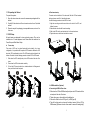
1.1.2 Unpacking the Cabinet
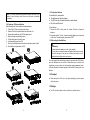
l Rack-mount setup
To unpack the system:
1. Open the outer carton and remove the accessories packaged with the
cabinet.
2. Carefully lift the cabinet out of the outer carton and set it on a flat, stable
surface.
3. Discard or recycle the packaging in a responsible manner, or store it for
future use.
The series can be installed in 19 inches racks. Both the UPS and external
battery enclosure need 2U of valuable rack space.
Use the following procedure to install UPS in a rack.
1.1.3 UPS Setup
1. Align the mounting ears with screw holes on the side of the UPS, and
tighten the screw.
2. Assemble the rack rails with the rack-mounting.
3. Slide in the UPS into the rack rail and lock it in the rack enclosure.
4. Tighten the screw, and the load can then be connect
All model series are designed for tower and rack purpose. They can be
installed into a 19 inches equipment rack. Please follow the instruction for
Tower Setup and Rack-Mount Setup.
l
Tower setup
This series of UPS can be placed horizontally and vertically. As a tower
configuration, it is provided with the optional UPS stands to stabilize the UPS
when the UPS is positioned in vertical. The UPS stand must be attached to the
bottom of the tower. Use the following procedure to install UPS in UPS stands.
1.
2.
3.
Slide down the UPS vertically and put two UPS stands at the end of the
tower.
Place down the UPS into two stands carefully.
Pull out the LCD box and rotate it in a clockwise direction to 90 degree and
then push it back in the front panel.
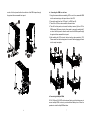
1.1.4 EBM Installation (Optional)
l Connecting the EBM in Tower form:
1. Slide down the UPS and EBM vertically and place two UPS stands with the
extend part at the end of the tower.
2. Tighten the screw on the metal sheet for stabilization
3. Connect the Earth line from UPS (port A ) to EBM (port B)
4. Take off the front panel, and connect the battery terminal (A) from UPS to
EBM terminal (B) shown as below. Users need to remove the small gate(C)
5
5
on side of the front panel to allow the outlet wire of the EBM to pass through
the gate and then reassemble front panel.
A
l
Connecting the EBM in a rack form
1. Using the same method as assembling UPS in a rack form, assemble EBM
into the rack-mounting on the top or bottom of the UPS.
2. Connect the earth line from UPS (port A ) to EBM (port B )
3. Take off the LCD box, and unscrew the internal screws.
4. Take off the front panel, and connect the battery terminal (A) from UPS to
EBM terminal (B) shown as below. Users need to remove the small gate(C)
on side of the front panel to allow the outlet wire of the EBM to pass through
the gate and then reassemble front panel.
5. After installing the UPS into rack, the load can then be connected to UPS.
Please make sure the load equipment is turned off before plugging all loads
into the output receptacle
B
B
Unscrew
A
Unscrew
A
B
A
C
C
B
5
l Connecting the Multiple EBMs
1KVA / 2KVA and 3KVA UPS include external battery port that allows users to
connect multiple EBM in order to provide additional backup time. Follow the
procedure to install multiple EBM as below.
6
7
Connecting multiple EBMs in Tower form
1. Connect Earth line between UPS and the first EBM, and then connect Earth
Line between the first EBM and the second EBM.
2. Take off the front panel, and connect the battery terminal (A) from UPS to
EBM terminal (B) shown as below. And then connect the battery terminal (D)
from the first EBM to the battery terminal (E) from the second EBM. Users
need to remove the small gate(C) on side of the front panel to allow the
outlet wire of the EBM to pass through the gate and then reassemble front
panel.
E
B
D
A
C
D
A
C
Note: Three or more EBMs can be connected to the UPS in the same way as
shown above.
Note: After connect the EBMs, please do not forget to set the number of EBMs
on LCD, please refer to chapter 7 “Setting by LCD module” for setting method.
If use the nonstandard EBMs, please call local dealer or distributor for setting
method.
E
B
1.2 Operation
1. Connect Earth line between UPS and the first EBM, and then connect
Earth Line between the first EBM and the second EBM.
2. Take off the front panel, and connect the battery terminal (A) from UPS to
EBM terminal (B) shown as below. And then connect the battery terminal
(D) from the first EBM to the battery terminal (E) from the second EBM.
Users need to remove the small gate(C) on side of the front panel to allow
the outlet wire of the EBM to pass through the gate and then reassemble
front panel.
★ Do not disconnect the mains cable on the UPS or the building wiring
socket (grounded shockproof socket) during operation as this would
remove the ground to the UPS and of all connected loads.
★ The UPS features its own, internal current source (batteries). You may be
electric shock when you touch the UPS output sockets or output terminal
block even if the UPS is not connected to the building wiring socket.
★ In order to fully disconnect the UPS, first press the OFF button to turn off
the UPS, then disconnect the mains lead.
★ Ensure that no liquid or other foreign objects can enter the UPS.
★ Do not remove the enclosure. This system is to be serviced by qualified
service personnel only.
★ Remove the protective panel only after disconnecting the terminal
connections.
★ Use No. 12 AWG (for 3K-KS input wire), 90°C copper wire and 4.4 lb-in
8
9
Connecting the Multiple EBMs in rack form
Torque force when connecting to terminal block.
★ Use No. 10AWG (for all models battery wire), 90°C copper wire and
Anderson PP45 connectors for user’s external battery cabinet.
1.3 Maintenance, servicing and faults
★ The UPS operates with hazardous voltages. Repairs may be carried out
only by qualified maintenance personnel.
★ Caution - risk of electric shock. Even after the unit is disconnected from the
mains power supply (building wiring socket), components inside the UPS
are still connected to the battery which are potentially dangerous.
★ Before carrying out any kind of service and/or maintenance, disconnect the
batteries. Verify that no current is present and no hazardous voltage
exists in the capacitor or BUS capacitor terminals.
★ Batteries must be replaced only by qualified personnel.
★ Caution - risk of electric shock. The battery circuit is not isolated from the
input voltage. Hazardous voltages may occur between the battery
terminals and the ground. Verify that no voltage is present before servicing!
★ Batteries have a high short-circuit current and pose a risk of shock. Take
all precautionary measures specified below and any other measures
necessary when working with batteries:
★ - remove all jewellery, wristwatches, rings and other metal objects
★ - use only tools with insulated grips and handles.
★ When changing batteries, replace with the same quantity and the same
type of batteries.
★ Do not attempt to dispose of batteries by burning them. It could cause
explosion.
★ Do not open or destroy batteries. Effluent electrolyte can cause injury to
the skin and eyes. It may be toxic.
★ Please replace the fuse only by a fuse of the same type and of the same
amperage in order to avoid fire hazards.
★ Do not dismantle the UPS, except the qualified maintenance personnel.
with a vacuum cleaner. For long battery life, keep the UPS at an ambient
temperature of 25°C (77°F)
1.3.2 Storing the UPS and Batteries
When the UPS is intended to store for a long period, recharge the battery
every 6 months by connecting the UPS to utility power. The batteries charge to
90% capacity in approximately 4 hours. However, it is recommended that the
batteries charge for 48 hours after long-term storage.
1.3.3 Time to Replace Batteries
When the discharging time is less than 50% of specified after full charged, the
battery may need to be replaced. Please check the battery connection or
contact your local dealer to order new battery.
WARNING:
l
For the best preventive maintenance, keep the area around the UPS clean
and dust-free. If the atmosphere is very dusty, clean the outside of the system
Turn off the UPS and disconnect the utility power cord from the wall outlet.
l Servicing should be performed by qualified service personnel
knowledgeable of batteries and required precautions. Keep unauthorized
personnel away from batteries
l Batteries can present a risk of electrical shock or burn from high short
circuit current. The following precautions should be observed:
1. Remove watches, rings, or other metal objects.
2. Use tools with insulated handles.
3. Do not lay tools or metal parts on top of batteries.
4. Wear rubber gloves and boots.
5. Disconnect the charging source prior to connecting or disconnecting
battery terminal.
l When replacing batteries, replace with the same type and number of
batteries or battery packs. Contact your service representative to order
new batteries.
l Do not dispose of battery in a fire. Batteries may explode when exposed to
flame.
l Proper disposal of batteries is required. Refer to your local codes for
disposal requirements.
l Do not open or mutilate the battery. Released toxic electrolyte is harmful to
skin and eyes.
10
11
1.3.1 UPS and Battery Care
1.3.5 Testing New Batteries
Note: If you are not qualified service personnel to replace the battery, do not
attempt to open the battery cabin. Please call local dealer or distributor
immediately.
1.3.4 Replacing UPS Internal Batteries
Follow the steps and Charts as below to replace batteries:
1. Take off the LCD box, and remove the screws.
2. Slide and Pull the front panel leftward and then take it off.
3. Disconnect the cable from the UPS and battery pack.
4. Remove the right inner battery bracket.
5. Pull the battery pack out onto flat area.
6. Install new battery pack into UPS.
7. Screw up the battery bracket and reconnect the battery cable A and B
8. Re-install the front panel back to UPS.
For a battery test, please check:
l The batteries must be fully charged.
l The UPS must be in Normal mode with no active alarms.
l Don’t take on/off the load.
To test batteries:
1. Connect the UPS to utility power for at least 48 hours to charge the
batteries.
2. Press and hold the “I” button 1 second to start the battery test on line mode
or HE mode. The status display string shows “TEST”
1.3.6 Recycling the Used Battery:
Warning:
l
Never dispose the batteries in a fire. It may explode.
Do not open or mutilate the batteries. Released electrolyte is harmful
to the skins and eyes. It may be toxic. A battery can present a risk of
electrical shock and high short circuit current.
l
To recycle properly the used battery, please do not discard the UPS, battery
pack and batteries into the trash bin. Please follow your local laws and
regulations; you may contact your local recycling waste management center
for further information to dispose properly of the used UPS, battery pack, and
batteries.
1.4 Transport
★ Please transport the UPS only in the original packaging (to protect against
shock and impact).
7
5
1.5 Storage
★ The UPS must be stockpiled in the room where it is ventilated and dry.
12
13
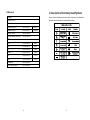
2. Description of Commonly Used Symbols
1.6 Standards
Some or all of the following symbols may be used in this manual. It is advisable to
familiarize yourself with them and understand their meaning:
* Safety
IEC/EN 62040-1-1
* EMI
Conducted Emission..........................:IEC/EN 62040-2
Category C1
Radiated Emission.............................:IEC/EN 62040-2
Category C1
Harmonic Current...............................:IEC/EN 61000-3-2
Voltage Fluctuation and Flicker..........:IEC/EN 61000-3-3
*EMS
ESD...................................................:IEC/EN 61000-4-2
Level 3
RS.....................................................:IEC/EN 61000-4-3
Level 3
EFT....................................................:IEC/EN 61000-4-4
Level 4
SURGE.............................................:IEC/EN 61000-4-5
Level 4
CS……………………………………...:IEC/EN 61000-4-6
Level 3
MS……………………………………..: IEC/EN 61000-4-8
Level 3
Voltage Dips………………………….: IEC/EN 61000-4-11
Low Frequency Signals.....................:IEC/EN 61000-2-2
14
15
3. Introduction
4. Panel Description
This On-Line-Series is an uninterruptible power supply incorporating
double-converter technology. It provides perfect protection specifically for
Novell, Windows NT and UNIX servers.
The double-converter principle eliminates all mains power disturbances. A
rectifier converts the alternating current from the socket outlet to direct
current. This direct current charges the batteries and powers the inverter. On
the basis of this DC voltage, the inverter generates a sinusoidal AC voltage,
which permanently supplies the loads.
Computers and periphery are thus powered entirely by the mains voltage. In
the event of power failure, the maintenance-free batteries power the inverter.
This manual covers the UPS listed as follows. Please confirm whether it is
the model you intend to purchase by performing a visual inspection of the
Model No. on the rear panel of the UPS.
Model No.
1K
2K
3K
Type
Standard
Model No.
1K-KS
2K-KS
3K-KS
“KS” Model: Extended backup time
Type
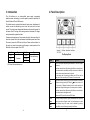
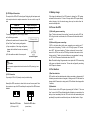
The Display Panel
Extended backup
time
Switch
Function
ON
Button
Turn on UPS system: By pressing the ON-Button “I” the UPS system
is turned on.
Deactivate acoustic alarm: By pressing this Button an acoustic alarm
can be deactivated in the battery mode. By short touch this Button all
acoustic alarms can be deactivated in all mode.
Do the battery test: By pressing this Button the UPS can do the
battery test in the Line mode or ECO mode or Converter mode.
When mains power is normal, the UPS system switches to No output
or Bypass mode by pressing OFF-Button “ “, and the inverter is off.
At this moment, if Bypass is enabled, then the output sockets are
supplied with voltage via the bypass if the mains power is available.
Deactivate acoustic alarm: By pressing this Button an acoustic alarm
can be deactivated in the bypass mode.
Release the UPS from fault mode and EPO status.
OFF
Button
Select
Button
Enter
Button
16
The output voltage, frequency, Bypass disable/enable and operating
mode in No output or Bypass mode, Two Load segments in output
mode, Battery string in all mode, could be selected by pressing
Select-Button, and confirmed by pressing Enter-Button.
17
5. Connection and Operation
The system may be installed and wired only by qualified electricians
in accordance with applicable safety regulations!
When installing the electrical wiring, please note the nominal
amperage of your incoming feeder.
5.1 Inspection:
The LCD Display
Display
Function
Display
Input Information
Inspect the packaging carton and its contents for damage. Please inform the
transport agency immediately should you find signs of damage.
Function
Output Information
It indicates input
It indicates output
voltage/frequency value, which
voltage/frequency value, which
are displayed alternately.
are displayed alternately.
connected with mains, and the
It indicates the Output plug.
input power is supplied from
the mains.
It indicates the Number of the
It indicates the Number of the
input supplied from the mains.
output connected with load.
Battery Information
Load Information
It indicates the battery capacity.
It indicates the load level. Every
Every
grid represents the level of
represents
Note: Please ensure that the incoming feeder is isolated and secured to
prevent it from being switched back on again.
5.2 Connection:
(1) UPS Input Connection
It indicates the input is
grid
Please keep the packaging in a safe place for future use.
the
capacity of 20%.
Mode/Fault/Warning Information
If the UPS is connected via the power cord, please use a proper socket with
protection against electric current, the user can refer to below table. If the
UPS is connected via wires, it is recommended to select the 2.5mm 2 wire,
and the “GND” terminal should be grounded first.
The UPS System has no input breaker on the standard cabinet. When
installing the UPS, the user needs to connect the external breakers and
protective components in the input terminals. It is recommended to select the
NFB(Non-Fuse Breaker) instead of the traditional combination kit including
breaker and fuse.
When selecting the NFB, the user can refer to below table.
20%.
Model No.
Else
It Indicates the operating mode
It indicates the UPS is in setting
or Fault kind or Warning kind,
mode.
several warning kinds at the
same time could be displayed
It indicates the UPS is in Fault
alternately.
mode or has some warnings.
18
UPS INPUT NFB & Power Cord & Socket
VOLTAGE
CURRENT
1K & 1K-KS
2K & 1K-KS
300Vac
300Vac
10A
16A
3K & 1K-KS
300Vac
20A
19
(2) UPS Output Connection
5.3 Battery charge:
The output of the UPS is IEC socket-types. Simply plug the load power cord
to the output sockets to complete connection. Use one cord for every 5A
load.
Fully charge the batteries of the UPS system by leaving the UPS system
connected to the mains for 1-2 hours. You may use the UPS system directly
without charging it but the stored energy time may be shorter than the
nominal value specified.
Model No.
1K, 1K-KS, 2K, 2K-KS
3K, 3K-KS
Output Socket (pcs)
8 * IEC320 C13
8 * IEC320 C13 + 1 * C19
5.4 Turn on the UPS:
(1) With utility power connecting:
Press “I” button continuously for more than 1 second to turn on the UPS, the
UPS will get into the inverter mode, the LCD screen will indicate the state of
the UPS.
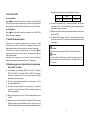
The wiring configuration ( 3K-KS only) is shown
as the following procedure:
a) Remove the small cover of the terminal block
(2) Without utility power connecting:
b) Use 2.5mm2 wires for wiring configuration
c) Upon completion of the wiring configuration,
please check whether the wires are securely
affixed
d) Put the small cover back to the rear panel
Connection diagram
Caution:
Do not connect equipment which would overload the UPS system (e.g. laser
printers)
If UPS is cold start without utility power connecting, user need to push “I”
button twice, first pushing “I” button is for UPS to get power, LCD screen
show ‘INIT’. And second pushing “I” button continuously for more than 1
second is for UPS to turns on, the UPS will get into the inverter mode. In fact,
the two pushing “I” button is to make further sure user operation for turning
on UPS, the LCD screen will indicate the state of the UPS.
Note: The default setting for bypass mode is no output after UPS is connecting
utility power and breaker is turned on. This can be configured by monitoring
the LCD panel or firmware.
5.5 Test function:
(1)Real time detection
(3) EPO Connection:
The polarity of EPO is NC (Normally closed) as default setting.
Normally the EPO connector is closed with a wire on the rear panel. Once
the connector is open, the UPS would stop the output until the EPO status is
disabled.
Enable the EPO status
UPS could do real-time detection when battery connected or disconnected. If
the battery connection status is changed, in floating mode, UPS will detect the
change within 30 seconds; in resting mode, UPS will detect the change within
3 minutes;
(2) Manual test
Test the function of the UPS system by pressing the On-Switch “I” for more
than 1 second, the UPS would detect whether the battery is connected or the
battery is low immediately. Also the UPS could do the test automatically and
periodically, the period time could be set by user, the default value is 7 days.
Disable the EPO status
( UPS output is OFF )
( normal status )
20
21
all model. And battery wire color is recommended as following:
5.6 Turn off the UPS:
+
Red wire
(1) In Inverter Mode:
Press “ ” button continuously for more than 1 second to turn off the UPS, the
UPS will get into no output or bypass mode. At this time, the UPS might has
output if bypass is enabled. Disconnect the utility power to turn off the output.
(2) In Battery Mode:
Press “ ” button continuously for more than 1 second to turn off the UPS, the
UPS will be turned off completely.
5.7 Audible alarm mute function:
If the alarm is too annoying in battery mode, you may press “I” button
continuously for more than 1 second to clear it. Moreover, the alarm will be
enabled when the battery is low to remind you to shutdown the load soon.
If the alarm is too annoying in bypass mode, you may press “ “button
continuously for more than 1 second to clear it. The action doesn’t affect the
warning and fault alarm.
If all alarm is too annoying, you can short touch “I” button, all alarms are
disable, if alarms need to be resumed, short touch “I” button again.
GND
Green/Yellow wire
(6) The red wire is connected to the "+" terminal of the battery. The black wire
is connected to the "-" terminal of the battery. (Note: the green/yellow wire
is grounded for protection purpose.)
(7) Make sure the wires are fasten, install the terminal block cover on the rear
panel of the UPS.
(8) Connect the UPS to the load. Then, turn on the mains switch or connect
the power cord of the UPS to utility power supply, the battery would start
to be charged.
Caution:
A DC breaker must be connected between the UPS and external battery.
Caution:
The output sockets of the UPS system may still be electrically live even if the
power supply system has been disconnected or the Bypass switch is on
“OFF” position.
5.8 Operation procedure of external battery for long backup
time model (“S” model)
(1) Use the battery pack with voltage: 36VDC for 1KVA (12V×3 batteries),
48VDC for 2KVA 2V×4 batteries), 72VDC for 3KVA 2V×6 batteries).
Connection of batteries more than or less than required will cause
abnormality or permanent damage.
(2) One hard wiring type battery terminal on the rear panel is used for
connecting the battery pack.
(3) The battery connection procedure is very important. Any incompliance
may result in the risk of electric shock. Therefore, the following steps must
be strictly complied with.
(4) Make sure the mains input is cut off, if there is a battery breaker then turn
it off first.
(5) Remove front panel, connect the battery via Anderson PP45 connectors.
Prepare the battery cable which should be able to carry the current of
2
>50A for all models, the cross section area should be great than 4 mm for
22
-
Black wire
23
6. Operating Mode for All Models
The different string could be displayed on the LCD screen corresponding to
their own operating modes, and they are illustrated as the following table. At
any time, only one normal operating string or fault string is presented. But the
warning, even several warnings could appear in a certain normal operating
mode at one time. And the normal operating mode string and the warning
string would be shown circularly. Once one fault is come forth, then all
previous warnings would not be shown again but only the fault string is
presented.
Normal operating mode
Code
No output mode
STbY
Bypass mode
bYPA
Line mode
LINE
Battery mode
bATT
Battery test mode
TEST
ECO mode
ECO
Converter mode
CVCF
Note: Please follow the following steps to connect the generator:
l Activate the generator and wait until the operation is stable before
supplying power of the generator to the UPS (be sure that the UPS is in
idle mode). Then turn on the UPS according to the start-up procedure.
After the UPS is turned on, then the loads can be connected to the UPS
one by one.
l The power capacity of the AC generator should be at least twice of the
UPS capacity.
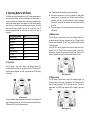
6.2 Battery mode
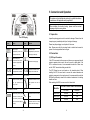
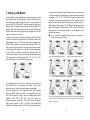
The LCD display in battery mode is shown in the following diagram. The
information about the utility power, the battery level, the UPS output and the
load level could be displayed. The “bATT” string indicates the UPS is working
in the battery mode.
When the UPS is running in battery mode, the buzzer beeps once every 4
seconds. If the “ON” button on the front panel is pressed for more than 1
second again, the buzzer will stop beeping (in silence mode). Press the “ON”
button once again for more than 1 second to resume the alarm function.
6.1 Line mode
The LCD display in Line mode is shown in the following diagram. The
information about the utility power, the battery level, the UPS output and the
load level could be displayed. The “LINE” string indicates the UPS is working
in Line mode.
■ The Battery mode
6.3 Bypass mode
The LCD display in bypass mode is shown in the following diagram. The
information about the utility power, the battery level, the UPS output and the
load level could be displayed. The UPS will beep once every 2 minutes in
bypass mode. The “bYPA” string indicate the UPS is working in the bypass
mode.
■ The Line mode
If output overloaded, alarm will keep twice every second. You should get rid of
some unnecessary loads one by one to decrease the loads connected to the
UPS less than 90% of its nominal power capacity.
■ The Bypass mode
24
25
The UPS does not have the backup function when it is in bypass mode.
The power used by the load is supplied from the utility power via internal
filter.
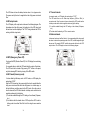
6.4 NO output mode
The LCD display in No output mode is shown in the following diagram. The
information about the utility power, the battery level, the UPS output and
the load level could be displayed. The “STbY” string indicates the UPS is
working in the No output mode.
6.7 Converter mode
In converter mode, on LCD display, the mode string is “CVCF”.
The UPS would free run with fixed output frequency (50Hz or 60Hz) in
converter mode. Once the mains is loss or abnormal, the UPS would transfer
to battery mode and the load is supplied continuously by the battery.
1) It could be enabled through the LCD setting or the software (Winpower,
etc.).
2) The load should be derating to 70% in converter mode.
6.8 Abnormal mode
In abnormal mode such as Bus fault etc., the corresponding fault string would
be shown to indicate the operating mode of the UPS, and the background light
become red. For example “SHOR” would be shown when the load or the UPS
output is short. The LCD display is shown in the following diagram.
■ The No output mode
6.5 EPO (Emergency Power Off)
It is also called RPO (Remote Power Off). On LCD display, the mode string
is “EPO”.
It is a special status in which the UPS would shut the output off and alarm.
The UPS could not be turned off by pressing “OFF” button on the panel,
only after releasing EPO status by turning off the EPO switch.
6.6 ECO mode (Economy mode)
It is also called high efficiency mode. In ECO mode, on LCD display, the
mode sting is “ECO”.
After the UPS is turned on, the power used by the load is supplied from the
utility power via internal filter while the utility power is in normal range, so
the high efficiency could be gained in the ECO mode. Once the mains is
loss or abnormal, the UPS would transfer to battery mode and the load is
supplied continuously by the battery.
1) It could be enabled through the LCD setting or the software (Winpower,
etc.).
2) It is attention that the transfer time of UPS output from ECO mode to
battery mode is less than 10ms. But it is still too long for some sensitive
load.
26
27
7. Setting by LCD Module
The output voltage, frequency, Bypass status and operating mode in No output
mode or Bypass mode, Two Load segments in output mode, Battery string in
all mode could be set directly through LCD module. The output voltage could
be set to 208V, 220V, 230V and 240V. The output frequency could be set to
50Hz and 60Hz. The bypass state could be set to enable and disable. The
operating mode of UPS could be set between the Line mode, ECO mode and
Converter mode. Battery string could be set to one to night groups. Two Load
segments could be set to on and off.
In bypass or no output mode, pressing the “Enter” button on the LCD panel for
more than one second to enter setting mode. The LCD display is shown in the
following diagram. The string “OPV” indicates that the current setting is output
voltage. “230Vac” indicates the current default output voltage is 230Vac. if you
want to set output voltage, press the “Enter” button for more than one second,
a flickering string “208” would be shown, if the “Enter” button is pressed again,
the string “208” turn to flickerless, the output volt is changed to 208V; if the
“Select” button is pressed for more than one second, the next flickering string
“220” appear, the order of flickering string is 208 – 220 – 230 – 240 – 208,
Press “Enter” button to confirm the output volt what you want.
several seconds after “Bypass Enable” is selected, and turn to no output mode
in several seconds after “Bypass Disable” is selected; Operating mode could
be selected in “UPS”, “ECO”, “CVF”(Here “UPS” means the normal inverter
mode, “ECO” means the high efficiency mode, and “CVF” means the converter
mode), The mode change would be active only after the UPS is turned on;
Battery string could be selected in “001” to “009”(Here “001” means one group
battery). Load segment 1 could be selected in “000” or “001”(Here 000 means
load segment 1 off, 001 means load segment 1 on); Load segment 2 is the
same as Load segment 1.
■ Here is a example for changing the Operating mode from normal mode to
converter mode through the LCD panel.
Step 1: “OPV” after pressing the “Enter” button;
Step 2: “OPF” after pressing the “Select” button.
Step 3: “bYPA” after pressing the “Select” button; Step 4: “MOdE” after pressing the “Select” button,
press the “Enter” button to set mode, then “UPS” flickering;
Exit the setting mode to short touch the “Enter” button; continue setting to
press “Select” button. if no any pressing on the “Select” or “Enter” button
lasting for more than 10 seconds, the setting mode exit automatically.
The output frequency string “OPF”, Bypass status string ” bYPA”, operating
mode string “MOdE”, Battery string “bSTR”, Load segment string “LS1” and
“LS2” would be presented circularly. The only one voltage value could be
selected in “208V”, “220V”, “230V”, “240V” at any time; The only one
frequency value could be selected in “50Hz”, “60Hz” at any time; Bypass
status could be selected in “000” or “001”(Here 000 means Bypass
Disable,001 means Bypass Enable),The UPS would turn to bypass mode in
28
Step 5: “ECO” flickering after pressing the “Select” button; Step 6: “CVF” flickering after pressing the
“Select” button again. Press the “Enter” button to make sure to change the mode. Short touch “Enter”
button to exit setting mode.
29
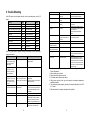
8. Trouble Shooting
Charge fail
Inverter temperature high
If the UPS system does not operate correctly, check the operating status on the LCD
display.
Warning
String
Fault
String
Site fail
SITE
Inverter short
SHOR
Fan fail
FANF
Overload fault
OVLD
Battery over voltage (over charged)
HIGH
Inverter soft start fail
ISFT
Battery low
bLOW
Bus soft start fail
bSFT
Charge fail
CHGF
Over temperature fault
OVTP
Inverter temperature high
TEPH
Inverter Volt Low
INVL
Ambient temperature high
AMbH
Inverter Volt High
INVH
Battery open
bOPN
Bus volt over
bUSH
Overload
OVLD
Bus volt Low
bUSL
EPO
EPO
Bus Unbalance
bUSE
Inverter NTC open
NTCO
If the UPS system does not operate correctly, please attempt to solve the problem
using the table below.
Problem
Pzle cause
Remedy
No indication, no warning
tone even though system
is connected to mains
power supply
No input voltage
Check building wiring socket outlet
and input cable.
Display Mode
string ”STbY” in LCD,
even though the power
supply is available
Inverter not switched on
Press On-Switch “I”.
Display Mode
string ”bATT” in LCD, and
audible alarm sounding
every 1 beep in every 4
seconds
Emergency supply period
shorter than nominal value
Mains power supply has
failed, or Input power and/or
frequency are out of tolerance
Switching to battery mode
automatically.
Check input power source and inform
dealer if necessary.
Batteries not fully charged /
batteries defect
Fan fail
Battery over voltage
Fan abnormal
Battery is over charged
Battery low
Battery voltage is low
Charge the batteries for at least
5 - 8 hours and then check capacity.
If the problem still persists, consult
your dealer.
Check if the fan is running
Stop charging to battery
automatically, and after the battery
voltage is normal and the mains is
normal, charge automatically again.
When audible alarm sounding every
second, battery is almost empty.
30
Ambient temperature high
Battery open
The charge is broken
Inside temperature of the UPS
is too high
The ambient temperature is
too high
Battery pack is not connected
correctly
Notify dealer.
Check the ventilation of the UPS,
check the ambient temperature.
Check the environment ventilation.
Check the battery bank is connected
to the UPS.
Check the battery breaker is turn on.
Check the loads and remove some
non-critical loads.
Check whether some loads are
failed.
Rotate mains power socket by 180°
or connect UPS system.
Overload
Overload
Site fail
Phase and neutral conductor
at input of UPS system are
reversed
EPO function is enabled
UPS internal fault
Turn off the EPO switch.
Notify dealer
UPS internal fault
Notify dealer
Over temperature
Check the ventilation of the UPS,
check the ambient temperature and
ventilation.
Remove all the loads. Turn off the
UPS. Check whether the output of
UPS and loads is short circuit. Make
sure the short circuit is removed, and
the UPS has no internal faults before
turning on again.
EPO active
Bus fault(Low/high/
Unbalance/soft start)
Inverter
fault(Low/high/soft start)
Over temperature fault
Inverter short
Output short circuit
Please have the following information at hand before calling the After-Sales
Service Department:
1. Model number, serial number
2. Date on which the problem occurred
3. LCD display status, Buzzer alarm status
4. Utility power condition, load type and capacity, environment temperature,
ventilation condition
5. The information (battery capacity, quantity) of external battery pack if the UPS
is “S” model
6. Other information for complete description of the problem
31
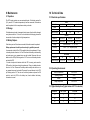
9. Maintenance
10. Technical Data
9.1 Operation
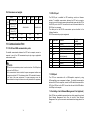
10.1 Electrical specifications
The UPS system contains no user-serviceable parts. If the battery service life
(3~5 years at 25°C ambient temperature) has been exceeded, the batteries
must be replaced. In this case please contact your dealer.
9.2 Storage
If the batteries are stored in temperate climatic zones, they should be charged
every three months for 1~2 hours. You should shorten the charging intervals to
two months at locations subject to high temperatures.
9.3 Battery Replace
If the battery service life has been exceeded, the batteries must be replaced.
INPUT
Model No.
1K & 1K-KS
2K & 2K-KS
3K & 3K-KS
Phase
1
Frequency
(45~55)/(54~66) Hz
Max Current(A)
7.5
13.5
20
OUTPUT
Model No.
1K& 1K-KS
2K& 2K-KS
3K & 3K-KS
Power rating
1KVA/0.9KW
2KVA/1.8KW
3KVA/2.7KW
Voltage
208/220/230/240×(1 士 1%)VAC
Battery replacement should be performed only by qualified personnel.
Frequency
50/60(±0.2)Hz (Battery mode)
It recommends to shut off the UPS completely before the replacement. If there
is a battery breaker then turn it off first. Disconnect the battery cable carefully
and make sure no any exposed wires can be touched. Reconnect the new
batteries to the UPS by following section 5.8. Then turn on the battery breaker
and start the UPS.
If it needs to replace the batteries while the UPS is running, make sure the
UPS would not shut down during the replacement. If there is a battery breaker
then turn it off first. Disconnect the battery cable carefully and make sure no
any exposed wires can be touched. Reconnect the new batteries to the UPS
by following section 5.8. Then turn on the battery breaker and press the ON
switch to make the UPS do the battery test, check whether the battery
information is normal.
Wave form
sinusoidal
BATTERIES
Model No.
1K
2K
3K
Number and type
3×12V 7Ah
4×12V 9Ah
6×12V 9Ah
10.2 Operating Environment
Ambient Temperature
0 oC to 40 oC
Operating humidity
< 95%
Altitude
< 1000m
Storage temperature
0 oC to 45 oC
10.3 Typical backup time (Typical values at 25°C in minutes:)
32
Model No.
100 % Load
50 % Load
1K
5
15
2K
3
10
3K
3
10
33
10.4 Dimensions and weights
Model
Net weight (kg)
UPS
Cabinet Dimension (mm)
(W x H x D)
Battery
Cabinet
11.2 RS-232 port
1K
1K-KS
2K
2K-KS
3K
3K-KS
16,2
8,4
19,7
9,3
28,6
13,2
438x86,5x436
Dimension (mm)
(W x H x D)
438x86,5x608
Net weight (kg)
22,2
27,5
40,5
Type
36V
48V
72V
11. Communication Port
11.1 RS-232 and USB communication ports
To establish communication between the UPS and a computer, connect a
computer to one of the UPS communication ports by using an applicable
communication cable.
NOTE:
Only one of the communication ports can be active at one time. The USB port has
priority over the RS-232 port.
When a communication cable is installed, the power management software can
exchange data with the UPS. The software polls the UPS for detailed information
on the status of the power environment. If a power emergency occurs, the
software initiates the saving of all data and an orderly shutdown of the equipment
The RS-232 port is available for UPS monitoring, control, and firmware
updates. To establish communication between the UPS and a computer,
connect one end of the serial communication cable that comes with the UPS to
the RS-232 port on the UPS. Connect the other end of the serial cable to the
RS-232 port on a computer.
The cable pins for the RS-232 communication port are identified in the
following illustration.
RS-232 communication port pin assignments
Pin
Signal name
1
2
3
4
Tx
Rx
5
GND
6
7
8
9
Direction
the UPS
Function
Unused
Transmit to external device
Receive from external device
Unused
Signal common
(tied to chassis)
Unused
Unused
Unused
Unused
from
Not applicable
Out
In
Not applicable
Not applicable
Not applicable
Not applicable
Not applicable
Not applicable
11.3 USB port
The UPS can communicate with a USB-compliant computer by using
HID-compatible power management software. To establish communication
between the UPS and a computer, connect the USB cable that comes with the
UPS to the USB port on the UPS. Connect the other end of the USB cable to
the USB port on a computer.
11.4 Installing a Serial Network Management Card (optional)
Each UPS has one available communication bay, which supports the optional
Serial Network Management Card. After you install a Serial Network
Management Card, you can connect an environmental monitoring probe to the
UPS.
34
35
Note: You do not have to shut down the UPS before you install a
communication card.
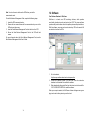
12. Software
To install the Network Management Card, complete the following steps:
WinPower is a brand new UPS monitoring software, which provides
user-friendly interface to monitor and control your UPS. This unique software
provides safely auto shutdown for multi-computer systems while power failure.
With this software, users can monitor and control any UPS on the same LAN
no matter how far from the UPSs.
1. Locate the UPS communication bay.
2. Remove the two screws that secure the communication bay cover to the
UPS and save the screws.
3. Insert the Serial Network Management Card into the slot on the UPS.
4. Secure the Serial Network Management Card to the UPS with both
screws.
For more information about the Serial Network Management Card, see the
Serial Network Management Card User's Guide.
Free Software Download – WinPower
Installation procedure:
1.
2.
3.
Go to the website:
http://www.ups-software-download.com/winpower.htm
Choose the operation system you need and follow the instruction
described on the website to download the software.
When downloading all required files from the internet, enter the serial No:
511C1-01220-0100-478DF2A to install the software.
When your computer restarts, the WinPower software will appear as a green
plug icon located in the system tray, near the clock.
36
37
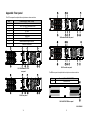
Appendix: Rear panel
The UPS rear panel description table and pictures are shown as below:
No.
1
2
3
4
5
6
7
8
9
Function(1KVA – 2KVA – 3KVA)
AC Output
EPO / Dry input Communication Port
USB Port
AC Input
Dry out
SNMP slot
RS232
Modem/Network Surge Protection
Earth Line connection
3K Standard model rear panel
3K-KS model rear panel
1K, 2K Standard & 1K-KS
rear panel
The EBM rear panel description table and picture are shown as below:
No.
1
Function(36V & 48V & 72V EBM)
Earth Line Port
1
2K-KS rear panel
36V &48V&72V EBM rear panel
1
614-03804-00
38
39