1
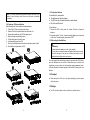
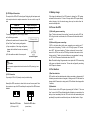
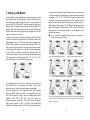
on side of the front panel to allow the outlet wire of the EBM to pass through
the gate and then reassemble front panel.
A
l
Connecting the EBM in a rack form
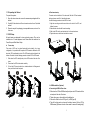
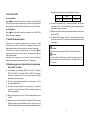
1. Using the same method as assembling UPS in a rack form, assemble EBM
into the rack-mounting on the top or bottom of the UPS.
2. Connect the earth line from UPS (port A ) to EBM (port B )
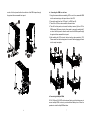
3. Take off the LCD box, and unscrew the internal screws.
4. Take off the front panel, and connect the battery terminal (A) from UPS to
EBM terminal (B) shown as below. Users need to remove the small gate(C)
on side of the front panel to allow the outlet wire of the EBM to pass through
the gate and then reassemble front panel.
5. After installing the UPS into rack, the load can then be connected to UPS.
Please make sure the load equipment is turned off before plugging all loads
into the output receptacle
B
B
Unscrew
A
Unscrew
A
B
A
C
C
B
5
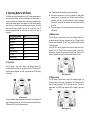
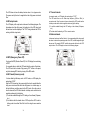
l Connecting the Multiple EBMs
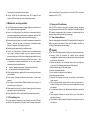
1KVA / 2KVA and 3KVA UPS include external battery port that allows users to
connect multiple EBM in order to provide additional backup time. Follow the
procedure to install multiple EBM as below.
6
7