1
Connections & Controls:
NOTE: Before connecting or disconnecting any cables, microphones or instruments it is good practice to
turn down all level controls and where possible switch off the system. This will prevent any pops, clicks or
bangs that could damage unit. Main’s cords and speaker cables should be connected and disconnected
with the power switched off.
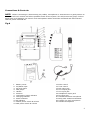
Fig.A
1. Battery Cover
2. AC/Mains input
3. AF level meter
4. MP3 player
5. Handle
6. Antenna
7. Low battery power indicator
8. Charging indicator
9. Power indicator
10. RF indicator
11. Master power switch & volume
12. MP3 power switch & volume
13. Echo control
14. Tone control
15. MIC input jack
16. Line output jack
17. Line input jack
18. Headphone output jack
19. DC input jack
20. Handheld wireless microphone
21. Body pack wireless transmitter
22. Lavalier (tie clip) microphone
23. Headset microphone
4