1
touchbga.com
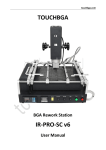
TOUCHBGA
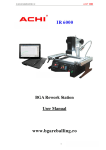
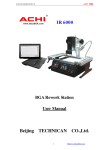
BGA Rework Station
IR6000
User Manual
touchbga.com
Table of contents
1. IR6000 BGA rework station features
1.1.Safety Instrouctions
1.1.1.Electric Safety
1.1.1.Operation Safety
1.1.3.Environmental requirements of operation and conservation
2.The operation and conservation condition of products
2.1.The parameters of IR6000 BGA Rework Station
2.2.Hardware description and Self-help install
2.3.Temperature-controlled meter Operation instructions
2.4.BGA Rework operation steps
2.5.Prompt
touchbga.com
1. IR6000 BGA rework stations features
IR6000 BGA Rework Station is designed to meet the ever-changing demands of today’s fast BGA Rework
manufacturing environments.
This model have following characteristics:
1. Rework station for laptop motherboards, desktop computer motherboards, server boards, industrial
computer boards, all kinds of game boards, communications equipment motherboards, LCD TVs and other
large circuit board BGA rework.
2. Innovative designs. An effective solution to general of infrared rework station vulnerable to the impact
of air flow. Will lead an inaccurate of temperature control. Maximum temperature up to 400C. Can easily
deal with lead-free soldering rework.
3. Can set up 8 rising temperature segments and 8 constant temperature segments to control. It can save
10 groups of temperature curves at one time.
4. Can be connected to a computer to be controlled more conveniently with a built-in PC RS232 serial port
and proprietary Software attached to it. Programmable.
5. Can easily rework the variety of CPU's seat, all kinds of shielding enclosures, replacement of various
components slot Can easily deal with lead-free soldering rework.
6. Sensitive temperature measurement sensor to obtain an accurate and instantaneous temperature
reading and monitoring.
7. BGA rework station the technology of closed-loop temperature control ensures accurate temperature
process and even heat distribution.
8. Machine overall system integration design. Rework station more integrated workbench area occupied by
smaller. Didn't mixed and disorderly of cables.
9. Linear guide type Bracket for BGA Reworks can be locking adjusted by rotating the handle. Can be very
easily fixed PCB board, effectively prevent the deformation of PCB board.
10. Detachable K type thermocouple.
11. Taiwan FOTEK SSR’s inside. Popular programmers inside.
touchbga.com
1.1.Safety Instrouctions
1.1.1.Electric Safety
1. Make sure the supply power voltage accord with the standards 220V-250V/50hz alternating current
before installing.
2. To avoid possible electric shock caused serious damage, please disconnect the power cord from the
outlet temporary before moving machines.
3. If the machine damages, please contact us for maintenance. If the damage caused by the users when
they dismantle or repair independently, they should take on the loss by themselves.
1.1.2.Operation Safety
1. Please carefully read the relevant information provided by the manual before starting using this product.
2. Make sure the power cord has been properly connected properly before using the products.
3. Installed the equipment in stable work platform to use, where the air mobility should be small as
possible. Avoid it closing to air conditioners, fans and the other outlet.
4. In case of electrical short-circuit, avoid the products contacting with water.
5. Forbid using this equipment in flammable and explosive substances.
6. The operators’ hands or other parts of the body should maintain a safe distance from the heater. Forbid
touching the heater to avoid scalding.
7. If you have any technical questions or suggestions in the course of using this product,please contact with
our technology department. We will try our best to solve.
1.1.3.Environmental requirements of operation and conservation
1. Operation environment of products
- Operation temperature: 15 – 45C
- Operation humidity: 5% to 95%, non-condensing
- Products should be kept in the air mobility of a smaller environment under the welding operation.
2. Conservation environment of products
- Storage temperature: -20 – 70C
- Storage humidity: 5% to 95%, non-condensing
touchbga.com
2.1.The parameters of IR6000 BGA Rework Station
Heating kind
IR/HR
Dimension
450x340x430mm
Weight
12kg
Electrical Parameters
Power
220V AC (3250W total)
Upper Heating
IR/HR
Size of Upper heating
IR-80x80mm
Consumption of upper heating
IR-450W / HR-1000W
Size of Bottom heating
205x210mm
Consumption of Bottom heating
3x600W
General power
IR+IR-2250W / IR+HR-2800W
Temperature Control
Control mode of Upper
Independent temperature control, high-precision closedloop control, precision ± 0.5%, Alarm
Control mode of Bottom
Independent temperature control, high-precision closedloop control, precision ± 0.5%, NO Alarm
Rework Function
BGA
Suit for welding, remove or repair packaged devices such
as BGA,PBGA,CSP,multi-layer substrates EMI metallic
shield product and solder/lead free Rework welding
Size of applicable chips
<=80x80mm
Size of applicable PCB
<=400x305mm
touchbga.com
2.2. Hardware description
IR6000 BGA Rework Station is composed of upper part of Heating Components / Bottom Preheat Module /
Bracket / Temperature Control Parts!
Temperature control Table is control the upper and lower heating, Can Simultaneously heated or first
preheat, then the upper part of heating.
3
4
5
1
6
13
7
8
10
9
11
12
1. PCB Table
2. Highly Sensitive K-temperature sensor
3. Upper Heater
4. X-Y Lifting Regulators
5. LED Auxiliary Lighting
6. Bottom Heater (Pre-Heater)
7. Lighting Switch
8. Upper fan Switch
9. Start Switch
10. Stop Switch
11. Upper Programmable Temperature Controller
12. Bottom Temperature Controller
13. Power Switch
2
touchbga.com
Self-Installation Instruction
PCB Table
1. Installation side support.
2. Installation Slip.
3. Installation side support.
touchbga.com
Upper Heater
Top head cable connector, RS232, power connector
Temperature sensor
Installation of RS232 communication interface for Desktop & Laptop
touchbga.com
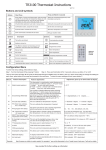
2.3. Temperature-controlled meter Operation instructions
TOP Programmer/Controller General Description
The programmable controller contains an in-built setpoint generator in addition to the controller function.
This setpoint generator can produce a temperature/time profile with 10*16 segments (0 9 10 Sets of
Curves). When the program is running, the current setpoint from the setpoint generator is fed to the
control algorithm. The current setpoint is continuously shown on the lower display.
The sixteen segments are defined in the order: Ramp 1, Dwell period 1, Ramp 2, Dwell period 2..., and are
executed in succession.
touchbga.com
Program Parameters Setting
touchbga.com
Program Parameter List
touchbga.com
BOTTOM Programmer/Controller General Description
Hold down the SET button of bottom heater temperature control instrumentation for 5 seconds, the
display will blinking and using up/down buttons temperature of bottom heater. Using left arrow you can
change one of four number positions.
The factory temperature is set is 180°C. Generally the user needn’t to change the data.
touchbga.com
2.4. Rework Operation Steps
1.Be all set
1.1.Fixed motherboard
1.2.Shift sensor close to BGA chip.
1.3.Adjust the height of heating head with adjustment knob
(Prompt: BGA chip in the middle of heating head, heating head away from BGA chip >= 2cm)
2.Start heating
touchbga.com
2.1.Select the appropriate temperature program segment, and then press the start switch. In the operation
can press the stop switch, stop operating.
2.2.After the program runs, automatic alarm 8sec. and automatically cut off the heating power, this time
you can check the following solder ball is completely liquefied, BGA chips should be subject to settlement,
floating state .
3.Rework completed
3.1. Moving Heating head and Sensor, open the Upper fan Switch.
3.2.Remove motherboard. Clear insulating tape.
3.3.BGA Rework Station Cooled, Then close Total Power.
Warning
1.If BGA Rework Station NO Cooling, Do not close the Total Power !
2.When the temperature is not cooled, do not touch heating module!
touchbga.com
Prompt
1. Keep the equipment at a steady working environment where the air mobility should be as small as
possible. Avoid it closing to air conditioners, fans and the other outlet.
2. IR 6000 Rework Station sensor is directly contacted with motherboards, So the display temperature is
Actual temperature.
3. In order to avoid damages to the motherboard capacitor, please use insulation tape. After Maintenance
is completed, Remove the insulation tape to prevent from short-circuit.
4. After removal of BGA chip PCB bonding pad needs to be cleaned up, Avoid cold solder joint. See BGA chip
tin completely liquefied, then move the BGA chip to avoid Bonding Pad Damage.
5. During the reflow of the new ball in a typical tin/lead (Sn63/Pb37) com position, there are “self
alignment” properties that are quite forgiving. According to IPC Spec, landing on 75% of the pad is
acceptable for BGA rework.
6. To improve success rate of Rework, PCB and chips need drying and processing in principle PCB board or
chip moist heat process will occur in the burst phenomenon, the Rework process may hear the blasting
sound of a minor. According to actual situation Please self-control.
7. PCB board heating time is too long or repeated several times the surface heating will lead to
discoloration.
8. Users from modifying temperature parameters. Please use scrap PCB tested heating whole time about 10
seconds before the end of solder balls should be fully liquefied f the liquefaction advanced or delayed,
should be regulating up/down the temperature setting. To prevent heat damage to your chips or lowtemperature sealing off.
9. Common setting of temperature
Reflow temp Sn63Pb37 : 185 - 190C, Reflow time: 10sec.
Reflow temp Sn96,5Ag3Cu0,5: 220 - 225C, Reflow time: 15sec.
10. The meaning of“ Hb”:
touchbga.com
“Hb” means the max heating temperature of the upper heating. We set the max temperature at 230°C
according to the max temperatrue of lead-free Reweork and other technical reasons. The data needn’t to
be changed.
11.The meaning of “r1” “L1” “d1” “r2” “L2” “d2” “r3” “L3” “d3” ……
Please pay attention to The following pictures and tables:
12.IR6000 can be managed by dedidated software using RS232 cable.
touchbga.com
Rework temperature curve to set examples