1
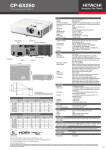
Hitachi wireless projectors: clear, effective, energy saving presentations
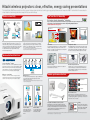
The latest Hitachi Multi Purpose projectors offer compact design, advanced wireless technology, energy saving features and an impressive 4000:1 contrast ratio. It means simpler
setup, brighter, clearer images and more impactful lessons and meetings.
Wireless connectivity
Low Total Cost of Ownership
Eco features based on ImageCare® technology
Optional USB
wireless adapter
ImageCare combines optimal picture performance with maximum energy savings. This technology has been integrated to enhance our existing
industry-leading eco features. Find out how much you can save using our Energy Savings Calculator at:
www.hitachidigitalmedia.com/energysavings
Optional USB
wireless adapter
Lamp power 100%
70% reduction in lamp power
Auto
Without access point
With access point
Manual
Access point
Wireless capability and network functionality
Projector Quick Connection for iOS Connectivity
Hitachi’s range of Multi Purpose projectors allow you to connect to your
wireless network, letting you run lessons or presentations wirelessly from
your laptop. The USB wireless adaptor enables the projector and computer
to communicate both directly or via a wireless network infrastructure.
The optional USB wireless adaptor supports all IEEE802.11b/g/n
networks, and simply slots into place.
Using our ‘Projector Quick Connection’ application, users can wirelessly
display documents, images and web pages from their iPad®, iPod touch®
and iPhone® on all of our Multi Purpose projectors. The application allows
users to control the projector via their iOS devices.
Lamp power reduces
down to 65%
*
*Our ‘Projector Quick Connection’ application can be downloaded from the App Store . Available using the following file formats: jpg,
bmp, png, gif, PDF, Excel®, Word®, PowerPoint®, Keynote®, Numbers®, Pages® and Web pages.
SM
Lamp power 100%
Saver Mode
Intelligent Eco Mode
The Saver Mode reduces lamp power by 70% compared to Normal Mode,
resulting in considerable energy savings. You can set the time for Saver
Mode from 1 to 30 minutes. If the projected image does not change within
the set time, the Saver Mode is activated.
When Intelligent Eco Mode is selected, the lamp power adjusts according
to screen brightness. Lamp power decreases when the image is dark and
increases when the image is bright. Using Intelligent Eco Mode increases
the contrast ratio of the projector while decreasing the use of electricity.
Effective security
Extended lamp and filter life
These projectors are equipped with a security bar, PIN-Lock, MyScreen
Lock and Transition Detector functions.
The lamp life of up to 6000 hours and the Hybrid Filter life of up to 5000
hours means that the projectors require less frequent maintenance and
cleaning, extending their overall life. Easy access to both ensures simple
maintenance and quick replacement.
Advanced network functions
1
2
3
4
12
Crestron RoomView™ Software
RoomView™ software provides a custom configurable interface to monitor,
manage and control every device in every room remotely from any computer.
Built-in network connectivity provides instant status and remote technical
support. Administrators or IT managers can schedule all the projectors to
turn off at the end of the day, saving energy and preserving lamps.
Moderator Control Mode
This mode lets you network 50 computers to the projector, with one
computer acting as the moderator. The teacher can use the moderator
computer to select and project images from the students computers.
Valuable performance features
Multi Projectors*
You can also project the same image via up to 12 projectors simultaneously.
This is useful for meetings and lectures in large venues to allow all
participants easy view of a screen.
Beginning of slideshow
*Multiple projector function will be provided later by software updates. Video transfer speed may vary depending on number of projectors
connected, and a wired network may offer faster rates.
Unplayable slides within slideshow
End of slideshow
TB-1 Wireless Pen Tablet
MS-1WL
Present without a PC
IM-1P Interactive Camera Unit
PC 1
Tablet
PC 1
Tablet
Compatible with Hitachi Solution products
PC 2
PC 3
PC 2
A USB memory stick** or other suitable storage device allows you to
display your presentation or images through the projector without the need
of a computer. With the addition of ‘iOS Connectivity’ you can also present
from your iPad®, iPhone® or iPod touch®.
PC 3
Single PC Mode
Multi PC Mode
With the single PC Mode, you
can project images sent by one
computer connected to the
network.
You can also project up to four
computer screens through a
network at the same time.
All new Multi Purpose models are fully compatible with our innovative
Hitachi Solution products*, which enhance interactivity, simplify installation
and easily accommodate multiple devices with complex connections. With
2 USB type A inputs both the optional wireless adapter and one of our
Solution products can be used simultaneously.
Cloning
USB
memory
stick
Projector 2
Projector 1
Projector settings can be transferred
to other projectors via a USB memory
stick. This makes setting up multiple
projectors quicker and simpler.
Projector 3
*Compatible Solution products include: Wireless Pen Tablet TB-1, Interactive Camera Unit IM-1P, Wireless Multi-Functional switcher MS-1WL, WHDI Transmitter/Receiver bundle WT-R1. For further information and specifications please refer to our
website www.hitachidigitalmedia.com. *Not compatible with all USB storage devices.